%22%3E%3C/path%3E%3Cpath d=%22M 63.072 7.554 C 62.258 8.022 61.577 8.689 61.092 9.493 L 61.092 7.076 L 57.158 7.076 L 57.158 22.64 L 61.089 22.64 L 61.089 14.888 C 61.089 13.446 61.403 12.434 62.03 11.853 C 62.818 11.218 63.818 10.907 64.826 10.982 L 65.868 10.982 L 65.868 6.851 C 64.891 6.834 63.926 7.076 63.073 7.554 Z%22 fill=%22rgb(17,17,17)%22%3E%3C/path%3E%3Cpath d=%22M 78.916 7.82 C 76.363 6.49 73.321 6.49 70.768 7.82 C 69.562 8.473 68.564 9.451 67.888 10.644 C 67.167 11.931 66.803 13.387 66.834 14.862 C 66.804 16.332 67.157 17.785 67.86 19.077 C 68.515 20.267 69.494 21.246 70.684 21.901 C 71.924 22.576 73.318 22.92 74.73 22.898 C 76.164 22.918 77.58 22.575 78.846 21.901 C 80.062 21.247 81.073 20.27 81.768 19.077 C 82.506 17.797 82.88 16.339 82.85 14.862 C 82.88 13.389 82.517 11.934 81.797 10.647 C 81.12 9.455 80.122 8.477 78.917 7.824 M 78.803 14.862 C 78.829 15.739 78.636 16.608 78.241 17.391 C 77.903 18.046 77.38 18.588 76.738 18.95 C 76.124 19.293 75.432 19.472 74.729 19.47 C 73.668 19.497 72.648 19.061 71.934 18.276 C 71.139 17.323 70.741 16.1 70.823 14.862 C 70.741 13.62 71.149 12.395 71.959 11.45 C 72.687 10.667 73.715 10.233 74.783 10.256 C 75.859 10.236 76.894 10.67 77.635 11.45 C 78.464 12.387 78.884 13.616 78.801 14.864%22 fill=%22rgb(17,17,17)%22%3E%3C/path%3E%3Cpath d=%22M 95.906 7.076 L 95.906 15.646 C 95.975 16.68 95.643 17.701 94.979 18.498 C 94.311 19.184 93.379 19.547 92.422 19.495 C 91.475 19.544 90.553 19.18 89.894 18.498 C 89.23 17.701 88.898 16.68 88.967 15.646 L 88.967 7.076 L 85.033 7.076 L 85.033 16.207 C 85 17.449 85.275 18.68 85.834 19.79 C 86.327 20.75 87.095 21.542 88.039 22.065 C 89.033 22.594 90.145 22.861 91.271 22.838 C 92.188 22.847 93.095 22.65 93.926 22.263 C 94.708 21.905 95.388 21.36 95.906 20.675 L 95.906 22.645 L 99.865 22.645 L 99.865 7.076 Z%22 fill=%22rgb(17,17,17)%22%3E%3C/path%3E%3Cpath d=%22M 4.513 15.626 C 4.511 10.815 7.606 6.549 12.181 5.059 C 16.756 3.57 21.77 5.195 24.601 9.086 L 27.816 5.87 C 24.074 1.186 17.981 -0.943 12.137 0.393 C 6.292 1.728 1.728 6.292 0.393 12.137 C -0.943 17.981 1.186 24.074 5.87 27.816 L 9.085 24.601 C 6.214 22.512 4.515 19.177 4.513 15.626%22 fill=%22rgb(32,62,235)%22%3E%3C/path%3E%3Cpath d=%22M 17.114 14.343 L 13.354 18.01 L 13.354 18.026 L 21.071 18.026 L 11.412 27.609 L 17.389 27.609 L 23.999 21.081 L 23.999 28.316 L 24.005 28.316 L 27.967 24.393 L 27.967 14.343 Z%22 fill=%22rgb(32,62,235)%22%3E%3C/path%3E%3C/g%3E%3C/svg%3E) ×
× ××
××›
›
›
›
Clean an email list in 2026: the B2B outbound playbook for better deliverability
Clean an email list in 2026: the B2B outbound playbook for better deliverability
Clean an email list in 2026: the B2B outbound playbook for better deliverability
Clean an email list in 2026: the B2B outbound playbook for better deliverability
Clean an email list in 2026: the B2B outbound playbook for better deliverability
Clean an email list in 2026: the B2B outbound playbook for better deliverability

Author
Aljaz Peklaj
Your outbound is already underperforming before the first reply comes back. The list looks big, the sequence is live, and the underlying problem is hiding in stale contacts, duplicate records, role accounts, and contacts that no longer fit your ICP. If you want to clean an email list properly for B2B outbound, verification is only one layer.
A dirty list hurts pipeline through deliverability first, then conversion
The right system is a 7-step data quality audit, not a one-tool scrub
Losing 30 to 50% of a 10K list is usually a sign the process worked
Clay is the right orchestration layer, but single-purpose verifiers still matter
Monthly or quarterly hygiene is what keeps the engine usable
Table of Contents
The compounding cost of a dirty email list
A dirty list doesn't fail once. It fails repeatedly, across inbox placement, sender reputation, reply rate, and meeting economics. That's why teams in SaaS, iGaming, manufacturing, legal tech, and pharma keep misreading outbound performance. They think the message is weak when the file is the problem.
What failure looked like before the cleanup
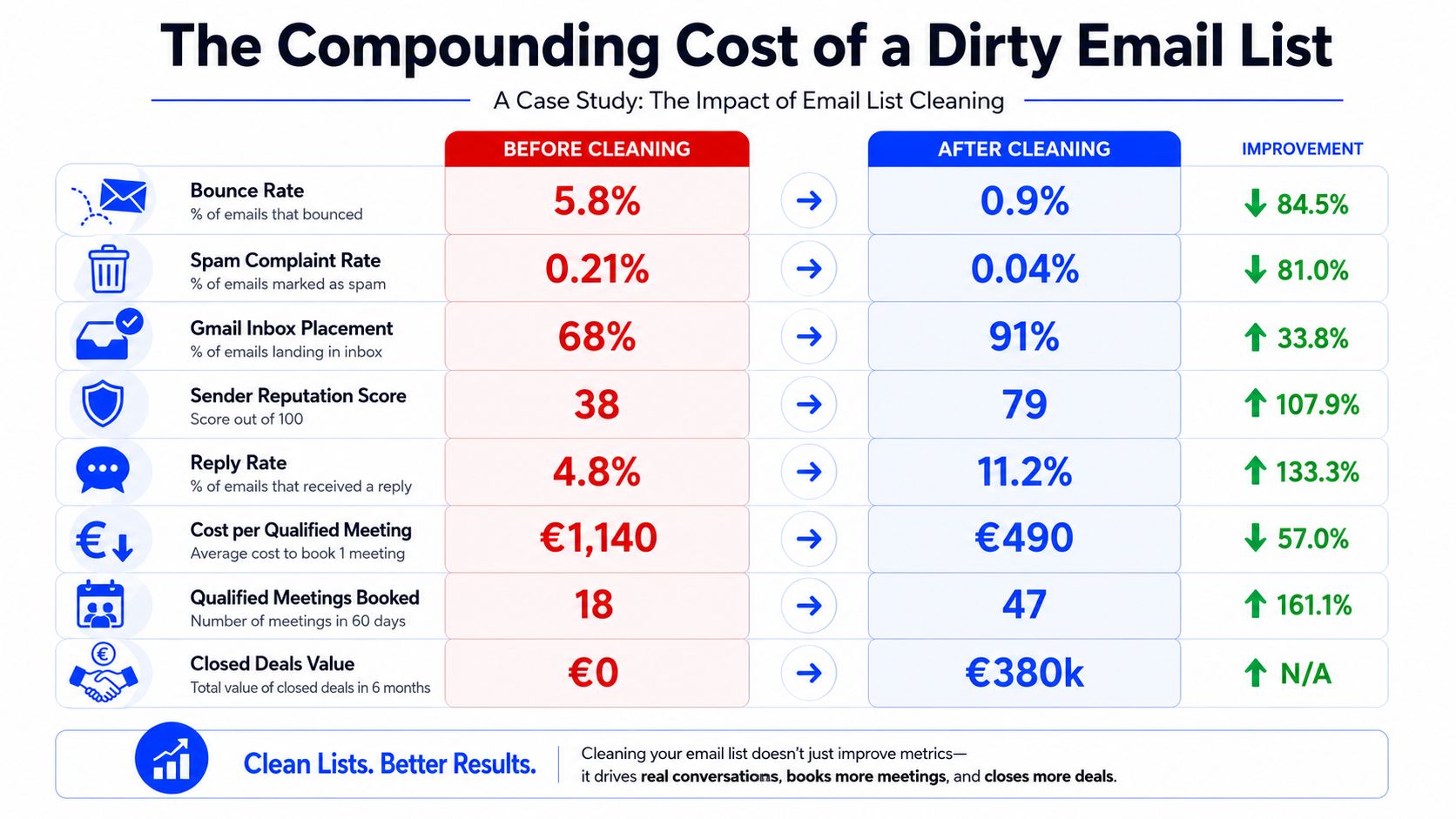
One B2B SaaS client came in after 14 months of outbound with a 14,000-contact list built over 18 months and barely maintained. Their bounce rate had climbed from 1.2% to 5.8%, spam complaints had risen from 0.04% to 0.21%, and Gmail inbox placement had dropped below 70%. The sequence copy wasn't the first issue. The list was.
They had the usual hidden damage points. Contacts had changed jobs. Role-based accounts were still active. Catch-all domains were treated as safe. Unsubscribed contacts had made their way back in through new imports. If this sounds familiar, the problem usually sits upstream of messaging, just like the pipeline issues in this piece on why leads aren't converting and how to fix it.
Practical rule: If your bounce rate is climbing while your list size still looks healthy, your data team is counting records, not usable contacts.
There are hard guardrails here. Hard bounce rates must stay under 2% and spam complaints under 0.1%, with anything above 0.3% treated as critical and requiring immediate action, according to Instantly's guidance on cleaning B2B email lists. The same source notes that over 20% of an email database goes bad within a year.
What changed after the list was cleaned
The recovery started with list quality, not creative refreshes. We ran full ICP re-verification, waterfall verification through ZeroBounce and NeverBounce, deduplication, suppression checks, role-based removal, catch-all flagging, and signal-based segmentation.
The list dropped from 14,000 contacts to 8,640 usable contacts. That attrition wasn't waste. It was the cost of finally seeing the database clearly.
Here's what improved over the next 60 days:
Bounce rate: from 5.8% to 0.9%
Spam complaint rate: from 0.21% to 0.04%
Gmail inbox placement: from 68% to 91%
Outlook inbox placement: from 71% to 88%
Microsoft 365 inbox placement: from 64% to 86%
Sender reputation score: from 38 to 79
Reply rate: from 4.8% to 11.2%
Cost per qualified meeting: from €1,140 to €490
Qualified meetings in 60 days: from 18 to 47
Closed deals within 6 months: 6 deals worth roughly €380k combined
The point isn't that every cleanup will look like this. It won't. The point is that poor list hygiene drags every downstream metric with it, and once reputation is damaged, recovery takes time. In this case, the full recovery period took 90 days.
A 7-step framework for cleaning a B2B list
Most advice on how to clean an email list stops at bounce verification. That's incomplete. A usable outbound list has to pass seven checks, in order, because every later step gets cheaper and more accurate if the earlier one is done right.

Step 1, re-verify ICP fit first
Estimated time for a 10K list is 2 to 3 hours. Start in Clay. Pull the raw list in, then re-check every record against current ICP rules: industry, company size, geography, function, and seniority.
You catch contacts who moved companies, changed roles, or stayed at a company that no longer fits the account criteria. On a typical 10K file, 8 to 15% gets flagged for ICP mismatch.
Don't verify deliverability on people you shouldn't contact anyway. That's the first mistake often made.
Step 2, deduplicate before you verify
Estimated time is 1 to 2 hours. Run exact-match dedup on email address, then a second pass on first name + last name + company. Add a domain-level view so you can decide whether multiple contacts at one account support the motion or create overlap.
Cross-check against the CRM and current outbound systems. If a contact is already in HubSpot, active in Smartlead, or was just hit from Apollo, remove or suppress before anything else. Typical outcome is 5 to 12% flagged as duplicates or already-contacted.
Contacting the same person from two systems doesn't make your coverage better. It makes your operation look uncoordinated.
For teams working with property, franchise, or location-based lists, I like pulling one external data sanity check before routing. If you're working a regional account set and need a model for validating records against public sources, this guide on how to analyze Onslow County property records is a useful example of structured source validation.
Step 3, verify emails with waterfall logic
Estimated time is 2 to 4 hours including processing. We run ZeroBounce and NeverBounce in sequence, and if needed add MillionVerifier. The point isn't tool loyalty. The point is majority agreement.
Classify each result into deliverable, undeliverable, risky, and unknown. Remove undeliverable records. Flag risky ones for review, especially role-based addresses, catch-all domains, and recently disposable patterns. Re-enrich unknowns if there may be an alternative email.
A technical pass matters here. Role-based addresses like info@ and admin@ should be removed from active sequences, and the audit should include converting emails to lowercase and using TRIM() to remove spaces before validation, as outlined in LeapData's B2B email list cleaning guide.
For a 10K list, 10 to 20% of remaining contacts usually end up undeliverable or risky.
If you want a simple verifier in the stack, GROU's no2bounce-style debounce workflow fits here as a verification layer before send.
A quick walkthrough is easier to grasp visually, especially if you're building this into operations instead of running it ad hoc.
Step 4, score signal relevance
Estimated time is 3 to 5 hours. Once the file is clean enough to trust, check current buying signals. We look for job changes, funding events, public posts tied to pain, and stack changes where available.
Bucket contacts into strong signal, moderate signal, and no signal. Typical distribution on a workable B2B file looks like this:
Strong signals: 15 to 30%
Moderate signals: 25 to 40%
No current signals: the remainder
At this stage, the list turns from inventory into sequence strategy. Strong-signal contacts go first, with tighter messaging and faster routing to sales.
Step 5, refresh contact and company data
Estimated time is 2 to 3 hours. Refresh LinkedIn fields, current role, company employee count, recent company activity, and any custom fields the campaign depends on. For SaaS, that might be stack or hiring patterns. For manufacturing, plant footprint or geography often matters more. For legal tech and pharma, title accuracy is usually the highest-value field because role precision affects both compliance and relevance.
On a normal pass, 90 to 95% of remaining records can be refreshed successfully. Sales Navigator, Apollo, and Clay are essential for saving real time.
Step 6, cross-check suppression and risk
Estimated time is 1 hour. Match against your suppression list, unsubscribes, prior hard bounces, and any industry-specific do-not-contact flags. If you're in legal tech or regulated healthcare segments, this step matters more than teams expect.
Also separate hard bounces from soft bounces operationally. Bounceproof's process recommends immediate suppression for hard bounces, monitoring for soft bounces, and suppression after 3 consecutive failures, along with a 7-step hygiene loop that includes backup, bounce review, engagement segmentation, verification, a 3-email re-engagement sequence over 10 to 14 days, suppression building, and syncing final state across ESP and CRM in a detailed email list cleaning workflow. Typical suppression attrition here is 0.5 to 2% of remaining contacts.
Step 7, segment and route the final file
Estimated time is 1 to 2 hours. Split the final list by signal strength, ICP tier, and persona, then assign each group to a specific workflow in Lemlist, Instantly, Smartlead, or HeyReach.
A good 10K scrub usually finishes with 5K to 7K usable contacts, after 12 to 18 hours of structured work, 4 to 8 hours of tool processing, and 2 to 3 business days elapsed time. That means total attrition of about 30 to 50%.
Operator view: A 10K list with quality issues is worth less than a 5K list that is current, segmented, and safe to send.
What doesn't belong in this process:
AI intent overlays as a primary filter: Too noisy for routing decisions at this scale
Manual review of every contact: Doesn't scale past small batches
Deleting inactive users instead of suppressing them: You lose the audit trail and invite re-imports
Sending test emails to verify addresses: Reputation risk isn't worth it
Deliverability metrics that define success
Cleaning matters only if the operating thresholds are clear. Many organizations don't have a list problem. They have an enforcement problem. The data gets cleaned once, then nobody knows what metric should trigger investigation, action, or a full pause.
The thresholds we actually run against
Expert benchmarks from Vortenza's email list hygiene guide call for hard bounce rates below 0.5% per campaign and spam complaint rates below 0.1%, and define inactive contacts as often falling in the 90 to 180 days of no opens or clicks range. That's the clean target.
Our operating thresholds for outbound are stricter than "wait until it's broken." For a deeper definition of the underlying metric, GROU's glossary entry on deliverability is a useful reference.
Metric | Yellow Flag (Investigate) | Red Flag (Act) | Emergency (Pause) |
|---|---|---|---|
Hard bounce rate | Above target but below 3% sustained | Above 3% sustained | Above 5% sustained |
Soft bounce rate | Above 4% sustained | Repeated pattern tied to domain groups | Severe sustained issue affecting sequence stability |
Spam complaint rate | Above 0.1% sustained | Above 0.2% sustained | Above 0.3% in any single send |
Spam-trap hits | Any suspected hit | Any confirmed hit | Repeated confirmed hits in a short period |
What action each threshold should trigger
Yellow flags get investigation, not denial. Check list source, recent imports, role-account leakage, catch-all handling, and whether sales reintroduced old CSVs into active flows.
Red flags need intervention. Reduce send volume, stop adding fresh contacts, re-run verification, and review suppression syncing between CRM and sending tools.
Emergency means pause. If hard bounces stay above 5% or spam complaints cross 0.3%, stop the affected domain and clean the list before another send. Continuing usually costs more than the pause.
The right tool stack for cleaning at scale
Clay is the recommendation. Not because it replaces every tool, but because it stops your team from stitching five disconnected workflows together every time you clean an email list.
Clay is the recommendation
Single-purpose verifiers matter. ZeroBounce, NeverBounce, BriteVerify, and similar tools all solve a real part of the problem. They just don't solve the whole thing. They won't re-check ICP, score buying signals, deduplicate against CRM state, or route clean segments into the right workflows.

Clay works because it orchestrates the process. On a 10K list, the Clay-led setup cuts manual ICP verification from 5 to 10 minutes per contact to roughly 30 to 60 seconds per contact, saving about 60 to 80 hours. It also removes 4 to 6 hours of consolidation work from multi-tool verification workflows. Across the full job, manual list cleaning that would take roughly 80 to 120 hours drops to 12 to 18 hours of human work plus 4 to 8 hours of tool processing, for net savings of about 60 to 100 hours per 10K list.
That orchestration layer is the main gain.
What the stack looks like in practice
The stack we use most often looks like this:
Clay: ICP verification, enrichment, dedup logic, signal scoring, routing
ZeroBounce and NeverBounce: waterfall email verification
Apollo or ZoomInfo: firmographic refresh
LinkedIn Sales Navigator: contact and role validation
Smartlead, Instantly, or Lemlist: outbound execution
HubSpot: suppression source of truth
HeyReach: LinkedIn routing when the motion needs multichannel touches
If you're comparing verifiers, a simple Email Verification Tool can still be useful as a benchmark layer in procurement or QA. The point is to keep verification inside a broader system, not mistake it for the system itself.
For teams evaluating the wider stack around outbound execution, this GROU roundup of top B2B email marketing tools is a good companion.
If your team exports CSVs from one tool, verifies in another, enriches in a third, then manually merges results in Sheets, the process is the bottleneck.
Building an ongoing list hygiene system
Once the list is clean, the actual work begins. A one-time cleanup fixes a snapshot. Pipeline needs a maintenance loop.
Set the cadence by list type
Cold outbound data should be cleaned monthly, because external sources age faster. Inbound or opt-in lists can usually be cleaned quarterly, and dormant contacts with no activity over 180 days should be suppressed or validated before further sending, according to Mailreach's B2B email list hygiene best practices.
That cadence should live in operations, not memory. Put it on the rev ops calendar. Tie it to list imports, enrichment runs, and sequence launches. If the market has longer buying cycles, adjust inactivity rules to fit that reality instead of forcing a generic timer.
Treat suppression as infrastructure
Suppression logic has to sync across CRM, enrichment tables, and sending tools. If a contact unsubscribes in one place and remains active in another, the system is broken. Reach Marketing makes the right point here: list reviews should be quarterly as a baseline, criteria should reflect buying cycles, click-based signals should carry more weight than opens, and sales should be involved in suppression decisions in their guide to cleaning a B2B email list without losing leads.
Three rules keep this clean:
Suppress, don't delete: deleted records come back through imports
Use click or reply signals over opens: open data is too weak on its own
Share the logic with sales: marketing can't own suppression in isolation
If you're tightening the system around the CRM itself, this piece on improving CRM data quality is worth a read because the same hygiene mistakes show up long before they hit sending tools. GROU's glossary entry on data hygiene is also useful if you need a shared internal definition for ops, sales, and marketing.
The next step is simple. Export your last 10K-contact outbound list by Monday, add columns for ICP status, duplicate status, verification result, signal tier, suppression status, and routing destination, then force every record through that audit before the next send.
GROU helps B2B teams build one outbound system where list quality, messaging, routing, and reporting all point at pipeline. Our method is simple, structure turns attention into pipeline, which means clean data first, segmented execution second, and sender protection all the time.
Your outbound is already underperforming before the first reply comes back. The list looks big, the sequence is live, and the underlying problem is hiding in stale contacts, duplicate records, role accounts, and contacts that no longer fit your ICP. If you want to clean an email list properly for B2B outbound, verification is only one layer.
A dirty list hurts pipeline through deliverability first, then conversion
The right system is a 7-step data quality audit, not a one-tool scrub
Losing 30 to 50% of a 10K list is usually a sign the process worked
Clay is the right orchestration layer, but single-purpose verifiers still matter
Monthly or quarterly hygiene is what keeps the engine usable
Table of Contents
The compounding cost of a dirty email list
A dirty list doesn't fail once. It fails repeatedly, across inbox placement, sender reputation, reply rate, and meeting economics. That's why teams in SaaS, iGaming, manufacturing, legal tech, and pharma keep misreading outbound performance. They think the message is weak when the file is the problem.
What failure looked like before the cleanup
One B2B SaaS client came in after 14 months of outbound with a 14,000-contact list built over 18 months and barely maintained. Their bounce rate had climbed from 1.2% to 5.8%, spam complaints had risen from 0.04% to 0.21%, and Gmail inbox placement had dropped below 70%. The sequence copy wasn't the first issue. The list was.
They had the usual hidden damage points. Contacts had changed jobs. Role-based accounts were still active. Catch-all domains were treated as safe. Unsubscribed contacts had made their way back in through new imports. If this sounds familiar, the problem usually sits upstream of messaging, just like the pipeline issues in this piece on why leads aren't converting and how to fix it.
Practical rule: If your bounce rate is climbing while your list size still looks healthy, your data team is counting records, not usable contacts.
There are hard guardrails here. Hard bounce rates must stay under 2% and spam complaints under 0.1%, with anything above 0.3% treated as critical and requiring immediate action, according to Instantly's guidance on cleaning B2B email lists. The same source notes that over 20% of an email database goes bad within a year.
What changed after the list was cleaned
The recovery started with list quality, not creative refreshes. We ran full ICP re-verification, waterfall verification through ZeroBounce and NeverBounce, deduplication, suppression checks, role-based removal, catch-all flagging, and signal-based segmentation.
The list dropped from 14,000 contacts to 8,640 usable contacts. That attrition wasn't waste. It was the cost of finally seeing the database clearly.
Here's what improved over the next 60 days:
Bounce rate: from 5.8% to 0.9%
Spam complaint rate: from 0.21% to 0.04%
Gmail inbox placement: from 68% to 91%
Outlook inbox placement: from 71% to 88%
Microsoft 365 inbox placement: from 64% to 86%
Sender reputation score: from 38 to 79
Reply rate: from 4.8% to 11.2%
Cost per qualified meeting: from €1,140 to €490
Qualified meetings in 60 days: from 18 to 47
Closed deals within 6 months: 6 deals worth roughly €380k combined
The point isn't that every cleanup will look like this. It won't. The point is that poor list hygiene drags every downstream metric with it, and once reputation is damaged, recovery takes time. In this case, the full recovery period took 90 days.
A 7-step framework for cleaning a B2B list
Most advice on how to clean an email list stops at bounce verification. That's incomplete. A usable outbound list has to pass seven checks, in order, because every later step gets cheaper and more accurate if the earlier one is done right.
Step 1, re-verify ICP fit first
Estimated time for a 10K list is 2 to 3 hours. Start in Clay. Pull the raw list in, then re-check every record against current ICP rules: industry, company size, geography, function, and seniority.
You catch contacts who moved companies, changed roles, or stayed at a company that no longer fits the account criteria. On a typical 10K file, 8 to 15% gets flagged for ICP mismatch.
Don't verify deliverability on people you shouldn't contact anyway. That's the first mistake often made.
Step 2, deduplicate before you verify
Estimated time is 1 to 2 hours. Run exact-match dedup on email address, then a second pass on first name + last name + company. Add a domain-level view so you can decide whether multiple contacts at one account support the motion or create overlap.
Cross-check against the CRM and current outbound systems. If a contact is already in HubSpot, active in Smartlead, or was just hit from Apollo, remove or suppress before anything else. Typical outcome is 5 to 12% flagged as duplicates or already-contacted.
Contacting the same person from two systems doesn't make your coverage better. It makes your operation look uncoordinated.
For teams working with property, franchise, or location-based lists, I like pulling one external data sanity check before routing. If you're working a regional account set and need a model for validating records against public sources, this guide on how to analyze Onslow County property records is a useful example of structured source validation.
Step 3, verify emails with waterfall logic
Estimated time is 2 to 4 hours including processing. We run ZeroBounce and NeverBounce in sequence, and if needed add MillionVerifier. The point isn't tool loyalty. The point is majority agreement.
Classify each result into deliverable, undeliverable, risky, and unknown. Remove undeliverable records. Flag risky ones for review, especially role-based addresses, catch-all domains, and recently disposable patterns. Re-enrich unknowns if there may be an alternative email.
A technical pass matters here. Role-based addresses like info@ and admin@ should be removed from active sequences, and the audit should include converting emails to lowercase and using TRIM() to remove spaces before validation, as outlined in LeapData's B2B email list cleaning guide.
For a 10K list, 10 to 20% of remaining contacts usually end up undeliverable or risky.
If you want a simple verifier in the stack, GROU's no2bounce-style debounce workflow fits here as a verification layer before send.
A quick walkthrough is easier to grasp visually, especially if you're building this into operations instead of running it ad hoc.
Step 4, score signal relevance
Estimated time is 3 to 5 hours. Once the file is clean enough to trust, check current buying signals. We look for job changes, funding events, public posts tied to pain, and stack changes where available.
Bucket contacts into strong signal, moderate signal, and no signal. Typical distribution on a workable B2B file looks like this:
Strong signals: 15 to 30%
Moderate signals: 25 to 40%
No current signals: the remainder
At this stage, the list turns from inventory into sequence strategy. Strong-signal contacts go first, with tighter messaging and faster routing to sales.
Step 5, refresh contact and company data
Estimated time is 2 to 3 hours. Refresh LinkedIn fields, current role, company employee count, recent company activity, and any custom fields the campaign depends on. For SaaS, that might be stack or hiring patterns. For manufacturing, plant footprint or geography often matters more. For legal tech and pharma, title accuracy is usually the highest-value field because role precision affects both compliance and relevance.
On a normal pass, 90 to 95% of remaining records can be refreshed successfully. Sales Navigator, Apollo, and Clay are essential for saving real time.
Step 6, cross-check suppression and risk
Estimated time is 1 hour. Match against your suppression list, unsubscribes, prior hard bounces, and any industry-specific do-not-contact flags. If you're in legal tech or regulated healthcare segments, this step matters more than teams expect.
Also separate hard bounces from soft bounces operationally. Bounceproof's process recommends immediate suppression for hard bounces, monitoring for soft bounces, and suppression after 3 consecutive failures, along with a 7-step hygiene loop that includes backup, bounce review, engagement segmentation, verification, a 3-email re-engagement sequence over 10 to 14 days, suppression building, and syncing final state across ESP and CRM in a detailed email list cleaning workflow. Typical suppression attrition here is 0.5 to 2% of remaining contacts.
Step 7, segment and route the final file
Estimated time is 1 to 2 hours. Split the final list by signal strength, ICP tier, and persona, then assign each group to a specific workflow in Lemlist, Instantly, Smartlead, or HeyReach.
A good 10K scrub usually finishes with 5K to 7K usable contacts, after 12 to 18 hours of structured work, 4 to 8 hours of tool processing, and 2 to 3 business days elapsed time. That means total attrition of about 30 to 50%.
Operator view: A 10K list with quality issues is worth less than a 5K list that is current, segmented, and safe to send.
What doesn't belong in this process:
AI intent overlays as a primary filter: Too noisy for routing decisions at this scale
Manual review of every contact: Doesn't scale past small batches
Deleting inactive users instead of suppressing them: You lose the audit trail and invite re-imports
Sending test emails to verify addresses: Reputation risk isn't worth it
Deliverability metrics that define success
Cleaning matters only if the operating thresholds are clear. Many organizations don't have a list problem. They have an enforcement problem. The data gets cleaned once, then nobody knows what metric should trigger investigation, action, or a full pause.
The thresholds we actually run against
Expert benchmarks from Vortenza's email list hygiene guide call for hard bounce rates below 0.5% per campaign and spam complaint rates below 0.1%, and define inactive contacts as often falling in the 90 to 180 days of no opens or clicks range. That's the clean target.
Our operating thresholds for outbound are stricter than "wait until it's broken." For a deeper definition of the underlying metric, GROU's glossary entry on deliverability is a useful reference.
Metric | Yellow Flag (Investigate) | Red Flag (Act) | Emergency (Pause) |
|---|---|---|---|
Hard bounce rate | Above target but below 3% sustained | Above 3% sustained | Above 5% sustained |
Soft bounce rate | Above 4% sustained | Repeated pattern tied to domain groups | Severe sustained issue affecting sequence stability |
Spam complaint rate | Above 0.1% sustained | Above 0.2% sustained | Above 0.3% in any single send |
Spam-trap hits | Any suspected hit | Any confirmed hit | Repeated confirmed hits in a short period |
What action each threshold should trigger
Yellow flags get investigation, not denial. Check list source, recent imports, role-account leakage, catch-all handling, and whether sales reintroduced old CSVs into active flows.
Red flags need intervention. Reduce send volume, stop adding fresh contacts, re-run verification, and review suppression syncing between CRM and sending tools.
Emergency means pause. If hard bounces stay above 5% or spam complaints cross 0.3%, stop the affected domain and clean the list before another send. Continuing usually costs more than the pause.
The right tool stack for cleaning at scale
Clay is the recommendation. Not because it replaces every tool, but because it stops your team from stitching five disconnected workflows together every time you clean an email list.
Clay is the recommendation
Single-purpose verifiers matter. ZeroBounce, NeverBounce, BriteVerify, and similar tools all solve a real part of the problem. They just don't solve the whole thing. They won't re-check ICP, score buying signals, deduplicate against CRM state, or route clean segments into the right workflows.
Clay works because it orchestrates the process. On a 10K list, the Clay-led setup cuts manual ICP verification from 5 to 10 minutes per contact to roughly 30 to 60 seconds per contact, saving about 60 to 80 hours. It also removes 4 to 6 hours of consolidation work from multi-tool verification workflows. Across the full job, manual list cleaning that would take roughly 80 to 120 hours drops to 12 to 18 hours of human work plus 4 to 8 hours of tool processing, for net savings of about 60 to 100 hours per 10K list.
That orchestration layer is the main gain.
What the stack looks like in practice
The stack we use most often looks like this:
Clay: ICP verification, enrichment, dedup logic, signal scoring, routing
ZeroBounce and NeverBounce: waterfall email verification
Apollo or ZoomInfo: firmographic refresh
LinkedIn Sales Navigator: contact and role validation
Smartlead, Instantly, or Lemlist: outbound execution
HubSpot: suppression source of truth
HeyReach: LinkedIn routing when the motion needs multichannel touches
If you're comparing verifiers, a simple Email Verification Tool can still be useful as a benchmark layer in procurement or QA. The point is to keep verification inside a broader system, not mistake it for the system itself.
For teams evaluating the wider stack around outbound execution, this GROU roundup of top B2B email marketing tools is a good companion.
If your team exports CSVs from one tool, verifies in another, enriches in a third, then manually merges results in Sheets, the process is the bottleneck.
Building an ongoing list hygiene system
Once the list is clean, the actual work begins. A one-time cleanup fixes a snapshot. Pipeline needs a maintenance loop.
Set the cadence by list type
Cold outbound data should be cleaned monthly, because external sources age faster. Inbound or opt-in lists can usually be cleaned quarterly, and dormant contacts with no activity over 180 days should be suppressed or validated before further sending, according to Mailreach's B2B email list hygiene best practices.
That cadence should live in operations, not memory. Put it on the rev ops calendar. Tie it to list imports, enrichment runs, and sequence launches. If the market has longer buying cycles, adjust inactivity rules to fit that reality instead of forcing a generic timer.
Treat suppression as infrastructure
Suppression logic has to sync across CRM, enrichment tables, and sending tools. If a contact unsubscribes in one place and remains active in another, the system is broken. Reach Marketing makes the right point here: list reviews should be quarterly as a baseline, criteria should reflect buying cycles, click-based signals should carry more weight than opens, and sales should be involved in suppression decisions in their guide to cleaning a B2B email list without losing leads.
Three rules keep this clean:
Suppress, don't delete: deleted records come back through imports
Use click or reply signals over opens: open data is too weak on its own
Share the logic with sales: marketing can't own suppression in isolation
If you're tightening the system around the CRM itself, this piece on improving CRM data quality is worth a read because the same hygiene mistakes show up long before they hit sending tools. GROU's glossary entry on data hygiene is also useful if you need a shared internal definition for ops, sales, and marketing.
The next step is simple. Export your last 10K-contact outbound list by Monday, add columns for ICP status, duplicate status, verification result, signal tier, suppression status, and routing destination, then force every record through that audit before the next send.
GROU helps B2B teams build one outbound system where list quality, messaging, routing, and reporting all point at pipeline. Our method is simple, structure turns attention into pipeline, which means clean data first, segmented execution second, and sender protection all the time.
Your outbound is already underperforming before the first reply comes back. The list looks big, the sequence is live, and the underlying problem is hiding in stale contacts, duplicate records, role accounts, and contacts that no longer fit your ICP. If you want to clean an email list properly for B2B outbound, verification is only one layer.
A dirty list hurts pipeline through deliverability first, then conversion
The right system is a 7-step data quality audit, not a one-tool scrub
Losing 30 to 50% of a 10K list is usually a sign the process worked
Clay is the right orchestration layer, but single-purpose verifiers still matter
Monthly or quarterly hygiene is what keeps the engine usable
Table of Contents
The compounding cost of a dirty email list
A dirty list doesn't fail once. It fails repeatedly, across inbox placement, sender reputation, reply rate, and meeting economics. That's why teams in SaaS, iGaming, manufacturing, legal tech, and pharma keep misreading outbound performance. They think the message is weak when the file is the problem.
What failure looked like before the cleanup
One B2B SaaS client came in after 14 months of outbound with a 14,000-contact list built over 18 months and barely maintained. Their bounce rate had climbed from 1.2% to 5.8%, spam complaints had risen from 0.04% to 0.21%, and Gmail inbox placement had dropped below 70%. The sequence copy wasn't the first issue. The list was.
They had the usual hidden damage points. Contacts had changed jobs. Role-based accounts were still active. Catch-all domains were treated as safe. Unsubscribed contacts had made their way back in through new imports. If this sounds familiar, the problem usually sits upstream of messaging, just like the pipeline issues in this piece on why leads aren't converting and how to fix it.
Practical rule: If your bounce rate is climbing while your list size still looks healthy, your data team is counting records, not usable contacts.
There are hard guardrails here. Hard bounce rates must stay under 2% and spam complaints under 0.1%, with anything above 0.3% treated as critical and requiring immediate action, according to Instantly's guidance on cleaning B2B email lists. The same source notes that over 20% of an email database goes bad within a year.
What changed after the list was cleaned
The recovery started with list quality, not creative refreshes. We ran full ICP re-verification, waterfall verification through ZeroBounce and NeverBounce, deduplication, suppression checks, role-based removal, catch-all flagging, and signal-based segmentation.
The list dropped from 14,000 contacts to 8,640 usable contacts. That attrition wasn't waste. It was the cost of finally seeing the database clearly.
Here's what improved over the next 60 days:
Bounce rate: from 5.8% to 0.9%
Spam complaint rate: from 0.21% to 0.04%
Gmail inbox placement: from 68% to 91%
Outlook inbox placement: from 71% to 88%
Microsoft 365 inbox placement: from 64% to 86%
Sender reputation score: from 38 to 79
Reply rate: from 4.8% to 11.2%
Cost per qualified meeting: from €1,140 to €490
Qualified meetings in 60 days: from 18 to 47
Closed deals within 6 months: 6 deals worth roughly €380k combined
The point isn't that every cleanup will look like this. It won't. The point is that poor list hygiene drags every downstream metric with it, and once reputation is damaged, recovery takes time. In this case, the full recovery period took 90 days.
A 7-step framework for cleaning a B2B list
Most advice on how to clean an email list stops at bounce verification. That's incomplete. A usable outbound list has to pass seven checks, in order, because every later step gets cheaper and more accurate if the earlier one is done right.
Step 1, re-verify ICP fit first
Estimated time for a 10K list is 2 to 3 hours. Start in Clay. Pull the raw list in, then re-check every record against current ICP rules: industry, company size, geography, function, and seniority.
You catch contacts who moved companies, changed roles, or stayed at a company that no longer fits the account criteria. On a typical 10K file, 8 to 15% gets flagged for ICP mismatch.
Don't verify deliverability on people you shouldn't contact anyway. That's the first mistake often made.
Step 2, deduplicate before you verify
Estimated time is 1 to 2 hours. Run exact-match dedup on email address, then a second pass on first name + last name + company. Add a domain-level view so you can decide whether multiple contacts at one account support the motion or create overlap.
Cross-check against the CRM and current outbound systems. If a contact is already in HubSpot, active in Smartlead, or was just hit from Apollo, remove or suppress before anything else. Typical outcome is 5 to 12% flagged as duplicates or already-contacted.
Contacting the same person from two systems doesn't make your coverage better. It makes your operation look uncoordinated.
For teams working with property, franchise, or location-based lists, I like pulling one external data sanity check before routing. If you're working a regional account set and need a model for validating records against public sources, this guide on how to analyze Onslow County property records is a useful example of structured source validation.
Step 3, verify emails with waterfall logic
Estimated time is 2 to 4 hours including processing. We run ZeroBounce and NeverBounce in sequence, and if needed add MillionVerifier. The point isn't tool loyalty. The point is majority agreement.
Classify each result into deliverable, undeliverable, risky, and unknown. Remove undeliverable records. Flag risky ones for review, especially role-based addresses, catch-all domains, and recently disposable patterns. Re-enrich unknowns if there may be an alternative email.
A technical pass matters here. Role-based addresses like info@ and admin@ should be removed from active sequences, and the audit should include converting emails to lowercase and using TRIM() to remove spaces before validation, as outlined in LeapData's B2B email list cleaning guide.
For a 10K list, 10 to 20% of remaining contacts usually end up undeliverable or risky.
If you want a simple verifier in the stack, GROU's no2bounce-style debounce workflow fits here as a verification layer before send.
A quick walkthrough is easier to grasp visually, especially if you're building this into operations instead of running it ad hoc.
Step 4, score signal relevance
Estimated time is 3 to 5 hours. Once the file is clean enough to trust, check current buying signals. We look for job changes, funding events, public posts tied to pain, and stack changes where available.
Bucket contacts into strong signal, moderate signal, and no signal. Typical distribution on a workable B2B file looks like this:
Strong signals: 15 to 30%
Moderate signals: 25 to 40%
No current signals: the remainder
At this stage, the list turns from inventory into sequence strategy. Strong-signal contacts go first, with tighter messaging and faster routing to sales.
Step 5, refresh contact and company data
Estimated time is 2 to 3 hours. Refresh LinkedIn fields, current role, company employee count, recent company activity, and any custom fields the campaign depends on. For SaaS, that might be stack or hiring patterns. For manufacturing, plant footprint or geography often matters more. For legal tech and pharma, title accuracy is usually the highest-value field because role precision affects both compliance and relevance.
On a normal pass, 90 to 95% of remaining records can be refreshed successfully. Sales Navigator, Apollo, and Clay are essential for saving real time.
Step 6, cross-check suppression and risk
Estimated time is 1 hour. Match against your suppression list, unsubscribes, prior hard bounces, and any industry-specific do-not-contact flags. If you're in legal tech or regulated healthcare segments, this step matters more than teams expect.
Also separate hard bounces from soft bounces operationally. Bounceproof's process recommends immediate suppression for hard bounces, monitoring for soft bounces, and suppression after 3 consecutive failures, along with a 7-step hygiene loop that includes backup, bounce review, engagement segmentation, verification, a 3-email re-engagement sequence over 10 to 14 days, suppression building, and syncing final state across ESP and CRM in a detailed email list cleaning workflow. Typical suppression attrition here is 0.5 to 2% of remaining contacts.
Step 7, segment and route the final file
Estimated time is 1 to 2 hours. Split the final list by signal strength, ICP tier, and persona, then assign each group to a specific workflow in Lemlist, Instantly, Smartlead, or HeyReach.
A good 10K scrub usually finishes with 5K to 7K usable contacts, after 12 to 18 hours of structured work, 4 to 8 hours of tool processing, and 2 to 3 business days elapsed time. That means total attrition of about 30 to 50%.
Operator view: A 10K list with quality issues is worth less than a 5K list that is current, segmented, and safe to send.
What doesn't belong in this process:
AI intent overlays as a primary filter: Too noisy for routing decisions at this scale
Manual review of every contact: Doesn't scale past small batches
Deleting inactive users instead of suppressing them: You lose the audit trail and invite re-imports
Sending test emails to verify addresses: Reputation risk isn't worth it
Deliverability metrics that define success
Cleaning matters only if the operating thresholds are clear. Many organizations don't have a list problem. They have an enforcement problem. The data gets cleaned once, then nobody knows what metric should trigger investigation, action, or a full pause.
The thresholds we actually run against
Expert benchmarks from Vortenza's email list hygiene guide call for hard bounce rates below 0.5% per campaign and spam complaint rates below 0.1%, and define inactive contacts as often falling in the 90 to 180 days of no opens or clicks range. That's the clean target.
Our operating thresholds for outbound are stricter than "wait until it's broken." For a deeper definition of the underlying metric, GROU's glossary entry on deliverability is a useful reference.
Metric | Yellow Flag (Investigate) | Red Flag (Act) | Emergency (Pause) |
|---|---|---|---|
Hard bounce rate | Above target but below 3% sustained | Above 3% sustained | Above 5% sustained |
Soft bounce rate | Above 4% sustained | Repeated pattern tied to domain groups | Severe sustained issue affecting sequence stability |
Spam complaint rate | Above 0.1% sustained | Above 0.2% sustained | Above 0.3% in any single send |
Spam-trap hits | Any suspected hit | Any confirmed hit | Repeated confirmed hits in a short period |
What action each threshold should trigger
Yellow flags get investigation, not denial. Check list source, recent imports, role-account leakage, catch-all handling, and whether sales reintroduced old CSVs into active flows.
Red flags need intervention. Reduce send volume, stop adding fresh contacts, re-run verification, and review suppression syncing between CRM and sending tools.
Emergency means pause. If hard bounces stay above 5% or spam complaints cross 0.3%, stop the affected domain and clean the list before another send. Continuing usually costs more than the pause.
The right tool stack for cleaning at scale
Clay is the recommendation. Not because it replaces every tool, but because it stops your team from stitching five disconnected workflows together every time you clean an email list.
Clay is the recommendation
Single-purpose verifiers matter. ZeroBounce, NeverBounce, BriteVerify, and similar tools all solve a real part of the problem. They just don't solve the whole thing. They won't re-check ICP, score buying signals, deduplicate against CRM state, or route clean segments into the right workflows.
Clay works because it orchestrates the process. On a 10K list, the Clay-led setup cuts manual ICP verification from 5 to 10 minutes per contact to roughly 30 to 60 seconds per contact, saving about 60 to 80 hours. It also removes 4 to 6 hours of consolidation work from multi-tool verification workflows. Across the full job, manual list cleaning that would take roughly 80 to 120 hours drops to 12 to 18 hours of human work plus 4 to 8 hours of tool processing, for net savings of about 60 to 100 hours per 10K list.
That orchestration layer is the main gain.
What the stack looks like in practice
The stack we use most often looks like this:
Clay: ICP verification, enrichment, dedup logic, signal scoring, routing
ZeroBounce and NeverBounce: waterfall email verification
Apollo or ZoomInfo: firmographic refresh
LinkedIn Sales Navigator: contact and role validation
Smartlead, Instantly, or Lemlist: outbound execution
HubSpot: suppression source of truth
HeyReach: LinkedIn routing when the motion needs multichannel touches
If you're comparing verifiers, a simple Email Verification Tool can still be useful as a benchmark layer in procurement or QA. The point is to keep verification inside a broader system, not mistake it for the system itself.
For teams evaluating the wider stack around outbound execution, this GROU roundup of top B2B email marketing tools is a good companion.
If your team exports CSVs from one tool, verifies in another, enriches in a third, then manually merges results in Sheets, the process is the bottleneck.
Building an ongoing list hygiene system
Once the list is clean, the actual work begins. A one-time cleanup fixes a snapshot. Pipeline needs a maintenance loop.
Set the cadence by list type
Cold outbound data should be cleaned monthly, because external sources age faster. Inbound or opt-in lists can usually be cleaned quarterly, and dormant contacts with no activity over 180 days should be suppressed or validated before further sending, according to Mailreach's B2B email list hygiene best practices.
That cadence should live in operations, not memory. Put it on the rev ops calendar. Tie it to list imports, enrichment runs, and sequence launches. If the market has longer buying cycles, adjust inactivity rules to fit that reality instead of forcing a generic timer.
Treat suppression as infrastructure
Suppression logic has to sync across CRM, enrichment tables, and sending tools. If a contact unsubscribes in one place and remains active in another, the system is broken. Reach Marketing makes the right point here: list reviews should be quarterly as a baseline, criteria should reflect buying cycles, click-based signals should carry more weight than opens, and sales should be involved in suppression decisions in their guide to cleaning a B2B email list without losing leads.
Three rules keep this clean:
Suppress, don't delete: deleted records come back through imports
Use click or reply signals over opens: open data is too weak on its own
Share the logic with sales: marketing can't own suppression in isolation
If you're tightening the system around the CRM itself, this piece on improving CRM data quality is worth a read because the same hygiene mistakes show up long before they hit sending tools. GROU's glossary entry on data hygiene is also useful if you need a shared internal definition for ops, sales, and marketing.
The next step is simple. Export your last 10K-contact outbound list by Monday, add columns for ICP status, duplicate status, verification result, signal tier, suppression status, and routing destination, then force every record through that audit before the next send.
GROU helps B2B teams build one outbound system where list quality, messaging, routing, and reporting all point at pipeline. Our method is simple, structure turns attention into pipeline, which means clean data first, segmented execution second, and sender protection all the time.

Pipeline OS Newsletter
Build qualified pipeline
Get weekly tactics to generate demand, improve lead quality, and book more meetings.





Trusted by industry leaders
Trusted by industry leaders
Trusted by industry leaders
Ready to build qualified pipeline?
Ready to build qualified pipeline?
Ready to build qualified pipeline?
Book a call to see if we're the right fit, or take the 2-minute quiz to get a clear starting point.
Book a call to see if we're the right fit, or take the 2-minute quiz to get a clear starting point.
Book a call to see if we're the right fit, or take the 2-minute quiz to get a clear starting point.
" height="30.21639343089746px" id="hfGbXmQR2" width="30.216393430897455px"/></svg>)
Copyright © 2026 – All Right Reserved
Copyright © 2026 – All Right Reserved
Copyright © 2026 – All Right Reserved