%22%3E%3C/path%3E%3Cpath d=%22M 63.072 7.554 C 62.258 8.022 61.577 8.689 61.092 9.493 L 61.092 7.076 L 57.158 7.076 L 57.158 22.64 L 61.089 22.64 L 61.089 14.888 C 61.089 13.446 61.403 12.434 62.03 11.853 C 62.818 11.218 63.818 10.907 64.826 10.982 L 65.868 10.982 L 65.868 6.851 C 64.891 6.834 63.926 7.076 63.073 7.554 Z%22 fill=%22rgb(17,17,17)%22%3E%3C/path%3E%3Cpath d=%22M 78.916 7.82 C 76.363 6.49 73.321 6.49 70.768 7.82 C 69.562 8.473 68.564 9.451 67.888 10.644 C 67.167 11.931 66.803 13.387 66.834 14.862 C 66.804 16.332 67.157 17.785 67.86 19.077 C 68.515 20.267 69.494 21.246 70.684 21.901 C 71.924 22.576 73.318 22.92 74.73 22.898 C 76.164 22.918 77.58 22.575 78.846 21.901 C 80.062 21.247 81.073 20.27 81.768 19.077 C 82.506 17.797 82.88 16.339 82.85 14.862 C 82.88 13.389 82.517 11.934 81.797 10.647 C 81.12 9.455 80.122 8.477 78.917 7.824 M 78.803 14.862 C 78.829 15.739 78.636 16.608 78.241 17.391 C 77.903 18.046 77.38 18.588 76.738 18.95 C 76.124 19.293 75.432 19.472 74.729 19.47 C 73.668 19.497 72.648 19.061 71.934 18.276 C 71.139 17.323 70.741 16.1 70.823 14.862 C 70.741 13.62 71.149 12.395 71.959 11.45 C 72.687 10.667 73.715 10.233 74.783 10.256 C 75.859 10.236 76.894 10.67 77.635 11.45 C 78.464 12.387 78.884 13.616 78.801 14.864%22 fill=%22rgb(17,17,17)%22%3E%3C/path%3E%3Cpath d=%22M 95.906 7.076 L 95.906 15.646 C 95.975 16.68 95.643 17.701 94.979 18.498 C 94.311 19.184 93.379 19.547 92.422 19.495 C 91.475 19.544 90.553 19.18 89.894 18.498 C 89.23 17.701 88.898 16.68 88.967 15.646 L 88.967 7.076 L 85.033 7.076 L 85.033 16.207 C 85 17.449 85.275 18.68 85.834 19.79 C 86.327 20.75 87.095 21.542 88.039 22.065 C 89.033 22.594 90.145 22.861 91.271 22.838 C 92.188 22.847 93.095 22.65 93.926 22.263 C 94.708 21.905 95.388 21.36 95.906 20.675 L 95.906 22.645 L 99.865 22.645 L 99.865 7.076 Z%22 fill=%22rgb(17,17,17)%22%3E%3C/path%3E%3Cpath d=%22M 4.513 15.626 C 4.511 10.815 7.606 6.549 12.181 5.059 C 16.756 3.57 21.77 5.195 24.601 9.086 L 27.816 5.87 C 24.074 1.186 17.981 -0.943 12.137 0.393 C 6.292 1.728 1.728 6.292 0.393 12.137 C -0.943 17.981 1.186 24.074 5.87 27.816 L 9.085 24.601 C 6.214 22.512 4.515 19.177 4.513 15.626%22 fill=%22rgb(32,62,235)%22%3E%3C/path%3E%3Cpath d=%22M 17.114 14.343 L 13.354 18.01 L 13.354 18.026 L 21.071 18.026 L 11.412 27.609 L 17.389 27.609 L 23.999 21.081 L 23.999 28.316 L 24.005 28.316 L 27.967 24.393 L 27.967 14.343 Z%22 fill=%22rgb(32,62,235)%22%3E%3C/path%3E%3C/g%3E%3C/svg%3E) ×
× ××
××›
›
›
›
SurferSEO review 2026
SurferSEO review 2026
SurferSEO review 2026
SurferSEO review 2026
SurferSEO review 2026
SurferSEO review 2026

Author
Aljaz Peklaj

Surfer is not the tool most people think they are buying. The content editor with the green score is still there, but the product has repositioned around measuring whether your brand shows up inside AI answers, and it now sells that as a separate subscription at $158 a month.
That repositioning is the thing worth evaluating in 2026, because it puts Surfer in competition with a report Google gives away for free on part of the same job.
TL;DR
Surfer runs four plans on annual billing: Discovery at $49 a month for 120 documents and one seat, Standard at $99 for 360 documents and AI visibility tracking on 25 prompts refreshed weekly, Pro at $182 for 50 prompts refreshed daily, five seats, five brand workspaces, internal linking, content gap analysis and cannibalization reports, and Peace of Mind at $299 for unlimited documents, 100 prompts, API access and ten seats. Enterprise is custom with a stated minimum of $999 a month. The detail that decides the middle of the range is that Standard and Pro both give you 360 documents, so the $83 a month between them buys seats, workspaces and analysis rather than any additional writing capacity. Surfer states that annual billing saves up to 17%, and that unused limits do not roll over. New accounts get a seven-day free trial of Pro. The honest caveat on the AI visibility product is that Google now publishes a Generative AI performance report inside Search Console at no cost, so Surfer's value there is the LLMs Google does not report on rather than AI visibility as a whole.
What it costs
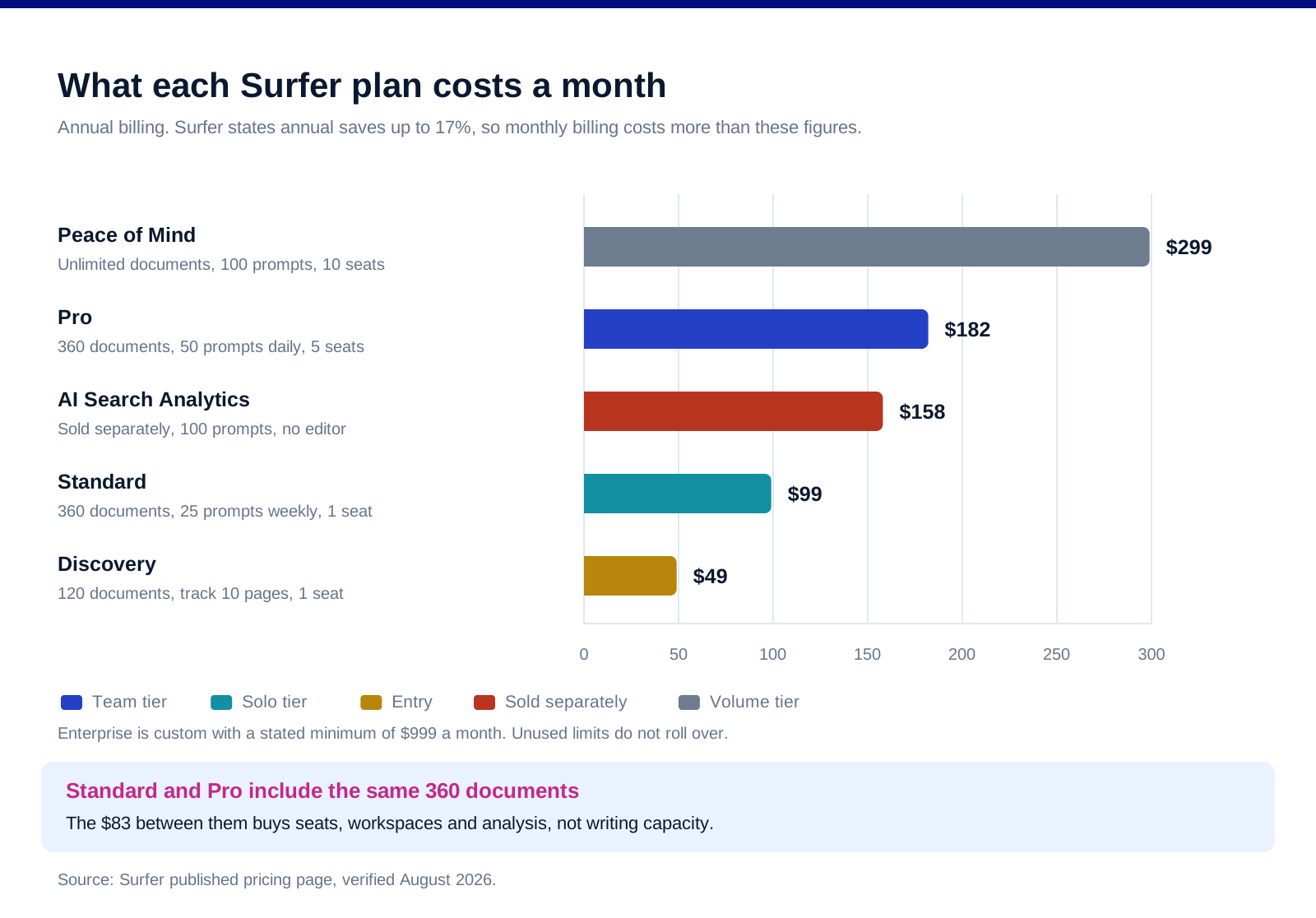
Discovery is $49 a month on annual billing, with 120 documents, tracking for 10 pages, the AI optimization guidelines, the Surfy assistant and one team seat.
Standard is $99 a month, with 360 documents, AI visibility tracking across 25 prompts refreshed weekly, the WordPress and Google Docs integrations, brand knowledge, the plagiarism checker and one seat.
Pro is $182 a month, which Surfer marks as its recommended plan. 50 prompts refreshed daily, five brand workspaces, internal linking, content ideas and gap analysis, templates, cannibalization reports and five seats.
Peace of Mind is $299 a month, with unlimited documents, 100 prompts refreshed daily, unlimited brand workspaces, advanced SERP analysis, personalized onboarding, a dedicated success manager, API access and ten seats.
AI Search Analytics is sold separately at $158 a month, tracking 100 prompts refreshed daily across multiple LLMs with five brand workspaces, for people who want the measurement without the writing tools.
Enterprise is custom with a stated minimum of $999 a month, adding SSO, an advisory programme, white-label options and priority support.
Two mechanics matter more than the headline numbers. Surfer's own pricing FAQ states that annual billing saves up to 17%, up to $720, and that unused limits do not roll over month to month. So the plan you pick is a bet on your minimum monthly output, not your average.
All the figures above are the annual-billed monthly rate. Monthly billing costs more, and the specific monthly rates were not published on the page we read, so we are not quoting numbers for them.
The upgrade that buys no extra documents
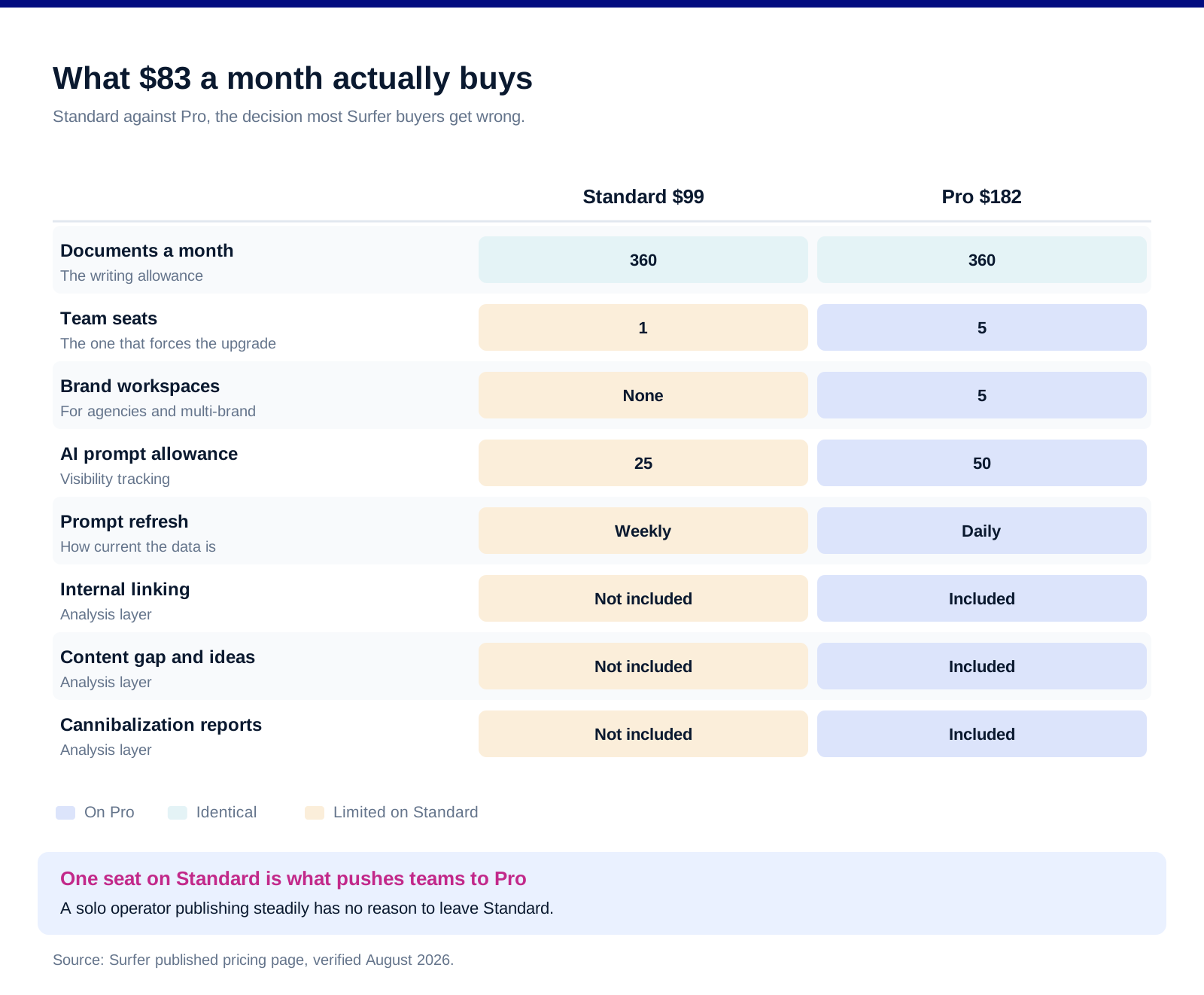
Standard and Pro both include 360 documents. This is the single most useful thing to know before you choose, and it is easy to miss because the plans are laid out as a ladder where each rung usually adds more of everything.
So the $83 a month between them is not writing capacity. It is five seats instead of one, five brand workspaces instead of none, daily prompt refresh instead of weekly, and the analysis layer: internal linking, content gap, cannibalization reports and templates.
Which makes the decision unusually clean. If you are one person publishing steadily, Standard is the plan and Pro is an upsell you do not need. If you are a team, or an agency running several brands, Pro is not an upgrade so much as the first plan that actually functions, because Standard gives you one seat.
And it makes Discovery a genuine tier rather than a stub. 120 documents and one seat at $49 is a real allowance for a solo operator publishing a few pieces a week, which is more than most entry tiers in this category offer.
Peace of Mind is the one to scrutinise. Unlimited documents at $299 only pays back above roughly 360 documents a month, which is a publishing volume very few B2B companies reach. Most teams who think they need it are actually buying the seats and the API.
The AI visibility question
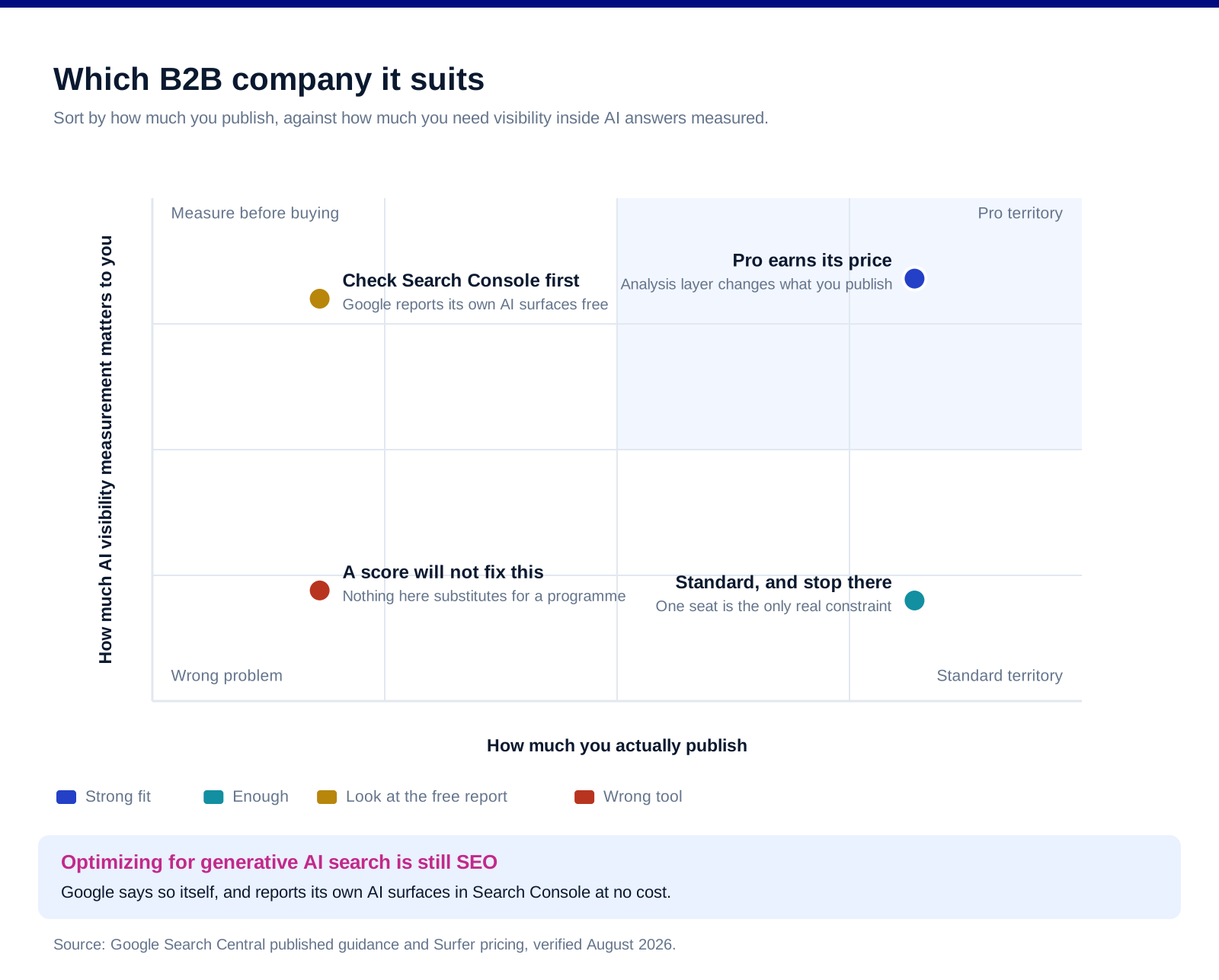
This is where the product has moved, and where the honest caveat lives. Google's own guide to optimizing for generative AI features states that best practices for SEO continue to be relevant because its generative AI features are rooted in core Search ranking systems, and that optimizing for generative AI search is still SEO. It specifically pushes back on the idea that you need new machine-readable files, AI text files or special markup, or that you need to break content into tiny pieces or write in a particular way for generative AI.
Google also points you at a free report for the measurement. The same guidance directs site owners to the Generative AI performance report in Search Console to see how content performs in Google's generative AI features. If your question is only about Google, you already have a first-party answer at no cost.
So what is the $158 for? Coverage of the LLMs Google does not report on. Surfer tracks prompts across multiple models, and no free first-party equivalent exists for those. That is a real gap and it is a reasonable thing to pay for. It is not the same as paying for AI visibility in general, and the distinction is worth holding onto when the pitch blurs them.
Google's guidance on AI-generated content is also worth reading before you lean on the writing features. Its position is that AI generation is not inherently penalised, but that generating many pages without adding value for users may violate the spam policy on scaled content abuse, and that accuracy, quality and relevance matter especially when content is generated automatically. Surfer will happily help you produce volume. That is your risk to manage, not the tool's.
Our AI search optimization playbook covers the work itself, which is mostly the same work as SEO, and where a measurement tool does and does not help.
What it does well, and what it does not
The editor is still the reason people buy it. Fast, clear, and it turns a vague brief into something a writer can execute against. That has not changed and it holds up.
The analysis layer on Pro is the underrated part. Cannibalization reports and content gap analysis are the features that change what you publish, rather than how you publish it, and they only appear at $182.
The score is a guide, not a target. Writing to hit a number produces content that reads like it was written to hit a number. Use it to catch omissions, not to grade drafts.
Seats are tight at the bottom. One seat on both Discovery and Standard means any team is effectively looking at Pro, which reframes the price ladder considerably.
Limits that do not roll over punish uneven output. A team that publishes in bursts pays for capacity it loses. Price the plan against your quietest month.
It does not do rank tracking at the depth a dedicated tool does. Page tracking exists, but if rank tracking is the job, this is not the tool for it. Our Surfer tool profile sits alongside the rest of the SEO category if you are comparing.
FAQ
How much does Surfer cost in 2026?
On annual billing, Discovery is $49 a month, Standard $99, Pro $182 and Peace of Mind $299. AI Search Analytics is sold separately at $158 a month, and Enterprise is custom with a stated minimum of $999 a month. Surfer states that annual billing saves up to 17%, so monthly billing costs more than these figures.
What is the difference between Surfer Standard and Pro?
Not documents. Both include 360. The $83 a month difference buys five seats instead of one, five brand workspaces, daily rather than weekly prompt refresh, and the analysis layer of internal linking, content gap, cannibalization reports and templates. If you are a single user, Standard is usually the right plan.
Is Surfer worth it for B2B?
For a team publishing consistently and using the Pro analysis features, yes. For a company publishing a few posts a month and hoping a score will fix rankings, no. The editor makes good writers faster; it does not substitute for having something worth saying, and the cannibalization and gap reports are where the actual strategic value sits.
Does Surfer help you rank in AI search?
Partly, and less exclusively than the positioning implies. Google states that optimizing for generative AI search is still SEO and that no special files, markup or writing style are required. Surfer's contribution is measurement across multiple LLMs rather than a distinct optimization method, which is worth paying for only if you need visibility into models Google does not report on.
Is there a free Surfer trial?
New accounts get a seven-day free trial of the Pro plan, which includes AI visibility, content audit, keyword research, AI writing and the one-click automations. Seven days is enough to run the analysis reports across an existing site, which is the fastest way to find out whether the Pro tier is worth $182 to you.
Do unused Surfer credits roll over?
No. Surfer states plainly that unused limits do not roll over to the next month. That makes the plan choice a bet on your minimum monthly output rather than your average, and it is the single most common reason teams end up overpaying for a tier they only fully use in busy months.
Bottom line
Surfer in 2026 is a strong content editor with a genuinely useful analysis layer bolted on at Pro, plus an AI visibility product that is priced as though it is the main event. Standard at $99 is the plan for a solo operator, Pro at $182 is the first plan that works for a team, and the fact that both include the same 360 documents is the detail that makes that choice obvious once you see it. On the AI side, read Google's own guidance before you buy the story: the optimization work is still SEO, Search Console reports Google's AI surfaces for free, and what you are actually paying Surfer for is the models Google stays quiet about.
Want the content programme built rather than the tool configured? Book a call with GROU. We run lead generation and outbound inside B2B revenue engines across verticals.
We are GROU, a B2B pipeline agency that runs lead generation, outbound, and LinkedIn content for clients across manufacturing, fintech, iGaming, software, and professional services. The fit guidance reflects our content and SEO deployments between 2024 and 2026, anonymized to protect client confidentiality.
Some links in this article are affiliate. We may earn a small commission at no extra cost to you. We only recommend tools we've deployed for clients.
Surfer is not the tool most people think they are buying. The content editor with the green score is still there, but the product has repositioned around measuring whether your brand shows up inside AI answers, and it now sells that as a separate subscription at $158 a month.
That repositioning is the thing worth evaluating in 2026, because it puts Surfer in competition with a report Google gives away for free on part of the same job.
TL;DR
Surfer runs four plans on annual billing: Discovery at $49 a month for 120 documents and one seat, Standard at $99 for 360 documents and AI visibility tracking on 25 prompts refreshed weekly, Pro at $182 for 50 prompts refreshed daily, five seats, five brand workspaces, internal linking, content gap analysis and cannibalization reports, and Peace of Mind at $299 for unlimited documents, 100 prompts, API access and ten seats. Enterprise is custom with a stated minimum of $999 a month. The detail that decides the middle of the range is that Standard and Pro both give you 360 documents, so the $83 a month between them buys seats, workspaces and analysis rather than any additional writing capacity. Surfer states that annual billing saves up to 17%, and that unused limits do not roll over. New accounts get a seven-day free trial of Pro. The honest caveat on the AI visibility product is that Google now publishes a Generative AI performance report inside Search Console at no cost, so Surfer's value there is the LLMs Google does not report on rather than AI visibility as a whole.
What it costs
Discovery is $49 a month on annual billing, with 120 documents, tracking for 10 pages, the AI optimization guidelines, the Surfy assistant and one team seat.
Standard is $99 a month, with 360 documents, AI visibility tracking across 25 prompts refreshed weekly, the WordPress and Google Docs integrations, brand knowledge, the plagiarism checker and one seat.
Pro is $182 a month, which Surfer marks as its recommended plan. 50 prompts refreshed daily, five brand workspaces, internal linking, content ideas and gap analysis, templates, cannibalization reports and five seats.
Peace of Mind is $299 a month, with unlimited documents, 100 prompts refreshed daily, unlimited brand workspaces, advanced SERP analysis, personalized onboarding, a dedicated success manager, API access and ten seats.
AI Search Analytics is sold separately at $158 a month, tracking 100 prompts refreshed daily across multiple LLMs with five brand workspaces, for people who want the measurement without the writing tools.
Enterprise is custom with a stated minimum of $999 a month, adding SSO, an advisory programme, white-label options and priority support.
Two mechanics matter more than the headline numbers. Surfer's own pricing FAQ states that annual billing saves up to 17%, up to $720, and that unused limits do not roll over month to month. So the plan you pick is a bet on your minimum monthly output, not your average.
All the figures above are the annual-billed monthly rate. Monthly billing costs more, and the specific monthly rates were not published on the page we read, so we are not quoting numbers for them.
The upgrade that buys no extra documents
Standard and Pro both include 360 documents. This is the single most useful thing to know before you choose, and it is easy to miss because the plans are laid out as a ladder where each rung usually adds more of everything.
So the $83 a month between them is not writing capacity. It is five seats instead of one, five brand workspaces instead of none, daily prompt refresh instead of weekly, and the analysis layer: internal linking, content gap, cannibalization reports and templates.
Which makes the decision unusually clean. If you are one person publishing steadily, Standard is the plan and Pro is an upsell you do not need. If you are a team, or an agency running several brands, Pro is not an upgrade so much as the first plan that actually functions, because Standard gives you one seat.
And it makes Discovery a genuine tier rather than a stub. 120 documents and one seat at $49 is a real allowance for a solo operator publishing a few pieces a week, which is more than most entry tiers in this category offer.
Peace of Mind is the one to scrutinise. Unlimited documents at $299 only pays back above roughly 360 documents a month, which is a publishing volume very few B2B companies reach. Most teams who think they need it are actually buying the seats and the API.
The AI visibility question
This is where the product has moved, and where the honest caveat lives. Google's own guide to optimizing for generative AI features states that best practices for SEO continue to be relevant because its generative AI features are rooted in core Search ranking systems, and that optimizing for generative AI search is still SEO. It specifically pushes back on the idea that you need new machine-readable files, AI text files or special markup, or that you need to break content into tiny pieces or write in a particular way for generative AI.
Google also points you at a free report for the measurement. The same guidance directs site owners to the Generative AI performance report in Search Console to see how content performs in Google's generative AI features. If your question is only about Google, you already have a first-party answer at no cost.
So what is the $158 for? Coverage of the LLMs Google does not report on. Surfer tracks prompts across multiple models, and no free first-party equivalent exists for those. That is a real gap and it is a reasonable thing to pay for. It is not the same as paying for AI visibility in general, and the distinction is worth holding onto when the pitch blurs them.
Google's guidance on AI-generated content is also worth reading before you lean on the writing features. Its position is that AI generation is not inherently penalised, but that generating many pages without adding value for users may violate the spam policy on scaled content abuse, and that accuracy, quality and relevance matter especially when content is generated automatically. Surfer will happily help you produce volume. That is your risk to manage, not the tool's.
Our AI search optimization playbook covers the work itself, which is mostly the same work as SEO, and where a measurement tool does and does not help.
What it does well, and what it does not
The editor is still the reason people buy it. Fast, clear, and it turns a vague brief into something a writer can execute against. That has not changed and it holds up.
The analysis layer on Pro is the underrated part. Cannibalization reports and content gap analysis are the features that change what you publish, rather than how you publish it, and they only appear at $182.
The score is a guide, not a target. Writing to hit a number produces content that reads like it was written to hit a number. Use it to catch omissions, not to grade drafts.
Seats are tight at the bottom. One seat on both Discovery and Standard means any team is effectively looking at Pro, which reframes the price ladder considerably.
Limits that do not roll over punish uneven output. A team that publishes in bursts pays for capacity it loses. Price the plan against your quietest month.
It does not do rank tracking at the depth a dedicated tool does. Page tracking exists, but if rank tracking is the job, this is not the tool for it. Our Surfer tool profile sits alongside the rest of the SEO category if you are comparing.
FAQ
How much does Surfer cost in 2026?
On annual billing, Discovery is $49 a month, Standard $99, Pro $182 and Peace of Mind $299. AI Search Analytics is sold separately at $158 a month, and Enterprise is custom with a stated minimum of $999 a month. Surfer states that annual billing saves up to 17%, so monthly billing costs more than these figures.
What is the difference between Surfer Standard and Pro?
Not documents. Both include 360. The $83 a month difference buys five seats instead of one, five brand workspaces, daily rather than weekly prompt refresh, and the analysis layer of internal linking, content gap, cannibalization reports and templates. If you are a single user, Standard is usually the right plan.
Is Surfer worth it for B2B?
For a team publishing consistently and using the Pro analysis features, yes. For a company publishing a few posts a month and hoping a score will fix rankings, no. The editor makes good writers faster; it does not substitute for having something worth saying, and the cannibalization and gap reports are where the actual strategic value sits.
Does Surfer help you rank in AI search?
Partly, and less exclusively than the positioning implies. Google states that optimizing for generative AI search is still SEO and that no special files, markup or writing style are required. Surfer's contribution is measurement across multiple LLMs rather than a distinct optimization method, which is worth paying for only if you need visibility into models Google does not report on.
Is there a free Surfer trial?
New accounts get a seven-day free trial of the Pro plan, which includes AI visibility, content audit, keyword research, AI writing and the one-click automations. Seven days is enough to run the analysis reports across an existing site, which is the fastest way to find out whether the Pro tier is worth $182 to you.
Do unused Surfer credits roll over?
No. Surfer states plainly that unused limits do not roll over to the next month. That makes the plan choice a bet on your minimum monthly output rather than your average, and it is the single most common reason teams end up overpaying for a tier they only fully use in busy months.
Bottom line
Surfer in 2026 is a strong content editor with a genuinely useful analysis layer bolted on at Pro, plus an AI visibility product that is priced as though it is the main event. Standard at $99 is the plan for a solo operator, Pro at $182 is the first plan that works for a team, and the fact that both include the same 360 documents is the detail that makes that choice obvious once you see it. On the AI side, read Google's own guidance before you buy the story: the optimization work is still SEO, Search Console reports Google's AI surfaces for free, and what you are actually paying Surfer for is the models Google stays quiet about.
Want the content programme built rather than the tool configured? Book a call with GROU. We run lead generation and outbound inside B2B revenue engines across verticals.
We are GROU, a B2B pipeline agency that runs lead generation, outbound, and LinkedIn content for clients across manufacturing, fintech, iGaming, software, and professional services. The fit guidance reflects our content and SEO deployments between 2024 and 2026, anonymized to protect client confidentiality.
Some links in this article are affiliate. We may earn a small commission at no extra cost to you. We only recommend tools we've deployed for clients.
Surfer is not the tool most people think they are buying. The content editor with the green score is still there, but the product has repositioned around measuring whether your brand shows up inside AI answers, and it now sells that as a separate subscription at $158 a month.
That repositioning is the thing worth evaluating in 2026, because it puts Surfer in competition with a report Google gives away for free on part of the same job.
TL;DR
Surfer runs four plans on annual billing: Discovery at $49 a month for 120 documents and one seat, Standard at $99 for 360 documents and AI visibility tracking on 25 prompts refreshed weekly, Pro at $182 for 50 prompts refreshed daily, five seats, five brand workspaces, internal linking, content gap analysis and cannibalization reports, and Peace of Mind at $299 for unlimited documents, 100 prompts, API access and ten seats. Enterprise is custom with a stated minimum of $999 a month. The detail that decides the middle of the range is that Standard and Pro both give you 360 documents, so the $83 a month between them buys seats, workspaces and analysis rather than any additional writing capacity. Surfer states that annual billing saves up to 17%, and that unused limits do not roll over. New accounts get a seven-day free trial of Pro. The honest caveat on the AI visibility product is that Google now publishes a Generative AI performance report inside Search Console at no cost, so Surfer's value there is the LLMs Google does not report on rather than AI visibility as a whole.
What it costs
Discovery is $49 a month on annual billing, with 120 documents, tracking for 10 pages, the AI optimization guidelines, the Surfy assistant and one team seat.
Standard is $99 a month, with 360 documents, AI visibility tracking across 25 prompts refreshed weekly, the WordPress and Google Docs integrations, brand knowledge, the plagiarism checker and one seat.
Pro is $182 a month, which Surfer marks as its recommended plan. 50 prompts refreshed daily, five brand workspaces, internal linking, content ideas and gap analysis, templates, cannibalization reports and five seats.
Peace of Mind is $299 a month, with unlimited documents, 100 prompts refreshed daily, unlimited brand workspaces, advanced SERP analysis, personalized onboarding, a dedicated success manager, API access and ten seats.
AI Search Analytics is sold separately at $158 a month, tracking 100 prompts refreshed daily across multiple LLMs with five brand workspaces, for people who want the measurement without the writing tools.
Enterprise is custom with a stated minimum of $999 a month, adding SSO, an advisory programme, white-label options and priority support.
Two mechanics matter more than the headline numbers. Surfer's own pricing FAQ states that annual billing saves up to 17%, up to $720, and that unused limits do not roll over month to month. So the plan you pick is a bet on your minimum monthly output, not your average.
All the figures above are the annual-billed monthly rate. Monthly billing costs more, and the specific monthly rates were not published on the page we read, so we are not quoting numbers for them.
The upgrade that buys no extra documents
Standard and Pro both include 360 documents. This is the single most useful thing to know before you choose, and it is easy to miss because the plans are laid out as a ladder where each rung usually adds more of everything.
So the $83 a month between them is not writing capacity. It is five seats instead of one, five brand workspaces instead of none, daily prompt refresh instead of weekly, and the analysis layer: internal linking, content gap, cannibalization reports and templates.
Which makes the decision unusually clean. If you are one person publishing steadily, Standard is the plan and Pro is an upsell you do not need. If you are a team, or an agency running several brands, Pro is not an upgrade so much as the first plan that actually functions, because Standard gives you one seat.
And it makes Discovery a genuine tier rather than a stub. 120 documents and one seat at $49 is a real allowance for a solo operator publishing a few pieces a week, which is more than most entry tiers in this category offer.
Peace of Mind is the one to scrutinise. Unlimited documents at $299 only pays back above roughly 360 documents a month, which is a publishing volume very few B2B companies reach. Most teams who think they need it are actually buying the seats and the API.
The AI visibility question
This is where the product has moved, and where the honest caveat lives. Google's own guide to optimizing for generative AI features states that best practices for SEO continue to be relevant because its generative AI features are rooted in core Search ranking systems, and that optimizing for generative AI search is still SEO. It specifically pushes back on the idea that you need new machine-readable files, AI text files or special markup, or that you need to break content into tiny pieces or write in a particular way for generative AI.
Google also points you at a free report for the measurement. The same guidance directs site owners to the Generative AI performance report in Search Console to see how content performs in Google's generative AI features. If your question is only about Google, you already have a first-party answer at no cost.
So what is the $158 for? Coverage of the LLMs Google does not report on. Surfer tracks prompts across multiple models, and no free first-party equivalent exists for those. That is a real gap and it is a reasonable thing to pay for. It is not the same as paying for AI visibility in general, and the distinction is worth holding onto when the pitch blurs them.
Google's guidance on AI-generated content is also worth reading before you lean on the writing features. Its position is that AI generation is not inherently penalised, but that generating many pages without adding value for users may violate the spam policy on scaled content abuse, and that accuracy, quality and relevance matter especially when content is generated automatically. Surfer will happily help you produce volume. That is your risk to manage, not the tool's.
Our AI search optimization playbook covers the work itself, which is mostly the same work as SEO, and where a measurement tool does and does not help.
What it does well, and what it does not
The editor is still the reason people buy it. Fast, clear, and it turns a vague brief into something a writer can execute against. That has not changed and it holds up.
The analysis layer on Pro is the underrated part. Cannibalization reports and content gap analysis are the features that change what you publish, rather than how you publish it, and they only appear at $182.
The score is a guide, not a target. Writing to hit a number produces content that reads like it was written to hit a number. Use it to catch omissions, not to grade drafts.
Seats are tight at the bottom. One seat on both Discovery and Standard means any team is effectively looking at Pro, which reframes the price ladder considerably.
Limits that do not roll over punish uneven output. A team that publishes in bursts pays for capacity it loses. Price the plan against your quietest month.
It does not do rank tracking at the depth a dedicated tool does. Page tracking exists, but if rank tracking is the job, this is not the tool for it. Our Surfer tool profile sits alongside the rest of the SEO category if you are comparing.
FAQ
How much does Surfer cost in 2026?
On annual billing, Discovery is $49 a month, Standard $99, Pro $182 and Peace of Mind $299. AI Search Analytics is sold separately at $158 a month, and Enterprise is custom with a stated minimum of $999 a month. Surfer states that annual billing saves up to 17%, so monthly billing costs more than these figures.
What is the difference between Surfer Standard and Pro?
Not documents. Both include 360. The $83 a month difference buys five seats instead of one, five brand workspaces, daily rather than weekly prompt refresh, and the analysis layer of internal linking, content gap, cannibalization reports and templates. If you are a single user, Standard is usually the right plan.
Is Surfer worth it for B2B?
For a team publishing consistently and using the Pro analysis features, yes. For a company publishing a few posts a month and hoping a score will fix rankings, no. The editor makes good writers faster; it does not substitute for having something worth saying, and the cannibalization and gap reports are where the actual strategic value sits.
Does Surfer help you rank in AI search?
Partly, and less exclusively than the positioning implies. Google states that optimizing for generative AI search is still SEO and that no special files, markup or writing style are required. Surfer's contribution is measurement across multiple LLMs rather than a distinct optimization method, which is worth paying for only if you need visibility into models Google does not report on.
Is there a free Surfer trial?
New accounts get a seven-day free trial of the Pro plan, which includes AI visibility, content audit, keyword research, AI writing and the one-click automations. Seven days is enough to run the analysis reports across an existing site, which is the fastest way to find out whether the Pro tier is worth $182 to you.
Do unused Surfer credits roll over?
No. Surfer states plainly that unused limits do not roll over to the next month. That makes the plan choice a bet on your minimum monthly output rather than your average, and it is the single most common reason teams end up overpaying for a tier they only fully use in busy months.
Bottom line
Surfer in 2026 is a strong content editor with a genuinely useful analysis layer bolted on at Pro, plus an AI visibility product that is priced as though it is the main event. Standard at $99 is the plan for a solo operator, Pro at $182 is the first plan that works for a team, and the fact that both include the same 360 documents is the detail that makes that choice obvious once you see it. On the AI side, read Google's own guidance before you buy the story: the optimization work is still SEO, Search Console reports Google's AI surfaces for free, and what you are actually paying Surfer for is the models Google stays quiet about.
Want the content programme built rather than the tool configured? Book a call with GROU. We run lead generation and outbound inside B2B revenue engines across verticals.
We are GROU, a B2B pipeline agency that runs lead generation, outbound, and LinkedIn content for clients across manufacturing, fintech, iGaming, software, and professional services. The fit guidance reflects our content and SEO deployments between 2024 and 2026, anonymized to protect client confidentiality.
Some links in this article are affiliate. We may earn a small commission at no extra cost to you. We only recommend tools we've deployed for clients.

Pipeline OS Newsletter
Build qualified pipeline
Get weekly tactics to generate demand, improve lead quality, and book more meetings.





Trusted by industry leaders
Trusted by industry leaders
Trusted by industry leaders
Ready to build qualified pipeline?
Ready to build qualified pipeline?
Ready to build qualified pipeline?
Book a call to see if we're the right fit, or take the 2-minute quiz to get a clear starting point.
Book a call to see if we're the right fit, or take the 2-minute quiz to get a clear starting point.
Book a call to see if we're the right fit, or take the 2-minute quiz to get a clear starting point.
" height="30.21639343089746px" id="hfGbXmQR2" width="30.216393430897455px"/></svg>)
Copyright © 2026 – All Right Reserved
Copyright © 2026 – All Right Reserved
Copyright © 2026 – All Right Reserved