%22%3E%3C/path%3E%3Cpath d=%22M 63.072 7.554 C 62.258 8.022 61.577 8.689 61.092 9.493 L 61.092 7.076 L 57.158 7.076 L 57.158 22.64 L 61.089 22.64 L 61.089 14.888 C 61.089 13.446 61.403 12.434 62.03 11.853 C 62.818 11.218 63.818 10.907 64.826 10.982 L 65.868 10.982 L 65.868 6.851 C 64.891 6.834 63.926 7.076 63.073 7.554 Z%22 fill=%22rgb(17,17,17)%22%3E%3C/path%3E%3Cpath d=%22M 78.916 7.82 C 76.363 6.49 73.321 6.49 70.768 7.82 C 69.562 8.473 68.564 9.451 67.888 10.644 C 67.167 11.931 66.803 13.387 66.834 14.862 C 66.804 16.332 67.157 17.785 67.86 19.077 C 68.515 20.267 69.494 21.246 70.684 21.901 C 71.924 22.576 73.318 22.92 74.73 22.898 C 76.164 22.918 77.58 22.575 78.846 21.901 C 80.062 21.247 81.073 20.27 81.768 19.077 C 82.506 17.797 82.88 16.339 82.85 14.862 C 82.88 13.389 82.517 11.934 81.797 10.647 C 81.12 9.455 80.122 8.477 78.917 7.824 M 78.803 14.862 C 78.829 15.739 78.636 16.608 78.241 17.391 C 77.903 18.046 77.38 18.588 76.738 18.95 C 76.124 19.293 75.432 19.472 74.729 19.47 C 73.668 19.497 72.648 19.061 71.934 18.276 C 71.139 17.323 70.741 16.1 70.823 14.862 C 70.741 13.62 71.149 12.395 71.959 11.45 C 72.687 10.667 73.715 10.233 74.783 10.256 C 75.859 10.236 76.894 10.67 77.635 11.45 C 78.464 12.387 78.884 13.616 78.801 14.864%22 fill=%22rgb(17,17,17)%22%3E%3C/path%3E%3Cpath d=%22M 95.906 7.076 L 95.906 15.646 C 95.975 16.68 95.643 17.701 94.979 18.498 C 94.311 19.184 93.379 19.547 92.422 19.495 C 91.475 19.544 90.553 19.18 89.894 18.498 C 89.23 17.701 88.898 16.68 88.967 15.646 L 88.967 7.076 L 85.033 7.076 L 85.033 16.207 C 85 17.449 85.275 18.68 85.834 19.79 C 86.327 20.75 87.095 21.542 88.039 22.065 C 89.033 22.594 90.145 22.861 91.271 22.838 C 92.188 22.847 93.095 22.65 93.926 22.263 C 94.708 21.905 95.388 21.36 95.906 20.675 L 95.906 22.645 L 99.865 22.645 L 99.865 7.076 Z%22 fill=%22rgb(17,17,17)%22%3E%3C/path%3E%3Cpath d=%22M 4.513 15.626 C 4.511 10.815 7.606 6.549 12.181 5.059 C 16.756 3.57 21.77 5.195 24.601 9.086 L 27.816 5.87 C 24.074 1.186 17.981 -0.943 12.137 0.393 C 6.292 1.728 1.728 6.292 0.393 12.137 C -0.943 17.981 1.186 24.074 5.87 27.816 L 9.085 24.601 C 6.214 22.512 4.515 19.177 4.513 15.626%22 fill=%22rgb(32,62,235)%22%3E%3C/path%3E%3Cpath d=%22M 17.114 14.343 L 13.354 18.01 L 13.354 18.026 L 21.071 18.026 L 11.412 27.609 L 17.389 27.609 L 23.999 21.081 L 23.999 28.316 L 24.005 28.316 L 27.967 24.393 L 27.967 14.343 Z%22 fill=%22rgb(32,62,235)%22%3E%3C/path%3E%3C/g%3E%3C/svg%3E) ×
× ××
××

Almost every deliverability benchmark you will find was published by a company selling deliverability software, measured on its own customers, and framed so that your numbers look worrying. There is a much shorter list of figures that actually matter, and they have a property none of the survey numbers do: the mailbox providers enforce them.
This covers the thresholds Google and Microsoft publish, what they look like as actual complaint counts rather than percentages, and which of the numbers in your sending dashboard are worth watching.
TL;DR
The only deliverability benchmark that is enforced rather than reported is Gmail's spam rate. Google requires bulk senders to keep the spam rate in Postmaster Tools below 0.30%, and recommends staying below 0.10% and never reaching 0.30% at all. Those percentages sound forgiving and are not: at 0.10% you are allowed one complaint per thousand delivered messages, so a sender doing 5,000 a day to Gmail has a working ceiling of five complaints in a day, and a hard ceiling of fifteen. Bulk sender status starts above 5,000 messages a day to Gmail accounts, and above that line SPF, DKIM and DMARC are all required rather than recommended, along with TLS, valid forward and reverse DNS, and one-click unsubscribe headers. Microsoft's high volume path publishes no daily message or recipient limit but caps recipients per message at 50 and meters usage at $0.000042 per recipient, which is $42 per million. Everything else you have seen quoted as a deliverability benchmark, including industry average open rates, inbox placement percentages and bounce-rate norms, comes from vendor surveys of self-selected samples and should not be used to judge your own numbers. Watch your spam rate, your authentication status and your bounce rate on your own list, and compare each against last month rather than against an industry.
The only enforced number: Gmail's spam rate
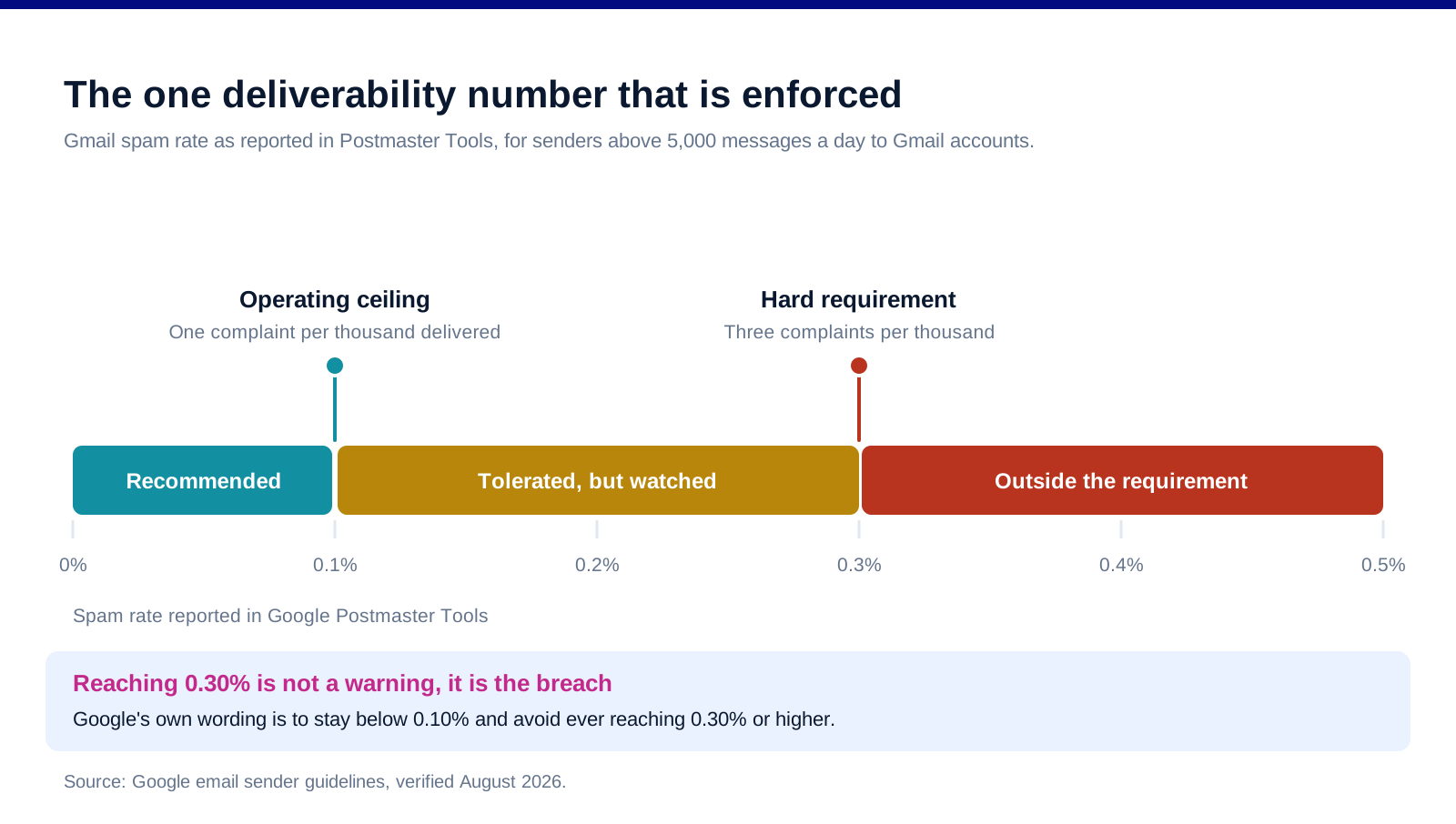
Google requires bulk senders to stay below 0.30%. This is stated as a requirement rather than a suggestion, measured in Postmaster Tools, and it applies to anyone sending more than 5,000 messages a day to Gmail accounts.
Google separately recommends staying below 0.10%. Its own wording is to keep spam rates below 0.10% and avoid ever reaching 0.30% or higher. Treat 0.10% as your operating ceiling and 0.30% as the cliff, because arriving at 0.30% is not a warning, it is the point at which you are out of compliance.
Bulk sender status begins above 5,000 a day to Gmail. Not 5,000 total sends, 5,000 to Gmail addresses specifically. Many B2B senders cross this line without noticing, because a list that looks mixed is often half Gmail-hosted once you account for Workspace domains.
The threshold is a rate, so small volumes are fragile. At low send volumes a handful of complaints moves the percentage a long way. This is the practical reason new sending domains fail: not that they are new, but that ten complaints out of a small send is a very different rate from ten complaints out of a large one.
What those percentages mean in complaints
![[INSERT CHART 2, email-deliverability-benchmarks-chart-2-headroom.svg] Alt: How many spam complaints per day put a sender over Gmail's 0.10 percent recommendation and 0.30 percent requirement at different daily volumes.](https://framerusercontent.com/images/yk578gph7Y38JlOOve0iRNjVlI.svg)
Percentages this small are hard to reason about, so convert them into the thing you can actually count.
At 0.10%, you get one complaint per thousand delivered. A sender doing 5,000 a day to Gmail has five complaints of headroom against the recommendation. At 10,000 a day it is ten, at 50,000 it is fifty.
At 0.30%, it is three per thousand. Fifteen complaints on a 5,000-message day, thirty on 10,000, a hundred and fifty on 50,000.
Which is why one bad segment can end a sending domain. A single poorly targeted campaign to a list segment that does not remember subscribing can generate more complaints in a morning than your entire daily allowance. The rate is calculated on delivered volume, so the campaign that caused the problem also inflates the denominator, but not nearly enough to save you.
And why bigger senders have it easier, up to a point. Fifty complaints a day at 50,000 sends is genuinely more forgiving than five at 5,000, because normal list churn produces a steadier trickle at scale. Small senders live closer to the edge than the percentage suggests.
Check the rate daily, not monthly. Postmaster Tools reports by day. A monthly average hides exactly the single-day spike that gets you filtered, and by the time the monthly number moves the damage is already reflected in your placement.
What both providers actually require
![[INSERT CHART 3, email-deliverability-benchmarks-chart-3-requirements.svg] Alt: Gmail and Microsoft sender requirements 2026 across authentication, TLS, DNS records, unsubscribe headers and volume limits.](https://framerusercontent.com/images/3Xlq8Bi7nl4PiGVgOACbicHoQ8.svg)
Gmail, above 5,000 a day: SPF, DKIM and DMARC are all required. Below that line SPF and DKIM are still expected, but DMARC becomes mandatory once you are a bulk sender. If you are near the threshold, set all three up now rather than discovering the requirement on the day you cross it.
Gmail also requires TLS, valid PTR records and one-click unsubscribe. Specifically a TLS connection for transmission, valid forward and reverse DNS records for your sending IPs, and both the List-Unsubscribe and List-Unsubscribe-Post headers so that Gmail's own unsubscribe button works. The one-click header is the one most commonly missing on self-hosted sending setups.
Microsoft's high volume path publishes no rate limits but caps recipients per message at 50. Its documentation states no recipient rate limit and no message rate limit, a 10 MB maximum message size, up to 100 concurrent connections per IP address or 250 authenticated connections per tenant, and TLS required on port 587.
Microsoft meters high volume sending at $0.000042 per recipient. That is $42 per million delivered recipients, billed on expanded delivered recipients. Worth knowing if you are costing an in-house sending path against a platform.
Authentication is a gate, not a score. Passing SPF, DKIM and DMARC does not make you deliverable. Failing them makes you undeliverable. It is the cheapest problem on this list to fix and the most common one still outstanding.
The benchmarks you should ignore
Industry average open rates. Measured on self-selected samples of one vendor's customers, inflated by image-proxy prefetching since Apple's Mail Privacy Protection, and different by a factor of two between any two published sources. There is no version of this number you can act on.
Inbox placement percentages from seed-list tests. Useful as a directional check on your own setup over time. Useless as a comparison against an industry figure, because seed lists are not your recipients and the test measures a synthetic send.
Bounce rate norms. Your bounce rate is a function of how you built the list, not of your industry. A 2% bounce on a list you verified last week means something entirely different from 2% on a list bought last year.
Any figure published by a company that sells the fix for that figure. This is most of them. It does not mean the vendors are dishonest; it means the sample is their customers and the framing is their product.
Compare against yourself instead. Last month's spam rate, last month's bounce rate, last month's reply rate on the same segment. Those comparisons are valid, available, and the only ones that will tell you whether something changed.
What to actually watch
Spam rate in Postmaster Tools, daily. The one number with a published, enforced threshold. If you send meaningful volume to Gmail and are not looking at this, nothing else on the list matters yet.
Authentication pass rates, weekly. SPF, DKIM and DMARC alignment. These break silently when someone changes DNS or adds a new sending service.
Hard bounce rate per campaign, against your own baseline. A jump on one campaign points at a list problem in that segment rather than a domain problem.
Reply rate by segment, not overall. For outbound specifically, reply rate is the honest engagement signal and the one that correlates with whether recipients wanted the message. Our email deliverability guide covers the setup side, and the best email verification tools cover the list-hygiene half that keeps bounces down.
Seed testing before a domain matters, not after. Tools like GlockApps and MailReach are worth running on a new domain before you put real volume through it. Use them as a pre-flight check rather than as a scoreboard.
FAQ
What is a good email deliverability rate in 2026?
The question has no useful industry answer, but it has a hard published one: Google requires bulk senders to keep the Gmail spam rate below 0.30% and recommends below 0.10%. Those are the only deliverability figures with enforcement behind them. Everything quoted as an industry average deliverability or open rate comes from vendor surveys of their own customers and cannot be compared against your list.
What spam complaint rate is too high?
Anything at or above 0.30% puts you outside Google's stated requirement for bulk senders. Treat 0.10% as your working ceiling. In absolute terms that is one complaint per thousand delivered messages, so a sender doing 5,000 a day to Gmail has about five complaints of daily headroom before the recommendation is breached.
Who counts as a bulk sender for Gmail?
Anyone sending more than 5,000 messages a day to Gmail accounts. It is measured against Gmail addresses specifically rather than total sending volume, which catches out B2B senders whose lists include a large share of Google Workspace domains.
Do you need DMARC for B2B cold email?
If you send more than 5,000 messages a day to Gmail addresses, DMARC is required along with SPF and DKIM. Below that, SPF and DKIM are still expected and DMARC remains strongly advisable, because it is the cheapest thing on the compliance list and the requirement arrives the moment your volume grows.
Are industry average open rates useful for benchmarking?
No. They are measured on self-selected vendor samples, they are inflated by mail clients that prefetch images, and published figures differ by a factor of two depending on who is publishing. Compare your open rate against your own previous months on the same segment, which is a valid comparison and an available one.
What are Microsoft's sending limits?
Microsoft's high volume email documentation states no recipient rate limit and no message rate limit, with a cap of 50 recipients per message, a 10 MB maximum message size, up to 100 concurrent connections per IP address or 250 authenticated per tenant, and TLS required on port 587. Usage is metered at $0.000042 per recipient, which is $42 per million.
Bottom line
There is one deliverability benchmark worth treating as a benchmark, and it is Gmail's spam rate: below 0.10% as an operating ceiling, below 0.30% as a hard requirement above 5,000 messages a day to Gmail addresses. Convert it into complaints per day at your own volume, because five complaints is a number you can act on and 0.10% is not. Get SPF, DKIM, DMARC, TLS, PTR records and one-click unsubscribe in place before you cross the volume line rather than after. Then stop comparing yourself to industry averages published by companies selling the remedy, and compare yourself to last month instead.
Want the sending infrastructure built so this stops being a monthly worry? Book a call with GROU. We run outbound inside B2B revenue engines across verticals.
We are GROU, a B2B pipeline agency that runs lead generation, outbound, and LinkedIn content for clients across manufacturing, fintech, iGaming, software, and professional services. The monitoring guidance reflects our outbound deployments between 2024 and 2026, anonymized to protect client confidentiality.
Some links in this article are affiliate. We may earn a small commission at no extra cost to you. We only recommend tools we've deployed for clients.
Almost every deliverability benchmark you will find was published by a company selling deliverability software, measured on its own customers, and framed so that your numbers look worrying. There is a much shorter list of figures that actually matter, and they have a property none of the survey numbers do: the mailbox providers enforce them.
This covers the thresholds Google and Microsoft publish, what they look like as actual complaint counts rather than percentages, and which of the numbers in your sending dashboard are worth watching.
TL;DR
The only deliverability benchmark that is enforced rather than reported is Gmail's spam rate. Google requires bulk senders to keep the spam rate in Postmaster Tools below 0.30%, and recommends staying below 0.10% and never reaching 0.30% at all. Those percentages sound forgiving and are not: at 0.10% you are allowed one complaint per thousand delivered messages, so a sender doing 5,000 a day to Gmail has a working ceiling of five complaints in a day, and a hard ceiling of fifteen. Bulk sender status starts above 5,000 messages a day to Gmail accounts, and above that line SPF, DKIM and DMARC are all required rather than recommended, along with TLS, valid forward and reverse DNS, and one-click unsubscribe headers. Microsoft's high volume path publishes no daily message or recipient limit but caps recipients per message at 50 and meters usage at $0.000042 per recipient, which is $42 per million. Everything else you have seen quoted as a deliverability benchmark, including industry average open rates, inbox placement percentages and bounce-rate norms, comes from vendor surveys of self-selected samples and should not be used to judge your own numbers. Watch your spam rate, your authentication status and your bounce rate on your own list, and compare each against last month rather than against an industry.
The only enforced number: Gmail's spam rate
Google requires bulk senders to stay below 0.30%. This is stated as a requirement rather than a suggestion, measured in Postmaster Tools, and it applies to anyone sending more than 5,000 messages a day to Gmail accounts.
Google separately recommends staying below 0.10%. Its own wording is to keep spam rates below 0.10% and avoid ever reaching 0.30% or higher. Treat 0.10% as your operating ceiling and 0.30% as the cliff, because arriving at 0.30% is not a warning, it is the point at which you are out of compliance.
Bulk sender status begins above 5,000 a day to Gmail. Not 5,000 total sends, 5,000 to Gmail addresses specifically. Many B2B senders cross this line without noticing, because a list that looks mixed is often half Gmail-hosted once you account for Workspace domains.
The threshold is a rate, so small volumes are fragile. At low send volumes a handful of complaints moves the percentage a long way. This is the practical reason new sending domains fail: not that they are new, but that ten complaints out of a small send is a very different rate from ten complaints out of a large one.
What those percentages mean in complaints
Percentages this small are hard to reason about, so convert them into the thing you can actually count.
At 0.10%, you get one complaint per thousand delivered. A sender doing 5,000 a day to Gmail has five complaints of headroom against the recommendation. At 10,000 a day it is ten, at 50,000 it is fifty.
At 0.30%, it is three per thousand. Fifteen complaints on a 5,000-message day, thirty on 10,000, a hundred and fifty on 50,000.
Which is why one bad segment can end a sending domain. A single poorly targeted campaign to a list segment that does not remember subscribing can generate more complaints in a morning than your entire daily allowance. The rate is calculated on delivered volume, so the campaign that caused the problem also inflates the denominator, but not nearly enough to save you.
And why bigger senders have it easier, up to a point. Fifty complaints a day at 50,000 sends is genuinely more forgiving than five at 5,000, because normal list churn produces a steadier trickle at scale. Small senders live closer to the edge than the percentage suggests.
Check the rate daily, not monthly. Postmaster Tools reports by day. A monthly average hides exactly the single-day spike that gets you filtered, and by the time the monthly number moves the damage is already reflected in your placement.
What both providers actually require
Gmail, above 5,000 a day: SPF, DKIM and DMARC are all required. Below that line SPF and DKIM are still expected, but DMARC becomes mandatory once you are a bulk sender. If you are near the threshold, set all three up now rather than discovering the requirement on the day you cross it.
Gmail also requires TLS, valid PTR records and one-click unsubscribe. Specifically a TLS connection for transmission, valid forward and reverse DNS records for your sending IPs, and both the List-Unsubscribe and List-Unsubscribe-Post headers so that Gmail's own unsubscribe button works. The one-click header is the one most commonly missing on self-hosted sending setups.
Microsoft's high volume path publishes no rate limits but caps recipients per message at 50. Its documentation states no recipient rate limit and no message rate limit, a 10 MB maximum message size, up to 100 concurrent connections per IP address or 250 authenticated connections per tenant, and TLS required on port 587.
Microsoft meters high volume sending at $0.000042 per recipient. That is $42 per million delivered recipients, billed on expanded delivered recipients. Worth knowing if you are costing an in-house sending path against a platform.
Authentication is a gate, not a score. Passing SPF, DKIM and DMARC does not make you deliverable. Failing them makes you undeliverable. It is the cheapest problem on this list to fix and the most common one still outstanding.
The benchmarks you should ignore
Industry average open rates. Measured on self-selected samples of one vendor's customers, inflated by image-proxy prefetching since Apple's Mail Privacy Protection, and different by a factor of two between any two published sources. There is no version of this number you can act on.
Inbox placement percentages from seed-list tests. Useful as a directional check on your own setup over time. Useless as a comparison against an industry figure, because seed lists are not your recipients and the test measures a synthetic send.
Bounce rate norms. Your bounce rate is a function of how you built the list, not of your industry. A 2% bounce on a list you verified last week means something entirely different from 2% on a list bought last year.
Any figure published by a company that sells the fix for that figure. This is most of them. It does not mean the vendors are dishonest; it means the sample is their customers and the framing is their product.
Compare against yourself instead. Last month's spam rate, last month's bounce rate, last month's reply rate on the same segment. Those comparisons are valid, available, and the only ones that will tell you whether something changed.
What to actually watch
Spam rate in Postmaster Tools, daily. The one number with a published, enforced threshold. If you send meaningful volume to Gmail and are not looking at this, nothing else on the list matters yet.
Authentication pass rates, weekly. SPF, DKIM and DMARC alignment. These break silently when someone changes DNS or adds a new sending service.
Hard bounce rate per campaign, against your own baseline. A jump on one campaign points at a list problem in that segment rather than a domain problem.
Reply rate by segment, not overall. For outbound specifically, reply rate is the honest engagement signal and the one that correlates with whether recipients wanted the message. Our email deliverability guide covers the setup side, and the best email verification tools cover the list-hygiene half that keeps bounces down.
Seed testing before a domain matters, not after. Tools like GlockApps and MailReach are worth running on a new domain before you put real volume through it. Use them as a pre-flight check rather than as a scoreboard.
FAQ
What is a good email deliverability rate in 2026?
The question has no useful industry answer, but it has a hard published one: Google requires bulk senders to keep the Gmail spam rate below 0.30% and recommends below 0.10%. Those are the only deliverability figures with enforcement behind them. Everything quoted as an industry average deliverability or open rate comes from vendor surveys of their own customers and cannot be compared against your list.
What spam complaint rate is too high?
Anything at or above 0.30% puts you outside Google's stated requirement for bulk senders. Treat 0.10% as your working ceiling. In absolute terms that is one complaint per thousand delivered messages, so a sender doing 5,000 a day to Gmail has about five complaints of daily headroom before the recommendation is breached.
Who counts as a bulk sender for Gmail?
Anyone sending more than 5,000 messages a day to Gmail accounts. It is measured against Gmail addresses specifically rather than total sending volume, which catches out B2B senders whose lists include a large share of Google Workspace domains.
Do you need DMARC for B2B cold email?
If you send more than 5,000 messages a day to Gmail addresses, DMARC is required along with SPF and DKIM. Below that, SPF and DKIM are still expected and DMARC remains strongly advisable, because it is the cheapest thing on the compliance list and the requirement arrives the moment your volume grows.
Are industry average open rates useful for benchmarking?
No. They are measured on self-selected vendor samples, they are inflated by mail clients that prefetch images, and published figures differ by a factor of two depending on who is publishing. Compare your open rate against your own previous months on the same segment, which is a valid comparison and an available one.
What are Microsoft's sending limits?
Microsoft's high volume email documentation states no recipient rate limit and no message rate limit, with a cap of 50 recipients per message, a 10 MB maximum message size, up to 100 concurrent connections per IP address or 250 authenticated per tenant, and TLS required on port 587. Usage is metered at $0.000042 per recipient, which is $42 per million.
Bottom line
There is one deliverability benchmark worth treating as a benchmark, and it is Gmail's spam rate: below 0.10% as an operating ceiling, below 0.30% as a hard requirement above 5,000 messages a day to Gmail addresses. Convert it into complaints per day at your own volume, because five complaints is a number you can act on and 0.10% is not. Get SPF, DKIM, DMARC, TLS, PTR records and one-click unsubscribe in place before you cross the volume line rather than after. Then stop comparing yourself to industry averages published by companies selling the remedy, and compare yourself to last month instead.
Want the sending infrastructure built so this stops being a monthly worry? Book a call with GROU. We run outbound inside B2B revenue engines across verticals.
We are GROU, a B2B pipeline agency that runs lead generation, outbound, and LinkedIn content for clients across manufacturing, fintech, iGaming, software, and professional services. The monitoring guidance reflects our outbound deployments between 2024 and 2026, anonymized to protect client confidentiality.
Some links in this article are affiliate. We may earn a small commission at no extra cost to you. We only recommend tools we've deployed for clients.
Almost every deliverability benchmark you will find was published by a company selling deliverability software, measured on its own customers, and framed so that your numbers look worrying. There is a much shorter list of figures that actually matter, and they have a property none of the survey numbers do: the mailbox providers enforce them.
This covers the thresholds Google and Microsoft publish, what they look like as actual complaint counts rather than percentages, and which of the numbers in your sending dashboard are worth watching.
TL;DR
The only deliverability benchmark that is enforced rather than reported is Gmail's spam rate. Google requires bulk senders to keep the spam rate in Postmaster Tools below 0.30%, and recommends staying below 0.10% and never reaching 0.30% at all. Those percentages sound forgiving and are not: at 0.10% you are allowed one complaint per thousand delivered messages, so a sender doing 5,000 a day to Gmail has a working ceiling of five complaints in a day, and a hard ceiling of fifteen. Bulk sender status starts above 5,000 messages a day to Gmail accounts, and above that line SPF, DKIM and DMARC are all required rather than recommended, along with TLS, valid forward and reverse DNS, and one-click unsubscribe headers. Microsoft's high volume path publishes no daily message or recipient limit but caps recipients per message at 50 and meters usage at $0.000042 per recipient, which is $42 per million. Everything else you have seen quoted as a deliverability benchmark, including industry average open rates, inbox placement percentages and bounce-rate norms, comes from vendor surveys of self-selected samples and should not be used to judge your own numbers. Watch your spam rate, your authentication status and your bounce rate on your own list, and compare each against last month rather than against an industry.
The only enforced number: Gmail's spam rate
Google requires bulk senders to stay below 0.30%. This is stated as a requirement rather than a suggestion, measured in Postmaster Tools, and it applies to anyone sending more than 5,000 messages a day to Gmail accounts.
Google separately recommends staying below 0.10%. Its own wording is to keep spam rates below 0.10% and avoid ever reaching 0.30% or higher. Treat 0.10% as your operating ceiling and 0.30% as the cliff, because arriving at 0.30% is not a warning, it is the point at which you are out of compliance.
Bulk sender status begins above 5,000 a day to Gmail. Not 5,000 total sends, 5,000 to Gmail addresses specifically. Many B2B senders cross this line without noticing, because a list that looks mixed is often half Gmail-hosted once you account for Workspace domains.
The threshold is a rate, so small volumes are fragile. At low send volumes a handful of complaints moves the percentage a long way. This is the practical reason new sending domains fail: not that they are new, but that ten complaints out of a small send is a very different rate from ten complaints out of a large one.
What those percentages mean in complaints
Percentages this small are hard to reason about, so convert them into the thing you can actually count.
At 0.10%, you get one complaint per thousand delivered. A sender doing 5,000 a day to Gmail has five complaints of headroom against the recommendation. At 10,000 a day it is ten, at 50,000 it is fifty.
At 0.30%, it is three per thousand. Fifteen complaints on a 5,000-message day, thirty on 10,000, a hundred and fifty on 50,000.
Which is why one bad segment can end a sending domain. A single poorly targeted campaign to a list segment that does not remember subscribing can generate more complaints in a morning than your entire daily allowance. The rate is calculated on delivered volume, so the campaign that caused the problem also inflates the denominator, but not nearly enough to save you.
And why bigger senders have it easier, up to a point. Fifty complaints a day at 50,000 sends is genuinely more forgiving than five at 5,000, because normal list churn produces a steadier trickle at scale. Small senders live closer to the edge than the percentage suggests.
Check the rate daily, not monthly. Postmaster Tools reports by day. A monthly average hides exactly the single-day spike that gets you filtered, and by the time the monthly number moves the damage is already reflected in your placement.
What both providers actually require
Gmail, above 5,000 a day: SPF, DKIM and DMARC are all required. Below that line SPF and DKIM are still expected, but DMARC becomes mandatory once you are a bulk sender. If you are near the threshold, set all three up now rather than discovering the requirement on the day you cross it.
Gmail also requires TLS, valid PTR records and one-click unsubscribe. Specifically a TLS connection for transmission, valid forward and reverse DNS records for your sending IPs, and both the List-Unsubscribe and List-Unsubscribe-Post headers so that Gmail's own unsubscribe button works. The one-click header is the one most commonly missing on self-hosted sending setups.
Microsoft's high volume path publishes no rate limits but caps recipients per message at 50. Its documentation states no recipient rate limit and no message rate limit, a 10 MB maximum message size, up to 100 concurrent connections per IP address or 250 authenticated connections per tenant, and TLS required on port 587.
Microsoft meters high volume sending at $0.000042 per recipient. That is $42 per million delivered recipients, billed on expanded delivered recipients. Worth knowing if you are costing an in-house sending path against a platform.
Authentication is a gate, not a score. Passing SPF, DKIM and DMARC does not make you deliverable. Failing them makes you undeliverable. It is the cheapest problem on this list to fix and the most common one still outstanding.
The benchmarks you should ignore
Industry average open rates. Measured on self-selected samples of one vendor's customers, inflated by image-proxy prefetching since Apple's Mail Privacy Protection, and different by a factor of two between any two published sources. There is no version of this number you can act on.
Inbox placement percentages from seed-list tests. Useful as a directional check on your own setup over time. Useless as a comparison against an industry figure, because seed lists are not your recipients and the test measures a synthetic send.
Bounce rate norms. Your bounce rate is a function of how you built the list, not of your industry. A 2% bounce on a list you verified last week means something entirely different from 2% on a list bought last year.
Any figure published by a company that sells the fix for that figure. This is most of them. It does not mean the vendors are dishonest; it means the sample is their customers and the framing is their product.
Compare against yourself instead. Last month's spam rate, last month's bounce rate, last month's reply rate on the same segment. Those comparisons are valid, available, and the only ones that will tell you whether something changed.
What to actually watch
Spam rate in Postmaster Tools, daily. The one number with a published, enforced threshold. If you send meaningful volume to Gmail and are not looking at this, nothing else on the list matters yet.
Authentication pass rates, weekly. SPF, DKIM and DMARC alignment. These break silently when someone changes DNS or adds a new sending service.
Hard bounce rate per campaign, against your own baseline. A jump on one campaign points at a list problem in that segment rather than a domain problem.
Reply rate by segment, not overall. For outbound specifically, reply rate is the honest engagement signal and the one that correlates with whether recipients wanted the message. Our email deliverability guide covers the setup side, and the best email verification tools cover the list-hygiene half that keeps bounces down.
Seed testing before a domain matters, not after. Tools like GlockApps and MailReach are worth running on a new domain before you put real volume through it. Use them as a pre-flight check rather than as a scoreboard.
FAQ
What is a good email deliverability rate in 2026?
The question has no useful industry answer, but it has a hard published one: Google requires bulk senders to keep the Gmail spam rate below 0.30% and recommends below 0.10%. Those are the only deliverability figures with enforcement behind them. Everything quoted as an industry average deliverability or open rate comes from vendor surveys of their own customers and cannot be compared against your list.
What spam complaint rate is too high?
Anything at or above 0.30% puts you outside Google's stated requirement for bulk senders. Treat 0.10% as your working ceiling. In absolute terms that is one complaint per thousand delivered messages, so a sender doing 5,000 a day to Gmail has about five complaints of daily headroom before the recommendation is breached.
Who counts as a bulk sender for Gmail?
Anyone sending more than 5,000 messages a day to Gmail accounts. It is measured against Gmail addresses specifically rather than total sending volume, which catches out B2B senders whose lists include a large share of Google Workspace domains.
Do you need DMARC for B2B cold email?
If you send more than 5,000 messages a day to Gmail addresses, DMARC is required along with SPF and DKIM. Below that, SPF and DKIM are still expected and DMARC remains strongly advisable, because it is the cheapest thing on the compliance list and the requirement arrives the moment your volume grows.
Are industry average open rates useful for benchmarking?
No. They are measured on self-selected vendor samples, they are inflated by mail clients that prefetch images, and published figures differ by a factor of two depending on who is publishing. Compare your open rate against your own previous months on the same segment, which is a valid comparison and an available one.
What are Microsoft's sending limits?
Microsoft's high volume email documentation states no recipient rate limit and no message rate limit, with a cap of 50 recipients per message, a 10 MB maximum message size, up to 100 concurrent connections per IP address or 250 authenticated per tenant, and TLS required on port 587. Usage is metered at $0.000042 per recipient, which is $42 per million.
Bottom line
There is one deliverability benchmark worth treating as a benchmark, and it is Gmail's spam rate: below 0.10% as an operating ceiling, below 0.30% as a hard requirement above 5,000 messages a day to Gmail addresses. Convert it into complaints per day at your own volume, because five complaints is a number you can act on and 0.10% is not. Get SPF, DKIM, DMARC, TLS, PTR records and one-click unsubscribe in place before you cross the volume line rather than after. Then stop comparing yourself to industry averages published by companies selling the remedy, and compare yourself to last month instead.
Want the sending infrastructure built so this stops being a monthly worry? Book a call with GROU. We run outbound inside B2B revenue engines across verticals.
We are GROU, a B2B pipeline agency that runs lead generation, outbound, and LinkedIn content for clients across manufacturing, fintech, iGaming, software, and professional services. The monitoring guidance reflects our outbound deployments between 2024 and 2026, anonymized to protect client confidentiality.
Some links in this article are affiliate. We may earn a small commission at no extra cost to you. We only recommend tools we've deployed for clients.

Pipeline OS Newsletter
Build qualified pipeline
Get weekly tactics to generate demand, improve lead quality, and book more meetings.





Trusted by industry leaders
Trusted by industry leaders
Trusted by industry leaders
Ready to build qualified pipeline?
Ready to build qualified pipeline?
Ready to build qualified pipeline?
Book a call to see if we're the right fit, or take the 2-minute quiz to get a clear starting point.
Book a call to see if we're the right fit, or take the 2-minute quiz to get a clear starting point.
Book a call to see if we're the right fit, or take the 2-minute quiz to get a clear starting point.
" height="30.21639343089746px" id="hfGbXmQR2" width="30.216393430897455px"/></svg>)
Copyright © 2026 – All Right Reserved
Copyright © 2026 – All Right Reserved
Copyright © 2026 – All Right Reserved