%22%3E%3C/path%3E%3Cpath d=%22M 63.072 7.554 C 62.258 8.022 61.577 8.689 61.092 9.493 L 61.092 7.076 L 57.158 7.076 L 57.158 22.64 L 61.089 22.64 L 61.089 14.888 C 61.089 13.446 61.403 12.434 62.03 11.853 C 62.818 11.218 63.818 10.907 64.826 10.982 L 65.868 10.982 L 65.868 6.851 C 64.891 6.834 63.926 7.076 63.073 7.554 Z%22 fill=%22rgb(17,17,17)%22%3E%3C/path%3E%3Cpath d=%22M 78.916 7.82 C 76.363 6.49 73.321 6.49 70.768 7.82 C 69.562 8.473 68.564 9.451 67.888 10.644 C 67.167 11.931 66.803 13.387 66.834 14.862 C 66.804 16.332 67.157 17.785 67.86 19.077 C 68.515 20.267 69.494 21.246 70.684 21.901 C 71.924 22.576 73.318 22.92 74.73 22.898 C 76.164 22.918 77.58 22.575 78.846 21.901 C 80.062 21.247 81.073 20.27 81.768 19.077 C 82.506 17.797 82.88 16.339 82.85 14.862 C 82.88 13.389 82.517 11.934 81.797 10.647 C 81.12 9.455 80.122 8.477 78.917 7.824 M 78.803 14.862 C 78.829 15.739 78.636 16.608 78.241 17.391 C 77.903 18.046 77.38 18.588 76.738 18.95 C 76.124 19.293 75.432 19.472 74.729 19.47 C 73.668 19.497 72.648 19.061 71.934 18.276 C 71.139 17.323 70.741 16.1 70.823 14.862 C 70.741 13.62 71.149 12.395 71.959 11.45 C 72.687 10.667 73.715 10.233 74.783 10.256 C 75.859 10.236 76.894 10.67 77.635 11.45 C 78.464 12.387 78.884 13.616 78.801 14.864%22 fill=%22rgb(17,17,17)%22%3E%3C/path%3E%3Cpath d=%22M 95.906 7.076 L 95.906 15.646 C 95.975 16.68 95.643 17.701 94.979 18.498 C 94.311 19.184 93.379 19.547 92.422 19.495 C 91.475 19.544 90.553 19.18 89.894 18.498 C 89.23 17.701 88.898 16.68 88.967 15.646 L 88.967 7.076 L 85.033 7.076 L 85.033 16.207 C 85 17.449 85.275 18.68 85.834 19.79 C 86.327 20.75 87.095 21.542 88.039 22.065 C 89.033 22.594 90.145 22.861 91.271 22.838 C 92.188 22.847 93.095 22.65 93.926 22.263 C 94.708 21.905 95.388 21.36 95.906 20.675 L 95.906 22.645 L 99.865 22.645 L 99.865 7.076 Z%22 fill=%22rgb(17,17,17)%22%3E%3C/path%3E%3Cpath d=%22M 4.513 15.626 C 4.511 10.815 7.606 6.549 12.181 5.059 C 16.756 3.57 21.77 5.195 24.601 9.086 L 27.816 5.87 C 24.074 1.186 17.981 -0.943 12.137 0.393 C 6.292 1.728 1.728 6.292 0.393 12.137 C -0.943 17.981 1.186 24.074 5.87 27.816 L 9.085 24.601 C 6.214 22.512 4.515 19.177 4.513 15.626%22 fill=%22rgb(32,62,235)%22%3E%3C/path%3E%3Cpath d=%22M 17.114 14.343 L 13.354 18.01 L 13.354 18.026 L 21.071 18.026 L 11.412 27.609 L 17.389 27.609 L 23.999 21.081 L 23.999 28.316 L 24.005 28.316 L 27.967 24.393 L 27.967 14.343 Z%22 fill=%22rgb(32,62,235)%22%3E%3C/path%3E%3C/g%3E%3C/svg%3E) ×
× ××
××›
›
›
›
LinkedIn conversation ads: setup and costs
LinkedIn conversation ads: setup and costs
LinkedIn conversation ads: setup and costs
LinkedIn conversation ads: setup and costs
LinkedIn conversation ads: setup and costs
LinkedIn conversation ads: setup and costs

Author
Aljaz Peklaj

LinkedIn conversation ads: setup and costs
LinkedIn conversation ads land in a member's LinkedIn inbox and let them choose a path with buttons, like a short branching chat. You pay per send, typically somewhere around $0.50 to $1 per message. Two things matter before you build one: in the EEA and Switzerland they only reach members who have opted in to sponsored messages, and every conversation ad now carries a required "Not interested" button.
TL;DR
Conversation ads are sponsored messages with multiple buttons. Message ads have a single button.
Pricing is cost per send. Benchmarks put most sends around $0.50 to $1.
In the EEA and Switzerland, only members who opted in receive sponsored messages.
LinkedIn recommends two to three messages with at least two buttons each.
Conversation ads vs message ads
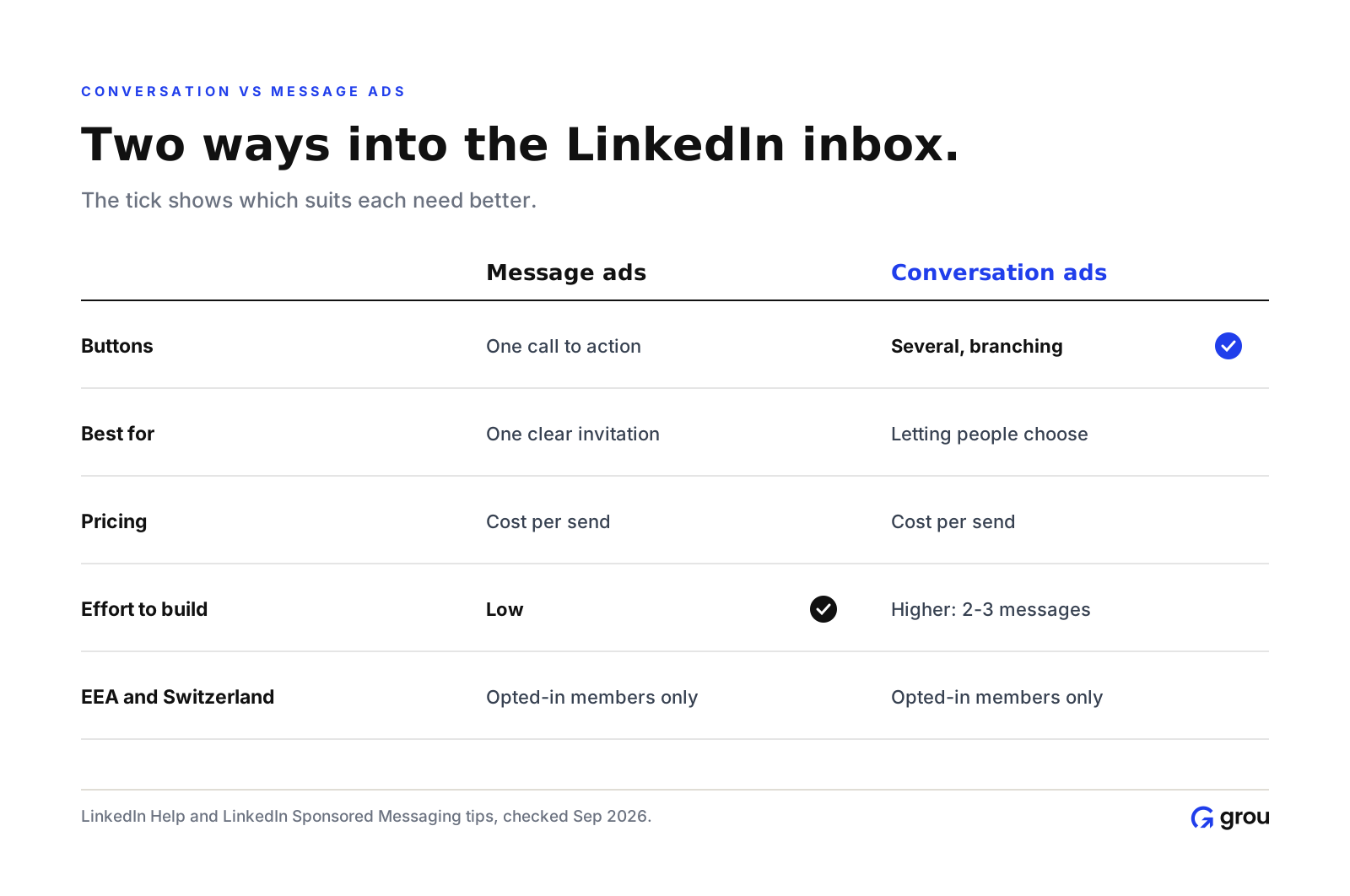
Both formats sit under LinkedIn's Sponsored Messaging. Message ads deliver one message with a single call-to-action button. Conversation ads add multiple buttons that branch into different paths (LinkedIn).
Message ads: best for one clear invitation, such as an event or a demo for engaged accounts.
Conversation ads: best when people need to choose, such as "send me the guide", "book a call" or "not now".
Some practitioners report message ads currently opening better than conversation ads for the same audience, so test both rather than assuming the interactive format wins.
What it costs
Sponsored Messaging uses a cost-per-send model: you pay each time a message is delivered.
One ABM benchmark report puts message ad sends at about $0.50 to $1.00 for targeted audiences (ZenABM).
A 2026 benchmark roundup, based on agency data it labels as directional, puts conversation ads near $0.92 per send (The Ad Spend).
Members can only receive a limited number of sponsored messages, so each send should carry a strong offer. The same ZenABM guide notes a 45-day frequency cap for message ads.

The maths that matters is cost per lead: divide your cost per send by your open rate, click rate and conversion rate. A cheap send with a weak offer is still an expensive lead.
The EU rule you need to know
LinkedIn supports EEA and Switzerland targeting for conversation and message ads, but only members in those countries who opted in to see Sponsored Messaging ads will receive them (LinkedIn Help). Expect much smaller delivery for European audiences, and plan Sponsored Content or Thought Leader Ads alongside.
How to build a conversation ad
LinkedIn's own guidance is to share information in bits rather than in bulk, with two to three messages and at least two buttons people can choose from (LinkedIn).

Intro message: short, personal, one question. Add two or three buttons, such as "Send me the benchmarks", "Book 15 minutes" and the required "Not interested".
Branch messages: one per button, each delivering exactly what was promised.
Final step: a Lead Gen Form or a link, with one clear action.
The "Not interested" button is required and added automatically to the intro message of new or edited conversation ads (LinkedIn Help). For message ads, the subject line can be up to 60 characters (LinkedIn Help).
When to use conversation ads
Event and webinar invitations for a defined account list.
Content offers with a choice of formats.
Re-engaging warm accounts that visited pricing or attended an event.
Avoid them for cold, broad audiences. They feel intrusive when the offer isn't relevant.
For the wider LinkedIn ads strategy, see our LinkedIn ads playbook, LinkedIn thought leader ads and B2B ad examples.
FAQ
What are LinkedIn conversation ads?
Sponsored messages in the LinkedIn inbox with multiple buttons that branch into different paths, so members can choose what they want.
How much do LinkedIn conversation ads cost?
They're priced per send. Benchmarks suggest roughly $0.50 to $1 per send for targeted B2B audiences, with cost per lead depending on your offer.
Can I run conversation ads in Europe?
Yes, but in the EEA and Switzerland only members who opted in to Sponsored Messaging will receive them, so reach is limited.
What's the difference between message ads and conversation ads?
Message ads have one call-to-action button. Conversation ads have several buttons that branch into different messages.
How many messages should a conversation ad have?
LinkedIn recommends two to three messages, each with at least two buttons.
About this guide
We are GROU, a B2B pipeline agency that runs lead generation, outbound, and LinkedIn content for clients across manufacturing, fintech, iGaming, software, and professional services. Platform rules come from LinkedIn's help pages; benchmarks are third-party and directional, checked September 2026.
LinkedIn updates Sponsored Messaging rules often. Check Campaign Manager before you launch.
LinkedIn conversation ads: setup and costs
LinkedIn conversation ads land in a member's LinkedIn inbox and let them choose a path with buttons, like a short branching chat. You pay per send, typically somewhere around $0.50 to $1 per message. Two things matter before you build one: in the EEA and Switzerland they only reach members who have opted in to sponsored messages, and every conversation ad now carries a required "Not interested" button.
TL;DR
Conversation ads are sponsored messages with multiple buttons. Message ads have a single button.
Pricing is cost per send. Benchmarks put most sends around $0.50 to $1.
In the EEA and Switzerland, only members who opted in receive sponsored messages.
LinkedIn recommends two to three messages with at least two buttons each.
Conversation ads vs message ads
Both formats sit under LinkedIn's Sponsored Messaging. Message ads deliver one message with a single call-to-action button. Conversation ads add multiple buttons that branch into different paths (LinkedIn).
Message ads: best for one clear invitation, such as an event or a demo for engaged accounts.
Conversation ads: best when people need to choose, such as "send me the guide", "book a call" or "not now".
Some practitioners report message ads currently opening better than conversation ads for the same audience, so test both rather than assuming the interactive format wins.
What it costs
Sponsored Messaging uses a cost-per-send model: you pay each time a message is delivered.
One ABM benchmark report puts message ad sends at about $0.50 to $1.00 for targeted audiences (ZenABM).
A 2026 benchmark roundup, based on agency data it labels as directional, puts conversation ads near $0.92 per send (The Ad Spend).
Members can only receive a limited number of sponsored messages, so each send should carry a strong offer. The same ZenABM guide notes a 45-day frequency cap for message ads.
The maths that matters is cost per lead: divide your cost per send by your open rate, click rate and conversion rate. A cheap send with a weak offer is still an expensive lead.
The EU rule you need to know
LinkedIn supports EEA and Switzerland targeting for conversation and message ads, but only members in those countries who opted in to see Sponsored Messaging ads will receive them (LinkedIn Help). Expect much smaller delivery for European audiences, and plan Sponsored Content or Thought Leader Ads alongside.
How to build a conversation ad
LinkedIn's own guidance is to share information in bits rather than in bulk, with two to three messages and at least two buttons people can choose from (LinkedIn).
Intro message: short, personal, one question. Add two or three buttons, such as "Send me the benchmarks", "Book 15 minutes" and the required "Not interested".
Branch messages: one per button, each delivering exactly what was promised.
Final step: a Lead Gen Form or a link, with one clear action.
The "Not interested" button is required and added automatically to the intro message of new or edited conversation ads (LinkedIn Help). For message ads, the subject line can be up to 60 characters (LinkedIn Help).
When to use conversation ads
Event and webinar invitations for a defined account list.
Content offers with a choice of formats.
Re-engaging warm accounts that visited pricing or attended an event.
Avoid them for cold, broad audiences. They feel intrusive when the offer isn't relevant.
For the wider LinkedIn ads strategy, see our LinkedIn ads playbook, LinkedIn thought leader ads and B2B ad examples.
FAQ
What are LinkedIn conversation ads?
Sponsored messages in the LinkedIn inbox with multiple buttons that branch into different paths, so members can choose what they want.
How much do LinkedIn conversation ads cost?
They're priced per send. Benchmarks suggest roughly $0.50 to $1 per send for targeted B2B audiences, with cost per lead depending on your offer.
Can I run conversation ads in Europe?
Yes, but in the EEA and Switzerland only members who opted in to Sponsored Messaging will receive them, so reach is limited.
What's the difference between message ads and conversation ads?
Message ads have one call-to-action button. Conversation ads have several buttons that branch into different messages.
How many messages should a conversation ad have?
LinkedIn recommends two to three messages, each with at least two buttons.
About this guide
We are GROU, a B2B pipeline agency that runs lead generation, outbound, and LinkedIn content for clients across manufacturing, fintech, iGaming, software, and professional services. Platform rules come from LinkedIn's help pages; benchmarks are third-party and directional, checked September 2026.
LinkedIn updates Sponsored Messaging rules often. Check Campaign Manager before you launch.
LinkedIn conversation ads: setup and costs
LinkedIn conversation ads land in a member's LinkedIn inbox and let them choose a path with buttons, like a short branching chat. You pay per send, typically somewhere around $0.50 to $1 per message. Two things matter before you build one: in the EEA and Switzerland they only reach members who have opted in to sponsored messages, and every conversation ad now carries a required "Not interested" button.
TL;DR
Conversation ads are sponsored messages with multiple buttons. Message ads have a single button.
Pricing is cost per send. Benchmarks put most sends around $0.50 to $1.
In the EEA and Switzerland, only members who opted in receive sponsored messages.
LinkedIn recommends two to three messages with at least two buttons each.
Conversation ads vs message ads
Both formats sit under LinkedIn's Sponsored Messaging. Message ads deliver one message with a single call-to-action button. Conversation ads add multiple buttons that branch into different paths (LinkedIn).
Message ads: best for one clear invitation, such as an event or a demo for engaged accounts.
Conversation ads: best when people need to choose, such as "send me the guide", "book a call" or "not now".
Some practitioners report message ads currently opening better than conversation ads for the same audience, so test both rather than assuming the interactive format wins.
What it costs
Sponsored Messaging uses a cost-per-send model: you pay each time a message is delivered.
One ABM benchmark report puts message ad sends at about $0.50 to $1.00 for targeted audiences (ZenABM).
A 2026 benchmark roundup, based on agency data it labels as directional, puts conversation ads near $0.92 per send (The Ad Spend).
Members can only receive a limited number of sponsored messages, so each send should carry a strong offer. The same ZenABM guide notes a 45-day frequency cap for message ads.
The maths that matters is cost per lead: divide your cost per send by your open rate, click rate and conversion rate. A cheap send with a weak offer is still an expensive lead.
The EU rule you need to know
LinkedIn supports EEA and Switzerland targeting for conversation and message ads, but only members in those countries who opted in to see Sponsored Messaging ads will receive them (LinkedIn Help). Expect much smaller delivery for European audiences, and plan Sponsored Content or Thought Leader Ads alongside.
How to build a conversation ad
LinkedIn's own guidance is to share information in bits rather than in bulk, with two to three messages and at least two buttons people can choose from (LinkedIn).
Intro message: short, personal, one question. Add two or three buttons, such as "Send me the benchmarks", "Book 15 minutes" and the required "Not interested".
Branch messages: one per button, each delivering exactly what was promised.
Final step: a Lead Gen Form or a link, with one clear action.
The "Not interested" button is required and added automatically to the intro message of new or edited conversation ads (LinkedIn Help). For message ads, the subject line can be up to 60 characters (LinkedIn Help).
When to use conversation ads
Event and webinar invitations for a defined account list.
Content offers with a choice of formats.
Re-engaging warm accounts that visited pricing or attended an event.
Avoid them for cold, broad audiences. They feel intrusive when the offer isn't relevant.
For the wider LinkedIn ads strategy, see our LinkedIn ads playbook, LinkedIn thought leader ads and B2B ad examples.
FAQ
What are LinkedIn conversation ads?
Sponsored messages in the LinkedIn inbox with multiple buttons that branch into different paths, so members can choose what they want.
How much do LinkedIn conversation ads cost?
They're priced per send. Benchmarks suggest roughly $0.50 to $1 per send for targeted B2B audiences, with cost per lead depending on your offer.
Can I run conversation ads in Europe?
Yes, but in the EEA and Switzerland only members who opted in to Sponsored Messaging will receive them, so reach is limited.
What's the difference between message ads and conversation ads?
Message ads have one call-to-action button. Conversation ads have several buttons that branch into different messages.
How many messages should a conversation ad have?
LinkedIn recommends two to three messages, each with at least two buttons.
About this guide
We are GROU, a B2B pipeline agency that runs lead generation, outbound, and LinkedIn content for clients across manufacturing, fintech, iGaming, software, and professional services. Platform rules come from LinkedIn's help pages; benchmarks are third-party and directional, checked September 2026.
LinkedIn updates Sponsored Messaging rules often. Check Campaign Manager before you launch.

Pipeline OS Newsletter
Build qualified pipeline
Get weekly tactics to generate demand, improve lead quality, and book more meetings.





Trusted by industry leaders
Trusted by industry leaders
Trusted by industry leaders
Ready to build qualified pipeline?
Ready to build qualified pipeline?
Ready to build qualified pipeline?
Book a call to see if we're the right fit, or take the 2-minute quiz to get a clear starting point.
Book a call to see if we're the right fit, or take the 2-minute quiz to get a clear starting point.
Book a call to see if we're the right fit, or take the 2-minute quiz to get a clear starting point.
" height="30.21639343089746px" id="hfGbXmQR2" width="30.216393430897455px"/></svg>)
Copyright © 2026 – All Right Reserved
Copyright © 2026 – All Right Reserved
Copyright © 2026 – All Right Reserved