%22%3E%3C/path%3E%3Cpath d=%22M 63.072 7.554 C 62.258 8.022 61.577 8.689 61.092 9.493 L 61.092 7.076 L 57.158 7.076 L 57.158 22.64 L 61.089 22.64 L 61.089 14.888 C 61.089 13.446 61.403 12.434 62.03 11.853 C 62.818 11.218 63.818 10.907 64.826 10.982 L 65.868 10.982 L 65.868 6.851 C 64.891 6.834 63.926 7.076 63.073 7.554 Z%22 fill=%22rgb(17,17,17)%22%3E%3C/path%3E%3Cpath d=%22M 78.916 7.82 C 76.363 6.49 73.321 6.49 70.768 7.82 C 69.562 8.473 68.564 9.451 67.888 10.644 C 67.167 11.931 66.803 13.387 66.834 14.862 C 66.804 16.332 67.157 17.785 67.86 19.077 C 68.515 20.267 69.494 21.246 70.684 21.901 C 71.924 22.576 73.318 22.92 74.73 22.898 C 76.164 22.918 77.58 22.575 78.846 21.901 C 80.062 21.247 81.073 20.27 81.768 19.077 C 82.506 17.797 82.88 16.339 82.85 14.862 C 82.88 13.389 82.517 11.934 81.797 10.647 C 81.12 9.455 80.122 8.477 78.917 7.824 M 78.803 14.862 C 78.829 15.739 78.636 16.608 78.241 17.391 C 77.903 18.046 77.38 18.588 76.738 18.95 C 76.124 19.293 75.432 19.472 74.729 19.47 C 73.668 19.497 72.648 19.061 71.934 18.276 C 71.139 17.323 70.741 16.1 70.823 14.862 C 70.741 13.62 71.149 12.395 71.959 11.45 C 72.687 10.667 73.715 10.233 74.783 10.256 C 75.859 10.236 76.894 10.67 77.635 11.45 C 78.464 12.387 78.884 13.616 78.801 14.864%22 fill=%22rgb(17,17,17)%22%3E%3C/path%3E%3Cpath d=%22M 95.906 7.076 L 95.906 15.646 C 95.975 16.68 95.643 17.701 94.979 18.498 C 94.311 19.184 93.379 19.547 92.422 19.495 C 91.475 19.544 90.553 19.18 89.894 18.498 C 89.23 17.701 88.898 16.68 88.967 15.646 L 88.967 7.076 L 85.033 7.076 L 85.033 16.207 C 85 17.449 85.275 18.68 85.834 19.79 C 86.327 20.75 87.095 21.542 88.039 22.065 C 89.033 22.594 90.145 22.861 91.271 22.838 C 92.188 22.847 93.095 22.65 93.926 22.263 C 94.708 21.905 95.388 21.36 95.906 20.675 L 95.906 22.645 L 99.865 22.645 L 99.865 7.076 Z%22 fill=%22rgb(17,17,17)%22%3E%3C/path%3E%3Cpath d=%22M 4.513 15.626 C 4.511 10.815 7.606 6.549 12.181 5.059 C 16.756 3.57 21.77 5.195 24.601 9.086 L 27.816 5.87 C 24.074 1.186 17.981 -0.943 12.137 0.393 C 6.292 1.728 1.728 6.292 0.393 12.137 C -0.943 17.981 1.186 24.074 5.87 27.816 L 9.085 24.601 C 6.214 22.512 4.515 19.177 4.513 15.626%22 fill=%22rgb(32,62,235)%22%3E%3C/path%3E%3Cpath d=%22M 17.114 14.343 L 13.354 18.01 L 13.354 18.026 L 21.071 18.026 L 11.412 27.609 L 17.389 27.609 L 23.999 21.081 L 23.999 28.316 L 24.005 28.316 L 27.967 24.393 L 27.967 14.343 Z%22 fill=%22rgb(32,62,235)%22%3E%3C/path%3E%3C/g%3E%3C/svg%3E) ×
× ××
××›
›
›
›
Reply.io review 2026
Reply.io review 2026
Reply.io review 2026
Reply.io review 2026
Reply.io review 2026
Reply.io review 2026

Author
Aljaz Peklaj

Reply.io is not one product. It is a sequencing tool, a multichannel tool, an AI SDR service and an agency platform, sold under one name at prices that run from $49 a month to several thousand.
Most reviews compare it to other sequencers, which answers the wrong question. The useful question is which Reply you are buying, and the answer hinges on a detail buried in the plan comparison: the cheaper email plan gives you unlimited mailboxes and the more expensive multichannel plan caps you at ten.
TL;DR
Reply sells four things. Email Volume starts at $49 per user a month for 1,000 active contacts and scales to $899 per user a month at 500,000, with unlimited emails and unlimited mailboxes subject to a fair usage policy, and it charges separately for LinkedIn at $69 per account a month and for Calls and SMS at $29 per account a month. Multichannel starts at $89 per user a month on annual billing with unlimited active contacts and the other channels bundled, but it includes ten mailboxes rather than unlimited. The AI SDR product, Jason, is a different order of magnitude: $500 to $1,000 a month for 1,000 to 3,000 active contacts, $1,500 to $3,000 for 5,000 to 10,000, with enterprise on request. Agency Core starts at $210 a month with unlimited clients and users. The deliverability tooling is genuinely comprehensive, covering warm-up, mailbox rotation, validation, DNS health checks and Google Postmaster monitoring, but none of it moves the ceiling that Google sets for bulk senders. Pick on mailboxes and channels, not on the headline price, because that is where the plans actually differ.
Four products, one brand
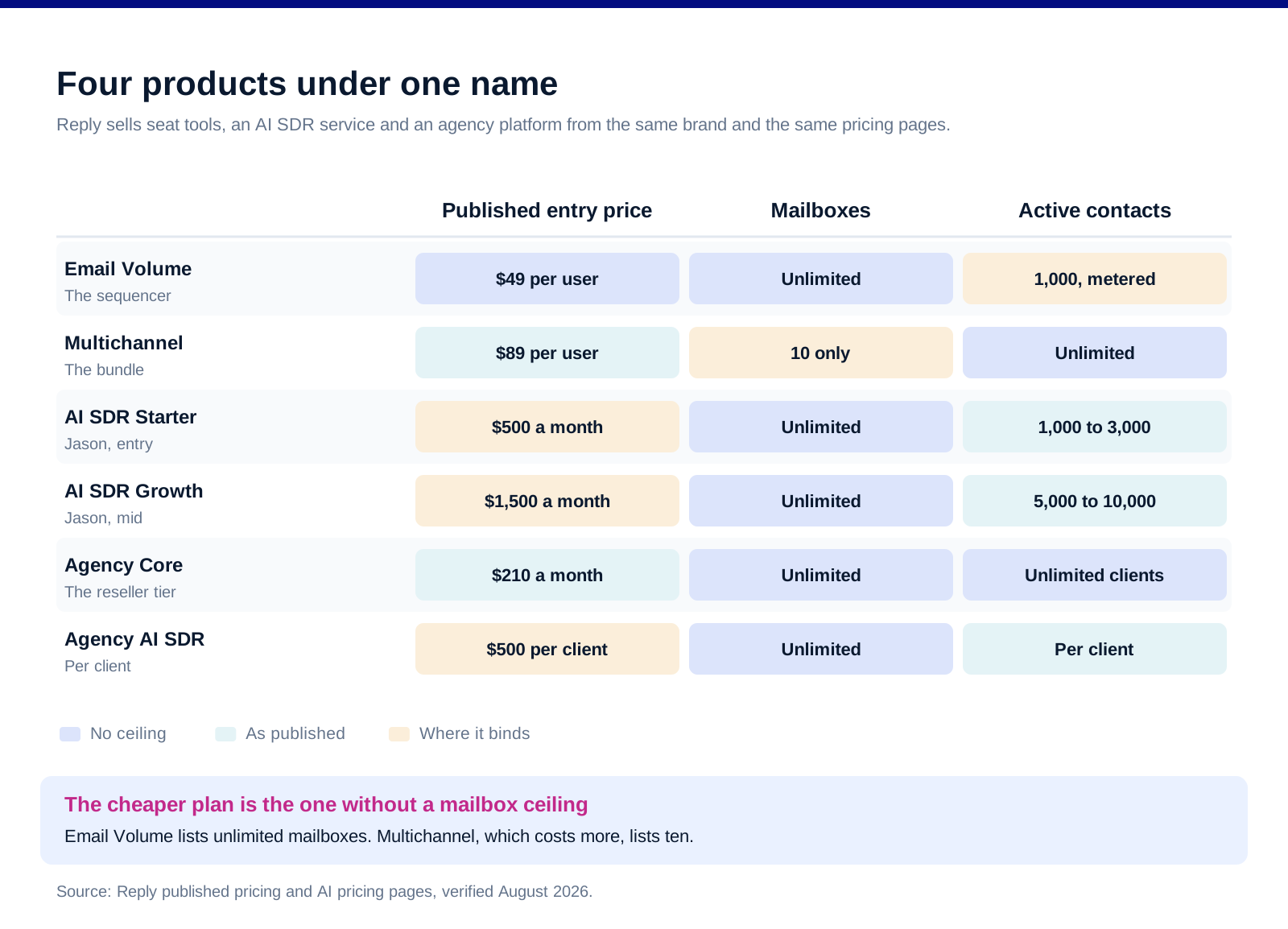
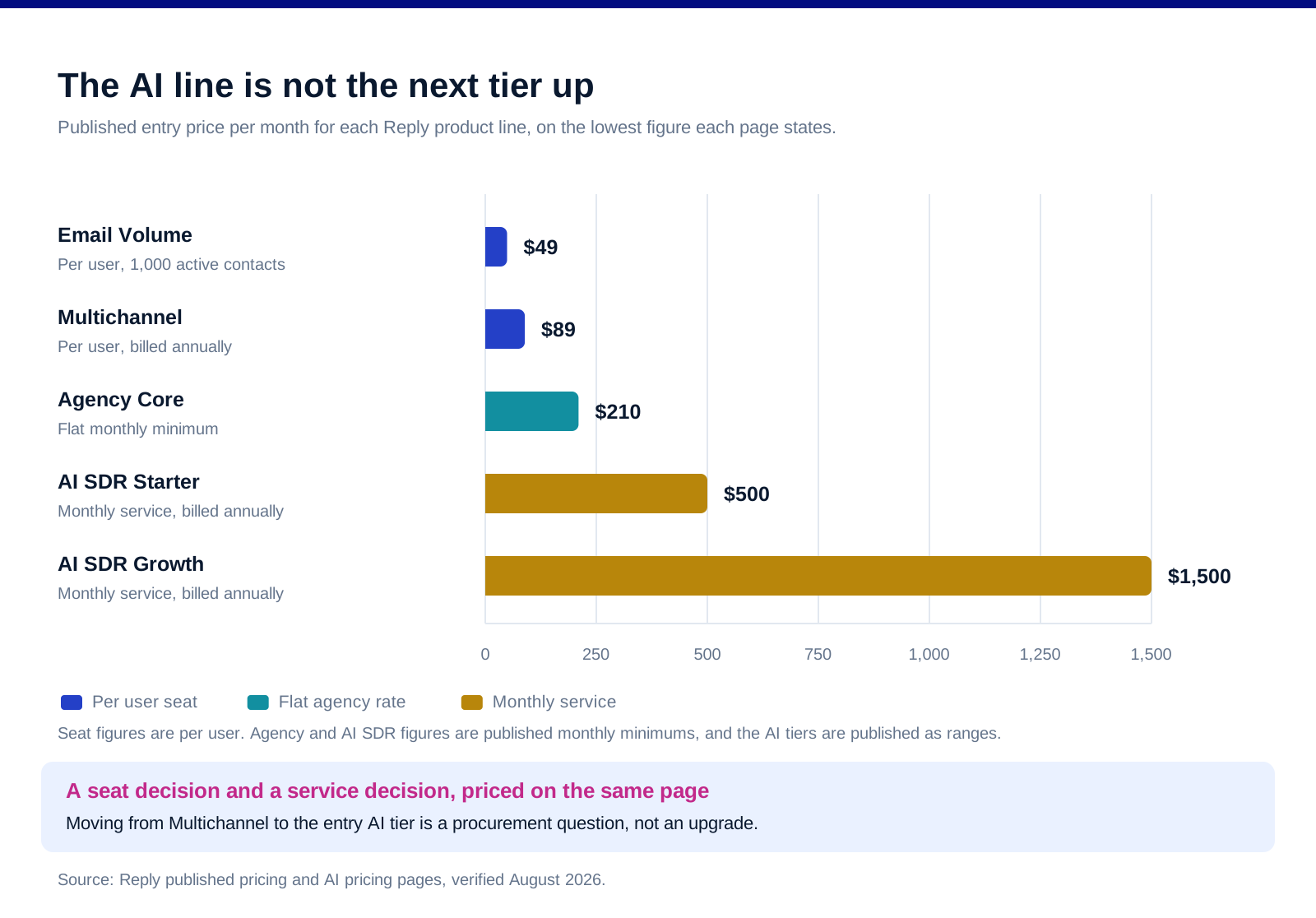
Email Volume is the sequencer. Reply's pricing page starts it at "$49 per user/month" for 1,000 active contacts and scales the same plan up to "$899 per user/month" at 500,000, with unlimited emails to active contacts and 50 live data credits a month.
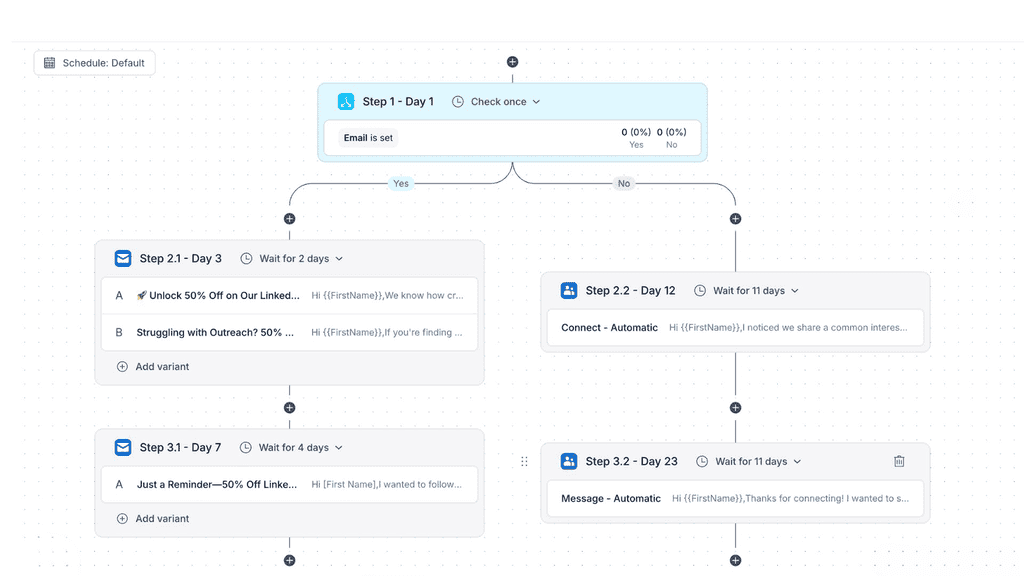
Multichannel is the bundle. It starts at "$89 per user/month" on annual billing, removes the active contact ceiling entirely, and folds LinkedIn, SMS, calls and semi-automated WhatsApp into the seat rather than charging for them separately.
Jason is an AI SDR service priced like one. Reply's AI pricing page lists Starter at "$500" to "$1.000 /month" billed annually for 1,000 to 3,000 active contacts, Growth at "$1500" to "$3000 /month billed annually" for 5,000 to 10,000, and Enterprise on request for 25,000 to 50,000. All three include unlimited users and unlimited mailboxes.
Agency Core is the reseller tier. It starts at "$210/month" with unlimited clients and users, with an Agency AI SDR option at "$500/month/client".
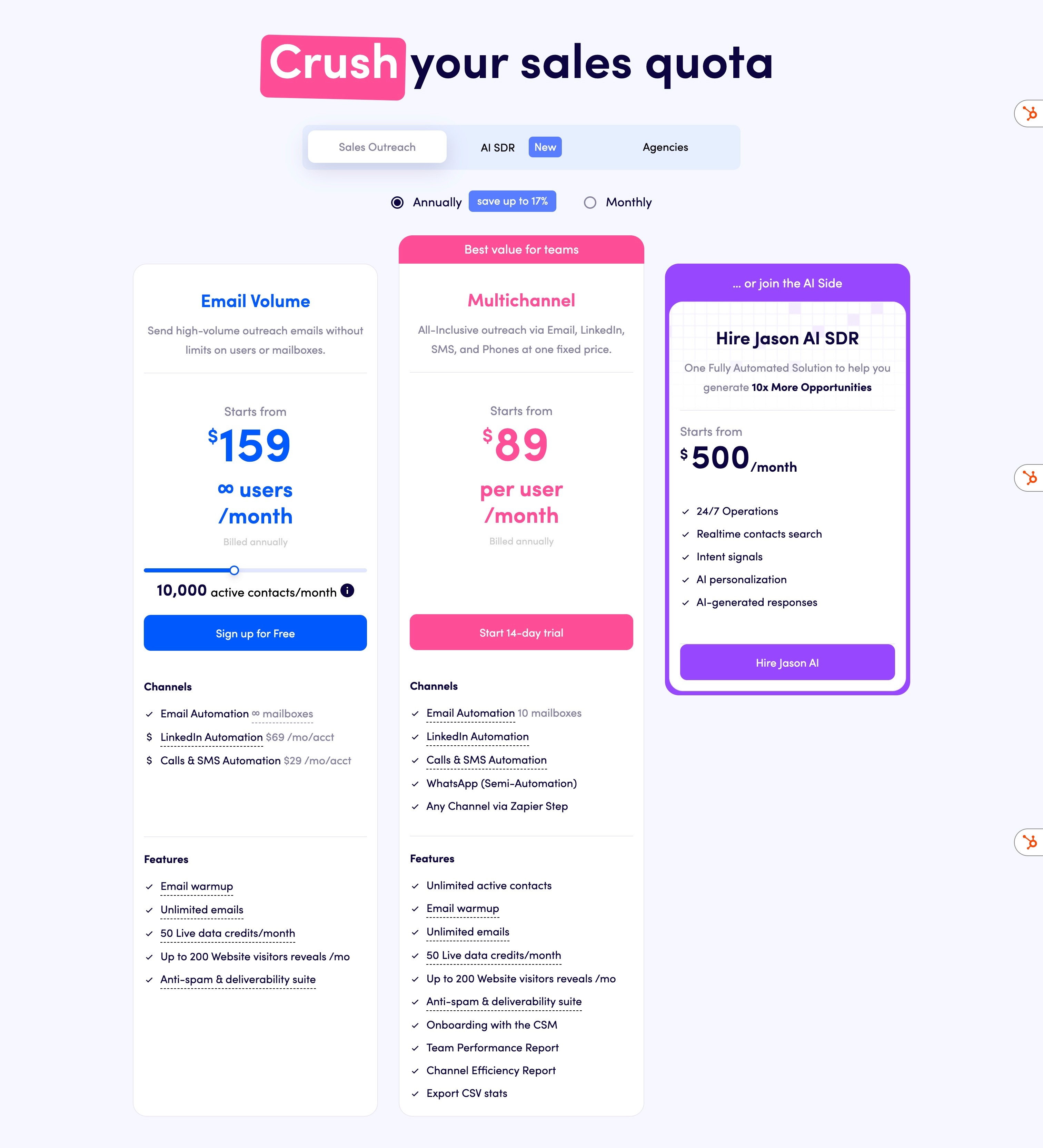
The jump between lines is not incremental. A team moving from Multichannel to the entry AI SDR tier is moving from a per-seat tool to a monthly service commitment. That is a procurement decision, not an upgrade, and treating it as the next tier up is how budgets get missed.
The plan choice is mailboxes against channels
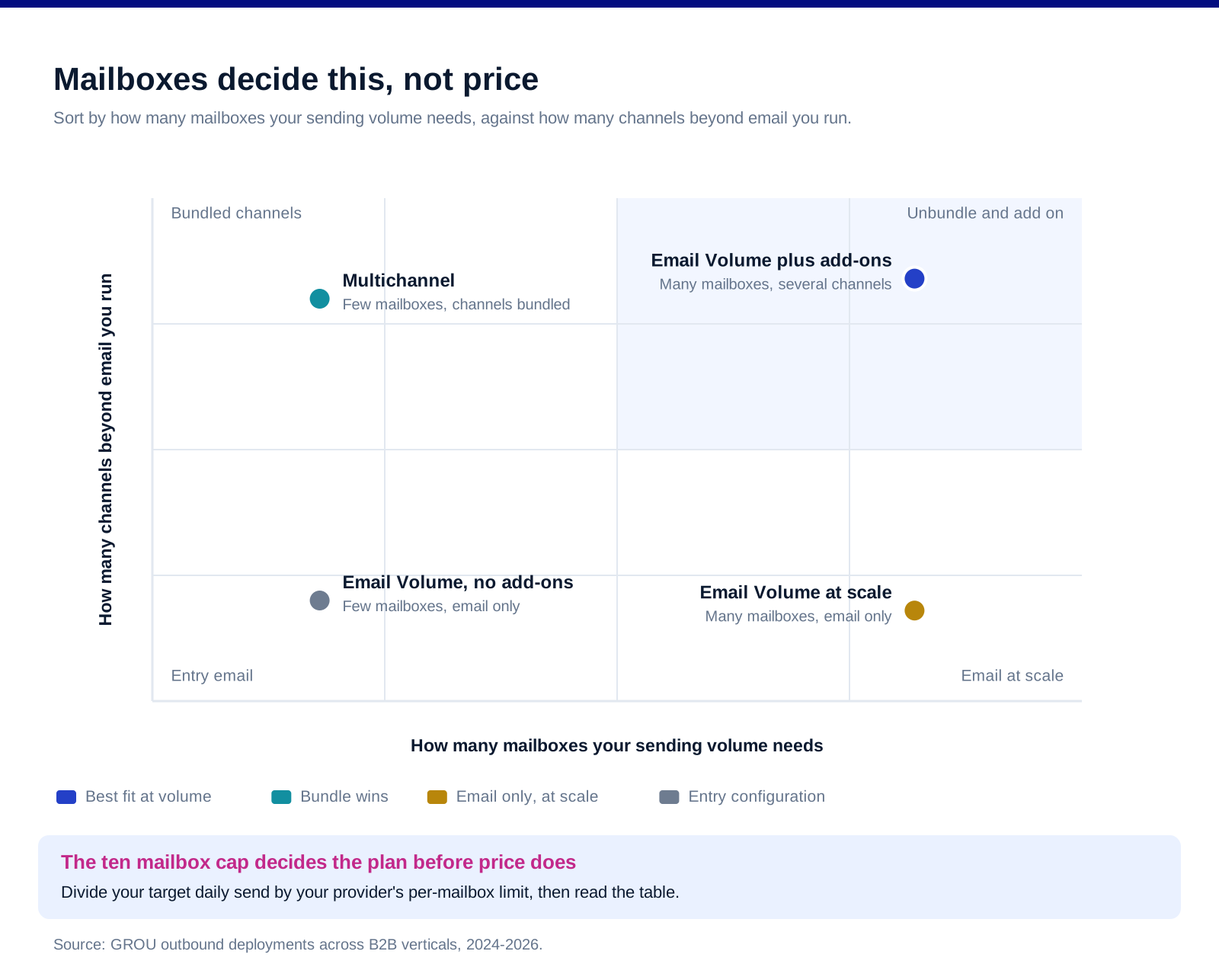
This is the detail that decides the plan. Email Volume lists unlimited mailboxes, qualified on the page as "Subject to our Fair Usage Policy". Multichannel lists "10 mailboxes". The cheaper plan is the one without a mailbox ceiling.
Which inverts the usual upgrade logic. Mailbox count is the real throughput constraint on a cold email programme, because each mailbox carries its own provider limit. Buying the more expensive plan to send more email can leave you with less capacity than the cheaper one.
Multichannel is buying bundled channels, not scale. On Email Volume, LinkedIn is "$69 /mo/acct" and Calls and SMS are "$29 /mo/acct". On Multichannel those channels come with the seat. If you run three channels on one seat, the bundle is straightforwardly cheaper. If you run email across fifteen mailboxes, it is not available to you at all.
So work out the mailbox count first. Divide your target daily send by your provider's per-mailbox limit and you have the number that picks your plan. Everything else in the comparison is secondary to it.
The active contact model cuts the other way. Email Volume meters active contacts and Multichannel does not. A team with a large but slow-moving list pays for it on Email Volume and does not on Multichannel. Two constraints, pointing in opposite directions, which is why the plan table does not answer the question on its own.
The deliverability stack, and the ceiling it cannot move
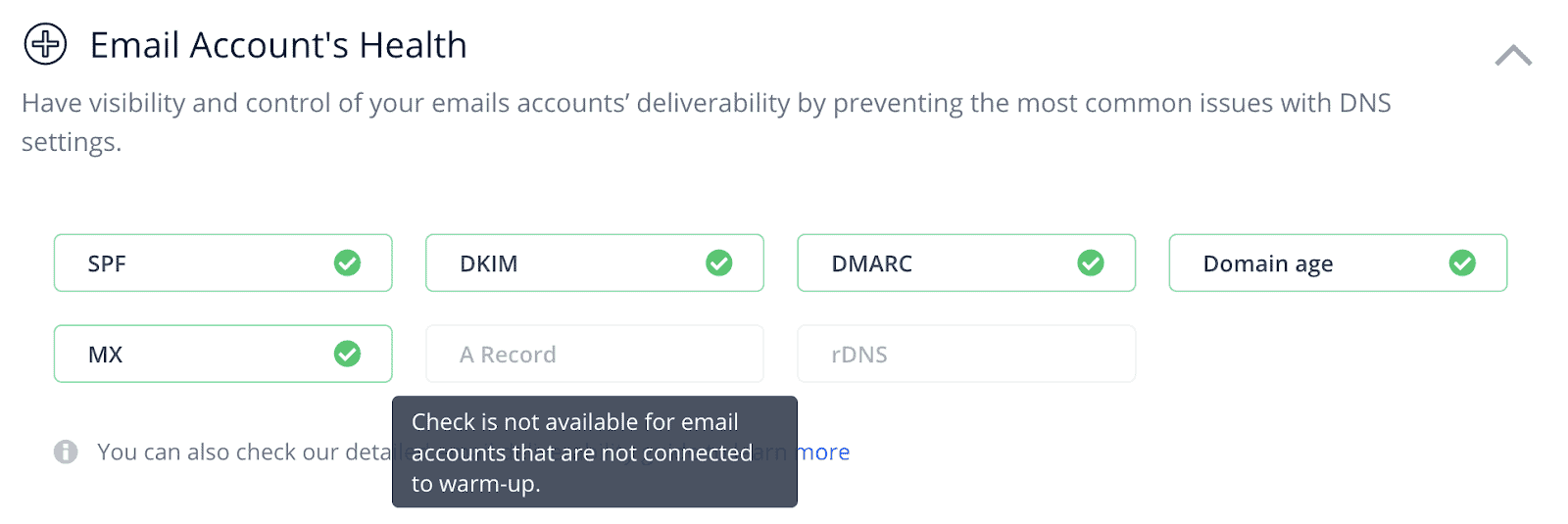
The tooling is comprehensive and named. Reply's deliverability page lists automated warm-up described as "Free Warmup for Every Mailbox", mailbox rotation to raise volume across a campaign, email verification classifying addresses as "Valid, Risky, or Invalid", an Email Health Checker for DNS configuration, and Google Postmaster monitoring for Gmail spam reports.
That is the right set of features. Warm-up, rotation, validation and DNS checks are the four things a sending programme actually needs, and having them in the platform rather than in three separate subscriptions is a real advantage over tools that only sequence.
None of it changes what Google requires. Google's sender guidelines apply to anyone sending more than 5,000 messages a day to Gmail accounts: SPF and DKIM on the domain, DMARC on the sending domain, spam rates in Postmaster Tools kept "below 0.30%", and one-click unsubscribe on marketing and subscribed messages.
The 0.30% figure is the one to internalise. It is roughly three complaints in a thousand. No warm-up tool, in any platform, buys you room above it, and a programme that treats deliverability software as insurance against a bad list will find that out at volume. Our deliverability guide covers what sits underneath the tooling.
Reply's own performance claims are Reply's. The deliverability page claims sending through the Gmail API will "Increase your average open rates by 15%", alongside "30+ features to ensure your emails reach the Inbox" and "Trusted by 3,000+ businesses". Those are vendor statements about the vendor's product and we publish them as such rather than as findings.
Who should buy it, and who should not
Teams running one seat across many mailboxes. Email Volume with unlimited mailboxes is the strongest configuration Reply offers, and it is the cheap one.
Teams running genuinely multichannel sequences at modest volume. Ten mailboxes is plenty for a small team, and getting LinkedIn, calls and SMS inside the seat price beats assembling them from add-ons.
Agencies with several small clients. $210 a month with unlimited clients and unlimited mailboxes is a different economic shape from per-seat pricing, and it is the plan most reviews skip.
Not teams that only want a cheap sequencer. At $49 per user a month for 1,000 active contacts, Reply is not competing on price with dedicated cold email tools, and the features you are paying for are the ones you would not use.
Not teams buying AI SDR on impulse. The Jason tiers start at $500 a month and run to $3,000 on published figures. That is a service budget, and it deserves the scrutiny a service gets rather than the scrutiny a software tier gets.
What Reply does not publish
No per-mailbox sending limit of its own. Which is correct, because the limit belongs to your mailbox provider, but it does mean the unlimited mailbox claim is bounded by a fair usage policy whose terms are not on the pricing page.
No reply rate, meeting rate or deliverability benchmark that we would repeat. Every figure of that kind on the site is a vendor claim, and we have attributed the ones we quote.
No exact AI SDR price. The tiers are published as ranges, so the number you pay is negotiated.
No published overage behaviour for active contacts. What happens when you cross your Email Volume tier mid-month is not stated.
FAQ
How much does Reply.io cost?
Email Volume starts at $49 per user a month for 1,000 active contacts and scales to $899 per user a month at 500,000. Multichannel starts at $89 per user a month on annual billing with unlimited active contacts. The AI SDR product runs from $500 to $3,000 a month on published ranges depending on contact volume, and Agency Core starts at $210 a month. There is a 14 day free trial.
Is Reply.io good for cold email?
For a team sending across many mailboxes, yes, and specifically on the Email Volume plan, which lists unlimited mailboxes subject to a fair usage policy. The deliverability tooling covers warm-up, rotation, validation, DNS health checks and Postmaster monitoring in one place. Whether it is good value depends on how many active contacts you meter, because that is what the plan charges for.
What is the difference between Reply.io's Email Volume and Multichannel plans?
Email Volume meters active contacts, includes unlimited mailboxes, and charges separately for LinkedIn at $69 per account a month and Calls and SMS at $29 per account a month. Multichannel removes the active contact limit and bundles the channels into the seat, but includes ten mailboxes rather than unlimited. The trade is channels against mailboxes, and which one binds depends on your sending volume.
How many mailboxes can you connect to Reply.io?
The Email Volume plan lists unlimited mailboxes, qualified as subject to a fair usage policy whose terms are not stated on the pricing page. The Multichannel plan lists ten. The AI SDR plans list unlimited mailboxes and warm-ups. Because per-mailbox sending limits are set by your email provider rather than by Reply, mailbox count is usually the binding constraint on total volume.
What is Jason AI in Reply.io?
Jason is Reply's AI SDR product, priced separately from the seat plans. Published tiers are Starter at $500 to $1,000 a month for 1,000 to 3,000 active contacts, Growth at $1,500 to $3,000 for 5,000 to 10,000, and Enterprise on request for 25,000 to 50,000, all billed annually with unlimited users and mailboxes. The prices are published as ranges rather than fixed figures.
Does Reply.io fix email deliverability?
It gives you the tools, not the outcome. Warm-up, mailbox rotation, validation, DNS checks and Postmaster monitoring are all in the platform, and having them in one place is a real advantage. But Google requires anyone sending more than 5,000 messages a day to Gmail to hold spam rates below 0.30% in Postmaster Tools, with SPF, DKIM and DMARC in place, and no tool creates headroom above that threshold. List quality and targeting still decide the outcome.
Bottom line
Reply is four products and the review that treats it as one will steer you wrong. Ignore the tier names and answer two questions: how many mailboxes does your volume need, and how many channels do you actually run. If the answer is many mailboxes, Email Volume is the plan and the add-ons are the price of the other channels. If the answer is few mailboxes and several channels, Multichannel bundles them and the ten mailbox cap will not bind. If you are an agency, the $210 tier with unlimited clients is a different shape of deal that most comparisons never mention. And if you are looking at Jason, price it as a service rather than as the next tier, because on published figures it is an order of magnitude away from the seat plans.
Want the sending programme run rather than the plan table decoded? Book a call with GROU. We run outbound and lead generation inside B2B revenue engines across verticals. If you are weighing it against the obvious alternative, our Klenty review covers the closest comparison and the head to head puts them side by side.
We are GROU, a B2B pipeline agency that runs lead generation, outbound, and LinkedIn content for clients across manufacturing, fintech, iGaming, software, and professional services. Some links in this article are affiliate links, including Reply.io. We only recommend tools we have deployed, and this review tells a segment of readers to buy the cheaper plan.
Reply.io is not one product. It is a sequencing tool, a multichannel tool, an AI SDR service and an agency platform, sold under one name at prices that run from $49 a month to several thousand.
Most reviews compare it to other sequencers, which answers the wrong question. The useful question is which Reply you are buying, and the answer hinges on a detail buried in the plan comparison: the cheaper email plan gives you unlimited mailboxes and the more expensive multichannel plan caps you at ten.
TL;DR
Reply sells four things. Email Volume starts at $49 per user a month for 1,000 active contacts and scales to $899 per user a month at 500,000, with unlimited emails and unlimited mailboxes subject to a fair usage policy, and it charges separately for LinkedIn at $69 per account a month and for Calls and SMS at $29 per account a month. Multichannel starts at $89 per user a month on annual billing with unlimited active contacts and the other channels bundled, but it includes ten mailboxes rather than unlimited. The AI SDR product, Jason, is a different order of magnitude: $500 to $1,000 a month for 1,000 to 3,000 active contacts, $1,500 to $3,000 for 5,000 to 10,000, with enterprise on request. Agency Core starts at $210 a month with unlimited clients and users. The deliverability tooling is genuinely comprehensive, covering warm-up, mailbox rotation, validation, DNS health checks and Google Postmaster monitoring, but none of it moves the ceiling that Google sets for bulk senders. Pick on mailboxes and channels, not on the headline price, because that is where the plans actually differ.
Four products, one brand
Email Volume is the sequencer. Reply's pricing page starts it at "$49 per user/month" for 1,000 active contacts and scales the same plan up to "$899 per user/month" at 500,000, with unlimited emails to active contacts and 50 live data credits a month.
Multichannel is the bundle. It starts at "$89 per user/month" on annual billing, removes the active contact ceiling entirely, and folds LinkedIn, SMS, calls and semi-automated WhatsApp into the seat rather than charging for them separately.
Jason is an AI SDR service priced like one. Reply's AI pricing page lists Starter at "$500" to "$1.000 /month" billed annually for 1,000 to 3,000 active contacts, Growth at "$1500" to "$3000 /month billed annually" for 5,000 to 10,000, and Enterprise on request for 25,000 to 50,000. All three include unlimited users and unlimited mailboxes.
Agency Core is the reseller tier. It starts at "$210/month" with unlimited clients and users, with an Agency AI SDR option at "$500/month/client".
The jump between lines is not incremental. A team moving from Multichannel to the entry AI SDR tier is moving from a per-seat tool to a monthly service commitment. That is a procurement decision, not an upgrade, and treating it as the next tier up is how budgets get missed.
The plan choice is mailboxes against channels
This is the detail that decides the plan. Email Volume lists unlimited mailboxes, qualified on the page as "Subject to our Fair Usage Policy". Multichannel lists "10 mailboxes". The cheaper plan is the one without a mailbox ceiling.
Which inverts the usual upgrade logic. Mailbox count is the real throughput constraint on a cold email programme, because each mailbox carries its own provider limit. Buying the more expensive plan to send more email can leave you with less capacity than the cheaper one.
Multichannel is buying bundled channels, not scale. On Email Volume, LinkedIn is "$69 /mo/acct" and Calls and SMS are "$29 /mo/acct". On Multichannel those channels come with the seat. If you run three channels on one seat, the bundle is straightforwardly cheaper. If you run email across fifteen mailboxes, it is not available to you at all.
So work out the mailbox count first. Divide your target daily send by your provider's per-mailbox limit and you have the number that picks your plan. Everything else in the comparison is secondary to it.
The active contact model cuts the other way. Email Volume meters active contacts and Multichannel does not. A team with a large but slow-moving list pays for it on Email Volume and does not on Multichannel. Two constraints, pointing in opposite directions, which is why the plan table does not answer the question on its own.
The deliverability stack, and the ceiling it cannot move
The tooling is comprehensive and named. Reply's deliverability page lists automated warm-up described as "Free Warmup for Every Mailbox", mailbox rotation to raise volume across a campaign, email verification classifying addresses as "Valid, Risky, or Invalid", an Email Health Checker for DNS configuration, and Google Postmaster monitoring for Gmail spam reports.
That is the right set of features. Warm-up, rotation, validation and DNS checks are the four things a sending programme actually needs, and having them in the platform rather than in three separate subscriptions is a real advantage over tools that only sequence.
None of it changes what Google requires. Google's sender guidelines apply to anyone sending more than 5,000 messages a day to Gmail accounts: SPF and DKIM on the domain, DMARC on the sending domain, spam rates in Postmaster Tools kept "below 0.30%", and one-click unsubscribe on marketing and subscribed messages.
The 0.30% figure is the one to internalise. It is roughly three complaints in a thousand. No warm-up tool, in any platform, buys you room above it, and a programme that treats deliverability software as insurance against a bad list will find that out at volume. Our deliverability guide covers what sits underneath the tooling.
Reply's own performance claims are Reply's. The deliverability page claims sending through the Gmail API will "Increase your average open rates by 15%", alongside "30+ features to ensure your emails reach the Inbox" and "Trusted by 3,000+ businesses". Those are vendor statements about the vendor's product and we publish them as such rather than as findings.
Who should buy it, and who should not
Teams running one seat across many mailboxes. Email Volume with unlimited mailboxes is the strongest configuration Reply offers, and it is the cheap one.
Teams running genuinely multichannel sequences at modest volume. Ten mailboxes is plenty for a small team, and getting LinkedIn, calls and SMS inside the seat price beats assembling them from add-ons.
Agencies with several small clients. $210 a month with unlimited clients and unlimited mailboxes is a different economic shape from per-seat pricing, and it is the plan most reviews skip.
Not teams that only want a cheap sequencer. At $49 per user a month for 1,000 active contacts, Reply is not competing on price with dedicated cold email tools, and the features you are paying for are the ones you would not use.
Not teams buying AI SDR on impulse. The Jason tiers start at $500 a month and run to $3,000 on published figures. That is a service budget, and it deserves the scrutiny a service gets rather than the scrutiny a software tier gets.
What Reply does not publish
No per-mailbox sending limit of its own. Which is correct, because the limit belongs to your mailbox provider, but it does mean the unlimited mailbox claim is bounded by a fair usage policy whose terms are not on the pricing page.
No reply rate, meeting rate or deliverability benchmark that we would repeat. Every figure of that kind on the site is a vendor claim, and we have attributed the ones we quote.
No exact AI SDR price. The tiers are published as ranges, so the number you pay is negotiated.
No published overage behaviour for active contacts. What happens when you cross your Email Volume tier mid-month is not stated.
FAQ
How much does Reply.io cost?
Email Volume starts at $49 per user a month for 1,000 active contacts and scales to $899 per user a month at 500,000. Multichannel starts at $89 per user a month on annual billing with unlimited active contacts. The AI SDR product runs from $500 to $3,000 a month on published ranges depending on contact volume, and Agency Core starts at $210 a month. There is a 14 day free trial.
Is Reply.io good for cold email?
For a team sending across many mailboxes, yes, and specifically on the Email Volume plan, which lists unlimited mailboxes subject to a fair usage policy. The deliverability tooling covers warm-up, rotation, validation, DNS health checks and Postmaster monitoring in one place. Whether it is good value depends on how many active contacts you meter, because that is what the plan charges for.
What is the difference between Reply.io's Email Volume and Multichannel plans?
Email Volume meters active contacts, includes unlimited mailboxes, and charges separately for LinkedIn at $69 per account a month and Calls and SMS at $29 per account a month. Multichannel removes the active contact limit and bundles the channels into the seat, but includes ten mailboxes rather than unlimited. The trade is channels against mailboxes, and which one binds depends on your sending volume.
How many mailboxes can you connect to Reply.io?
The Email Volume plan lists unlimited mailboxes, qualified as subject to a fair usage policy whose terms are not stated on the pricing page. The Multichannel plan lists ten. The AI SDR plans list unlimited mailboxes and warm-ups. Because per-mailbox sending limits are set by your email provider rather than by Reply, mailbox count is usually the binding constraint on total volume.
What is Jason AI in Reply.io?
Jason is Reply's AI SDR product, priced separately from the seat plans. Published tiers are Starter at $500 to $1,000 a month for 1,000 to 3,000 active contacts, Growth at $1,500 to $3,000 for 5,000 to 10,000, and Enterprise on request for 25,000 to 50,000, all billed annually with unlimited users and mailboxes. The prices are published as ranges rather than fixed figures.
Does Reply.io fix email deliverability?
It gives you the tools, not the outcome. Warm-up, mailbox rotation, validation, DNS checks and Postmaster monitoring are all in the platform, and having them in one place is a real advantage. But Google requires anyone sending more than 5,000 messages a day to Gmail to hold spam rates below 0.30% in Postmaster Tools, with SPF, DKIM and DMARC in place, and no tool creates headroom above that threshold. List quality and targeting still decide the outcome.
Bottom line
Reply is four products and the review that treats it as one will steer you wrong. Ignore the tier names and answer two questions: how many mailboxes does your volume need, and how many channels do you actually run. If the answer is many mailboxes, Email Volume is the plan and the add-ons are the price of the other channels. If the answer is few mailboxes and several channels, Multichannel bundles them and the ten mailbox cap will not bind. If you are an agency, the $210 tier with unlimited clients is a different shape of deal that most comparisons never mention. And if you are looking at Jason, price it as a service rather than as the next tier, because on published figures it is an order of magnitude away from the seat plans.
Want the sending programme run rather than the plan table decoded? Book a call with GROU. We run outbound and lead generation inside B2B revenue engines across verticals. If you are weighing it against the obvious alternative, our Klenty review covers the closest comparison and the head to head puts them side by side.
We are GROU, a B2B pipeline agency that runs lead generation, outbound, and LinkedIn content for clients across manufacturing, fintech, iGaming, software, and professional services. Some links in this article are affiliate links, including Reply.io. We only recommend tools we have deployed, and this review tells a segment of readers to buy the cheaper plan.
Reply.io is not one product. It is a sequencing tool, a multichannel tool, an AI SDR service and an agency platform, sold under one name at prices that run from $49 a month to several thousand.
Most reviews compare it to other sequencers, which answers the wrong question. The useful question is which Reply you are buying, and the answer hinges on a detail buried in the plan comparison: the cheaper email plan gives you unlimited mailboxes and the more expensive multichannel plan caps you at ten.
TL;DR
Reply sells four things. Email Volume starts at $49 per user a month for 1,000 active contacts and scales to $899 per user a month at 500,000, with unlimited emails and unlimited mailboxes subject to a fair usage policy, and it charges separately for LinkedIn at $69 per account a month and for Calls and SMS at $29 per account a month. Multichannel starts at $89 per user a month on annual billing with unlimited active contacts and the other channels bundled, but it includes ten mailboxes rather than unlimited. The AI SDR product, Jason, is a different order of magnitude: $500 to $1,000 a month for 1,000 to 3,000 active contacts, $1,500 to $3,000 for 5,000 to 10,000, with enterprise on request. Agency Core starts at $210 a month with unlimited clients and users. The deliverability tooling is genuinely comprehensive, covering warm-up, mailbox rotation, validation, DNS health checks and Google Postmaster monitoring, but none of it moves the ceiling that Google sets for bulk senders. Pick on mailboxes and channels, not on the headline price, because that is where the plans actually differ.
Four products, one brand
Email Volume is the sequencer. Reply's pricing page starts it at "$49 per user/month" for 1,000 active contacts and scales the same plan up to "$899 per user/month" at 500,000, with unlimited emails to active contacts and 50 live data credits a month.
Multichannel is the bundle. It starts at "$89 per user/month" on annual billing, removes the active contact ceiling entirely, and folds LinkedIn, SMS, calls and semi-automated WhatsApp into the seat rather than charging for them separately.
Jason is an AI SDR service priced like one. Reply's AI pricing page lists Starter at "$500" to "$1.000 /month" billed annually for 1,000 to 3,000 active contacts, Growth at "$1500" to "$3000 /month billed annually" for 5,000 to 10,000, and Enterprise on request for 25,000 to 50,000. All three include unlimited users and unlimited mailboxes.
Agency Core is the reseller tier. It starts at "$210/month" with unlimited clients and users, with an Agency AI SDR option at "$500/month/client".
The jump between lines is not incremental. A team moving from Multichannel to the entry AI SDR tier is moving from a per-seat tool to a monthly service commitment. That is a procurement decision, not an upgrade, and treating it as the next tier up is how budgets get missed.
The plan choice is mailboxes against channels
This is the detail that decides the plan. Email Volume lists unlimited mailboxes, qualified on the page as "Subject to our Fair Usage Policy". Multichannel lists "10 mailboxes". The cheaper plan is the one without a mailbox ceiling.
Which inverts the usual upgrade logic. Mailbox count is the real throughput constraint on a cold email programme, because each mailbox carries its own provider limit. Buying the more expensive plan to send more email can leave you with less capacity than the cheaper one.
Multichannel is buying bundled channels, not scale. On Email Volume, LinkedIn is "$69 /mo/acct" and Calls and SMS are "$29 /mo/acct". On Multichannel those channels come with the seat. If you run three channels on one seat, the bundle is straightforwardly cheaper. If you run email across fifteen mailboxes, it is not available to you at all.
So work out the mailbox count first. Divide your target daily send by your provider's per-mailbox limit and you have the number that picks your plan. Everything else in the comparison is secondary to it.
The active contact model cuts the other way. Email Volume meters active contacts and Multichannel does not. A team with a large but slow-moving list pays for it on Email Volume and does not on Multichannel. Two constraints, pointing in opposite directions, which is why the plan table does not answer the question on its own.
The deliverability stack, and the ceiling it cannot move
The tooling is comprehensive and named. Reply's deliverability page lists automated warm-up described as "Free Warmup for Every Mailbox", mailbox rotation to raise volume across a campaign, email verification classifying addresses as "Valid, Risky, or Invalid", an Email Health Checker for DNS configuration, and Google Postmaster monitoring for Gmail spam reports.
That is the right set of features. Warm-up, rotation, validation and DNS checks are the four things a sending programme actually needs, and having them in the platform rather than in three separate subscriptions is a real advantage over tools that only sequence.
None of it changes what Google requires. Google's sender guidelines apply to anyone sending more than 5,000 messages a day to Gmail accounts: SPF and DKIM on the domain, DMARC on the sending domain, spam rates in Postmaster Tools kept "below 0.30%", and one-click unsubscribe on marketing and subscribed messages.
The 0.30% figure is the one to internalise. It is roughly three complaints in a thousand. No warm-up tool, in any platform, buys you room above it, and a programme that treats deliverability software as insurance against a bad list will find that out at volume. Our deliverability guide covers what sits underneath the tooling.
Reply's own performance claims are Reply's. The deliverability page claims sending through the Gmail API will "Increase your average open rates by 15%", alongside "30+ features to ensure your emails reach the Inbox" and "Trusted by 3,000+ businesses". Those are vendor statements about the vendor's product and we publish them as such rather than as findings.
Who should buy it, and who should not
Teams running one seat across many mailboxes. Email Volume with unlimited mailboxes is the strongest configuration Reply offers, and it is the cheap one.
Teams running genuinely multichannel sequences at modest volume. Ten mailboxes is plenty for a small team, and getting LinkedIn, calls and SMS inside the seat price beats assembling them from add-ons.
Agencies with several small clients. $210 a month with unlimited clients and unlimited mailboxes is a different economic shape from per-seat pricing, and it is the plan most reviews skip.
Not teams that only want a cheap sequencer. At $49 per user a month for 1,000 active contacts, Reply is not competing on price with dedicated cold email tools, and the features you are paying for are the ones you would not use.
Not teams buying AI SDR on impulse. The Jason tiers start at $500 a month and run to $3,000 on published figures. That is a service budget, and it deserves the scrutiny a service gets rather than the scrutiny a software tier gets.
What Reply does not publish
No per-mailbox sending limit of its own. Which is correct, because the limit belongs to your mailbox provider, but it does mean the unlimited mailbox claim is bounded by a fair usage policy whose terms are not on the pricing page.
No reply rate, meeting rate or deliverability benchmark that we would repeat. Every figure of that kind on the site is a vendor claim, and we have attributed the ones we quote.
No exact AI SDR price. The tiers are published as ranges, so the number you pay is negotiated.
No published overage behaviour for active contacts. What happens when you cross your Email Volume tier mid-month is not stated.
FAQ
How much does Reply.io cost?
Email Volume starts at $49 per user a month for 1,000 active contacts and scales to $899 per user a month at 500,000. Multichannel starts at $89 per user a month on annual billing with unlimited active contacts. The AI SDR product runs from $500 to $3,000 a month on published ranges depending on contact volume, and Agency Core starts at $210 a month. There is a 14 day free trial.
Is Reply.io good for cold email?
For a team sending across many mailboxes, yes, and specifically on the Email Volume plan, which lists unlimited mailboxes subject to a fair usage policy. The deliverability tooling covers warm-up, rotation, validation, DNS health checks and Postmaster monitoring in one place. Whether it is good value depends on how many active contacts you meter, because that is what the plan charges for.
What is the difference between Reply.io's Email Volume and Multichannel plans?
Email Volume meters active contacts, includes unlimited mailboxes, and charges separately for LinkedIn at $69 per account a month and Calls and SMS at $29 per account a month. Multichannel removes the active contact limit and bundles the channels into the seat, but includes ten mailboxes rather than unlimited. The trade is channels against mailboxes, and which one binds depends on your sending volume.
How many mailboxes can you connect to Reply.io?
The Email Volume plan lists unlimited mailboxes, qualified as subject to a fair usage policy whose terms are not stated on the pricing page. The Multichannel plan lists ten. The AI SDR plans list unlimited mailboxes and warm-ups. Because per-mailbox sending limits are set by your email provider rather than by Reply, mailbox count is usually the binding constraint on total volume.
What is Jason AI in Reply.io?
Jason is Reply's AI SDR product, priced separately from the seat plans. Published tiers are Starter at $500 to $1,000 a month for 1,000 to 3,000 active contacts, Growth at $1,500 to $3,000 for 5,000 to 10,000, and Enterprise on request for 25,000 to 50,000, all billed annually with unlimited users and mailboxes. The prices are published as ranges rather than fixed figures.
Does Reply.io fix email deliverability?
It gives you the tools, not the outcome. Warm-up, mailbox rotation, validation, DNS checks and Postmaster monitoring are all in the platform, and having them in one place is a real advantage. But Google requires anyone sending more than 5,000 messages a day to Gmail to hold spam rates below 0.30% in Postmaster Tools, with SPF, DKIM and DMARC in place, and no tool creates headroom above that threshold. List quality and targeting still decide the outcome.
Bottom line
Reply is four products and the review that treats it as one will steer you wrong. Ignore the tier names and answer two questions: how many mailboxes does your volume need, and how many channels do you actually run. If the answer is many mailboxes, Email Volume is the plan and the add-ons are the price of the other channels. If the answer is few mailboxes and several channels, Multichannel bundles them and the ten mailbox cap will not bind. If you are an agency, the $210 tier with unlimited clients is a different shape of deal that most comparisons never mention. And if you are looking at Jason, price it as a service rather than as the next tier, because on published figures it is an order of magnitude away from the seat plans.
Want the sending programme run rather than the plan table decoded? Book a call with GROU. We run outbound and lead generation inside B2B revenue engines across verticals. If you are weighing it against the obvious alternative, our Klenty review covers the closest comparison and the head to head puts them side by side.
We are GROU, a B2B pipeline agency that runs lead generation, outbound, and LinkedIn content for clients across manufacturing, fintech, iGaming, software, and professional services. Some links in this article are affiliate links, including Reply.io. We only recommend tools we have deployed, and this review tells a segment of readers to buy the cheaper plan.

Pipeline OS Newsletter
Build qualified pipeline
Get weekly tactics to generate demand, improve lead quality, and book more meetings.





Trusted by industry leaders
Trusted by industry leaders
Trusted by industry leaders
Ready to build qualified pipeline?
Ready to build qualified pipeline?
Ready to build qualified pipeline?
Book a call to see if we're the right fit, or take the 2-minute quiz to get a clear starting point.
Book a call to see if we're the right fit, or take the 2-minute quiz to get a clear starting point.
Book a call to see if we're the right fit, or take the 2-minute quiz to get a clear starting point.
" height="30.21639343089746px" id="hfGbXmQR2" width="30.216393430897455px"/></svg>)
Copyright © 2026 – All Right Reserved
Copyright © 2026 – All Right Reserved
Copyright © 2026 – All Right Reserved