%22%3E%3C/path%3E%3Cpath d=%22M 63.072 7.554 C 62.258 8.022 61.577 8.689 61.092 9.493 L 61.092 7.076 L 57.158 7.076 L 57.158 22.64 L 61.089 22.64 L 61.089 14.888 C 61.089 13.446 61.403 12.434 62.03 11.853 C 62.818 11.218 63.818 10.907 64.826 10.982 L 65.868 10.982 L 65.868 6.851 C 64.891 6.834 63.926 7.076 63.073 7.554 Z%22 fill=%22rgb(17,17,17)%22%3E%3C/path%3E%3Cpath d=%22M 78.916 7.82 C 76.363 6.49 73.321 6.49 70.768 7.82 C 69.562 8.473 68.564 9.451 67.888 10.644 C 67.167 11.931 66.803 13.387 66.834 14.862 C 66.804 16.332 67.157 17.785 67.86 19.077 C 68.515 20.267 69.494 21.246 70.684 21.901 C 71.924 22.576 73.318 22.92 74.73 22.898 C 76.164 22.918 77.58 22.575 78.846 21.901 C 80.062 21.247 81.073 20.27 81.768 19.077 C 82.506 17.797 82.88 16.339 82.85 14.862 C 82.88 13.389 82.517 11.934 81.797 10.647 C 81.12 9.455 80.122 8.477 78.917 7.824 M 78.803 14.862 C 78.829 15.739 78.636 16.608 78.241 17.391 C 77.903 18.046 77.38 18.588 76.738 18.95 C 76.124 19.293 75.432 19.472 74.729 19.47 C 73.668 19.497 72.648 19.061 71.934 18.276 C 71.139 17.323 70.741 16.1 70.823 14.862 C 70.741 13.62 71.149 12.395 71.959 11.45 C 72.687 10.667 73.715 10.233 74.783 10.256 C 75.859 10.236 76.894 10.67 77.635 11.45 C 78.464 12.387 78.884 13.616 78.801 14.864%22 fill=%22rgb(17,17,17)%22%3E%3C/path%3E%3Cpath d=%22M 95.906 7.076 L 95.906 15.646 C 95.975 16.68 95.643 17.701 94.979 18.498 C 94.311 19.184 93.379 19.547 92.422 19.495 C 91.475 19.544 90.553 19.18 89.894 18.498 C 89.23 17.701 88.898 16.68 88.967 15.646 L 88.967 7.076 L 85.033 7.076 L 85.033 16.207 C 85 17.449 85.275 18.68 85.834 19.79 C 86.327 20.75 87.095 21.542 88.039 22.065 C 89.033 22.594 90.145 22.861 91.271 22.838 C 92.188 22.847 93.095 22.65 93.926 22.263 C 94.708 21.905 95.388 21.36 95.906 20.675 L 95.906 22.645 L 99.865 22.645 L 99.865 7.076 Z%22 fill=%22rgb(17,17,17)%22%3E%3C/path%3E%3Cpath d=%22M 4.513 15.626 C 4.511 10.815 7.606 6.549 12.181 5.059 C 16.756 3.57 21.77 5.195 24.601 9.086 L 27.816 5.87 C 24.074 1.186 17.981 -0.943 12.137 0.393 C 6.292 1.728 1.728 6.292 0.393 12.137 C -0.943 17.981 1.186 24.074 5.87 27.816 L 9.085 24.601 C 6.214 22.512 4.515 19.177 4.513 15.626%22 fill=%22rgb(32,62,235)%22%3E%3C/path%3E%3Cpath d=%22M 17.114 14.343 L 13.354 18.01 L 13.354 18.026 L 21.071 18.026 L 11.412 27.609 L 17.389 27.609 L 23.999 21.081 L 23.999 28.316 L 24.005 28.316 L 27.967 24.393 L 27.967 14.343 Z%22 fill=%22rgb(32,62,235)%22%3E%3C/path%3E%3C/g%3E%3C/svg%3E) ×
× ××
××›
›
›
›
Scrupp review 2026
Scrupp review 2026
Scrupp review 2026
Scrupp review 2026
Scrupp review 2026
Scrupp review 2026

Author
Aljaz Peklaj

Scrupp's Growth plan is $39 a month. Running it costs about $159 a month, and the tool is the small part of that.
You cannot use the thing it is built for without a LinkedIn Sales Navigator seat, and Sales Navigator Core lists at $119.99 per licence per month. So the pricing page you compare against Evaboot or PhantomBuster is describing a quarter of the bill. That is the single most useful fact in this review and almost no comparison mentions it.
TL;DR
Scrupp is a Chrome extension that exports LinkedIn Sales Navigator searches to CSV with verified emails and phone numbers. It works, it is cheap on its own terms, and its published prices run from a free tier at 100 credits a month to Enterprise at $99. The catch is structural rather than a flaw: it runs inside your logged-in browser session, so Scrupp states you need "any active Sales Navigator seat (Core, Advanced, Advanced Plus, or Recruiter)" for the Sales Navigator export that is its main use. Core is $119.99 a month. On credits, Scrupp's own scale is "1 credit = 1 lead scraped", plus one more for a verified email and two more for phone numbers, so a fully enriched lead is four credits and the $39 Growth plan's 2,000 credits buys 500 of them. Combine that with Scrupp's stated "~65% avg verified email find rate" and the honest unit cost is about 24 cents per usable email on Growth, not the six cents the subscription price alone implies. Whether an unsuccessful email lookup still consumes a credit is not published anywhere we could find, and at a 65 percent hit rate that omission moves the number materially.
What it actually is
A Chrome extension, not a cloud scraper. Scrupp states it "runs as a Chrome extension inside your own logged-in browser session", that it "never asks for your LinkedIn password" and does not store credentials. That is a meaningfully different architecture from tools that log into LinkedIn on a server on your behalf, and it is the reason the Sales Navigator seat is mandatory rather than optional.
Sales Navigator searches, exported. Lead search, account search and saved lists, out to CSV with "15+ columns per lead" covering person, company and contact fields.
Capped at 2,500 leads per search, and Scrupp says why. It describes the limit as "the Sales Navigator UI cap", which is honest, because it is LinkedIn's constraint rather than Scrupp's. No extension gets past it, so treat any competitor claiming otherwise with suspicion.
It does not send anything. Scrupp states it "never sends connection requests, messages, likes, or comments on your behalf". That is a real product decision and it is the right one, because the automation tools that do send are the ones that reliably attract account restrictions.
The prerequisite is the price
![1, scrupp-review-chart-1-stack.svg] Alt: What a Scrupp workflow actually costs each month in 2026, once the required Sales Navigator seat is included.](https://framerusercontent.com/images/yhZ5Nz0ZcSEKnKAbOLMwerrxFc.svg)
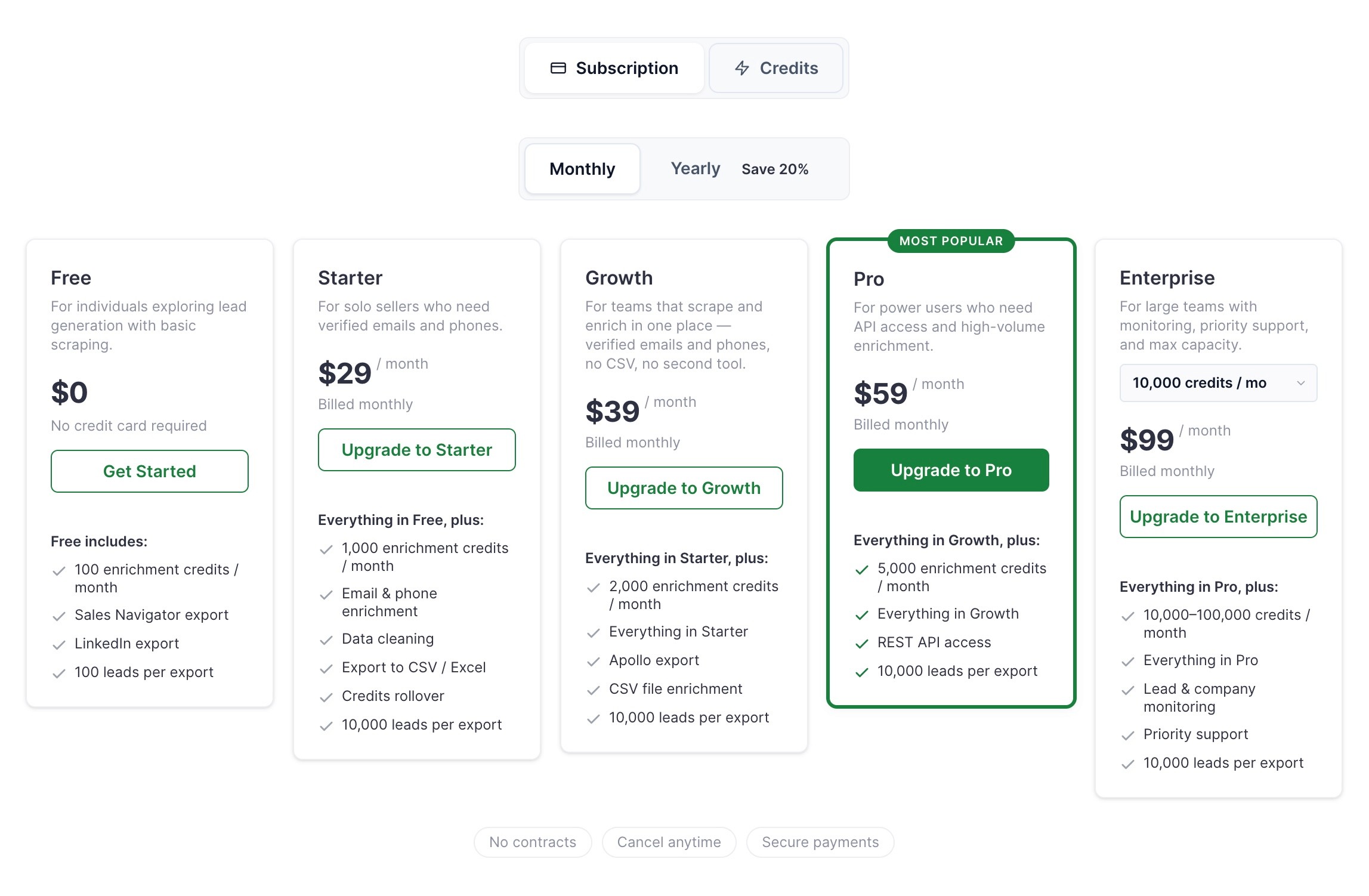
Scrupp's published plans. Its pricing page lists Free at $0 with "100 enrichment credits / month" and 100 leads per export, Starter at $29 with 1,000 credits, Growth at $39 with 2,000, Pro at $59 with 5,000 and REST API access, and Enterprise at $99 with 10,000 to 100,000. Annual billing brings those to $22, $29, $44 and $74. Every paid tier carries the same "10,000 leads per export" ceiling, which means the export limit is not what separates the plans. Credits are.
LinkedIn's published plans. Sales Navigator Core is "US$119.99 per month/license" or "US$1,079.88 per year/license", and Advanced is "US$159.99 per month/license" or "US$1,799.88 per year/license".
So the real monthly figure, billed monthly, is $158.99 on Growth. Scrupp is 25 percent of it. On annual billing for both, it is roughly $118.99 a month, and Scrupp's share falls to about 24 percent.
Which reframes the buying decision entirely. If you already pay for Sales Navigator, Scrupp is a $39 add-on and an easy yes. If you do not, you are evaluating a $159 a month workflow, and the comparison is no longer Scrupp against other extensions. It is this whole approach against a database product that does not require a LinkedIn seat at all. Our Sales Navigator pricing breakdown covers the seat itself in more depth.
Credits, and what they actually buy
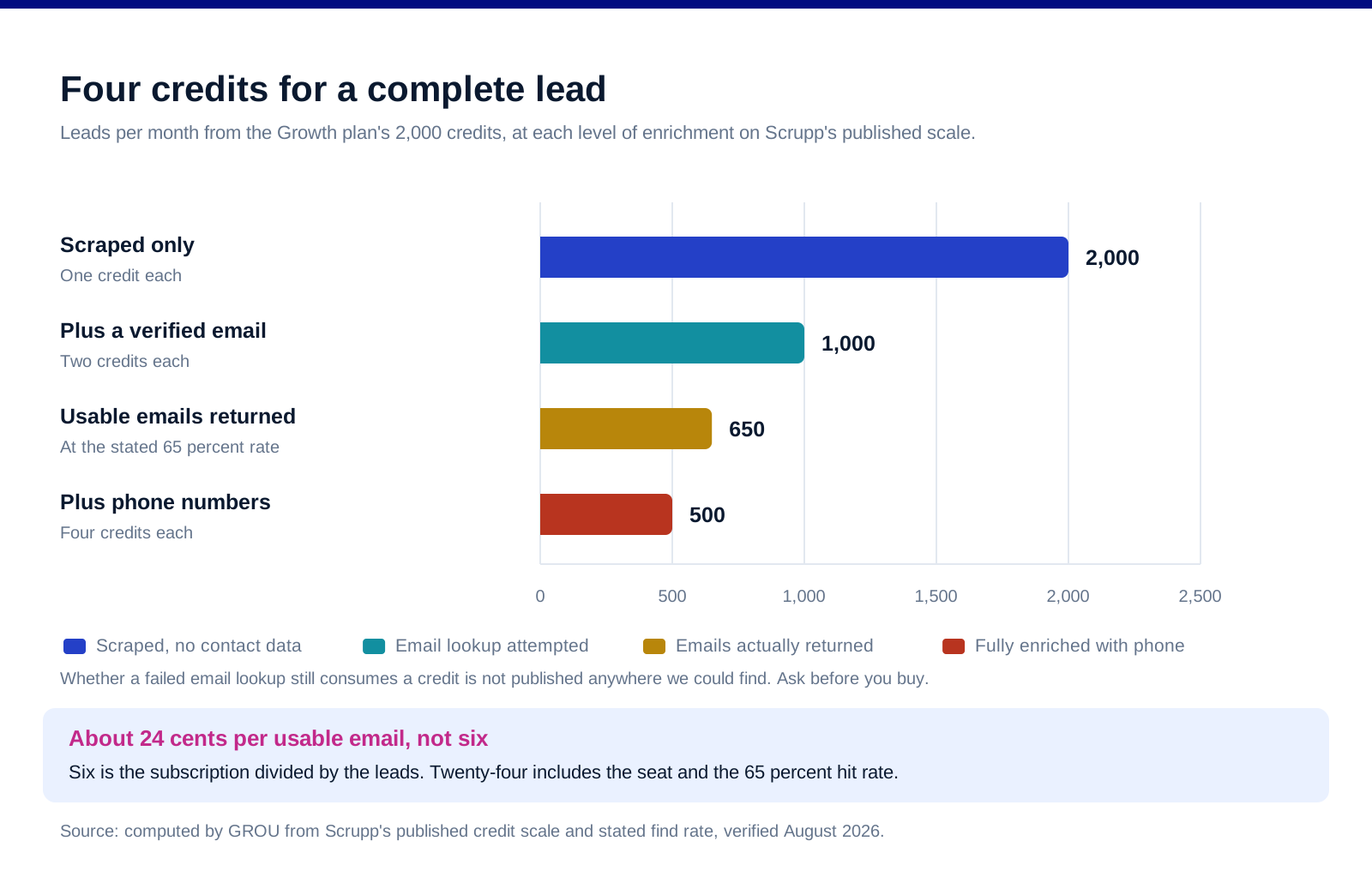
The scale is published and simple. Scrupp states "1 credit = 1 lead scraped", one additional credit for a verified email and two more for phone numbers, so a fully enriched lead is four credits.
Run it against the Growth plan's 2,000 credits. Scraped only, 2,000 leads. Scraped with a verified email, 1,000 leads. Fully enriched with phone numbers, 500 leads.
Then apply Scrupp's own hit rate. It claims a "~65% avg verified email find rate" with "Under 5% bounce" and SMTP verification "in real time at export". At that rate, spending 2,000 credits on 1,000 leads plus email lookups returns roughly 650 usable email addresses.
Which produces the number that matters. $158.99 divided by 650 is about 24 cents per usable email. Judged on the subscription alone it looks like six cents. Both are arithmetic on published figures; only one of them is the cost of running the workflow.
One thing we could not establish, and it is not a small one. Nothing we could find on Scrupp's pricing page or FAQ states whether a credit is consumed when an email lookup fails. At a 65 percent hit rate the difference between charging for attempts and charging for results is roughly a third of your allowance. Ask before you buy, and ask in writing.
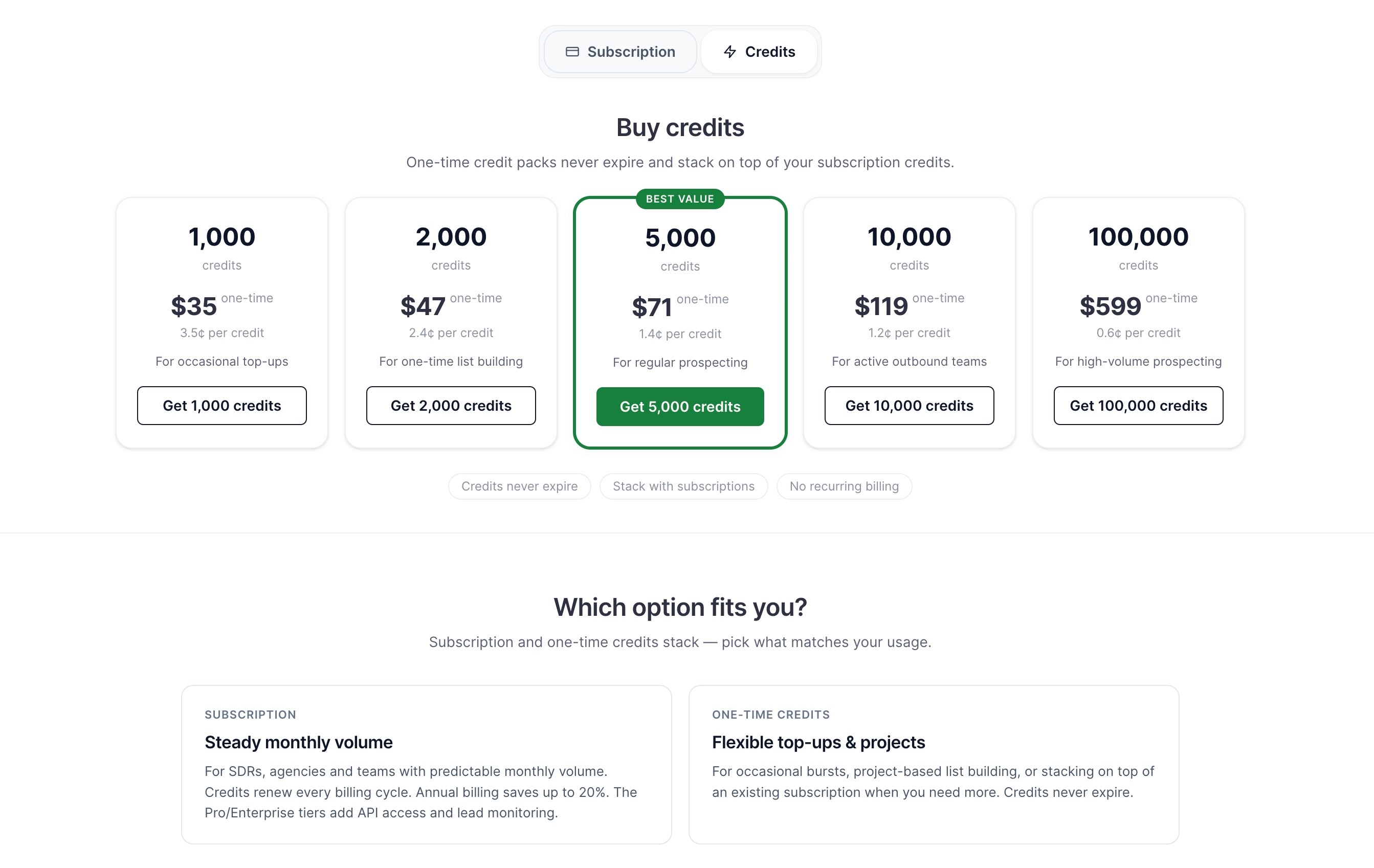
Credits do roll over on an active subscription, and separately purchased credit packs are stated to "never expire" and to "Stack with subscriptions", in packs from 1,000 to 100,000 credits priced between $35 and $599.
The account risk question, answered as honestly as we can
This is what buyers actually want to know, so here is the full state of it. Scrupp's own position is that it operates at "normal human browsing speed" and "always within LinkedIn's rate limits", and it states that "Thousands of SDR teams export daily without restrictions, warnings, or account reviews." That is a vendor claim about the vendor's own risk profile. We report it as such and we have not tested it.
We could not read LinkedIn's User Agreement directly. It is disallowed to automated retrieval, so we are not going to quote or characterise its exact wording from memory or from a secondary source. What we can say is that LinkedIn restricts accounts at its own discretion and does not have to justify it to you.
The legal position is narrower than either side usually implies. In hiQ Labs v LinkedIn the Ninth Circuit held that "It is likely that when a computer network generally permits public access to its data, a user's accessing that publicly available data will not constitute access without authorization under the CFAA", and that "A violation of the terms of use of a website - without more - cannot establish liability under the CFAA."
But read what the court did not decide. It said explicitly that "Although we do not decide the question ... it may be that web scraping exceeding the scope of the website owner's consent gives rise to a common law tort claim." A federal computer crime statute not applying is not the same as a contract being unenforceable, and neither question governs whether LinkedIn switches your account off.
So the practical risk is commercial, not criminal, and it sits on the account, which is the asset. If the seat is the founder's personal profile with eight years of network on it, price the downside accordingly. Our note on LinkedIn limits and warm-up covers the behaviour side.
What you owe the people on the list
Exporting a contact is the start of an obligation, not the end of a task. The European Commission's guidance is that where data came from another source, an organisation must inform the individual "at the latest at the time of the first communication with them, that it has collected their personal data and that it will be processing it for sending them adverts", and that "individuals will have a right to object to such processing."
Which is a first-email design constraint. It has to be in the message, not buried in a privacy policy nobody opens. Our GDPR playbook for cold email covers how to phrase it without wrecking the email. This is not legal advice and the position differs by jurisdiction.
Who it fits, and who it does not
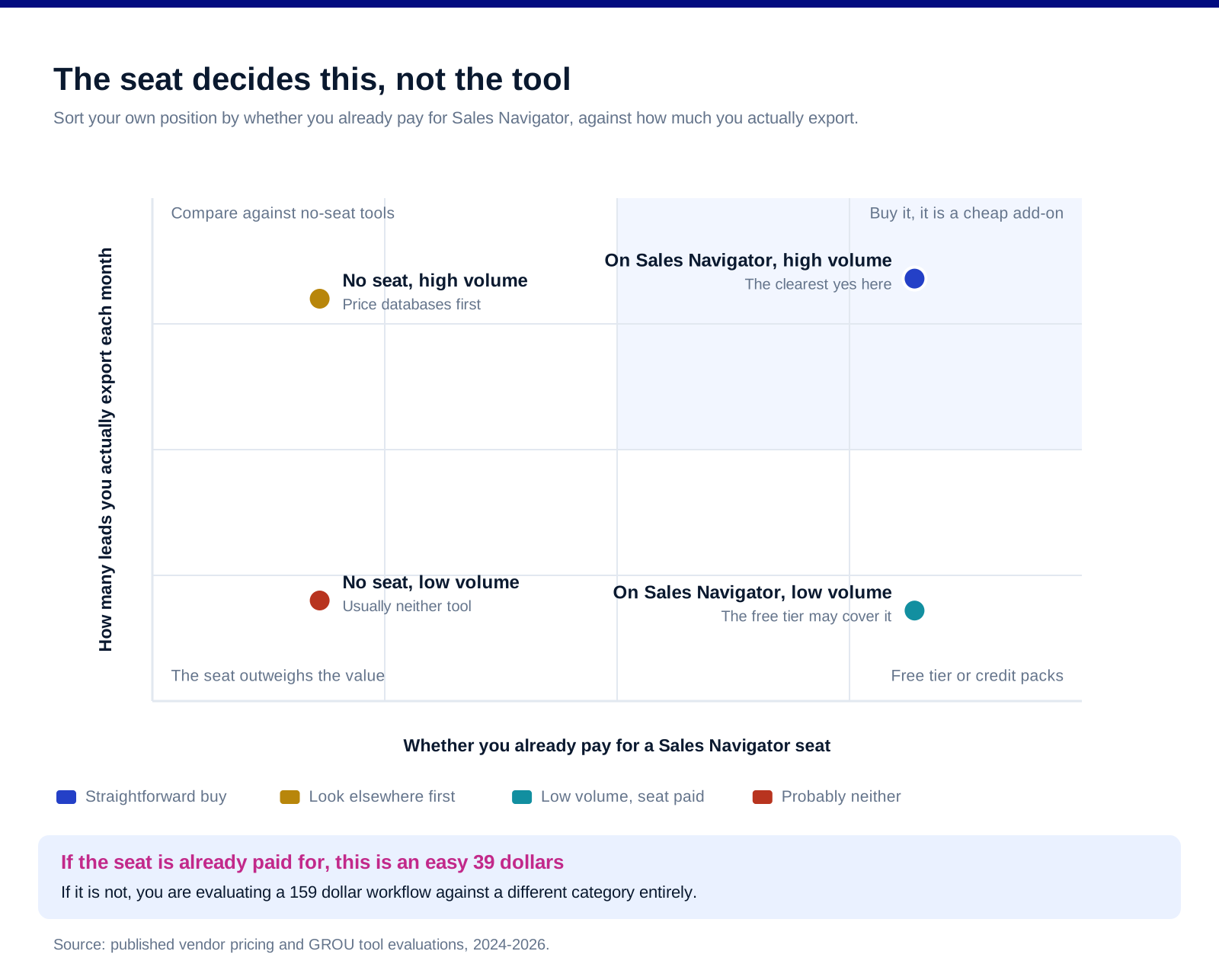
Already on Sales Navigator, exporting regularly. The clearest yes in this review. You have already paid the expensive part and Scrupp is a cheap, well-scoped tool on top of it.
Already on Sales Navigator, exporting occasionally. The free tier's 100 credits a month may genuinely be enough, and the one-time credit packs suit lumpy usage better than a subscription.
Not on Sales Navigator, high volume. Look hard at database products before you buy the seat. You are comparing $159 a month against tools that need no LinkedIn login and carry no account risk at all.
Not on Sales Navigator, low volume. The cheapest correct answer here is usually neither. The seat alone outweighs the value at low volume.
Anyone whose LinkedIn account is the business. Weigh the account, not the subscription. That calculation is personal and nobody else can run it for you.
What we do not publish here
A verdict on whether Scrupp is safe to use on your LinkedIn account. We have not run a controlled test, LinkedIn does not publish its enforcement criteria, and anyone offering you a confident answer on this is guessing.
An accuracy comparison against Evaboot, PhantomBuster or Apollo. That needs a matched list run through every tool at the same time, which we have not done. Every published comparison of this kind we have seen was produced by one of the tools involved.
A verified bounce rate. Under 5 percent is Scrupp's own figure and we report it as its claim.
Whether failed lookups consume credits. Not published, not assumed, flagged above as a question to ask.
Any recommendation to scrape outside a platform's terms. We do not know your contract position and we are not going to encourage a breach of it.
FAQ
How much does Scrupp really cost?
On its own, $29 to $99 a month depending on tier, or $22 to $74 billed annually. In practice, add a Sales Navigator seat at $119.99 a month for Core, because Scrupp states you need one for the Sales Navigator export it is built around. The realistic Growth figure is about $159 a month billed monthly.
How many leads can you export with Scrupp?
Every paid tier is capped at 10,000 leads per export and every Sales Navigator search is capped at 2,500 results, which is LinkedIn's limit rather than Scrupp's. Your real constraint is credits: 2,000 a month on Growth, which is 2,000 leads scraped, 1,000 with verified emails or 500 fully enriched with phone numbers.
Is Scrupp safe to use?
Scrupp states it runs inside your own browser session at human speed, never asks for your password and never sends messages or connection requests, and says thousands of teams export daily without account reviews. Those are its claims, not our test results. LinkedIn restricts accounts at its own discretion, so weigh the value of the account you would be using.
Does Scrupp need Sales Navigator?
For the Sales Navigator export, yes. Scrupp states you need an active Core, Advanced, Advanced Plus or Recruiter seat. Basic LinkedIn profile scraping is stated to work with a free account, but that is not the workflow most people buy it for.
Is Scrupp better than Evaboot?
We have not run a matched comparison and will not publish a ranking without one. The more useful question is whether you already hold a Sales Navigator seat, because that decides most of the cost either way.
What happens to unused Scrupp credits?
Monthly credits roll over on an active subscription, and separately purchased credit packs are stated never to expire and to stack with a subscription. That makes packs a reasonable fit for irregular usage.
Bottom line
Judged as a Sales Navigator export tool for someone who already pays for Sales Navigator, Scrupp is good value and sensibly built: it runs in your own session, it does not send anything on your behalf, it tells you plainly that the 2,500 cap is LinkedIn's rather than its own, and its credit scale is published and easy to check. Judged as a standalone purchase it is a $159 a month workflow wearing a $39 price tag, and at that number the comparison should be against database products that need no LinkedIn seat and put no account at risk. Work out your real cost per usable email rather than your subscription cost, ask whether failed lookups burn a credit before you commit, and if the LinkedIn account in question is the one your business runs on, price that risk before you price the tool.
Want the list built and the outbound run rather than the tools assembled? Book a call with GROU. We run lead generation and outbound inside B2B revenue engines across verticals.
We are GROU, a B2B pipeline agency that runs lead generation, outbound, and LinkedIn content for clients across manufacturing, fintech, iGaming, software, and professional services. Some links in this article are affiliate links, including Scrupp. Every price quoted is the published list price taken from Scrupp's and LinkedIn's own pages and verified in August 2026, and the cost per usable email is our own arithmetic on those figures. Nothing here is legal advice.
Scrupp's Growth plan is $39 a month. Running it costs about $159 a month, and the tool is the small part of that.
You cannot use the thing it is built for without a LinkedIn Sales Navigator seat, and Sales Navigator Core lists at $119.99 per licence per month. So the pricing page you compare against Evaboot or PhantomBuster is describing a quarter of the bill. That is the single most useful fact in this review and almost no comparison mentions it.
TL;DR
Scrupp is a Chrome extension that exports LinkedIn Sales Navigator searches to CSV with verified emails and phone numbers. It works, it is cheap on its own terms, and its published prices run from a free tier at 100 credits a month to Enterprise at $99. The catch is structural rather than a flaw: it runs inside your logged-in browser session, so Scrupp states you need "any active Sales Navigator seat (Core, Advanced, Advanced Plus, or Recruiter)" for the Sales Navigator export that is its main use. Core is $119.99 a month. On credits, Scrupp's own scale is "1 credit = 1 lead scraped", plus one more for a verified email and two more for phone numbers, so a fully enriched lead is four credits and the $39 Growth plan's 2,000 credits buys 500 of them. Combine that with Scrupp's stated "~65% avg verified email find rate" and the honest unit cost is about 24 cents per usable email on Growth, not the six cents the subscription price alone implies. Whether an unsuccessful email lookup still consumes a credit is not published anywhere we could find, and at a 65 percent hit rate that omission moves the number materially.
What it actually is
A Chrome extension, not a cloud scraper. Scrupp states it "runs as a Chrome extension inside your own logged-in browser session", that it "never asks for your LinkedIn password" and does not store credentials. That is a meaningfully different architecture from tools that log into LinkedIn on a server on your behalf, and it is the reason the Sales Navigator seat is mandatory rather than optional.
Sales Navigator searches, exported. Lead search, account search and saved lists, out to CSV with "15+ columns per lead" covering person, company and contact fields.
Capped at 2,500 leads per search, and Scrupp says why. It describes the limit as "the Sales Navigator UI cap", which is honest, because it is LinkedIn's constraint rather than Scrupp's. No extension gets past it, so treat any competitor claiming otherwise with suspicion.
It does not send anything. Scrupp states it "never sends connection requests, messages, likes, or comments on your behalf". That is a real product decision and it is the right one, because the automation tools that do send are the ones that reliably attract account restrictions.
The prerequisite is the price
Scrupp's published plans. Its pricing page lists Free at $0 with "100 enrichment credits / month" and 100 leads per export, Starter at $29 with 1,000 credits, Growth at $39 with 2,000, Pro at $59 with 5,000 and REST API access, and Enterprise at $99 with 10,000 to 100,000. Annual billing brings those to $22, $29, $44 and $74. Every paid tier carries the same "10,000 leads per export" ceiling, which means the export limit is not what separates the plans. Credits are.
LinkedIn's published plans. Sales Navigator Core is "US$119.99 per month/license" or "US$1,079.88 per year/license", and Advanced is "US$159.99 per month/license" or "US$1,799.88 per year/license".
So the real monthly figure, billed monthly, is $158.99 on Growth. Scrupp is 25 percent of it. On annual billing for both, it is roughly $118.99 a month, and Scrupp's share falls to about 24 percent.
Which reframes the buying decision entirely. If you already pay for Sales Navigator, Scrupp is a $39 add-on and an easy yes. If you do not, you are evaluating a $159 a month workflow, and the comparison is no longer Scrupp against other extensions. It is this whole approach against a database product that does not require a LinkedIn seat at all. Our Sales Navigator pricing breakdown covers the seat itself in more depth.
Credits, and what they actually buy
The scale is published and simple. Scrupp states "1 credit = 1 lead scraped", one additional credit for a verified email and two more for phone numbers, so a fully enriched lead is four credits.
Run it against the Growth plan's 2,000 credits. Scraped only, 2,000 leads. Scraped with a verified email, 1,000 leads. Fully enriched with phone numbers, 500 leads.
Then apply Scrupp's own hit rate. It claims a "~65% avg verified email find rate" with "Under 5% bounce" and SMTP verification "in real time at export". At that rate, spending 2,000 credits on 1,000 leads plus email lookups returns roughly 650 usable email addresses.
Which produces the number that matters. $158.99 divided by 650 is about 24 cents per usable email. Judged on the subscription alone it looks like six cents. Both are arithmetic on published figures; only one of them is the cost of running the workflow.
One thing we could not establish, and it is not a small one. Nothing we could find on Scrupp's pricing page or FAQ states whether a credit is consumed when an email lookup fails. At a 65 percent hit rate the difference between charging for attempts and charging for results is roughly a third of your allowance. Ask before you buy, and ask in writing.
Credits do roll over on an active subscription, and separately purchased credit packs are stated to "never expire" and to "Stack with subscriptions", in packs from 1,000 to 100,000 credits priced between $35 and $599.
The account risk question, answered as honestly as we can
This is what buyers actually want to know, so here is the full state of it. Scrupp's own position is that it operates at "normal human browsing speed" and "always within LinkedIn's rate limits", and it states that "Thousands of SDR teams export daily without restrictions, warnings, or account reviews." That is a vendor claim about the vendor's own risk profile. We report it as such and we have not tested it.
We could not read LinkedIn's User Agreement directly. It is disallowed to automated retrieval, so we are not going to quote or characterise its exact wording from memory or from a secondary source. What we can say is that LinkedIn restricts accounts at its own discretion and does not have to justify it to you.
The legal position is narrower than either side usually implies. In hiQ Labs v LinkedIn the Ninth Circuit held that "It is likely that when a computer network generally permits public access to its data, a user's accessing that publicly available data will not constitute access without authorization under the CFAA", and that "A violation of the terms of use of a website - without more - cannot establish liability under the CFAA."
But read what the court did not decide. It said explicitly that "Although we do not decide the question ... it may be that web scraping exceeding the scope of the website owner's consent gives rise to a common law tort claim." A federal computer crime statute not applying is not the same as a contract being unenforceable, and neither question governs whether LinkedIn switches your account off.
So the practical risk is commercial, not criminal, and it sits on the account, which is the asset. If the seat is the founder's personal profile with eight years of network on it, price the downside accordingly. Our note on LinkedIn limits and warm-up covers the behaviour side.
What you owe the people on the list
Exporting a contact is the start of an obligation, not the end of a task. The European Commission's guidance is that where data came from another source, an organisation must inform the individual "at the latest at the time of the first communication with them, that it has collected their personal data and that it will be processing it for sending them adverts", and that "individuals will have a right to object to such processing."
Which is a first-email design constraint. It has to be in the message, not buried in a privacy policy nobody opens. Our GDPR playbook for cold email covers how to phrase it without wrecking the email. This is not legal advice and the position differs by jurisdiction.
Who it fits, and who it does not
Already on Sales Navigator, exporting regularly. The clearest yes in this review. You have already paid the expensive part and Scrupp is a cheap, well-scoped tool on top of it.
Already on Sales Navigator, exporting occasionally. The free tier's 100 credits a month may genuinely be enough, and the one-time credit packs suit lumpy usage better than a subscription.
Not on Sales Navigator, high volume. Look hard at database products before you buy the seat. You are comparing $159 a month against tools that need no LinkedIn login and carry no account risk at all.
Not on Sales Navigator, low volume. The cheapest correct answer here is usually neither. The seat alone outweighs the value at low volume.
Anyone whose LinkedIn account is the business. Weigh the account, not the subscription. That calculation is personal and nobody else can run it for you.
What we do not publish here
A verdict on whether Scrupp is safe to use on your LinkedIn account. We have not run a controlled test, LinkedIn does not publish its enforcement criteria, and anyone offering you a confident answer on this is guessing.
An accuracy comparison against Evaboot, PhantomBuster or Apollo. That needs a matched list run through every tool at the same time, which we have not done. Every published comparison of this kind we have seen was produced by one of the tools involved.
A verified bounce rate. Under 5 percent is Scrupp's own figure and we report it as its claim.
Whether failed lookups consume credits. Not published, not assumed, flagged above as a question to ask.
Any recommendation to scrape outside a platform's terms. We do not know your contract position and we are not going to encourage a breach of it.
FAQ
How much does Scrupp really cost?
On its own, $29 to $99 a month depending on tier, or $22 to $74 billed annually. In practice, add a Sales Navigator seat at $119.99 a month for Core, because Scrupp states you need one for the Sales Navigator export it is built around. The realistic Growth figure is about $159 a month billed monthly.
How many leads can you export with Scrupp?
Every paid tier is capped at 10,000 leads per export and every Sales Navigator search is capped at 2,500 results, which is LinkedIn's limit rather than Scrupp's. Your real constraint is credits: 2,000 a month on Growth, which is 2,000 leads scraped, 1,000 with verified emails or 500 fully enriched with phone numbers.
Is Scrupp safe to use?
Scrupp states it runs inside your own browser session at human speed, never asks for your password and never sends messages or connection requests, and says thousands of teams export daily without account reviews. Those are its claims, not our test results. LinkedIn restricts accounts at its own discretion, so weigh the value of the account you would be using.
Does Scrupp need Sales Navigator?
For the Sales Navigator export, yes. Scrupp states you need an active Core, Advanced, Advanced Plus or Recruiter seat. Basic LinkedIn profile scraping is stated to work with a free account, but that is not the workflow most people buy it for.
Is Scrupp better than Evaboot?
We have not run a matched comparison and will not publish a ranking without one. The more useful question is whether you already hold a Sales Navigator seat, because that decides most of the cost either way.
What happens to unused Scrupp credits?
Monthly credits roll over on an active subscription, and separately purchased credit packs are stated never to expire and to stack with a subscription. That makes packs a reasonable fit for irregular usage.
Bottom line
Judged as a Sales Navigator export tool for someone who already pays for Sales Navigator, Scrupp is good value and sensibly built: it runs in your own session, it does not send anything on your behalf, it tells you plainly that the 2,500 cap is LinkedIn's rather than its own, and its credit scale is published and easy to check. Judged as a standalone purchase it is a $159 a month workflow wearing a $39 price tag, and at that number the comparison should be against database products that need no LinkedIn seat and put no account at risk. Work out your real cost per usable email rather than your subscription cost, ask whether failed lookups burn a credit before you commit, and if the LinkedIn account in question is the one your business runs on, price that risk before you price the tool.
Want the list built and the outbound run rather than the tools assembled? Book a call with GROU. We run lead generation and outbound inside B2B revenue engines across verticals.
We are GROU, a B2B pipeline agency that runs lead generation, outbound, and LinkedIn content for clients across manufacturing, fintech, iGaming, software, and professional services. Some links in this article are affiliate links, including Scrupp. Every price quoted is the published list price taken from Scrupp's and LinkedIn's own pages and verified in August 2026, and the cost per usable email is our own arithmetic on those figures. Nothing here is legal advice.
Scrupp's Growth plan is $39 a month. Running it costs about $159 a month, and the tool is the small part of that.
You cannot use the thing it is built for without a LinkedIn Sales Navigator seat, and Sales Navigator Core lists at $119.99 per licence per month. So the pricing page you compare against Evaboot or PhantomBuster is describing a quarter of the bill. That is the single most useful fact in this review and almost no comparison mentions it.
TL;DR
Scrupp is a Chrome extension that exports LinkedIn Sales Navigator searches to CSV with verified emails and phone numbers. It works, it is cheap on its own terms, and its published prices run from a free tier at 100 credits a month to Enterprise at $99. The catch is structural rather than a flaw: it runs inside your logged-in browser session, so Scrupp states you need "any active Sales Navigator seat (Core, Advanced, Advanced Plus, or Recruiter)" for the Sales Navigator export that is its main use. Core is $119.99 a month. On credits, Scrupp's own scale is "1 credit = 1 lead scraped", plus one more for a verified email and two more for phone numbers, so a fully enriched lead is four credits and the $39 Growth plan's 2,000 credits buys 500 of them. Combine that with Scrupp's stated "~65% avg verified email find rate" and the honest unit cost is about 24 cents per usable email on Growth, not the six cents the subscription price alone implies. Whether an unsuccessful email lookup still consumes a credit is not published anywhere we could find, and at a 65 percent hit rate that omission moves the number materially.
What it actually is
A Chrome extension, not a cloud scraper. Scrupp states it "runs as a Chrome extension inside your own logged-in browser session", that it "never asks for your LinkedIn password" and does not store credentials. That is a meaningfully different architecture from tools that log into LinkedIn on a server on your behalf, and it is the reason the Sales Navigator seat is mandatory rather than optional.
Sales Navigator searches, exported. Lead search, account search and saved lists, out to CSV with "15+ columns per lead" covering person, company and contact fields.
Capped at 2,500 leads per search, and Scrupp says why. It describes the limit as "the Sales Navigator UI cap", which is honest, because it is LinkedIn's constraint rather than Scrupp's. No extension gets past it, so treat any competitor claiming otherwise with suspicion.
It does not send anything. Scrupp states it "never sends connection requests, messages, likes, or comments on your behalf". That is a real product decision and it is the right one, because the automation tools that do send are the ones that reliably attract account restrictions.
The prerequisite is the price
Scrupp's published plans. Its pricing page lists Free at $0 with "100 enrichment credits / month" and 100 leads per export, Starter at $29 with 1,000 credits, Growth at $39 with 2,000, Pro at $59 with 5,000 and REST API access, and Enterprise at $99 with 10,000 to 100,000. Annual billing brings those to $22, $29, $44 and $74. Every paid tier carries the same "10,000 leads per export" ceiling, which means the export limit is not what separates the plans. Credits are.
LinkedIn's published plans. Sales Navigator Core is "US$119.99 per month/license" or "US$1,079.88 per year/license", and Advanced is "US$159.99 per month/license" or "US$1,799.88 per year/license".
So the real monthly figure, billed monthly, is $158.99 on Growth. Scrupp is 25 percent of it. On annual billing for both, it is roughly $118.99 a month, and Scrupp's share falls to about 24 percent.
Which reframes the buying decision entirely. If you already pay for Sales Navigator, Scrupp is a $39 add-on and an easy yes. If you do not, you are evaluating a $159 a month workflow, and the comparison is no longer Scrupp against other extensions. It is this whole approach against a database product that does not require a LinkedIn seat at all. Our Sales Navigator pricing breakdown covers the seat itself in more depth.
Credits, and what they actually buy
The scale is published and simple. Scrupp states "1 credit = 1 lead scraped", one additional credit for a verified email and two more for phone numbers, so a fully enriched lead is four credits.
Run it against the Growth plan's 2,000 credits. Scraped only, 2,000 leads. Scraped with a verified email, 1,000 leads. Fully enriched with phone numbers, 500 leads.
Then apply Scrupp's own hit rate. It claims a "~65% avg verified email find rate" with "Under 5% bounce" and SMTP verification "in real time at export". At that rate, spending 2,000 credits on 1,000 leads plus email lookups returns roughly 650 usable email addresses.
Which produces the number that matters. $158.99 divided by 650 is about 24 cents per usable email. Judged on the subscription alone it looks like six cents. Both are arithmetic on published figures; only one of them is the cost of running the workflow.
One thing we could not establish, and it is not a small one. Nothing we could find on Scrupp's pricing page or FAQ states whether a credit is consumed when an email lookup fails. At a 65 percent hit rate the difference between charging for attempts and charging for results is roughly a third of your allowance. Ask before you buy, and ask in writing.
Credits do roll over on an active subscription, and separately purchased credit packs are stated to "never expire" and to "Stack with subscriptions", in packs from 1,000 to 100,000 credits priced between $35 and $599.
The account risk question, answered as honestly as we can
This is what buyers actually want to know, so here is the full state of it. Scrupp's own position is that it operates at "normal human browsing speed" and "always within LinkedIn's rate limits", and it states that "Thousands of SDR teams export daily without restrictions, warnings, or account reviews." That is a vendor claim about the vendor's own risk profile. We report it as such and we have not tested it.
We could not read LinkedIn's User Agreement directly. It is disallowed to automated retrieval, so we are not going to quote or characterise its exact wording from memory or from a secondary source. What we can say is that LinkedIn restricts accounts at its own discretion and does not have to justify it to you.
The legal position is narrower than either side usually implies. In hiQ Labs v LinkedIn the Ninth Circuit held that "It is likely that when a computer network generally permits public access to its data, a user's accessing that publicly available data will not constitute access without authorization under the CFAA", and that "A violation of the terms of use of a website - without more - cannot establish liability under the CFAA."
But read what the court did not decide. It said explicitly that "Although we do not decide the question ... it may be that web scraping exceeding the scope of the website owner's consent gives rise to a common law tort claim." A federal computer crime statute not applying is not the same as a contract being unenforceable, and neither question governs whether LinkedIn switches your account off.
So the practical risk is commercial, not criminal, and it sits on the account, which is the asset. If the seat is the founder's personal profile with eight years of network on it, price the downside accordingly. Our note on LinkedIn limits and warm-up covers the behaviour side.
What you owe the people on the list
Exporting a contact is the start of an obligation, not the end of a task. The European Commission's guidance is that where data came from another source, an organisation must inform the individual "at the latest at the time of the first communication with them, that it has collected their personal data and that it will be processing it for sending them adverts", and that "individuals will have a right to object to such processing."
Which is a first-email design constraint. It has to be in the message, not buried in a privacy policy nobody opens. Our GDPR playbook for cold email covers how to phrase it without wrecking the email. This is not legal advice and the position differs by jurisdiction.
Who it fits, and who it does not
Already on Sales Navigator, exporting regularly. The clearest yes in this review. You have already paid the expensive part and Scrupp is a cheap, well-scoped tool on top of it.
Already on Sales Navigator, exporting occasionally. The free tier's 100 credits a month may genuinely be enough, and the one-time credit packs suit lumpy usage better than a subscription.
Not on Sales Navigator, high volume. Look hard at database products before you buy the seat. You are comparing $159 a month against tools that need no LinkedIn login and carry no account risk at all.
Not on Sales Navigator, low volume. The cheapest correct answer here is usually neither. The seat alone outweighs the value at low volume.
Anyone whose LinkedIn account is the business. Weigh the account, not the subscription. That calculation is personal and nobody else can run it for you.
What we do not publish here
A verdict on whether Scrupp is safe to use on your LinkedIn account. We have not run a controlled test, LinkedIn does not publish its enforcement criteria, and anyone offering you a confident answer on this is guessing.
An accuracy comparison against Evaboot, PhantomBuster or Apollo. That needs a matched list run through every tool at the same time, which we have not done. Every published comparison of this kind we have seen was produced by one of the tools involved.
A verified bounce rate. Under 5 percent is Scrupp's own figure and we report it as its claim.
Whether failed lookups consume credits. Not published, not assumed, flagged above as a question to ask.
Any recommendation to scrape outside a platform's terms. We do not know your contract position and we are not going to encourage a breach of it.
FAQ
How much does Scrupp really cost?
On its own, $29 to $99 a month depending on tier, or $22 to $74 billed annually. In practice, add a Sales Navigator seat at $119.99 a month for Core, because Scrupp states you need one for the Sales Navigator export it is built around. The realistic Growth figure is about $159 a month billed monthly.
How many leads can you export with Scrupp?
Every paid tier is capped at 10,000 leads per export and every Sales Navigator search is capped at 2,500 results, which is LinkedIn's limit rather than Scrupp's. Your real constraint is credits: 2,000 a month on Growth, which is 2,000 leads scraped, 1,000 with verified emails or 500 fully enriched with phone numbers.
Is Scrupp safe to use?
Scrupp states it runs inside your own browser session at human speed, never asks for your password and never sends messages or connection requests, and says thousands of teams export daily without account reviews. Those are its claims, not our test results. LinkedIn restricts accounts at its own discretion, so weigh the value of the account you would be using.
Does Scrupp need Sales Navigator?
For the Sales Navigator export, yes. Scrupp states you need an active Core, Advanced, Advanced Plus or Recruiter seat. Basic LinkedIn profile scraping is stated to work with a free account, but that is not the workflow most people buy it for.
Is Scrupp better than Evaboot?
We have not run a matched comparison and will not publish a ranking without one. The more useful question is whether you already hold a Sales Navigator seat, because that decides most of the cost either way.
What happens to unused Scrupp credits?
Monthly credits roll over on an active subscription, and separately purchased credit packs are stated never to expire and to stack with a subscription. That makes packs a reasonable fit for irregular usage.
Bottom line
Judged as a Sales Navigator export tool for someone who already pays for Sales Navigator, Scrupp is good value and sensibly built: it runs in your own session, it does not send anything on your behalf, it tells you plainly that the 2,500 cap is LinkedIn's rather than its own, and its credit scale is published and easy to check. Judged as a standalone purchase it is a $159 a month workflow wearing a $39 price tag, and at that number the comparison should be against database products that need no LinkedIn seat and put no account at risk. Work out your real cost per usable email rather than your subscription cost, ask whether failed lookups burn a credit before you commit, and if the LinkedIn account in question is the one your business runs on, price that risk before you price the tool.
Want the list built and the outbound run rather than the tools assembled? Book a call with GROU. We run lead generation and outbound inside B2B revenue engines across verticals.
We are GROU, a B2B pipeline agency that runs lead generation, outbound, and LinkedIn content for clients across manufacturing, fintech, iGaming, software, and professional services. Some links in this article are affiliate links, including Scrupp. Every price quoted is the published list price taken from Scrupp's and LinkedIn's own pages and verified in August 2026, and the cost per usable email is our own arithmetic on those figures. Nothing here is legal advice.

Pipeline OS Newsletter
Build qualified pipeline
Get weekly tactics to generate demand, improve lead quality, and book more meetings.





Trusted by industry leaders
Trusted by industry leaders
Trusted by industry leaders
Ready to build qualified pipeline?
Ready to build qualified pipeline?
Ready to build qualified pipeline?
Book a call to see if we're the right fit, or take the 2-minute quiz to get a clear starting point.
Book a call to see if we're the right fit, or take the 2-minute quiz to get a clear starting point.
Book a call to see if we're the right fit, or take the 2-minute quiz to get a clear starting point.
" height="30.21639343089746px" id="hfGbXmQR2" width="30.216393430897455px"/></svg>)
Copyright © 2026 – All Right Reserved
Copyright © 2026 – All Right Reserved
Copyright © 2026 – All Right Reserved