%22%3E%3C/path%3E%3Cpath d=%22M 63.072 7.554 C 62.258 8.022 61.577 8.689 61.092 9.493 L 61.092 7.076 L 57.158 7.076 L 57.158 22.64 L 61.089 22.64 L 61.089 14.888 C 61.089 13.446 61.403 12.434 62.03 11.853 C 62.818 11.218 63.818 10.907 64.826 10.982 L 65.868 10.982 L 65.868 6.851 C 64.891 6.834 63.926 7.076 63.073 7.554 Z%22 fill=%22rgb(17,17,17)%22%3E%3C/path%3E%3Cpath d=%22M 78.916 7.82 C 76.363 6.49 73.321 6.49 70.768 7.82 C 69.562 8.473 68.564 9.451 67.888 10.644 C 67.167 11.931 66.803 13.387 66.834 14.862 C 66.804 16.332 67.157 17.785 67.86 19.077 C 68.515 20.267 69.494 21.246 70.684 21.901 C 71.924 22.576 73.318 22.92 74.73 22.898 C 76.164 22.918 77.58 22.575 78.846 21.901 C 80.062 21.247 81.073 20.27 81.768 19.077 C 82.506 17.797 82.88 16.339 82.85 14.862 C 82.88 13.389 82.517 11.934 81.797 10.647 C 81.12 9.455 80.122 8.477 78.917 7.824 M 78.803 14.862 C 78.829 15.739 78.636 16.608 78.241 17.391 C 77.903 18.046 77.38 18.588 76.738 18.95 C 76.124 19.293 75.432 19.472 74.729 19.47 C 73.668 19.497 72.648 19.061 71.934 18.276 C 71.139 17.323 70.741 16.1 70.823 14.862 C 70.741 13.62 71.149 12.395 71.959 11.45 C 72.687 10.667 73.715 10.233 74.783 10.256 C 75.859 10.236 76.894 10.67 77.635 11.45 C 78.464 12.387 78.884 13.616 78.801 14.864%22 fill=%22rgb(17,17,17)%22%3E%3C/path%3E%3Cpath d=%22M 95.906 7.076 L 95.906 15.646 C 95.975 16.68 95.643 17.701 94.979 18.498 C 94.311 19.184 93.379 19.547 92.422 19.495 C 91.475 19.544 90.553 19.18 89.894 18.498 C 89.23 17.701 88.898 16.68 88.967 15.646 L 88.967 7.076 L 85.033 7.076 L 85.033 16.207 C 85 17.449 85.275 18.68 85.834 19.79 C 86.327 20.75 87.095 21.542 88.039 22.065 C 89.033 22.594 90.145 22.861 91.271 22.838 C 92.188 22.847 93.095 22.65 93.926 22.263 C 94.708 21.905 95.388 21.36 95.906 20.675 L 95.906 22.645 L 99.865 22.645 L 99.865 7.076 Z%22 fill=%22rgb(17,17,17)%22%3E%3C/path%3E%3Cpath d=%22M 4.513 15.626 C 4.511 10.815 7.606 6.549 12.181 5.059 C 16.756 3.57 21.77 5.195 24.601 9.086 L 27.816 5.87 C 24.074 1.186 17.981 -0.943 12.137 0.393 C 6.292 1.728 1.728 6.292 0.393 12.137 C -0.943 17.981 1.186 24.074 5.87 27.816 L 9.085 24.601 C 6.214 22.512 4.515 19.177 4.513 15.626%22 fill=%22rgb(32,62,235)%22%3E%3C/path%3E%3Cpath d=%22M 17.114 14.343 L 13.354 18.01 L 13.354 18.026 L 21.071 18.026 L 11.412 27.609 L 17.389 27.609 L 23.999 21.081 L 23.999 28.316 L 24.005 28.316 L 27.967 24.393 L 27.967 14.343 Z%22 fill=%22rgb(32,62,235)%22%3E%3C/path%3E%3C/g%3E%3C/svg%3E) ×
× ××
××›
›
›
›
LinkedIn limits and warmup: the safety playbook
LinkedIn limits and warmup: the safety playbook
LinkedIn limits and warmup: the safety playbook
LinkedIn limits and warmup: the safety playbook
LinkedIn limits and warmup: the safety playbook
LinkedIn limits and warmup: the safety playbook

Author
Aljaz Peklaj

Why trust this guide
We are GROU, a B2B pipeline agency that runs lead generation, outbound, and LinkedIn content for clients across manufacturing, fintech, iGaming, software, and professional services. We have managed 200+ LinkedIn accounts across client workspaces in the last 24 months and have personally warmed up dozens of new accounts, recovered restricted accounts, and pushed the daily limits on every cloud and desktop automation tool on the market. The playbook below is from operators who have hit (and learned to avoid) every LinkedIn restriction trigger that exists, not from a vendor pitch.
→ Methodology: This guide combines our own client deployment data across 50+ LinkedIn campaigns, LinkedIn's published account usage guidance, public restriction reports across third-party communities (Lagrowthmachine, Puzzle Inbox, Heyreach forums), and real-world testing of warmup protocols across 30+ new accounts in 2025 and 2026. We refresh this article quarterly because LinkedIn's enforcement evolves faster than most playbooks acknowledge.
→ Affiliate disclosure: Some links in this article are affiliate links to LinkedIn automation tools we have actually deployed for our agency clients. We earn a small commission if you sign up through them, at no extra cost to you. We only recommend tools we use.
TL;DR
LinkedIn's safe daily limits are materially lower than most operators assume in 2026. The headline numbers most people quote (200 connection requests per day, hundreds of messages, unlimited profile views) are 2019 numbers that have been obsolete for at least 3 years. The current safe ceiling: roughly 10 to 15 connection requests per day, 15 to 20 direct messages per day, 30 to 40 InMails per day for Premium accounts, and a total ceiling of around 120 interactions per day before LinkedIn's behaviour-detection systems start flagging the account.
New accounts (and dormant accounts coming back online) need a structured 21-day warmup before running any automation. Days 1 to 10 are manual-only activity at 60 interactions per day. Days 11 to 20 ramp to 80 per day with light connection requests. Day 21+ slowly introduces automation up to safe ceilings. Skipping the warmup is the single most common reason new operator accounts get restricted in the first 30 days.
If your account has been restricted, the recovery playbook is 2 weeks of manual-only activity before reintroducing automation slowly. This guide covers the full limits matrix, the warmup protocol, the red flags that trigger restrictions, the account health indicators to watch, and tool-specific safety notes for Heyreach, Expandi, Lemlist, and desktop tools like Linked Helper 2.
The 2026 LinkedIn limits
The current safe daily and monthly ceilings, by interaction type:
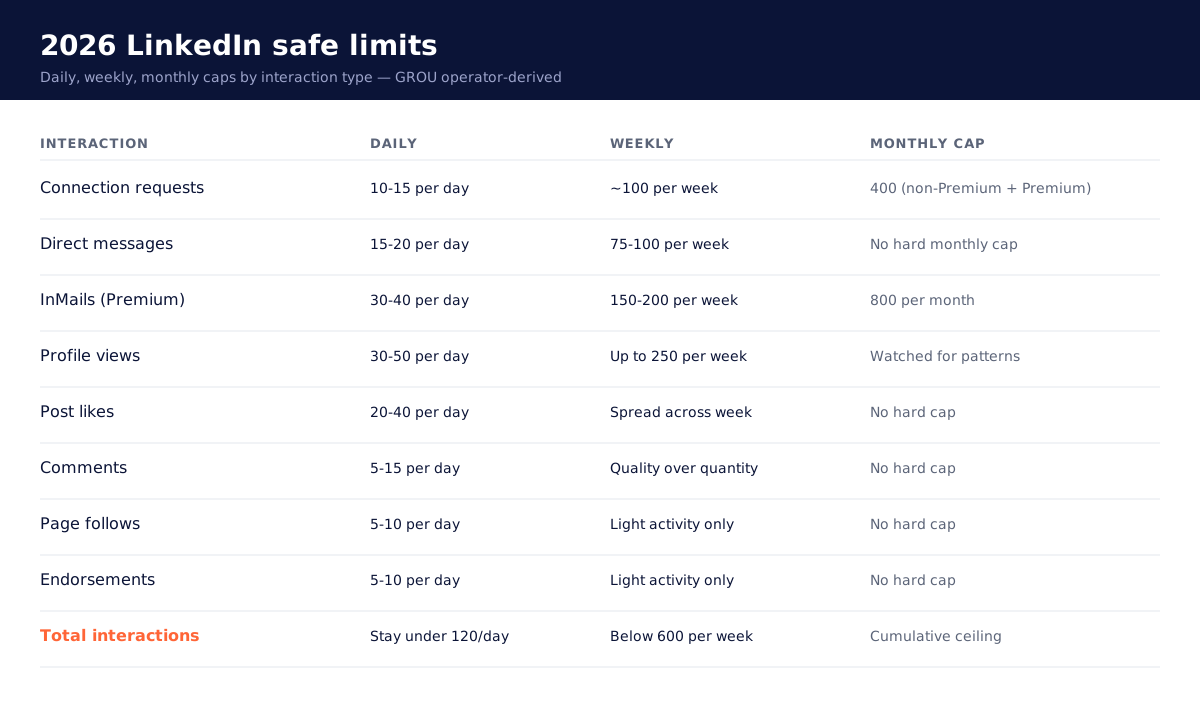
The two numbers that matter most for B2B outbound: 10 to 15 connection requests per day (capped at 400 per month for non-Premium accounts, 100 per week is a common safe budget), and 15 to 20 direct messages per day to existing connections. For Premium accounts, the InMail ceiling is 30 to 40 per day with a 800 per month total.
The trap most operators fall into: focusing only on the connection request limit while ignoring the total daily interaction ceiling. LinkedIn counts everything you do (DMs, InMails, profile views, post likes, comments, page follows, endorsements, event joins) as interactions. Cross any of the individual category limits or push the total above 120 per day, and the behaviour-detection systems start flagging the account.
The other trap: assuming Premium accounts have higher connection request limits. They do not. Premium gives you more InMails and more search results, not more connection invites. The 400 per month connection limit applies to Premium and non-Premium accounts equally.
For Sales Navigator users, the limits are even more conservative. LinkedIn tracks Sales Nav users more aggressively because they are paying for high-volume access and the assumption is that you should know better than to spray invitations. A Sales Nav account flagged for over-aggressive automation gets restricted faster than a standard account doing the same thing.
What counts as an interaction
The full list of actions LinkedIn counts against your daily activity budget:
Sending connection requests
Sending direct messages to existing connections
Sending InMails (Premium)
Viewing profiles
Liking posts and comments
Commenting on posts
Following companies and pages
Endorsing skills
Joining events
Joining groups
Following hashtags
Saving posts and articles
The total ceiling: stay well below 120 actions per day total across all categories. For accounts running automation through cloud-based tools (Heyreach, Expandi, Dripify), the tool will enforce these limits automatically if configured correctly. For desktop tools (Linked Helper 2, older Dux-Soup), the limits enforcement is on you.
A common operator mistake: configuring an automation tool to run 80 profile views per day plus 20 connection requests plus 30 follow-up messages plus 15 likes. The math: 145 actions per day, above the safe ceiling. The tool will run it. LinkedIn will flag it.
The pattern that works at GROU: keep automation between 60 and 80 actions per day on warmed accounts, distributed across categories, weighted toward connection requests and messages because those are the conversion-driving actions. Profile views and likes are nice signals but they consume budget without producing pipeline.
Daily action ceiling explained
The 120 per day ceiling is not LinkedIn's published limit. It is the operator-derived ceiling based on what triggers restrictions across hundreds of accounts we have managed. The published guidance from LinkedIn is more vague: "use the platform like a human would." The 120 figure approximates what "human-like" volume looks like at the upper end before LinkedIn's behaviour-detection algorithms start treating you as a bot.
The detection signals LinkedIn watches:
Timing: same-second action intervals, perfectly regular spacing, actions only at the top of every minute. Humans randomise.
Volume bursts: 50 actions in 10 minutes followed by 6 hours of nothing. Humans spread activity across hours.
Action diversity: only connection requests, no profile views or likes. Humans browse before they invite.
Off-hours activity: actions at 3 AM in your timezone, weekend bursts, holiday volume. Humans work standard hours.
Conversion rates: low acceptance rates (under 15 percent), low response rates (under 5 percent), high pending invitation counts (over 700). Humans get accepted because they target the right people.
Cloud-based tools like Heyreach and Expandi handle most of these automatically: randomised timing within configured ranges, business-hours-only sending, action mix configuration, pending invitation monitoring. Desktop tools like Linked Helper 2 require you to manage these yourself. The safety ceiling on a well-configured cloud tool is meaningfully higher than on a manually-configured desktop tool.
The 21-day warmup protocol
For new accounts and accounts returning from restriction, run a structured warmup before pushing automation volume:
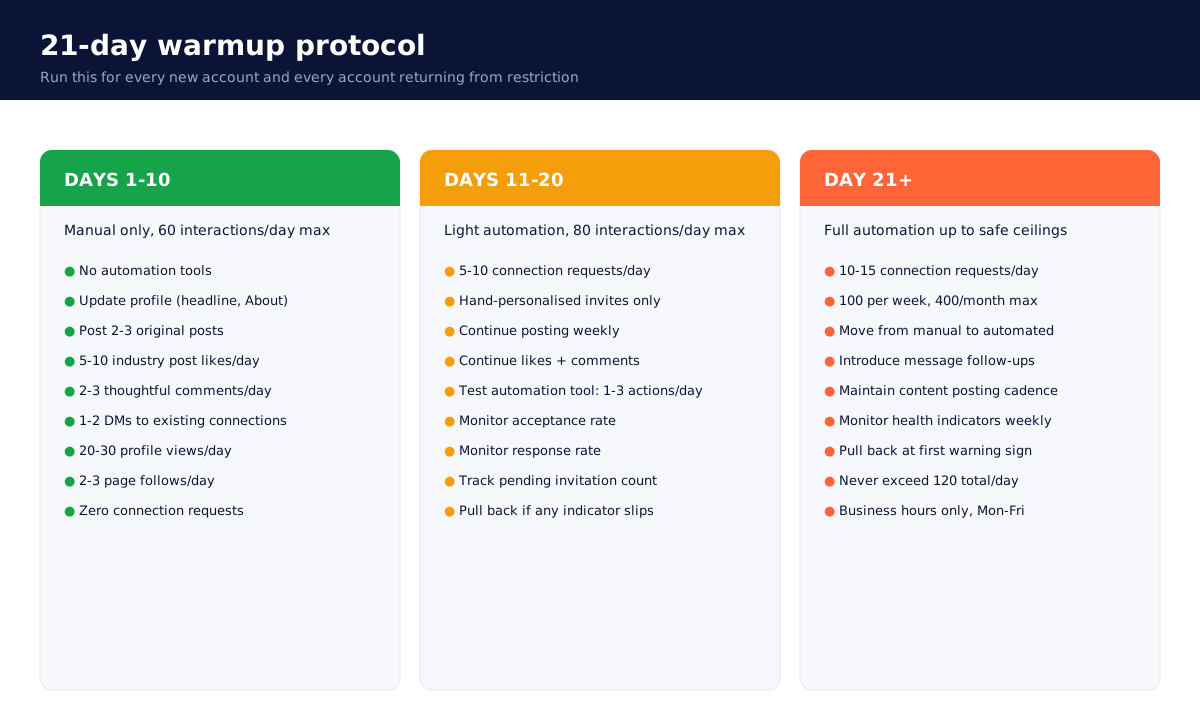
Days 1 to 10: manual only, 60 interactions per day maximum.
No automation. Manual browsing only. Mix of profile views, likes, comments on industry posts, light DMs to existing connections, and gradual page follows. The goal is to build a baseline of "normal user behaviour" that LinkedIn can fingerprint as legitimate. Skip this phase and the automation that follows looks like a bot from day one.
Specific actions for days 1 to 10:
Update profile if it has been stale (headline, About section, recent role)
Post 2 to 3 original posts (LinkedIn favours accounts that produce content)
Like 5 to 10 industry posts per day
Comment thoughtfully on 2 to 3 posts per day
Send DMs to 1 to 2 existing connections per day with a real reason
Browse 20 to 30 profiles per day from your industry (no connection requests yet)
Follow 2 to 3 industry companies per day
Days 11 to 20: light automation, 80 interactions per day maximum.
Introduce 5 to 10 connection requests per day, manually targeted to ICP prospects (not automated yet). Continue the manual engagement from phase one. The goal: validate that connection requests at low volume produce a 25+ percent acceptance rate, which signals to LinkedIn that you are targeting people who actually know you or your context.
Specific actions for days 11 to 20:
Connection requests: 5 to 10 per day, hand-personalised
Continue posting 1 to 2 times per week
Continue liking and commenting at days 1 to 10 volume
Begin warming up automation tool on a separate test campaign (1 to 3 actions per day through the tool)
Monitor acceptance rate, response rate, pending invitation count
Day 21+: full automation up to safe ceilings.
Move connection requests from manual to automated (target 10 to 15 per day, 100 per week, 400 per month maximum). Introduce message follow-up automation. Continue manual content posting and engagement to maintain the "normal user" signal. Watch the health indicators (next section) and pull back if anything starts to slip.
This warmup applies to every new LinkedIn account, every account that has been dormant for 60+ days, and every account returning from a LinkedIn-imposed restriction.
Red flags that trigger restrictions
The five behaviours that get accounts flagged faster than anything else:
Sudden activity spikes. New account that has done nothing for 30 days suddenly sends 80 connection requests in one afternoon. The ramp from baseline to volume must be gradual. Even on established accounts, doubling daily volume in one day is a red flag.
Identical message copy at scale. Sending the same message body to 50 prospects in a row, even with merged-tag personalisation tokens. LinkedIn fingerprints message templates and flags accounts running obvious spintax-free spray. Vary your message bodies, run A/B tests, never let one template carry more than 30 percent of your sends.
Off-hours activity. Connection requests sent at 2 AM in your account's stated timezone. Messages sent on Saturday at 11 PM. LinkedIn watches the activity timing distribution. Real users send most of their actions between 9 AM and 6 PM Monday through Friday. Stay inside that window.
Automation introduced too early. New account that has been live for 4 days suddenly starts running 50 actions per day through Heyreach. LinkedIn flags this regardless of the tool quality. The 21-day warmup is not optional; it is the price of admission to safe automation.
Generic spam templates. "Hi {{first_name}}, I noticed you work at {{company}} and I think we could help you scale your sales pipeline. Are you available for a 15-minute call this week?" Variations of this message are the single most common cause of low acceptance rate, low response rate, and downstream account restriction. LinkedIn reads the engagement signals; messages that get no replies eventually get flagged.
The corollary: high acceptance rates and high response rates protect your account. If you target the right people with messages that actually resonate, LinkedIn treats your activity as legitimate and the safety ceiling rises. If you spray generic copy at poor-fit prospects, the ceiling collapses.
Account health indicators
The four metrics to watch weekly to spot account health degradation before it becomes a restriction:
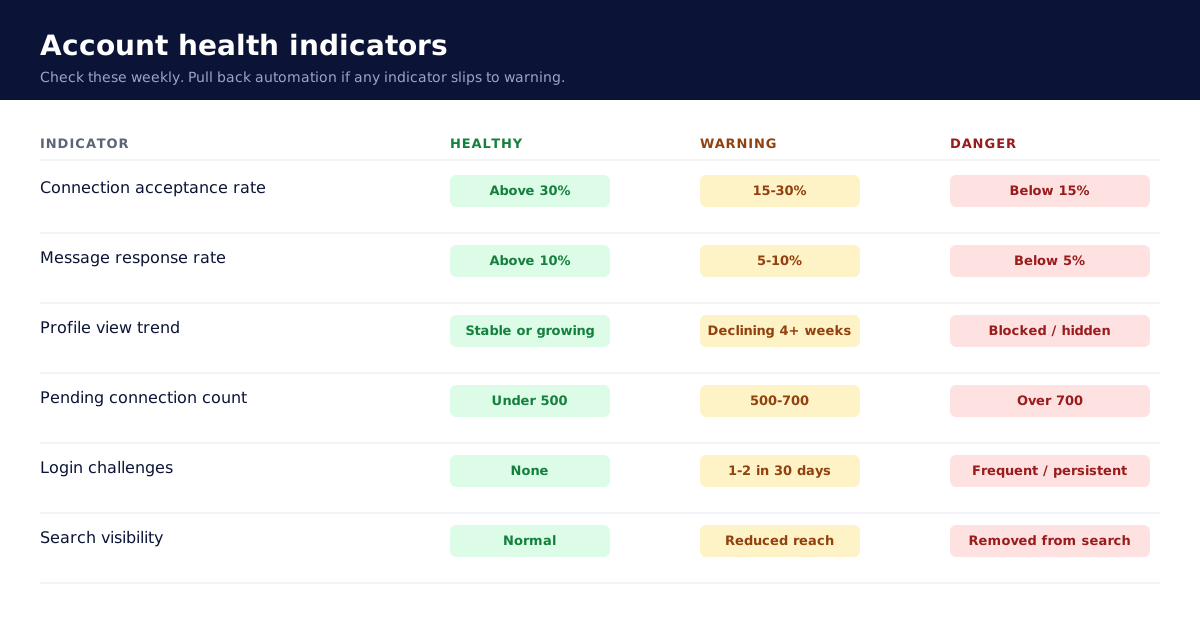
Connection acceptance rate. Above 30 percent: healthy. 15 to 30 percent: warning. Below 15 percent: danger. Low acceptance rate signals to LinkedIn that you are targeting people who do not know you, do not want to know you, or who flag your invitation as spam. Acceptance rate over 30 percent suggests the targeting is right.
Message response rate. Above 10 percent: healthy. 5 to 10 percent: warning. Below 5 percent: danger. Low response rate is a slower signal than acceptance rate but compounds over time. If your messages routinely get no response, LinkedIn assumes they are unwanted.
Profile view stability. Stable or growing: healthy. Declining over 4+ weeks: warning. Blocked or hidden from search: danger. If profile views start declining for no obvious external reason (no offboarding from a high-traffic role, no content velocity change), LinkedIn may be down-ranking your visibility as a soft restriction.
Pending connection count. Under 500 pending: healthy. 500 to 700 pending: warning. Over 700 pending: danger. High pending counts signal that your invitations are not being accepted, which suggests targeting is wrong. LinkedIn caps pending invitations at roughly 700 for most accounts; hitting the cap blocks further invitations until you withdraw old ones.
Check these weekly on every active account. If any indicator slips into the warning zone, pull back automation volume by 30 to 50 percent for 2 weeks and reset. If any indicator slips into the danger zone, stop automation entirely and run the recovery protocol below.
Recovery from restriction
If your account has been restricted (warning banner from LinkedIn, login challenge, temporary cap on actions, full account suspension), the recovery playbook:
Step 1: stop all automation immediately. Do not try to push through. Do not run "just one more campaign." LinkedIn restrictions escalate; pushing through a soft warning gets you a hard suspension.
Step 2: 2 weeks of manual activity only. Same protocol as the warmup days 1 to 10, but slower. 30 to 50 interactions per day manually. Focus on responding to existing conversations, posting valuable content, engaging thoughtfully with other people's posts.
Step 3: respond to existing conversations. Any messages in your inbox that have been sitting unanswered, work through them with real responses. LinkedIn weights two-way conversation as a strong "human user" signal.
Step 4: post valuable content. Publish 2 to 3 original posts during the 2 weeks. The post quality matters: thoughtful industry observations, lessons learned, contrarian takes on common assumptions. Generic "5 tips for sales success" content does not signal legitimacy.
Step 5: engage with others' content. Like and comment thoughtfully on 5 to 10 industry posts per day. Engagement that contributes value (substantive comments, not "great post!") signals legitimacy.
Step 6: slowly reintroduce outreach. After 2 weeks, restart with 3 to 5 manual connection requests per day for a week. Then 5 to 10 per day for another week. Then begin automation at half your previous volume. Run the 21-day warmup again before pushing back to full ceilings.
Account recovery typically takes 4 to 6 weeks total before you are back to safe full-automation volume. Some restrictions never fully clear; if your account has been flagged twice in a 90-day window, consider opening a fresh LinkedIn account (different email, different number, different IP for setup) and running the new account through the full warmup protocol.
Tool-specific safety notes
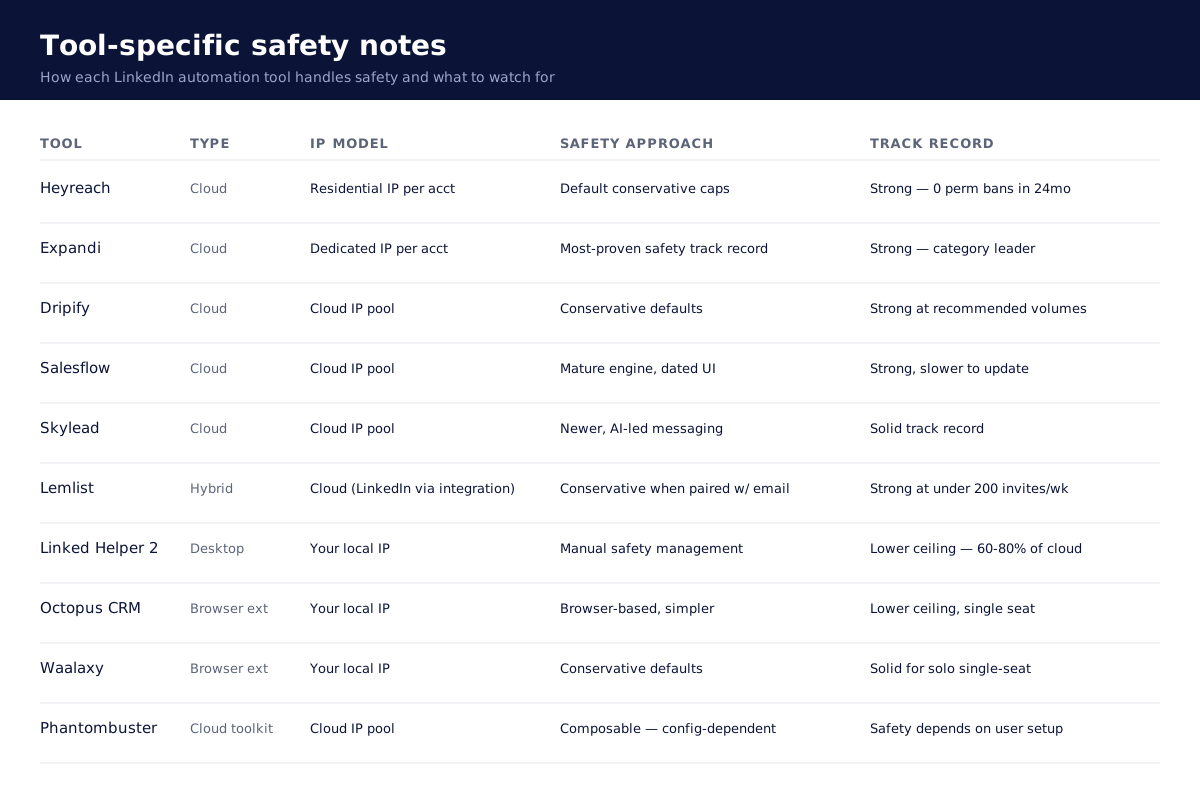
Heyreach: cloud-based, residential IPs per account, conservative safety defaults. Configurable daily caps that default to the safe ceilings (10 to 15 connection requests per day, 80 total interactions). Multi-account architecture with isolated IPs reduces cross-contamination risk. Strong track record across our client deployments; no permanent bans in 24 months across 200+ accounts.
Expandi: cloud-based, dedicated IP per LinkedIn account. Longest-running cloud platform with the most-proven safety track record in the category. Behaviour-mimicking randomisation, smart sending limits, business-hours-only scheduling. Slightly higher per-account cost than Heyreach but credible alternative for teams that want the most-established platform.
Lemlist: hybrid platform with LinkedIn baked into multichannel sequences (email + LinkedIn + call). LinkedIn automation is conservative by default and accounts in our client deployments have not been banned at recommended volumes (under 200 invites per week per seat). For higher LinkedIn volume, pair Lemlist with Heyreach and split the channels.
Dripify, Salesflow, Skylead: cloud-based with solid safety defaults across the board. Use them at recommended volumes and you will not have restriction problems. Push the limits beyond what they recommend and you will, regardless of the tool.
Linked Helper 2, Octopus CRM, Waalaxy, older Dux-Soup: desktop or browser-extension based. Actions originate from your local IP, which LinkedIn fingerprints more aggressively than dedicated cloud IPs. Safety ceiling is meaningfully lower (recommend staying at 60 to 80 percent of cloud-tool limits). Never run automation and manual use of the same account simultaneously.
Phantombuster: cloud-based but composable rather than turnkey. Safety depends on how you configure each phantom. The defaults are conservative; the risk is users building custom workflows that ignore the safety guardrails.
For the full comparison of LinkedIn automation tools by safety, agency fit, and pricing, see our Best LinkedIn automation tools listicle.
FAQ
What is the safe daily connection request limit on LinkedIn in 2026?
10 to 15 per day, with a hard ceiling of 100 per week and a monthly cap of 400 for non-Premium accounts. Premium accounts have the same connection request limits as non-Premium accounts. The published 200-per-week figure from 2019 and earlier is obsolete and unsafe.
Do automation tools actually get accounts banned?
Tools at recommended safety limits do not get accounts banned. Tools pushed beyond recommended limits do. The variable is configuration, not tool choice. Across 200+ client LinkedIn accounts on the tools we recommend (Heyreach, Expandi, Lemlist, Dripify), we have not had a permanent ban in 24 months. Temporary restrictions happen occasionally and resolve in 24 to 72 hours when caught early.
How long does the LinkedIn warmup take for a new account?
21 days minimum. Days 1 to 10 are manual-only at 60 interactions per day. Days 11 to 20 introduce light connection requests. Day 21+ moves to automated outreach at safe ceilings. Skipping any of these phases is the single most common reason new operator accounts get restricted in the first 30 days.
What is the safe daily interaction ceiling?
Roughly 120 total actions per day across all categories (connection requests, messages, profile views, likes, comments, follows, endorsements). Stay well below this if you can; we run client accounts at 60 to 80 actions per day on average and rarely push beyond 100.
Can I get my LinkedIn account banned by automation?
Yes, if you ignore safety best practices. No, if you use recommended tools at recommended volumes. The unsafe practices are: ignoring daily limits, using datacenter IPs, running automation and manual use simultaneously on the same account, sending generic spammy templates at volume.
What is the acceptance rate threshold for a healthy LinkedIn account?
Above 30 percent acceptance rate is healthy. 15 to 30 percent is a warning. Below 15 percent is dangerous. Low acceptance rate signals targeting problems and triggers LinkedIn's spam-detection algorithms.
Are weekend connection requests safe?
No. Run automation Monday through Friday during business hours in the account's stated timezone. Weekend activity is a flag. Off-hours activity is a flag. Stay inside 9 AM to 6 PM, weekdays only, for any automated actions.
What about LinkedIn Premium and Sales Navigator limits?
Premium gives you more InMails (800 per month total, 30 to 40 per day) and more search results. It does not raise the connection request limit. Sales Navigator users are tracked more aggressively because the assumption is that you should know better than to abuse the platform; flagged Sales Nav accounts get restricted faster than standard accounts doing the same thing.
My account has been restricted. How long does recovery take?
4 to 6 weeks. 2 weeks of manual-only activity (no automation). Then 2 weeks of slow manual outreach reintroduction. Then 1 to 2 weeks of automation ramping back up. Full restoration of pre-restriction send volume typically lands around week 6.
Can I run two LinkedIn accounts to double my volume?
Technically yes, against LinkedIn's terms of service. The platform fingerprints accounts that look like they belong to the same person (similar profile photo, identical work history, same IP pool for login, overlapping connection graphs) and bans both. If you genuinely need higher volume than one account allows, hire a second person and use their LinkedIn account legitimately. Do not run shadow accounts on yourself.
Does posting content on LinkedIn affect automation safety?
Yes, positively. LinkedIn favours accounts that produce content. Posting 1 to 3 times per week signals "legitimate user" and raises the safety ceiling for outreach actions. The reverse is also true: accounts that only do outreach and never post content trip the bot-detection algorithms faster.
Should I use Sales Navigator with automation tools?
Yes, for the search and targeting filters. Sales Navigator is the best way to build precise ICP lists. But run automation more conservatively on Sales Nav accounts (60 to 80 percent of standard safe ceilings) because LinkedIn tracks Sales Nav users more aggressively for abuse.
Bottom line
The 2026 LinkedIn limits are tighter than most operator playbooks acknowledge. 10 to 15 connection requests per day, 120 total interactions per day ceiling, 21-day warmup before automation, and conservative behaviour-mimicking patterns are the price of admission to a safe long-term LinkedIn motion.
The accounts that get banned are the accounts that push the limits, skip the warmup, use generic templates, and run weekend or off-hours activity. The accounts that scale safely are the ones that target precise ICPs, use varied message bodies, run only during business hours, post content alongside outreach, and pull back at the first warning sign.
For B2B operators, the rule that beats every other tactic: target the right people. Connection requests sent to true ICP prospects with a clear "why now" message produce 30+ percent acceptance rates and protect the account. Connection requests sprayed at adjacent personas produce 10 percent acceptance rates and triggered restrictions. Tool choice matters less than targeting precision and message quality.
For the tools that handle these safety defaults best at agency scale, see our Best LinkedIn automation tools listicle. For the agency-specific comparison between the two best cloud platforms, see our Heyreach vs Expandi comparison. For multichannel motions where LinkedIn runs alongside email, see Lemlist vs Smartlead.
If you want help designing a LinkedIn motion that stays inside the safety envelope and produces real pipeline, book a working session with GROU. We run this stack for clients every day. We can do the same for you.
→ Try Heyreach free (14-day trial, no card required).
→ Try Expandi free (7-day trial, no card required).
→ Try Lemlist free (14-day trial, no card required).
Why trust this guide
We are GROU, a B2B pipeline agency that runs lead generation, outbound, and LinkedIn content for clients across manufacturing, fintech, iGaming, software, and professional services. We have managed 200+ LinkedIn accounts across client workspaces in the last 24 months and have personally warmed up dozens of new accounts, recovered restricted accounts, and pushed the daily limits on every cloud and desktop automation tool on the market. The playbook below is from operators who have hit (and learned to avoid) every LinkedIn restriction trigger that exists, not from a vendor pitch.
→ Methodology: This guide combines our own client deployment data across 50+ LinkedIn campaigns, LinkedIn's published account usage guidance, public restriction reports across third-party communities (Lagrowthmachine, Puzzle Inbox, Heyreach forums), and real-world testing of warmup protocols across 30+ new accounts in 2025 and 2026. We refresh this article quarterly because LinkedIn's enforcement evolves faster than most playbooks acknowledge.
→ Affiliate disclosure: Some links in this article are affiliate links to LinkedIn automation tools we have actually deployed for our agency clients. We earn a small commission if you sign up through them, at no extra cost to you. We only recommend tools we use.
TL;DR
LinkedIn's safe daily limits are materially lower than most operators assume in 2026. The headline numbers most people quote (200 connection requests per day, hundreds of messages, unlimited profile views) are 2019 numbers that have been obsolete for at least 3 years. The current safe ceiling: roughly 10 to 15 connection requests per day, 15 to 20 direct messages per day, 30 to 40 InMails per day for Premium accounts, and a total ceiling of around 120 interactions per day before LinkedIn's behaviour-detection systems start flagging the account.
New accounts (and dormant accounts coming back online) need a structured 21-day warmup before running any automation. Days 1 to 10 are manual-only activity at 60 interactions per day. Days 11 to 20 ramp to 80 per day with light connection requests. Day 21+ slowly introduces automation up to safe ceilings. Skipping the warmup is the single most common reason new operator accounts get restricted in the first 30 days.
If your account has been restricted, the recovery playbook is 2 weeks of manual-only activity before reintroducing automation slowly. This guide covers the full limits matrix, the warmup protocol, the red flags that trigger restrictions, the account health indicators to watch, and tool-specific safety notes for Heyreach, Expandi, Lemlist, and desktop tools like Linked Helper 2.
The 2026 LinkedIn limits
The current safe daily and monthly ceilings, by interaction type:
The two numbers that matter most for B2B outbound: 10 to 15 connection requests per day (capped at 400 per month for non-Premium accounts, 100 per week is a common safe budget), and 15 to 20 direct messages per day to existing connections. For Premium accounts, the InMail ceiling is 30 to 40 per day with a 800 per month total.
The trap most operators fall into: focusing only on the connection request limit while ignoring the total daily interaction ceiling. LinkedIn counts everything you do (DMs, InMails, profile views, post likes, comments, page follows, endorsements, event joins) as interactions. Cross any of the individual category limits or push the total above 120 per day, and the behaviour-detection systems start flagging the account.
The other trap: assuming Premium accounts have higher connection request limits. They do not. Premium gives you more InMails and more search results, not more connection invites. The 400 per month connection limit applies to Premium and non-Premium accounts equally.
For Sales Navigator users, the limits are even more conservative. LinkedIn tracks Sales Nav users more aggressively because they are paying for high-volume access and the assumption is that you should know better than to spray invitations. A Sales Nav account flagged for over-aggressive automation gets restricted faster than a standard account doing the same thing.
What counts as an interaction
The full list of actions LinkedIn counts against your daily activity budget:
Sending connection requests
Sending direct messages to existing connections
Sending InMails (Premium)
Viewing profiles
Liking posts and comments
Commenting on posts
Following companies and pages
Endorsing skills
Joining events
Joining groups
Following hashtags
Saving posts and articles
The total ceiling: stay well below 120 actions per day total across all categories. For accounts running automation through cloud-based tools (Heyreach, Expandi, Dripify), the tool will enforce these limits automatically if configured correctly. For desktop tools (Linked Helper 2, older Dux-Soup), the limits enforcement is on you.
A common operator mistake: configuring an automation tool to run 80 profile views per day plus 20 connection requests plus 30 follow-up messages plus 15 likes. The math: 145 actions per day, above the safe ceiling. The tool will run it. LinkedIn will flag it.
The pattern that works at GROU: keep automation between 60 and 80 actions per day on warmed accounts, distributed across categories, weighted toward connection requests and messages because those are the conversion-driving actions. Profile views and likes are nice signals but they consume budget without producing pipeline.
Daily action ceiling explained
The 120 per day ceiling is not LinkedIn's published limit. It is the operator-derived ceiling based on what triggers restrictions across hundreds of accounts we have managed. The published guidance from LinkedIn is more vague: "use the platform like a human would." The 120 figure approximates what "human-like" volume looks like at the upper end before LinkedIn's behaviour-detection algorithms start treating you as a bot.
The detection signals LinkedIn watches:
Timing: same-second action intervals, perfectly regular spacing, actions only at the top of every minute. Humans randomise.
Volume bursts: 50 actions in 10 minutes followed by 6 hours of nothing. Humans spread activity across hours.
Action diversity: only connection requests, no profile views or likes. Humans browse before they invite.
Off-hours activity: actions at 3 AM in your timezone, weekend bursts, holiday volume. Humans work standard hours.
Conversion rates: low acceptance rates (under 15 percent), low response rates (under 5 percent), high pending invitation counts (over 700). Humans get accepted because they target the right people.
Cloud-based tools like Heyreach and Expandi handle most of these automatically: randomised timing within configured ranges, business-hours-only sending, action mix configuration, pending invitation monitoring. Desktop tools like Linked Helper 2 require you to manage these yourself. The safety ceiling on a well-configured cloud tool is meaningfully higher than on a manually-configured desktop tool.
The 21-day warmup protocol
For new accounts and accounts returning from restriction, run a structured warmup before pushing automation volume:
Days 1 to 10: manual only, 60 interactions per day maximum.
No automation. Manual browsing only. Mix of profile views, likes, comments on industry posts, light DMs to existing connections, and gradual page follows. The goal is to build a baseline of "normal user behaviour" that LinkedIn can fingerprint as legitimate. Skip this phase and the automation that follows looks like a bot from day one.
Specific actions for days 1 to 10:
Update profile if it has been stale (headline, About section, recent role)
Post 2 to 3 original posts (LinkedIn favours accounts that produce content)
Like 5 to 10 industry posts per day
Comment thoughtfully on 2 to 3 posts per day
Send DMs to 1 to 2 existing connections per day with a real reason
Browse 20 to 30 profiles per day from your industry (no connection requests yet)
Follow 2 to 3 industry companies per day
Days 11 to 20: light automation, 80 interactions per day maximum.
Introduce 5 to 10 connection requests per day, manually targeted to ICP prospects (not automated yet). Continue the manual engagement from phase one. The goal: validate that connection requests at low volume produce a 25+ percent acceptance rate, which signals to LinkedIn that you are targeting people who actually know you or your context.
Specific actions for days 11 to 20:
Connection requests: 5 to 10 per day, hand-personalised
Continue posting 1 to 2 times per week
Continue liking and commenting at days 1 to 10 volume
Begin warming up automation tool on a separate test campaign (1 to 3 actions per day through the tool)
Monitor acceptance rate, response rate, pending invitation count
Day 21+: full automation up to safe ceilings.
Move connection requests from manual to automated (target 10 to 15 per day, 100 per week, 400 per month maximum). Introduce message follow-up automation. Continue manual content posting and engagement to maintain the "normal user" signal. Watch the health indicators (next section) and pull back if anything starts to slip.
This warmup applies to every new LinkedIn account, every account that has been dormant for 60+ days, and every account returning from a LinkedIn-imposed restriction.
Red flags that trigger restrictions
The five behaviours that get accounts flagged faster than anything else:
Sudden activity spikes. New account that has done nothing for 30 days suddenly sends 80 connection requests in one afternoon. The ramp from baseline to volume must be gradual. Even on established accounts, doubling daily volume in one day is a red flag.
Identical message copy at scale. Sending the same message body to 50 prospects in a row, even with merged-tag personalisation tokens. LinkedIn fingerprints message templates and flags accounts running obvious spintax-free spray. Vary your message bodies, run A/B tests, never let one template carry more than 30 percent of your sends.
Off-hours activity. Connection requests sent at 2 AM in your account's stated timezone. Messages sent on Saturday at 11 PM. LinkedIn watches the activity timing distribution. Real users send most of their actions between 9 AM and 6 PM Monday through Friday. Stay inside that window.
Automation introduced too early. New account that has been live for 4 days suddenly starts running 50 actions per day through Heyreach. LinkedIn flags this regardless of the tool quality. The 21-day warmup is not optional; it is the price of admission to safe automation.
Generic spam templates. "Hi {{first_name}}, I noticed you work at {{company}} and I think we could help you scale your sales pipeline. Are you available for a 15-minute call this week?" Variations of this message are the single most common cause of low acceptance rate, low response rate, and downstream account restriction. LinkedIn reads the engagement signals; messages that get no replies eventually get flagged.
The corollary: high acceptance rates and high response rates protect your account. If you target the right people with messages that actually resonate, LinkedIn treats your activity as legitimate and the safety ceiling rises. If you spray generic copy at poor-fit prospects, the ceiling collapses.
Account health indicators
The four metrics to watch weekly to spot account health degradation before it becomes a restriction:
Connection acceptance rate. Above 30 percent: healthy. 15 to 30 percent: warning. Below 15 percent: danger. Low acceptance rate signals to LinkedIn that you are targeting people who do not know you, do not want to know you, or who flag your invitation as spam. Acceptance rate over 30 percent suggests the targeting is right.
Message response rate. Above 10 percent: healthy. 5 to 10 percent: warning. Below 5 percent: danger. Low response rate is a slower signal than acceptance rate but compounds over time. If your messages routinely get no response, LinkedIn assumes they are unwanted.
Profile view stability. Stable or growing: healthy. Declining over 4+ weeks: warning. Blocked or hidden from search: danger. If profile views start declining for no obvious external reason (no offboarding from a high-traffic role, no content velocity change), LinkedIn may be down-ranking your visibility as a soft restriction.
Pending connection count. Under 500 pending: healthy. 500 to 700 pending: warning. Over 700 pending: danger. High pending counts signal that your invitations are not being accepted, which suggests targeting is wrong. LinkedIn caps pending invitations at roughly 700 for most accounts; hitting the cap blocks further invitations until you withdraw old ones.
Check these weekly on every active account. If any indicator slips into the warning zone, pull back automation volume by 30 to 50 percent for 2 weeks and reset. If any indicator slips into the danger zone, stop automation entirely and run the recovery protocol below.
Recovery from restriction
If your account has been restricted (warning banner from LinkedIn, login challenge, temporary cap on actions, full account suspension), the recovery playbook:
Step 1: stop all automation immediately. Do not try to push through. Do not run "just one more campaign." LinkedIn restrictions escalate; pushing through a soft warning gets you a hard suspension.
Step 2: 2 weeks of manual activity only. Same protocol as the warmup days 1 to 10, but slower. 30 to 50 interactions per day manually. Focus on responding to existing conversations, posting valuable content, engaging thoughtfully with other people's posts.
Step 3: respond to existing conversations. Any messages in your inbox that have been sitting unanswered, work through them with real responses. LinkedIn weights two-way conversation as a strong "human user" signal.
Step 4: post valuable content. Publish 2 to 3 original posts during the 2 weeks. The post quality matters: thoughtful industry observations, lessons learned, contrarian takes on common assumptions. Generic "5 tips for sales success" content does not signal legitimacy.
Step 5: engage with others' content. Like and comment thoughtfully on 5 to 10 industry posts per day. Engagement that contributes value (substantive comments, not "great post!") signals legitimacy.
Step 6: slowly reintroduce outreach. After 2 weeks, restart with 3 to 5 manual connection requests per day for a week. Then 5 to 10 per day for another week. Then begin automation at half your previous volume. Run the 21-day warmup again before pushing back to full ceilings.
Account recovery typically takes 4 to 6 weeks total before you are back to safe full-automation volume. Some restrictions never fully clear; if your account has been flagged twice in a 90-day window, consider opening a fresh LinkedIn account (different email, different number, different IP for setup) and running the new account through the full warmup protocol.
Tool-specific safety notes
Heyreach: cloud-based, residential IPs per account, conservative safety defaults. Configurable daily caps that default to the safe ceilings (10 to 15 connection requests per day, 80 total interactions). Multi-account architecture with isolated IPs reduces cross-contamination risk. Strong track record across our client deployments; no permanent bans in 24 months across 200+ accounts.
Expandi: cloud-based, dedicated IP per LinkedIn account. Longest-running cloud platform with the most-proven safety track record in the category. Behaviour-mimicking randomisation, smart sending limits, business-hours-only scheduling. Slightly higher per-account cost than Heyreach but credible alternative for teams that want the most-established platform.
Lemlist: hybrid platform with LinkedIn baked into multichannel sequences (email + LinkedIn + call). LinkedIn automation is conservative by default and accounts in our client deployments have not been banned at recommended volumes (under 200 invites per week per seat). For higher LinkedIn volume, pair Lemlist with Heyreach and split the channels.
Dripify, Salesflow, Skylead: cloud-based with solid safety defaults across the board. Use them at recommended volumes and you will not have restriction problems. Push the limits beyond what they recommend and you will, regardless of the tool.
Linked Helper 2, Octopus CRM, Waalaxy, older Dux-Soup: desktop or browser-extension based. Actions originate from your local IP, which LinkedIn fingerprints more aggressively than dedicated cloud IPs. Safety ceiling is meaningfully lower (recommend staying at 60 to 80 percent of cloud-tool limits). Never run automation and manual use of the same account simultaneously.
Phantombuster: cloud-based but composable rather than turnkey. Safety depends on how you configure each phantom. The defaults are conservative; the risk is users building custom workflows that ignore the safety guardrails.
For the full comparison of LinkedIn automation tools by safety, agency fit, and pricing, see our Best LinkedIn automation tools listicle.
FAQ
What is the safe daily connection request limit on LinkedIn in 2026?
10 to 15 per day, with a hard ceiling of 100 per week and a monthly cap of 400 for non-Premium accounts. Premium accounts have the same connection request limits as non-Premium accounts. The published 200-per-week figure from 2019 and earlier is obsolete and unsafe.
Do automation tools actually get accounts banned?
Tools at recommended safety limits do not get accounts banned. Tools pushed beyond recommended limits do. The variable is configuration, not tool choice. Across 200+ client LinkedIn accounts on the tools we recommend (Heyreach, Expandi, Lemlist, Dripify), we have not had a permanent ban in 24 months. Temporary restrictions happen occasionally and resolve in 24 to 72 hours when caught early.
How long does the LinkedIn warmup take for a new account?
21 days minimum. Days 1 to 10 are manual-only at 60 interactions per day. Days 11 to 20 introduce light connection requests. Day 21+ moves to automated outreach at safe ceilings. Skipping any of these phases is the single most common reason new operator accounts get restricted in the first 30 days.
What is the safe daily interaction ceiling?
Roughly 120 total actions per day across all categories (connection requests, messages, profile views, likes, comments, follows, endorsements). Stay well below this if you can; we run client accounts at 60 to 80 actions per day on average and rarely push beyond 100.
Can I get my LinkedIn account banned by automation?
Yes, if you ignore safety best practices. No, if you use recommended tools at recommended volumes. The unsafe practices are: ignoring daily limits, using datacenter IPs, running automation and manual use simultaneously on the same account, sending generic spammy templates at volume.
What is the acceptance rate threshold for a healthy LinkedIn account?
Above 30 percent acceptance rate is healthy. 15 to 30 percent is a warning. Below 15 percent is dangerous. Low acceptance rate signals targeting problems and triggers LinkedIn's spam-detection algorithms.
Are weekend connection requests safe?
No. Run automation Monday through Friday during business hours in the account's stated timezone. Weekend activity is a flag. Off-hours activity is a flag. Stay inside 9 AM to 6 PM, weekdays only, for any automated actions.
What about LinkedIn Premium and Sales Navigator limits?
Premium gives you more InMails (800 per month total, 30 to 40 per day) and more search results. It does not raise the connection request limit. Sales Navigator users are tracked more aggressively because the assumption is that you should know better than to abuse the platform; flagged Sales Nav accounts get restricted faster than standard accounts doing the same thing.
My account has been restricted. How long does recovery take?
4 to 6 weeks. 2 weeks of manual-only activity (no automation). Then 2 weeks of slow manual outreach reintroduction. Then 1 to 2 weeks of automation ramping back up. Full restoration of pre-restriction send volume typically lands around week 6.
Can I run two LinkedIn accounts to double my volume?
Technically yes, against LinkedIn's terms of service. The platform fingerprints accounts that look like they belong to the same person (similar profile photo, identical work history, same IP pool for login, overlapping connection graphs) and bans both. If you genuinely need higher volume than one account allows, hire a second person and use their LinkedIn account legitimately. Do not run shadow accounts on yourself.
Does posting content on LinkedIn affect automation safety?
Yes, positively. LinkedIn favours accounts that produce content. Posting 1 to 3 times per week signals "legitimate user" and raises the safety ceiling for outreach actions. The reverse is also true: accounts that only do outreach and never post content trip the bot-detection algorithms faster.
Should I use Sales Navigator with automation tools?
Yes, for the search and targeting filters. Sales Navigator is the best way to build precise ICP lists. But run automation more conservatively on Sales Nav accounts (60 to 80 percent of standard safe ceilings) because LinkedIn tracks Sales Nav users more aggressively for abuse.
Bottom line
The 2026 LinkedIn limits are tighter than most operator playbooks acknowledge. 10 to 15 connection requests per day, 120 total interactions per day ceiling, 21-day warmup before automation, and conservative behaviour-mimicking patterns are the price of admission to a safe long-term LinkedIn motion.
The accounts that get banned are the accounts that push the limits, skip the warmup, use generic templates, and run weekend or off-hours activity. The accounts that scale safely are the ones that target precise ICPs, use varied message bodies, run only during business hours, post content alongside outreach, and pull back at the first warning sign.
For B2B operators, the rule that beats every other tactic: target the right people. Connection requests sent to true ICP prospects with a clear "why now" message produce 30+ percent acceptance rates and protect the account. Connection requests sprayed at adjacent personas produce 10 percent acceptance rates and triggered restrictions. Tool choice matters less than targeting precision and message quality.
For the tools that handle these safety defaults best at agency scale, see our Best LinkedIn automation tools listicle. For the agency-specific comparison between the two best cloud platforms, see our Heyreach vs Expandi comparison. For multichannel motions where LinkedIn runs alongside email, see Lemlist vs Smartlead.
If you want help designing a LinkedIn motion that stays inside the safety envelope and produces real pipeline, book a working session with GROU. We run this stack for clients every day. We can do the same for you.
→ Try Heyreach free (14-day trial, no card required).
→ Try Expandi free (7-day trial, no card required).
→ Try Lemlist free (14-day trial, no card required).
Why trust this guide
We are GROU, a B2B pipeline agency that runs lead generation, outbound, and LinkedIn content for clients across manufacturing, fintech, iGaming, software, and professional services. We have managed 200+ LinkedIn accounts across client workspaces in the last 24 months and have personally warmed up dozens of new accounts, recovered restricted accounts, and pushed the daily limits on every cloud and desktop automation tool on the market. The playbook below is from operators who have hit (and learned to avoid) every LinkedIn restriction trigger that exists, not from a vendor pitch.
→ Methodology: This guide combines our own client deployment data across 50+ LinkedIn campaigns, LinkedIn's published account usage guidance, public restriction reports across third-party communities (Lagrowthmachine, Puzzle Inbox, Heyreach forums), and real-world testing of warmup protocols across 30+ new accounts in 2025 and 2026. We refresh this article quarterly because LinkedIn's enforcement evolves faster than most playbooks acknowledge.
→ Affiliate disclosure: Some links in this article are affiliate links to LinkedIn automation tools we have actually deployed for our agency clients. We earn a small commission if you sign up through them, at no extra cost to you. We only recommend tools we use.
TL;DR
LinkedIn's safe daily limits are materially lower than most operators assume in 2026. The headline numbers most people quote (200 connection requests per day, hundreds of messages, unlimited profile views) are 2019 numbers that have been obsolete for at least 3 years. The current safe ceiling: roughly 10 to 15 connection requests per day, 15 to 20 direct messages per day, 30 to 40 InMails per day for Premium accounts, and a total ceiling of around 120 interactions per day before LinkedIn's behaviour-detection systems start flagging the account.
New accounts (and dormant accounts coming back online) need a structured 21-day warmup before running any automation. Days 1 to 10 are manual-only activity at 60 interactions per day. Days 11 to 20 ramp to 80 per day with light connection requests. Day 21+ slowly introduces automation up to safe ceilings. Skipping the warmup is the single most common reason new operator accounts get restricted in the first 30 days.
If your account has been restricted, the recovery playbook is 2 weeks of manual-only activity before reintroducing automation slowly. This guide covers the full limits matrix, the warmup protocol, the red flags that trigger restrictions, the account health indicators to watch, and tool-specific safety notes for Heyreach, Expandi, Lemlist, and desktop tools like Linked Helper 2.
The 2026 LinkedIn limits
The current safe daily and monthly ceilings, by interaction type:
The two numbers that matter most for B2B outbound: 10 to 15 connection requests per day (capped at 400 per month for non-Premium accounts, 100 per week is a common safe budget), and 15 to 20 direct messages per day to existing connections. For Premium accounts, the InMail ceiling is 30 to 40 per day with a 800 per month total.
The trap most operators fall into: focusing only on the connection request limit while ignoring the total daily interaction ceiling. LinkedIn counts everything you do (DMs, InMails, profile views, post likes, comments, page follows, endorsements, event joins) as interactions. Cross any of the individual category limits or push the total above 120 per day, and the behaviour-detection systems start flagging the account.
The other trap: assuming Premium accounts have higher connection request limits. They do not. Premium gives you more InMails and more search results, not more connection invites. The 400 per month connection limit applies to Premium and non-Premium accounts equally.
For Sales Navigator users, the limits are even more conservative. LinkedIn tracks Sales Nav users more aggressively because they are paying for high-volume access and the assumption is that you should know better than to spray invitations. A Sales Nav account flagged for over-aggressive automation gets restricted faster than a standard account doing the same thing.
What counts as an interaction
The full list of actions LinkedIn counts against your daily activity budget:
Sending connection requests
Sending direct messages to existing connections
Sending InMails (Premium)
Viewing profiles
Liking posts and comments
Commenting on posts
Following companies and pages
Endorsing skills
Joining events
Joining groups
Following hashtags
Saving posts and articles
The total ceiling: stay well below 120 actions per day total across all categories. For accounts running automation through cloud-based tools (Heyreach, Expandi, Dripify), the tool will enforce these limits automatically if configured correctly. For desktop tools (Linked Helper 2, older Dux-Soup), the limits enforcement is on you.
A common operator mistake: configuring an automation tool to run 80 profile views per day plus 20 connection requests plus 30 follow-up messages plus 15 likes. The math: 145 actions per day, above the safe ceiling. The tool will run it. LinkedIn will flag it.
The pattern that works at GROU: keep automation between 60 and 80 actions per day on warmed accounts, distributed across categories, weighted toward connection requests and messages because those are the conversion-driving actions. Profile views and likes are nice signals but they consume budget without producing pipeline.
Daily action ceiling explained
The 120 per day ceiling is not LinkedIn's published limit. It is the operator-derived ceiling based on what triggers restrictions across hundreds of accounts we have managed. The published guidance from LinkedIn is more vague: "use the platform like a human would." The 120 figure approximates what "human-like" volume looks like at the upper end before LinkedIn's behaviour-detection algorithms start treating you as a bot.
The detection signals LinkedIn watches:
Timing: same-second action intervals, perfectly regular spacing, actions only at the top of every minute. Humans randomise.
Volume bursts: 50 actions in 10 minutes followed by 6 hours of nothing. Humans spread activity across hours.
Action diversity: only connection requests, no profile views or likes. Humans browse before they invite.
Off-hours activity: actions at 3 AM in your timezone, weekend bursts, holiday volume. Humans work standard hours.
Conversion rates: low acceptance rates (under 15 percent), low response rates (under 5 percent), high pending invitation counts (over 700). Humans get accepted because they target the right people.
Cloud-based tools like Heyreach and Expandi handle most of these automatically: randomised timing within configured ranges, business-hours-only sending, action mix configuration, pending invitation monitoring. Desktop tools like Linked Helper 2 require you to manage these yourself. The safety ceiling on a well-configured cloud tool is meaningfully higher than on a manually-configured desktop tool.
The 21-day warmup protocol
For new accounts and accounts returning from restriction, run a structured warmup before pushing automation volume:
Days 1 to 10: manual only, 60 interactions per day maximum.
No automation. Manual browsing only. Mix of profile views, likes, comments on industry posts, light DMs to existing connections, and gradual page follows. The goal is to build a baseline of "normal user behaviour" that LinkedIn can fingerprint as legitimate. Skip this phase and the automation that follows looks like a bot from day one.
Specific actions for days 1 to 10:
Update profile if it has been stale (headline, About section, recent role)
Post 2 to 3 original posts (LinkedIn favours accounts that produce content)
Like 5 to 10 industry posts per day
Comment thoughtfully on 2 to 3 posts per day
Send DMs to 1 to 2 existing connections per day with a real reason
Browse 20 to 30 profiles per day from your industry (no connection requests yet)
Follow 2 to 3 industry companies per day
Days 11 to 20: light automation, 80 interactions per day maximum.
Introduce 5 to 10 connection requests per day, manually targeted to ICP prospects (not automated yet). Continue the manual engagement from phase one. The goal: validate that connection requests at low volume produce a 25+ percent acceptance rate, which signals to LinkedIn that you are targeting people who actually know you or your context.
Specific actions for days 11 to 20:
Connection requests: 5 to 10 per day, hand-personalised
Continue posting 1 to 2 times per week
Continue liking and commenting at days 1 to 10 volume
Begin warming up automation tool on a separate test campaign (1 to 3 actions per day through the tool)
Monitor acceptance rate, response rate, pending invitation count
Day 21+: full automation up to safe ceilings.
Move connection requests from manual to automated (target 10 to 15 per day, 100 per week, 400 per month maximum). Introduce message follow-up automation. Continue manual content posting and engagement to maintain the "normal user" signal. Watch the health indicators (next section) and pull back if anything starts to slip.
This warmup applies to every new LinkedIn account, every account that has been dormant for 60+ days, and every account returning from a LinkedIn-imposed restriction.
Red flags that trigger restrictions
The five behaviours that get accounts flagged faster than anything else:
Sudden activity spikes. New account that has done nothing for 30 days suddenly sends 80 connection requests in one afternoon. The ramp from baseline to volume must be gradual. Even on established accounts, doubling daily volume in one day is a red flag.
Identical message copy at scale. Sending the same message body to 50 prospects in a row, even with merged-tag personalisation tokens. LinkedIn fingerprints message templates and flags accounts running obvious spintax-free spray. Vary your message bodies, run A/B tests, never let one template carry more than 30 percent of your sends.
Off-hours activity. Connection requests sent at 2 AM in your account's stated timezone. Messages sent on Saturday at 11 PM. LinkedIn watches the activity timing distribution. Real users send most of their actions between 9 AM and 6 PM Monday through Friday. Stay inside that window.
Automation introduced too early. New account that has been live for 4 days suddenly starts running 50 actions per day through Heyreach. LinkedIn flags this regardless of the tool quality. The 21-day warmup is not optional; it is the price of admission to safe automation.
Generic spam templates. "Hi {{first_name}}, I noticed you work at {{company}} and I think we could help you scale your sales pipeline. Are you available for a 15-minute call this week?" Variations of this message are the single most common cause of low acceptance rate, low response rate, and downstream account restriction. LinkedIn reads the engagement signals; messages that get no replies eventually get flagged.
The corollary: high acceptance rates and high response rates protect your account. If you target the right people with messages that actually resonate, LinkedIn treats your activity as legitimate and the safety ceiling rises. If you spray generic copy at poor-fit prospects, the ceiling collapses.
Account health indicators
The four metrics to watch weekly to spot account health degradation before it becomes a restriction:
Connection acceptance rate. Above 30 percent: healthy. 15 to 30 percent: warning. Below 15 percent: danger. Low acceptance rate signals to LinkedIn that you are targeting people who do not know you, do not want to know you, or who flag your invitation as spam. Acceptance rate over 30 percent suggests the targeting is right.
Message response rate. Above 10 percent: healthy. 5 to 10 percent: warning. Below 5 percent: danger. Low response rate is a slower signal than acceptance rate but compounds over time. If your messages routinely get no response, LinkedIn assumes they are unwanted.
Profile view stability. Stable or growing: healthy. Declining over 4+ weeks: warning. Blocked or hidden from search: danger. If profile views start declining for no obvious external reason (no offboarding from a high-traffic role, no content velocity change), LinkedIn may be down-ranking your visibility as a soft restriction.
Pending connection count. Under 500 pending: healthy. 500 to 700 pending: warning. Over 700 pending: danger. High pending counts signal that your invitations are not being accepted, which suggests targeting is wrong. LinkedIn caps pending invitations at roughly 700 for most accounts; hitting the cap blocks further invitations until you withdraw old ones.
Check these weekly on every active account. If any indicator slips into the warning zone, pull back automation volume by 30 to 50 percent for 2 weeks and reset. If any indicator slips into the danger zone, stop automation entirely and run the recovery protocol below.
Recovery from restriction
If your account has been restricted (warning banner from LinkedIn, login challenge, temporary cap on actions, full account suspension), the recovery playbook:
Step 1: stop all automation immediately. Do not try to push through. Do not run "just one more campaign." LinkedIn restrictions escalate; pushing through a soft warning gets you a hard suspension.
Step 2: 2 weeks of manual activity only. Same protocol as the warmup days 1 to 10, but slower. 30 to 50 interactions per day manually. Focus on responding to existing conversations, posting valuable content, engaging thoughtfully with other people's posts.
Step 3: respond to existing conversations. Any messages in your inbox that have been sitting unanswered, work through them with real responses. LinkedIn weights two-way conversation as a strong "human user" signal.
Step 4: post valuable content. Publish 2 to 3 original posts during the 2 weeks. The post quality matters: thoughtful industry observations, lessons learned, contrarian takes on common assumptions. Generic "5 tips for sales success" content does not signal legitimacy.
Step 5: engage with others' content. Like and comment thoughtfully on 5 to 10 industry posts per day. Engagement that contributes value (substantive comments, not "great post!") signals legitimacy.
Step 6: slowly reintroduce outreach. After 2 weeks, restart with 3 to 5 manual connection requests per day for a week. Then 5 to 10 per day for another week. Then begin automation at half your previous volume. Run the 21-day warmup again before pushing back to full ceilings.
Account recovery typically takes 4 to 6 weeks total before you are back to safe full-automation volume. Some restrictions never fully clear; if your account has been flagged twice in a 90-day window, consider opening a fresh LinkedIn account (different email, different number, different IP for setup) and running the new account through the full warmup protocol.
Tool-specific safety notes
Heyreach: cloud-based, residential IPs per account, conservative safety defaults. Configurable daily caps that default to the safe ceilings (10 to 15 connection requests per day, 80 total interactions). Multi-account architecture with isolated IPs reduces cross-contamination risk. Strong track record across our client deployments; no permanent bans in 24 months across 200+ accounts.
Expandi: cloud-based, dedicated IP per LinkedIn account. Longest-running cloud platform with the most-proven safety track record in the category. Behaviour-mimicking randomisation, smart sending limits, business-hours-only scheduling. Slightly higher per-account cost than Heyreach but credible alternative for teams that want the most-established platform.
Lemlist: hybrid platform with LinkedIn baked into multichannel sequences (email + LinkedIn + call). LinkedIn automation is conservative by default and accounts in our client deployments have not been banned at recommended volumes (under 200 invites per week per seat). For higher LinkedIn volume, pair Lemlist with Heyreach and split the channels.
Dripify, Salesflow, Skylead: cloud-based with solid safety defaults across the board. Use them at recommended volumes and you will not have restriction problems. Push the limits beyond what they recommend and you will, regardless of the tool.
Linked Helper 2, Octopus CRM, Waalaxy, older Dux-Soup: desktop or browser-extension based. Actions originate from your local IP, which LinkedIn fingerprints more aggressively than dedicated cloud IPs. Safety ceiling is meaningfully lower (recommend staying at 60 to 80 percent of cloud-tool limits). Never run automation and manual use of the same account simultaneously.
Phantombuster: cloud-based but composable rather than turnkey. Safety depends on how you configure each phantom. The defaults are conservative; the risk is users building custom workflows that ignore the safety guardrails.
For the full comparison of LinkedIn automation tools by safety, agency fit, and pricing, see our Best LinkedIn automation tools listicle.
FAQ
What is the safe daily connection request limit on LinkedIn in 2026?
10 to 15 per day, with a hard ceiling of 100 per week and a monthly cap of 400 for non-Premium accounts. Premium accounts have the same connection request limits as non-Premium accounts. The published 200-per-week figure from 2019 and earlier is obsolete and unsafe.
Do automation tools actually get accounts banned?
Tools at recommended safety limits do not get accounts banned. Tools pushed beyond recommended limits do. The variable is configuration, not tool choice. Across 200+ client LinkedIn accounts on the tools we recommend (Heyreach, Expandi, Lemlist, Dripify), we have not had a permanent ban in 24 months. Temporary restrictions happen occasionally and resolve in 24 to 72 hours when caught early.
How long does the LinkedIn warmup take for a new account?
21 days minimum. Days 1 to 10 are manual-only at 60 interactions per day. Days 11 to 20 introduce light connection requests. Day 21+ moves to automated outreach at safe ceilings. Skipping any of these phases is the single most common reason new operator accounts get restricted in the first 30 days.
What is the safe daily interaction ceiling?
Roughly 120 total actions per day across all categories (connection requests, messages, profile views, likes, comments, follows, endorsements). Stay well below this if you can; we run client accounts at 60 to 80 actions per day on average and rarely push beyond 100.
Can I get my LinkedIn account banned by automation?
Yes, if you ignore safety best practices. No, if you use recommended tools at recommended volumes. The unsafe practices are: ignoring daily limits, using datacenter IPs, running automation and manual use simultaneously on the same account, sending generic spammy templates at volume.
What is the acceptance rate threshold for a healthy LinkedIn account?
Above 30 percent acceptance rate is healthy. 15 to 30 percent is a warning. Below 15 percent is dangerous. Low acceptance rate signals targeting problems and triggers LinkedIn's spam-detection algorithms.
Are weekend connection requests safe?
No. Run automation Monday through Friday during business hours in the account's stated timezone. Weekend activity is a flag. Off-hours activity is a flag. Stay inside 9 AM to 6 PM, weekdays only, for any automated actions.
What about LinkedIn Premium and Sales Navigator limits?
Premium gives you more InMails (800 per month total, 30 to 40 per day) and more search results. It does not raise the connection request limit. Sales Navigator users are tracked more aggressively because the assumption is that you should know better than to abuse the platform; flagged Sales Nav accounts get restricted faster than standard accounts doing the same thing.
My account has been restricted. How long does recovery take?
4 to 6 weeks. 2 weeks of manual-only activity (no automation). Then 2 weeks of slow manual outreach reintroduction. Then 1 to 2 weeks of automation ramping back up. Full restoration of pre-restriction send volume typically lands around week 6.
Can I run two LinkedIn accounts to double my volume?
Technically yes, against LinkedIn's terms of service. The platform fingerprints accounts that look like they belong to the same person (similar profile photo, identical work history, same IP pool for login, overlapping connection graphs) and bans both. If you genuinely need higher volume than one account allows, hire a second person and use their LinkedIn account legitimately. Do not run shadow accounts on yourself.
Does posting content on LinkedIn affect automation safety?
Yes, positively. LinkedIn favours accounts that produce content. Posting 1 to 3 times per week signals "legitimate user" and raises the safety ceiling for outreach actions. The reverse is also true: accounts that only do outreach and never post content trip the bot-detection algorithms faster.
Should I use Sales Navigator with automation tools?
Yes, for the search and targeting filters. Sales Navigator is the best way to build precise ICP lists. But run automation more conservatively on Sales Nav accounts (60 to 80 percent of standard safe ceilings) because LinkedIn tracks Sales Nav users more aggressively for abuse.
Bottom line
The 2026 LinkedIn limits are tighter than most operator playbooks acknowledge. 10 to 15 connection requests per day, 120 total interactions per day ceiling, 21-day warmup before automation, and conservative behaviour-mimicking patterns are the price of admission to a safe long-term LinkedIn motion.
The accounts that get banned are the accounts that push the limits, skip the warmup, use generic templates, and run weekend or off-hours activity. The accounts that scale safely are the ones that target precise ICPs, use varied message bodies, run only during business hours, post content alongside outreach, and pull back at the first warning sign.
For B2B operators, the rule that beats every other tactic: target the right people. Connection requests sent to true ICP prospects with a clear "why now" message produce 30+ percent acceptance rates and protect the account. Connection requests sprayed at adjacent personas produce 10 percent acceptance rates and triggered restrictions. Tool choice matters less than targeting precision and message quality.
For the tools that handle these safety defaults best at agency scale, see our Best LinkedIn automation tools listicle. For the agency-specific comparison between the two best cloud platforms, see our Heyreach vs Expandi comparison. For multichannel motions where LinkedIn runs alongside email, see Lemlist vs Smartlead.
If you want help designing a LinkedIn motion that stays inside the safety envelope and produces real pipeline, book a working session with GROU. We run this stack for clients every day. We can do the same for you.
→ Try Heyreach free (14-day trial, no card required).
→ Try Expandi free (7-day trial, no card required).
→ Try Lemlist free (14-day trial, no card required).

Pipeline OS Newsletter
Build qualified pipeline
Get weekly tactics to generate demand, improve lead quality, and book more meetings.





Trusted by industry leaders
Trusted by industry leaders
Trusted by industry leaders
Ready to build qualified pipeline?
Ready to build qualified pipeline?
Ready to build qualified pipeline?
Book a call to see if we're the right fit, or take the 2-minute quiz to get a clear starting point.
Book a call to see if we're the right fit, or take the 2-minute quiz to get a clear starting point.
Book a call to see if we're the right fit, or take the 2-minute quiz to get a clear starting point.
" height="30.21639343089746px" id="hfGbXmQR2" width="30.216393430897455px"/></svg>)
Copyright © 2026 – All Right Reserved
Copyright © 2026 – All Right Reserved
Copyright © 2026 – All Right Reserved