%22%3E%3C/path%3E%3Cpath d=%22M 63.072 7.554 C 62.258 8.022 61.577 8.689 61.092 9.493 L 61.092 7.076 L 57.158 7.076 L 57.158 22.64 L 61.089 22.64 L 61.089 14.888 C 61.089 13.446 61.403 12.434 62.03 11.853 C 62.818 11.218 63.818 10.907 64.826 10.982 L 65.868 10.982 L 65.868 6.851 C 64.891 6.834 63.926 7.076 63.073 7.554 Z%22 fill=%22rgb(17,17,17)%22%3E%3C/path%3E%3Cpath d=%22M 78.916 7.82 C 76.363 6.49 73.321 6.49 70.768 7.82 C 69.562 8.473 68.564 9.451 67.888 10.644 C 67.167 11.931 66.803 13.387 66.834 14.862 C 66.804 16.332 67.157 17.785 67.86 19.077 C 68.515 20.267 69.494 21.246 70.684 21.901 C 71.924 22.576 73.318 22.92 74.73 22.898 C 76.164 22.918 77.58 22.575 78.846 21.901 C 80.062 21.247 81.073 20.27 81.768 19.077 C 82.506 17.797 82.88 16.339 82.85 14.862 C 82.88 13.389 82.517 11.934 81.797 10.647 C 81.12 9.455 80.122 8.477 78.917 7.824 M 78.803 14.862 C 78.829 15.739 78.636 16.608 78.241 17.391 C 77.903 18.046 77.38 18.588 76.738 18.95 C 76.124 19.293 75.432 19.472 74.729 19.47 C 73.668 19.497 72.648 19.061 71.934 18.276 C 71.139 17.323 70.741 16.1 70.823 14.862 C 70.741 13.62 71.149 12.395 71.959 11.45 C 72.687 10.667 73.715 10.233 74.783 10.256 C 75.859 10.236 76.894 10.67 77.635 11.45 C 78.464 12.387 78.884 13.616 78.801 14.864%22 fill=%22rgb(17,17,17)%22%3E%3C/path%3E%3Cpath d=%22M 95.906 7.076 L 95.906 15.646 C 95.975 16.68 95.643 17.701 94.979 18.498 C 94.311 19.184 93.379 19.547 92.422 19.495 C 91.475 19.544 90.553 19.18 89.894 18.498 C 89.23 17.701 88.898 16.68 88.967 15.646 L 88.967 7.076 L 85.033 7.076 L 85.033 16.207 C 85 17.449 85.275 18.68 85.834 19.79 C 86.327 20.75 87.095 21.542 88.039 22.065 C 89.033 22.594 90.145 22.861 91.271 22.838 C 92.188 22.847 93.095 22.65 93.926 22.263 C 94.708 21.905 95.388 21.36 95.906 20.675 L 95.906 22.645 L 99.865 22.645 L 99.865 7.076 Z%22 fill=%22rgb(17,17,17)%22%3E%3C/path%3E%3Cpath d=%22M 4.513 15.626 C 4.511 10.815 7.606 6.549 12.181 5.059 C 16.756 3.57 21.77 5.195 24.601 9.086 L 27.816 5.87 C 24.074 1.186 17.981 -0.943 12.137 0.393 C 6.292 1.728 1.728 6.292 0.393 12.137 C -0.943 17.981 1.186 24.074 5.87 27.816 L 9.085 24.601 C 6.214 22.512 4.515 19.177 4.513 15.626%22 fill=%22rgb(32,62,235)%22%3E%3C/path%3E%3Cpath d=%22M 17.114 14.343 L 13.354 18.01 L 13.354 18.026 L 21.071 18.026 L 11.412 27.609 L 17.389 27.609 L 23.999 21.081 L 23.999 28.316 L 24.005 28.316 L 27.967 24.393 L 27.967 14.343 Z%22 fill=%22rgb(32,62,235)%22%3E%3C/path%3E%3C/g%3E%3C/svg%3E) ×
× ××
××›
›
›
›
Best LinkedIn automation tools for B2B outbound
Best LinkedIn automation tools for B2B outbound
Best LinkedIn automation tools for B2B outbound
Best LinkedIn automation tools for B2B outbound
Best LinkedIn automation tools for B2B outbound
Best LinkedIn automation tools for B2B outbound

Author
Aljaz Peklaj

Why trust this listicle
We are GROU, a B2B pipeline agency that runs lead generation, outbound, and LinkedIn content for clients across manufacturing, fintech, iGaming, software, and professional services. We have run real client campaigns on every cloud and desktop LinkedIn automation tool below in the last 24 months. The picks are from operators who have managed 200+ LinkedIn accounts across agency client workspaces, not from a vendor pitch.
→ Methodology: This list combines our own client deployment data across 50+ LinkedIn campaigns, vendors' published pricing pages, third-party reviews from Lagrowthmachine, Puzzle Inbox, and Landbase, plus live G2 review data. We refresh this article quarterly. Tools are scored on agency fit, safety, deliverability, pricing, and product velocity, not just feature counts.
→ Affiliate disclosure: Some links in this article are affiliate links to tools we have actually deployed for our agency clients. We earn a small commission if you sign up through them, at no extra cost to you. We only recommend tools we use.
TL;DR
LinkedIn automation in 2026 splits into three architectures. Cloud-based tools (Heyreach, Expandi, Dripify, Skylead) run on remote servers, support multi-account agency setups, and are the right call for any team running outbound for more than one LinkedIn seat. Desktop tools (Linked Helper 2, Linked Helper, older Dux-Soup) run on your local machine, cost materially less, and are the right call for a single seat on a tight budget. Hybrid platforms (Lemlist, Waalaxy) bundle LinkedIn automation with email or other channels in one cadence.
The two operator picks for most buyers: Heyreach if you are an agency or in-house team running 3+ LinkedIn accounts, and Lemlist if you want LinkedIn + email + cold call in one sequence for a single-rep motion. The rest of the list is for specific buyer profiles where these two are not the right fit.
How we ranked them
We weight five factors:
Safety + LinkedIn limits: how the tool handles LinkedIn's daily action caps, connection request limits, and warmup. Tools that ignore the limits get banned accounts.
Multi-account architecture: whether the tool was built for one seat or for agency-scale deployment across 10 to 200 LinkedIn accounts.
Pricing model: per-account, per-user, or per-workspace. Agency economics live or die here.
Real product velocity: are they shipping new features quarterly or coasting on a 2022 product?
Integration depth: native CRM and outreach stack integrations, API quality, and webhook support.
A high score on raw feature count without safety discipline is worth nothing. We have rebuilt client motions twice after their previous tool got accounts restricted; the picks below are tools we have personally never had a serious LinkedIn account suspension on.
Quick reference scorecard
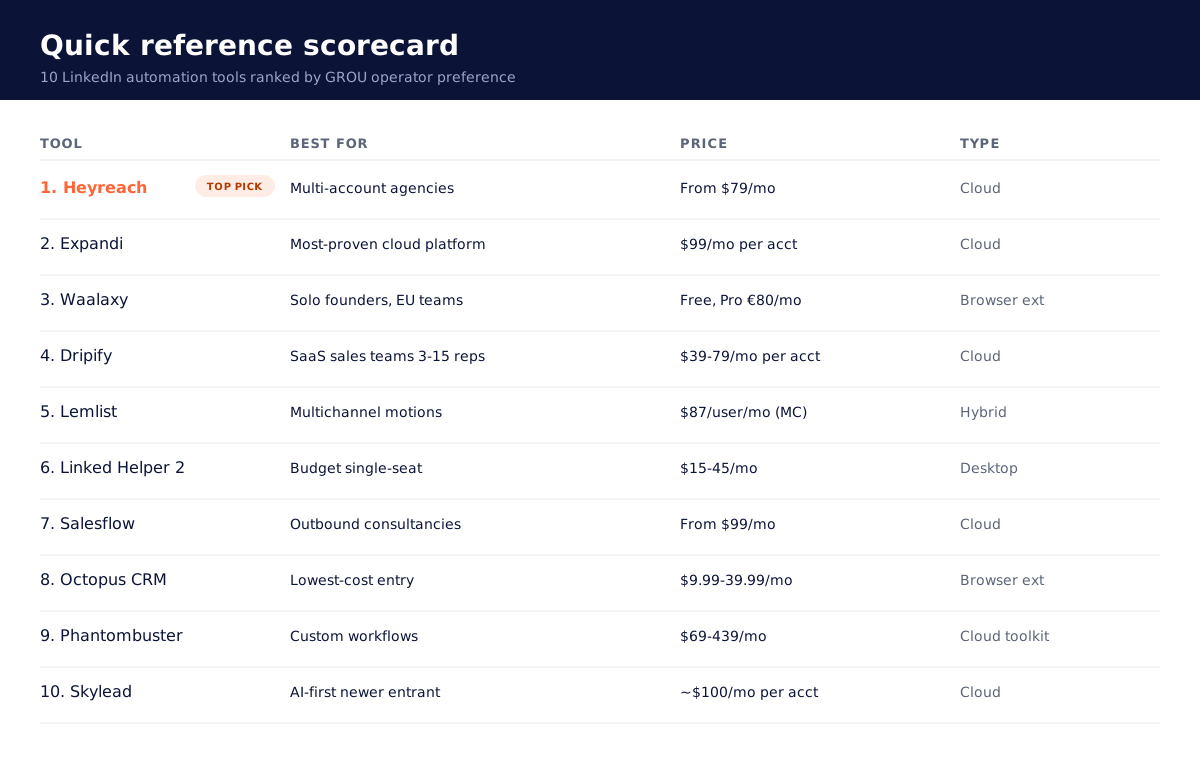
Table of contents
Why trust this listicle
TL;DR
How we ranked them
Heyreach — best overall for agencies
Expandi — best cloud-based for mid-volume
Waalaxy — best for solo founders and EU teams
Dripify — best for SaaS sales teams
Lemlist — best for multichannel motions
Linked Helper 2 — best budget desktop option
Salesflow — best for outbound consultancies
Octopus CRM — best lowest-cost entry
Phantombuster — best for custom workflows
Skylead — best AI-first newer entrant
Pricing matrix at a glance
Cloud vs desktop vs hybrid
LinkedIn safety + warmup non-negotiables
Alternatives we skipped
FAQ
Bottom line
1. Heyreach - best overall for agencies
Heyreach is the operator pick for any agency running LinkedIn automation across multiple client accounts. The wedge is multi-account architecture: one workspace manages 10, 50, or 200+ LinkedIn accounts from a single dashboard with shared campaign templates, unified reporting, and a centralised inbox for replies. Per-account pricing scales gracefully, the safety defaults are conservative (capped at LinkedIn's safe daily limits with smart randomised timing), and the agency tier ($999/mo for 50 accounts) is the cheapest multi-account math on the market.
The platform supports email plus LinkedIn campaigns in one sequence builder, native A/B testing, conditional logic, and granular client reporting. The downside: no native desktop fallback for users who refuse cloud-based tools. The upside dwarfs the downside for anyone running more than one LinkedIn seat.
→ Best for: agencies, in-house teams running multiple LinkedIn personas, sales consultancies. Pricing: from $79/mo for 1 account, $999/mo for 50 accounts (agency tier). Verdict: the default for multi-account work in 2026.
2. Expandi — best cloud-based for mid-volume
Expandi is the established cloud-based incumbent. The platform predates most newer entrants and has the longest production track record on LinkedIn safety. Cloud-based architecture means no desktop install, dedicated IP per LinkedIn account, smart sending limits, and behaviour-mimicking randomisation. The campaign builder supports multi-step LinkedIn sequences plus email follow-up, dynamic personalisation tokens, and Smart Inbox for centralised reply management.
Pricing runs $99 per month per LinkedIn account on the Business plan, with Agency plans available for higher seat counts. The per-account economics are higher than Heyreach at scale, but Expandi's safety track record and integration depth (Pipedrive, HubSpot, Salesforce, Zapier, webhooks) make it a strong second pick for teams that want the most-proven cloud platform.
→ Best for: 1 to 5 LinkedIn accounts, teams that want the longest-running cloud platform, users who care about per-IP isolation. Pricing: from $99/mo per account. Verdict: most-proven cloud option, slightly more expensive at agency scale than Heyreach.
3. Waalaxy — best for solo founders and EU teams
Waalaxy is the EU operator favourite. The platform is browser-extension based (lighter footprint than full cloud, less robust than dedicated cloud), focused on solo founders and small teams running their own outbound. The UI is the friendliest in the category: drag-and-drop sequence builder, pre-built templates, AI-assisted message writing, native LinkedIn + email cadences.
Pricing is per-user and runs €80 per month on the Pro plan and €160 on the Advanced plan, with a free 14-day trial that includes most features. Free tier exists for very light use (15 invitations per week). Safety is conservative by default, no banned-account stories from our client deployments at standard volumes.
→ Best for: solo founders, freelancers running personal LinkedIn outbound, EU teams who prefer EU-headquartered tools. Pricing: free tier, Pro €80/mo, Advanced €160/mo. Verdict: the friendliest entry point for single-seat outbound.
4. Dripify — best for SaaS sales teams
Dripify is the cloud-based platform built explicitly for SaaS sales workflows. Multi-step LinkedIn sequences with conditional logic (reply detected, profile viewed, connection accepted), bulk export to CSV, Zapier and API integrations, native team management features for 5 to 20 seat deployments. Cloud-based architecture handles the multi-account piece without desktop install.
Pricing tiers run $39 per month per LinkedIn account on Basic, $59 on Pro, $79 on Advanced (annual billing). Per-account economics are competitive with Heyreach for small teams (under 5 accounts), less efficient at 20+ accounts where Heyreach's agency tier wins.
→ Best for: SaaS sales teams of 3 to 15 reps, in-house outbound functions, teams that prefer per-account pricing over per-workspace. Pricing: $39 to $79/mo per account annual. Verdict: strong for mid-size SaaS sales teams.
5. Lemlist — best for multichannel motions
Lemlist is not a pure LinkedIn automation tool, it is a multichannel sequencer with native LinkedIn automation baked in. Email plus LinkedIn (profile view, connection request, message) plus in-app cold calling in one cadence, with replies and engagement signals routing back to one centralised inbox. For solo founders and small teams where the motion runs across all three channels in one sequence, Lemlist is materially faster than maintaining a separate LinkedIn tool plus email plus dialer.
The LinkedIn limits are conservative by default and accounts in our client deployments have not been banned at recommended volumes (under 200 invites per week per seat). For higher LinkedIn volume (500+ per week per seat), pair Lemlist with Heyreach and split the channels.
Pricing is per-user. Email Pro at $63 per user per month does not include the LinkedIn automation; you need Multichannel Expert at $87 per user per month for the full LinkedIn + email + call stack.
→ Best for: solo founders, single-rep motions where multichannel is the differentiator, high-ACV outbound where reply rate beats raw volume. Pricing: Multichannel Expert $87/user/mo annual. Verdict: best for integrated multichannel.
6. Linked Helper 2 — best budget desktop option
Linked Helper 2 is the desktop app for users who refuse cloud-based tools or want the lowest possible per-seat cost. Runs locally on your machine (Mac, Windows, Linux), works from your own IP address (no per-account dedicated IP), and costs $15 per month for the Standard plan or $45 per month for Pro. Multi-step sequences, CRM-style contact management, bulk action support.
The trade-off: desktop tools are riskier on LinkedIn safety because actions originate from your own consumer IP, which LinkedIn fingerprints more aggressively than dedicated cloud IPs. Mitigations exist (run during business hours, never overlap with manual LinkedIn use, stay well under daily limits), but the safety ceiling is lower than cloud-based tools.
→ Best for: solo operators on a tight budget, technical users who want full local control, freelancers willing to manage safety manually. Pricing: Standard $15/mo, Pro $45/mo (annual). Verdict: cheapest viable option for a single seat.
7. Salesflow — best for outbound consultancies
Salesflow is the older cloud-based player favoured by outbound consultancies and lead-gen agencies. The platform predates Expandi by a year or two and has a mature campaign builder, multi-account management, integrated email follow-up, and white-label options for client delivery. Pricing starts at $99 per month per user with custom agency plans for higher seat counts.
The product feels older than Heyreach or Skylead (UI shows its age), but the underlying automation engine is reliable and the safety track record is strong. For consultancies that have used Salesflow for years, switching is rarely worth the migration cost; for new buyers in 2026, Heyreach is usually the better default.
→ Best for: outbound consultancies with existing Salesflow workflows, lead-gen agencies running 5 to 30 client accounts. Pricing: from $99/mo per user. Verdict: solid incumbent, slightly dated UX vs newer cloud options.
8. Octopus CRM — best lowest-cost entry
Octopus CRM is a browser-extension based tool aimed at the lowest possible price point. Starter at $9.99 per month, Pro at $14.99, Advanced at $21.99, Unlimited at $39.99 (monthly billing). Supports basic LinkedIn automation (connection requests, messages, profile views, endorsements) with a minimal sequence builder.
The trade-off matches the price: lightweight features, browser-based safety ceiling (lower than cloud, similar to Waalaxy), no centralised inbox at lower tiers, limited team features. Fine for a solo operator running 50 to 100 LinkedIn actions per day on a budget; not the right tool for any serious outbound motion.
→ Best for: solo founders running occasional LinkedIn outreach, freelancers on the tightest possible budget, users who want browser-extension simplicity. Pricing: $9.99 to $39.99/mo. Verdict: cheapest entry, capped on capability.
9. Phantombuster — best for custom workflows
Phantombuster is not a dedicated LinkedIn automation tool, it is a broader automation toolkit that includes 100+ pre-built "phantoms" for scraping, enriching, and automating LinkedIn (and other platforms). For users who want to compose custom workflows (scrape LinkedIn search results, enrich via API, push to CRM, trigger Smartlead campaign), Phantombuster is the right stack layer.
Pricing tiers: Starter at $69 per month, Pro at $159, Team at $439. The platform is cloud-based, infinitely composable via the phantom library, and pairs well with Clay, HubSpot, or custom backends. Not the right tool for plug-and-play LinkedIn outreach (Heyreach is materially faster to set up), but the right tool for advanced operators building custom growth stacks.
→ Best for: technical operators, growth engineers, agencies building custom client workflows. Pricing: $69 to $439/mo. Verdict: composable toolkit, not a turnkey LinkedIn automation tool.
10. Skylead — best AI-first newer entrant
Skylead is the 2024 entrant that has gained share in 2025 to 2026 on the back of AI-first messaging features. Cloud-based architecture, multi-account support, native AI message personalisation that pulls from the prospect's recent LinkedIn activity, and competitive pricing around $100 per month per LinkedIn seat. The product velocity has been strong (monthly feature ships), and the AI features genuinely outperform spintax in our testing on reply rate.
The trade-off: newer platform, smaller customer base than Heyreach or Expandi, less integration depth into the broader sales stack. For early-adopters who want the AI features and accept a younger product, Skylead is a credible pick.
→ Best for: early-adopter teams, single-rep motions where AI personalisation matters more than raw automation depth, founders running their own outbound. Pricing: ~$100/mo per LinkedIn seat. Verdict: strong AI feature set, younger product than the incumbents.
Pricing matrix at a glance
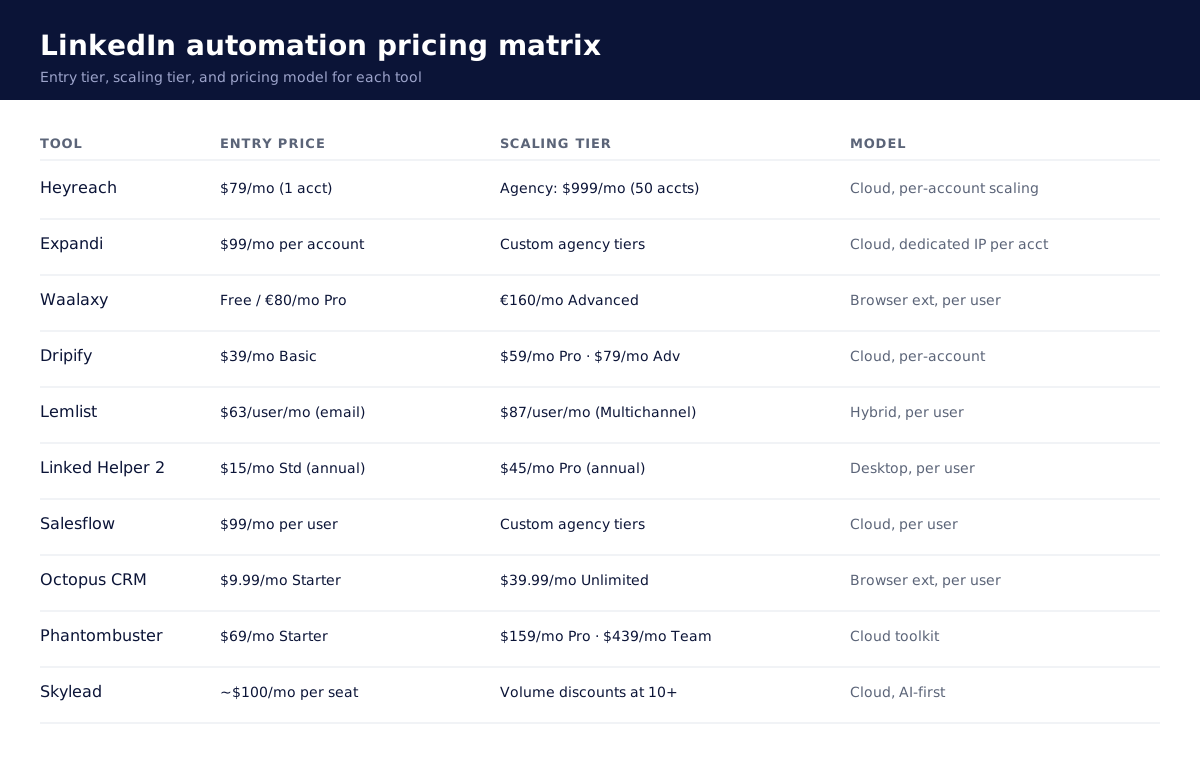
The cleanest read: at 1 to 3 LinkedIn accounts, per-account tools ($39 to $99 per month per account) are roughly cost-neutral with multi-account agency tiers. At 5+ accounts, Heyreach's agency math pulls ahead. At 20+ accounts, no per-account tool is competitive with Heyreach.
For solo founders, the lowest viable cost stack is Linked Helper 2 at $15 per month (desktop) or Octopus CRM at $9.99 to $39.99 per month (browser extension). Both are workable for a single seat under 100 actions per day; neither scales beyond that.
Cloud vs desktop vs hybrid
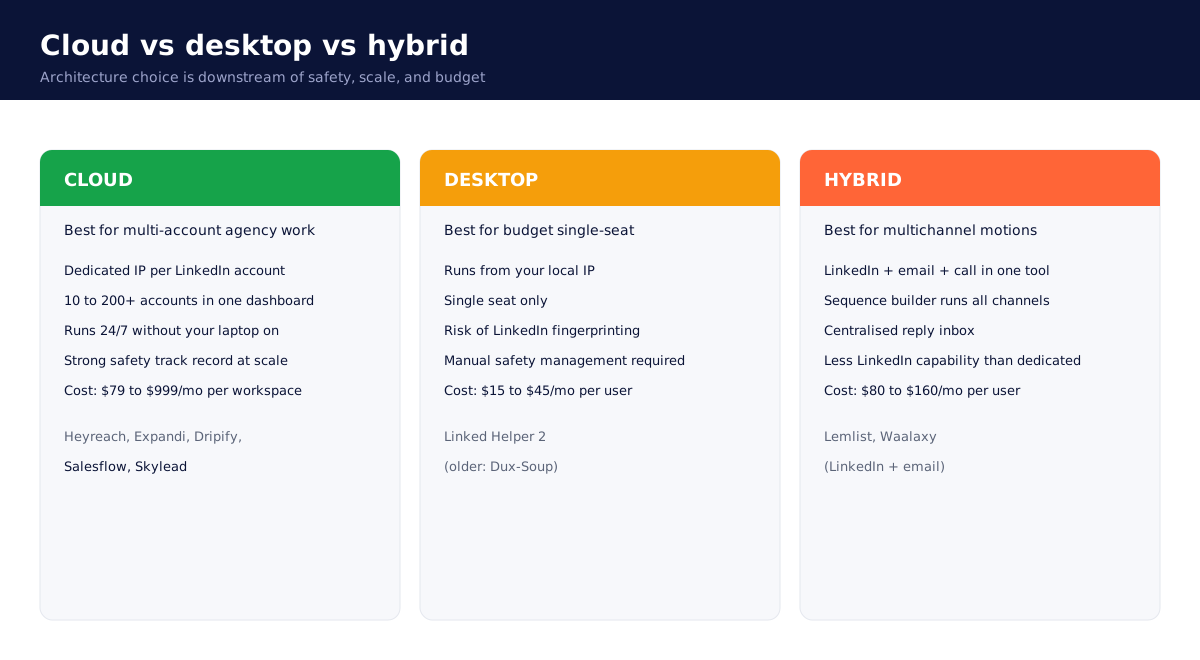
The architecture choice is downstream of three questions: do you need multi-account support, what is your safety risk tolerance, and what is your budget.
Cloud-based tools (Heyreach, Expandi, Dripify, Salesflow, Skylead) win on safety (dedicated per-account IPs), multi-account support (one dashboard manages 10 to 200 LinkedIn accounts), and uptime (run 24/7 without your laptop on). They cost more per account but deliver the safety profile that agencies need.
Desktop tools (Linked Helper 2) win on cost ($15 per month) but cap at single-seat motions because actions originate from your local IP. Risk of LinkedIn fingerprinting is real but mitigable if you stay under daily limits and never overlap with manual use of the same account.
Hybrid tools (Lemlist, Waalaxy) bundle LinkedIn with other channels (email, calls). Win on workflow integration when multichannel is the differentiator, lose on raw LinkedIn capability vs dedicated tools at higher volumes.
LinkedIn safety + warmup non-negotiables
Every operator gets banned accounts eventually if they ignore these rules:
Stay under LinkedIn's daily limits. As of 2026, the safe ceiling is roughly 100 connection requests per week per account (lower than older guides suggest), 200 to 250 messages per day per account, 200 profile views per day per account.
Warm up new accounts before pushing volume. New LinkedIn accounts (or dormant accounts coming back online) need 2 to 4 weeks of light activity (manual posting, real engagement, occasional accepted connections) before running automation.
Never overlap automation and manual use on the same account. If you are running Linked Helper or Octopus from your local IP, do not also browse LinkedIn manually during the same hours. LinkedIn fingerprints overlapping sessions.
Stay on residential cloud IPs for agency-scale work. Heyreach, Expandi, and other cloud tools route through residential IP pools that LinkedIn does not flag. Desktop tools running from datacenter VPNs or shared office IPs get flagged faster.
Randomise timing. All cloud tools randomise action timing by default. If yours does not, do not use it.
Personalise every message. Generic "Hi {{first_name}}, I noticed you work at {{company}}" gets reported as spam at volume. LinkedIn reads engagement signals (replies, message length, response rate); generic messages tank your account's trust score.
For deeper warmup protocols and account safety playbooks specific to LinkedIn in 2026, see our LinkedIn limits and warmup guide.
Alternatives we skipped
A few tools deliberately not in the top 10:
Dux-Soup: longstanding browser-based tool, but the product velocity has stalled and the UX is meaningfully behind newer entrants. Fine if you already use it; not a recommended pick for new buyers.
Zopto: cloud-based, mid-tier pricing, smaller customer base. Credible but no specific edge over Heyreach or Expandi.
We-Connect: cloud-based, US-focused, decent but unremarkable. Loses to Heyreach on multi-account economics.
Closely: newer entrant with AI features, smaller than Skylead, harder to justify over the top 10.
Klenty: primarily a multichannel sales engagement platform, LinkedIn is a side feature.
Apollo's native LinkedIn features: more workflow nudges than automation. Not a true LinkedIn automation tool.
If your favourite tool is not here and you want our take, book a working session with GROU and we can run it through the same scoring rubric.
FAQ
Is LinkedIn automation safe in 2026?
Yes, if you use the right tool and respect the daily limits. The platforms above (Heyreach, Expandi, Dripify, Lemlist, Skylead) have strong safety track records when used at recommended volumes. The unsafe practices are: ignoring daily limits, using datacenter IPs, running automation and manual use on the same account simultaneously, sending generic spammy messages at volume.
Which is the best LinkedIn automation tool for agencies?
Heyreach for multi-account agency work. The agency tier ($999 per month for 50 accounts) is the cheapest multi-account math on the market, the safety defaults are conservative, and the centralised inbox handles client reply workflows cleanly. For 3 to 5 accounts, Expandi is also a strong pick.
Which is the best LinkedIn automation tool for solo founders?
Lemlist if you want LinkedIn + email + cold call in one cadence. Waalaxy if you want a friendly UI focused only on LinkedIn. Linked Helper 2 if you want the lowest possible cost.
Can I get my LinkedIn account banned using these tools?
Yes, if you ignore safety best practices. No, if you use the recommended tools at recommended volumes. Across 200+ client LinkedIn accounts we have managed on the picks above, we have not had a permanent ban in 24 months. Temporary restrictions happen occasionally and resolve in 24 to 72 hours.
What is the difference between cloud-based and desktop LinkedIn automation?
Cloud-based tools (Heyreach, Expandi, Dripify, Salesflow, Skylead) run on remote servers with dedicated IPs per LinkedIn account. Safer at scale, more expensive, multi-account friendly. Desktop tools (Linked Helper 2, older Dux-Soup) run on your local machine from your local IP. Cheaper, riskier at scale, single-seat focused.
How many connection requests can I safely send per week?
LinkedIn's published limit in 2026 is approximately 100 connection requests per week per account, materially lower than older guides suggest. Stay at or below this limit. Quality of targeting matters more than quantity; 50 well-targeted invites per week often outperforms 200 sprayed ones.
Do these tools support LinkedIn Sales Navigator?
Yes, all of the top 10 support Sales Navigator integration. Most use Sales Navigator search URLs as the input for campaign audiences, with the tool pulling profiles via API or browser automation. Sales Navigator subscription is sold separately by LinkedIn (~$99 per month per user on Core).
Which tool has the best deliverability for LinkedIn messages?
Deliverability is not the right frame for LinkedIn (vs email). The right metric is acceptance rate (for connection requests) and response rate (for messages). Across our client deployments, the platforms above all run in the 30 to 50 percent acceptance rate range and 10 to 25 percent response rate range with proper targeting and message quality. Tool choice matters less than ICP precision and message quality.
Can I use multiple LinkedIn automation tools at once?
No, never on the same LinkedIn account. Running two automation tools against one account is the fastest way to get flagged and banned. Pick one tool per account; if you need different features, segment campaigns by goal (one tool for connections, another for messaging) only if absolutely necessary, and ideally never.
What about LinkedIn content scheduling tools like Taplio?
Different category. Taplio, AuthoredUp, and Buffer LinkedIn handle content scheduling (writing and publishing posts), not outreach automation. We cover those in our Taplio vs AuthoredUp comparison and the upcoming Best LinkedIn content tools listicle.
Bottom line
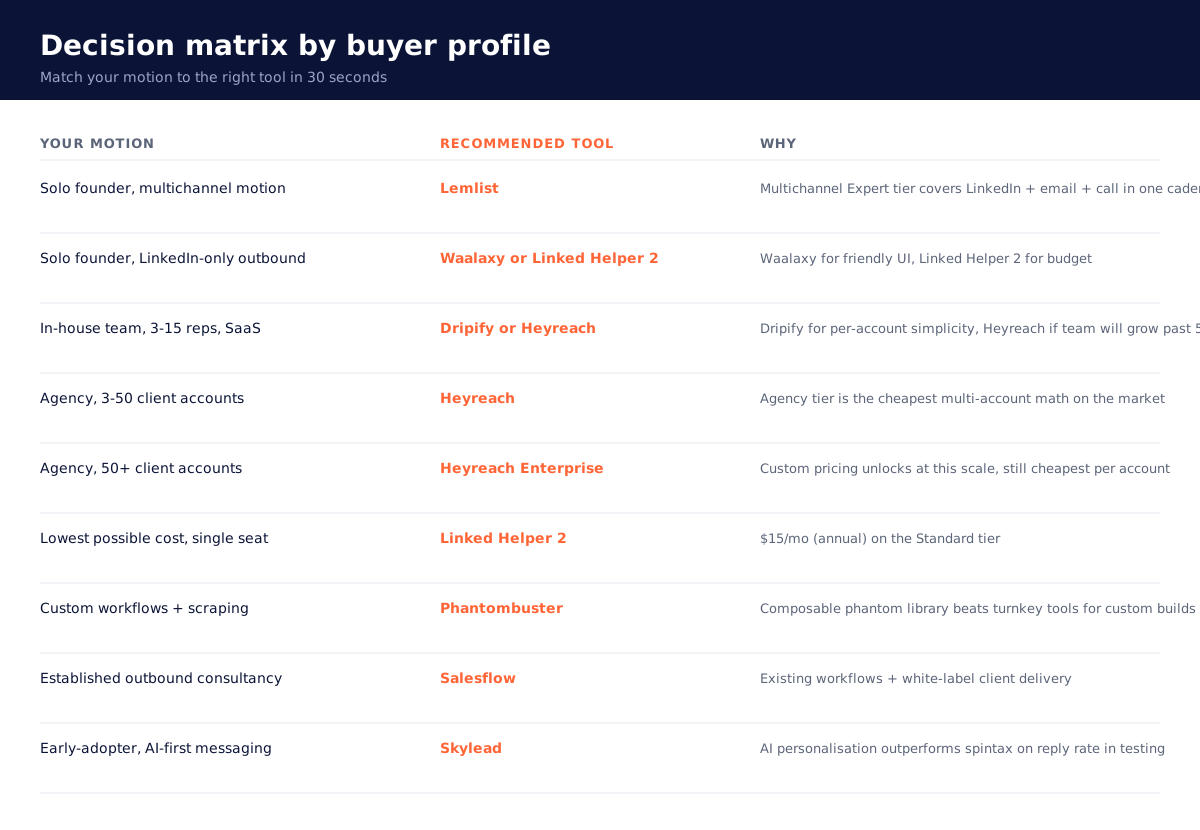
For most B2B operators in 2026, the right LinkedIn automation pick lands in one of three buckets.
If you are an agency or in-house team running 3+ LinkedIn accounts, default to Heyreach. The multi-account architecture, agency-tier pricing, and conservative safety defaults are unmatched.
If you are a solo founder or single-rep motion where email and LinkedIn must run in one cadence, Lemlist is the workflow winner. Pair it with Heyreach only if you need to push LinkedIn volume above 200 invites per week per seat.
If you are on the tightest budget and willing to manage safety manually on a single seat, Linked Helper 2 at $15 per month gets the basics done. Just stay under the LinkedIn limits and never overlap with manual use.
If you want help designing the right LinkedIn motion (including which tool, what the messaging should be, and how to integrate it with email and CRM), book a working session with GROU. We run this stack for clients every day. We can do the same for you.
→ Try Heyreach free (14-day trial, no card required).
→ Try Expandi free (7-day trial, no card required).
→ Try Lemlist free (14-day trial, no card required).
→ Try Taplio free (7-day trial, no card required).
Why trust this listicle
We are GROU, a B2B pipeline agency that runs lead generation, outbound, and LinkedIn content for clients across manufacturing, fintech, iGaming, software, and professional services. We have run real client campaigns on every cloud and desktop LinkedIn automation tool below in the last 24 months. The picks are from operators who have managed 200+ LinkedIn accounts across agency client workspaces, not from a vendor pitch.
→ Methodology: This list combines our own client deployment data across 50+ LinkedIn campaigns, vendors' published pricing pages, third-party reviews from Lagrowthmachine, Puzzle Inbox, and Landbase, plus live G2 review data. We refresh this article quarterly. Tools are scored on agency fit, safety, deliverability, pricing, and product velocity, not just feature counts.
→ Affiliate disclosure: Some links in this article are affiliate links to tools we have actually deployed for our agency clients. We earn a small commission if you sign up through them, at no extra cost to you. We only recommend tools we use.
TL;DR
LinkedIn automation in 2026 splits into three architectures. Cloud-based tools (Heyreach, Expandi, Dripify, Skylead) run on remote servers, support multi-account agency setups, and are the right call for any team running outbound for more than one LinkedIn seat. Desktop tools (Linked Helper 2, Linked Helper, older Dux-Soup) run on your local machine, cost materially less, and are the right call for a single seat on a tight budget. Hybrid platforms (Lemlist, Waalaxy) bundle LinkedIn automation with email or other channels in one cadence.
The two operator picks for most buyers: Heyreach if you are an agency or in-house team running 3+ LinkedIn accounts, and Lemlist if you want LinkedIn + email + cold call in one sequence for a single-rep motion. The rest of the list is for specific buyer profiles where these two are not the right fit.
How we ranked them
We weight five factors:
Safety + LinkedIn limits: how the tool handles LinkedIn's daily action caps, connection request limits, and warmup. Tools that ignore the limits get banned accounts.
Multi-account architecture: whether the tool was built for one seat or for agency-scale deployment across 10 to 200 LinkedIn accounts.
Pricing model: per-account, per-user, or per-workspace. Agency economics live or die here.
Real product velocity: are they shipping new features quarterly or coasting on a 2022 product?
Integration depth: native CRM and outreach stack integrations, API quality, and webhook support.
A high score on raw feature count without safety discipline is worth nothing. We have rebuilt client motions twice after their previous tool got accounts restricted; the picks below are tools we have personally never had a serious LinkedIn account suspension on.
Quick reference scorecard
Table of contents
Why trust this listicle
TL;DR
How we ranked them
Heyreach — best overall for agencies
Expandi — best cloud-based for mid-volume
Waalaxy — best for solo founders and EU teams
Dripify — best for SaaS sales teams
Lemlist — best for multichannel motions
Linked Helper 2 — best budget desktop option
Salesflow — best for outbound consultancies
Octopus CRM — best lowest-cost entry
Phantombuster — best for custom workflows
Skylead — best AI-first newer entrant
Pricing matrix at a glance
Cloud vs desktop vs hybrid
LinkedIn safety + warmup non-negotiables
Alternatives we skipped
FAQ
Bottom line
1. Heyreach - best overall for agencies
Heyreach is the operator pick for any agency running LinkedIn automation across multiple client accounts. The wedge is multi-account architecture: one workspace manages 10, 50, or 200+ LinkedIn accounts from a single dashboard with shared campaign templates, unified reporting, and a centralised inbox for replies. Per-account pricing scales gracefully, the safety defaults are conservative (capped at LinkedIn's safe daily limits with smart randomised timing), and the agency tier ($999/mo for 50 accounts) is the cheapest multi-account math on the market.
The platform supports email plus LinkedIn campaigns in one sequence builder, native A/B testing, conditional logic, and granular client reporting. The downside: no native desktop fallback for users who refuse cloud-based tools. The upside dwarfs the downside for anyone running more than one LinkedIn seat.
→ Best for: agencies, in-house teams running multiple LinkedIn personas, sales consultancies. Pricing: from $79/mo for 1 account, $999/mo for 50 accounts (agency tier). Verdict: the default for multi-account work in 2026.
2. Expandi — best cloud-based for mid-volume
Expandi is the established cloud-based incumbent. The platform predates most newer entrants and has the longest production track record on LinkedIn safety. Cloud-based architecture means no desktop install, dedicated IP per LinkedIn account, smart sending limits, and behaviour-mimicking randomisation. The campaign builder supports multi-step LinkedIn sequences plus email follow-up, dynamic personalisation tokens, and Smart Inbox for centralised reply management.
Pricing runs $99 per month per LinkedIn account on the Business plan, with Agency plans available for higher seat counts. The per-account economics are higher than Heyreach at scale, but Expandi's safety track record and integration depth (Pipedrive, HubSpot, Salesforce, Zapier, webhooks) make it a strong second pick for teams that want the most-proven cloud platform.
→ Best for: 1 to 5 LinkedIn accounts, teams that want the longest-running cloud platform, users who care about per-IP isolation. Pricing: from $99/mo per account. Verdict: most-proven cloud option, slightly more expensive at agency scale than Heyreach.
3. Waalaxy — best for solo founders and EU teams
Waalaxy is the EU operator favourite. The platform is browser-extension based (lighter footprint than full cloud, less robust than dedicated cloud), focused on solo founders and small teams running their own outbound. The UI is the friendliest in the category: drag-and-drop sequence builder, pre-built templates, AI-assisted message writing, native LinkedIn + email cadences.
Pricing is per-user and runs €80 per month on the Pro plan and €160 on the Advanced plan, with a free 14-day trial that includes most features. Free tier exists for very light use (15 invitations per week). Safety is conservative by default, no banned-account stories from our client deployments at standard volumes.
→ Best for: solo founders, freelancers running personal LinkedIn outbound, EU teams who prefer EU-headquartered tools. Pricing: free tier, Pro €80/mo, Advanced €160/mo. Verdict: the friendliest entry point for single-seat outbound.
4. Dripify — best for SaaS sales teams
Dripify is the cloud-based platform built explicitly for SaaS sales workflows. Multi-step LinkedIn sequences with conditional logic (reply detected, profile viewed, connection accepted), bulk export to CSV, Zapier and API integrations, native team management features for 5 to 20 seat deployments. Cloud-based architecture handles the multi-account piece without desktop install.
Pricing tiers run $39 per month per LinkedIn account on Basic, $59 on Pro, $79 on Advanced (annual billing). Per-account economics are competitive with Heyreach for small teams (under 5 accounts), less efficient at 20+ accounts where Heyreach's agency tier wins.
→ Best for: SaaS sales teams of 3 to 15 reps, in-house outbound functions, teams that prefer per-account pricing over per-workspace. Pricing: $39 to $79/mo per account annual. Verdict: strong for mid-size SaaS sales teams.
5. Lemlist — best for multichannel motions
Lemlist is not a pure LinkedIn automation tool, it is a multichannel sequencer with native LinkedIn automation baked in. Email plus LinkedIn (profile view, connection request, message) plus in-app cold calling in one cadence, with replies and engagement signals routing back to one centralised inbox. For solo founders and small teams where the motion runs across all three channels in one sequence, Lemlist is materially faster than maintaining a separate LinkedIn tool plus email plus dialer.
The LinkedIn limits are conservative by default and accounts in our client deployments have not been banned at recommended volumes (under 200 invites per week per seat). For higher LinkedIn volume (500+ per week per seat), pair Lemlist with Heyreach and split the channels.
Pricing is per-user. Email Pro at $63 per user per month does not include the LinkedIn automation; you need Multichannel Expert at $87 per user per month for the full LinkedIn + email + call stack.
→ Best for: solo founders, single-rep motions where multichannel is the differentiator, high-ACV outbound where reply rate beats raw volume. Pricing: Multichannel Expert $87/user/mo annual. Verdict: best for integrated multichannel.
6. Linked Helper 2 — best budget desktop option
Linked Helper 2 is the desktop app for users who refuse cloud-based tools or want the lowest possible per-seat cost. Runs locally on your machine (Mac, Windows, Linux), works from your own IP address (no per-account dedicated IP), and costs $15 per month for the Standard plan or $45 per month for Pro. Multi-step sequences, CRM-style contact management, bulk action support.
The trade-off: desktop tools are riskier on LinkedIn safety because actions originate from your own consumer IP, which LinkedIn fingerprints more aggressively than dedicated cloud IPs. Mitigations exist (run during business hours, never overlap with manual LinkedIn use, stay well under daily limits), but the safety ceiling is lower than cloud-based tools.
→ Best for: solo operators on a tight budget, technical users who want full local control, freelancers willing to manage safety manually. Pricing: Standard $15/mo, Pro $45/mo (annual). Verdict: cheapest viable option for a single seat.
7. Salesflow — best for outbound consultancies
Salesflow is the older cloud-based player favoured by outbound consultancies and lead-gen agencies. The platform predates Expandi by a year or two and has a mature campaign builder, multi-account management, integrated email follow-up, and white-label options for client delivery. Pricing starts at $99 per month per user with custom agency plans for higher seat counts.
The product feels older than Heyreach or Skylead (UI shows its age), but the underlying automation engine is reliable and the safety track record is strong. For consultancies that have used Salesflow for years, switching is rarely worth the migration cost; for new buyers in 2026, Heyreach is usually the better default.
→ Best for: outbound consultancies with existing Salesflow workflows, lead-gen agencies running 5 to 30 client accounts. Pricing: from $99/mo per user. Verdict: solid incumbent, slightly dated UX vs newer cloud options.
8. Octopus CRM — best lowest-cost entry
Octopus CRM is a browser-extension based tool aimed at the lowest possible price point. Starter at $9.99 per month, Pro at $14.99, Advanced at $21.99, Unlimited at $39.99 (monthly billing). Supports basic LinkedIn automation (connection requests, messages, profile views, endorsements) with a minimal sequence builder.
The trade-off matches the price: lightweight features, browser-based safety ceiling (lower than cloud, similar to Waalaxy), no centralised inbox at lower tiers, limited team features. Fine for a solo operator running 50 to 100 LinkedIn actions per day on a budget; not the right tool for any serious outbound motion.
→ Best for: solo founders running occasional LinkedIn outreach, freelancers on the tightest possible budget, users who want browser-extension simplicity. Pricing: $9.99 to $39.99/mo. Verdict: cheapest entry, capped on capability.
9. Phantombuster — best for custom workflows
Phantombuster is not a dedicated LinkedIn automation tool, it is a broader automation toolkit that includes 100+ pre-built "phantoms" for scraping, enriching, and automating LinkedIn (and other platforms). For users who want to compose custom workflows (scrape LinkedIn search results, enrich via API, push to CRM, trigger Smartlead campaign), Phantombuster is the right stack layer.
Pricing tiers: Starter at $69 per month, Pro at $159, Team at $439. The platform is cloud-based, infinitely composable via the phantom library, and pairs well with Clay, HubSpot, or custom backends. Not the right tool for plug-and-play LinkedIn outreach (Heyreach is materially faster to set up), but the right tool for advanced operators building custom growth stacks.
→ Best for: technical operators, growth engineers, agencies building custom client workflows. Pricing: $69 to $439/mo. Verdict: composable toolkit, not a turnkey LinkedIn automation tool.
10. Skylead — best AI-first newer entrant
Skylead is the 2024 entrant that has gained share in 2025 to 2026 on the back of AI-first messaging features. Cloud-based architecture, multi-account support, native AI message personalisation that pulls from the prospect's recent LinkedIn activity, and competitive pricing around $100 per month per LinkedIn seat. The product velocity has been strong (monthly feature ships), and the AI features genuinely outperform spintax in our testing on reply rate.
The trade-off: newer platform, smaller customer base than Heyreach or Expandi, less integration depth into the broader sales stack. For early-adopters who want the AI features and accept a younger product, Skylead is a credible pick.
→ Best for: early-adopter teams, single-rep motions where AI personalisation matters more than raw automation depth, founders running their own outbound. Pricing: ~$100/mo per LinkedIn seat. Verdict: strong AI feature set, younger product than the incumbents.
Pricing matrix at a glance
The cleanest read: at 1 to 3 LinkedIn accounts, per-account tools ($39 to $99 per month per account) are roughly cost-neutral with multi-account agency tiers. At 5+ accounts, Heyreach's agency math pulls ahead. At 20+ accounts, no per-account tool is competitive with Heyreach.
For solo founders, the lowest viable cost stack is Linked Helper 2 at $15 per month (desktop) or Octopus CRM at $9.99 to $39.99 per month (browser extension). Both are workable for a single seat under 100 actions per day; neither scales beyond that.
Cloud vs desktop vs hybrid
The architecture choice is downstream of three questions: do you need multi-account support, what is your safety risk tolerance, and what is your budget.
Cloud-based tools (Heyreach, Expandi, Dripify, Salesflow, Skylead) win on safety (dedicated per-account IPs), multi-account support (one dashboard manages 10 to 200 LinkedIn accounts), and uptime (run 24/7 without your laptop on). They cost more per account but deliver the safety profile that agencies need.
Desktop tools (Linked Helper 2) win on cost ($15 per month) but cap at single-seat motions because actions originate from your local IP. Risk of LinkedIn fingerprinting is real but mitigable if you stay under daily limits and never overlap with manual use of the same account.
Hybrid tools (Lemlist, Waalaxy) bundle LinkedIn with other channels (email, calls). Win on workflow integration when multichannel is the differentiator, lose on raw LinkedIn capability vs dedicated tools at higher volumes.
LinkedIn safety + warmup non-negotiables
Every operator gets banned accounts eventually if they ignore these rules:
Stay under LinkedIn's daily limits. As of 2026, the safe ceiling is roughly 100 connection requests per week per account (lower than older guides suggest), 200 to 250 messages per day per account, 200 profile views per day per account.
Warm up new accounts before pushing volume. New LinkedIn accounts (or dormant accounts coming back online) need 2 to 4 weeks of light activity (manual posting, real engagement, occasional accepted connections) before running automation.
Never overlap automation and manual use on the same account. If you are running Linked Helper or Octopus from your local IP, do not also browse LinkedIn manually during the same hours. LinkedIn fingerprints overlapping sessions.
Stay on residential cloud IPs for agency-scale work. Heyreach, Expandi, and other cloud tools route through residential IP pools that LinkedIn does not flag. Desktop tools running from datacenter VPNs or shared office IPs get flagged faster.
Randomise timing. All cloud tools randomise action timing by default. If yours does not, do not use it.
Personalise every message. Generic "Hi {{first_name}}, I noticed you work at {{company}}" gets reported as spam at volume. LinkedIn reads engagement signals (replies, message length, response rate); generic messages tank your account's trust score.
For deeper warmup protocols and account safety playbooks specific to LinkedIn in 2026, see our LinkedIn limits and warmup guide.
Alternatives we skipped
A few tools deliberately not in the top 10:
Dux-Soup: longstanding browser-based tool, but the product velocity has stalled and the UX is meaningfully behind newer entrants. Fine if you already use it; not a recommended pick for new buyers.
Zopto: cloud-based, mid-tier pricing, smaller customer base. Credible but no specific edge over Heyreach or Expandi.
We-Connect: cloud-based, US-focused, decent but unremarkable. Loses to Heyreach on multi-account economics.
Closely: newer entrant with AI features, smaller than Skylead, harder to justify over the top 10.
Klenty: primarily a multichannel sales engagement platform, LinkedIn is a side feature.
Apollo's native LinkedIn features: more workflow nudges than automation. Not a true LinkedIn automation tool.
If your favourite tool is not here and you want our take, book a working session with GROU and we can run it through the same scoring rubric.
FAQ
Is LinkedIn automation safe in 2026?
Yes, if you use the right tool and respect the daily limits. The platforms above (Heyreach, Expandi, Dripify, Lemlist, Skylead) have strong safety track records when used at recommended volumes. The unsafe practices are: ignoring daily limits, using datacenter IPs, running automation and manual use on the same account simultaneously, sending generic spammy messages at volume.
Which is the best LinkedIn automation tool for agencies?
Heyreach for multi-account agency work. The agency tier ($999 per month for 50 accounts) is the cheapest multi-account math on the market, the safety defaults are conservative, and the centralised inbox handles client reply workflows cleanly. For 3 to 5 accounts, Expandi is also a strong pick.
Which is the best LinkedIn automation tool for solo founders?
Lemlist if you want LinkedIn + email + cold call in one cadence. Waalaxy if you want a friendly UI focused only on LinkedIn. Linked Helper 2 if you want the lowest possible cost.
Can I get my LinkedIn account banned using these tools?
Yes, if you ignore safety best practices. No, if you use the recommended tools at recommended volumes. Across 200+ client LinkedIn accounts we have managed on the picks above, we have not had a permanent ban in 24 months. Temporary restrictions happen occasionally and resolve in 24 to 72 hours.
What is the difference between cloud-based and desktop LinkedIn automation?
Cloud-based tools (Heyreach, Expandi, Dripify, Salesflow, Skylead) run on remote servers with dedicated IPs per LinkedIn account. Safer at scale, more expensive, multi-account friendly. Desktop tools (Linked Helper 2, older Dux-Soup) run on your local machine from your local IP. Cheaper, riskier at scale, single-seat focused.
How many connection requests can I safely send per week?
LinkedIn's published limit in 2026 is approximately 100 connection requests per week per account, materially lower than older guides suggest. Stay at or below this limit. Quality of targeting matters more than quantity; 50 well-targeted invites per week often outperforms 200 sprayed ones.
Do these tools support LinkedIn Sales Navigator?
Yes, all of the top 10 support Sales Navigator integration. Most use Sales Navigator search URLs as the input for campaign audiences, with the tool pulling profiles via API or browser automation. Sales Navigator subscription is sold separately by LinkedIn (~$99 per month per user on Core).
Which tool has the best deliverability for LinkedIn messages?
Deliverability is not the right frame for LinkedIn (vs email). The right metric is acceptance rate (for connection requests) and response rate (for messages). Across our client deployments, the platforms above all run in the 30 to 50 percent acceptance rate range and 10 to 25 percent response rate range with proper targeting and message quality. Tool choice matters less than ICP precision and message quality.
Can I use multiple LinkedIn automation tools at once?
No, never on the same LinkedIn account. Running two automation tools against one account is the fastest way to get flagged and banned. Pick one tool per account; if you need different features, segment campaigns by goal (one tool for connections, another for messaging) only if absolutely necessary, and ideally never.
What about LinkedIn content scheduling tools like Taplio?
Different category. Taplio, AuthoredUp, and Buffer LinkedIn handle content scheduling (writing and publishing posts), not outreach automation. We cover those in our Taplio vs AuthoredUp comparison and the upcoming Best LinkedIn content tools listicle.
Bottom line
For most B2B operators in 2026, the right LinkedIn automation pick lands in one of three buckets.
If you are an agency or in-house team running 3+ LinkedIn accounts, default to Heyreach. The multi-account architecture, agency-tier pricing, and conservative safety defaults are unmatched.
If you are a solo founder or single-rep motion where email and LinkedIn must run in one cadence, Lemlist is the workflow winner. Pair it with Heyreach only if you need to push LinkedIn volume above 200 invites per week per seat.
If you are on the tightest budget and willing to manage safety manually on a single seat, Linked Helper 2 at $15 per month gets the basics done. Just stay under the LinkedIn limits and never overlap with manual use.
If you want help designing the right LinkedIn motion (including which tool, what the messaging should be, and how to integrate it with email and CRM), book a working session with GROU. We run this stack for clients every day. We can do the same for you.
→ Try Heyreach free (14-day trial, no card required).
→ Try Expandi free (7-day trial, no card required).
→ Try Lemlist free (14-day trial, no card required).
→ Try Taplio free (7-day trial, no card required).
Why trust this listicle
We are GROU, a B2B pipeline agency that runs lead generation, outbound, and LinkedIn content for clients across manufacturing, fintech, iGaming, software, and professional services. We have run real client campaigns on every cloud and desktop LinkedIn automation tool below in the last 24 months. The picks are from operators who have managed 200+ LinkedIn accounts across agency client workspaces, not from a vendor pitch.
→ Methodology: This list combines our own client deployment data across 50+ LinkedIn campaigns, vendors' published pricing pages, third-party reviews from Lagrowthmachine, Puzzle Inbox, and Landbase, plus live G2 review data. We refresh this article quarterly. Tools are scored on agency fit, safety, deliverability, pricing, and product velocity, not just feature counts.
→ Affiliate disclosure: Some links in this article are affiliate links to tools we have actually deployed for our agency clients. We earn a small commission if you sign up through them, at no extra cost to you. We only recommend tools we use.
TL;DR
LinkedIn automation in 2026 splits into three architectures. Cloud-based tools (Heyreach, Expandi, Dripify, Skylead) run on remote servers, support multi-account agency setups, and are the right call for any team running outbound for more than one LinkedIn seat. Desktop tools (Linked Helper 2, Linked Helper, older Dux-Soup) run on your local machine, cost materially less, and are the right call for a single seat on a tight budget. Hybrid platforms (Lemlist, Waalaxy) bundle LinkedIn automation with email or other channels in one cadence.
The two operator picks for most buyers: Heyreach if you are an agency or in-house team running 3+ LinkedIn accounts, and Lemlist if you want LinkedIn + email + cold call in one sequence for a single-rep motion. The rest of the list is for specific buyer profiles where these two are not the right fit.
How we ranked them
We weight five factors:
Safety + LinkedIn limits: how the tool handles LinkedIn's daily action caps, connection request limits, and warmup. Tools that ignore the limits get banned accounts.
Multi-account architecture: whether the tool was built for one seat or for agency-scale deployment across 10 to 200 LinkedIn accounts.
Pricing model: per-account, per-user, or per-workspace. Agency economics live or die here.
Real product velocity: are they shipping new features quarterly or coasting on a 2022 product?
Integration depth: native CRM and outreach stack integrations, API quality, and webhook support.
A high score on raw feature count without safety discipline is worth nothing. We have rebuilt client motions twice after their previous tool got accounts restricted; the picks below are tools we have personally never had a serious LinkedIn account suspension on.
Quick reference scorecard
Table of contents
Why trust this listicle
TL;DR
How we ranked them
Heyreach — best overall for agencies
Expandi — best cloud-based for mid-volume
Waalaxy — best for solo founders and EU teams
Dripify — best for SaaS sales teams
Lemlist — best for multichannel motions
Linked Helper 2 — best budget desktop option
Salesflow — best for outbound consultancies
Octopus CRM — best lowest-cost entry
Phantombuster — best for custom workflows
Skylead — best AI-first newer entrant
Pricing matrix at a glance
Cloud vs desktop vs hybrid
LinkedIn safety + warmup non-negotiables
Alternatives we skipped
FAQ
Bottom line
1. Heyreach - best overall for agencies
Heyreach is the operator pick for any agency running LinkedIn automation across multiple client accounts. The wedge is multi-account architecture: one workspace manages 10, 50, or 200+ LinkedIn accounts from a single dashboard with shared campaign templates, unified reporting, and a centralised inbox for replies. Per-account pricing scales gracefully, the safety defaults are conservative (capped at LinkedIn's safe daily limits with smart randomised timing), and the agency tier ($999/mo for 50 accounts) is the cheapest multi-account math on the market.
The platform supports email plus LinkedIn campaigns in one sequence builder, native A/B testing, conditional logic, and granular client reporting. The downside: no native desktop fallback for users who refuse cloud-based tools. The upside dwarfs the downside for anyone running more than one LinkedIn seat.
→ Best for: agencies, in-house teams running multiple LinkedIn personas, sales consultancies. Pricing: from $79/mo for 1 account, $999/mo for 50 accounts (agency tier). Verdict: the default for multi-account work in 2026.
2. Expandi — best cloud-based for mid-volume
Expandi is the established cloud-based incumbent. The platform predates most newer entrants and has the longest production track record on LinkedIn safety. Cloud-based architecture means no desktop install, dedicated IP per LinkedIn account, smart sending limits, and behaviour-mimicking randomisation. The campaign builder supports multi-step LinkedIn sequences plus email follow-up, dynamic personalisation tokens, and Smart Inbox for centralised reply management.
Pricing runs $99 per month per LinkedIn account on the Business plan, with Agency plans available for higher seat counts. The per-account economics are higher than Heyreach at scale, but Expandi's safety track record and integration depth (Pipedrive, HubSpot, Salesforce, Zapier, webhooks) make it a strong second pick for teams that want the most-proven cloud platform.
→ Best for: 1 to 5 LinkedIn accounts, teams that want the longest-running cloud platform, users who care about per-IP isolation. Pricing: from $99/mo per account. Verdict: most-proven cloud option, slightly more expensive at agency scale than Heyreach.
3. Waalaxy — best for solo founders and EU teams
Waalaxy is the EU operator favourite. The platform is browser-extension based (lighter footprint than full cloud, less robust than dedicated cloud), focused on solo founders and small teams running their own outbound. The UI is the friendliest in the category: drag-and-drop sequence builder, pre-built templates, AI-assisted message writing, native LinkedIn + email cadences.
Pricing is per-user and runs €80 per month on the Pro plan and €160 on the Advanced plan, with a free 14-day trial that includes most features. Free tier exists for very light use (15 invitations per week). Safety is conservative by default, no banned-account stories from our client deployments at standard volumes.
→ Best for: solo founders, freelancers running personal LinkedIn outbound, EU teams who prefer EU-headquartered tools. Pricing: free tier, Pro €80/mo, Advanced €160/mo. Verdict: the friendliest entry point for single-seat outbound.
4. Dripify — best for SaaS sales teams
Dripify is the cloud-based platform built explicitly for SaaS sales workflows. Multi-step LinkedIn sequences with conditional logic (reply detected, profile viewed, connection accepted), bulk export to CSV, Zapier and API integrations, native team management features for 5 to 20 seat deployments. Cloud-based architecture handles the multi-account piece without desktop install.
Pricing tiers run $39 per month per LinkedIn account on Basic, $59 on Pro, $79 on Advanced (annual billing). Per-account economics are competitive with Heyreach for small teams (under 5 accounts), less efficient at 20+ accounts where Heyreach's agency tier wins.
→ Best for: SaaS sales teams of 3 to 15 reps, in-house outbound functions, teams that prefer per-account pricing over per-workspace. Pricing: $39 to $79/mo per account annual. Verdict: strong for mid-size SaaS sales teams.
5. Lemlist — best for multichannel motions
Lemlist is not a pure LinkedIn automation tool, it is a multichannel sequencer with native LinkedIn automation baked in. Email plus LinkedIn (profile view, connection request, message) plus in-app cold calling in one cadence, with replies and engagement signals routing back to one centralised inbox. For solo founders and small teams where the motion runs across all three channels in one sequence, Lemlist is materially faster than maintaining a separate LinkedIn tool plus email plus dialer.
The LinkedIn limits are conservative by default and accounts in our client deployments have not been banned at recommended volumes (under 200 invites per week per seat). For higher LinkedIn volume (500+ per week per seat), pair Lemlist with Heyreach and split the channels.
Pricing is per-user. Email Pro at $63 per user per month does not include the LinkedIn automation; you need Multichannel Expert at $87 per user per month for the full LinkedIn + email + call stack.
→ Best for: solo founders, single-rep motions where multichannel is the differentiator, high-ACV outbound where reply rate beats raw volume. Pricing: Multichannel Expert $87/user/mo annual. Verdict: best for integrated multichannel.
6. Linked Helper 2 — best budget desktop option
Linked Helper 2 is the desktop app for users who refuse cloud-based tools or want the lowest possible per-seat cost. Runs locally on your machine (Mac, Windows, Linux), works from your own IP address (no per-account dedicated IP), and costs $15 per month for the Standard plan or $45 per month for Pro. Multi-step sequences, CRM-style contact management, bulk action support.
The trade-off: desktop tools are riskier on LinkedIn safety because actions originate from your own consumer IP, which LinkedIn fingerprints more aggressively than dedicated cloud IPs. Mitigations exist (run during business hours, never overlap with manual LinkedIn use, stay well under daily limits), but the safety ceiling is lower than cloud-based tools.
→ Best for: solo operators on a tight budget, technical users who want full local control, freelancers willing to manage safety manually. Pricing: Standard $15/mo, Pro $45/mo (annual). Verdict: cheapest viable option for a single seat.
7. Salesflow — best for outbound consultancies
Salesflow is the older cloud-based player favoured by outbound consultancies and lead-gen agencies. The platform predates Expandi by a year or two and has a mature campaign builder, multi-account management, integrated email follow-up, and white-label options for client delivery. Pricing starts at $99 per month per user with custom agency plans for higher seat counts.
The product feels older than Heyreach or Skylead (UI shows its age), but the underlying automation engine is reliable and the safety track record is strong. For consultancies that have used Salesflow for years, switching is rarely worth the migration cost; for new buyers in 2026, Heyreach is usually the better default.
→ Best for: outbound consultancies with existing Salesflow workflows, lead-gen agencies running 5 to 30 client accounts. Pricing: from $99/mo per user. Verdict: solid incumbent, slightly dated UX vs newer cloud options.
8. Octopus CRM — best lowest-cost entry
Octopus CRM is a browser-extension based tool aimed at the lowest possible price point. Starter at $9.99 per month, Pro at $14.99, Advanced at $21.99, Unlimited at $39.99 (monthly billing). Supports basic LinkedIn automation (connection requests, messages, profile views, endorsements) with a minimal sequence builder.
The trade-off matches the price: lightweight features, browser-based safety ceiling (lower than cloud, similar to Waalaxy), no centralised inbox at lower tiers, limited team features. Fine for a solo operator running 50 to 100 LinkedIn actions per day on a budget; not the right tool for any serious outbound motion.
→ Best for: solo founders running occasional LinkedIn outreach, freelancers on the tightest possible budget, users who want browser-extension simplicity. Pricing: $9.99 to $39.99/mo. Verdict: cheapest entry, capped on capability.
9. Phantombuster — best for custom workflows
Phantombuster is not a dedicated LinkedIn automation tool, it is a broader automation toolkit that includes 100+ pre-built "phantoms" for scraping, enriching, and automating LinkedIn (and other platforms). For users who want to compose custom workflows (scrape LinkedIn search results, enrich via API, push to CRM, trigger Smartlead campaign), Phantombuster is the right stack layer.
Pricing tiers: Starter at $69 per month, Pro at $159, Team at $439. The platform is cloud-based, infinitely composable via the phantom library, and pairs well with Clay, HubSpot, or custom backends. Not the right tool for plug-and-play LinkedIn outreach (Heyreach is materially faster to set up), but the right tool for advanced operators building custom growth stacks.
→ Best for: technical operators, growth engineers, agencies building custom client workflows. Pricing: $69 to $439/mo. Verdict: composable toolkit, not a turnkey LinkedIn automation tool.
10. Skylead — best AI-first newer entrant
Skylead is the 2024 entrant that has gained share in 2025 to 2026 on the back of AI-first messaging features. Cloud-based architecture, multi-account support, native AI message personalisation that pulls from the prospect's recent LinkedIn activity, and competitive pricing around $100 per month per LinkedIn seat. The product velocity has been strong (monthly feature ships), and the AI features genuinely outperform spintax in our testing on reply rate.
The trade-off: newer platform, smaller customer base than Heyreach or Expandi, less integration depth into the broader sales stack. For early-adopters who want the AI features and accept a younger product, Skylead is a credible pick.
→ Best for: early-adopter teams, single-rep motions where AI personalisation matters more than raw automation depth, founders running their own outbound. Pricing: ~$100/mo per LinkedIn seat. Verdict: strong AI feature set, younger product than the incumbents.
Pricing matrix at a glance
The cleanest read: at 1 to 3 LinkedIn accounts, per-account tools ($39 to $99 per month per account) are roughly cost-neutral with multi-account agency tiers. At 5+ accounts, Heyreach's agency math pulls ahead. At 20+ accounts, no per-account tool is competitive with Heyreach.
For solo founders, the lowest viable cost stack is Linked Helper 2 at $15 per month (desktop) or Octopus CRM at $9.99 to $39.99 per month (browser extension). Both are workable for a single seat under 100 actions per day; neither scales beyond that.
Cloud vs desktop vs hybrid
The architecture choice is downstream of three questions: do you need multi-account support, what is your safety risk tolerance, and what is your budget.
Cloud-based tools (Heyreach, Expandi, Dripify, Salesflow, Skylead) win on safety (dedicated per-account IPs), multi-account support (one dashboard manages 10 to 200 LinkedIn accounts), and uptime (run 24/7 without your laptop on). They cost more per account but deliver the safety profile that agencies need.
Desktop tools (Linked Helper 2) win on cost ($15 per month) but cap at single-seat motions because actions originate from your local IP. Risk of LinkedIn fingerprinting is real but mitigable if you stay under daily limits and never overlap with manual use of the same account.
Hybrid tools (Lemlist, Waalaxy) bundle LinkedIn with other channels (email, calls). Win on workflow integration when multichannel is the differentiator, lose on raw LinkedIn capability vs dedicated tools at higher volumes.
LinkedIn safety + warmup non-negotiables
Every operator gets banned accounts eventually if they ignore these rules:
Stay under LinkedIn's daily limits. As of 2026, the safe ceiling is roughly 100 connection requests per week per account (lower than older guides suggest), 200 to 250 messages per day per account, 200 profile views per day per account.
Warm up new accounts before pushing volume. New LinkedIn accounts (or dormant accounts coming back online) need 2 to 4 weeks of light activity (manual posting, real engagement, occasional accepted connections) before running automation.
Never overlap automation and manual use on the same account. If you are running Linked Helper or Octopus from your local IP, do not also browse LinkedIn manually during the same hours. LinkedIn fingerprints overlapping sessions.
Stay on residential cloud IPs for agency-scale work. Heyreach, Expandi, and other cloud tools route through residential IP pools that LinkedIn does not flag. Desktop tools running from datacenter VPNs or shared office IPs get flagged faster.
Randomise timing. All cloud tools randomise action timing by default. If yours does not, do not use it.
Personalise every message. Generic "Hi {{first_name}}, I noticed you work at {{company}}" gets reported as spam at volume. LinkedIn reads engagement signals (replies, message length, response rate); generic messages tank your account's trust score.
For deeper warmup protocols and account safety playbooks specific to LinkedIn in 2026, see our LinkedIn limits and warmup guide.
Alternatives we skipped
A few tools deliberately not in the top 10:
Dux-Soup: longstanding browser-based tool, but the product velocity has stalled and the UX is meaningfully behind newer entrants. Fine if you already use it; not a recommended pick for new buyers.
Zopto: cloud-based, mid-tier pricing, smaller customer base. Credible but no specific edge over Heyreach or Expandi.
We-Connect: cloud-based, US-focused, decent but unremarkable. Loses to Heyreach on multi-account economics.
Closely: newer entrant with AI features, smaller than Skylead, harder to justify over the top 10.
Klenty: primarily a multichannel sales engagement platform, LinkedIn is a side feature.
Apollo's native LinkedIn features: more workflow nudges than automation. Not a true LinkedIn automation tool.
If your favourite tool is not here and you want our take, book a working session with GROU and we can run it through the same scoring rubric.
FAQ
Is LinkedIn automation safe in 2026?
Yes, if you use the right tool and respect the daily limits. The platforms above (Heyreach, Expandi, Dripify, Lemlist, Skylead) have strong safety track records when used at recommended volumes. The unsafe practices are: ignoring daily limits, using datacenter IPs, running automation and manual use on the same account simultaneously, sending generic spammy messages at volume.
Which is the best LinkedIn automation tool for agencies?
Heyreach for multi-account agency work. The agency tier ($999 per month for 50 accounts) is the cheapest multi-account math on the market, the safety defaults are conservative, and the centralised inbox handles client reply workflows cleanly. For 3 to 5 accounts, Expandi is also a strong pick.
Which is the best LinkedIn automation tool for solo founders?
Lemlist if you want LinkedIn + email + cold call in one cadence. Waalaxy if you want a friendly UI focused only on LinkedIn. Linked Helper 2 if you want the lowest possible cost.
Can I get my LinkedIn account banned using these tools?
Yes, if you ignore safety best practices. No, if you use the recommended tools at recommended volumes. Across 200+ client LinkedIn accounts we have managed on the picks above, we have not had a permanent ban in 24 months. Temporary restrictions happen occasionally and resolve in 24 to 72 hours.
What is the difference between cloud-based and desktop LinkedIn automation?
Cloud-based tools (Heyreach, Expandi, Dripify, Salesflow, Skylead) run on remote servers with dedicated IPs per LinkedIn account. Safer at scale, more expensive, multi-account friendly. Desktop tools (Linked Helper 2, older Dux-Soup) run on your local machine from your local IP. Cheaper, riskier at scale, single-seat focused.
How many connection requests can I safely send per week?
LinkedIn's published limit in 2026 is approximately 100 connection requests per week per account, materially lower than older guides suggest. Stay at or below this limit. Quality of targeting matters more than quantity; 50 well-targeted invites per week often outperforms 200 sprayed ones.
Do these tools support LinkedIn Sales Navigator?
Yes, all of the top 10 support Sales Navigator integration. Most use Sales Navigator search URLs as the input for campaign audiences, with the tool pulling profiles via API or browser automation. Sales Navigator subscription is sold separately by LinkedIn (~$99 per month per user on Core).
Which tool has the best deliverability for LinkedIn messages?
Deliverability is not the right frame for LinkedIn (vs email). The right metric is acceptance rate (for connection requests) and response rate (for messages). Across our client deployments, the platforms above all run in the 30 to 50 percent acceptance rate range and 10 to 25 percent response rate range with proper targeting and message quality. Tool choice matters less than ICP precision and message quality.
Can I use multiple LinkedIn automation tools at once?
No, never on the same LinkedIn account. Running two automation tools against one account is the fastest way to get flagged and banned. Pick one tool per account; if you need different features, segment campaigns by goal (one tool for connections, another for messaging) only if absolutely necessary, and ideally never.
What about LinkedIn content scheduling tools like Taplio?
Different category. Taplio, AuthoredUp, and Buffer LinkedIn handle content scheduling (writing and publishing posts), not outreach automation. We cover those in our Taplio vs AuthoredUp comparison and the upcoming Best LinkedIn content tools listicle.
Bottom line
For most B2B operators in 2026, the right LinkedIn automation pick lands in one of three buckets.
If you are an agency or in-house team running 3+ LinkedIn accounts, default to Heyreach. The multi-account architecture, agency-tier pricing, and conservative safety defaults are unmatched.
If you are a solo founder or single-rep motion where email and LinkedIn must run in one cadence, Lemlist is the workflow winner. Pair it with Heyreach only if you need to push LinkedIn volume above 200 invites per week per seat.
If you are on the tightest budget and willing to manage safety manually on a single seat, Linked Helper 2 at $15 per month gets the basics done. Just stay under the LinkedIn limits and never overlap with manual use.
If you want help designing the right LinkedIn motion (including which tool, what the messaging should be, and how to integrate it with email and CRM), book a working session with GROU. We run this stack for clients every day. We can do the same for you.
→ Try Heyreach free (14-day trial, no card required).
→ Try Expandi free (7-day trial, no card required).
→ Try Lemlist free (14-day trial, no card required).
→ Try Taplio free (7-day trial, no card required).

Pipeline OS Newsletter
Build qualified pipeline
Get weekly tactics to generate demand, improve lead quality, and book more meetings.





Trusted by industry leaders
Trusted by industry leaders
Trusted by industry leaders
Ready to build qualified pipeline?
Ready to build qualified pipeline?
Ready to build qualified pipeline?
Book a call to see if we're the right fit, or take the 2-minute quiz to get a clear starting point.
Book a call to see if we're the right fit, or take the 2-minute quiz to get a clear starting point.
Book a call to see if we're the right fit, or take the 2-minute quiz to get a clear starting point.
" height="30.21639343089746px" id="hfGbXmQR2" width="30.216393430897455px"/></svg>)
Copyright © 2026 – All Right Reserved
Copyright © 2026 – All Right Reserved
Copyright © 2026 – All Right Reserved