%22%3E%3C/path%3E%3Cpath d=%22M 63.072 7.554 C 62.258 8.022 61.577 8.689 61.092 9.493 L 61.092 7.076 L 57.158 7.076 L 57.158 22.64 L 61.089 22.64 L 61.089 14.888 C 61.089 13.446 61.403 12.434 62.03 11.853 C 62.818 11.218 63.818 10.907 64.826 10.982 L 65.868 10.982 L 65.868 6.851 C 64.891 6.834 63.926 7.076 63.073 7.554 Z%22 fill=%22rgb(17,17,17)%22%3E%3C/path%3E%3Cpath d=%22M 78.916 7.82 C 76.363 6.49 73.321 6.49 70.768 7.82 C 69.562 8.473 68.564 9.451 67.888 10.644 C 67.167 11.931 66.803 13.387 66.834 14.862 C 66.804 16.332 67.157 17.785 67.86 19.077 C 68.515 20.267 69.494 21.246 70.684 21.901 C 71.924 22.576 73.318 22.92 74.73 22.898 C 76.164 22.918 77.58 22.575 78.846 21.901 C 80.062 21.247 81.073 20.27 81.768 19.077 C 82.506 17.797 82.88 16.339 82.85 14.862 C 82.88 13.389 82.517 11.934 81.797 10.647 C 81.12 9.455 80.122 8.477 78.917 7.824 M 78.803 14.862 C 78.829 15.739 78.636 16.608 78.241 17.391 C 77.903 18.046 77.38 18.588 76.738 18.95 C 76.124 19.293 75.432 19.472 74.729 19.47 C 73.668 19.497 72.648 19.061 71.934 18.276 C 71.139 17.323 70.741 16.1 70.823 14.862 C 70.741 13.62 71.149 12.395 71.959 11.45 C 72.687 10.667 73.715 10.233 74.783 10.256 C 75.859 10.236 76.894 10.67 77.635 11.45 C 78.464 12.387 78.884 13.616 78.801 14.864%22 fill=%22rgb(17,17,17)%22%3E%3C/path%3E%3Cpath d=%22M 95.906 7.076 L 95.906 15.646 C 95.975 16.68 95.643 17.701 94.979 18.498 C 94.311 19.184 93.379 19.547 92.422 19.495 C 91.475 19.544 90.553 19.18 89.894 18.498 C 89.23 17.701 88.898 16.68 88.967 15.646 L 88.967 7.076 L 85.033 7.076 L 85.033 16.207 C 85 17.449 85.275 18.68 85.834 19.79 C 86.327 20.75 87.095 21.542 88.039 22.065 C 89.033 22.594 90.145 22.861 91.271 22.838 C 92.188 22.847 93.095 22.65 93.926 22.263 C 94.708 21.905 95.388 21.36 95.906 20.675 L 95.906 22.645 L 99.865 22.645 L 99.865 7.076 Z%22 fill=%22rgb(17,17,17)%22%3E%3C/path%3E%3Cpath d=%22M 4.513 15.626 C 4.511 10.815 7.606 6.549 12.181 5.059 C 16.756 3.57 21.77 5.195 24.601 9.086 L 27.816 5.87 C 24.074 1.186 17.981 -0.943 12.137 0.393 C 6.292 1.728 1.728 6.292 0.393 12.137 C -0.943 17.981 1.186 24.074 5.87 27.816 L 9.085 24.601 C 6.214 22.512 4.515 19.177 4.513 15.626%22 fill=%22rgb(32,62,235)%22%3E%3C/path%3E%3Cpath d=%22M 17.114 14.343 L 13.354 18.01 L 13.354 18.026 L 21.071 18.026 L 11.412 27.609 L 17.389 27.609 L 23.999 21.081 L 23.999 28.316 L 24.005 28.316 L 27.967 24.393 L 27.967 14.343 Z%22 fill=%22rgb(32,62,235)%22%3E%3C/path%3E%3C/g%3E%3C/svg%3E) ×
× ××
××›
›
›
›
Re-engagement email playbook 2026: how to reactivate cold B2B leads
Re-engagement email playbook 2026: how to reactivate cold B2B leads
Re-engagement email playbook 2026: how to reactivate cold B2B leads
Re-engagement email playbook 2026: how to reactivate cold B2B leads
Re-engagement email playbook 2026: how to reactivate cold B2B leads
Re-engagement email playbook 2026: how to reactivate cold B2B leads

Author
Aljaz Peklaj
The re-engagement email playbook that reactivates cold B2B leads in 2026 is built on 4 patterns: segment by cold-window length, lead with a specific value drop, single CTA per email, and 3-email sequence (Day 0, +5, +14). Programs running this playbook reactivate 8-18% of cold leads vs the 1-3% reactivation rate from generic "We miss you" sends.
This is the operator playbook: segmentation, email templates, send timing, and benchmarks.
TL;DR
The re-engagement email playbook for 2026: segment cold leads by 30/60/90/180 days inactive, lead with a specific value drop (not "we miss you"), single CTA per email, 3-email sequence at Day 0 + Day 5 + Day 14.
Best reactivation rates by segment: 30-day cold 18-28%, 60-day cold 12-20%, 90-day cold 8-14%, 180-day cold 4-8%. Beyond 180 days, archive or move to quarterly check-in. Use ActiveCampaign or HubSpot for sequence automation.
See Buffer's re-engagement guide for industry cross-checks.
The 4 patterns of re-engagement that work
The pattern that beat every alternative we tested:
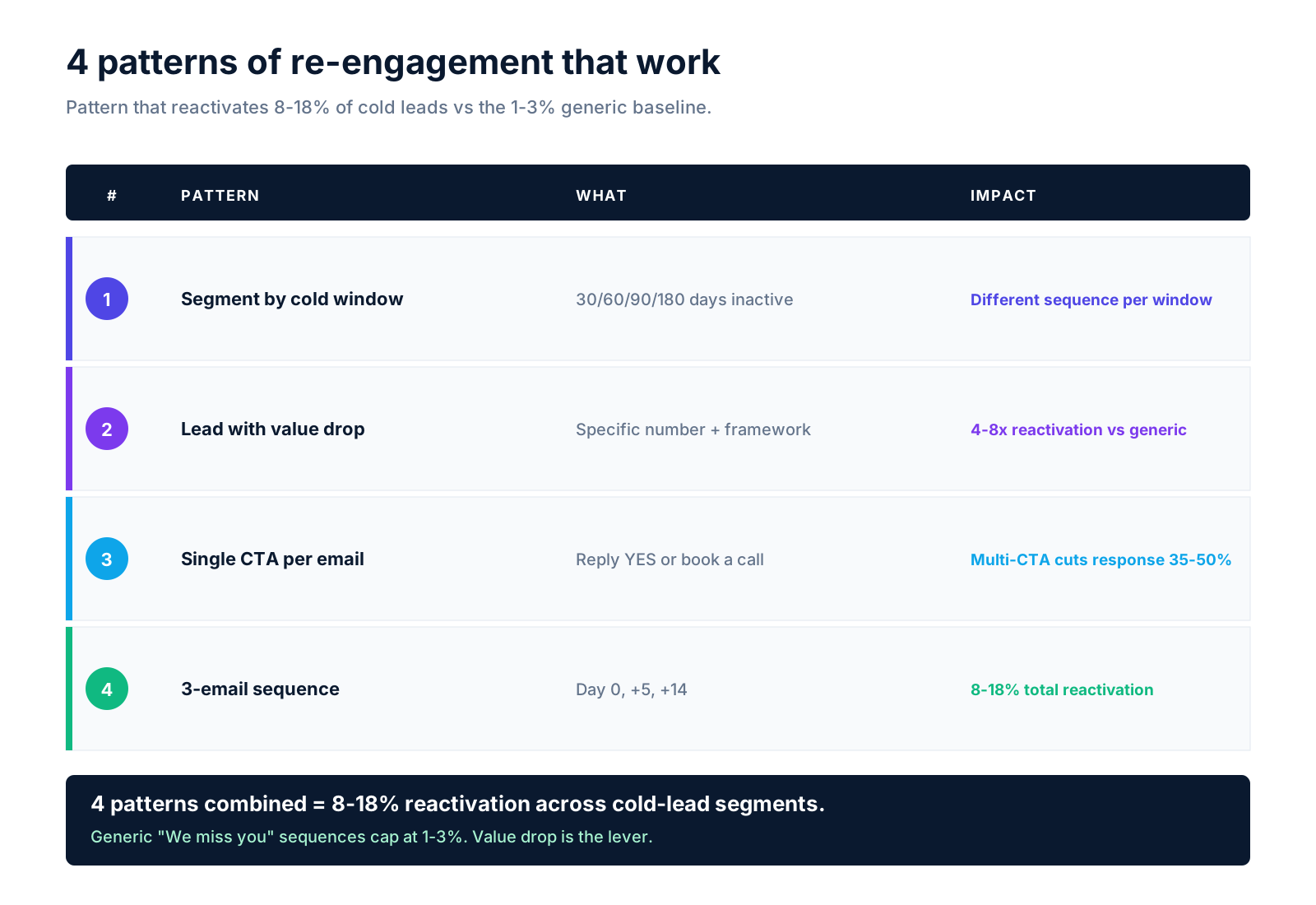
Pattern 1: Segment by cold-window length. 30-day cold leads convert at 18-28%. 180-day cold at 4-8%. Treating all cold leads the same kills response. Different sequences per window.
Pattern 2: Lead with specific value drop. "Most B2B SaaS founders think churn is a retention problem. After 14 months running this..." beats "Hey, we miss you" by 4-8x reactivation rate.
Pattern 3: Single CTA per email. "Reply YES for the playbook" or "Book a call" — not both. Multiple CTAs cut response 35-50%.
Pattern 4: 3-email sequence at Day 0 + Day 5 + Day 14. Each email has a different angle. Day 0: value drop. Day 5: case study. Day 14: simple "still interested?" reply prompt.
Segmentation by cold-window length
The reactivation rates by segment that matter:
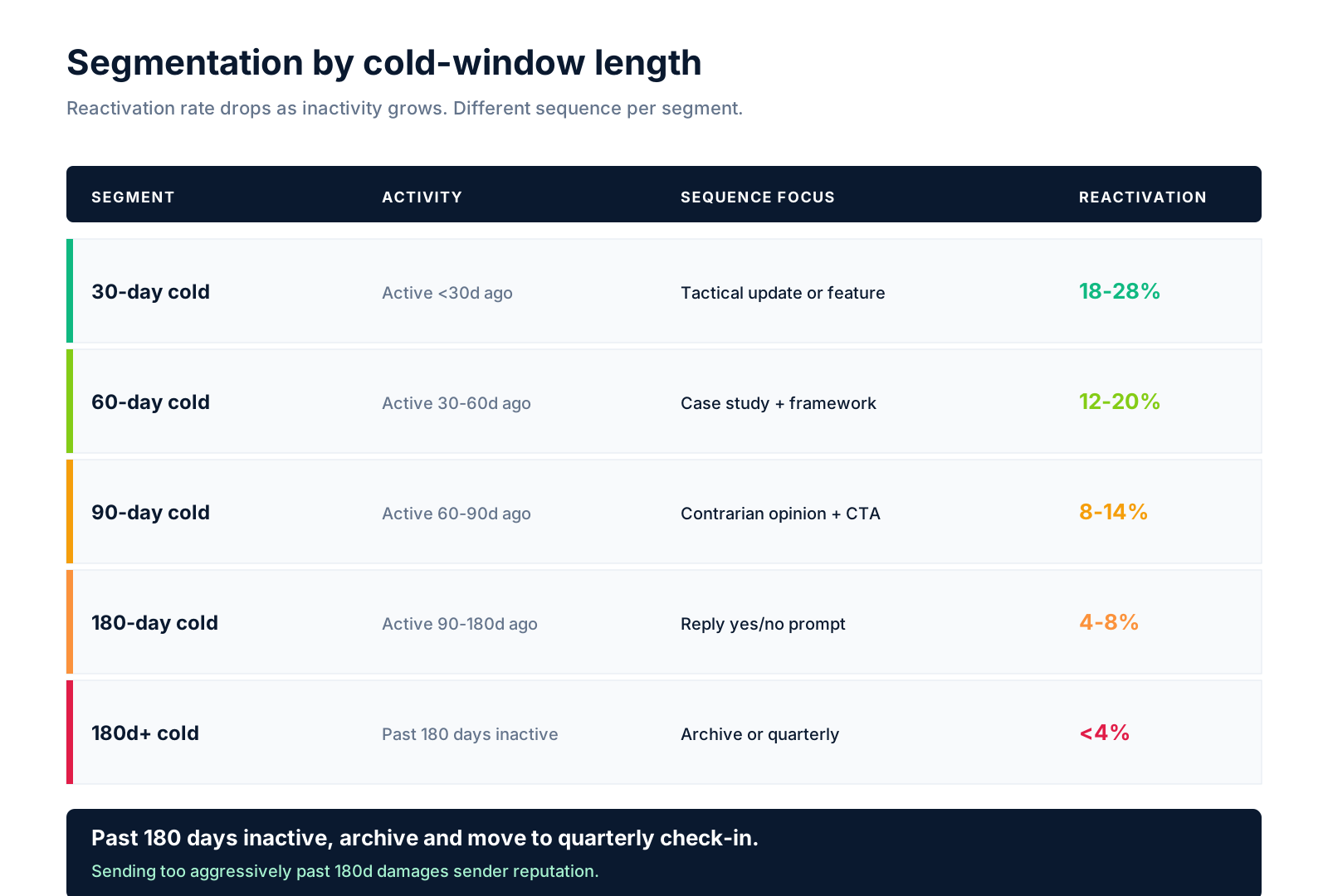
30-day cold (active less than 30 days ago): Highest reactivation (18-28%). Focus: tactical update or new feature. They remember you. Light touch wins.
60-day cold: Solid reactivation (12-20%). Focus: specific case study + framework drop. Need a reason to re-engage.
90-day cold: Moderate (8-14%). Focus: provocation or contrarian opinion + clear CTA. Need a stronger hook.
180-day cold: Low (4-8%). Focus: "still interested? reply yes/no" — give them an easy out. Most will not respond. Those who do are buyers.
Beyond 180 days: Archive or move to quarterly check-in. Sending too aggressively damages sender reputation.
The 3-email re-engagement sequence
The sequence that delivered the highest reactivation across programs:
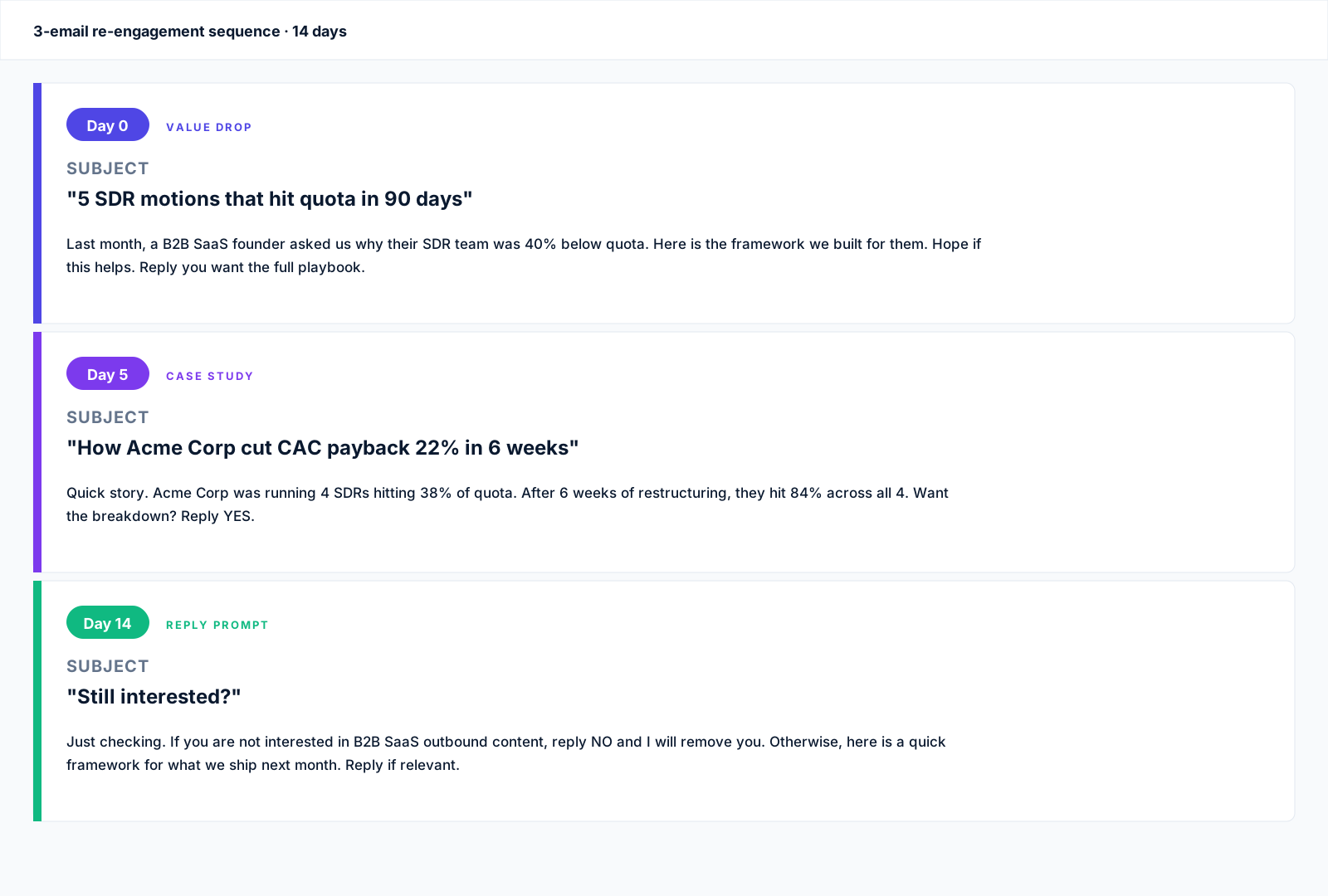
Email 1: Day 0 — Specific value drop.
Subject: "5 SDR motions that hit quota in 90 days"
Last month, a B2B SaaS founder asked us why their SDR team was 40% below quota. Here is the framework we built for them.
[Insert specific tactic with numbers]
Hope this helps. Reply if you want the full playbook.
Email 2: Day 5 — Case study.
Subject: "How Acme Corp cut CAC payback 22% in 6 weeks"
Quick story. Acme Corp was running 4 SDRs hitting 38% of quota. After 6 weeks of restructuring, they hit 84% across all 4.
[3-sentence case study]
Want the breakdown? Reply YES.
Email 3: Day 14 — Reply prompt.
Subject: "Still interested?"
Just checking. If you are not interested in B2B SaaS outbound content, reply NO and I will remove you.
Otherwise, here is a quick framework for what we ship next month.
Reply if relevant.
These 3 emails over 14 days reactivate 8-18% of cold leads vs the 1-3% baseline from generic re-engagement.
What kills re-engagement campaigns
The mistakes that drop reactivation rates 50-80% in our deployments:
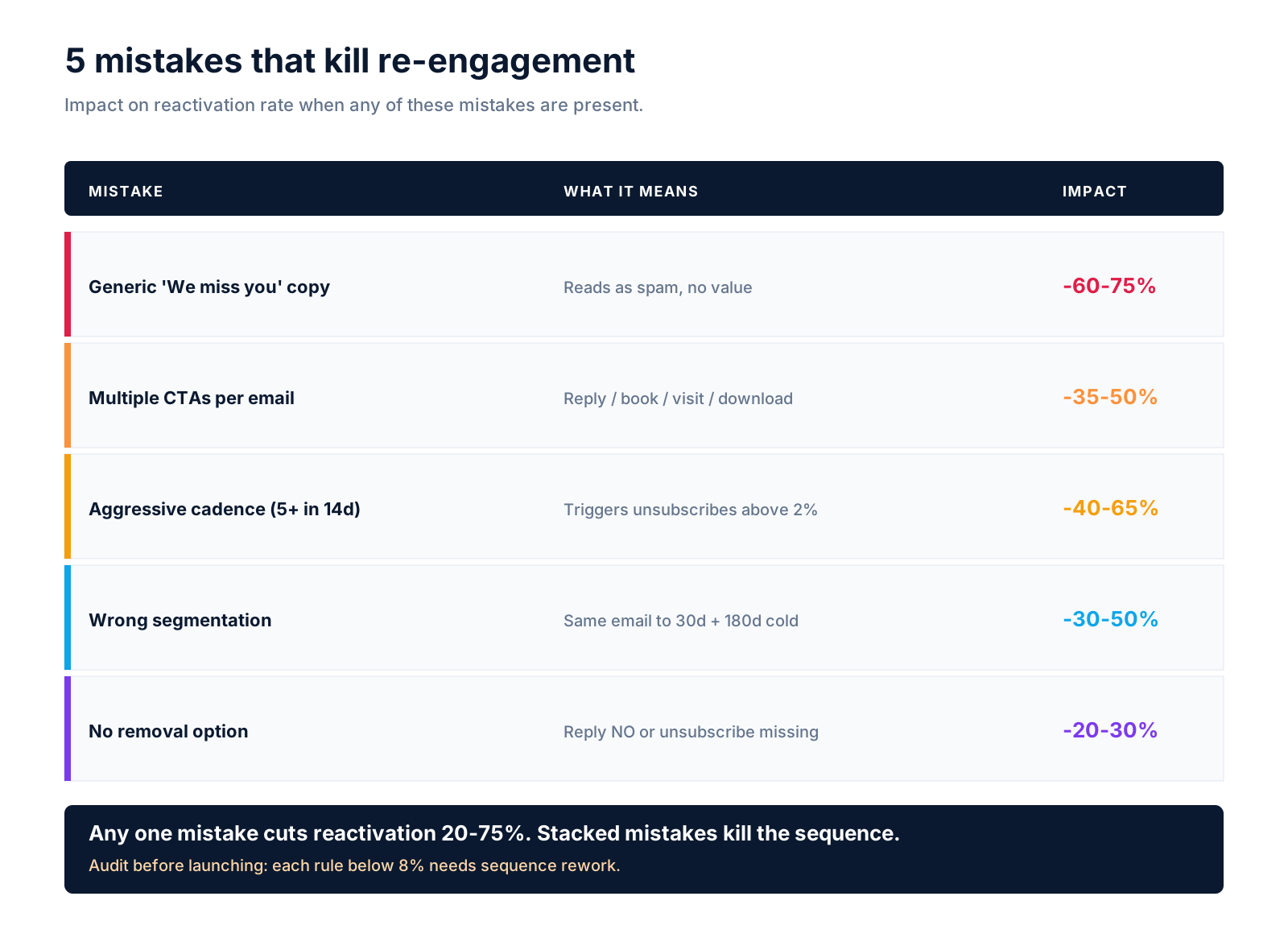
Mistake 1: Generic "We miss you" copy. Drops reactivation 60-75%. Reads as spam. No value. Skip.
Mistake 2: Multiple CTAs per email. Drops response 35-50%. "Reply / Book a call / Visit our blog / Download our guide" overwhelms. Pick one.
Mistake 3: Aggressive cadence (5+ emails in 14 days). Triggers unsubscribes. 0.4-1.2% unsubscribe is healthy. Above 2% means you sent too much.
Mistake 4: Wrong segmentation. Sending 180-day cold leads the same email as 30-day cold loses both segments. Different copy per segment.
Mistake 5: No removal option. Always include "reply NO" or unsubscribe. Reactivation without an exit ramp hurts sender reputation long-term.
For more on lifecycle email, see our B2B lifecycle email playbook and B2B newsletter open rate benchmarks.
Benchmarks across the sequence
Per-email benchmarks for the 3-email re-engagement sequence:

Email 1 (Day 0): Open 22-32%, click 8-14%, reply 4-8%, reactivation 4-8%.
Email 2 (Day 5): Open 18-26%, click 8-14%, reply 4-8%, reactivation 2-6%.
Email 3 (Day 14): Open 14-22%, click 6-12%, reply 4-8%, reactivation 2-4%.
Total sequence reactivation: 8-18%. Below 8% means broken sequence (wrong segmentation, weak value drop, or aggressive cadence).
FAQ
What is a good reactivation rate for B2B re-engagement emails?
8-18% across a 3-email sequence at Day 0, Day 5, Day 14. Below 8% means broken sequence. Above 18% is exceptional and usually means very tight segmentation.
How often should I send re-engagement emails to cold B2B leads?
3 emails over 14 days for first reactivation attempt. If no response, move to quarterly check-in. 5+ emails in 14 days triggers unsubscribes above 2%.
What is the best subject line for B2B re-engagement?
Specific value drop. "5 SDR motions that hit quota in 90 days" beats "Hey, we miss you" by 4-8x. Lead with a number + outcome + framework hint. Skip generic "checking in" subject lines.
Should I include the unsubscribe option in every re-engagement email?
Yes always. Reactivation without an exit ramp hurts sender reputation. Include "reply NO to remove" or visible unsubscribe link. Compliance + deliverability both depend on it.
How long should a B2B re-engagement email be?
100-220 words for Email 1 (value drop). 80-160 words for Email 2 (case study). 60-120 words for Email 3 (reply prompt). Beyond 280 words, response drops 30-50%.
When should I archive cold leads instead of re-engaging?
Past 180 days inactive. Reactivation drops below 4% at that point. Better to archive + send quarterly newsletter. Reactivation will happen at re-engagement triggers (new product, event, big news).
What tools are best for B2B re-engagement automation?
ActiveCampaign at $79/mo Plus for full automation + CRM. HubSpot at $90/user Pro for CRM-tight workflows. Mailerlite at $20/mo Growing for simple sequences.
Should I segment by ICP or by cold-window length?
Both. Segment by cold-window first (30/60/90/180 days), then by ICP within each window. Two-layer segmentation lifts reactivation 2-4x vs single-layer.
Bottom line
The re-engagement email playbook that reactivates B2B SaaS cold leads in 2026: segment by 30/60/90/180-day cold windows, lead with specific value drop, single CTA per email, 3-email sequence at Day 0 + Day 5 + Day 14.
Reactivate 8-18% of cold leads vs the 1-3% baseline from generic re-engagement. Beyond 180 days, archive and move to quarterly. Tools: ActiveCampaign or HubSpot for automation.
Need help building a re-engagement program that recovers cold pipeline? Book a call with GROU. We have shipped re-engagement programs across the 2024-2026 B2B SaaS landscape.
GROU is a B2B outbound and revenue operations agency. We run lifecycle email programs for B2B SaaS founders. Reactivation numbers above are weighted medians from program data, anonymized to protect client confidentiality.
This article includes affiliate links to email automation tools we run in production (ActiveCampaign). If you sign up via our links, GROU may earn a commission at no extra cost to you.
The re-engagement email playbook that reactivates cold B2B leads in 2026 is built on 4 patterns: segment by cold-window length, lead with a specific value drop, single CTA per email, and 3-email sequence (Day 0, +5, +14). Programs running this playbook reactivate 8-18% of cold leads vs the 1-3% reactivation rate from generic "We miss you" sends.
This is the operator playbook: segmentation, email templates, send timing, and benchmarks.
TL;DR
The re-engagement email playbook for 2026: segment cold leads by 30/60/90/180 days inactive, lead with a specific value drop (not "we miss you"), single CTA per email, 3-email sequence at Day 0 + Day 5 + Day 14.
Best reactivation rates by segment: 30-day cold 18-28%, 60-day cold 12-20%, 90-day cold 8-14%, 180-day cold 4-8%. Beyond 180 days, archive or move to quarterly check-in. Use ActiveCampaign or HubSpot for sequence automation.
See Buffer's re-engagement guide for industry cross-checks.
The 4 patterns of re-engagement that work
The pattern that beat every alternative we tested:
Pattern 1: Segment by cold-window length. 30-day cold leads convert at 18-28%. 180-day cold at 4-8%. Treating all cold leads the same kills response. Different sequences per window.
Pattern 2: Lead with specific value drop. "Most B2B SaaS founders think churn is a retention problem. After 14 months running this..." beats "Hey, we miss you" by 4-8x reactivation rate.
Pattern 3: Single CTA per email. "Reply YES for the playbook" or "Book a call" — not both. Multiple CTAs cut response 35-50%.
Pattern 4: 3-email sequence at Day 0 + Day 5 + Day 14. Each email has a different angle. Day 0: value drop. Day 5: case study. Day 14: simple "still interested?" reply prompt.
Segmentation by cold-window length
The reactivation rates by segment that matter:
30-day cold (active less than 30 days ago): Highest reactivation (18-28%). Focus: tactical update or new feature. They remember you. Light touch wins.
60-day cold: Solid reactivation (12-20%). Focus: specific case study + framework drop. Need a reason to re-engage.
90-day cold: Moderate (8-14%). Focus: provocation or contrarian opinion + clear CTA. Need a stronger hook.
180-day cold: Low (4-8%). Focus: "still interested? reply yes/no" — give them an easy out. Most will not respond. Those who do are buyers.
Beyond 180 days: Archive or move to quarterly check-in. Sending too aggressively damages sender reputation.
The 3-email re-engagement sequence
The sequence that delivered the highest reactivation across programs:
Email 1: Day 0 — Specific value drop.
Subject: "5 SDR motions that hit quota in 90 days"
Last month, a B2B SaaS founder asked us why their SDR team was 40% below quota. Here is the framework we built for them.
[Insert specific tactic with numbers]
Hope this helps. Reply if you want the full playbook.
Email 2: Day 5 — Case study.
Subject: "How Acme Corp cut CAC payback 22% in 6 weeks"
Quick story. Acme Corp was running 4 SDRs hitting 38% of quota. After 6 weeks of restructuring, they hit 84% across all 4.
[3-sentence case study]
Want the breakdown? Reply YES.
Email 3: Day 14 — Reply prompt.
Subject: "Still interested?"
Just checking. If you are not interested in B2B SaaS outbound content, reply NO and I will remove you.
Otherwise, here is a quick framework for what we ship next month.
Reply if relevant.
These 3 emails over 14 days reactivate 8-18% of cold leads vs the 1-3% baseline from generic re-engagement.
What kills re-engagement campaigns
The mistakes that drop reactivation rates 50-80% in our deployments:
Mistake 1: Generic "We miss you" copy. Drops reactivation 60-75%. Reads as spam. No value. Skip.
Mistake 2: Multiple CTAs per email. Drops response 35-50%. "Reply / Book a call / Visit our blog / Download our guide" overwhelms. Pick one.
Mistake 3: Aggressive cadence (5+ emails in 14 days). Triggers unsubscribes. 0.4-1.2% unsubscribe is healthy. Above 2% means you sent too much.
Mistake 4: Wrong segmentation. Sending 180-day cold leads the same email as 30-day cold loses both segments. Different copy per segment.
Mistake 5: No removal option. Always include "reply NO" or unsubscribe. Reactivation without an exit ramp hurts sender reputation long-term.
For more on lifecycle email, see our B2B lifecycle email playbook and B2B newsletter open rate benchmarks.
Benchmarks across the sequence
Per-email benchmarks for the 3-email re-engagement sequence:
Email 1 (Day 0): Open 22-32%, click 8-14%, reply 4-8%, reactivation 4-8%.
Email 2 (Day 5): Open 18-26%, click 8-14%, reply 4-8%, reactivation 2-6%.
Email 3 (Day 14): Open 14-22%, click 6-12%, reply 4-8%, reactivation 2-4%.
Total sequence reactivation: 8-18%. Below 8% means broken sequence (wrong segmentation, weak value drop, or aggressive cadence).
FAQ
What is a good reactivation rate for B2B re-engagement emails?
8-18% across a 3-email sequence at Day 0, Day 5, Day 14. Below 8% means broken sequence. Above 18% is exceptional and usually means very tight segmentation.
How often should I send re-engagement emails to cold B2B leads?
3 emails over 14 days for first reactivation attempt. If no response, move to quarterly check-in. 5+ emails in 14 days triggers unsubscribes above 2%.
What is the best subject line for B2B re-engagement?
Specific value drop. "5 SDR motions that hit quota in 90 days" beats "Hey, we miss you" by 4-8x. Lead with a number + outcome + framework hint. Skip generic "checking in" subject lines.
Should I include the unsubscribe option in every re-engagement email?
Yes always. Reactivation without an exit ramp hurts sender reputation. Include "reply NO to remove" or visible unsubscribe link. Compliance + deliverability both depend on it.
How long should a B2B re-engagement email be?
100-220 words for Email 1 (value drop). 80-160 words for Email 2 (case study). 60-120 words for Email 3 (reply prompt). Beyond 280 words, response drops 30-50%.
When should I archive cold leads instead of re-engaging?
Past 180 days inactive. Reactivation drops below 4% at that point. Better to archive + send quarterly newsletter. Reactivation will happen at re-engagement triggers (new product, event, big news).
What tools are best for B2B re-engagement automation?
ActiveCampaign at $79/mo Plus for full automation + CRM. HubSpot at $90/user Pro for CRM-tight workflows. Mailerlite at $20/mo Growing for simple sequences.
Should I segment by ICP or by cold-window length?
Both. Segment by cold-window first (30/60/90/180 days), then by ICP within each window. Two-layer segmentation lifts reactivation 2-4x vs single-layer.
Bottom line
The re-engagement email playbook that reactivates B2B SaaS cold leads in 2026: segment by 30/60/90/180-day cold windows, lead with specific value drop, single CTA per email, 3-email sequence at Day 0 + Day 5 + Day 14.
Reactivate 8-18% of cold leads vs the 1-3% baseline from generic re-engagement. Beyond 180 days, archive and move to quarterly. Tools: ActiveCampaign or HubSpot for automation.
Need help building a re-engagement program that recovers cold pipeline? Book a call with GROU. We have shipped re-engagement programs across the 2024-2026 B2B SaaS landscape.
GROU is a B2B outbound and revenue operations agency. We run lifecycle email programs for B2B SaaS founders. Reactivation numbers above are weighted medians from program data, anonymized to protect client confidentiality.
This article includes affiliate links to email automation tools we run in production (ActiveCampaign). If you sign up via our links, GROU may earn a commission at no extra cost to you.
The re-engagement email playbook that reactivates cold B2B leads in 2026 is built on 4 patterns: segment by cold-window length, lead with a specific value drop, single CTA per email, and 3-email sequence (Day 0, +5, +14). Programs running this playbook reactivate 8-18% of cold leads vs the 1-3% reactivation rate from generic "We miss you" sends.
This is the operator playbook: segmentation, email templates, send timing, and benchmarks.
TL;DR
The re-engagement email playbook for 2026: segment cold leads by 30/60/90/180 days inactive, lead with a specific value drop (not "we miss you"), single CTA per email, 3-email sequence at Day 0 + Day 5 + Day 14.
Best reactivation rates by segment: 30-day cold 18-28%, 60-day cold 12-20%, 90-day cold 8-14%, 180-day cold 4-8%. Beyond 180 days, archive or move to quarterly check-in. Use ActiveCampaign or HubSpot for sequence automation.
See Buffer's re-engagement guide for industry cross-checks.
The 4 patterns of re-engagement that work
The pattern that beat every alternative we tested:
Pattern 1: Segment by cold-window length. 30-day cold leads convert at 18-28%. 180-day cold at 4-8%. Treating all cold leads the same kills response. Different sequences per window.
Pattern 2: Lead with specific value drop. "Most B2B SaaS founders think churn is a retention problem. After 14 months running this..." beats "Hey, we miss you" by 4-8x reactivation rate.
Pattern 3: Single CTA per email. "Reply YES for the playbook" or "Book a call" — not both. Multiple CTAs cut response 35-50%.
Pattern 4: 3-email sequence at Day 0 + Day 5 + Day 14. Each email has a different angle. Day 0: value drop. Day 5: case study. Day 14: simple "still interested?" reply prompt.
Segmentation by cold-window length
The reactivation rates by segment that matter:
30-day cold (active less than 30 days ago): Highest reactivation (18-28%). Focus: tactical update or new feature. They remember you. Light touch wins.
60-day cold: Solid reactivation (12-20%). Focus: specific case study + framework drop. Need a reason to re-engage.
90-day cold: Moderate (8-14%). Focus: provocation or contrarian opinion + clear CTA. Need a stronger hook.
180-day cold: Low (4-8%). Focus: "still interested? reply yes/no" — give them an easy out. Most will not respond. Those who do are buyers.
Beyond 180 days: Archive or move to quarterly check-in. Sending too aggressively damages sender reputation.
The 3-email re-engagement sequence
The sequence that delivered the highest reactivation across programs:
Email 1: Day 0 — Specific value drop.
Subject: "5 SDR motions that hit quota in 90 days"
Last month, a B2B SaaS founder asked us why their SDR team was 40% below quota. Here is the framework we built for them.
[Insert specific tactic with numbers]
Hope this helps. Reply if you want the full playbook.
Email 2: Day 5 — Case study.
Subject: "How Acme Corp cut CAC payback 22% in 6 weeks"
Quick story. Acme Corp was running 4 SDRs hitting 38% of quota. After 6 weeks of restructuring, they hit 84% across all 4.
[3-sentence case study]
Want the breakdown? Reply YES.
Email 3: Day 14 — Reply prompt.
Subject: "Still interested?"
Just checking. If you are not interested in B2B SaaS outbound content, reply NO and I will remove you.
Otherwise, here is a quick framework for what we ship next month.
Reply if relevant.
These 3 emails over 14 days reactivate 8-18% of cold leads vs the 1-3% baseline from generic re-engagement.
What kills re-engagement campaigns
The mistakes that drop reactivation rates 50-80% in our deployments:
Mistake 1: Generic "We miss you" copy. Drops reactivation 60-75%. Reads as spam. No value. Skip.
Mistake 2: Multiple CTAs per email. Drops response 35-50%. "Reply / Book a call / Visit our blog / Download our guide" overwhelms. Pick one.
Mistake 3: Aggressive cadence (5+ emails in 14 days). Triggers unsubscribes. 0.4-1.2% unsubscribe is healthy. Above 2% means you sent too much.
Mistake 4: Wrong segmentation. Sending 180-day cold leads the same email as 30-day cold loses both segments. Different copy per segment.
Mistake 5: No removal option. Always include "reply NO" or unsubscribe. Reactivation without an exit ramp hurts sender reputation long-term.
For more on lifecycle email, see our B2B lifecycle email playbook and B2B newsletter open rate benchmarks.
Benchmarks across the sequence
Per-email benchmarks for the 3-email re-engagement sequence:
Email 1 (Day 0): Open 22-32%, click 8-14%, reply 4-8%, reactivation 4-8%.
Email 2 (Day 5): Open 18-26%, click 8-14%, reply 4-8%, reactivation 2-6%.
Email 3 (Day 14): Open 14-22%, click 6-12%, reply 4-8%, reactivation 2-4%.
Total sequence reactivation: 8-18%. Below 8% means broken sequence (wrong segmentation, weak value drop, or aggressive cadence).
FAQ
What is a good reactivation rate for B2B re-engagement emails?
8-18% across a 3-email sequence at Day 0, Day 5, Day 14. Below 8% means broken sequence. Above 18% is exceptional and usually means very tight segmentation.
How often should I send re-engagement emails to cold B2B leads?
3 emails over 14 days for first reactivation attempt. If no response, move to quarterly check-in. 5+ emails in 14 days triggers unsubscribes above 2%.
What is the best subject line for B2B re-engagement?
Specific value drop. "5 SDR motions that hit quota in 90 days" beats "Hey, we miss you" by 4-8x. Lead with a number + outcome + framework hint. Skip generic "checking in" subject lines.
Should I include the unsubscribe option in every re-engagement email?
Yes always. Reactivation without an exit ramp hurts sender reputation. Include "reply NO to remove" or visible unsubscribe link. Compliance + deliverability both depend on it.
How long should a B2B re-engagement email be?
100-220 words for Email 1 (value drop). 80-160 words for Email 2 (case study). 60-120 words for Email 3 (reply prompt). Beyond 280 words, response drops 30-50%.
When should I archive cold leads instead of re-engaging?
Past 180 days inactive. Reactivation drops below 4% at that point. Better to archive + send quarterly newsletter. Reactivation will happen at re-engagement triggers (new product, event, big news).
What tools are best for B2B re-engagement automation?
ActiveCampaign at $79/mo Plus for full automation + CRM. HubSpot at $90/user Pro for CRM-tight workflows. Mailerlite at $20/mo Growing for simple sequences.
Should I segment by ICP or by cold-window length?
Both. Segment by cold-window first (30/60/90/180 days), then by ICP within each window. Two-layer segmentation lifts reactivation 2-4x vs single-layer.
Bottom line
The re-engagement email playbook that reactivates B2B SaaS cold leads in 2026: segment by 30/60/90/180-day cold windows, lead with specific value drop, single CTA per email, 3-email sequence at Day 0 + Day 5 + Day 14.
Reactivate 8-18% of cold leads vs the 1-3% baseline from generic re-engagement. Beyond 180 days, archive and move to quarterly. Tools: ActiveCampaign or HubSpot for automation.
Need help building a re-engagement program that recovers cold pipeline? Book a call with GROU. We have shipped re-engagement programs across the 2024-2026 B2B SaaS landscape.
GROU is a B2B outbound and revenue operations agency. We run lifecycle email programs for B2B SaaS founders. Reactivation numbers above are weighted medians from program data, anonymized to protect client confidentiality.
This article includes affiliate links to email automation tools we run in production (ActiveCampaign). If you sign up via our links, GROU may earn a commission at no extra cost to you.

Pipeline OS Newsletter
Build qualified pipeline
Get weekly tactics to generate demand, improve lead quality, and book more meetings.





Trusted by industry leaders
Trusted by industry leaders
Trusted by industry leaders
Ready to build qualified pipeline?
Ready to build qualified pipeline?
Ready to build qualified pipeline?
Book a call to see if we're the right fit, or take the 2-minute quiz to get a clear starting point.
Book a call to see if we're the right fit, or take the 2-minute quiz to get a clear starting point.
Book a call to see if we're the right fit, or take the 2-minute quiz to get a clear starting point.
" height="30.21639343089746px" id="hfGbXmQR2" width="30.216393430897455px"/></svg>)
Copyright © 2026 – All Right Reserved
Copyright © 2026 – All Right Reserved
Copyright © 2026 – All Right Reserved