%22%3E%3C/path%3E%3Cpath d=%22M 63.072 7.554 C 62.258 8.022 61.577 8.689 61.092 9.493 L 61.092 7.076 L 57.158 7.076 L 57.158 22.64 L 61.089 22.64 L 61.089 14.888 C 61.089 13.446 61.403 12.434 62.03 11.853 C 62.818 11.218 63.818 10.907 64.826 10.982 L 65.868 10.982 L 65.868 6.851 C 64.891 6.834 63.926 7.076 63.073 7.554 Z%22 fill=%22rgb(17,17,17)%22%3E%3C/path%3E%3Cpath d=%22M 78.916 7.82 C 76.363 6.49 73.321 6.49 70.768 7.82 C 69.562 8.473 68.564 9.451 67.888 10.644 C 67.167 11.931 66.803 13.387 66.834 14.862 C 66.804 16.332 67.157 17.785 67.86 19.077 C 68.515 20.267 69.494 21.246 70.684 21.901 C 71.924 22.576 73.318 22.92 74.73 22.898 C 76.164 22.918 77.58 22.575 78.846 21.901 C 80.062 21.247 81.073 20.27 81.768 19.077 C 82.506 17.797 82.88 16.339 82.85 14.862 C 82.88 13.389 82.517 11.934 81.797 10.647 C 81.12 9.455 80.122 8.477 78.917 7.824 M 78.803 14.862 C 78.829 15.739 78.636 16.608 78.241 17.391 C 77.903 18.046 77.38 18.588 76.738 18.95 C 76.124 19.293 75.432 19.472 74.729 19.47 C 73.668 19.497 72.648 19.061 71.934 18.276 C 71.139 17.323 70.741 16.1 70.823 14.862 C 70.741 13.62 71.149 12.395 71.959 11.45 C 72.687 10.667 73.715 10.233 74.783 10.256 C 75.859 10.236 76.894 10.67 77.635 11.45 C 78.464 12.387 78.884 13.616 78.801 14.864%22 fill=%22rgb(17,17,17)%22%3E%3C/path%3E%3Cpath d=%22M 95.906 7.076 L 95.906 15.646 C 95.975 16.68 95.643 17.701 94.979 18.498 C 94.311 19.184 93.379 19.547 92.422 19.495 C 91.475 19.544 90.553 19.18 89.894 18.498 C 89.23 17.701 88.898 16.68 88.967 15.646 L 88.967 7.076 L 85.033 7.076 L 85.033 16.207 C 85 17.449 85.275 18.68 85.834 19.79 C 86.327 20.75 87.095 21.542 88.039 22.065 C 89.033 22.594 90.145 22.861 91.271 22.838 C 92.188 22.847 93.095 22.65 93.926 22.263 C 94.708 21.905 95.388 21.36 95.906 20.675 L 95.906 22.645 L 99.865 22.645 L 99.865 7.076 Z%22 fill=%22rgb(17,17,17)%22%3E%3C/path%3E%3Cpath d=%22M 4.513 15.626 C 4.511 10.815 7.606 6.549 12.181 5.059 C 16.756 3.57 21.77 5.195 24.601 9.086 L 27.816 5.87 C 24.074 1.186 17.981 -0.943 12.137 0.393 C 6.292 1.728 1.728 6.292 0.393 12.137 C -0.943 17.981 1.186 24.074 5.87 27.816 L 9.085 24.601 C 6.214 22.512 4.515 19.177 4.513 15.626%22 fill=%22rgb(32,62,235)%22%3E%3C/path%3E%3Cpath d=%22M 17.114 14.343 L 13.354 18.01 L 13.354 18.026 L 21.071 18.026 L 11.412 27.609 L 17.389 27.609 L 23.999 21.081 L 23.999 28.316 L 24.005 28.316 L 27.967 24.393 L 27.967 14.343 Z%22 fill=%22rgb(32,62,235)%22%3E%3C/path%3E%3C/g%3E%3C/svg%3E) ×
× ××
××

Three tools, four meters, and not one of them is denominated in the thing you budget in.
Your CRM charges per seat. Your enrichment layer charges in actions and in data credits, which are two different meters on the same invoice. Your automation layer charges in tasks, except that roughly half the steps you build do not consume one. Nobody prices in leads, records or pipeline, which is what you are actually buying, and the gap between those units is where RevOps budgets go wrong.
This is what each layer of a working B2B stack costs in 2026, what it meters, and how to size it before you sign anything.
TL;DR
A three-layer stack of Pipedrive, Clay and Zapier runs roughly $549 a month for a five-person team: Pipedrive Premium at $59 a seat is $295, Clay Launch starts at $185, and Zapier Team starts at $69. The CRM looks like the big line and it is, but enrichment is the one that surprises people, because Clay meters two things at once. Its Launch plan includes 15,000 actions and between 2,500 and 10,000 data credits a month, and a fully enriched record typically consumes six to twenty credits. So the same $185 buys anywhere from about 125 to about 1,650 fully enriched records depending on how deep you enrich, a thirteen-fold range on one plan. Zapier's task meter has the opposite quirk: standard app steps cost one task, MCP tool calls cost two and Lead Router costs five, but Filters, Paths, Formatter, Delay, Looping, Sub-Zaps and Digests never consume a task at all, so a well-built Zap costs a fraction of a naive one. Size the enrichment layer on enrichment depth rather than list size, build automations that filter early, and buy CRM seats for the people who log activity rather than the people who read reports.
What each layer meters
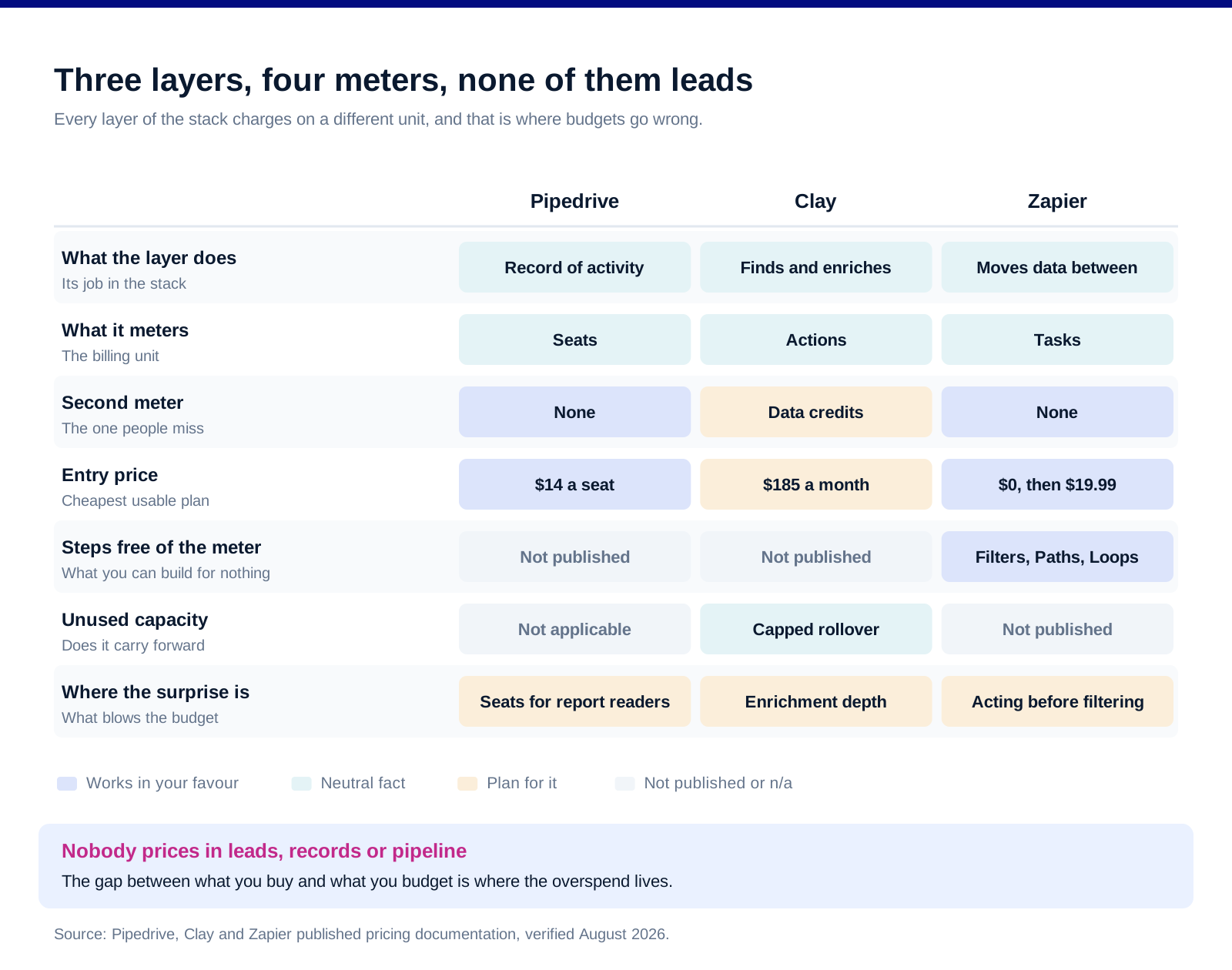
Pipedrive meters seats, and its plans were renamed in 2025. Lite was Essential, Growth was Advanced, Premium absorbed Professional and Power, and Ultimate was Enterprise. Its published pricing puts Lite at $14 a seat a month on annual billing, Growth at $39, Premium at $59 and Ultimate at $79, billed as $168, $468, $708 and $948 a year per seat. There is a fourteen-day free trial with no card.
The detail worth knowing on Pipedrive is that the top tier got more constrained, not less. The 2025 changes introduced limits on Ultimate where there previously were none: 500 custom fields, 500 reports, 25 teams and 25 permission sets. Lower tiers got more generous, with Lite's lead and deal limit rising from 2,000 to 2,500 per user and Growth's from 4,000 to 5,000. If you bought Enterprise on the promise of unlimited, check what you have now.
Clay meters actions and data credits separately. Per Clay's own plans documentation, Launch starts at $185 a month with 15,000 actions and 2,500 to 10,000 data credits, Growth starts at $495 with 40,000 actions and 6,000 to 100,000 credits, and Enterprise is custom above 100,000 of each. Data credits are what buys third-party data and AI from the marketplace, and Clay states each credit costs a few pennies.
Clay's rollover rules differ by billing term. On monthly plans unused credits accumulate but cap at twice your monthly limit, so a 50,000-credit plan holds at most 100,000. On annual plans you can roll over up to 15% of annual credits plus new credits, provided you renew at the same tier or higher.
Zapier meters tasks, and the exclusions are the point. Its published task documentation states that tasks are counted whenever Zapier successfully completes a unit of work. A standard app action step is one task, a Code step is one, an MCP tool call is two and a Lead Router step is five. Formatter, Paths, Filters, Delay, Looping, Sub-Zaps, Digests, Zapier Manager, Storage, Tables and Forms never use tasks.
Zapier's plans are Free at $0 with 100 tasks a month and two-step Zaps, Professional from $19.99 a month with multi-step Zaps, unlimited premium apps and webhooks, Team from $69 with 25 users and shared connections, and Enterprise custom. Annual billing takes 33% off.
The enrichment layer is the one to size carefully
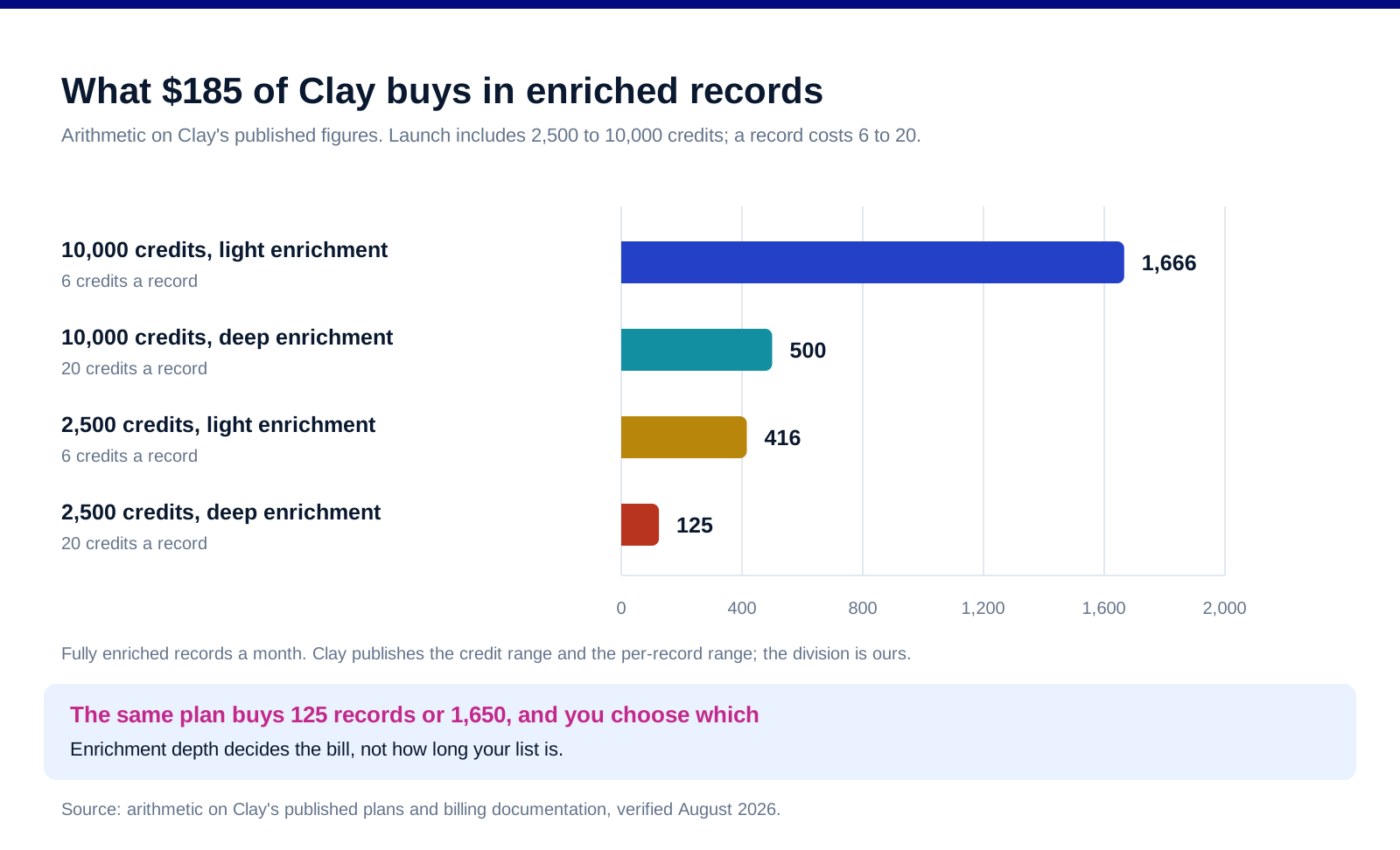
Here is the arithmetic that decides your Clay bill. Clay publishes two figures that multiply against each other: the Launch plan includes 2,500 to 10,000 data credits a month, and a fully enriched record typically consumes six to twenty credits. Divide one by the other and the same $185 plan buys between roughly 125 and roughly 1,650 fully enriched records a month.
That thirteen-fold range is not a pricing trick, it is a design decision you make. Every extra waterfall step, every AI research column, every additional provider you check is more credits on the same record. A record enriched for a work email is cheap. The same record enriched for email, mobile, technographics, headcount, funding and an AI-written first line is not.
Which means the question is never how many leads you have. It is how much you need to know about each one before outreach is worth sending. Teams that size Clay on list length overspend on the first month and then ration for the rest of the year. Our lead enrichment tools roundup covers the wider field, and our Clay versus Apollo comparison covers the case where a simpler database is the better buy.
Actions and credits run out at different rates. 15,000 actions against as few as 2,500 credits on Launch means most teams hit the credit ceiling long before the action ceiling. Watch the credit meter, not the action meter.
Build the enrichment waterfall to fail fast. Check the cheapest provider first and only escalate when it misses. This is the single largest lever on the bill and it is a configuration choice rather than a plan choice.
How to build the automation layer cheaply
Filter before you act, always. Filters, Paths and Formatter consume no tasks. Every action step consumes one. A Zap that pulls 1,000 records and acts on all of them costs 1,000 tasks; the same Zap with a filter that passes 60 costs 60. The logic is free and the doing is metered.
Use Sub-Zaps and Looping rather than duplicating action steps. Both are on the no-task list, so restructuring repetitive work into a loop can cut the meter substantially without changing what the automation does.
Be deliberate about MCP and Lead Router. Two tasks per MCP tool call and five per Lead Router step are five times the cost of an ordinary action. They may still be worth it, but they should be a decision rather than a default.
Start on Professional, not Team, unless you need shared connections. Team at $69 a month buys 25 users, shared Zap folders, shared app connections and SAML SSO. If one person owns automation, Professional from $19.99 does the same work.
Free is a real tier for testing. 100 tasks a month and two-step Zaps is enough to prove a workflow before you pay for it.
Which stack shape fits you
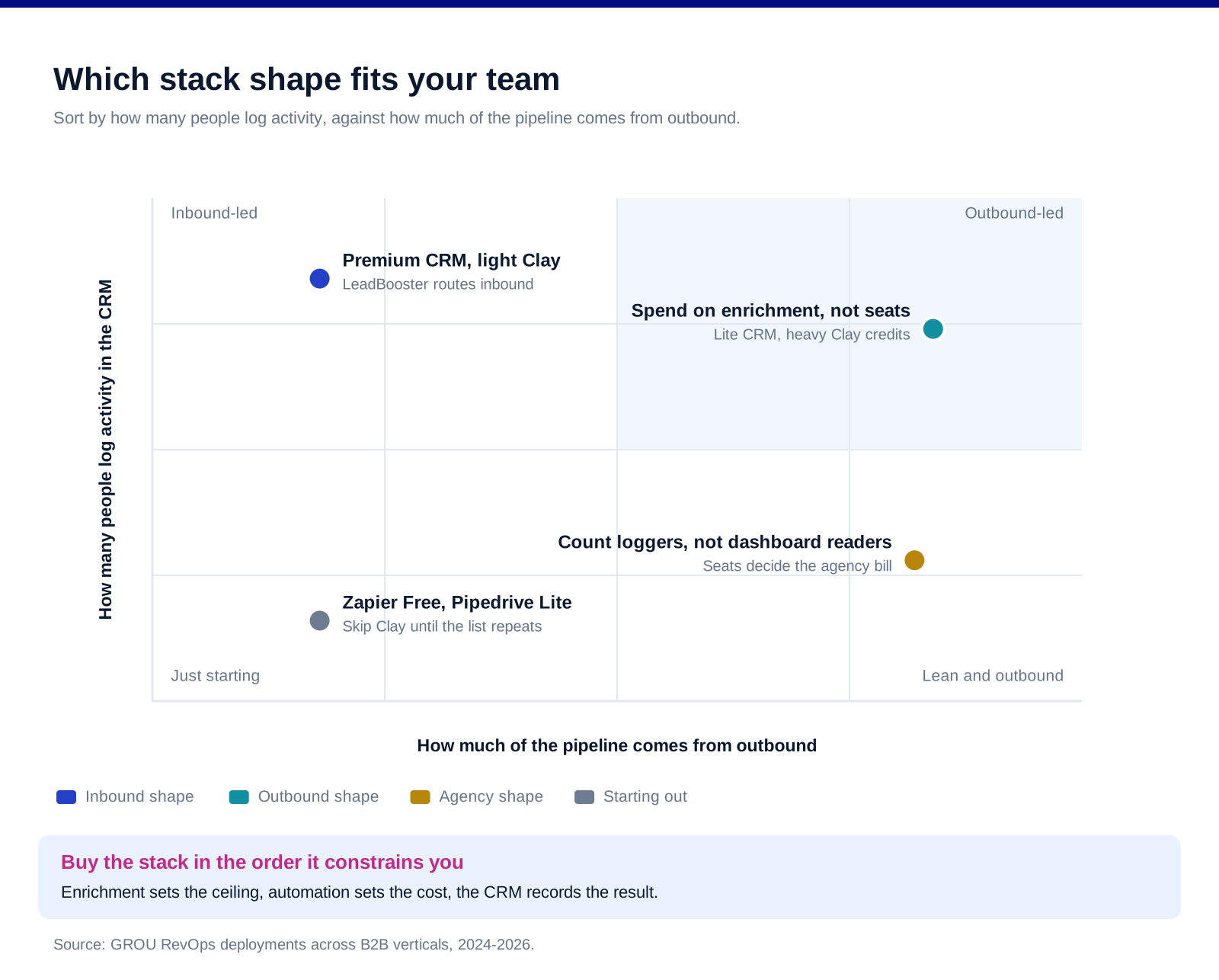
A small team running heavy outbound: spend on enrichment, not on CRM. Pipedrive Lite at $14 a seat is enough to log activity when three people share a pipeline, and the money is better placed in Clay credits and a decent sending tool. The CRM is a record of what happened; the enrichment layer determines whether anything happens at all.
A larger team running mostly inbound: invert it. Pipedrive Premium at $59 brings LeadBooster with chatbot, live chat, prospector and web forms, plus custom scoring and enrichment and a team inbox. That is where inbound routing and qualification live, and a light Clay plan is enough alongside it.
A team of one or two: Zapier Free and Pipedrive Lite, and skip Clay until you have a repeatable list. Buying an enrichment platform before you know what to enrich is the most common early overspend in this category.
An agency running several clients: seats and workspaces decide it, not features. Count the people who log activity, not the people who look at dashboards, and check that Ultimate's new limits on teams and permission sets clear your client count before assuming the top tier is unbounded.
Migrating an existing stack: sequence it CRM last. Automations and enrichment can be rebuilt in parallel with the old system running. The CRM cutover cannot, and our HubSpot to Pipedrive migration piece covers the mechanics of that move, while our Close versus HubSpot comparison covers the case for a phone-first CRM instead.
What none of the pricing pages tell you
Seats get bought for the wrong people. Executives who read reports do not need a CRM seat if the reporting is exported or shared. Count the people who create and update records.
Every meter resets, and unused capacity mostly vanishes. Clay's monthly rollover caps at twice the limit and its annual rollover at 15%. Everything else in this stack is use it or lose it. Buy for a normal month rather than your busiest one.
The integrations are the fragile part. Three tools means at least two joins, and joins break silently. Put a weekly check on record counts flowing between systems, because the failure mode is not an error message, it is a quiet gap.
Nobody in this stack owns data hygiene. Duplicates, stale titles and bounced addresses accumulate regardless of what you pay. That is a process to run, not a product to buy.
Adding a tool never fixes an undefined process. If it is not clear who owns a lead at each stage, no amount of automation will produce that clarity, it will just execute the confusion faster.
FAQ
How much does a B2B RevOps stack cost in 2026?
For a five-person team, roughly $549 a month across three layers: Pipedrive Premium at $59 a seat is $295, Clay Launch starts at $185 and Zapier Team starts at $69. A leaner version using Pipedrive Lite at $14 a seat and Zapier Professional from $19.99 brings the same three layers closer to $275 a month before any usage overage.
What does Pipedrive cost per user?
On annual billing, Lite is $14 a seat a month, Growth $39, Premium $59 and Ultimate $79, billed as $168, $468, $708 and $948 a year per seat. There is a fourteen-day free trial with no card required. Pipedrive states that annual billing saves up to 42% against paying monthly.
How many records can you enrich on Clay's cheapest plan?
Between roughly 125 and 1,650 a month on Launch at $185, which is arithmetic on Clay's own published figures. The plan includes 2,500 to 10,000 data credits and a fully enriched record typically consumes six to twenty credits. Where you land inside that range is decided by how many enrichment steps you run per record, not by how long your list is.
What counts as a task in Zapier?
A task is counted whenever Zapier successfully completes a unit of work. Standard app action steps and Code steps cost one task each, MCP tool calls cost two and Lead Router steps cost five. Filters, Paths, Formatter, Delay, Looping, Sub-Zaps, Digests, Zapier Manager, Storage, Tables and Forms never consume a task, which is why filtering early is the cheapest optimisation available.
Do you need Clay if you already have a CRM?
They do different jobs. A CRM stores what you know about accounts you are already working; Clay finds and enriches accounts you are not. If your pipeline comes entirely from inbound and referral, you may not need an enrichment layer at all. If you run outbound, the quality of that layer sets the ceiling on everything downstream.
Should you buy tools annually or monthly?
Annually if you are confident you are keeping them, because the discounts are real: Pipedrive states up to 42% and Zapier 33%. The exception is Clay, where annual rollover is capped at 15% of annual credits against monthly rollover of up to twice the monthly limit, so a team with uneven enrichment volume may be better served monthly despite the higher rate.
Bottom line
Buy this stack in the order it constrains you. Enrichment sets the ceiling on outbound and is metered in a unit you control through configuration, so size it on how deep you enrich rather than how long your list is, and build waterfalls that check cheap sources first. Automation is metered in a unit where the logic is free and the actions are not, so filter early and use the no-task steps. The CRM is the most visible line and the least leveraged one, so buy seats for people who log activity and pick the tier on whether you need LeadBooster rather than on the feature grid. Then put a weekly check on the joins between the three, because the expensive failure in a RevOps stack is never the invoice, it is the records that quietly stopped flowing.
Want the revenue engine built rather than the stack assembled? Book a call with GROU. We run lead generation and outbound inside B2B revenue engines across verticals.
We are GROU, a B2B pipeline agency that runs lead generation, outbound, and LinkedIn content for clients across manufacturing, fintech, iGaming, software, and professional services. The stack guidance reflects our RevOps deployments between 2024 and 2026, anonymized to protect client confidentiality.
Some links in this article are affiliate. We may earn a small commission at no extra cost to you. We only recommend tools we've deployed for clients.
Three tools, four meters, and not one of them is denominated in the thing you budget in.
Your CRM charges per seat. Your enrichment layer charges in actions and in data credits, which are two different meters on the same invoice. Your automation layer charges in tasks, except that roughly half the steps you build do not consume one. Nobody prices in leads, records or pipeline, which is what you are actually buying, and the gap between those units is where RevOps budgets go wrong.
This is what each layer of a working B2B stack costs in 2026, what it meters, and how to size it before you sign anything.
TL;DR
A three-layer stack of Pipedrive, Clay and Zapier runs roughly $549 a month for a five-person team: Pipedrive Premium at $59 a seat is $295, Clay Launch starts at $185, and Zapier Team starts at $69. The CRM looks like the big line and it is, but enrichment is the one that surprises people, because Clay meters two things at once. Its Launch plan includes 15,000 actions and between 2,500 and 10,000 data credits a month, and a fully enriched record typically consumes six to twenty credits. So the same $185 buys anywhere from about 125 to about 1,650 fully enriched records depending on how deep you enrich, a thirteen-fold range on one plan. Zapier's task meter has the opposite quirk: standard app steps cost one task, MCP tool calls cost two and Lead Router costs five, but Filters, Paths, Formatter, Delay, Looping, Sub-Zaps and Digests never consume a task at all, so a well-built Zap costs a fraction of a naive one. Size the enrichment layer on enrichment depth rather than list size, build automations that filter early, and buy CRM seats for the people who log activity rather than the people who read reports.
What each layer meters
Pipedrive meters seats, and its plans were renamed in 2025. Lite was Essential, Growth was Advanced, Premium absorbed Professional and Power, and Ultimate was Enterprise. Its published pricing puts Lite at $14 a seat a month on annual billing, Growth at $39, Premium at $59 and Ultimate at $79, billed as $168, $468, $708 and $948 a year per seat. There is a fourteen-day free trial with no card.
The detail worth knowing on Pipedrive is that the top tier got more constrained, not less. The 2025 changes introduced limits on Ultimate where there previously were none: 500 custom fields, 500 reports, 25 teams and 25 permission sets. Lower tiers got more generous, with Lite's lead and deal limit rising from 2,000 to 2,500 per user and Growth's from 4,000 to 5,000. If you bought Enterprise on the promise of unlimited, check what you have now.
Clay meters actions and data credits separately. Per Clay's own plans documentation, Launch starts at $185 a month with 15,000 actions and 2,500 to 10,000 data credits, Growth starts at $495 with 40,000 actions and 6,000 to 100,000 credits, and Enterprise is custom above 100,000 of each. Data credits are what buys third-party data and AI from the marketplace, and Clay states each credit costs a few pennies.
Clay's rollover rules differ by billing term. On monthly plans unused credits accumulate but cap at twice your monthly limit, so a 50,000-credit plan holds at most 100,000. On annual plans you can roll over up to 15% of annual credits plus new credits, provided you renew at the same tier or higher.
Zapier meters tasks, and the exclusions are the point. Its published task documentation states that tasks are counted whenever Zapier successfully completes a unit of work. A standard app action step is one task, a Code step is one, an MCP tool call is two and a Lead Router step is five. Formatter, Paths, Filters, Delay, Looping, Sub-Zaps, Digests, Zapier Manager, Storage, Tables and Forms never use tasks.
Zapier's plans are Free at $0 with 100 tasks a month and two-step Zaps, Professional from $19.99 a month with multi-step Zaps, unlimited premium apps and webhooks, Team from $69 with 25 users and shared connections, and Enterprise custom. Annual billing takes 33% off.
The enrichment layer is the one to size carefully
Here is the arithmetic that decides your Clay bill. Clay publishes two figures that multiply against each other: the Launch plan includes 2,500 to 10,000 data credits a month, and a fully enriched record typically consumes six to twenty credits. Divide one by the other and the same $185 plan buys between roughly 125 and roughly 1,650 fully enriched records a month.
That thirteen-fold range is not a pricing trick, it is a design decision you make. Every extra waterfall step, every AI research column, every additional provider you check is more credits on the same record. A record enriched for a work email is cheap. The same record enriched for email, mobile, technographics, headcount, funding and an AI-written first line is not.
Which means the question is never how many leads you have. It is how much you need to know about each one before outreach is worth sending. Teams that size Clay on list length overspend on the first month and then ration for the rest of the year. Our lead enrichment tools roundup covers the wider field, and our Clay versus Apollo comparison covers the case where a simpler database is the better buy.
Actions and credits run out at different rates. 15,000 actions against as few as 2,500 credits on Launch means most teams hit the credit ceiling long before the action ceiling. Watch the credit meter, not the action meter.
Build the enrichment waterfall to fail fast. Check the cheapest provider first and only escalate when it misses. This is the single largest lever on the bill and it is a configuration choice rather than a plan choice.
How to build the automation layer cheaply
Filter before you act, always. Filters, Paths and Formatter consume no tasks. Every action step consumes one. A Zap that pulls 1,000 records and acts on all of them costs 1,000 tasks; the same Zap with a filter that passes 60 costs 60. The logic is free and the doing is metered.
Use Sub-Zaps and Looping rather than duplicating action steps. Both are on the no-task list, so restructuring repetitive work into a loop can cut the meter substantially without changing what the automation does.
Be deliberate about MCP and Lead Router. Two tasks per MCP tool call and five per Lead Router step are five times the cost of an ordinary action. They may still be worth it, but they should be a decision rather than a default.
Start on Professional, not Team, unless you need shared connections. Team at $69 a month buys 25 users, shared Zap folders, shared app connections and SAML SSO. If one person owns automation, Professional from $19.99 does the same work.
Free is a real tier for testing. 100 tasks a month and two-step Zaps is enough to prove a workflow before you pay for it.
Which stack shape fits you
A small team running heavy outbound: spend on enrichment, not on CRM. Pipedrive Lite at $14 a seat is enough to log activity when three people share a pipeline, and the money is better placed in Clay credits and a decent sending tool. The CRM is a record of what happened; the enrichment layer determines whether anything happens at all.
A larger team running mostly inbound: invert it. Pipedrive Premium at $59 brings LeadBooster with chatbot, live chat, prospector and web forms, plus custom scoring and enrichment and a team inbox. That is where inbound routing and qualification live, and a light Clay plan is enough alongside it.
A team of one or two: Zapier Free and Pipedrive Lite, and skip Clay until you have a repeatable list. Buying an enrichment platform before you know what to enrich is the most common early overspend in this category.
An agency running several clients: seats and workspaces decide it, not features. Count the people who log activity, not the people who look at dashboards, and check that Ultimate's new limits on teams and permission sets clear your client count before assuming the top tier is unbounded.
Migrating an existing stack: sequence it CRM last. Automations and enrichment can be rebuilt in parallel with the old system running. The CRM cutover cannot, and our HubSpot to Pipedrive migration piece covers the mechanics of that move, while our Close versus HubSpot comparison covers the case for a phone-first CRM instead.
What none of the pricing pages tell you
Seats get bought for the wrong people. Executives who read reports do not need a CRM seat if the reporting is exported or shared. Count the people who create and update records.
Every meter resets, and unused capacity mostly vanishes. Clay's monthly rollover caps at twice the limit and its annual rollover at 15%. Everything else in this stack is use it or lose it. Buy for a normal month rather than your busiest one.
The integrations are the fragile part. Three tools means at least two joins, and joins break silently. Put a weekly check on record counts flowing between systems, because the failure mode is not an error message, it is a quiet gap.
Nobody in this stack owns data hygiene. Duplicates, stale titles and bounced addresses accumulate regardless of what you pay. That is a process to run, not a product to buy.
Adding a tool never fixes an undefined process. If it is not clear who owns a lead at each stage, no amount of automation will produce that clarity, it will just execute the confusion faster.
FAQ
How much does a B2B RevOps stack cost in 2026?
For a five-person team, roughly $549 a month across three layers: Pipedrive Premium at $59 a seat is $295, Clay Launch starts at $185 and Zapier Team starts at $69. A leaner version using Pipedrive Lite at $14 a seat and Zapier Professional from $19.99 brings the same three layers closer to $275 a month before any usage overage.
What does Pipedrive cost per user?
On annual billing, Lite is $14 a seat a month, Growth $39, Premium $59 and Ultimate $79, billed as $168, $468, $708 and $948 a year per seat. There is a fourteen-day free trial with no card required. Pipedrive states that annual billing saves up to 42% against paying monthly.
How many records can you enrich on Clay's cheapest plan?
Between roughly 125 and 1,650 a month on Launch at $185, which is arithmetic on Clay's own published figures. The plan includes 2,500 to 10,000 data credits and a fully enriched record typically consumes six to twenty credits. Where you land inside that range is decided by how many enrichment steps you run per record, not by how long your list is.
What counts as a task in Zapier?
A task is counted whenever Zapier successfully completes a unit of work. Standard app action steps and Code steps cost one task each, MCP tool calls cost two and Lead Router steps cost five. Filters, Paths, Formatter, Delay, Looping, Sub-Zaps, Digests, Zapier Manager, Storage, Tables and Forms never consume a task, which is why filtering early is the cheapest optimisation available.
Do you need Clay if you already have a CRM?
They do different jobs. A CRM stores what you know about accounts you are already working; Clay finds and enriches accounts you are not. If your pipeline comes entirely from inbound and referral, you may not need an enrichment layer at all. If you run outbound, the quality of that layer sets the ceiling on everything downstream.
Should you buy tools annually or monthly?
Annually if you are confident you are keeping them, because the discounts are real: Pipedrive states up to 42% and Zapier 33%. The exception is Clay, where annual rollover is capped at 15% of annual credits against monthly rollover of up to twice the monthly limit, so a team with uneven enrichment volume may be better served monthly despite the higher rate.
Bottom line
Buy this stack in the order it constrains you. Enrichment sets the ceiling on outbound and is metered in a unit you control through configuration, so size it on how deep you enrich rather than how long your list is, and build waterfalls that check cheap sources first. Automation is metered in a unit where the logic is free and the actions are not, so filter early and use the no-task steps. The CRM is the most visible line and the least leveraged one, so buy seats for people who log activity and pick the tier on whether you need LeadBooster rather than on the feature grid. Then put a weekly check on the joins between the three, because the expensive failure in a RevOps stack is never the invoice, it is the records that quietly stopped flowing.
Want the revenue engine built rather than the stack assembled? Book a call with GROU. We run lead generation and outbound inside B2B revenue engines across verticals.
We are GROU, a B2B pipeline agency that runs lead generation, outbound, and LinkedIn content for clients across manufacturing, fintech, iGaming, software, and professional services. The stack guidance reflects our RevOps deployments between 2024 and 2026, anonymized to protect client confidentiality.
Some links in this article are affiliate. We may earn a small commission at no extra cost to you. We only recommend tools we've deployed for clients.
Three tools, four meters, and not one of them is denominated in the thing you budget in.
Your CRM charges per seat. Your enrichment layer charges in actions and in data credits, which are two different meters on the same invoice. Your automation layer charges in tasks, except that roughly half the steps you build do not consume one. Nobody prices in leads, records or pipeline, which is what you are actually buying, and the gap between those units is where RevOps budgets go wrong.
This is what each layer of a working B2B stack costs in 2026, what it meters, and how to size it before you sign anything.
TL;DR
A three-layer stack of Pipedrive, Clay and Zapier runs roughly $549 a month for a five-person team: Pipedrive Premium at $59 a seat is $295, Clay Launch starts at $185, and Zapier Team starts at $69. The CRM looks like the big line and it is, but enrichment is the one that surprises people, because Clay meters two things at once. Its Launch plan includes 15,000 actions and between 2,500 and 10,000 data credits a month, and a fully enriched record typically consumes six to twenty credits. So the same $185 buys anywhere from about 125 to about 1,650 fully enriched records depending on how deep you enrich, a thirteen-fold range on one plan. Zapier's task meter has the opposite quirk: standard app steps cost one task, MCP tool calls cost two and Lead Router costs five, but Filters, Paths, Formatter, Delay, Looping, Sub-Zaps and Digests never consume a task at all, so a well-built Zap costs a fraction of a naive one. Size the enrichment layer on enrichment depth rather than list size, build automations that filter early, and buy CRM seats for the people who log activity rather than the people who read reports.
What each layer meters
Pipedrive meters seats, and its plans were renamed in 2025. Lite was Essential, Growth was Advanced, Premium absorbed Professional and Power, and Ultimate was Enterprise. Its published pricing puts Lite at $14 a seat a month on annual billing, Growth at $39, Premium at $59 and Ultimate at $79, billed as $168, $468, $708 and $948 a year per seat. There is a fourteen-day free trial with no card.
The detail worth knowing on Pipedrive is that the top tier got more constrained, not less. The 2025 changes introduced limits on Ultimate where there previously were none: 500 custom fields, 500 reports, 25 teams and 25 permission sets. Lower tiers got more generous, with Lite's lead and deal limit rising from 2,000 to 2,500 per user and Growth's from 4,000 to 5,000. If you bought Enterprise on the promise of unlimited, check what you have now.
Clay meters actions and data credits separately. Per Clay's own plans documentation, Launch starts at $185 a month with 15,000 actions and 2,500 to 10,000 data credits, Growth starts at $495 with 40,000 actions and 6,000 to 100,000 credits, and Enterprise is custom above 100,000 of each. Data credits are what buys third-party data and AI from the marketplace, and Clay states each credit costs a few pennies.
Clay's rollover rules differ by billing term. On monthly plans unused credits accumulate but cap at twice your monthly limit, so a 50,000-credit plan holds at most 100,000. On annual plans you can roll over up to 15% of annual credits plus new credits, provided you renew at the same tier or higher.
Zapier meters tasks, and the exclusions are the point. Its published task documentation states that tasks are counted whenever Zapier successfully completes a unit of work. A standard app action step is one task, a Code step is one, an MCP tool call is two and a Lead Router step is five. Formatter, Paths, Filters, Delay, Looping, Sub-Zaps, Digests, Zapier Manager, Storage, Tables and Forms never use tasks.
Zapier's plans are Free at $0 with 100 tasks a month and two-step Zaps, Professional from $19.99 a month with multi-step Zaps, unlimited premium apps and webhooks, Team from $69 with 25 users and shared connections, and Enterprise custom. Annual billing takes 33% off.
The enrichment layer is the one to size carefully
Here is the arithmetic that decides your Clay bill. Clay publishes two figures that multiply against each other: the Launch plan includes 2,500 to 10,000 data credits a month, and a fully enriched record typically consumes six to twenty credits. Divide one by the other and the same $185 plan buys between roughly 125 and roughly 1,650 fully enriched records a month.
That thirteen-fold range is not a pricing trick, it is a design decision you make. Every extra waterfall step, every AI research column, every additional provider you check is more credits on the same record. A record enriched for a work email is cheap. The same record enriched for email, mobile, technographics, headcount, funding and an AI-written first line is not.
Which means the question is never how many leads you have. It is how much you need to know about each one before outreach is worth sending. Teams that size Clay on list length overspend on the first month and then ration for the rest of the year. Our lead enrichment tools roundup covers the wider field, and our Clay versus Apollo comparison covers the case where a simpler database is the better buy.
Actions and credits run out at different rates. 15,000 actions against as few as 2,500 credits on Launch means most teams hit the credit ceiling long before the action ceiling. Watch the credit meter, not the action meter.
Build the enrichment waterfall to fail fast. Check the cheapest provider first and only escalate when it misses. This is the single largest lever on the bill and it is a configuration choice rather than a plan choice.
How to build the automation layer cheaply
Filter before you act, always. Filters, Paths and Formatter consume no tasks. Every action step consumes one. A Zap that pulls 1,000 records and acts on all of them costs 1,000 tasks; the same Zap with a filter that passes 60 costs 60. The logic is free and the doing is metered.
Use Sub-Zaps and Looping rather than duplicating action steps. Both are on the no-task list, so restructuring repetitive work into a loop can cut the meter substantially without changing what the automation does.
Be deliberate about MCP and Lead Router. Two tasks per MCP tool call and five per Lead Router step are five times the cost of an ordinary action. They may still be worth it, but they should be a decision rather than a default.
Start on Professional, not Team, unless you need shared connections. Team at $69 a month buys 25 users, shared Zap folders, shared app connections and SAML SSO. If one person owns automation, Professional from $19.99 does the same work.
Free is a real tier for testing. 100 tasks a month and two-step Zaps is enough to prove a workflow before you pay for it.
Which stack shape fits you
A small team running heavy outbound: spend on enrichment, not on CRM. Pipedrive Lite at $14 a seat is enough to log activity when three people share a pipeline, and the money is better placed in Clay credits and a decent sending tool. The CRM is a record of what happened; the enrichment layer determines whether anything happens at all.
A larger team running mostly inbound: invert it. Pipedrive Premium at $59 brings LeadBooster with chatbot, live chat, prospector and web forms, plus custom scoring and enrichment and a team inbox. That is where inbound routing and qualification live, and a light Clay plan is enough alongside it.
A team of one or two: Zapier Free and Pipedrive Lite, and skip Clay until you have a repeatable list. Buying an enrichment platform before you know what to enrich is the most common early overspend in this category.
An agency running several clients: seats and workspaces decide it, not features. Count the people who log activity, not the people who look at dashboards, and check that Ultimate's new limits on teams and permission sets clear your client count before assuming the top tier is unbounded.
Migrating an existing stack: sequence it CRM last. Automations and enrichment can be rebuilt in parallel with the old system running. The CRM cutover cannot, and our HubSpot to Pipedrive migration piece covers the mechanics of that move, while our Close versus HubSpot comparison covers the case for a phone-first CRM instead.
What none of the pricing pages tell you
Seats get bought for the wrong people. Executives who read reports do not need a CRM seat if the reporting is exported or shared. Count the people who create and update records.
Every meter resets, and unused capacity mostly vanishes. Clay's monthly rollover caps at twice the limit and its annual rollover at 15%. Everything else in this stack is use it or lose it. Buy for a normal month rather than your busiest one.
The integrations are the fragile part. Three tools means at least two joins, and joins break silently. Put a weekly check on record counts flowing between systems, because the failure mode is not an error message, it is a quiet gap.
Nobody in this stack owns data hygiene. Duplicates, stale titles and bounced addresses accumulate regardless of what you pay. That is a process to run, not a product to buy.
Adding a tool never fixes an undefined process. If it is not clear who owns a lead at each stage, no amount of automation will produce that clarity, it will just execute the confusion faster.
FAQ
How much does a B2B RevOps stack cost in 2026?
For a five-person team, roughly $549 a month across three layers: Pipedrive Premium at $59 a seat is $295, Clay Launch starts at $185 and Zapier Team starts at $69. A leaner version using Pipedrive Lite at $14 a seat and Zapier Professional from $19.99 brings the same three layers closer to $275 a month before any usage overage.
What does Pipedrive cost per user?
On annual billing, Lite is $14 a seat a month, Growth $39, Premium $59 and Ultimate $79, billed as $168, $468, $708 and $948 a year per seat. There is a fourteen-day free trial with no card required. Pipedrive states that annual billing saves up to 42% against paying monthly.
How many records can you enrich on Clay's cheapest plan?
Between roughly 125 and 1,650 a month on Launch at $185, which is arithmetic on Clay's own published figures. The plan includes 2,500 to 10,000 data credits and a fully enriched record typically consumes six to twenty credits. Where you land inside that range is decided by how many enrichment steps you run per record, not by how long your list is.
What counts as a task in Zapier?
A task is counted whenever Zapier successfully completes a unit of work. Standard app action steps and Code steps cost one task each, MCP tool calls cost two and Lead Router steps cost five. Filters, Paths, Formatter, Delay, Looping, Sub-Zaps, Digests, Zapier Manager, Storage, Tables and Forms never consume a task, which is why filtering early is the cheapest optimisation available.
Do you need Clay if you already have a CRM?
They do different jobs. A CRM stores what you know about accounts you are already working; Clay finds and enriches accounts you are not. If your pipeline comes entirely from inbound and referral, you may not need an enrichment layer at all. If you run outbound, the quality of that layer sets the ceiling on everything downstream.
Should you buy tools annually or monthly?
Annually if you are confident you are keeping them, because the discounts are real: Pipedrive states up to 42% and Zapier 33%. The exception is Clay, where annual rollover is capped at 15% of annual credits against monthly rollover of up to twice the monthly limit, so a team with uneven enrichment volume may be better served monthly despite the higher rate.
Bottom line
Buy this stack in the order it constrains you. Enrichment sets the ceiling on outbound and is metered in a unit you control through configuration, so size it on how deep you enrich rather than how long your list is, and build waterfalls that check cheap sources first. Automation is metered in a unit where the logic is free and the actions are not, so filter early and use the no-task steps. The CRM is the most visible line and the least leveraged one, so buy seats for people who log activity and pick the tier on whether you need LeadBooster rather than on the feature grid. Then put a weekly check on the joins between the three, because the expensive failure in a RevOps stack is never the invoice, it is the records that quietly stopped flowing.
Want the revenue engine built rather than the stack assembled? Book a call with GROU. We run lead generation and outbound inside B2B revenue engines across verticals.
We are GROU, a B2B pipeline agency that runs lead generation, outbound, and LinkedIn content for clients across manufacturing, fintech, iGaming, software, and professional services. The stack guidance reflects our RevOps deployments between 2024 and 2026, anonymized to protect client confidentiality.
Some links in this article are affiliate. We may earn a small commission at no extra cost to you. We only recommend tools we've deployed for clients.

Pipeline OS Newsletter
Build qualified pipeline
Get weekly tactics to generate demand, improve lead quality, and book more meetings.





Trusted by industry leaders
Trusted by industry leaders
Trusted by industry leaders
Ready to build qualified pipeline?
Ready to build qualified pipeline?
Ready to build qualified pipeline?
Book a call to see if we're the right fit, or take the 2-minute quiz to get a clear starting point.
Book a call to see if we're the right fit, or take the 2-minute quiz to get a clear starting point.
Book a call to see if we're the right fit, or take the 2-minute quiz to get a clear starting point.
" height="30.21639343089746px" id="hfGbXmQR2" width="30.216393430897455px"/></svg>)
Copyright © 2026 – All Right Reserved
Copyright © 2026 – All Right Reserved
Copyright © 2026 – All Right Reserved