%22%3E%3C/path%3E%3Cpath d=%22M 63.072 7.554 C 62.258 8.022 61.577 8.689 61.092 9.493 L 61.092 7.076 L 57.158 7.076 L 57.158 22.64 L 61.089 22.64 L 61.089 14.888 C 61.089 13.446 61.403 12.434 62.03 11.853 C 62.818 11.218 63.818 10.907 64.826 10.982 L 65.868 10.982 L 65.868 6.851 C 64.891 6.834 63.926 7.076 63.073 7.554 Z%22 fill=%22rgb(17,17,17)%22%3E%3C/path%3E%3Cpath d=%22M 78.916 7.82 C 76.363 6.49 73.321 6.49 70.768 7.82 C 69.562 8.473 68.564 9.451 67.888 10.644 C 67.167 11.931 66.803 13.387 66.834 14.862 C 66.804 16.332 67.157 17.785 67.86 19.077 C 68.515 20.267 69.494 21.246 70.684 21.901 C 71.924 22.576 73.318 22.92 74.73 22.898 C 76.164 22.918 77.58 22.575 78.846 21.901 C 80.062 21.247 81.073 20.27 81.768 19.077 C 82.506 17.797 82.88 16.339 82.85 14.862 C 82.88 13.389 82.517 11.934 81.797 10.647 C 81.12 9.455 80.122 8.477 78.917 7.824 M 78.803 14.862 C 78.829 15.739 78.636 16.608 78.241 17.391 C 77.903 18.046 77.38 18.588 76.738 18.95 C 76.124 19.293 75.432 19.472 74.729 19.47 C 73.668 19.497 72.648 19.061 71.934 18.276 C 71.139 17.323 70.741 16.1 70.823 14.862 C 70.741 13.62 71.149 12.395 71.959 11.45 C 72.687 10.667 73.715 10.233 74.783 10.256 C 75.859 10.236 76.894 10.67 77.635 11.45 C 78.464 12.387 78.884 13.616 78.801 14.864%22 fill=%22rgb(17,17,17)%22%3E%3C/path%3E%3Cpath d=%22M 95.906 7.076 L 95.906 15.646 C 95.975 16.68 95.643 17.701 94.979 18.498 C 94.311 19.184 93.379 19.547 92.422 19.495 C 91.475 19.544 90.553 19.18 89.894 18.498 C 89.23 17.701 88.898 16.68 88.967 15.646 L 88.967 7.076 L 85.033 7.076 L 85.033 16.207 C 85 17.449 85.275 18.68 85.834 19.79 C 86.327 20.75 87.095 21.542 88.039 22.065 C 89.033 22.594 90.145 22.861 91.271 22.838 C 92.188 22.847 93.095 22.65 93.926 22.263 C 94.708 21.905 95.388 21.36 95.906 20.675 L 95.906 22.645 L 99.865 22.645 L 99.865 7.076 Z%22 fill=%22rgb(17,17,17)%22%3E%3C/path%3E%3Cpath d=%22M 4.513 15.626 C 4.511 10.815 7.606 6.549 12.181 5.059 C 16.756 3.57 21.77 5.195 24.601 9.086 L 27.816 5.87 C 24.074 1.186 17.981 -0.943 12.137 0.393 C 6.292 1.728 1.728 6.292 0.393 12.137 C -0.943 17.981 1.186 24.074 5.87 27.816 L 9.085 24.601 C 6.214 22.512 4.515 19.177 4.513 15.626%22 fill=%22rgb(32,62,235)%22%3E%3C/path%3E%3Cpath d=%22M 17.114 14.343 L 13.354 18.01 L 13.354 18.026 L 21.071 18.026 L 11.412 27.609 L 17.389 27.609 L 23.999 21.081 L 23.999 28.316 L 24.005 28.316 L 27.967 24.393 L 27.967 14.343 Z%22 fill=%22rgb(32,62,235)%22%3E%3C/path%3E%3C/g%3E%3C/svg%3E) ×
× ××
××›
›
›
›
Taplio pricing 2026 explained
Taplio pricing 2026 explained
Taplio pricing 2026 explained
Taplio pricing 2026 explained
Taplio pricing 2026 explained
Taplio pricing 2026 explained

Author
Aljaz Peklaj

Taplio's pricing looks like three tiers separated by features. It is really two decisions: whether you want AI writing at all, and how much of it you plan to use in a month. Get those two right and the tier picks itself. Get them wrong and you either pay $199 a month for a scheduler or run out of credits on the eighth of every month.
This is the tier structure with the current figures, what the credit system actually meters, and the two places where Taplio's own documentation disagrees with itself.
If you want the product assessment rather than the price breakdown, that sits in our Taplio review.
TL;DR
Taplio runs three tiers. Starter is $39 a month, or $32 on annual billing, and deliberately excludes AI writing: it is a scheduler with analytics for people who write their own posts. The middle tier is $69 monthly or $49 annual and is where AI drafting, engagement tools and team collaboration arrive, with 100 reply credits and 250 GPT-4 credits a month. Pro is $199 monthly or $149 annual, with 500 reply credits, 5,000 GPT-4 credits and automated lead outreach. Every plan gets a 7-day trial with full Pro access regardless of which tier you pick, a 30-day money-back guarantee, and no per-seat charges. Two things the marketing does not make obvious: credits reset on the 1st of every month and do not roll over, and Pro's "no AI limits" means unlimited access to the older model once your 5,000 GPT-4 credits are gone. The right tier is Starter if you already write well and just need consistency, the middle tier if you post daily with AI help, and Pro only if LinkedIn is a pipeline channel rather than a publishing habit.
The price ladder
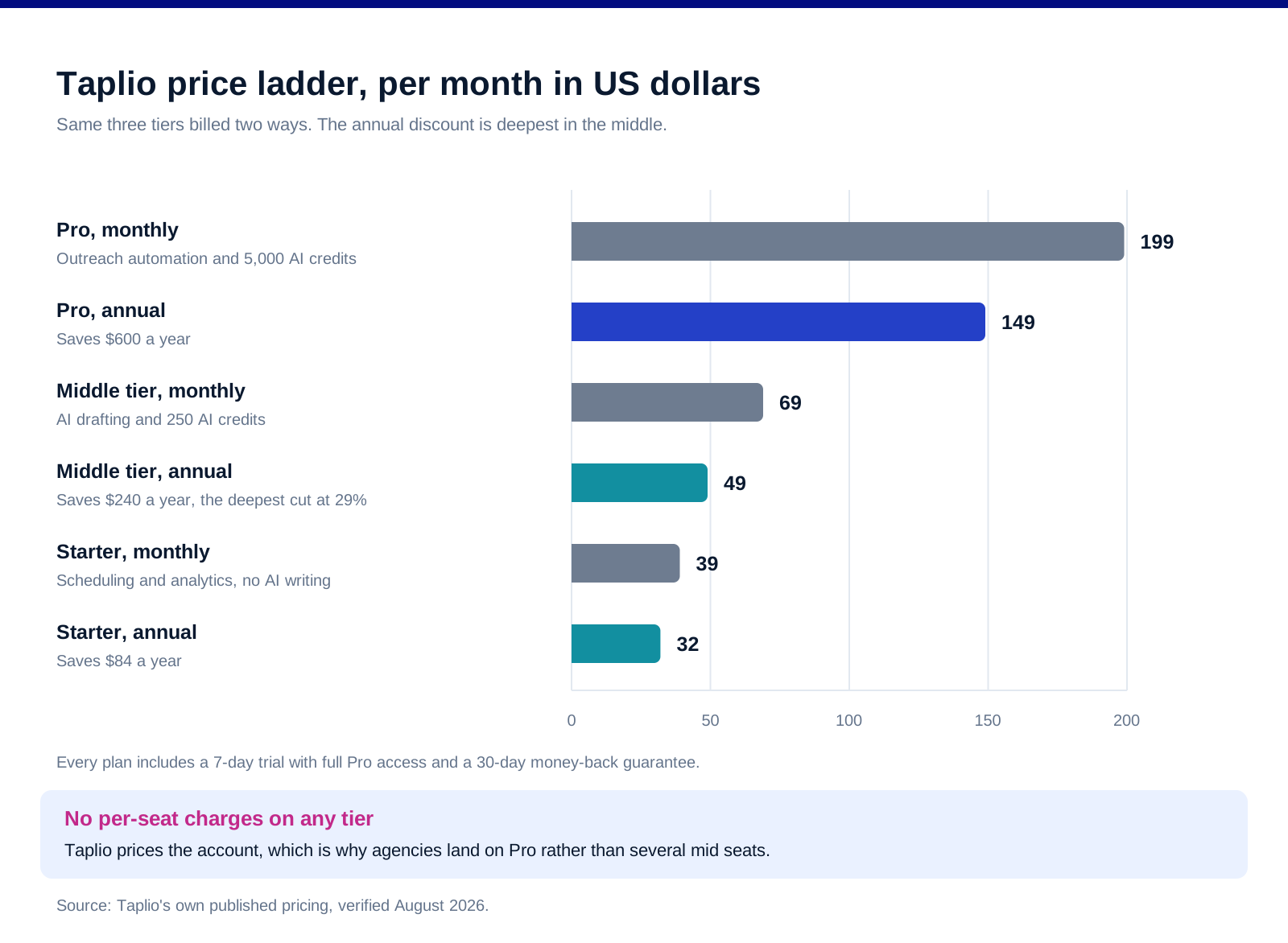
The annual discount is not uniform, and the middle tier carries the deepest cut.
Annual billing saves 18% on Starter, 29% in the middle and 25% on Pro. In absolute terms that is $84, $240 and $600 a year. The middle tier is the one where committing annually changes the decision, because $49 a month sits close enough to Starter's $39 that the AI features stop feeling like a luxury.
There are no per-seat charges. Taplio prices the account, not the head. For a team running several profiles this matters more than the sticker, and it is the reason agencies tend to land on Pro rather than buying multiple mid-tier accounts.
The trial is Pro-level whichever tier you choose. Seven days of full Pro access, which means the trial will not tell you whether the cheaper tier is enough. If you are evaluating Starter, deliberately avoid the AI features during the trial, otherwise you are testing a product you are not buying.
A 30-day money-back guarantee sits behind all of it. Combined with self-serve cancellation, the downside of picking the wrong tier is a month, not a year, even on annual billing.
What you actually get on each tier
![[INSERT CHART 2, taplio-pricing-chart-2-tiers.svg] Alt: Taplio tier comparison 2026, AI writing, reply credits, GPT-4 credits, lead outreach and team collaboration.](https://framerusercontent.com/images/kZc4GqeAng8eEi12xjieWpZRnnI.svg)
Starter has no AI writing, and that is deliberate rather than a gap. Taplio says so directly. Starter is scheduling, core analytics and the consistency tooling, aimed at people who already have a voice and need a calendar. If you were planning to pay $39 for AI drafting, you are on the wrong tier and will be disappointed.
The middle tier is where the product becomes what people think Taplio is. AI post drafting trained on a database of over five million viral posts, engagement tools, and team collaboration. 100 reply credits and 250 GPT-4 credits a month.
Pro adds automated lead outreach and a 20x credit jump. 500 reply credits and 5,000 GPT-4 credits, plus priority support. The outreach automation is the feature that justifies the price gap, not the credits, because very few individual creators exhaust 250 credits.
Naming warning, and this one is Taplio's fault rather than yours. The middle tier appears as "Growth" on Taplio's own 2026 pricing article and as "Standard" in its help centre and pricing page metadata. The price and the feature set match across both; only the label differs. Check what the checkout screen calls it before you assume you are comparing the same thing against a competitor's table.
How the credit system actually meters
![[INSERT CHART 3, taplio-pricing-chart-3-credits.svg] Alt: Taplio monthly credit allowance by tier 2026, reply credits and GPT-4 credits compared.](https://framerusercontent.com/images/noVKxe0fUQjBcgtnuSOJxI6tYnc.svg)
Credits are the part of Taplio's pricing that decides whether a tier works for you, and they are documented in the help centre rather than on the pricing page.
One credit is one AI action, and the list is short. Rewriting a post is one credit. The post generator is one. The hook generator is one. A message to Chat Assist is one. The reply generator is one. There is no partial billing and no cost difference between a short and a long generation.
They reset on the 1st and do not roll over. Unused credits vanish monthly. If you write in bursts, the practical allowance is not your monthly number, it is whatever you can consume in the weeks you actually work.
Do the arithmetic against your posting rhythm. 250 GPT-4 credits sounds generous until you count real usage. One post that goes through the generator, a hook variant and a rewrite is three credits. Five posts a week at that rate is 60 a month, so a daily poster who also uses Chat Assist and the reply generator can get close to the ceiling without feeling extravagant.
Pro's "unlimited AI" has a specific meaning. Once the GPT-4 credits are exhausted, Taplio gives unlimited access to GPT-3.5 rather than cutting you off. That is a real safety net and it is not the same thing as unlimited GPT-4. Read any "no AI limits" claim with that in mind.
Reply credits are the underrated line. 100 a month on the middle tier is roughly three engagement replies a day. If commenting on other people's posts is your growth mechanic rather than publishing, that number binds long before the AI credits do.
Which tier you should actually buy
![[INSERT CHART 4, taplio-pricing-chart-4-fit.svg] Alt: Which Taplio tier fits which user 2026, mapped by posting frequency against whether LinkedIn drives pipeline.](https://framerusercontent.com/images/W7TxuXfSRWyI4fpFov7u07cxXvs.svg)
Buy Starter if you write your own posts. Founders with a voice, consultants who already know what they want to say, anyone whose bottleneck is scheduling rather than drafting. $32 a month on annual billing for a calendar, analytics and the consistency nudge is a fair trade, and you keep the thing that makes the posts worth reading.
Buy the middle tier if you post most weekdays with help. This is the default for most B2B people using the product seriously. The AI drafting from the viral post database is the feature you are paying for, and 250 credits covers a daily habit with room to experiment.
Buy Pro if LinkedIn is a pipeline channel. The automated lead outreach is what changes the economics, not the credit ceiling. If you are booking meetings from LinkedIn and the profile is a sales asset rather than a brand asset, $149 a month on annual billing is cheap against one closed deal. If you are not, you are buying credits you will not use.
Do not buy Taplio at all if you need multichannel sequencing. Taplio publishes and engages. It does not run cold outreach sequences across email and LinkedIn together, and trying to make it do that ends badly. Expandi and HeyReach cover LinkedIn sequencing, and Instantly or Lemlist cover the email half. Our LinkedIn Premium versus Sales Navigator comparison covers the seat you need underneath all of it.
How to run the trial so it tells you something
Decide the tier before you start, then test that tier's workflow. The trial gives everyone full Pro access, which is generous and misleading. If you are evaluating the middle tier, ignore the outreach automation entirely.
Count your credit burn in week one and multiply. Seven days of honest usage times four gives you a monthly number. If it lands over 200, the middle tier will be tight and Pro starts to make sense.
Publish at your real cadence, not an experimental one. People trial tools at three times their normal posting rate and then buy for that fictional version of themselves. Post the way you actually will in month three.
Check the analytics answer a question you have. Taplio's analytics are a core part of the cheapest tier, so if they do not tell you something useful in seven days, the scheduler alone may not be worth $32 a month against a free alternative.
FAQ
How much does Taplio cost?
Three tiers. Starter is $39 a month or $32 on annual billing, the middle tier is $69 monthly or $49 annual, and Pro is $199 monthly or $149 annual. There are no per-seat charges and no setup fees, and every plan comes with a 7-day trial and a 30-day money-back guarantee.
Does the cheapest Taplio plan include AI writing?
No, and this is the single most misunderstood thing about the pricing. Starter is scheduling, analytics and consistency tooling for people who write their own posts. AI drafting starts on the middle tier.
How many AI credits do you get with Taplio?
The middle tier includes 250 GPT-4 credits and 100 reply credits a month. Pro includes 5,000 GPT-4 credits and 500 reply credits. One credit equals one AI action, such as generating a post, generating a hook, rewriting a post, sending a Chat Assist message or generating a reply.
Do Taplio credits roll over?
No. All credits renew on the 1st of every month and unused ones are lost. If your work comes in bursts, budget against what you can realistically consume in your active weeks rather than against the headline monthly figure.
Is Taplio Pro really unlimited AI?
Not in the way most people read it. Pro includes 5,000 GPT-4 credits a month, and once those are used you get unlimited access to GPT-3.5 rather than being cut off. That is a useful safety net but it is not unlimited access to the better model.
Is Taplio worth it compared to free scheduling tools?
It depends on whether the analytics and the viral post database change what you publish. If you only need to queue posts, a free scheduler does that. If you want prompts drawn from what actually performs on LinkedIn, plus engagement tooling in the same place, that is what the paid tiers are selling.
Bottom line
Taplio's three tiers map to three different jobs rather than three sizes of the same job. Starter is a scheduler and says so. The middle tier is the product most people mean when they say Taplio, at $49 a month on annual billing with 250 AI credits. Pro is for people turning LinkedIn into pipeline, where the outreach automation rather than the credit ceiling is what you are buying. Count your real credit burn during the trial, remember that nothing rolls over, and check what the checkout calls the middle tier before you compare it against anything else.
Want the LinkedIn presence built and the pipeline attached to it? Book a call with GROU. We run LinkedIn content and outbound inside B2B revenue engines across verticals.
We are GROU, a B2B pipeline agency that runs lead generation, outbound, and LinkedIn content for clients across manufacturing, fintech, iGaming, software, and professional services. The tier guidance and credit-burn arithmetic reflect our LinkedIn content deployments between 2024 and 2026, anonymized to protect client confidentiality.
Some links in this article are affiliate. We may earn a small commission at no extra cost to you. We only recommend tools we've deployed for clients.
Taplio's pricing looks like three tiers separated by features. It is really two decisions: whether you want AI writing at all, and how much of it you plan to use in a month. Get those two right and the tier picks itself. Get them wrong and you either pay $199 a month for a scheduler or run out of credits on the eighth of every month.
This is the tier structure with the current figures, what the credit system actually meters, and the two places where Taplio's own documentation disagrees with itself.
If you want the product assessment rather than the price breakdown, that sits in our Taplio review.
TL;DR
Taplio runs three tiers. Starter is $39 a month, or $32 on annual billing, and deliberately excludes AI writing: it is a scheduler with analytics for people who write their own posts. The middle tier is $69 monthly or $49 annual and is where AI drafting, engagement tools and team collaboration arrive, with 100 reply credits and 250 GPT-4 credits a month. Pro is $199 monthly or $149 annual, with 500 reply credits, 5,000 GPT-4 credits and automated lead outreach. Every plan gets a 7-day trial with full Pro access regardless of which tier you pick, a 30-day money-back guarantee, and no per-seat charges. Two things the marketing does not make obvious: credits reset on the 1st of every month and do not roll over, and Pro's "no AI limits" means unlimited access to the older model once your 5,000 GPT-4 credits are gone. The right tier is Starter if you already write well and just need consistency, the middle tier if you post daily with AI help, and Pro only if LinkedIn is a pipeline channel rather than a publishing habit.
The price ladder
The annual discount is not uniform, and the middle tier carries the deepest cut.
Annual billing saves 18% on Starter, 29% in the middle and 25% on Pro. In absolute terms that is $84, $240 and $600 a year. The middle tier is the one where committing annually changes the decision, because $49 a month sits close enough to Starter's $39 that the AI features stop feeling like a luxury.
There are no per-seat charges. Taplio prices the account, not the head. For a team running several profiles this matters more than the sticker, and it is the reason agencies tend to land on Pro rather than buying multiple mid-tier accounts.
The trial is Pro-level whichever tier you choose. Seven days of full Pro access, which means the trial will not tell you whether the cheaper tier is enough. If you are evaluating Starter, deliberately avoid the AI features during the trial, otherwise you are testing a product you are not buying.
A 30-day money-back guarantee sits behind all of it. Combined with self-serve cancellation, the downside of picking the wrong tier is a month, not a year, even on annual billing.
What you actually get on each tier
Starter has no AI writing, and that is deliberate rather than a gap. Taplio says so directly. Starter is scheduling, core analytics and the consistency tooling, aimed at people who already have a voice and need a calendar. If you were planning to pay $39 for AI drafting, you are on the wrong tier and will be disappointed.
The middle tier is where the product becomes what people think Taplio is. AI post drafting trained on a database of over five million viral posts, engagement tools, and team collaboration. 100 reply credits and 250 GPT-4 credits a month.
Pro adds automated lead outreach and a 20x credit jump. 500 reply credits and 5,000 GPT-4 credits, plus priority support. The outreach automation is the feature that justifies the price gap, not the credits, because very few individual creators exhaust 250 credits.
Naming warning, and this one is Taplio's fault rather than yours. The middle tier appears as "Growth" on Taplio's own 2026 pricing article and as "Standard" in its help centre and pricing page metadata. The price and the feature set match across both; only the label differs. Check what the checkout screen calls it before you assume you are comparing the same thing against a competitor's table.
How the credit system actually meters
Credits are the part of Taplio's pricing that decides whether a tier works for you, and they are documented in the help centre rather than on the pricing page.
One credit is one AI action, and the list is short. Rewriting a post is one credit. The post generator is one. The hook generator is one. A message to Chat Assist is one. The reply generator is one. There is no partial billing and no cost difference between a short and a long generation.
They reset on the 1st and do not roll over. Unused credits vanish monthly. If you write in bursts, the practical allowance is not your monthly number, it is whatever you can consume in the weeks you actually work.
Do the arithmetic against your posting rhythm. 250 GPT-4 credits sounds generous until you count real usage. One post that goes through the generator, a hook variant and a rewrite is three credits. Five posts a week at that rate is 60 a month, so a daily poster who also uses Chat Assist and the reply generator can get close to the ceiling without feeling extravagant.
Pro's "unlimited AI" has a specific meaning. Once the GPT-4 credits are exhausted, Taplio gives unlimited access to GPT-3.5 rather than cutting you off. That is a real safety net and it is not the same thing as unlimited GPT-4. Read any "no AI limits" claim with that in mind.
Reply credits are the underrated line. 100 a month on the middle tier is roughly three engagement replies a day. If commenting on other people's posts is your growth mechanic rather than publishing, that number binds long before the AI credits do.
Which tier you should actually buy
Buy Starter if you write your own posts. Founders with a voice, consultants who already know what they want to say, anyone whose bottleneck is scheduling rather than drafting. $32 a month on annual billing for a calendar, analytics and the consistency nudge is a fair trade, and you keep the thing that makes the posts worth reading.
Buy the middle tier if you post most weekdays with help. This is the default for most B2B people using the product seriously. The AI drafting from the viral post database is the feature you are paying for, and 250 credits covers a daily habit with room to experiment.
Buy Pro if LinkedIn is a pipeline channel. The automated lead outreach is what changes the economics, not the credit ceiling. If you are booking meetings from LinkedIn and the profile is a sales asset rather than a brand asset, $149 a month on annual billing is cheap against one closed deal. If you are not, you are buying credits you will not use.
Do not buy Taplio at all if you need multichannel sequencing. Taplio publishes and engages. It does not run cold outreach sequences across email and LinkedIn together, and trying to make it do that ends badly. Expandi and HeyReach cover LinkedIn sequencing, and Instantly or Lemlist cover the email half. Our LinkedIn Premium versus Sales Navigator comparison covers the seat you need underneath all of it.
How to run the trial so it tells you something
Decide the tier before you start, then test that tier's workflow. The trial gives everyone full Pro access, which is generous and misleading. If you are evaluating the middle tier, ignore the outreach automation entirely.
Count your credit burn in week one and multiply. Seven days of honest usage times four gives you a monthly number. If it lands over 200, the middle tier will be tight and Pro starts to make sense.
Publish at your real cadence, not an experimental one. People trial tools at three times their normal posting rate and then buy for that fictional version of themselves. Post the way you actually will in month three.
Check the analytics answer a question you have. Taplio's analytics are a core part of the cheapest tier, so if they do not tell you something useful in seven days, the scheduler alone may not be worth $32 a month against a free alternative.
FAQ
How much does Taplio cost?
Three tiers. Starter is $39 a month or $32 on annual billing, the middle tier is $69 monthly or $49 annual, and Pro is $199 monthly or $149 annual. There are no per-seat charges and no setup fees, and every plan comes with a 7-day trial and a 30-day money-back guarantee.
Does the cheapest Taplio plan include AI writing?
No, and this is the single most misunderstood thing about the pricing. Starter is scheduling, analytics and consistency tooling for people who write their own posts. AI drafting starts on the middle tier.
How many AI credits do you get with Taplio?
The middle tier includes 250 GPT-4 credits and 100 reply credits a month. Pro includes 5,000 GPT-4 credits and 500 reply credits. One credit equals one AI action, such as generating a post, generating a hook, rewriting a post, sending a Chat Assist message or generating a reply.
Do Taplio credits roll over?
No. All credits renew on the 1st of every month and unused ones are lost. If your work comes in bursts, budget against what you can realistically consume in your active weeks rather than against the headline monthly figure.
Is Taplio Pro really unlimited AI?
Not in the way most people read it. Pro includes 5,000 GPT-4 credits a month, and once those are used you get unlimited access to GPT-3.5 rather than being cut off. That is a useful safety net but it is not unlimited access to the better model.
Is Taplio worth it compared to free scheduling tools?
It depends on whether the analytics and the viral post database change what you publish. If you only need to queue posts, a free scheduler does that. If you want prompts drawn from what actually performs on LinkedIn, plus engagement tooling in the same place, that is what the paid tiers are selling.
Bottom line
Taplio's three tiers map to three different jobs rather than three sizes of the same job. Starter is a scheduler and says so. The middle tier is the product most people mean when they say Taplio, at $49 a month on annual billing with 250 AI credits. Pro is for people turning LinkedIn into pipeline, where the outreach automation rather than the credit ceiling is what you are buying. Count your real credit burn during the trial, remember that nothing rolls over, and check what the checkout calls the middle tier before you compare it against anything else.
Want the LinkedIn presence built and the pipeline attached to it? Book a call with GROU. We run LinkedIn content and outbound inside B2B revenue engines across verticals.
We are GROU, a B2B pipeline agency that runs lead generation, outbound, and LinkedIn content for clients across manufacturing, fintech, iGaming, software, and professional services. The tier guidance and credit-burn arithmetic reflect our LinkedIn content deployments between 2024 and 2026, anonymized to protect client confidentiality.
Some links in this article are affiliate. We may earn a small commission at no extra cost to you. We only recommend tools we've deployed for clients.
Taplio's pricing looks like three tiers separated by features. It is really two decisions: whether you want AI writing at all, and how much of it you plan to use in a month. Get those two right and the tier picks itself. Get them wrong and you either pay $199 a month for a scheduler or run out of credits on the eighth of every month.
This is the tier structure with the current figures, what the credit system actually meters, and the two places where Taplio's own documentation disagrees with itself.
If you want the product assessment rather than the price breakdown, that sits in our Taplio review.
TL;DR
Taplio runs three tiers. Starter is $39 a month, or $32 on annual billing, and deliberately excludes AI writing: it is a scheduler with analytics for people who write their own posts. The middle tier is $69 monthly or $49 annual and is where AI drafting, engagement tools and team collaboration arrive, with 100 reply credits and 250 GPT-4 credits a month. Pro is $199 monthly or $149 annual, with 500 reply credits, 5,000 GPT-4 credits and automated lead outreach. Every plan gets a 7-day trial with full Pro access regardless of which tier you pick, a 30-day money-back guarantee, and no per-seat charges. Two things the marketing does not make obvious: credits reset on the 1st of every month and do not roll over, and Pro's "no AI limits" means unlimited access to the older model once your 5,000 GPT-4 credits are gone. The right tier is Starter if you already write well and just need consistency, the middle tier if you post daily with AI help, and Pro only if LinkedIn is a pipeline channel rather than a publishing habit.
The price ladder
The annual discount is not uniform, and the middle tier carries the deepest cut.
Annual billing saves 18% on Starter, 29% in the middle and 25% on Pro. In absolute terms that is $84, $240 and $600 a year. The middle tier is the one where committing annually changes the decision, because $49 a month sits close enough to Starter's $39 that the AI features stop feeling like a luxury.
There are no per-seat charges. Taplio prices the account, not the head. For a team running several profiles this matters more than the sticker, and it is the reason agencies tend to land on Pro rather than buying multiple mid-tier accounts.
The trial is Pro-level whichever tier you choose. Seven days of full Pro access, which means the trial will not tell you whether the cheaper tier is enough. If you are evaluating Starter, deliberately avoid the AI features during the trial, otherwise you are testing a product you are not buying.
A 30-day money-back guarantee sits behind all of it. Combined with self-serve cancellation, the downside of picking the wrong tier is a month, not a year, even on annual billing.
What you actually get on each tier
Starter has no AI writing, and that is deliberate rather than a gap. Taplio says so directly. Starter is scheduling, core analytics and the consistency tooling, aimed at people who already have a voice and need a calendar. If you were planning to pay $39 for AI drafting, you are on the wrong tier and will be disappointed.
The middle tier is where the product becomes what people think Taplio is. AI post drafting trained on a database of over five million viral posts, engagement tools, and team collaboration. 100 reply credits and 250 GPT-4 credits a month.
Pro adds automated lead outreach and a 20x credit jump. 500 reply credits and 5,000 GPT-4 credits, plus priority support. The outreach automation is the feature that justifies the price gap, not the credits, because very few individual creators exhaust 250 credits.
Naming warning, and this one is Taplio's fault rather than yours. The middle tier appears as "Growth" on Taplio's own 2026 pricing article and as "Standard" in its help centre and pricing page metadata. The price and the feature set match across both; only the label differs. Check what the checkout screen calls it before you assume you are comparing the same thing against a competitor's table.
How the credit system actually meters
Credits are the part of Taplio's pricing that decides whether a tier works for you, and they are documented in the help centre rather than on the pricing page.
One credit is one AI action, and the list is short. Rewriting a post is one credit. The post generator is one. The hook generator is one. A message to Chat Assist is one. The reply generator is one. There is no partial billing and no cost difference between a short and a long generation.
They reset on the 1st and do not roll over. Unused credits vanish monthly. If you write in bursts, the practical allowance is not your monthly number, it is whatever you can consume in the weeks you actually work.
Do the arithmetic against your posting rhythm. 250 GPT-4 credits sounds generous until you count real usage. One post that goes through the generator, a hook variant and a rewrite is three credits. Five posts a week at that rate is 60 a month, so a daily poster who also uses Chat Assist and the reply generator can get close to the ceiling without feeling extravagant.
Pro's "unlimited AI" has a specific meaning. Once the GPT-4 credits are exhausted, Taplio gives unlimited access to GPT-3.5 rather than cutting you off. That is a real safety net and it is not the same thing as unlimited GPT-4. Read any "no AI limits" claim with that in mind.
Reply credits are the underrated line. 100 a month on the middle tier is roughly three engagement replies a day. If commenting on other people's posts is your growth mechanic rather than publishing, that number binds long before the AI credits do.
Which tier you should actually buy
Buy Starter if you write your own posts. Founders with a voice, consultants who already know what they want to say, anyone whose bottleneck is scheduling rather than drafting. $32 a month on annual billing for a calendar, analytics and the consistency nudge is a fair trade, and you keep the thing that makes the posts worth reading.
Buy the middle tier if you post most weekdays with help. This is the default for most B2B people using the product seriously. The AI drafting from the viral post database is the feature you are paying for, and 250 credits covers a daily habit with room to experiment.
Buy Pro if LinkedIn is a pipeline channel. The automated lead outreach is what changes the economics, not the credit ceiling. If you are booking meetings from LinkedIn and the profile is a sales asset rather than a brand asset, $149 a month on annual billing is cheap against one closed deal. If you are not, you are buying credits you will not use.
Do not buy Taplio at all if you need multichannel sequencing. Taplio publishes and engages. It does not run cold outreach sequences across email and LinkedIn together, and trying to make it do that ends badly. Expandi and HeyReach cover LinkedIn sequencing, and Instantly or Lemlist cover the email half. Our LinkedIn Premium versus Sales Navigator comparison covers the seat you need underneath all of it.
How to run the trial so it tells you something
Decide the tier before you start, then test that tier's workflow. The trial gives everyone full Pro access, which is generous and misleading. If you are evaluating the middle tier, ignore the outreach automation entirely.
Count your credit burn in week one and multiply. Seven days of honest usage times four gives you a monthly number. If it lands over 200, the middle tier will be tight and Pro starts to make sense.
Publish at your real cadence, not an experimental one. People trial tools at three times their normal posting rate and then buy for that fictional version of themselves. Post the way you actually will in month three.
Check the analytics answer a question you have. Taplio's analytics are a core part of the cheapest tier, so if they do not tell you something useful in seven days, the scheduler alone may not be worth $32 a month against a free alternative.
FAQ
How much does Taplio cost?
Three tiers. Starter is $39 a month or $32 on annual billing, the middle tier is $69 monthly or $49 annual, and Pro is $199 monthly or $149 annual. There are no per-seat charges and no setup fees, and every plan comes with a 7-day trial and a 30-day money-back guarantee.
Does the cheapest Taplio plan include AI writing?
No, and this is the single most misunderstood thing about the pricing. Starter is scheduling, analytics and consistency tooling for people who write their own posts. AI drafting starts on the middle tier.
How many AI credits do you get with Taplio?
The middle tier includes 250 GPT-4 credits and 100 reply credits a month. Pro includes 5,000 GPT-4 credits and 500 reply credits. One credit equals one AI action, such as generating a post, generating a hook, rewriting a post, sending a Chat Assist message or generating a reply.
Do Taplio credits roll over?
No. All credits renew on the 1st of every month and unused ones are lost. If your work comes in bursts, budget against what you can realistically consume in your active weeks rather than against the headline monthly figure.
Is Taplio Pro really unlimited AI?
Not in the way most people read it. Pro includes 5,000 GPT-4 credits a month, and once those are used you get unlimited access to GPT-3.5 rather than being cut off. That is a useful safety net but it is not unlimited access to the better model.
Is Taplio worth it compared to free scheduling tools?
It depends on whether the analytics and the viral post database change what you publish. If you only need to queue posts, a free scheduler does that. If you want prompts drawn from what actually performs on LinkedIn, plus engagement tooling in the same place, that is what the paid tiers are selling.
Bottom line
Taplio's three tiers map to three different jobs rather than three sizes of the same job. Starter is a scheduler and says so. The middle tier is the product most people mean when they say Taplio, at $49 a month on annual billing with 250 AI credits. Pro is for people turning LinkedIn into pipeline, where the outreach automation rather than the credit ceiling is what you are buying. Count your real credit burn during the trial, remember that nothing rolls over, and check what the checkout calls the middle tier before you compare it against anything else.
Want the LinkedIn presence built and the pipeline attached to it? Book a call with GROU. We run LinkedIn content and outbound inside B2B revenue engines across verticals.
We are GROU, a B2B pipeline agency that runs lead generation, outbound, and LinkedIn content for clients across manufacturing, fintech, iGaming, software, and professional services. The tier guidance and credit-burn arithmetic reflect our LinkedIn content deployments between 2024 and 2026, anonymized to protect client confidentiality.
Some links in this article are affiliate. We may earn a small commission at no extra cost to you. We only recommend tools we've deployed for clients.

Pipeline OS Newsletter
Build qualified pipeline
Get weekly tactics to generate demand, improve lead quality, and book more meetings.






Trusted by industry leaders
Trusted by industry leaders
Trusted by industry leaders
Ready to build qualified pipeline?
Ready to build qualified pipeline?
Ready to build qualified pipeline?
Book a call to see if we're the right fit, or take the 2-minute quiz to get a clear starting point.
Book a call to see if we're the right fit, or take the 2-minute quiz to get a clear starting point.
Book a call to see if we're the right fit, or take the 2-minute quiz to get a clear starting point.
" height="30.21639343089746px" id="hfGbXmQR2" width="30.216393430897455px"/></svg>)
Copyright © 2026 – All Right Reserved
Copyright © 2026 – All Right Reserved
Copyright © 2026 – All Right Reserved