%22%3E%3C/path%3E%3Cpath d=%22M 63.072 7.554 C 62.258 8.022 61.577 8.689 61.092 9.493 L 61.092 7.076 L 57.158 7.076 L 57.158 22.64 L 61.089 22.64 L 61.089 14.888 C 61.089 13.446 61.403 12.434 62.03 11.853 C 62.818 11.218 63.818 10.907 64.826 10.982 L 65.868 10.982 L 65.868 6.851 C 64.891 6.834 63.926 7.076 63.073 7.554 Z%22 fill=%22rgb(17,17,17)%22%3E%3C/path%3E%3Cpath d=%22M 78.916 7.82 C 76.363 6.49 73.321 6.49 70.768 7.82 C 69.562 8.473 68.564 9.451 67.888 10.644 C 67.167 11.931 66.803 13.387 66.834 14.862 C 66.804 16.332 67.157 17.785 67.86 19.077 C 68.515 20.267 69.494 21.246 70.684 21.901 C 71.924 22.576 73.318 22.92 74.73 22.898 C 76.164 22.918 77.58 22.575 78.846 21.901 C 80.062 21.247 81.073 20.27 81.768 19.077 C 82.506 17.797 82.88 16.339 82.85 14.862 C 82.88 13.389 82.517 11.934 81.797 10.647 C 81.12 9.455 80.122 8.477 78.917 7.824 M 78.803 14.862 C 78.829 15.739 78.636 16.608 78.241 17.391 C 77.903 18.046 77.38 18.588 76.738 18.95 C 76.124 19.293 75.432 19.472 74.729 19.47 C 73.668 19.497 72.648 19.061 71.934 18.276 C 71.139 17.323 70.741 16.1 70.823 14.862 C 70.741 13.62 71.149 12.395 71.959 11.45 C 72.687 10.667 73.715 10.233 74.783 10.256 C 75.859 10.236 76.894 10.67 77.635 11.45 C 78.464 12.387 78.884 13.616 78.801 14.864%22 fill=%22rgb(17,17,17)%22%3E%3C/path%3E%3Cpath d=%22M 95.906 7.076 L 95.906 15.646 C 95.975 16.68 95.643 17.701 94.979 18.498 C 94.311 19.184 93.379 19.547 92.422 19.495 C 91.475 19.544 90.553 19.18 89.894 18.498 C 89.23 17.701 88.898 16.68 88.967 15.646 L 88.967 7.076 L 85.033 7.076 L 85.033 16.207 C 85 17.449 85.275 18.68 85.834 19.79 C 86.327 20.75 87.095 21.542 88.039 22.065 C 89.033 22.594 90.145 22.861 91.271 22.838 C 92.188 22.847 93.095 22.65 93.926 22.263 C 94.708 21.905 95.388 21.36 95.906 20.675 L 95.906 22.645 L 99.865 22.645 L 99.865 7.076 Z%22 fill=%22rgb(17,17,17)%22%3E%3C/path%3E%3Cpath d=%22M 4.513 15.626 C 4.511 10.815 7.606 6.549 12.181 5.059 C 16.756 3.57 21.77 5.195 24.601 9.086 L 27.816 5.87 C 24.074 1.186 17.981 -0.943 12.137 0.393 C 6.292 1.728 1.728 6.292 0.393 12.137 C -0.943 17.981 1.186 24.074 5.87 27.816 L 9.085 24.601 C 6.214 22.512 4.515 19.177 4.513 15.626%22 fill=%22rgb(32,62,235)%22%3E%3C/path%3E%3Cpath d=%22M 17.114 14.343 L 13.354 18.01 L 13.354 18.026 L 21.071 18.026 L 11.412 27.609 L 17.389 27.609 L 23.999 21.081 L 23.999 28.316 L 24.005 28.316 L 27.967 24.393 L 27.967 14.343 Z%22 fill=%22rgb(32,62,235)%22%3E%3C/path%3E%3C/g%3E%3C/svg%3E) ×
× ××
××

The question most teams ask is which one is better, and that framing is what leads to the wrong purchase. Premium Business and Sales Navigator are not two tiers of the same product. One is an upgrade to your personal LinkedIn experience. The other is a prospecting database with a LinkedIn interface on top. Buying the cheaper one to save money usually means buying a tool that does not do the job at all, and buying the expensive one for a team that browses profiles means paying for filters nobody opens.
This piece covers what each actually unlocks, where the real cost sits once you divide by usage, and which situations genuinely call for which.
For the full tier-by-tier breakdown of Sales Navigator on its own, see our Sales Navigator pricing guide.
TL;DR
Premium Business gives you unlimited profile browsing, company insights and 15 InMail credits a month. Sales Navigator Core gives you the advanced search filter set, saved lead and account lists, alerts on those saved records, and 50 InMail credits. The gap that matters is search: Premium searches LinkedIn the way a member does, Sales Navigator searches it the way a prospector does, with filters for company headcount growth, job changes, seniority and function that simply do not exist on the Premium side. On monthly list pricing Premium Business runs at $69.99 and Sales Navigator Core at $119.99, which sounds like a 71% premium until you divide by InMail credits, at which point Premium costs $4.67 per credit and Core costs $2.40. If your team builds prospect lists, Sales Navigator is the cheaper tool. If your team receives inbound and wants to look people up, Premium Business is the right size and Sales Navigator is an expensive way to do the same thing. Advanced adds TeamLink and buyer intent signals for teams selling into shared networks; skip it if you are one or two people.
What each one actually unlocks
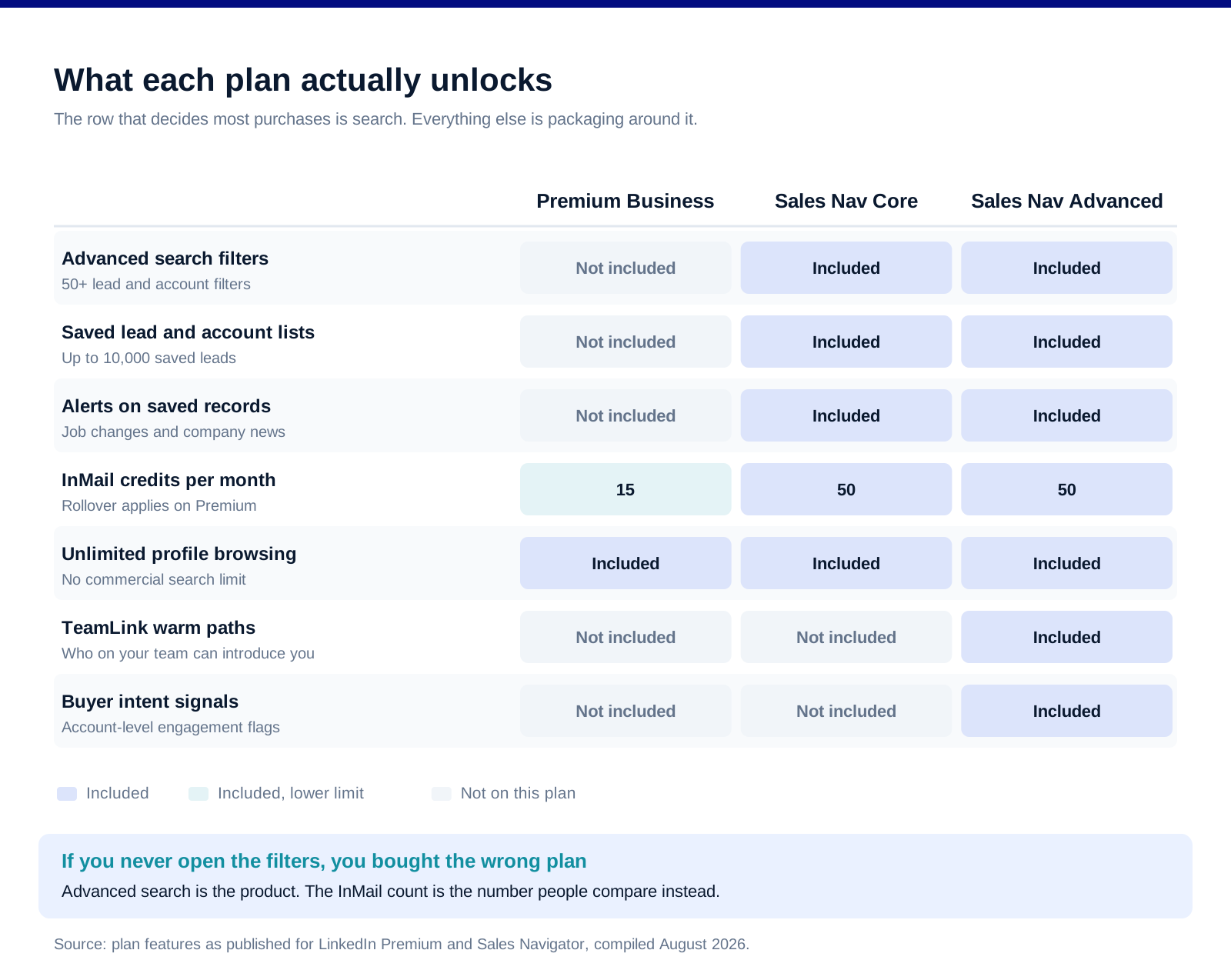
The comparison above is the honest version of the marketing pages, and the row that decides most purchases is the search filter set.
Advanced search is the actual product. Sales Navigator publishes more than 50 filters for leads and accounts. Premium gives you the standard LinkedIn search with a few additional facets. If your job is to produce a list of the right 400 people at the right 80 companies, the filter set is the entire value, and everything else in the plan is packaging.
Saved lists and alerts change the workflow, not just the data. Sales Navigator lets you save up to 10,000 leads and watch them, which means job changes and company news arrive as notifications on accounts you care about rather than as a research task you keep meaning to do. Premium has no equivalent, and rebuilding this with spreadsheets is the tell that someone bought the wrong plan.
InMail credits are the least important difference. They are the number everyone compares because they are easy to compare. In practice, connection requests with a note outperform InMail for most B2B outreach, and 50 credits a month is not a volume play at any price.
TeamLink and buyer intent are the Advanced line. Advanced surfaces which of your colleagues can introduce you, and flags accounts showing engagement signals. Both need a team with an actual shared network to be worth the step up. A two-person sales team has no meaningful TeamLink graph.
The price gap and what it looks like per unit
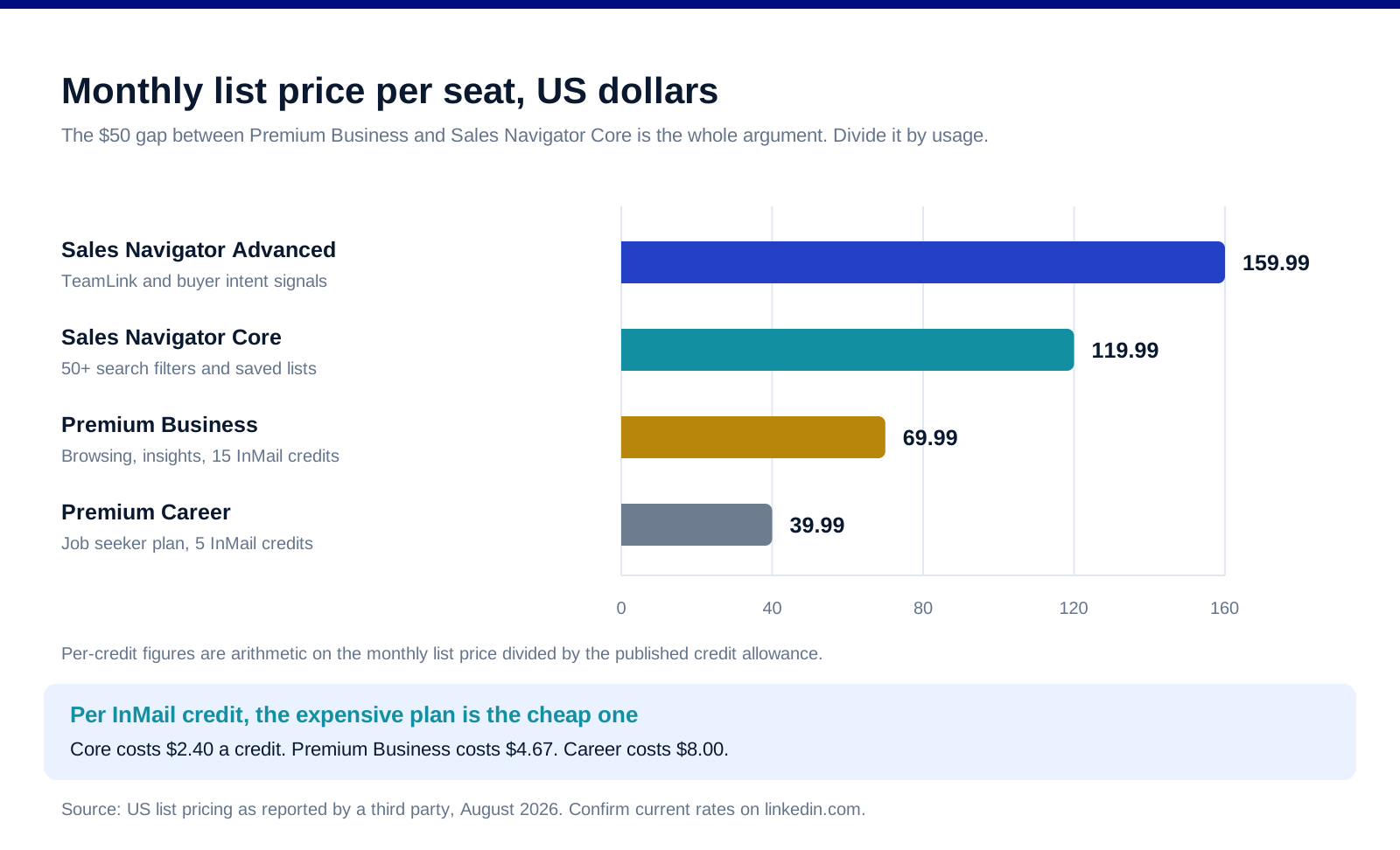
The headline gap between Premium Business and Sales Navigator Core is $50 a month per seat. Read against what the seat produces, that number changes shape.
Per InMail credit, Sales Navigator is cheaper. Premium Career works out at $8.00 a credit, Premium Business at $4.67, Sales Navigator Core at $2.40 and Advanced at $3.20. Those are arithmetic on the published monthly list prices, not a promotion. The plan that looks expensive is the one with the lowest unit cost on the feature everyone benchmarks.
Annual billing discounts are inconsistent across the range. The published annual prices work out to a much steeper effective discount on the cheaper plans than on the expensive ones, which means the annual commitment decision is a different calculation at each tier rather than a flat "two months free" rule. Check the current annual figure against the monthly one before assuming the saving is proportional.
The real cost is the seat you are not using. A Sales Navigator seat that produces one saved list a quarter costs more per useful output than a Premium seat used daily. Audit seats every quarter and downgrade the ones where the saved-lead count has not moved.
Prices here are US list prices reported by a third party in August 2026. LinkedIn does not permit automated retrieval of its pricing pages, so we could not verify these first-hand this month. Regional pricing, taxes and negotiated multi-seat rates all move the number. Treat them as the shape of the gap rather than as your quote, and confirm on LinkedIn's own plan pages before you buy.
Which one you should actually buy
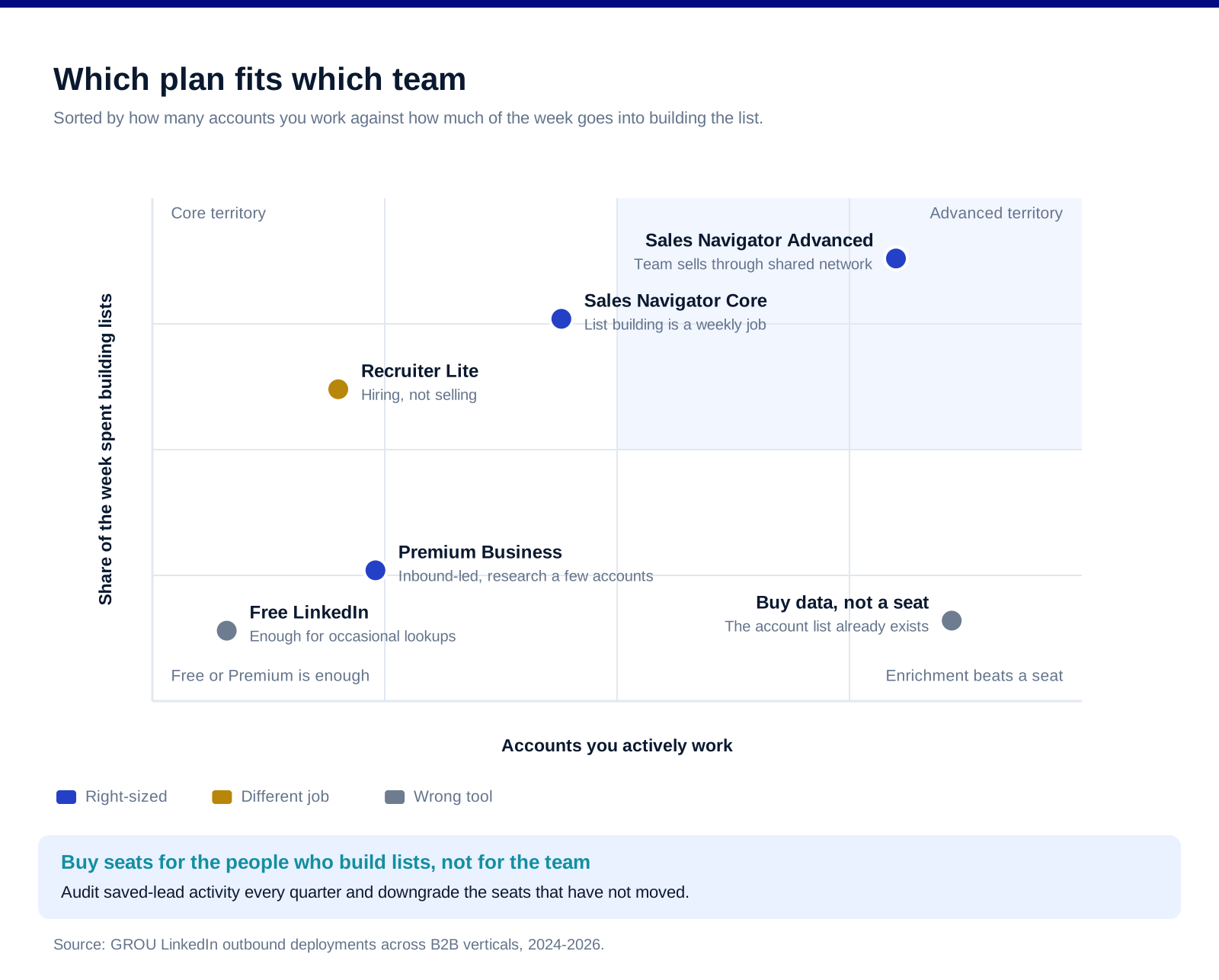
The map above sorts by two things: how many accounts you work and how much of your week goes into building lists rather than working them.
Buy Premium Business if you receive more than you hunt. Founders taking inbound, consultants checking who viewed them, marketers researching a handful of accounts a month. The unlimited browsing and profile viewer history is the feature that earns the money, and the advanced filters would sit unopened.
Buy Sales Navigator Core if list building is a weekly job. One person, or a small team, whose week includes producing target lists. The filters pay for the seat in the first month of not manually checking headcounts.
Buy Sales Navigator Advanced if the team sells through its network. Multiple reps, overlapping connections, accounts where a warm path matters more than a cold message. TeamLink is the reason to step up, not the InMail count, which does not change.
Do not buy either if your list already exists. If you have a defined account list of 80 companies and the contacts are already enriched, a data tool serves you better than a LinkedIn seat. Apollo, Clay and Lusha all cover contact-level enrichment without the browsing layer, and Kaspr pulls contact details directly from LinkedIn profiles.
Where the seat sits in an actual outbound stack
Neither plan sends sequences, and this is the part teams get wrong most often. Sales Navigator produces the list. Something else has to work it.
Sending happens elsewhere. Expandi, HeyReach and Waalaxy run LinkedIn sequences from lists you build in Sales Navigator, with HeyReach built for agencies running many accounts at once. Keep the volume conservative regardless of what the tool permits.
Extraction is a separate step. PhantomBuster exports Sales Navigator search results into a usable file when you want the list outside LinkedIn's interface.
Email runs alongside, not instead. Instantly and Lemlist cover the email half of a multichannel sequence, which is where most replies come from anyway.
Content warms the list you built. Taplio handles publishing and engagement on the profile doing the outreach, and a profile that posts converts connection requests at a visibly higher rate than one that does not. Our LinkedIn company page playbook covers the brand-side version of the same idea.
FAQ
Is Sales Navigator worth it over LinkedIn Premium?
It depends entirely on whether you build lists. Sales Navigator's advanced filters, saved lead lists and account alerts exist for prospecting, and if that is a weekly job then the step up pays for itself quickly. If you mostly look people up after they contact you, Premium Business does that job for less.
Can you get Sales Navigator features on Premium Business?
No. The advanced search filter set, saved lead and account lists, and the alerts attached to them are Sales Navigator features and have no Premium equivalent. Premium adds browsing, InMail credits and profile insights on top of a standard member experience.
How many InMail credits do you get on each plan?
On published figures, Premium Career includes 5 a month, Premium Business 15 with rollover for up to three months, and Sales Navigator Core and Advanced 50 each. Per credit, Sales Navigator Core is the cheapest of the four.
Does Sales Navigator include a CRM integration?
Core does not include automatic CRM writeback. That sits in the Advanced Plus tier, which is quoted rather than list-priced. Core and Advanced users typically export or use a third-party connector, which is fine for most teams and a real operational cost for large ones.
Should each sales rep have their own Sales Navigator seat?
Only the reps who build lists. A common and expensive mistake is buying seats for an entire team when two people do the list building and the rest work what those two produce. Audit saved-lead activity per seat each quarter.
Is there a free trial for Sales Navigator?
LinkedIn has historically offered a trial period on Sales Navigator plans, and terms change. Check the current offer on LinkedIn's own plan pages, and if you take one, spend it building a real target list rather than browsing, because that is the only thing that tells you whether the filters are worth the money.
Bottom line
Premium Business and Sales Navigator solve different problems, and the price gap is only meaningful once you know which problem you have. If your week includes building target lists, Sales Navigator Core is the cheaper tool despite the higher sticker, and the advanced filters are the reason. If your week includes looking people up and reading company pages, Premium Business is correctly sized and the extra $50 a month buys filters you will not open. Neither one sends sequences, neither one is a database, and neither one replaces knowing who you are targeting before you open the search.
Want the list built and worked rather than a seat bought? Book a call with GROU. We run LinkedIn outbound inside B2B revenue engines across verticals.
We are GROU, a B2B pipeline agency that runs lead generation, outbound, and LinkedIn content for clients across manufacturing, fintech, iGaming, software, and professional services. The seat-allocation guidance reflects our LinkedIn outbound deployments between 2024 and 2026, anonymized to protect client confidentiality.
Some links in this article are affiliate. We may earn a small commission at no extra cost to you. We only recommend tools we've deployed for clients.
The question most teams ask is which one is better, and that framing is what leads to the wrong purchase. Premium Business and Sales Navigator are not two tiers of the same product. One is an upgrade to your personal LinkedIn experience. The other is a prospecting database with a LinkedIn interface on top. Buying the cheaper one to save money usually means buying a tool that does not do the job at all, and buying the expensive one for a team that browses profiles means paying for filters nobody opens.
This piece covers what each actually unlocks, where the real cost sits once you divide by usage, and which situations genuinely call for which.
For the full tier-by-tier breakdown of Sales Navigator on its own, see our Sales Navigator pricing guide.
TL;DR
Premium Business gives you unlimited profile browsing, company insights and 15 InMail credits a month. Sales Navigator Core gives you the advanced search filter set, saved lead and account lists, alerts on those saved records, and 50 InMail credits. The gap that matters is search: Premium searches LinkedIn the way a member does, Sales Navigator searches it the way a prospector does, with filters for company headcount growth, job changes, seniority and function that simply do not exist on the Premium side. On monthly list pricing Premium Business runs at $69.99 and Sales Navigator Core at $119.99, which sounds like a 71% premium until you divide by InMail credits, at which point Premium costs $4.67 per credit and Core costs $2.40. If your team builds prospect lists, Sales Navigator is the cheaper tool. If your team receives inbound and wants to look people up, Premium Business is the right size and Sales Navigator is an expensive way to do the same thing. Advanced adds TeamLink and buyer intent signals for teams selling into shared networks; skip it if you are one or two people.
What each one actually unlocks
The comparison above is the honest version of the marketing pages, and the row that decides most purchases is the search filter set.
Advanced search is the actual product. Sales Navigator publishes more than 50 filters for leads and accounts. Premium gives you the standard LinkedIn search with a few additional facets. If your job is to produce a list of the right 400 people at the right 80 companies, the filter set is the entire value, and everything else in the plan is packaging.
Saved lists and alerts change the workflow, not just the data. Sales Navigator lets you save up to 10,000 leads and watch them, which means job changes and company news arrive as notifications on accounts you care about rather than as a research task you keep meaning to do. Premium has no equivalent, and rebuilding this with spreadsheets is the tell that someone bought the wrong plan.
InMail credits are the least important difference. They are the number everyone compares because they are easy to compare. In practice, connection requests with a note outperform InMail for most B2B outreach, and 50 credits a month is not a volume play at any price.
TeamLink and buyer intent are the Advanced line. Advanced surfaces which of your colleagues can introduce you, and flags accounts showing engagement signals. Both need a team with an actual shared network to be worth the step up. A two-person sales team has no meaningful TeamLink graph.
The price gap and what it looks like per unit
The headline gap between Premium Business and Sales Navigator Core is $50 a month per seat. Read against what the seat produces, that number changes shape.
Per InMail credit, Sales Navigator is cheaper. Premium Career works out at $8.00 a credit, Premium Business at $4.67, Sales Navigator Core at $2.40 and Advanced at $3.20. Those are arithmetic on the published monthly list prices, not a promotion. The plan that looks expensive is the one with the lowest unit cost on the feature everyone benchmarks.
Annual billing discounts are inconsistent across the range. The published annual prices work out to a much steeper effective discount on the cheaper plans than on the expensive ones, which means the annual commitment decision is a different calculation at each tier rather than a flat "two months free" rule. Check the current annual figure against the monthly one before assuming the saving is proportional.
The real cost is the seat you are not using. A Sales Navigator seat that produces one saved list a quarter costs more per useful output than a Premium seat used daily. Audit seats every quarter and downgrade the ones where the saved-lead count has not moved.
Prices here are US list prices reported by a third party in August 2026. LinkedIn does not permit automated retrieval of its pricing pages, so we could not verify these first-hand this month. Regional pricing, taxes and negotiated multi-seat rates all move the number. Treat them as the shape of the gap rather than as your quote, and confirm on LinkedIn's own plan pages before you buy.
Which one you should actually buy
The map above sorts by two things: how many accounts you work and how much of your week goes into building lists rather than working them.
Buy Premium Business if you receive more than you hunt. Founders taking inbound, consultants checking who viewed them, marketers researching a handful of accounts a month. The unlimited browsing and profile viewer history is the feature that earns the money, and the advanced filters would sit unopened.
Buy Sales Navigator Core if list building is a weekly job. One person, or a small team, whose week includes producing target lists. The filters pay for the seat in the first month of not manually checking headcounts.
Buy Sales Navigator Advanced if the team sells through its network. Multiple reps, overlapping connections, accounts where a warm path matters more than a cold message. TeamLink is the reason to step up, not the InMail count, which does not change.
Do not buy either if your list already exists. If you have a defined account list of 80 companies and the contacts are already enriched, a data tool serves you better than a LinkedIn seat. Apollo, Clay and Lusha all cover contact-level enrichment without the browsing layer, and Kaspr pulls contact details directly from LinkedIn profiles.
Where the seat sits in an actual outbound stack
Neither plan sends sequences, and this is the part teams get wrong most often. Sales Navigator produces the list. Something else has to work it.
Sending happens elsewhere. Expandi, HeyReach and Waalaxy run LinkedIn sequences from lists you build in Sales Navigator, with HeyReach built for agencies running many accounts at once. Keep the volume conservative regardless of what the tool permits.
Extraction is a separate step. PhantomBuster exports Sales Navigator search results into a usable file when you want the list outside LinkedIn's interface.
Email runs alongside, not instead. Instantly and Lemlist cover the email half of a multichannel sequence, which is where most replies come from anyway.
Content warms the list you built. Taplio handles publishing and engagement on the profile doing the outreach, and a profile that posts converts connection requests at a visibly higher rate than one that does not. Our LinkedIn company page playbook covers the brand-side version of the same idea.
FAQ
Is Sales Navigator worth it over LinkedIn Premium?
It depends entirely on whether you build lists. Sales Navigator's advanced filters, saved lead lists and account alerts exist for prospecting, and if that is a weekly job then the step up pays for itself quickly. If you mostly look people up after they contact you, Premium Business does that job for less.
Can you get Sales Navigator features on Premium Business?
No. The advanced search filter set, saved lead and account lists, and the alerts attached to them are Sales Navigator features and have no Premium equivalent. Premium adds browsing, InMail credits and profile insights on top of a standard member experience.
How many InMail credits do you get on each plan?
On published figures, Premium Career includes 5 a month, Premium Business 15 with rollover for up to three months, and Sales Navigator Core and Advanced 50 each. Per credit, Sales Navigator Core is the cheapest of the four.
Does Sales Navigator include a CRM integration?
Core does not include automatic CRM writeback. That sits in the Advanced Plus tier, which is quoted rather than list-priced. Core and Advanced users typically export or use a third-party connector, which is fine for most teams and a real operational cost for large ones.
Should each sales rep have their own Sales Navigator seat?
Only the reps who build lists. A common and expensive mistake is buying seats for an entire team when two people do the list building and the rest work what those two produce. Audit saved-lead activity per seat each quarter.
Is there a free trial for Sales Navigator?
LinkedIn has historically offered a trial period on Sales Navigator plans, and terms change. Check the current offer on LinkedIn's own plan pages, and if you take one, spend it building a real target list rather than browsing, because that is the only thing that tells you whether the filters are worth the money.
Bottom line
Premium Business and Sales Navigator solve different problems, and the price gap is only meaningful once you know which problem you have. If your week includes building target lists, Sales Navigator Core is the cheaper tool despite the higher sticker, and the advanced filters are the reason. If your week includes looking people up and reading company pages, Premium Business is correctly sized and the extra $50 a month buys filters you will not open. Neither one sends sequences, neither one is a database, and neither one replaces knowing who you are targeting before you open the search.
Want the list built and worked rather than a seat bought? Book a call with GROU. We run LinkedIn outbound inside B2B revenue engines across verticals.
We are GROU, a B2B pipeline agency that runs lead generation, outbound, and LinkedIn content for clients across manufacturing, fintech, iGaming, software, and professional services. The seat-allocation guidance reflects our LinkedIn outbound deployments between 2024 and 2026, anonymized to protect client confidentiality.
Some links in this article are affiliate. We may earn a small commission at no extra cost to you. We only recommend tools we've deployed for clients.
The question most teams ask is which one is better, and that framing is what leads to the wrong purchase. Premium Business and Sales Navigator are not two tiers of the same product. One is an upgrade to your personal LinkedIn experience. The other is a prospecting database with a LinkedIn interface on top. Buying the cheaper one to save money usually means buying a tool that does not do the job at all, and buying the expensive one for a team that browses profiles means paying for filters nobody opens.
This piece covers what each actually unlocks, where the real cost sits once you divide by usage, and which situations genuinely call for which.
For the full tier-by-tier breakdown of Sales Navigator on its own, see our Sales Navigator pricing guide.
TL;DR
Premium Business gives you unlimited profile browsing, company insights and 15 InMail credits a month. Sales Navigator Core gives you the advanced search filter set, saved lead and account lists, alerts on those saved records, and 50 InMail credits. The gap that matters is search: Premium searches LinkedIn the way a member does, Sales Navigator searches it the way a prospector does, with filters for company headcount growth, job changes, seniority and function that simply do not exist on the Premium side. On monthly list pricing Premium Business runs at $69.99 and Sales Navigator Core at $119.99, which sounds like a 71% premium until you divide by InMail credits, at which point Premium costs $4.67 per credit and Core costs $2.40. If your team builds prospect lists, Sales Navigator is the cheaper tool. If your team receives inbound and wants to look people up, Premium Business is the right size and Sales Navigator is an expensive way to do the same thing. Advanced adds TeamLink and buyer intent signals for teams selling into shared networks; skip it if you are one or two people.
What each one actually unlocks
The comparison above is the honest version of the marketing pages, and the row that decides most purchases is the search filter set.
Advanced search is the actual product. Sales Navigator publishes more than 50 filters for leads and accounts. Premium gives you the standard LinkedIn search with a few additional facets. If your job is to produce a list of the right 400 people at the right 80 companies, the filter set is the entire value, and everything else in the plan is packaging.
Saved lists and alerts change the workflow, not just the data. Sales Navigator lets you save up to 10,000 leads and watch them, which means job changes and company news arrive as notifications on accounts you care about rather than as a research task you keep meaning to do. Premium has no equivalent, and rebuilding this with spreadsheets is the tell that someone bought the wrong plan.
InMail credits are the least important difference. They are the number everyone compares because they are easy to compare. In practice, connection requests with a note outperform InMail for most B2B outreach, and 50 credits a month is not a volume play at any price.
TeamLink and buyer intent are the Advanced line. Advanced surfaces which of your colleagues can introduce you, and flags accounts showing engagement signals. Both need a team with an actual shared network to be worth the step up. A two-person sales team has no meaningful TeamLink graph.
The price gap and what it looks like per unit
The headline gap between Premium Business and Sales Navigator Core is $50 a month per seat. Read against what the seat produces, that number changes shape.
Per InMail credit, Sales Navigator is cheaper. Premium Career works out at $8.00 a credit, Premium Business at $4.67, Sales Navigator Core at $2.40 and Advanced at $3.20. Those are arithmetic on the published monthly list prices, not a promotion. The plan that looks expensive is the one with the lowest unit cost on the feature everyone benchmarks.
Annual billing discounts are inconsistent across the range. The published annual prices work out to a much steeper effective discount on the cheaper plans than on the expensive ones, which means the annual commitment decision is a different calculation at each tier rather than a flat "two months free" rule. Check the current annual figure against the monthly one before assuming the saving is proportional.
The real cost is the seat you are not using. A Sales Navigator seat that produces one saved list a quarter costs more per useful output than a Premium seat used daily. Audit seats every quarter and downgrade the ones where the saved-lead count has not moved.
Prices here are US list prices reported by a third party in August 2026. LinkedIn does not permit automated retrieval of its pricing pages, so we could not verify these first-hand this month. Regional pricing, taxes and negotiated multi-seat rates all move the number. Treat them as the shape of the gap rather than as your quote, and confirm on LinkedIn's own plan pages before you buy.
Which one you should actually buy
The map above sorts by two things: how many accounts you work and how much of your week goes into building lists rather than working them.
Buy Premium Business if you receive more than you hunt. Founders taking inbound, consultants checking who viewed them, marketers researching a handful of accounts a month. The unlimited browsing and profile viewer history is the feature that earns the money, and the advanced filters would sit unopened.
Buy Sales Navigator Core if list building is a weekly job. One person, or a small team, whose week includes producing target lists. The filters pay for the seat in the first month of not manually checking headcounts.
Buy Sales Navigator Advanced if the team sells through its network. Multiple reps, overlapping connections, accounts where a warm path matters more than a cold message. TeamLink is the reason to step up, not the InMail count, which does not change.
Do not buy either if your list already exists. If you have a defined account list of 80 companies and the contacts are already enriched, a data tool serves you better than a LinkedIn seat. Apollo, Clay and Lusha all cover contact-level enrichment without the browsing layer, and Kaspr pulls contact details directly from LinkedIn profiles.
Where the seat sits in an actual outbound stack
Neither plan sends sequences, and this is the part teams get wrong most often. Sales Navigator produces the list. Something else has to work it.
Sending happens elsewhere. Expandi, HeyReach and Waalaxy run LinkedIn sequences from lists you build in Sales Navigator, with HeyReach built for agencies running many accounts at once. Keep the volume conservative regardless of what the tool permits.
Extraction is a separate step. PhantomBuster exports Sales Navigator search results into a usable file when you want the list outside LinkedIn's interface.
Email runs alongside, not instead. Instantly and Lemlist cover the email half of a multichannel sequence, which is where most replies come from anyway.
Content warms the list you built. Taplio handles publishing and engagement on the profile doing the outreach, and a profile that posts converts connection requests at a visibly higher rate than one that does not. Our LinkedIn company page playbook covers the brand-side version of the same idea.
FAQ
Is Sales Navigator worth it over LinkedIn Premium?
It depends entirely on whether you build lists. Sales Navigator's advanced filters, saved lead lists and account alerts exist for prospecting, and if that is a weekly job then the step up pays for itself quickly. If you mostly look people up after they contact you, Premium Business does that job for less.
Can you get Sales Navigator features on Premium Business?
No. The advanced search filter set, saved lead and account lists, and the alerts attached to them are Sales Navigator features and have no Premium equivalent. Premium adds browsing, InMail credits and profile insights on top of a standard member experience.
How many InMail credits do you get on each plan?
On published figures, Premium Career includes 5 a month, Premium Business 15 with rollover for up to three months, and Sales Navigator Core and Advanced 50 each. Per credit, Sales Navigator Core is the cheapest of the four.
Does Sales Navigator include a CRM integration?
Core does not include automatic CRM writeback. That sits in the Advanced Plus tier, which is quoted rather than list-priced. Core and Advanced users typically export or use a third-party connector, which is fine for most teams and a real operational cost for large ones.
Should each sales rep have their own Sales Navigator seat?
Only the reps who build lists. A common and expensive mistake is buying seats for an entire team when two people do the list building and the rest work what those two produce. Audit saved-lead activity per seat each quarter.
Is there a free trial for Sales Navigator?
LinkedIn has historically offered a trial period on Sales Navigator plans, and terms change. Check the current offer on LinkedIn's own plan pages, and if you take one, spend it building a real target list rather than browsing, because that is the only thing that tells you whether the filters are worth the money.
Bottom line
Premium Business and Sales Navigator solve different problems, and the price gap is only meaningful once you know which problem you have. If your week includes building target lists, Sales Navigator Core is the cheaper tool despite the higher sticker, and the advanced filters are the reason. If your week includes looking people up and reading company pages, Premium Business is correctly sized and the extra $50 a month buys filters you will not open. Neither one sends sequences, neither one is a database, and neither one replaces knowing who you are targeting before you open the search.
Want the list built and worked rather than a seat bought? Book a call with GROU. We run LinkedIn outbound inside B2B revenue engines across verticals.
We are GROU, a B2B pipeline agency that runs lead generation, outbound, and LinkedIn content for clients across manufacturing, fintech, iGaming, software, and professional services. The seat-allocation guidance reflects our LinkedIn outbound deployments between 2024 and 2026, anonymized to protect client confidentiality.
Some links in this article are affiliate. We may earn a small commission at no extra cost to you. We only recommend tools we've deployed for clients.

Pipeline OS Newsletter
Build qualified pipeline
Get weekly tactics to generate demand, improve lead quality, and book more meetings.





Trusted by industry leaders
Trusted by industry leaders
Trusted by industry leaders
Ready to build qualified pipeline?
Ready to build qualified pipeline?
Ready to build qualified pipeline?
Book a call to see if we're the right fit, or take the 2-minute quiz to get a clear starting point.
Book a call to see if we're the right fit, or take the 2-minute quiz to get a clear starting point.
Book a call to see if we're the right fit, or take the 2-minute quiz to get a clear starting point.
" height="30.21639343089746px" id="hfGbXmQR2" width="30.216393430897455px"/></svg>)
Copyright © 2026 – All Right Reserved
Copyright © 2026 – All Right Reserved
Copyright © 2026 – All Right Reserved