%22%3E%3C/path%3E%3Cpath d=%22M 63.072 7.554 C 62.258 8.022 61.577 8.689 61.092 9.493 L 61.092 7.076 L 57.158 7.076 L 57.158 22.64 L 61.089 22.64 L 61.089 14.888 C 61.089 13.446 61.403 12.434 62.03 11.853 C 62.818 11.218 63.818 10.907 64.826 10.982 L 65.868 10.982 L 65.868 6.851 C 64.891 6.834 63.926 7.076 63.073 7.554 Z%22 fill=%22rgb(17,17,17)%22%3E%3C/path%3E%3Cpath d=%22M 78.916 7.82 C 76.363 6.49 73.321 6.49 70.768 7.82 C 69.562 8.473 68.564 9.451 67.888 10.644 C 67.167 11.931 66.803 13.387 66.834 14.862 C 66.804 16.332 67.157 17.785 67.86 19.077 C 68.515 20.267 69.494 21.246 70.684 21.901 C 71.924 22.576 73.318 22.92 74.73 22.898 C 76.164 22.918 77.58 22.575 78.846 21.901 C 80.062 21.247 81.073 20.27 81.768 19.077 C 82.506 17.797 82.88 16.339 82.85 14.862 C 82.88 13.389 82.517 11.934 81.797 10.647 C 81.12 9.455 80.122 8.477 78.917 7.824 M 78.803 14.862 C 78.829 15.739 78.636 16.608 78.241 17.391 C 77.903 18.046 77.38 18.588 76.738 18.95 C 76.124 19.293 75.432 19.472 74.729 19.47 C 73.668 19.497 72.648 19.061 71.934 18.276 C 71.139 17.323 70.741 16.1 70.823 14.862 C 70.741 13.62 71.149 12.395 71.959 11.45 C 72.687 10.667 73.715 10.233 74.783 10.256 C 75.859 10.236 76.894 10.67 77.635 11.45 C 78.464 12.387 78.884 13.616 78.801 14.864%22 fill=%22rgb(17,17,17)%22%3E%3C/path%3E%3Cpath d=%22M 95.906 7.076 L 95.906 15.646 C 95.975 16.68 95.643 17.701 94.979 18.498 C 94.311 19.184 93.379 19.547 92.422 19.495 C 91.475 19.544 90.553 19.18 89.894 18.498 C 89.23 17.701 88.898 16.68 88.967 15.646 L 88.967 7.076 L 85.033 7.076 L 85.033 16.207 C 85 17.449 85.275 18.68 85.834 19.79 C 86.327 20.75 87.095 21.542 88.039 22.065 C 89.033 22.594 90.145 22.861 91.271 22.838 C 92.188 22.847 93.095 22.65 93.926 22.263 C 94.708 21.905 95.388 21.36 95.906 20.675 L 95.906 22.645 L 99.865 22.645 L 99.865 7.076 Z%22 fill=%22rgb(17,17,17)%22%3E%3C/path%3E%3Cpath d=%22M 4.513 15.626 C 4.511 10.815 7.606 6.549 12.181 5.059 C 16.756 3.57 21.77 5.195 24.601 9.086 L 27.816 5.87 C 24.074 1.186 17.981 -0.943 12.137 0.393 C 6.292 1.728 1.728 6.292 0.393 12.137 C -0.943 17.981 1.186 24.074 5.87 27.816 L 9.085 24.601 C 6.214 22.512 4.515 19.177 4.513 15.626%22 fill=%22rgb(32,62,235)%22%3E%3C/path%3E%3Cpath d=%22M 17.114 14.343 L 13.354 18.01 L 13.354 18.026 L 21.071 18.026 L 11.412 27.609 L 17.389 27.609 L 23.999 21.081 L 23.999 28.316 L 24.005 28.316 L 27.967 24.393 L 27.967 14.343 Z%22 fill=%22rgb(32,62,235)%22%3E%3C/path%3E%3C/g%3E%3C/svg%3E) ×
× ××
××

Most account research produces a personalised first line and changes nothing else. Same list, same offer, same week, one sentence at the top about their recent funding round.
That is not research. That is decoration with a research budget attached. Research earns its place only when you can name the decision it changed, and there are exactly three decisions available: who you contact, what you say to them, and when you send it.
TL;DR
Apply one test to every research step: name the decision it changes. If the answer is "it makes the email sound personalised", cut it, because personalisation that does not change the offer or the timing is a cost with no return. The three decisions worth researching for are who you contact, what you say, and when you send. Sequence the work so the free sources run first and the paid enrichment runs last, because the arithmetic is brutal: Clay's own documentation puts a fully enriched record at "6-20 Data Credits", and the Growth plan includes 6,000 data credits a month, so your entire monthly enrichment allowance buys somewhere between 300 and 1,000 fully enriched records. Enriching a raw list before you have qualified it is how that allowance disappears on accounts you were never going to contact. Meanwhile the highest-signal sources in B2B are free and unglamorous: statutory filings, company registers and job postings, none of which appear in an enrichment waterfall.
The only test that matters
Name the decision. For every research field you are about to collect, finish this sentence: "if this comes back differently, I will do something different." If you cannot finish it, the field is decoration.
Most research fails this test. Headcount, funding round, tech stack, recent post, city, industry. Collected as standard, used to write a first line, never used to change who gets contacted or when. The team feels prepared and the campaign is identical to the one it would have run with no research at all.
The three decisions research can change. Who you contact, which is a qualification decision, and which starts from your ICP definition rather than from a data source. What you say, which is an offer and message decision. When you send, which is a timing decision. Everything else is background reading.
Timing is the one almost nobody researches for, and it is the one with the largest effect. The same message to the same person lands differently depending on whether they have just been handed a problem you solve. That is a researchable fact and almost no workflow looks for it.
Sort your fields by which decision they change
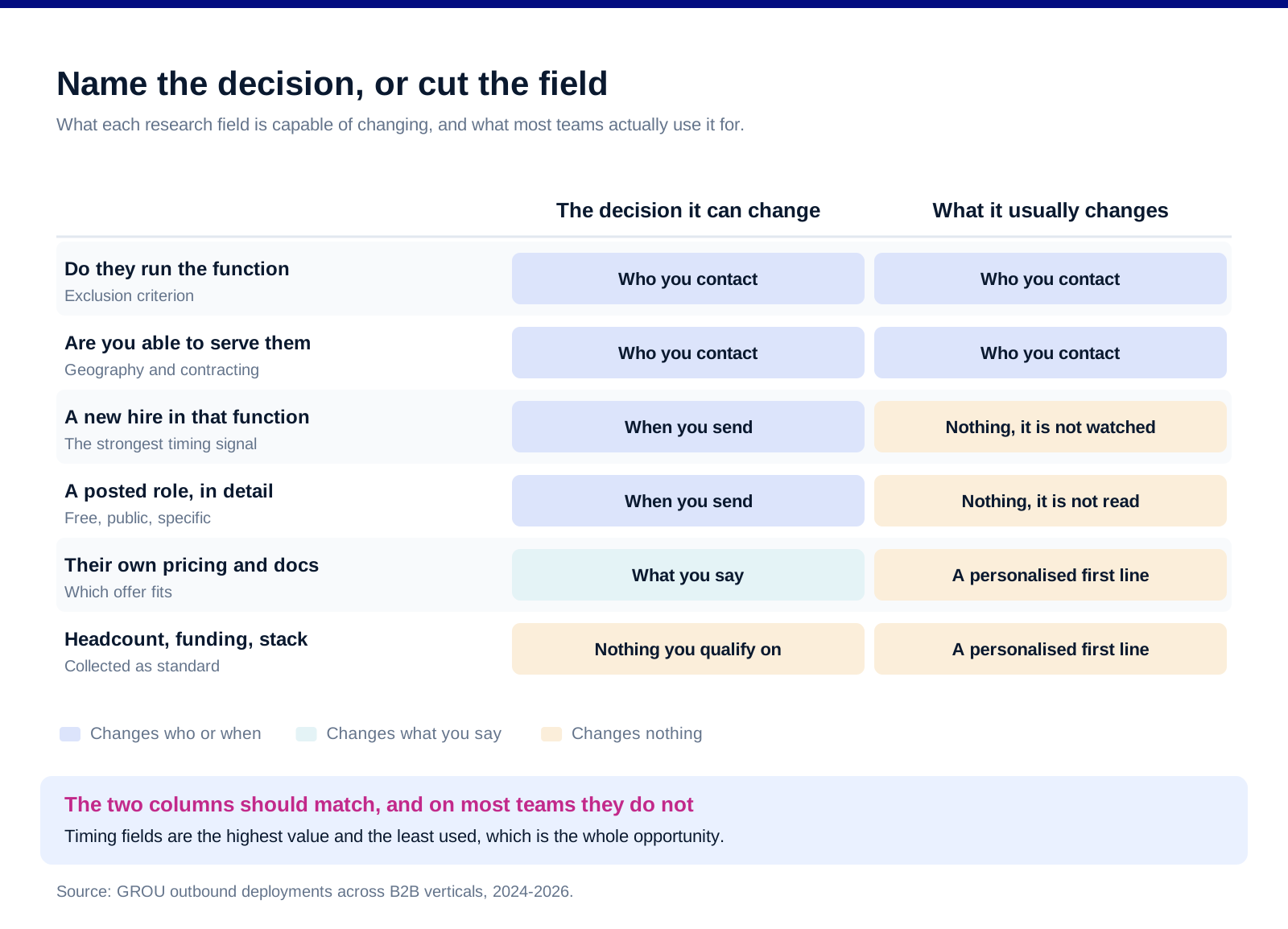
Fields that change who. Whether they run the function you sell into at all. Whether they are inside your served geography for delivery and contracting. Whether they are already a customer, a competitor, or in a category you cannot serve. These are exclusion criteria and they should run before anything is enriched.
Fields that change what. Which of your offers fits their situation, which case is relevant, and which objection you should pre-empt. This is the only place where a personalised sentence is legitimate, because it is a symptom of having chosen a different message rather than a decoration on the same one.
Fields that change when. A new hire in the function you sell into. A filing or register change. A posted role that describes the problem you solve. An announced project with a delivery date. These are the fields worth automating a watch on.
Fields that change nothing, and there are more of them than anyone admits. Headcount bands you do not price on. Funding you do not qualify on. Tech stack you do not integrate with. Their last post, unless it changed which offer you are sending. Collecting these is not neutral, because every one of them costs time or credits and pushes the enrichment budget further from the accounts that deserved it.
The free sources are the good ones
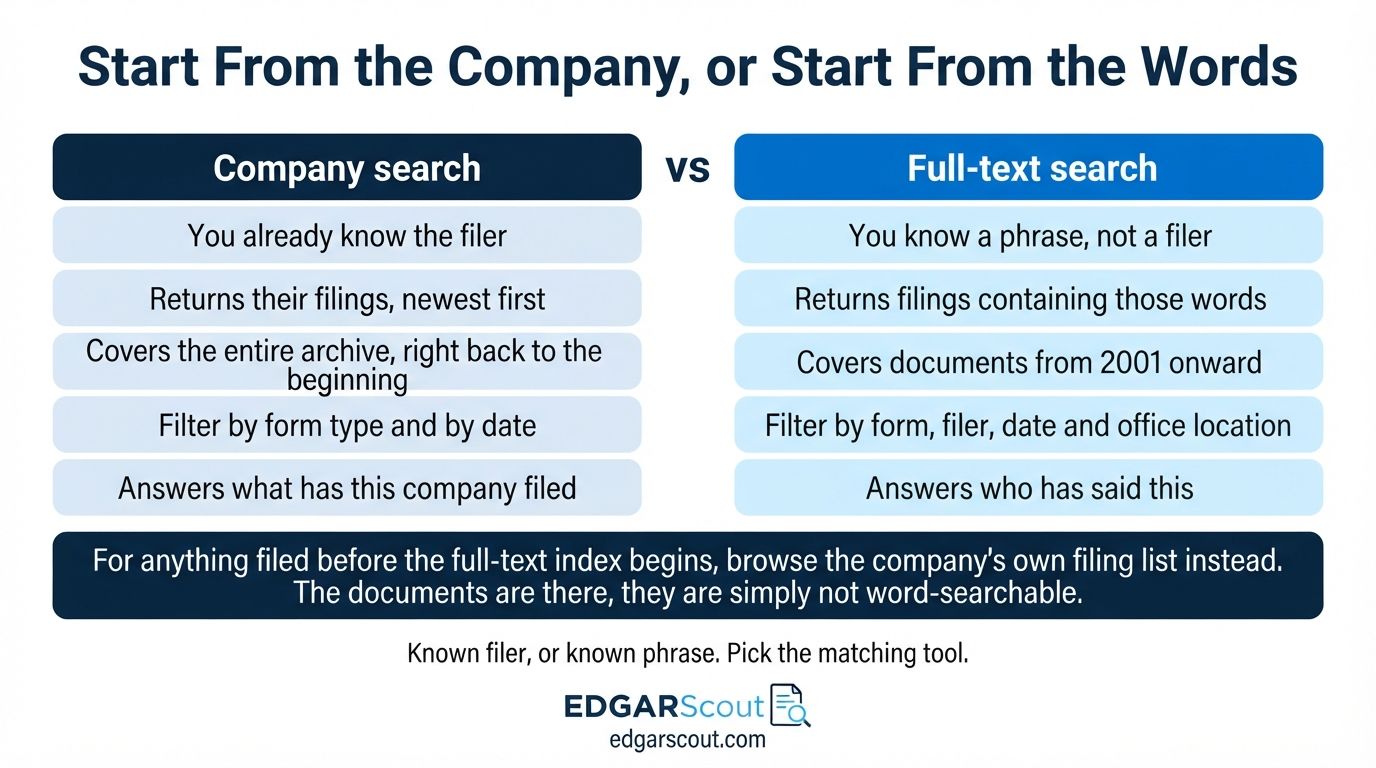
Statutory filings, if your accounts are US-listed or have US-listed parents. The SEC's EDGAR full-text search covers "the full text of electronic filings since 2001". Searching it for your own product category, your competitors' names, or the language your buyers use about the problem is free, and returns primary documents rather than someone's summary of them. If you automate against it, the SEC asks you to "declare your user agent in request headers", caps you at a "Current max request rate: 10 requests/second", and asks that you "Download only what you need and please moderate requests to minimize server load."
European company registers, through one search. The European e-Justice Portal's business register search covers "companies registered in business registers in the EU, Iceland, Liechtenstein or Norway", with data "gathered in real time from the business registers of the Member States". The portal is explicit that "At the moment you can only request information that the national registers provide free of charge", and what each register exposes varies, so treat coverage as uneven rather than universal. Annual accounts and legal representatives are the fields worth looking at.
Job postings, which are the most underrated timing signal in B2B. A posted role is a company telling you, in public and in detail, what it has decided to fix and roughly when. It is more specific than a funding announcement and far more actionable, because it names the function, the seniority and often the tooling.
Their own published material. Pricing pages, changelogs, documentation, terms. This is where the answer to "which of our offers fits" usually sits, and almost nobody reads it before writing.
None of this appears in an enrichment waterfall, which is why teams with expensive data stacks often research worse than a careful person with a browser.
Sequence it so the paid step runs last
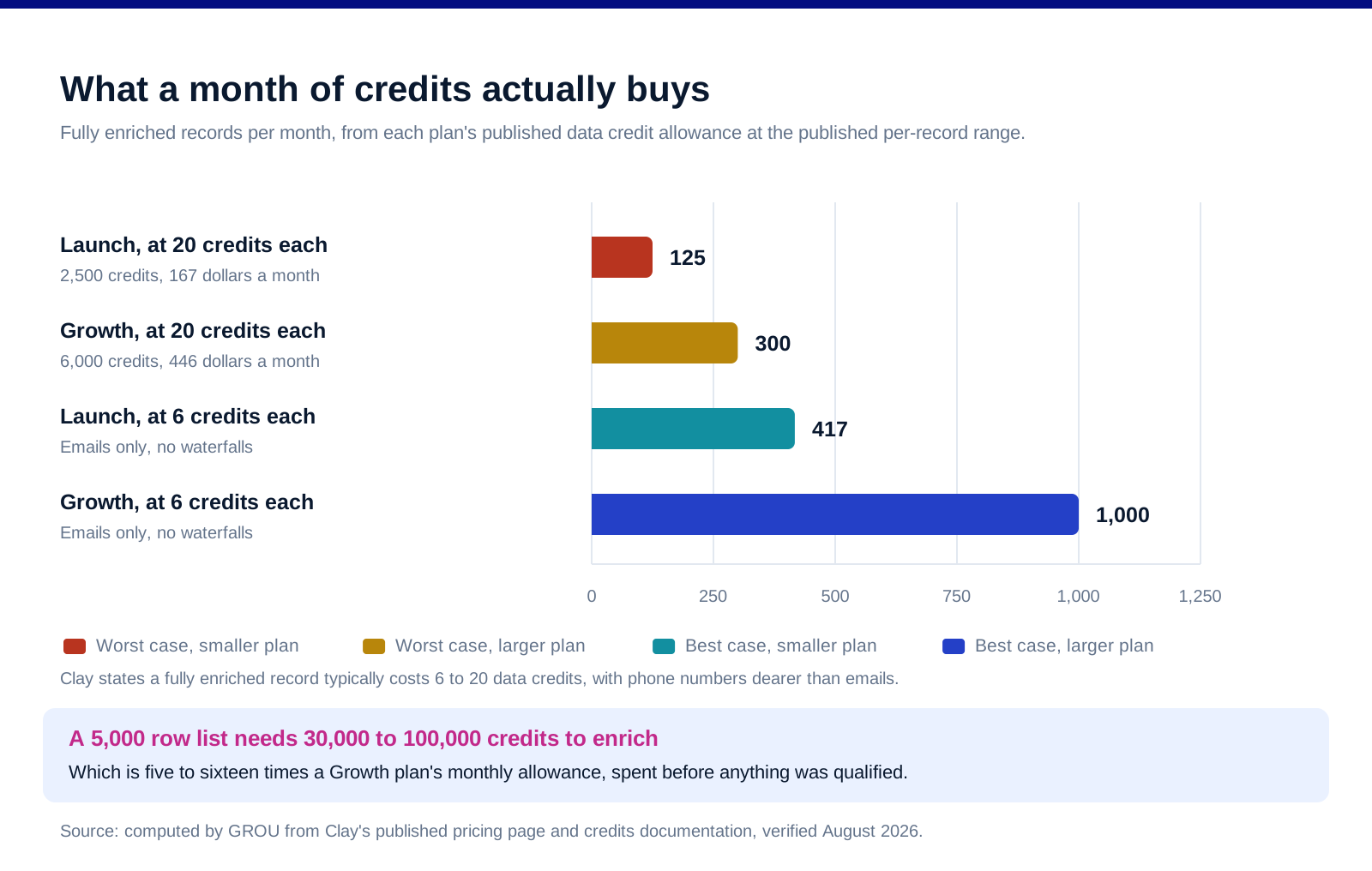
Here is the arithmetic that should decide your sequence. Clay's documentation on actions and data credits states that "Each fully enriched record typically costs 6-20 Data Credits", varying with the data types you pull and whether you run waterfalls across multiple providers. Its pricing page lists Launch at $167 a month with 2,500 data credits and Growth at $446 a month with 6,000.
Divide one by the other. Launch buys between 125 and roughly 417 fully enriched records a month. Growth buys between 300 and 1,000. That is your real monthly research capacity, and it is a fraction of the list most teams upload.
Which makes the sequence non-negotiable. Clay states that "Sourcing lists of accounts or contacts", CRM imports, data warehouse imports, and "Clay formulas and filters" consume neither actions nor credits. So source and filter first, for free, and enrich only what survives. A team that enriches a 5,000 row list before qualifying it needs somewhere between 30,000 and 100,000 credits to do it, which is five to sixteen times a Growth plan's monthly allowance.
Free source, free filter, paid enrich, then write. In that order. The most common workflow error in this category is running those four steps in exactly the reverse of the sensible sequence, then concluding the data is expensive.
And phone numbers are the expensive field. Clay names them explicitly, noting "emails are cheap, phone numbers are expensive". Pull them for the accounts you will actually call, not for the list.
![[SCREENSHOT NEEDED: Clay, the actions and data credits documentation showing the per-record credit range]](https://framerusercontent.com/images/hc52MdwGVhy5L1Ac9r4qkL2XsE.jpg)
The workflow, in order
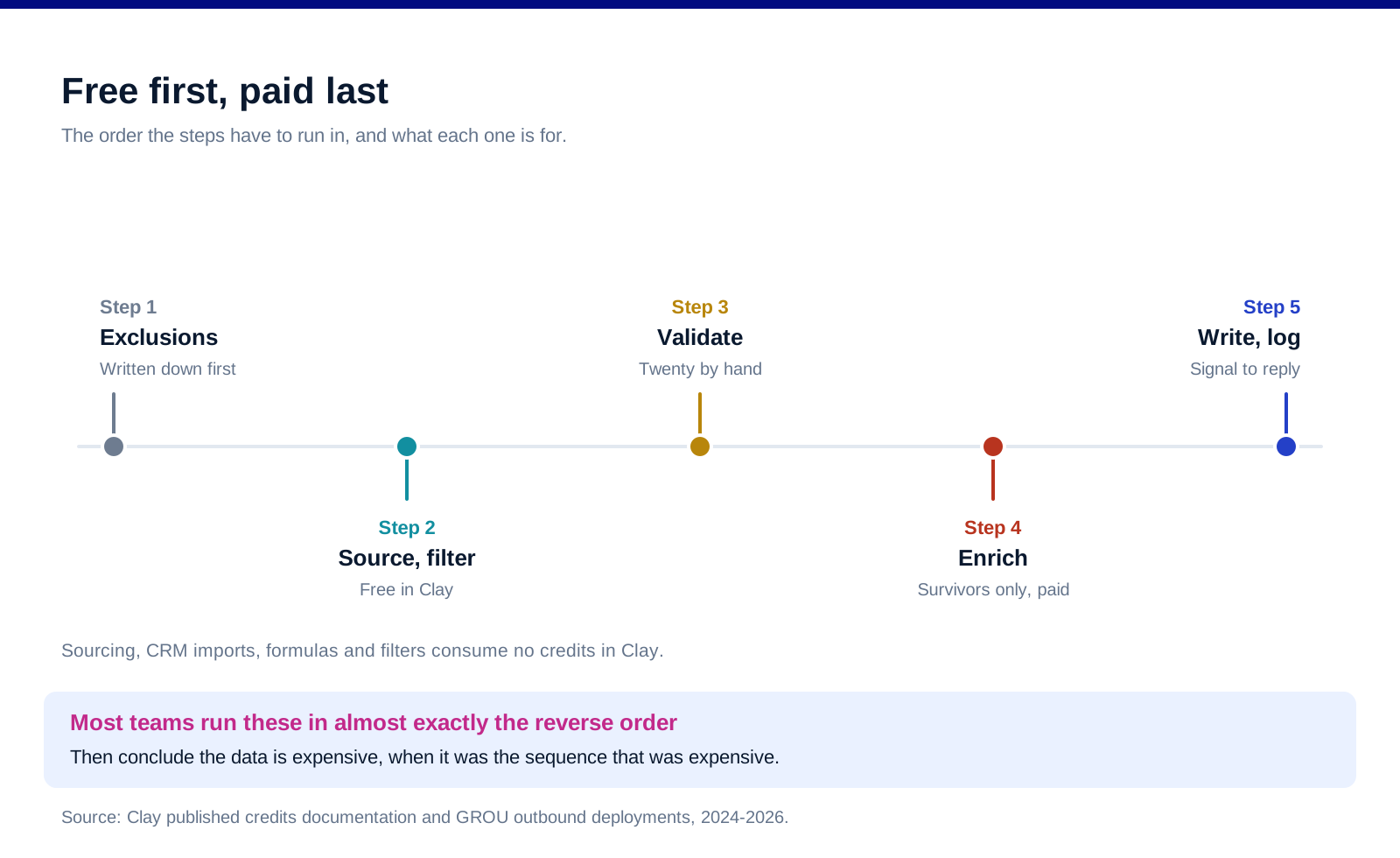
One. Define the exclusion criteria before you look at anything. Write down what disqualifies an account. This is faster to apply than a fit score and it is the step that protects the budget. Our guide to building a B2B prospecting list covers the sourcing side of this.
Two. Source and filter on free fields. Whatever your list source, apply the exclusions before a single paid call is made.
Three. Look for the timing signal, by hand, on a sample. Before you automate a watch on job postings or filings, check on twenty accounts whether the signal exists and whether it correlates with anything. Automating a signal you have not validated produces a very efficient stream of noise.
Four. Enrich only the survivors, and only the fields you will use. Contact data for the people you will contact. Not phone numbers for a list you will email.
Five. Choose the offer, then write. The research output is a decision about which message this account gets. The personalised sentence, if there is one, falls out of that decision rather than replacing it.
Six. Log which signal produced which reply. Otherwise you cannot tell next quarter which research step was worth its cost, and you will keep paying for all of them.
What the law expects while you do this
You need a lawful basis, and for B2B research it is usually legitimate interests. The ICO's guidance sets a three-part test: a purpose test, "Do you have a legitimate interest for using the personal information?"; a necessity test, "Is your use of personal information necessary for that purpose?"; and a balancing test, "Do the person's interests, rights or freedoms override the legitimate interest you've identified?"
Direct marketing is named, but that is not a free pass. The ICO notes that the UK GDPR lists "network and information security; direct marketing; and administrative transfers within a group of organisations" among activities that may constitute a legitimate interest, while stating that you must also comply with the PECR rules on marketing.
The balancing test is where enthusiastic research gets caught. The ICO's standard is objective: "The question isn't whether a particular person actually expects what you intend to do with their information, but whether a reasonable person ought to expect it in the circumstances." A named contact at a company expecting a work email about a work problem is one thing. A dossier assembled from their personal accounts is another, and the necessity test is the one it fails first.
Which is a workflow instruction, not just a legal one. Collect what changes a decision, and the necessity test mostly answers itself. Our GDPR playbook for cold email covers the outbound side in more depth, and our Clay review covers the tool itself rather than the workflow. This is not legal advice and the position differs by jurisdiction.
What we do not publish here
Reply rate uplift from research. We have not run a matched test isolating research as the variable, and every published figure of that kind comes from a company selling research software.
A recommended field list. It depends entirely on what you qualify and price on, which is the point of the article.
Scraping instructions for any platform. Several of the obvious sources prohibit automated collection in their own terms, and we are not going to publish a workaround.
Any claim about which data provider is most accurate. Coverage varies by geography and by role seniority, provider benchmarks are published by providers, and we have not run a controlled comparison.
A prompt for automated research summaries. The output quality depends on the source you point it at, and pointing a good prompt at a shallow source produces confident nonsense.
FAQ
How much account research is enough?
Enough to change one of three decisions: who you contact, what you say, or when you send. If a field cannot change any of them, you have already done too much. The volume question answers itself once you apply that test, because most standard research fields fail it.
Should you enrich the whole list or just part of it?
Just the part that survives qualification. Clay's own documentation puts a fully enriched record at 6 to 20 data credits, and the Growth plan carries 6,000 credits a month, so enriching everything means spending your entire monthly allowance on 300 to 1,000 records regardless of whether they were qualified.
What is the best free account research source?
Job postings for timing, company registers for structure and filings for language. A posted role tells you what a company has decided to fix and roughly when, which is more actionable than most paid signals and costs nothing.
Is manual research better than automated research?
For validating whether a signal exists, yes, and you should do it on about twenty accounts before automating anything. For applying a validated signal across a list, no. The error is automating first and validating never.
What is the legal basis for researching a prospect?
In the UK and EU this is usually legitimate interests, which requires passing a purpose test, a necessity test and a balancing test. The balancing test asks whether a reasonable person ought to expect what you intend to do. Take advice on your own markets; this is not legal advice.
How do you know whether the research is working?
Log which signal triggered which contact and which of those produced a reply. Without that link you are paying for every research step in the workflow indefinitely, because you have no way to identify the ones that never earned anything.
Bottom line
Run one test over your current research process: for every field you collect, name the decision it changes. Most teams find that the majority of what they collect changes nothing except the first line of an email, which is the most expensive way to write a sentence. Then reorder the workflow so the free steps come first, because the credit arithmetic is unforgiving and enriching before qualifying spends a month's allowance on accounts you had already decided against. Read the filings, the registers and the job postings, which are free and specific and largely ignored. And log which signal produced which reply, because that is the only way you will ever know which parts of this were worth doing.
Want the research and the outbound run together rather than bought separately? Book a call with GROU. We run lead generation and outbound inside B2B revenue engines across verticals.
We are GROU, a B2B pipeline agency that runs lead generation, outbound, and LinkedIn content for clients across manufacturing, fintech, iGaming, software, and professional services. Some links in this article are affiliate links, including Clay. Every price and credit figure quoted is taken from the vendor's own published pages and verified in August 2026. Nothing here is legal advice.
Most account research produces a personalised first line and changes nothing else. Same list, same offer, same week, one sentence at the top about their recent funding round.
That is not research. That is decoration with a research budget attached. Research earns its place only when you can name the decision it changed, and there are exactly three decisions available: who you contact, what you say to them, and when you send it.
TL;DR
Apply one test to every research step: name the decision it changes. If the answer is "it makes the email sound personalised", cut it, because personalisation that does not change the offer or the timing is a cost with no return. The three decisions worth researching for are who you contact, what you say, and when you send. Sequence the work so the free sources run first and the paid enrichment runs last, because the arithmetic is brutal: Clay's own documentation puts a fully enriched record at "6-20 Data Credits", and the Growth plan includes 6,000 data credits a month, so your entire monthly enrichment allowance buys somewhere between 300 and 1,000 fully enriched records. Enriching a raw list before you have qualified it is how that allowance disappears on accounts you were never going to contact. Meanwhile the highest-signal sources in B2B are free and unglamorous: statutory filings, company registers and job postings, none of which appear in an enrichment waterfall.
The only test that matters
Name the decision. For every research field you are about to collect, finish this sentence: "if this comes back differently, I will do something different." If you cannot finish it, the field is decoration.
Most research fails this test. Headcount, funding round, tech stack, recent post, city, industry. Collected as standard, used to write a first line, never used to change who gets contacted or when. The team feels prepared and the campaign is identical to the one it would have run with no research at all.
The three decisions research can change. Who you contact, which is a qualification decision, and which starts from your ICP definition rather than from a data source. What you say, which is an offer and message decision. When you send, which is a timing decision. Everything else is background reading.
Timing is the one almost nobody researches for, and it is the one with the largest effect. The same message to the same person lands differently depending on whether they have just been handed a problem you solve. That is a researchable fact and almost no workflow looks for it.
Sort your fields by which decision they change
Fields that change who. Whether they run the function you sell into at all. Whether they are inside your served geography for delivery and contracting. Whether they are already a customer, a competitor, or in a category you cannot serve. These are exclusion criteria and they should run before anything is enriched.
Fields that change what. Which of your offers fits their situation, which case is relevant, and which objection you should pre-empt. This is the only place where a personalised sentence is legitimate, because it is a symptom of having chosen a different message rather than a decoration on the same one.
Fields that change when. A new hire in the function you sell into. A filing or register change. A posted role that describes the problem you solve. An announced project with a delivery date. These are the fields worth automating a watch on.
Fields that change nothing, and there are more of them than anyone admits. Headcount bands you do not price on. Funding you do not qualify on. Tech stack you do not integrate with. Their last post, unless it changed which offer you are sending. Collecting these is not neutral, because every one of them costs time or credits and pushes the enrichment budget further from the accounts that deserved it.
The free sources are the good ones
Statutory filings, if your accounts are US-listed or have US-listed parents. The SEC's EDGAR full-text search covers "the full text of electronic filings since 2001". Searching it for your own product category, your competitors' names, or the language your buyers use about the problem is free, and returns primary documents rather than someone's summary of them. If you automate against it, the SEC asks you to "declare your user agent in request headers", caps you at a "Current max request rate: 10 requests/second", and asks that you "Download only what you need and please moderate requests to minimize server load."
European company registers, through one search. The European e-Justice Portal's business register search covers "companies registered in business registers in the EU, Iceland, Liechtenstein or Norway", with data "gathered in real time from the business registers of the Member States". The portal is explicit that "At the moment you can only request information that the national registers provide free of charge", and what each register exposes varies, so treat coverage as uneven rather than universal. Annual accounts and legal representatives are the fields worth looking at.
Job postings, which are the most underrated timing signal in B2B. A posted role is a company telling you, in public and in detail, what it has decided to fix and roughly when. It is more specific than a funding announcement and far more actionable, because it names the function, the seniority and often the tooling.
Their own published material. Pricing pages, changelogs, documentation, terms. This is where the answer to "which of our offers fits" usually sits, and almost nobody reads it before writing.
None of this appears in an enrichment waterfall, which is why teams with expensive data stacks often research worse than a careful person with a browser.
Sequence it so the paid step runs last
Here is the arithmetic that should decide your sequence. Clay's documentation on actions and data credits states that "Each fully enriched record typically costs 6-20 Data Credits", varying with the data types you pull and whether you run waterfalls across multiple providers. Its pricing page lists Launch at $167 a month with 2,500 data credits and Growth at $446 a month with 6,000.
Divide one by the other. Launch buys between 125 and roughly 417 fully enriched records a month. Growth buys between 300 and 1,000. That is your real monthly research capacity, and it is a fraction of the list most teams upload.
Which makes the sequence non-negotiable. Clay states that "Sourcing lists of accounts or contacts", CRM imports, data warehouse imports, and "Clay formulas and filters" consume neither actions nor credits. So source and filter first, for free, and enrich only what survives. A team that enriches a 5,000 row list before qualifying it needs somewhere between 30,000 and 100,000 credits to do it, which is five to sixteen times a Growth plan's monthly allowance.
Free source, free filter, paid enrich, then write. In that order. The most common workflow error in this category is running those four steps in exactly the reverse of the sensible sequence, then concluding the data is expensive.
And phone numbers are the expensive field. Clay names them explicitly, noting "emails are cheap, phone numbers are expensive". Pull them for the accounts you will actually call, not for the list.
The workflow, in order
One. Define the exclusion criteria before you look at anything. Write down what disqualifies an account. This is faster to apply than a fit score and it is the step that protects the budget. Our guide to building a B2B prospecting list covers the sourcing side of this.
Two. Source and filter on free fields. Whatever your list source, apply the exclusions before a single paid call is made.
Three. Look for the timing signal, by hand, on a sample. Before you automate a watch on job postings or filings, check on twenty accounts whether the signal exists and whether it correlates with anything. Automating a signal you have not validated produces a very efficient stream of noise.
Four. Enrich only the survivors, and only the fields you will use. Contact data for the people you will contact. Not phone numbers for a list you will email.
Five. Choose the offer, then write. The research output is a decision about which message this account gets. The personalised sentence, if there is one, falls out of that decision rather than replacing it.
Six. Log which signal produced which reply. Otherwise you cannot tell next quarter which research step was worth its cost, and you will keep paying for all of them.
What the law expects while you do this
You need a lawful basis, and for B2B research it is usually legitimate interests. The ICO's guidance sets a three-part test: a purpose test, "Do you have a legitimate interest for using the personal information?"; a necessity test, "Is your use of personal information necessary for that purpose?"; and a balancing test, "Do the person's interests, rights or freedoms override the legitimate interest you've identified?"
Direct marketing is named, but that is not a free pass. The ICO notes that the UK GDPR lists "network and information security; direct marketing; and administrative transfers within a group of organisations" among activities that may constitute a legitimate interest, while stating that you must also comply with the PECR rules on marketing.
The balancing test is where enthusiastic research gets caught. The ICO's standard is objective: "The question isn't whether a particular person actually expects what you intend to do with their information, but whether a reasonable person ought to expect it in the circumstances." A named contact at a company expecting a work email about a work problem is one thing. A dossier assembled from their personal accounts is another, and the necessity test is the one it fails first.
Which is a workflow instruction, not just a legal one. Collect what changes a decision, and the necessity test mostly answers itself. Our GDPR playbook for cold email covers the outbound side in more depth, and our Clay review covers the tool itself rather than the workflow. This is not legal advice and the position differs by jurisdiction.
What we do not publish here
Reply rate uplift from research. We have not run a matched test isolating research as the variable, and every published figure of that kind comes from a company selling research software.
A recommended field list. It depends entirely on what you qualify and price on, which is the point of the article.
Scraping instructions for any platform. Several of the obvious sources prohibit automated collection in their own terms, and we are not going to publish a workaround.
Any claim about which data provider is most accurate. Coverage varies by geography and by role seniority, provider benchmarks are published by providers, and we have not run a controlled comparison.
A prompt for automated research summaries. The output quality depends on the source you point it at, and pointing a good prompt at a shallow source produces confident nonsense.
FAQ
How much account research is enough?
Enough to change one of three decisions: who you contact, what you say, or when you send. If a field cannot change any of them, you have already done too much. The volume question answers itself once you apply that test, because most standard research fields fail it.
Should you enrich the whole list or just part of it?
Just the part that survives qualification. Clay's own documentation puts a fully enriched record at 6 to 20 data credits, and the Growth plan carries 6,000 credits a month, so enriching everything means spending your entire monthly allowance on 300 to 1,000 records regardless of whether they were qualified.
What is the best free account research source?
Job postings for timing, company registers for structure and filings for language. A posted role tells you what a company has decided to fix and roughly when, which is more actionable than most paid signals and costs nothing.
Is manual research better than automated research?
For validating whether a signal exists, yes, and you should do it on about twenty accounts before automating anything. For applying a validated signal across a list, no. The error is automating first and validating never.
What is the legal basis for researching a prospect?
In the UK and EU this is usually legitimate interests, which requires passing a purpose test, a necessity test and a balancing test. The balancing test asks whether a reasonable person ought to expect what you intend to do. Take advice on your own markets; this is not legal advice.
How do you know whether the research is working?
Log which signal triggered which contact and which of those produced a reply. Without that link you are paying for every research step in the workflow indefinitely, because you have no way to identify the ones that never earned anything.
Bottom line
Run one test over your current research process: for every field you collect, name the decision it changes. Most teams find that the majority of what they collect changes nothing except the first line of an email, which is the most expensive way to write a sentence. Then reorder the workflow so the free steps come first, because the credit arithmetic is unforgiving and enriching before qualifying spends a month's allowance on accounts you had already decided against. Read the filings, the registers and the job postings, which are free and specific and largely ignored. And log which signal produced which reply, because that is the only way you will ever know which parts of this were worth doing.
Want the research and the outbound run together rather than bought separately? Book a call with GROU. We run lead generation and outbound inside B2B revenue engines across verticals.
We are GROU, a B2B pipeline agency that runs lead generation, outbound, and LinkedIn content for clients across manufacturing, fintech, iGaming, software, and professional services. Some links in this article are affiliate links, including Clay. Every price and credit figure quoted is taken from the vendor's own published pages and verified in August 2026. Nothing here is legal advice.
Most account research produces a personalised first line and changes nothing else. Same list, same offer, same week, one sentence at the top about their recent funding round.
That is not research. That is decoration with a research budget attached. Research earns its place only when you can name the decision it changed, and there are exactly three decisions available: who you contact, what you say to them, and when you send it.
TL;DR
Apply one test to every research step: name the decision it changes. If the answer is "it makes the email sound personalised", cut it, because personalisation that does not change the offer or the timing is a cost with no return. The three decisions worth researching for are who you contact, what you say, and when you send. Sequence the work so the free sources run first and the paid enrichment runs last, because the arithmetic is brutal: Clay's own documentation puts a fully enriched record at "6-20 Data Credits", and the Growth plan includes 6,000 data credits a month, so your entire monthly enrichment allowance buys somewhere between 300 and 1,000 fully enriched records. Enriching a raw list before you have qualified it is how that allowance disappears on accounts you were never going to contact. Meanwhile the highest-signal sources in B2B are free and unglamorous: statutory filings, company registers and job postings, none of which appear in an enrichment waterfall.
The only test that matters
Name the decision. For every research field you are about to collect, finish this sentence: "if this comes back differently, I will do something different." If you cannot finish it, the field is decoration.
Most research fails this test. Headcount, funding round, tech stack, recent post, city, industry. Collected as standard, used to write a first line, never used to change who gets contacted or when. The team feels prepared and the campaign is identical to the one it would have run with no research at all.
The three decisions research can change. Who you contact, which is a qualification decision, and which starts from your ICP definition rather than from a data source. What you say, which is an offer and message decision. When you send, which is a timing decision. Everything else is background reading.
Timing is the one almost nobody researches for, and it is the one with the largest effect. The same message to the same person lands differently depending on whether they have just been handed a problem you solve. That is a researchable fact and almost no workflow looks for it.
Sort your fields by which decision they change
Fields that change who. Whether they run the function you sell into at all. Whether they are inside your served geography for delivery and contracting. Whether they are already a customer, a competitor, or in a category you cannot serve. These are exclusion criteria and they should run before anything is enriched.
Fields that change what. Which of your offers fits their situation, which case is relevant, and which objection you should pre-empt. This is the only place where a personalised sentence is legitimate, because it is a symptom of having chosen a different message rather than a decoration on the same one.
Fields that change when. A new hire in the function you sell into. A filing or register change. A posted role that describes the problem you solve. An announced project with a delivery date. These are the fields worth automating a watch on.
Fields that change nothing, and there are more of them than anyone admits. Headcount bands you do not price on. Funding you do not qualify on. Tech stack you do not integrate with. Their last post, unless it changed which offer you are sending. Collecting these is not neutral, because every one of them costs time or credits and pushes the enrichment budget further from the accounts that deserved it.
The free sources are the good ones
Statutory filings, if your accounts are US-listed or have US-listed parents. The SEC's EDGAR full-text search covers "the full text of electronic filings since 2001". Searching it for your own product category, your competitors' names, or the language your buyers use about the problem is free, and returns primary documents rather than someone's summary of them. If you automate against it, the SEC asks you to "declare your user agent in request headers", caps you at a "Current max request rate: 10 requests/second", and asks that you "Download only what you need and please moderate requests to minimize server load."
European company registers, through one search. The European e-Justice Portal's business register search covers "companies registered in business registers in the EU, Iceland, Liechtenstein or Norway", with data "gathered in real time from the business registers of the Member States". The portal is explicit that "At the moment you can only request information that the national registers provide free of charge", and what each register exposes varies, so treat coverage as uneven rather than universal. Annual accounts and legal representatives are the fields worth looking at.
Job postings, which are the most underrated timing signal in B2B. A posted role is a company telling you, in public and in detail, what it has decided to fix and roughly when. It is more specific than a funding announcement and far more actionable, because it names the function, the seniority and often the tooling.
Their own published material. Pricing pages, changelogs, documentation, terms. This is where the answer to "which of our offers fits" usually sits, and almost nobody reads it before writing.
None of this appears in an enrichment waterfall, which is why teams with expensive data stacks often research worse than a careful person with a browser.
Sequence it so the paid step runs last
Here is the arithmetic that should decide your sequence. Clay's documentation on actions and data credits states that "Each fully enriched record typically costs 6-20 Data Credits", varying with the data types you pull and whether you run waterfalls across multiple providers. Its pricing page lists Launch at $167 a month with 2,500 data credits and Growth at $446 a month with 6,000.
Divide one by the other. Launch buys between 125 and roughly 417 fully enriched records a month. Growth buys between 300 and 1,000. That is your real monthly research capacity, and it is a fraction of the list most teams upload.
Which makes the sequence non-negotiable. Clay states that "Sourcing lists of accounts or contacts", CRM imports, data warehouse imports, and "Clay formulas and filters" consume neither actions nor credits. So source and filter first, for free, and enrich only what survives. A team that enriches a 5,000 row list before qualifying it needs somewhere between 30,000 and 100,000 credits to do it, which is five to sixteen times a Growth plan's monthly allowance.
Free source, free filter, paid enrich, then write. In that order. The most common workflow error in this category is running those four steps in exactly the reverse of the sensible sequence, then concluding the data is expensive.
And phone numbers are the expensive field. Clay names them explicitly, noting "emails are cheap, phone numbers are expensive". Pull them for the accounts you will actually call, not for the list.
The workflow, in order
One. Define the exclusion criteria before you look at anything. Write down what disqualifies an account. This is faster to apply than a fit score and it is the step that protects the budget. Our guide to building a B2B prospecting list covers the sourcing side of this.
Two. Source and filter on free fields. Whatever your list source, apply the exclusions before a single paid call is made.
Three. Look for the timing signal, by hand, on a sample. Before you automate a watch on job postings or filings, check on twenty accounts whether the signal exists and whether it correlates with anything. Automating a signal you have not validated produces a very efficient stream of noise.
Four. Enrich only the survivors, and only the fields you will use. Contact data for the people you will contact. Not phone numbers for a list you will email.
Five. Choose the offer, then write. The research output is a decision about which message this account gets. The personalised sentence, if there is one, falls out of that decision rather than replacing it.
Six. Log which signal produced which reply. Otherwise you cannot tell next quarter which research step was worth its cost, and you will keep paying for all of them.
What the law expects while you do this
You need a lawful basis, and for B2B research it is usually legitimate interests. The ICO's guidance sets a three-part test: a purpose test, "Do you have a legitimate interest for using the personal information?"; a necessity test, "Is your use of personal information necessary for that purpose?"; and a balancing test, "Do the person's interests, rights or freedoms override the legitimate interest you've identified?"
Direct marketing is named, but that is not a free pass. The ICO notes that the UK GDPR lists "network and information security; direct marketing; and administrative transfers within a group of organisations" among activities that may constitute a legitimate interest, while stating that you must also comply with the PECR rules on marketing.
The balancing test is where enthusiastic research gets caught. The ICO's standard is objective: "The question isn't whether a particular person actually expects what you intend to do with their information, but whether a reasonable person ought to expect it in the circumstances." A named contact at a company expecting a work email about a work problem is one thing. A dossier assembled from their personal accounts is another, and the necessity test is the one it fails first.
Which is a workflow instruction, not just a legal one. Collect what changes a decision, and the necessity test mostly answers itself. Our GDPR playbook for cold email covers the outbound side in more depth, and our Clay review covers the tool itself rather than the workflow. This is not legal advice and the position differs by jurisdiction.
What we do not publish here
Reply rate uplift from research. We have not run a matched test isolating research as the variable, and every published figure of that kind comes from a company selling research software.
A recommended field list. It depends entirely on what you qualify and price on, which is the point of the article.
Scraping instructions for any platform. Several of the obvious sources prohibit automated collection in their own terms, and we are not going to publish a workaround.
Any claim about which data provider is most accurate. Coverage varies by geography and by role seniority, provider benchmarks are published by providers, and we have not run a controlled comparison.
A prompt for automated research summaries. The output quality depends on the source you point it at, and pointing a good prompt at a shallow source produces confident nonsense.
FAQ
How much account research is enough?
Enough to change one of three decisions: who you contact, what you say, or when you send. If a field cannot change any of them, you have already done too much. The volume question answers itself once you apply that test, because most standard research fields fail it.
Should you enrich the whole list or just part of it?
Just the part that survives qualification. Clay's own documentation puts a fully enriched record at 6 to 20 data credits, and the Growth plan carries 6,000 credits a month, so enriching everything means spending your entire monthly allowance on 300 to 1,000 records regardless of whether they were qualified.
What is the best free account research source?
Job postings for timing, company registers for structure and filings for language. A posted role tells you what a company has decided to fix and roughly when, which is more actionable than most paid signals and costs nothing.
Is manual research better than automated research?
For validating whether a signal exists, yes, and you should do it on about twenty accounts before automating anything. For applying a validated signal across a list, no. The error is automating first and validating never.
What is the legal basis for researching a prospect?
In the UK and EU this is usually legitimate interests, which requires passing a purpose test, a necessity test and a balancing test. The balancing test asks whether a reasonable person ought to expect what you intend to do. Take advice on your own markets; this is not legal advice.
How do you know whether the research is working?
Log which signal triggered which contact and which of those produced a reply. Without that link you are paying for every research step in the workflow indefinitely, because you have no way to identify the ones that never earned anything.
Bottom line
Run one test over your current research process: for every field you collect, name the decision it changes. Most teams find that the majority of what they collect changes nothing except the first line of an email, which is the most expensive way to write a sentence. Then reorder the workflow so the free steps come first, because the credit arithmetic is unforgiving and enriching before qualifying spends a month's allowance on accounts you had already decided against. Read the filings, the registers and the job postings, which are free and specific and largely ignored. And log which signal produced which reply, because that is the only way you will ever know which parts of this were worth doing.
Want the research and the outbound run together rather than bought separately? Book a call with GROU. We run lead generation and outbound inside B2B revenue engines across verticals.
We are GROU, a B2B pipeline agency that runs lead generation, outbound, and LinkedIn content for clients across manufacturing, fintech, iGaming, software, and professional services. Some links in this article are affiliate links, including Clay. Every price and credit figure quoted is taken from the vendor's own published pages and verified in August 2026. Nothing here is legal advice.

Pipeline OS Newsletter
Build qualified pipeline
Get weekly tactics to generate demand, improve lead quality, and book more meetings.





Trusted by industry leaders
Trusted by industry leaders
Trusted by industry leaders
Ready to build qualified pipeline?
Ready to build qualified pipeline?
Ready to build qualified pipeline?
Book a call to see if we're the right fit, or take the 2-minute quiz to get a clear starting point.
Book a call to see if we're the right fit, or take the 2-minute quiz to get a clear starting point.
Book a call to see if we're the right fit, or take the 2-minute quiz to get a clear starting point.
" height="30.21639343089746px" id="hfGbXmQR2" width="30.216393430897455px"/></svg>)
Copyright © 2026 – All Right Reserved
Copyright © 2026 – All Right Reserved
Copyright © 2026 – All Right Reserved