%22%3E%3C/path%3E%3Cpath d=%22M 63.072 7.554 C 62.258 8.022 61.577 8.689 61.092 9.493 L 61.092 7.076 L 57.158 7.076 L 57.158 22.64 L 61.089 22.64 L 61.089 14.888 C 61.089 13.446 61.403 12.434 62.03 11.853 C 62.818 11.218 63.818 10.907 64.826 10.982 L 65.868 10.982 L 65.868 6.851 C 64.891 6.834 63.926 7.076 63.073 7.554 Z%22 fill=%22rgb(17,17,17)%22%3E%3C/path%3E%3Cpath d=%22M 78.916 7.82 C 76.363 6.49 73.321 6.49 70.768 7.82 C 69.562 8.473 68.564 9.451 67.888 10.644 C 67.167 11.931 66.803 13.387 66.834 14.862 C 66.804 16.332 67.157 17.785 67.86 19.077 C 68.515 20.267 69.494 21.246 70.684 21.901 C 71.924 22.576 73.318 22.92 74.73 22.898 C 76.164 22.918 77.58 22.575 78.846 21.901 C 80.062 21.247 81.073 20.27 81.768 19.077 C 82.506 17.797 82.88 16.339 82.85 14.862 C 82.88 13.389 82.517 11.934 81.797 10.647 C 81.12 9.455 80.122 8.477 78.917 7.824 M 78.803 14.862 C 78.829 15.739 78.636 16.608 78.241 17.391 C 77.903 18.046 77.38 18.588 76.738 18.95 C 76.124 19.293 75.432 19.472 74.729 19.47 C 73.668 19.497 72.648 19.061 71.934 18.276 C 71.139 17.323 70.741 16.1 70.823 14.862 C 70.741 13.62 71.149 12.395 71.959 11.45 C 72.687 10.667 73.715 10.233 74.783 10.256 C 75.859 10.236 76.894 10.67 77.635 11.45 C 78.464 12.387 78.884 13.616 78.801 14.864%22 fill=%22rgb(17,17,17)%22%3E%3C/path%3E%3Cpath d=%22M 95.906 7.076 L 95.906 15.646 C 95.975 16.68 95.643 17.701 94.979 18.498 C 94.311 19.184 93.379 19.547 92.422 19.495 C 91.475 19.544 90.553 19.18 89.894 18.498 C 89.23 17.701 88.898 16.68 88.967 15.646 L 88.967 7.076 L 85.033 7.076 L 85.033 16.207 C 85 17.449 85.275 18.68 85.834 19.79 C 86.327 20.75 87.095 21.542 88.039 22.065 C 89.033 22.594 90.145 22.861 91.271 22.838 C 92.188 22.847 93.095 22.65 93.926 22.263 C 94.708 21.905 95.388 21.36 95.906 20.675 L 95.906 22.645 L 99.865 22.645 L 99.865 7.076 Z%22 fill=%22rgb(17,17,17)%22%3E%3C/path%3E%3Cpath d=%22M 4.513 15.626 C 4.511 10.815 7.606 6.549 12.181 5.059 C 16.756 3.57 21.77 5.195 24.601 9.086 L 27.816 5.87 C 24.074 1.186 17.981 -0.943 12.137 0.393 C 6.292 1.728 1.728 6.292 0.393 12.137 C -0.943 17.981 1.186 24.074 5.87 27.816 L 9.085 24.601 C 6.214 22.512 4.515 19.177 4.513 15.626%22 fill=%22rgb(32,62,235)%22%3E%3C/path%3E%3Cpath d=%22M 17.114 14.343 L 13.354 18.01 L 13.354 18.026 L 21.071 18.026 L 11.412 27.609 L 17.389 27.609 L 23.999 21.081 L 23.999 28.316 L 24.005 28.316 L 27.967 24.393 L 27.967 14.343 Z%22 fill=%22rgb(32,62,235)%22%3E%3C/path%3E%3C/g%3E%3C/svg%3E) ×
× ××
××›
›
›
›
Advanced search in LinkedIn: the B2B prospecting guide 2026
Advanced search in LinkedIn: the B2B prospecting guide 2026
Advanced search in LinkedIn: the B2B prospecting guide 2026
Advanced search in LinkedIn: the B2B prospecting guide 2026
Advanced search in LinkedIn: the B2B prospecting guide 2026
Advanced search in LinkedIn: the B2B prospecting guide 2026

Author
Aljaz Peklaj

You're staring at a LinkedIn search that looked promising, then turned into 25,000 names, burned credits, and still didn't produce meetings. The problem isn't the platform, it's the search structure, because advanced search in LinkedIn only works when filter logic, title variants, and validation are built like a system.
Start with written niche parameters, or the result set will balloon beyond repair.
Use Boolean and layered filters together, especially title variants, exclusions, company size, and seniority.
Reuse structural templates, but customize them for the ICP instead of copying saved searches.
Validate the first 20 to 30 results before outreach, then tighten the search until mismatch rates are acceptable.
Table of Contents
Why your LinkedIn search returns 25,000 results and zero meetings
The 8-step build for a search that survives first contact
Five search templates we reuse across SaaS, manufacturing, and signal-led motions
Wiring validated lists into Clay, HeyReach, and your sequencer
Why your LinkedIn search returns 25,000 results and zero meetings
A huge result set usually means the search began with a title, not a target. That's the mistake I see most often in advanced search in LinkedIn, especially when teams jump straight into Sales Navigator without writing the niche down first.
LinkedIn gives you a useful signal layer through Search Appearances, which shows how people found you, and on Company Pages it refreshes daily with search volume and top keywords. That only matters if the search terms match the audience you want, otherwise you're measuring noise instead of demand. LinkedIn's own help page makes the metric useful because it turns discoverability into something you can inspect, not guess at. LinkedIn Search Appearances
Practical rule: if the search can't be written on paper, it's not ready for Sales Navigator.
Advanced search works best when you treat it like an engineering problem. The inputs are filter combinations, Boolean logic, sample size, and iteration. The output is a concentrated list that can support outbound, content visibility, and pipeline building, not a broad directory dump.
The other trap is assuming LinkedIn search is one thing. It spans 8 searchable categories, including People, Companies, Jobs, Groups, Schools, Posts, Events, and Products, so the workflow changes depending on the object you're targeting. A people search and a post search are not the same exercise, even if they start in the same bar. LinkedIn targeting glossary
If you need a practical companion to the interface itself, the LinkedIn tools resource is useful for mapping the platform's search and workflow surfaces without turning it into theory.
A well-built search is slower up front and faster later. The build usually takes 90 to 180 minutes when you define the niche, layer filters, and validate the result set, which is far cheaper than launching broad outreach into weak-fit prospects. That's the trade-off, and it's the one that decides whether your search becomes a pipeline asset or a credit sink.
The 8-step build for a search that survives first contact
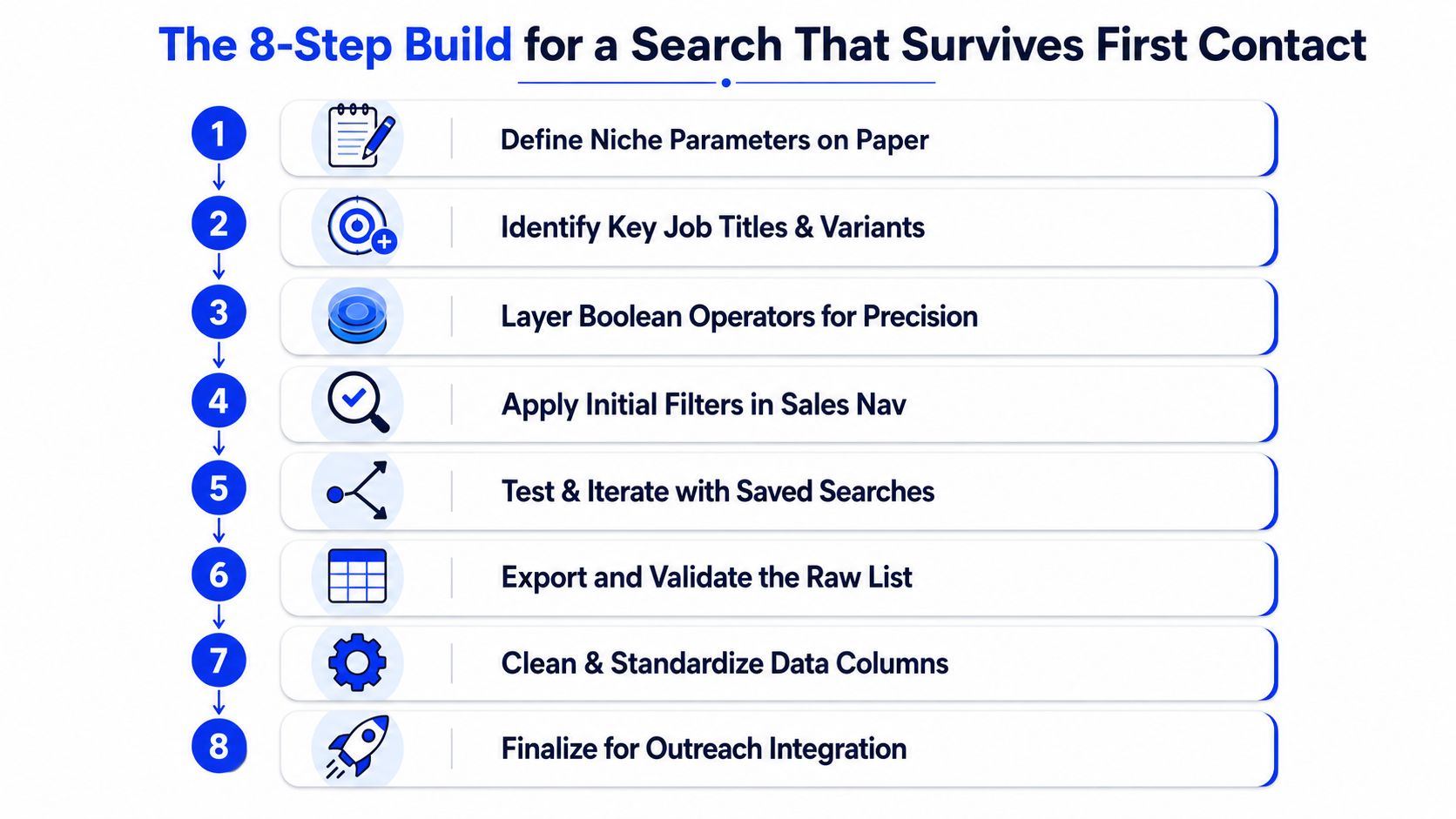
Step 1, write the niche on paper first
Start by writing the role, industry sub-segment, geography, company characteristics, and persona traits on paper. Sales Navigator only gets useful after the scope is clear, because that written brief stops the search from drifting every time a filter looks tempting.
That written version also gives you a baseline for validation. If the criteria stay fuzzy, you cannot tell whether the search is broken or whether the ICP definition was never tight enough to begin with.
Step 2, build title variants before filters
Use the Current Job Title filter with several variations, not one term. For revenue operations, that can include Head of Revenue Operations, VP of Revenue Operations, Director of Revenue Operations, Head of RevOps, and Revenue Operations Leader. In some companies, Sales Operations overlaps enough to stay in the set.
This step is where many searches gain or lose quality. If the title set is too narrow, you miss valid buyers. If it is too broad, you spend time cleaning up roles that only look relevant at first glance.
Step 3, add company headcount with intent
Company size should match how the buying motion works. A mid-market motion usually sits in the 100 to 500 band, upper mid-market often sits in 500 to 2,000, and enterprise behaves differently again. For many defined-function roles, companies under 100 employees are too small to generate the depth you need.
Band | Employees | Best for |
|---|---|---|
Startup | 11-50 | Early specialists and founder-led outreach |
Mid-market | 100-500 | Repeatable B2B motions with clear ownership |
Enterprise | 1,000-10,000 | Senior buyers and longer buying committees |
The trade-off is simple. Smaller companies can give you faster access and clearer ownership, but they often lack the team depth that makes outreach scalable. Larger companies usually give you more buying structure, but the search gets harder to keep focused.
Step 4, scope geography by campaign intent
Decide whether you are filtering by prospect location or by company HQ. For North America, the US and Canada often work better as separate blocks. For Europe, DACH, Northern Europe, and Southern Europe usually need different treatment.
That choice changes the quality of the list fast. If your campaign is tied to regional coverage, use the prospect's location. If it is tied to account ownership or territory routing, use HQ and keep the rules consistent across the build.
Step 5, narrow industry with adjacent verticals
LinkedIn's industry labels are imperfect, so a single industry filter rarely cleans up the market as neatly as people expect. Related industries often perform better than a brittle single selection, especially in SaaS, manufacturing, and legal tech. The ICP guide helps here because this only works when the target account definition is already tight.
Use adjacent verticals when the buying signal crosses categories. A rigid industry choice can leave out real prospects who sit just outside the label LinkedIn assigned them, while a broader set of related industries gives you enough coverage to validate the motion without flooding the search.
Step 6, align seniority to the buyer, not the title
Use Seniority Level after title and company fit. “Head of” often maps to Director or VP, but LinkedIn classification is not always consistent. For executive targets, C-Level and Owner are useful, but only when the rest of the account filters support that level.
That order matters because seniority alone does not define fit. A high-level title inside the wrong company profile still creates noise, and a lower title inside the right account can be the buyer you need.
Step 7, add signals that indicate timing
Recent role change, company recent news, company headcount growth, and company keywords are the signal filters that turn static fit into active timing. A leader new to the role or a company with fresh news is usually a better outbound candidate than a stale profile with perfect firmographics.
The search starts behaving like an operating system instead of a list. Fit tells you who could buy. Signals tell you who is worth contacting now. If you are building around intent, a validated ICP guide is the right reference point before you start layering those timing cues.
Step 8, validate the first sample before outreach
Review the first 20 to 30 results manually. Check role, company, seniority, and obvious disqualifiers, then note which mismatch types repeat. That sample tells you whether the search is ready or whether the whole thing needs another pass.
A serious stack usually moves in this order, define, search, validate, then enrich. Sales Navigator is the workbench, and the quality of the output depends on how disciplined the build was before anyone touched outreach.
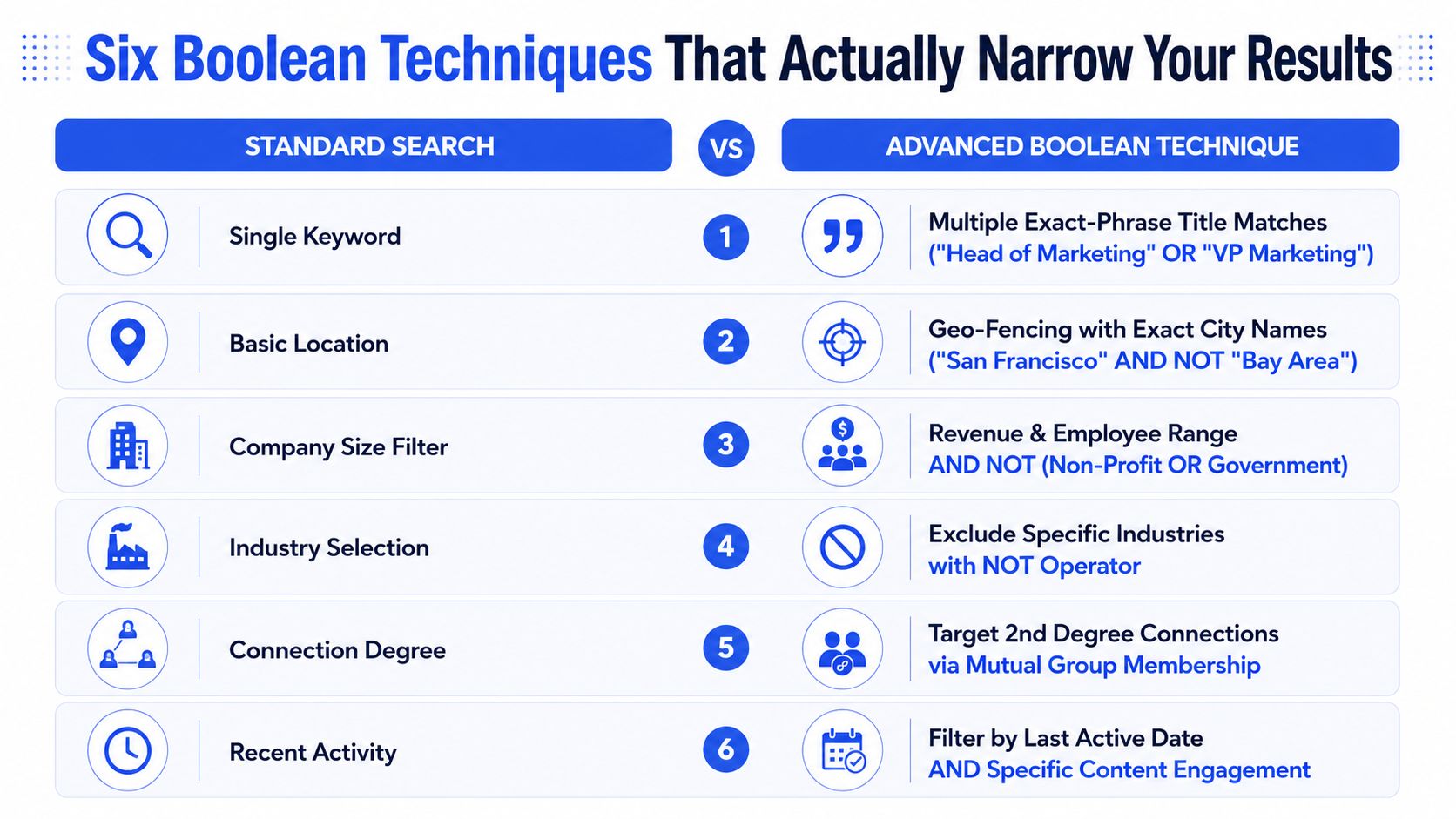
Six Boolean techniques that narrow your results
Start with exact title combinations
The fastest way to cut noise is to combine exact phrases with OR. For example, ("Head of RevOps" OR "VP RevOps" OR "Director RevOps") captures title variants without pulling in every partial match that happens to share the same words.
That matters because broad title searches drag in roles that look relevant on paper but do not belong in the motion you are building. A search for “Revenue Operations” can easily surface jobs that sit outside the buying committee.
Use NOT to remove systematic false positives
Exclusion filters clean up a noisy list fast. ("Head of Marketing" NOT "Product Marketing" NOT "Field Marketing") is sharper than asking the platform to infer intent from the title alone.
Boolean starts doing real work at that point. It removes the predictable junk that title-only searches keep returning.
Use title fragments carefully
Partial matches help with abbreviation-heavy roles, especially on teams that say “RevOps,” “CS,” or “FinOps” internally. ("VP Rev") can catch useful variants that a rigid exact-match search misses.
The trade-off is straightforward. Fragments widen coverage, so they need manual review to make sure unrelated titles did not slip in.
Some of the strongest searches are not the most complex, they are the ones with the fewest accidental matches.
Combine function and seniority for role definition
Function plus seniority catches people with atypical titles. A search using Function = Engineering and Seniority = Director or higher can surface leaders who would never appear in title-only searches. That matters in technical teams where job titles vary more than the org chart suggests.
Layer company characteristics with role filters
The strongest account-level searches combine Company Headcount, Industry, and Geography with the title logic. A useful pattern is headcount 200 to 500, industry SaaS, and a recent activity signal.
That shifts the search away from persona buckets and toward buying committee reality. For outbound, that is where precision starts to improve. If you need a refresher on the platform controls behind those filters, the Sales Navigator filter overview is the right place to start.
Add content engagement for signal-based targeting
If the prospect has posted about a category-relevant topic, that signal is often cleaner than the firmographic list alone. A person discussing attribution usually shows more intent than a passive profile with the right title.
The payoff shows up in the list quality. One search started as “Head of Sales” + SaaS + United States, produced 25,000+ prospects, and delivered a 5.2% reply rate with €820 cost per qualified meeting. The refined version used ("Head of Sales" OR "VP Sales" OR "CRO") NOT "Sales Development" NOT "Sales Enablement" NOT "Field Sales", plus Company Headcount 100-500, Industry Computer Software OR Internet OR SaaS, Company Recent News past 60 days, and United States or Canada. That cut the list to 1,800 prospects, lifted reply rate to 13.4%, and dropped cost per qualified meeting to €340.
The key advantage lay not in the syntax. It was the combination of exact matches, exclusions, account filters, and a signal layer that made the results worth contacting.
LinkedIn classifications are not flawless, Boolean support can vary across surfaces, and some nested logic behaves differently than you expect. The best operators test small result sets first and keep multiple simpler searches instead of one fragile monster query. Sales Navigator filter overview
Five search templates we reuse across SaaS, manufacturing, and signal-led motions
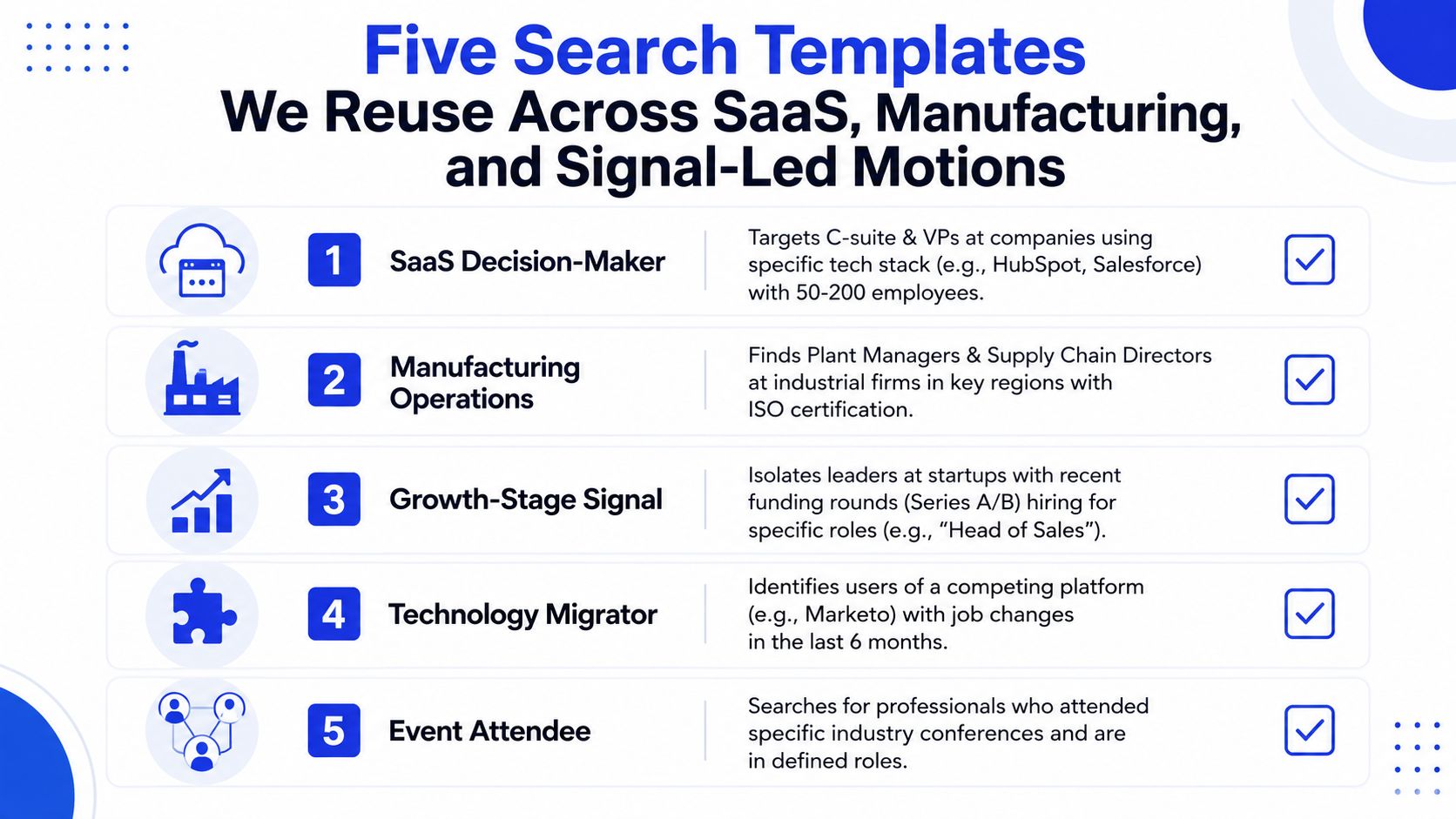
A strong LinkedIn search build is not one query, it is a controlled system. I treat each template like an engineering job with clear inputs, expected outputs, and a validation pass before anyone spends outreach credits on it.
Mid-market B2B SaaS decision-maker
This template starts with Function in Sales, Marketing, or Operations, Seniority at VP-level or above, Company Headcount 100 to 500, and industries such as Computer Software, Internet, or SaaS. I usually add recent company news when the motion depends on timing, then exclude consulting and agency firms if they muddy the fit.
That structure works because the buying motion is usually visible at that company size. You get enough depth for a real buying team without drifting into enterprise sprawl or pulling in profiles that look good on paper but never answer.
Enterprise B2B decision-maker
Enterprise searches need tighter authority and more patience. I usually set Company Headcount 1,000 to 10,000, Seniority at C-Level or VP-Level, and a tenure filter of one year or more so you are not chasing people who just joined and still need to learn the org.
That matters because new leaders can be relevant, but they rarely have enough context to act quickly. In practice, a more senior title with a short tenure can be worse than a slightly lower title with real operating history.
Technical B2B buyer
For technical products, start with Function in Engineering, IT, or a specific technical function, then layer Director, VP, or C-Level depending on the target. Industry needs to be tighter here, because software buyers do not all behave the same way, and broad labels create a lot of false comfort.
This template also improves when the platform gives you technical activity signals. A flat title search usually misses the people with unusual role names, and those are often the ones who influence the evaluation.
Manufacturing decision-maker
Manufacturing motions usually work better with Operations, Manufacturing, or Engineering functions, Company Headcount 200 to 2,000, and a manufacturing sub-vertical instead of the broad category. Capacity or expansion signals matter here because they point to active investment, not just a clean profile.
Regional focus matters more than teams expect. Manufacturing buyers tend to cluster in practical geographies, so a country-wide list often looks better than it performs.
Signal-triggered opportunity
I use this template when timing matters more than broad coverage. Company Recent News past 30 to 60 days combined with Company Headcount Growth and a role filter catches prospects who are more likely to care right now.
A useful next step is to run the validated list through a review of lead enrichment tools, because enrichment often clarifies the signal after LinkedIn has already surfaced the account.
Operator note: templates are starting points, not finished searches. If the ICP shifts, the template should shift too.
The customization sequence is straightforward. Pick the closest structure, adjust title variants and sub-verticals, validate against 20 to 30 results, then save the final version as a client-specific search with a refresh schedule. For teams running recurring outbound motions, the saved-search discipline is worth more than rebuilding from scratch every time.
The pattern stays consistent across sectors. SaaS, manufacturing, pharma, and legal tech each need different combinations, but the underlying build logic is the same, which is why templates save time without flattening nuance.
Validating results before you burn credits on outreach
A search can look clean and still fail in practice. The only reliable guardrail is a validation pass before outreach, because a list with too many mismatches will waste sends no matter how good the copy is.
Review the first sample manually
Start with the first 20 to 30 results and check role, company, seniority, signal presence, and obvious disqualifiers. Don't rush this part. Automated checks miss the weird edge cases that humans spot immediately.
Categorize the mismatch pattern
You're not just counting bad rows, you're identifying why they're bad. The most common issues are industry classification errors, title variants you missed, seniority mismatches, and geographic surprises inside multinational companies.
That pattern tells you which filter to change first.
Tighten the search and revalidate
If the industry is noisy, use combinations instead of a single label. If title variants are missing, add them. If seniority is off, pair Function with Seniority instead of trusting title alone.
After that, run another 20 to 30 result sample. A search under 10% obvious mismatches is usually workable, 10 to 20% needs refinement, and anything above 20% means the search needs more serious work.
Enrich before scaling
Once the search is clean enough, export it into Clay and verify the signals there before it hits outreach. prospecting email samples can help teams keep the outreach side aligned with the list quality, but the list has to be right first.
The validation stack usually runs through Sales Navigator, Clay, Google Sheets, and Notion. Clay becomes useful when you need stack data, role context, and signal checks that LinkedIn doesn't give you cleanly.
Here's the case that makes the point. One search began with 2,400 prospects and showed 24% obvious mismatches in the sample. After refining title Boolean, adding industry exclusions, and adjusting seniority and company size, the list dropped to 1,600 prospects with 7% mismatches. Reply rate moved from a projected 9.2% to 12.8%, and cost per qualified meeting fell from a projected €560 to €390.
The gain came from removing prospects who were never going to fit. That's the whole economics of validation.
Wiring validated lists into Clay, HeyReach, and your sequencer
A validated search only matters once it moves cleanly into the rest of the stack. The handoff should feel boring, because boring handoffs are the ones that hold up under pressure.
Export the approved list from Sales Navigator, then enrich it in Clay for stack, headcount, and signal data. Push the validated contacts into HubSpot for routing, and send the final segments into HeyReach, Lemlist, Instantly, or Smartlead depending on the motion. prospecting email samples are useful here as a check on how the message maps to list quality.
The columns that tend to matter most are Company headcount, recent role change, recent news, and technology stack. If a contact has a fresh signal, move them into the fast lane. If they fit the ICP but are quiet, send them into a longer nurture motion.
Sequence splits should follow fit and timing, not preference. The CRM needs to reflect the search logic instead of flattening it into one generic bucket.
For teams already using Clay for enrichment and routing, this is the point where the workflow starts to hold together. It cuts manual cleanup and keeps the outbound team from chasing poorly formatted exports.
Run this Friday audit on your own LinkedIn searches
Pull your three highest-volume searches before Friday ends. Check whether each one has a written parameter definition, then sample 20 results from each and mark every obvious mismatch against your ICP.
If a search is above 15% mismatches, rebuild it with the 8-step process and the six narrowing techniques. If it's clean, save the structure, document the customizations, and schedule a quarterly refresh so it doesn't drift.
Use this short checklist while you audit:
Written niche definition: If it doesn't exist, the search is already too loose.
Title variants captured: If you only used one title, you're probably missing fit.
Account filters applied: Company size, geography, and industry need to match the motion.
Validation notes saved: The next search gets faster when the mismatch pattern is documented.
The pattern is simple. Structure turns attention into pipeline, but only if the search is built, validated, and wired into the rest of the system before outreach starts.
GROU works with B2B teams that need LinkedIn targeting, outbound, and lead generation to behave like one pipeline engine, not three disconnected tactics. If you want that same structure applied to your search logic, your list quality, and your outreach flow, visit Grou and use this framework on your next ICP build.
You're staring at a LinkedIn search that looked promising, then turned into 25,000 names, burned credits, and still didn't produce meetings. The problem isn't the platform, it's the search structure, because advanced search in LinkedIn only works when filter logic, title variants, and validation are built like a system.
Start with written niche parameters, or the result set will balloon beyond repair.
Use Boolean and layered filters together, especially title variants, exclusions, company size, and seniority.
Reuse structural templates, but customize them for the ICP instead of copying saved searches.
Validate the first 20 to 30 results before outreach, then tighten the search until mismatch rates are acceptable.
Table of Contents
Why your LinkedIn search returns 25,000 results and zero meetings
The 8-step build for a search that survives first contact
Five search templates we reuse across SaaS, manufacturing, and signal-led motions
Wiring validated lists into Clay, HeyReach, and your sequencer
Why your LinkedIn search returns 25,000 results and zero meetings
A huge result set usually means the search began with a title, not a target. That's the mistake I see most often in advanced search in LinkedIn, especially when teams jump straight into Sales Navigator without writing the niche down first.
LinkedIn gives you a useful signal layer through Search Appearances, which shows how people found you, and on Company Pages it refreshes daily with search volume and top keywords. That only matters if the search terms match the audience you want, otherwise you're measuring noise instead of demand. LinkedIn's own help page makes the metric useful because it turns discoverability into something you can inspect, not guess at. LinkedIn Search Appearances
Practical rule: if the search can't be written on paper, it's not ready for Sales Navigator.
Advanced search works best when you treat it like an engineering problem. The inputs are filter combinations, Boolean logic, sample size, and iteration. The output is a concentrated list that can support outbound, content visibility, and pipeline building, not a broad directory dump.
The other trap is assuming LinkedIn search is one thing. It spans 8 searchable categories, including People, Companies, Jobs, Groups, Schools, Posts, Events, and Products, so the workflow changes depending on the object you're targeting. A people search and a post search are not the same exercise, even if they start in the same bar. LinkedIn targeting glossary
If you need a practical companion to the interface itself, the LinkedIn tools resource is useful for mapping the platform's search and workflow surfaces without turning it into theory.
A well-built search is slower up front and faster later. The build usually takes 90 to 180 minutes when you define the niche, layer filters, and validate the result set, which is far cheaper than launching broad outreach into weak-fit prospects. That's the trade-off, and it's the one that decides whether your search becomes a pipeline asset or a credit sink.
The 8-step build for a search that survives first contact
Step 1, write the niche on paper first
Start by writing the role, industry sub-segment, geography, company characteristics, and persona traits on paper. Sales Navigator only gets useful after the scope is clear, because that written brief stops the search from drifting every time a filter looks tempting.
That written version also gives you a baseline for validation. If the criteria stay fuzzy, you cannot tell whether the search is broken or whether the ICP definition was never tight enough to begin with.
Step 2, build title variants before filters
Use the Current Job Title filter with several variations, not one term. For revenue operations, that can include Head of Revenue Operations, VP of Revenue Operations, Director of Revenue Operations, Head of RevOps, and Revenue Operations Leader. In some companies, Sales Operations overlaps enough to stay in the set.
This step is where many searches gain or lose quality. If the title set is too narrow, you miss valid buyers. If it is too broad, you spend time cleaning up roles that only look relevant at first glance.
Step 3, add company headcount with intent
Company size should match how the buying motion works. A mid-market motion usually sits in the 100 to 500 band, upper mid-market often sits in 500 to 2,000, and enterprise behaves differently again. For many defined-function roles, companies under 100 employees are too small to generate the depth you need.
Band | Employees | Best for |
|---|---|---|
Startup | 11-50 | Early specialists and founder-led outreach |
Mid-market | 100-500 | Repeatable B2B motions with clear ownership |
Enterprise | 1,000-10,000 | Senior buyers and longer buying committees |
The trade-off is simple. Smaller companies can give you faster access and clearer ownership, but they often lack the team depth that makes outreach scalable. Larger companies usually give you more buying structure, but the search gets harder to keep focused.
Step 4, scope geography by campaign intent
Decide whether you are filtering by prospect location or by company HQ. For North America, the US and Canada often work better as separate blocks. For Europe, DACH, Northern Europe, and Southern Europe usually need different treatment.
That choice changes the quality of the list fast. If your campaign is tied to regional coverage, use the prospect's location. If it is tied to account ownership or territory routing, use HQ and keep the rules consistent across the build.
Step 5, narrow industry with adjacent verticals
LinkedIn's industry labels are imperfect, so a single industry filter rarely cleans up the market as neatly as people expect. Related industries often perform better than a brittle single selection, especially in SaaS, manufacturing, and legal tech. The ICP guide helps here because this only works when the target account definition is already tight.
Use adjacent verticals when the buying signal crosses categories. A rigid industry choice can leave out real prospects who sit just outside the label LinkedIn assigned them, while a broader set of related industries gives you enough coverage to validate the motion without flooding the search.
Step 6, align seniority to the buyer, not the title
Use Seniority Level after title and company fit. “Head of” often maps to Director or VP, but LinkedIn classification is not always consistent. For executive targets, C-Level and Owner are useful, but only when the rest of the account filters support that level.
That order matters because seniority alone does not define fit. A high-level title inside the wrong company profile still creates noise, and a lower title inside the right account can be the buyer you need.
Step 7, add signals that indicate timing
Recent role change, company recent news, company headcount growth, and company keywords are the signal filters that turn static fit into active timing. A leader new to the role or a company with fresh news is usually a better outbound candidate than a stale profile with perfect firmographics.
The search starts behaving like an operating system instead of a list. Fit tells you who could buy. Signals tell you who is worth contacting now. If you are building around intent, a validated ICP guide is the right reference point before you start layering those timing cues.
Step 8, validate the first sample before outreach
Review the first 20 to 30 results manually. Check role, company, seniority, and obvious disqualifiers, then note which mismatch types repeat. That sample tells you whether the search is ready or whether the whole thing needs another pass.
A serious stack usually moves in this order, define, search, validate, then enrich. Sales Navigator is the workbench, and the quality of the output depends on how disciplined the build was before anyone touched outreach.
Six Boolean techniques that narrow your results
Start with exact title combinations
The fastest way to cut noise is to combine exact phrases with OR. For example, ("Head of RevOps" OR "VP RevOps" OR "Director RevOps") captures title variants without pulling in every partial match that happens to share the same words.
That matters because broad title searches drag in roles that look relevant on paper but do not belong in the motion you are building. A search for “Revenue Operations” can easily surface jobs that sit outside the buying committee.
Use NOT to remove systematic false positives
Exclusion filters clean up a noisy list fast. ("Head of Marketing" NOT "Product Marketing" NOT "Field Marketing") is sharper than asking the platform to infer intent from the title alone.
Boolean starts doing real work at that point. It removes the predictable junk that title-only searches keep returning.
Use title fragments carefully
Partial matches help with abbreviation-heavy roles, especially on teams that say “RevOps,” “CS,” or “FinOps” internally. ("VP Rev") can catch useful variants that a rigid exact-match search misses.
The trade-off is straightforward. Fragments widen coverage, so they need manual review to make sure unrelated titles did not slip in.
Some of the strongest searches are not the most complex, they are the ones with the fewest accidental matches.
Combine function and seniority for role definition
Function plus seniority catches people with atypical titles. A search using Function = Engineering and Seniority = Director or higher can surface leaders who would never appear in title-only searches. That matters in technical teams where job titles vary more than the org chart suggests.
Layer company characteristics with role filters
The strongest account-level searches combine Company Headcount, Industry, and Geography with the title logic. A useful pattern is headcount 200 to 500, industry SaaS, and a recent activity signal.
That shifts the search away from persona buckets and toward buying committee reality. For outbound, that is where precision starts to improve. If you need a refresher on the platform controls behind those filters, the Sales Navigator filter overview is the right place to start.
Add content engagement for signal-based targeting
If the prospect has posted about a category-relevant topic, that signal is often cleaner than the firmographic list alone. A person discussing attribution usually shows more intent than a passive profile with the right title.
The payoff shows up in the list quality. One search started as “Head of Sales” + SaaS + United States, produced 25,000+ prospects, and delivered a 5.2% reply rate with €820 cost per qualified meeting. The refined version used ("Head of Sales" OR "VP Sales" OR "CRO") NOT "Sales Development" NOT "Sales Enablement" NOT "Field Sales", plus Company Headcount 100-500, Industry Computer Software OR Internet OR SaaS, Company Recent News past 60 days, and United States or Canada. That cut the list to 1,800 prospects, lifted reply rate to 13.4%, and dropped cost per qualified meeting to €340.
The key advantage lay not in the syntax. It was the combination of exact matches, exclusions, account filters, and a signal layer that made the results worth contacting.
LinkedIn classifications are not flawless, Boolean support can vary across surfaces, and some nested logic behaves differently than you expect. The best operators test small result sets first and keep multiple simpler searches instead of one fragile monster query. Sales Navigator filter overview
Five search templates we reuse across SaaS, manufacturing, and signal-led motions
A strong LinkedIn search build is not one query, it is a controlled system. I treat each template like an engineering job with clear inputs, expected outputs, and a validation pass before anyone spends outreach credits on it.
Mid-market B2B SaaS decision-maker
This template starts with Function in Sales, Marketing, or Operations, Seniority at VP-level or above, Company Headcount 100 to 500, and industries such as Computer Software, Internet, or SaaS. I usually add recent company news when the motion depends on timing, then exclude consulting and agency firms if they muddy the fit.
That structure works because the buying motion is usually visible at that company size. You get enough depth for a real buying team without drifting into enterprise sprawl or pulling in profiles that look good on paper but never answer.
Enterprise B2B decision-maker
Enterprise searches need tighter authority and more patience. I usually set Company Headcount 1,000 to 10,000, Seniority at C-Level or VP-Level, and a tenure filter of one year or more so you are not chasing people who just joined and still need to learn the org.
That matters because new leaders can be relevant, but they rarely have enough context to act quickly. In practice, a more senior title with a short tenure can be worse than a slightly lower title with real operating history.
Technical B2B buyer
For technical products, start with Function in Engineering, IT, or a specific technical function, then layer Director, VP, or C-Level depending on the target. Industry needs to be tighter here, because software buyers do not all behave the same way, and broad labels create a lot of false comfort.
This template also improves when the platform gives you technical activity signals. A flat title search usually misses the people with unusual role names, and those are often the ones who influence the evaluation.
Manufacturing decision-maker
Manufacturing motions usually work better with Operations, Manufacturing, or Engineering functions, Company Headcount 200 to 2,000, and a manufacturing sub-vertical instead of the broad category. Capacity or expansion signals matter here because they point to active investment, not just a clean profile.
Regional focus matters more than teams expect. Manufacturing buyers tend to cluster in practical geographies, so a country-wide list often looks better than it performs.
Signal-triggered opportunity
I use this template when timing matters more than broad coverage. Company Recent News past 30 to 60 days combined with Company Headcount Growth and a role filter catches prospects who are more likely to care right now.
A useful next step is to run the validated list through a review of lead enrichment tools, because enrichment often clarifies the signal after LinkedIn has already surfaced the account.
Operator note: templates are starting points, not finished searches. If the ICP shifts, the template should shift too.
The customization sequence is straightforward. Pick the closest structure, adjust title variants and sub-verticals, validate against 20 to 30 results, then save the final version as a client-specific search with a refresh schedule. For teams running recurring outbound motions, the saved-search discipline is worth more than rebuilding from scratch every time.
The pattern stays consistent across sectors. SaaS, manufacturing, pharma, and legal tech each need different combinations, but the underlying build logic is the same, which is why templates save time without flattening nuance.
Validating results before you burn credits on outreach
A search can look clean and still fail in practice. The only reliable guardrail is a validation pass before outreach, because a list with too many mismatches will waste sends no matter how good the copy is.
Review the first sample manually
Start with the first 20 to 30 results and check role, company, seniority, signal presence, and obvious disqualifiers. Don't rush this part. Automated checks miss the weird edge cases that humans spot immediately.
Categorize the mismatch pattern
You're not just counting bad rows, you're identifying why they're bad. The most common issues are industry classification errors, title variants you missed, seniority mismatches, and geographic surprises inside multinational companies.
That pattern tells you which filter to change first.
Tighten the search and revalidate
If the industry is noisy, use combinations instead of a single label. If title variants are missing, add them. If seniority is off, pair Function with Seniority instead of trusting title alone.
After that, run another 20 to 30 result sample. A search under 10% obvious mismatches is usually workable, 10 to 20% needs refinement, and anything above 20% means the search needs more serious work.
Enrich before scaling
Once the search is clean enough, export it into Clay and verify the signals there before it hits outreach. prospecting email samples can help teams keep the outreach side aligned with the list quality, but the list has to be right first.
The validation stack usually runs through Sales Navigator, Clay, Google Sheets, and Notion. Clay becomes useful when you need stack data, role context, and signal checks that LinkedIn doesn't give you cleanly.
Here's the case that makes the point. One search began with 2,400 prospects and showed 24% obvious mismatches in the sample. After refining title Boolean, adding industry exclusions, and adjusting seniority and company size, the list dropped to 1,600 prospects with 7% mismatches. Reply rate moved from a projected 9.2% to 12.8%, and cost per qualified meeting fell from a projected €560 to €390.
The gain came from removing prospects who were never going to fit. That's the whole economics of validation.
Wiring validated lists into Clay, HeyReach, and your sequencer
A validated search only matters once it moves cleanly into the rest of the stack. The handoff should feel boring, because boring handoffs are the ones that hold up under pressure.
Export the approved list from Sales Navigator, then enrich it in Clay for stack, headcount, and signal data. Push the validated contacts into HubSpot for routing, and send the final segments into HeyReach, Lemlist, Instantly, or Smartlead depending on the motion. prospecting email samples are useful here as a check on how the message maps to list quality.
The columns that tend to matter most are Company headcount, recent role change, recent news, and technology stack. If a contact has a fresh signal, move them into the fast lane. If they fit the ICP but are quiet, send them into a longer nurture motion.
Sequence splits should follow fit and timing, not preference. The CRM needs to reflect the search logic instead of flattening it into one generic bucket.
For teams already using Clay for enrichment and routing, this is the point where the workflow starts to hold together. It cuts manual cleanup and keeps the outbound team from chasing poorly formatted exports.
Run this Friday audit on your own LinkedIn searches
Pull your three highest-volume searches before Friday ends. Check whether each one has a written parameter definition, then sample 20 results from each and mark every obvious mismatch against your ICP.
If a search is above 15% mismatches, rebuild it with the 8-step process and the six narrowing techniques. If it's clean, save the structure, document the customizations, and schedule a quarterly refresh so it doesn't drift.
Use this short checklist while you audit:
Written niche definition: If it doesn't exist, the search is already too loose.
Title variants captured: If you only used one title, you're probably missing fit.
Account filters applied: Company size, geography, and industry need to match the motion.
Validation notes saved: The next search gets faster when the mismatch pattern is documented.
The pattern is simple. Structure turns attention into pipeline, but only if the search is built, validated, and wired into the rest of the system before outreach starts.
GROU works with B2B teams that need LinkedIn targeting, outbound, and lead generation to behave like one pipeline engine, not three disconnected tactics. If you want that same structure applied to your search logic, your list quality, and your outreach flow, visit Grou and use this framework on your next ICP build.
You're staring at a LinkedIn search that looked promising, then turned into 25,000 names, burned credits, and still didn't produce meetings. The problem isn't the platform, it's the search structure, because advanced search in LinkedIn only works when filter logic, title variants, and validation are built like a system.
Start with written niche parameters, or the result set will balloon beyond repair.
Use Boolean and layered filters together, especially title variants, exclusions, company size, and seniority.
Reuse structural templates, but customize them for the ICP instead of copying saved searches.
Validate the first 20 to 30 results before outreach, then tighten the search until mismatch rates are acceptable.
Table of Contents
Why your LinkedIn search returns 25,000 results and zero meetings
The 8-step build for a search that survives first contact
Five search templates we reuse across SaaS, manufacturing, and signal-led motions
Wiring validated lists into Clay, HeyReach, and your sequencer
Why your LinkedIn search returns 25,000 results and zero meetings
A huge result set usually means the search began with a title, not a target. That's the mistake I see most often in advanced search in LinkedIn, especially when teams jump straight into Sales Navigator without writing the niche down first.
LinkedIn gives you a useful signal layer through Search Appearances, which shows how people found you, and on Company Pages it refreshes daily with search volume and top keywords. That only matters if the search terms match the audience you want, otherwise you're measuring noise instead of demand. LinkedIn's own help page makes the metric useful because it turns discoverability into something you can inspect, not guess at. LinkedIn Search Appearances
Practical rule: if the search can't be written on paper, it's not ready for Sales Navigator.
Advanced search works best when you treat it like an engineering problem. The inputs are filter combinations, Boolean logic, sample size, and iteration. The output is a concentrated list that can support outbound, content visibility, and pipeline building, not a broad directory dump.
The other trap is assuming LinkedIn search is one thing. It spans 8 searchable categories, including People, Companies, Jobs, Groups, Schools, Posts, Events, and Products, so the workflow changes depending on the object you're targeting. A people search and a post search are not the same exercise, even if they start in the same bar. LinkedIn targeting glossary
If you need a practical companion to the interface itself, the LinkedIn tools resource is useful for mapping the platform's search and workflow surfaces without turning it into theory.
A well-built search is slower up front and faster later. The build usually takes 90 to 180 minutes when you define the niche, layer filters, and validate the result set, which is far cheaper than launching broad outreach into weak-fit prospects. That's the trade-off, and it's the one that decides whether your search becomes a pipeline asset or a credit sink.
The 8-step build for a search that survives first contact
Step 1, write the niche on paper first
Start by writing the role, industry sub-segment, geography, company characteristics, and persona traits on paper. Sales Navigator only gets useful after the scope is clear, because that written brief stops the search from drifting every time a filter looks tempting.
That written version also gives you a baseline for validation. If the criteria stay fuzzy, you cannot tell whether the search is broken or whether the ICP definition was never tight enough to begin with.
Step 2, build title variants before filters
Use the Current Job Title filter with several variations, not one term. For revenue operations, that can include Head of Revenue Operations, VP of Revenue Operations, Director of Revenue Operations, Head of RevOps, and Revenue Operations Leader. In some companies, Sales Operations overlaps enough to stay in the set.
This step is where many searches gain or lose quality. If the title set is too narrow, you miss valid buyers. If it is too broad, you spend time cleaning up roles that only look relevant at first glance.
Step 3, add company headcount with intent
Company size should match how the buying motion works. A mid-market motion usually sits in the 100 to 500 band, upper mid-market often sits in 500 to 2,000, and enterprise behaves differently again. For many defined-function roles, companies under 100 employees are too small to generate the depth you need.
Band | Employees | Best for |
|---|---|---|
Startup | 11-50 | Early specialists and founder-led outreach |
Mid-market | 100-500 | Repeatable B2B motions with clear ownership |
Enterprise | 1,000-10,000 | Senior buyers and longer buying committees |
The trade-off is simple. Smaller companies can give you faster access and clearer ownership, but they often lack the team depth that makes outreach scalable. Larger companies usually give you more buying structure, but the search gets harder to keep focused.
Step 4, scope geography by campaign intent
Decide whether you are filtering by prospect location or by company HQ. For North America, the US and Canada often work better as separate blocks. For Europe, DACH, Northern Europe, and Southern Europe usually need different treatment.
That choice changes the quality of the list fast. If your campaign is tied to regional coverage, use the prospect's location. If it is tied to account ownership or territory routing, use HQ and keep the rules consistent across the build.
Step 5, narrow industry with adjacent verticals
LinkedIn's industry labels are imperfect, so a single industry filter rarely cleans up the market as neatly as people expect. Related industries often perform better than a brittle single selection, especially in SaaS, manufacturing, and legal tech. The ICP guide helps here because this only works when the target account definition is already tight.
Use adjacent verticals when the buying signal crosses categories. A rigid industry choice can leave out real prospects who sit just outside the label LinkedIn assigned them, while a broader set of related industries gives you enough coverage to validate the motion without flooding the search.
Step 6, align seniority to the buyer, not the title
Use Seniority Level after title and company fit. “Head of” often maps to Director or VP, but LinkedIn classification is not always consistent. For executive targets, C-Level and Owner are useful, but only when the rest of the account filters support that level.
That order matters because seniority alone does not define fit. A high-level title inside the wrong company profile still creates noise, and a lower title inside the right account can be the buyer you need.
Step 7, add signals that indicate timing
Recent role change, company recent news, company headcount growth, and company keywords are the signal filters that turn static fit into active timing. A leader new to the role or a company with fresh news is usually a better outbound candidate than a stale profile with perfect firmographics.
The search starts behaving like an operating system instead of a list. Fit tells you who could buy. Signals tell you who is worth contacting now. If you are building around intent, a validated ICP guide is the right reference point before you start layering those timing cues.
Step 8, validate the first sample before outreach
Review the first 20 to 30 results manually. Check role, company, seniority, and obvious disqualifiers, then note which mismatch types repeat. That sample tells you whether the search is ready or whether the whole thing needs another pass.
A serious stack usually moves in this order, define, search, validate, then enrich. Sales Navigator is the workbench, and the quality of the output depends on how disciplined the build was before anyone touched outreach.
Six Boolean techniques that narrow your results
Start with exact title combinations
The fastest way to cut noise is to combine exact phrases with OR. For example, ("Head of RevOps" OR "VP RevOps" OR "Director RevOps") captures title variants without pulling in every partial match that happens to share the same words.
That matters because broad title searches drag in roles that look relevant on paper but do not belong in the motion you are building. A search for “Revenue Operations” can easily surface jobs that sit outside the buying committee.
Use NOT to remove systematic false positives
Exclusion filters clean up a noisy list fast. ("Head of Marketing" NOT "Product Marketing" NOT "Field Marketing") is sharper than asking the platform to infer intent from the title alone.
Boolean starts doing real work at that point. It removes the predictable junk that title-only searches keep returning.
Use title fragments carefully
Partial matches help with abbreviation-heavy roles, especially on teams that say “RevOps,” “CS,” or “FinOps” internally. ("VP Rev") can catch useful variants that a rigid exact-match search misses.
The trade-off is straightforward. Fragments widen coverage, so they need manual review to make sure unrelated titles did not slip in.
Some of the strongest searches are not the most complex, they are the ones with the fewest accidental matches.
Combine function and seniority for role definition
Function plus seniority catches people with atypical titles. A search using Function = Engineering and Seniority = Director or higher can surface leaders who would never appear in title-only searches. That matters in technical teams where job titles vary more than the org chart suggests.
Layer company characteristics with role filters
The strongest account-level searches combine Company Headcount, Industry, and Geography with the title logic. A useful pattern is headcount 200 to 500, industry SaaS, and a recent activity signal.
That shifts the search away from persona buckets and toward buying committee reality. For outbound, that is where precision starts to improve. If you need a refresher on the platform controls behind those filters, the Sales Navigator filter overview is the right place to start.
Add content engagement for signal-based targeting
If the prospect has posted about a category-relevant topic, that signal is often cleaner than the firmographic list alone. A person discussing attribution usually shows more intent than a passive profile with the right title.
The payoff shows up in the list quality. One search started as “Head of Sales” + SaaS + United States, produced 25,000+ prospects, and delivered a 5.2% reply rate with €820 cost per qualified meeting. The refined version used ("Head of Sales" OR "VP Sales" OR "CRO") NOT "Sales Development" NOT "Sales Enablement" NOT "Field Sales", plus Company Headcount 100-500, Industry Computer Software OR Internet OR SaaS, Company Recent News past 60 days, and United States or Canada. That cut the list to 1,800 prospects, lifted reply rate to 13.4%, and dropped cost per qualified meeting to €340.
The key advantage lay not in the syntax. It was the combination of exact matches, exclusions, account filters, and a signal layer that made the results worth contacting.
LinkedIn classifications are not flawless, Boolean support can vary across surfaces, and some nested logic behaves differently than you expect. The best operators test small result sets first and keep multiple simpler searches instead of one fragile monster query. Sales Navigator filter overview
Five search templates we reuse across SaaS, manufacturing, and signal-led motions
A strong LinkedIn search build is not one query, it is a controlled system. I treat each template like an engineering job with clear inputs, expected outputs, and a validation pass before anyone spends outreach credits on it.
Mid-market B2B SaaS decision-maker
This template starts with Function in Sales, Marketing, or Operations, Seniority at VP-level or above, Company Headcount 100 to 500, and industries such as Computer Software, Internet, or SaaS. I usually add recent company news when the motion depends on timing, then exclude consulting and agency firms if they muddy the fit.
That structure works because the buying motion is usually visible at that company size. You get enough depth for a real buying team without drifting into enterprise sprawl or pulling in profiles that look good on paper but never answer.
Enterprise B2B decision-maker
Enterprise searches need tighter authority and more patience. I usually set Company Headcount 1,000 to 10,000, Seniority at C-Level or VP-Level, and a tenure filter of one year or more so you are not chasing people who just joined and still need to learn the org.
That matters because new leaders can be relevant, but they rarely have enough context to act quickly. In practice, a more senior title with a short tenure can be worse than a slightly lower title with real operating history.
Technical B2B buyer
For technical products, start with Function in Engineering, IT, or a specific technical function, then layer Director, VP, or C-Level depending on the target. Industry needs to be tighter here, because software buyers do not all behave the same way, and broad labels create a lot of false comfort.
This template also improves when the platform gives you technical activity signals. A flat title search usually misses the people with unusual role names, and those are often the ones who influence the evaluation.
Manufacturing decision-maker
Manufacturing motions usually work better with Operations, Manufacturing, or Engineering functions, Company Headcount 200 to 2,000, and a manufacturing sub-vertical instead of the broad category. Capacity or expansion signals matter here because they point to active investment, not just a clean profile.
Regional focus matters more than teams expect. Manufacturing buyers tend to cluster in practical geographies, so a country-wide list often looks better than it performs.
Signal-triggered opportunity
I use this template when timing matters more than broad coverage. Company Recent News past 30 to 60 days combined with Company Headcount Growth and a role filter catches prospects who are more likely to care right now.
A useful next step is to run the validated list through a review of lead enrichment tools, because enrichment often clarifies the signal after LinkedIn has already surfaced the account.
Operator note: templates are starting points, not finished searches. If the ICP shifts, the template should shift too.
The customization sequence is straightforward. Pick the closest structure, adjust title variants and sub-verticals, validate against 20 to 30 results, then save the final version as a client-specific search with a refresh schedule. For teams running recurring outbound motions, the saved-search discipline is worth more than rebuilding from scratch every time.
The pattern stays consistent across sectors. SaaS, manufacturing, pharma, and legal tech each need different combinations, but the underlying build logic is the same, which is why templates save time without flattening nuance.
Validating results before you burn credits on outreach
A search can look clean and still fail in practice. The only reliable guardrail is a validation pass before outreach, because a list with too many mismatches will waste sends no matter how good the copy is.
Review the first sample manually
Start with the first 20 to 30 results and check role, company, seniority, signal presence, and obvious disqualifiers. Don't rush this part. Automated checks miss the weird edge cases that humans spot immediately.
Categorize the mismatch pattern
You're not just counting bad rows, you're identifying why they're bad. The most common issues are industry classification errors, title variants you missed, seniority mismatches, and geographic surprises inside multinational companies.
That pattern tells you which filter to change first.
Tighten the search and revalidate
If the industry is noisy, use combinations instead of a single label. If title variants are missing, add them. If seniority is off, pair Function with Seniority instead of trusting title alone.
After that, run another 20 to 30 result sample. A search under 10% obvious mismatches is usually workable, 10 to 20% needs refinement, and anything above 20% means the search needs more serious work.
Enrich before scaling
Once the search is clean enough, export it into Clay and verify the signals there before it hits outreach. prospecting email samples can help teams keep the outreach side aligned with the list quality, but the list has to be right first.
The validation stack usually runs through Sales Navigator, Clay, Google Sheets, and Notion. Clay becomes useful when you need stack data, role context, and signal checks that LinkedIn doesn't give you cleanly.
Here's the case that makes the point. One search began with 2,400 prospects and showed 24% obvious mismatches in the sample. After refining title Boolean, adding industry exclusions, and adjusting seniority and company size, the list dropped to 1,600 prospects with 7% mismatches. Reply rate moved from a projected 9.2% to 12.8%, and cost per qualified meeting fell from a projected €560 to €390.
The gain came from removing prospects who were never going to fit. That's the whole economics of validation.
Wiring validated lists into Clay, HeyReach, and your sequencer
A validated search only matters once it moves cleanly into the rest of the stack. The handoff should feel boring, because boring handoffs are the ones that hold up under pressure.
Export the approved list from Sales Navigator, then enrich it in Clay for stack, headcount, and signal data. Push the validated contacts into HubSpot for routing, and send the final segments into HeyReach, Lemlist, Instantly, or Smartlead depending on the motion. prospecting email samples are useful here as a check on how the message maps to list quality.
The columns that tend to matter most are Company headcount, recent role change, recent news, and technology stack. If a contact has a fresh signal, move them into the fast lane. If they fit the ICP but are quiet, send them into a longer nurture motion.
Sequence splits should follow fit and timing, not preference. The CRM needs to reflect the search logic instead of flattening it into one generic bucket.
For teams already using Clay for enrichment and routing, this is the point where the workflow starts to hold together. It cuts manual cleanup and keeps the outbound team from chasing poorly formatted exports.
Run this Friday audit on your own LinkedIn searches
Pull your three highest-volume searches before Friday ends. Check whether each one has a written parameter definition, then sample 20 results from each and mark every obvious mismatch against your ICP.
If a search is above 15% mismatches, rebuild it with the 8-step process and the six narrowing techniques. If it's clean, save the structure, document the customizations, and schedule a quarterly refresh so it doesn't drift.
Use this short checklist while you audit:
Written niche definition: If it doesn't exist, the search is already too loose.
Title variants captured: If you only used one title, you're probably missing fit.
Account filters applied: Company size, geography, and industry need to match the motion.
Validation notes saved: The next search gets faster when the mismatch pattern is documented.
The pattern is simple. Structure turns attention into pipeline, but only if the search is built, validated, and wired into the rest of the system before outreach starts.
GROU works with B2B teams that need LinkedIn targeting, outbound, and lead generation to behave like one pipeline engine, not three disconnected tactics. If you want that same structure applied to your search logic, your list quality, and your outreach flow, visit Grou and use this framework on your next ICP build.

Pipeline OS Newsletter
Build qualified pipeline
Get weekly tactics to generate demand, improve lead quality, and book more meetings.





Trusted by industry leaders
Trusted by industry leaders
Trusted by industry leaders
Ready to build qualified pipeline?
Ready to build qualified pipeline?
Ready to build qualified pipeline?
Book a call to see if we're the right fit, or take the 2-minute quiz to get a clear starting point.
Book a call to see if we're the right fit, or take the 2-minute quiz to get a clear starting point.
Book a call to see if we're the right fit, or take the 2-minute quiz to get a clear starting point.
" height="30.21639343089746px" id="hfGbXmQR2" width="30.216393430897455px"/></svg>)
Copyright © 2026 – All Right Reserved
Copyright © 2026 – All Right Reserved
Copyright © 2026 – All Right Reserved