%22%3E%3C/path%3E%3Cpath d=%22M 63.072 7.554 C 62.258 8.022 61.577 8.689 61.092 9.493 L 61.092 7.076 L 57.158 7.076 L 57.158 22.64 L 61.089 22.64 L 61.089 14.888 C 61.089 13.446 61.403 12.434 62.03 11.853 C 62.818 11.218 63.818 10.907 64.826 10.982 L 65.868 10.982 L 65.868 6.851 C 64.891 6.834 63.926 7.076 63.073 7.554 Z%22 fill=%22rgb(17,17,17)%22%3E%3C/path%3E%3Cpath d=%22M 78.916 7.82 C 76.363 6.49 73.321 6.49 70.768 7.82 C 69.562 8.473 68.564 9.451 67.888 10.644 C 67.167 11.931 66.803 13.387 66.834 14.862 C 66.804 16.332 67.157 17.785 67.86 19.077 C 68.515 20.267 69.494 21.246 70.684 21.901 C 71.924 22.576 73.318 22.92 74.73 22.898 C 76.164 22.918 77.58 22.575 78.846 21.901 C 80.062 21.247 81.073 20.27 81.768 19.077 C 82.506 17.797 82.88 16.339 82.85 14.862 C 82.88 13.389 82.517 11.934 81.797 10.647 C 81.12 9.455 80.122 8.477 78.917 7.824 M 78.803 14.862 C 78.829 15.739 78.636 16.608 78.241 17.391 C 77.903 18.046 77.38 18.588 76.738 18.95 C 76.124 19.293 75.432 19.472 74.729 19.47 C 73.668 19.497 72.648 19.061 71.934 18.276 C 71.139 17.323 70.741 16.1 70.823 14.862 C 70.741 13.62 71.149 12.395 71.959 11.45 C 72.687 10.667 73.715 10.233 74.783 10.256 C 75.859 10.236 76.894 10.67 77.635 11.45 C 78.464 12.387 78.884 13.616 78.801 14.864%22 fill=%22rgb(17,17,17)%22%3E%3C/path%3E%3Cpath d=%22M 95.906 7.076 L 95.906 15.646 C 95.975 16.68 95.643 17.701 94.979 18.498 C 94.311 19.184 93.379 19.547 92.422 19.495 C 91.475 19.544 90.553 19.18 89.894 18.498 C 89.23 17.701 88.898 16.68 88.967 15.646 L 88.967 7.076 L 85.033 7.076 L 85.033 16.207 C 85 17.449 85.275 18.68 85.834 19.79 C 86.327 20.75 87.095 21.542 88.039 22.065 C 89.033 22.594 90.145 22.861 91.271 22.838 C 92.188 22.847 93.095 22.65 93.926 22.263 C 94.708 21.905 95.388 21.36 95.906 20.675 L 95.906 22.645 L 99.865 22.645 L 99.865 7.076 Z%22 fill=%22rgb(17,17,17)%22%3E%3C/path%3E%3Cpath d=%22M 4.513 15.626 C 4.511 10.815 7.606 6.549 12.181 5.059 C 16.756 3.57 21.77 5.195 24.601 9.086 L 27.816 5.87 C 24.074 1.186 17.981 -0.943 12.137 0.393 C 6.292 1.728 1.728 6.292 0.393 12.137 C -0.943 17.981 1.186 24.074 5.87 27.816 L 9.085 24.601 C 6.214 22.512 4.515 19.177 4.513 15.626%22 fill=%22rgb(32,62,235)%22%3E%3C/path%3E%3Cpath d=%22M 17.114 14.343 L 13.354 18.01 L 13.354 18.026 L 21.071 18.026 L 11.412 27.609 L 17.389 27.609 L 23.999 21.081 L 23.999 28.316 L 24.005 28.316 L 27.967 24.393 L 27.967 14.343 Z%22 fill=%22rgb(32,62,235)%22%3E%3C/path%3E%3C/g%3E%3C/svg%3E) ×
× ××
××›
›
›
›
Best Relevance AI alternatives 2026
Best Relevance AI alternatives 2026
Best Relevance AI alternatives 2026
Best Relevance AI alternatives 2026
Best Relevance AI alternatives 2026
Best Relevance AI alternatives 2026

Author
Aljaz Peklaj

There are two kinds of tool on this list and they bill in opposite directions. One family charges you for steps and lets you bring your own model. The other charges almost nothing for steps and bills you for the model.
Which means the cheapest option is not a property of the vendor. It is a property of your workflows: how many steps they run, and how much of each run is an AI call. Get that the wrong way round and you will pick the tool that is worst for exactly the thing you are building.
TL;DR
Relevance AI now splits its bill in two, and its own documentation is unusually clear about why: an Action is "A single run of a Tool", while Vendor Credits are "The cost of running the AI model." Gumloop does the same thing more explicitly still, charging 0 credits for "Most native nodes (text, logic, integrations)" and token-based variable amounts for AI nodes, at a published conversion of "1 credit = $0.005". Against that, n8n prices "based on monthly workflow executions, regardless of complexity", with plans from EUR 20 a month for 2,500 executions and unlimited steps, and Make charges per module action, where "Each module action in your scenario, like adding a Google Sheet row or fetching Gmail account data, counts as one credit", from $12 a month for 10,000. So a twenty-step workflow with one AI call is cheap on n8n and expensive on Make. A two-step workflow with ten AI calls is the reverse. Count your steps and your model calls before you compare a single price, and note that n8n is the only one here you can self-host.
The split that decides everything
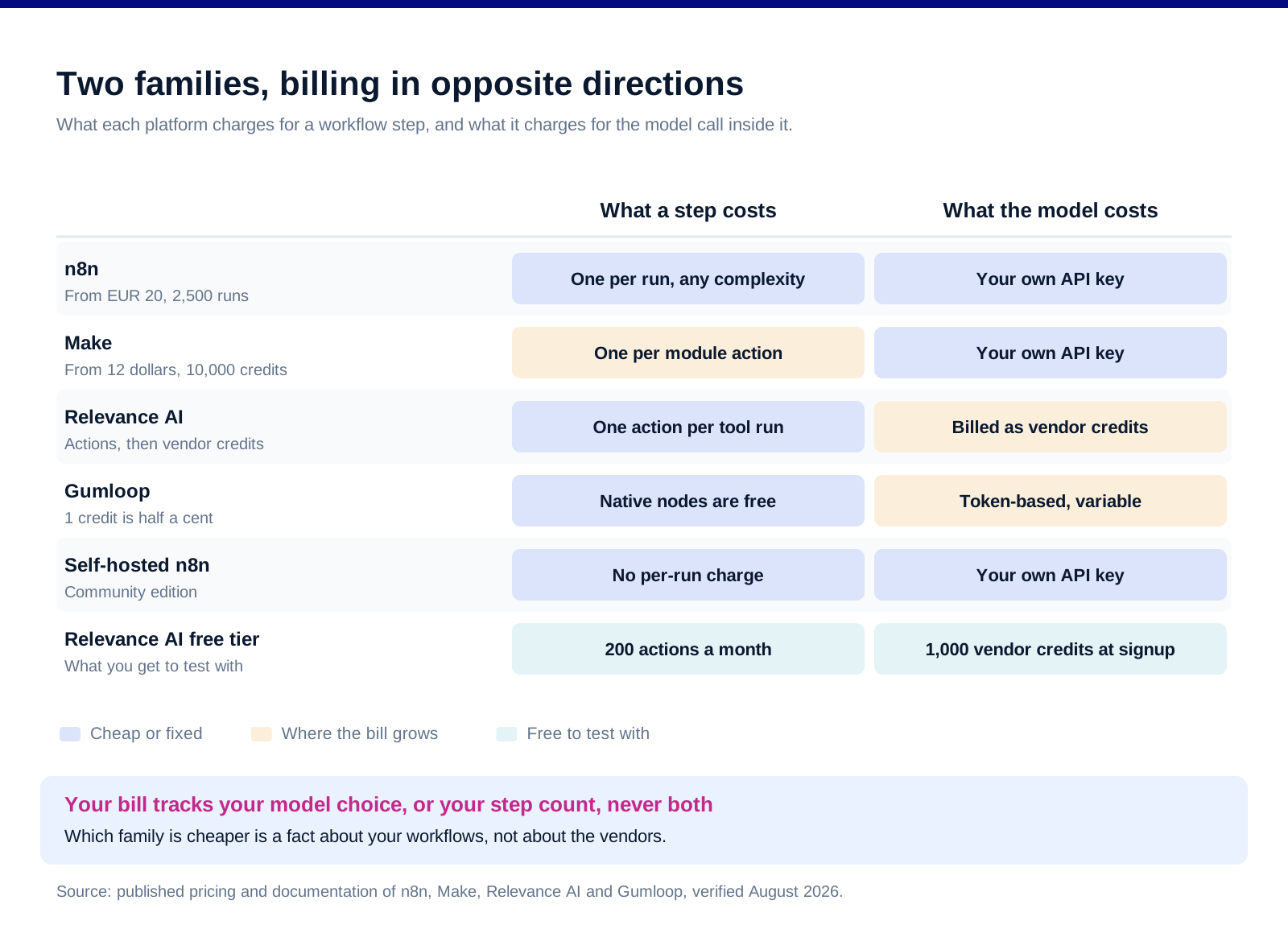
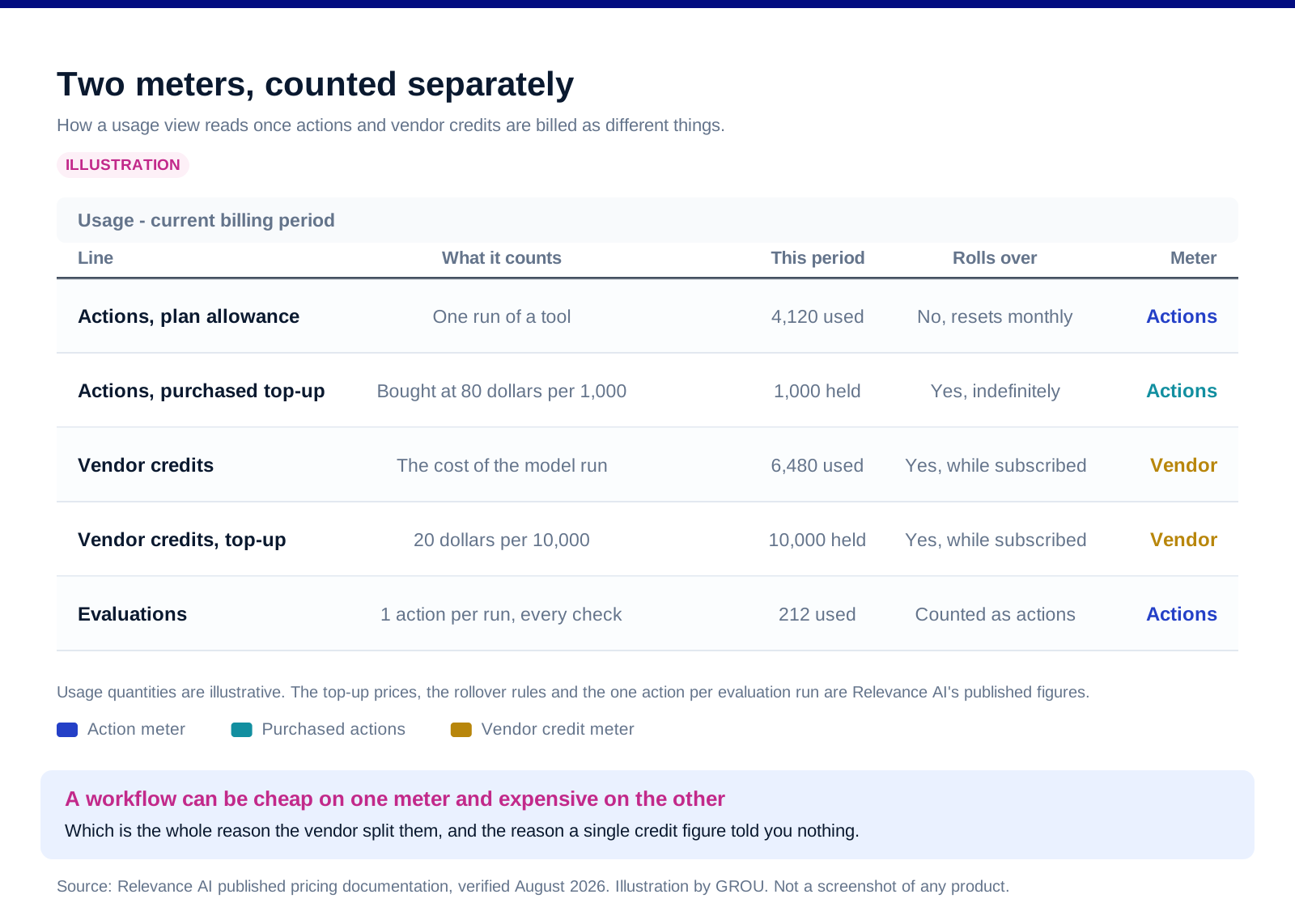
Relevance AI separated the two and said why. Its documentation defines an Action as "A single run of a Tool. Each time a tool runs, it counts as an action, whether it's a simple task like sending one email or running a complex workflow with many steps." Vendor Credits are separately defined as "The cost of running the AI model. This is the cost of the LLM, and the cost of the tools you use." The free tier is stated as 1,000 vendor credits at signup and 200 actions a month.
Read that Action definition twice, because it is generous. A workflow with many steps counts as one action. That is the opposite of how the general automation platforms count, and it is the single biggest structural difference in this comparison.
The company's own explanation of the change is worth quoting. In its post on splitting the credit system, Relevance AI says the old single-currency model meant "The simple question, 'How many credits will this workflow use?' became a source of friction. Instead of building freely, you were building spreadsheets." Its cost advice is the tell: "Want to save on AI costs? Use a smaller model for simple emails."
Which is the honest summary of this whole category. On the agent platforms, your bill is a function of which model you pick and how long your prompts are, not of how much you automate.
Gumloop publishes the exchange rate, which makes it checkable
One credit is five tenths of a cent. Gumloop's credits documentation states "1 credit = $0.005" and gives the conversion for model calls directly: "Divide the model cost by $0.005: a $0.03 model call is 6 credits."
And most of the workflow is free. The published node table puts "Most native nodes (text, logic, integrations)" at 0 credits, with AI nodes token-based, image generation at 30 credits, contact or company enrichment at 60 credits each, email validation at 10 and web scraper variants at 1 to 10.
Agent runs are billed across five components, which the documentation lists as chat and reasoning, tool calls at a minimum of 1 credit per successful call, compute at 5 credits per session-minute, an orchestration fee of 8 percent on those three, and any workflows the agent runs. It also warns plainly that "Agent credit costs are variable."
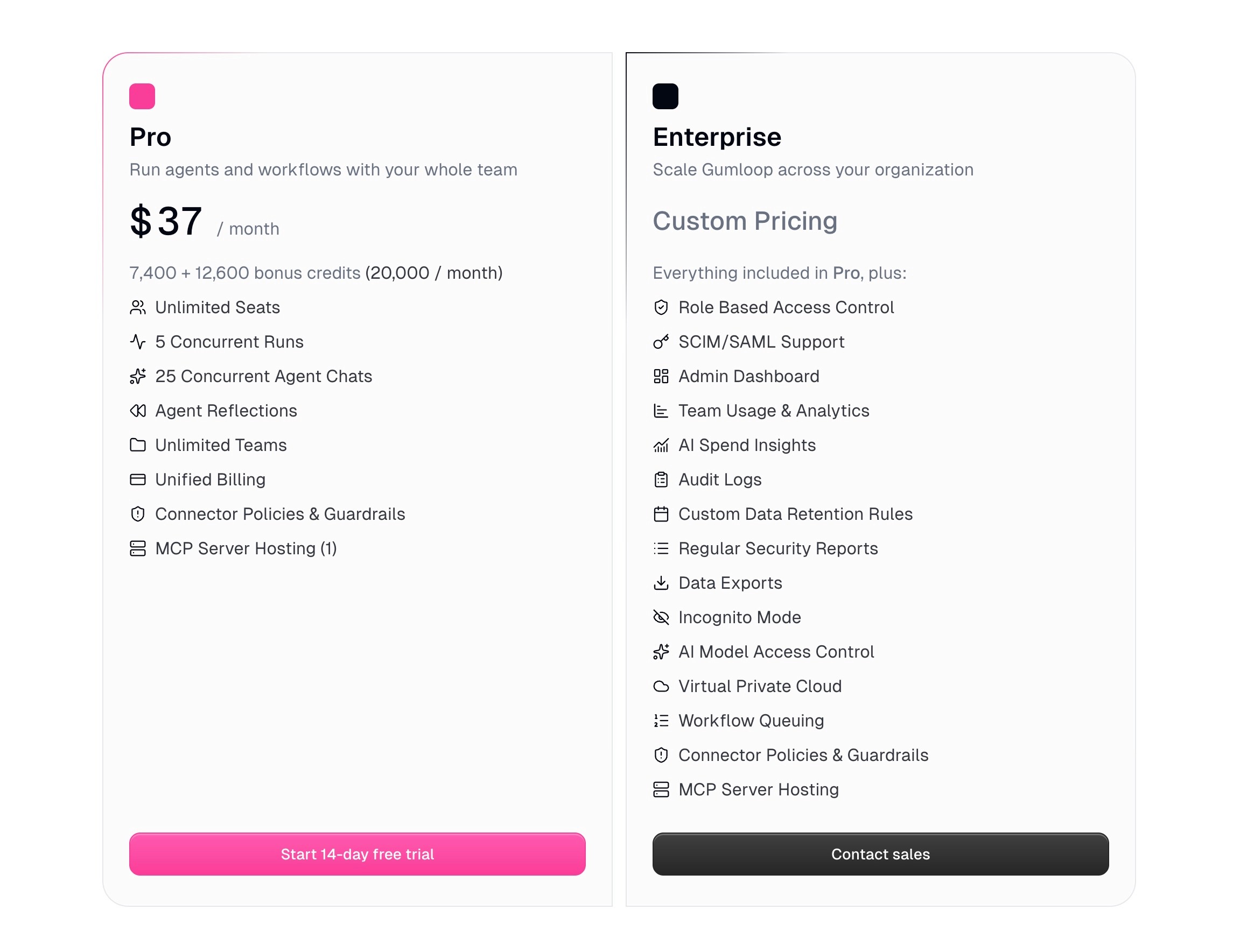
Now check the plan against the exchange rate, because it is a neat piece of arithmetic. Gumloop's pricing page lists Pro at "$37/ month" with "7,400 + 12,600 bonus credits (20,000 / month)". At the published rate, 7,400 credits is exactly $37.00. So the base allowance is priced at face value and the bonus is the discount. Whether that bonus persists is the question to ask before you build on it.
The automation platforms bill the other way
n8n charges per execution and ignores complexity. Its pricing lists Starter at "20 EUR/mo, billed annually" for "2.5K workflow executions with unlimited steps", Pro at "50 EUR/mo" for 10,000, and Business at "667 EUR/mo" for 40,000 with self-hosting. Every plan carries "unlimited users & workflows and every integration", and the pricing principle is stated as being based on "monthly workflow executions, regardless of complexity."
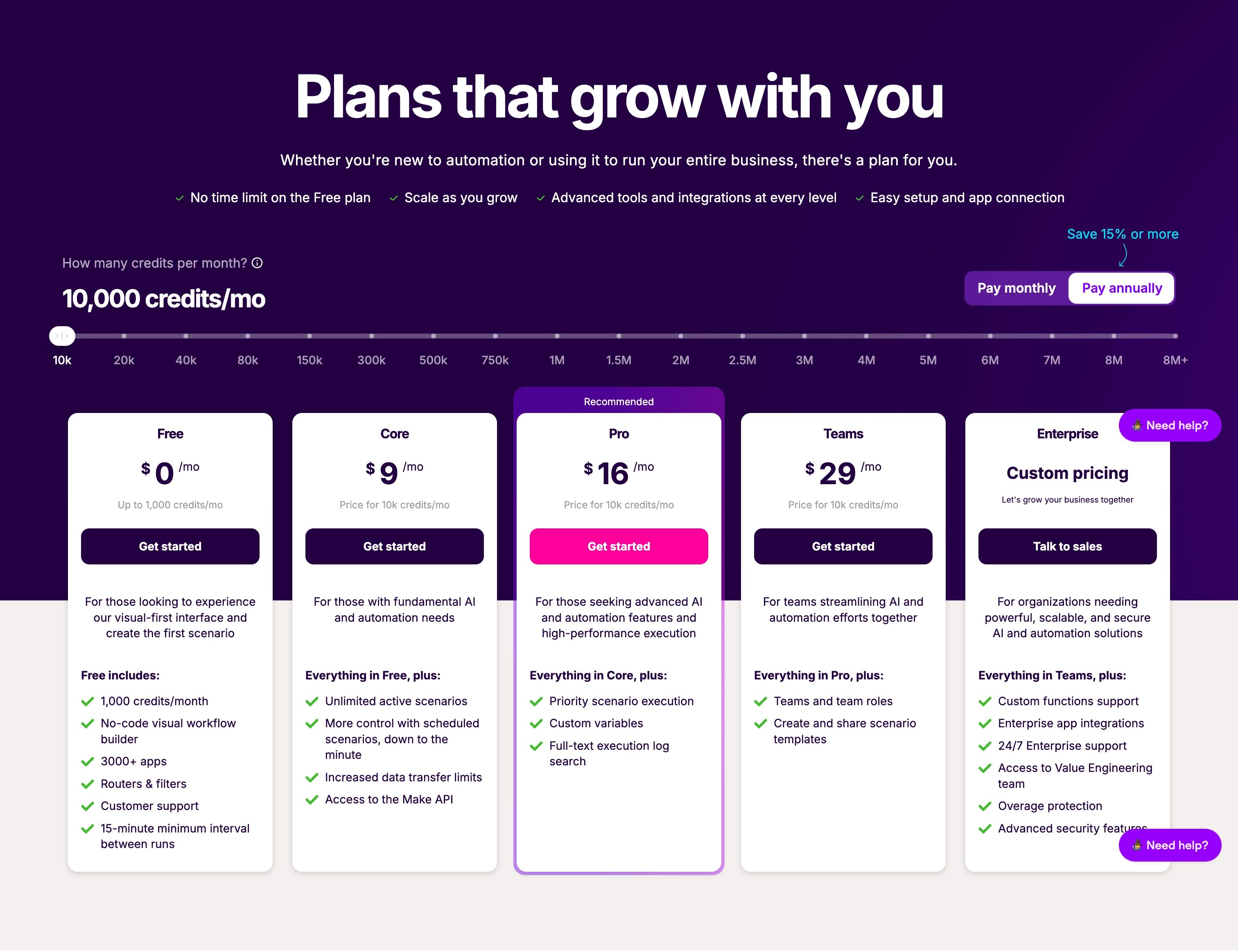
Make charges per module action, which is the opposite principle. Its pricing page states that "Each module action in your scenario, like adding a Google Sheet row or fetching Gmail account data, counts as one credit", and that "as of August 27, credits are the billing unit in Make." Free is $0 with up to 1,000 credits a month, Core $12, Pro $21 and Teams $38, all three of which carry 10,000 credits a month.
Note what that last sentence means. On Make, the three main paid tiers include the same volume. You are paying the difference for features, not for capacity, which is worth knowing before you upgrade expecting headroom.
And on both of these, the model is your problem. You bring your own API key, so the LLM cost lands on your provider bill rather than your automation bill. That is cheaper at scale and it is one more account to watch.
Work out your shape before you compare a price
Count the steps in a typical run. Not the workflow you demoed, the one that will run ten thousand times. Enrichment pipelines are step-heavy: fetch, parse, branch, write, notify. That is five module actions on Make and one execution on n8n.
Count the model calls in the same run. A single classification call is very different from an agent that reasons across several turns and calls three tools. The same discipline applies to enrichment credits, which we covered in our account research workflow piece.
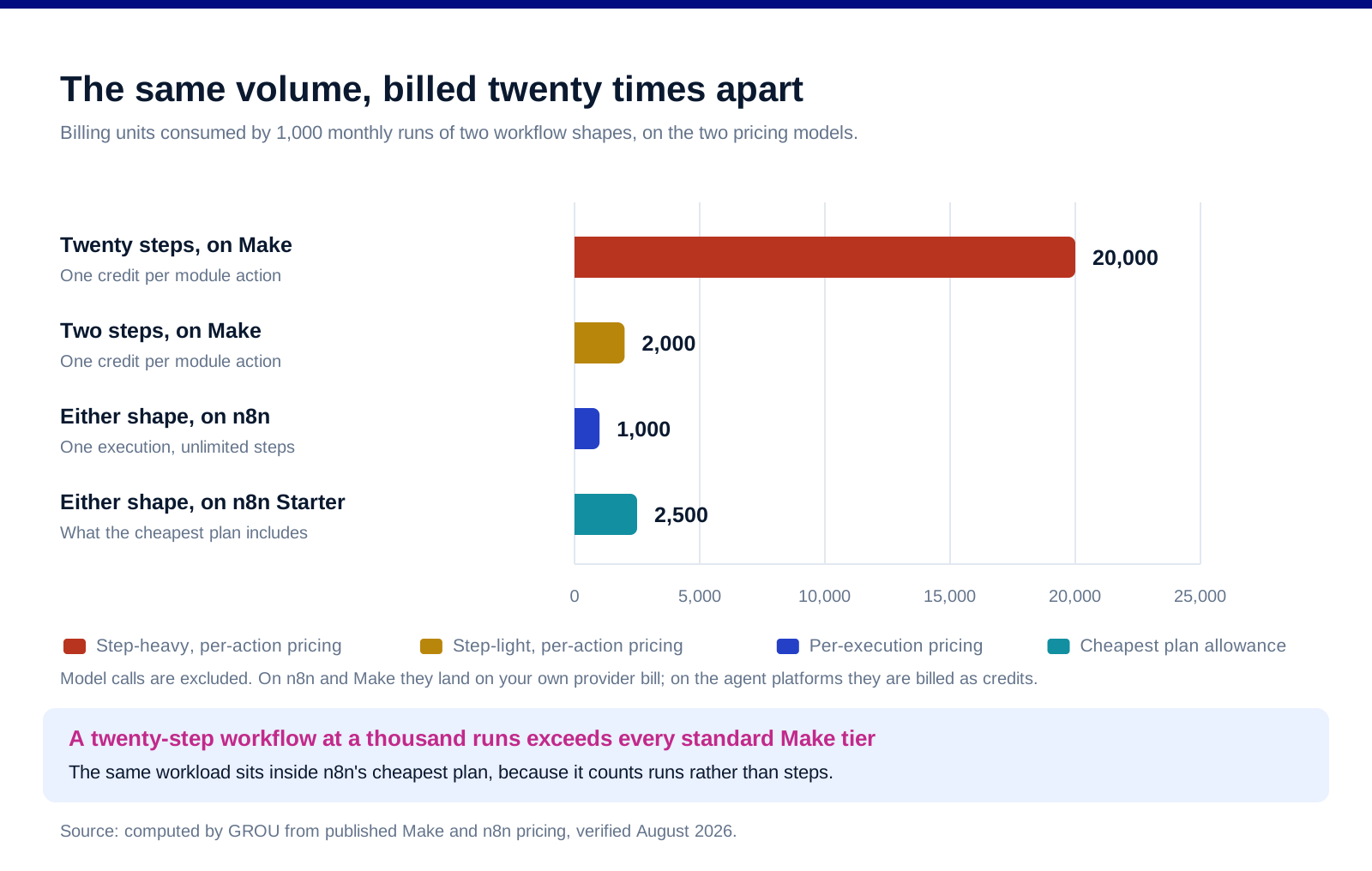
Multiply by real monthly volume. This is where most comparisons stop being about the tool. A twenty-step, one-call workflow at 1,000 runs a month is 20,000 credits on Make, which is above every standard tier, and 1,000 executions on n8n, which sits inside the cheapest plan.
Then reverse it. A two-step workflow with ten model calls, at the same volume, is 2,000 credits on Make and 1,000 executions on n8n, both trivial, while the model cost lands wherever your agent platform bills it.
The rule that falls out. Step-heavy and AI-light belongs on n8n. AI-heavy and step-light belongs wherever the model pass-through is cheapest and the building experience is best. Nobody publishes this because it makes the answer depend on the reader.
The three structural questions price does not answer
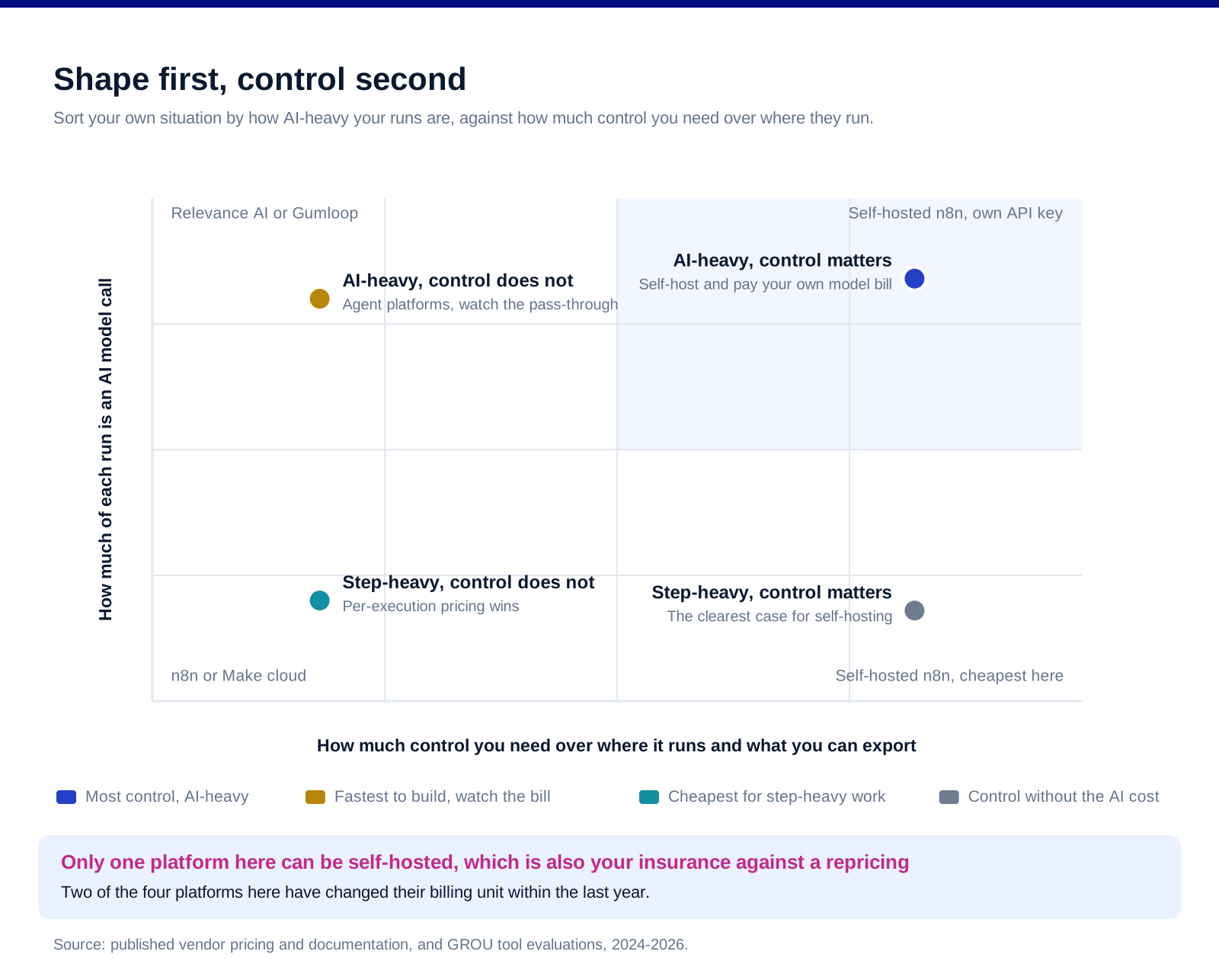
Can you self-host it? n8n is the only platform here that offers a self-hosted community edition, and its Business plan is explicitly self-hosted with a licence key. That matters if your data cannot leave your infrastructure, and it matters again the day the vendor reprices.
Can you export the logic? An agent platform sitting between your CRM and your outbound holds the rules of your business, which makes it a load-bearing part of your revops stack rather than a utility. Ask before you build what an export looks like and whether it is readable by anything other than the vendor.
Does the price move with your model choice? On the agent platforms, yes, and Relevance AI says so directly. That is not a criticism, it is a planning fact: your bill will rise when you switch to a better model, in a way it never does on an execution-priced platform.
This category reprices frequently, and both of these have done it recently. Relevance AI's split took effect for existing customers from the first billing cycle after 1 December 2025, and Make's pricing page states that "as of August 27, credits are the billing unit in Make" without naming the year. Build on the assumption that the rate card you sign is not the rate card you renew on.
What we do not publish here
A performance or reliability comparison. We have not run matched workflows across all five under equal conditions, and every published comparison of this kind we have seen was produced by one of the platforms involved. Two of the results in our own search for this article were competitor comparison pages hosted by vendors in the set.
An overall ranking. The billing units differ by design, so a single ordering would be misleading by construction.
Model pass-through cost estimates. They depend on your prompts, your model and your token volume, none of which we know.
Lindy pricing. Its pricing page did not return to us and we are not going to estimate it.
Any claim about which platform builds better agents. That is a two-week trial question, not an article question.
FAQ
What is the best Relevance AI alternative?
It depends on the shape of your workflows rather than on the vendor. If your runs are step-heavy and use few model calls, n8n is likely cheapest because it charges per execution regardless of complexity. If your runs are AI-heavy, the comparison is really about model pass-through cost, and Gumloop publishes the clearest conversion at 1 credit to half a cent.
Why do AI agent platforms charge two different kinds of credit?
Because the platform cost and the model cost move independently. Relevance AI separates Actions, a single run of a tool, from Vendor Credits, which it defines as the cost of running the AI model. It is more transparent than a single blended currency, and it means your bill tracks your model choice.
Is n8n cheaper than Make?
For step-heavy workflows, usually yes, because n8n counts executions with unlimited steps while Make counts each module action as a credit. A twenty-step workflow run a thousand times is 1,000 units on n8n and 20,000 on Make. For simple two-step workflows the difference largely disappears.
Can you self-host any of these?
n8n, which offers a self-hosted community edition and a self-hosted Business plan with a licence key. That is the relevant answer if data residency matters or if you want insurance against a repricing.
How do you compare credits across these platforms?
You cannot, directly, because a credit means a different thing on each one. Convert everything into your own units first: steps per run, model calls per run, and runs per month. Then price each platform against those three numbers.
How stable is pricing in this category?
Not very. Relevance AI restructured its credit system with effect from the first billing cycle after 1 December 2025, and Make's pricing page states that credits became its billing unit as of 27 August. Assume the terms will change and check what an export of your workflows looks like before you commit.
Bottom line
Do not start from the prices, because the prices are denominated in units that do not mean the same thing. Start from your own workflows: how many steps a typical run executes, how many model calls it makes, and how often it runs. Those three numbers tell you which family you belong in, because the execution-priced platforms are cheap for step-heavy work and the agent platforms are cheap for step-light work and then bill you for the intelligence. Ask what an export looks like before you put your business rules inside any of them, check whether self-hosting is available if that matters to you, and price everything on the assumption that this category will reprice again, because two of the four platforms here have changed their billing unit within the last year.
Want the pipeline built rather than the stack assembled? Book a call with GROU. We run lead generation and outbound inside B2B revenue engines across verticals.
We are GROU, a B2B pipeline agency that runs lead generation, outbound, and LinkedIn content for clients across manufacturing, fintech, iGaming, software, and professional services. Some links in this article are affiliate links, including Relevance AI. Every price and definition quoted is taken from each vendor's own published pages and verified in August 2026. This category reprices often, so check before you buy.
There are two kinds of tool on this list and they bill in opposite directions. One family charges you for steps and lets you bring your own model. The other charges almost nothing for steps and bills you for the model.
Which means the cheapest option is not a property of the vendor. It is a property of your workflows: how many steps they run, and how much of each run is an AI call. Get that the wrong way round and you will pick the tool that is worst for exactly the thing you are building.
TL;DR
Relevance AI now splits its bill in two, and its own documentation is unusually clear about why: an Action is "A single run of a Tool", while Vendor Credits are "The cost of running the AI model." Gumloop does the same thing more explicitly still, charging 0 credits for "Most native nodes (text, logic, integrations)" and token-based variable amounts for AI nodes, at a published conversion of "1 credit = $0.005". Against that, n8n prices "based on monthly workflow executions, regardless of complexity", with plans from EUR 20 a month for 2,500 executions and unlimited steps, and Make charges per module action, where "Each module action in your scenario, like adding a Google Sheet row or fetching Gmail account data, counts as one credit", from $12 a month for 10,000. So a twenty-step workflow with one AI call is cheap on n8n and expensive on Make. A two-step workflow with ten AI calls is the reverse. Count your steps and your model calls before you compare a single price, and note that n8n is the only one here you can self-host.
The split that decides everything
Relevance AI separated the two and said why. Its documentation defines an Action as "A single run of a Tool. Each time a tool runs, it counts as an action, whether it's a simple task like sending one email or running a complex workflow with many steps." Vendor Credits are separately defined as "The cost of running the AI model. This is the cost of the LLM, and the cost of the tools you use." The free tier is stated as 1,000 vendor credits at signup and 200 actions a month.
Read that Action definition twice, because it is generous. A workflow with many steps counts as one action. That is the opposite of how the general automation platforms count, and it is the single biggest structural difference in this comparison.
The company's own explanation of the change is worth quoting. In its post on splitting the credit system, Relevance AI says the old single-currency model meant "The simple question, 'How many credits will this workflow use?' became a source of friction. Instead of building freely, you were building spreadsheets." Its cost advice is the tell: "Want to save on AI costs? Use a smaller model for simple emails."
Which is the honest summary of this whole category. On the agent platforms, your bill is a function of which model you pick and how long your prompts are, not of how much you automate.
Gumloop publishes the exchange rate, which makes it checkable
One credit is five tenths of a cent. Gumloop's credits documentation states "1 credit = $0.005" and gives the conversion for model calls directly: "Divide the model cost by $0.005: a $0.03 model call is 6 credits."
And most of the workflow is free. The published node table puts "Most native nodes (text, logic, integrations)" at 0 credits, with AI nodes token-based, image generation at 30 credits, contact or company enrichment at 60 credits each, email validation at 10 and web scraper variants at 1 to 10.
Agent runs are billed across five components, which the documentation lists as chat and reasoning, tool calls at a minimum of 1 credit per successful call, compute at 5 credits per session-minute, an orchestration fee of 8 percent on those three, and any workflows the agent runs. It also warns plainly that "Agent credit costs are variable."
Now check the plan against the exchange rate, because it is a neat piece of arithmetic. Gumloop's pricing page lists Pro at "$37/ month" with "7,400 + 12,600 bonus credits (20,000 / month)". At the published rate, 7,400 credits is exactly $37.00. So the base allowance is priced at face value and the bonus is the discount. Whether that bonus persists is the question to ask before you build on it.
The automation platforms bill the other way
n8n charges per execution and ignores complexity. Its pricing lists Starter at "20 EUR/mo, billed annually" for "2.5K workflow executions with unlimited steps", Pro at "50 EUR/mo" for 10,000, and Business at "667 EUR/mo" for 40,000 with self-hosting. Every plan carries "unlimited users & workflows and every integration", and the pricing principle is stated as being based on "monthly workflow executions, regardless of complexity."
Make charges per module action, which is the opposite principle. Its pricing page states that "Each module action in your scenario, like adding a Google Sheet row or fetching Gmail account data, counts as one credit", and that "as of August 27, credits are the billing unit in Make." Free is $0 with up to 1,000 credits a month, Core $12, Pro $21 and Teams $38, all three of which carry 10,000 credits a month.
Note what that last sentence means. On Make, the three main paid tiers include the same volume. You are paying the difference for features, not for capacity, which is worth knowing before you upgrade expecting headroom.
And on both of these, the model is your problem. You bring your own API key, so the LLM cost lands on your provider bill rather than your automation bill. That is cheaper at scale and it is one more account to watch.
Work out your shape before you compare a price
Count the steps in a typical run. Not the workflow you demoed, the one that will run ten thousand times. Enrichment pipelines are step-heavy: fetch, parse, branch, write, notify. That is five module actions on Make and one execution on n8n.
Count the model calls in the same run. A single classification call is very different from an agent that reasons across several turns and calls three tools. The same discipline applies to enrichment credits, which we covered in our account research workflow piece.
Multiply by real monthly volume. This is where most comparisons stop being about the tool. A twenty-step, one-call workflow at 1,000 runs a month is 20,000 credits on Make, which is above every standard tier, and 1,000 executions on n8n, which sits inside the cheapest plan.
Then reverse it. A two-step workflow with ten model calls, at the same volume, is 2,000 credits on Make and 1,000 executions on n8n, both trivial, while the model cost lands wherever your agent platform bills it.
The rule that falls out. Step-heavy and AI-light belongs on n8n. AI-heavy and step-light belongs wherever the model pass-through is cheapest and the building experience is best. Nobody publishes this because it makes the answer depend on the reader.
The three structural questions price does not answer
Can you self-host it? n8n is the only platform here that offers a self-hosted community edition, and its Business plan is explicitly self-hosted with a licence key. That matters if your data cannot leave your infrastructure, and it matters again the day the vendor reprices.
Can you export the logic? An agent platform sitting between your CRM and your outbound holds the rules of your business, which makes it a load-bearing part of your revops stack rather than a utility. Ask before you build what an export looks like and whether it is readable by anything other than the vendor.
Does the price move with your model choice? On the agent platforms, yes, and Relevance AI says so directly. That is not a criticism, it is a planning fact: your bill will rise when you switch to a better model, in a way it never does on an execution-priced platform.
This category reprices frequently, and both of these have done it recently. Relevance AI's split took effect for existing customers from the first billing cycle after 1 December 2025, and Make's pricing page states that "as of August 27, credits are the billing unit in Make" without naming the year. Build on the assumption that the rate card you sign is not the rate card you renew on.
What we do not publish here
A performance or reliability comparison. We have not run matched workflows across all five under equal conditions, and every published comparison of this kind we have seen was produced by one of the platforms involved. Two of the results in our own search for this article were competitor comparison pages hosted by vendors in the set.
An overall ranking. The billing units differ by design, so a single ordering would be misleading by construction.
Model pass-through cost estimates. They depend on your prompts, your model and your token volume, none of which we know.
Lindy pricing. Its pricing page did not return to us and we are not going to estimate it.
Any claim about which platform builds better agents. That is a two-week trial question, not an article question.
FAQ
What is the best Relevance AI alternative?
It depends on the shape of your workflows rather than on the vendor. If your runs are step-heavy and use few model calls, n8n is likely cheapest because it charges per execution regardless of complexity. If your runs are AI-heavy, the comparison is really about model pass-through cost, and Gumloop publishes the clearest conversion at 1 credit to half a cent.
Why do AI agent platforms charge two different kinds of credit?
Because the platform cost and the model cost move independently. Relevance AI separates Actions, a single run of a tool, from Vendor Credits, which it defines as the cost of running the AI model. It is more transparent than a single blended currency, and it means your bill tracks your model choice.
Is n8n cheaper than Make?
For step-heavy workflows, usually yes, because n8n counts executions with unlimited steps while Make counts each module action as a credit. A twenty-step workflow run a thousand times is 1,000 units on n8n and 20,000 on Make. For simple two-step workflows the difference largely disappears.
Can you self-host any of these?
n8n, which offers a self-hosted community edition and a self-hosted Business plan with a licence key. That is the relevant answer if data residency matters or if you want insurance against a repricing.
How do you compare credits across these platforms?
You cannot, directly, because a credit means a different thing on each one. Convert everything into your own units first: steps per run, model calls per run, and runs per month. Then price each platform against those three numbers.
How stable is pricing in this category?
Not very. Relevance AI restructured its credit system with effect from the first billing cycle after 1 December 2025, and Make's pricing page states that credits became its billing unit as of 27 August. Assume the terms will change and check what an export of your workflows looks like before you commit.
Bottom line
Do not start from the prices, because the prices are denominated in units that do not mean the same thing. Start from your own workflows: how many steps a typical run executes, how many model calls it makes, and how often it runs. Those three numbers tell you which family you belong in, because the execution-priced platforms are cheap for step-heavy work and the agent platforms are cheap for step-light work and then bill you for the intelligence. Ask what an export looks like before you put your business rules inside any of them, check whether self-hosting is available if that matters to you, and price everything on the assumption that this category will reprice again, because two of the four platforms here have changed their billing unit within the last year.
Want the pipeline built rather than the stack assembled? Book a call with GROU. We run lead generation and outbound inside B2B revenue engines across verticals.
We are GROU, a B2B pipeline agency that runs lead generation, outbound, and LinkedIn content for clients across manufacturing, fintech, iGaming, software, and professional services. Some links in this article are affiliate links, including Relevance AI. Every price and definition quoted is taken from each vendor's own published pages and verified in August 2026. This category reprices often, so check before you buy.
There are two kinds of tool on this list and they bill in opposite directions. One family charges you for steps and lets you bring your own model. The other charges almost nothing for steps and bills you for the model.
Which means the cheapest option is not a property of the vendor. It is a property of your workflows: how many steps they run, and how much of each run is an AI call. Get that the wrong way round and you will pick the tool that is worst for exactly the thing you are building.
TL;DR
Relevance AI now splits its bill in two, and its own documentation is unusually clear about why: an Action is "A single run of a Tool", while Vendor Credits are "The cost of running the AI model." Gumloop does the same thing more explicitly still, charging 0 credits for "Most native nodes (text, logic, integrations)" and token-based variable amounts for AI nodes, at a published conversion of "1 credit = $0.005". Against that, n8n prices "based on monthly workflow executions, regardless of complexity", with plans from EUR 20 a month for 2,500 executions and unlimited steps, and Make charges per module action, where "Each module action in your scenario, like adding a Google Sheet row or fetching Gmail account data, counts as one credit", from $12 a month for 10,000. So a twenty-step workflow with one AI call is cheap on n8n and expensive on Make. A two-step workflow with ten AI calls is the reverse. Count your steps and your model calls before you compare a single price, and note that n8n is the only one here you can self-host.
The split that decides everything
Relevance AI separated the two and said why. Its documentation defines an Action as "A single run of a Tool. Each time a tool runs, it counts as an action, whether it's a simple task like sending one email or running a complex workflow with many steps." Vendor Credits are separately defined as "The cost of running the AI model. This is the cost of the LLM, and the cost of the tools you use." The free tier is stated as 1,000 vendor credits at signup and 200 actions a month.
Read that Action definition twice, because it is generous. A workflow with many steps counts as one action. That is the opposite of how the general automation platforms count, and it is the single biggest structural difference in this comparison.
The company's own explanation of the change is worth quoting. In its post on splitting the credit system, Relevance AI says the old single-currency model meant "The simple question, 'How many credits will this workflow use?' became a source of friction. Instead of building freely, you were building spreadsheets." Its cost advice is the tell: "Want to save on AI costs? Use a smaller model for simple emails."
Which is the honest summary of this whole category. On the agent platforms, your bill is a function of which model you pick and how long your prompts are, not of how much you automate.
Gumloop publishes the exchange rate, which makes it checkable
One credit is five tenths of a cent. Gumloop's credits documentation states "1 credit = $0.005" and gives the conversion for model calls directly: "Divide the model cost by $0.005: a $0.03 model call is 6 credits."
And most of the workflow is free. The published node table puts "Most native nodes (text, logic, integrations)" at 0 credits, with AI nodes token-based, image generation at 30 credits, contact or company enrichment at 60 credits each, email validation at 10 and web scraper variants at 1 to 10.
Agent runs are billed across five components, which the documentation lists as chat and reasoning, tool calls at a minimum of 1 credit per successful call, compute at 5 credits per session-minute, an orchestration fee of 8 percent on those three, and any workflows the agent runs. It also warns plainly that "Agent credit costs are variable."
Now check the plan against the exchange rate, because it is a neat piece of arithmetic. Gumloop's pricing page lists Pro at "$37/ month" with "7,400 + 12,600 bonus credits (20,000 / month)". At the published rate, 7,400 credits is exactly $37.00. So the base allowance is priced at face value and the bonus is the discount. Whether that bonus persists is the question to ask before you build on it.
The automation platforms bill the other way
n8n charges per execution and ignores complexity. Its pricing lists Starter at "20 EUR/mo, billed annually" for "2.5K workflow executions with unlimited steps", Pro at "50 EUR/mo" for 10,000, and Business at "667 EUR/mo" for 40,000 with self-hosting. Every plan carries "unlimited users & workflows and every integration", and the pricing principle is stated as being based on "monthly workflow executions, regardless of complexity."
Make charges per module action, which is the opposite principle. Its pricing page states that "Each module action in your scenario, like adding a Google Sheet row or fetching Gmail account data, counts as one credit", and that "as of August 27, credits are the billing unit in Make." Free is $0 with up to 1,000 credits a month, Core $12, Pro $21 and Teams $38, all three of which carry 10,000 credits a month.
Note what that last sentence means. On Make, the three main paid tiers include the same volume. You are paying the difference for features, not for capacity, which is worth knowing before you upgrade expecting headroom.
And on both of these, the model is your problem. You bring your own API key, so the LLM cost lands on your provider bill rather than your automation bill. That is cheaper at scale and it is one more account to watch.
Work out your shape before you compare a price
Count the steps in a typical run. Not the workflow you demoed, the one that will run ten thousand times. Enrichment pipelines are step-heavy: fetch, parse, branch, write, notify. That is five module actions on Make and one execution on n8n.
Count the model calls in the same run. A single classification call is very different from an agent that reasons across several turns and calls three tools. The same discipline applies to enrichment credits, which we covered in our account research workflow piece.
Multiply by real monthly volume. This is where most comparisons stop being about the tool. A twenty-step, one-call workflow at 1,000 runs a month is 20,000 credits on Make, which is above every standard tier, and 1,000 executions on n8n, which sits inside the cheapest plan.
Then reverse it. A two-step workflow with ten model calls, at the same volume, is 2,000 credits on Make and 1,000 executions on n8n, both trivial, while the model cost lands wherever your agent platform bills it.
The rule that falls out. Step-heavy and AI-light belongs on n8n. AI-heavy and step-light belongs wherever the model pass-through is cheapest and the building experience is best. Nobody publishes this because it makes the answer depend on the reader.
The three structural questions price does not answer
Can you self-host it? n8n is the only platform here that offers a self-hosted community edition, and its Business plan is explicitly self-hosted with a licence key. That matters if your data cannot leave your infrastructure, and it matters again the day the vendor reprices.
Can you export the logic? An agent platform sitting between your CRM and your outbound holds the rules of your business, which makes it a load-bearing part of your revops stack rather than a utility. Ask before you build what an export looks like and whether it is readable by anything other than the vendor.
Does the price move with your model choice? On the agent platforms, yes, and Relevance AI says so directly. That is not a criticism, it is a planning fact: your bill will rise when you switch to a better model, in a way it never does on an execution-priced platform.
This category reprices frequently, and both of these have done it recently. Relevance AI's split took effect for existing customers from the first billing cycle after 1 December 2025, and Make's pricing page states that "as of August 27, credits are the billing unit in Make" without naming the year. Build on the assumption that the rate card you sign is not the rate card you renew on.
What we do not publish here
A performance or reliability comparison. We have not run matched workflows across all five under equal conditions, and every published comparison of this kind we have seen was produced by one of the platforms involved. Two of the results in our own search for this article were competitor comparison pages hosted by vendors in the set.
An overall ranking. The billing units differ by design, so a single ordering would be misleading by construction.
Model pass-through cost estimates. They depend on your prompts, your model and your token volume, none of which we know.
Lindy pricing. Its pricing page did not return to us and we are not going to estimate it.
Any claim about which platform builds better agents. That is a two-week trial question, not an article question.
FAQ
What is the best Relevance AI alternative?
It depends on the shape of your workflows rather than on the vendor. If your runs are step-heavy and use few model calls, n8n is likely cheapest because it charges per execution regardless of complexity. If your runs are AI-heavy, the comparison is really about model pass-through cost, and Gumloop publishes the clearest conversion at 1 credit to half a cent.
Why do AI agent platforms charge two different kinds of credit?
Because the platform cost and the model cost move independently. Relevance AI separates Actions, a single run of a tool, from Vendor Credits, which it defines as the cost of running the AI model. It is more transparent than a single blended currency, and it means your bill tracks your model choice.
Is n8n cheaper than Make?
For step-heavy workflows, usually yes, because n8n counts executions with unlimited steps while Make counts each module action as a credit. A twenty-step workflow run a thousand times is 1,000 units on n8n and 20,000 on Make. For simple two-step workflows the difference largely disappears.
Can you self-host any of these?
n8n, which offers a self-hosted community edition and a self-hosted Business plan with a licence key. That is the relevant answer if data residency matters or if you want insurance against a repricing.
How do you compare credits across these platforms?
You cannot, directly, because a credit means a different thing on each one. Convert everything into your own units first: steps per run, model calls per run, and runs per month. Then price each platform against those three numbers.
How stable is pricing in this category?
Not very. Relevance AI restructured its credit system with effect from the first billing cycle after 1 December 2025, and Make's pricing page states that credits became its billing unit as of 27 August. Assume the terms will change and check what an export of your workflows looks like before you commit.
Bottom line
Do not start from the prices, because the prices are denominated in units that do not mean the same thing. Start from your own workflows: how many steps a typical run executes, how many model calls it makes, and how often it runs. Those three numbers tell you which family you belong in, because the execution-priced platforms are cheap for step-heavy work and the agent platforms are cheap for step-light work and then bill you for the intelligence. Ask what an export looks like before you put your business rules inside any of them, check whether self-hosting is available if that matters to you, and price everything on the assumption that this category will reprice again, because two of the four platforms here have changed their billing unit within the last year.
Want the pipeline built rather than the stack assembled? Book a call with GROU. We run lead generation and outbound inside B2B revenue engines across verticals.
We are GROU, a B2B pipeline agency that runs lead generation, outbound, and LinkedIn content for clients across manufacturing, fintech, iGaming, software, and professional services. Some links in this article are affiliate links, including Relevance AI. Every price and definition quoted is taken from each vendor's own published pages and verified in August 2026. This category reprices often, so check before you buy.

Pipeline OS Newsletter
Build qualified pipeline
Get weekly tactics to generate demand, improve lead quality, and book more meetings.





Trusted by industry leaders
Trusted by industry leaders
Trusted by industry leaders
Ready to build qualified pipeline?
Ready to build qualified pipeline?
Ready to build qualified pipeline?
Book a call to see if we're the right fit, or take the 2-minute quiz to get a clear starting point.
Book a call to see if we're the right fit, or take the 2-minute quiz to get a clear starting point.
Book a call to see if we're the right fit, or take the 2-minute quiz to get a clear starting point.
" height="30.21639343089746px" id="hfGbXmQR2" width="30.216393430897455px"/></svg>)
Copyright © 2026 – All Right Reserved
Copyright © 2026 – All Right Reserved
Copyright © 2026 – All Right Reserved