%22%3E%3C/path%3E%3Cpath d=%22M 63.072 7.554 C 62.258 8.022 61.577 8.689 61.092 9.493 L 61.092 7.076 L 57.158 7.076 L 57.158 22.64 L 61.089 22.64 L 61.089 14.888 C 61.089 13.446 61.403 12.434 62.03 11.853 C 62.818 11.218 63.818 10.907 64.826 10.982 L 65.868 10.982 L 65.868 6.851 C 64.891 6.834 63.926 7.076 63.073 7.554 Z%22 fill=%22rgb(17,17,17)%22%3E%3C/path%3E%3Cpath d=%22M 78.916 7.82 C 76.363 6.49 73.321 6.49 70.768 7.82 C 69.562 8.473 68.564 9.451 67.888 10.644 C 67.167 11.931 66.803 13.387 66.834 14.862 C 66.804 16.332 67.157 17.785 67.86 19.077 C 68.515 20.267 69.494 21.246 70.684 21.901 C 71.924 22.576 73.318 22.92 74.73 22.898 C 76.164 22.918 77.58 22.575 78.846 21.901 C 80.062 21.247 81.073 20.27 81.768 19.077 C 82.506 17.797 82.88 16.339 82.85 14.862 C 82.88 13.389 82.517 11.934 81.797 10.647 C 81.12 9.455 80.122 8.477 78.917 7.824 M 78.803 14.862 C 78.829 15.739 78.636 16.608 78.241 17.391 C 77.903 18.046 77.38 18.588 76.738 18.95 C 76.124 19.293 75.432 19.472 74.729 19.47 C 73.668 19.497 72.648 19.061 71.934 18.276 C 71.139 17.323 70.741 16.1 70.823 14.862 C 70.741 13.62 71.149 12.395 71.959 11.45 C 72.687 10.667 73.715 10.233 74.783 10.256 C 75.859 10.236 76.894 10.67 77.635 11.45 C 78.464 12.387 78.884 13.616 78.801 14.864%22 fill=%22rgb(17,17,17)%22%3E%3C/path%3E%3Cpath d=%22M 95.906 7.076 L 95.906 15.646 C 95.975 16.68 95.643 17.701 94.979 18.498 C 94.311 19.184 93.379 19.547 92.422 19.495 C 91.475 19.544 90.553 19.18 89.894 18.498 C 89.23 17.701 88.898 16.68 88.967 15.646 L 88.967 7.076 L 85.033 7.076 L 85.033 16.207 C 85 17.449 85.275 18.68 85.834 19.79 C 86.327 20.75 87.095 21.542 88.039 22.065 C 89.033 22.594 90.145 22.861 91.271 22.838 C 92.188 22.847 93.095 22.65 93.926 22.263 C 94.708 21.905 95.388 21.36 95.906 20.675 L 95.906 22.645 L 99.865 22.645 L 99.865 7.076 Z%22 fill=%22rgb(17,17,17)%22%3E%3C/path%3E%3Cpath d=%22M 4.513 15.626 C 4.511 10.815 7.606 6.549 12.181 5.059 C 16.756 3.57 21.77 5.195 24.601 9.086 L 27.816 5.87 C 24.074 1.186 17.981 -0.943 12.137 0.393 C 6.292 1.728 1.728 6.292 0.393 12.137 C -0.943 17.981 1.186 24.074 5.87 27.816 L 9.085 24.601 C 6.214 22.512 4.515 19.177 4.513 15.626%22 fill=%22rgb(32,62,235)%22%3E%3C/path%3E%3Cpath d=%22M 17.114 14.343 L 13.354 18.01 L 13.354 18.026 L 21.071 18.026 L 11.412 27.609 L 17.389 27.609 L 23.999 21.081 L 23.999 28.316 L 24.005 28.316 L 27.967 24.393 L 27.967 14.343 Z%22 fill=%22rgb(32,62,235)%22%3E%3C/path%3E%3C/g%3E%3C/svg%3E) ×
 ××
›
›
›
›
How to get sales leads worth your reps’ time
How to get sales leads worth your reps’ time
How to get sales leads worth your reps’ time
How to get sales leads worth your reps’ time
How to get sales leads worth your reps’ time
How to get sales leads worth your reps’ time

Author
Aljaz Peklaj

Adding more lead sources is bad advice when your CRM already has names, forms, and replies that sales won't work. To get sales leads worth pursuing, fix the account selection and handoff before buying more volume.
Score the motion on qualified meetings per 100 accounts.
Rebuild the list around the buying group.
Run three distinct email touches paired with LinkedIn.
Route a fit reply inside five minutes.
Table of Contents
Benchmarks that show a lead is worth working
Lead motion benchmarks
Signal | Reference point | Source |
|---|---|---|
Three cold-email rounds | 9% average reply rate | |
First follow-up | Reply rate up 49% | HubSpot |
Highest-response cold channel | Social media, named by 42% of sales professionals | HubSpot compiled research |
Unit of success | Qualified meetings and pipeline per 100 targeted accounts | Editorial position |
Fields to report | Delivery, bounce, positive reply, meeting booked, meeting held, opportunity, revenue, split by segment | Editorial position |
A lead program is working when qualified meetings and pipeline per 100 targeted accounts improve. Database growth doesn't pass that test. Neither does a busy inbox filled with referrals to the wrong department, polite declines, or requests for information from accounts that could never buy.
Treat the reference points as diagnostic signals, not promises. HubSpot's compiled figures cover different campaigns and respondents, so they aren't a combined performance standard for your next sprint. They do support completing the follow-up test and giving social a deliberate role rather than defaulting to email alone.
Read each signal as a go or stop
For delivery and bounce, the question is whether the list is safe to work. If a new export produces delivery problems, stop that segment before rewriting the offer. A copy test built on unverified addresses won't tell you much about demand.
For positive replies, inspect the substance. A prospect who recognizes the problem and asks about implementation deserves a different label from someone who says to send a brochure. Your lead qualification process should make that distinction explicit enough that marketing and sales classify the same reply consistently.
Operating rule: A high reply rate from poor-fit accounts is a miss, even when the campaign dashboard is green.
For booked versus held meetings, inspect calendar friction and expectations. Did the prospect understand what the call would resolve? Did the invitation reach the right person? Don't reward a campaign for filling calendars with meetings that never happen.
Keep the denominator stable
Calculate qualified meetings held ÷ unique targeted accounts × 100. Keep pipeline value on that same account denominator, and split both measures by segment. Count an account once even when several stakeholders receive outreach (contacts aren't accounts).
For agency teams targeting merchants, AdvertiserLeads' ecommerce lead generation strategies for agencies is a relevant companion when planning that segment. Keep its channel ideas separate from your decision to scale: the account cohort still needs to produce sales-accepted conversations.
Report the full path from delivery to revenue, but don't change the reporting cohort halfway through a test. Otherwise, adding fresh accounts can conceal weak conversion among the accounts you started with.
Mark last month against every row in the table as go or stop. Keep only the misses on the repair list, with an owner and a specific change before the next send.
Build the list around the buying group
Start with Apollo for sourcing and enrichment. Add Clay only when a sprint exposes a research gap it can fill. Buying another tool before you can describe the missing information adds expense without improving account selection.
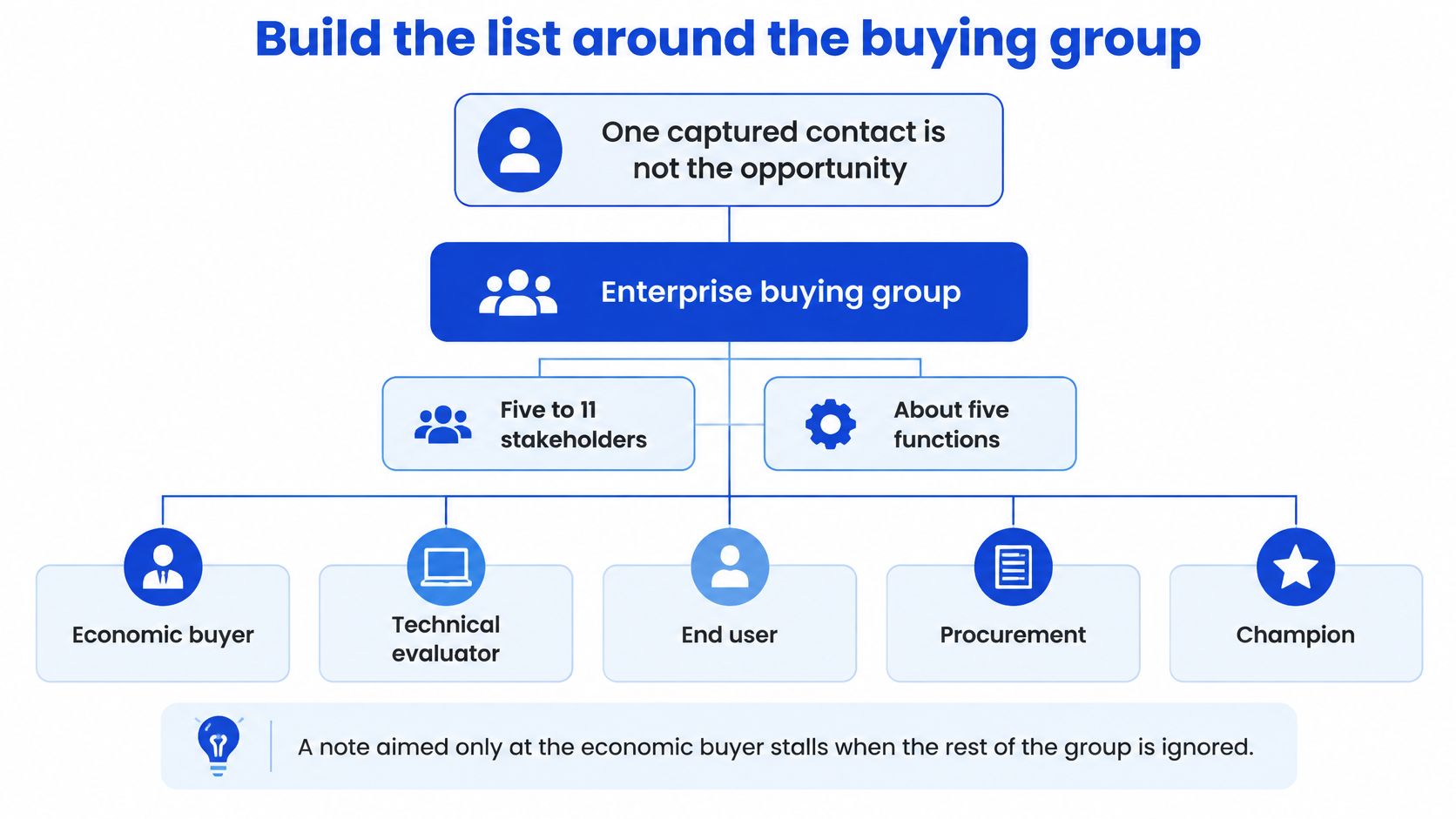
One captured contact isn't the opportunity. According to Gartner's B2B buying report, enterprise buying groups typically include five to 11 stakeholders across an average of five business functions. A note aimed only at the economic buyer leaves you exposed when security, procurement, or the daily user enters the evaluation.
Use the buying group as the organizing unit for account research.
Build the account file in six steps
Write the ICP as firmographics → buying trigger → problem severity. A plastics manufacturer adding a production line gives you something to investigate. Manufacturing alone doesn't. A legal-tech team replacing matter software is a usable starting point; SaaS is a category.
Source matching accounts in Apollo or Sales Navigator. Review the company before collecting contacts, and exclude customers, active opportunities, and accounts your sales team has already disqualified.
Enrich the trigger where it's cheapest to verify. Use Apollo for available technographics and hiring signals. Bring in Clay when you need to assemble evidence from several sources, such as a location announcement combined with recruitment and an equipment change.
Keep at least two relevant people per account, with different functional perspectives. Tag their buying role as economic buyer, user, or blocker, then record their actual function separately. Don't assume a senior title means budget authority.
Delete any row you can't attach to a named problem. If the trigger requires a paragraph of speculation, put the account back into research rather than asking a rep to invent relevance.
Load the retained records into HubSpot using the problem labels sales will use in discovery. Preserve the trigger evidence and verification date so the seller can check the premise before replying.
Buy coverage, not enrichment complexity
Clay earns its place when the missing evidence changes who qualifies. If it merely recreates a field already available in Apollo, keep the simpler workflow. Someone still needs to review ambiguous results; an enriched guess is still a guess.
Use the same stakeholder engagement framework for research ownership and buying-role tags. For SaaS-specific planning, Fetchin's SaaS lead generation guide provides a relevant companion to account selection, without replacing the need to verify each trigger.
The industry changes the evidence you collect. iGaming might require a market-entry trigger, while pharma could require an operational change that your offer directly supports. Manufacturing and legal tech need equally concrete premises.
Before launch, inspect your top 50 accounts as an internal quality check. If each account doesn't have two relevant roles filled, don't start the sequence.
Give buyers proof before you interrupt them
Gartner's 2025 buyer survey found that 61% of B2B buyers prefer an overall rep-free buying experience, while 73% actively avoid suppliers that send irrelevant outreach. Buyers still seek seller input for contextual questions, including whether a solution fits their organization.
That makes cold volume the wrong default. Publish material buyers can evaluate alone, then let a person intervene when there's enough evidence of fit to contribute something useful.
Give the buyer a way to assess the problem before asking for calendar time.

Answer the questions buyers ask before vendor selection
Map three questions your ICP asks before knowing a vendor name. Build a separate asset for each question, with enough substance to help someone make a decision.
A teardown shows where an existing process breaks and what the buyer should inspect.
A short calculator lets the buyer enter their own assumptions, with the calculation visible.
A one-page diagnostic helps a stakeholder identify whether the problem warrants internal attention.
Don't gate the first asset behind a demo request. A buyer checking whether a problem exists shouldn't have to accept a sales call to see the criteria.
Build your B2B proof library around these buying questions rather than a folder of company announcements. For pharma or iGaming, keep the asset tied to the actual trigger and approved claims. A generic industry trends post won't establish account-level relevance.
Write the contact threshold before publishing
My recommended outbound gate is ICP fit plus either a named trigger and relevant role, or identifiable high-intent behavior. That behavior could be a repeat visit to a diagnostic or a request for an implementation resource. A casual post reaction alone doesn't clear the threshold.
Keep anonymous account engagement separate from person-level evidence. An account visiting your site doesn't establish which employee visited, and it doesn't give you permission to imply that a particular person read something (don't manufacture familiarity).
Use video as optional self-service material, not another forced step before the buyer can evaluate fit.
Publish LinkedIn content for the same titles represented in your account list. When a later message addresses that problem, it should remain useful even if the recipient never saw the post.
Put account engagement and content progression beside meeting outcomes in your reporting view. If nobody can state why an account crossed the contact threshold, leave it in the self-service audience.
Send a three-touch sequence they can answer
Hold the stack to one tool per job. I'd use Instantly as the default email sender and keep Smartlead when the team already runs it successfully. Switching a functioning sending setup rarely deserves priority over fixing targeting.
Job | Default | When to change |
|---|---|---|
Account sourcing and basic enrichment | Apollo | Add Clay for a demonstrated research gap |
Email sequencing and mailbox rotation | Instantly | Keep Smartlead if it's already established |
LinkedIn execution | HeyReach | Use a manual Sales Navigator pass for low volume |
Contact record and routing | HubSpot | Keep ownership and qualification centralized |
Don't add Lemlist alongside another email sequencer for the same sprint. Choose the sender your operator can inspect and maintain, then keep HubSpot responsible for the contact record and routing rather than splitting ownership across sending tools.
The sequence needs distinct reasons to respond.

Run the send in seven steps
Start with verified accounts that cleared the contact threshold. Exclude unresolved research rows and suppressed contacts before the export reaches the sender.
Pick two stakeholders in different functions. Give each person a role-specific reason to care rather than sending identical messages to colleagues.
Write an opening tied to the trigger and one problem. For a manufacturer, use this structure:
Saw you added [line or site] this quarter. That can create [specific problem] when [operating condition]. Worth two minutes on how we map it?
Only include a timing claim if you can substantiate it. Don't invent a predictable failure window to make the opening sound sharper.
Give each email a different job. The first contributes a useful observation. The second supplies relevant proof, and the final note closes the loop with a clear opportunity to decline.
Place a short LinkedIn touch between emails, addressing the same problem. Don't paste the email into a connection request or imply a relationship that doesn't exist.
Add phone only where the offer, region, and applicable rules support a call. A phone number in an export isn't sufficient reason to use it.
Change one variable per sprint: trigger, role, offer, or subject. Keep the rest stable so you can explain why the outcome changed.
Our B2B sequence touch-count guide can help you set a stopping rule. Don't keep extending a sequence because the sender makes adding another step easy.
Every follow-up should give the recipient a new reason to consider the problem, not another copy of your first request.
Grou built a multi-channel outbound engine for Plastit to reach hardware buyers across Europe, generating 97 leads with a 7.9% reply rate. That's a campaign outcome, not a universal target or a claim that every lead became an opportunity.
Make suppression a launch requirement
For US commercial email, the FTC's CAN-SPAM compliance guide requires accurate sender and routing information, nondeceptive subject lines, clear advertising identification, a valid physical postal address, and an opt-out mechanism that can process requests for at least 30 days after sending. Opt-out requests must be honored promptly.
Build those checks into campaign approval. Test the From, To, and Reply-To fields, inspect every footer variant, and make sure the subject accurately represents the body.
Judge the run by qualified meetings per 100 targeted accounts, but finish the launch check with suppression. Unsubscribe a test contact, attempt to reimport it through another mailbox, and confirm it stays blocked (including after enrichment).
Route a positive reply inside five minutes
The 2007 Lead Response Management Study, summarized by Blazehive's lead generation statistics, examined more than 15,000 leads and 100,000 call attempts across six companies and found contact within five minutes made a lead 100 times more likely to be reached and 21 times more likely to enter qualification than contact after 30 minutes.
The same compilation reports later large-scale analysis finding eight times higher conversion rates when the first attempt occurred within five minutes rather than after five minutes. These are lead-response findings, not a forecast that your cold-email replies will produce the same lift.
Use them to justify fast ownership, not to promise a conversion multiplier. Getting the lead includes ensuring someone acts while the inquiry is still relevant.
Make the handoff visible to everyone responsible for coverage.

Set the routing path before the next send
Collect interest in one queue. Positive email replies, form submissions, and LinkedIn interest should create or update the HubSpot record without creating competing owners.
Score use case, timeline, authority, and economic impact using the same problem labels attached during account research. Preserve unknown fields instead of treating them as confirmed.
A fit lead pages a named owner. Include the original message, trigger evidence, qualification notes, and the reason the lead passed.
Require a human reply inside five minutes during coverage hours. Use 30 minutes as the internal fail line, not the target. An automated acknowledgment doesn't count as the human response.
Fire a manager alert when the timer breaks. Assign the backup immediately rather than leaving the manager to discover who is available.
Give out-of-fit replies a short, honest close. If the prospect may qualify later, record the condition that would justify reopening the conversation instead of forcing a meeting.
When you connect forms to business tools through a workflow such as Kiwiform, test the complete submission path into the CRM. Field mapping, duplicate handling, and owner assignment matter more than receiving a successful submission notification.
Use a simple starting score
Set an internal starting rule of 0 to 2 points each for use case, timeline, authority, and economic impact. Route a lead as fit at 5 or higher out of 8, subject to explicit disqualifiers. These are proposed operating settings, not published benchmarks.
Award zero for no evidence, one for plausible but incomplete evidence, and two for confirmed relevance. Let the owner clarify unknowns in the first response; scoring shouldn't become an excuse to delay answering a direct inquiry.
Coverage check: Every market needs a named owner and backup. A response SLA without coverage is a calendar assumption.
The manager's morning number should be median minutes to first human touch, displayed beside positive-reply rate. Track it through your speed-to-lead workflow, and inspect overdue records individually.
Name backups for nights, absences, and regional gaps. Review the fit threshold only after two sprints of meeting-held outcomes, and log rejected replies with the reason so you can detect a scoring rule that excludes real buyers.
Repair the leaks and start the next sprint
Lead leaks and the fix
Symptom | Likely cause | Fix before the next send |
|---|---|---|
High replies, few meetings held | Offer is too soft, or the list is curious | Swap the ask for the diagnostic and recheck ICP fields |
Meetings held, no opportunity | Only one stakeholder was contacted | Add the second role before another touch |
Opt-outs cluster on touch two | The second email repeated the pitch | Replace it with proof or a close-the-loop note |
Bounces climb after a new export | Records were not verified | Re-verify in Clay and pause that segment |
Opted-out contact returns | Suppression is split across mailboxes | Point every domain at one suppression list |
Median first touch past 30 minutes | No named owner or backup | Page an owner and alert a manager on a miss |
Treat the likely cause as a hypothesis. Read the underlying replies and call notes before changing the campaign, because a stalled opportunity can also reflect pricing, procurement, or a problem the buyer doesn't consider urgent.
For verification, use Clay when it's already part of the workflow. Don't buy it solely to repair an export that your existing verification process can check.
Run a two-week repair sprint
Monday: Freeze the ICP and the top 50 accounts, with two relevant roles per account. Choose the leak you're testing, write the proposed fix, and name the person responsible for accepting or rejecting the result.
Wednesday: Load the three-email sequence and LinkedIn touches. Check suppression and routing with test records, then release the approved cohort without adding accounts mid-test.
Watch fit rate, positive replies, meetings held, and minutes to first touch during execution. Keep the broader revenue report available, but don't rewrite the campaign every time a new reply arrives.
Friday of week two: Keep the single tested change that improved meetings held. Stop unsupported variations, and carry unresolved questions into a new test rather than calling every positive fluctuation a winner.
Make sales feedback usable
Grou can work alongside an existing sales team: we generate and qualify leads and book meetings, while the client's team runs the calls and closes deals. That division still requires sellers to record why a meeting did or didn't become an opportunity.
Our clients receive a sprint report every two weeks covering reply quality, meetings booked, show rate, fit rate, lead gen conversion, and LinkedIn engagement from target profiles. We run LinkedIn content, lead generation, and outbound with one message, one target list, and one reporting line.
If you're deciding how to get sales leads, start this week by pulling last month's meetings held per 100 accounts by segment. Mark each row of the diagnostic table as go or stop, then assign the first repair before approving another lead source.
GROU is a global B2B pipeline agency that built Plastit's multi-channel outbound engine to reach hardware buyers across Europe. Our methodology connects account research, LinkedIn content, outbound, and fast qualification so structure turns attention into pipeline. Visit Grou to scope a connected pipeline engagement, and bring last month's account-level meeting report so the first conversation starts with the leak you need to repair.
Adding more lead sources is bad advice when your CRM already has names, forms, and replies that sales won't work. To get sales leads worth pursuing, fix the account selection and handoff before buying more volume.
Score the motion on qualified meetings per 100 accounts.
Rebuild the list around the buying group.
Run three distinct email touches paired with LinkedIn.
Route a fit reply inside five minutes.
Table of Contents
Benchmarks that show a lead is worth working
Lead motion benchmarks
Signal | Reference point | Source |
|---|---|---|
Three cold-email rounds | 9% average reply rate | |
First follow-up | Reply rate up 49% | HubSpot |
Highest-response cold channel | Social media, named by 42% of sales professionals | HubSpot compiled research |
Unit of success | Qualified meetings and pipeline per 100 targeted accounts | Editorial position |
Fields to report | Delivery, bounce, positive reply, meeting booked, meeting held, opportunity, revenue, split by segment | Editorial position |
A lead program is working when qualified meetings and pipeline per 100 targeted accounts improve. Database growth doesn't pass that test. Neither does a busy inbox filled with referrals to the wrong department, polite declines, or requests for information from accounts that could never buy.
Treat the reference points as diagnostic signals, not promises. HubSpot's compiled figures cover different campaigns and respondents, so they aren't a combined performance standard for your next sprint. They do support completing the follow-up test and giving social a deliberate role rather than defaulting to email alone.
Read each signal as a go or stop
For delivery and bounce, the question is whether the list is safe to work. If a new export produces delivery problems, stop that segment before rewriting the offer. A copy test built on unverified addresses won't tell you much about demand.
For positive replies, inspect the substance. A prospect who recognizes the problem and asks about implementation deserves a different label from someone who says to send a brochure. Your lead qualification process should make that distinction explicit enough that marketing and sales classify the same reply consistently.
Operating rule: A high reply rate from poor-fit accounts is a miss, even when the campaign dashboard is green.
For booked versus held meetings, inspect calendar friction and expectations. Did the prospect understand what the call would resolve? Did the invitation reach the right person? Don't reward a campaign for filling calendars with meetings that never happen.
Keep the denominator stable
Calculate qualified meetings held ÷ unique targeted accounts × 100. Keep pipeline value on that same account denominator, and split both measures by segment. Count an account once even when several stakeholders receive outreach (contacts aren't accounts).
For agency teams targeting merchants, AdvertiserLeads' ecommerce lead generation strategies for agencies is a relevant companion when planning that segment. Keep its channel ideas separate from your decision to scale: the account cohort still needs to produce sales-accepted conversations.
Report the full path from delivery to revenue, but don't change the reporting cohort halfway through a test. Otherwise, adding fresh accounts can conceal weak conversion among the accounts you started with.
Mark last month against every row in the table as go or stop. Keep only the misses on the repair list, with an owner and a specific change before the next send.
Build the list around the buying group
Start with Apollo for sourcing and enrichment. Add Clay only when a sprint exposes a research gap it can fill. Buying another tool before you can describe the missing information adds expense without improving account selection.
One captured contact isn't the opportunity. According to Gartner's B2B buying report, enterprise buying groups typically include five to 11 stakeholders across an average of five business functions. A note aimed only at the economic buyer leaves you exposed when security, procurement, or the daily user enters the evaluation.
Use the buying group as the organizing unit for account research.
Build the account file in six steps
Write the ICP as firmographics → buying trigger → problem severity. A plastics manufacturer adding a production line gives you something to investigate. Manufacturing alone doesn't. A legal-tech team replacing matter software is a usable starting point; SaaS is a category.
Source matching accounts in Apollo or Sales Navigator. Review the company before collecting contacts, and exclude customers, active opportunities, and accounts your sales team has already disqualified.
Enrich the trigger where it's cheapest to verify. Use Apollo for available technographics and hiring signals. Bring in Clay when you need to assemble evidence from several sources, such as a location announcement combined with recruitment and an equipment change.
Keep at least two relevant people per account, with different functional perspectives. Tag their buying role as economic buyer, user, or blocker, then record their actual function separately. Don't assume a senior title means budget authority.
Delete any row you can't attach to a named problem. If the trigger requires a paragraph of speculation, put the account back into research rather than asking a rep to invent relevance.
Load the retained records into HubSpot using the problem labels sales will use in discovery. Preserve the trigger evidence and verification date so the seller can check the premise before replying.
Buy coverage, not enrichment complexity
Clay earns its place when the missing evidence changes who qualifies. If it merely recreates a field already available in Apollo, keep the simpler workflow. Someone still needs to review ambiguous results; an enriched guess is still a guess.
Use the same stakeholder engagement framework for research ownership and buying-role tags. For SaaS-specific planning, Fetchin's SaaS lead generation guide provides a relevant companion to account selection, without replacing the need to verify each trigger.
The industry changes the evidence you collect. iGaming might require a market-entry trigger, while pharma could require an operational change that your offer directly supports. Manufacturing and legal tech need equally concrete premises.
Before launch, inspect your top 50 accounts as an internal quality check. If each account doesn't have two relevant roles filled, don't start the sequence.
Give buyers proof before you interrupt them
Gartner's 2025 buyer survey found that 61% of B2B buyers prefer an overall rep-free buying experience, while 73% actively avoid suppliers that send irrelevant outreach. Buyers still seek seller input for contextual questions, including whether a solution fits their organization.
That makes cold volume the wrong default. Publish material buyers can evaluate alone, then let a person intervene when there's enough evidence of fit to contribute something useful.
Give the buyer a way to assess the problem before asking for calendar time.
Answer the questions buyers ask before vendor selection
Map three questions your ICP asks before knowing a vendor name. Build a separate asset for each question, with enough substance to help someone make a decision.
A teardown shows where an existing process breaks and what the buyer should inspect.
A short calculator lets the buyer enter their own assumptions, with the calculation visible.
A one-page diagnostic helps a stakeholder identify whether the problem warrants internal attention.
Don't gate the first asset behind a demo request. A buyer checking whether a problem exists shouldn't have to accept a sales call to see the criteria.
Build your B2B proof library around these buying questions rather than a folder of company announcements. For pharma or iGaming, keep the asset tied to the actual trigger and approved claims. A generic industry trends post won't establish account-level relevance.
Write the contact threshold before publishing
My recommended outbound gate is ICP fit plus either a named trigger and relevant role, or identifiable high-intent behavior. That behavior could be a repeat visit to a diagnostic or a request for an implementation resource. A casual post reaction alone doesn't clear the threshold.
Keep anonymous account engagement separate from person-level evidence. An account visiting your site doesn't establish which employee visited, and it doesn't give you permission to imply that a particular person read something (don't manufacture familiarity).
Use video as optional self-service material, not another forced step before the buyer can evaluate fit.
Publish LinkedIn content for the same titles represented in your account list. When a later message addresses that problem, it should remain useful even if the recipient never saw the post.
Put account engagement and content progression beside meeting outcomes in your reporting view. If nobody can state why an account crossed the contact threshold, leave it in the self-service audience.
Send a three-touch sequence they can answer
Hold the stack to one tool per job. I'd use Instantly as the default email sender and keep Smartlead when the team already runs it successfully. Switching a functioning sending setup rarely deserves priority over fixing targeting.
Job | Default | When to change |
|---|---|---|
Account sourcing and basic enrichment | Apollo | Add Clay for a demonstrated research gap |
Email sequencing and mailbox rotation | Instantly | Keep Smartlead if it's already established |
LinkedIn execution | HeyReach | Use a manual Sales Navigator pass for low volume |
Contact record and routing | HubSpot | Keep ownership and qualification centralized |
Don't add Lemlist alongside another email sequencer for the same sprint. Choose the sender your operator can inspect and maintain, then keep HubSpot responsible for the contact record and routing rather than splitting ownership across sending tools.
The sequence needs distinct reasons to respond.
Run the send in seven steps
Start with verified accounts that cleared the contact threshold. Exclude unresolved research rows and suppressed contacts before the export reaches the sender.
Pick two stakeholders in different functions. Give each person a role-specific reason to care rather than sending identical messages to colleagues.
Write an opening tied to the trigger and one problem. For a manufacturer, use this structure:
Saw you added [line or site] this quarter. That can create [specific problem] when [operating condition]. Worth two minutes on how we map it?
Only include a timing claim if you can substantiate it. Don't invent a predictable failure window to make the opening sound sharper.
Give each email a different job. The first contributes a useful observation. The second supplies relevant proof, and the final note closes the loop with a clear opportunity to decline.
Place a short LinkedIn touch between emails, addressing the same problem. Don't paste the email into a connection request or imply a relationship that doesn't exist.
Add phone only where the offer, region, and applicable rules support a call. A phone number in an export isn't sufficient reason to use it.
Change one variable per sprint: trigger, role, offer, or subject. Keep the rest stable so you can explain why the outcome changed.
Our B2B sequence touch-count guide can help you set a stopping rule. Don't keep extending a sequence because the sender makes adding another step easy.
Every follow-up should give the recipient a new reason to consider the problem, not another copy of your first request.
Grou built a multi-channel outbound engine for Plastit to reach hardware buyers across Europe, generating 97 leads with a 7.9% reply rate. That's a campaign outcome, not a universal target or a claim that every lead became an opportunity.
Make suppression a launch requirement
For US commercial email, the FTC's CAN-SPAM compliance guide requires accurate sender and routing information, nondeceptive subject lines, clear advertising identification, a valid physical postal address, and an opt-out mechanism that can process requests for at least 30 days after sending. Opt-out requests must be honored promptly.
Build those checks into campaign approval. Test the From, To, and Reply-To fields, inspect every footer variant, and make sure the subject accurately represents the body.
Judge the run by qualified meetings per 100 targeted accounts, but finish the launch check with suppression. Unsubscribe a test contact, attempt to reimport it through another mailbox, and confirm it stays blocked (including after enrichment).
Route a positive reply inside five minutes
The 2007 Lead Response Management Study, summarized by Blazehive's lead generation statistics, examined more than 15,000 leads and 100,000 call attempts across six companies and found contact within five minutes made a lead 100 times more likely to be reached and 21 times more likely to enter qualification than contact after 30 minutes.
The same compilation reports later large-scale analysis finding eight times higher conversion rates when the first attempt occurred within five minutes rather than after five minutes. These are lead-response findings, not a forecast that your cold-email replies will produce the same lift.
Use them to justify fast ownership, not to promise a conversion multiplier. Getting the lead includes ensuring someone acts while the inquiry is still relevant.
Make the handoff visible to everyone responsible for coverage.
Set the routing path before the next send
Collect interest in one queue. Positive email replies, form submissions, and LinkedIn interest should create or update the HubSpot record without creating competing owners.
Score use case, timeline, authority, and economic impact using the same problem labels attached during account research. Preserve unknown fields instead of treating them as confirmed.
A fit lead pages a named owner. Include the original message, trigger evidence, qualification notes, and the reason the lead passed.
Require a human reply inside five minutes during coverage hours. Use 30 minutes as the internal fail line, not the target. An automated acknowledgment doesn't count as the human response.
Fire a manager alert when the timer breaks. Assign the backup immediately rather than leaving the manager to discover who is available.
Give out-of-fit replies a short, honest close. If the prospect may qualify later, record the condition that would justify reopening the conversation instead of forcing a meeting.
When you connect forms to business tools through a workflow such as Kiwiform, test the complete submission path into the CRM. Field mapping, duplicate handling, and owner assignment matter more than receiving a successful submission notification.
Use a simple starting score
Set an internal starting rule of 0 to 2 points each for use case, timeline, authority, and economic impact. Route a lead as fit at 5 or higher out of 8, subject to explicit disqualifiers. These are proposed operating settings, not published benchmarks.
Award zero for no evidence, one for plausible but incomplete evidence, and two for confirmed relevance. Let the owner clarify unknowns in the first response; scoring shouldn't become an excuse to delay answering a direct inquiry.
Coverage check: Every market needs a named owner and backup. A response SLA without coverage is a calendar assumption.
The manager's morning number should be median minutes to first human touch, displayed beside positive-reply rate. Track it through your speed-to-lead workflow, and inspect overdue records individually.
Name backups for nights, absences, and regional gaps. Review the fit threshold only after two sprints of meeting-held outcomes, and log rejected replies with the reason so you can detect a scoring rule that excludes real buyers.
Repair the leaks and start the next sprint
Lead leaks and the fix
Symptom | Likely cause | Fix before the next send |
|---|---|---|
High replies, few meetings held | Offer is too soft, or the list is curious | Swap the ask for the diagnostic and recheck ICP fields |
Meetings held, no opportunity | Only one stakeholder was contacted | Add the second role before another touch |
Opt-outs cluster on touch two | The second email repeated the pitch | Replace it with proof or a close-the-loop note |
Bounces climb after a new export | Records were not verified | Re-verify in Clay and pause that segment |
Opted-out contact returns | Suppression is split across mailboxes | Point every domain at one suppression list |
Median first touch past 30 minutes | No named owner or backup | Page an owner and alert a manager on a miss |
Treat the likely cause as a hypothesis. Read the underlying replies and call notes before changing the campaign, because a stalled opportunity can also reflect pricing, procurement, or a problem the buyer doesn't consider urgent.
For verification, use Clay when it's already part of the workflow. Don't buy it solely to repair an export that your existing verification process can check.
Run a two-week repair sprint
Monday: Freeze the ICP and the top 50 accounts, with two relevant roles per account. Choose the leak you're testing, write the proposed fix, and name the person responsible for accepting or rejecting the result.
Wednesday: Load the three-email sequence and LinkedIn touches. Check suppression and routing with test records, then release the approved cohort without adding accounts mid-test.
Watch fit rate, positive replies, meetings held, and minutes to first touch during execution. Keep the broader revenue report available, but don't rewrite the campaign every time a new reply arrives.
Friday of week two: Keep the single tested change that improved meetings held. Stop unsupported variations, and carry unresolved questions into a new test rather than calling every positive fluctuation a winner.
Make sales feedback usable
Grou can work alongside an existing sales team: we generate and qualify leads and book meetings, while the client's team runs the calls and closes deals. That division still requires sellers to record why a meeting did or didn't become an opportunity.
Our clients receive a sprint report every two weeks covering reply quality, meetings booked, show rate, fit rate, lead gen conversion, and LinkedIn engagement from target profiles. We run LinkedIn content, lead generation, and outbound with one message, one target list, and one reporting line.
If you're deciding how to get sales leads, start this week by pulling last month's meetings held per 100 accounts by segment. Mark each row of the diagnostic table as go or stop, then assign the first repair before approving another lead source.
GROU is a global B2B pipeline agency that built Plastit's multi-channel outbound engine to reach hardware buyers across Europe. Our methodology connects account research, LinkedIn content, outbound, and fast qualification so structure turns attention into pipeline. Visit Grou to scope a connected pipeline engagement, and bring last month's account-level meeting report so the first conversation starts with the leak you need to repair.
Adding more lead sources is bad advice when your CRM already has names, forms, and replies that sales won't work. To get sales leads worth pursuing, fix the account selection and handoff before buying more volume.
Score the motion on qualified meetings per 100 accounts.
Rebuild the list around the buying group.
Run three distinct email touches paired with LinkedIn.
Route a fit reply inside five minutes.
Table of Contents
Benchmarks that show a lead is worth working
Lead motion benchmarks
Signal | Reference point | Source |
|---|---|---|
Three cold-email rounds | 9% average reply rate | |
First follow-up | Reply rate up 49% | HubSpot |
Highest-response cold channel | Social media, named by 42% of sales professionals | HubSpot compiled research |
Unit of success | Qualified meetings and pipeline per 100 targeted accounts | Editorial position |
Fields to report | Delivery, bounce, positive reply, meeting booked, meeting held, opportunity, revenue, split by segment | Editorial position |
A lead program is working when qualified meetings and pipeline per 100 targeted accounts improve. Database growth doesn't pass that test. Neither does a busy inbox filled with referrals to the wrong department, polite declines, or requests for information from accounts that could never buy.
Treat the reference points as diagnostic signals, not promises. HubSpot's compiled figures cover different campaigns and respondents, so they aren't a combined performance standard for your next sprint. They do support completing the follow-up test and giving social a deliberate role rather than defaulting to email alone.
Read each signal as a go or stop
For delivery and bounce, the question is whether the list is safe to work. If a new export produces delivery problems, stop that segment before rewriting the offer. A copy test built on unverified addresses won't tell you much about demand.
For positive replies, inspect the substance. A prospect who recognizes the problem and asks about implementation deserves a different label from someone who says to send a brochure. Your lead qualification process should make that distinction explicit enough that marketing and sales classify the same reply consistently.
Operating rule: A high reply rate from poor-fit accounts is a miss, even when the campaign dashboard is green.
For booked versus held meetings, inspect calendar friction and expectations. Did the prospect understand what the call would resolve? Did the invitation reach the right person? Don't reward a campaign for filling calendars with meetings that never happen.
Keep the denominator stable
Calculate qualified meetings held ÷ unique targeted accounts × 100. Keep pipeline value on that same account denominator, and split both measures by segment. Count an account once even when several stakeholders receive outreach (contacts aren't accounts).
For agency teams targeting merchants, AdvertiserLeads' ecommerce lead generation strategies for agencies is a relevant companion when planning that segment. Keep its channel ideas separate from your decision to scale: the account cohort still needs to produce sales-accepted conversations.
Report the full path from delivery to revenue, but don't change the reporting cohort halfway through a test. Otherwise, adding fresh accounts can conceal weak conversion among the accounts you started with.
Mark last month against every row in the table as go or stop. Keep only the misses on the repair list, with an owner and a specific change before the next send.
Build the list around the buying group
Start with Apollo for sourcing and enrichment. Add Clay only when a sprint exposes a research gap it can fill. Buying another tool before you can describe the missing information adds expense without improving account selection.
One captured contact isn't the opportunity. According to Gartner's B2B buying report, enterprise buying groups typically include five to 11 stakeholders across an average of five business functions. A note aimed only at the economic buyer leaves you exposed when security, procurement, or the daily user enters the evaluation.
Use the buying group as the organizing unit for account research.
Build the account file in six steps
Write the ICP as firmographics → buying trigger → problem severity. A plastics manufacturer adding a production line gives you something to investigate. Manufacturing alone doesn't. A legal-tech team replacing matter software is a usable starting point; SaaS is a category.
Source matching accounts in Apollo or Sales Navigator. Review the company before collecting contacts, and exclude customers, active opportunities, and accounts your sales team has already disqualified.
Enrich the trigger where it's cheapest to verify. Use Apollo for available technographics and hiring signals. Bring in Clay when you need to assemble evidence from several sources, such as a location announcement combined with recruitment and an equipment change.
Keep at least two relevant people per account, with different functional perspectives. Tag their buying role as economic buyer, user, or blocker, then record their actual function separately. Don't assume a senior title means budget authority.
Delete any row you can't attach to a named problem. If the trigger requires a paragraph of speculation, put the account back into research rather than asking a rep to invent relevance.
Load the retained records into HubSpot using the problem labels sales will use in discovery. Preserve the trigger evidence and verification date so the seller can check the premise before replying.
Buy coverage, not enrichment complexity
Clay earns its place when the missing evidence changes who qualifies. If it merely recreates a field already available in Apollo, keep the simpler workflow. Someone still needs to review ambiguous results; an enriched guess is still a guess.
Use the same stakeholder engagement framework for research ownership and buying-role tags. For SaaS-specific planning, Fetchin's SaaS lead generation guide provides a relevant companion to account selection, without replacing the need to verify each trigger.
The industry changes the evidence you collect. iGaming might require a market-entry trigger, while pharma could require an operational change that your offer directly supports. Manufacturing and legal tech need equally concrete premises.
Before launch, inspect your top 50 accounts as an internal quality check. If each account doesn't have two relevant roles filled, don't start the sequence.
Give buyers proof before you interrupt them
Gartner's 2025 buyer survey found that 61% of B2B buyers prefer an overall rep-free buying experience, while 73% actively avoid suppliers that send irrelevant outreach. Buyers still seek seller input for contextual questions, including whether a solution fits their organization.
That makes cold volume the wrong default. Publish material buyers can evaluate alone, then let a person intervene when there's enough evidence of fit to contribute something useful.
Give the buyer a way to assess the problem before asking for calendar time.
Answer the questions buyers ask before vendor selection
Map three questions your ICP asks before knowing a vendor name. Build a separate asset for each question, with enough substance to help someone make a decision.
A teardown shows where an existing process breaks and what the buyer should inspect.
A short calculator lets the buyer enter their own assumptions, with the calculation visible.
A one-page diagnostic helps a stakeholder identify whether the problem warrants internal attention.
Don't gate the first asset behind a demo request. A buyer checking whether a problem exists shouldn't have to accept a sales call to see the criteria.
Build your B2B proof library around these buying questions rather than a folder of company announcements. For pharma or iGaming, keep the asset tied to the actual trigger and approved claims. A generic industry trends post won't establish account-level relevance.
Write the contact threshold before publishing
My recommended outbound gate is ICP fit plus either a named trigger and relevant role, or identifiable high-intent behavior. That behavior could be a repeat visit to a diagnostic or a request for an implementation resource. A casual post reaction alone doesn't clear the threshold.
Keep anonymous account engagement separate from person-level evidence. An account visiting your site doesn't establish which employee visited, and it doesn't give you permission to imply that a particular person read something (don't manufacture familiarity).
Use video as optional self-service material, not another forced step before the buyer can evaluate fit.
Publish LinkedIn content for the same titles represented in your account list. When a later message addresses that problem, it should remain useful even if the recipient never saw the post.
Put account engagement and content progression beside meeting outcomes in your reporting view. If nobody can state why an account crossed the contact threshold, leave it in the self-service audience.
Send a three-touch sequence they can answer
Hold the stack to one tool per job. I'd use Instantly as the default email sender and keep Smartlead when the team already runs it successfully. Switching a functioning sending setup rarely deserves priority over fixing targeting.
Job | Default | When to change |
|---|---|---|
Account sourcing and basic enrichment | Apollo | Add Clay for a demonstrated research gap |
Email sequencing and mailbox rotation | Instantly | Keep Smartlead if it's already established |
LinkedIn execution | HeyReach | Use a manual Sales Navigator pass for low volume |
Contact record and routing | HubSpot | Keep ownership and qualification centralized |
Don't add Lemlist alongside another email sequencer for the same sprint. Choose the sender your operator can inspect and maintain, then keep HubSpot responsible for the contact record and routing rather than splitting ownership across sending tools.
The sequence needs distinct reasons to respond.
Run the send in seven steps
Start with verified accounts that cleared the contact threshold. Exclude unresolved research rows and suppressed contacts before the export reaches the sender.
Pick two stakeholders in different functions. Give each person a role-specific reason to care rather than sending identical messages to colleagues.
Write an opening tied to the trigger and one problem. For a manufacturer, use this structure:
Saw you added [line or site] this quarter. That can create [specific problem] when [operating condition]. Worth two minutes on how we map it?
Only include a timing claim if you can substantiate it. Don't invent a predictable failure window to make the opening sound sharper.
Give each email a different job. The first contributes a useful observation. The second supplies relevant proof, and the final note closes the loop with a clear opportunity to decline.
Place a short LinkedIn touch between emails, addressing the same problem. Don't paste the email into a connection request or imply a relationship that doesn't exist.
Add phone only where the offer, region, and applicable rules support a call. A phone number in an export isn't sufficient reason to use it.
Change one variable per sprint: trigger, role, offer, or subject. Keep the rest stable so you can explain why the outcome changed.
Our B2B sequence touch-count guide can help you set a stopping rule. Don't keep extending a sequence because the sender makes adding another step easy.
Every follow-up should give the recipient a new reason to consider the problem, not another copy of your first request.
Grou built a multi-channel outbound engine for Plastit to reach hardware buyers across Europe, generating 97 leads with a 7.9% reply rate. That's a campaign outcome, not a universal target or a claim that every lead became an opportunity.
Make suppression a launch requirement
For US commercial email, the FTC's CAN-SPAM compliance guide requires accurate sender and routing information, nondeceptive subject lines, clear advertising identification, a valid physical postal address, and an opt-out mechanism that can process requests for at least 30 days after sending. Opt-out requests must be honored promptly.
Build those checks into campaign approval. Test the From, To, and Reply-To fields, inspect every footer variant, and make sure the subject accurately represents the body.
Judge the run by qualified meetings per 100 targeted accounts, but finish the launch check with suppression. Unsubscribe a test contact, attempt to reimport it through another mailbox, and confirm it stays blocked (including after enrichment).
Route a positive reply inside five minutes
The 2007 Lead Response Management Study, summarized by Blazehive's lead generation statistics, examined more than 15,000 leads and 100,000 call attempts across six companies and found contact within five minutes made a lead 100 times more likely to be reached and 21 times more likely to enter qualification than contact after 30 minutes.
The same compilation reports later large-scale analysis finding eight times higher conversion rates when the first attempt occurred within five minutes rather than after five minutes. These are lead-response findings, not a forecast that your cold-email replies will produce the same lift.
Use them to justify fast ownership, not to promise a conversion multiplier. Getting the lead includes ensuring someone acts while the inquiry is still relevant.
Make the handoff visible to everyone responsible for coverage.
Set the routing path before the next send
Collect interest in one queue. Positive email replies, form submissions, and LinkedIn interest should create or update the HubSpot record without creating competing owners.
Score use case, timeline, authority, and economic impact using the same problem labels attached during account research. Preserve unknown fields instead of treating them as confirmed.
A fit lead pages a named owner. Include the original message, trigger evidence, qualification notes, and the reason the lead passed.
Require a human reply inside five minutes during coverage hours. Use 30 minutes as the internal fail line, not the target. An automated acknowledgment doesn't count as the human response.
Fire a manager alert when the timer breaks. Assign the backup immediately rather than leaving the manager to discover who is available.
Give out-of-fit replies a short, honest close. If the prospect may qualify later, record the condition that would justify reopening the conversation instead of forcing a meeting.
When you connect forms to business tools through a workflow such as Kiwiform, test the complete submission path into the CRM. Field mapping, duplicate handling, and owner assignment matter more than receiving a successful submission notification.
Use a simple starting score
Set an internal starting rule of 0 to 2 points each for use case, timeline, authority, and economic impact. Route a lead as fit at 5 or higher out of 8, subject to explicit disqualifiers. These are proposed operating settings, not published benchmarks.
Award zero for no evidence, one for plausible but incomplete evidence, and two for confirmed relevance. Let the owner clarify unknowns in the first response; scoring shouldn't become an excuse to delay answering a direct inquiry.
Coverage check: Every market needs a named owner and backup. A response SLA without coverage is a calendar assumption.
The manager's morning number should be median minutes to first human touch, displayed beside positive-reply rate. Track it through your speed-to-lead workflow, and inspect overdue records individually.
Name backups for nights, absences, and regional gaps. Review the fit threshold only after two sprints of meeting-held outcomes, and log rejected replies with the reason so you can detect a scoring rule that excludes real buyers.
Repair the leaks and start the next sprint
Lead leaks and the fix
Symptom | Likely cause | Fix before the next send |
|---|---|---|
High replies, few meetings held | Offer is too soft, or the list is curious | Swap the ask for the diagnostic and recheck ICP fields |
Meetings held, no opportunity | Only one stakeholder was contacted | Add the second role before another touch |
Opt-outs cluster on touch two | The second email repeated the pitch | Replace it with proof or a close-the-loop note |
Bounces climb after a new export | Records were not verified | Re-verify in Clay and pause that segment |
Opted-out contact returns | Suppression is split across mailboxes | Point every domain at one suppression list |
Median first touch past 30 minutes | No named owner or backup | Page an owner and alert a manager on a miss |
Treat the likely cause as a hypothesis. Read the underlying replies and call notes before changing the campaign, because a stalled opportunity can also reflect pricing, procurement, or a problem the buyer doesn't consider urgent.
For verification, use Clay when it's already part of the workflow. Don't buy it solely to repair an export that your existing verification process can check.
Run a two-week repair sprint
Monday: Freeze the ICP and the top 50 accounts, with two relevant roles per account. Choose the leak you're testing, write the proposed fix, and name the person responsible for accepting or rejecting the result.
Wednesday: Load the three-email sequence and LinkedIn touches. Check suppression and routing with test records, then release the approved cohort without adding accounts mid-test.
Watch fit rate, positive replies, meetings held, and minutes to first touch during execution. Keep the broader revenue report available, but don't rewrite the campaign every time a new reply arrives.
Friday of week two: Keep the single tested change that improved meetings held. Stop unsupported variations, and carry unresolved questions into a new test rather than calling every positive fluctuation a winner.
Make sales feedback usable
Grou can work alongside an existing sales team: we generate and qualify leads and book meetings, while the client's team runs the calls and closes deals. That division still requires sellers to record why a meeting did or didn't become an opportunity.
Our clients receive a sprint report every two weeks covering reply quality, meetings booked, show rate, fit rate, lead gen conversion, and LinkedIn engagement from target profiles. We run LinkedIn content, lead generation, and outbound with one message, one target list, and one reporting line.
If you're deciding how to get sales leads, start this week by pulling last month's meetings held per 100 accounts by segment. Mark each row of the diagnostic table as go or stop, then assign the first repair before approving another lead source.
GROU is a global B2B pipeline agency that built Plastit's multi-channel outbound engine to reach hardware buyers across Europe. Our methodology connects account research, LinkedIn content, outbound, and fast qualification so structure turns attention into pipeline. Visit Grou to scope a connected pipeline engagement, and bring last month's account-level meeting report so the first conversation starts with the leak you need to repair.
Pipeline OS Newsletter
Build qualified pipeline
Get weekly tactics to generate demand, improve lead quality, and book more meetings.





Trusted by industry leaders
Trusted by industry leaders
Trusted by industry leaders
Ready to build qualified pipeline?
Ready to build qualified pipeline?
Ready to build qualified pipeline?
Book a call to see if we're the right fit, or take the 2-minute quiz to get a clear starting point.
Book a call to see if we're the right fit, or take the 2-minute quiz to get a clear starting point.
Book a call to see if we're the right fit, or take the 2-minute quiz to get a clear starting point.
" height="30.21639343089746px" id="hfGbXmQR2" width="30.216393430897455px"/></svg>)
Copyright © 2026 – All Right Reserved
Copyright © 2026 – All Right Reserved
Copyright © 2026 – All Right Reserved