%22%3E%3C/path%3E%3Cpath d=%22M 63.072 7.554 C 62.258 8.022 61.577 8.689 61.092 9.493 L 61.092 7.076 L 57.158 7.076 L 57.158 22.64 L 61.089 22.64 L 61.089 14.888 C 61.089 13.446 61.403 12.434 62.03 11.853 C 62.818 11.218 63.818 10.907 64.826 10.982 L 65.868 10.982 L 65.868 6.851 C 64.891 6.834 63.926 7.076 63.073 7.554 Z%22 fill=%22rgb(17,17,17)%22%3E%3C/path%3E%3Cpath d=%22M 78.916 7.82 C 76.363 6.49 73.321 6.49 70.768 7.82 C 69.562 8.473 68.564 9.451 67.888 10.644 C 67.167 11.931 66.803 13.387 66.834 14.862 C 66.804 16.332 67.157 17.785 67.86 19.077 C 68.515 20.267 69.494 21.246 70.684 21.901 C 71.924 22.576 73.318 22.92 74.73 22.898 C 76.164 22.918 77.58 22.575 78.846 21.901 C 80.062 21.247 81.073 20.27 81.768 19.077 C 82.506 17.797 82.88 16.339 82.85 14.862 C 82.88 13.389 82.517 11.934 81.797 10.647 C 81.12 9.455 80.122 8.477 78.917 7.824 M 78.803 14.862 C 78.829 15.739 78.636 16.608 78.241 17.391 C 77.903 18.046 77.38 18.588 76.738 18.95 C 76.124 19.293 75.432 19.472 74.729 19.47 C 73.668 19.497 72.648 19.061 71.934 18.276 C 71.139 17.323 70.741 16.1 70.823 14.862 C 70.741 13.62 71.149 12.395 71.959 11.45 C 72.687 10.667 73.715 10.233 74.783 10.256 C 75.859 10.236 76.894 10.67 77.635 11.45 C 78.464 12.387 78.884 13.616 78.801 14.864%22 fill=%22rgb(17,17,17)%22%3E%3C/path%3E%3Cpath d=%22M 95.906 7.076 L 95.906 15.646 C 95.975 16.68 95.643 17.701 94.979 18.498 C 94.311 19.184 93.379 19.547 92.422 19.495 C 91.475 19.544 90.553 19.18 89.894 18.498 C 89.23 17.701 88.898 16.68 88.967 15.646 L 88.967 7.076 L 85.033 7.076 L 85.033 16.207 C 85 17.449 85.275 18.68 85.834 19.79 C 86.327 20.75 87.095 21.542 88.039 22.065 C 89.033 22.594 90.145 22.861 91.271 22.838 C 92.188 22.847 93.095 22.65 93.926 22.263 C 94.708 21.905 95.388 21.36 95.906 20.675 L 95.906 22.645 L 99.865 22.645 L 99.865 7.076 Z%22 fill=%22rgb(17,17,17)%22%3E%3C/path%3E%3Cpath d=%22M 4.513 15.626 C 4.511 10.815 7.606 6.549 12.181 5.059 C 16.756 3.57 21.77 5.195 24.601 9.086 L 27.816 5.87 C 24.074 1.186 17.981 -0.943 12.137 0.393 C 6.292 1.728 1.728 6.292 0.393 12.137 C -0.943 17.981 1.186 24.074 5.87 27.816 L 9.085 24.601 C 6.214 22.512 4.515 19.177 4.513 15.626%22 fill=%22rgb(32,62,235)%22%3E%3C/path%3E%3Cpath d=%22M 17.114 14.343 L 13.354 18.01 L 13.354 18.026 L 21.071 18.026 L 11.412 27.609 L 17.389 27.609 L 23.999 21.081 L 23.999 28.316 L 24.005 28.316 L 27.967 24.393 L 27.967 14.343 Z%22 fill=%22rgb(32,62,235)%22%3E%3C/path%3E%3C/g%3E%3C/svg%3E) ×
× ××
××›
›
›
›
How to use AI in sales in 2026: tools, tactics, and results
How to use AI in sales in 2026: tools, tactics, and results
How to use AI in sales in 2026: tools, tactics, and results
How to use AI in sales in 2026: tools, tactics, and results
How to use AI in sales in 2026: tools, tactics, and results
How to use AI in sales in 2026: tools, tactics, and results

Author
Aljaz Peklaj

Teams are still asking the wrong question. The problem isn't how to use AI in sales everywhere, it's where AI belongs without wrecking quality, trust, or rep judgment. If your team is using AI to spray more outbound, score leads with a black box, or predict deals it can't understand, you're adding noise, not pipeline.
Start with one high-friction workflow, usually prospect research or email personalization, then measure the impact before expanding.
Use AI where repetition is the bottleneck, like research, follow-up drafting, signal monitoring, and pattern analysis.
Keep humans in the loop for forecasting, strategic conversations, and any outreach that can damage reputation if it's wrong.
Treat data readiness as the gate, because AI only gets useful once your workflows, inputs, and review rules are clean.
Roll out in 30 to 90 days, with clear thresholds for reply rate, positive reply rate, meeting bookings, and cost per qualified meeting.
Table of Contents
Where AI actually works in sales and where it fails
The most common mistake in how to use AI in sales is assuming every workflow deserves automation. It doesn't. AI earns its keep when the task is repetitive, data-heavy, and easy to verify, and it breaks down when the work depends on context, judgment, or subtle deal dynamics.

The useful side of AI is narrow but valuable. Industry guidance from Gartner on AI in sales describes AI as a way to automate initial contact, follow-ups, and lead engagement, while implementation guidance from ZoomInfo recommends starting with one workflow, measuring outcomes, then expanding only after impact is proven. That matches what we see in the field, AI works best as a process layer, not a novelty layer.
What AI does well
AI consistently helps with prospect research and qualification, email personalization, signal detection and prioritization, content engagement scoring, message performance analysis, and meeting summary drafting. Those are the six functions where repetition, pattern recognition, and structured outputs matter more than improvisation. In practice, that is where teams get time back and cleaner inputs for the next action.
Practical rule: if the task can be reviewed against a clear source, AI is usually worth testing. If the task depends on reading a live deal, assume a human owns it.
The failures are just as important. AI underperforms on forecasting, lead scoring, deal coaching, video content generation, and strategic conversations. A clean forecast needs context around deal risk, champion strength, and manager judgment. A strategic objection call needs a person who understands the buyer, not a pattern-matching model. For a closer look at the limits, see understanding AI hallucinations in sales contexts, since confident output can still be wrong.
Gartner's guidance also points to the time savings teams care about most, usually 5 to 10 hours per rep per week on administrative work from tasks like data entry, scheduling, CRM updates, and repetitive outreach. That does not sound glamorous, but it matters because those hours become live selling time. The point is not to make reps faster at busywork, it is to remove busywork.
The decision filter
Use AI when the workflow has four traits. It should be high volume, easy to audit, tied to revenue, and annoying enough that reps avoid it. That is why tools like Clay, Lemlist, HubSpot, and transcription software keep showing up in real deployments. They sit close to the work instead of pretending to replace the work.
For a broader tool map, our own guide to AI lead generation tools is useful when you are deciding which part of the pipeline deserves automation first. The key is still structure, one target list, one message logic, one reporting line. Դ
The six high-ROI AI functions with specific tools
The highest-return deployments usually start with research, then move into personalization and signal handling. That sequence matters because each layer feeds the next one. If your inputs are weak, your outreach gets generic fast.
Prospect research and qualification
Clay AI does the heavy lifting here, pulling from LinkedIn, company sites, news, and technical stack clues. We've seen research time drop from 25 to 40 minutes per prospect to 2 to 4 minutes with human review, using custom prompts to capture buying signals, role authority, technical readiness, and timeline. AI is strong at gathering and standardizing information, while humans still own the actual qualification call.
Email personalization and follow-up drafting
AI can draft the opening line or first pass of a message using recent posts, role changes, company context, or industry patterns. In practice, that usually means 8 to 12 minutes per message becomes 30 to 60 seconds for the AI draft plus review. Clay can provide the research input, and Lemlist or manual workflows can handle the prompt framework. If you want a deeper breakdown of how outbound systems are stitched together, Dooza's AI sales agent guide is a useful companion read.
Signal detection, content engagement, and messaging analysis
Clay orchestration can monitor buying signals across multiple sources, then prioritize prospects based on signal strength. HubSpot is useful for content engagement scoring, because it shows which prospects are interacting with which assets and how often. Meeting notes and transcripts from Fathom, Otter, or Fireflies can then feed follow-up drafting and message pattern analysis.
AI is strongest where the work is continuous. Manual review can't watch the market all day, but an AI workflow can.
A simple implementation sequence
Prospect research first, because it gives you cleaner targeting and sharper context.
Personalization second, because research quality directly affects message quality.
Signal monitoring third, because timing improves once you can see buyer activity sooner.
Engagement scoring fourth, because active readers are often closer to a buying decision than static lead scores suggest.
Message analysis fifth, because campaign data shows what the team should repeat or stop.
Meeting summary drafting last, because follow-up quality matters most after live conversations.
The fit is narrower than most vendors claim. Lead scoring often turns into an opaque number nobody can explain, while explicit qualification rules stay diagnosable. For outbound teams, a structured system beats a dashboard full of magic scores.
The internal prompt template guide is useful if your team is building repeatable prompts instead of one-off experiments. That's where consistency starts, and consistency is what lets AI scale without becoming sloppy.
Measured conversion improvements from AI deployment
The cleanest proof point is a B2B SaaS client in revenue operations, with about 65 employees and an average ACV of €42k. The team was three months into an ongoing engagement, so the baseline was already established. Before the test, reply rate sat at 8.4% and cost per qualified meeting was €680.
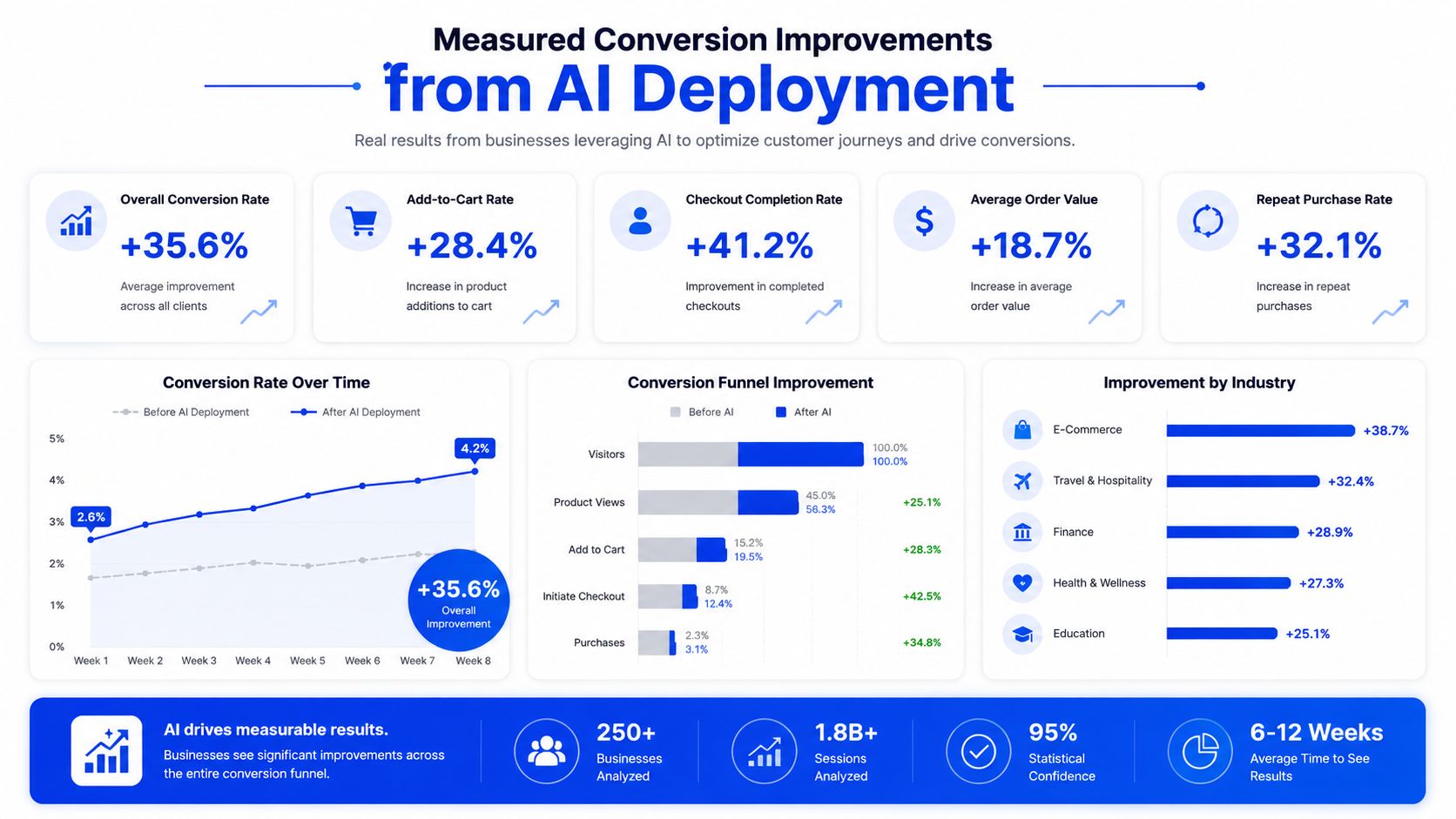
The test was simple. A 50/50 split went across 400 prospects over 3 weeks. The control group kept template-based openings. The test group used Clay AI-driven research to generate specific openings that referenced recent LinkedIn activity, company news, or public content. Everything else in the message stayed the same.
What changed in the test
The control group, 200 prospects with template openings, produced a 7.8% reply rate, 58% positive reply rate, 62% meeting booked rate from positive replies, and 5.7 total meetings booked. The test group, also 200 prospects, produced a 12.1% reply rate, 66% positive reply rate, 71% meeting booked rate from positive replies, and 11.4 total meetings booked.
The main lift came from the opening line. AI-generated personalization created a 55% reply rate improvement, a 14% positive reply improvement, and a 15% meeting booking rate improvement. End-to-end, meetings booked doubled in the test segment versus control.
Why it worked, and what to watch
AI referenced specific context that template text couldn't match. That made the outreach feel researched rather than recycled, and it lowered the immediate defensiveness a buyer often has when a message looks generic. Human review mattered too, because it caught obvious errors and kept the tone aligned with the account.
The caveat matters as much as the result. The 100% end-to-end conversion improvement is a comparison from one test, not a promise for every market. Across similar deployments, our median improvements are closer to 30 to 60%, and the bigger number should not be your planning assumption.
After rollout, the campaign held up over the next 90 days at 11.4% reply rate, with cost per qualified meeting down to €390 from the €680 baseline. Qualified opportunities rose 31%, and overall engagement ROI improved 42%. The pilot was strong, but the sustained result is the number I'd budget against.
For a broader benchmark mindset around structured experimentation, the 90-day strategy for AI search shows the same pattern, narrow the scope, prove the lift, then expand only after the data settles. The discipline is the point.
Improving AI accuracy through prompt engineering and workflow configuration
Most people claiming they've “trained AI on client data” are really describing prompt and workflow configuration. That's still useful, but it's not model training in the technical sense. The distinction matters because your expectations need to match the toolchain you control.
The work starts with client-specific prompt engineering. Voice, terminology, value proposition framing, and forbidden topics all belong in the prompt layer. For most engagements, initial prompt development takes 6 to 10 hours, then another 2 to 4 hours weekly during the first month of refinement.
The five-layer setup that actually improves output
Layer 1 is prompt engineering. Build the prompt around client language, not generic sales language. Add examples, constraints, and tone guidance. The more clearly the prompt describes what the AI should avoid, the fewer useless drafts you have to clean up later.
Layer 2 is workflow configuration. Clay tables, enrichment sources, signal definitions, and qualification thresholds need to fit the client's ICP and market. That usually takes 8 to 12 hours upfront, then ongoing maintenance as patterns emerge. It's where structure turns raw attention into pipeline.
Layer 3 is outcome feedback. Track which AI-generated outputs got replies, meetings, or qualified opportunities. Then fold those patterns back into the prompt and workflow rules. If the output looks good but doesn't convert, the problem is usually logic, not wording.
Layer 4 is closed-deal pattern integration. Map successful buyer traits into machine-readable fields. MEDDIC or MEDDPICC works well here because it can live inside CRM fields and be updated after each call. That gives AI better context without pretending the model understands the whole deal on its own.
Layer 5 is human correction. During ramp, reviewers should flag tone issues, false facts, weak references, and mismatched qualification calls. That correction loop is what moves AI from “interesting” to “usable.”
Operator note: accuracy gains usually come from iteration, not brilliance. A mediocre prompt improved weekly will beat a clever prompt nobody touches after launch.
Across 90 days of refinement, AI research accuracy often improves from 65 to 75% at launch to 85 to 90% at stabilization, while AI-assisted conversion metrics improve 25 to 40%. Those gains come from tightening the workflow, not from magical model behavior. The guardrails guide is worth keeping open while you build, because accuracy without review just scales errors.
Mandatory human guardrails and escalation protocols
AI without oversight is a reputation risk, not an efficiency gain. In B2B sales, one wrong claim or one weirdly confident message can cost you trust with a prospect who already had limited patience. That's why the review layer isn't optional.
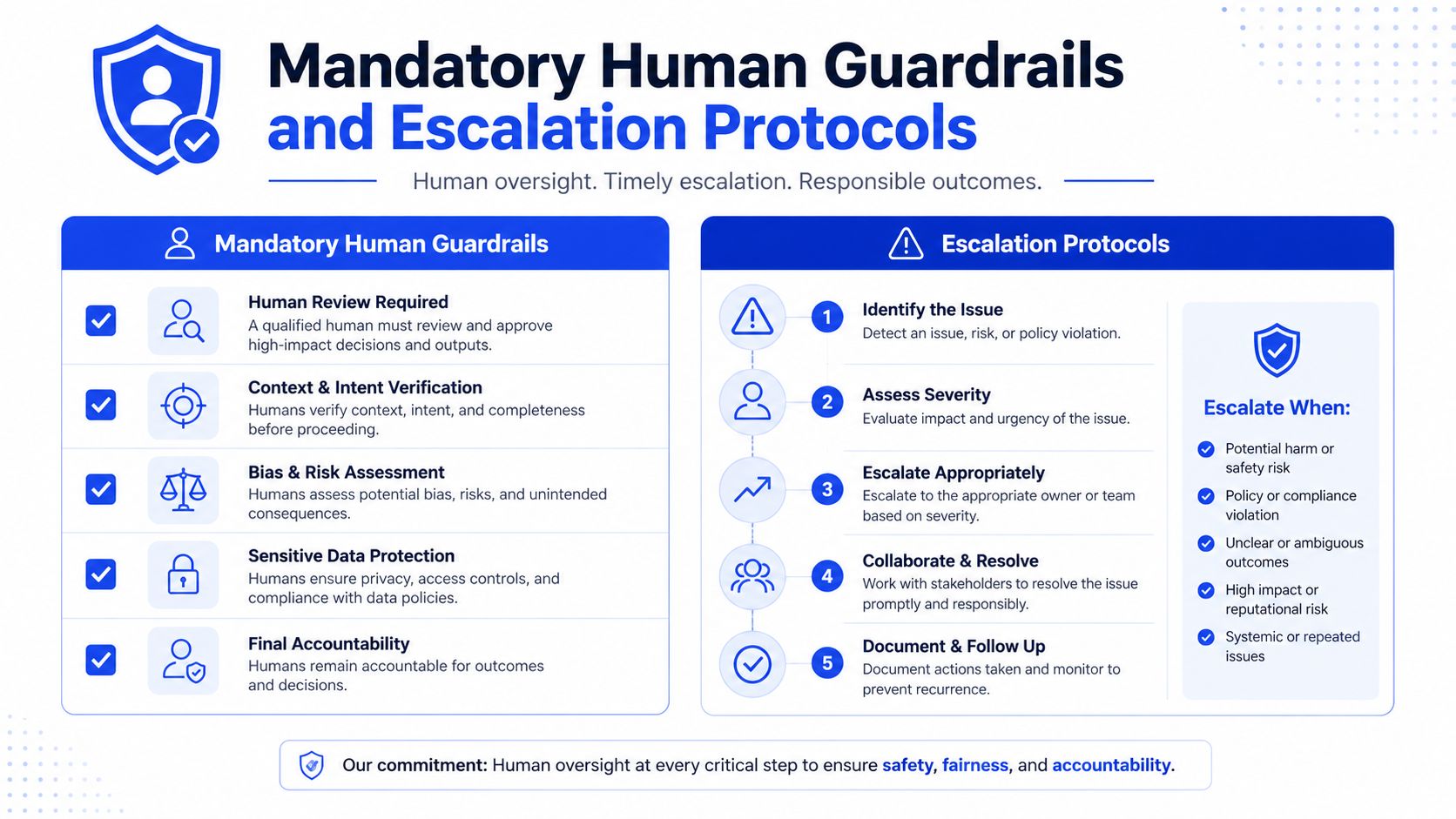
The first guardrail is simple, every AI-generated message gets human review before it goes out. Review usually takes 30 to 60 seconds per message, which is still far less time than writing the message manually. The goal is to catch tone problems, factual mistakes, and anything that would make the sender look sloppy.
The seven guardrails that hold the system together
Human review first: every draft is checked for accuracy, tone, and fit before sending.
Sensitive content filters: AI never touches competitors, legal issues, or unverifiable claims.
Factual verification: prospect details get cross-checked against LinkedIn and company sources.
Escalation rules: thin data or uncertain situations go to a human instead of forcing a draft.
Audit trail: what AI generated and what went out are both documented.
Performance monitoring: AI content is compared against template alternatives.
Client transparency: buyers and clients know which parts of the process AI handles.
The five human checkpoints matter just as much. Research gets reviewed before it enters outreach. Messages get reviewed before send. Signals get validated before action. Qualification gets confirmed before routing. Meeting summaries get checked before they're used internally. That's the minimum if you care about quality.
A useful example came from a client engagement where AI wrote a message referring to a prospect's “recent acquisition of X company.” Human review caught the fact that the acquisition had only been announced, not completed. Without that check, the team would've sent an embarrassing message on a false premise. The correction also fed back into the prompt so the same error wouldn't repeat.
Escalation is the other half of the system. If data is thin, if the situation is sensitive, or if the output feels too generic, a human should step in. AI should handle high-volume repetition, not strategic conversation or delicate account management. That line keeps the system useful.
Your 30-90 day AI rollout plan with quick wins
Days 1 to 30 should focus on one workflow only, preferably prospect research or email personalization. Baseline your current reply rate, positive reply rate, meeting booking rate, cost per qualified meeting, and downstream conversion before you touch anything. Then configure prompts, workflows, and human review rules around that single motion.
Days 31 to 60 should add signal detection and content engagement scoring. AI starts helping with timing, not just drafting. You should also tighten prompts based on the first batch of outcomes and fold in closed-deal patterns so the system gets less generic with every cycle.
What to measure before you scale
Reply rates: compare AI-assisted outreach against template control groups.
Positive reply percentages: don't stop at replies, because quality matters more than activity.
Meeting booking rates: look at the conversion from interest to scheduled conversation.
Cost per qualified meeting: watch whether the workflow lowers acquisition cost.
Downstream conversion: make sure meetings and opportunities aren't just inflating top-of-funnel vanity.
Days 61 to 90 can add message performance analysis and meeting follow-up drafting. By then, review time should be dropping as accuracy improves. If AI accuracy is above 85%, review time is under 60 seconds per message, and your target metric is up by 20% or more, it's time to expand the workflow.
If you want a planning model for pacing and sequencing, the Sales Pipeline Management guide helps frame AI as part of the wider revenue system instead of a disconnected tool layer. That matters because the best AI deployments don't sit outside the pipeline, they sit inside it.
Grou helps B2B teams build AI-assisted outbound systems that connect LinkedIn content, lead generation, and sequence execution into one pipeline motion. If you want structure around AI in sales instead of more disconnected tools, visit Grou and audit your current workflow against the six functions that deserve automation.
Grou works across global B2B programs with a focus on qualified conversations, clear review rules, and pipeline reporting that sales teams can act on. The method is simple: map the friction, automate the repetitive parts, and keep human judgment where the deal depends on it.
Teams are still asking the wrong question. The problem isn't how to use AI in sales everywhere, it's where AI belongs without wrecking quality, trust, or rep judgment. If your team is using AI to spray more outbound, score leads with a black box, or predict deals it can't understand, you're adding noise, not pipeline.
Start with one high-friction workflow, usually prospect research or email personalization, then measure the impact before expanding.
Use AI where repetition is the bottleneck, like research, follow-up drafting, signal monitoring, and pattern analysis.
Keep humans in the loop for forecasting, strategic conversations, and any outreach that can damage reputation if it's wrong.
Treat data readiness as the gate, because AI only gets useful once your workflows, inputs, and review rules are clean.
Roll out in 30 to 90 days, with clear thresholds for reply rate, positive reply rate, meeting bookings, and cost per qualified meeting.
Table of Contents
Where AI actually works in sales and where it fails
The most common mistake in how to use AI in sales is assuming every workflow deserves automation. It doesn't. AI earns its keep when the task is repetitive, data-heavy, and easy to verify, and it breaks down when the work depends on context, judgment, or subtle deal dynamics.
The useful side of AI is narrow but valuable. Industry guidance from Gartner on AI in sales describes AI as a way to automate initial contact, follow-ups, and lead engagement, while implementation guidance from ZoomInfo recommends starting with one workflow, measuring outcomes, then expanding only after impact is proven. That matches what we see in the field, AI works best as a process layer, not a novelty layer.
What AI does well
AI consistently helps with prospect research and qualification, email personalization, signal detection and prioritization, content engagement scoring, message performance analysis, and meeting summary drafting. Those are the six functions where repetition, pattern recognition, and structured outputs matter more than improvisation. In practice, that is where teams get time back and cleaner inputs for the next action.
Practical rule: if the task can be reviewed against a clear source, AI is usually worth testing. If the task depends on reading a live deal, assume a human owns it.
The failures are just as important. AI underperforms on forecasting, lead scoring, deal coaching, video content generation, and strategic conversations. A clean forecast needs context around deal risk, champion strength, and manager judgment. A strategic objection call needs a person who understands the buyer, not a pattern-matching model. For a closer look at the limits, see understanding AI hallucinations in sales contexts, since confident output can still be wrong.
Gartner's guidance also points to the time savings teams care about most, usually 5 to 10 hours per rep per week on administrative work from tasks like data entry, scheduling, CRM updates, and repetitive outreach. That does not sound glamorous, but it matters because those hours become live selling time. The point is not to make reps faster at busywork, it is to remove busywork.
The decision filter
Use AI when the workflow has four traits. It should be high volume, easy to audit, tied to revenue, and annoying enough that reps avoid it. That is why tools like Clay, Lemlist, HubSpot, and transcription software keep showing up in real deployments. They sit close to the work instead of pretending to replace the work.
For a broader tool map, our own guide to AI lead generation tools is useful when you are deciding which part of the pipeline deserves automation first. The key is still structure, one target list, one message logic, one reporting line. Դ
The six high-ROI AI functions with specific tools
The highest-return deployments usually start with research, then move into personalization and signal handling. That sequence matters because each layer feeds the next one. If your inputs are weak, your outreach gets generic fast.
Prospect research and qualification
Clay AI does the heavy lifting here, pulling from LinkedIn, company sites, news, and technical stack clues. We've seen research time drop from 25 to 40 minutes per prospect to 2 to 4 minutes with human review, using custom prompts to capture buying signals, role authority, technical readiness, and timeline. AI is strong at gathering and standardizing information, while humans still own the actual qualification call.
Email personalization and follow-up drafting
AI can draft the opening line or first pass of a message using recent posts, role changes, company context, or industry patterns. In practice, that usually means 8 to 12 minutes per message becomes 30 to 60 seconds for the AI draft plus review. Clay can provide the research input, and Lemlist or manual workflows can handle the prompt framework. If you want a deeper breakdown of how outbound systems are stitched together, Dooza's AI sales agent guide is a useful companion read.
Signal detection, content engagement, and messaging analysis
Clay orchestration can monitor buying signals across multiple sources, then prioritize prospects based on signal strength. HubSpot is useful for content engagement scoring, because it shows which prospects are interacting with which assets and how often. Meeting notes and transcripts from Fathom, Otter, or Fireflies can then feed follow-up drafting and message pattern analysis.
AI is strongest where the work is continuous. Manual review can't watch the market all day, but an AI workflow can.
A simple implementation sequence
Prospect research first, because it gives you cleaner targeting and sharper context.
Personalization second, because research quality directly affects message quality.
Signal monitoring third, because timing improves once you can see buyer activity sooner.
Engagement scoring fourth, because active readers are often closer to a buying decision than static lead scores suggest.
Message analysis fifth, because campaign data shows what the team should repeat or stop.
Meeting summary drafting last, because follow-up quality matters most after live conversations.
The fit is narrower than most vendors claim. Lead scoring often turns into an opaque number nobody can explain, while explicit qualification rules stay diagnosable. For outbound teams, a structured system beats a dashboard full of magic scores.
The internal prompt template guide is useful if your team is building repeatable prompts instead of one-off experiments. That's where consistency starts, and consistency is what lets AI scale without becoming sloppy.
Measured conversion improvements from AI deployment
The cleanest proof point is a B2B SaaS client in revenue operations, with about 65 employees and an average ACV of €42k. The team was three months into an ongoing engagement, so the baseline was already established. Before the test, reply rate sat at 8.4% and cost per qualified meeting was €680.
The test was simple. A 50/50 split went across 400 prospects over 3 weeks. The control group kept template-based openings. The test group used Clay AI-driven research to generate specific openings that referenced recent LinkedIn activity, company news, or public content. Everything else in the message stayed the same.
What changed in the test
The control group, 200 prospects with template openings, produced a 7.8% reply rate, 58% positive reply rate, 62% meeting booked rate from positive replies, and 5.7 total meetings booked. The test group, also 200 prospects, produced a 12.1% reply rate, 66% positive reply rate, 71% meeting booked rate from positive replies, and 11.4 total meetings booked.
The main lift came from the opening line. AI-generated personalization created a 55% reply rate improvement, a 14% positive reply improvement, and a 15% meeting booking rate improvement. End-to-end, meetings booked doubled in the test segment versus control.
Why it worked, and what to watch
AI referenced specific context that template text couldn't match. That made the outreach feel researched rather than recycled, and it lowered the immediate defensiveness a buyer often has when a message looks generic. Human review mattered too, because it caught obvious errors and kept the tone aligned with the account.
The caveat matters as much as the result. The 100% end-to-end conversion improvement is a comparison from one test, not a promise for every market. Across similar deployments, our median improvements are closer to 30 to 60%, and the bigger number should not be your planning assumption.
After rollout, the campaign held up over the next 90 days at 11.4% reply rate, with cost per qualified meeting down to €390 from the €680 baseline. Qualified opportunities rose 31%, and overall engagement ROI improved 42%. The pilot was strong, but the sustained result is the number I'd budget against.
For a broader benchmark mindset around structured experimentation, the 90-day strategy for AI search shows the same pattern, narrow the scope, prove the lift, then expand only after the data settles. The discipline is the point.
Improving AI accuracy through prompt engineering and workflow configuration
Most people claiming they've “trained AI on client data” are really describing prompt and workflow configuration. That's still useful, but it's not model training in the technical sense. The distinction matters because your expectations need to match the toolchain you control.
The work starts with client-specific prompt engineering. Voice, terminology, value proposition framing, and forbidden topics all belong in the prompt layer. For most engagements, initial prompt development takes 6 to 10 hours, then another 2 to 4 hours weekly during the first month of refinement.
The five-layer setup that actually improves output
Layer 1 is prompt engineering. Build the prompt around client language, not generic sales language. Add examples, constraints, and tone guidance. The more clearly the prompt describes what the AI should avoid, the fewer useless drafts you have to clean up later.
Layer 2 is workflow configuration. Clay tables, enrichment sources, signal definitions, and qualification thresholds need to fit the client's ICP and market. That usually takes 8 to 12 hours upfront, then ongoing maintenance as patterns emerge. It's where structure turns raw attention into pipeline.
Layer 3 is outcome feedback. Track which AI-generated outputs got replies, meetings, or qualified opportunities. Then fold those patterns back into the prompt and workflow rules. If the output looks good but doesn't convert, the problem is usually logic, not wording.
Layer 4 is closed-deal pattern integration. Map successful buyer traits into machine-readable fields. MEDDIC or MEDDPICC works well here because it can live inside CRM fields and be updated after each call. That gives AI better context without pretending the model understands the whole deal on its own.
Layer 5 is human correction. During ramp, reviewers should flag tone issues, false facts, weak references, and mismatched qualification calls. That correction loop is what moves AI from “interesting” to “usable.”
Operator note: accuracy gains usually come from iteration, not brilliance. A mediocre prompt improved weekly will beat a clever prompt nobody touches after launch.
Across 90 days of refinement, AI research accuracy often improves from 65 to 75% at launch to 85 to 90% at stabilization, while AI-assisted conversion metrics improve 25 to 40%. Those gains come from tightening the workflow, not from magical model behavior. The guardrails guide is worth keeping open while you build, because accuracy without review just scales errors.
Mandatory human guardrails and escalation protocols
AI without oversight is a reputation risk, not an efficiency gain. In B2B sales, one wrong claim or one weirdly confident message can cost you trust with a prospect who already had limited patience. That's why the review layer isn't optional.
The first guardrail is simple, every AI-generated message gets human review before it goes out. Review usually takes 30 to 60 seconds per message, which is still far less time than writing the message manually. The goal is to catch tone problems, factual mistakes, and anything that would make the sender look sloppy.
The seven guardrails that hold the system together
Human review first: every draft is checked for accuracy, tone, and fit before sending.
Sensitive content filters: AI never touches competitors, legal issues, or unverifiable claims.
Factual verification: prospect details get cross-checked against LinkedIn and company sources.
Escalation rules: thin data or uncertain situations go to a human instead of forcing a draft.
Audit trail: what AI generated and what went out are both documented.
Performance monitoring: AI content is compared against template alternatives.
Client transparency: buyers and clients know which parts of the process AI handles.
The five human checkpoints matter just as much. Research gets reviewed before it enters outreach. Messages get reviewed before send. Signals get validated before action. Qualification gets confirmed before routing. Meeting summaries get checked before they're used internally. That's the minimum if you care about quality.
A useful example came from a client engagement where AI wrote a message referring to a prospect's “recent acquisition of X company.” Human review caught the fact that the acquisition had only been announced, not completed. Without that check, the team would've sent an embarrassing message on a false premise. The correction also fed back into the prompt so the same error wouldn't repeat.
Escalation is the other half of the system. If data is thin, if the situation is sensitive, or if the output feels too generic, a human should step in. AI should handle high-volume repetition, not strategic conversation or delicate account management. That line keeps the system useful.
Your 30-90 day AI rollout plan with quick wins
Days 1 to 30 should focus on one workflow only, preferably prospect research or email personalization. Baseline your current reply rate, positive reply rate, meeting booking rate, cost per qualified meeting, and downstream conversion before you touch anything. Then configure prompts, workflows, and human review rules around that single motion.
Days 31 to 60 should add signal detection and content engagement scoring. AI starts helping with timing, not just drafting. You should also tighten prompts based on the first batch of outcomes and fold in closed-deal patterns so the system gets less generic with every cycle.
What to measure before you scale
Reply rates: compare AI-assisted outreach against template control groups.
Positive reply percentages: don't stop at replies, because quality matters more than activity.
Meeting booking rates: look at the conversion from interest to scheduled conversation.
Cost per qualified meeting: watch whether the workflow lowers acquisition cost.
Downstream conversion: make sure meetings and opportunities aren't just inflating top-of-funnel vanity.
Days 61 to 90 can add message performance analysis and meeting follow-up drafting. By then, review time should be dropping as accuracy improves. If AI accuracy is above 85%, review time is under 60 seconds per message, and your target metric is up by 20% or more, it's time to expand the workflow.
If you want a planning model for pacing and sequencing, the Sales Pipeline Management guide helps frame AI as part of the wider revenue system instead of a disconnected tool layer. That matters because the best AI deployments don't sit outside the pipeline, they sit inside it.
Grou helps B2B teams build AI-assisted outbound systems that connect LinkedIn content, lead generation, and sequence execution into one pipeline motion. If you want structure around AI in sales instead of more disconnected tools, visit Grou and audit your current workflow against the six functions that deserve automation.
Grou works across global B2B programs with a focus on qualified conversations, clear review rules, and pipeline reporting that sales teams can act on. The method is simple: map the friction, automate the repetitive parts, and keep human judgment where the deal depends on it.
Teams are still asking the wrong question. The problem isn't how to use AI in sales everywhere, it's where AI belongs without wrecking quality, trust, or rep judgment. If your team is using AI to spray more outbound, score leads with a black box, or predict deals it can't understand, you're adding noise, not pipeline.
Start with one high-friction workflow, usually prospect research or email personalization, then measure the impact before expanding.
Use AI where repetition is the bottleneck, like research, follow-up drafting, signal monitoring, and pattern analysis.
Keep humans in the loop for forecasting, strategic conversations, and any outreach that can damage reputation if it's wrong.
Treat data readiness as the gate, because AI only gets useful once your workflows, inputs, and review rules are clean.
Roll out in 30 to 90 days, with clear thresholds for reply rate, positive reply rate, meeting bookings, and cost per qualified meeting.
Table of Contents
Where AI actually works in sales and where it fails
The most common mistake in how to use AI in sales is assuming every workflow deserves automation. It doesn't. AI earns its keep when the task is repetitive, data-heavy, and easy to verify, and it breaks down when the work depends on context, judgment, or subtle deal dynamics.
The useful side of AI is narrow but valuable. Industry guidance from Gartner on AI in sales describes AI as a way to automate initial contact, follow-ups, and lead engagement, while implementation guidance from ZoomInfo recommends starting with one workflow, measuring outcomes, then expanding only after impact is proven. That matches what we see in the field, AI works best as a process layer, not a novelty layer.
What AI does well
AI consistently helps with prospect research and qualification, email personalization, signal detection and prioritization, content engagement scoring, message performance analysis, and meeting summary drafting. Those are the six functions where repetition, pattern recognition, and structured outputs matter more than improvisation. In practice, that is where teams get time back and cleaner inputs for the next action.
Practical rule: if the task can be reviewed against a clear source, AI is usually worth testing. If the task depends on reading a live deal, assume a human owns it.
The failures are just as important. AI underperforms on forecasting, lead scoring, deal coaching, video content generation, and strategic conversations. A clean forecast needs context around deal risk, champion strength, and manager judgment. A strategic objection call needs a person who understands the buyer, not a pattern-matching model. For a closer look at the limits, see understanding AI hallucinations in sales contexts, since confident output can still be wrong.
Gartner's guidance also points to the time savings teams care about most, usually 5 to 10 hours per rep per week on administrative work from tasks like data entry, scheduling, CRM updates, and repetitive outreach. That does not sound glamorous, but it matters because those hours become live selling time. The point is not to make reps faster at busywork, it is to remove busywork.
The decision filter
Use AI when the workflow has four traits. It should be high volume, easy to audit, tied to revenue, and annoying enough that reps avoid it. That is why tools like Clay, Lemlist, HubSpot, and transcription software keep showing up in real deployments. They sit close to the work instead of pretending to replace the work.
For a broader tool map, our own guide to AI lead generation tools is useful when you are deciding which part of the pipeline deserves automation first. The key is still structure, one target list, one message logic, one reporting line. Դ
The six high-ROI AI functions with specific tools
The highest-return deployments usually start with research, then move into personalization and signal handling. That sequence matters because each layer feeds the next one. If your inputs are weak, your outreach gets generic fast.
Prospect research and qualification
Clay AI does the heavy lifting here, pulling from LinkedIn, company sites, news, and technical stack clues. We've seen research time drop from 25 to 40 minutes per prospect to 2 to 4 minutes with human review, using custom prompts to capture buying signals, role authority, technical readiness, and timeline. AI is strong at gathering and standardizing information, while humans still own the actual qualification call.
Email personalization and follow-up drafting
AI can draft the opening line or first pass of a message using recent posts, role changes, company context, or industry patterns. In practice, that usually means 8 to 12 minutes per message becomes 30 to 60 seconds for the AI draft plus review. Clay can provide the research input, and Lemlist or manual workflows can handle the prompt framework. If you want a deeper breakdown of how outbound systems are stitched together, Dooza's AI sales agent guide is a useful companion read.
Signal detection, content engagement, and messaging analysis
Clay orchestration can monitor buying signals across multiple sources, then prioritize prospects based on signal strength. HubSpot is useful for content engagement scoring, because it shows which prospects are interacting with which assets and how often. Meeting notes and transcripts from Fathom, Otter, or Fireflies can then feed follow-up drafting and message pattern analysis.
AI is strongest where the work is continuous. Manual review can't watch the market all day, but an AI workflow can.
A simple implementation sequence
Prospect research first, because it gives you cleaner targeting and sharper context.
Personalization second, because research quality directly affects message quality.
Signal monitoring third, because timing improves once you can see buyer activity sooner.
Engagement scoring fourth, because active readers are often closer to a buying decision than static lead scores suggest.
Message analysis fifth, because campaign data shows what the team should repeat or stop.
Meeting summary drafting last, because follow-up quality matters most after live conversations.
The fit is narrower than most vendors claim. Lead scoring often turns into an opaque number nobody can explain, while explicit qualification rules stay diagnosable. For outbound teams, a structured system beats a dashboard full of magic scores.
The internal prompt template guide is useful if your team is building repeatable prompts instead of one-off experiments. That's where consistency starts, and consistency is what lets AI scale without becoming sloppy.
Measured conversion improvements from AI deployment
The cleanest proof point is a B2B SaaS client in revenue operations, with about 65 employees and an average ACV of €42k. The team was three months into an ongoing engagement, so the baseline was already established. Before the test, reply rate sat at 8.4% and cost per qualified meeting was €680.
The test was simple. A 50/50 split went across 400 prospects over 3 weeks. The control group kept template-based openings. The test group used Clay AI-driven research to generate specific openings that referenced recent LinkedIn activity, company news, or public content. Everything else in the message stayed the same.
What changed in the test
The control group, 200 prospects with template openings, produced a 7.8% reply rate, 58% positive reply rate, 62% meeting booked rate from positive replies, and 5.7 total meetings booked. The test group, also 200 prospects, produced a 12.1% reply rate, 66% positive reply rate, 71% meeting booked rate from positive replies, and 11.4 total meetings booked.
The main lift came from the opening line. AI-generated personalization created a 55% reply rate improvement, a 14% positive reply improvement, and a 15% meeting booking rate improvement. End-to-end, meetings booked doubled in the test segment versus control.
Why it worked, and what to watch
AI referenced specific context that template text couldn't match. That made the outreach feel researched rather than recycled, and it lowered the immediate defensiveness a buyer often has when a message looks generic. Human review mattered too, because it caught obvious errors and kept the tone aligned with the account.
The caveat matters as much as the result. The 100% end-to-end conversion improvement is a comparison from one test, not a promise for every market. Across similar deployments, our median improvements are closer to 30 to 60%, and the bigger number should not be your planning assumption.
After rollout, the campaign held up over the next 90 days at 11.4% reply rate, with cost per qualified meeting down to €390 from the €680 baseline. Qualified opportunities rose 31%, and overall engagement ROI improved 42%. The pilot was strong, but the sustained result is the number I'd budget against.
For a broader benchmark mindset around structured experimentation, the 90-day strategy for AI search shows the same pattern, narrow the scope, prove the lift, then expand only after the data settles. The discipline is the point.
Improving AI accuracy through prompt engineering and workflow configuration
Most people claiming they've “trained AI on client data” are really describing prompt and workflow configuration. That's still useful, but it's not model training in the technical sense. The distinction matters because your expectations need to match the toolchain you control.
The work starts with client-specific prompt engineering. Voice, terminology, value proposition framing, and forbidden topics all belong in the prompt layer. For most engagements, initial prompt development takes 6 to 10 hours, then another 2 to 4 hours weekly during the first month of refinement.
The five-layer setup that actually improves output
Layer 1 is prompt engineering. Build the prompt around client language, not generic sales language. Add examples, constraints, and tone guidance. The more clearly the prompt describes what the AI should avoid, the fewer useless drafts you have to clean up later.
Layer 2 is workflow configuration. Clay tables, enrichment sources, signal definitions, and qualification thresholds need to fit the client's ICP and market. That usually takes 8 to 12 hours upfront, then ongoing maintenance as patterns emerge. It's where structure turns raw attention into pipeline.
Layer 3 is outcome feedback. Track which AI-generated outputs got replies, meetings, or qualified opportunities. Then fold those patterns back into the prompt and workflow rules. If the output looks good but doesn't convert, the problem is usually logic, not wording.
Layer 4 is closed-deal pattern integration. Map successful buyer traits into machine-readable fields. MEDDIC or MEDDPICC works well here because it can live inside CRM fields and be updated after each call. That gives AI better context without pretending the model understands the whole deal on its own.
Layer 5 is human correction. During ramp, reviewers should flag tone issues, false facts, weak references, and mismatched qualification calls. That correction loop is what moves AI from “interesting” to “usable.”
Operator note: accuracy gains usually come from iteration, not brilliance. A mediocre prompt improved weekly will beat a clever prompt nobody touches after launch.
Across 90 days of refinement, AI research accuracy often improves from 65 to 75% at launch to 85 to 90% at stabilization, while AI-assisted conversion metrics improve 25 to 40%. Those gains come from tightening the workflow, not from magical model behavior. The guardrails guide is worth keeping open while you build, because accuracy without review just scales errors.
Mandatory human guardrails and escalation protocols
AI without oversight is a reputation risk, not an efficiency gain. In B2B sales, one wrong claim or one weirdly confident message can cost you trust with a prospect who already had limited patience. That's why the review layer isn't optional.
The first guardrail is simple, every AI-generated message gets human review before it goes out. Review usually takes 30 to 60 seconds per message, which is still far less time than writing the message manually. The goal is to catch tone problems, factual mistakes, and anything that would make the sender look sloppy.
The seven guardrails that hold the system together
Human review first: every draft is checked for accuracy, tone, and fit before sending.
Sensitive content filters: AI never touches competitors, legal issues, or unverifiable claims.
Factual verification: prospect details get cross-checked against LinkedIn and company sources.
Escalation rules: thin data or uncertain situations go to a human instead of forcing a draft.
Audit trail: what AI generated and what went out are both documented.
Performance monitoring: AI content is compared against template alternatives.
Client transparency: buyers and clients know which parts of the process AI handles.
The five human checkpoints matter just as much. Research gets reviewed before it enters outreach. Messages get reviewed before send. Signals get validated before action. Qualification gets confirmed before routing. Meeting summaries get checked before they're used internally. That's the minimum if you care about quality.
A useful example came from a client engagement where AI wrote a message referring to a prospect's “recent acquisition of X company.” Human review caught the fact that the acquisition had only been announced, not completed. Without that check, the team would've sent an embarrassing message on a false premise. The correction also fed back into the prompt so the same error wouldn't repeat.
Escalation is the other half of the system. If data is thin, if the situation is sensitive, or if the output feels too generic, a human should step in. AI should handle high-volume repetition, not strategic conversation or delicate account management. That line keeps the system useful.
Your 30-90 day AI rollout plan with quick wins
Days 1 to 30 should focus on one workflow only, preferably prospect research or email personalization. Baseline your current reply rate, positive reply rate, meeting booking rate, cost per qualified meeting, and downstream conversion before you touch anything. Then configure prompts, workflows, and human review rules around that single motion.
Days 31 to 60 should add signal detection and content engagement scoring. AI starts helping with timing, not just drafting. You should also tighten prompts based on the first batch of outcomes and fold in closed-deal patterns so the system gets less generic with every cycle.
What to measure before you scale
Reply rates: compare AI-assisted outreach against template control groups.
Positive reply percentages: don't stop at replies, because quality matters more than activity.
Meeting booking rates: look at the conversion from interest to scheduled conversation.
Cost per qualified meeting: watch whether the workflow lowers acquisition cost.
Downstream conversion: make sure meetings and opportunities aren't just inflating top-of-funnel vanity.
Days 61 to 90 can add message performance analysis and meeting follow-up drafting. By then, review time should be dropping as accuracy improves. If AI accuracy is above 85%, review time is under 60 seconds per message, and your target metric is up by 20% or more, it's time to expand the workflow.
If you want a planning model for pacing and sequencing, the Sales Pipeline Management guide helps frame AI as part of the wider revenue system instead of a disconnected tool layer. That matters because the best AI deployments don't sit outside the pipeline, they sit inside it.
Grou helps B2B teams build AI-assisted outbound systems that connect LinkedIn content, lead generation, and sequence execution into one pipeline motion. If you want structure around AI in sales instead of more disconnected tools, visit Grou and audit your current workflow against the six functions that deserve automation.
Grou works across global B2B programs with a focus on qualified conversations, clear review rules, and pipeline reporting that sales teams can act on. The method is simple: map the friction, automate the repetitive parts, and keep human judgment where the deal depends on it.

Pipeline OS Newsletter
Build qualified pipeline
Get weekly tactics to generate demand, improve lead quality, and book more meetings.





Trusted by industry leaders
Trusted by industry leaders
Trusted by industry leaders
Ready to build qualified pipeline?
Ready to build qualified pipeline?
Ready to build qualified pipeline?
Book a call to see if we're the right fit, or take the 2-minute quiz to get a clear starting point.
Book a call to see if we're the right fit, or take the 2-minute quiz to get a clear starting point.
Book a call to see if we're the right fit, or take the 2-minute quiz to get a clear starting point.
" height="30.21639343089746px" id="hfGbXmQR2" width="30.216393430897455px"/></svg>)
Copyright © 2026 – All Right Reserved
Copyright © 2026 – All Right Reserved
Copyright © 2026 – All Right Reserved