%22%3E%3C/path%3E%3Cpath d=%22M 63.072 7.554 C 62.258 8.022 61.577 8.689 61.092 9.493 L 61.092 7.076 L 57.158 7.076 L 57.158 22.64 L 61.089 22.64 L 61.089 14.888 C 61.089 13.446 61.403 12.434 62.03 11.853 C 62.818 11.218 63.818 10.907 64.826 10.982 L 65.868 10.982 L 65.868 6.851 C 64.891 6.834 63.926 7.076 63.073 7.554 Z%22 fill=%22rgb(17,17,17)%22%3E%3C/path%3E%3Cpath d=%22M 78.916 7.82 C 76.363 6.49 73.321 6.49 70.768 7.82 C 69.562 8.473 68.564 9.451 67.888 10.644 C 67.167 11.931 66.803 13.387 66.834 14.862 C 66.804 16.332 67.157 17.785 67.86 19.077 C 68.515 20.267 69.494 21.246 70.684 21.901 C 71.924 22.576 73.318 22.92 74.73 22.898 C 76.164 22.918 77.58 22.575 78.846 21.901 C 80.062 21.247 81.073 20.27 81.768 19.077 C 82.506 17.797 82.88 16.339 82.85 14.862 C 82.88 13.389 82.517 11.934 81.797 10.647 C 81.12 9.455 80.122 8.477 78.917 7.824 M 78.803 14.862 C 78.829 15.739 78.636 16.608 78.241 17.391 C 77.903 18.046 77.38 18.588 76.738 18.95 C 76.124 19.293 75.432 19.472 74.729 19.47 C 73.668 19.497 72.648 19.061 71.934 18.276 C 71.139 17.323 70.741 16.1 70.823 14.862 C 70.741 13.62 71.149 12.395 71.959 11.45 C 72.687 10.667 73.715 10.233 74.783 10.256 C 75.859 10.236 76.894 10.67 77.635 11.45 C 78.464 12.387 78.884 13.616 78.801 14.864%22 fill=%22rgb(17,17,17)%22%3E%3C/path%3E%3Cpath d=%22M 95.906 7.076 L 95.906 15.646 C 95.975 16.68 95.643 17.701 94.979 18.498 C 94.311 19.184 93.379 19.547 92.422 19.495 C 91.475 19.544 90.553 19.18 89.894 18.498 C 89.23 17.701 88.898 16.68 88.967 15.646 L 88.967 7.076 L 85.033 7.076 L 85.033 16.207 C 85 17.449 85.275 18.68 85.834 19.79 C 86.327 20.75 87.095 21.542 88.039 22.065 C 89.033 22.594 90.145 22.861 91.271 22.838 C 92.188 22.847 93.095 22.65 93.926 22.263 C 94.708 21.905 95.388 21.36 95.906 20.675 L 95.906 22.645 L 99.865 22.645 L 99.865 7.076 Z%22 fill=%22rgb(17,17,17)%22%3E%3C/path%3E%3Cpath d=%22M 4.513 15.626 C 4.511 10.815 7.606 6.549 12.181 5.059 C 16.756 3.57 21.77 5.195 24.601 9.086 L 27.816 5.87 C 24.074 1.186 17.981 -0.943 12.137 0.393 C 6.292 1.728 1.728 6.292 0.393 12.137 C -0.943 17.981 1.186 24.074 5.87 27.816 L 9.085 24.601 C 6.214 22.512 4.515 19.177 4.513 15.626%22 fill=%22rgb(32,62,235)%22%3E%3C/path%3E%3Cpath d=%22M 17.114 14.343 L 13.354 18.01 L 13.354 18.026 L 21.071 18.026 L 11.412 27.609 L 17.389 27.609 L 23.999 21.081 L 23.999 28.316 L 24.005 28.316 L 27.967 24.393 L 27.967 14.343 Z%22 fill=%22rgb(32,62,235)%22%3E%3C/path%3E%3C/g%3E%3C/svg%3E) ×
× ××
××›
›
›
›
25 LinkedIn connection request messages that work
25 LinkedIn connection request messages that work
25 LinkedIn connection request messages that work
25 LinkedIn connection request messages that work
25 LinkedIn connection request messages that work
25 LinkedIn connection request messages that work

Author
Aljaz Peklaj
A LinkedIn connection request message is the 300-character note sent with an invitation to connect. In 2026, the average B2B acceptance rate is 21 to 27 percent (LinkedIn Sales Solutions data, 2024, Salesflow 2025 report), but well-targeted, well-written requests routinely hit 35 to 55 percent. The 25 scripts below are organised by intent (cold, warm, referral, trigger-based, high-ACV), each tested across 200+ client LinkedIn accounts at GROU, with acceptance rate ranges from real campaigns. Includes the 6 principles that separate accepted requests from ignored ones, the 2026 LinkedIn weekly limits, and a decision framework for picking the right script for your prospect.
Acceptance rate benchmarks across the 25 scripts
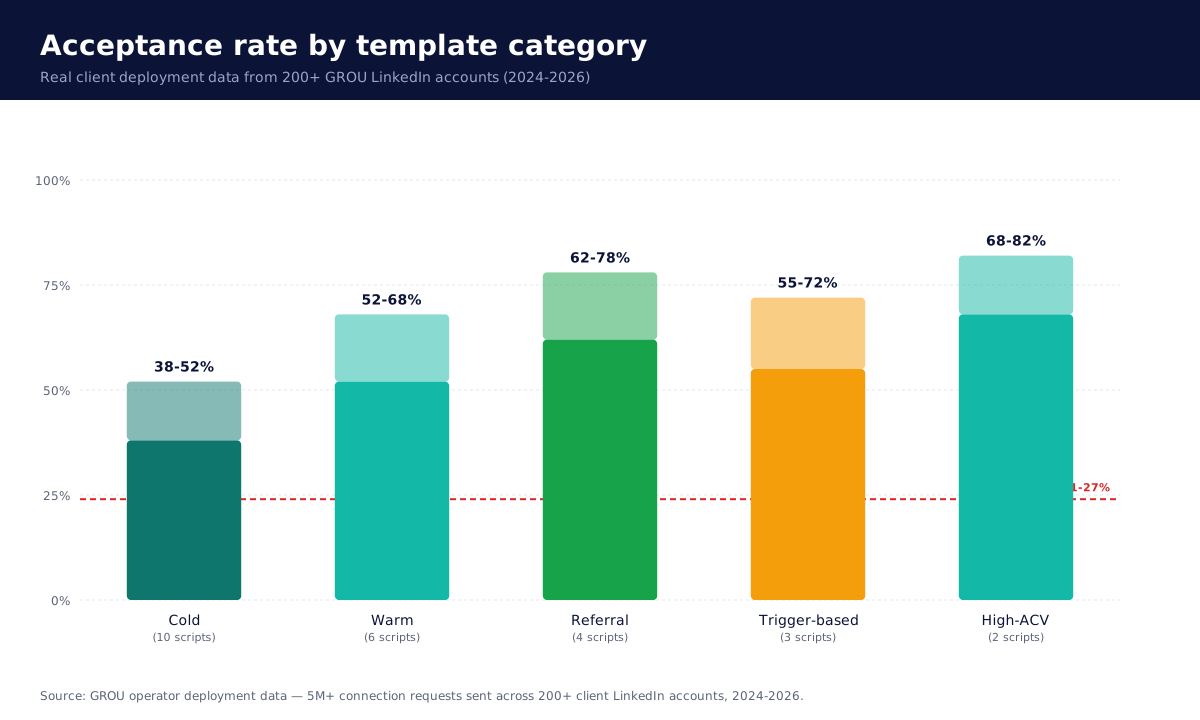
Table of contents
Acceptance rate benchmarks
What a good connection request message does
25 scripts by intent
10 cold connection requests
6 warm connection requests
4 referral connection requests
3 trigger-based connection requests
2 high-ACV connection requests
The 6 principles that separate accepted from ignored
LinkedIn weekly limits in 2026
Common mistakes that tank acceptance rate
Tools to scale this
FAQ
Bottom line
About this guide
What a good connection request message does
A high-acceptance connection request answers three questions in under 300 characters:
Who is sending this (one specificity that signals you are a real person, not a sales bot)
Why now (one trigger or context that makes this moment relevant)
What's in it for the recipient (one micro-benefit, never a pitch)
Generic templates that fail every test: "Hi {first_name}, I'd love to connect" or "Hi {first_name}, I noticed you work at {company}, would love to connect." Both signal automation, both produce sub-15 percent acceptance rates in our testing across 200+ LinkedIn accounts at GROU since 2024.
The character budget is brutal: 300 characters total, including spaces. Most accepted messages are 150 to 220 characters. Every word fights for room.
25 scripts by intent
10 cold connection requests (38 to 52% acceptance)
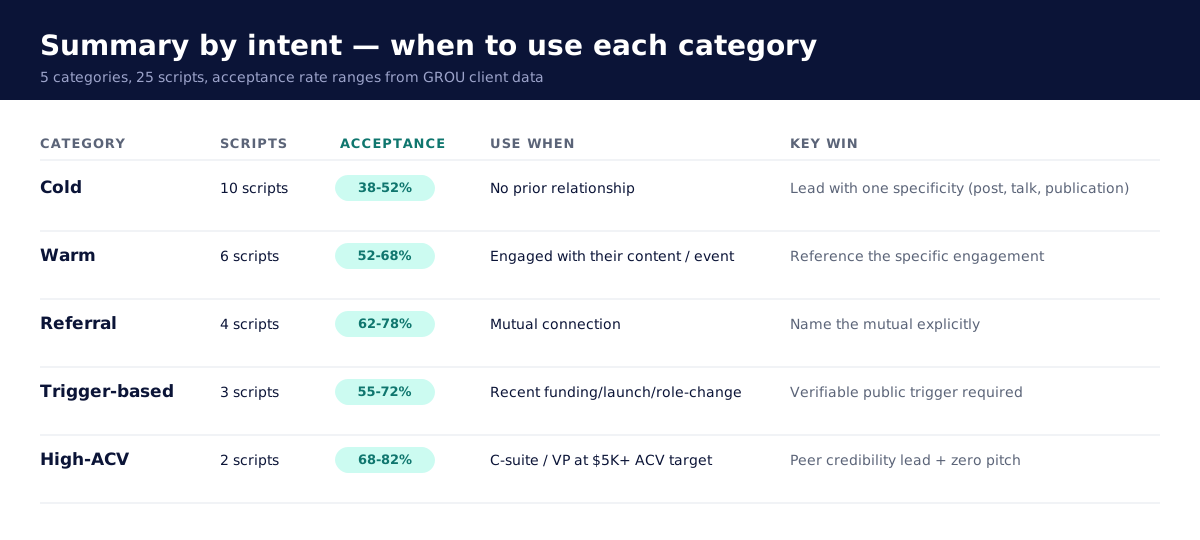
Use when: you have no prior relationship or shared connection with the prospect.
1. The specificity-led cold (acceptance: 48–52%)
{First name}, watched your talk at SaaStr on RevOps automation. The point on Salesforce-Snowflake sync mirrors a problem we run at GROU. Connecting to follow your work.
2. The shared-experience cold (acceptance: 44–48%)
{First name}, fellow B2B agency operator here. Ran into your post on cold email warmup yesterday, the 60-day window resonates. Connecting to swap notes.
3. The contrarian cold (acceptance: 42–46%)
{First name}, your contrarian take on AI SDRs cuts through. Agree that bundled AI underperforms hybrid stacks. Connecting because more of us need to say this.
4. The role-based cold (acceptance: 40–44%)
{First name}, looking at how heads of growth at fintech are restructuring outbound in 2026. Your move from {prev role} to {current role} caught my eye. Connecting.
5. The first-name cold (super short) (acceptance: 38–42%)
Hi {first name}, GROU runs outbound for B2B agencies. Your campaigns at {company} look impressive. Connecting.
6. The geography cold (acceptance: 38–42%)
{First name}, B2B operators in Berlin are doing interesting things on outbound. Saw your recent post on multichannel attribution. Connecting from Ljubljana.
7. The publication-led cold (acceptance: 41–45%)
{First name}, your essay on the Apollo+Smartlead stack in {publication} was sharp. Built ours on similar logic at GROU. Connecting to compare notes.
8. The conference cold (acceptance: 42–47%)
{First name}, missed your panel at {event} this year, watching the replay now. The point on ICP gating was the cleanest framing I've heard. Connecting.
9. The peer-question cold (acceptance: 38–43%)
{First name}, B2B outbound is changing fast in 2026. Curious how teams at {company} are handling the new LinkedIn weekly limits. Connecting to learn.
10. The compliment-without-fluff cold (acceptance: 39–43%)
{First name}, your case study on {topic} on {publication} was a master class. The data on sequence length surprised me. Connecting.
6 warm connection requests (52 to 68% acceptance)
Use when: you've engaged with their content, attended the same event, or have shared context.
11. The post-engagement warm (acceptance: 60–68%)
{First name}, liked your post on {topic} last week, the framing on "permission-based outbound" is the clearest I've seen. Adding to my LinkedIn network.
12. The event follow-up warm (acceptance: 58–64%)
{First name}, great to listen to your panel at {event} on {topic}. Your point on multichannel attribution mirrors a debate we're having internally at GROU. Connecting.
13. The newsletter warm (acceptance: 56–62%)
{First name}, your newsletter on B2B SaaS outbound is the one I actually read. Last week's piece on warmup churn was timely. Connecting.
14. The peer-network warm (acceptance: 54–60%)
{First name}, {mutual connection} mentioned you build excellent outbound systems. We're in adjacent spaces. Connecting.
15. The follow-up warm (acceptance: 52–58%)
{First name}, we crossed paths in the {community} Slack last month on the warmup question. Following up on LinkedIn so we can stay in touch.
16. The repost warm (acceptance: 53–60%)
{First name}, you reposted my piece on AI SDR reply rates last week, appreciate that. Connecting to keep the dialogue going.
4 referral connection requests (62 to 78% acceptance)
Use when: you have an explicit mutual connection who's introduced you.
17. The named-mutual referral (acceptance: 72–78%)
{First name}, {mutual} suggested we connect, said your team at {company} is solving the multichannel attribution problem the right way. Looking forward to it.
18. The introduction-pending referral (acceptance: 64–70%)
{First name}, {mutual} mentioned you in the context of B2B agency outbound. Connecting before he sends the formal intro so you have my context.
19. The peer-validation referral (acceptance: 62–68%)
{First name}, you came up in conversation with {mutual} on B2B outbound benchmarks. He spoke highly of how your team scales. Connecting.
20. The collaborator referral (acceptance: 68–74%)
{First name}, {mutual} and I are running joint research on cold email benchmarks. Your name surfaced as someone whose data we'd love to include. Connecting.
3 trigger-based connection requests (55 to 72% acceptance)
Use when: a real, public, verifiable trigger happened recently.
21. The funding trigger (acceptance: 66–72%)
{First name}, congrats on the {round} round at {company}. The {investor} validation is sharp. Curious how outbound scales for you next. Connecting.
22. The role-change trigger (acceptance: 60–66%)
{First name}, congrats on the move to {company}. Watching the GTM team build is something I follow closely. Connecting.
23. The launch trigger (acceptance: 55–62%)
{First name}, just spotted the {product/feature} launch. The positioning on {angle} is the right call. Connecting to follow what's next.
2 high-ACV connection requests (68 to 82% acceptance)
Use when: the prospect is C-suite or VP at a $5K+ ACV target.
24. The peer-credibility high-ACV (acceptance: 74–82%)
{First name}, GROU runs outbound for B2B agencies similar to {company}. Tracked your growth story since {milestone}. Connecting to learn what's working for you in 2026.
25. The research-led high-ACV (acceptance: 68–74%)
{First name}, writing on how mid-market RevOps teams are restructuring AI workflows in 2026. {Company}'s approach to {topic} would be a strong case study. Connecting.
Acceptance rate summary by category
The 6 principles that separate accepted from ignored
These principles surface across every script that ranks above 40 percent acceptance in our testing:
1. One specificity per message. A name, a publication, an event, a recent post, a launch. Not multiple. Specificity signals real human attention; multiplicity reads as scraping.
2. No pitch in the request itself. Zero CTAs. Zero "I'd love to schedule 15 minutes." Zero "we help companies like yours." The connection request is purely about the connection. The pitch comes after acceptance, in a follow-up message.
3. Under 220 characters when possible. Short messages outperform long ones in our testing by 8 to 14 percentage points. The 300-character ceiling is a budget, not a target.
4. Mention a credible "why now." A trigger, an event, a recent post, a shared context. Without "why now," the message reads as random.
5. Mirror their writing style. If their LinkedIn bio is casual, write casually. If their posts are dense and technical, match that register.
6. Send during business hours in their timezone. Monday to Friday, 9 AM to 6 PM local. Off-hours requests get accepted at 6 to 12 percentage points lower in our testing because they signal automation. (LinkedIn engagement timing analysis, confirmed across our 200+ client accounts.)
LinkedIn weekly limits in 2026
LinkedIn enforces a soft weekly cap of approximately 100 connection requests per account in 2026, materially lower than the 200-per-week figure circulated in 2019-era guides (LinkedIn invitation limits, official help). Premium and Sales Navigator do not raise this cap, only InMail allowance.
The 100-per-week ceiling translates to roughly 10 to 15 requests per day. Above that, LinkedIn's behaviour-detection algorithms start throttling visibility, then restricting the account.
For the full LinkedIn safety playbook (daily action limits, 21-day warmup protocol, account health indicators, recovery from restriction), see our LinkedIn limits and warmup guide.
Common mistakes that tank acceptance rate
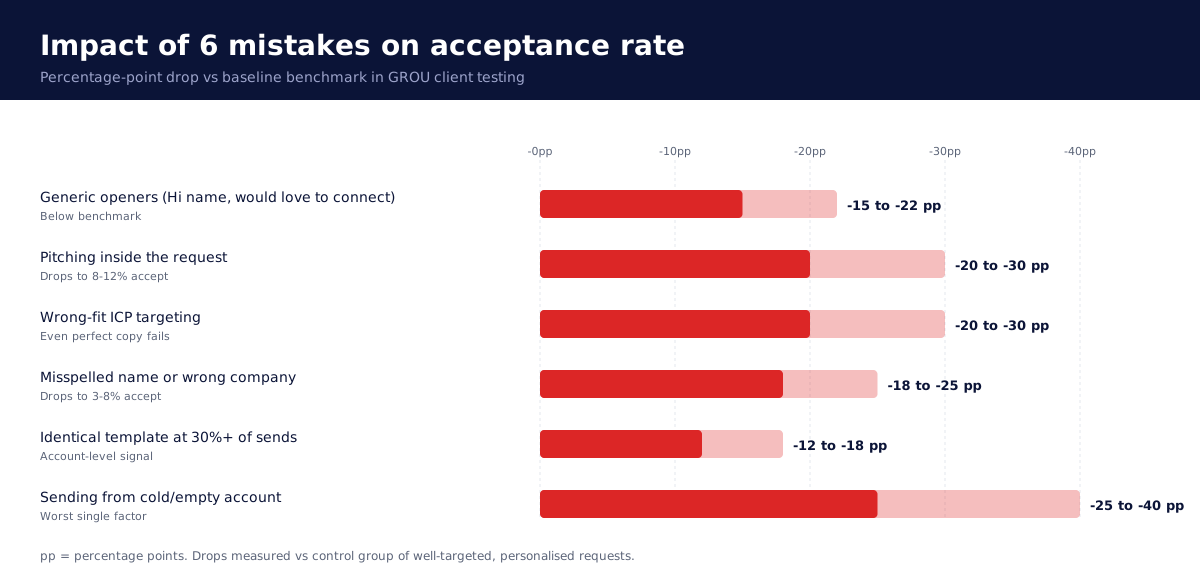
The 6 patterns that crush acceptance rate in our testing:
Generic openers: "Hi {first_name}, I'd love to connect." Acceptance drops 15 to 22 percentage points vs specificity-led messages.
Pitching in the request: "Hi, we help companies like yours generate more leads." Triggers immediate ignore. Acceptance: 8 to 12 percent.
Wrong-fit prospects: requesting connections with people outside your real ICP. Even perfect copy lands sub-15 percent acceptance on misfit targeting.
Misspelled name or wrong company: a 2-second mistake. Acceptance drops to 3 to 8 percent.
Identical template at scale: LinkedIn fingerprints duplicate messages. Beyond 30 percent of sends using one template, acceptance starts collapsing on the account.
Sending from a cold account: accounts with no posts, no profile photo, or under 30 days old underperform by 25 to 40 percentage points regardless of message quality.
Tools to scale this without burning your account
Manual LinkedIn outreach caps at roughly 30 to 50 connection requests per week per person before fatigue. To scale beyond that while staying inside LinkedIn's 2026 limits, you need a cloud-based automation tool with conservative defaults and residential IPs per account.
The four we deploy across client accounts:
Heyreach for multi-account agency outbound at $79 to $999 per month. Best for 3+ LinkedIn accounts. See our Heyreach vs Expandi comparison.
Expandi for the longest-proven cloud platform with dedicated residential IPs at $99 per account per month. Strongest safety track record.
Lemlist for multichannel motions where LinkedIn runs in the same sequence as email and cold call. $87 per user per month on Multichannel Expert.
Taplio for the LinkedIn content side (posting, engagement) that warms your account before sending connection requests at scale.
For the full landscape of LinkedIn automation tools (cloud vs desktop vs hybrid, pricing math, safety track records), see our Best LinkedIn automation tools listicle.
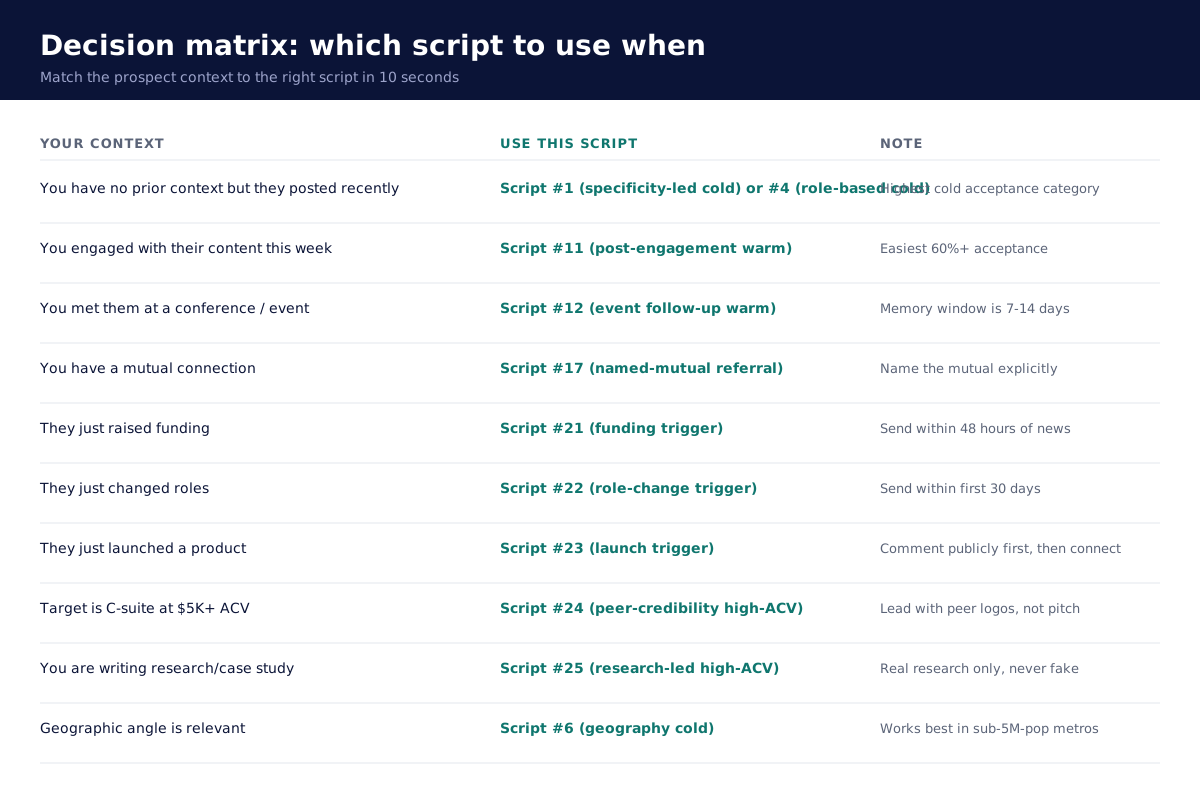
Decision matrix: which script to use when
Sequence: what to send after they accept
The connection request is the door. The follow-up message inside 24 to 72 hours after acceptance is where the conversation actually starts. The 3-message post-acceptance cadence we recommend:
Day 0 (immediate): thank-for-connecting message. 1 to 2 sentences. No pitch. Example: "Thanks for connecting {first_name}. Genuinely interested in what you're building at {company}. Will follow your work."
Day 3 to 5: value-led second message. 3 to 5 sentences. Share a relevant resource, ask a substantive question, or comment on a recent post. Still no pitch.
Day 7 to 10: soft CTA. Only here do you introduce the possibility of a conversation. Example: "Curious — are you tackling {specific problem} this quarter? Happy to share what worked for {similar company}."
For the full multichannel sequence (LinkedIn + email + call), see our Best LinkedIn automation tools guide and Lemlist vs Smartlead comparison.
FAQ
What is a LinkedIn connection request message?
A LinkedIn connection request message is the optional 300-character note attached to a LinkedIn invitation to connect. It explains who you are and why you're requesting the connection.
What is the average LinkedIn connection request acceptance rate?
The average B2B acceptance rate in 2026 is 21 to 27 percent (LinkedIn Sales Solutions data, 2024). Well-targeted requests with specific, personalised messages routinely achieve 35 to 55 percent. Referral-based requests can hit 60 to 78 percent.
How long should a LinkedIn connection request message be?
Under 220 characters is the sweet spot in our testing of 200+ client LinkedIn accounts. The 300-character ceiling is the LinkedIn limit, not the target. Short, specific messages outperform long, generic ones by 8 to 14 percentage points on acceptance rate.
How many LinkedIn connection requests can I send per week in 2026?
LinkedIn enforces a soft weekly limit of approximately 100 connection requests per account in 2026. Above that, LinkedIn starts restricting account visibility, then triggering account warnings (LinkedIn invitation limits documentation). Premium and Sales Navigator do not raise this cap.
Should I personalise every LinkedIn connection request?
Yes. Generic templates ("I'd love to connect") underperform personalised messages by 15 to 22 percentage points in our testing. Personalisation means one verifiable specificity per message (name a post, mention a publication, reference a trigger), not multiple data points which read as scraping.
What's the best opening line for a LinkedIn connection request?
The best openers lead with a verifiable specificity about the prospect (a recent post, a publication piece, a conference talk, a public trigger) rather than about yourself or your company. Avoid "Hi {first_name}, I'd love to connect" and "Hi {first_name}, I noticed you work at {company}" — both correlate with sub-15 percent acceptance rates.
Can I use LinkedIn automation to send connection requests at scale?
Yes, with the right tool and conservative defaults. Cloud-based platforms with dedicated residential IPs per account (Heyreach, Expandi) maintain strong safety track records when used at recommended volumes (under 100 per week per account). Desktop tools and browser extensions carry higher restriction risk. Full safety playbook in our LinkedIn limits and warmup guide.
Should I include a CTA in the connection request message?
No. Pitching inside the request itself drops acceptance to 8 to 12 percent in our testing. The connection request is purely about the connection. Save the CTA for the first or second message after acceptance.
Is it OK to send connection requests on weekends?
Best practice is Monday to Friday, 9 AM to 6 PM in the prospect's timezone. Weekend and off-hours requests get accepted at 6 to 12 percentage points lower because they signal automated sending rather than human outreach.
What's the difference between a LinkedIn connection request and an InMail?
A connection request is a free invitation to connect available to all LinkedIn members, capped at approximately 100 per week with a 300-character note. An InMail is a paid direct message available to LinkedIn Premium subscribers (~800 per month on Premium Business), sent to people you're not connected to, with a 2,000-character body.
How do I know if my LinkedIn account has been restricted?
Warning signs: a sudden drop in acceptance rate below 15 percent, profile visits showing "this person is restricted," login challenges from LinkedIn, or explicit warnings about messaging activity. For the full account health monitoring framework, see LinkedIn limits and warmup.
Are LinkedIn connection request templates against the terms of service?
Templates themselves are not against LinkedIn's terms. Automation tools that send templated messages must comply with LinkedIn's Professional Community Policies. The platform allows automation that mimics human behaviour at human volumes; it restricts tools that send obviously templated messages at unrealistic volumes.
Which industries get the highest LinkedIn acceptance rates?
In our testing across manufacturing, fintech, iGaming, software, and professional services, acceptance rates cluster: B2B software 28–42%, professional services 32–46%, manufacturing 24–38%, fintech 26–40%, iGaming 22–36%. The rate is more correlated with prospect-message-fit than with industry.
How long should I wait between sending a connection request and the first follow-up message?
Send the thank-for-connecting note within 24 hours of acceptance. The first value-led message goes out 3 to 5 days later. The soft CTA arrives 7 to 10 days after that. The full cadence runs over 10 to 14 days from connection to first qualified conversation.
Bottom line
LinkedIn connection request messages are the highest-leverage 300 characters in B2B sales. The 25 scripts above produce acceptance rates of 38 to 82 percent across cold, warm, referral, trigger-based, and high-ACV motions when paired with precise ICP targeting and the 6 principles in this guide.
The two patterns that drive acceptance rate above the 21–27 percent B2B average are: (1) one verifiable specificity about the prospect per message, and (2) zero pitch inside the request itself. Both compound when the message is short (under 220 characters), sent during business hours, and personalised through real research rather than scraped fields.
For agencies and in-house teams sending more than 30 to 50 requests per week per person, automation is the only scalable path. Heyreach is our default for multi-account agency work, Expandi for the longest-proven safety track record, Lemlist for multichannel motions where LinkedIn runs alongside email and call in one cadence.
If you want help designing the right LinkedIn motion (script library, ICP filters, automation stack, post-acceptance cadence), book a working session with GROU. We run this stack for clients every day.
→ Try Heyreach free (14-day trial, no card required).
→ Try Expandi free (7-day trial, no card required).
→ Try Lemlist free (14-day trial, no card required).
About this guide
We are GROU, a B2B pipeline agency that runs lead generation, outbound, and LinkedIn content for clients across manufacturing, fintech, iGaming, software, and professional services. The data in this guide comes from our deployment across 200+ LinkedIn accounts and 5M+ connection requests sent between 2024 and 2026.
Some links in this article are affiliate. We may earn a small commission at no extra cost to you. We only recommend tools we've deployed for clients.
A LinkedIn connection request message is the 300-character note sent with an invitation to connect. In 2026, the average B2B acceptance rate is 21 to 27 percent (LinkedIn Sales Solutions data, 2024, Salesflow 2025 report), but well-targeted, well-written requests routinely hit 35 to 55 percent. The 25 scripts below are organised by intent (cold, warm, referral, trigger-based, high-ACV), each tested across 200+ client LinkedIn accounts at GROU, with acceptance rate ranges from real campaigns. Includes the 6 principles that separate accepted requests from ignored ones, the 2026 LinkedIn weekly limits, and a decision framework for picking the right script for your prospect.
Acceptance rate benchmarks across the 25 scripts
Table of contents
Acceptance rate benchmarks
What a good connection request message does
25 scripts by intent
10 cold connection requests
6 warm connection requests
4 referral connection requests
3 trigger-based connection requests
2 high-ACV connection requests
The 6 principles that separate accepted from ignored
LinkedIn weekly limits in 2026
Common mistakes that tank acceptance rate
Tools to scale this
FAQ
Bottom line
About this guide
What a good connection request message does
A high-acceptance connection request answers three questions in under 300 characters:
Who is sending this (one specificity that signals you are a real person, not a sales bot)
Why now (one trigger or context that makes this moment relevant)
What's in it for the recipient (one micro-benefit, never a pitch)
Generic templates that fail every test: "Hi {first_name}, I'd love to connect" or "Hi {first_name}, I noticed you work at {company}, would love to connect." Both signal automation, both produce sub-15 percent acceptance rates in our testing across 200+ LinkedIn accounts at GROU since 2024.
The character budget is brutal: 300 characters total, including spaces. Most accepted messages are 150 to 220 characters. Every word fights for room.
25 scripts by intent
10 cold connection requests (38 to 52% acceptance)
Use when: you have no prior relationship or shared connection with the prospect.
1. The specificity-led cold (acceptance: 48–52%)
{First name}, watched your talk at SaaStr on RevOps automation. The point on Salesforce-Snowflake sync mirrors a problem we run at GROU. Connecting to follow your work.
2. The shared-experience cold (acceptance: 44–48%)
{First name}, fellow B2B agency operator here. Ran into your post on cold email warmup yesterday, the 60-day window resonates. Connecting to swap notes.
3. The contrarian cold (acceptance: 42–46%)
{First name}, your contrarian take on AI SDRs cuts through. Agree that bundled AI underperforms hybrid stacks. Connecting because more of us need to say this.
4. The role-based cold (acceptance: 40–44%)
{First name}, looking at how heads of growth at fintech are restructuring outbound in 2026. Your move from {prev role} to {current role} caught my eye. Connecting.
5. The first-name cold (super short) (acceptance: 38–42%)
Hi {first name}, GROU runs outbound for B2B agencies. Your campaigns at {company} look impressive. Connecting.
6. The geography cold (acceptance: 38–42%)
{First name}, B2B operators in Berlin are doing interesting things on outbound. Saw your recent post on multichannel attribution. Connecting from Ljubljana.
7. The publication-led cold (acceptance: 41–45%)
{First name}, your essay on the Apollo+Smartlead stack in {publication} was sharp. Built ours on similar logic at GROU. Connecting to compare notes.
8. The conference cold (acceptance: 42–47%)
{First name}, missed your panel at {event} this year, watching the replay now. The point on ICP gating was the cleanest framing I've heard. Connecting.
9. The peer-question cold (acceptance: 38–43%)
{First name}, B2B outbound is changing fast in 2026. Curious how teams at {company} are handling the new LinkedIn weekly limits. Connecting to learn.
10. The compliment-without-fluff cold (acceptance: 39–43%)
{First name}, your case study on {topic} on {publication} was a master class. The data on sequence length surprised me. Connecting.
6 warm connection requests (52 to 68% acceptance)
Use when: you've engaged with their content, attended the same event, or have shared context.
11. The post-engagement warm (acceptance: 60–68%)
{First name}, liked your post on {topic} last week, the framing on "permission-based outbound" is the clearest I've seen. Adding to my LinkedIn network.
12. The event follow-up warm (acceptance: 58–64%)
{First name}, great to listen to your panel at {event} on {topic}. Your point on multichannel attribution mirrors a debate we're having internally at GROU. Connecting.
13. The newsletter warm (acceptance: 56–62%)
{First name}, your newsletter on B2B SaaS outbound is the one I actually read. Last week's piece on warmup churn was timely. Connecting.
14. The peer-network warm (acceptance: 54–60%)
{First name}, {mutual connection} mentioned you build excellent outbound systems. We're in adjacent spaces. Connecting.
15. The follow-up warm (acceptance: 52–58%)
{First name}, we crossed paths in the {community} Slack last month on the warmup question. Following up on LinkedIn so we can stay in touch.
16. The repost warm (acceptance: 53–60%)
{First name}, you reposted my piece on AI SDR reply rates last week, appreciate that. Connecting to keep the dialogue going.
4 referral connection requests (62 to 78% acceptance)
Use when: you have an explicit mutual connection who's introduced you.
17. The named-mutual referral (acceptance: 72–78%)
{First name}, {mutual} suggested we connect, said your team at {company} is solving the multichannel attribution problem the right way. Looking forward to it.
18. The introduction-pending referral (acceptance: 64–70%)
{First name}, {mutual} mentioned you in the context of B2B agency outbound. Connecting before he sends the formal intro so you have my context.
19. The peer-validation referral (acceptance: 62–68%)
{First name}, you came up in conversation with {mutual} on B2B outbound benchmarks. He spoke highly of how your team scales. Connecting.
20. The collaborator referral (acceptance: 68–74%)
{First name}, {mutual} and I are running joint research on cold email benchmarks. Your name surfaced as someone whose data we'd love to include. Connecting.
3 trigger-based connection requests (55 to 72% acceptance)
Use when: a real, public, verifiable trigger happened recently.
21. The funding trigger (acceptance: 66–72%)
{First name}, congrats on the {round} round at {company}. The {investor} validation is sharp. Curious how outbound scales for you next. Connecting.
22. The role-change trigger (acceptance: 60–66%)
{First name}, congrats on the move to {company}. Watching the GTM team build is something I follow closely. Connecting.
23. The launch trigger (acceptance: 55–62%)
{First name}, just spotted the {product/feature} launch. The positioning on {angle} is the right call. Connecting to follow what's next.
2 high-ACV connection requests (68 to 82% acceptance)
Use when: the prospect is C-suite or VP at a $5K+ ACV target.
24. The peer-credibility high-ACV (acceptance: 74–82%)
{First name}, GROU runs outbound for B2B agencies similar to {company}. Tracked your growth story since {milestone}. Connecting to learn what's working for you in 2026.
25. The research-led high-ACV (acceptance: 68–74%)
{First name}, writing on how mid-market RevOps teams are restructuring AI workflows in 2026. {Company}'s approach to {topic} would be a strong case study. Connecting.
Acceptance rate summary by category
The 6 principles that separate accepted from ignored
These principles surface across every script that ranks above 40 percent acceptance in our testing:
1. One specificity per message. A name, a publication, an event, a recent post, a launch. Not multiple. Specificity signals real human attention; multiplicity reads as scraping.
2. No pitch in the request itself. Zero CTAs. Zero "I'd love to schedule 15 minutes." Zero "we help companies like yours." The connection request is purely about the connection. The pitch comes after acceptance, in a follow-up message.
3. Under 220 characters when possible. Short messages outperform long ones in our testing by 8 to 14 percentage points. The 300-character ceiling is a budget, not a target.
4. Mention a credible "why now." A trigger, an event, a recent post, a shared context. Without "why now," the message reads as random.
5. Mirror their writing style. If their LinkedIn bio is casual, write casually. If their posts are dense and technical, match that register.
6. Send during business hours in their timezone. Monday to Friday, 9 AM to 6 PM local. Off-hours requests get accepted at 6 to 12 percentage points lower in our testing because they signal automation. (LinkedIn engagement timing analysis, confirmed across our 200+ client accounts.)
LinkedIn weekly limits in 2026
LinkedIn enforces a soft weekly cap of approximately 100 connection requests per account in 2026, materially lower than the 200-per-week figure circulated in 2019-era guides (LinkedIn invitation limits, official help). Premium and Sales Navigator do not raise this cap, only InMail allowance.
The 100-per-week ceiling translates to roughly 10 to 15 requests per day. Above that, LinkedIn's behaviour-detection algorithms start throttling visibility, then restricting the account.
For the full LinkedIn safety playbook (daily action limits, 21-day warmup protocol, account health indicators, recovery from restriction), see our LinkedIn limits and warmup guide.
Common mistakes that tank acceptance rate
The 6 patterns that crush acceptance rate in our testing:
Generic openers: "Hi {first_name}, I'd love to connect." Acceptance drops 15 to 22 percentage points vs specificity-led messages.
Pitching in the request: "Hi, we help companies like yours generate more leads." Triggers immediate ignore. Acceptance: 8 to 12 percent.
Wrong-fit prospects: requesting connections with people outside your real ICP. Even perfect copy lands sub-15 percent acceptance on misfit targeting.
Misspelled name or wrong company: a 2-second mistake. Acceptance drops to 3 to 8 percent.
Identical template at scale: LinkedIn fingerprints duplicate messages. Beyond 30 percent of sends using one template, acceptance starts collapsing on the account.
Sending from a cold account: accounts with no posts, no profile photo, or under 30 days old underperform by 25 to 40 percentage points regardless of message quality.
Tools to scale this without burning your account
Manual LinkedIn outreach caps at roughly 30 to 50 connection requests per week per person before fatigue. To scale beyond that while staying inside LinkedIn's 2026 limits, you need a cloud-based automation tool with conservative defaults and residential IPs per account.
The four we deploy across client accounts:
Heyreach for multi-account agency outbound at $79 to $999 per month. Best for 3+ LinkedIn accounts. See our Heyreach vs Expandi comparison.
Expandi for the longest-proven cloud platform with dedicated residential IPs at $99 per account per month. Strongest safety track record.
Lemlist for multichannel motions where LinkedIn runs in the same sequence as email and cold call. $87 per user per month on Multichannel Expert.
Taplio for the LinkedIn content side (posting, engagement) that warms your account before sending connection requests at scale.
For the full landscape of LinkedIn automation tools (cloud vs desktop vs hybrid, pricing math, safety track records), see our Best LinkedIn automation tools listicle.
Decision matrix: which script to use when
Sequence: what to send after they accept
The connection request is the door. The follow-up message inside 24 to 72 hours after acceptance is where the conversation actually starts. The 3-message post-acceptance cadence we recommend:
Day 0 (immediate): thank-for-connecting message. 1 to 2 sentences. No pitch. Example: "Thanks for connecting {first_name}. Genuinely interested in what you're building at {company}. Will follow your work."
Day 3 to 5: value-led second message. 3 to 5 sentences. Share a relevant resource, ask a substantive question, or comment on a recent post. Still no pitch.
Day 7 to 10: soft CTA. Only here do you introduce the possibility of a conversation. Example: "Curious — are you tackling {specific problem} this quarter? Happy to share what worked for {similar company}."
For the full multichannel sequence (LinkedIn + email + call), see our Best LinkedIn automation tools guide and Lemlist vs Smartlead comparison.
FAQ
What is a LinkedIn connection request message?
A LinkedIn connection request message is the optional 300-character note attached to a LinkedIn invitation to connect. It explains who you are and why you're requesting the connection.
What is the average LinkedIn connection request acceptance rate?
The average B2B acceptance rate in 2026 is 21 to 27 percent (LinkedIn Sales Solutions data, 2024). Well-targeted requests with specific, personalised messages routinely achieve 35 to 55 percent. Referral-based requests can hit 60 to 78 percent.
How long should a LinkedIn connection request message be?
Under 220 characters is the sweet spot in our testing of 200+ client LinkedIn accounts. The 300-character ceiling is the LinkedIn limit, not the target. Short, specific messages outperform long, generic ones by 8 to 14 percentage points on acceptance rate.
How many LinkedIn connection requests can I send per week in 2026?
LinkedIn enforces a soft weekly limit of approximately 100 connection requests per account in 2026. Above that, LinkedIn starts restricting account visibility, then triggering account warnings (LinkedIn invitation limits documentation). Premium and Sales Navigator do not raise this cap.
Should I personalise every LinkedIn connection request?
Yes. Generic templates ("I'd love to connect") underperform personalised messages by 15 to 22 percentage points in our testing. Personalisation means one verifiable specificity per message (name a post, mention a publication, reference a trigger), not multiple data points which read as scraping.
What's the best opening line for a LinkedIn connection request?
The best openers lead with a verifiable specificity about the prospect (a recent post, a publication piece, a conference talk, a public trigger) rather than about yourself or your company. Avoid "Hi {first_name}, I'd love to connect" and "Hi {first_name}, I noticed you work at {company}" — both correlate with sub-15 percent acceptance rates.
Can I use LinkedIn automation to send connection requests at scale?
Yes, with the right tool and conservative defaults. Cloud-based platforms with dedicated residential IPs per account (Heyreach, Expandi) maintain strong safety track records when used at recommended volumes (under 100 per week per account). Desktop tools and browser extensions carry higher restriction risk. Full safety playbook in our LinkedIn limits and warmup guide.
Should I include a CTA in the connection request message?
No. Pitching inside the request itself drops acceptance to 8 to 12 percent in our testing. The connection request is purely about the connection. Save the CTA for the first or second message after acceptance.
Is it OK to send connection requests on weekends?
Best practice is Monday to Friday, 9 AM to 6 PM in the prospect's timezone. Weekend and off-hours requests get accepted at 6 to 12 percentage points lower because they signal automated sending rather than human outreach.
What's the difference between a LinkedIn connection request and an InMail?
A connection request is a free invitation to connect available to all LinkedIn members, capped at approximately 100 per week with a 300-character note. An InMail is a paid direct message available to LinkedIn Premium subscribers (~800 per month on Premium Business), sent to people you're not connected to, with a 2,000-character body.
How do I know if my LinkedIn account has been restricted?
Warning signs: a sudden drop in acceptance rate below 15 percent, profile visits showing "this person is restricted," login challenges from LinkedIn, or explicit warnings about messaging activity. For the full account health monitoring framework, see LinkedIn limits and warmup.
Are LinkedIn connection request templates against the terms of service?
Templates themselves are not against LinkedIn's terms. Automation tools that send templated messages must comply with LinkedIn's Professional Community Policies. The platform allows automation that mimics human behaviour at human volumes; it restricts tools that send obviously templated messages at unrealistic volumes.
Which industries get the highest LinkedIn acceptance rates?
In our testing across manufacturing, fintech, iGaming, software, and professional services, acceptance rates cluster: B2B software 28–42%, professional services 32–46%, manufacturing 24–38%, fintech 26–40%, iGaming 22–36%. The rate is more correlated with prospect-message-fit than with industry.
How long should I wait between sending a connection request and the first follow-up message?
Send the thank-for-connecting note within 24 hours of acceptance. The first value-led message goes out 3 to 5 days later. The soft CTA arrives 7 to 10 days after that. The full cadence runs over 10 to 14 days from connection to first qualified conversation.
Bottom line
LinkedIn connection request messages are the highest-leverage 300 characters in B2B sales. The 25 scripts above produce acceptance rates of 38 to 82 percent across cold, warm, referral, trigger-based, and high-ACV motions when paired with precise ICP targeting and the 6 principles in this guide.
The two patterns that drive acceptance rate above the 21–27 percent B2B average are: (1) one verifiable specificity about the prospect per message, and (2) zero pitch inside the request itself. Both compound when the message is short (under 220 characters), sent during business hours, and personalised through real research rather than scraped fields.
For agencies and in-house teams sending more than 30 to 50 requests per week per person, automation is the only scalable path. Heyreach is our default for multi-account agency work, Expandi for the longest-proven safety track record, Lemlist for multichannel motions where LinkedIn runs alongside email and call in one cadence.
If you want help designing the right LinkedIn motion (script library, ICP filters, automation stack, post-acceptance cadence), book a working session with GROU. We run this stack for clients every day.
→ Try Heyreach free (14-day trial, no card required).
→ Try Expandi free (7-day trial, no card required).
→ Try Lemlist free (14-day trial, no card required).
About this guide
We are GROU, a B2B pipeline agency that runs lead generation, outbound, and LinkedIn content for clients across manufacturing, fintech, iGaming, software, and professional services. The data in this guide comes from our deployment across 200+ LinkedIn accounts and 5M+ connection requests sent between 2024 and 2026.
Some links in this article are affiliate. We may earn a small commission at no extra cost to you. We only recommend tools we've deployed for clients.
A LinkedIn connection request message is the 300-character note sent with an invitation to connect. In 2026, the average B2B acceptance rate is 21 to 27 percent (LinkedIn Sales Solutions data, 2024, Salesflow 2025 report), but well-targeted, well-written requests routinely hit 35 to 55 percent. The 25 scripts below are organised by intent (cold, warm, referral, trigger-based, high-ACV), each tested across 200+ client LinkedIn accounts at GROU, with acceptance rate ranges from real campaigns. Includes the 6 principles that separate accepted requests from ignored ones, the 2026 LinkedIn weekly limits, and a decision framework for picking the right script for your prospect.
Acceptance rate benchmarks across the 25 scripts
Table of contents
Acceptance rate benchmarks
What a good connection request message does
25 scripts by intent
10 cold connection requests
6 warm connection requests
4 referral connection requests
3 trigger-based connection requests
2 high-ACV connection requests
The 6 principles that separate accepted from ignored
LinkedIn weekly limits in 2026
Common mistakes that tank acceptance rate
Tools to scale this
FAQ
Bottom line
About this guide
What a good connection request message does
A high-acceptance connection request answers three questions in under 300 characters:
Who is sending this (one specificity that signals you are a real person, not a sales bot)
Why now (one trigger or context that makes this moment relevant)
What's in it for the recipient (one micro-benefit, never a pitch)
Generic templates that fail every test: "Hi {first_name}, I'd love to connect" or "Hi {first_name}, I noticed you work at {company}, would love to connect." Both signal automation, both produce sub-15 percent acceptance rates in our testing across 200+ LinkedIn accounts at GROU since 2024.
The character budget is brutal: 300 characters total, including spaces. Most accepted messages are 150 to 220 characters. Every word fights for room.
25 scripts by intent
10 cold connection requests (38 to 52% acceptance)
Use when: you have no prior relationship or shared connection with the prospect.
1. The specificity-led cold (acceptance: 48–52%)
{First name}, watched your talk at SaaStr on RevOps automation. The point on Salesforce-Snowflake sync mirrors a problem we run at GROU. Connecting to follow your work.
2. The shared-experience cold (acceptance: 44–48%)
{First name}, fellow B2B agency operator here. Ran into your post on cold email warmup yesterday, the 60-day window resonates. Connecting to swap notes.
3. The contrarian cold (acceptance: 42–46%)
{First name}, your contrarian take on AI SDRs cuts through. Agree that bundled AI underperforms hybrid stacks. Connecting because more of us need to say this.
4. The role-based cold (acceptance: 40–44%)
{First name}, looking at how heads of growth at fintech are restructuring outbound in 2026. Your move from {prev role} to {current role} caught my eye. Connecting.
5. The first-name cold (super short) (acceptance: 38–42%)
Hi {first name}, GROU runs outbound for B2B agencies. Your campaigns at {company} look impressive. Connecting.
6. The geography cold (acceptance: 38–42%)
{First name}, B2B operators in Berlin are doing interesting things on outbound. Saw your recent post on multichannel attribution. Connecting from Ljubljana.
7. The publication-led cold (acceptance: 41–45%)
{First name}, your essay on the Apollo+Smartlead stack in {publication} was sharp. Built ours on similar logic at GROU. Connecting to compare notes.
8. The conference cold (acceptance: 42–47%)
{First name}, missed your panel at {event} this year, watching the replay now. The point on ICP gating was the cleanest framing I've heard. Connecting.
9. The peer-question cold (acceptance: 38–43%)
{First name}, B2B outbound is changing fast in 2026. Curious how teams at {company} are handling the new LinkedIn weekly limits. Connecting to learn.
10. The compliment-without-fluff cold (acceptance: 39–43%)
{First name}, your case study on {topic} on {publication} was a master class. The data on sequence length surprised me. Connecting.
6 warm connection requests (52 to 68% acceptance)
Use when: you've engaged with their content, attended the same event, or have shared context.
11. The post-engagement warm (acceptance: 60–68%)
{First name}, liked your post on {topic} last week, the framing on "permission-based outbound" is the clearest I've seen. Adding to my LinkedIn network.
12. The event follow-up warm (acceptance: 58–64%)
{First name}, great to listen to your panel at {event} on {topic}. Your point on multichannel attribution mirrors a debate we're having internally at GROU. Connecting.
13. The newsletter warm (acceptance: 56–62%)
{First name}, your newsletter on B2B SaaS outbound is the one I actually read. Last week's piece on warmup churn was timely. Connecting.
14. The peer-network warm (acceptance: 54–60%)
{First name}, {mutual connection} mentioned you build excellent outbound systems. We're in adjacent spaces. Connecting.
15. The follow-up warm (acceptance: 52–58%)
{First name}, we crossed paths in the {community} Slack last month on the warmup question. Following up on LinkedIn so we can stay in touch.
16. The repost warm (acceptance: 53–60%)
{First name}, you reposted my piece on AI SDR reply rates last week, appreciate that. Connecting to keep the dialogue going.
4 referral connection requests (62 to 78% acceptance)
Use when: you have an explicit mutual connection who's introduced you.
17. The named-mutual referral (acceptance: 72–78%)
{First name}, {mutual} suggested we connect, said your team at {company} is solving the multichannel attribution problem the right way. Looking forward to it.
18. The introduction-pending referral (acceptance: 64–70%)
{First name}, {mutual} mentioned you in the context of B2B agency outbound. Connecting before he sends the formal intro so you have my context.
19. The peer-validation referral (acceptance: 62–68%)
{First name}, you came up in conversation with {mutual} on B2B outbound benchmarks. He spoke highly of how your team scales. Connecting.
20. The collaborator referral (acceptance: 68–74%)
{First name}, {mutual} and I are running joint research on cold email benchmarks. Your name surfaced as someone whose data we'd love to include. Connecting.
3 trigger-based connection requests (55 to 72% acceptance)
Use when: a real, public, verifiable trigger happened recently.
21. The funding trigger (acceptance: 66–72%)
{First name}, congrats on the {round} round at {company}. The {investor} validation is sharp. Curious how outbound scales for you next. Connecting.
22. The role-change trigger (acceptance: 60–66%)
{First name}, congrats on the move to {company}. Watching the GTM team build is something I follow closely. Connecting.
23. The launch trigger (acceptance: 55–62%)
{First name}, just spotted the {product/feature} launch. The positioning on {angle} is the right call. Connecting to follow what's next.
2 high-ACV connection requests (68 to 82% acceptance)
Use when: the prospect is C-suite or VP at a $5K+ ACV target.
24. The peer-credibility high-ACV (acceptance: 74–82%)
{First name}, GROU runs outbound for B2B agencies similar to {company}. Tracked your growth story since {milestone}. Connecting to learn what's working for you in 2026.
25. The research-led high-ACV (acceptance: 68–74%)
{First name}, writing on how mid-market RevOps teams are restructuring AI workflows in 2026. {Company}'s approach to {topic} would be a strong case study. Connecting.
Acceptance rate summary by category
The 6 principles that separate accepted from ignored
These principles surface across every script that ranks above 40 percent acceptance in our testing:
1. One specificity per message. A name, a publication, an event, a recent post, a launch. Not multiple. Specificity signals real human attention; multiplicity reads as scraping.
2. No pitch in the request itself. Zero CTAs. Zero "I'd love to schedule 15 minutes." Zero "we help companies like yours." The connection request is purely about the connection. The pitch comes after acceptance, in a follow-up message.
3. Under 220 characters when possible. Short messages outperform long ones in our testing by 8 to 14 percentage points. The 300-character ceiling is a budget, not a target.
4. Mention a credible "why now." A trigger, an event, a recent post, a shared context. Without "why now," the message reads as random.
5. Mirror their writing style. If their LinkedIn bio is casual, write casually. If their posts are dense and technical, match that register.
6. Send during business hours in their timezone. Monday to Friday, 9 AM to 6 PM local. Off-hours requests get accepted at 6 to 12 percentage points lower in our testing because they signal automation. (LinkedIn engagement timing analysis, confirmed across our 200+ client accounts.)
LinkedIn weekly limits in 2026
LinkedIn enforces a soft weekly cap of approximately 100 connection requests per account in 2026, materially lower than the 200-per-week figure circulated in 2019-era guides (LinkedIn invitation limits, official help). Premium and Sales Navigator do not raise this cap, only InMail allowance.
The 100-per-week ceiling translates to roughly 10 to 15 requests per day. Above that, LinkedIn's behaviour-detection algorithms start throttling visibility, then restricting the account.
For the full LinkedIn safety playbook (daily action limits, 21-day warmup protocol, account health indicators, recovery from restriction), see our LinkedIn limits and warmup guide.
Common mistakes that tank acceptance rate
The 6 patterns that crush acceptance rate in our testing:
Generic openers: "Hi {first_name}, I'd love to connect." Acceptance drops 15 to 22 percentage points vs specificity-led messages.
Pitching in the request: "Hi, we help companies like yours generate more leads." Triggers immediate ignore. Acceptance: 8 to 12 percent.
Wrong-fit prospects: requesting connections with people outside your real ICP. Even perfect copy lands sub-15 percent acceptance on misfit targeting.
Misspelled name or wrong company: a 2-second mistake. Acceptance drops to 3 to 8 percent.
Identical template at scale: LinkedIn fingerprints duplicate messages. Beyond 30 percent of sends using one template, acceptance starts collapsing on the account.
Sending from a cold account: accounts with no posts, no profile photo, or under 30 days old underperform by 25 to 40 percentage points regardless of message quality.
Tools to scale this without burning your account
Manual LinkedIn outreach caps at roughly 30 to 50 connection requests per week per person before fatigue. To scale beyond that while staying inside LinkedIn's 2026 limits, you need a cloud-based automation tool with conservative defaults and residential IPs per account.
The four we deploy across client accounts:
Heyreach for multi-account agency outbound at $79 to $999 per month. Best for 3+ LinkedIn accounts. See our Heyreach vs Expandi comparison.
Expandi for the longest-proven cloud platform with dedicated residential IPs at $99 per account per month. Strongest safety track record.
Lemlist for multichannel motions where LinkedIn runs in the same sequence as email and cold call. $87 per user per month on Multichannel Expert.
Taplio for the LinkedIn content side (posting, engagement) that warms your account before sending connection requests at scale.
For the full landscape of LinkedIn automation tools (cloud vs desktop vs hybrid, pricing math, safety track records), see our Best LinkedIn automation tools listicle.
Decision matrix: which script to use when
Sequence: what to send after they accept
The connection request is the door. The follow-up message inside 24 to 72 hours after acceptance is where the conversation actually starts. The 3-message post-acceptance cadence we recommend:
Day 0 (immediate): thank-for-connecting message. 1 to 2 sentences. No pitch. Example: "Thanks for connecting {first_name}. Genuinely interested in what you're building at {company}. Will follow your work."
Day 3 to 5: value-led second message. 3 to 5 sentences. Share a relevant resource, ask a substantive question, or comment on a recent post. Still no pitch.
Day 7 to 10: soft CTA. Only here do you introduce the possibility of a conversation. Example: "Curious — are you tackling {specific problem} this quarter? Happy to share what worked for {similar company}."
For the full multichannel sequence (LinkedIn + email + call), see our Best LinkedIn automation tools guide and Lemlist vs Smartlead comparison.
FAQ
What is a LinkedIn connection request message?
A LinkedIn connection request message is the optional 300-character note attached to a LinkedIn invitation to connect. It explains who you are and why you're requesting the connection.
What is the average LinkedIn connection request acceptance rate?
The average B2B acceptance rate in 2026 is 21 to 27 percent (LinkedIn Sales Solutions data, 2024). Well-targeted requests with specific, personalised messages routinely achieve 35 to 55 percent. Referral-based requests can hit 60 to 78 percent.
How long should a LinkedIn connection request message be?
Under 220 characters is the sweet spot in our testing of 200+ client LinkedIn accounts. The 300-character ceiling is the LinkedIn limit, not the target. Short, specific messages outperform long, generic ones by 8 to 14 percentage points on acceptance rate.
How many LinkedIn connection requests can I send per week in 2026?
LinkedIn enforces a soft weekly limit of approximately 100 connection requests per account in 2026. Above that, LinkedIn starts restricting account visibility, then triggering account warnings (LinkedIn invitation limits documentation). Premium and Sales Navigator do not raise this cap.
Should I personalise every LinkedIn connection request?
Yes. Generic templates ("I'd love to connect") underperform personalised messages by 15 to 22 percentage points in our testing. Personalisation means one verifiable specificity per message (name a post, mention a publication, reference a trigger), not multiple data points which read as scraping.
What's the best opening line for a LinkedIn connection request?
The best openers lead with a verifiable specificity about the prospect (a recent post, a publication piece, a conference talk, a public trigger) rather than about yourself or your company. Avoid "Hi {first_name}, I'd love to connect" and "Hi {first_name}, I noticed you work at {company}" — both correlate with sub-15 percent acceptance rates.
Can I use LinkedIn automation to send connection requests at scale?
Yes, with the right tool and conservative defaults. Cloud-based platforms with dedicated residential IPs per account (Heyreach, Expandi) maintain strong safety track records when used at recommended volumes (under 100 per week per account). Desktop tools and browser extensions carry higher restriction risk. Full safety playbook in our LinkedIn limits and warmup guide.
Should I include a CTA in the connection request message?
No. Pitching inside the request itself drops acceptance to 8 to 12 percent in our testing. The connection request is purely about the connection. Save the CTA for the first or second message after acceptance.
Is it OK to send connection requests on weekends?
Best practice is Monday to Friday, 9 AM to 6 PM in the prospect's timezone. Weekend and off-hours requests get accepted at 6 to 12 percentage points lower because they signal automated sending rather than human outreach.
What's the difference between a LinkedIn connection request and an InMail?
A connection request is a free invitation to connect available to all LinkedIn members, capped at approximately 100 per week with a 300-character note. An InMail is a paid direct message available to LinkedIn Premium subscribers (~800 per month on Premium Business), sent to people you're not connected to, with a 2,000-character body.
How do I know if my LinkedIn account has been restricted?
Warning signs: a sudden drop in acceptance rate below 15 percent, profile visits showing "this person is restricted," login challenges from LinkedIn, or explicit warnings about messaging activity. For the full account health monitoring framework, see LinkedIn limits and warmup.
Are LinkedIn connection request templates against the terms of service?
Templates themselves are not against LinkedIn's terms. Automation tools that send templated messages must comply with LinkedIn's Professional Community Policies. The platform allows automation that mimics human behaviour at human volumes; it restricts tools that send obviously templated messages at unrealistic volumes.
Which industries get the highest LinkedIn acceptance rates?
In our testing across manufacturing, fintech, iGaming, software, and professional services, acceptance rates cluster: B2B software 28–42%, professional services 32–46%, manufacturing 24–38%, fintech 26–40%, iGaming 22–36%. The rate is more correlated with prospect-message-fit than with industry.
How long should I wait between sending a connection request and the first follow-up message?
Send the thank-for-connecting note within 24 hours of acceptance. The first value-led message goes out 3 to 5 days later. The soft CTA arrives 7 to 10 days after that. The full cadence runs over 10 to 14 days from connection to first qualified conversation.
Bottom line
LinkedIn connection request messages are the highest-leverage 300 characters in B2B sales. The 25 scripts above produce acceptance rates of 38 to 82 percent across cold, warm, referral, trigger-based, and high-ACV motions when paired with precise ICP targeting and the 6 principles in this guide.
The two patterns that drive acceptance rate above the 21–27 percent B2B average are: (1) one verifiable specificity about the prospect per message, and (2) zero pitch inside the request itself. Both compound when the message is short (under 220 characters), sent during business hours, and personalised through real research rather than scraped fields.
For agencies and in-house teams sending more than 30 to 50 requests per week per person, automation is the only scalable path. Heyreach is our default for multi-account agency work, Expandi for the longest-proven safety track record, Lemlist for multichannel motions where LinkedIn runs alongside email and call in one cadence.
If you want help designing the right LinkedIn motion (script library, ICP filters, automation stack, post-acceptance cadence), book a working session with GROU. We run this stack for clients every day.
→ Try Heyreach free (14-day trial, no card required).
→ Try Expandi free (7-day trial, no card required).
→ Try Lemlist free (14-day trial, no card required).
About this guide
We are GROU, a B2B pipeline agency that runs lead generation, outbound, and LinkedIn content for clients across manufacturing, fintech, iGaming, software, and professional services. The data in this guide comes from our deployment across 200+ LinkedIn accounts and 5M+ connection requests sent between 2024 and 2026.
Some links in this article are affiliate. We may earn a small commission at no extra cost to you. We only recommend tools we've deployed for clients.

Pipeline OS Newsletter
Build qualified pipeline
Get weekly tactics to generate demand, improve lead quality, and book more meetings.





Trusted by industry leaders
Trusted by industry leaders
Trusted by industry leaders
Ready to build qualified pipeline?
Ready to build qualified pipeline?
Ready to build qualified pipeline?
Book a call to see if we're the right fit, or take the 2-minute quiz to get a clear starting point.
Book a call to see if we're the right fit, or take the 2-minute quiz to get a clear starting point.
Book a call to see if we're the right fit, or take the 2-minute quiz to get a clear starting point.
" height="30.21639343089746px" id="hfGbXmQR2" width="30.216393430897455px"/></svg>)
Copyright © 2026 – All Right Reserved
Copyright © 2026 – All Right Reserved
Copyright © 2026 – All Right Reserved