%22%3E%3C/path%3E%3Cpath d=%22M 63.072 7.554 C 62.258 8.022 61.577 8.689 61.092 9.493 L 61.092 7.076 L 57.158 7.076 L 57.158 22.64 L 61.089 22.64 L 61.089 14.888 C 61.089 13.446 61.403 12.434 62.03 11.853 C 62.818 11.218 63.818 10.907 64.826 10.982 L 65.868 10.982 L 65.868 6.851 C 64.891 6.834 63.926 7.076 63.073 7.554 Z%22 fill=%22rgb(17,17,17)%22%3E%3C/path%3E%3Cpath d=%22M 78.916 7.82 C 76.363 6.49 73.321 6.49 70.768 7.82 C 69.562 8.473 68.564 9.451 67.888 10.644 C 67.167 11.931 66.803 13.387 66.834 14.862 C 66.804 16.332 67.157 17.785 67.86 19.077 C 68.515 20.267 69.494 21.246 70.684 21.901 C 71.924 22.576 73.318 22.92 74.73 22.898 C 76.164 22.918 77.58 22.575 78.846 21.901 C 80.062 21.247 81.073 20.27 81.768 19.077 C 82.506 17.797 82.88 16.339 82.85 14.862 C 82.88 13.389 82.517 11.934 81.797 10.647 C 81.12 9.455 80.122 8.477 78.917 7.824 M 78.803 14.862 C 78.829 15.739 78.636 16.608 78.241 17.391 C 77.903 18.046 77.38 18.588 76.738 18.95 C 76.124 19.293 75.432 19.472 74.729 19.47 C 73.668 19.497 72.648 19.061 71.934 18.276 C 71.139 17.323 70.741 16.1 70.823 14.862 C 70.741 13.62 71.149 12.395 71.959 11.45 C 72.687 10.667 73.715 10.233 74.783 10.256 C 75.859 10.236 76.894 10.67 77.635 11.45 C 78.464 12.387 78.884 13.616 78.801 14.864%22 fill=%22rgb(17,17,17)%22%3E%3C/path%3E%3Cpath d=%22M 95.906 7.076 L 95.906 15.646 C 95.975 16.68 95.643 17.701 94.979 18.498 C 94.311 19.184 93.379 19.547 92.422 19.495 C 91.475 19.544 90.553 19.18 89.894 18.498 C 89.23 17.701 88.898 16.68 88.967 15.646 L 88.967 7.076 L 85.033 7.076 L 85.033 16.207 C 85 17.449 85.275 18.68 85.834 19.79 C 86.327 20.75 87.095 21.542 88.039 22.065 C 89.033 22.594 90.145 22.861 91.271 22.838 C 92.188 22.847 93.095 22.65 93.926 22.263 C 94.708 21.905 95.388 21.36 95.906 20.675 L 95.906 22.645 L 99.865 22.645 L 99.865 7.076 Z%22 fill=%22rgb(17,17,17)%22%3E%3C/path%3E%3Cpath d=%22M 4.513 15.626 C 4.511 10.815 7.606 6.549 12.181 5.059 C 16.756 3.57 21.77 5.195 24.601 9.086 L 27.816 5.87 C 24.074 1.186 17.981 -0.943 12.137 0.393 C 6.292 1.728 1.728 6.292 0.393 12.137 C -0.943 17.981 1.186 24.074 5.87 27.816 L 9.085 24.601 C 6.214 22.512 4.515 19.177 4.513 15.626%22 fill=%22rgb(32,62,235)%22%3E%3C/path%3E%3Cpath d=%22M 17.114 14.343 L 13.354 18.01 L 13.354 18.026 L 21.071 18.026 L 11.412 27.609 L 17.389 27.609 L 23.999 21.081 L 23.999 28.316 L 24.005 28.316 L 27.967 24.393 L 27.967 14.343 Z%22 fill=%22rgb(32,62,235)%22%3E%3C/path%3E%3C/g%3E%3C/svg%3E) ×
× ××
××›
›
›
›
Make workflow automation: 2026 guide for B2B revenue
Make workflow automation: 2026 guide for B2B revenue
Make workflow automation: 2026 guide for B2B revenue
Make workflow automation: 2026 guide for B2B revenue
Make workflow automation: 2026 guide for B2B revenue
Make workflow automation: 2026 guide for B2B revenue

Author
Aljaz Peklaj

Your Make scenarios probably worked on Tuesday, then went quiet by Friday. The webhook fired, HubSpot accepted the record, Clay enriched it, and nobody saw that a field change, expired credential, or retry loop had broken the handoff. The pipeline looked healthy until the inbox got empty.
Fragile automations fail without warning when they're built as app chains instead of observable systems.
Default Make settings can stall routing, especially on webhook queues and cycle limits.
Outbound reliability depends on hygiene, deduplication, idempotency, and clear fallback paths.
AI needs governance, or it turns CRM noise into a process problem.
Monitoring must be weekly, with reconciliation, exception review, and a dead-letter queue.
Table of Contents
Why most revenue automations fail silently
Most revenue teams don't lose a workflow because Make is broken. They lose it because the process was shaky before anyone touched a module, then the automation made the weakness faster. McKinsey's automation work is a useful benchmark here, because it shows that automation changes work at the task level, not by replacing whole jobs outright. It also models a potential 0.8 to 1.4 percentage point annual lift in global productivity growth if automation is adopted well and displaced labor is redeployed productively McKinsey.
The catch is simple. If the source process is inconsistent, automating it just produces inconsistent output faster. That's why a bad ICP field, poor deduplication, or sloppy qualification logic gets worse after you connect it to HubSpot, Clay, Apollo, or an outbound tool.
Practical rule: map the current workflow before you touch a single module. If you can't name the failure modes, you're automating guesswork.
Select the process, not the app
High-frequency, rules-based work belongs in Make. Judgment-heavy work doesn't. That line matters more than the connector list, because the expensive mistakes happen when teams automate tasks that still need a human decision.
For revenue workflows, the right candidates are usually repetitive handoffs. Think lead routing, account enrichment, reporting, deduplication checks, and follow-up triggers. The wrong candidates are nuanced qualification calls, sensitive exception handling, and outreach that depends on context a schema can't hold.
A good source of contrast is Loopfour's audit-proof O2C automation piece, because it shows how careful process control matters once work crosses teams and systems. The same logic applies to revenue ops, even if the systems are different. If the workflow has no baseline, no exception logic, and no owner, Make only exposes the gap faster.
For teams that already have a sales process layer, our internal guide on sales process automation fits here. The common thread is structure, because structure turns attention into pipeline.
Automate the repetitive steps first, then keep the judgment call with a person.
Configuring cycles and queues for instant routing
A Make scenario does not just run. It moves through initialization, operation, commit, and rollback. For revenue workflows, that matters because defaults are tuned for convenience, not for a trade show surge, a webinar spike, or a form-fill burst that suddenly drops dozens of leads into the queue.
The default for scheduled webhook scenarios is only two queued results per run Make webhook docs. If your schedule runs hourly, that becomes a quiet bottleneck. The CRM can look empty while records wait behind it.
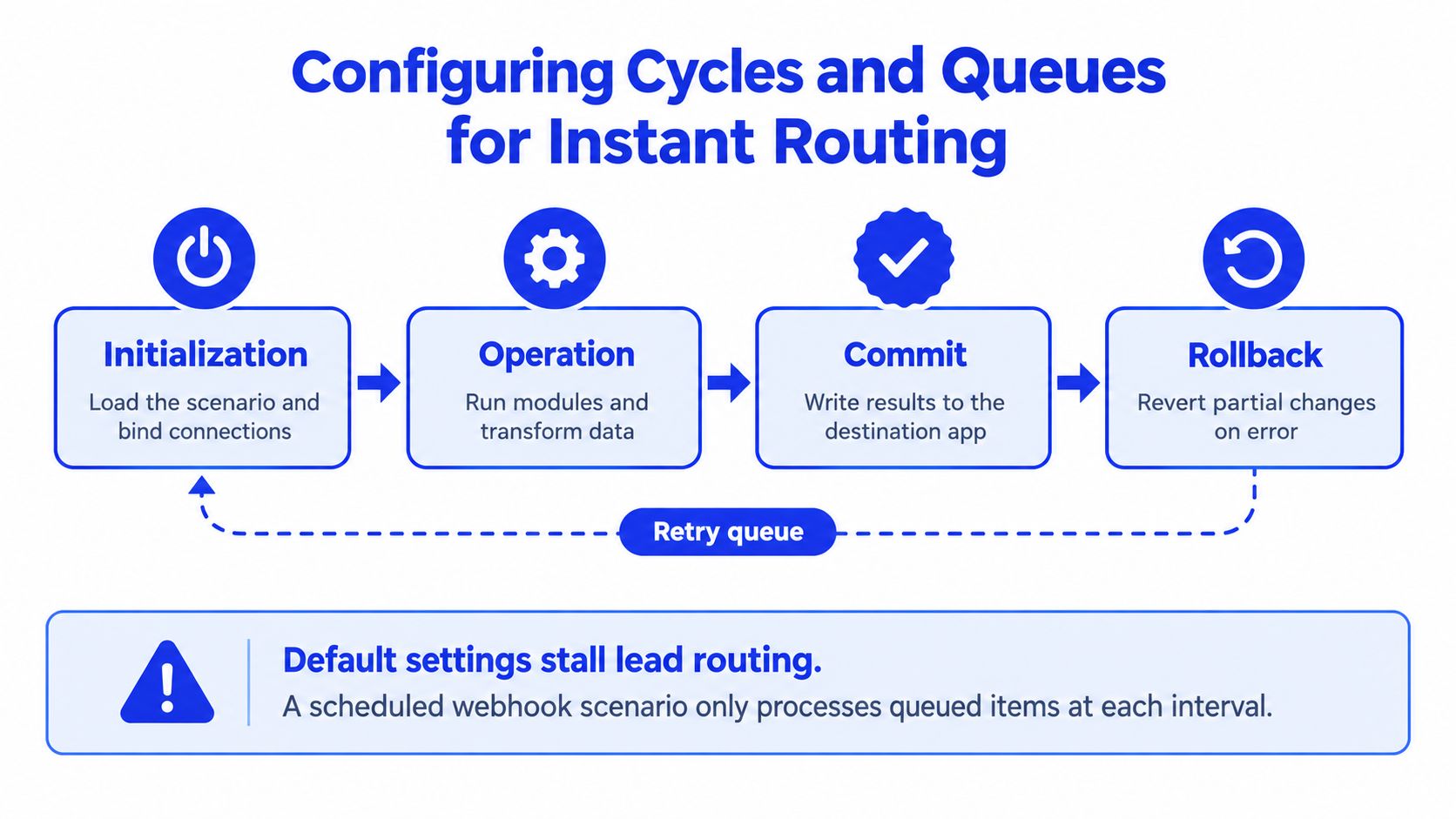
Set the batch size on purpose
Decide how many records should move through each cycle before you touch the scenario. Make's execution model lets you raise the trigger's maximum results per cycle or the scenario's maximum cycle count Make cycles and phases. Leaving that choice to defaults is a bad fit for any pipeline that depends on speed and handoff accuracy.
Use batch sizing to match actual volume. A weekday lead source can usually tolerate a small queue, but event traffic usually cannot. For account enrichment, a larger batch may be fine if the provider's rate limits are stable and the downstream owner can absorb the pace.
Operator rule: batch size is a revenue control, not a technical preference.
Use on-demand runs for qualified handoffs
Make also supports on-demand scenarios that stay idle until an authorized API call wakes them up Make scenario inputs. That pattern works when downstream enrichment or routing should start only after a qualification rule passes.
It keeps you from polling continuously just to catch a signal you already trust. It also cuts wasted operations, which matters when a workflow should stay dormant until the account is worth human attention. Qualify first. Trigger second. Hand off third.
For the routing logic behind that handoff, see lead routing automation. Use that logic before you wire the scenario itself.
This walkthrough shows how to raise the maximum results per cycle on a webhook trigger and keep routing from stalling when volume spikes.
Connecting outbound tools without breaking deliverability
Outbound stacks fail in two places. They fail at data hygiene, and they fail at execution discipline. If a Make scenario sends duplicates into Instantly, Smartlead, or HeyReach, or writes malformed records into HubSpot, the sender reputation damage usually shows up later, after the mistake has already scaled.
The safest sequence is boring. Validate the record, dedupe it, resolve ownership, write to CRM, then trigger outbound. If your sequence starts with a send step, you've already put the risky part first.
Build the outbound path in the right order
Sales Navigator, Clay, and Apollo often sit upstream of the send. Make should act as the control layer, not a blind pipe. Deduplication belongs before CRM creation, not after it. Ownership preservation belongs before the reply lands, not during cleanup.
A practical flow looks like this:
Ingest the lead from the source.
Check for duplicates against your CRM and list logic.
Enrich only the clean record.
Preserve account ownership.
Trigger Instantly or Smartlead.
Route replies back to the right owner.
That sequence protects reply handling and prevents a clean source list from becoming a noisy send list. It also reduces the chance that a retry creates duplicate outreach when a webhook fires again.
For deliverability hygiene, our email deliverability guide covers the broader sending side. In Make, the rule is simpler: never let one malformed prospect contaminate the downstream queue.
Treat retries like a risk, not a convenience
Make's own error guidance points to invalid data, API changes, expired credentials, rate limits, timeouts, and duplicate-data errors as failure sources, and repeated failures can disable a scenario schedule Make errors and warnings. That means retries need a policy.
Use an idempotency check before each write step. Route failed prospects into a dead-letter queue. Alert when bounced contacts or missing attribution appear. The team that handles replies should never wonder whether a record was sent once, twice, or not at all.
When we build these systems for outbound teams, a dead-letter queue isn't optional. It's the difference between a recoverable exception and a ghost campaign.
Governing AI outputs in pipeline workflows
AI inside Make can save time, but it can also create a mess faster than a manual process ever could. The problem isn't that AI writes badly every time. The problem is that a believable line can still be false, unsupported, or unfit for a CRM record.
Recent SMB survey data shows that 38% of SMBs were already using AI for collaboration and productivity tasks, while another 39% planned adoption within 12 months SMB survey. That tells you the adoption curve is already moving. It doesn't tell you the governance exists.

Pick the right AI mode for the job
Three modes matter in revenue workflows: fully automated, approval-gated, and shadow mode. Fully automated only works when the output is low-risk and the schema is strict. Approval-gated works when the field matters, but the confidence is still imperfect. Shadow mode works when you want the model to suggest without writing.
The question isn't whether AI can draft a line. It's whether your team can prove why that line was written, who approved it, and what evidence supported it. That matters when AI touches qualification, personalization, or routing.
Governance rule: if the output affects CRM state, route, or contact strategy, the model needs a threshold and an owner.
Make confidence visible
GROU often treats AI as a research layer rather than a final writer, especially when the prospect context is thin or the claim needs validation. That's the safer default. The CRM should only receive AI output after schema checks, confidence scoring, and a human review gate where the risk is high.
That's also where a versioned prompt trail matters. If a prospect was scored or contacted, your team should be able to show which prompt version ran, what inputs it saw, and why it crossed the threshold. Our internal guide on AI sales automation goes deeper on that logic.
A good test is blunt. If the AI sentence can't survive a skeptical rep reading it out loud, it doesn't belong in a live workflow.
Monitoring execution and handling silent errors
A workflow can look healthy while missing records, skipping updates, or stalling on a single bad payload. That is the failure mode to watch for in Make. The scenario stays “on,” the pipeline keeps moving, and revenue ops only notices when a rep asks why a lead never arrived.
Make can stop a failed run and preserve partial state around the error point, which helps protect data integrity. But rollback alone does not give you operational confidence. You still need a way to see where the run broke, what was retried, and whether the output matched the source system.
Monitor the outputs that matter
Track time-to-first-touch, routing accuracy, exception rate, duplicate rate, and qualified-conversation yield by workflow version. Those signals show whether the automation is improving pipeline flow or just shuffling records between systems.
Set alerts for failed enrichment, stalled approvals, and missing CRM attribution. Then reconcile source and destination systems on a regular cadence. If a source list says 100 qualified accounts entered the flow and your destination shows 94, that gap needs review before the next release.
Practical rule: if you cannot reconcile it, you cannot trust it.
Use replay and exceptions as controls
Replay is useful when a rate limit, timeout, or malformed payload needs a clean test. It lets operations compare the broken execution with a corrected version without consuming fresh records. That is closer to production debugging than guessing from logs alone, and it fits the same control mindset you see in how AgentStack handles API errors.
For teams that want a broader systems view, the same logic applies in a data orchestration platform. You need visibility, ownership, and a clear stop condition when quality drops. Silent errors are only silent when nobody is watching the run data closely enough.
Audit your current automation stack today
Run a real audit this week, not a theoretical one. Open your active Make scenarios and check three things first, queue depth, rollback behavior, and whether any AI module writes to the CRM without a human gate.
Then pull your last ten failed executions and sort them by cause. Separate credential issues, duplicate-data errors, bad enrichment, timeout failures, and routing mistakes. If the same category appears more than once, you have a control problem, not a one-off glitch.
Use a short audit list
Check queue limits: confirm every scheduled webhook scenario can process the volume you receive.
Inspect rollback paths: make sure failed cycles don't leave partial records behind.
Review AI write access: block direct CRM writes unless a confidence threshold and review step exist.
Verify exception routing: failed leads should land in a dead-letter queue, not disappear.
Compare source and destination records: weekly reconciliation should catch drift before revenue does.
Don't spread the fix across five weak spots. Add one dead-letter queue to your primary outbound flow this week, then watch it for seven days. If the queue stays empty and your exception rate drops, expand from there.
GROU builds revenue systems for B2B teams across iGaming, SaaS, manufacturing, legal tech, and pharma, with one message, one target list, and one reporting line. The method is simple, source the right accounts, wire the handoffs, and keep every automated step observable so structure turns attention into pipeline.
If your Make stack is already live, don't add another scenario before you audit the ones you have. Grou builds observable outbound and routing systems for B2B teams that need cleaner handoffs, tighter governance, and fewer silent failures, and we can help you pressure-test the flows you're running now.
Your Make scenarios probably worked on Tuesday, then went quiet by Friday. The webhook fired, HubSpot accepted the record, Clay enriched it, and nobody saw that a field change, expired credential, or retry loop had broken the handoff. The pipeline looked healthy until the inbox got empty.
Fragile automations fail without warning when they're built as app chains instead of observable systems.
Default Make settings can stall routing, especially on webhook queues and cycle limits.
Outbound reliability depends on hygiene, deduplication, idempotency, and clear fallback paths.
AI needs governance, or it turns CRM noise into a process problem.
Monitoring must be weekly, with reconciliation, exception review, and a dead-letter queue.
Table of Contents
Why most revenue automations fail silently
Most revenue teams don't lose a workflow because Make is broken. They lose it because the process was shaky before anyone touched a module, then the automation made the weakness faster. McKinsey's automation work is a useful benchmark here, because it shows that automation changes work at the task level, not by replacing whole jobs outright. It also models a potential 0.8 to 1.4 percentage point annual lift in global productivity growth if automation is adopted well and displaced labor is redeployed productively McKinsey.
The catch is simple. If the source process is inconsistent, automating it just produces inconsistent output faster. That's why a bad ICP field, poor deduplication, or sloppy qualification logic gets worse after you connect it to HubSpot, Clay, Apollo, or an outbound tool.
Practical rule: map the current workflow before you touch a single module. If you can't name the failure modes, you're automating guesswork.
Select the process, not the app
High-frequency, rules-based work belongs in Make. Judgment-heavy work doesn't. That line matters more than the connector list, because the expensive mistakes happen when teams automate tasks that still need a human decision.
For revenue workflows, the right candidates are usually repetitive handoffs. Think lead routing, account enrichment, reporting, deduplication checks, and follow-up triggers. The wrong candidates are nuanced qualification calls, sensitive exception handling, and outreach that depends on context a schema can't hold.
A good source of contrast is Loopfour's audit-proof O2C automation piece, because it shows how careful process control matters once work crosses teams and systems. The same logic applies to revenue ops, even if the systems are different. If the workflow has no baseline, no exception logic, and no owner, Make only exposes the gap faster.
For teams that already have a sales process layer, our internal guide on sales process automation fits here. The common thread is structure, because structure turns attention into pipeline.
Automate the repetitive steps first, then keep the judgment call with a person.
Configuring cycles and queues for instant routing
A Make scenario does not just run. It moves through initialization, operation, commit, and rollback. For revenue workflows, that matters because defaults are tuned for convenience, not for a trade show surge, a webinar spike, or a form-fill burst that suddenly drops dozens of leads into the queue.
The default for scheduled webhook scenarios is only two queued results per run Make webhook docs. If your schedule runs hourly, that becomes a quiet bottleneck. The CRM can look empty while records wait behind it.
Set the batch size on purpose
Decide how many records should move through each cycle before you touch the scenario. Make's execution model lets you raise the trigger's maximum results per cycle or the scenario's maximum cycle count Make cycles and phases. Leaving that choice to defaults is a bad fit for any pipeline that depends on speed and handoff accuracy.
Use batch sizing to match actual volume. A weekday lead source can usually tolerate a small queue, but event traffic usually cannot. For account enrichment, a larger batch may be fine if the provider's rate limits are stable and the downstream owner can absorb the pace.
Operator rule: batch size is a revenue control, not a technical preference.
Use on-demand runs for qualified handoffs
Make also supports on-demand scenarios that stay idle until an authorized API call wakes them up Make scenario inputs. That pattern works when downstream enrichment or routing should start only after a qualification rule passes.
It keeps you from polling continuously just to catch a signal you already trust. It also cuts wasted operations, which matters when a workflow should stay dormant until the account is worth human attention. Qualify first. Trigger second. Hand off third.
For the routing logic behind that handoff, see lead routing automation. Use that logic before you wire the scenario itself.
This walkthrough shows how to raise the maximum results per cycle on a webhook trigger and keep routing from stalling when volume spikes.
Connecting outbound tools without breaking deliverability
Outbound stacks fail in two places. They fail at data hygiene, and they fail at execution discipline. If a Make scenario sends duplicates into Instantly, Smartlead, or HeyReach, or writes malformed records into HubSpot, the sender reputation damage usually shows up later, after the mistake has already scaled.
The safest sequence is boring. Validate the record, dedupe it, resolve ownership, write to CRM, then trigger outbound. If your sequence starts with a send step, you've already put the risky part first.
Build the outbound path in the right order
Sales Navigator, Clay, and Apollo often sit upstream of the send. Make should act as the control layer, not a blind pipe. Deduplication belongs before CRM creation, not after it. Ownership preservation belongs before the reply lands, not during cleanup.
A practical flow looks like this:
Ingest the lead from the source.
Check for duplicates against your CRM and list logic.
Enrich only the clean record.
Preserve account ownership.
Trigger Instantly or Smartlead.
Route replies back to the right owner.
That sequence protects reply handling and prevents a clean source list from becoming a noisy send list. It also reduces the chance that a retry creates duplicate outreach when a webhook fires again.
For deliverability hygiene, our email deliverability guide covers the broader sending side. In Make, the rule is simpler: never let one malformed prospect contaminate the downstream queue.
Treat retries like a risk, not a convenience
Make's own error guidance points to invalid data, API changes, expired credentials, rate limits, timeouts, and duplicate-data errors as failure sources, and repeated failures can disable a scenario schedule Make errors and warnings. That means retries need a policy.
Use an idempotency check before each write step. Route failed prospects into a dead-letter queue. Alert when bounced contacts or missing attribution appear. The team that handles replies should never wonder whether a record was sent once, twice, or not at all.
When we build these systems for outbound teams, a dead-letter queue isn't optional. It's the difference between a recoverable exception and a ghost campaign.
Governing AI outputs in pipeline workflows
AI inside Make can save time, but it can also create a mess faster than a manual process ever could. The problem isn't that AI writes badly every time. The problem is that a believable line can still be false, unsupported, or unfit for a CRM record.
Recent SMB survey data shows that 38% of SMBs were already using AI for collaboration and productivity tasks, while another 39% planned adoption within 12 months SMB survey. That tells you the adoption curve is already moving. It doesn't tell you the governance exists.
Pick the right AI mode for the job
Three modes matter in revenue workflows: fully automated, approval-gated, and shadow mode. Fully automated only works when the output is low-risk and the schema is strict. Approval-gated works when the field matters, but the confidence is still imperfect. Shadow mode works when you want the model to suggest without writing.
The question isn't whether AI can draft a line. It's whether your team can prove why that line was written, who approved it, and what evidence supported it. That matters when AI touches qualification, personalization, or routing.
Governance rule: if the output affects CRM state, route, or contact strategy, the model needs a threshold and an owner.
Make confidence visible
GROU often treats AI as a research layer rather than a final writer, especially when the prospect context is thin or the claim needs validation. That's the safer default. The CRM should only receive AI output after schema checks, confidence scoring, and a human review gate where the risk is high.
That's also where a versioned prompt trail matters. If a prospect was scored or contacted, your team should be able to show which prompt version ran, what inputs it saw, and why it crossed the threshold. Our internal guide on AI sales automation goes deeper on that logic.
A good test is blunt. If the AI sentence can't survive a skeptical rep reading it out loud, it doesn't belong in a live workflow.
Monitoring execution and handling silent errors
A workflow can look healthy while missing records, skipping updates, or stalling on a single bad payload. That is the failure mode to watch for in Make. The scenario stays “on,” the pipeline keeps moving, and revenue ops only notices when a rep asks why a lead never arrived.
Make can stop a failed run and preserve partial state around the error point, which helps protect data integrity. But rollback alone does not give you operational confidence. You still need a way to see where the run broke, what was retried, and whether the output matched the source system.
Monitor the outputs that matter
Track time-to-first-touch, routing accuracy, exception rate, duplicate rate, and qualified-conversation yield by workflow version. Those signals show whether the automation is improving pipeline flow or just shuffling records between systems.
Set alerts for failed enrichment, stalled approvals, and missing CRM attribution. Then reconcile source and destination systems on a regular cadence. If a source list says 100 qualified accounts entered the flow and your destination shows 94, that gap needs review before the next release.
Practical rule: if you cannot reconcile it, you cannot trust it.
Use replay and exceptions as controls
Replay is useful when a rate limit, timeout, or malformed payload needs a clean test. It lets operations compare the broken execution with a corrected version without consuming fresh records. That is closer to production debugging than guessing from logs alone, and it fits the same control mindset you see in how AgentStack handles API errors.
For teams that want a broader systems view, the same logic applies in a data orchestration platform. You need visibility, ownership, and a clear stop condition when quality drops. Silent errors are only silent when nobody is watching the run data closely enough.
Audit your current automation stack today
Run a real audit this week, not a theoretical one. Open your active Make scenarios and check three things first, queue depth, rollback behavior, and whether any AI module writes to the CRM without a human gate.
Then pull your last ten failed executions and sort them by cause. Separate credential issues, duplicate-data errors, bad enrichment, timeout failures, and routing mistakes. If the same category appears more than once, you have a control problem, not a one-off glitch.
Use a short audit list
Check queue limits: confirm every scheduled webhook scenario can process the volume you receive.
Inspect rollback paths: make sure failed cycles don't leave partial records behind.
Review AI write access: block direct CRM writes unless a confidence threshold and review step exist.
Verify exception routing: failed leads should land in a dead-letter queue, not disappear.
Compare source and destination records: weekly reconciliation should catch drift before revenue does.
Don't spread the fix across five weak spots. Add one dead-letter queue to your primary outbound flow this week, then watch it for seven days. If the queue stays empty and your exception rate drops, expand from there.
GROU builds revenue systems for B2B teams across iGaming, SaaS, manufacturing, legal tech, and pharma, with one message, one target list, and one reporting line. The method is simple, source the right accounts, wire the handoffs, and keep every automated step observable so structure turns attention into pipeline.
If your Make stack is already live, don't add another scenario before you audit the ones you have. Grou builds observable outbound and routing systems for B2B teams that need cleaner handoffs, tighter governance, and fewer silent failures, and we can help you pressure-test the flows you're running now.
Your Make scenarios probably worked on Tuesday, then went quiet by Friday. The webhook fired, HubSpot accepted the record, Clay enriched it, and nobody saw that a field change, expired credential, or retry loop had broken the handoff. The pipeline looked healthy until the inbox got empty.
Fragile automations fail without warning when they're built as app chains instead of observable systems.
Default Make settings can stall routing, especially on webhook queues and cycle limits.
Outbound reliability depends on hygiene, deduplication, idempotency, and clear fallback paths.
AI needs governance, or it turns CRM noise into a process problem.
Monitoring must be weekly, with reconciliation, exception review, and a dead-letter queue.
Table of Contents
Why most revenue automations fail silently
Most revenue teams don't lose a workflow because Make is broken. They lose it because the process was shaky before anyone touched a module, then the automation made the weakness faster. McKinsey's automation work is a useful benchmark here, because it shows that automation changes work at the task level, not by replacing whole jobs outright. It also models a potential 0.8 to 1.4 percentage point annual lift in global productivity growth if automation is adopted well and displaced labor is redeployed productively McKinsey.
The catch is simple. If the source process is inconsistent, automating it just produces inconsistent output faster. That's why a bad ICP field, poor deduplication, or sloppy qualification logic gets worse after you connect it to HubSpot, Clay, Apollo, or an outbound tool.
Practical rule: map the current workflow before you touch a single module. If you can't name the failure modes, you're automating guesswork.
Select the process, not the app
High-frequency, rules-based work belongs in Make. Judgment-heavy work doesn't. That line matters more than the connector list, because the expensive mistakes happen when teams automate tasks that still need a human decision.
For revenue workflows, the right candidates are usually repetitive handoffs. Think lead routing, account enrichment, reporting, deduplication checks, and follow-up triggers. The wrong candidates are nuanced qualification calls, sensitive exception handling, and outreach that depends on context a schema can't hold.
A good source of contrast is Loopfour's audit-proof O2C automation piece, because it shows how careful process control matters once work crosses teams and systems. The same logic applies to revenue ops, even if the systems are different. If the workflow has no baseline, no exception logic, and no owner, Make only exposes the gap faster.
For teams that already have a sales process layer, our internal guide on sales process automation fits here. The common thread is structure, because structure turns attention into pipeline.
Automate the repetitive steps first, then keep the judgment call with a person.
Configuring cycles and queues for instant routing
A Make scenario does not just run. It moves through initialization, operation, commit, and rollback. For revenue workflows, that matters because defaults are tuned for convenience, not for a trade show surge, a webinar spike, or a form-fill burst that suddenly drops dozens of leads into the queue.
The default for scheduled webhook scenarios is only two queued results per run Make webhook docs. If your schedule runs hourly, that becomes a quiet bottleneck. The CRM can look empty while records wait behind it.
Set the batch size on purpose
Decide how many records should move through each cycle before you touch the scenario. Make's execution model lets you raise the trigger's maximum results per cycle or the scenario's maximum cycle count Make cycles and phases. Leaving that choice to defaults is a bad fit for any pipeline that depends on speed and handoff accuracy.
Use batch sizing to match actual volume. A weekday lead source can usually tolerate a small queue, but event traffic usually cannot. For account enrichment, a larger batch may be fine if the provider's rate limits are stable and the downstream owner can absorb the pace.
Operator rule: batch size is a revenue control, not a technical preference.
Use on-demand runs for qualified handoffs
Make also supports on-demand scenarios that stay idle until an authorized API call wakes them up Make scenario inputs. That pattern works when downstream enrichment or routing should start only after a qualification rule passes.
It keeps you from polling continuously just to catch a signal you already trust. It also cuts wasted operations, which matters when a workflow should stay dormant until the account is worth human attention. Qualify first. Trigger second. Hand off third.
For the routing logic behind that handoff, see lead routing automation. Use that logic before you wire the scenario itself.
This walkthrough shows how to raise the maximum results per cycle on a webhook trigger and keep routing from stalling when volume spikes.
Connecting outbound tools without breaking deliverability
Outbound stacks fail in two places. They fail at data hygiene, and they fail at execution discipline. If a Make scenario sends duplicates into Instantly, Smartlead, or HeyReach, or writes malformed records into HubSpot, the sender reputation damage usually shows up later, after the mistake has already scaled.
The safest sequence is boring. Validate the record, dedupe it, resolve ownership, write to CRM, then trigger outbound. If your sequence starts with a send step, you've already put the risky part first.
Build the outbound path in the right order
Sales Navigator, Clay, and Apollo often sit upstream of the send. Make should act as the control layer, not a blind pipe. Deduplication belongs before CRM creation, not after it. Ownership preservation belongs before the reply lands, not during cleanup.
A practical flow looks like this:
Ingest the lead from the source.
Check for duplicates against your CRM and list logic.
Enrich only the clean record.
Preserve account ownership.
Trigger Instantly or Smartlead.
Route replies back to the right owner.
That sequence protects reply handling and prevents a clean source list from becoming a noisy send list. It also reduces the chance that a retry creates duplicate outreach when a webhook fires again.
For deliverability hygiene, our email deliverability guide covers the broader sending side. In Make, the rule is simpler: never let one malformed prospect contaminate the downstream queue.
Treat retries like a risk, not a convenience
Make's own error guidance points to invalid data, API changes, expired credentials, rate limits, timeouts, and duplicate-data errors as failure sources, and repeated failures can disable a scenario schedule Make errors and warnings. That means retries need a policy.
Use an idempotency check before each write step. Route failed prospects into a dead-letter queue. Alert when bounced contacts or missing attribution appear. The team that handles replies should never wonder whether a record was sent once, twice, or not at all.
When we build these systems for outbound teams, a dead-letter queue isn't optional. It's the difference between a recoverable exception and a ghost campaign.
Governing AI outputs in pipeline workflows
AI inside Make can save time, but it can also create a mess faster than a manual process ever could. The problem isn't that AI writes badly every time. The problem is that a believable line can still be false, unsupported, or unfit for a CRM record.
Recent SMB survey data shows that 38% of SMBs were already using AI for collaboration and productivity tasks, while another 39% planned adoption within 12 months SMB survey. That tells you the adoption curve is already moving. It doesn't tell you the governance exists.
Pick the right AI mode for the job
Three modes matter in revenue workflows: fully automated, approval-gated, and shadow mode. Fully automated only works when the output is low-risk and the schema is strict. Approval-gated works when the field matters, but the confidence is still imperfect. Shadow mode works when you want the model to suggest without writing.
The question isn't whether AI can draft a line. It's whether your team can prove why that line was written, who approved it, and what evidence supported it. That matters when AI touches qualification, personalization, or routing.
Governance rule: if the output affects CRM state, route, or contact strategy, the model needs a threshold and an owner.
Make confidence visible
GROU often treats AI as a research layer rather than a final writer, especially when the prospect context is thin or the claim needs validation. That's the safer default. The CRM should only receive AI output after schema checks, confidence scoring, and a human review gate where the risk is high.
That's also where a versioned prompt trail matters. If a prospect was scored or contacted, your team should be able to show which prompt version ran, what inputs it saw, and why it crossed the threshold. Our internal guide on AI sales automation goes deeper on that logic.
A good test is blunt. If the AI sentence can't survive a skeptical rep reading it out loud, it doesn't belong in a live workflow.
Monitoring execution and handling silent errors
A workflow can look healthy while missing records, skipping updates, or stalling on a single bad payload. That is the failure mode to watch for in Make. The scenario stays “on,” the pipeline keeps moving, and revenue ops only notices when a rep asks why a lead never arrived.
Make can stop a failed run and preserve partial state around the error point, which helps protect data integrity. But rollback alone does not give you operational confidence. You still need a way to see where the run broke, what was retried, and whether the output matched the source system.
Monitor the outputs that matter
Track time-to-first-touch, routing accuracy, exception rate, duplicate rate, and qualified-conversation yield by workflow version. Those signals show whether the automation is improving pipeline flow or just shuffling records between systems.
Set alerts for failed enrichment, stalled approvals, and missing CRM attribution. Then reconcile source and destination systems on a regular cadence. If a source list says 100 qualified accounts entered the flow and your destination shows 94, that gap needs review before the next release.
Practical rule: if you cannot reconcile it, you cannot trust it.
Use replay and exceptions as controls
Replay is useful when a rate limit, timeout, or malformed payload needs a clean test. It lets operations compare the broken execution with a corrected version without consuming fresh records. That is closer to production debugging than guessing from logs alone, and it fits the same control mindset you see in how AgentStack handles API errors.
For teams that want a broader systems view, the same logic applies in a data orchestration platform. You need visibility, ownership, and a clear stop condition when quality drops. Silent errors are only silent when nobody is watching the run data closely enough.
Audit your current automation stack today
Run a real audit this week, not a theoretical one. Open your active Make scenarios and check three things first, queue depth, rollback behavior, and whether any AI module writes to the CRM without a human gate.
Then pull your last ten failed executions and sort them by cause. Separate credential issues, duplicate-data errors, bad enrichment, timeout failures, and routing mistakes. If the same category appears more than once, you have a control problem, not a one-off glitch.
Use a short audit list
Check queue limits: confirm every scheduled webhook scenario can process the volume you receive.
Inspect rollback paths: make sure failed cycles don't leave partial records behind.
Review AI write access: block direct CRM writes unless a confidence threshold and review step exist.
Verify exception routing: failed leads should land in a dead-letter queue, not disappear.
Compare source and destination records: weekly reconciliation should catch drift before revenue does.
Don't spread the fix across five weak spots. Add one dead-letter queue to your primary outbound flow this week, then watch it for seven days. If the queue stays empty and your exception rate drops, expand from there.
GROU builds revenue systems for B2B teams across iGaming, SaaS, manufacturing, legal tech, and pharma, with one message, one target list, and one reporting line. The method is simple, source the right accounts, wire the handoffs, and keep every automated step observable so structure turns attention into pipeline.
If your Make stack is already live, don't add another scenario before you audit the ones you have. Grou builds observable outbound and routing systems for B2B teams that need cleaner handoffs, tighter governance, and fewer silent failures, and we can help you pressure-test the flows you're running now.

Pipeline OS Newsletter
Build qualified pipeline
Get weekly tactics to generate demand, improve lead quality, and book more meetings.





Trusted by industry leaders
Trusted by industry leaders
Trusted by industry leaders
Ready to build qualified pipeline?
Ready to build qualified pipeline?
Ready to build qualified pipeline?
Book a call to see if we're the right fit, or take the 2-minute quiz to get a clear starting point.
Book a call to see if we're the right fit, or take the 2-minute quiz to get a clear starting point.
Book a call to see if we're the right fit, or take the 2-minute quiz to get a clear starting point.
" height="30.21639343089746px" id="hfGbXmQR2" width="30.216393430897455px"/></svg>)
Copyright © 2026 – All Right Reserved
Copyright © 2026 – All Right Reserved
Copyright © 2026 – All Right Reserved