%22%3E%3C/path%3E%3Cpath d=%22M 63.072 7.554 C 62.258 8.022 61.577 8.689 61.092 9.493 L 61.092 7.076 L 57.158 7.076 L 57.158 22.64 L 61.089 22.64 L 61.089 14.888 C 61.089 13.446 61.403 12.434 62.03 11.853 C 62.818 11.218 63.818 10.907 64.826 10.982 L 65.868 10.982 L 65.868 6.851 C 64.891 6.834 63.926 7.076 63.073 7.554 Z%22 fill=%22rgb(17,17,17)%22%3E%3C/path%3E%3Cpath d=%22M 78.916 7.82 C 76.363 6.49 73.321 6.49 70.768 7.82 C 69.562 8.473 68.564 9.451 67.888 10.644 C 67.167 11.931 66.803 13.387 66.834 14.862 C 66.804 16.332 67.157 17.785 67.86 19.077 C 68.515 20.267 69.494 21.246 70.684 21.901 C 71.924 22.576 73.318 22.92 74.73 22.898 C 76.164 22.918 77.58 22.575 78.846 21.901 C 80.062 21.247 81.073 20.27 81.768 19.077 C 82.506 17.797 82.88 16.339 82.85 14.862 C 82.88 13.389 82.517 11.934 81.797 10.647 C 81.12 9.455 80.122 8.477 78.917 7.824 M 78.803 14.862 C 78.829 15.739 78.636 16.608 78.241 17.391 C 77.903 18.046 77.38 18.588 76.738 18.95 C 76.124 19.293 75.432 19.472 74.729 19.47 C 73.668 19.497 72.648 19.061 71.934 18.276 C 71.139 17.323 70.741 16.1 70.823 14.862 C 70.741 13.62 71.149 12.395 71.959 11.45 C 72.687 10.667 73.715 10.233 74.783 10.256 C 75.859 10.236 76.894 10.67 77.635 11.45 C 78.464 12.387 78.884 13.616 78.801 14.864%22 fill=%22rgb(17,17,17)%22%3E%3C/path%3E%3Cpath d=%22M 95.906 7.076 L 95.906 15.646 C 95.975 16.68 95.643 17.701 94.979 18.498 C 94.311 19.184 93.379 19.547 92.422 19.495 C 91.475 19.544 90.553 19.18 89.894 18.498 C 89.23 17.701 88.898 16.68 88.967 15.646 L 88.967 7.076 L 85.033 7.076 L 85.033 16.207 C 85 17.449 85.275 18.68 85.834 19.79 C 86.327 20.75 87.095 21.542 88.039 22.065 C 89.033 22.594 90.145 22.861 91.271 22.838 C 92.188 22.847 93.095 22.65 93.926 22.263 C 94.708 21.905 95.388 21.36 95.906 20.675 L 95.906 22.645 L 99.865 22.645 L 99.865 7.076 Z%22 fill=%22rgb(17,17,17)%22%3E%3C/path%3E%3Cpath d=%22M 4.513 15.626 C 4.511 10.815 7.606 6.549 12.181 5.059 C 16.756 3.57 21.77 5.195 24.601 9.086 L 27.816 5.87 C 24.074 1.186 17.981 -0.943 12.137 0.393 C 6.292 1.728 1.728 6.292 0.393 12.137 C -0.943 17.981 1.186 24.074 5.87 27.816 L 9.085 24.601 C 6.214 22.512 4.515 19.177 4.513 15.626%22 fill=%22rgb(32,62,235)%22%3E%3C/path%3E%3Cpath d=%22M 17.114 14.343 L 13.354 18.01 L 13.354 18.026 L 21.071 18.026 L 11.412 27.609 L 17.389 27.609 L 23.999 21.081 L 23.999 28.316 L 24.005 28.316 L 27.967 24.393 L 27.967 14.343 Z%22 fill=%22rgb(32,62,235)%22%3E%3C/path%3E%3C/g%3E%3C/svg%3E) ×
× ××
××›
›
›
›
Sales Process Automation for B2B Revenue Leaders
Sales Process Automation for B2B Revenue Leaders
Sales Process Automation for B2B Revenue Leaders
Sales Process Automation for B2B Revenue Leaders
Sales Process Automation for B2B Revenue Leaders
Sales Process Automation for B2B Revenue Leaders

Author
Aljaz Peklaj

Your reps are probably spending too much of the week inside tools and not enough of it in live selling. That usually shows up as slow follow-up, inconsistent CRM hygiene, weak handoffs, and a lot of debate about messaging when the actual problem is time allocation.
I've seen the same pattern repeatedly. One SDR can look busy all week and still spend most of that time on list cleaning, manual research, notes, routing, and meeting admin. The issue isn't effort. The issue is that the process asks expensive humans to do low-judgment work at scale.
That's where sales process automation earns its keep. Not as a layer of clever sequences, but as a system for moving repetitive work away from reps and moving rep time back into conversations, qualification, and deal movement. If you need a basic definition, Grou's automation glossary is a useful reference point, but the operator view is simpler: automate the tasks that steal selling time, protect the moments where judgment and trust decide the outcome.
A lot of teams treat automation like a sending problem. It isn't. It's an operating model problem. If your targeting, routing, and handoff logic are weak, automation just helps you make mistakes faster. If the structure is sound, it turns attention into pipeline.
Table of Contents
What sales automation actually means for B2B teams
Sales automation is usually explained as software handling repetitive tasks. That's true, but it misses the operational point. In B2B teams, the core value is time reallocation.
According to McKinsey's research on sales automation, more than 30% of sales-related activities can be automated with today's technology, and automation can reduce the cost of sales by 10% to 15%. That matters because the primary challenge is often not a headcount shortage, but rather an allocation issue.
The real job of automation
A sales process automation program should do three things well:
Remove admin drag so reps spend less time on data movement and more time in live conversations
Standardize repeatable work so lead routing, follow-up, and record updates don't depend on memory
Tighten response loops so prospects get faster action and internal teams get cleaner handoffs
That's a different goal than “send more emails.” Strong operators know the message, list, routing logic, and CRM discipline all have to work together. If you're tightening that whole system, it helps to cross-check your outbound and demand capture with broader effective B2B marketing strategies so the sales layer isn't compensating for weak positioning upstream.
The bottleneck is usually labor allocation
One of the clearest examples came from a B2B SaaS team where a single SDR handled the full outbound motion. A time audit showed 34 of 40 weekly hours going to manual admin, and only 6 hours going to actual selling conversations.
The breakdown looked like this:
Activity | Weekly time before automation |
|---|---|
List building and cleaning | 15 hours |
Manual research and opener writing | 8 hours |
Post-call notes and CRM entry | 6 hours |
Meeting confirmations and reschedules | 5 hours |
Live selling conversations | 6 hours |
That's the hidden tax commonly accepted as normal. It isn't normal. It's just common.
Practical rule: If your reps spend the majority of the week preparing to sell, your process is under-automated in the wrong places.
After the admin-heavy steps were automated, manual task time dropped sharply and selling time expanded. The gain wasn't abstract efficiency. It was more rep capacity pointed at the only work buyers pay you for, conversation quality, qualification quality, and deal progression.
Where to automate for maximum impact
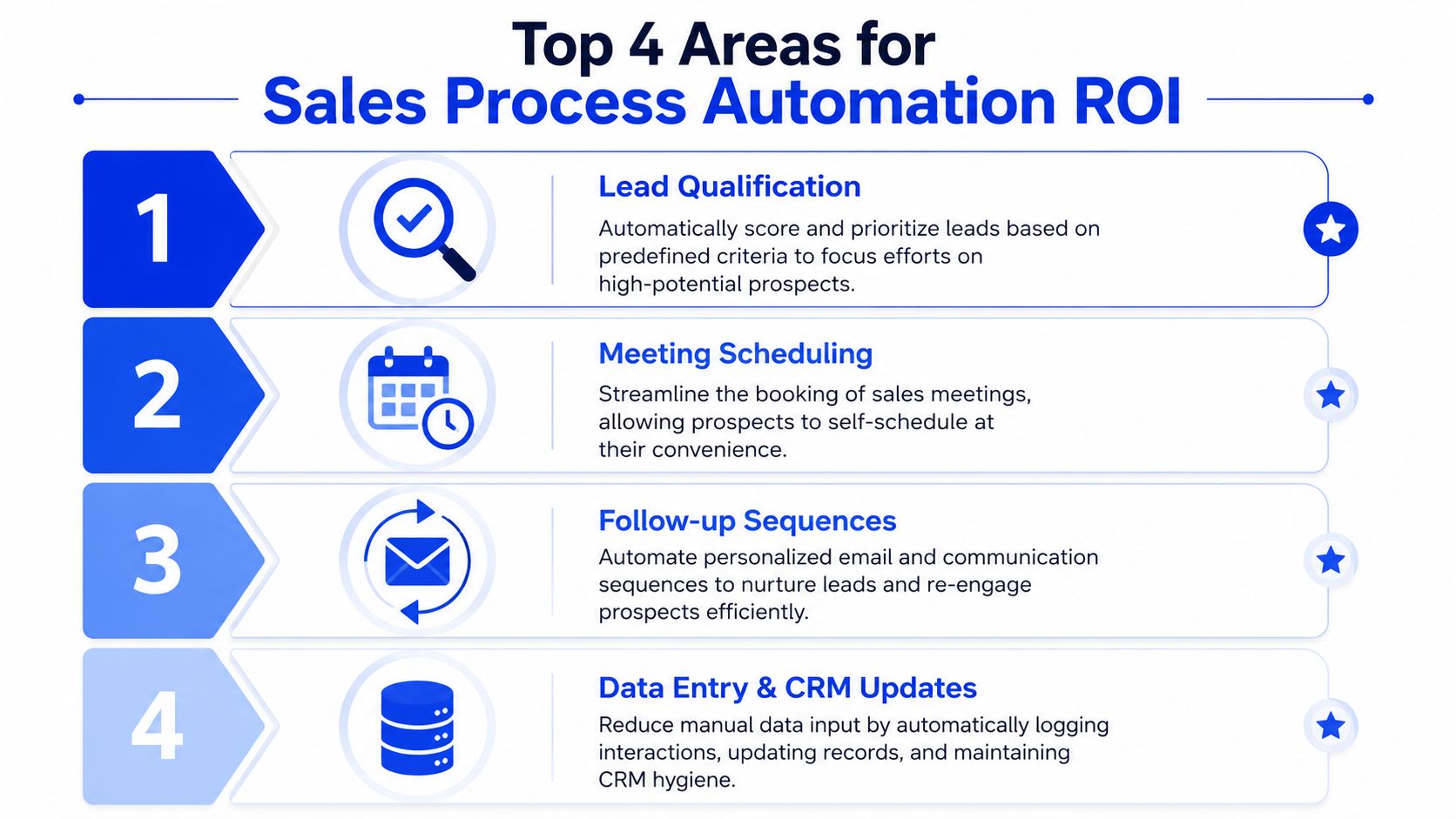
If you want early ROI from sales process automation, don't start with the most visible workflow. Start with the most repetitive one. In most B2B teams, that means list intake, handoff admin, deal monitoring, and late-stage reminders.
For a broader operational view of sequence design and workflow fit, this outbound sales automation breakdown is a useful companion.
The four zones that usually pay back first
Here's the ranking I'd use in a real build.
Top of funnel research and list intake
This is usually the biggest gain by a wide margin. In one outbound function, list building and enrichment dropped from 15 hours per week to under 3 once intake moved to signal-triggered sourcing plus automated enrichment. The recovered time went straight into prospecting conversations, not into more admin.
Mid funnel meeting capture and handoff
Call transcription plus AI summarization removes manual notes and reduces context loss between sales and delivery. In practice, this cut about 20 minutes of manual note-taking per call and replaced weak handoff habits with structured CRM records containing pain points, objections, and next steps.
Mid funnel deal risk detection
Engagement decline and time-in-stage signals are hard for reps to monitor consistently across an active pipeline. Automated risk flags surfaced stalling deals 5 to 7 days earlier than a human usually noticed, which gave reps time to intervene while the deal still had momentum.
Late funnel follow-up cadence and reminders
Meeting confirmation sequences look boring, but they matter. Automated post-booking reminders moved show rate from the high 60s to the mid 80s in one program because the system handled confirmations and reschedules reliably every time.
What these wins have in common
They all sit in the same category, high-volume, repetitive, low-judgment work. That's where automation usually produces clean gains without damaging buyer trust.
A second example makes the point even clearer. In a three-week build for a B2B SaaS client, these changes landed:
List building and enrichment went from 15 hours to 3
Opener drafting moved from 8 hours to 2 through AI-drafted, human-reviewed copy
Note-taking and CRM entry went from 6 hours to 1
Meeting confirmation admin went from 5 hours to 1
That took manual admin from 34 hours down to 7, a 79% reduction in manual task time. The recovered 27 hours went into live selling, and conversation time increased from 6 hours a week to over 30.
This only works when the team keeps a human review step where judgment still matters. Remove that, and the process gets faster while the output gets worse.
The honest version is that this isn't free. It took build time, subscriptions, and maintenance. But these are the parts of the sales motion where the trade is usually worth it.
What to protect from automation
A lot of bad automation strategy comes from one assumption, if a task can be automated, it should be. That logic breaks fast in B2B sales because the highest-value moments are often the least repeatable.
McKinsey's guidance is useful here. In its sales automation perspective, the firm notes that automation is best applied to repetitive, administrative work. For teams building real pipeline, that leaves a critical design question, where should automation stop and human judgment take over? A strong human in the loop approach answers that directly.
Three areas that should stay human
The first is discovery. The call where pain is uncovered, urgency is tested, and internal politics surface should stay fully human. No workflow can read hesitation, contradiction, or buying dynamics the way a strong rep can.
The second is proposal and negotiation messaging to senior buyers. These messages often carry tone risk, commercial nuance, and internal stakeholder sensitivity. A templated or AI-sent note can save minutes and cost trust.
The third is final qualification judgment. Systems can score, flag, route, and summarize. They should not decide who is qualified.
Activity | Automate | Keep human |
|---|---|---|
Discovery prep | Yes | |
Discovery conversation | Yes | |
Proposal drafting support | Yes | |
Proposal and negotiation messaging | Yes | |
Lead scoring and routing | Yes | |
Final qualification call | Yes |
Support the judgment, don't replace it
The right model is support, not substitution. Let the system surface signals, organize data, draft first passes, and alert the rep to exceptions.
Then let the rep do the work that changes win rate.
Automate the repetitive parts around the decision. Don't automate the decision itself.
Teams that ignore this boundary usually get short-term efficiency and long-term close-rate damage. Senior buyers can feel when they're being handled by a workflow instead of being understood by a person.
How to automate outreach without sounding like a robot
Many sales departments don't have an automation problem in outreach. They have a relevance problem. Buyers don't care whether a message was assembled by a human or a system. They care whether it proves somebody paid attention.
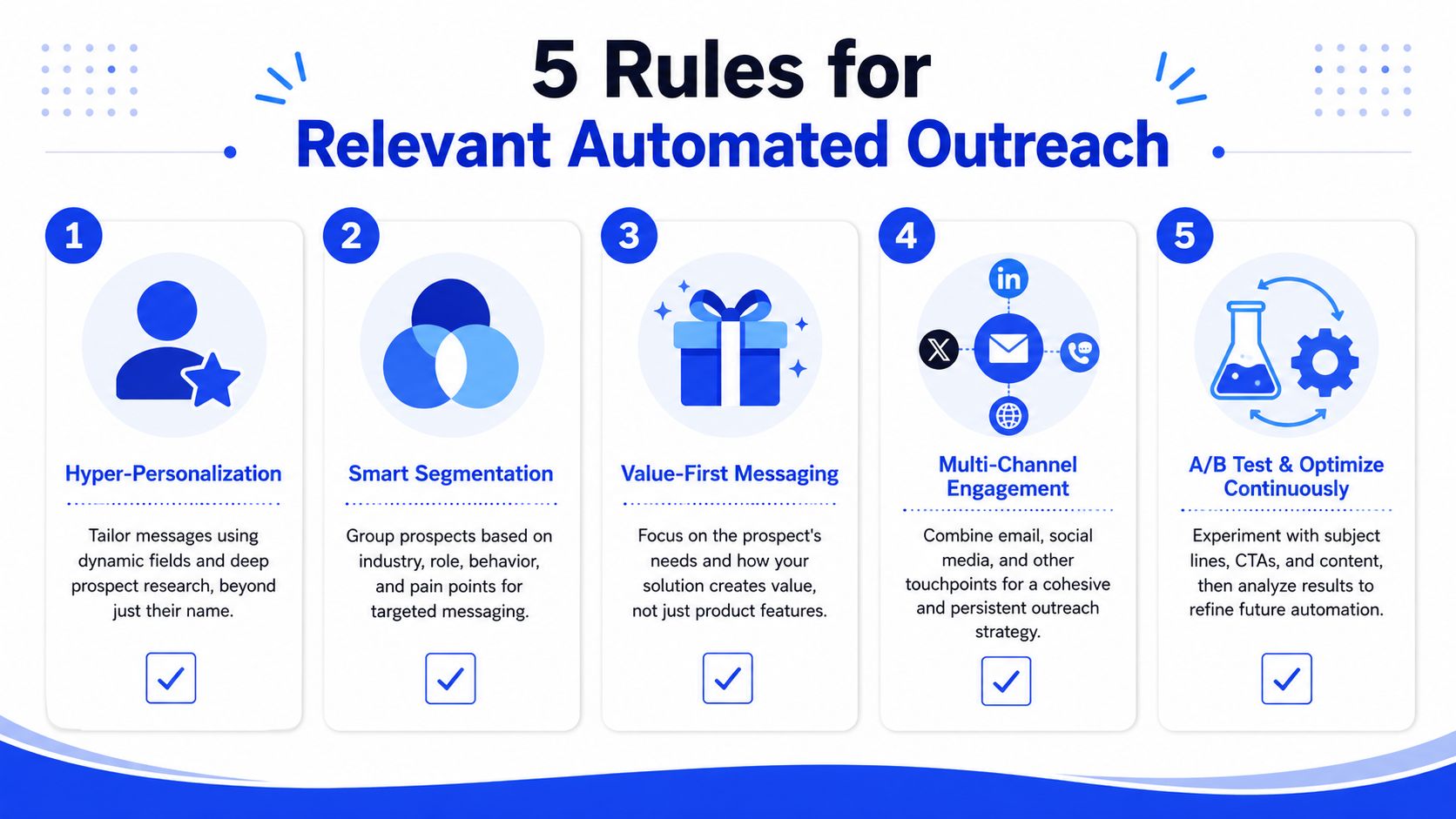
This is the visual model I use when building outbound rules.
The mechanics start in the CRM. As explained in this GTMnow piece on CRM data segmentation, historical records segmented by lead source, industry, and deal size help teams identify bottlenecks and conversion patterns. That's the foundation for routing, prioritization, and signal-based personalization. If your outreach still runs on static lists and merge fields, the personalization layer is already broken.
For teams tightening outbound copy and sequencing, this cold email outreach guide is a practical complement.
Five rules for relevant automated outreach
Personalize on signals, not tokens
{First_name} is not personalization. Neither is {company}. Real personalization references an observable event or condition, hiring activity, a new market launch, a team restructure, a product announcement, or a visible GTM move.
If the system detects that signal automatically, that's fine. The buyer only cares that the message is grounded in something real.
Make the opening line impossible to reuse
We use a simple test. Could this exact first sentence be sent to hundreds of similar prospects? If yes, it fails.
A good opener narrows itself to one account or one moment. That's what makes automated outreach feel researched instead of sprayed.
Put human review at the value boundary
Low-value accounts can run on fully automated signal-based personalization. Mid-market and enterprise accounts should not.
In those segments, AI can draft and a human can sharpen. That review often takes less than a minute, but it protects tone, relevance, and positioning.
Before you scale LinkedIn as a channel, it's also worth reviewing how to safely scale LinkedIn outreach without turning the platform into another generic send layer.
Here's a useful walkthrough on message quality and outbound structure:
Use voice guardrails on every template
Every sequence should be constrained by a real voice document. That means tone rules, phrase bans, rhythm preferences, and examples of what the brand would never say.
This is one of the easiest ways to stop AI-assisted drafting from drifting into generic language.
Run a weekly human audit
A person should review a sample of sent messages every week. Not dashboard metrics, actual messages.
That catches drift early. It also forces the team to review whether the signals, prompts, and approval logic still match the market.
What usually breaks the personal feel
A few patterns consistently make automation feel fake:
Token-only personalization that uses names and company fields without any real context
Segment-wide opener reuse where the same first line appears across too many accounts
No behavioral branching after opens, replies, meeting books, or stage changes
Zero human review on larger accounts where message quality carries more commercial risk
Relevance scales. Generic copy scales too. One creates conversations, the other creates volume.
The architecture of a modern automation stack
Most stack conversations focus on tool selection. That's not the hard part. The hard part is deciding where intelligence lives, where delivery lives, and how the CRM stays clean while both of those layers move.
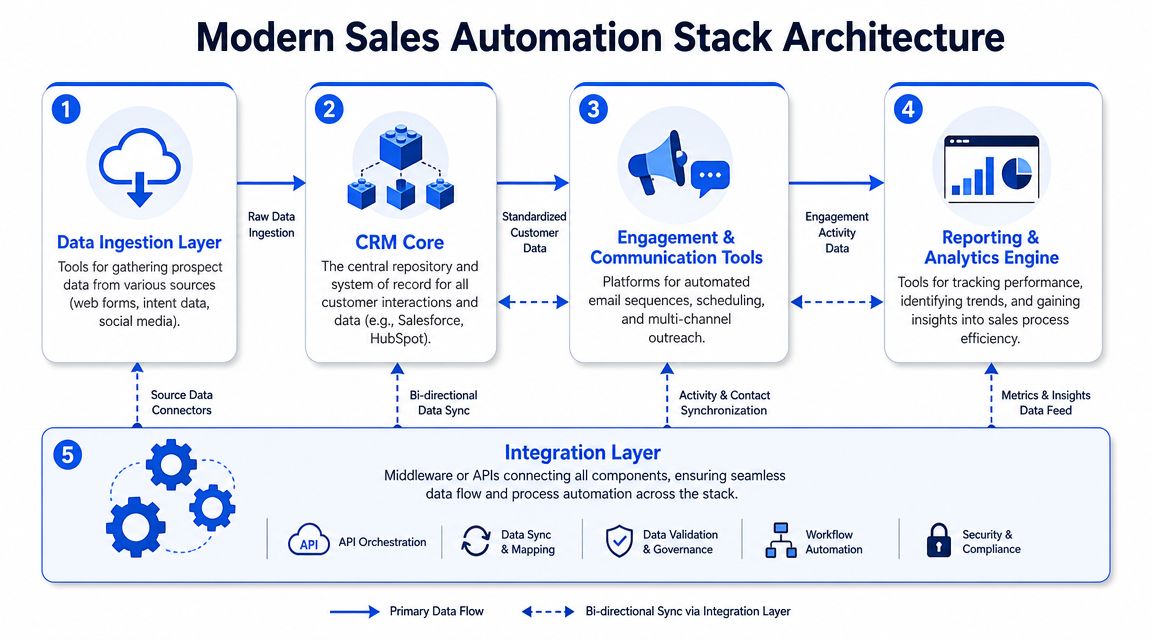
The clearest framing I've seen in public guidance is from KBMax's explanation of integrated sales automation systems. The point is right, a modern stack connects CRM, intelligence, content generation, and workflow automation. But in practice, the architecture matters more than the logo set.
Intelligence in the center, delivery at the edge
The stack I recommend is opinionated.
Clay sits in the center as the intelligence layer. It handles signal detection, enrichment, waterfall logic across providers, and ICP scoring. If this layer is wrong, every downstream action gets worse.
Claude or another drafting model connects to Clay, not to the sending tool. That way the prompt receives structured context, detected trigger, segment, and account notes before drafting the opener.
Lemlist, Instantly, or HeyReach sit at the edge as delivery infrastructure. They send. They don't own your targeting logic.
HubSpot acts as system of record with two-way sync. Replies and bookings push in automatically. Stage changes pull back into the workflow to pause, branch, or stop outreach.
Sales Navigator and Apollo support sourcing and validation where needed, but they shouldn't become the brain of the system.
A simple architecture view looks like this:
Layer | Primary role | Typical tools |
|---|---|---|
Intelligence | Signals, enrichment, scoring | Clay, Apollo |
Drafting | Message creation from context | Claude |
Delivery | Sequence execution | Lemlist, Instantly, HeyReach |
System of record | Contact, company, deal history | HubSpot |
Human interface | Exceptions and action alerts | Slack |
The same pattern applies to meeting capture. Transcription feeds an AI summary step, which writes structured fields into the CRM, pain, objection, next step, owner. Slack then alerts the right human only when action is needed.
One provider that operates in this broader category is Grou, which combines LinkedIn content, lead generation, and outbound into a connected pipeline system. The useful part of that model is the unification, one target list, one message system, one reporting line.
Why all-in-one platforms usually cap the outcome
All-in-one platforms are attractive because setup looks simpler. The trade-off shows up later.
When the same tool owns targeting, enrichment, copy logic, sending, and analytics, you inherit its limitations everywhere. Swapping one weak component becomes hard because the whole workflow depends on vendor-specific logic.
That's why I prefer best-in-class components with clean handoffs. It takes more setup, but it protects flexibility.
Keep intelligence centralized, keep delivery replaceable, keep the CRM authoritative.
If a sender gets replaced, the system should survive. If an enrichment source drops in quality, the workflow should reroute. If your architecture can't handle that, it's brittle.
A practical implementation roadmap
Most automation projects fail before tooling becomes the issue. They fail because the team automates a bad process, starts with dirty data, or measures activity instead of conversation quality.
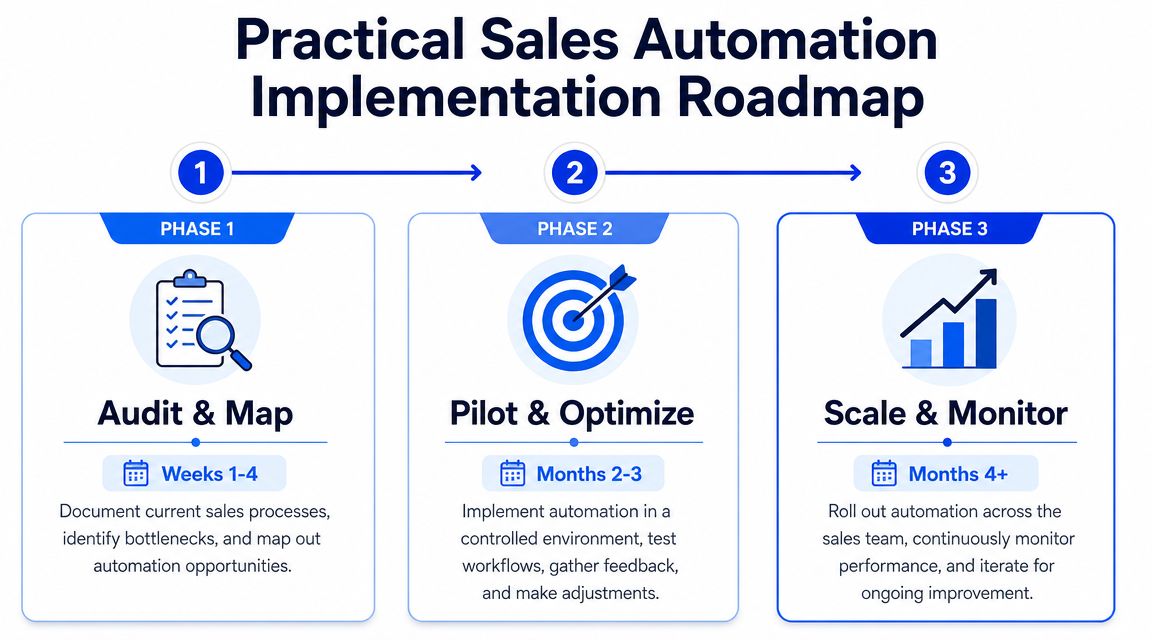
That blind spot shows up in a lot of vendor content. As outlined in Salesforce's guidance on sales automation success, teams hear a lot about lead scoring, follow-ups, and reduced manual work, but get much less guidance on attribution and proof of quality improvement. That's why implementation needs a sequence, not a shopping list.
If you want a broader planning reference for AI adoption inside B2B teams, Prometheus Agency's B2B AI roadmap is a useful companion to the workflow-first approach here. For a narrower execution view, this AI sales automation guide fits well alongside the roadmap below.
Phase 1, audit and map
Start with one rep, one week, one honest time audit.
Track where hours go → list building → enrichment cleanup → opener drafting → CRM entry → handoff notes → confirmations → reschedules → selling conversations. Don't estimate from memory. Pull it from calendars, activity logs, and rep notes.
Then map the workflow in order:
Capture the trigger that starts the step
Identify the system touched at each handoff
Mark where a human adds judgment
Mark where the work is repetitive and rule-based
Record the failure modes when the step gets skipped or delayed
This usually reveals one ugly truth. The team's bottleneck is rarely persuasion first. It's process friction first.
Phase 2, pilot one workflow
Pick a single workflow with high volume and low judgment. Top-of-funnel intake is often the right first move. Meeting confirmation is another good one if no-show drag is obvious.
The pilot should include:
A narrow scope with one rep or one segment
A clear success condition tied to qualified conversations, not just task completion
A human review checkpoint before a prospect-facing message crosses the value boundary
A rollback path so the team can stop the automation without losing records or visibility
Don't pilot three workflows at once. You'll create noise and nobody will know what improved.
The first win should make the team trust the system, not overwhelm it.
Phase 3, integrate and scale
Once the pilot works, wire the rest of the stack around it. That means CRM sync, reply routing, exception alerts, and reporting discipline.
Scale in this order:
Clean the source data before increasing send volume
Standardize naming and stage logic inside the CRM
Add alerting for exceptions such as positive replies, booking events, or risk flags
Expand to adjacent workflows like transcription, handoff summaries, and sequence branching
Review outputs weekly so drift gets corrected quickly
The key measurement question stays the same at every phase. Are you creating more qualified conversations, or just more touches?
If you want one next step, make it this. Run a one-week time audit on a single SDR and identify the largest block of repetitive work that doesn't require judgment. That's your first automation target.
If your team knows the bottleneck but needs help wiring the system, Grou works with B2B revenue teams to structure targeting, outbound, and reporting into one operating model. A good first move is to map one live workflow, usually list intake or reply routing, and pressure-test where automation will increase qualified conversations instead of just increasing activity.
Your reps are probably spending too much of the week inside tools and not enough of it in live selling. That usually shows up as slow follow-up, inconsistent CRM hygiene, weak handoffs, and a lot of debate about messaging when the actual problem is time allocation.
I've seen the same pattern repeatedly. One SDR can look busy all week and still spend most of that time on list cleaning, manual research, notes, routing, and meeting admin. The issue isn't effort. The issue is that the process asks expensive humans to do low-judgment work at scale.
That's where sales process automation earns its keep. Not as a layer of clever sequences, but as a system for moving repetitive work away from reps and moving rep time back into conversations, qualification, and deal movement. If you need a basic definition, Grou's automation glossary is a useful reference point, but the operator view is simpler: automate the tasks that steal selling time, protect the moments where judgment and trust decide the outcome.
A lot of teams treat automation like a sending problem. It isn't. It's an operating model problem. If your targeting, routing, and handoff logic are weak, automation just helps you make mistakes faster. If the structure is sound, it turns attention into pipeline.
Table of Contents
What sales automation actually means for B2B teams
Sales automation is usually explained as software handling repetitive tasks. That's true, but it misses the operational point. In B2B teams, the core value is time reallocation.
According to McKinsey's research on sales automation, more than 30% of sales-related activities can be automated with today's technology, and automation can reduce the cost of sales by 10% to 15%. That matters because the primary challenge is often not a headcount shortage, but rather an allocation issue.
The real job of automation
A sales process automation program should do three things well:
Remove admin drag so reps spend less time on data movement and more time in live conversations
Standardize repeatable work so lead routing, follow-up, and record updates don't depend on memory
Tighten response loops so prospects get faster action and internal teams get cleaner handoffs
That's a different goal than “send more emails.” Strong operators know the message, list, routing logic, and CRM discipline all have to work together. If you're tightening that whole system, it helps to cross-check your outbound and demand capture with broader effective B2B marketing strategies so the sales layer isn't compensating for weak positioning upstream.
The bottleneck is usually labor allocation
One of the clearest examples came from a B2B SaaS team where a single SDR handled the full outbound motion. A time audit showed 34 of 40 weekly hours going to manual admin, and only 6 hours going to actual selling conversations.
The breakdown looked like this:
Activity | Weekly time before automation |
|---|---|
List building and cleaning | 15 hours |
Manual research and opener writing | 8 hours |
Post-call notes and CRM entry | 6 hours |
Meeting confirmations and reschedules | 5 hours |
Live selling conversations | 6 hours |
That's the hidden tax commonly accepted as normal. It isn't normal. It's just common.
Practical rule: If your reps spend the majority of the week preparing to sell, your process is under-automated in the wrong places.
After the admin-heavy steps were automated, manual task time dropped sharply and selling time expanded. The gain wasn't abstract efficiency. It was more rep capacity pointed at the only work buyers pay you for, conversation quality, qualification quality, and deal progression.
Where to automate for maximum impact
If you want early ROI from sales process automation, don't start with the most visible workflow. Start with the most repetitive one. In most B2B teams, that means list intake, handoff admin, deal monitoring, and late-stage reminders.
For a broader operational view of sequence design and workflow fit, this outbound sales automation breakdown is a useful companion.
The four zones that usually pay back first
Here's the ranking I'd use in a real build.
Top of funnel research and list intake
This is usually the biggest gain by a wide margin. In one outbound function, list building and enrichment dropped from 15 hours per week to under 3 once intake moved to signal-triggered sourcing plus automated enrichment. The recovered time went straight into prospecting conversations, not into more admin.
Mid funnel meeting capture and handoff
Call transcription plus AI summarization removes manual notes and reduces context loss between sales and delivery. In practice, this cut about 20 minutes of manual note-taking per call and replaced weak handoff habits with structured CRM records containing pain points, objections, and next steps.
Mid funnel deal risk detection
Engagement decline and time-in-stage signals are hard for reps to monitor consistently across an active pipeline. Automated risk flags surfaced stalling deals 5 to 7 days earlier than a human usually noticed, which gave reps time to intervene while the deal still had momentum.
Late funnel follow-up cadence and reminders
Meeting confirmation sequences look boring, but they matter. Automated post-booking reminders moved show rate from the high 60s to the mid 80s in one program because the system handled confirmations and reschedules reliably every time.
What these wins have in common
They all sit in the same category, high-volume, repetitive, low-judgment work. That's where automation usually produces clean gains without damaging buyer trust.
A second example makes the point even clearer. In a three-week build for a B2B SaaS client, these changes landed:
List building and enrichment went from 15 hours to 3
Opener drafting moved from 8 hours to 2 through AI-drafted, human-reviewed copy
Note-taking and CRM entry went from 6 hours to 1
Meeting confirmation admin went from 5 hours to 1
That took manual admin from 34 hours down to 7, a 79% reduction in manual task time. The recovered 27 hours went into live selling, and conversation time increased from 6 hours a week to over 30.
This only works when the team keeps a human review step where judgment still matters. Remove that, and the process gets faster while the output gets worse.
The honest version is that this isn't free. It took build time, subscriptions, and maintenance. But these are the parts of the sales motion where the trade is usually worth it.
What to protect from automation
A lot of bad automation strategy comes from one assumption, if a task can be automated, it should be. That logic breaks fast in B2B sales because the highest-value moments are often the least repeatable.
McKinsey's guidance is useful here. In its sales automation perspective, the firm notes that automation is best applied to repetitive, administrative work. For teams building real pipeline, that leaves a critical design question, where should automation stop and human judgment take over? A strong human in the loop approach answers that directly.
Three areas that should stay human
The first is discovery. The call where pain is uncovered, urgency is tested, and internal politics surface should stay fully human. No workflow can read hesitation, contradiction, or buying dynamics the way a strong rep can.
The second is proposal and negotiation messaging to senior buyers. These messages often carry tone risk, commercial nuance, and internal stakeholder sensitivity. A templated or AI-sent note can save minutes and cost trust.
The third is final qualification judgment. Systems can score, flag, route, and summarize. They should not decide who is qualified.
Activity | Automate | Keep human |
|---|---|---|
Discovery prep | Yes | |
Discovery conversation | Yes | |
Proposal drafting support | Yes | |
Proposal and negotiation messaging | Yes | |
Lead scoring and routing | Yes | |
Final qualification call | Yes |
Support the judgment, don't replace it
The right model is support, not substitution. Let the system surface signals, organize data, draft first passes, and alert the rep to exceptions.
Then let the rep do the work that changes win rate.
Automate the repetitive parts around the decision. Don't automate the decision itself.
Teams that ignore this boundary usually get short-term efficiency and long-term close-rate damage. Senior buyers can feel when they're being handled by a workflow instead of being understood by a person.
How to automate outreach without sounding like a robot
Many sales departments don't have an automation problem in outreach. They have a relevance problem. Buyers don't care whether a message was assembled by a human or a system. They care whether it proves somebody paid attention.
This is the visual model I use when building outbound rules.
The mechanics start in the CRM. As explained in this GTMnow piece on CRM data segmentation, historical records segmented by lead source, industry, and deal size help teams identify bottlenecks and conversion patterns. That's the foundation for routing, prioritization, and signal-based personalization. If your outreach still runs on static lists and merge fields, the personalization layer is already broken.
For teams tightening outbound copy and sequencing, this cold email outreach guide is a practical complement.
Five rules for relevant automated outreach
Personalize on signals, not tokens
{First_name} is not personalization. Neither is {company}. Real personalization references an observable event or condition, hiring activity, a new market launch, a team restructure, a product announcement, or a visible GTM move.
If the system detects that signal automatically, that's fine. The buyer only cares that the message is grounded in something real.
Make the opening line impossible to reuse
We use a simple test. Could this exact first sentence be sent to hundreds of similar prospects? If yes, it fails.
A good opener narrows itself to one account or one moment. That's what makes automated outreach feel researched instead of sprayed.
Put human review at the value boundary
Low-value accounts can run on fully automated signal-based personalization. Mid-market and enterprise accounts should not.
In those segments, AI can draft and a human can sharpen. That review often takes less than a minute, but it protects tone, relevance, and positioning.
Before you scale LinkedIn as a channel, it's also worth reviewing how to safely scale LinkedIn outreach without turning the platform into another generic send layer.
Here's a useful walkthrough on message quality and outbound structure:
Use voice guardrails on every template
Every sequence should be constrained by a real voice document. That means tone rules, phrase bans, rhythm preferences, and examples of what the brand would never say.
This is one of the easiest ways to stop AI-assisted drafting from drifting into generic language.
Run a weekly human audit
A person should review a sample of sent messages every week. Not dashboard metrics, actual messages.
That catches drift early. It also forces the team to review whether the signals, prompts, and approval logic still match the market.
What usually breaks the personal feel
A few patterns consistently make automation feel fake:
Token-only personalization that uses names and company fields without any real context
Segment-wide opener reuse where the same first line appears across too many accounts
No behavioral branching after opens, replies, meeting books, or stage changes
Zero human review on larger accounts where message quality carries more commercial risk
Relevance scales. Generic copy scales too. One creates conversations, the other creates volume.
The architecture of a modern automation stack
Most stack conversations focus on tool selection. That's not the hard part. The hard part is deciding where intelligence lives, where delivery lives, and how the CRM stays clean while both of those layers move.
The clearest framing I've seen in public guidance is from KBMax's explanation of integrated sales automation systems. The point is right, a modern stack connects CRM, intelligence, content generation, and workflow automation. But in practice, the architecture matters more than the logo set.
Intelligence in the center, delivery at the edge
The stack I recommend is opinionated.
Clay sits in the center as the intelligence layer. It handles signal detection, enrichment, waterfall logic across providers, and ICP scoring. If this layer is wrong, every downstream action gets worse.
Claude or another drafting model connects to Clay, not to the sending tool. That way the prompt receives structured context, detected trigger, segment, and account notes before drafting the opener.
Lemlist, Instantly, or HeyReach sit at the edge as delivery infrastructure. They send. They don't own your targeting logic.
HubSpot acts as system of record with two-way sync. Replies and bookings push in automatically. Stage changes pull back into the workflow to pause, branch, or stop outreach.
Sales Navigator and Apollo support sourcing and validation where needed, but they shouldn't become the brain of the system.
A simple architecture view looks like this:
Layer | Primary role | Typical tools |
|---|---|---|
Intelligence | Signals, enrichment, scoring | Clay, Apollo |
Drafting | Message creation from context | Claude |
Delivery | Sequence execution | Lemlist, Instantly, HeyReach |
System of record | Contact, company, deal history | HubSpot |
Human interface | Exceptions and action alerts | Slack |
The same pattern applies to meeting capture. Transcription feeds an AI summary step, which writes structured fields into the CRM, pain, objection, next step, owner. Slack then alerts the right human only when action is needed.
One provider that operates in this broader category is Grou, which combines LinkedIn content, lead generation, and outbound into a connected pipeline system. The useful part of that model is the unification, one target list, one message system, one reporting line.
Why all-in-one platforms usually cap the outcome
All-in-one platforms are attractive because setup looks simpler. The trade-off shows up later.
When the same tool owns targeting, enrichment, copy logic, sending, and analytics, you inherit its limitations everywhere. Swapping one weak component becomes hard because the whole workflow depends on vendor-specific logic.
That's why I prefer best-in-class components with clean handoffs. It takes more setup, but it protects flexibility.
Keep intelligence centralized, keep delivery replaceable, keep the CRM authoritative.
If a sender gets replaced, the system should survive. If an enrichment source drops in quality, the workflow should reroute. If your architecture can't handle that, it's brittle.
A practical implementation roadmap
Most automation projects fail before tooling becomes the issue. They fail because the team automates a bad process, starts with dirty data, or measures activity instead of conversation quality.
That blind spot shows up in a lot of vendor content. As outlined in Salesforce's guidance on sales automation success, teams hear a lot about lead scoring, follow-ups, and reduced manual work, but get much less guidance on attribution and proof of quality improvement. That's why implementation needs a sequence, not a shopping list.
If you want a broader planning reference for AI adoption inside B2B teams, Prometheus Agency's B2B AI roadmap is a useful companion to the workflow-first approach here. For a narrower execution view, this AI sales automation guide fits well alongside the roadmap below.
Phase 1, audit and map
Start with one rep, one week, one honest time audit.
Track where hours go → list building → enrichment cleanup → opener drafting → CRM entry → handoff notes → confirmations → reschedules → selling conversations. Don't estimate from memory. Pull it from calendars, activity logs, and rep notes.
Then map the workflow in order:
Capture the trigger that starts the step
Identify the system touched at each handoff
Mark where a human adds judgment
Mark where the work is repetitive and rule-based
Record the failure modes when the step gets skipped or delayed
This usually reveals one ugly truth. The team's bottleneck is rarely persuasion first. It's process friction first.
Phase 2, pilot one workflow
Pick a single workflow with high volume and low judgment. Top-of-funnel intake is often the right first move. Meeting confirmation is another good one if no-show drag is obvious.
The pilot should include:
A narrow scope with one rep or one segment
A clear success condition tied to qualified conversations, not just task completion
A human review checkpoint before a prospect-facing message crosses the value boundary
A rollback path so the team can stop the automation without losing records or visibility
Don't pilot three workflows at once. You'll create noise and nobody will know what improved.
The first win should make the team trust the system, not overwhelm it.
Phase 3, integrate and scale
Once the pilot works, wire the rest of the stack around it. That means CRM sync, reply routing, exception alerts, and reporting discipline.
Scale in this order:
Clean the source data before increasing send volume
Standardize naming and stage logic inside the CRM
Add alerting for exceptions such as positive replies, booking events, or risk flags
Expand to adjacent workflows like transcription, handoff summaries, and sequence branching
Review outputs weekly so drift gets corrected quickly
The key measurement question stays the same at every phase. Are you creating more qualified conversations, or just more touches?
If you want one next step, make it this. Run a one-week time audit on a single SDR and identify the largest block of repetitive work that doesn't require judgment. That's your first automation target.
If your team knows the bottleneck but needs help wiring the system, Grou works with B2B revenue teams to structure targeting, outbound, and reporting into one operating model. A good first move is to map one live workflow, usually list intake or reply routing, and pressure-test where automation will increase qualified conversations instead of just increasing activity.
Your reps are probably spending too much of the week inside tools and not enough of it in live selling. That usually shows up as slow follow-up, inconsistent CRM hygiene, weak handoffs, and a lot of debate about messaging when the actual problem is time allocation.
I've seen the same pattern repeatedly. One SDR can look busy all week and still spend most of that time on list cleaning, manual research, notes, routing, and meeting admin. The issue isn't effort. The issue is that the process asks expensive humans to do low-judgment work at scale.
That's where sales process automation earns its keep. Not as a layer of clever sequences, but as a system for moving repetitive work away from reps and moving rep time back into conversations, qualification, and deal movement. If you need a basic definition, Grou's automation glossary is a useful reference point, but the operator view is simpler: automate the tasks that steal selling time, protect the moments where judgment and trust decide the outcome.
A lot of teams treat automation like a sending problem. It isn't. It's an operating model problem. If your targeting, routing, and handoff logic are weak, automation just helps you make mistakes faster. If the structure is sound, it turns attention into pipeline.
Table of Contents
What sales automation actually means for B2B teams
Sales automation is usually explained as software handling repetitive tasks. That's true, but it misses the operational point. In B2B teams, the core value is time reallocation.
According to McKinsey's research on sales automation, more than 30% of sales-related activities can be automated with today's technology, and automation can reduce the cost of sales by 10% to 15%. That matters because the primary challenge is often not a headcount shortage, but rather an allocation issue.
The real job of automation
A sales process automation program should do three things well:
Remove admin drag so reps spend less time on data movement and more time in live conversations
Standardize repeatable work so lead routing, follow-up, and record updates don't depend on memory
Tighten response loops so prospects get faster action and internal teams get cleaner handoffs
That's a different goal than “send more emails.” Strong operators know the message, list, routing logic, and CRM discipline all have to work together. If you're tightening that whole system, it helps to cross-check your outbound and demand capture with broader effective B2B marketing strategies so the sales layer isn't compensating for weak positioning upstream.
The bottleneck is usually labor allocation
One of the clearest examples came from a B2B SaaS team where a single SDR handled the full outbound motion. A time audit showed 34 of 40 weekly hours going to manual admin, and only 6 hours going to actual selling conversations.
The breakdown looked like this:
Activity | Weekly time before automation |
|---|---|
List building and cleaning | 15 hours |
Manual research and opener writing | 8 hours |
Post-call notes and CRM entry | 6 hours |
Meeting confirmations and reschedules | 5 hours |
Live selling conversations | 6 hours |
That's the hidden tax commonly accepted as normal. It isn't normal. It's just common.
Practical rule: If your reps spend the majority of the week preparing to sell, your process is under-automated in the wrong places.
After the admin-heavy steps were automated, manual task time dropped sharply and selling time expanded. The gain wasn't abstract efficiency. It was more rep capacity pointed at the only work buyers pay you for, conversation quality, qualification quality, and deal progression.
Where to automate for maximum impact
If you want early ROI from sales process automation, don't start with the most visible workflow. Start with the most repetitive one. In most B2B teams, that means list intake, handoff admin, deal monitoring, and late-stage reminders.
For a broader operational view of sequence design and workflow fit, this outbound sales automation breakdown is a useful companion.
The four zones that usually pay back first
Here's the ranking I'd use in a real build.
Top of funnel research and list intake
This is usually the biggest gain by a wide margin. In one outbound function, list building and enrichment dropped from 15 hours per week to under 3 once intake moved to signal-triggered sourcing plus automated enrichment. The recovered time went straight into prospecting conversations, not into more admin.
Mid funnel meeting capture and handoff
Call transcription plus AI summarization removes manual notes and reduces context loss between sales and delivery. In practice, this cut about 20 minutes of manual note-taking per call and replaced weak handoff habits with structured CRM records containing pain points, objections, and next steps.
Mid funnel deal risk detection
Engagement decline and time-in-stage signals are hard for reps to monitor consistently across an active pipeline. Automated risk flags surfaced stalling deals 5 to 7 days earlier than a human usually noticed, which gave reps time to intervene while the deal still had momentum.
Late funnel follow-up cadence and reminders
Meeting confirmation sequences look boring, but they matter. Automated post-booking reminders moved show rate from the high 60s to the mid 80s in one program because the system handled confirmations and reschedules reliably every time.
What these wins have in common
They all sit in the same category, high-volume, repetitive, low-judgment work. That's where automation usually produces clean gains without damaging buyer trust.
A second example makes the point even clearer. In a three-week build for a B2B SaaS client, these changes landed:
List building and enrichment went from 15 hours to 3
Opener drafting moved from 8 hours to 2 through AI-drafted, human-reviewed copy
Note-taking and CRM entry went from 6 hours to 1
Meeting confirmation admin went from 5 hours to 1
That took manual admin from 34 hours down to 7, a 79% reduction in manual task time. The recovered 27 hours went into live selling, and conversation time increased from 6 hours a week to over 30.
This only works when the team keeps a human review step where judgment still matters. Remove that, and the process gets faster while the output gets worse.
The honest version is that this isn't free. It took build time, subscriptions, and maintenance. But these are the parts of the sales motion where the trade is usually worth it.
What to protect from automation
A lot of bad automation strategy comes from one assumption, if a task can be automated, it should be. That logic breaks fast in B2B sales because the highest-value moments are often the least repeatable.
McKinsey's guidance is useful here. In its sales automation perspective, the firm notes that automation is best applied to repetitive, administrative work. For teams building real pipeline, that leaves a critical design question, where should automation stop and human judgment take over? A strong human in the loop approach answers that directly.
Three areas that should stay human
The first is discovery. The call where pain is uncovered, urgency is tested, and internal politics surface should stay fully human. No workflow can read hesitation, contradiction, or buying dynamics the way a strong rep can.
The second is proposal and negotiation messaging to senior buyers. These messages often carry tone risk, commercial nuance, and internal stakeholder sensitivity. A templated or AI-sent note can save minutes and cost trust.
The third is final qualification judgment. Systems can score, flag, route, and summarize. They should not decide who is qualified.
Activity | Automate | Keep human |
|---|---|---|
Discovery prep | Yes | |
Discovery conversation | Yes | |
Proposal drafting support | Yes | |
Proposal and negotiation messaging | Yes | |
Lead scoring and routing | Yes | |
Final qualification call | Yes |
Support the judgment, don't replace it
The right model is support, not substitution. Let the system surface signals, organize data, draft first passes, and alert the rep to exceptions.
Then let the rep do the work that changes win rate.
Automate the repetitive parts around the decision. Don't automate the decision itself.
Teams that ignore this boundary usually get short-term efficiency and long-term close-rate damage. Senior buyers can feel when they're being handled by a workflow instead of being understood by a person.
How to automate outreach without sounding like a robot
Many sales departments don't have an automation problem in outreach. They have a relevance problem. Buyers don't care whether a message was assembled by a human or a system. They care whether it proves somebody paid attention.
This is the visual model I use when building outbound rules.
The mechanics start in the CRM. As explained in this GTMnow piece on CRM data segmentation, historical records segmented by lead source, industry, and deal size help teams identify bottlenecks and conversion patterns. That's the foundation for routing, prioritization, and signal-based personalization. If your outreach still runs on static lists and merge fields, the personalization layer is already broken.
For teams tightening outbound copy and sequencing, this cold email outreach guide is a practical complement.
Five rules for relevant automated outreach
Personalize on signals, not tokens
{First_name} is not personalization. Neither is {company}. Real personalization references an observable event or condition, hiring activity, a new market launch, a team restructure, a product announcement, or a visible GTM move.
If the system detects that signal automatically, that's fine. The buyer only cares that the message is grounded in something real.
Make the opening line impossible to reuse
We use a simple test. Could this exact first sentence be sent to hundreds of similar prospects? If yes, it fails.
A good opener narrows itself to one account or one moment. That's what makes automated outreach feel researched instead of sprayed.
Put human review at the value boundary
Low-value accounts can run on fully automated signal-based personalization. Mid-market and enterprise accounts should not.
In those segments, AI can draft and a human can sharpen. That review often takes less than a minute, but it protects tone, relevance, and positioning.
Before you scale LinkedIn as a channel, it's also worth reviewing how to safely scale LinkedIn outreach without turning the platform into another generic send layer.
Here's a useful walkthrough on message quality and outbound structure:
Use voice guardrails on every template
Every sequence should be constrained by a real voice document. That means tone rules, phrase bans, rhythm preferences, and examples of what the brand would never say.
This is one of the easiest ways to stop AI-assisted drafting from drifting into generic language.
Run a weekly human audit
A person should review a sample of sent messages every week. Not dashboard metrics, actual messages.
That catches drift early. It also forces the team to review whether the signals, prompts, and approval logic still match the market.
What usually breaks the personal feel
A few patterns consistently make automation feel fake:
Token-only personalization that uses names and company fields without any real context
Segment-wide opener reuse where the same first line appears across too many accounts
No behavioral branching after opens, replies, meeting books, or stage changes
Zero human review on larger accounts where message quality carries more commercial risk
Relevance scales. Generic copy scales too. One creates conversations, the other creates volume.
The architecture of a modern automation stack
Most stack conversations focus on tool selection. That's not the hard part. The hard part is deciding where intelligence lives, where delivery lives, and how the CRM stays clean while both of those layers move.
The clearest framing I've seen in public guidance is from KBMax's explanation of integrated sales automation systems. The point is right, a modern stack connects CRM, intelligence, content generation, and workflow automation. But in practice, the architecture matters more than the logo set.
Intelligence in the center, delivery at the edge
The stack I recommend is opinionated.
Clay sits in the center as the intelligence layer. It handles signal detection, enrichment, waterfall logic across providers, and ICP scoring. If this layer is wrong, every downstream action gets worse.
Claude or another drafting model connects to Clay, not to the sending tool. That way the prompt receives structured context, detected trigger, segment, and account notes before drafting the opener.
Lemlist, Instantly, or HeyReach sit at the edge as delivery infrastructure. They send. They don't own your targeting logic.
HubSpot acts as system of record with two-way sync. Replies and bookings push in automatically. Stage changes pull back into the workflow to pause, branch, or stop outreach.
Sales Navigator and Apollo support sourcing and validation where needed, but they shouldn't become the brain of the system.
A simple architecture view looks like this:
Layer | Primary role | Typical tools |
|---|---|---|
Intelligence | Signals, enrichment, scoring | Clay, Apollo |
Drafting | Message creation from context | Claude |
Delivery | Sequence execution | Lemlist, Instantly, HeyReach |
System of record | Contact, company, deal history | HubSpot |
Human interface | Exceptions and action alerts | Slack |
The same pattern applies to meeting capture. Transcription feeds an AI summary step, which writes structured fields into the CRM, pain, objection, next step, owner. Slack then alerts the right human only when action is needed.
One provider that operates in this broader category is Grou, which combines LinkedIn content, lead generation, and outbound into a connected pipeline system. The useful part of that model is the unification, one target list, one message system, one reporting line.
Why all-in-one platforms usually cap the outcome
All-in-one platforms are attractive because setup looks simpler. The trade-off shows up later.
When the same tool owns targeting, enrichment, copy logic, sending, and analytics, you inherit its limitations everywhere. Swapping one weak component becomes hard because the whole workflow depends on vendor-specific logic.
That's why I prefer best-in-class components with clean handoffs. It takes more setup, but it protects flexibility.
Keep intelligence centralized, keep delivery replaceable, keep the CRM authoritative.
If a sender gets replaced, the system should survive. If an enrichment source drops in quality, the workflow should reroute. If your architecture can't handle that, it's brittle.
A practical implementation roadmap
Most automation projects fail before tooling becomes the issue. They fail because the team automates a bad process, starts with dirty data, or measures activity instead of conversation quality.
That blind spot shows up in a lot of vendor content. As outlined in Salesforce's guidance on sales automation success, teams hear a lot about lead scoring, follow-ups, and reduced manual work, but get much less guidance on attribution and proof of quality improvement. That's why implementation needs a sequence, not a shopping list.
If you want a broader planning reference for AI adoption inside B2B teams, Prometheus Agency's B2B AI roadmap is a useful companion to the workflow-first approach here. For a narrower execution view, this AI sales automation guide fits well alongside the roadmap below.
Phase 1, audit and map
Start with one rep, one week, one honest time audit.
Track where hours go → list building → enrichment cleanup → opener drafting → CRM entry → handoff notes → confirmations → reschedules → selling conversations. Don't estimate from memory. Pull it from calendars, activity logs, and rep notes.
Then map the workflow in order:
Capture the trigger that starts the step
Identify the system touched at each handoff
Mark where a human adds judgment
Mark where the work is repetitive and rule-based
Record the failure modes when the step gets skipped or delayed
This usually reveals one ugly truth. The team's bottleneck is rarely persuasion first. It's process friction first.
Phase 2, pilot one workflow
Pick a single workflow with high volume and low judgment. Top-of-funnel intake is often the right first move. Meeting confirmation is another good one if no-show drag is obvious.
The pilot should include:
A narrow scope with one rep or one segment
A clear success condition tied to qualified conversations, not just task completion
A human review checkpoint before a prospect-facing message crosses the value boundary
A rollback path so the team can stop the automation without losing records or visibility
Don't pilot three workflows at once. You'll create noise and nobody will know what improved.
The first win should make the team trust the system, not overwhelm it.
Phase 3, integrate and scale
Once the pilot works, wire the rest of the stack around it. That means CRM sync, reply routing, exception alerts, and reporting discipline.
Scale in this order:
Clean the source data before increasing send volume
Standardize naming and stage logic inside the CRM
Add alerting for exceptions such as positive replies, booking events, or risk flags
Expand to adjacent workflows like transcription, handoff summaries, and sequence branching
Review outputs weekly so drift gets corrected quickly
The key measurement question stays the same at every phase. Are you creating more qualified conversations, or just more touches?
If you want one next step, make it this. Run a one-week time audit on a single SDR and identify the largest block of repetitive work that doesn't require judgment. That's your first automation target.
If your team knows the bottleneck but needs help wiring the system, Grou works with B2B revenue teams to structure targeting, outbound, and reporting into one operating model. A good first move is to map one live workflow, usually list intake or reply routing, and pressure-test where automation will increase qualified conversations instead of just increasing activity.

Pipeline OS Newsletter
Build qualified pipeline
Get weekly tactics to generate demand, improve lead quality, and book more meetings.






Trusted by industry leaders
Trusted by industry leaders
Trusted by industry leaders
Ready to build qualified pipeline?
Ready to build qualified pipeline?
Ready to build qualified pipeline?
Book a call to see if we're the right fit, or take the 2-minute quiz to get a clear starting point.
Book a call to see if we're the right fit, or take the 2-minute quiz to get a clear starting point.
Book a call to see if we're the right fit, or take the 2-minute quiz to get a clear starting point.
" height="30.21639343089746px" id="hfGbXmQR2" width="30.216393430897455px"/></svg>)
Copyright © 2026 – All Right Reserved
Copyright © 2026 – All Right Reserved
Copyright © 2026 – All Right Reserved