NEW WEBINAR: Learn how to fill your B2B webinar seatsHow to fill your B2B webinar seatsSave your seat
%22%3E%3C/path%3E%3Cpath d=%22M 63.072 7.554 C 62.258 8.022 61.577 8.689 61.092 9.493 L 61.092 7.076 L 57.158 7.076 L 57.158 22.64 L 61.089 22.64 L 61.089 14.888 C 61.089 13.446 61.403 12.434 62.03 11.853 C 62.818 11.218 63.818 10.907 64.826 10.982 L 65.868 10.982 L 65.868 6.851 C 64.891 6.834 63.926 7.076 63.073 7.554 Z%22 fill=%22rgb(17,17,17)%22%3E%3C/path%3E%3Cpath d=%22M 78.916 7.82 C 76.363 6.49 73.321 6.49 70.768 7.82 C 69.562 8.473 68.564 9.451 67.888 10.644 C 67.167 11.931 66.803 13.387 66.834 14.862 C 66.804 16.332 67.157 17.785 67.86 19.077 C 68.515 20.267 69.494 21.246 70.684 21.901 C 71.924 22.576 73.318 22.92 74.73 22.898 C 76.164 22.918 77.58 22.575 78.846 21.901 C 80.062 21.247 81.073 20.27 81.768 19.077 C 82.506 17.797 82.88 16.339 82.85 14.862 C 82.88 13.389 82.517 11.934 81.797 10.647 C 81.12 9.455 80.122 8.477 78.917 7.824 M 78.803 14.862 C 78.829 15.739 78.636 16.608 78.241 17.391 C 77.903 18.046 77.38 18.588 76.738 18.95 C 76.124 19.293 75.432 19.472 74.729 19.47 C 73.668 19.497 72.648 19.061 71.934 18.276 C 71.139 17.323 70.741 16.1 70.823 14.862 C 70.741 13.62 71.149 12.395 71.959 11.45 C 72.687 10.667 73.715 10.233 74.783 10.256 C 75.859 10.236 76.894 10.67 77.635 11.45 C 78.464 12.387 78.884 13.616 78.801 14.864%22 fill=%22rgb(17,17,17)%22%3E%3C/path%3E%3Cpath d=%22M 95.906 7.076 L 95.906 15.646 C 95.975 16.68 95.643 17.701 94.979 18.498 C 94.311 19.184 93.379 19.547 92.422 19.495 C 91.475 19.544 90.553 19.18 89.894 18.498 C 89.23 17.701 88.898 16.68 88.967 15.646 L 88.967 7.076 L 85.033 7.076 L 85.033 16.207 C 85 17.449 85.275 18.68 85.834 19.79 C 86.327 20.75 87.095 21.542 88.039 22.065 C 89.033 22.594 90.145 22.861 91.271 22.838 C 92.188 22.847 93.095 22.65 93.926 22.263 C 94.708 21.905 95.388 21.36 95.906 20.675 L 95.906 22.645 L 99.865 22.645 L 99.865 7.076 Z%22 fill=%22rgb(17,17,17)%22%3E%3C/path%3E%3Cpath d=%22M 4.513 15.626 C 4.511 10.815 7.606 6.549 12.181 5.059 C 16.756 3.57 21.77 5.195 24.601 9.086 L 27.816 5.87 C 24.074 1.186 17.981 -0.943 12.137 0.393 C 6.292 1.728 1.728 6.292 0.393 12.137 C -0.943 17.981 1.186 24.074 5.87 27.816 L 9.085 24.601 C 6.214 22.512 4.515 19.177 4.513 15.626%22 fill=%22rgb(32,62,235)%22%3E%3C/path%3E%3Cpath d=%22M 17.114 14.343 L 13.354 18.01 L 13.354 18.026 L 21.071 18.026 L 11.412 27.609 L 17.389 27.609 L 23.999 21.081 L 23.999 28.316 L 24.005 28.316 L 27.967 24.393 L 27.967 14.343 Z%22 fill=%22rgb(32,62,235)%22%3E%3C/path%3E%3C/g%3E%3C/svg%3E) ×
×
NEW WEBINAR: Learn how to fill your B2B webinar seatsHow to fill your B2B webinar seatsSave your seat
×NEW WEBINAR: Learn how to fill your B2B webinar seatsHow to fill your B2B webinar seatsSave your seat
×›
›
›
›
AI sales automation: an operator's guide for B2B teams
AI sales automation: an operator's guide for B2B teams
AI sales automation: an operator's guide for B2B teams
AI sales automation: an operator's guide for B2B teams
AI sales automation: an operator's guide for B2B teams
AI sales automation: an operator's guide for B2B teams

Author
Aljaz Peklaj

Your reps aren't short on tools. They're short on clean time.
Most B2B teams I talk to have the same problem. SDRs spend the day jumping between Sales Navigator, Apollo, HubSpot, call notes, list cleanup, and follow-up tasks, but the calendar still doesn't fill fast enough. That's why ai sales automation gets attention, but it also gets skepticism. A bad setup creates more spam, worse data, and a team that trusts the system less every week.
The useful version looks different. It automates research, qualification, routing, and cleanup, while keeping judgment, relationship handling, and late-stage messaging with humans.
Table of Contents
Your pipeline is full of tasks, not meetings
Key takeaways
The two paths to AI sales automation
Path one, disconnected tactics
Path two, a centralized pipeline engine
The highest ROI automation targets in 2026
What we automate first
What we keep human
A case study in AI-assisted outreach
The test setup
What actually beat manual work
A 4-step blueprint for implementation
1. Fix the data layer first
2. Build one connected stack
3. Define the human review points
4. Train voice like an operating system
Measuring success and getting organizational buy-in
Track operating metrics, not vanity metrics
Handle objections with a process, not reassurance
Your pipeline is full of tasks, not meetings
The core sales problem isn't lack of effort. It's that reps spend too much of the week doing work adjacent to selling. Industry data puts the gap in plain terms. Salespeople spend 71% of their time on non-selling activities, while reps using AI spend 35% more time selling according to these ai sales automation statistics.
That shift is why adoption has moved so fast. The same source reports that 83% of sales teams are using or planning to use AI tools within 12 months, and 83% of companies using AI reported revenue growth, compared with 66% of teams without AI. The demand is real, but many organizations still bolt tools onto a broken process and call it transformation.
If you're evaluating where automation fits, this short explainer on autonomous digital workers is useful because it clarifies the difference between simple task automation and systems that can carry work across steps.
Key takeaways
Disconnected tools don't compound: a writing tool, a scoring tool, and a call tool won't produce pipeline if they run on different definitions of ICP, stage, and qualification. That's why workflow design matters more than the model name.
Four tasks usually produce the fastest return: research, ICP scoring, opening-line personalization, and meeting note capture.
The highest-performing setups stay hybrid: AI handles research and admin. Humans handle judgment, positioning, and relationship-sensitive messages.
Rollout needs operating rules: without review points, prompt standards, and ownership, quality drops fast.
Measurement has to tie to pipeline: reply rate alone isn't enough. You need to see whether the system creates qualified meetings faster and with less manual effort.
Practical rule: If a workflow saves time but creates extra review, cleanup, or brand risk downstream, it isn't automated. It's just moved work.
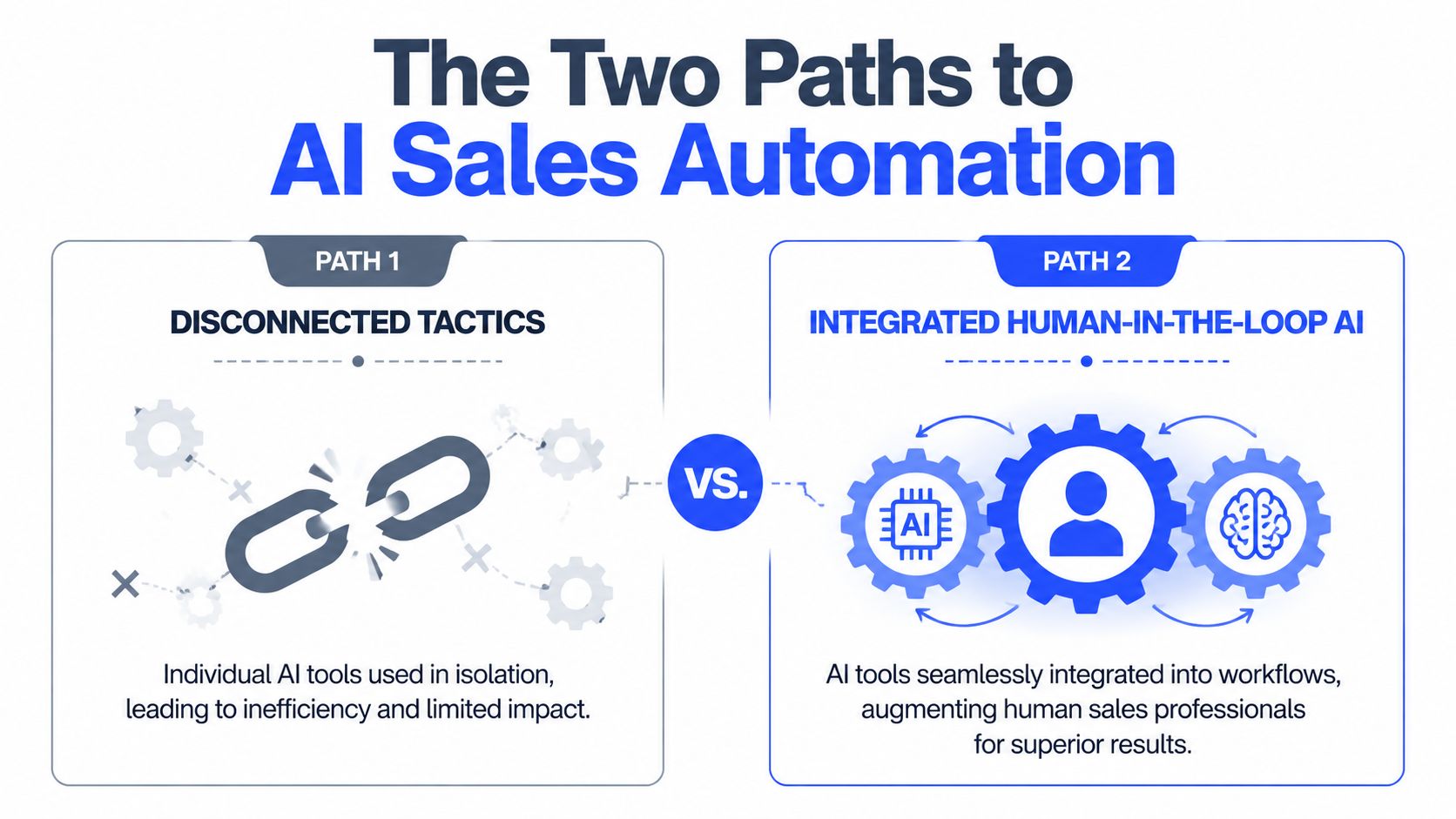
The two paths to AI sales automation
Most companies end up on one of two paths. One looks cheap and fast at the start, then turns into stack sprawl. The other takes more discipline early, but it's the only one that scales cleanly.
Path one, disconnected tactics
This is the default pattern. A team adds ChatGPT or Claude for email drafting, buys a lead scoring add-on, then adds a meeting summary tool and a sequencing layer. Each tool works, sort of, but only inside its own box.
The result is predictable. Scoring rules don't match list logic. Enrichment fields overwrite each other. Reps stop trusting CRM stages because the data is stale or incomplete. One team uses Apollo tags, another uses HubSpot properties, and nobody agrees on what counts as sales-ready.
That's why the infrastructure issue matters more than the feature list. SalesFully's analysis of AI sales adoption notes that 65% of businesses view AI as a key driver of sales growth, but hybrid solutions currently outperform full AI automation, and poor CRM data often blocks ROI before the tools get a fair shot.
For smaller teams also evaluating customer-facing automation, this guide to AI chatbots for small business marketing is a useful reminder that front-end automation only works when the handoff logic behind it is clear.
Path two, a centralized pipeline engine
This is the model I'd recommend every time. Start with one ICP definition, one source of truth for account status, one routing logic, and one reporting line. Then plug AI into that system.
In practice, that means a connected flow such as Sales Navigator for account discovery → Clay for enrichment and signal collection → Claude for research summaries and opener drafts → HubSpot for status, tasking, and reporting → Lemlist, Instantly, or HeyReach for channel execution. You can also use a specialist operator like AI automation tools and systems when you want that stack connected into one managed motion rather than assembled internally.
What changes when the system is centralized
Component | Disconnected setup | Centralized setup |
|---|---|---|
ICP definition | Varies by tool and rep | Set once and reused everywhere |
Data ownership | Split across apps | Owned inside CRM and enrichment rules |
Reporting | Activity-heavy | Pipeline-focused |
Review process | Ad hoc | Fixed human checkpoints |
Failure mode | Silent drift | Visible bottlenecks |
A centralized engine does one thing disconnected tools don't. It forces consistency. If an account is out of ICP, the score, sequence logic, routing, and reporting all reflect that. If a prospect replies, the handoff doesn't depend on an SDR noticing it in time.
Teams don't usually fail with ai sales automation because the model is weak. They fail because the data model is messy and the operating model is missing.
The highest ROI automation targets in 2026
The best automation targets are boring. They remove repetitive work, tighten qualification, and protect data quality. They don't try to replace sales judgment.

The financial case is already strong. Sopro's roundup of AI sales and marketing data reports that 86% of sales teams see positive ROI within the first year, 83% of recent AI buyers are already seeing measurable returns, and teams see 30% productivity gains with sales cycles shortening by 20% to 30%.
What we automate first
Here's the order that tends to produce the fastest return in live pipeline programs.
Prospect research and enrichment Clay plus Claude is hard to beat here. Pull funding signals, hiring changes, tech stack, compliance expansion, leadership moves, product launches, or competitor migrations across large account lists, then push the output into HubSpot or Apollo as structured fields. Teams usually save the most rep time in this stage because the machine can scan far more accounts than a human can review manually.
List building and ICP scoring
Good scoring is less about scoring every lead and more about excluding the wrong accounts early. Pull firmographic fit, role fit, market coverage, signal strength, and channel availability into one score. If the team already has a qualification rubric, codify it. If it doesn't, don't automate scoring yet.Opening-line personalization AI can materially improve throughput without damaging quality in this area, but only if a person reviews the line before send. The machine should identify the reason to reach out. The rep should decide whether that reason is credible and relevant.
Meeting note summarization
Fathom and Fireflies remove a lot of invisible admin. Good summaries should output pain points, objections, buying committee notes, next steps, and CRM-ready action items. That keeps post-call follow-up sharp and reduces the amount of context that disappears between SDR and AE.CRM data hygiene
This is underrated. Auto-tagging, stale-opportunity flags, lifecycle updates, duplicate detection, and account-level activity summaries keep the rest of the system usable. Clean CRM beats fancy prompts.
For teams comparing tools, this overview from DMpro on boosting sales with AI is useful as a shopping reference, but the stack matters less than the process wrapped around it.
What we keep human
Some work should stay with the rep or AE, even when the stack is mature.
Proposal emails: late-stage written communication needs judgment, timing awareness, and commercial nuance.
Negotiation messages: AI can summarize context, but a human should write the actual response.
CFO and CEO outreach at decision stage: the downside of an off-tone message is too high.
Account strategy in complex deals: multi-threading, political mapping, and stakeholder sequencing still need a person.
A useful benchmark for the qualification layer is AI lead scoring, especially when you're deciding where model output should stop and human review should begin.
The principle is simple. Automate research and admin. Keep judgment and relationships human.
A case study in AI-assisted outreach
A real split test makes the point better than any tool comparison.
We ran a six-week outbound test for a B2B SaaS client in the iGaming vertical across 800 prospects. The goal wasn't to see whether AI could write prettier copy. The goal was to test whether AI-assisted research could help an SDR send sharper, faster, more relevant outreach.
The test setup
Group A used manual personalization across 400 contacts. The SDR spent roughly 3 to 5 minutes researching each prospect, wrote the opener manually, and sent the sequence.
Group B used AI-assisted personalization across 400 contacts. Claude pulled the trigger signal, drafted the opening line, and the SDR reviewed it in about 30 seconds before sending.
The results after 6 weeks were clear:
Group A, manual: 11% reply rate, 18 meetings booked, 47 hours of SDR time
Group B, AI-assisted: 14% reply rate, 26 meetings booked, 9 hours of SDR time
The gain didn't come from better prose. It came from better reasons to contact the account. The AI surfaced signals the SDR wouldn't reliably find in a quick manual scan, things like a recent product launch, a compliance hiring spike, or evidence of competitor movement.
What actually beat manual work
This is the mistake many teams make. They ask AI to replace thinking when they should ask it to expand coverage.
In this test, the human still approved the opener. The machine just did the expensive part first, signal discovery at scale. That changed the economics of outreach because the SDR could spend time where human judgment matters instead of hunting for context in ten browser tabs.
A lot of teams need an example of the motion rather than another abstract benchmark. This outreach case study for a professional services firm is useful for that reason. The mechanics matter more than the hype.
AI didn't write better cold emails than the rep. It found better reasons to send them.
That lesson held after rollout too. Once the workflow proved reliable, we moved it into broader account coverage and standardized the review step so quality stayed controlled.
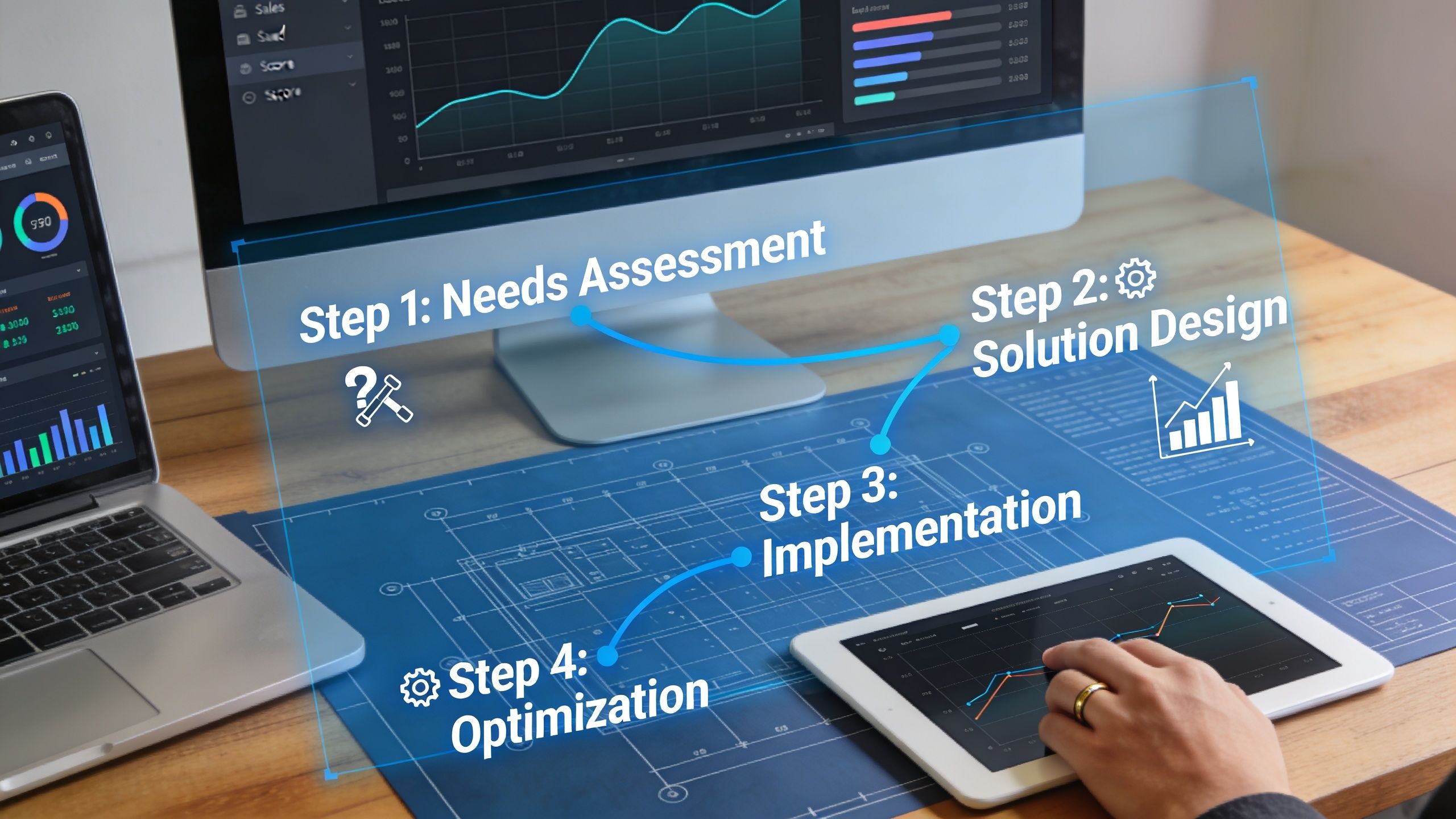
A 4-step blueprint for implementation
Most ai sales automation projects break at the handoff between tools and process. The fix is to build the operating model first, then fit tools into it.
1. Fix the data layer first
If account names, owner rules, lifecycle stages, and qualification properties are inconsistent, the automation will fail unnoticed. You need one CRM owner, one field map, and one definition of what enters an active outbound sequence.
Predictive systems outperform manual judgment only when the input is usable. Walnut's guide to AI in sales reports that AI sales automation platforms can drive up to 40% higher conversion rates in personalized demos through predictive lead scoring, while poor manual scoring misses 60% to 70% of high-fit leads due to bias and incomplete data.
Before adding prompts, audit these:
Account fields: industry, segment, geo, employee range, revenue band if tracked, CRM owner, lifecycle stage
Contact fields: role, seniority, channel availability, source, last touch, opt-out status
Signal fields: hiring change, funding event, product launch, tech stack, intent, competitor signal
Outcome fields: positive reply, meeting booked, qualified meeting, opportunity created, disqualified reason
If your qualification model isn't documented, use a practical lead qualification process first and only then automate the routing.
2. Build one connected stack
The right stack is the one your team will maintain. For most mid-market B2B teams, that means a simple line of travel rather than a pile of apps.
A clean version looks like this:
Sales Navigator for account discovery
Clay for enrichment and signal gathering
Claude for research synthesis and opener drafts
Apollo for contact coverage where needed
HubSpot as the source of truth
Lemlist, Instantly, or HeyReach for execution by channel
The key is handoff logic. If Clay enriches a record, HubSpot should store the structured output. If a reply lands, the sequence tool should stop and route. If an SDR marks a prospect as poor fit, that label should feed back into future scoring.
3. Define the human review points
Automation without review rules turns into brand damage quickly. Every system needs explicit stop signs.
Use a simple review map:
AI can research and draft the opening line.
SDR reviews relevance before send.
AI can summarize calls and suggest CRM updates.
AE or SDR confirms next step, objections, and stage movement.
AI never sends negotiation, proposal, or executive-stage messaging without a human rewrite.
This is a good point to pressure-test the logic in motion:
The highest-output teams don't remove humans from the loop. They place humans where risk and nuance are highest.
4. Train voice like an operating system
Voice is where weak AI rollouts become obvious. A tone guide alone won't fix it. The model needs examples, boundaries, and repeated edits.
Our operating version is a four-part training set:
Voice document
Build a short brief covering tone, banned words, sentence rhythm, and the kind of authority the brand should sound like. Pull examples from founder posts, sales emails, Slack messages, and call transcripts.Best examples
Feed the model 5 to 10 of the strongest-performing messages or posts in the brand's real voice. Real examples train better than abstract rules.Negative examples Include 5 things the company would never say. This matters more than many expect because it defines the edge of the voice.
Human edit loop
Every draft gets edited before it goes live. Over time the model improves, but the review step stays.
Weak AI voice usually isn't a model problem. It's a training problem.
Refresh the examples quarterly. Brand voice drifts, especially when founders start speaking to a different market segment or the company moves upmarket.
Measuring success and getting organizational buy-in
The system only sticks if the team can see what it's doing and trust how it works.

Track operating metrics, not vanity metrics
Open rate is a weak proxy. Activity volume is worse. The useful metrics are the ones that show whether the machine is helping the team create qualified conversations faster and with less wasted effort.
Track these every week:
Reply rate by sequence: not blended across all campaigns
Meetings booked per SDR: paired with quality review, not raw count alone
Pipeline velocity: how quickly qualified accounts move from first touch to meeting to opportunity
Cost per qualified meeting: including tooling and labor
CRM hygiene adherence: stale deals, missing fields, unworked replies, duplicate records
Conversation intelligence can help here if it's tied to coaching rather than surveillance. Kixie's sales automation data reports 88% adoption for conversation intelligence among teams, with 53% higher customer satisfaction, and notes that rep talk ratios above 60% correlate with 40% slower closes. That's useful because it gives managers something operational to coach, not just something to admire in a dashboard.
Handle objections with a process, not reassurance
The same concerns come up in almost every rollout.
Buyers will spot the AI: they usually will if the system sends untouched copy. They usually won't if AI handles research and drafting while humans review and send.
It will damage the brand: that risk is real, which is why review logs, prompt standards, and negative examples need to be part of the SOP.
We'll look like spammers: poor voice training and weak targeting cause that, not AI by itself.
Our SDRs will lose their jobs: in practice, the work changes first. Research and cleanup shrink. Calling, follow-up, and qualification time expand.
What about privacy and compliance: document the data flow, define tool permissions, and make sure the client knows where review happens.
A lot of buy-in problems are really visibility problems. When leaders can see the rules, the checkpoints, and the outcomes, they stop treating ai sales automation as a black box.
The next step is straightforward. Audit your CRM hygiene, then map one SDR week in detail. Find the manual research, list building, note capture, and data cleanup work that keeps reps away from live selling. Automate those first.
If you want a practical benchmark for your own setup, Grou builds B2B pipeline systems that connect targeting, LinkedIn, outbound, and reply handling into one operating model. A good starting move is to compare your current stack against the framework above and identify where your data, routing, or human review layer is breaking the chain.
Your reps aren't short on tools. They're short on clean time.
Most B2B teams I talk to have the same problem. SDRs spend the day jumping between Sales Navigator, Apollo, HubSpot, call notes, list cleanup, and follow-up tasks, but the calendar still doesn't fill fast enough. That's why ai sales automation gets attention, but it also gets skepticism. A bad setup creates more spam, worse data, and a team that trusts the system less every week.
The useful version looks different. It automates research, qualification, routing, and cleanup, while keeping judgment, relationship handling, and late-stage messaging with humans.
Table of Contents
Your pipeline is full of tasks, not meetings
Key takeaways
The two paths to AI sales automation
Path one, disconnected tactics
Path two, a centralized pipeline engine
The highest ROI automation targets in 2026
What we automate first
What we keep human
A case study in AI-assisted outreach
The test setup
What actually beat manual work
A 4-step blueprint for implementation
1. Fix the data layer first
2. Build one connected stack
3. Define the human review points
4. Train voice like an operating system
Measuring success and getting organizational buy-in
Track operating metrics, not vanity metrics
Handle objections with a process, not reassurance
Your pipeline is full of tasks, not meetings
The core sales problem isn't lack of effort. It's that reps spend too much of the week doing work adjacent to selling. Industry data puts the gap in plain terms. Salespeople spend 71% of their time on non-selling activities, while reps using AI spend 35% more time selling according to these ai sales automation statistics.
That shift is why adoption has moved so fast. The same source reports that 83% of sales teams are using or planning to use AI tools within 12 months, and 83% of companies using AI reported revenue growth, compared with 66% of teams without AI. The demand is real, but many organizations still bolt tools onto a broken process and call it transformation.
If you're evaluating where automation fits, this short explainer on autonomous digital workers is useful because it clarifies the difference between simple task automation and systems that can carry work across steps.
Key takeaways
Disconnected tools don't compound: a writing tool, a scoring tool, and a call tool won't produce pipeline if they run on different definitions of ICP, stage, and qualification. That's why workflow design matters more than the model name.
Four tasks usually produce the fastest return: research, ICP scoring, opening-line personalization, and meeting note capture.
The highest-performing setups stay hybrid: AI handles research and admin. Humans handle judgment, positioning, and relationship-sensitive messages.
Rollout needs operating rules: without review points, prompt standards, and ownership, quality drops fast.
Measurement has to tie to pipeline: reply rate alone isn't enough. You need to see whether the system creates qualified meetings faster and with less manual effort.
Practical rule: If a workflow saves time but creates extra review, cleanup, or brand risk downstream, it isn't automated. It's just moved work.
The two paths to AI sales automation
Most companies end up on one of two paths. One looks cheap and fast at the start, then turns into stack sprawl. The other takes more discipline early, but it's the only one that scales cleanly.
Path one, disconnected tactics
This is the default pattern. A team adds ChatGPT or Claude for email drafting, buys a lead scoring add-on, then adds a meeting summary tool and a sequencing layer. Each tool works, sort of, but only inside its own box.
The result is predictable. Scoring rules don't match list logic. Enrichment fields overwrite each other. Reps stop trusting CRM stages because the data is stale or incomplete. One team uses Apollo tags, another uses HubSpot properties, and nobody agrees on what counts as sales-ready.
That's why the infrastructure issue matters more than the feature list. SalesFully's analysis of AI sales adoption notes that 65% of businesses view AI as a key driver of sales growth, but hybrid solutions currently outperform full AI automation, and poor CRM data often blocks ROI before the tools get a fair shot.
For smaller teams also evaluating customer-facing automation, this guide to AI chatbots for small business marketing is a useful reminder that front-end automation only works when the handoff logic behind it is clear.
Path two, a centralized pipeline engine
This is the model I'd recommend every time. Start with one ICP definition, one source of truth for account status, one routing logic, and one reporting line. Then plug AI into that system.
In practice, that means a connected flow such as Sales Navigator for account discovery → Clay for enrichment and signal collection → Claude for research summaries and opener drafts → HubSpot for status, tasking, and reporting → Lemlist, Instantly, or HeyReach for channel execution. You can also use a specialist operator like AI automation tools and systems when you want that stack connected into one managed motion rather than assembled internally.
What changes when the system is centralized
Component | Disconnected setup | Centralized setup |
|---|---|---|
ICP definition | Varies by tool and rep | Set once and reused everywhere |
Data ownership | Split across apps | Owned inside CRM and enrichment rules |
Reporting | Activity-heavy | Pipeline-focused |
Review process | Ad hoc | Fixed human checkpoints |
Failure mode | Silent drift | Visible bottlenecks |
A centralized engine does one thing disconnected tools don't. It forces consistency. If an account is out of ICP, the score, sequence logic, routing, and reporting all reflect that. If a prospect replies, the handoff doesn't depend on an SDR noticing it in time.
Teams don't usually fail with ai sales automation because the model is weak. They fail because the data model is messy and the operating model is missing.
The highest ROI automation targets in 2026
The best automation targets are boring. They remove repetitive work, tighten qualification, and protect data quality. They don't try to replace sales judgment.
The financial case is already strong. Sopro's roundup of AI sales and marketing data reports that 86% of sales teams see positive ROI within the first year, 83% of recent AI buyers are already seeing measurable returns, and teams see 30% productivity gains with sales cycles shortening by 20% to 30%.
What we automate first
Here's the order that tends to produce the fastest return in live pipeline programs.
Prospect research and enrichment Clay plus Claude is hard to beat here. Pull funding signals, hiring changes, tech stack, compliance expansion, leadership moves, product launches, or competitor migrations across large account lists, then push the output into HubSpot or Apollo as structured fields. Teams usually save the most rep time in this stage because the machine can scan far more accounts than a human can review manually.
List building and ICP scoring
Good scoring is less about scoring every lead and more about excluding the wrong accounts early. Pull firmographic fit, role fit, market coverage, signal strength, and channel availability into one score. If the team already has a qualification rubric, codify it. If it doesn't, don't automate scoring yet.Opening-line personalization AI can materially improve throughput without damaging quality in this area, but only if a person reviews the line before send. The machine should identify the reason to reach out. The rep should decide whether that reason is credible and relevant.
Meeting note summarization
Fathom and Fireflies remove a lot of invisible admin. Good summaries should output pain points, objections, buying committee notes, next steps, and CRM-ready action items. That keeps post-call follow-up sharp and reduces the amount of context that disappears between SDR and AE.CRM data hygiene
This is underrated. Auto-tagging, stale-opportunity flags, lifecycle updates, duplicate detection, and account-level activity summaries keep the rest of the system usable. Clean CRM beats fancy prompts.
For teams comparing tools, this overview from DMpro on boosting sales with AI is useful as a shopping reference, but the stack matters less than the process wrapped around it.
What we keep human
Some work should stay with the rep or AE, even when the stack is mature.
Proposal emails: late-stage written communication needs judgment, timing awareness, and commercial nuance.
Negotiation messages: AI can summarize context, but a human should write the actual response.
CFO and CEO outreach at decision stage: the downside of an off-tone message is too high.
Account strategy in complex deals: multi-threading, political mapping, and stakeholder sequencing still need a person.
A useful benchmark for the qualification layer is AI lead scoring, especially when you're deciding where model output should stop and human review should begin.
The principle is simple. Automate research and admin. Keep judgment and relationships human.
A case study in AI-assisted outreach
A real split test makes the point better than any tool comparison.
We ran a six-week outbound test for a B2B SaaS client in the iGaming vertical across 800 prospects. The goal wasn't to see whether AI could write prettier copy. The goal was to test whether AI-assisted research could help an SDR send sharper, faster, more relevant outreach.
The test setup
Group A used manual personalization across 400 contacts. The SDR spent roughly 3 to 5 minutes researching each prospect, wrote the opener manually, and sent the sequence.
Group B used AI-assisted personalization across 400 contacts. Claude pulled the trigger signal, drafted the opening line, and the SDR reviewed it in about 30 seconds before sending.
The results after 6 weeks were clear:
Group A, manual: 11% reply rate, 18 meetings booked, 47 hours of SDR time
Group B, AI-assisted: 14% reply rate, 26 meetings booked, 9 hours of SDR time
The gain didn't come from better prose. It came from better reasons to contact the account. The AI surfaced signals the SDR wouldn't reliably find in a quick manual scan, things like a recent product launch, a compliance hiring spike, or evidence of competitor movement.
What actually beat manual work
This is the mistake many teams make. They ask AI to replace thinking when they should ask it to expand coverage.
In this test, the human still approved the opener. The machine just did the expensive part first, signal discovery at scale. That changed the economics of outreach because the SDR could spend time where human judgment matters instead of hunting for context in ten browser tabs.
A lot of teams need an example of the motion rather than another abstract benchmark. This outreach case study for a professional services firm is useful for that reason. The mechanics matter more than the hype.
AI didn't write better cold emails than the rep. It found better reasons to send them.
That lesson held after rollout too. Once the workflow proved reliable, we moved it into broader account coverage and standardized the review step so quality stayed controlled.
A 4-step blueprint for implementation
Most ai sales automation projects break at the handoff between tools and process. The fix is to build the operating model first, then fit tools into it.
1. Fix the data layer first
If account names, owner rules, lifecycle stages, and qualification properties are inconsistent, the automation will fail unnoticed. You need one CRM owner, one field map, and one definition of what enters an active outbound sequence.
Predictive systems outperform manual judgment only when the input is usable. Walnut's guide to AI in sales reports that AI sales automation platforms can drive up to 40% higher conversion rates in personalized demos through predictive lead scoring, while poor manual scoring misses 60% to 70% of high-fit leads due to bias and incomplete data.
Before adding prompts, audit these:
Account fields: industry, segment, geo, employee range, revenue band if tracked, CRM owner, lifecycle stage
Contact fields: role, seniority, channel availability, source, last touch, opt-out status
Signal fields: hiring change, funding event, product launch, tech stack, intent, competitor signal
Outcome fields: positive reply, meeting booked, qualified meeting, opportunity created, disqualified reason
If your qualification model isn't documented, use a practical lead qualification process first and only then automate the routing.
2. Build one connected stack
The right stack is the one your team will maintain. For most mid-market B2B teams, that means a simple line of travel rather than a pile of apps.
A clean version looks like this:
Sales Navigator for account discovery
Clay for enrichment and signal gathering
Claude for research synthesis and opener drafts
Apollo for contact coverage where needed
HubSpot as the source of truth
Lemlist, Instantly, or HeyReach for execution by channel
The key is handoff logic. If Clay enriches a record, HubSpot should store the structured output. If a reply lands, the sequence tool should stop and route. If an SDR marks a prospect as poor fit, that label should feed back into future scoring.
3. Define the human review points
Automation without review rules turns into brand damage quickly. Every system needs explicit stop signs.
Use a simple review map:
AI can research and draft the opening line.
SDR reviews relevance before send.
AI can summarize calls and suggest CRM updates.
AE or SDR confirms next step, objections, and stage movement.
AI never sends negotiation, proposal, or executive-stage messaging without a human rewrite.
This is a good point to pressure-test the logic in motion:
The highest-output teams don't remove humans from the loop. They place humans where risk and nuance are highest.
4. Train voice like an operating system
Voice is where weak AI rollouts become obvious. A tone guide alone won't fix it. The model needs examples, boundaries, and repeated edits.
Our operating version is a four-part training set:
Voice document
Build a short brief covering tone, banned words, sentence rhythm, and the kind of authority the brand should sound like. Pull examples from founder posts, sales emails, Slack messages, and call transcripts.Best examples
Feed the model 5 to 10 of the strongest-performing messages or posts in the brand's real voice. Real examples train better than abstract rules.Negative examples Include 5 things the company would never say. This matters more than many expect because it defines the edge of the voice.
Human edit loop
Every draft gets edited before it goes live. Over time the model improves, but the review step stays.
Weak AI voice usually isn't a model problem. It's a training problem.
Refresh the examples quarterly. Brand voice drifts, especially when founders start speaking to a different market segment or the company moves upmarket.
Measuring success and getting organizational buy-in
The system only sticks if the team can see what it's doing and trust how it works.
Track operating metrics, not vanity metrics
Open rate is a weak proxy. Activity volume is worse. The useful metrics are the ones that show whether the machine is helping the team create qualified conversations faster and with less wasted effort.
Track these every week:
Reply rate by sequence: not blended across all campaigns
Meetings booked per SDR: paired with quality review, not raw count alone
Pipeline velocity: how quickly qualified accounts move from first touch to meeting to opportunity
Cost per qualified meeting: including tooling and labor
CRM hygiene adherence: stale deals, missing fields, unworked replies, duplicate records
Conversation intelligence can help here if it's tied to coaching rather than surveillance. Kixie's sales automation data reports 88% adoption for conversation intelligence among teams, with 53% higher customer satisfaction, and notes that rep talk ratios above 60% correlate with 40% slower closes. That's useful because it gives managers something operational to coach, not just something to admire in a dashboard.
Handle objections with a process, not reassurance
The same concerns come up in almost every rollout.
Buyers will spot the AI: they usually will if the system sends untouched copy. They usually won't if AI handles research and drafting while humans review and send.
It will damage the brand: that risk is real, which is why review logs, prompt standards, and negative examples need to be part of the SOP.
We'll look like spammers: poor voice training and weak targeting cause that, not AI by itself.
Our SDRs will lose their jobs: in practice, the work changes first. Research and cleanup shrink. Calling, follow-up, and qualification time expand.
What about privacy and compliance: document the data flow, define tool permissions, and make sure the client knows where review happens.
A lot of buy-in problems are really visibility problems. When leaders can see the rules, the checkpoints, and the outcomes, they stop treating ai sales automation as a black box.
The next step is straightforward. Audit your CRM hygiene, then map one SDR week in detail. Find the manual research, list building, note capture, and data cleanup work that keeps reps away from live selling. Automate those first.
If you want a practical benchmark for your own setup, Grou builds B2B pipeline systems that connect targeting, LinkedIn, outbound, and reply handling into one operating model. A good starting move is to compare your current stack against the framework above and identify where your data, routing, or human review layer is breaking the chain.
Your reps aren't short on tools. They're short on clean time.
Most B2B teams I talk to have the same problem. SDRs spend the day jumping between Sales Navigator, Apollo, HubSpot, call notes, list cleanup, and follow-up tasks, but the calendar still doesn't fill fast enough. That's why ai sales automation gets attention, but it also gets skepticism. A bad setup creates more spam, worse data, and a team that trusts the system less every week.
The useful version looks different. It automates research, qualification, routing, and cleanup, while keeping judgment, relationship handling, and late-stage messaging with humans.
Table of Contents
Your pipeline is full of tasks, not meetings
Key takeaways
The two paths to AI sales automation
Path one, disconnected tactics
Path two, a centralized pipeline engine
The highest ROI automation targets in 2026
What we automate first
What we keep human
A case study in AI-assisted outreach
The test setup
What actually beat manual work
A 4-step blueprint for implementation
1. Fix the data layer first
2. Build one connected stack
3. Define the human review points
4. Train voice like an operating system
Measuring success and getting organizational buy-in
Track operating metrics, not vanity metrics
Handle objections with a process, not reassurance
Your pipeline is full of tasks, not meetings
The core sales problem isn't lack of effort. It's that reps spend too much of the week doing work adjacent to selling. Industry data puts the gap in plain terms. Salespeople spend 71% of their time on non-selling activities, while reps using AI spend 35% more time selling according to these ai sales automation statistics.
That shift is why adoption has moved so fast. The same source reports that 83% of sales teams are using or planning to use AI tools within 12 months, and 83% of companies using AI reported revenue growth, compared with 66% of teams without AI. The demand is real, but many organizations still bolt tools onto a broken process and call it transformation.
If you're evaluating where automation fits, this short explainer on autonomous digital workers is useful because it clarifies the difference between simple task automation and systems that can carry work across steps.
Key takeaways
Disconnected tools don't compound: a writing tool, a scoring tool, and a call tool won't produce pipeline if they run on different definitions of ICP, stage, and qualification. That's why workflow design matters more than the model name.
Four tasks usually produce the fastest return: research, ICP scoring, opening-line personalization, and meeting note capture.
The highest-performing setups stay hybrid: AI handles research and admin. Humans handle judgment, positioning, and relationship-sensitive messages.
Rollout needs operating rules: without review points, prompt standards, and ownership, quality drops fast.
Measurement has to tie to pipeline: reply rate alone isn't enough. You need to see whether the system creates qualified meetings faster and with less manual effort.
Practical rule: If a workflow saves time but creates extra review, cleanup, or brand risk downstream, it isn't automated. It's just moved work.
The two paths to AI sales automation
Most companies end up on one of two paths. One looks cheap and fast at the start, then turns into stack sprawl. The other takes more discipline early, but it's the only one that scales cleanly.
Path one, disconnected tactics
This is the default pattern. A team adds ChatGPT or Claude for email drafting, buys a lead scoring add-on, then adds a meeting summary tool and a sequencing layer. Each tool works, sort of, but only inside its own box.
The result is predictable. Scoring rules don't match list logic. Enrichment fields overwrite each other. Reps stop trusting CRM stages because the data is stale or incomplete. One team uses Apollo tags, another uses HubSpot properties, and nobody agrees on what counts as sales-ready.
That's why the infrastructure issue matters more than the feature list. SalesFully's analysis of AI sales adoption notes that 65% of businesses view AI as a key driver of sales growth, but hybrid solutions currently outperform full AI automation, and poor CRM data often blocks ROI before the tools get a fair shot.
For smaller teams also evaluating customer-facing automation, this guide to AI chatbots for small business marketing is a useful reminder that front-end automation only works when the handoff logic behind it is clear.
Path two, a centralized pipeline engine
This is the model I'd recommend every time. Start with one ICP definition, one source of truth for account status, one routing logic, and one reporting line. Then plug AI into that system.
In practice, that means a connected flow such as Sales Navigator for account discovery → Clay for enrichment and signal collection → Claude for research summaries and opener drafts → HubSpot for status, tasking, and reporting → Lemlist, Instantly, or HeyReach for channel execution. You can also use a specialist operator like AI automation tools and systems when you want that stack connected into one managed motion rather than assembled internally.
What changes when the system is centralized
Component | Disconnected setup | Centralized setup |
|---|---|---|
ICP definition | Varies by tool and rep | Set once and reused everywhere |
Data ownership | Split across apps | Owned inside CRM and enrichment rules |
Reporting | Activity-heavy | Pipeline-focused |
Review process | Ad hoc | Fixed human checkpoints |
Failure mode | Silent drift | Visible bottlenecks |
A centralized engine does one thing disconnected tools don't. It forces consistency. If an account is out of ICP, the score, sequence logic, routing, and reporting all reflect that. If a prospect replies, the handoff doesn't depend on an SDR noticing it in time.
Teams don't usually fail with ai sales automation because the model is weak. They fail because the data model is messy and the operating model is missing.
The highest ROI automation targets in 2026
The best automation targets are boring. They remove repetitive work, tighten qualification, and protect data quality. They don't try to replace sales judgment.
The financial case is already strong. Sopro's roundup of AI sales and marketing data reports that 86% of sales teams see positive ROI within the first year, 83% of recent AI buyers are already seeing measurable returns, and teams see 30% productivity gains with sales cycles shortening by 20% to 30%.
What we automate first
Here's the order that tends to produce the fastest return in live pipeline programs.
Prospect research and enrichment Clay plus Claude is hard to beat here. Pull funding signals, hiring changes, tech stack, compliance expansion, leadership moves, product launches, or competitor migrations across large account lists, then push the output into HubSpot or Apollo as structured fields. Teams usually save the most rep time in this stage because the machine can scan far more accounts than a human can review manually.
List building and ICP scoring
Good scoring is less about scoring every lead and more about excluding the wrong accounts early. Pull firmographic fit, role fit, market coverage, signal strength, and channel availability into one score. If the team already has a qualification rubric, codify it. If it doesn't, don't automate scoring yet.Opening-line personalization AI can materially improve throughput without damaging quality in this area, but only if a person reviews the line before send. The machine should identify the reason to reach out. The rep should decide whether that reason is credible and relevant.
Meeting note summarization
Fathom and Fireflies remove a lot of invisible admin. Good summaries should output pain points, objections, buying committee notes, next steps, and CRM-ready action items. That keeps post-call follow-up sharp and reduces the amount of context that disappears between SDR and AE.CRM data hygiene
This is underrated. Auto-tagging, stale-opportunity flags, lifecycle updates, duplicate detection, and account-level activity summaries keep the rest of the system usable. Clean CRM beats fancy prompts.
For teams comparing tools, this overview from DMpro on boosting sales with AI is useful as a shopping reference, but the stack matters less than the process wrapped around it.
What we keep human
Some work should stay with the rep or AE, even when the stack is mature.
Proposal emails: late-stage written communication needs judgment, timing awareness, and commercial nuance.
Negotiation messages: AI can summarize context, but a human should write the actual response.
CFO and CEO outreach at decision stage: the downside of an off-tone message is too high.
Account strategy in complex deals: multi-threading, political mapping, and stakeholder sequencing still need a person.
A useful benchmark for the qualification layer is AI lead scoring, especially when you're deciding where model output should stop and human review should begin.
The principle is simple. Automate research and admin. Keep judgment and relationships human.
A case study in AI-assisted outreach
A real split test makes the point better than any tool comparison.
We ran a six-week outbound test for a B2B SaaS client in the iGaming vertical across 800 prospects. The goal wasn't to see whether AI could write prettier copy. The goal was to test whether AI-assisted research could help an SDR send sharper, faster, more relevant outreach.
The test setup
Group A used manual personalization across 400 contacts. The SDR spent roughly 3 to 5 minutes researching each prospect, wrote the opener manually, and sent the sequence.
Group B used AI-assisted personalization across 400 contacts. Claude pulled the trigger signal, drafted the opening line, and the SDR reviewed it in about 30 seconds before sending.
The results after 6 weeks were clear:
Group A, manual: 11% reply rate, 18 meetings booked, 47 hours of SDR time
Group B, AI-assisted: 14% reply rate, 26 meetings booked, 9 hours of SDR time
The gain didn't come from better prose. It came from better reasons to contact the account. The AI surfaced signals the SDR wouldn't reliably find in a quick manual scan, things like a recent product launch, a compliance hiring spike, or evidence of competitor movement.
What actually beat manual work
This is the mistake many teams make. They ask AI to replace thinking when they should ask it to expand coverage.
In this test, the human still approved the opener. The machine just did the expensive part first, signal discovery at scale. That changed the economics of outreach because the SDR could spend time where human judgment matters instead of hunting for context in ten browser tabs.
A lot of teams need an example of the motion rather than another abstract benchmark. This outreach case study for a professional services firm is useful for that reason. The mechanics matter more than the hype.
AI didn't write better cold emails than the rep. It found better reasons to send them.
That lesson held after rollout too. Once the workflow proved reliable, we moved it into broader account coverage and standardized the review step so quality stayed controlled.
A 4-step blueprint for implementation
Most ai sales automation projects break at the handoff between tools and process. The fix is to build the operating model first, then fit tools into it.
1. Fix the data layer first
If account names, owner rules, lifecycle stages, and qualification properties are inconsistent, the automation will fail unnoticed. You need one CRM owner, one field map, and one definition of what enters an active outbound sequence.
Predictive systems outperform manual judgment only when the input is usable. Walnut's guide to AI in sales reports that AI sales automation platforms can drive up to 40% higher conversion rates in personalized demos through predictive lead scoring, while poor manual scoring misses 60% to 70% of high-fit leads due to bias and incomplete data.
Before adding prompts, audit these:
Account fields: industry, segment, geo, employee range, revenue band if tracked, CRM owner, lifecycle stage
Contact fields: role, seniority, channel availability, source, last touch, opt-out status
Signal fields: hiring change, funding event, product launch, tech stack, intent, competitor signal
Outcome fields: positive reply, meeting booked, qualified meeting, opportunity created, disqualified reason
If your qualification model isn't documented, use a practical lead qualification process first and only then automate the routing.
2. Build one connected stack
The right stack is the one your team will maintain. For most mid-market B2B teams, that means a simple line of travel rather than a pile of apps.
A clean version looks like this:
Sales Navigator for account discovery
Clay for enrichment and signal gathering
Claude for research synthesis and opener drafts
Apollo for contact coverage where needed
HubSpot as the source of truth
Lemlist, Instantly, or HeyReach for execution by channel
The key is handoff logic. If Clay enriches a record, HubSpot should store the structured output. If a reply lands, the sequence tool should stop and route. If an SDR marks a prospect as poor fit, that label should feed back into future scoring.
3. Define the human review points
Automation without review rules turns into brand damage quickly. Every system needs explicit stop signs.
Use a simple review map:
AI can research and draft the opening line.
SDR reviews relevance before send.
AI can summarize calls and suggest CRM updates.
AE or SDR confirms next step, objections, and stage movement.
AI never sends negotiation, proposal, or executive-stage messaging without a human rewrite.
This is a good point to pressure-test the logic in motion:
The highest-output teams don't remove humans from the loop. They place humans where risk and nuance are highest.
4. Train voice like an operating system
Voice is where weak AI rollouts become obvious. A tone guide alone won't fix it. The model needs examples, boundaries, and repeated edits.
Our operating version is a four-part training set:
Voice document
Build a short brief covering tone, banned words, sentence rhythm, and the kind of authority the brand should sound like. Pull examples from founder posts, sales emails, Slack messages, and call transcripts.Best examples
Feed the model 5 to 10 of the strongest-performing messages or posts in the brand's real voice. Real examples train better than abstract rules.Negative examples Include 5 things the company would never say. This matters more than many expect because it defines the edge of the voice.
Human edit loop
Every draft gets edited before it goes live. Over time the model improves, but the review step stays.
Weak AI voice usually isn't a model problem. It's a training problem.
Refresh the examples quarterly. Brand voice drifts, especially when founders start speaking to a different market segment or the company moves upmarket.
Measuring success and getting organizational buy-in
The system only sticks if the team can see what it's doing and trust how it works.
Track operating metrics, not vanity metrics
Open rate is a weak proxy. Activity volume is worse. The useful metrics are the ones that show whether the machine is helping the team create qualified conversations faster and with less wasted effort.
Track these every week:
Reply rate by sequence: not blended across all campaigns
Meetings booked per SDR: paired with quality review, not raw count alone
Pipeline velocity: how quickly qualified accounts move from first touch to meeting to opportunity
Cost per qualified meeting: including tooling and labor
CRM hygiene adherence: stale deals, missing fields, unworked replies, duplicate records
Conversation intelligence can help here if it's tied to coaching rather than surveillance. Kixie's sales automation data reports 88% adoption for conversation intelligence among teams, with 53% higher customer satisfaction, and notes that rep talk ratios above 60% correlate with 40% slower closes. That's useful because it gives managers something operational to coach, not just something to admire in a dashboard.
Handle objections with a process, not reassurance
The same concerns come up in almost every rollout.
Buyers will spot the AI: they usually will if the system sends untouched copy. They usually won't if AI handles research and drafting while humans review and send.
It will damage the brand: that risk is real, which is why review logs, prompt standards, and negative examples need to be part of the SOP.
We'll look like spammers: poor voice training and weak targeting cause that, not AI by itself.
Our SDRs will lose their jobs: in practice, the work changes first. Research and cleanup shrink. Calling, follow-up, and qualification time expand.
What about privacy and compliance: document the data flow, define tool permissions, and make sure the client knows where review happens.
A lot of buy-in problems are really visibility problems. When leaders can see the rules, the checkpoints, and the outcomes, they stop treating ai sales automation as a black box.
The next step is straightforward. Audit your CRM hygiene, then map one SDR week in detail. Find the manual research, list building, note capture, and data cleanup work that keeps reps away from live selling. Automate those first.
If you want a practical benchmark for your own setup, Grou builds B2B pipeline systems that connect targeting, LinkedIn, outbound, and reply handling into one operating model. A good starting move is to compare your current stack against the framework above and identify where your data, routing, or human review layer is breaking the chain.

Pipeline OS Newsletter
Build qualified pipeline
Get weekly tactics to generate demand, improve lead quality, and book more meetings.





Trusted by industry leaders
Trusted by industry leaders
Trusted by industry leaders
Ready to build qualified pipeline?
Ready to build qualified pipeline?
Ready to build qualified pipeline?
Book a call to see if we're the right fit, or take the 2-minute quiz to get a clear starting point.
Book a call to see if we're the right fit, or take the 2-minute quiz to get a clear starting point.
Book a call to see if we're the right fit, or take the 2-minute quiz to get a clear starting point.
" height="30.21639343089746px" id="hfGbXmQR2" width="30.216393430897455px"/></svg>)
Copyright © 2026 – All Right Reserved
Copyright © 2026 – All Right Reserved
Copyright © 2026 – All Right Reserved