%22%3E%3C/path%3E%3Cpath d=%22M 63.072 7.554 C 62.258 8.022 61.577 8.689 61.092 9.493 L 61.092 7.076 L 57.158 7.076 L 57.158 22.64 L 61.089 22.64 L 61.089 14.888 C 61.089 13.446 61.403 12.434 62.03 11.853 C 62.818 11.218 63.818 10.907 64.826 10.982 L 65.868 10.982 L 65.868 6.851 C 64.891 6.834 63.926 7.076 63.073 7.554 Z%22 fill=%22rgb(17,17,17)%22%3E%3C/path%3E%3Cpath d=%22M 78.916 7.82 C 76.363 6.49 73.321 6.49 70.768 7.82 C 69.562 8.473 68.564 9.451 67.888 10.644 C 67.167 11.931 66.803 13.387 66.834 14.862 C 66.804 16.332 67.157 17.785 67.86 19.077 C 68.515 20.267 69.494 21.246 70.684 21.901 C 71.924 22.576 73.318 22.92 74.73 22.898 C 76.164 22.918 77.58 22.575 78.846 21.901 C 80.062 21.247 81.073 20.27 81.768 19.077 C 82.506 17.797 82.88 16.339 82.85 14.862 C 82.88 13.389 82.517 11.934 81.797 10.647 C 81.12 9.455 80.122 8.477 78.917 7.824 M 78.803 14.862 C 78.829 15.739 78.636 16.608 78.241 17.391 C 77.903 18.046 77.38 18.588 76.738 18.95 C 76.124 19.293 75.432 19.472 74.729 19.47 C 73.668 19.497 72.648 19.061 71.934 18.276 C 71.139 17.323 70.741 16.1 70.823 14.862 C 70.741 13.62 71.149 12.395 71.959 11.45 C 72.687 10.667 73.715 10.233 74.783 10.256 C 75.859 10.236 76.894 10.67 77.635 11.45 C 78.464 12.387 78.884 13.616 78.801 14.864%22 fill=%22rgb(17,17,17)%22%3E%3C/path%3E%3Cpath d=%22M 95.906 7.076 L 95.906 15.646 C 95.975 16.68 95.643 17.701 94.979 18.498 C 94.311 19.184 93.379 19.547 92.422 19.495 C 91.475 19.544 90.553 19.18 89.894 18.498 C 89.23 17.701 88.898 16.68 88.967 15.646 L 88.967 7.076 L 85.033 7.076 L 85.033 16.207 C 85 17.449 85.275 18.68 85.834 19.79 C 86.327 20.75 87.095 21.542 88.039 22.065 C 89.033 22.594 90.145 22.861 91.271 22.838 C 92.188 22.847 93.095 22.65 93.926 22.263 C 94.708 21.905 95.388 21.36 95.906 20.675 L 95.906 22.645 L 99.865 22.645 L 99.865 7.076 Z%22 fill=%22rgb(17,17,17)%22%3E%3C/path%3E%3Cpath d=%22M 4.513 15.626 C 4.511 10.815 7.606 6.549 12.181 5.059 C 16.756 3.57 21.77 5.195 24.601 9.086 L 27.816 5.87 C 24.074 1.186 17.981 -0.943 12.137 0.393 C 6.292 1.728 1.728 6.292 0.393 12.137 C -0.943 17.981 1.186 24.074 5.87 27.816 L 9.085 24.601 C 6.214 22.512 4.515 19.177 4.513 15.626%22 fill=%22rgb(32,62,235)%22%3E%3C/path%3E%3Cpath d=%22M 17.114 14.343 L 13.354 18.01 L 13.354 18.026 L 21.071 18.026 L 11.412 27.609 L 17.389 27.609 L 23.999 21.081 L 23.999 28.316 L 24.005 28.316 L 27.967 24.393 L 27.967 14.343 Z%22 fill=%22rgb(32,62,235)%22%3E%3C/path%3E%3C/g%3E%3C/svg%3E) ×
× ××
××›
›
›
›
SEO for tech companies in 2026: what actually ranks
SEO for tech companies in 2026: what actually ranks
SEO for tech companies in 2026: what actually ranks
SEO for tech companies in 2026: what actually ranks
SEO for tech companies in 2026: what actually ranks
SEO for tech companies in 2026: what actually ranks

Author
Aljaz Peklaj

You've got traffic, but the pipeline is still thin. That usually means search is pulling in the wrong people, the wrong pages, or both. Tech buyers don't convert because a blog post exists, they convert when the site is structured around intent, proof, and technical trust.
Diagnose first, because crawl blockers and rendering issues can make every other SEO effort wasteful.
Map content to ICP stages, since technical buyers search by problem, comparison, and implementation intent.
Treat documentation and product pages as revenue assets, not internal support artifacts.
Connect SEO to RevOps, so organic visits show up in meetings, influenced revenue, and CRM reporting.
Earn links where technical credibility lives, then measure them against pipeline, not vanity traffic.
Table of Contents
The SEO Pipeline Problem for Tech Companies
Organic search still carries real weight for tech brands. Multiple 2026 SEO roundups put organic search at about 47% to 53% of all website traffic, while Google controls roughly 82% to 90% of the global search market, and the number one organic result can pull around 27.6% to 39.8% CTR. That concentration is why seo for tech companies isn't a side project, it's a discovery system for serious buyers. (SEO statistics for 2026)
The failure mode is familiar. Marketing reports healthy traffic, sales still asks where the meetings are. The site may be ranking, but the pages aren't built around the questions buyers ask before they talk to anyone.
The real problem is structure
Technical audiences don't search like casual readers. They search for implementation details, compatibility, comparisons, and proof that the vendor understands their stack. If the content architecture doesn't reflect that journey, organic traffic turns into an expensive audience report.
Practical rule: If a page can't be tied to a buyer question, a product motion, or a sales objection, it probably doesn't belong in the core SEO system.
The best lens is pipeline, not pageviews. A search visitor should land on a page that answers the exact concern behind the query, then move to a commercial page, then to a meeting path. That's why a structured system matters more than random content volume.
For a useful adjacent lens on how AI search discovery is changing visibility, the team at GetIntel's answer engine visibility tips is worth reading. It's not a replacement for classic search work, but it reinforces the same point, structure wins when discovery systems get more selective.
This is also where most generic SEO advice breaks. It assumes every buyer behaves the same way, then pushes broad blog traffic as if it were pipeline. Tech companies need tighter content architecture and stronger handoff into revenue systems, which is why a data-backed operating model matters at the agency level too, as outlined in GROU's approach to data-driven digital marketing.
Your First Diagnostic Checklist
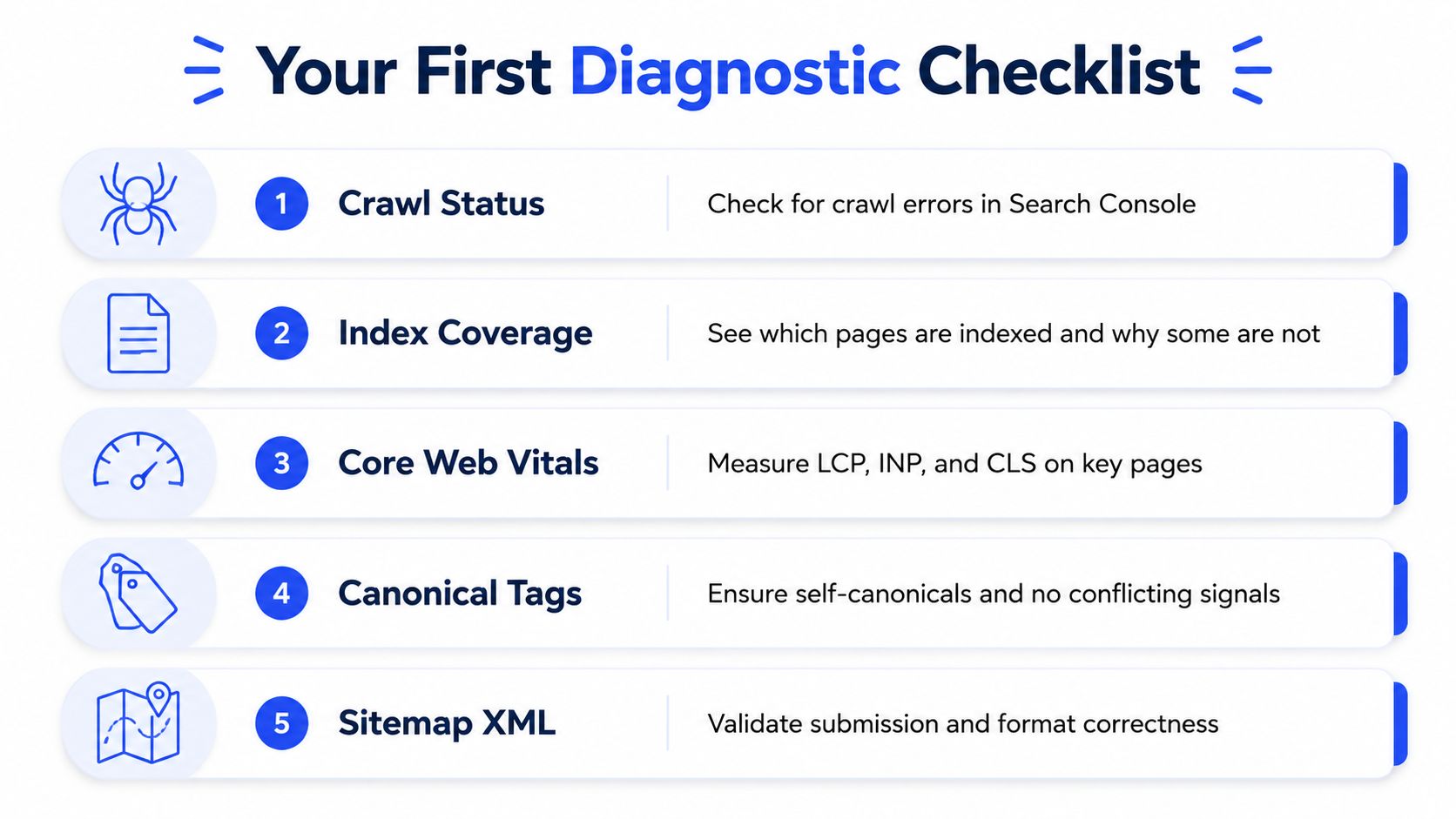
Start where blockers live. If Google can't crawl, render, or index the right pages, content work won't matter. That's especially true for JS-heavy sites, documentation libraries, and product pages with lots of parameterized URLs.
Check crawl and indexability first
Open Google Search Console and inspect crawl errors, index coverage, and sitemap submission status. The question isn't whether the site has issues, it's whether the wrong pages are being indexed while the right ones sit out. On tech sites, blocked resources, thin gated pages, duplicate documentation versions, and parameter sprawl are common enough that you should assume they exist until proven otherwise.
If a page is important and missing from the index, fix that before anything else. If a page is indexed but clearly the wrong version, check canonicals, redirects, and internal linking paths. Clean crawl architecture matters because technology sites often grow through product launches, docs expansion, and fragmented ownership.
Measure rendering and speed where buyers actually land
Core Web Vitals should be green across product pages, blogs, and docs. For tech companies, that means checking whether the page is indexable when JavaScript is involved, not just whether a browser can display it. Industry guidance for technology sites also calls for server-side rendering or dynamic rendering fallbacks for JS-heavy frontends, because Google can struggle without them. (SEO for technology companies)
If a page takes too long to load, people leave. Independent technical SEO research says 53% of users abandon pages that take more than 3 seconds to load, and 88% of organizations wait 1 to 24+ months for technical SEO changes to be implemented. That gap matters because engineering delay can erase the benefit of even good recommendations. (Enterprise SEO statistics)
Decide what to fix first
Use this order:
Remove crawl blockers → pages that can't be reached or indexed are dead weight.
Tighten product and comparison pages → these pages should reflect buyer intent, not feature lists.
Repair documentation structure → docs should answer technical pre-sales questions, not sit isolated from the rest of the site.

If technical debt is heavy, don't start with nice-to-have content changes. Start with the pages that can move through the funnel once the machine is visible to search.
Use GROU's ICP resource to pressure-test whether your site structure matches the buyers you want. If it doesn't, the technical checklist above will only make the wrong pages perform faster.
Building an ICP-Aligned Content Strategy
The fastest way to waste SEO budget is to chase keywords without a buyer model. Tech buyers rarely move from one informational page to a demo. They move through a sequence of questions, and the content system needs to match that sequence if you want search traffic to support pipeline instead of vanity metrics.
Start with intent and buyer questions
A SaaS buyer searching for “customer data platform” is in a different mode from someone searching “customer data platform vs warehouse native CDP.” A dev tools buyer looking for “how to set up API rate limiting” is not asking for brand copy, they are asking whether your documentation is clear enough to trust. That is why comparison terms, alternative terms, integration terms, and problem-solution queries often matter more than broad category pages.
Google's SEO Starter Guide says content should be written naturally, easy to read, organized with headings and paragraphs, and unique, up to date, helpful, reliable, and people-first. That matches tech SEO reality, because thin keyword pages do not satisfy technical readers and do not hold up well over time. (Google SEO Starter Guide)
Write the page the buyer needs before they talk to sales. If the page sounds like a brochure, it is already behind.
Build briefs around buyer stages
Use a brief with five fields:
ICP stage, awareness, evaluation, procurement, implementation.
Primary question, the exact thing the buyer wants answered.
Search form, comparison, alternative, how-to, pricing, integration, troubleshooting.
Proof required, screenshots, diagrams, docs, feature detail, security language.
Next step, demo, calculator, comparison page, or implementation guide.
That structure keeps product marketing and SEO from drifting apart. It also stops teams from writing content that pleases search engines but misses the actual purchase conversation. If you need a cleaner way to pressure-test who the content is really for, use GROU's ICP resource and check whether the page answers the questions your best-fit accounts ask before a call.
Map content clusters to buying journeys
A useful cluster for cybersecurity might include a use-case page, a comparison page, a feature page, and a setup guide. Each page supports the same motion, but each answers a different question. For pharma, legal tech, or manufacturing, the wording changes, but the structure does not.
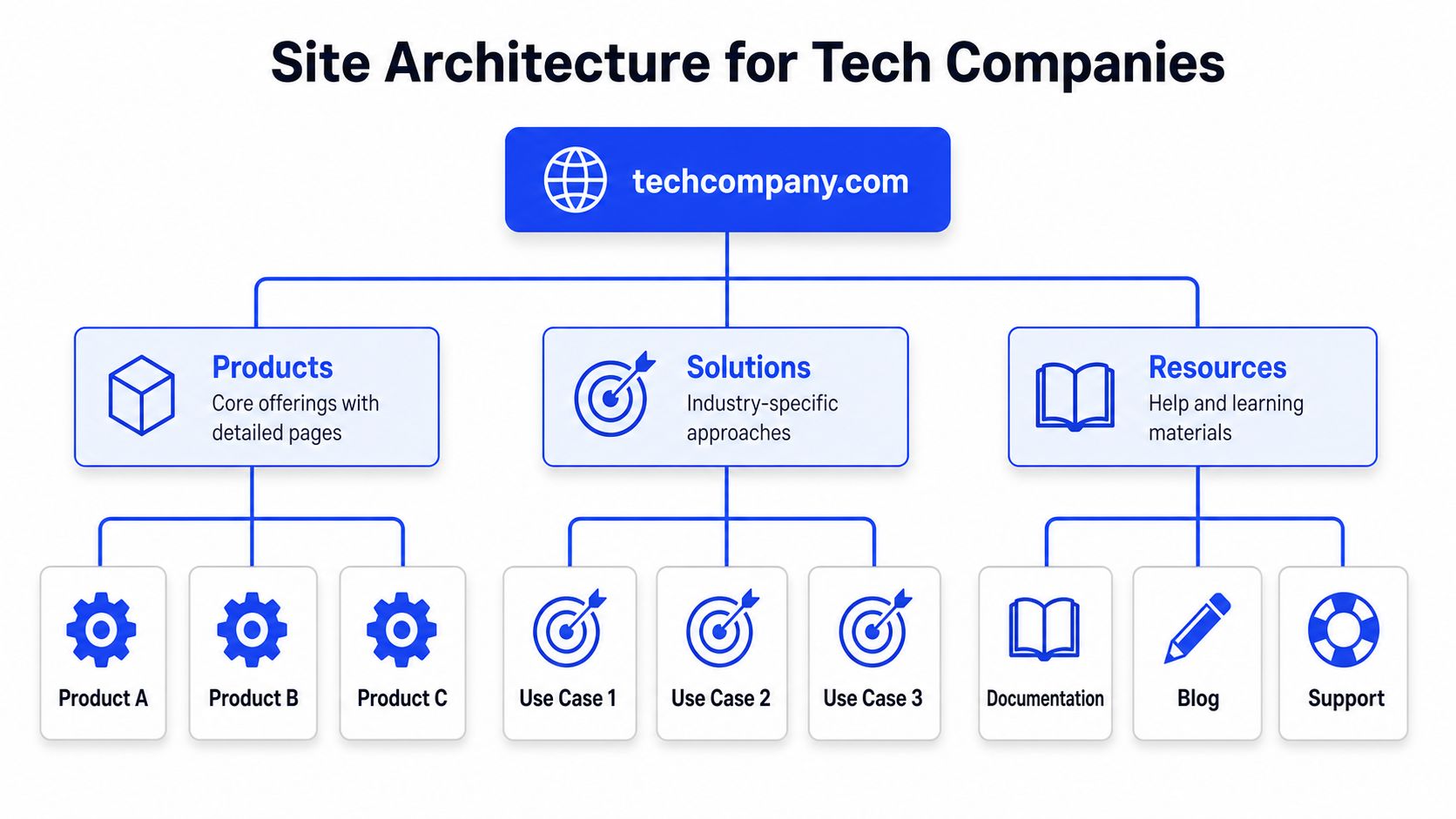
This works because buyers trust sites that make the next step obvious, and search engines reward pages that answer the query without forcing extra clicks. If your content map still treats the blog as separate from the product motion, you are leaving intent disconnected from pipeline.
Use diagnose and fix site speed issues as a reference point when a page is technically solid but still fails to convert. Slow delivery, weak messaging, and vague positioning often show up together, and they all hurt the same buyer journey.
Site Architecture and Technical Foundations
A tech site can have strong content and still lose if architecture is messy. Internal linking, canonicals, hreflang, schema, and rendering all shape whether search engines can understand the site well enough to show the right page.
Build the schema stack in the right order
Onely recommends starting with Organization and SoftwareApplication, then adding Product for feature pages, FAQPage for buyer questions, and HowTo for implementation guides. That order matters because it mirrors the way tech buyers move through the site, from brand recognition to evaluation to practical use. (Onely's schema guidance)
Use that same logic in your templates:
Organization → site-wide identity and trust.
SoftwareApplication → product-level pages.
Product → feature or package pages.
FAQPage → objections, security, compatibility, pricing questions.
HowTo → implementation and onboarding content.
Handle multi-market and JS-heavy sites carefully
For international tech companies, hreflang can prevent the wrong market page from surfacing. For JS-heavy frontends, server-side rendering or dynamic rendering fallbacks keep Google from missing content that users can see. That's the point where engineering and SEO need to work from the same ticketing system, not separate wish lists.
If you want a practical reference for speed work, PageSpeed Plus has a useful guide to diagnose and fix site speed issues. That matters because speed problems aren't abstract, they affect whether pages are usable and whether content gets crawled cleanly.
Prioritize architecture by business value
The order should be boring and disciplined. Fix broken internal links, make sure product pages link into docs and back again, and keep canonical signals clean across versioned content. Then confirm that the resource sections don't trap authority away from commercial pages.
Use a crawler such as Oncrawl to see how your internal linking behaves, not how the nav says it should behave. The reports usually reveal that product pages are isolated while blogs carry too much of the internal authority.
If engineering can only take one SEO request this sprint, make it the change that affects crawl paths or canonical signals. Cosmetic work comes later.
That hierarchy respects team constraints. It also keeps SEO from becoming a backlog full of low-value requests that never touch revenue.
Developer Documentation and Product Pages That Rank
Documentation often gets filed under support, which is the wrong bucket. In tech companies, docs frequently answer the exact questions buyers need answered before they book a demo, bring in security, or ask procurement to review the deal. If your SEO work does not capture those questions, you leave money stuck in support tickets and late-stage calls.
Write docs that answer pre-sales questions before users need them
Strong documentation covers implementation questions, integration questions, and whether the product will work in a buyer's environment. It should also point readers toward the commercial pages that explain the product in business terms. When those two parts stay disconnected, the buyer has to do the translation work on their own, and many will stop there.
Use documentation pages for the questions sales keeps hearing near the end of the buying cycle. Setup, compatibility, API behavior, migration steps, and error handling all belong there. Put the answer near the top, then add detail below for technical readers who need it.
Make product pages search-friendly without making them generic
Product pages need more than feature lists. They should capture comparison searches and alternative searches, because those queries usually come from buyers who already know the category and are narrowing options. A page that explains use cases, differentiators, and specific integrations usually performs better than one that only repeats marketing copy.
Versioned docs need tighter control. If every release gets a new URL without a clear canonical strategy, you create duplicate and near-duplicate pages that confuse search engines and make it harder for buyers to find the right version. Keep the structure predictable, then direct older versions to the right place.
Use a documentation checklist
Single source per topic. Avoid splitting the same explanation across several pages.
Clear internal links. Docs should point to product pages and support pages.
Stable URLs. Version changes should not fracture indexing.
Targeted schema. HowTo and FAQPage often fit implementation and question pages.
API clarity. Examples, parameters, and edge cases should be easy to scan.
For teams that want to take the connection between technical content and discovery more seriously, GROU's documentation and wiki tools page is a useful adjacent reference. The point is simple, product truth, doc structure, and search intent have to line up.
Tech companies that get this right stop treating docs as hidden support material. They turn them into a pre-sales layer that lowers friction before a rep ever joins the conversation.
Link Building, PR, and Revenue Integration
The best links for tech companies usually come from places that already care about technical credibility. That includes engineering blogs, open-source communities, developer publications, and partner ecosystems. The goal isn't volume, it's relevance that compounds with trust.
Earn links where technical audiences already gather
Guest posts on general business sites rarely do much for this niche. Stronger plays include engineering blog citations, open-source contributions, community participation, and technical PR. If a respected developer publication cites your work, the backlink carries context, not just authority.
There's also a smart overlap with influencer-style distribution in B2B. A technical founder, product lead, or engineer often has more credibility with this audience than a polished brand account, which is why GROU's B2B influencer marketing perspective fits neatly beside SEO when the topic is technical trust.
Practical rule: If a backlink can't be explained in one sentence to a sales leader, it probably isn't the right link target for a tech company.
Report SEO like a revenue system
Organic traffic alone doesn't tell the story. Track meetings booked from organic, meeting-held rate by organic source, and revenue influenced where the first touch or last organic interaction matters to the pipeline team. Then put organic alongside outbound, LinkedIn, and paid in the same reporting view.
That's where RevOps earns its keep. When SEO data lives in the same dashboard as outbound and social, leaders can see whether organic is filling the right part of the funnel or just creating more noise.
Build a practical reporting rhythm
Meeting-held rate → measure whether organic traffic produces real conversations.
Source mapping → add an organic source column in CRM views.
Pipeline influenced → separate traffic from actual commercial contribution.
Page-level review → tie high-performing content to the motions it supports.
Sales feedback → ask reps which organic pages show up in live deals.
Organic search works best when it supports the rest of the system. Outbound creates the motion, LinkedIn builds credibility, and SEO captures existing demand from buyers who are already researching. When those channels are disconnected, each one looks weaker than it is.
Audit your meeting-held rate this Friday, then add an organic source column to your CRM pipeline view by Monday. If your organic pages can't be tied to qualified conversations, the problem isn't traffic, it's structure.
GROU works with B2B teams across iGaming, SaaS, manufacturing, and professional services to turn attention into qualified conversations. The operating model is simple, one target list, one message, one reporting line, with LinkedIn content, outbound, and signal-triggered prospecting running together through bi-weekly sprints and transparent reporting.
You've got traffic, but the pipeline is still thin. That usually means search is pulling in the wrong people, the wrong pages, or both. Tech buyers don't convert because a blog post exists, they convert when the site is structured around intent, proof, and technical trust.
Diagnose first, because crawl blockers and rendering issues can make every other SEO effort wasteful.
Map content to ICP stages, since technical buyers search by problem, comparison, and implementation intent.
Treat documentation and product pages as revenue assets, not internal support artifacts.
Connect SEO to RevOps, so organic visits show up in meetings, influenced revenue, and CRM reporting.
Earn links where technical credibility lives, then measure them against pipeline, not vanity traffic.
Table of Contents
The SEO Pipeline Problem for Tech Companies
Organic search still carries real weight for tech brands. Multiple 2026 SEO roundups put organic search at about 47% to 53% of all website traffic, while Google controls roughly 82% to 90% of the global search market, and the number one organic result can pull around 27.6% to 39.8% CTR. That concentration is why seo for tech companies isn't a side project, it's a discovery system for serious buyers. (SEO statistics for 2026)
The failure mode is familiar. Marketing reports healthy traffic, sales still asks where the meetings are. The site may be ranking, but the pages aren't built around the questions buyers ask before they talk to anyone.
The real problem is structure
Technical audiences don't search like casual readers. They search for implementation details, compatibility, comparisons, and proof that the vendor understands their stack. If the content architecture doesn't reflect that journey, organic traffic turns into an expensive audience report.
Practical rule: If a page can't be tied to a buyer question, a product motion, or a sales objection, it probably doesn't belong in the core SEO system.
The best lens is pipeline, not pageviews. A search visitor should land on a page that answers the exact concern behind the query, then move to a commercial page, then to a meeting path. That's why a structured system matters more than random content volume.
For a useful adjacent lens on how AI search discovery is changing visibility, the team at GetIntel's answer engine visibility tips is worth reading. It's not a replacement for classic search work, but it reinforces the same point, structure wins when discovery systems get more selective.
This is also where most generic SEO advice breaks. It assumes every buyer behaves the same way, then pushes broad blog traffic as if it were pipeline. Tech companies need tighter content architecture and stronger handoff into revenue systems, which is why a data-backed operating model matters at the agency level too, as outlined in GROU's approach to data-driven digital marketing.
Your First Diagnostic Checklist
Start where blockers live. If Google can't crawl, render, or index the right pages, content work won't matter. That's especially true for JS-heavy sites, documentation libraries, and product pages with lots of parameterized URLs.
Check crawl and indexability first
Open Google Search Console and inspect crawl errors, index coverage, and sitemap submission status. The question isn't whether the site has issues, it's whether the wrong pages are being indexed while the right ones sit out. On tech sites, blocked resources, thin gated pages, duplicate documentation versions, and parameter sprawl are common enough that you should assume they exist until proven otherwise.
If a page is important and missing from the index, fix that before anything else. If a page is indexed but clearly the wrong version, check canonicals, redirects, and internal linking paths. Clean crawl architecture matters because technology sites often grow through product launches, docs expansion, and fragmented ownership.
Measure rendering and speed where buyers actually land
Core Web Vitals should be green across product pages, blogs, and docs. For tech companies, that means checking whether the page is indexable when JavaScript is involved, not just whether a browser can display it. Industry guidance for technology sites also calls for server-side rendering or dynamic rendering fallbacks for JS-heavy frontends, because Google can struggle without them. (SEO for technology companies)
If a page takes too long to load, people leave. Independent technical SEO research says 53% of users abandon pages that take more than 3 seconds to load, and 88% of organizations wait 1 to 24+ months for technical SEO changes to be implemented. That gap matters because engineering delay can erase the benefit of even good recommendations. (Enterprise SEO statistics)
Decide what to fix first
Use this order:
Remove crawl blockers → pages that can't be reached or indexed are dead weight.
Tighten product and comparison pages → these pages should reflect buyer intent, not feature lists.
Repair documentation structure → docs should answer technical pre-sales questions, not sit isolated from the rest of the site.
If technical debt is heavy, don't start with nice-to-have content changes. Start with the pages that can move through the funnel once the machine is visible to search.
Use GROU's ICP resource to pressure-test whether your site structure matches the buyers you want. If it doesn't, the technical checklist above will only make the wrong pages perform faster.
Building an ICP-Aligned Content Strategy
The fastest way to waste SEO budget is to chase keywords without a buyer model. Tech buyers rarely move from one informational page to a demo. They move through a sequence of questions, and the content system needs to match that sequence if you want search traffic to support pipeline instead of vanity metrics.
Start with intent and buyer questions
A SaaS buyer searching for “customer data platform” is in a different mode from someone searching “customer data platform vs warehouse native CDP.” A dev tools buyer looking for “how to set up API rate limiting” is not asking for brand copy, they are asking whether your documentation is clear enough to trust. That is why comparison terms, alternative terms, integration terms, and problem-solution queries often matter more than broad category pages.
Google's SEO Starter Guide says content should be written naturally, easy to read, organized with headings and paragraphs, and unique, up to date, helpful, reliable, and people-first. That matches tech SEO reality, because thin keyword pages do not satisfy technical readers and do not hold up well over time. (Google SEO Starter Guide)
Write the page the buyer needs before they talk to sales. If the page sounds like a brochure, it is already behind.
Build briefs around buyer stages
Use a brief with five fields:
ICP stage, awareness, evaluation, procurement, implementation.
Primary question, the exact thing the buyer wants answered.
Search form, comparison, alternative, how-to, pricing, integration, troubleshooting.
Proof required, screenshots, diagrams, docs, feature detail, security language.
Next step, demo, calculator, comparison page, or implementation guide.
That structure keeps product marketing and SEO from drifting apart. It also stops teams from writing content that pleases search engines but misses the actual purchase conversation. If you need a cleaner way to pressure-test who the content is really for, use GROU's ICP resource and check whether the page answers the questions your best-fit accounts ask before a call.
Map content clusters to buying journeys
A useful cluster for cybersecurity might include a use-case page, a comparison page, a feature page, and a setup guide. Each page supports the same motion, but each answers a different question. For pharma, legal tech, or manufacturing, the wording changes, but the structure does not.
This works because buyers trust sites that make the next step obvious, and search engines reward pages that answer the query without forcing extra clicks. If your content map still treats the blog as separate from the product motion, you are leaving intent disconnected from pipeline.
Use diagnose and fix site speed issues as a reference point when a page is technically solid but still fails to convert. Slow delivery, weak messaging, and vague positioning often show up together, and they all hurt the same buyer journey.
Site Architecture and Technical Foundations
A tech site can have strong content and still lose if architecture is messy. Internal linking, canonicals, hreflang, schema, and rendering all shape whether search engines can understand the site well enough to show the right page.
Build the schema stack in the right order
Onely recommends starting with Organization and SoftwareApplication, then adding Product for feature pages, FAQPage for buyer questions, and HowTo for implementation guides. That order matters because it mirrors the way tech buyers move through the site, from brand recognition to evaluation to practical use. (Onely's schema guidance)
Use that same logic in your templates:
Organization → site-wide identity and trust.
SoftwareApplication → product-level pages.
Product → feature or package pages.
FAQPage → objections, security, compatibility, pricing questions.
HowTo → implementation and onboarding content.
Handle multi-market and JS-heavy sites carefully
For international tech companies, hreflang can prevent the wrong market page from surfacing. For JS-heavy frontends, server-side rendering or dynamic rendering fallbacks keep Google from missing content that users can see. That's the point where engineering and SEO need to work from the same ticketing system, not separate wish lists.
If you want a practical reference for speed work, PageSpeed Plus has a useful guide to diagnose and fix site speed issues. That matters because speed problems aren't abstract, they affect whether pages are usable and whether content gets crawled cleanly.
Prioritize architecture by business value
The order should be boring and disciplined. Fix broken internal links, make sure product pages link into docs and back again, and keep canonical signals clean across versioned content. Then confirm that the resource sections don't trap authority away from commercial pages.
Use a crawler such as Oncrawl to see how your internal linking behaves, not how the nav says it should behave. The reports usually reveal that product pages are isolated while blogs carry too much of the internal authority.
If engineering can only take one SEO request this sprint, make it the change that affects crawl paths or canonical signals. Cosmetic work comes later.
That hierarchy respects team constraints. It also keeps SEO from becoming a backlog full of low-value requests that never touch revenue.
Developer Documentation and Product Pages That Rank
Documentation often gets filed under support, which is the wrong bucket. In tech companies, docs frequently answer the exact questions buyers need answered before they book a demo, bring in security, or ask procurement to review the deal. If your SEO work does not capture those questions, you leave money stuck in support tickets and late-stage calls.
Write docs that answer pre-sales questions before users need them
Strong documentation covers implementation questions, integration questions, and whether the product will work in a buyer's environment. It should also point readers toward the commercial pages that explain the product in business terms. When those two parts stay disconnected, the buyer has to do the translation work on their own, and many will stop there.
Use documentation pages for the questions sales keeps hearing near the end of the buying cycle. Setup, compatibility, API behavior, migration steps, and error handling all belong there. Put the answer near the top, then add detail below for technical readers who need it.
Make product pages search-friendly without making them generic
Product pages need more than feature lists. They should capture comparison searches and alternative searches, because those queries usually come from buyers who already know the category and are narrowing options. A page that explains use cases, differentiators, and specific integrations usually performs better than one that only repeats marketing copy.
Versioned docs need tighter control. If every release gets a new URL without a clear canonical strategy, you create duplicate and near-duplicate pages that confuse search engines and make it harder for buyers to find the right version. Keep the structure predictable, then direct older versions to the right place.
Use a documentation checklist
Single source per topic. Avoid splitting the same explanation across several pages.
Clear internal links. Docs should point to product pages and support pages.
Stable URLs. Version changes should not fracture indexing.
Targeted schema. HowTo and FAQPage often fit implementation and question pages.
API clarity. Examples, parameters, and edge cases should be easy to scan.
For teams that want to take the connection between technical content and discovery more seriously, GROU's documentation and wiki tools page is a useful adjacent reference. The point is simple, product truth, doc structure, and search intent have to line up.
Tech companies that get this right stop treating docs as hidden support material. They turn them into a pre-sales layer that lowers friction before a rep ever joins the conversation.
Link Building, PR, and Revenue Integration
The best links for tech companies usually come from places that already care about technical credibility. That includes engineering blogs, open-source communities, developer publications, and partner ecosystems. The goal isn't volume, it's relevance that compounds with trust.
Earn links where technical audiences already gather
Guest posts on general business sites rarely do much for this niche. Stronger plays include engineering blog citations, open-source contributions, community participation, and technical PR. If a respected developer publication cites your work, the backlink carries context, not just authority.
There's also a smart overlap with influencer-style distribution in B2B. A technical founder, product lead, or engineer often has more credibility with this audience than a polished brand account, which is why GROU's B2B influencer marketing perspective fits neatly beside SEO when the topic is technical trust.
Practical rule: If a backlink can't be explained in one sentence to a sales leader, it probably isn't the right link target for a tech company.
Report SEO like a revenue system
Organic traffic alone doesn't tell the story. Track meetings booked from organic, meeting-held rate by organic source, and revenue influenced where the first touch or last organic interaction matters to the pipeline team. Then put organic alongside outbound, LinkedIn, and paid in the same reporting view.
That's where RevOps earns its keep. When SEO data lives in the same dashboard as outbound and social, leaders can see whether organic is filling the right part of the funnel or just creating more noise.
Build a practical reporting rhythm
Meeting-held rate → measure whether organic traffic produces real conversations.
Source mapping → add an organic source column in CRM views.
Pipeline influenced → separate traffic from actual commercial contribution.
Page-level review → tie high-performing content to the motions it supports.
Sales feedback → ask reps which organic pages show up in live deals.
Organic search works best when it supports the rest of the system. Outbound creates the motion, LinkedIn builds credibility, and SEO captures existing demand from buyers who are already researching. When those channels are disconnected, each one looks weaker than it is.
Audit your meeting-held rate this Friday, then add an organic source column to your CRM pipeline view by Monday. If your organic pages can't be tied to qualified conversations, the problem isn't traffic, it's structure.
GROU works with B2B teams across iGaming, SaaS, manufacturing, and professional services to turn attention into qualified conversations. The operating model is simple, one target list, one message, one reporting line, with LinkedIn content, outbound, and signal-triggered prospecting running together through bi-weekly sprints and transparent reporting.
You've got traffic, but the pipeline is still thin. That usually means search is pulling in the wrong people, the wrong pages, or both. Tech buyers don't convert because a blog post exists, they convert when the site is structured around intent, proof, and technical trust.
Diagnose first, because crawl blockers and rendering issues can make every other SEO effort wasteful.
Map content to ICP stages, since technical buyers search by problem, comparison, and implementation intent.
Treat documentation and product pages as revenue assets, not internal support artifacts.
Connect SEO to RevOps, so organic visits show up in meetings, influenced revenue, and CRM reporting.
Earn links where technical credibility lives, then measure them against pipeline, not vanity traffic.
Table of Contents
The SEO Pipeline Problem for Tech Companies
Organic search still carries real weight for tech brands. Multiple 2026 SEO roundups put organic search at about 47% to 53% of all website traffic, while Google controls roughly 82% to 90% of the global search market, and the number one organic result can pull around 27.6% to 39.8% CTR. That concentration is why seo for tech companies isn't a side project, it's a discovery system for serious buyers. (SEO statistics for 2026)
The failure mode is familiar. Marketing reports healthy traffic, sales still asks where the meetings are. The site may be ranking, but the pages aren't built around the questions buyers ask before they talk to anyone.
The real problem is structure
Technical audiences don't search like casual readers. They search for implementation details, compatibility, comparisons, and proof that the vendor understands their stack. If the content architecture doesn't reflect that journey, organic traffic turns into an expensive audience report.
Practical rule: If a page can't be tied to a buyer question, a product motion, or a sales objection, it probably doesn't belong in the core SEO system.
The best lens is pipeline, not pageviews. A search visitor should land on a page that answers the exact concern behind the query, then move to a commercial page, then to a meeting path. That's why a structured system matters more than random content volume.
For a useful adjacent lens on how AI search discovery is changing visibility, the team at GetIntel's answer engine visibility tips is worth reading. It's not a replacement for classic search work, but it reinforces the same point, structure wins when discovery systems get more selective.
This is also where most generic SEO advice breaks. It assumes every buyer behaves the same way, then pushes broad blog traffic as if it were pipeline. Tech companies need tighter content architecture and stronger handoff into revenue systems, which is why a data-backed operating model matters at the agency level too, as outlined in GROU's approach to data-driven digital marketing.
Your First Diagnostic Checklist
Start where blockers live. If Google can't crawl, render, or index the right pages, content work won't matter. That's especially true for JS-heavy sites, documentation libraries, and product pages with lots of parameterized URLs.
Check crawl and indexability first
Open Google Search Console and inspect crawl errors, index coverage, and sitemap submission status. The question isn't whether the site has issues, it's whether the wrong pages are being indexed while the right ones sit out. On tech sites, blocked resources, thin gated pages, duplicate documentation versions, and parameter sprawl are common enough that you should assume they exist until proven otherwise.
If a page is important and missing from the index, fix that before anything else. If a page is indexed but clearly the wrong version, check canonicals, redirects, and internal linking paths. Clean crawl architecture matters because technology sites often grow through product launches, docs expansion, and fragmented ownership.
Measure rendering and speed where buyers actually land
Core Web Vitals should be green across product pages, blogs, and docs. For tech companies, that means checking whether the page is indexable when JavaScript is involved, not just whether a browser can display it. Industry guidance for technology sites also calls for server-side rendering or dynamic rendering fallbacks for JS-heavy frontends, because Google can struggle without them. (SEO for technology companies)
If a page takes too long to load, people leave. Independent technical SEO research says 53% of users abandon pages that take more than 3 seconds to load, and 88% of organizations wait 1 to 24+ months for technical SEO changes to be implemented. That gap matters because engineering delay can erase the benefit of even good recommendations. (Enterprise SEO statistics)
Decide what to fix first
Use this order:
Remove crawl blockers → pages that can't be reached or indexed are dead weight.
Tighten product and comparison pages → these pages should reflect buyer intent, not feature lists.
Repair documentation structure → docs should answer technical pre-sales questions, not sit isolated from the rest of the site.
If technical debt is heavy, don't start with nice-to-have content changes. Start with the pages that can move through the funnel once the machine is visible to search.
Use GROU's ICP resource to pressure-test whether your site structure matches the buyers you want. If it doesn't, the technical checklist above will only make the wrong pages perform faster.
Building an ICP-Aligned Content Strategy
The fastest way to waste SEO budget is to chase keywords without a buyer model. Tech buyers rarely move from one informational page to a demo. They move through a sequence of questions, and the content system needs to match that sequence if you want search traffic to support pipeline instead of vanity metrics.
Start with intent and buyer questions
A SaaS buyer searching for “customer data platform” is in a different mode from someone searching “customer data platform vs warehouse native CDP.” A dev tools buyer looking for “how to set up API rate limiting” is not asking for brand copy, they are asking whether your documentation is clear enough to trust. That is why comparison terms, alternative terms, integration terms, and problem-solution queries often matter more than broad category pages.
Google's SEO Starter Guide says content should be written naturally, easy to read, organized with headings and paragraphs, and unique, up to date, helpful, reliable, and people-first. That matches tech SEO reality, because thin keyword pages do not satisfy technical readers and do not hold up well over time. (Google SEO Starter Guide)
Write the page the buyer needs before they talk to sales. If the page sounds like a brochure, it is already behind.
Build briefs around buyer stages
Use a brief with five fields:
ICP stage, awareness, evaluation, procurement, implementation.
Primary question, the exact thing the buyer wants answered.
Search form, comparison, alternative, how-to, pricing, integration, troubleshooting.
Proof required, screenshots, diagrams, docs, feature detail, security language.
Next step, demo, calculator, comparison page, or implementation guide.
That structure keeps product marketing and SEO from drifting apart. It also stops teams from writing content that pleases search engines but misses the actual purchase conversation. If you need a cleaner way to pressure-test who the content is really for, use GROU's ICP resource and check whether the page answers the questions your best-fit accounts ask before a call.
Map content clusters to buying journeys
A useful cluster for cybersecurity might include a use-case page, a comparison page, a feature page, and a setup guide. Each page supports the same motion, but each answers a different question. For pharma, legal tech, or manufacturing, the wording changes, but the structure does not.
This works because buyers trust sites that make the next step obvious, and search engines reward pages that answer the query without forcing extra clicks. If your content map still treats the blog as separate from the product motion, you are leaving intent disconnected from pipeline.
Use diagnose and fix site speed issues as a reference point when a page is technically solid but still fails to convert. Slow delivery, weak messaging, and vague positioning often show up together, and they all hurt the same buyer journey.
Site Architecture and Technical Foundations
A tech site can have strong content and still lose if architecture is messy. Internal linking, canonicals, hreflang, schema, and rendering all shape whether search engines can understand the site well enough to show the right page.
Build the schema stack in the right order
Onely recommends starting with Organization and SoftwareApplication, then adding Product for feature pages, FAQPage for buyer questions, and HowTo for implementation guides. That order matters because it mirrors the way tech buyers move through the site, from brand recognition to evaluation to practical use. (Onely's schema guidance)
Use that same logic in your templates:
Organization → site-wide identity and trust.
SoftwareApplication → product-level pages.
Product → feature or package pages.
FAQPage → objections, security, compatibility, pricing questions.
HowTo → implementation and onboarding content.
Handle multi-market and JS-heavy sites carefully
For international tech companies, hreflang can prevent the wrong market page from surfacing. For JS-heavy frontends, server-side rendering or dynamic rendering fallbacks keep Google from missing content that users can see. That's the point where engineering and SEO need to work from the same ticketing system, not separate wish lists.
If you want a practical reference for speed work, PageSpeed Plus has a useful guide to diagnose and fix site speed issues. That matters because speed problems aren't abstract, they affect whether pages are usable and whether content gets crawled cleanly.
Prioritize architecture by business value
The order should be boring and disciplined. Fix broken internal links, make sure product pages link into docs and back again, and keep canonical signals clean across versioned content. Then confirm that the resource sections don't trap authority away from commercial pages.
Use a crawler such as Oncrawl to see how your internal linking behaves, not how the nav says it should behave. The reports usually reveal that product pages are isolated while blogs carry too much of the internal authority.
If engineering can only take one SEO request this sprint, make it the change that affects crawl paths or canonical signals. Cosmetic work comes later.
That hierarchy respects team constraints. It also keeps SEO from becoming a backlog full of low-value requests that never touch revenue.
Developer Documentation and Product Pages That Rank
Documentation often gets filed under support, which is the wrong bucket. In tech companies, docs frequently answer the exact questions buyers need answered before they book a demo, bring in security, or ask procurement to review the deal. If your SEO work does not capture those questions, you leave money stuck in support tickets and late-stage calls.
Write docs that answer pre-sales questions before users need them
Strong documentation covers implementation questions, integration questions, and whether the product will work in a buyer's environment. It should also point readers toward the commercial pages that explain the product in business terms. When those two parts stay disconnected, the buyer has to do the translation work on their own, and many will stop there.
Use documentation pages for the questions sales keeps hearing near the end of the buying cycle. Setup, compatibility, API behavior, migration steps, and error handling all belong there. Put the answer near the top, then add detail below for technical readers who need it.
Make product pages search-friendly without making them generic
Product pages need more than feature lists. They should capture comparison searches and alternative searches, because those queries usually come from buyers who already know the category and are narrowing options. A page that explains use cases, differentiators, and specific integrations usually performs better than one that only repeats marketing copy.
Versioned docs need tighter control. If every release gets a new URL without a clear canonical strategy, you create duplicate and near-duplicate pages that confuse search engines and make it harder for buyers to find the right version. Keep the structure predictable, then direct older versions to the right place.
Use a documentation checklist
Single source per topic. Avoid splitting the same explanation across several pages.
Clear internal links. Docs should point to product pages and support pages.
Stable URLs. Version changes should not fracture indexing.
Targeted schema. HowTo and FAQPage often fit implementation and question pages.
API clarity. Examples, parameters, and edge cases should be easy to scan.
For teams that want to take the connection between technical content and discovery more seriously, GROU's documentation and wiki tools page is a useful adjacent reference. The point is simple, product truth, doc structure, and search intent have to line up.
Tech companies that get this right stop treating docs as hidden support material. They turn them into a pre-sales layer that lowers friction before a rep ever joins the conversation.
Link Building, PR, and Revenue Integration
The best links for tech companies usually come from places that already care about technical credibility. That includes engineering blogs, open-source communities, developer publications, and partner ecosystems. The goal isn't volume, it's relevance that compounds with trust.
Earn links where technical audiences already gather
Guest posts on general business sites rarely do much for this niche. Stronger plays include engineering blog citations, open-source contributions, community participation, and technical PR. If a respected developer publication cites your work, the backlink carries context, not just authority.
There's also a smart overlap with influencer-style distribution in B2B. A technical founder, product lead, or engineer often has more credibility with this audience than a polished brand account, which is why GROU's B2B influencer marketing perspective fits neatly beside SEO when the topic is technical trust.
Practical rule: If a backlink can't be explained in one sentence to a sales leader, it probably isn't the right link target for a tech company.
Report SEO like a revenue system
Organic traffic alone doesn't tell the story. Track meetings booked from organic, meeting-held rate by organic source, and revenue influenced where the first touch or last organic interaction matters to the pipeline team. Then put organic alongside outbound, LinkedIn, and paid in the same reporting view.
That's where RevOps earns its keep. When SEO data lives in the same dashboard as outbound and social, leaders can see whether organic is filling the right part of the funnel or just creating more noise.
Build a practical reporting rhythm
Meeting-held rate → measure whether organic traffic produces real conversations.
Source mapping → add an organic source column in CRM views.
Pipeline influenced → separate traffic from actual commercial contribution.
Page-level review → tie high-performing content to the motions it supports.
Sales feedback → ask reps which organic pages show up in live deals.
Organic search works best when it supports the rest of the system. Outbound creates the motion, LinkedIn builds credibility, and SEO captures existing demand from buyers who are already researching. When those channels are disconnected, each one looks weaker than it is.
Audit your meeting-held rate this Friday, then add an organic source column to your CRM pipeline view by Monday. If your organic pages can't be tied to qualified conversations, the problem isn't traffic, it's structure.
GROU works with B2B teams across iGaming, SaaS, manufacturing, and professional services to turn attention into qualified conversations. The operating model is simple, one target list, one message, one reporting line, with LinkedIn content, outbound, and signal-triggered prospecting running together through bi-weekly sprints and transparent reporting.

Pipeline OS Newsletter
Build qualified pipeline
Get weekly tactics to generate demand, improve lead quality, and book more meetings.





Trusted by industry leaders
Trusted by industry leaders
Trusted by industry leaders
Ready to build qualified pipeline?
Ready to build qualified pipeline?
Ready to build qualified pipeline?
Book a call to see if we're the right fit, or take the 2-minute quiz to get a clear starting point.
Book a call to see if we're the right fit, or take the 2-minute quiz to get a clear starting point.
Book a call to see if we're the right fit, or take the 2-minute quiz to get a clear starting point.
" height="30.21639343089746px" id="hfGbXmQR2" width="30.216393430897455px"/></svg>)
Copyright © 2026 – All Right Reserved
Copyright © 2026 – All Right Reserved
Copyright © 2026 – All Right Reserved