%22%3E%3C/path%3E%3Cpath d=%22M 63.072 7.554 C 62.258 8.022 61.577 8.689 61.092 9.493 L 61.092 7.076 L 57.158 7.076 L 57.158 22.64 L 61.089 22.64 L 61.089 14.888 C 61.089 13.446 61.403 12.434 62.03 11.853 C 62.818 11.218 63.818 10.907 64.826 10.982 L 65.868 10.982 L 65.868 6.851 C 64.891 6.834 63.926 7.076 63.073 7.554 Z%22 fill=%22rgb(17,17,17)%22%3E%3C/path%3E%3Cpath d=%22M 78.916 7.82 C 76.363 6.49 73.321 6.49 70.768 7.82 C 69.562 8.473 68.564 9.451 67.888 10.644 C 67.167 11.931 66.803 13.387 66.834 14.862 C 66.804 16.332 67.157 17.785 67.86 19.077 C 68.515 20.267 69.494 21.246 70.684 21.901 C 71.924 22.576 73.318 22.92 74.73 22.898 C 76.164 22.918 77.58 22.575 78.846 21.901 C 80.062 21.247 81.073 20.27 81.768 19.077 C 82.506 17.797 82.88 16.339 82.85 14.862 C 82.88 13.389 82.517 11.934 81.797 10.647 C 81.12 9.455 80.122 8.477 78.917 7.824 M 78.803 14.862 C 78.829 15.739 78.636 16.608 78.241 17.391 C 77.903 18.046 77.38 18.588 76.738 18.95 C 76.124 19.293 75.432 19.472 74.729 19.47 C 73.668 19.497 72.648 19.061 71.934 18.276 C 71.139 17.323 70.741 16.1 70.823 14.862 C 70.741 13.62 71.149 12.395 71.959 11.45 C 72.687 10.667 73.715 10.233 74.783 10.256 C 75.859 10.236 76.894 10.67 77.635 11.45 C 78.464 12.387 78.884 13.616 78.801 14.864%22 fill=%22rgb(17,17,17)%22%3E%3C/path%3E%3Cpath d=%22M 95.906 7.076 L 95.906 15.646 C 95.975 16.68 95.643 17.701 94.979 18.498 C 94.311 19.184 93.379 19.547 92.422 19.495 C 91.475 19.544 90.553 19.18 89.894 18.498 C 89.23 17.701 88.898 16.68 88.967 15.646 L 88.967 7.076 L 85.033 7.076 L 85.033 16.207 C 85 17.449 85.275 18.68 85.834 19.79 C 86.327 20.75 87.095 21.542 88.039 22.065 C 89.033 22.594 90.145 22.861 91.271 22.838 C 92.188 22.847 93.095 22.65 93.926 22.263 C 94.708 21.905 95.388 21.36 95.906 20.675 L 95.906 22.645 L 99.865 22.645 L 99.865 7.076 Z%22 fill=%22rgb(17,17,17)%22%3E%3C/path%3E%3Cpath d=%22M 4.513 15.626 C 4.511 10.815 7.606 6.549 12.181 5.059 C 16.756 3.57 21.77 5.195 24.601 9.086 L 27.816 5.87 C 24.074 1.186 17.981 -0.943 12.137 0.393 C 6.292 1.728 1.728 6.292 0.393 12.137 C -0.943 17.981 1.186 24.074 5.87 27.816 L 9.085 24.601 C 6.214 22.512 4.515 19.177 4.513 15.626%22 fill=%22rgb(32,62,235)%22%3E%3C/path%3E%3Cpath d=%22M 17.114 14.343 L 13.354 18.01 L 13.354 18.026 L 21.071 18.026 L 11.412 27.609 L 17.389 27.609 L 23.999 21.081 L 23.999 28.316 L 24.005 28.316 L 27.967 24.393 L 27.967 14.343 Z%22 fill=%22rgb(32,62,235)%22%3E%3C/path%3E%3C/g%3E%3C/svg%3E) ×
× ××
××›
›
›
›
CRM software comparison 2026: best picks by use case
CRM software comparison 2026: best picks by use case
CRM software comparison 2026: best picks by use case
CRM software comparison 2026: best picks by use case
CRM software comparison 2026: best picks by use case
CRM software comparison 2026: best picks by use case

Author
Aljaz Peklaj

Your CRM choice is probably slowing pipeline right now. Sales wants faster routing, marketing wants cleaner attribution, and RevOps is stuck patching fields between HubSpot, Apollo, LinkedIn, and whatever sequence tool got added last quarter. My verdict is simple, Salesforce wins for complex pipeline operations, HubSpot wins for speed and rep adoption in smaller motions, and Zoho earns a look when cost pressure matters more than polish.
Pick by motion, not by brand: outbound-heavy teams need automation depth and clean routing, not just contact storage.
Score the hidden work: manual entry, migration friction, and reporting gaps matter more than demo polish.
Treat AI as workflow infrastructure: teams use AI outside the CRM, but far fewer have it embedded inside the system.
Integrations decide day-to-day speed: LinkedIn, enrichment, and sequencing matter as much as dashboards.
Shortlist with a use case filter: under 50 reps, growth-stage teams, and enterprise renewals do not need the same CRM.
Table of Contents
Introduction
You're probably choosing a CRM while pipeline pressure is already high. The vendor deck says it can do everything, the sales team wants something easy, and finance wants the license bill to make sense over the next year. That's why this decision needs a verdict, not a feature tour.
For crm software comparison, the right logic is: Salesforce for depth, HubSpot for speed, Zoho for cost control. If your motion is outbound-heavy, the winner is the platform that keeps routing, enrichment, sequence tracking, and forecasting in one reporting line, not the one with the prettiest demo.
Start with operating model: outbound, inbound, renewals, or a mix.
Weight workflow impact first: automation, integrations, and reporting.
Check hidden labor: admin work, migration effort, and rep data entry.
Map AI to actual use: CRM-native AI matters more than standalone AI hype.
Shortlist for scale: a tool that works at 20 reps can fail at 200.
Use this as an operator's decision system, not a catalog. If you want a broader tool list first, the CRM tools roundup from Grou is a useful companion, but the better move is to score your current motion before you compare logos.
Why CRM choice decides pipeline speed and structure
CRM is not a database purchase. It's a choice about how your team will move leads, assign ownership, manage follow-up, and report on revenue without rebuilding the same data in five places. If the structure is wrong, the pipeline gets slower even when the software looks modern.
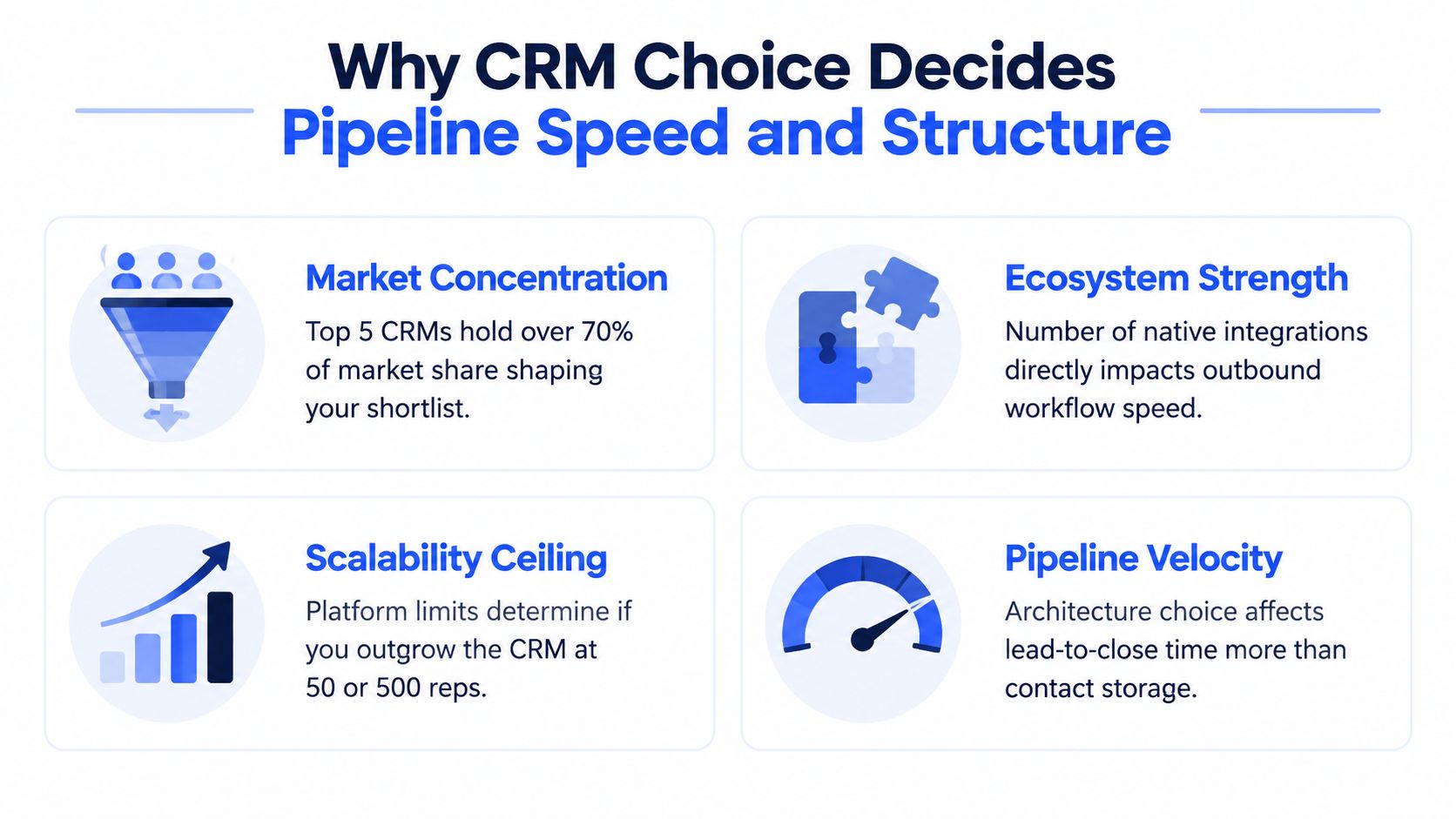
The market itself explains why the shortlist is narrow. One independent report estimates worldwide CRM spending at about $52 billion in 2023 and forecasts $139 billion by 2030, while Salesforce held 23.9% share and the top five vendors were Salesforce, Microsoft Dynamics, Oracle, SAP CRM, and Adobe (CRM market share report). Another market summary says Salesforce remains the largest vendor by revenue share, with the rest of the market fragmented across Microsoft, Oracle, SAP, Adobe, Zoho, HubSpot, and long-tail SMB tools (CRM stats 2026).
That concentration matters. Buyers aren't comparing isolated features in a vacuum, they're comparing ecosystem strength, scalability, and vendor concentration. A CRM with weak integrations turns every outbound motion into manual cleanup, and every manual cleanup becomes a reporting gap later.
Practical rule: if a CRM can't support your routing, enrichment, and reporting in one system, your reps will rebuild the process outside the CRM.
The market also makes the cloud shift hard to ignore. Salesforce's 1999 launch and 2004 IPO helped prove the SaaS model at scale, and modern comparison content still centers on cloud delivery, integrations, and vendor strength instead of contact management basics (CRM history). That's the key lens for founders and sales leaders in iGaming, SaaS, manufacturing, legal tech, and pharma.
A second reason CRM choice matters is the operating layer below the demos. Buyers increasingly prefer a single platform over separate tools for CRM, marketing automation, and customer service, with one 2026 roundup citing a Capterra finding that 61% of SMBs prefer that model (CRM statistics roundup). That preference is rational. One reporting line is easier to govern than three disconnected ones.
How to score CRM platforms with a weighted framework
A good crm software comparison needs weights, not opinions. For most B2B teams, reporting and analytics deserve the biggest share because attribution breaks first when data quality slips. Integrations and automation depth should sit near the top too, because outbound motions fail when the CRM can't talk to LinkedIn, enrichment tools, and sequence platforms cleanly.
The 2026 evaluator scorecards back up that split. Independent review criteria commonly separate reporting, integrations, ease of use, and support into distinct dimensions rather than treating “CRM capability” as one blob (Forbes Advisor CRM review criteria). That's the right way to think about it. A CRM can be easy to use and still be weak where pipeline gets built.
A scoring model that matches your motion
Use this split as a starting point.
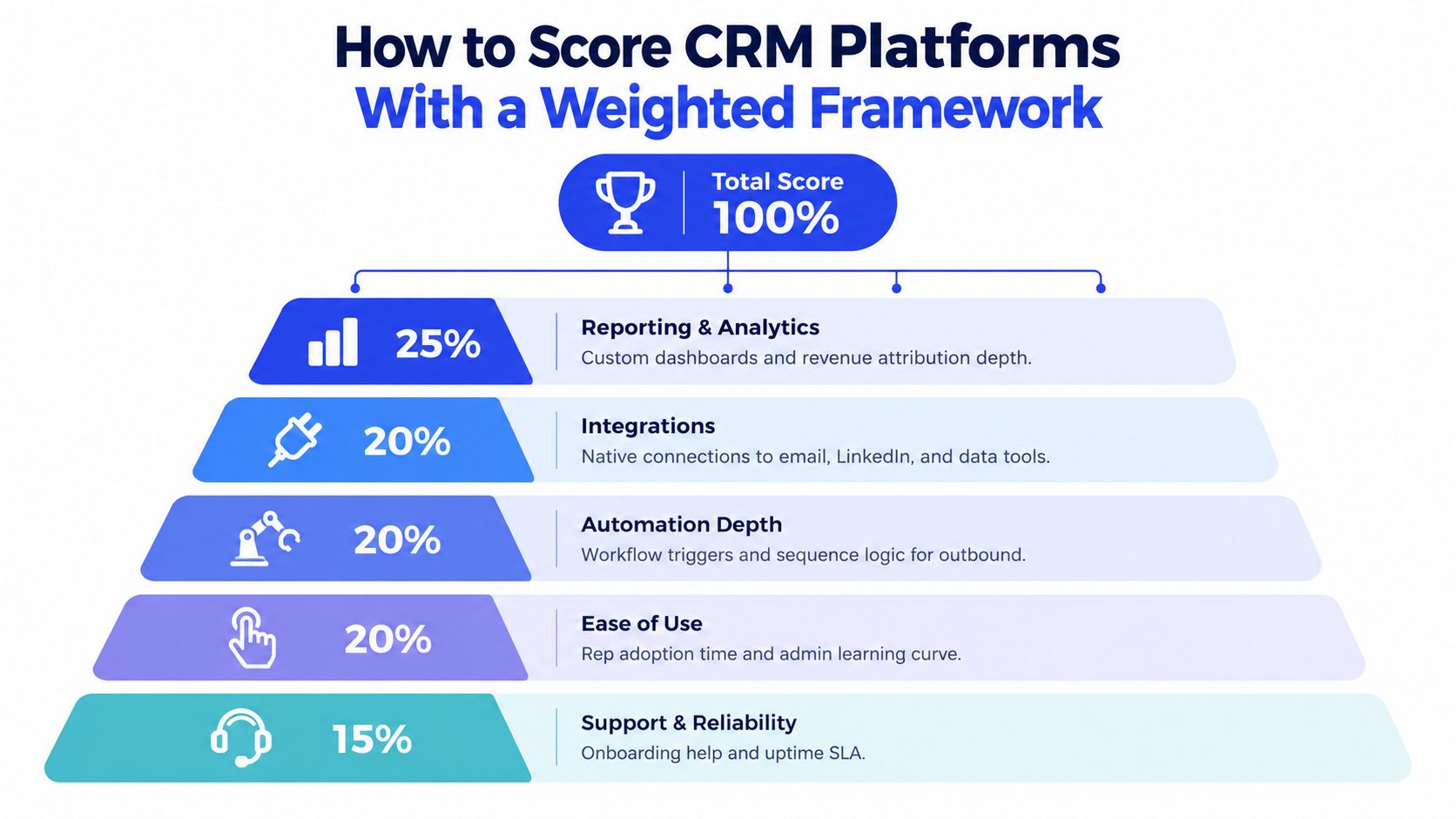
Reporting and analytics, 25%. Look for custom dashboards, revenue attribution depth, and clean pipeline views.
Integrations, 20%. Check native connections to email, LinkedIn, and data tools.
Automation depth, 20%. Test workflow triggers, lead routing, and sequence logic.
Ease of use, 20%. Measure rep adoption time and admin complexity.
Support and reliability, 15%. Ask how onboarding, uptime, and issue resolution are handled.
For SDR-led outbound, weight automation and integrations higher. For enterprise renewals, shift weight toward reporting, security controls, and extensibility. For SMB inside sales, ease of use matters more because rep compliance falls apart fast when the workflow feels heavy.
Rule of thumb: if the CRM can't prove custom fields, lead scoring, multilingual or multicurrency support, document management, and security controls in the demo, it's not ready for a serious shortlist.
The lead scoring question deserves its own check. If your team is still hand-ranking prospects, use the lead scoring glossary from Grou as the common language, then test whether the CRM can operationalize it without another layer of manual work.
For the comparison process, make the vendor show a real workflow. Ask them to route a lead, update a field, trigger a task, score the account, and rebuild a dashboard without custom code. If they need three consultants to do it, that platform will cost you later.
Side by side comparison of features pricing and operations
Salesforce is the enterprise answer when the process is messy, the data model is custom, and the reporting line has to survive scale. HubSpot is the cleaner answer when you want reps moving fast and don't want admin overhead eating the week. Zoho is the budget-conscious option that still gives buyers AI-assisted analysis and predictive insights without premium pricing pressure, but it asks more from the team if governance gets complex.
That's the practical split I'd use. If your motion depends on lead routing, revenue tracking, forecasting, omnichannel communications, and no-code customization, Salesforce usually wins on depth (PCMag CRM comparison). If your team values usability and two-way app sync, HubSpot is usually the easier fit. If the buyer cares most about keeping spend down while still getting AI help, Zoho belongs in the conversation.
Criteria | Salesforce | HubSpot | Zoho | Microsoft Dynamics |
|---|---|---|---|---|
Automation depth | Broad workflow automation, strong for enterprise routing | Solid for core automation, simpler to administer | Good AI-assisted automation, lighter than Salesforce | Strong in complex Microsoft-centered environments |
Usability | Powerful, but admin-heavy | Usually strongest on ease of use | Moderate learning curve | Often better for teams already on Microsoft stack |
Integrations | Very wide ecosystem | Strong app sync, especially for SMB tools | Broad, but depth varies by connector | Best fit when Microsoft tools are already central |
AI capabilities | AI and Einstein capabilities across enterprise use cases | AI features tied to growth workflows | AI-assisted analysis and predictive insights | Strong when tied to Microsoft ecosystem and data flows |
Operations fit | Best for governance, custom objects, and scale | Best for rapid rep adoption | Best for cost-sensitive teams with simpler ops | Best for Microsoft-heavy enterprises and structured reporting |
What matters most: the CRM that looks cheapest in a quote can become expensive if reps spend time rekeying data, reconciling fields, or waiting on a partner for every workflow change.
For a deeper buyer-side read, see how stacks up against HubSpot is worth using when you're pressure-testing a growth-stage shortlist. It helps when you're deciding whether ease of use should beat depth in your motion.
A useful companion comparison is the Pipedrive vs HubSpot guide from Grou. It's a good reference when deciding whether your team needs a simpler selling system or a broader revenue platform.
If you're in a Microsoft-first org, Dynamics deserves a separate look because it changes the shape of the stack. Salesforce, HubSpot, Zoho, and Dynamics don't just differ on features, they differ on how much process you can keep inside the CRM before you need extra tools.
Recommended CRM by company size and outbound motion
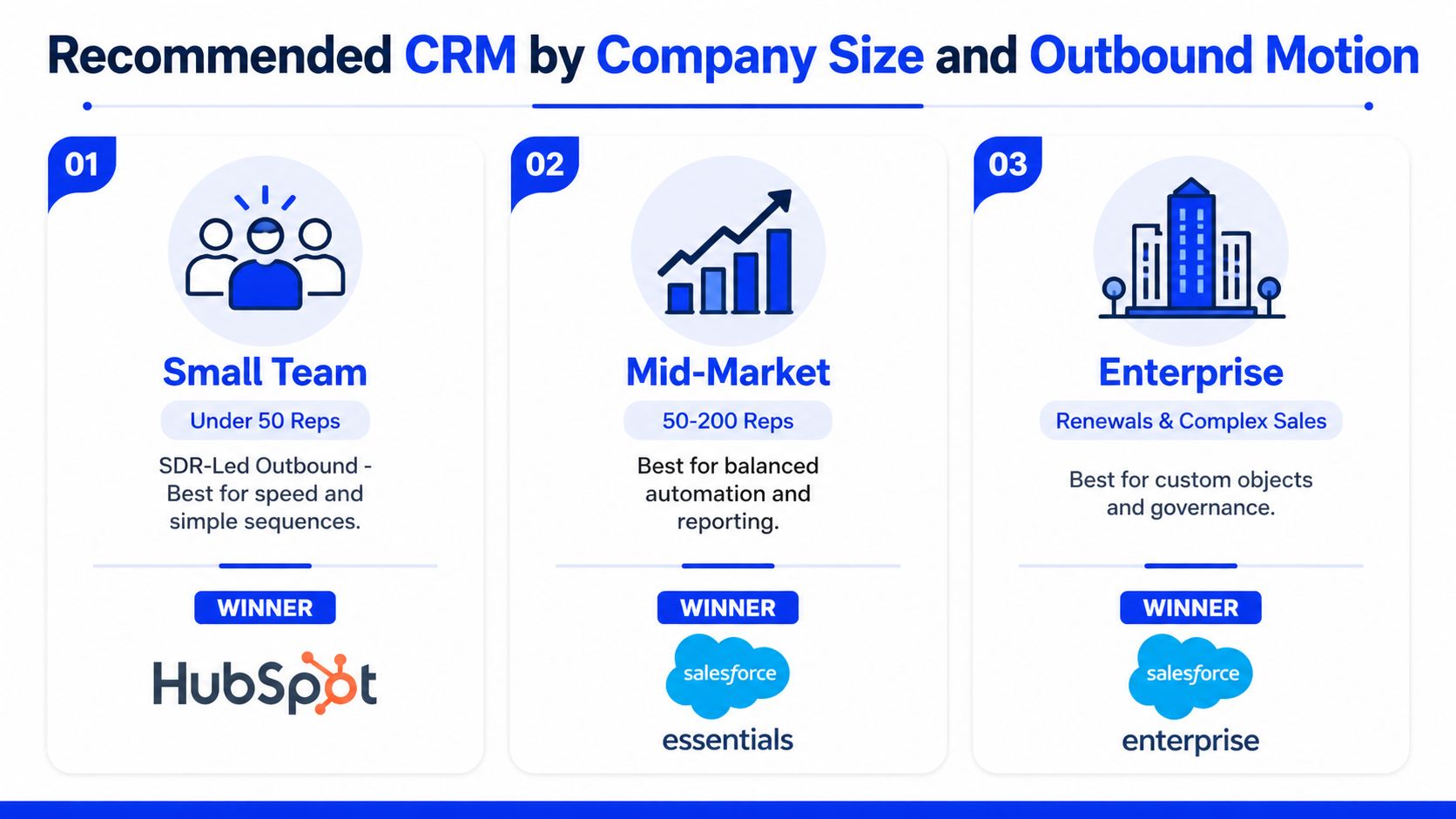
For under 50 reps with SDR-led outbound, HubSpot is the right default. It gives teams the fastest path to adoption, cleaner handoffs, and enough structure to run sequences without turning the CRM into a project. If your stack looks like Apollo, Clay, Lemlist, Instantly, Smartlead, HeyReach, HubSpot, and Sales Navigator, HubSpot is usually the least painful system to keep at the center.
For mid-market teams with 50 to 200 reps, I'd pick Salesforce Essentials or Salesforce-adjacent setup if the motion depends on routing, forecasting, and account ownership hygiene. At that point, hidden labor costs matter more than the license sticker. The team will feel the difference when operations can preserve logic instead of rebuilding it in spreadsheets.
For enterprise renewals and complex sales, Salesforce Enterprise wins. That's where custom objects, governance, and multi-step forecasting become part of daily work instead of occasional admin. If your forecast call still depends on people exporting data to Excel, the CRM is already underbuilt for the motion.
The main trade-off is time to value over 12 to 24 months. A platform can look perfect in a demo and still fail once lead volume, territories, and reporting obligations rise. A 2026 benchmark also marked HubSpot as a strong fit for growth-stage B2B while only a partial fit for scale and throughput, which is exactly the kind of signal founders should take seriously (Brightfield benchmark).
If you're building outbound at speed, the CRM should sit behind the motion, not slow it down. That's why teams using sequence tools, list enrichment, and LinkedIn workflows should be ruthless about the amount of manual entry they accept. A CRM that creates extra admin will kill rep follow-through long before it shows up in a license review.
For teams that need people to do the actual outbound work, Hire BDR is a relevant external resource when you're figuring out whether to staff the motion before you change the stack. If your pipeline is weak because the team is too small, software won't fix that by itself.
I'd skip Dynamics if your team isn't already in Microsoft-heavy operations, because the operating overhead won't pay back fast enough. I'd skip Zoho if you need deep governance and enterprise-grade complexity. I'd skip HubSpot if you know your model will outgrow simple automations quickly.
Migration checklist and LinkedIn outbound integration
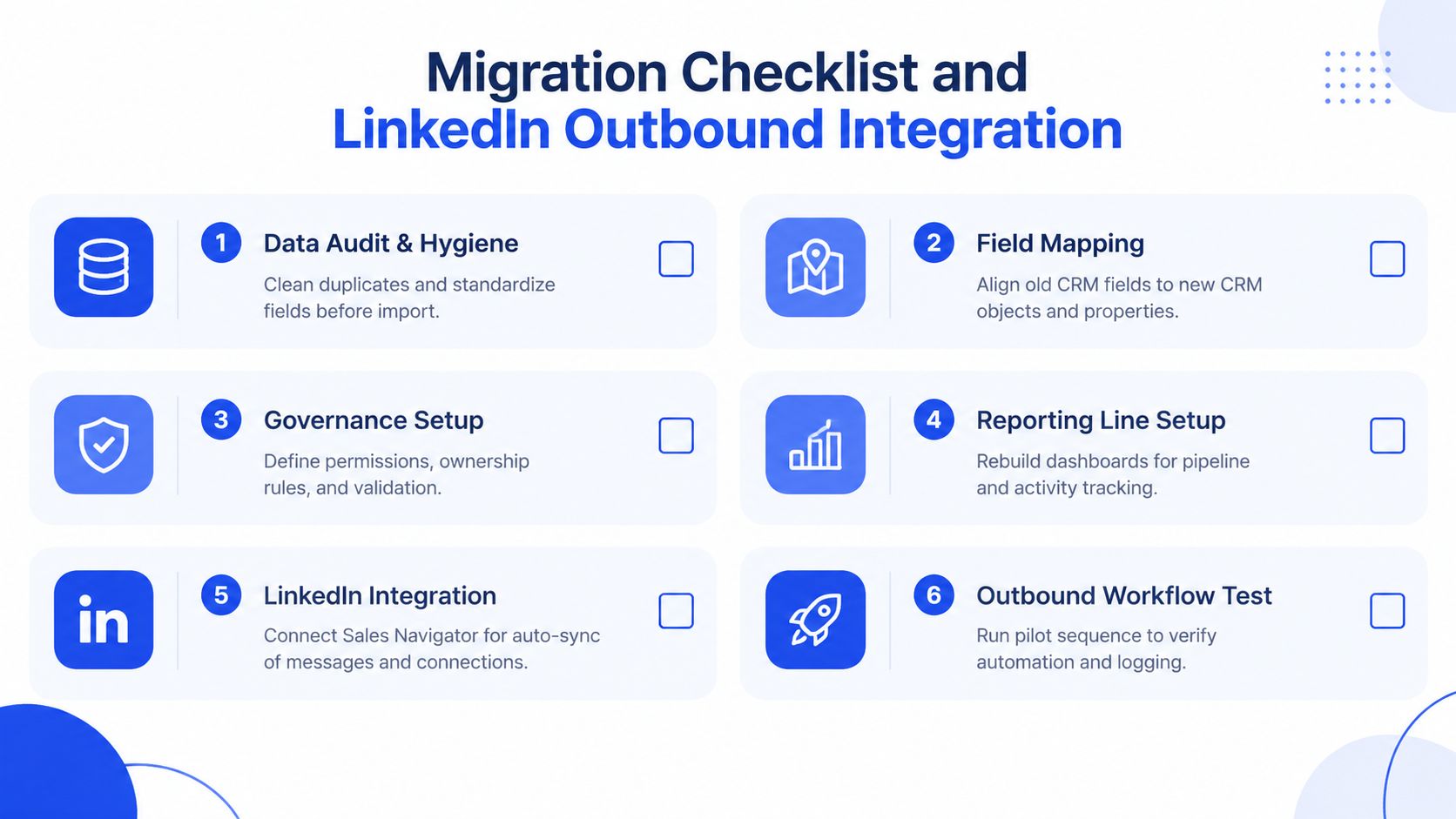
Start migration with data hygiene, not import speed. Clean duplicates, standardize field names, and decide ownership rules before you move a single record. If you skip that step, the new CRM will inherit the same bad habits, just in a shinier interface.
Then map fields, rebuild governance, and recreate reporting before go-live. That sequence matters because the team will trust the new system only if the pipeline view matches reality on day one. If the dashboard is wrong, reps go back to side spreadsheets and Slack threads.
The LinkedIn piece should sit inside one reporting line. Use Sales Navigator for list building, enrich the names in Clay or Apollo, send the handoff into your sequencing layer, then keep reply handling fast so qualified interest doesn't rot in inboxes. That's the point of a structured outbound system, one message, one target list, one owner.
Operational rule: if a reply comes in, the rep should know the next action immediately, and the CRM should record it without manual reconstruction.
For a migration partner reference, modern CRM migration services are worth reviewing if your team doesn't have the internal capacity to map objects, permissions, and dashboards cleanly. If you're moving from one CRM to another, this Grou migration guide is a useful sanity check on what breaks first.
Measure ROI with three numbers only, meeting held rate, pipeline created, and attribution quality. AI adoption matters here too. Independent research shows 91% of B2B leaders regularly use AI, but only 38% have enabled AI inside their CRM, 17% use more than two AI features, and 64% to 80% cite lack of internal expertise as the main barrier (Destination CRM AI research). That's why AI should live in the workflow, not on a separate tab nobody opens.
Next step to turn comparison into pipeline
By Monday, add one field to your CRM called routing source and fill it for every new lead, then review every meeting held from last week against that field. If you can't see which source creates held meetings, you're comparing CRMs with blind spots instead of pipeline data.
GROU is a B2B pipeline agency trusted by 50+ companies across iGaming, SaaS, manufacturing, and professional services. Its methodology centers on one message, one target list, and one reporting line, so CRM choice gets judged by how well it supports actual pipeline work.
If your CRM choice is still fuzzy, GROU can help you sort the stack around the motion instead of the other way around. We build the outbound structure that turns attention into pipeline, and you can see how that works by visiting Grou.
Your CRM choice is probably slowing pipeline right now. Sales wants faster routing, marketing wants cleaner attribution, and RevOps is stuck patching fields between HubSpot, Apollo, LinkedIn, and whatever sequence tool got added last quarter. My verdict is simple, Salesforce wins for complex pipeline operations, HubSpot wins for speed and rep adoption in smaller motions, and Zoho earns a look when cost pressure matters more than polish.
Pick by motion, not by brand: outbound-heavy teams need automation depth and clean routing, not just contact storage.
Score the hidden work: manual entry, migration friction, and reporting gaps matter more than demo polish.
Treat AI as workflow infrastructure: teams use AI outside the CRM, but far fewer have it embedded inside the system.
Integrations decide day-to-day speed: LinkedIn, enrichment, and sequencing matter as much as dashboards.
Shortlist with a use case filter: under 50 reps, growth-stage teams, and enterprise renewals do not need the same CRM.
Table of Contents
Introduction
You're probably choosing a CRM while pipeline pressure is already high. The vendor deck says it can do everything, the sales team wants something easy, and finance wants the license bill to make sense over the next year. That's why this decision needs a verdict, not a feature tour.
For crm software comparison, the right logic is: Salesforce for depth, HubSpot for speed, Zoho for cost control. If your motion is outbound-heavy, the winner is the platform that keeps routing, enrichment, sequence tracking, and forecasting in one reporting line, not the one with the prettiest demo.
Start with operating model: outbound, inbound, renewals, or a mix.
Weight workflow impact first: automation, integrations, and reporting.
Check hidden labor: admin work, migration effort, and rep data entry.
Map AI to actual use: CRM-native AI matters more than standalone AI hype.
Shortlist for scale: a tool that works at 20 reps can fail at 200.
Use this as an operator's decision system, not a catalog. If you want a broader tool list first, the CRM tools roundup from Grou is a useful companion, but the better move is to score your current motion before you compare logos.
Why CRM choice decides pipeline speed and structure
CRM is not a database purchase. It's a choice about how your team will move leads, assign ownership, manage follow-up, and report on revenue without rebuilding the same data in five places. If the structure is wrong, the pipeline gets slower even when the software looks modern.
The market itself explains why the shortlist is narrow. One independent report estimates worldwide CRM spending at about $52 billion in 2023 and forecasts $139 billion by 2030, while Salesforce held 23.9% share and the top five vendors were Salesforce, Microsoft Dynamics, Oracle, SAP CRM, and Adobe (CRM market share report). Another market summary says Salesforce remains the largest vendor by revenue share, with the rest of the market fragmented across Microsoft, Oracle, SAP, Adobe, Zoho, HubSpot, and long-tail SMB tools (CRM stats 2026).
That concentration matters. Buyers aren't comparing isolated features in a vacuum, they're comparing ecosystem strength, scalability, and vendor concentration. A CRM with weak integrations turns every outbound motion into manual cleanup, and every manual cleanup becomes a reporting gap later.
Practical rule: if a CRM can't support your routing, enrichment, and reporting in one system, your reps will rebuild the process outside the CRM.
The market also makes the cloud shift hard to ignore. Salesforce's 1999 launch and 2004 IPO helped prove the SaaS model at scale, and modern comparison content still centers on cloud delivery, integrations, and vendor strength instead of contact management basics (CRM history). That's the key lens for founders and sales leaders in iGaming, SaaS, manufacturing, legal tech, and pharma.
A second reason CRM choice matters is the operating layer below the demos. Buyers increasingly prefer a single platform over separate tools for CRM, marketing automation, and customer service, with one 2026 roundup citing a Capterra finding that 61% of SMBs prefer that model (CRM statistics roundup). That preference is rational. One reporting line is easier to govern than three disconnected ones.
How to score CRM platforms with a weighted framework
A good crm software comparison needs weights, not opinions. For most B2B teams, reporting and analytics deserve the biggest share because attribution breaks first when data quality slips. Integrations and automation depth should sit near the top too, because outbound motions fail when the CRM can't talk to LinkedIn, enrichment tools, and sequence platforms cleanly.
The 2026 evaluator scorecards back up that split. Independent review criteria commonly separate reporting, integrations, ease of use, and support into distinct dimensions rather than treating “CRM capability” as one blob (Forbes Advisor CRM review criteria). That's the right way to think about it. A CRM can be easy to use and still be weak where pipeline gets built.
A scoring model that matches your motion
Use this split as a starting point.
Reporting and analytics, 25%. Look for custom dashboards, revenue attribution depth, and clean pipeline views.
Integrations, 20%. Check native connections to email, LinkedIn, and data tools.
Automation depth, 20%. Test workflow triggers, lead routing, and sequence logic.
Ease of use, 20%. Measure rep adoption time and admin complexity.
Support and reliability, 15%. Ask how onboarding, uptime, and issue resolution are handled.
For SDR-led outbound, weight automation and integrations higher. For enterprise renewals, shift weight toward reporting, security controls, and extensibility. For SMB inside sales, ease of use matters more because rep compliance falls apart fast when the workflow feels heavy.
Rule of thumb: if the CRM can't prove custom fields, lead scoring, multilingual or multicurrency support, document management, and security controls in the demo, it's not ready for a serious shortlist.
The lead scoring question deserves its own check. If your team is still hand-ranking prospects, use the lead scoring glossary from Grou as the common language, then test whether the CRM can operationalize it without another layer of manual work.
For the comparison process, make the vendor show a real workflow. Ask them to route a lead, update a field, trigger a task, score the account, and rebuild a dashboard without custom code. If they need three consultants to do it, that platform will cost you later.
Side by side comparison of features pricing and operations
Salesforce is the enterprise answer when the process is messy, the data model is custom, and the reporting line has to survive scale. HubSpot is the cleaner answer when you want reps moving fast and don't want admin overhead eating the week. Zoho is the budget-conscious option that still gives buyers AI-assisted analysis and predictive insights without premium pricing pressure, but it asks more from the team if governance gets complex.
That's the practical split I'd use. If your motion depends on lead routing, revenue tracking, forecasting, omnichannel communications, and no-code customization, Salesforce usually wins on depth (PCMag CRM comparison). If your team values usability and two-way app sync, HubSpot is usually the easier fit. If the buyer cares most about keeping spend down while still getting AI help, Zoho belongs in the conversation.
Criteria | Salesforce | HubSpot | Zoho | Microsoft Dynamics |
|---|---|---|---|---|
Automation depth | Broad workflow automation, strong for enterprise routing | Solid for core automation, simpler to administer | Good AI-assisted automation, lighter than Salesforce | Strong in complex Microsoft-centered environments |
Usability | Powerful, but admin-heavy | Usually strongest on ease of use | Moderate learning curve | Often better for teams already on Microsoft stack |
Integrations | Very wide ecosystem | Strong app sync, especially for SMB tools | Broad, but depth varies by connector | Best fit when Microsoft tools are already central |
AI capabilities | AI and Einstein capabilities across enterprise use cases | AI features tied to growth workflows | AI-assisted analysis and predictive insights | Strong when tied to Microsoft ecosystem and data flows |
Operations fit | Best for governance, custom objects, and scale | Best for rapid rep adoption | Best for cost-sensitive teams with simpler ops | Best for Microsoft-heavy enterprises and structured reporting |
What matters most: the CRM that looks cheapest in a quote can become expensive if reps spend time rekeying data, reconciling fields, or waiting on a partner for every workflow change.
For a deeper buyer-side read, see how stacks up against HubSpot is worth using when you're pressure-testing a growth-stage shortlist. It helps when you're deciding whether ease of use should beat depth in your motion.
A useful companion comparison is the Pipedrive vs HubSpot guide from Grou. It's a good reference when deciding whether your team needs a simpler selling system or a broader revenue platform.
If you're in a Microsoft-first org, Dynamics deserves a separate look because it changes the shape of the stack. Salesforce, HubSpot, Zoho, and Dynamics don't just differ on features, they differ on how much process you can keep inside the CRM before you need extra tools.
Recommended CRM by company size and outbound motion
For under 50 reps with SDR-led outbound, HubSpot is the right default. It gives teams the fastest path to adoption, cleaner handoffs, and enough structure to run sequences without turning the CRM into a project. If your stack looks like Apollo, Clay, Lemlist, Instantly, Smartlead, HeyReach, HubSpot, and Sales Navigator, HubSpot is usually the least painful system to keep at the center.
For mid-market teams with 50 to 200 reps, I'd pick Salesforce Essentials or Salesforce-adjacent setup if the motion depends on routing, forecasting, and account ownership hygiene. At that point, hidden labor costs matter more than the license sticker. The team will feel the difference when operations can preserve logic instead of rebuilding it in spreadsheets.
For enterprise renewals and complex sales, Salesforce Enterprise wins. That's where custom objects, governance, and multi-step forecasting become part of daily work instead of occasional admin. If your forecast call still depends on people exporting data to Excel, the CRM is already underbuilt for the motion.
The main trade-off is time to value over 12 to 24 months. A platform can look perfect in a demo and still fail once lead volume, territories, and reporting obligations rise. A 2026 benchmark also marked HubSpot as a strong fit for growth-stage B2B while only a partial fit for scale and throughput, which is exactly the kind of signal founders should take seriously (Brightfield benchmark).
If you're building outbound at speed, the CRM should sit behind the motion, not slow it down. That's why teams using sequence tools, list enrichment, and LinkedIn workflows should be ruthless about the amount of manual entry they accept. A CRM that creates extra admin will kill rep follow-through long before it shows up in a license review.
For teams that need people to do the actual outbound work, Hire BDR is a relevant external resource when you're figuring out whether to staff the motion before you change the stack. If your pipeline is weak because the team is too small, software won't fix that by itself.
I'd skip Dynamics if your team isn't already in Microsoft-heavy operations, because the operating overhead won't pay back fast enough. I'd skip Zoho if you need deep governance and enterprise-grade complexity. I'd skip HubSpot if you know your model will outgrow simple automations quickly.
Migration checklist and LinkedIn outbound integration
Start migration with data hygiene, not import speed. Clean duplicates, standardize field names, and decide ownership rules before you move a single record. If you skip that step, the new CRM will inherit the same bad habits, just in a shinier interface.
Then map fields, rebuild governance, and recreate reporting before go-live. That sequence matters because the team will trust the new system only if the pipeline view matches reality on day one. If the dashboard is wrong, reps go back to side spreadsheets and Slack threads.
The LinkedIn piece should sit inside one reporting line. Use Sales Navigator for list building, enrich the names in Clay or Apollo, send the handoff into your sequencing layer, then keep reply handling fast so qualified interest doesn't rot in inboxes. That's the point of a structured outbound system, one message, one target list, one owner.
Operational rule: if a reply comes in, the rep should know the next action immediately, and the CRM should record it without manual reconstruction.
For a migration partner reference, modern CRM migration services are worth reviewing if your team doesn't have the internal capacity to map objects, permissions, and dashboards cleanly. If you're moving from one CRM to another, this Grou migration guide is a useful sanity check on what breaks first.
Measure ROI with three numbers only, meeting held rate, pipeline created, and attribution quality. AI adoption matters here too. Independent research shows 91% of B2B leaders regularly use AI, but only 38% have enabled AI inside their CRM, 17% use more than two AI features, and 64% to 80% cite lack of internal expertise as the main barrier (Destination CRM AI research). That's why AI should live in the workflow, not on a separate tab nobody opens.
Next step to turn comparison into pipeline
By Monday, add one field to your CRM called routing source and fill it for every new lead, then review every meeting held from last week against that field. If you can't see which source creates held meetings, you're comparing CRMs with blind spots instead of pipeline data.
GROU is a B2B pipeline agency trusted by 50+ companies across iGaming, SaaS, manufacturing, and professional services. Its methodology centers on one message, one target list, and one reporting line, so CRM choice gets judged by how well it supports actual pipeline work.
If your CRM choice is still fuzzy, GROU can help you sort the stack around the motion instead of the other way around. We build the outbound structure that turns attention into pipeline, and you can see how that works by visiting Grou.
Your CRM choice is probably slowing pipeline right now. Sales wants faster routing, marketing wants cleaner attribution, and RevOps is stuck patching fields between HubSpot, Apollo, LinkedIn, and whatever sequence tool got added last quarter. My verdict is simple, Salesforce wins for complex pipeline operations, HubSpot wins for speed and rep adoption in smaller motions, and Zoho earns a look when cost pressure matters more than polish.
Pick by motion, not by brand: outbound-heavy teams need automation depth and clean routing, not just contact storage.
Score the hidden work: manual entry, migration friction, and reporting gaps matter more than demo polish.
Treat AI as workflow infrastructure: teams use AI outside the CRM, but far fewer have it embedded inside the system.
Integrations decide day-to-day speed: LinkedIn, enrichment, and sequencing matter as much as dashboards.
Shortlist with a use case filter: under 50 reps, growth-stage teams, and enterprise renewals do not need the same CRM.
Table of Contents
Introduction
You're probably choosing a CRM while pipeline pressure is already high. The vendor deck says it can do everything, the sales team wants something easy, and finance wants the license bill to make sense over the next year. That's why this decision needs a verdict, not a feature tour.
For crm software comparison, the right logic is: Salesforce for depth, HubSpot for speed, Zoho for cost control. If your motion is outbound-heavy, the winner is the platform that keeps routing, enrichment, sequence tracking, and forecasting in one reporting line, not the one with the prettiest demo.
Start with operating model: outbound, inbound, renewals, or a mix.
Weight workflow impact first: automation, integrations, and reporting.
Check hidden labor: admin work, migration effort, and rep data entry.
Map AI to actual use: CRM-native AI matters more than standalone AI hype.
Shortlist for scale: a tool that works at 20 reps can fail at 200.
Use this as an operator's decision system, not a catalog. If you want a broader tool list first, the CRM tools roundup from Grou is a useful companion, but the better move is to score your current motion before you compare logos.
Why CRM choice decides pipeline speed and structure
CRM is not a database purchase. It's a choice about how your team will move leads, assign ownership, manage follow-up, and report on revenue without rebuilding the same data in five places. If the structure is wrong, the pipeline gets slower even when the software looks modern.
The market itself explains why the shortlist is narrow. One independent report estimates worldwide CRM spending at about $52 billion in 2023 and forecasts $139 billion by 2030, while Salesforce held 23.9% share and the top five vendors were Salesforce, Microsoft Dynamics, Oracle, SAP CRM, and Adobe (CRM market share report). Another market summary says Salesforce remains the largest vendor by revenue share, with the rest of the market fragmented across Microsoft, Oracle, SAP, Adobe, Zoho, HubSpot, and long-tail SMB tools (CRM stats 2026).
That concentration matters. Buyers aren't comparing isolated features in a vacuum, they're comparing ecosystem strength, scalability, and vendor concentration. A CRM with weak integrations turns every outbound motion into manual cleanup, and every manual cleanup becomes a reporting gap later.
Practical rule: if a CRM can't support your routing, enrichment, and reporting in one system, your reps will rebuild the process outside the CRM.
The market also makes the cloud shift hard to ignore. Salesforce's 1999 launch and 2004 IPO helped prove the SaaS model at scale, and modern comparison content still centers on cloud delivery, integrations, and vendor strength instead of contact management basics (CRM history). That's the key lens for founders and sales leaders in iGaming, SaaS, manufacturing, legal tech, and pharma.
A second reason CRM choice matters is the operating layer below the demos. Buyers increasingly prefer a single platform over separate tools for CRM, marketing automation, and customer service, with one 2026 roundup citing a Capterra finding that 61% of SMBs prefer that model (CRM statistics roundup). That preference is rational. One reporting line is easier to govern than three disconnected ones.
How to score CRM platforms with a weighted framework
A good crm software comparison needs weights, not opinions. For most B2B teams, reporting and analytics deserve the biggest share because attribution breaks first when data quality slips. Integrations and automation depth should sit near the top too, because outbound motions fail when the CRM can't talk to LinkedIn, enrichment tools, and sequence platforms cleanly.
The 2026 evaluator scorecards back up that split. Independent review criteria commonly separate reporting, integrations, ease of use, and support into distinct dimensions rather than treating “CRM capability” as one blob (Forbes Advisor CRM review criteria). That's the right way to think about it. A CRM can be easy to use and still be weak where pipeline gets built.
A scoring model that matches your motion
Use this split as a starting point.
Reporting and analytics, 25%. Look for custom dashboards, revenue attribution depth, and clean pipeline views.
Integrations, 20%. Check native connections to email, LinkedIn, and data tools.
Automation depth, 20%. Test workflow triggers, lead routing, and sequence logic.
Ease of use, 20%. Measure rep adoption time and admin complexity.
Support and reliability, 15%. Ask how onboarding, uptime, and issue resolution are handled.
For SDR-led outbound, weight automation and integrations higher. For enterprise renewals, shift weight toward reporting, security controls, and extensibility. For SMB inside sales, ease of use matters more because rep compliance falls apart fast when the workflow feels heavy.
Rule of thumb: if the CRM can't prove custom fields, lead scoring, multilingual or multicurrency support, document management, and security controls in the demo, it's not ready for a serious shortlist.
The lead scoring question deserves its own check. If your team is still hand-ranking prospects, use the lead scoring glossary from Grou as the common language, then test whether the CRM can operationalize it without another layer of manual work.
For the comparison process, make the vendor show a real workflow. Ask them to route a lead, update a field, trigger a task, score the account, and rebuild a dashboard without custom code. If they need three consultants to do it, that platform will cost you later.
Side by side comparison of features pricing and operations
Salesforce is the enterprise answer when the process is messy, the data model is custom, and the reporting line has to survive scale. HubSpot is the cleaner answer when you want reps moving fast and don't want admin overhead eating the week. Zoho is the budget-conscious option that still gives buyers AI-assisted analysis and predictive insights without premium pricing pressure, but it asks more from the team if governance gets complex.
That's the practical split I'd use. If your motion depends on lead routing, revenue tracking, forecasting, omnichannel communications, and no-code customization, Salesforce usually wins on depth (PCMag CRM comparison). If your team values usability and two-way app sync, HubSpot is usually the easier fit. If the buyer cares most about keeping spend down while still getting AI help, Zoho belongs in the conversation.
Criteria | Salesforce | HubSpot | Zoho | Microsoft Dynamics |
|---|---|---|---|---|
Automation depth | Broad workflow automation, strong for enterprise routing | Solid for core automation, simpler to administer | Good AI-assisted automation, lighter than Salesforce | Strong in complex Microsoft-centered environments |
Usability | Powerful, but admin-heavy | Usually strongest on ease of use | Moderate learning curve | Often better for teams already on Microsoft stack |
Integrations | Very wide ecosystem | Strong app sync, especially for SMB tools | Broad, but depth varies by connector | Best fit when Microsoft tools are already central |
AI capabilities | AI and Einstein capabilities across enterprise use cases | AI features tied to growth workflows | AI-assisted analysis and predictive insights | Strong when tied to Microsoft ecosystem and data flows |
Operations fit | Best for governance, custom objects, and scale | Best for rapid rep adoption | Best for cost-sensitive teams with simpler ops | Best for Microsoft-heavy enterprises and structured reporting |
What matters most: the CRM that looks cheapest in a quote can become expensive if reps spend time rekeying data, reconciling fields, or waiting on a partner for every workflow change.
For a deeper buyer-side read, see how stacks up against HubSpot is worth using when you're pressure-testing a growth-stage shortlist. It helps when you're deciding whether ease of use should beat depth in your motion.
A useful companion comparison is the Pipedrive vs HubSpot guide from Grou. It's a good reference when deciding whether your team needs a simpler selling system or a broader revenue platform.
If you're in a Microsoft-first org, Dynamics deserves a separate look because it changes the shape of the stack. Salesforce, HubSpot, Zoho, and Dynamics don't just differ on features, they differ on how much process you can keep inside the CRM before you need extra tools.
Recommended CRM by company size and outbound motion
For under 50 reps with SDR-led outbound, HubSpot is the right default. It gives teams the fastest path to adoption, cleaner handoffs, and enough structure to run sequences without turning the CRM into a project. If your stack looks like Apollo, Clay, Lemlist, Instantly, Smartlead, HeyReach, HubSpot, and Sales Navigator, HubSpot is usually the least painful system to keep at the center.
For mid-market teams with 50 to 200 reps, I'd pick Salesforce Essentials or Salesforce-adjacent setup if the motion depends on routing, forecasting, and account ownership hygiene. At that point, hidden labor costs matter more than the license sticker. The team will feel the difference when operations can preserve logic instead of rebuilding it in spreadsheets.
For enterprise renewals and complex sales, Salesforce Enterprise wins. That's where custom objects, governance, and multi-step forecasting become part of daily work instead of occasional admin. If your forecast call still depends on people exporting data to Excel, the CRM is already underbuilt for the motion.
The main trade-off is time to value over 12 to 24 months. A platform can look perfect in a demo and still fail once lead volume, territories, and reporting obligations rise. A 2026 benchmark also marked HubSpot as a strong fit for growth-stage B2B while only a partial fit for scale and throughput, which is exactly the kind of signal founders should take seriously (Brightfield benchmark).
If you're building outbound at speed, the CRM should sit behind the motion, not slow it down. That's why teams using sequence tools, list enrichment, and LinkedIn workflows should be ruthless about the amount of manual entry they accept. A CRM that creates extra admin will kill rep follow-through long before it shows up in a license review.
For teams that need people to do the actual outbound work, Hire BDR is a relevant external resource when you're figuring out whether to staff the motion before you change the stack. If your pipeline is weak because the team is too small, software won't fix that by itself.
I'd skip Dynamics if your team isn't already in Microsoft-heavy operations, because the operating overhead won't pay back fast enough. I'd skip Zoho if you need deep governance and enterprise-grade complexity. I'd skip HubSpot if you know your model will outgrow simple automations quickly.
Migration checklist and LinkedIn outbound integration
Start migration with data hygiene, not import speed. Clean duplicates, standardize field names, and decide ownership rules before you move a single record. If you skip that step, the new CRM will inherit the same bad habits, just in a shinier interface.
Then map fields, rebuild governance, and recreate reporting before go-live. That sequence matters because the team will trust the new system only if the pipeline view matches reality on day one. If the dashboard is wrong, reps go back to side spreadsheets and Slack threads.
The LinkedIn piece should sit inside one reporting line. Use Sales Navigator for list building, enrich the names in Clay or Apollo, send the handoff into your sequencing layer, then keep reply handling fast so qualified interest doesn't rot in inboxes. That's the point of a structured outbound system, one message, one target list, one owner.
Operational rule: if a reply comes in, the rep should know the next action immediately, and the CRM should record it without manual reconstruction.
For a migration partner reference, modern CRM migration services are worth reviewing if your team doesn't have the internal capacity to map objects, permissions, and dashboards cleanly. If you're moving from one CRM to another, this Grou migration guide is a useful sanity check on what breaks first.
Measure ROI with three numbers only, meeting held rate, pipeline created, and attribution quality. AI adoption matters here too. Independent research shows 91% of B2B leaders regularly use AI, but only 38% have enabled AI inside their CRM, 17% use more than two AI features, and 64% to 80% cite lack of internal expertise as the main barrier (Destination CRM AI research). That's why AI should live in the workflow, not on a separate tab nobody opens.
Next step to turn comparison into pipeline
By Monday, add one field to your CRM called routing source and fill it for every new lead, then review every meeting held from last week against that field. If you can't see which source creates held meetings, you're comparing CRMs with blind spots instead of pipeline data.
GROU is a B2B pipeline agency trusted by 50+ companies across iGaming, SaaS, manufacturing, and professional services. Its methodology centers on one message, one target list, and one reporting line, so CRM choice gets judged by how well it supports actual pipeline work.
If your CRM choice is still fuzzy, GROU can help you sort the stack around the motion instead of the other way around. We build the outbound structure that turns attention into pipeline, and you can see how that works by visiting Grou.

Pipeline OS Newsletter
Build qualified pipeline
Get weekly tactics to generate demand, improve lead quality, and book more meetings.





Trusted by industry leaders
Trusted by industry leaders
Trusted by industry leaders
Ready to build qualified pipeline?
Ready to build qualified pipeline?
Ready to build qualified pipeline?
Book a call to see if we're the right fit, or take the 2-minute quiz to get a clear starting point.
Book a call to see if we're the right fit, or take the 2-minute quiz to get a clear starting point.
Book a call to see if we're the right fit, or take the 2-minute quiz to get a clear starting point.
" height="30.21639343089746px" id="hfGbXmQR2" width="30.216393430897455px"/></svg>)
Copyright © 2026 – All Right Reserved
Copyright © 2026 – All Right Reserved
Copyright © 2026 – All Right Reserved