%22%3E%3C/path%3E%3Cpath d=%22M 63.072 7.554 C 62.258 8.022 61.577 8.689 61.092 9.493 L 61.092 7.076 L 57.158 7.076 L 57.158 22.64 L 61.089 22.64 L 61.089 14.888 C 61.089 13.446 61.403 12.434 62.03 11.853 C 62.818 11.218 63.818 10.907 64.826 10.982 L 65.868 10.982 L 65.868 6.851 C 64.891 6.834 63.926 7.076 63.073 7.554 Z%22 fill=%22rgb(17,17,17)%22%3E%3C/path%3E%3Cpath d=%22M 78.916 7.82 C 76.363 6.49 73.321 6.49 70.768 7.82 C 69.562 8.473 68.564 9.451 67.888 10.644 C 67.167 11.931 66.803 13.387 66.834 14.862 C 66.804 16.332 67.157 17.785 67.86 19.077 C 68.515 20.267 69.494 21.246 70.684 21.901 C 71.924 22.576 73.318 22.92 74.73 22.898 C 76.164 22.918 77.58 22.575 78.846 21.901 C 80.062 21.247 81.073 20.27 81.768 19.077 C 82.506 17.797 82.88 16.339 82.85 14.862 C 82.88 13.389 82.517 11.934 81.797 10.647 C 81.12 9.455 80.122 8.477 78.917 7.824 M 78.803 14.862 C 78.829 15.739 78.636 16.608 78.241 17.391 C 77.903 18.046 77.38 18.588 76.738 18.95 C 76.124 19.293 75.432 19.472 74.729 19.47 C 73.668 19.497 72.648 19.061 71.934 18.276 C 71.139 17.323 70.741 16.1 70.823 14.862 C 70.741 13.62 71.149 12.395 71.959 11.45 C 72.687 10.667 73.715 10.233 74.783 10.256 C 75.859 10.236 76.894 10.67 77.635 11.45 C 78.464 12.387 78.884 13.616 78.801 14.864%22 fill=%22rgb(17,17,17)%22%3E%3C/path%3E%3Cpath d=%22M 95.906 7.076 L 95.906 15.646 C 95.975 16.68 95.643 17.701 94.979 18.498 C 94.311 19.184 93.379 19.547 92.422 19.495 C 91.475 19.544 90.553 19.18 89.894 18.498 C 89.23 17.701 88.898 16.68 88.967 15.646 L 88.967 7.076 L 85.033 7.076 L 85.033 16.207 C 85 17.449 85.275 18.68 85.834 19.79 C 86.327 20.75 87.095 21.542 88.039 22.065 C 89.033 22.594 90.145 22.861 91.271 22.838 C 92.188 22.847 93.095 22.65 93.926 22.263 C 94.708 21.905 95.388 21.36 95.906 20.675 L 95.906 22.645 L 99.865 22.645 L 99.865 7.076 Z%22 fill=%22rgb(17,17,17)%22%3E%3C/path%3E%3Cpath d=%22M 4.513 15.626 C 4.511 10.815 7.606 6.549 12.181 5.059 C 16.756 3.57 21.77 5.195 24.601 9.086 L 27.816 5.87 C 24.074 1.186 17.981 -0.943 12.137 0.393 C 6.292 1.728 1.728 6.292 0.393 12.137 C -0.943 17.981 1.186 24.074 5.87 27.816 L 9.085 24.601 C 6.214 22.512 4.515 19.177 4.513 15.626%22 fill=%22rgb(32,62,235)%22%3E%3C/path%3E%3Cpath d=%22M 17.114 14.343 L 13.354 18.01 L 13.354 18.026 L 21.071 18.026 L 11.412 27.609 L 17.389 27.609 L 23.999 21.081 L 23.999 28.316 L 24.005 28.316 L 27.967 24.393 L 27.967 14.343 Z%22 fill=%22rgb(32,62,235)%22%3E%3C/path%3E%3C/g%3E%3C/svg%3E) ×
× ××
××›
›
›
›
How to cold message on LinkedIn and actually get replies
How to cold message on LinkedIn and actually get replies
How to cold message on LinkedIn and actually get replies
How to cold message on LinkedIn and actually get replies
How to cold message on LinkedIn and actually get replies
How to cold message on LinkedIn and actually get replies

Author
Aljaz Peklaj

Your LinkedIn campaign is getting accepted connections, but the replies have flattened and the inbox still isn't producing enough qualified conversations. The problem may not be the number of touches. It may be that your first message asks for a meeting before the prospect has a reason to trust the sender, understand the relevance, or take a smaller next step.
Lead with the prospect's role and operational problem, not a profile compliment.
Use a measured connection-to-message cadence, with a clear purpose for each touch.
Route replies by intent and stop the sequence as soon as someone responds.
Measure acceptance, replies, qualified conversations, and meetings separately, using a consistent response window.
Table of Contents
Why most LinkedIn cold messages stall before a reply
The common failure starts before the first direct message: the sender treats acceptance as permission to pitch. A new connection receives a company introduction, a list of benefits, and a request for time. The prospect has little context for why this message is meant for them, so it feels like another task in an already crowded inbox.
That's a structural problem, not a clever-copy problem. A cold message should trigger a buyer-education system. The prospect may check the sender's profile, review company content, or look for proof that the offer fits their operation before replying. If those trust signals don't support the message, a better opening line can't carry the whole decision.
Treat the message as one step, not the whole motion
A useful LinkedIn sequence gives the recipient room to move at their own pace. One person may reply and agree to a call. Another may ask for a case study. A third may inspect your profile and content, then come back later. Those are different forms of engagement and shouldn't be collapsed into one “meeting booked” metric.
The practical system connects message intent to what happens next: a relevant first question, credibility content that backs up the claim, a reply route based on intent, and reporting that distinguishes early engagement from pipeline. For a channel-level comparison, GROU's breakdown of LinkedIn outreach versus cold email can help teams decide where each channel belongs in the motion.
Build trust before asking for time
Before launching a sequence, check what a prospect sees after clicking the sender's name. Does the profile explain who the sender helps? Does recent content speak to the buyer's operating problem? Is there a case or useful point of view that supports the message? If the answer is no, the campaign is asking the copy to do a job that the rest of the system hasn't done.
Structure turns attention into pipeline when every step has a defined job. The first message earns a response, proof answers a likely question, and routing makes sure a reply reaches the right person quickly. Without those connections, activity can rise while sales sees little evidence of real buying intent.
Role and problem first, personalization second
A mutual group or a reference to someone's profile can make an opener feel researched. It doesn't necessarily make it relevant. The prospect's role and the specific operational problem attached to it are stronger starting points because they explain why this person, rather than anyone else at the company, should care.
A published T-2 campaign result reported a 19.2% reply rate for its IT segment, compared with an 11.8% average. That's a campaign-specific result, not a promise for every audience, but it supports a practical decision: split outreach by role when the job changes the problem. GROU's account research workflow can help teams turn account signals into a message that fits the recipient's responsibilities.
Write to the job, not the biography
A general manager in a hotel may care about staff time and guest experience. A purchasing manager may focus on cost and supply. An F&B manager may be concerned with service operations. The same solution needs a different first sentence for each, because the business consequence changes with the role.
Role | Day-to-day pain to anchor on | Open with | Avoid |
|---|---|---|---|
General manager | Staff capacity and guest experience | “How much time does your team spend managing [manual task]?” | A feature list with no operational context |
Purchasing manager | Cost, supply, and vendor coordination | “Are you still handling [purchasing task] manually at [company]?” | A claim about staff experience that doesn't fit the role |
F&B manager | Service flow and recurring operational work | “Does your team already use a tool for [specific task]?” | A generic note about company growth |
Head of operations | Process consistency and handoffs | “How are you handling [workflow] across the team today?” | Personal trivia unrelated to the job |
Use a minimum viable personalization standard: one verifiable business signal, one plausible consequence, and one low-pressure question. A public product launch or hiring pattern can be useful if it connects directly to the role. Personal details that don't belong in a business conversation can make an opener feel intrusive, not thoughtful.
The brief for the message should fit in a few lines. LinkedIn's analysis of recruiter InMails found that the shortest messages had a response rate 22% above the average, while the longest performed 11% below average. That dataset covers recruiting outreach, so treat it as directional evidence for concise writing, not a guaranteed B2B sales result. Role-based copy naturally helps: when you know the business problem, you don't need a long introduction.
The day-by-day LinkedIn sequence that earns the reply
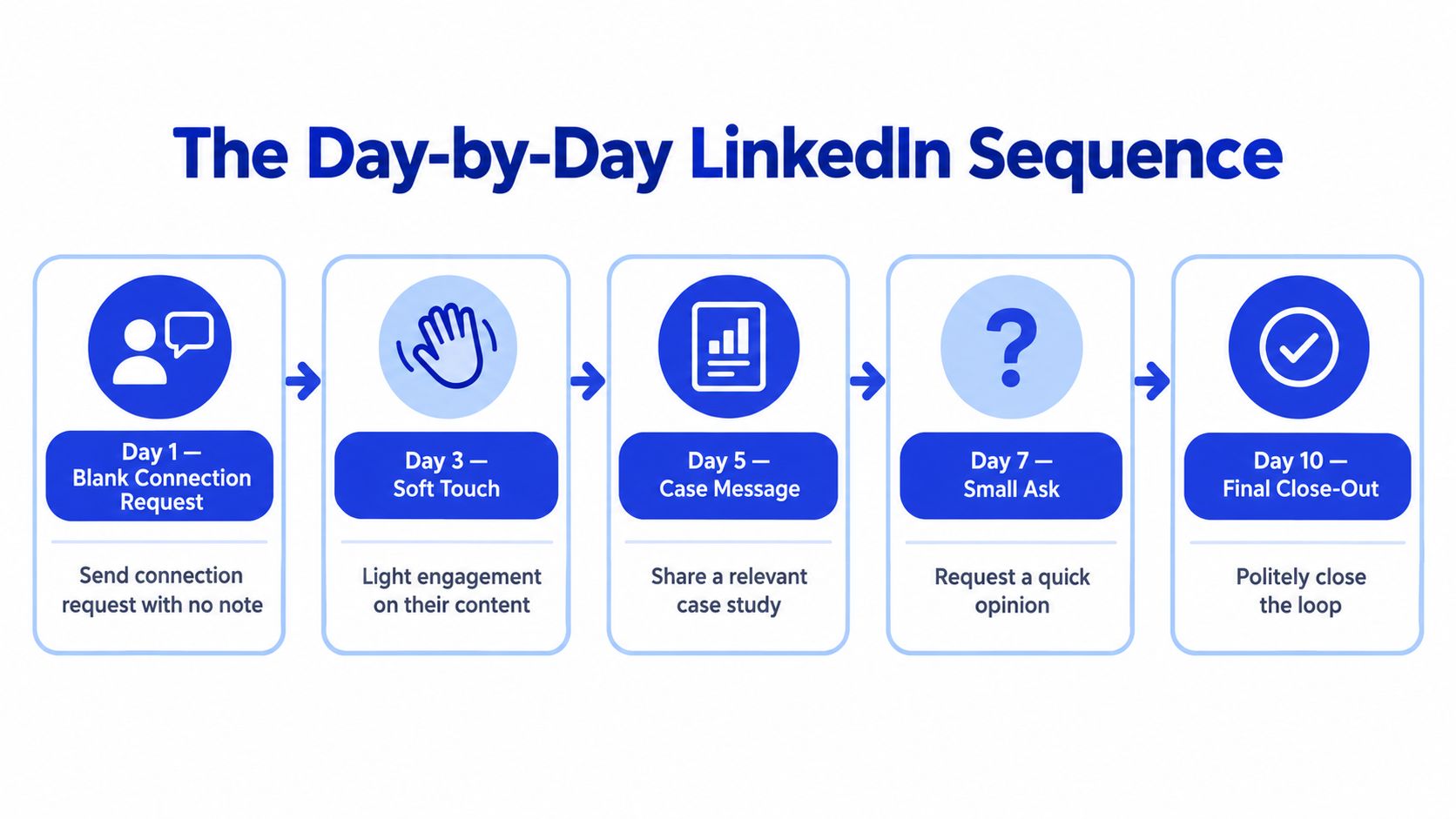
GROU's hospitality sequence starts with a blank connection request, then waits a day after acceptance before sending the first direct message. That first note asks about an operational task rather than introducing the seller or pushing for time. Each following touch has a different purpose, and the sequence ends with a clear close-out rather than an open-ended stream of reminders.
A cadence with a job for every touch
Day 0: View the prospect's profile and send a connection request without a note. This keeps the request free of a premature pitch. A blank request won't suit every campaign, but it is the approach GROU uses when the initial message can carry the business context more effectively.
One day after acceptance: Ask one role-specific question. For example: “Hi {first name}, since I know how much time [their team] spends on [manual task], I wanted to ask whether you already use [solution type] at {company}?” The question gives the prospect an easy way to confirm or correct your assumption.
The next day: Like a relevant recent post. It's a light touch, not a substitute for a message, and it gives the recipient another chance to recognize the sender.
The following day: Send a short case tied to the same operational problem. Offer to share the case study rather than attaching a large bundle of collateral immediately.
Four days later: Make a smaller ask, such as a short self-assessment. Invite the prospect to share the result if they want to discuss it.
Five days later: Close the loop with a simple question: “Should I close this, or is a quick call worth it? A one-line reply is enough.” Stop as soon as a prospect replies.
In GROU's anonymized hospitality campaign, 217 of 856 contacted prospects accepted, 69 replied, and 17 replies were tagged as interested. Those figures describe that campaign, not a forecast for yours. They show why acceptance, reply, and interest need separate labels in the CRM.
Keep LinkedIn and email cadences distinct
For the same motion, the standard email cadence is four touches over 14 days, on days 0, 3, 7, and 14. That's a separate channel rhythm, not a reason to stack every email and LinkedIn touch on the same day. Teams planning cross-channel volume can use GROU's guide to sequence touch count to set channel-specific limits.
The sequence logic also applies to recruiting, where a useful resource on passive candidate outreach is GENTY Recruitment's LATAM tech hiring playbook. Across either motion, each direct message should earn the next step by asking for one small action, not demanding a meeting before the prospect is ready.
Anatomy of a cold message that gets answered
A strong first message doesn't need a personal introduction followed by a company overview. It needs a relevant observation, a question the recipient can answer quickly, and a reason to reply that doesn't force an immediate meeting.
Writing rule: Ask about the prospect's operation before you explain your offer.
Three templates for the sequence
Question-led opener:
“Hi {first name}, since I know how much time [their team] spends on [manual task], I wanted to ask whether you already use [solution type] at {company}?”
This opens with a business problem and asks for a straightforward answer. Use it only when the task is relevant to that person's role. If you can't support the observation, rewrite it.
Case-led follow-up:
“We recently helped a [similar company] make the switch. They cut [the time spent on the task] and kept revenue stable. Want me to send the case study?”
The case belongs after the prospect has seen the problem framing, not as an unsolicited proof dump in the opener. Replace the bracketed outcome with a verifiable result. Don't imply a client result you can't substantiate.
Low-pressure close-out:
“Should I close this, or is a quick call worth it? A one-line reply is enough.”
This makes it easy for the recipient to respond without drafting a detailed explanation. If they say no, record the preference and stop.
Keep the copy brief and the ask singular
Avoid opening with a pitch, an extended “about us” paragraph, or a request for a meeting before the prospect has shown interest. “Just checking in” doesn't add a reason to reply. A follow-up should bring a relevant question, proof point, or small next step instead.
LinkedIn's recruiter InMail analysis found that individual messages outperformed bulk-sent InMails by approximately 15%. The dataset isn't B2B-sales-only, but it reinforces the value of recipient-specific relevance over volume. As a practical editing choice, keep the message under 400 characters when you can; that character guidance comes from a separate benchmark discussion, not a universal platform rule. Teams writing for another audience can also review these recruiter LinkedIn outreach templates for examples of concise connection messaging.
Routing replies and qualifying the conversation
The sequence isn't finished when someone replies. It's finished when the team knows what the response means, who owns the next action, and whether the account belongs in an active sales conversation or a nurture path.
LinkedIn's recruiter InMail analysis found that 65% of replies arrived within 24 hours and 90% within one week. Those figures come from recruiting messages, but they make a strong operational case for checking replies promptly rather than reviewing a campaign only at the end. Assign an owner and a response notification before you launch.
Route by intent
Reply bucket | Signal | Next action |
|---|---|---|
Interested | Asks about a conversation or next step | Confirm fit, then offer meeting times |
Curious | Requests information or asks how it works | Send the most relevant proof or explanation |
Not now | Acknowledges relevance but signals timing is wrong | Record timing context and set a suitable nurture task |
Not a fit | Says the offer doesn't match the need | Close the sequence and record the reason |
Wrong person | Points to another contact or team | Thank them, verify the referral, and route to the right owner |
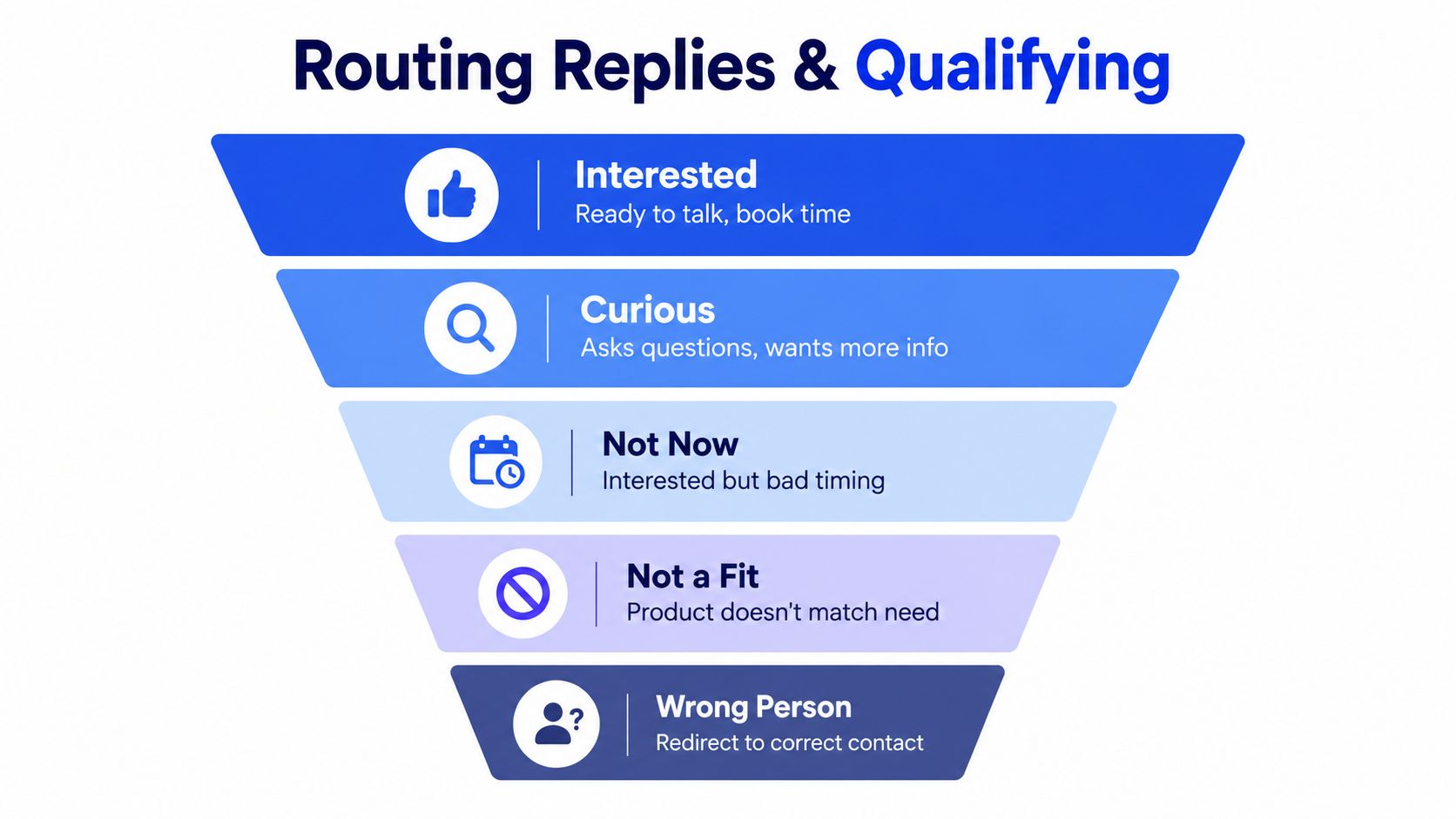
A reply is evidence of engagement, not automatic proof of qualification. The rep should confirm the problem, whether the contact has a role in addressing it, and whether there's a plausible next step. An interested reply with no fit should not become an SQL just because the person agreed to talk. GROU's lead qualification process is a useful reference for setting those handoff rules.
Respect the response the prospect gave
If a prospect asks for a case study, send that resource and avoid turning the exchange into an immediate meeting push. If they say “not now,” clarify whether they want a future follow-up or prefer no further messages. If they ask you to stop, close the outreach record and honor that request across the sequence.
No reply is also a signal. Complete the planned cadence, then pause rather than adding extra touches because the dashboard is short on meetings. If the prospect later engages with relevant content or enters a new buying context, reassess whether a new message has a legitimate reason to reach out. That keeps follow-up tied to relevance instead of habit.
Benchmarks worth tracking and how to measure them
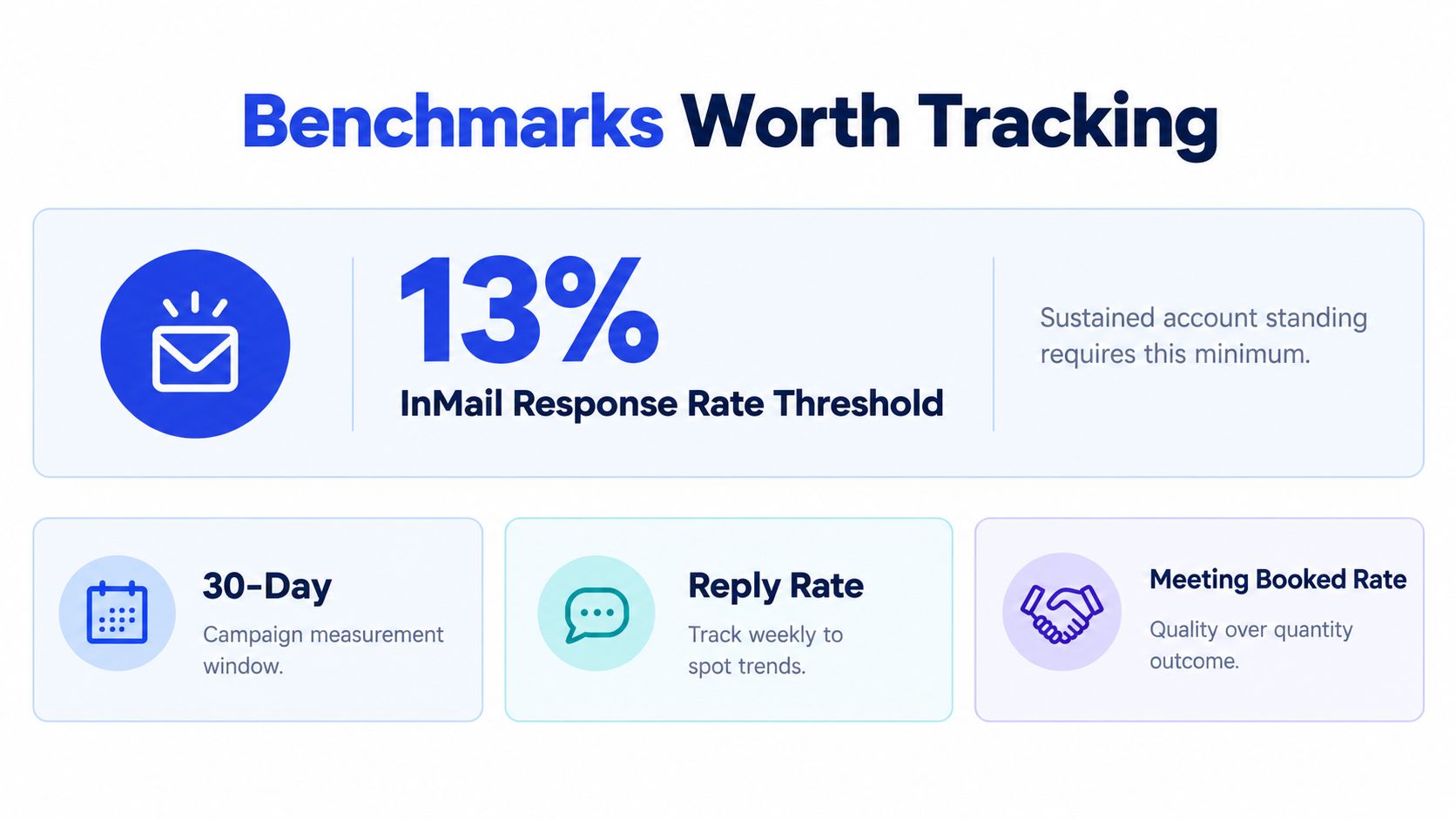
LinkedIn's historical InMail policy used a 13% response rate as an operational minimum for Recruiter accounts sending at least 100 InMails during a 14-day assessment period. It isn't an expected average for every industry or audience. LinkedIn counted replies received within 30 days and included several InMail types while excluding messages sent to email addresses, so the threshold should not be treated as a direct benchmark for connection requests or ordinary direct messages. See LinkedIn's InMail response-rate policy for the measurement details.
Define the denominator before comparing results
A benchmark is useful only when the team knows what it measures. Keep connection requests, direct messages, and InMails in separate reporting groups. For every comparison, record the denominator, message type, date range, and response window. LinkedIn's 30-day InMail response window is a consistent historical reference for InMail reporting, not a reason to mix message types.
A benchmark of 16,492 LinkedIn connection requests reported nearly identical acceptance rates with and without a note, 26.42% versus 26.37%. After acceptance, requests with a note had a reported reply rate of 9.36%, compared with 5.44% without a note. That commercial benchmark suggests personalization may matter more downstream than at the acceptance stage, but it doesn't prove a note is right for every campaign. Cleverly's LinkedIn benchmark provides the underlying figures.
Put the funnel, not just the send count, on the dashboard
Report acceptance → reply → qualified conversation → meeting as separate stages. For a working pipeline view, focus on reply rate, qualified-conversation rate, and meeting-held rate. Use acceptance to diagnose targeting and invitation performance, but don't treat acceptance by itself as evidence of buying intent.
Review replies regularly so an operational issue doesn't sit unnoticed, then assess the full 30-day window for InMail comparisons. A clear scorecard also helps teams managing handoffs between outreach and sales; for role definitions around that transition, this overview of appointment setters gives additional context. GROU's guide to lead generation KPIs can help align campaign metrics with pipeline reporting.
Common pitfalls and a Friday audit you can run today
A campaign can show plenty of activity and still fail to create useful conversations. Adding a pitch to every connection request, using the same opener for every role, counting acceptance as engagement, and treating a booked meeting as the only valuable outcome all hide where the sequence is breaking. Replies asking for evidence, naming a future buying window, or pointing to another decision-maker are signals to route, not dead ends.
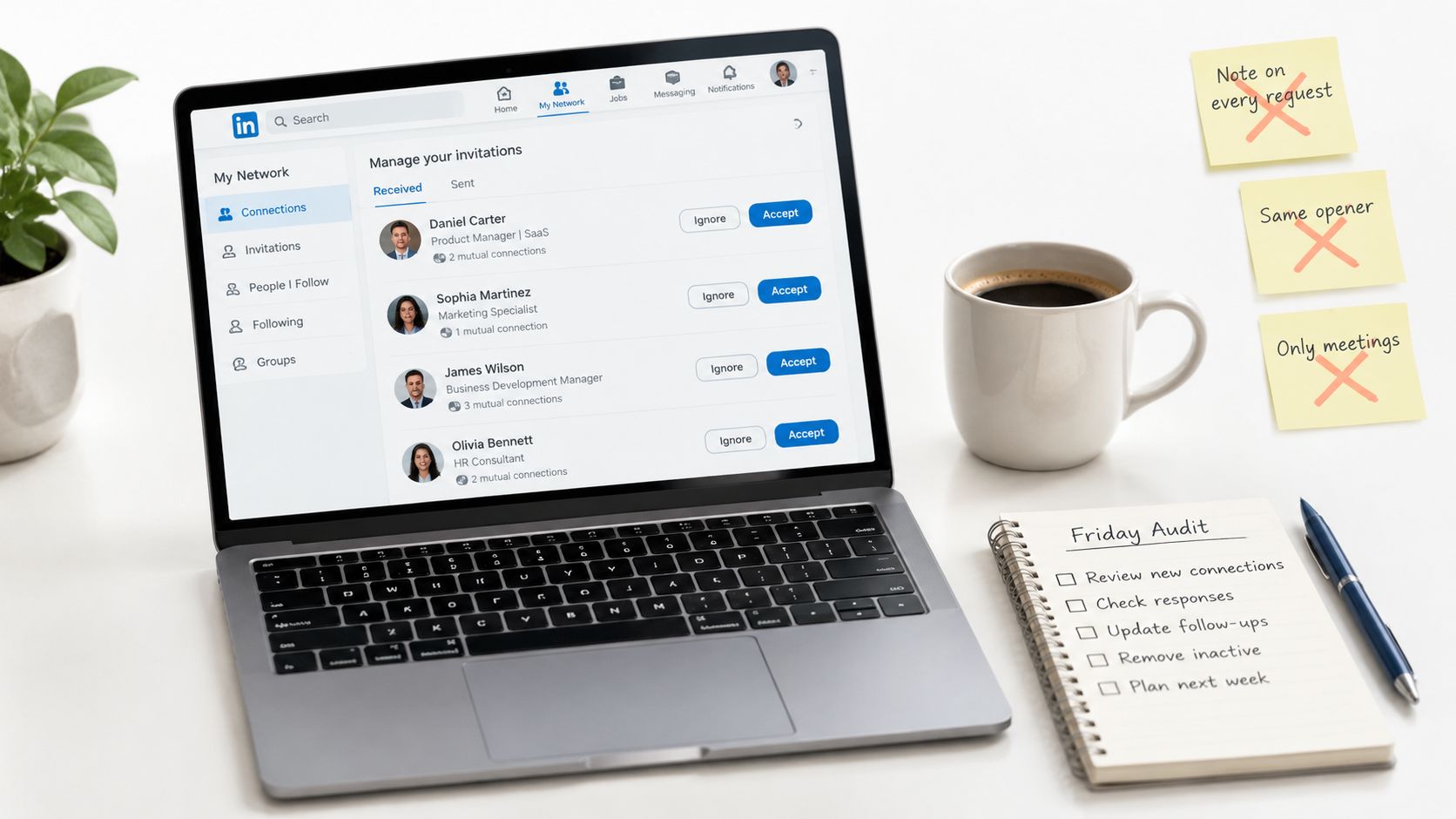
As the benchmark above showed, acceptance rates barely moved with a note while reply rates were higher, so weight reply-stage metrics more heavily than acceptance in the Friday audit. Acceptance helps diagnose targeting and invitation performance. Replies show whether the role-based opening gave someone a reason to engage.
Audit the leak, not just the copy
On Friday, pull a recent campaign and review meeting-held rate, replies by prospect role and opening sentence, and the time from reply to human response. Then read the replies that did not become meetings. If a segment accepts but stays silent, check role relevance and first-message timing. If prospects reply but fail to qualify, inspect the target list and reply-routing rules before rewriting every message.
A reply asking for proof can be routed to relevant credibility content. A future-timing response belongs in a follow-up path, while a referral should reach the right owner. This makes the cold message one trigger in a buyer-education sequence, rather than a standalone ask.
On Monday, add a “first-message role” field to your CRM and require it for new LinkedIn sequences. Compare openers by the job they address instead of relying on a blended campaign total. Keep acceptance, reply, qualified conversation, meeting booked, and meeting held as separate fields, then review the downstream results across a 30-day window.
LinkedIn says invitation limits apply to all members and that exceeding a limit can result in a temporary restriction. Free members can add a personalized note to five connection requests per month, while Premium members can send unlimited personalized connection-request notes. Check LinkedIn's invitation limits guidance before building a workflow around notes. LinkedIn also caps a first-degree network at 30,000 connections, as described in its invitation restrictions. Set up outbound with that ceiling in mind.
The video below shows how to review pending invitations and spot restrictions in LinkedIn's invitation management interface. That check helps you separate platform limits from weak targeting when acceptance data looks off.
GROU is a global B2B pipeline agency that connects LinkedIn content, lead generation, and outbound in one operating system. Its methodology draws on production campaigns across SaaS, iGaming, manufacturing, and professional services.
Use Friday's audit to check meeting-held rate, map first-message replies by role, and review response handling time. GROU builds and manages LinkedIn outreach systems with role-based messaging, reply routing, and pipeline reporting, connecting the first touch to what happens next. Visit Grou to see how that work fits your outbound motion.
Your LinkedIn campaign is getting accepted connections, but the replies have flattened and the inbox still isn't producing enough qualified conversations. The problem may not be the number of touches. It may be that your first message asks for a meeting before the prospect has a reason to trust the sender, understand the relevance, or take a smaller next step.
Lead with the prospect's role and operational problem, not a profile compliment.
Use a measured connection-to-message cadence, with a clear purpose for each touch.
Route replies by intent and stop the sequence as soon as someone responds.
Measure acceptance, replies, qualified conversations, and meetings separately, using a consistent response window.
Table of Contents
Why most LinkedIn cold messages stall before a reply
The common failure starts before the first direct message: the sender treats acceptance as permission to pitch. A new connection receives a company introduction, a list of benefits, and a request for time. The prospect has little context for why this message is meant for them, so it feels like another task in an already crowded inbox.
That's a structural problem, not a clever-copy problem. A cold message should trigger a buyer-education system. The prospect may check the sender's profile, review company content, or look for proof that the offer fits their operation before replying. If those trust signals don't support the message, a better opening line can't carry the whole decision.
Treat the message as one step, not the whole motion
A useful LinkedIn sequence gives the recipient room to move at their own pace. One person may reply and agree to a call. Another may ask for a case study. A third may inspect your profile and content, then come back later. Those are different forms of engagement and shouldn't be collapsed into one “meeting booked” metric.
The practical system connects message intent to what happens next: a relevant first question, credibility content that backs up the claim, a reply route based on intent, and reporting that distinguishes early engagement from pipeline. For a channel-level comparison, GROU's breakdown of LinkedIn outreach versus cold email can help teams decide where each channel belongs in the motion.
Build trust before asking for time
Before launching a sequence, check what a prospect sees after clicking the sender's name. Does the profile explain who the sender helps? Does recent content speak to the buyer's operating problem? Is there a case or useful point of view that supports the message? If the answer is no, the campaign is asking the copy to do a job that the rest of the system hasn't done.
Structure turns attention into pipeline when every step has a defined job. The first message earns a response, proof answers a likely question, and routing makes sure a reply reaches the right person quickly. Without those connections, activity can rise while sales sees little evidence of real buying intent.
Role and problem first, personalization second
A mutual group or a reference to someone's profile can make an opener feel researched. It doesn't necessarily make it relevant. The prospect's role and the specific operational problem attached to it are stronger starting points because they explain why this person, rather than anyone else at the company, should care.
A published T-2 campaign result reported a 19.2% reply rate for its IT segment, compared with an 11.8% average. That's a campaign-specific result, not a promise for every audience, but it supports a practical decision: split outreach by role when the job changes the problem. GROU's account research workflow can help teams turn account signals into a message that fits the recipient's responsibilities.
Write to the job, not the biography
A general manager in a hotel may care about staff time and guest experience. A purchasing manager may focus on cost and supply. An F&B manager may be concerned with service operations. The same solution needs a different first sentence for each, because the business consequence changes with the role.
Role | Day-to-day pain to anchor on | Open with | Avoid |
|---|---|---|---|
General manager | Staff capacity and guest experience | “How much time does your team spend managing [manual task]?” | A feature list with no operational context |
Purchasing manager | Cost, supply, and vendor coordination | “Are you still handling [purchasing task] manually at [company]?” | A claim about staff experience that doesn't fit the role |
F&B manager | Service flow and recurring operational work | “Does your team already use a tool for [specific task]?” | A generic note about company growth |
Head of operations | Process consistency and handoffs | “How are you handling [workflow] across the team today?” | Personal trivia unrelated to the job |
Use a minimum viable personalization standard: one verifiable business signal, one plausible consequence, and one low-pressure question. A public product launch or hiring pattern can be useful if it connects directly to the role. Personal details that don't belong in a business conversation can make an opener feel intrusive, not thoughtful.
The brief for the message should fit in a few lines. LinkedIn's analysis of recruiter InMails found that the shortest messages had a response rate 22% above the average, while the longest performed 11% below average. That dataset covers recruiting outreach, so treat it as directional evidence for concise writing, not a guaranteed B2B sales result. Role-based copy naturally helps: when you know the business problem, you don't need a long introduction.
The day-by-day LinkedIn sequence that earns the reply
GROU's hospitality sequence starts with a blank connection request, then waits a day after acceptance before sending the first direct message. That first note asks about an operational task rather than introducing the seller or pushing for time. Each following touch has a different purpose, and the sequence ends with a clear close-out rather than an open-ended stream of reminders.
A cadence with a job for every touch
Day 0: View the prospect's profile and send a connection request without a note. This keeps the request free of a premature pitch. A blank request won't suit every campaign, but it is the approach GROU uses when the initial message can carry the business context more effectively.
One day after acceptance: Ask one role-specific question. For example: “Hi {first name}, since I know how much time [their team] spends on [manual task], I wanted to ask whether you already use [solution type] at {company}?” The question gives the prospect an easy way to confirm or correct your assumption.
The next day: Like a relevant recent post. It's a light touch, not a substitute for a message, and it gives the recipient another chance to recognize the sender.
The following day: Send a short case tied to the same operational problem. Offer to share the case study rather than attaching a large bundle of collateral immediately.
Four days later: Make a smaller ask, such as a short self-assessment. Invite the prospect to share the result if they want to discuss it.
Five days later: Close the loop with a simple question: “Should I close this, or is a quick call worth it? A one-line reply is enough.” Stop as soon as a prospect replies.
In GROU's anonymized hospitality campaign, 217 of 856 contacted prospects accepted, 69 replied, and 17 replies were tagged as interested. Those figures describe that campaign, not a forecast for yours. They show why acceptance, reply, and interest need separate labels in the CRM.
Keep LinkedIn and email cadences distinct
For the same motion, the standard email cadence is four touches over 14 days, on days 0, 3, 7, and 14. That's a separate channel rhythm, not a reason to stack every email and LinkedIn touch on the same day. Teams planning cross-channel volume can use GROU's guide to sequence touch count to set channel-specific limits.
The sequence logic also applies to recruiting, where a useful resource on passive candidate outreach is GENTY Recruitment's LATAM tech hiring playbook. Across either motion, each direct message should earn the next step by asking for one small action, not demanding a meeting before the prospect is ready.
Anatomy of a cold message that gets answered
A strong first message doesn't need a personal introduction followed by a company overview. It needs a relevant observation, a question the recipient can answer quickly, and a reason to reply that doesn't force an immediate meeting.
Writing rule: Ask about the prospect's operation before you explain your offer.
Three templates for the sequence
Question-led opener:
“Hi {first name}, since I know how much time [their team] spends on [manual task], I wanted to ask whether you already use [solution type] at {company}?”
This opens with a business problem and asks for a straightforward answer. Use it only when the task is relevant to that person's role. If you can't support the observation, rewrite it.
Case-led follow-up:
“We recently helped a [similar company] make the switch. They cut [the time spent on the task] and kept revenue stable. Want me to send the case study?”
The case belongs after the prospect has seen the problem framing, not as an unsolicited proof dump in the opener. Replace the bracketed outcome with a verifiable result. Don't imply a client result you can't substantiate.
Low-pressure close-out:
“Should I close this, or is a quick call worth it? A one-line reply is enough.”
This makes it easy for the recipient to respond without drafting a detailed explanation. If they say no, record the preference and stop.
Keep the copy brief and the ask singular
Avoid opening with a pitch, an extended “about us” paragraph, or a request for a meeting before the prospect has shown interest. “Just checking in” doesn't add a reason to reply. A follow-up should bring a relevant question, proof point, or small next step instead.
LinkedIn's recruiter InMail analysis found that individual messages outperformed bulk-sent InMails by approximately 15%. The dataset isn't B2B-sales-only, but it reinforces the value of recipient-specific relevance over volume. As a practical editing choice, keep the message under 400 characters when you can; that character guidance comes from a separate benchmark discussion, not a universal platform rule. Teams writing for another audience can also review these recruiter LinkedIn outreach templates for examples of concise connection messaging.
Routing replies and qualifying the conversation
The sequence isn't finished when someone replies. It's finished when the team knows what the response means, who owns the next action, and whether the account belongs in an active sales conversation or a nurture path.
LinkedIn's recruiter InMail analysis found that 65% of replies arrived within 24 hours and 90% within one week. Those figures come from recruiting messages, but they make a strong operational case for checking replies promptly rather than reviewing a campaign only at the end. Assign an owner and a response notification before you launch.
Route by intent
Reply bucket | Signal | Next action |
|---|---|---|
Interested | Asks about a conversation or next step | Confirm fit, then offer meeting times |
Curious | Requests information or asks how it works | Send the most relevant proof or explanation |
Not now | Acknowledges relevance but signals timing is wrong | Record timing context and set a suitable nurture task |
Not a fit | Says the offer doesn't match the need | Close the sequence and record the reason |
Wrong person | Points to another contact or team | Thank them, verify the referral, and route to the right owner |
A reply is evidence of engagement, not automatic proof of qualification. The rep should confirm the problem, whether the contact has a role in addressing it, and whether there's a plausible next step. An interested reply with no fit should not become an SQL just because the person agreed to talk. GROU's lead qualification process is a useful reference for setting those handoff rules.
Respect the response the prospect gave
If a prospect asks for a case study, send that resource and avoid turning the exchange into an immediate meeting push. If they say “not now,” clarify whether they want a future follow-up or prefer no further messages. If they ask you to stop, close the outreach record and honor that request across the sequence.
No reply is also a signal. Complete the planned cadence, then pause rather than adding extra touches because the dashboard is short on meetings. If the prospect later engages with relevant content or enters a new buying context, reassess whether a new message has a legitimate reason to reach out. That keeps follow-up tied to relevance instead of habit.
Benchmarks worth tracking and how to measure them
LinkedIn's historical InMail policy used a 13% response rate as an operational minimum for Recruiter accounts sending at least 100 InMails during a 14-day assessment period. It isn't an expected average for every industry or audience. LinkedIn counted replies received within 30 days and included several InMail types while excluding messages sent to email addresses, so the threshold should not be treated as a direct benchmark for connection requests or ordinary direct messages. See LinkedIn's InMail response-rate policy for the measurement details.
Define the denominator before comparing results
A benchmark is useful only when the team knows what it measures. Keep connection requests, direct messages, and InMails in separate reporting groups. For every comparison, record the denominator, message type, date range, and response window. LinkedIn's 30-day InMail response window is a consistent historical reference for InMail reporting, not a reason to mix message types.
A benchmark of 16,492 LinkedIn connection requests reported nearly identical acceptance rates with and without a note, 26.42% versus 26.37%. After acceptance, requests with a note had a reported reply rate of 9.36%, compared with 5.44% without a note. That commercial benchmark suggests personalization may matter more downstream than at the acceptance stage, but it doesn't prove a note is right for every campaign. Cleverly's LinkedIn benchmark provides the underlying figures.
Put the funnel, not just the send count, on the dashboard
Report acceptance → reply → qualified conversation → meeting as separate stages. For a working pipeline view, focus on reply rate, qualified-conversation rate, and meeting-held rate. Use acceptance to diagnose targeting and invitation performance, but don't treat acceptance by itself as evidence of buying intent.
Review replies regularly so an operational issue doesn't sit unnoticed, then assess the full 30-day window for InMail comparisons. A clear scorecard also helps teams managing handoffs between outreach and sales; for role definitions around that transition, this overview of appointment setters gives additional context. GROU's guide to lead generation KPIs can help align campaign metrics with pipeline reporting.
Common pitfalls and a Friday audit you can run today
A campaign can show plenty of activity and still fail to create useful conversations. Adding a pitch to every connection request, using the same opener for every role, counting acceptance as engagement, and treating a booked meeting as the only valuable outcome all hide where the sequence is breaking. Replies asking for evidence, naming a future buying window, or pointing to another decision-maker are signals to route, not dead ends.
As the benchmark above showed, acceptance rates barely moved with a note while reply rates were higher, so weight reply-stage metrics more heavily than acceptance in the Friday audit. Acceptance helps diagnose targeting and invitation performance. Replies show whether the role-based opening gave someone a reason to engage.
Audit the leak, not just the copy
On Friday, pull a recent campaign and review meeting-held rate, replies by prospect role and opening sentence, and the time from reply to human response. Then read the replies that did not become meetings. If a segment accepts but stays silent, check role relevance and first-message timing. If prospects reply but fail to qualify, inspect the target list and reply-routing rules before rewriting every message.
A reply asking for proof can be routed to relevant credibility content. A future-timing response belongs in a follow-up path, while a referral should reach the right owner. This makes the cold message one trigger in a buyer-education sequence, rather than a standalone ask.
On Monday, add a “first-message role” field to your CRM and require it for new LinkedIn sequences. Compare openers by the job they address instead of relying on a blended campaign total. Keep acceptance, reply, qualified conversation, meeting booked, and meeting held as separate fields, then review the downstream results across a 30-day window.
LinkedIn says invitation limits apply to all members and that exceeding a limit can result in a temporary restriction. Free members can add a personalized note to five connection requests per month, while Premium members can send unlimited personalized connection-request notes. Check LinkedIn's invitation limits guidance before building a workflow around notes. LinkedIn also caps a first-degree network at 30,000 connections, as described in its invitation restrictions. Set up outbound with that ceiling in mind.
The video below shows how to review pending invitations and spot restrictions in LinkedIn's invitation management interface. That check helps you separate platform limits from weak targeting when acceptance data looks off.
GROU is a global B2B pipeline agency that connects LinkedIn content, lead generation, and outbound in one operating system. Its methodology draws on production campaigns across SaaS, iGaming, manufacturing, and professional services.
Use Friday's audit to check meeting-held rate, map first-message replies by role, and review response handling time. GROU builds and manages LinkedIn outreach systems with role-based messaging, reply routing, and pipeline reporting, connecting the first touch to what happens next. Visit Grou to see how that work fits your outbound motion.
Your LinkedIn campaign is getting accepted connections, but the replies have flattened and the inbox still isn't producing enough qualified conversations. The problem may not be the number of touches. It may be that your first message asks for a meeting before the prospect has a reason to trust the sender, understand the relevance, or take a smaller next step.
Lead with the prospect's role and operational problem, not a profile compliment.
Use a measured connection-to-message cadence, with a clear purpose for each touch.
Route replies by intent and stop the sequence as soon as someone responds.
Measure acceptance, replies, qualified conversations, and meetings separately, using a consistent response window.
Table of Contents
Why most LinkedIn cold messages stall before a reply
The common failure starts before the first direct message: the sender treats acceptance as permission to pitch. A new connection receives a company introduction, a list of benefits, and a request for time. The prospect has little context for why this message is meant for them, so it feels like another task in an already crowded inbox.
That's a structural problem, not a clever-copy problem. A cold message should trigger a buyer-education system. The prospect may check the sender's profile, review company content, or look for proof that the offer fits their operation before replying. If those trust signals don't support the message, a better opening line can't carry the whole decision.
Treat the message as one step, not the whole motion
A useful LinkedIn sequence gives the recipient room to move at their own pace. One person may reply and agree to a call. Another may ask for a case study. A third may inspect your profile and content, then come back later. Those are different forms of engagement and shouldn't be collapsed into one “meeting booked” metric.
The practical system connects message intent to what happens next: a relevant first question, credibility content that backs up the claim, a reply route based on intent, and reporting that distinguishes early engagement from pipeline. For a channel-level comparison, GROU's breakdown of LinkedIn outreach versus cold email can help teams decide where each channel belongs in the motion.
Build trust before asking for time
Before launching a sequence, check what a prospect sees after clicking the sender's name. Does the profile explain who the sender helps? Does recent content speak to the buyer's operating problem? Is there a case or useful point of view that supports the message? If the answer is no, the campaign is asking the copy to do a job that the rest of the system hasn't done.
Structure turns attention into pipeline when every step has a defined job. The first message earns a response, proof answers a likely question, and routing makes sure a reply reaches the right person quickly. Without those connections, activity can rise while sales sees little evidence of real buying intent.
Role and problem first, personalization second
A mutual group or a reference to someone's profile can make an opener feel researched. It doesn't necessarily make it relevant. The prospect's role and the specific operational problem attached to it are stronger starting points because they explain why this person, rather than anyone else at the company, should care.
A published T-2 campaign result reported a 19.2% reply rate for its IT segment, compared with an 11.8% average. That's a campaign-specific result, not a promise for every audience, but it supports a practical decision: split outreach by role when the job changes the problem. GROU's account research workflow can help teams turn account signals into a message that fits the recipient's responsibilities.
Write to the job, not the biography
A general manager in a hotel may care about staff time and guest experience. A purchasing manager may focus on cost and supply. An F&B manager may be concerned with service operations. The same solution needs a different first sentence for each, because the business consequence changes with the role.
Role | Day-to-day pain to anchor on | Open with | Avoid |
|---|---|---|---|
General manager | Staff capacity and guest experience | “How much time does your team spend managing [manual task]?” | A feature list with no operational context |
Purchasing manager | Cost, supply, and vendor coordination | “Are you still handling [purchasing task] manually at [company]?” | A claim about staff experience that doesn't fit the role |
F&B manager | Service flow and recurring operational work | “Does your team already use a tool for [specific task]?” | A generic note about company growth |
Head of operations | Process consistency and handoffs | “How are you handling [workflow] across the team today?” | Personal trivia unrelated to the job |
Use a minimum viable personalization standard: one verifiable business signal, one plausible consequence, and one low-pressure question. A public product launch or hiring pattern can be useful if it connects directly to the role. Personal details that don't belong in a business conversation can make an opener feel intrusive, not thoughtful.
The brief for the message should fit in a few lines. LinkedIn's analysis of recruiter InMails found that the shortest messages had a response rate 22% above the average, while the longest performed 11% below average. That dataset covers recruiting outreach, so treat it as directional evidence for concise writing, not a guaranteed B2B sales result. Role-based copy naturally helps: when you know the business problem, you don't need a long introduction.
The day-by-day LinkedIn sequence that earns the reply
GROU's hospitality sequence starts with a blank connection request, then waits a day after acceptance before sending the first direct message. That first note asks about an operational task rather than introducing the seller or pushing for time. Each following touch has a different purpose, and the sequence ends with a clear close-out rather than an open-ended stream of reminders.
A cadence with a job for every touch
Day 0: View the prospect's profile and send a connection request without a note. This keeps the request free of a premature pitch. A blank request won't suit every campaign, but it is the approach GROU uses when the initial message can carry the business context more effectively.
One day after acceptance: Ask one role-specific question. For example: “Hi {first name}, since I know how much time [their team] spends on [manual task], I wanted to ask whether you already use [solution type] at {company}?” The question gives the prospect an easy way to confirm or correct your assumption.
The next day: Like a relevant recent post. It's a light touch, not a substitute for a message, and it gives the recipient another chance to recognize the sender.
The following day: Send a short case tied to the same operational problem. Offer to share the case study rather than attaching a large bundle of collateral immediately.
Four days later: Make a smaller ask, such as a short self-assessment. Invite the prospect to share the result if they want to discuss it.
Five days later: Close the loop with a simple question: “Should I close this, or is a quick call worth it? A one-line reply is enough.” Stop as soon as a prospect replies.
In GROU's anonymized hospitality campaign, 217 of 856 contacted prospects accepted, 69 replied, and 17 replies were tagged as interested. Those figures describe that campaign, not a forecast for yours. They show why acceptance, reply, and interest need separate labels in the CRM.
Keep LinkedIn and email cadences distinct
For the same motion, the standard email cadence is four touches over 14 days, on days 0, 3, 7, and 14. That's a separate channel rhythm, not a reason to stack every email and LinkedIn touch on the same day. Teams planning cross-channel volume can use GROU's guide to sequence touch count to set channel-specific limits.
The sequence logic also applies to recruiting, where a useful resource on passive candidate outreach is GENTY Recruitment's LATAM tech hiring playbook. Across either motion, each direct message should earn the next step by asking for one small action, not demanding a meeting before the prospect is ready.
Anatomy of a cold message that gets answered
A strong first message doesn't need a personal introduction followed by a company overview. It needs a relevant observation, a question the recipient can answer quickly, and a reason to reply that doesn't force an immediate meeting.
Writing rule: Ask about the prospect's operation before you explain your offer.
Three templates for the sequence
Question-led opener:
“Hi {first name}, since I know how much time [their team] spends on [manual task], I wanted to ask whether you already use [solution type] at {company}?”
This opens with a business problem and asks for a straightforward answer. Use it only when the task is relevant to that person's role. If you can't support the observation, rewrite it.
Case-led follow-up:
“We recently helped a [similar company] make the switch. They cut [the time spent on the task] and kept revenue stable. Want me to send the case study?”
The case belongs after the prospect has seen the problem framing, not as an unsolicited proof dump in the opener. Replace the bracketed outcome with a verifiable result. Don't imply a client result you can't substantiate.
Low-pressure close-out:
“Should I close this, or is a quick call worth it? A one-line reply is enough.”
This makes it easy for the recipient to respond without drafting a detailed explanation. If they say no, record the preference and stop.
Keep the copy brief and the ask singular
Avoid opening with a pitch, an extended “about us” paragraph, or a request for a meeting before the prospect has shown interest. “Just checking in” doesn't add a reason to reply. A follow-up should bring a relevant question, proof point, or small next step instead.
LinkedIn's recruiter InMail analysis found that individual messages outperformed bulk-sent InMails by approximately 15%. The dataset isn't B2B-sales-only, but it reinforces the value of recipient-specific relevance over volume. As a practical editing choice, keep the message under 400 characters when you can; that character guidance comes from a separate benchmark discussion, not a universal platform rule. Teams writing for another audience can also review these recruiter LinkedIn outreach templates for examples of concise connection messaging.
Routing replies and qualifying the conversation
The sequence isn't finished when someone replies. It's finished when the team knows what the response means, who owns the next action, and whether the account belongs in an active sales conversation or a nurture path.
LinkedIn's recruiter InMail analysis found that 65% of replies arrived within 24 hours and 90% within one week. Those figures come from recruiting messages, but they make a strong operational case for checking replies promptly rather than reviewing a campaign only at the end. Assign an owner and a response notification before you launch.
Route by intent
Reply bucket | Signal | Next action |
|---|---|---|
Interested | Asks about a conversation or next step | Confirm fit, then offer meeting times |
Curious | Requests information or asks how it works | Send the most relevant proof or explanation |
Not now | Acknowledges relevance but signals timing is wrong | Record timing context and set a suitable nurture task |
Not a fit | Says the offer doesn't match the need | Close the sequence and record the reason |
Wrong person | Points to another contact or team | Thank them, verify the referral, and route to the right owner |
A reply is evidence of engagement, not automatic proof of qualification. The rep should confirm the problem, whether the contact has a role in addressing it, and whether there's a plausible next step. An interested reply with no fit should not become an SQL just because the person agreed to talk. GROU's lead qualification process is a useful reference for setting those handoff rules.
Respect the response the prospect gave
If a prospect asks for a case study, send that resource and avoid turning the exchange into an immediate meeting push. If they say “not now,” clarify whether they want a future follow-up or prefer no further messages. If they ask you to stop, close the outreach record and honor that request across the sequence.
No reply is also a signal. Complete the planned cadence, then pause rather than adding extra touches because the dashboard is short on meetings. If the prospect later engages with relevant content or enters a new buying context, reassess whether a new message has a legitimate reason to reach out. That keeps follow-up tied to relevance instead of habit.
Benchmarks worth tracking and how to measure them
LinkedIn's historical InMail policy used a 13% response rate as an operational minimum for Recruiter accounts sending at least 100 InMails during a 14-day assessment period. It isn't an expected average for every industry or audience. LinkedIn counted replies received within 30 days and included several InMail types while excluding messages sent to email addresses, so the threshold should not be treated as a direct benchmark for connection requests or ordinary direct messages. See LinkedIn's InMail response-rate policy for the measurement details.
Define the denominator before comparing results
A benchmark is useful only when the team knows what it measures. Keep connection requests, direct messages, and InMails in separate reporting groups. For every comparison, record the denominator, message type, date range, and response window. LinkedIn's 30-day InMail response window is a consistent historical reference for InMail reporting, not a reason to mix message types.
A benchmark of 16,492 LinkedIn connection requests reported nearly identical acceptance rates with and without a note, 26.42% versus 26.37%. After acceptance, requests with a note had a reported reply rate of 9.36%, compared with 5.44% without a note. That commercial benchmark suggests personalization may matter more downstream than at the acceptance stage, but it doesn't prove a note is right for every campaign. Cleverly's LinkedIn benchmark provides the underlying figures.
Put the funnel, not just the send count, on the dashboard
Report acceptance → reply → qualified conversation → meeting as separate stages. For a working pipeline view, focus on reply rate, qualified-conversation rate, and meeting-held rate. Use acceptance to diagnose targeting and invitation performance, but don't treat acceptance by itself as evidence of buying intent.
Review replies regularly so an operational issue doesn't sit unnoticed, then assess the full 30-day window for InMail comparisons. A clear scorecard also helps teams managing handoffs between outreach and sales; for role definitions around that transition, this overview of appointment setters gives additional context. GROU's guide to lead generation KPIs can help align campaign metrics with pipeline reporting.
Common pitfalls and a Friday audit you can run today
A campaign can show plenty of activity and still fail to create useful conversations. Adding a pitch to every connection request, using the same opener for every role, counting acceptance as engagement, and treating a booked meeting as the only valuable outcome all hide where the sequence is breaking. Replies asking for evidence, naming a future buying window, or pointing to another decision-maker are signals to route, not dead ends.
As the benchmark above showed, acceptance rates barely moved with a note while reply rates were higher, so weight reply-stage metrics more heavily than acceptance in the Friday audit. Acceptance helps diagnose targeting and invitation performance. Replies show whether the role-based opening gave someone a reason to engage.
Audit the leak, not just the copy
On Friday, pull a recent campaign and review meeting-held rate, replies by prospect role and opening sentence, and the time from reply to human response. Then read the replies that did not become meetings. If a segment accepts but stays silent, check role relevance and first-message timing. If prospects reply but fail to qualify, inspect the target list and reply-routing rules before rewriting every message.
A reply asking for proof can be routed to relevant credibility content. A future-timing response belongs in a follow-up path, while a referral should reach the right owner. This makes the cold message one trigger in a buyer-education sequence, rather than a standalone ask.
On Monday, add a “first-message role” field to your CRM and require it for new LinkedIn sequences. Compare openers by the job they address instead of relying on a blended campaign total. Keep acceptance, reply, qualified conversation, meeting booked, and meeting held as separate fields, then review the downstream results across a 30-day window.
LinkedIn says invitation limits apply to all members and that exceeding a limit can result in a temporary restriction. Free members can add a personalized note to five connection requests per month, while Premium members can send unlimited personalized connection-request notes. Check LinkedIn's invitation limits guidance before building a workflow around notes. LinkedIn also caps a first-degree network at 30,000 connections, as described in its invitation restrictions. Set up outbound with that ceiling in mind.
The video below shows how to review pending invitations and spot restrictions in LinkedIn's invitation management interface. That check helps you separate platform limits from weak targeting when acceptance data looks off.
GROU is a global B2B pipeline agency that connects LinkedIn content, lead generation, and outbound in one operating system. Its methodology draws on production campaigns across SaaS, iGaming, manufacturing, and professional services.
Use Friday's audit to check meeting-held rate, map first-message replies by role, and review response handling time. GROU builds and manages LinkedIn outreach systems with role-based messaging, reply routing, and pipeline reporting, connecting the first touch to what happens next. Visit Grou to see how that work fits your outbound motion.

Pipeline OS Newsletter
Build qualified pipeline
Get weekly tactics to generate demand, improve lead quality, and book more meetings.





Trusted by industry leaders
Trusted by industry leaders
Trusted by industry leaders
Ready to build qualified pipeline?
Ready to build qualified pipeline?
Ready to build qualified pipeline?
Book a call to see if we're the right fit, or take the 2-minute quiz to get a clear starting point.
Book a call to see if we're the right fit, or take the 2-minute quiz to get a clear starting point.
Book a call to see if we're the right fit, or take the 2-minute quiz to get a clear starting point.
" height="30.21639343089746px" id="hfGbXmQR2" width="30.216393430897455px"/></svg>)
Copyright © 2026 – All Right Reserved
Copyright © 2026 – All Right Reserved
Copyright © 2026 – All Right Reserved