%22%3E%3C/path%3E%3Cpath d=%22M 63.072 7.554 C 62.258 8.022 61.577 8.689 61.092 9.493 L 61.092 7.076 L 57.158 7.076 L 57.158 22.64 L 61.089 22.64 L 61.089 14.888 C 61.089 13.446 61.403 12.434 62.03 11.853 C 62.818 11.218 63.818 10.907 64.826 10.982 L 65.868 10.982 L 65.868 6.851 C 64.891 6.834 63.926 7.076 63.073 7.554 Z%22 fill=%22rgb(17,17,17)%22%3E%3C/path%3E%3Cpath d=%22M 78.916 7.82 C 76.363 6.49 73.321 6.49 70.768 7.82 C 69.562 8.473 68.564 9.451 67.888 10.644 C 67.167 11.931 66.803 13.387 66.834 14.862 C 66.804 16.332 67.157 17.785 67.86 19.077 C 68.515 20.267 69.494 21.246 70.684 21.901 C 71.924 22.576 73.318 22.92 74.73 22.898 C 76.164 22.918 77.58 22.575 78.846 21.901 C 80.062 21.247 81.073 20.27 81.768 19.077 C 82.506 17.797 82.88 16.339 82.85 14.862 C 82.88 13.389 82.517 11.934 81.797 10.647 C 81.12 9.455 80.122 8.477 78.917 7.824 M 78.803 14.862 C 78.829 15.739 78.636 16.608 78.241 17.391 C 77.903 18.046 77.38 18.588 76.738 18.95 C 76.124 19.293 75.432 19.472 74.729 19.47 C 73.668 19.497 72.648 19.061 71.934 18.276 C 71.139 17.323 70.741 16.1 70.823 14.862 C 70.741 13.62 71.149 12.395 71.959 11.45 C 72.687 10.667 73.715 10.233 74.783 10.256 C 75.859 10.236 76.894 10.67 77.635 11.45 C 78.464 12.387 78.884 13.616 78.801 14.864%22 fill=%22rgb(17,17,17)%22%3E%3C/path%3E%3Cpath d=%22M 95.906 7.076 L 95.906 15.646 C 95.975 16.68 95.643 17.701 94.979 18.498 C 94.311 19.184 93.379 19.547 92.422 19.495 C 91.475 19.544 90.553 19.18 89.894 18.498 C 89.23 17.701 88.898 16.68 88.967 15.646 L 88.967 7.076 L 85.033 7.076 L 85.033 16.207 C 85 17.449 85.275 18.68 85.834 19.79 C 86.327 20.75 87.095 21.542 88.039 22.065 C 89.033 22.594 90.145 22.861 91.271 22.838 C 92.188 22.847 93.095 22.65 93.926 22.263 C 94.708 21.905 95.388 21.36 95.906 20.675 L 95.906 22.645 L 99.865 22.645 L 99.865 7.076 Z%22 fill=%22rgb(17,17,17)%22%3E%3C/path%3E%3Cpath d=%22M 4.513 15.626 C 4.511 10.815 7.606 6.549 12.181 5.059 C 16.756 3.57 21.77 5.195 24.601 9.086 L 27.816 5.87 C 24.074 1.186 17.981 -0.943 12.137 0.393 C 6.292 1.728 1.728 6.292 0.393 12.137 C -0.943 17.981 1.186 24.074 5.87 27.816 L 9.085 24.601 C 6.214 22.512 4.515 19.177 4.513 15.626%22 fill=%22rgb(32,62,235)%22%3E%3C/path%3E%3Cpath d=%22M 17.114 14.343 L 13.354 18.01 L 13.354 18.026 L 21.071 18.026 L 11.412 27.609 L 17.389 27.609 L 23.999 21.081 L 23.999 28.316 L 24.005 28.316 L 27.967 24.393 L 27.967 14.343 Z%22 fill=%22rgb(32,62,235)%22%3E%3C/path%3E%3C/g%3E%3C/svg%3E) ×
× ××
××›
›
›
›
How to delete a LinkedIn connection in 2026: step by step
How to delete a LinkedIn connection in 2026: step by step
How to delete a LinkedIn connection in 2026: step by step
How to delete a LinkedIn connection in 2026: step by step
How to delete a LinkedIn connection in 2026: step by step
How to delete a LinkedIn connection in 2026: step by step

Author
Aljaz Peklaj

Your LinkedIn network is growing, but the people seeing your posts and receiving your outreach don't match your ICP. The result is familiar: weak engagement, noisy feeds, and a connection list that looks healthy in volume while contributing little to pipeline.
Keep content problems separate from relationship problems. Unfollow noisy contacts instead of removing useful buyers or partners.
Use removal for clear network risks. Spam accounts, automated pitch profiles, and abusive participants deserve a closer review.
Follow LinkedIn's four-step removal path. The action is simple, but the decision before it should be deliberate.
Check recommendations and endorsements first. Reconnecting later won't restore every asset tied to the original relationship.
Fix acceptance rules before cleaning volume. A relevant network is built at the connection request stage.
Table of Contents
Why your network size is hurting your pipeline
A sales rep opens LinkedIn to find referral paths and buying signals, then spends time sorting through inactive accounts, unrelated roles, and profiles that never matched the ICP. The connection count looks healthy, yet the network produces little pipeline value.
The issue is the proportion of commercially relevant people in the list. B2B teams in SaaS, iGaming, manufacturing, legal tech, and pharma use their networks to support account selection, social proof, referrals, and outbound timing. A poorly qualified network makes each task slower and reduces confidence in the audience behind your posts.
Network limits also make indiscriminate growth a poor operating rule. LinkedIn's help documentation describes connection removal as an individual account action, separate from closing an account. Its example shows a Connections screen with “465 connections,” indicating that LinkedIn handles removal one connection at a time rather than through a built-in bulk cleanup flow. Review the official LinkedIn removal guidance for the current interface.
Fit matters more than the count
Independent data puts the average LinkedIn user at about 1,300 connections (Hootsuite's LinkedIn statistics). About 12% have more than 1,000 connections. 1.6% exceed 5,000 connections, the reported maximum for first-degree connections in those statistics. The figures make selective pruning a normal network hygiene task for active users.
At GROU, the operating principle is fit beats size. Buyers, referrers, partners, and credible peers create more pipeline value than contacts accepted without qualification. Removing a connection can also permanently discard relationship assets, including recommendations associated with that relationship, so deletion should follow a business rule rather than a mood.
Review performance at the audience level. High LinkedIn impressions with few qualified conversations usually warrant an examination of who receives and amplifies your content. Use this guide to LinkedIn impressions to separate visibility from commercial relevance.
Deciding between unfollow, remove, and block
Choose the lightest action that solves the actual problem. Removing someone because you dislike their content destroys a relationship that may still become commercially relevant later. Keeping a spam account because you want a bigger number creates a different risk.
Situation | Recommended action | Pipeline reason |
|---|---|---|
Their posts are irrelevant or repetitive | Unfollow | Keep the relationship while removing feed noise |
The account sends automated pitches or adds no credible value | Remove | Stop treating a poor-fit profile as part of your network |
The person is abusive, harasses people, or attacks your audience | Block and report | Protect your profile, team, and comment environment |
Use unfollow when the content is the issue
Unfollowing keeps the connection in place while stopping that person's posts from appearing in your feed. The relationship remains available, and the person may still see your content. That matters because roles change, companies reforecast, and a contact who isn't relevant today can become a buyer or referrer later.
This is the correct decision for a former colleague who posts too often, a vendor whose content no longer matches your focus, or a prospect whose updates are distracting you. Your feed stays cleaner without cutting off the underlying relationship.
Remove when the person creates network risk
Removal is appropriate for spam accounts, fake profiles, and connections used only to launch automated pitches. It also makes sense when someone repeatedly pitches your audience inside your comment threads or behaves in a way you wouldn't want a client to associate with your account.
The removal action isn't a substitute for qualification. Before clicking it, check whether the person could fit your ICP now or later, and whether the relationship contains recommendations or endorsements worth preserving.
Block when removal won't protect you
Blocking is the right response to abusive behavior or repeated harassment. Removal alone doesn't address the underlying conduct. If the person is actively creating a safety or reputation issue, block and report rather than treating the situation as ordinary list hygiene.
The broader concept is covered in this LinkedIn glossary entry, which is useful when aligning sales and marketing teams around the same network rules.
The exact steps to remove a connection
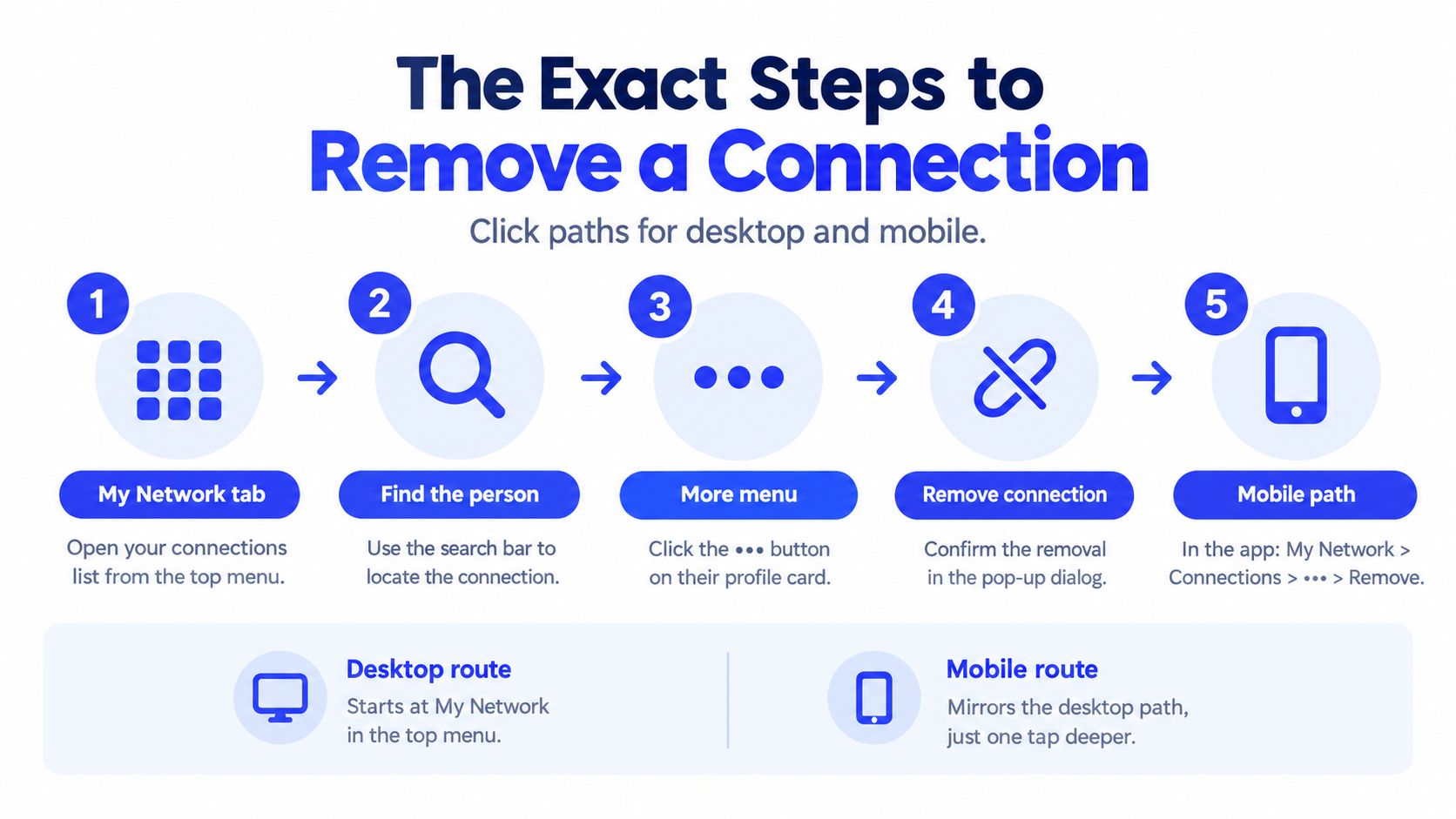
LinkedIn's official workflow has four actions: open the member's profile or your Connections list under My Network, click More or the three-dot menu, select Remove connection, then confirm in the Remove Connection popup (LinkedIn's documented removal path).
The fastest desktop route starts from your connection list. It avoids opening profiles one by one, which matters when you're reviewing a large set against a target account list.
Desktop path
Open My Network from the top LinkedIn menu.
Select your connection count to open the Connections list.
Search for the person by name.
Click More or the three-dot menu beside their name.
Select Remove connection, then confirm in the popup.
LinkedIn doesn't notify the other person when you remove the connection. They can send a new invitation later, and you can also reconnect by sending a new request. That reversibility applies to the relationship itself, not necessarily to the history attached to it.
Mobile path
In the LinkedIn app, open My Network, select Connections, search for the person, tap the three-dot menu, choose Remove connection, and confirm. The mobile route mirrors the desktop logic, with the connection list one tap deeper.
Sales Navigator path
Sales Navigator's help content repeats the same removal workflow as LinkedIn's core interface. The action is therefore a standard network function, not a premium-only cleanup capability. Start from your network or the member's profile, open More, choose Remove connection, and confirm.
Do the review before opening the menu. If you're working from a prospecting system that includes Apollo, Clay, HubSpot, or Sales Navigator, compare the profile against the account record first. A removed LinkedIn connection shouldn't unexpectedly become an unexplained gap in your relationship history.
For adjacent social-account hygiene, teams may also find this guide to delete inactive followers effectively useful. The operating principle is the same, review the account before removing it.
What you permanently lose when you hit remove
A new connection request can restore access to the relationship, but it doesn't guarantee restoration of the original network history. This is the point most cleanup projects miss.
When a connection is removed, skill endorsements and recommendations tied to that relationship can be lost irreversibly, even if both people reconnect later. For a founder or sales leader, that history may support enterprise credibility, referral confidence, and the social proof a prospect checks before accepting a meeting.
Audit the relationship before deleting it
Open the person's profile and check for:
Recommendations: Look for written references from customers, partners, executives, or respected peers.
Endorsements: Review whether the connection contributed meaningful skill validation.
Commercial context: Check your CRM, email history, and previous conversations before severing the link.
Future relevance: Consider whether their current role, company, or network could matter to your ICP later.
Here, LinkedIn network hygiene connects with CRM hygiene. Your CRM may retain a contact record after the LinkedIn connection disappears, but it won't recreate the social proof that was attached to the original relationship.
Don't confuse removal with account closure
LinkedIn distinguishes removing one connection from closing an account. Closing an account deletes connections, recommendations, endorsements, and messages altogether, according to LinkedIn's help documentation. That distinction matters when someone searches for a way to “delete a LinkedIn connection” but wants broader privacy or account cleanup.
Unfollowing is the safest option when you only want less content. Removal breaks the first-degree relationship. Account closure affects the entire network and its associated assets, so it should never be treated as a larger version of ordinary pruning.
Practical rule: If the contact has provided meaningful social proof, pause the cleanup and document the relationship before you remove anything.
The four-point checklist for network pruning
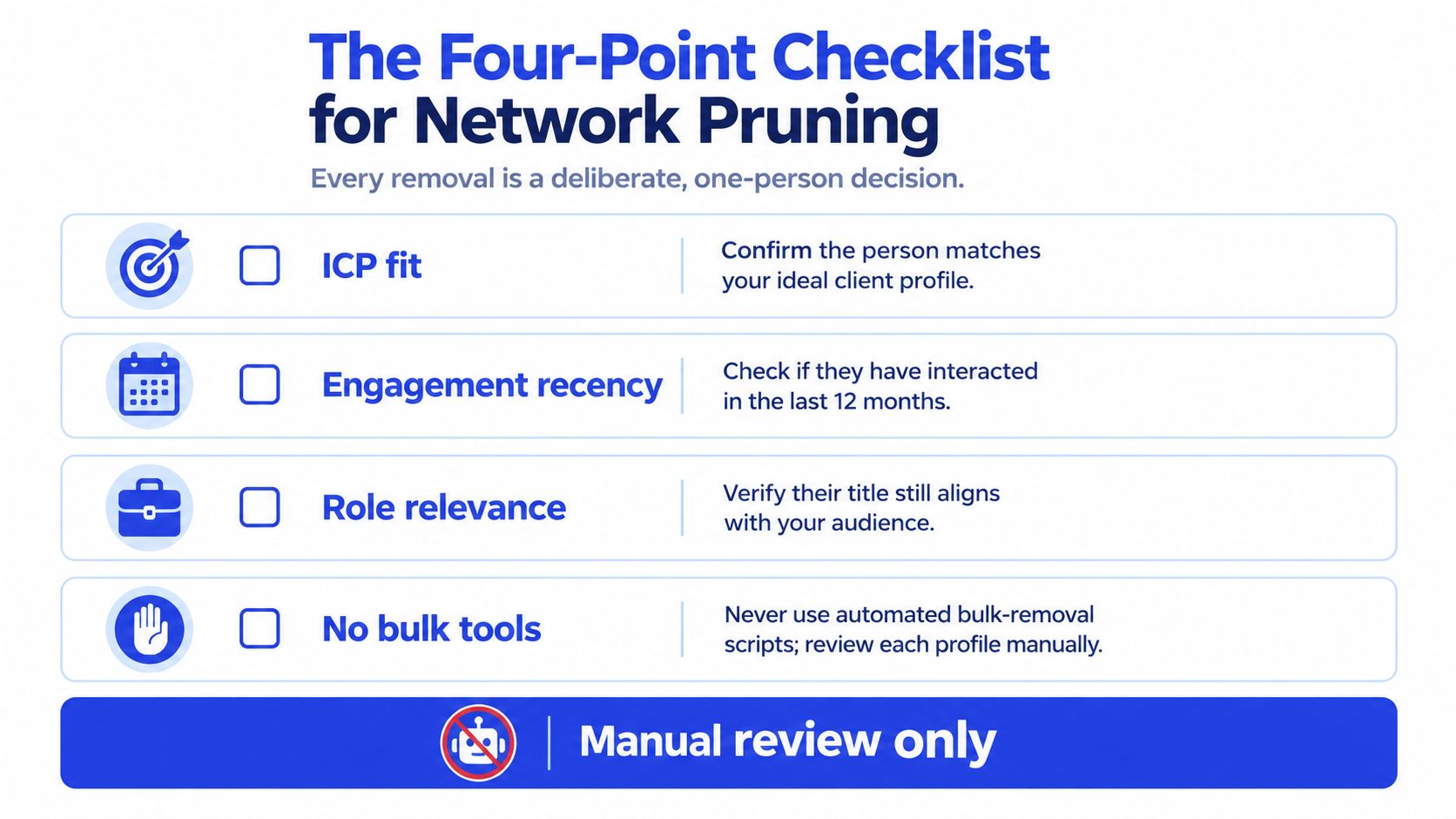
A sales rep sees a crowded LinkedIn network and starts removing people in batches. That creates pipeline risk. LinkedIn handles removal one connection at a time, so apply the same standard you use for account hygiene: make a person-level decision based on fit, risk, and relationship value.
A large network may need maintenance, but connection volume is not a qualification rule. Keep an audit trail for removals when the contact has touched an opportunity, referral path, or active account.
1. Content or person
Identify the actual problem before choosing an action. If irrelevant posts are the issue, unfollow. If the person sends automated pitches, spams your team, or creates brand risk in public conversations, removal may be appropriate.
This distinction protects potential buyers from being deleted because their content is irritating. Preserve the relationship when it still supports reach, access, or a credible commercial conversation.
2. Current or future ICP fit
Classify the contact against your buyer, referrer, partner, or useful industry connection criteria. Record the reason in your CRM or network notes, such as a target account, referral route, or market segment. Do not use current job title as the only filter. Role changes and account priorities can alter the value of a connection.
If the fit is plausible but the feed is distracting, unfollow rather than remove. The decision should protect qualified access without forcing the contact into an active sales sequence.
3. Relationship evidence
Review the relationship record before deleting. Check message history, opportunity activity, introductions, event conversations, and any notes shared with the account team. A quiet contact may still have a documented reason to remain in the network.
Apply the same record discipline used to clean an email list. A dormant record needs review, not automatic deletion. Removing a connection can also permanently eliminate recommendations attached to that relationship, so confirm that the loss is acceptable before clicking.
4. Remove or block
Use removal for network quality. Use blocking when the issue involves harassment, targeted abuse, repeated attacks on your audience, or conduct that creates a client-facing safety risk. Report the behavior where appropriate. Removal alone does not address a person who continues to target your team.
For broader identity and account hygiene, the guide to clean up your social profiles provides a separate framework. Keep the LinkedIn action tied to pipeline relevance, brand exposure, and personal safety.
Recovery after an accidental removal
If a valuable contact was removed, send a new invitation with a brief, honest note. Do not turn the recovery message into a pitch.
Lost you from my network during a cleanup. I'd love to stay connected.
The note acknowledges the mistake without starting a sales sequence. Prevention still matters because recommendations and other relationship signals may not return after removal.
Building a stricter connection acceptance system
The cleanest network is created before the invitation is accepted. Define the audience first, then judge each request against role, account, market, and likely commercial relevance. A founder in legal tech may need a different network boundary from a pharma RevOps leader, but neither should accept every profile just to increase reach.
Use one target list for each LinkedIn campaign. Match the list to your ICP and account strategy, then write connection notes that earn a conversation without pitching immediately. The same principle applies whether the follow-up runs through HubSpot, Apollo, Lemlist, Instantly, Smartlead, HeyReach, or Sales Navigator.
A practical acceptance gate
Before accepting or sending a request, ask:
Does this person work in or around the target account set?
Could their role influence a purchase, referral, partnership, or introduction?
Is their profile credible enough to support the quality of the network?
Is there a clear reason to stay connected if they don't reply?
Track acceptance quality, not only acceptance volume. The relevant outcome is whether the resulting network supports qualified conversations and content distribution among people who can affect revenue.
Use LinkedIn connection request messages to keep the opening relevant and non-promotional. A strict request standard reduces the need for future deletion and gives sales a cleaner audience for account-based messaging.
Review pending invitations this Friday. Reject obvious poor-fit requests, leave credible future prospects in place, and record a simple qualification reason in your CRM. That small operating habit is more valuable than a quarterly purge because it keeps network hygiene connected to pipeline decisions.
GROU is a global B2B pipeline agency trusted by more than 50 companies across iGaming, SaaS, manufacturing, and professional services. Its methodology connects ICP-aligned targeting, LinkedIn content, outbound execution, qualification rules, and transparent pipeline reporting into one operating system. Visit Grou to assess whether your network and outbound motion are creating qualified conversations rather than vanity activity.
Your LinkedIn network is growing, but the people seeing your posts and receiving your outreach don't match your ICP. The result is familiar: weak engagement, noisy feeds, and a connection list that looks healthy in volume while contributing little to pipeline.
Keep content problems separate from relationship problems. Unfollow noisy contacts instead of removing useful buyers or partners.
Use removal for clear network risks. Spam accounts, automated pitch profiles, and abusive participants deserve a closer review.
Follow LinkedIn's four-step removal path. The action is simple, but the decision before it should be deliberate.
Check recommendations and endorsements first. Reconnecting later won't restore every asset tied to the original relationship.
Fix acceptance rules before cleaning volume. A relevant network is built at the connection request stage.
Table of Contents
Why your network size is hurting your pipeline
A sales rep opens LinkedIn to find referral paths and buying signals, then spends time sorting through inactive accounts, unrelated roles, and profiles that never matched the ICP. The connection count looks healthy, yet the network produces little pipeline value.
The issue is the proportion of commercially relevant people in the list. B2B teams in SaaS, iGaming, manufacturing, legal tech, and pharma use their networks to support account selection, social proof, referrals, and outbound timing. A poorly qualified network makes each task slower and reduces confidence in the audience behind your posts.
Network limits also make indiscriminate growth a poor operating rule. LinkedIn's help documentation describes connection removal as an individual account action, separate from closing an account. Its example shows a Connections screen with “465 connections,” indicating that LinkedIn handles removal one connection at a time rather than through a built-in bulk cleanup flow. Review the official LinkedIn removal guidance for the current interface.
Fit matters more than the count
Independent data puts the average LinkedIn user at about 1,300 connections (Hootsuite's LinkedIn statistics). About 12% have more than 1,000 connections. 1.6% exceed 5,000 connections, the reported maximum for first-degree connections in those statistics. The figures make selective pruning a normal network hygiene task for active users.
At GROU, the operating principle is fit beats size. Buyers, referrers, partners, and credible peers create more pipeline value than contacts accepted without qualification. Removing a connection can also permanently discard relationship assets, including recommendations associated with that relationship, so deletion should follow a business rule rather than a mood.
Review performance at the audience level. High LinkedIn impressions with few qualified conversations usually warrant an examination of who receives and amplifies your content. Use this guide to LinkedIn impressions to separate visibility from commercial relevance.
Deciding between unfollow, remove, and block
Choose the lightest action that solves the actual problem. Removing someone because you dislike their content destroys a relationship that may still become commercially relevant later. Keeping a spam account because you want a bigger number creates a different risk.
Situation | Recommended action | Pipeline reason |
|---|---|---|
Their posts are irrelevant or repetitive | Unfollow | Keep the relationship while removing feed noise |
The account sends automated pitches or adds no credible value | Remove | Stop treating a poor-fit profile as part of your network |
The person is abusive, harasses people, or attacks your audience | Block and report | Protect your profile, team, and comment environment |
Use unfollow when the content is the issue
Unfollowing keeps the connection in place while stopping that person's posts from appearing in your feed. The relationship remains available, and the person may still see your content. That matters because roles change, companies reforecast, and a contact who isn't relevant today can become a buyer or referrer later.
This is the correct decision for a former colleague who posts too often, a vendor whose content no longer matches your focus, or a prospect whose updates are distracting you. Your feed stays cleaner without cutting off the underlying relationship.
Remove when the person creates network risk
Removal is appropriate for spam accounts, fake profiles, and connections used only to launch automated pitches. It also makes sense when someone repeatedly pitches your audience inside your comment threads or behaves in a way you wouldn't want a client to associate with your account.
The removal action isn't a substitute for qualification. Before clicking it, check whether the person could fit your ICP now or later, and whether the relationship contains recommendations or endorsements worth preserving.
Block when removal won't protect you
Blocking is the right response to abusive behavior or repeated harassment. Removal alone doesn't address the underlying conduct. If the person is actively creating a safety or reputation issue, block and report rather than treating the situation as ordinary list hygiene.
The broader concept is covered in this LinkedIn glossary entry, which is useful when aligning sales and marketing teams around the same network rules.
The exact steps to remove a connection
LinkedIn's official workflow has four actions: open the member's profile or your Connections list under My Network, click More or the three-dot menu, select Remove connection, then confirm in the Remove Connection popup (LinkedIn's documented removal path).
The fastest desktop route starts from your connection list. It avoids opening profiles one by one, which matters when you're reviewing a large set against a target account list.
Desktop path
Open My Network from the top LinkedIn menu.
Select your connection count to open the Connections list.
Search for the person by name.
Click More or the three-dot menu beside their name.
Select Remove connection, then confirm in the popup.
LinkedIn doesn't notify the other person when you remove the connection. They can send a new invitation later, and you can also reconnect by sending a new request. That reversibility applies to the relationship itself, not necessarily to the history attached to it.
Mobile path
In the LinkedIn app, open My Network, select Connections, search for the person, tap the three-dot menu, choose Remove connection, and confirm. The mobile route mirrors the desktop logic, with the connection list one tap deeper.
Sales Navigator path
Sales Navigator's help content repeats the same removal workflow as LinkedIn's core interface. The action is therefore a standard network function, not a premium-only cleanup capability. Start from your network or the member's profile, open More, choose Remove connection, and confirm.
Do the review before opening the menu. If you're working from a prospecting system that includes Apollo, Clay, HubSpot, or Sales Navigator, compare the profile against the account record first. A removed LinkedIn connection shouldn't unexpectedly become an unexplained gap in your relationship history.
For adjacent social-account hygiene, teams may also find this guide to delete inactive followers effectively useful. The operating principle is the same, review the account before removing it.
What you permanently lose when you hit remove
A new connection request can restore access to the relationship, but it doesn't guarantee restoration of the original network history. This is the point most cleanup projects miss.
When a connection is removed, skill endorsements and recommendations tied to that relationship can be lost irreversibly, even if both people reconnect later. For a founder or sales leader, that history may support enterprise credibility, referral confidence, and the social proof a prospect checks before accepting a meeting.
Audit the relationship before deleting it
Open the person's profile and check for:
Recommendations: Look for written references from customers, partners, executives, or respected peers.
Endorsements: Review whether the connection contributed meaningful skill validation.
Commercial context: Check your CRM, email history, and previous conversations before severing the link.
Future relevance: Consider whether their current role, company, or network could matter to your ICP later.
Here, LinkedIn network hygiene connects with CRM hygiene. Your CRM may retain a contact record after the LinkedIn connection disappears, but it won't recreate the social proof that was attached to the original relationship.
Don't confuse removal with account closure
LinkedIn distinguishes removing one connection from closing an account. Closing an account deletes connections, recommendations, endorsements, and messages altogether, according to LinkedIn's help documentation. That distinction matters when someone searches for a way to “delete a LinkedIn connection” but wants broader privacy or account cleanup.
Unfollowing is the safest option when you only want less content. Removal breaks the first-degree relationship. Account closure affects the entire network and its associated assets, so it should never be treated as a larger version of ordinary pruning.
Practical rule: If the contact has provided meaningful social proof, pause the cleanup and document the relationship before you remove anything.
The four-point checklist for network pruning
A sales rep sees a crowded LinkedIn network and starts removing people in batches. That creates pipeline risk. LinkedIn handles removal one connection at a time, so apply the same standard you use for account hygiene: make a person-level decision based on fit, risk, and relationship value.
A large network may need maintenance, but connection volume is not a qualification rule. Keep an audit trail for removals when the contact has touched an opportunity, referral path, or active account.
1. Content or person
Identify the actual problem before choosing an action. If irrelevant posts are the issue, unfollow. If the person sends automated pitches, spams your team, or creates brand risk in public conversations, removal may be appropriate.
This distinction protects potential buyers from being deleted because their content is irritating. Preserve the relationship when it still supports reach, access, or a credible commercial conversation.
2. Current or future ICP fit
Classify the contact against your buyer, referrer, partner, or useful industry connection criteria. Record the reason in your CRM or network notes, such as a target account, referral route, or market segment. Do not use current job title as the only filter. Role changes and account priorities can alter the value of a connection.
If the fit is plausible but the feed is distracting, unfollow rather than remove. The decision should protect qualified access without forcing the contact into an active sales sequence.
3. Relationship evidence
Review the relationship record before deleting. Check message history, opportunity activity, introductions, event conversations, and any notes shared with the account team. A quiet contact may still have a documented reason to remain in the network.
Apply the same record discipline used to clean an email list. A dormant record needs review, not automatic deletion. Removing a connection can also permanently eliminate recommendations attached to that relationship, so confirm that the loss is acceptable before clicking.
4. Remove or block
Use removal for network quality. Use blocking when the issue involves harassment, targeted abuse, repeated attacks on your audience, or conduct that creates a client-facing safety risk. Report the behavior where appropriate. Removal alone does not address a person who continues to target your team.
For broader identity and account hygiene, the guide to clean up your social profiles provides a separate framework. Keep the LinkedIn action tied to pipeline relevance, brand exposure, and personal safety.
Recovery after an accidental removal
If a valuable contact was removed, send a new invitation with a brief, honest note. Do not turn the recovery message into a pitch.
Lost you from my network during a cleanup. I'd love to stay connected.
The note acknowledges the mistake without starting a sales sequence. Prevention still matters because recommendations and other relationship signals may not return after removal.
Building a stricter connection acceptance system
The cleanest network is created before the invitation is accepted. Define the audience first, then judge each request against role, account, market, and likely commercial relevance. A founder in legal tech may need a different network boundary from a pharma RevOps leader, but neither should accept every profile just to increase reach.
Use one target list for each LinkedIn campaign. Match the list to your ICP and account strategy, then write connection notes that earn a conversation without pitching immediately. The same principle applies whether the follow-up runs through HubSpot, Apollo, Lemlist, Instantly, Smartlead, HeyReach, or Sales Navigator.
A practical acceptance gate
Before accepting or sending a request, ask:
Does this person work in or around the target account set?
Could their role influence a purchase, referral, partnership, or introduction?
Is their profile credible enough to support the quality of the network?
Is there a clear reason to stay connected if they don't reply?
Track acceptance quality, not only acceptance volume. The relevant outcome is whether the resulting network supports qualified conversations and content distribution among people who can affect revenue.
Use LinkedIn connection request messages to keep the opening relevant and non-promotional. A strict request standard reduces the need for future deletion and gives sales a cleaner audience for account-based messaging.
Review pending invitations this Friday. Reject obvious poor-fit requests, leave credible future prospects in place, and record a simple qualification reason in your CRM. That small operating habit is more valuable than a quarterly purge because it keeps network hygiene connected to pipeline decisions.
GROU is a global B2B pipeline agency trusted by more than 50 companies across iGaming, SaaS, manufacturing, and professional services. Its methodology connects ICP-aligned targeting, LinkedIn content, outbound execution, qualification rules, and transparent pipeline reporting into one operating system. Visit Grou to assess whether your network and outbound motion are creating qualified conversations rather than vanity activity.
Your LinkedIn network is growing, but the people seeing your posts and receiving your outreach don't match your ICP. The result is familiar: weak engagement, noisy feeds, and a connection list that looks healthy in volume while contributing little to pipeline.
Keep content problems separate from relationship problems. Unfollow noisy contacts instead of removing useful buyers or partners.
Use removal for clear network risks. Spam accounts, automated pitch profiles, and abusive participants deserve a closer review.
Follow LinkedIn's four-step removal path. The action is simple, but the decision before it should be deliberate.
Check recommendations and endorsements first. Reconnecting later won't restore every asset tied to the original relationship.
Fix acceptance rules before cleaning volume. A relevant network is built at the connection request stage.
Table of Contents
Why your network size is hurting your pipeline
A sales rep opens LinkedIn to find referral paths and buying signals, then spends time sorting through inactive accounts, unrelated roles, and profiles that never matched the ICP. The connection count looks healthy, yet the network produces little pipeline value.
The issue is the proportion of commercially relevant people in the list. B2B teams in SaaS, iGaming, manufacturing, legal tech, and pharma use their networks to support account selection, social proof, referrals, and outbound timing. A poorly qualified network makes each task slower and reduces confidence in the audience behind your posts.
Network limits also make indiscriminate growth a poor operating rule. LinkedIn's help documentation describes connection removal as an individual account action, separate from closing an account. Its example shows a Connections screen with “465 connections,” indicating that LinkedIn handles removal one connection at a time rather than through a built-in bulk cleanup flow. Review the official LinkedIn removal guidance for the current interface.
Fit matters more than the count
Independent data puts the average LinkedIn user at about 1,300 connections (Hootsuite's LinkedIn statistics). About 12% have more than 1,000 connections. 1.6% exceed 5,000 connections, the reported maximum for first-degree connections in those statistics. The figures make selective pruning a normal network hygiene task for active users.
At GROU, the operating principle is fit beats size. Buyers, referrers, partners, and credible peers create more pipeline value than contacts accepted without qualification. Removing a connection can also permanently discard relationship assets, including recommendations associated with that relationship, so deletion should follow a business rule rather than a mood.
Review performance at the audience level. High LinkedIn impressions with few qualified conversations usually warrant an examination of who receives and amplifies your content. Use this guide to LinkedIn impressions to separate visibility from commercial relevance.
Deciding between unfollow, remove, and block
Choose the lightest action that solves the actual problem. Removing someone because you dislike their content destroys a relationship that may still become commercially relevant later. Keeping a spam account because you want a bigger number creates a different risk.
Situation | Recommended action | Pipeline reason |
|---|---|---|
Their posts are irrelevant or repetitive | Unfollow | Keep the relationship while removing feed noise |
The account sends automated pitches or adds no credible value | Remove | Stop treating a poor-fit profile as part of your network |
The person is abusive, harasses people, or attacks your audience | Block and report | Protect your profile, team, and comment environment |
Use unfollow when the content is the issue
Unfollowing keeps the connection in place while stopping that person's posts from appearing in your feed. The relationship remains available, and the person may still see your content. That matters because roles change, companies reforecast, and a contact who isn't relevant today can become a buyer or referrer later.
This is the correct decision for a former colleague who posts too often, a vendor whose content no longer matches your focus, or a prospect whose updates are distracting you. Your feed stays cleaner without cutting off the underlying relationship.
Remove when the person creates network risk
Removal is appropriate for spam accounts, fake profiles, and connections used only to launch automated pitches. It also makes sense when someone repeatedly pitches your audience inside your comment threads or behaves in a way you wouldn't want a client to associate with your account.
The removal action isn't a substitute for qualification. Before clicking it, check whether the person could fit your ICP now or later, and whether the relationship contains recommendations or endorsements worth preserving.
Block when removal won't protect you
Blocking is the right response to abusive behavior or repeated harassment. Removal alone doesn't address the underlying conduct. If the person is actively creating a safety or reputation issue, block and report rather than treating the situation as ordinary list hygiene.
The broader concept is covered in this LinkedIn glossary entry, which is useful when aligning sales and marketing teams around the same network rules.
The exact steps to remove a connection
LinkedIn's official workflow has four actions: open the member's profile or your Connections list under My Network, click More or the three-dot menu, select Remove connection, then confirm in the Remove Connection popup (LinkedIn's documented removal path).
The fastest desktop route starts from your connection list. It avoids opening profiles one by one, which matters when you're reviewing a large set against a target account list.
Desktop path
Open My Network from the top LinkedIn menu.
Select your connection count to open the Connections list.
Search for the person by name.
Click More or the three-dot menu beside their name.
Select Remove connection, then confirm in the popup.
LinkedIn doesn't notify the other person when you remove the connection. They can send a new invitation later, and you can also reconnect by sending a new request. That reversibility applies to the relationship itself, not necessarily to the history attached to it.
Mobile path
In the LinkedIn app, open My Network, select Connections, search for the person, tap the three-dot menu, choose Remove connection, and confirm. The mobile route mirrors the desktop logic, with the connection list one tap deeper.
Sales Navigator path
Sales Navigator's help content repeats the same removal workflow as LinkedIn's core interface. The action is therefore a standard network function, not a premium-only cleanup capability. Start from your network or the member's profile, open More, choose Remove connection, and confirm.
Do the review before opening the menu. If you're working from a prospecting system that includes Apollo, Clay, HubSpot, or Sales Navigator, compare the profile against the account record first. A removed LinkedIn connection shouldn't unexpectedly become an unexplained gap in your relationship history.
For adjacent social-account hygiene, teams may also find this guide to delete inactive followers effectively useful. The operating principle is the same, review the account before removing it.
What you permanently lose when you hit remove
A new connection request can restore access to the relationship, but it doesn't guarantee restoration of the original network history. This is the point most cleanup projects miss.
When a connection is removed, skill endorsements and recommendations tied to that relationship can be lost irreversibly, even if both people reconnect later. For a founder or sales leader, that history may support enterprise credibility, referral confidence, and the social proof a prospect checks before accepting a meeting.
Audit the relationship before deleting it
Open the person's profile and check for:
Recommendations: Look for written references from customers, partners, executives, or respected peers.
Endorsements: Review whether the connection contributed meaningful skill validation.
Commercial context: Check your CRM, email history, and previous conversations before severing the link.
Future relevance: Consider whether their current role, company, or network could matter to your ICP later.
Here, LinkedIn network hygiene connects with CRM hygiene. Your CRM may retain a contact record after the LinkedIn connection disappears, but it won't recreate the social proof that was attached to the original relationship.
Don't confuse removal with account closure
LinkedIn distinguishes removing one connection from closing an account. Closing an account deletes connections, recommendations, endorsements, and messages altogether, according to LinkedIn's help documentation. That distinction matters when someone searches for a way to “delete a LinkedIn connection” but wants broader privacy or account cleanup.
Unfollowing is the safest option when you only want less content. Removal breaks the first-degree relationship. Account closure affects the entire network and its associated assets, so it should never be treated as a larger version of ordinary pruning.
Practical rule: If the contact has provided meaningful social proof, pause the cleanup and document the relationship before you remove anything.
The four-point checklist for network pruning
A sales rep sees a crowded LinkedIn network and starts removing people in batches. That creates pipeline risk. LinkedIn handles removal one connection at a time, so apply the same standard you use for account hygiene: make a person-level decision based on fit, risk, and relationship value.
A large network may need maintenance, but connection volume is not a qualification rule. Keep an audit trail for removals when the contact has touched an opportunity, referral path, or active account.
1. Content or person
Identify the actual problem before choosing an action. If irrelevant posts are the issue, unfollow. If the person sends automated pitches, spams your team, or creates brand risk in public conversations, removal may be appropriate.
This distinction protects potential buyers from being deleted because their content is irritating. Preserve the relationship when it still supports reach, access, or a credible commercial conversation.
2. Current or future ICP fit
Classify the contact against your buyer, referrer, partner, or useful industry connection criteria. Record the reason in your CRM or network notes, such as a target account, referral route, or market segment. Do not use current job title as the only filter. Role changes and account priorities can alter the value of a connection.
If the fit is plausible but the feed is distracting, unfollow rather than remove. The decision should protect qualified access without forcing the contact into an active sales sequence.
3. Relationship evidence
Review the relationship record before deleting. Check message history, opportunity activity, introductions, event conversations, and any notes shared with the account team. A quiet contact may still have a documented reason to remain in the network.
Apply the same record discipline used to clean an email list. A dormant record needs review, not automatic deletion. Removing a connection can also permanently eliminate recommendations attached to that relationship, so confirm that the loss is acceptable before clicking.
4. Remove or block
Use removal for network quality. Use blocking when the issue involves harassment, targeted abuse, repeated attacks on your audience, or conduct that creates a client-facing safety risk. Report the behavior where appropriate. Removal alone does not address a person who continues to target your team.
For broader identity and account hygiene, the guide to clean up your social profiles provides a separate framework. Keep the LinkedIn action tied to pipeline relevance, brand exposure, and personal safety.
Recovery after an accidental removal
If a valuable contact was removed, send a new invitation with a brief, honest note. Do not turn the recovery message into a pitch.
Lost you from my network during a cleanup. I'd love to stay connected.
The note acknowledges the mistake without starting a sales sequence. Prevention still matters because recommendations and other relationship signals may not return after removal.
Building a stricter connection acceptance system
The cleanest network is created before the invitation is accepted. Define the audience first, then judge each request against role, account, market, and likely commercial relevance. A founder in legal tech may need a different network boundary from a pharma RevOps leader, but neither should accept every profile just to increase reach.
Use one target list for each LinkedIn campaign. Match the list to your ICP and account strategy, then write connection notes that earn a conversation without pitching immediately. The same principle applies whether the follow-up runs through HubSpot, Apollo, Lemlist, Instantly, Smartlead, HeyReach, or Sales Navigator.
A practical acceptance gate
Before accepting or sending a request, ask:
Does this person work in or around the target account set?
Could their role influence a purchase, referral, partnership, or introduction?
Is their profile credible enough to support the quality of the network?
Is there a clear reason to stay connected if they don't reply?
Track acceptance quality, not only acceptance volume. The relevant outcome is whether the resulting network supports qualified conversations and content distribution among people who can affect revenue.
Use LinkedIn connection request messages to keep the opening relevant and non-promotional. A strict request standard reduces the need for future deletion and gives sales a cleaner audience for account-based messaging.
Review pending invitations this Friday. Reject obvious poor-fit requests, leave credible future prospects in place, and record a simple qualification reason in your CRM. That small operating habit is more valuable than a quarterly purge because it keeps network hygiene connected to pipeline decisions.
GROU is a global B2B pipeline agency trusted by more than 50 companies across iGaming, SaaS, manufacturing, and professional services. Its methodology connects ICP-aligned targeting, LinkedIn content, outbound execution, qualification rules, and transparent pipeline reporting into one operating system. Visit Grou to assess whether your network and outbound motion are creating qualified conversations rather than vanity activity.

Pipeline OS Newsletter
Build qualified pipeline
Get weekly tactics to generate demand, improve lead quality, and book more meetings.





Trusted by industry leaders
Trusted by industry leaders
Trusted by industry leaders
Ready to build qualified pipeline?
Ready to build qualified pipeline?
Ready to build qualified pipeline?
Book a call to see if we're the right fit, or take the 2-minute quiz to get a clear starting point.
Book a call to see if we're the right fit, or take the 2-minute quiz to get a clear starting point.
Book a call to see if we're the right fit, or take the 2-minute quiz to get a clear starting point.
" height="30.21639343089746px" id="hfGbXmQR2" width="30.216393430897455px"/></svg>)
Copyright © 2026 – All Right Reserved
Copyright © 2026 – All Right Reserved
Copyright © 2026 – All Right Reserved