%22%3E%3C/path%3E%3Cpath d=%22M 63.072 7.554 C 62.258 8.022 61.577 8.689 61.092 9.493 L 61.092 7.076 L 57.158 7.076 L 57.158 22.64 L 61.089 22.64 L 61.089 14.888 C 61.089 13.446 61.403 12.434 62.03 11.853 C 62.818 11.218 63.818 10.907 64.826 10.982 L 65.868 10.982 L 65.868 6.851 C 64.891 6.834 63.926 7.076 63.073 7.554 Z%22 fill=%22rgb(17,17,17)%22%3E%3C/path%3E%3Cpath d=%22M 78.916 7.82 C 76.363 6.49 73.321 6.49 70.768 7.82 C 69.562 8.473 68.564 9.451 67.888 10.644 C 67.167 11.931 66.803 13.387 66.834 14.862 C 66.804 16.332 67.157 17.785 67.86 19.077 C 68.515 20.267 69.494 21.246 70.684 21.901 C 71.924 22.576 73.318 22.92 74.73 22.898 C 76.164 22.918 77.58 22.575 78.846 21.901 C 80.062 21.247 81.073 20.27 81.768 19.077 C 82.506 17.797 82.88 16.339 82.85 14.862 C 82.88 13.389 82.517 11.934 81.797 10.647 C 81.12 9.455 80.122 8.477 78.917 7.824 M 78.803 14.862 C 78.829 15.739 78.636 16.608 78.241 17.391 C 77.903 18.046 77.38 18.588 76.738 18.95 C 76.124 19.293 75.432 19.472 74.729 19.47 C 73.668 19.497 72.648 19.061 71.934 18.276 C 71.139 17.323 70.741 16.1 70.823 14.862 C 70.741 13.62 71.149 12.395 71.959 11.45 C 72.687 10.667 73.715 10.233 74.783 10.256 C 75.859 10.236 76.894 10.67 77.635 11.45 C 78.464 12.387 78.884 13.616 78.801 14.864%22 fill=%22rgb(17,17,17)%22%3E%3C/path%3E%3Cpath d=%22M 95.906 7.076 L 95.906 15.646 C 95.975 16.68 95.643 17.701 94.979 18.498 C 94.311 19.184 93.379 19.547 92.422 19.495 C 91.475 19.544 90.553 19.18 89.894 18.498 C 89.23 17.701 88.898 16.68 88.967 15.646 L 88.967 7.076 L 85.033 7.076 L 85.033 16.207 C 85 17.449 85.275 18.68 85.834 19.79 C 86.327 20.75 87.095 21.542 88.039 22.065 C 89.033 22.594 90.145 22.861 91.271 22.838 C 92.188 22.847 93.095 22.65 93.926 22.263 C 94.708 21.905 95.388 21.36 95.906 20.675 L 95.906 22.645 L 99.865 22.645 L 99.865 7.076 Z%22 fill=%22rgb(17,17,17)%22%3E%3C/path%3E%3Cpath d=%22M 4.513 15.626 C 4.511 10.815 7.606 6.549 12.181 5.059 C 16.756 3.57 21.77 5.195 24.601 9.086 L 27.816 5.87 C 24.074 1.186 17.981 -0.943 12.137 0.393 C 6.292 1.728 1.728 6.292 0.393 12.137 C -0.943 17.981 1.186 24.074 5.87 27.816 L 9.085 24.601 C 6.214 22.512 4.515 19.177 4.513 15.626%22 fill=%22rgb(32,62,235)%22%3E%3C/path%3E%3Cpath d=%22M 17.114 14.343 L 13.354 18.01 L 13.354 18.026 L 21.071 18.026 L 11.412 27.609 L 17.389 27.609 L 23.999 21.081 L 23.999 28.316 L 24.005 28.316 L 27.967 24.393 L 27.967 14.343 Z%22 fill=%22rgb(32,62,235)%22%3E%3C/path%3E%3C/g%3E%3C/svg%3E) ×
× ××
××›
›
›
›
How do you connect on LinkedIn? The B2B strategy that gets accepted in 2026
How do you connect on LinkedIn? The B2B strategy that gets accepted in 2026
How do you connect on LinkedIn? The B2B strategy that gets accepted in 2026
How do you connect on LinkedIn? The B2B strategy that gets accepted in 2026
How do you connect on LinkedIn? The B2B strategy that gets accepted in 2026
How do you connect on LinkedIn? The B2B strategy that gets accepted in 2026

Author
Aljaz Peklaj

Your LinkedIn connection requests probably aren't failing because the copy is weak. They're failing because the system behind the copy is weak. If you're sending founder or sales-led outreach into iGaming, SaaS, manufacturing, legal tech, or pharma, the issue is usually the same. Random targeting, fake personalization, then a pitch too early.
Publish before outreach, because profiles with at least 3 recent posts and comments see a 40% higher acceptance rate, while 85% of cold connection requests are rejected from profiles lacking recent activity or content, per Three Ears Media
Build lists from signals, not just firmographics, then send notes under LinkedIn's 300-character limit using a real trigger and a soft ask, based on Botdog's connection request guidance
Follow up in a sequence, not with an instant pitch. The strongest structure is Day 0 thank-you, Days 3-7 engagement, then Days 7-14 value-driven outreach, as outlined by Draftboard
Scale with tiers. Use Sales Navigator, Clay, Apollo, HeyReach, HubSpot, and human review so structure turns attention into pipeline
Table of Contents
The truth about personalization in connection requests
Most LinkedIn “personalization” is just template decoration. First name, company name, maybe a line about their university, then a disguised sales pitch. Astute buyers see that pattern immediately, especially in sectors where outbound volume is high.
Why most LinkedIn personalization fails
The common advice is still wrong. Mentioning a past employer, location, or alma mater doesn't signal attention. It signals that someone skimmed the profile and pasted a field into a sequence.
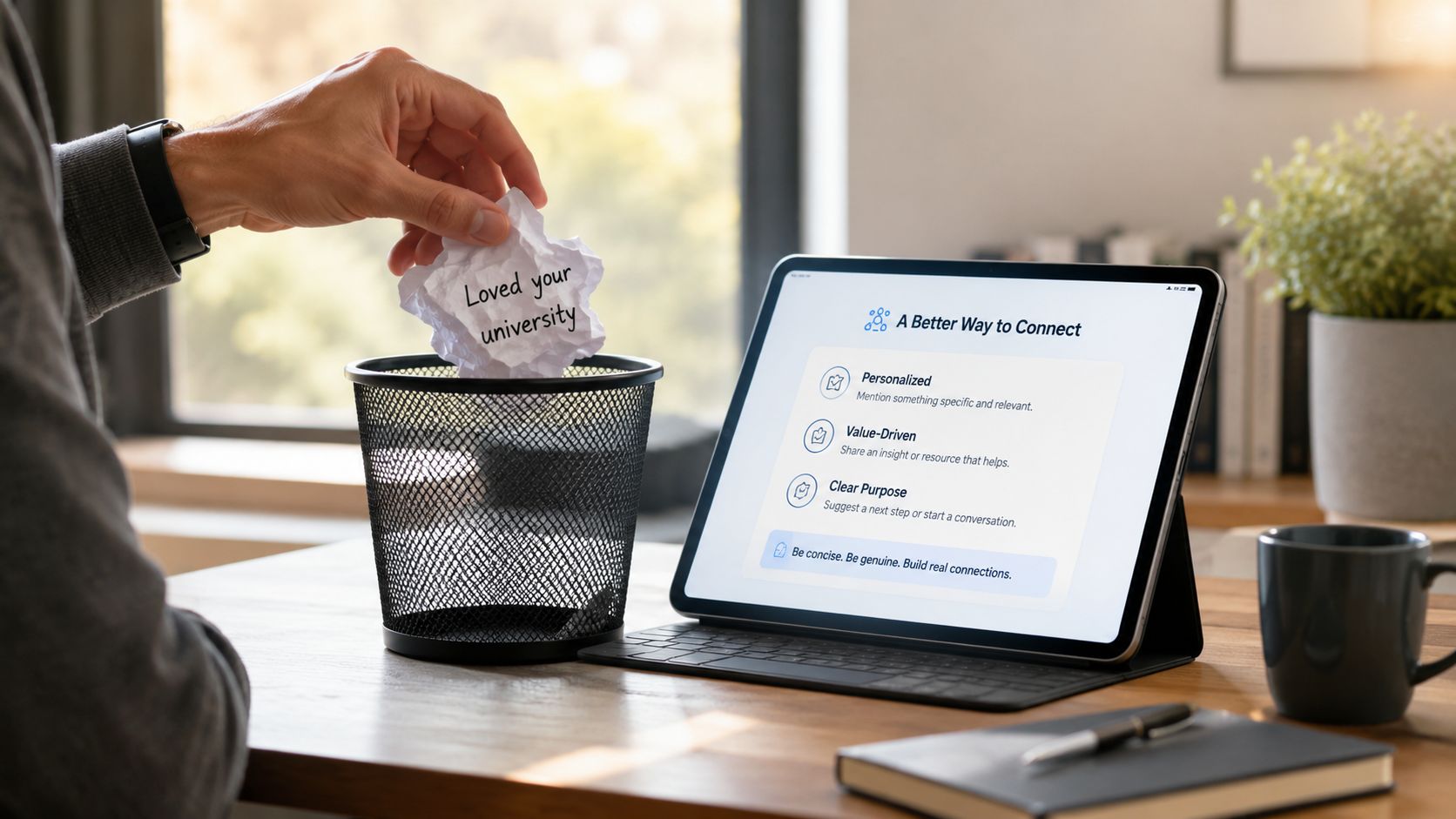
A better question than “how do you connect on LinkedIn” is this: what proof can you show, in one sentence, that you looked at the person's current context? That's the only personalization that still carries weight in B2B.
The profile also has to look alive before you reach out. Most content tells users to send requests immediately, but fails to enforce that 85% of cold connection requests are rejected from profiles lacking recent activity or content. Profiles with at least 3 recent posts and comments see a 40% higher acceptance rate, according to Three Ears Media's networking analysis.
Practical rule: Don't send cold connection requests from a profile that hasn't posted recently. You'll look like a rented identity, not a real operator.
If your team is still treating merge fields as personalization, fix that first. A useful framing is this first line personalisation reference, but the working standard is simpler. The line has to prove attention to something current, specific, and verifiable.
The message structure that actually gets accepted
The structure that works is short:
Verifiable observation → a recent post, role change, hiring movement, or company shift
Peer-level reason → why being connected makes sense, without a pitch
No-agenda close → remove pressure
That sounds basic, but it's common to skip the hard part, which is the observation. “Saw you're in legal tech” is not an observation. “Caught your post on pipeline quality last week” is.
Here's the standard I'd hold across founder-led and revenue-led outreach:
Saw your team brought on several SDRs recently. Working with similar revenue teams dealing with the same scaling pressure, thought it'd be worth being connected. No agenda.
That works because it doesn't pretend intimacy. It signals relevance, keeps status balanced, and avoids the usual ask inflation. No meeting link. No “would love to connect.” No compliment that reads like flattery.
The trade-off is time. Real personalization takes research. It won't scale to thousands of requests a week without quality dropping. That's fine. Connection acceptance isn't the point. Qualified conversations are.
Finding prospects who are ready to connect
A strong note sent to the wrong prospect is still wasted work. The list decides more than the copy does. For B2B teams, that means stopping the habit of building lists only from title, company size, and industry, then hoping the message carries the load.
Start with list quality, not message quality
LinkedIn is huge. The platform reached 1.3 billion+ global registered members in January 2026, with 310 million monthly active users, 69 million registered companies, and a hard cap of 30,000 first-degree connections per profile, according to LinkedIn stats compiled by Joe Apfelbaum. Scale isn't the issue. Selection is.
Sales Navigator should be your base layer. Use filters for location, company size, job title, industry, and shared background. Then narrow to the accounts where your offer fits the current operating context. In GROU programs, that usually means one of two things. A current pain signal, or a current change signal.
Two profile factors matter before you even message someone. Members who list their current job position receive up to 5x more connection requests, and profiles with at least five relevant skills are more than 31 times more likely to be discovered and receive a message, based on Kinsta's LinkedIn statistics roundup. That's useful in two ways. It tells you which prospects are active enough to engage, and it tells you whether your own sender profile is set up to be accepted.
If the founder or AE profile is weak, fix that before sequence work starts. This LinkedIn personal branding guide is a good resource for tightening the public layer buyers see before they decide to accept.
Build a signal layer on top of Sales Navigator
Firmographics get you to the right neighborhood. Signals get you to the right door. The cleanest setup is:
Sales Navigator for account and contact filtering
Clay for signal monitoring and enrichment
Apollo for account context and channel overlap
HubSpot for status tracking and reply routing
The signals worth watching are the ones you can reference without sounding manufactured:
Recent posts about pipeline, hiring, expansion, GTM friction, compliance pressure
Role changes where the new hire likely owns a fresh mandate
Team buildout that suggests process strain
Comment behavior that shows current topic interest
A useful internal standard is to tag each prospect with one intent signal definition before they enter outreach. If the trigger field is empty, they don't get a “personalized” note. They either wait, or they move into a simpler no-agenda request.
High-signal lists outperform large cold lists because relevance is doing the work before the message arrives.
Many teams get impatient. They want volume fast, so they skip signal collection and send generic invites. That creates activity in the CRM, not pipeline. If you're targeting pharma operators, manufacturing leaders, or legal tech executives, low-context outreach gets ignored even faster because these buyers pattern-match weak outreach immediately.
Crafting the 300-character connection message
A prospect sees your name, headline, company, and 300 characters. That is the whole decision environment. If the note tries to explain your product, prove your credentials, and ask for time, acceptance rates drop because the ask feels bigger than the click.
The job of the connection note is narrower. Confirm relevance. Show a credible reason to connect. Keep the pressure near zero.
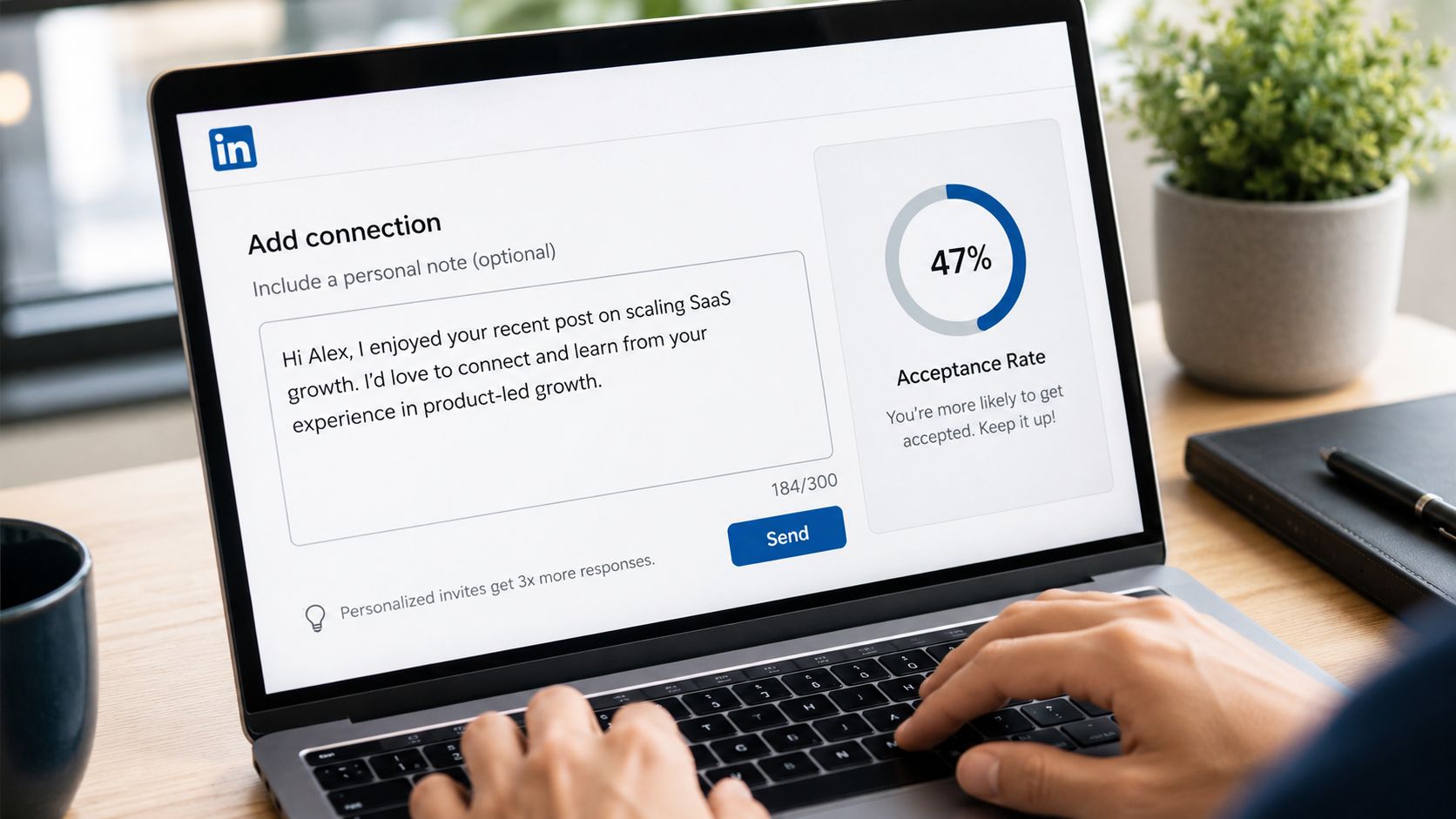
The structure I'd use every time
I use a three-part format because it forces discipline inside the character limit:
Part | What it does | Example |
|---|---|---|
Observation | Shows a real trigger | Saw your post on Q1 pipeline gaps |
Reason | Explains why the connection makes sense | I work with revenue teams dealing with the same issue |
Close | Keeps the ask light | Thought it made sense to connect |
That format works because each line has a job. The observation proves the note came from a real signal. The reason gives context without turning into a pitch. The close asks for the smallest possible commitment.
The trade-off is simple. The shorter note gets more accepts. The longer note gives more context, but it often lowers acceptance because prospects can smell an outbound sequence before they click.
B2B SDR teams usually ruin this step by stuffing in company background, product category, social proof, and a meeting ask. Cut all of it. If you want examples of short messages that still carry intent, these messaging strategy examples are useful. For LinkedIn-specific patterns, this connection request message breakdown shows the format in more detail.
A message format tied to pipeline, not vanity acceptance
I care less about raw acceptance rate than accept-to-reply and accept-to-meeting rate. A note can get accepted because it is harmless. That does not mean it started a sales conversation.
The better test is whether the note sets up the next message cleanly. If the trigger in the note matches the trigger in the follow-up, reply quality improves because the conversation feels consistent instead of scripted.
A strong example looks like this:
Saw your post on the Q1 pipeline gap. I work with revenue leaders working through the same issue. Thought it made sense to connect.
Why this format works:
The trigger is specific. It references one observable event, not generic profile scraping.
The reason is peer-based. It frames shared context without forcing authority.
The close stays light. No call request, no teaser pitch, no fake familiarity.
The next step is clear. The post-accept DM can continue the same thread without changing context.
That last point matters more than copywriters tend to admit. Connection notes do not produce pipeline by themselves. They produce pipeline when the note, sender profile, and follow-up sequence all match the same buying signal.
Later in the section, it helps to see the mechanics explained live:
What to remove from your connection note
These are the first things I cut in reviews:
Greeting filler. “Hi [name], hope you're doing well” wastes characters and reads templated.
Profile praise. “Impressive background” signals low-effort flattery.
Product language. Category terms and feature hints make the note feel like a disguised pitch.
Calendar asks. Asking for time inside the connection request is too much, too early.
Weak mutual connection references. If the relationship is thin, the note feels manipulative.
One more rule. If the note only works because of clever wording, it is fragile. If it works because it is tied to a recent signal, a credible sender, and a clean follow-up path, it scales.
If you're asking how do you connect on LinkedIn in a way that turns into meetings, write the note to earn the accept and set up the next touch. That is the system.
Executing the post-connection follow-up sequence
A prospect accepts your request at 9:12 AM. By 9:13, a rep sends a product pitch. Reply rates collapse because the buyer has not agreed to have a sales conversation yet. Wait ten days with no touch, and the trigger that got the accept is gone.
The post-accept sequence decides whether a new connection turns into pipeline or turns into another silent contact in Sales Navigator.
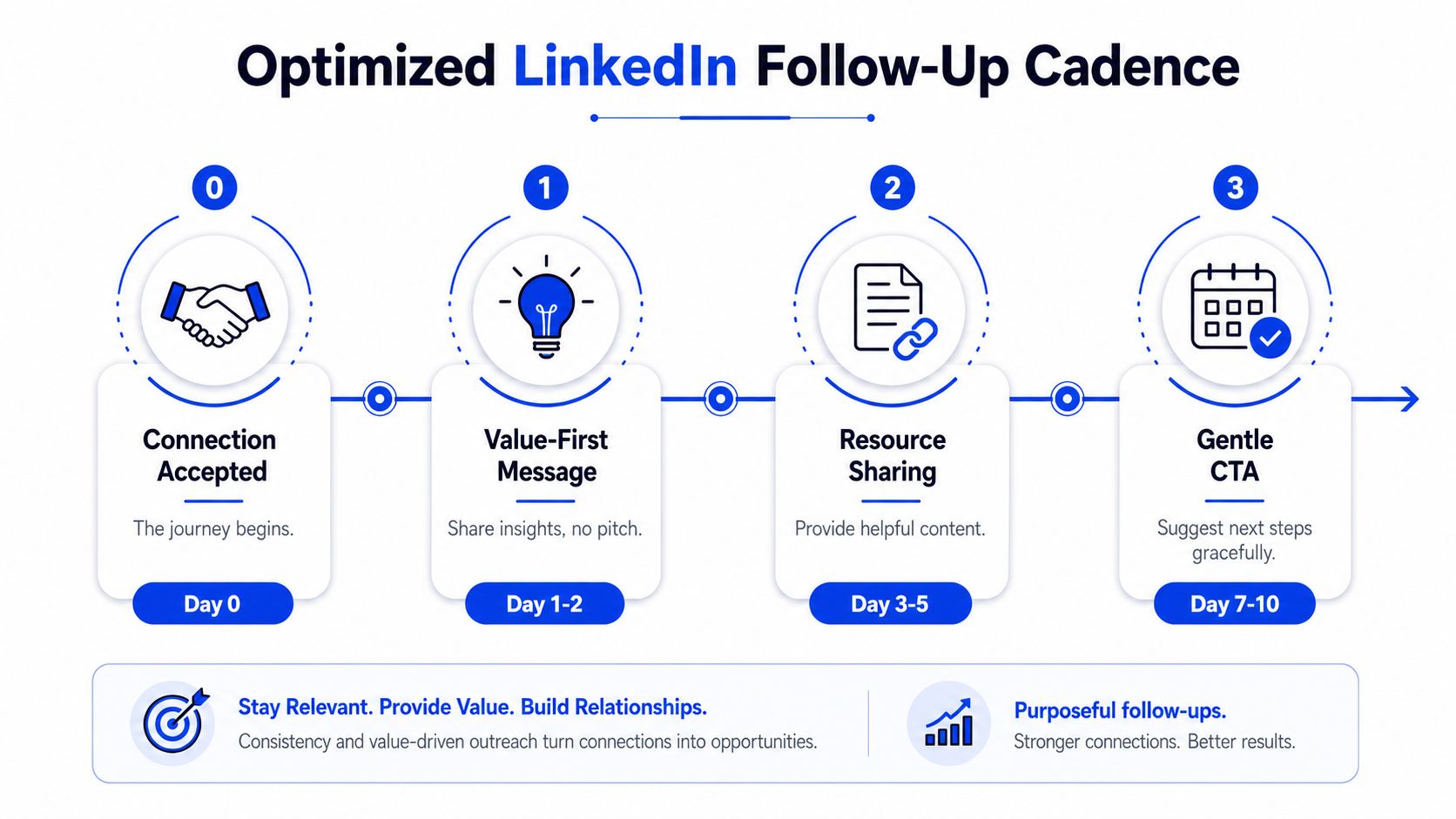
I use a simple rule. The first 14 days after acceptance have one job. Keep the original signal alive long enough to earn a reply.
That means the sequence needs timing, message type, and a clear escalation path. It cannot be a random mix of “thanks for connecting” notes and meeting asks.
Here's the cadence I'd run:
Day 0
Send a one-line thank-you. No pitch. No link. No calendar.Day 2 to 4
Send the first real DM. Tie it to the signal that drove the connection request, such as a hiring push, a new initiative, a funding event, or a leadership change.Day 5 to 9
Add passive engagement if the prospect posts. A relevant like is fine. A short comment is better if you have something specific to say.Day 10 to 14
Send a second DM only if the first one got no reply. Bring new context, not the same ask reworded.
If the team needs a shared process definition, this follow-up workflow reference is the right operational object to standardize around.
The first DM should earn a response, not force a meeting
The mistake I see in outbound teams is treating the accept like consent to pitch. It is not. The clean sequence after acceptance is established. Thank them, re-anchor to the trigger, then ask a low-friction question.
A useful structure is:
Signal reminder → why you reached out in the first place
Specific observation → one practical implication of that signal
Light question → easy to answer in one sentence
Example:
We connected after I saw the SDR hiring push. In teams that add reps this fast, reply rates usually dip before the reporting catches it. Are you seeing that yet, or is ramp going cleanly?
That message works because it gives the buyer something narrow to react to. It does not ask them to evaluate your product, book time, or read a deck.
Escalate based on behavior
I only move to a meeting ask after one of three things happens:
They reply to the first DM
They engage with my content after connecting
They confirm a problem, even partially
If none of those happen, the next touch stays useful. Send a short observation, a relevant teardown, or a note tied to a fresh company signal. Teams that also publish regularly need to think about avoiding content burnout with multi-channel, because LinkedIn follow-up works better when the buyer sees consistent proof between DMs.
Here is the trade-off. Fast escalation creates more immediate asks, but it also burns more warm connections. Slower escalation preserves the network and gives you more second-chance moments across LinkedIn, email, and retargeting.
Buyers separate “I'll connect” from “I'll take a sales call.” Your sequence should respect that separation.
How to scale this system without automation tells
Monday morning is where this breaks. A rep opens Sales Navigator, exports 200 names, pushes them into a sequence, and by Friday the team has volume but no signal. Connection acceptance stays decent, reply quality drops, and the inbox fills with polite dead ends. Scale fails on LinkedIn when the operating model treats every prospect the same.
The fix is a tiered system with clear rules on where humans spend time and where software only prepares the work.
Use tiers, not one personalization standard for everyone
This is the structure I use:
Tier | Who belongs here | Workflow |
|---|---|---|
Tier 1 | Good-fit prospects with strong public signals | Clay drafts trigger language, human reviews before send |
Tier 2 | Highest-value accounts | Founder or senior operator researches manually and writes each note |
Tier 3 | Prospects with no real signal | Send an honest, simple no-agenda note or wait |
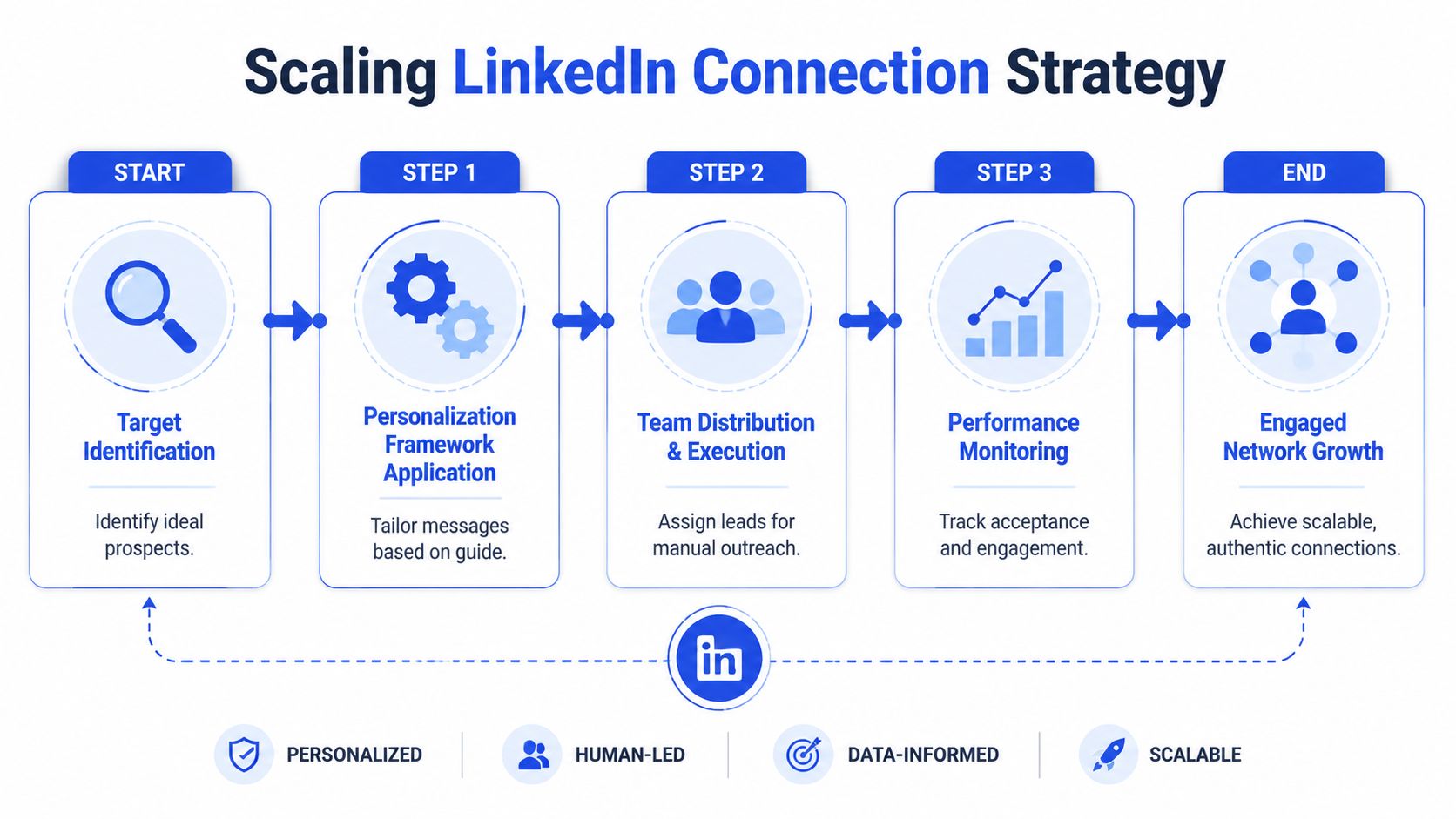
Tiering solves two problems at once. It protects message quality, and it keeps expensive research time focused on accounts that can return pipeline. If an AE, founder, or senior SDR is spending 10 minutes researching a low-signal prospect, the system is upside down.
The stack is simple:
Sales Navigator for targeting and list segmentation
Clay for trigger capture, enrichment, and draft inputs
Apollo for surrounding account context
HeyReach for LinkedIn execution across profiles
HubSpot for workflow control and reply routing
Lemlist, Instantly, or Smartlead for email overlap where LinkedIn and email run together
Tools help with throughput. They do not protect message quality.
That protection comes from operating rules, daily limits, and review steps. Teams that ignore those usually hit restriction risk, uneven acceptance rates, or messages that read like templated enrichment pasted into a DM. If you need a baseline for profile pacing and account safety, use this guide to LinkedIn limits and warm-up.
The stack that keeps volume from turning robotic
I keep four rules in place:
Human review is required for any message that references a trigger
No invented personalization if the signal is weak or stale
Daily send volume stays controlled at the profile level
One owner handles reply routing and CRM disposition
Those rules matter more than the software brand names.
A common mistake is pushing every lead into one sequence with one personalization rule and one follow-up standard. That creates the same rhythm, same phrasing, and same ask across very different accounts. Buyers notice. The message may mention their company, but the structure still feels mass-produced.
A better system separates preparation from delivery. Clay can compile hiring signals, recent posts, funding events, or job changes. A human then decides whether that signal is strong enough to mention, whether the prospect belongs in Tier 1 or Tier 3, and whether LinkedIn should run alone or alongside email. Teams publishing heavily across channels should also think about avoiding content burnout with multi-channel, because weak coordination between outbound and content creates repetitive buyer touchpoints fast.
One option in this category is Grou, which combines LinkedIn content, lead generation, and outbound into one system so teams can run one target list, one message standard, and one reporting line.
If you want scale without automation tells, standardize decisions, not sentences. Keep the research inputs structured, keep the tier rules strict, and keep a human on every buyer-facing message that references context. That is the system that turns LinkedIn connections into pipeline instead of inflated activity.
Your LinkedIn connection requests probably aren't failing because the copy is weak. They're failing because the system behind the copy is weak. If you're sending founder or sales-led outreach into iGaming, SaaS, manufacturing, legal tech, or pharma, the issue is usually the same. Random targeting, fake personalization, then a pitch too early.
Publish before outreach, because profiles with at least 3 recent posts and comments see a 40% higher acceptance rate, while 85% of cold connection requests are rejected from profiles lacking recent activity or content, per Three Ears Media
Build lists from signals, not just firmographics, then send notes under LinkedIn's 300-character limit using a real trigger and a soft ask, based on Botdog's connection request guidance
Follow up in a sequence, not with an instant pitch. The strongest structure is Day 0 thank-you, Days 3-7 engagement, then Days 7-14 value-driven outreach, as outlined by Draftboard
Scale with tiers. Use Sales Navigator, Clay, Apollo, HeyReach, HubSpot, and human review so structure turns attention into pipeline
Table of Contents
The truth about personalization in connection requests
Most LinkedIn “personalization” is just template decoration. First name, company name, maybe a line about their university, then a disguised sales pitch. Astute buyers see that pattern immediately, especially in sectors where outbound volume is high.
Why most LinkedIn personalization fails
The common advice is still wrong. Mentioning a past employer, location, or alma mater doesn't signal attention. It signals that someone skimmed the profile and pasted a field into a sequence.
A better question than “how do you connect on LinkedIn” is this: what proof can you show, in one sentence, that you looked at the person's current context? That's the only personalization that still carries weight in B2B.
The profile also has to look alive before you reach out. Most content tells users to send requests immediately, but fails to enforce that 85% of cold connection requests are rejected from profiles lacking recent activity or content. Profiles with at least 3 recent posts and comments see a 40% higher acceptance rate, according to Three Ears Media's networking analysis.
Practical rule: Don't send cold connection requests from a profile that hasn't posted recently. You'll look like a rented identity, not a real operator.
If your team is still treating merge fields as personalization, fix that first. A useful framing is this first line personalisation reference, but the working standard is simpler. The line has to prove attention to something current, specific, and verifiable.
The message structure that actually gets accepted
The structure that works is short:
Verifiable observation → a recent post, role change, hiring movement, or company shift
Peer-level reason → why being connected makes sense, without a pitch
No-agenda close → remove pressure
That sounds basic, but it's common to skip the hard part, which is the observation. “Saw you're in legal tech” is not an observation. “Caught your post on pipeline quality last week” is.
Here's the standard I'd hold across founder-led and revenue-led outreach:
Saw your team brought on several SDRs recently. Working with similar revenue teams dealing with the same scaling pressure, thought it'd be worth being connected. No agenda.
That works because it doesn't pretend intimacy. It signals relevance, keeps status balanced, and avoids the usual ask inflation. No meeting link. No “would love to connect.” No compliment that reads like flattery.
The trade-off is time. Real personalization takes research. It won't scale to thousands of requests a week without quality dropping. That's fine. Connection acceptance isn't the point. Qualified conversations are.
Finding prospects who are ready to connect
A strong note sent to the wrong prospect is still wasted work. The list decides more than the copy does. For B2B teams, that means stopping the habit of building lists only from title, company size, and industry, then hoping the message carries the load.
Start with list quality, not message quality
LinkedIn is huge. The platform reached 1.3 billion+ global registered members in January 2026, with 310 million monthly active users, 69 million registered companies, and a hard cap of 30,000 first-degree connections per profile, according to LinkedIn stats compiled by Joe Apfelbaum. Scale isn't the issue. Selection is.
Sales Navigator should be your base layer. Use filters for location, company size, job title, industry, and shared background. Then narrow to the accounts where your offer fits the current operating context. In GROU programs, that usually means one of two things. A current pain signal, or a current change signal.
Two profile factors matter before you even message someone. Members who list their current job position receive up to 5x more connection requests, and profiles with at least five relevant skills are more than 31 times more likely to be discovered and receive a message, based on Kinsta's LinkedIn statistics roundup. That's useful in two ways. It tells you which prospects are active enough to engage, and it tells you whether your own sender profile is set up to be accepted.
If the founder or AE profile is weak, fix that before sequence work starts. This LinkedIn personal branding guide is a good resource for tightening the public layer buyers see before they decide to accept.
Build a signal layer on top of Sales Navigator
Firmographics get you to the right neighborhood. Signals get you to the right door. The cleanest setup is:
Sales Navigator for account and contact filtering
Clay for signal monitoring and enrichment
Apollo for account context and channel overlap
HubSpot for status tracking and reply routing
The signals worth watching are the ones you can reference without sounding manufactured:
Recent posts about pipeline, hiring, expansion, GTM friction, compliance pressure
Role changes where the new hire likely owns a fresh mandate
Team buildout that suggests process strain
Comment behavior that shows current topic interest
A useful internal standard is to tag each prospect with one intent signal definition before they enter outreach. If the trigger field is empty, they don't get a “personalized” note. They either wait, or they move into a simpler no-agenda request.
High-signal lists outperform large cold lists because relevance is doing the work before the message arrives.
Many teams get impatient. They want volume fast, so they skip signal collection and send generic invites. That creates activity in the CRM, not pipeline. If you're targeting pharma operators, manufacturing leaders, or legal tech executives, low-context outreach gets ignored even faster because these buyers pattern-match weak outreach immediately.
Crafting the 300-character connection message
A prospect sees your name, headline, company, and 300 characters. That is the whole decision environment. If the note tries to explain your product, prove your credentials, and ask for time, acceptance rates drop because the ask feels bigger than the click.
The job of the connection note is narrower. Confirm relevance. Show a credible reason to connect. Keep the pressure near zero.
The structure I'd use every time
I use a three-part format because it forces discipline inside the character limit:
Part | What it does | Example |
|---|---|---|
Observation | Shows a real trigger | Saw your post on Q1 pipeline gaps |
Reason | Explains why the connection makes sense | I work with revenue teams dealing with the same issue |
Close | Keeps the ask light | Thought it made sense to connect |
That format works because each line has a job. The observation proves the note came from a real signal. The reason gives context without turning into a pitch. The close asks for the smallest possible commitment.
The trade-off is simple. The shorter note gets more accepts. The longer note gives more context, but it often lowers acceptance because prospects can smell an outbound sequence before they click.
B2B SDR teams usually ruin this step by stuffing in company background, product category, social proof, and a meeting ask. Cut all of it. If you want examples of short messages that still carry intent, these messaging strategy examples are useful. For LinkedIn-specific patterns, this connection request message breakdown shows the format in more detail.
A message format tied to pipeline, not vanity acceptance
I care less about raw acceptance rate than accept-to-reply and accept-to-meeting rate. A note can get accepted because it is harmless. That does not mean it started a sales conversation.
The better test is whether the note sets up the next message cleanly. If the trigger in the note matches the trigger in the follow-up, reply quality improves because the conversation feels consistent instead of scripted.
A strong example looks like this:
Saw your post on the Q1 pipeline gap. I work with revenue leaders working through the same issue. Thought it made sense to connect.
Why this format works:
The trigger is specific. It references one observable event, not generic profile scraping.
The reason is peer-based. It frames shared context without forcing authority.
The close stays light. No call request, no teaser pitch, no fake familiarity.
The next step is clear. The post-accept DM can continue the same thread without changing context.
That last point matters more than copywriters tend to admit. Connection notes do not produce pipeline by themselves. They produce pipeline when the note, sender profile, and follow-up sequence all match the same buying signal.
Later in the section, it helps to see the mechanics explained live:
What to remove from your connection note
These are the first things I cut in reviews:
Greeting filler. “Hi [name], hope you're doing well” wastes characters and reads templated.
Profile praise. “Impressive background” signals low-effort flattery.
Product language. Category terms and feature hints make the note feel like a disguised pitch.
Calendar asks. Asking for time inside the connection request is too much, too early.
Weak mutual connection references. If the relationship is thin, the note feels manipulative.
One more rule. If the note only works because of clever wording, it is fragile. If it works because it is tied to a recent signal, a credible sender, and a clean follow-up path, it scales.
If you're asking how do you connect on LinkedIn in a way that turns into meetings, write the note to earn the accept and set up the next touch. That is the system.
Executing the post-connection follow-up sequence
A prospect accepts your request at 9:12 AM. By 9:13, a rep sends a product pitch. Reply rates collapse because the buyer has not agreed to have a sales conversation yet. Wait ten days with no touch, and the trigger that got the accept is gone.
The post-accept sequence decides whether a new connection turns into pipeline or turns into another silent contact in Sales Navigator.
I use a simple rule. The first 14 days after acceptance have one job. Keep the original signal alive long enough to earn a reply.
That means the sequence needs timing, message type, and a clear escalation path. It cannot be a random mix of “thanks for connecting” notes and meeting asks.
Here's the cadence I'd run:
Day 0
Send a one-line thank-you. No pitch. No link. No calendar.Day 2 to 4
Send the first real DM. Tie it to the signal that drove the connection request, such as a hiring push, a new initiative, a funding event, or a leadership change.Day 5 to 9
Add passive engagement if the prospect posts. A relevant like is fine. A short comment is better if you have something specific to say.Day 10 to 14
Send a second DM only if the first one got no reply. Bring new context, not the same ask reworded.
If the team needs a shared process definition, this follow-up workflow reference is the right operational object to standardize around.
The first DM should earn a response, not force a meeting
The mistake I see in outbound teams is treating the accept like consent to pitch. It is not. The clean sequence after acceptance is established. Thank them, re-anchor to the trigger, then ask a low-friction question.
A useful structure is:
Signal reminder → why you reached out in the first place
Specific observation → one practical implication of that signal
Light question → easy to answer in one sentence
Example:
We connected after I saw the SDR hiring push. In teams that add reps this fast, reply rates usually dip before the reporting catches it. Are you seeing that yet, or is ramp going cleanly?
That message works because it gives the buyer something narrow to react to. It does not ask them to evaluate your product, book time, or read a deck.
Escalate based on behavior
I only move to a meeting ask after one of three things happens:
They reply to the first DM
They engage with my content after connecting
They confirm a problem, even partially
If none of those happen, the next touch stays useful. Send a short observation, a relevant teardown, or a note tied to a fresh company signal. Teams that also publish regularly need to think about avoiding content burnout with multi-channel, because LinkedIn follow-up works better when the buyer sees consistent proof between DMs.
Here is the trade-off. Fast escalation creates more immediate asks, but it also burns more warm connections. Slower escalation preserves the network and gives you more second-chance moments across LinkedIn, email, and retargeting.
Buyers separate “I'll connect” from “I'll take a sales call.” Your sequence should respect that separation.
How to scale this system without automation tells
Monday morning is where this breaks. A rep opens Sales Navigator, exports 200 names, pushes them into a sequence, and by Friday the team has volume but no signal. Connection acceptance stays decent, reply quality drops, and the inbox fills with polite dead ends. Scale fails on LinkedIn when the operating model treats every prospect the same.
The fix is a tiered system with clear rules on where humans spend time and where software only prepares the work.
Use tiers, not one personalization standard for everyone
This is the structure I use:
Tier | Who belongs here | Workflow |
|---|---|---|
Tier 1 | Good-fit prospects with strong public signals | Clay drafts trigger language, human reviews before send |
Tier 2 | Highest-value accounts | Founder or senior operator researches manually and writes each note |
Tier 3 | Prospects with no real signal | Send an honest, simple no-agenda note or wait |
Tiering solves two problems at once. It protects message quality, and it keeps expensive research time focused on accounts that can return pipeline. If an AE, founder, or senior SDR is spending 10 minutes researching a low-signal prospect, the system is upside down.
The stack is simple:
Sales Navigator for targeting and list segmentation
Clay for trigger capture, enrichment, and draft inputs
Apollo for surrounding account context
HeyReach for LinkedIn execution across profiles
HubSpot for workflow control and reply routing
Lemlist, Instantly, or Smartlead for email overlap where LinkedIn and email run together
Tools help with throughput. They do not protect message quality.
That protection comes from operating rules, daily limits, and review steps. Teams that ignore those usually hit restriction risk, uneven acceptance rates, or messages that read like templated enrichment pasted into a DM. If you need a baseline for profile pacing and account safety, use this guide to LinkedIn limits and warm-up.
The stack that keeps volume from turning robotic
I keep four rules in place:
Human review is required for any message that references a trigger
No invented personalization if the signal is weak or stale
Daily send volume stays controlled at the profile level
One owner handles reply routing and CRM disposition
Those rules matter more than the software brand names.
A common mistake is pushing every lead into one sequence with one personalization rule and one follow-up standard. That creates the same rhythm, same phrasing, and same ask across very different accounts. Buyers notice. The message may mention their company, but the structure still feels mass-produced.
A better system separates preparation from delivery. Clay can compile hiring signals, recent posts, funding events, or job changes. A human then decides whether that signal is strong enough to mention, whether the prospect belongs in Tier 1 or Tier 3, and whether LinkedIn should run alone or alongside email. Teams publishing heavily across channels should also think about avoiding content burnout with multi-channel, because weak coordination between outbound and content creates repetitive buyer touchpoints fast.
One option in this category is Grou, which combines LinkedIn content, lead generation, and outbound into one system so teams can run one target list, one message standard, and one reporting line.
If you want scale without automation tells, standardize decisions, not sentences. Keep the research inputs structured, keep the tier rules strict, and keep a human on every buyer-facing message that references context. That is the system that turns LinkedIn connections into pipeline instead of inflated activity.
Your LinkedIn connection requests probably aren't failing because the copy is weak. They're failing because the system behind the copy is weak. If you're sending founder or sales-led outreach into iGaming, SaaS, manufacturing, legal tech, or pharma, the issue is usually the same. Random targeting, fake personalization, then a pitch too early.
Publish before outreach, because profiles with at least 3 recent posts and comments see a 40% higher acceptance rate, while 85% of cold connection requests are rejected from profiles lacking recent activity or content, per Three Ears Media
Build lists from signals, not just firmographics, then send notes under LinkedIn's 300-character limit using a real trigger and a soft ask, based on Botdog's connection request guidance
Follow up in a sequence, not with an instant pitch. The strongest structure is Day 0 thank-you, Days 3-7 engagement, then Days 7-14 value-driven outreach, as outlined by Draftboard
Scale with tiers. Use Sales Navigator, Clay, Apollo, HeyReach, HubSpot, and human review so structure turns attention into pipeline
Table of Contents
The truth about personalization in connection requests
Most LinkedIn “personalization” is just template decoration. First name, company name, maybe a line about their university, then a disguised sales pitch. Astute buyers see that pattern immediately, especially in sectors where outbound volume is high.
Why most LinkedIn personalization fails
The common advice is still wrong. Mentioning a past employer, location, or alma mater doesn't signal attention. It signals that someone skimmed the profile and pasted a field into a sequence.
A better question than “how do you connect on LinkedIn” is this: what proof can you show, in one sentence, that you looked at the person's current context? That's the only personalization that still carries weight in B2B.
The profile also has to look alive before you reach out. Most content tells users to send requests immediately, but fails to enforce that 85% of cold connection requests are rejected from profiles lacking recent activity or content. Profiles with at least 3 recent posts and comments see a 40% higher acceptance rate, according to Three Ears Media's networking analysis.
Practical rule: Don't send cold connection requests from a profile that hasn't posted recently. You'll look like a rented identity, not a real operator.
If your team is still treating merge fields as personalization, fix that first. A useful framing is this first line personalisation reference, but the working standard is simpler. The line has to prove attention to something current, specific, and verifiable.
The message structure that actually gets accepted
The structure that works is short:
Verifiable observation → a recent post, role change, hiring movement, or company shift
Peer-level reason → why being connected makes sense, without a pitch
No-agenda close → remove pressure
That sounds basic, but it's common to skip the hard part, which is the observation. “Saw you're in legal tech” is not an observation. “Caught your post on pipeline quality last week” is.
Here's the standard I'd hold across founder-led and revenue-led outreach:
Saw your team brought on several SDRs recently. Working with similar revenue teams dealing with the same scaling pressure, thought it'd be worth being connected. No agenda.
That works because it doesn't pretend intimacy. It signals relevance, keeps status balanced, and avoids the usual ask inflation. No meeting link. No “would love to connect.” No compliment that reads like flattery.
The trade-off is time. Real personalization takes research. It won't scale to thousands of requests a week without quality dropping. That's fine. Connection acceptance isn't the point. Qualified conversations are.
Finding prospects who are ready to connect
A strong note sent to the wrong prospect is still wasted work. The list decides more than the copy does. For B2B teams, that means stopping the habit of building lists only from title, company size, and industry, then hoping the message carries the load.
Start with list quality, not message quality
LinkedIn is huge. The platform reached 1.3 billion+ global registered members in January 2026, with 310 million monthly active users, 69 million registered companies, and a hard cap of 30,000 first-degree connections per profile, according to LinkedIn stats compiled by Joe Apfelbaum. Scale isn't the issue. Selection is.
Sales Navigator should be your base layer. Use filters for location, company size, job title, industry, and shared background. Then narrow to the accounts where your offer fits the current operating context. In GROU programs, that usually means one of two things. A current pain signal, or a current change signal.
Two profile factors matter before you even message someone. Members who list their current job position receive up to 5x more connection requests, and profiles with at least five relevant skills are more than 31 times more likely to be discovered and receive a message, based on Kinsta's LinkedIn statistics roundup. That's useful in two ways. It tells you which prospects are active enough to engage, and it tells you whether your own sender profile is set up to be accepted.
If the founder or AE profile is weak, fix that before sequence work starts. This LinkedIn personal branding guide is a good resource for tightening the public layer buyers see before they decide to accept.
Build a signal layer on top of Sales Navigator
Firmographics get you to the right neighborhood. Signals get you to the right door. The cleanest setup is:
Sales Navigator for account and contact filtering
Clay for signal monitoring and enrichment
Apollo for account context and channel overlap
HubSpot for status tracking and reply routing
The signals worth watching are the ones you can reference without sounding manufactured:
Recent posts about pipeline, hiring, expansion, GTM friction, compliance pressure
Role changes where the new hire likely owns a fresh mandate
Team buildout that suggests process strain
Comment behavior that shows current topic interest
A useful internal standard is to tag each prospect with one intent signal definition before they enter outreach. If the trigger field is empty, they don't get a “personalized” note. They either wait, or they move into a simpler no-agenda request.
High-signal lists outperform large cold lists because relevance is doing the work before the message arrives.
Many teams get impatient. They want volume fast, so they skip signal collection and send generic invites. That creates activity in the CRM, not pipeline. If you're targeting pharma operators, manufacturing leaders, or legal tech executives, low-context outreach gets ignored even faster because these buyers pattern-match weak outreach immediately.
Crafting the 300-character connection message
A prospect sees your name, headline, company, and 300 characters. That is the whole decision environment. If the note tries to explain your product, prove your credentials, and ask for time, acceptance rates drop because the ask feels bigger than the click.
The job of the connection note is narrower. Confirm relevance. Show a credible reason to connect. Keep the pressure near zero.
The structure I'd use every time
I use a three-part format because it forces discipline inside the character limit:
Part | What it does | Example |
|---|---|---|
Observation | Shows a real trigger | Saw your post on Q1 pipeline gaps |
Reason | Explains why the connection makes sense | I work with revenue teams dealing with the same issue |
Close | Keeps the ask light | Thought it made sense to connect |
That format works because each line has a job. The observation proves the note came from a real signal. The reason gives context without turning into a pitch. The close asks for the smallest possible commitment.
The trade-off is simple. The shorter note gets more accepts. The longer note gives more context, but it often lowers acceptance because prospects can smell an outbound sequence before they click.
B2B SDR teams usually ruin this step by stuffing in company background, product category, social proof, and a meeting ask. Cut all of it. If you want examples of short messages that still carry intent, these messaging strategy examples are useful. For LinkedIn-specific patterns, this connection request message breakdown shows the format in more detail.
A message format tied to pipeline, not vanity acceptance
I care less about raw acceptance rate than accept-to-reply and accept-to-meeting rate. A note can get accepted because it is harmless. That does not mean it started a sales conversation.
The better test is whether the note sets up the next message cleanly. If the trigger in the note matches the trigger in the follow-up, reply quality improves because the conversation feels consistent instead of scripted.
A strong example looks like this:
Saw your post on the Q1 pipeline gap. I work with revenue leaders working through the same issue. Thought it made sense to connect.
Why this format works:
The trigger is specific. It references one observable event, not generic profile scraping.
The reason is peer-based. It frames shared context without forcing authority.
The close stays light. No call request, no teaser pitch, no fake familiarity.
The next step is clear. The post-accept DM can continue the same thread without changing context.
That last point matters more than copywriters tend to admit. Connection notes do not produce pipeline by themselves. They produce pipeline when the note, sender profile, and follow-up sequence all match the same buying signal.
Later in the section, it helps to see the mechanics explained live:
What to remove from your connection note
These are the first things I cut in reviews:
Greeting filler. “Hi [name], hope you're doing well” wastes characters and reads templated.
Profile praise. “Impressive background” signals low-effort flattery.
Product language. Category terms and feature hints make the note feel like a disguised pitch.
Calendar asks. Asking for time inside the connection request is too much, too early.
Weak mutual connection references. If the relationship is thin, the note feels manipulative.
One more rule. If the note only works because of clever wording, it is fragile. If it works because it is tied to a recent signal, a credible sender, and a clean follow-up path, it scales.
If you're asking how do you connect on LinkedIn in a way that turns into meetings, write the note to earn the accept and set up the next touch. That is the system.
Executing the post-connection follow-up sequence
A prospect accepts your request at 9:12 AM. By 9:13, a rep sends a product pitch. Reply rates collapse because the buyer has not agreed to have a sales conversation yet. Wait ten days with no touch, and the trigger that got the accept is gone.
The post-accept sequence decides whether a new connection turns into pipeline or turns into another silent contact in Sales Navigator.
I use a simple rule. The first 14 days after acceptance have one job. Keep the original signal alive long enough to earn a reply.
That means the sequence needs timing, message type, and a clear escalation path. It cannot be a random mix of “thanks for connecting” notes and meeting asks.
Here's the cadence I'd run:
Day 0
Send a one-line thank-you. No pitch. No link. No calendar.Day 2 to 4
Send the first real DM. Tie it to the signal that drove the connection request, such as a hiring push, a new initiative, a funding event, or a leadership change.Day 5 to 9
Add passive engagement if the prospect posts. A relevant like is fine. A short comment is better if you have something specific to say.Day 10 to 14
Send a second DM only if the first one got no reply. Bring new context, not the same ask reworded.
If the team needs a shared process definition, this follow-up workflow reference is the right operational object to standardize around.
The first DM should earn a response, not force a meeting
The mistake I see in outbound teams is treating the accept like consent to pitch. It is not. The clean sequence after acceptance is established. Thank them, re-anchor to the trigger, then ask a low-friction question.
A useful structure is:
Signal reminder → why you reached out in the first place
Specific observation → one practical implication of that signal
Light question → easy to answer in one sentence
Example:
We connected after I saw the SDR hiring push. In teams that add reps this fast, reply rates usually dip before the reporting catches it. Are you seeing that yet, or is ramp going cleanly?
That message works because it gives the buyer something narrow to react to. It does not ask them to evaluate your product, book time, or read a deck.
Escalate based on behavior
I only move to a meeting ask after one of three things happens:
They reply to the first DM
They engage with my content after connecting
They confirm a problem, even partially
If none of those happen, the next touch stays useful. Send a short observation, a relevant teardown, or a note tied to a fresh company signal. Teams that also publish regularly need to think about avoiding content burnout with multi-channel, because LinkedIn follow-up works better when the buyer sees consistent proof between DMs.
Here is the trade-off. Fast escalation creates more immediate asks, but it also burns more warm connections. Slower escalation preserves the network and gives you more second-chance moments across LinkedIn, email, and retargeting.
Buyers separate “I'll connect” from “I'll take a sales call.” Your sequence should respect that separation.
How to scale this system without automation tells
Monday morning is where this breaks. A rep opens Sales Navigator, exports 200 names, pushes them into a sequence, and by Friday the team has volume but no signal. Connection acceptance stays decent, reply quality drops, and the inbox fills with polite dead ends. Scale fails on LinkedIn when the operating model treats every prospect the same.
The fix is a tiered system with clear rules on where humans spend time and where software only prepares the work.
Use tiers, not one personalization standard for everyone
This is the structure I use:
Tier | Who belongs here | Workflow |
|---|---|---|
Tier 1 | Good-fit prospects with strong public signals | Clay drafts trigger language, human reviews before send |
Tier 2 | Highest-value accounts | Founder or senior operator researches manually and writes each note |
Tier 3 | Prospects with no real signal | Send an honest, simple no-agenda note or wait |
Tiering solves two problems at once. It protects message quality, and it keeps expensive research time focused on accounts that can return pipeline. If an AE, founder, or senior SDR is spending 10 minutes researching a low-signal prospect, the system is upside down.
The stack is simple:
Sales Navigator for targeting and list segmentation
Clay for trigger capture, enrichment, and draft inputs
Apollo for surrounding account context
HeyReach for LinkedIn execution across profiles
HubSpot for workflow control and reply routing
Lemlist, Instantly, or Smartlead for email overlap where LinkedIn and email run together
Tools help with throughput. They do not protect message quality.
That protection comes from operating rules, daily limits, and review steps. Teams that ignore those usually hit restriction risk, uneven acceptance rates, or messages that read like templated enrichment pasted into a DM. If you need a baseline for profile pacing and account safety, use this guide to LinkedIn limits and warm-up.
The stack that keeps volume from turning robotic
I keep four rules in place:
Human review is required for any message that references a trigger
No invented personalization if the signal is weak or stale
Daily send volume stays controlled at the profile level
One owner handles reply routing and CRM disposition
Those rules matter more than the software brand names.
A common mistake is pushing every lead into one sequence with one personalization rule and one follow-up standard. That creates the same rhythm, same phrasing, and same ask across very different accounts. Buyers notice. The message may mention their company, but the structure still feels mass-produced.
A better system separates preparation from delivery. Clay can compile hiring signals, recent posts, funding events, or job changes. A human then decides whether that signal is strong enough to mention, whether the prospect belongs in Tier 1 or Tier 3, and whether LinkedIn should run alone or alongside email. Teams publishing heavily across channels should also think about avoiding content burnout with multi-channel, because weak coordination between outbound and content creates repetitive buyer touchpoints fast.
One option in this category is Grou, which combines LinkedIn content, lead generation, and outbound into one system so teams can run one target list, one message standard, and one reporting line.
If you want scale without automation tells, standardize decisions, not sentences. Keep the research inputs structured, keep the tier rules strict, and keep a human on every buyer-facing message that references context. That is the system that turns LinkedIn connections into pipeline instead of inflated activity.

Pipeline OS Newsletter
Build qualified pipeline
Get weekly tactics to generate demand, improve lead quality, and book more meetings.





Trusted by industry leaders
Trusted by industry leaders
Trusted by industry leaders
Ready to build qualified pipeline?
Ready to build qualified pipeline?
Ready to build qualified pipeline?
Book a call to see if we're the right fit, or take the 2-minute quiz to get a clear starting point.
Book a call to see if we're the right fit, or take the 2-minute quiz to get a clear starting point.
Book a call to see if we're the right fit, or take the 2-minute quiz to get a clear starting point.
" height="30.21639343089746px" id="hfGbXmQR2" width="30.216393430897455px"/></svg>)
Copyright © 2026 – All Right Reserved
Copyright © 2026 – All Right Reserved
Copyright © 2026 – All Right Reserved