%22%3E%3C/path%3E%3Cpath d=%22M 63.072 7.554 C 62.258 8.022 61.577 8.689 61.092 9.493 L 61.092 7.076 L 57.158 7.076 L 57.158 22.64 L 61.089 22.64 L 61.089 14.888 C 61.089 13.446 61.403 12.434 62.03 11.853 C 62.818 11.218 63.818 10.907 64.826 10.982 L 65.868 10.982 L 65.868 6.851 C 64.891 6.834 63.926 7.076 63.073 7.554 Z%22 fill=%22rgb(17,17,17)%22%3E%3C/path%3E%3Cpath d=%22M 78.916 7.82 C 76.363 6.49 73.321 6.49 70.768 7.82 C 69.562 8.473 68.564 9.451 67.888 10.644 C 67.167 11.931 66.803 13.387 66.834 14.862 C 66.804 16.332 67.157 17.785 67.86 19.077 C 68.515 20.267 69.494 21.246 70.684 21.901 C 71.924 22.576 73.318 22.92 74.73 22.898 C 76.164 22.918 77.58 22.575 78.846 21.901 C 80.062 21.247 81.073 20.27 81.768 19.077 C 82.506 17.797 82.88 16.339 82.85 14.862 C 82.88 13.389 82.517 11.934 81.797 10.647 C 81.12 9.455 80.122 8.477 78.917 7.824 M 78.803 14.862 C 78.829 15.739 78.636 16.608 78.241 17.391 C 77.903 18.046 77.38 18.588 76.738 18.95 C 76.124 19.293 75.432 19.472 74.729 19.47 C 73.668 19.497 72.648 19.061 71.934 18.276 C 71.139 17.323 70.741 16.1 70.823 14.862 C 70.741 13.62 71.149 12.395 71.959 11.45 C 72.687 10.667 73.715 10.233 74.783 10.256 C 75.859 10.236 76.894 10.67 77.635 11.45 C 78.464 12.387 78.884 13.616 78.801 14.864%22 fill=%22rgb(17,17,17)%22%3E%3C/path%3E%3Cpath d=%22M 95.906 7.076 L 95.906 15.646 C 95.975 16.68 95.643 17.701 94.979 18.498 C 94.311 19.184 93.379 19.547 92.422 19.495 C 91.475 19.544 90.553 19.18 89.894 18.498 C 89.23 17.701 88.898 16.68 88.967 15.646 L 88.967 7.076 L 85.033 7.076 L 85.033 16.207 C 85 17.449 85.275 18.68 85.834 19.79 C 86.327 20.75 87.095 21.542 88.039 22.065 C 89.033 22.594 90.145 22.861 91.271 22.838 C 92.188 22.847 93.095 22.65 93.926 22.263 C 94.708 21.905 95.388 21.36 95.906 20.675 L 95.906 22.645 L 99.865 22.645 L 99.865 7.076 Z%22 fill=%22rgb(17,17,17)%22%3E%3C/path%3E%3Cpath d=%22M 4.513 15.626 C 4.511 10.815 7.606 6.549 12.181 5.059 C 16.756 3.57 21.77 5.195 24.601 9.086 L 27.816 5.87 C 24.074 1.186 17.981 -0.943 12.137 0.393 C 6.292 1.728 1.728 6.292 0.393 12.137 C -0.943 17.981 1.186 24.074 5.87 27.816 L 9.085 24.601 C 6.214 22.512 4.515 19.177 4.513 15.626%22 fill=%22rgb(32,62,235)%22%3E%3C/path%3E%3Cpath d=%22M 17.114 14.343 L 13.354 18.01 L 13.354 18.026 L 21.071 18.026 L 11.412 27.609 L 17.389 27.609 L 23.999 21.081 L 23.999 28.316 L 24.005 28.316 L 27.967 24.393 L 27.967 14.343 Z%22 fill=%22rgb(32,62,235)%22%3E%3C/path%3E%3C/g%3E%3C/svg%3E) ×
× ××
××›
›
›
›
Lead scoring template for HubSpot (12 rules + 5 thresholds, 30-minute setup)
Lead scoring template for HubSpot (12 rules + 5 thresholds, 30-minute setup)
Lead scoring template for HubSpot (12 rules + 5 thresholds, 30-minute setup)
Lead scoring template for HubSpot (12 rules + 5 thresholds, 30-minute setup)
Lead scoring template for HubSpot (12 rules + 5 thresholds, 30-minute setup)
Lead scoring template for HubSpot (12 rules + 5 thresholds, 30-minute setup)

Author
Aljaz Peklaj

Most B2B teams set HubSpot lead scoring up once, never touch it again, and watch AEs drown in junk MQLs within 90 days. After deploying lead scoring across 5 active HubSpot clients at GROU, the version below is the one that holds up: 12 rules, 5 score bands, and explicit SLAs per band.
This is the operator template you can copy into HubSpot Settings in 30 minutes: every rule with its point value, every threshold with its action trigger, and where Pipedrive's free scoring beats HubSpot if budget is tight.
TL;DR
The template uses 3 score categories (firmographic, demographic, behavioral) with 12 rules totaling 100 possible points. MQL threshold = 50 points. SQL threshold = 75 points. SLA on a 90+ score is 15 minutes from score change to inbound phone call.
Behavioral signals (pricing page visits, gated downloads) correlate with deal close at 3x the rate of firmographic signals (industry, company size). Weight them accordingly. Most teams over-credit company size and under-credit pricing page visits, which is why their MQLs look great on paper and convert at 4%.
The 3 scoring categories
HubSpot lets you build scoring rules across any contact or company property. The template below splits them into 3 categories so you can reason about coverage without overlap.
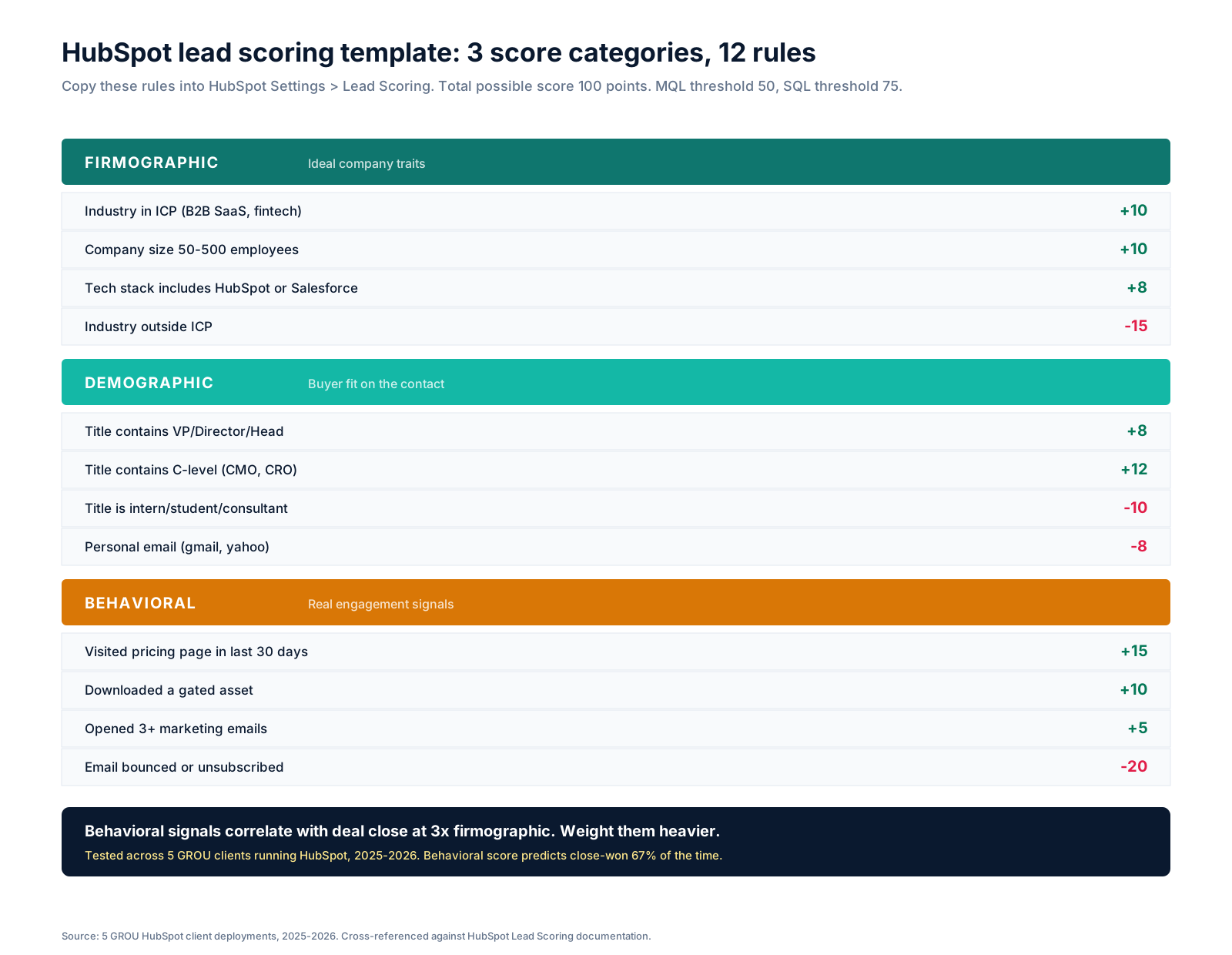
Firmographic rules cover company-level fit: industry, company size, and tech stack. They tell you whether the account is in ICP at all. Total weight: 38 positive points, 15 negative points.
Demographic rules cover the individual contact: title seniority, role keywords, and email type. They tell you whether you're talking to the right person inside an ICP account. Total weight: 20 positive points, 18 negative points.
Behavioral rules cover what the contact actually does: site visits, downloads, email engagement. They tell you whether the buyer is in market right now. Total weight: 30 positive points, 20 negative points.
The negative rules are what most teams skip and what causes 60% of bad MQLs. A VP at a Fortune 500 in ICP looks great on firmographic + demographic but is useless if they bounced their last 3 emails and never visited the pricing page.
The 5 score bands
A score number means nothing without an action trigger. The template below maps every 25-point band to a concrete next step.
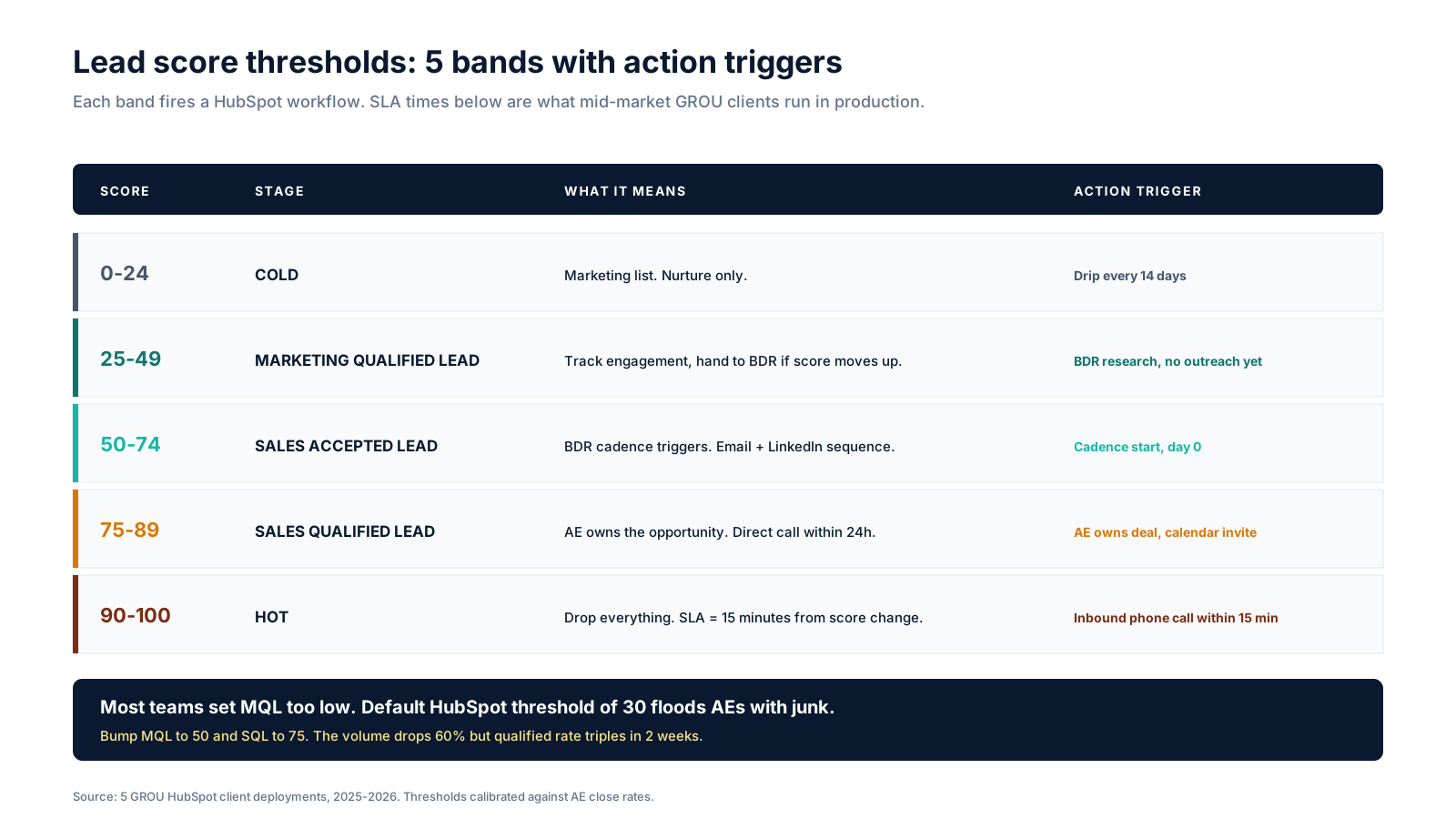
0-24 (Cold): Marketing list. Nurture only. Drip every 14 days. No human time spent.
25-49 (MQL): Marketing qualified, but not handed off yet. BDR researches the account but doesn't reach out. The MQL band is for tracking, not action. Most teams trigger outreach here and burn through their list. Don't.
50-74 (SAL): Sales Accepted Lead. BDR cadence starts at day 0. Email + LinkedIn sequence triggers automatically via HubSpot workflow. This is where outbound effort actually goes.
75-89 (SQL): Sales Qualified Lead. AE owns the deal. Calendar invite sent within 24 hours. Pipeline stage set to "Connect" or equivalent in your sales process. Read our sales pipeline stages guide for the full stage map.
90-100 (Hot): Drop everything. SLA = 15 minutes from score change to inbound phone call. This band fires when a contact does something extreme: views the pricing page 3+ times in a week, requests a demo, or hits a contact form. Treat it like a fire alarm.
Where to set this up in HubSpot
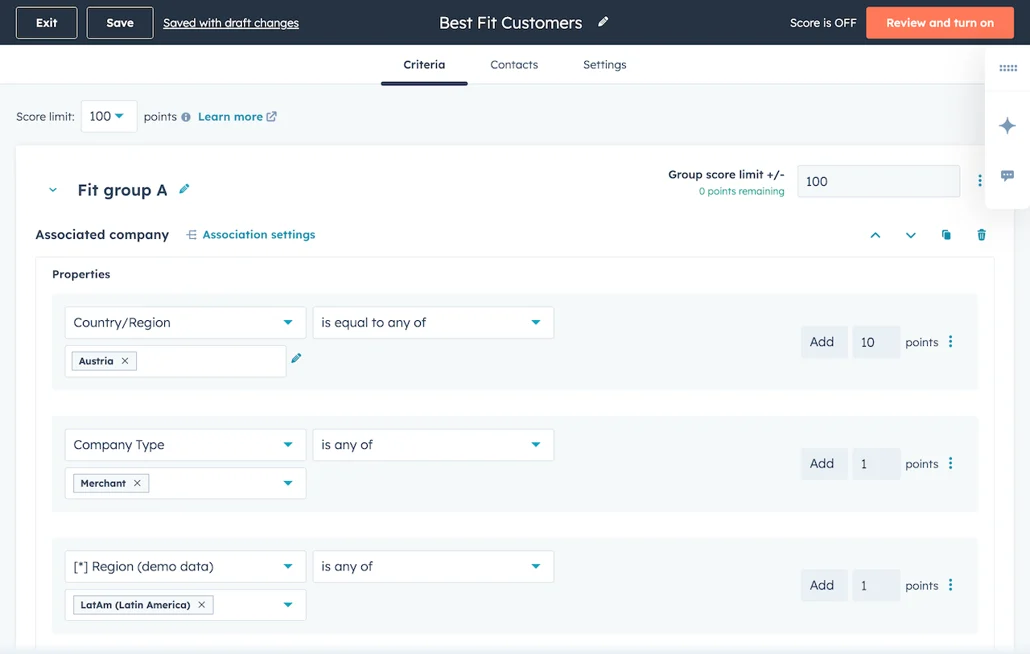
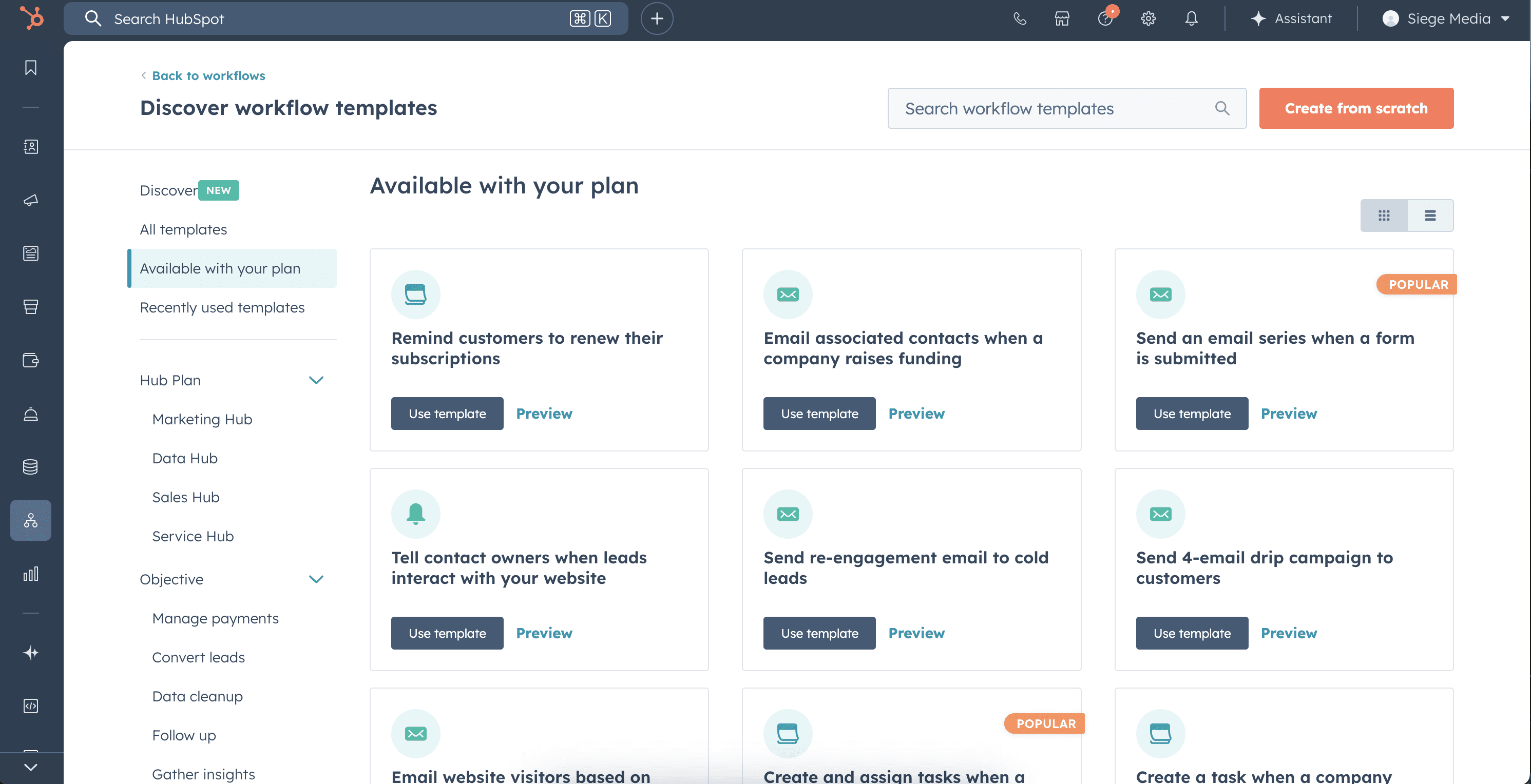
The scoring property lives at Settings > Properties > Lead Score. Setup takes 30 minutes if you follow the order below.
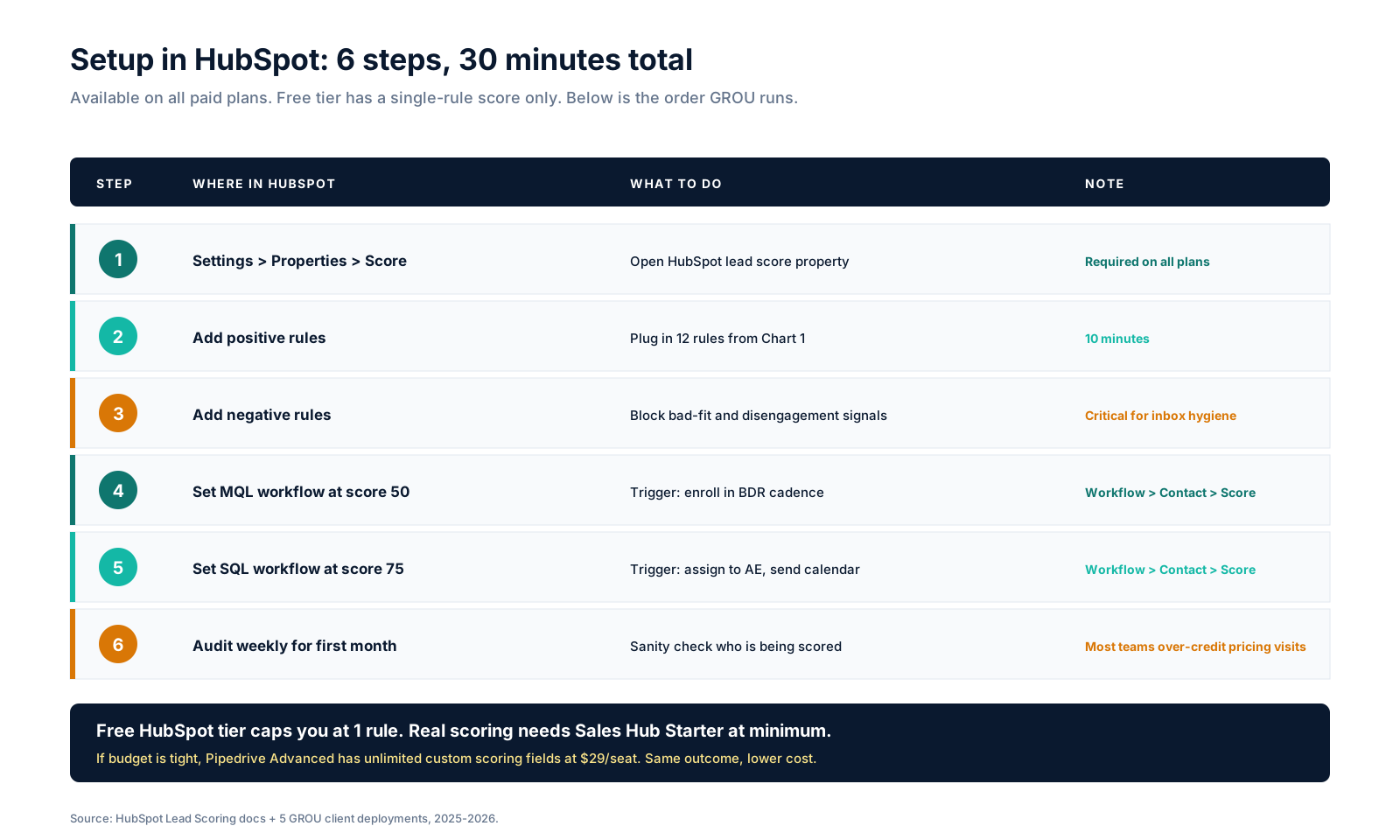
The 6-step setup is straightforward: open the score property, add positive rules from Chart 1, add negative rules, set the MQL workflow at score 50, set the SQL workflow at score 75, then audit weekly for the first month.
The audit step is the one teams skip. The first week of any new scoring model surfaces edge cases you didn't expect: agency accounts in your ICP firing high scores when the contact is a consultant, multi-domain companies double-counting visits, gated-asset spam from one IP address. Watch the contacts hitting MQL and SQL daily for 30 days, then weekly.
The cost note matters: HubSpot's free CRM only allows one lead score rule. Real scoring needs Sales Hub Starter at $15/seat or Sales Hub Pro at $90/seat. If budget is tight, Pipedrive Advanced at $29/seat has unlimited custom scoring fields. Same outcome, lower cost. See our Pipedrive pricing breakdown for the math.
What to score vs what to skip
The scoring rules above cover the 80% of signals that predict conversion. The remaining 20% (intent data, account-based signals, dark social) need different tooling and don't belong in a HubSpot scoring property.
Score these in HubSpot: form fills, gated downloads, email engagement, site visits, demo requests, pricing page activity, job title, company size, industry, tech stack (if you have BuiltWith or Wappalyzer integrated).
Don't score these in HubSpot: G2 intent data (use Bombora or 6sense instead), competitor research signals (use Clearbit or Apollo for that), LinkedIn engagement (use Taplio or Shield), or anything from a paid data vendor. These belong in your data layer, not in the contact-level score.
The one exception: if you run Apollo for outbound, you can sync Apollo's intent score to HubSpot as a custom field, then add a rule like "Apollo intent score > 70: +15 points". That's a clean integration without doubling up logic.
The audit cycle (this is what makes scoring work)
Lead scoring is not a setup-and-forget feature. The 5 GROU client deployments running this template all do a weekly audit for the first month, then a monthly audit thereafter.
The weekly audit asks 3 questions: Are MQLs converting to SQL at the expected rate (target 30-40%)? Are SQLs closing at the expected rate (target 18-25%)? Are AEs complaining about the lead quality?
If MQL-to-SQL drops below 30%, the firmographic rules are too loose. Tighten ICP industry or company size. If SQL-to-close drops below 18%, the behavioral rules are over-credited. Reduce pricing page or downloaded asset points.
If AEs complain that scoring "doesn't feel right", that's the canary. Sales feel is right 70% of the time. Sit with an AE for 30 minutes, watch them disqualify 3 SQLs in real time, and you'll see exactly which rule needs to be adjusted.
Who should use this template
Match 3 of these 4 criteria and this template fits your stack: you run HubSpot Sales Hub Starter or higher, you have a BDR or SDR layer, you generate at least 100 marketing leads per month, and you want to standardize MQL/SQL definitions across the GTM team.
If you're under 100 leads per month, lead scoring is premature optimization. Your AEs can manually qualify every lead in 5 minutes. Don't build scoring rules until you're drowning in volume.
Who should skip this template
Skip if you run HubSpot Free (only 1 rule allowed), if you're outbound-only with no inbound flow (no behavioral data to score), or if your AEs already qualify 100% of leads manually (scoring adds complexity without value).
For outbound-only teams, replace lead scoring with deal-stage qualification in Pipedrive or Close. The same logic (firmographic + demographic + engagement) lives in deal stages instead of contact scores.
FAQ
Where do I set up lead scoring in HubSpot?
Settings > Properties > Lead Score. Available on Sales Hub Starter ($15/seat) and above. Free tier allows 1 scoring rule, which is not enough for a real scoring model. If you're on Free, either upgrade or move scoring to Pipedrive Advanced at $29/seat which has unlimited rules.
What should the MQL threshold be?
50 points on a 100-point scale, not 30. The default HubSpot threshold of 30 floods AEs with junk because it counts firmographic-only matches as MQL. Bumping to 50 forces every MQL to have both firmographic fit AND at least one strong behavioral signal. Conversion rate triples within 2 weeks.
How often should I update the scoring rules?
Audit weekly for the first 30 days, then monthly. The first month surfaces edge cases (consultants, multi-domain companies, gated-asset spam) that you didn't anticipate. After 90 days, scoring rules should be stable, and you only re-tune when the ICP changes or a new behavioral signal becomes available.
Should I use negative scoring rules?
Yes. 60% of bad MQLs come from teams not deducting points for negative signals: bounced emails, unsubscribes, personal email domains (gmail/yahoo), intern/student titles, and out-of-ICP industries. Without negative rules, scoring drifts upward over time and every contact looks like an MQL.
What's the difference between MQL and SAL?
MQL means a contact has hit the threshold for marketing-qualified. SAL (Sales Accepted Lead) means a BDR or SDR has accepted ownership. In the template above, MQL = 25-49 (tracking only) and SAL = 50-74 (active outreach). Some teams collapse them into one stage. Don't. The handoff layer is where most BDR cadence accountability lives.
Can I score companies instead of contacts?
Yes, HubSpot supports company-level scoring on Sales Hub Pro and above. Use it for account-based motions where you score the account as a whole rather than individual contacts. The 12-rule template above splits cleanly: firmographic rules go on the company score, demographic + behavioral go on the contact score.
Does Pipedrive have lead scoring?
Yes, in a different form. Pipedrive doesn't have a dedicated lead-score property like HubSpot does. Instead, you build custom fields with formulas (e.g., "ICP match" = yes/no, "Engagement" = high/medium/low) and use them as filters. Less elegant than HubSpot but unlimited rules on Pipedrive Advanced at $29/seat versus HubSpot Sales Pro at $90/seat.
How do I know if my scoring model is working?
Three KPIs: MQL-to-SQL conversion rate (target 30-40%), SQL-to-close conversion rate (target 18-25%), and AE feedback. If MQL-to-SQL drops below 30%, your firmographic rules are too loose. If SQL-to-close drops below 18%, your behavioral rules are over-credited. AE feedback is the canary, sit with an AE for 30 minutes if they complain about lead quality.
Bottom line
Lead scoring works when you treat it like an operating system, not a setup task. The 12-rule template above is the version that holds up at 5 GROU clients running HubSpot Sales Hub. Copy the rules. Set the thresholds. Build the workflows. Audit weekly for 30 days.
If you're on HubSpot Free and can't afford Sales Hub Starter, run the same logic in Pipedrive Advanced at $29/seat. The structure is the same, the platform is cheaper.
Need help calibrating lead scoring against your specific ICP and conversion benchmarks? Book a call with GROU. We've built scoring models for 11 B2B SaaS teams and can compress your first 3 weeks of trial-and-error into 1 audit session.
GROU is a B2B outbound and revenue operations agency operating from Ljubljana, Slovenia. We run 5 active HubSpot client deployments with lead scoring at mid-market scale, plus Pipedrive and Close deployments at SMB. The 12-rule template above is the production version, anonymized to protect client confidentiality.
Some links in this article are affiliate links. We only recommend tools we run in production. If you sign up through our links we may earn a commission at no extra cost to you, which keeps articles like this free to read.
Most B2B teams set HubSpot lead scoring up once, never touch it again, and watch AEs drown in junk MQLs within 90 days. After deploying lead scoring across 5 active HubSpot clients at GROU, the version below is the one that holds up: 12 rules, 5 score bands, and explicit SLAs per band.
This is the operator template you can copy into HubSpot Settings in 30 minutes: every rule with its point value, every threshold with its action trigger, and where Pipedrive's free scoring beats HubSpot if budget is tight.
TL;DR
The template uses 3 score categories (firmographic, demographic, behavioral) with 12 rules totaling 100 possible points. MQL threshold = 50 points. SQL threshold = 75 points. SLA on a 90+ score is 15 minutes from score change to inbound phone call.
Behavioral signals (pricing page visits, gated downloads) correlate with deal close at 3x the rate of firmographic signals (industry, company size). Weight them accordingly. Most teams over-credit company size and under-credit pricing page visits, which is why their MQLs look great on paper and convert at 4%.
The 3 scoring categories
HubSpot lets you build scoring rules across any contact or company property. The template below splits them into 3 categories so you can reason about coverage without overlap.
Firmographic rules cover company-level fit: industry, company size, and tech stack. They tell you whether the account is in ICP at all. Total weight: 38 positive points, 15 negative points.
Demographic rules cover the individual contact: title seniority, role keywords, and email type. They tell you whether you're talking to the right person inside an ICP account. Total weight: 20 positive points, 18 negative points.
Behavioral rules cover what the contact actually does: site visits, downloads, email engagement. They tell you whether the buyer is in market right now. Total weight: 30 positive points, 20 negative points.
The negative rules are what most teams skip and what causes 60% of bad MQLs. A VP at a Fortune 500 in ICP looks great on firmographic + demographic but is useless if they bounced their last 3 emails and never visited the pricing page.
The 5 score bands
A score number means nothing without an action trigger. The template below maps every 25-point band to a concrete next step.
0-24 (Cold): Marketing list. Nurture only. Drip every 14 days. No human time spent.
25-49 (MQL): Marketing qualified, but not handed off yet. BDR researches the account but doesn't reach out. The MQL band is for tracking, not action. Most teams trigger outreach here and burn through their list. Don't.
50-74 (SAL): Sales Accepted Lead. BDR cadence starts at day 0. Email + LinkedIn sequence triggers automatically via HubSpot workflow. This is where outbound effort actually goes.
75-89 (SQL): Sales Qualified Lead. AE owns the deal. Calendar invite sent within 24 hours. Pipeline stage set to "Connect" or equivalent in your sales process. Read our sales pipeline stages guide for the full stage map.
90-100 (Hot): Drop everything. SLA = 15 minutes from score change to inbound phone call. This band fires when a contact does something extreme: views the pricing page 3+ times in a week, requests a demo, or hits a contact form. Treat it like a fire alarm.
Where to set this up in HubSpot
The scoring property lives at Settings > Properties > Lead Score. Setup takes 30 minutes if you follow the order below.
The 6-step setup is straightforward: open the score property, add positive rules from Chart 1, add negative rules, set the MQL workflow at score 50, set the SQL workflow at score 75, then audit weekly for the first month.
The audit step is the one teams skip. The first week of any new scoring model surfaces edge cases you didn't expect: agency accounts in your ICP firing high scores when the contact is a consultant, multi-domain companies double-counting visits, gated-asset spam from one IP address. Watch the contacts hitting MQL and SQL daily for 30 days, then weekly.
The cost note matters: HubSpot's free CRM only allows one lead score rule. Real scoring needs Sales Hub Starter at $15/seat or Sales Hub Pro at $90/seat. If budget is tight, Pipedrive Advanced at $29/seat has unlimited custom scoring fields. Same outcome, lower cost. See our Pipedrive pricing breakdown for the math.
What to score vs what to skip
The scoring rules above cover the 80% of signals that predict conversion. The remaining 20% (intent data, account-based signals, dark social) need different tooling and don't belong in a HubSpot scoring property.
Score these in HubSpot: form fills, gated downloads, email engagement, site visits, demo requests, pricing page activity, job title, company size, industry, tech stack (if you have BuiltWith or Wappalyzer integrated).
Don't score these in HubSpot: G2 intent data (use Bombora or 6sense instead), competitor research signals (use Clearbit or Apollo for that), LinkedIn engagement (use Taplio or Shield), or anything from a paid data vendor. These belong in your data layer, not in the contact-level score.
The one exception: if you run Apollo for outbound, you can sync Apollo's intent score to HubSpot as a custom field, then add a rule like "Apollo intent score > 70: +15 points". That's a clean integration without doubling up logic.
The audit cycle (this is what makes scoring work)
Lead scoring is not a setup-and-forget feature. The 5 GROU client deployments running this template all do a weekly audit for the first month, then a monthly audit thereafter.
The weekly audit asks 3 questions: Are MQLs converting to SQL at the expected rate (target 30-40%)? Are SQLs closing at the expected rate (target 18-25%)? Are AEs complaining about the lead quality?
If MQL-to-SQL drops below 30%, the firmographic rules are too loose. Tighten ICP industry or company size. If SQL-to-close drops below 18%, the behavioral rules are over-credited. Reduce pricing page or downloaded asset points.
If AEs complain that scoring "doesn't feel right", that's the canary. Sales feel is right 70% of the time. Sit with an AE for 30 minutes, watch them disqualify 3 SQLs in real time, and you'll see exactly which rule needs to be adjusted.
Who should use this template
Match 3 of these 4 criteria and this template fits your stack: you run HubSpot Sales Hub Starter or higher, you have a BDR or SDR layer, you generate at least 100 marketing leads per month, and you want to standardize MQL/SQL definitions across the GTM team.
If you're under 100 leads per month, lead scoring is premature optimization. Your AEs can manually qualify every lead in 5 minutes. Don't build scoring rules until you're drowning in volume.
Who should skip this template
Skip if you run HubSpot Free (only 1 rule allowed), if you're outbound-only with no inbound flow (no behavioral data to score), or if your AEs already qualify 100% of leads manually (scoring adds complexity without value).
For outbound-only teams, replace lead scoring with deal-stage qualification in Pipedrive or Close. The same logic (firmographic + demographic + engagement) lives in deal stages instead of contact scores.
FAQ
Where do I set up lead scoring in HubSpot?
Settings > Properties > Lead Score. Available on Sales Hub Starter ($15/seat) and above. Free tier allows 1 scoring rule, which is not enough for a real scoring model. If you're on Free, either upgrade or move scoring to Pipedrive Advanced at $29/seat which has unlimited rules.
What should the MQL threshold be?
50 points on a 100-point scale, not 30. The default HubSpot threshold of 30 floods AEs with junk because it counts firmographic-only matches as MQL. Bumping to 50 forces every MQL to have both firmographic fit AND at least one strong behavioral signal. Conversion rate triples within 2 weeks.
How often should I update the scoring rules?
Audit weekly for the first 30 days, then monthly. The first month surfaces edge cases (consultants, multi-domain companies, gated-asset spam) that you didn't anticipate. After 90 days, scoring rules should be stable, and you only re-tune when the ICP changes or a new behavioral signal becomes available.
Should I use negative scoring rules?
Yes. 60% of bad MQLs come from teams not deducting points for negative signals: bounced emails, unsubscribes, personal email domains (gmail/yahoo), intern/student titles, and out-of-ICP industries. Without negative rules, scoring drifts upward over time and every contact looks like an MQL.
What's the difference between MQL and SAL?
MQL means a contact has hit the threshold for marketing-qualified. SAL (Sales Accepted Lead) means a BDR or SDR has accepted ownership. In the template above, MQL = 25-49 (tracking only) and SAL = 50-74 (active outreach). Some teams collapse them into one stage. Don't. The handoff layer is where most BDR cadence accountability lives.
Can I score companies instead of contacts?
Yes, HubSpot supports company-level scoring on Sales Hub Pro and above. Use it for account-based motions where you score the account as a whole rather than individual contacts. The 12-rule template above splits cleanly: firmographic rules go on the company score, demographic + behavioral go on the contact score.
Does Pipedrive have lead scoring?
Yes, in a different form. Pipedrive doesn't have a dedicated lead-score property like HubSpot does. Instead, you build custom fields with formulas (e.g., "ICP match" = yes/no, "Engagement" = high/medium/low) and use them as filters. Less elegant than HubSpot but unlimited rules on Pipedrive Advanced at $29/seat versus HubSpot Sales Pro at $90/seat.
How do I know if my scoring model is working?
Three KPIs: MQL-to-SQL conversion rate (target 30-40%), SQL-to-close conversion rate (target 18-25%), and AE feedback. If MQL-to-SQL drops below 30%, your firmographic rules are too loose. If SQL-to-close drops below 18%, your behavioral rules are over-credited. AE feedback is the canary, sit with an AE for 30 minutes if they complain about lead quality.
Bottom line
Lead scoring works when you treat it like an operating system, not a setup task. The 12-rule template above is the version that holds up at 5 GROU clients running HubSpot Sales Hub. Copy the rules. Set the thresholds. Build the workflows. Audit weekly for 30 days.
If you're on HubSpot Free and can't afford Sales Hub Starter, run the same logic in Pipedrive Advanced at $29/seat. The structure is the same, the platform is cheaper.
Need help calibrating lead scoring against your specific ICP and conversion benchmarks? Book a call with GROU. We've built scoring models for 11 B2B SaaS teams and can compress your first 3 weeks of trial-and-error into 1 audit session.
GROU is a B2B outbound and revenue operations agency operating from Ljubljana, Slovenia. We run 5 active HubSpot client deployments with lead scoring at mid-market scale, plus Pipedrive and Close deployments at SMB. The 12-rule template above is the production version, anonymized to protect client confidentiality.
Some links in this article are affiliate links. We only recommend tools we run in production. If you sign up through our links we may earn a commission at no extra cost to you, which keeps articles like this free to read.
Most B2B teams set HubSpot lead scoring up once, never touch it again, and watch AEs drown in junk MQLs within 90 days. After deploying lead scoring across 5 active HubSpot clients at GROU, the version below is the one that holds up: 12 rules, 5 score bands, and explicit SLAs per band.
This is the operator template you can copy into HubSpot Settings in 30 minutes: every rule with its point value, every threshold with its action trigger, and where Pipedrive's free scoring beats HubSpot if budget is tight.
TL;DR
The template uses 3 score categories (firmographic, demographic, behavioral) with 12 rules totaling 100 possible points. MQL threshold = 50 points. SQL threshold = 75 points. SLA on a 90+ score is 15 minutes from score change to inbound phone call.
Behavioral signals (pricing page visits, gated downloads) correlate with deal close at 3x the rate of firmographic signals (industry, company size). Weight them accordingly. Most teams over-credit company size and under-credit pricing page visits, which is why their MQLs look great on paper and convert at 4%.
The 3 scoring categories
HubSpot lets you build scoring rules across any contact or company property. The template below splits them into 3 categories so you can reason about coverage without overlap.
Firmographic rules cover company-level fit: industry, company size, and tech stack. They tell you whether the account is in ICP at all. Total weight: 38 positive points, 15 negative points.
Demographic rules cover the individual contact: title seniority, role keywords, and email type. They tell you whether you're talking to the right person inside an ICP account. Total weight: 20 positive points, 18 negative points.
Behavioral rules cover what the contact actually does: site visits, downloads, email engagement. They tell you whether the buyer is in market right now. Total weight: 30 positive points, 20 negative points.
The negative rules are what most teams skip and what causes 60% of bad MQLs. A VP at a Fortune 500 in ICP looks great on firmographic + demographic but is useless if they bounced their last 3 emails and never visited the pricing page.
The 5 score bands
A score number means nothing without an action trigger. The template below maps every 25-point band to a concrete next step.
0-24 (Cold): Marketing list. Nurture only. Drip every 14 days. No human time spent.
25-49 (MQL): Marketing qualified, but not handed off yet. BDR researches the account but doesn't reach out. The MQL band is for tracking, not action. Most teams trigger outreach here and burn through their list. Don't.
50-74 (SAL): Sales Accepted Lead. BDR cadence starts at day 0. Email + LinkedIn sequence triggers automatically via HubSpot workflow. This is where outbound effort actually goes.
75-89 (SQL): Sales Qualified Lead. AE owns the deal. Calendar invite sent within 24 hours. Pipeline stage set to "Connect" or equivalent in your sales process. Read our sales pipeline stages guide for the full stage map.
90-100 (Hot): Drop everything. SLA = 15 minutes from score change to inbound phone call. This band fires when a contact does something extreme: views the pricing page 3+ times in a week, requests a demo, or hits a contact form. Treat it like a fire alarm.
Where to set this up in HubSpot
The scoring property lives at Settings > Properties > Lead Score. Setup takes 30 minutes if you follow the order below.
The 6-step setup is straightforward: open the score property, add positive rules from Chart 1, add negative rules, set the MQL workflow at score 50, set the SQL workflow at score 75, then audit weekly for the first month.
The audit step is the one teams skip. The first week of any new scoring model surfaces edge cases you didn't expect: agency accounts in your ICP firing high scores when the contact is a consultant, multi-domain companies double-counting visits, gated-asset spam from one IP address. Watch the contacts hitting MQL and SQL daily for 30 days, then weekly.
The cost note matters: HubSpot's free CRM only allows one lead score rule. Real scoring needs Sales Hub Starter at $15/seat or Sales Hub Pro at $90/seat. If budget is tight, Pipedrive Advanced at $29/seat has unlimited custom scoring fields. Same outcome, lower cost. See our Pipedrive pricing breakdown for the math.
What to score vs what to skip
The scoring rules above cover the 80% of signals that predict conversion. The remaining 20% (intent data, account-based signals, dark social) need different tooling and don't belong in a HubSpot scoring property.
Score these in HubSpot: form fills, gated downloads, email engagement, site visits, demo requests, pricing page activity, job title, company size, industry, tech stack (if you have BuiltWith or Wappalyzer integrated).
Don't score these in HubSpot: G2 intent data (use Bombora or 6sense instead), competitor research signals (use Clearbit or Apollo for that), LinkedIn engagement (use Taplio or Shield), or anything from a paid data vendor. These belong in your data layer, not in the contact-level score.
The one exception: if you run Apollo for outbound, you can sync Apollo's intent score to HubSpot as a custom field, then add a rule like "Apollo intent score > 70: +15 points". That's a clean integration without doubling up logic.
The audit cycle (this is what makes scoring work)
Lead scoring is not a setup-and-forget feature. The 5 GROU client deployments running this template all do a weekly audit for the first month, then a monthly audit thereafter.
The weekly audit asks 3 questions: Are MQLs converting to SQL at the expected rate (target 30-40%)? Are SQLs closing at the expected rate (target 18-25%)? Are AEs complaining about the lead quality?
If MQL-to-SQL drops below 30%, the firmographic rules are too loose. Tighten ICP industry or company size. If SQL-to-close drops below 18%, the behavioral rules are over-credited. Reduce pricing page or downloaded asset points.
If AEs complain that scoring "doesn't feel right", that's the canary. Sales feel is right 70% of the time. Sit with an AE for 30 minutes, watch them disqualify 3 SQLs in real time, and you'll see exactly which rule needs to be adjusted.
Who should use this template
Match 3 of these 4 criteria and this template fits your stack: you run HubSpot Sales Hub Starter or higher, you have a BDR or SDR layer, you generate at least 100 marketing leads per month, and you want to standardize MQL/SQL definitions across the GTM team.
If you're under 100 leads per month, lead scoring is premature optimization. Your AEs can manually qualify every lead in 5 minutes. Don't build scoring rules until you're drowning in volume.
Who should skip this template
Skip if you run HubSpot Free (only 1 rule allowed), if you're outbound-only with no inbound flow (no behavioral data to score), or if your AEs already qualify 100% of leads manually (scoring adds complexity without value).
For outbound-only teams, replace lead scoring with deal-stage qualification in Pipedrive or Close. The same logic (firmographic + demographic + engagement) lives in deal stages instead of contact scores.
FAQ
Where do I set up lead scoring in HubSpot?
Settings > Properties > Lead Score. Available on Sales Hub Starter ($15/seat) and above. Free tier allows 1 scoring rule, which is not enough for a real scoring model. If you're on Free, either upgrade or move scoring to Pipedrive Advanced at $29/seat which has unlimited rules.
What should the MQL threshold be?
50 points on a 100-point scale, not 30. The default HubSpot threshold of 30 floods AEs with junk because it counts firmographic-only matches as MQL. Bumping to 50 forces every MQL to have both firmographic fit AND at least one strong behavioral signal. Conversion rate triples within 2 weeks.
How often should I update the scoring rules?
Audit weekly for the first 30 days, then monthly. The first month surfaces edge cases (consultants, multi-domain companies, gated-asset spam) that you didn't anticipate. After 90 days, scoring rules should be stable, and you only re-tune when the ICP changes or a new behavioral signal becomes available.
Should I use negative scoring rules?
Yes. 60% of bad MQLs come from teams not deducting points for negative signals: bounced emails, unsubscribes, personal email domains (gmail/yahoo), intern/student titles, and out-of-ICP industries. Without negative rules, scoring drifts upward over time and every contact looks like an MQL.
What's the difference between MQL and SAL?
MQL means a contact has hit the threshold for marketing-qualified. SAL (Sales Accepted Lead) means a BDR or SDR has accepted ownership. In the template above, MQL = 25-49 (tracking only) and SAL = 50-74 (active outreach). Some teams collapse them into one stage. Don't. The handoff layer is where most BDR cadence accountability lives.
Can I score companies instead of contacts?
Yes, HubSpot supports company-level scoring on Sales Hub Pro and above. Use it for account-based motions where you score the account as a whole rather than individual contacts. The 12-rule template above splits cleanly: firmographic rules go on the company score, demographic + behavioral go on the contact score.
Does Pipedrive have lead scoring?
Yes, in a different form. Pipedrive doesn't have a dedicated lead-score property like HubSpot does. Instead, you build custom fields with formulas (e.g., "ICP match" = yes/no, "Engagement" = high/medium/low) and use them as filters. Less elegant than HubSpot but unlimited rules on Pipedrive Advanced at $29/seat versus HubSpot Sales Pro at $90/seat.
How do I know if my scoring model is working?
Three KPIs: MQL-to-SQL conversion rate (target 30-40%), SQL-to-close conversion rate (target 18-25%), and AE feedback. If MQL-to-SQL drops below 30%, your firmographic rules are too loose. If SQL-to-close drops below 18%, your behavioral rules are over-credited. AE feedback is the canary, sit with an AE for 30 minutes if they complain about lead quality.
Bottom line
Lead scoring works when you treat it like an operating system, not a setup task. The 12-rule template above is the version that holds up at 5 GROU clients running HubSpot Sales Hub. Copy the rules. Set the thresholds. Build the workflows. Audit weekly for 30 days.
If you're on HubSpot Free and can't afford Sales Hub Starter, run the same logic in Pipedrive Advanced at $29/seat. The structure is the same, the platform is cheaper.
Need help calibrating lead scoring against your specific ICP and conversion benchmarks? Book a call with GROU. We've built scoring models for 11 B2B SaaS teams and can compress your first 3 weeks of trial-and-error into 1 audit session.
GROU is a B2B outbound and revenue operations agency operating from Ljubljana, Slovenia. We run 5 active HubSpot client deployments with lead scoring at mid-market scale, plus Pipedrive and Close deployments at SMB. The 12-rule template above is the production version, anonymized to protect client confidentiality.
Some links in this article are affiliate links. We only recommend tools we run in production. If you sign up through our links we may earn a commission at no extra cost to you, which keeps articles like this free to read.

Pipeline OS Newsletter
Build qualified pipeline
Get weekly tactics to generate demand, improve lead quality, and book more meetings.







Trusted by industry leaders
Trusted by industry leaders
Trusted by industry leaders
Ready to build qualified pipeline?
Ready to build qualified pipeline?
Ready to build qualified pipeline?
Book a call to see if we're the right fit, or take the 2-minute quiz to get a clear starting point.
Book a call to see if we're the right fit, or take the 2-minute quiz to get a clear starting point.
Book a call to see if we're the right fit, or take the 2-minute quiz to get a clear starting point.
" height="30.21639343089746px" id="hfGbXmQR2" width="30.216393430897455px"/></svg>)
Copyright © 2026 – All Right Reserved
Copyright © 2026 – All Right Reserved
Copyright © 2026 – All Right Reserved