%22%3E%3C/path%3E%3Cpath d=%22M 63.072 7.554 C 62.258 8.022 61.577 8.689 61.092 9.493 L 61.092 7.076 L 57.158 7.076 L 57.158 22.64 L 61.089 22.64 L 61.089 14.888 C 61.089 13.446 61.403 12.434 62.03 11.853 C 62.818 11.218 63.818 10.907 64.826 10.982 L 65.868 10.982 L 65.868 6.851 C 64.891 6.834 63.926 7.076 63.073 7.554 Z%22 fill=%22rgb(17,17,17)%22%3E%3C/path%3E%3Cpath d=%22M 78.916 7.82 C 76.363 6.49 73.321 6.49 70.768 7.82 C 69.562 8.473 68.564 9.451 67.888 10.644 C 67.167 11.931 66.803 13.387 66.834 14.862 C 66.804 16.332 67.157 17.785 67.86 19.077 C 68.515 20.267 69.494 21.246 70.684 21.901 C 71.924 22.576 73.318 22.92 74.73 22.898 C 76.164 22.918 77.58 22.575 78.846 21.901 C 80.062 21.247 81.073 20.27 81.768 19.077 C 82.506 17.797 82.88 16.339 82.85 14.862 C 82.88 13.389 82.517 11.934 81.797 10.647 C 81.12 9.455 80.122 8.477 78.917 7.824 M 78.803 14.862 C 78.829 15.739 78.636 16.608 78.241 17.391 C 77.903 18.046 77.38 18.588 76.738 18.95 C 76.124 19.293 75.432 19.472 74.729 19.47 C 73.668 19.497 72.648 19.061 71.934 18.276 C 71.139 17.323 70.741 16.1 70.823 14.862 C 70.741 13.62 71.149 12.395 71.959 11.45 C 72.687 10.667 73.715 10.233 74.783 10.256 C 75.859 10.236 76.894 10.67 77.635 11.45 C 78.464 12.387 78.884 13.616 78.801 14.864%22 fill=%22rgb(17,17,17)%22%3E%3C/path%3E%3Cpath d=%22M 95.906 7.076 L 95.906 15.646 C 95.975 16.68 95.643 17.701 94.979 18.498 C 94.311 19.184 93.379 19.547 92.422 19.495 C 91.475 19.544 90.553 19.18 89.894 18.498 C 89.23 17.701 88.898 16.68 88.967 15.646 L 88.967 7.076 L 85.033 7.076 L 85.033 16.207 C 85 17.449 85.275 18.68 85.834 19.79 C 86.327 20.75 87.095 21.542 88.039 22.065 C 89.033 22.594 90.145 22.861 91.271 22.838 C 92.188 22.847 93.095 22.65 93.926 22.263 C 94.708 21.905 95.388 21.36 95.906 20.675 L 95.906 22.645 L 99.865 22.645 L 99.865 7.076 Z%22 fill=%22rgb(17,17,17)%22%3E%3C/path%3E%3Cpath d=%22M 4.513 15.626 C 4.511 10.815 7.606 6.549 12.181 5.059 C 16.756 3.57 21.77 5.195 24.601 9.086 L 27.816 5.87 C 24.074 1.186 17.981 -0.943 12.137 0.393 C 6.292 1.728 1.728 6.292 0.393 12.137 C -0.943 17.981 1.186 24.074 5.87 27.816 L 9.085 24.601 C 6.214 22.512 4.515 19.177 4.513 15.626%22 fill=%22rgb(32,62,235)%22%3E%3C/path%3E%3Cpath d=%22M 17.114 14.343 L 13.354 18.01 L 13.354 18.026 L 21.071 18.026 L 11.412 27.609 L 17.389 27.609 L 23.999 21.081 L 23.999 28.316 L 24.005 28.316 L 27.967 24.393 L 27.967 14.343 Z%22 fill=%22rgb(32,62,235)%22%3E%3C/path%3E%3C/g%3E%3C/svg%3E) ×
× ××
××›
›
›
›
LinkedIn polls and interactive posts 2026
LinkedIn polls and interactive posts 2026
LinkedIn polls and interactive posts 2026
LinkedIn polls and interactive posts 2026
LinkedIn polls and interactive posts 2026
LinkedIn polls and interactive posts 2026

Author
Aljaz Peklaj

Most people run a LinkedIn poll for reach. The interesting thing about a poll is not the reach, it is that you can see exactly who voted and which option they chose.
That turns a poll from an engagement tactic into a segmentation instrument. It also puts you in possession of a named list of people who have told you something about their situation, which is a different kind of asset with a different set of obligations attached.
TL;DR
LinkedIn's own description of the feature is the whole strategy. Polls run with up to four answer options, for a duration "between 24 hours and up to two weeks", and critically, "Only you, the poll creator, can also see who voted and what they cast their vote for." Nobody else sees who chose what. That means a well-written poll produces something no other organic format does: a named segment of people who have self-identified with a specific situation, gathered without a form. The craft is entirely in the question. A poll whose options are opinions gives you nothing usable, while a poll whose options are states of affairs gives you four lists you can act on differently. Write options that describe where someone is rather than what they think, keep it to two or three so the segments stay meaningful, and run it long enough to reach people who are not daily users. Then be careful about what you do next, because acting on those identities is processing personal data and the European Commission is clear that individuals must be told at the latest at the time of first contact and retain a right to object.
What the mechanics actually are
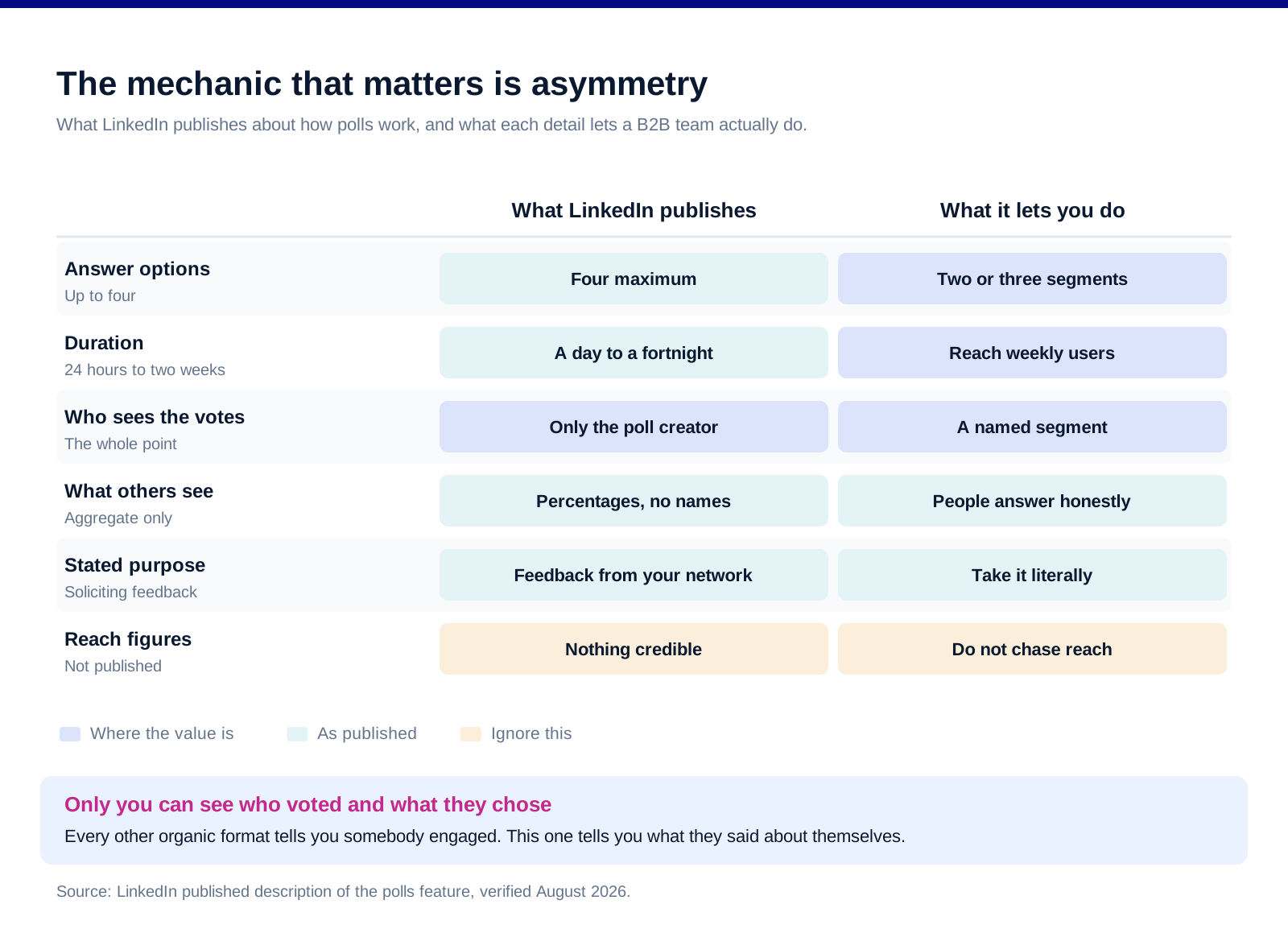
Four answer options, maximum. LinkedIn's announcement of the feature describes entering a question with up to four answer options, alongside accompanying text.
Duration runs from a day to a fortnight. The stated range is "between 24 hours and up to two weeks". Short polls close before slower parts of your network see them, which is a targeting decision rather than a scheduling one.
Only the creator sees who voted, and how. LinkedIn states that "Only you, the poll creator, can also see who voted and what they cast their vote for." Everyone else sees the aggregate.
Which is the entire commercial point of the format. Every other organic post tells you that someone engaged. A poll tells you what they said about themselves.
And it is described by LinkedIn as a feedback instrument. The stated purpose is "a quick, easy and fully-virtual way to solicit feedback from your network", which is worth taking literally rather than treating the format as a reach hack.
We publish no reach or engagement figure for polls. No credible independent measurement exists, and every claim in circulation comes from a tool vendor or from a single account's experience.
That makes it a list-building instrument
A poll is a form nobody has to fill in. The friction of a survey is the form. The friction of a poll is one tap, and the answer still arrives attached to a name and a profile.
Four options is four segments. If the options are written well, you finish with four groups of people who differ in a way that matters to how you would talk to them.
The segments are only as useful as the question. This is where almost every poll fails, and it fails in a specific way covered in the next section.
Profile context comes free. Because you can see who voted, you also see their role, company and seniority, which is the difference between a data point and a segment.
And it works at small scale. A poll that reaches two hundred of the right people and produces thirty named responses is more useful to a B2B team than one that reaches forty thousand strangers. Our piece on what to actually measure on LinkedIn covers why the second number is the tempting one.
Cross-check the sample against your follower base. LinkedIn's Page analytics guidance points you at follower demographics broken down by "location, job function, seniority". If the roles voting in your poll do not resemble the roles you sell to, the segment is real and the audience is wrong.
How to write one that produces a usable segment
![[INSERT CHART 2, linkedin-polls-interactive-posts-chart-2-questions.svg] Alt: Which LinkedIn poll questions produce a usable B2B segment in 2026, mapped by what the answer reveals against how willing people are to answer publicly.](https://framerusercontent.com/images/NOhAK4r430jOMPezbrKRrRk9VqQ.svg)
Ask about their state, not their opinion. "Which of these describes your current setup" produces segments. "What matters most in a vendor" produces a chart nobody can act on.
Make every option a real position somebody occupies. If one option exists only to make another look bad, the people who occupy it will not vote and your segment is missing exactly the group you wanted.
Use two or three options rather than four. Four splits a small audience into groups too thin to be worth acting on, and the fourth option is usually a joke or an escape hatch.
Never include "other" or "just seeing results". Both are escape hatches that absorb your most cautious respondents, who are frequently the ones worth talking to.
Keep it answerable in a second, and answerable honestly. Nobody publicly picks the option that makes them look behind. If the honest answer is embarrassing, you will get a skewed sample and not know it.
Run it for a week rather than a day. Two weeks is the published maximum and a full week catches people who use LinkedIn twice a week, which in B2B is most of your buyers.
What to do with the result, carefully
The votes are personal data, and you now hold them. Seeing who voted is a LinkedIn feature. Building a list from it and contacting those people is processing, and the obligations follow the use rather than the source.
The European Commission is specific about the first contact. Its guidance on using data from another source for marketing states that an organisation must inform individuals "at the latest at the time of the first communication with them, that it has collected their personal data and that it will be processing it for sending them adverts", and that "individuals will have a right to object to such processing".
Which points at the sensible practice rather than a clever one. Say where you got it. A message that opens by referring to the poll they voted in is both more honest and more likely to get a reply than one that pretends the contact is a coincidence.
And it argues against bulk exporting. Using a poll result to decide who to have a conversation with is different from using it to build an outbound list, and the two feel similar right up to the point where they do not.
Nothing here is legal advice. The rules vary by jurisdiction and by what you actually do next, and this is a paragraph in an article rather than a compliance review.
The other interactive formats, and what each is for
![INSERT CHART 3, linkedin-polls-interactive-posts-chart-3-formats.svg] Alt: Six interactive LinkedIn post formats in 2026, what each one produces and where each one fails.](https://framerusercontent.com/images/ABXtqG3t9lsZciT2Q9BWwGGTRk.svg)
The document carousel, for depth without a click. It keeps people on the platform and gives them something worth saving, which is the closest organic proxy for reference value.
The question post, for replies rather than reactions. A genuine question with a specific scope produces comments you can answer individually, and comments are conversations that can be continued in the inbox.
The comment-gated resource, which we would avoid. Asking people to comment to receive a link inflates a metric and irritates the people whose attention you wanted. It also puts fulfilment work on you.
The poll, for segmentation. Covered above, and the only format on this list that hands you a named answer.
The reshare with a line of your own, for distribution. Not interactive as such, but it is the format that actually moves content into other networks, and it is the ask that works with colleagues. Our employee advocacy piece covers that.
And the repurposed long piece, for everything else. Most interactive formats work better carrying a real argument than carrying a prompt. Our repurposing guide covers turning one substantial thing into several.
FAQ
How many options can a LinkedIn poll have?
Up to four, according to LinkedIn's own description of the feature. In practice two or three works better for B2B, because four options split a modest audience into groups too small to act on, and the fourth option tends to become a joke answer or an escape hatch that absorbs your most cautious respondents.
Can you see who voted in a LinkedIn poll?
Yes, if it is your poll. LinkedIn states that "Only you, the poll creator, can also see who voted and what they cast their vote for." Other viewers see only the aggregate percentages. That asymmetry is what makes the format useful commercially, because it turns a post into a named segment rather than an engagement number.
How long should a LinkedIn poll run?
The published range is between 24 hours and two weeks. A week is usually right for B2B, because a large share of buyers open LinkedIn a couple of times a week rather than daily, and a 24 hour poll systematically samples only the heaviest users of the platform.
Are LinkedIn polls good for lead generation?
They are good for segmentation, which is not the same thing. A well-written poll gives you a named list of people who have described their own situation, which is a better starting point for a conversation than a list built on job title alone. Treating it as a lead capture mechanism, particularly by exporting and bulk contacting voters, is where it goes wrong both practically and legally.
What makes a bad LinkedIn poll question?
Asking for an opinion rather than a state of affairs. "What matters most when choosing a vendor" produces a chart and nothing else, because every answer is defensible and none of them tells you where the person actually is. Options that are embarrassing to pick also skew the sample, since nobody publicly selects the answer that makes them look behind.
Is it allowed to contact people who voted in your poll?
Seeing the voters is a LinkedIn feature, but contacting them is processing their personal data and the obligations attach to that. The European Commission's guidance states that individuals must be informed at the latest at the time of first communication that their data has been collected and will be used for marketing, and that they retain a right to object. Saying plainly that you are writing because of the poll is both the compliant instinct and the one that gets replies. This is not legal advice.
Bottom line
Judge a poll by the segment it produces, not the impressions it collects. The mechanic that matters is that only you can see who voted and how, which means a well-built poll is the cheapest named segmentation available on the platform and the only organic format that returns an answer attached to a person. Everything therefore rests on the question. Ask about someone's situation rather than their preferences, offer two or three real positions rather than four, leave out the escape hatches, and give it a week so you are not sampling only the people who live on the platform. Then treat the result as what it is, a list of identifiable people who told you something, and open your first message by saying so.
Want the LinkedIn programme run rather than the poll format debated? Book a call with GROU. We run LinkedIn content and lead generation inside B2B revenue engines across verticals.
We are GROU, a B2B pipeline agency that runs lead generation, outbound, and LinkedIn content for clients across manufacturing, fintech, iGaming, software, and professional services. Nothing in this article is legal advice, and the format guidance reflects our LinkedIn content deployments between 2024 and 2026, anonymized to protect client confidentiality.
Most people run a LinkedIn poll for reach. The interesting thing about a poll is not the reach, it is that you can see exactly who voted and which option they chose.
That turns a poll from an engagement tactic into a segmentation instrument. It also puts you in possession of a named list of people who have told you something about their situation, which is a different kind of asset with a different set of obligations attached.
TL;DR
LinkedIn's own description of the feature is the whole strategy. Polls run with up to four answer options, for a duration "between 24 hours and up to two weeks", and critically, "Only you, the poll creator, can also see who voted and what they cast their vote for." Nobody else sees who chose what. That means a well-written poll produces something no other organic format does: a named segment of people who have self-identified with a specific situation, gathered without a form. The craft is entirely in the question. A poll whose options are opinions gives you nothing usable, while a poll whose options are states of affairs gives you four lists you can act on differently. Write options that describe where someone is rather than what they think, keep it to two or three so the segments stay meaningful, and run it long enough to reach people who are not daily users. Then be careful about what you do next, because acting on those identities is processing personal data and the European Commission is clear that individuals must be told at the latest at the time of first contact and retain a right to object.
What the mechanics actually are
Four answer options, maximum. LinkedIn's announcement of the feature describes entering a question with up to four answer options, alongside accompanying text.
Duration runs from a day to a fortnight. The stated range is "between 24 hours and up to two weeks". Short polls close before slower parts of your network see them, which is a targeting decision rather than a scheduling one.
Only the creator sees who voted, and how. LinkedIn states that "Only you, the poll creator, can also see who voted and what they cast their vote for." Everyone else sees the aggregate.
Which is the entire commercial point of the format. Every other organic post tells you that someone engaged. A poll tells you what they said about themselves.
And it is described by LinkedIn as a feedback instrument. The stated purpose is "a quick, easy and fully-virtual way to solicit feedback from your network", which is worth taking literally rather than treating the format as a reach hack.
We publish no reach or engagement figure for polls. No credible independent measurement exists, and every claim in circulation comes from a tool vendor or from a single account's experience.
That makes it a list-building instrument
A poll is a form nobody has to fill in. The friction of a survey is the form. The friction of a poll is one tap, and the answer still arrives attached to a name and a profile.
Four options is four segments. If the options are written well, you finish with four groups of people who differ in a way that matters to how you would talk to them.
The segments are only as useful as the question. This is where almost every poll fails, and it fails in a specific way covered in the next section.
Profile context comes free. Because you can see who voted, you also see their role, company and seniority, which is the difference between a data point and a segment.
And it works at small scale. A poll that reaches two hundred of the right people and produces thirty named responses is more useful to a B2B team than one that reaches forty thousand strangers. Our piece on what to actually measure on LinkedIn covers why the second number is the tempting one.
Cross-check the sample against your follower base. LinkedIn's Page analytics guidance points you at follower demographics broken down by "location, job function, seniority". If the roles voting in your poll do not resemble the roles you sell to, the segment is real and the audience is wrong.
How to write one that produces a usable segment
Ask about their state, not their opinion. "Which of these describes your current setup" produces segments. "What matters most in a vendor" produces a chart nobody can act on.
Make every option a real position somebody occupies. If one option exists only to make another look bad, the people who occupy it will not vote and your segment is missing exactly the group you wanted.
Use two or three options rather than four. Four splits a small audience into groups too thin to be worth acting on, and the fourth option is usually a joke or an escape hatch.
Never include "other" or "just seeing results". Both are escape hatches that absorb your most cautious respondents, who are frequently the ones worth talking to.
Keep it answerable in a second, and answerable honestly. Nobody publicly picks the option that makes them look behind. If the honest answer is embarrassing, you will get a skewed sample and not know it.
Run it for a week rather than a day. Two weeks is the published maximum and a full week catches people who use LinkedIn twice a week, which in B2B is most of your buyers.
What to do with the result, carefully
The votes are personal data, and you now hold them. Seeing who voted is a LinkedIn feature. Building a list from it and contacting those people is processing, and the obligations follow the use rather than the source.
The European Commission is specific about the first contact. Its guidance on using data from another source for marketing states that an organisation must inform individuals "at the latest at the time of the first communication with them, that it has collected their personal data and that it will be processing it for sending them adverts", and that "individuals will have a right to object to such processing".
Which points at the sensible practice rather than a clever one. Say where you got it. A message that opens by referring to the poll they voted in is both more honest and more likely to get a reply than one that pretends the contact is a coincidence.
And it argues against bulk exporting. Using a poll result to decide who to have a conversation with is different from using it to build an outbound list, and the two feel similar right up to the point where they do not.
Nothing here is legal advice. The rules vary by jurisdiction and by what you actually do next, and this is a paragraph in an article rather than a compliance review.
The other interactive formats, and what each is for
The document carousel, for depth without a click. It keeps people on the platform and gives them something worth saving, which is the closest organic proxy for reference value.
The question post, for replies rather than reactions. A genuine question with a specific scope produces comments you can answer individually, and comments are conversations that can be continued in the inbox.
The comment-gated resource, which we would avoid. Asking people to comment to receive a link inflates a metric and irritates the people whose attention you wanted. It also puts fulfilment work on you.
The poll, for segmentation. Covered above, and the only format on this list that hands you a named answer.
The reshare with a line of your own, for distribution. Not interactive as such, but it is the format that actually moves content into other networks, and it is the ask that works with colleagues. Our employee advocacy piece covers that.
And the repurposed long piece, for everything else. Most interactive formats work better carrying a real argument than carrying a prompt. Our repurposing guide covers turning one substantial thing into several.
FAQ
How many options can a LinkedIn poll have?
Up to four, according to LinkedIn's own description of the feature. In practice two or three works better for B2B, because four options split a modest audience into groups too small to act on, and the fourth option tends to become a joke answer or an escape hatch that absorbs your most cautious respondents.
Can you see who voted in a LinkedIn poll?
Yes, if it is your poll. LinkedIn states that "Only you, the poll creator, can also see who voted and what they cast their vote for." Other viewers see only the aggregate percentages. That asymmetry is what makes the format useful commercially, because it turns a post into a named segment rather than an engagement number.
How long should a LinkedIn poll run?
The published range is between 24 hours and two weeks. A week is usually right for B2B, because a large share of buyers open LinkedIn a couple of times a week rather than daily, and a 24 hour poll systematically samples only the heaviest users of the platform.
Are LinkedIn polls good for lead generation?
They are good for segmentation, which is not the same thing. A well-written poll gives you a named list of people who have described their own situation, which is a better starting point for a conversation than a list built on job title alone. Treating it as a lead capture mechanism, particularly by exporting and bulk contacting voters, is where it goes wrong both practically and legally.
What makes a bad LinkedIn poll question?
Asking for an opinion rather than a state of affairs. "What matters most when choosing a vendor" produces a chart and nothing else, because every answer is defensible and none of them tells you where the person actually is. Options that are embarrassing to pick also skew the sample, since nobody publicly selects the answer that makes them look behind.
Is it allowed to contact people who voted in your poll?
Seeing the voters is a LinkedIn feature, but contacting them is processing their personal data and the obligations attach to that. The European Commission's guidance states that individuals must be informed at the latest at the time of first communication that their data has been collected and will be used for marketing, and that they retain a right to object. Saying plainly that you are writing because of the poll is both the compliant instinct and the one that gets replies. This is not legal advice.
Bottom line
Judge a poll by the segment it produces, not the impressions it collects. The mechanic that matters is that only you can see who voted and how, which means a well-built poll is the cheapest named segmentation available on the platform and the only organic format that returns an answer attached to a person. Everything therefore rests on the question. Ask about someone's situation rather than their preferences, offer two or three real positions rather than four, leave out the escape hatches, and give it a week so you are not sampling only the people who live on the platform. Then treat the result as what it is, a list of identifiable people who told you something, and open your first message by saying so.
Want the LinkedIn programme run rather than the poll format debated? Book a call with GROU. We run LinkedIn content and lead generation inside B2B revenue engines across verticals.
We are GROU, a B2B pipeline agency that runs lead generation, outbound, and LinkedIn content for clients across manufacturing, fintech, iGaming, software, and professional services. Nothing in this article is legal advice, and the format guidance reflects our LinkedIn content deployments between 2024 and 2026, anonymized to protect client confidentiality.
Most people run a LinkedIn poll for reach. The interesting thing about a poll is not the reach, it is that you can see exactly who voted and which option they chose.
That turns a poll from an engagement tactic into a segmentation instrument. It also puts you in possession of a named list of people who have told you something about their situation, which is a different kind of asset with a different set of obligations attached.
TL;DR
LinkedIn's own description of the feature is the whole strategy. Polls run with up to four answer options, for a duration "between 24 hours and up to two weeks", and critically, "Only you, the poll creator, can also see who voted and what they cast their vote for." Nobody else sees who chose what. That means a well-written poll produces something no other organic format does: a named segment of people who have self-identified with a specific situation, gathered without a form. The craft is entirely in the question. A poll whose options are opinions gives you nothing usable, while a poll whose options are states of affairs gives you four lists you can act on differently. Write options that describe where someone is rather than what they think, keep it to two or three so the segments stay meaningful, and run it long enough to reach people who are not daily users. Then be careful about what you do next, because acting on those identities is processing personal data and the European Commission is clear that individuals must be told at the latest at the time of first contact and retain a right to object.
What the mechanics actually are
Four answer options, maximum. LinkedIn's announcement of the feature describes entering a question with up to four answer options, alongside accompanying text.
Duration runs from a day to a fortnight. The stated range is "between 24 hours and up to two weeks". Short polls close before slower parts of your network see them, which is a targeting decision rather than a scheduling one.
Only the creator sees who voted, and how. LinkedIn states that "Only you, the poll creator, can also see who voted and what they cast their vote for." Everyone else sees the aggregate.
Which is the entire commercial point of the format. Every other organic post tells you that someone engaged. A poll tells you what they said about themselves.
And it is described by LinkedIn as a feedback instrument. The stated purpose is "a quick, easy and fully-virtual way to solicit feedback from your network", which is worth taking literally rather than treating the format as a reach hack.
We publish no reach or engagement figure for polls. No credible independent measurement exists, and every claim in circulation comes from a tool vendor or from a single account's experience.
That makes it a list-building instrument
A poll is a form nobody has to fill in. The friction of a survey is the form. The friction of a poll is one tap, and the answer still arrives attached to a name and a profile.
Four options is four segments. If the options are written well, you finish with four groups of people who differ in a way that matters to how you would talk to them.
The segments are only as useful as the question. This is where almost every poll fails, and it fails in a specific way covered in the next section.
Profile context comes free. Because you can see who voted, you also see their role, company and seniority, which is the difference between a data point and a segment.
And it works at small scale. A poll that reaches two hundred of the right people and produces thirty named responses is more useful to a B2B team than one that reaches forty thousand strangers. Our piece on what to actually measure on LinkedIn covers why the second number is the tempting one.
Cross-check the sample against your follower base. LinkedIn's Page analytics guidance points you at follower demographics broken down by "location, job function, seniority". If the roles voting in your poll do not resemble the roles you sell to, the segment is real and the audience is wrong.
How to write one that produces a usable segment
Ask about their state, not their opinion. "Which of these describes your current setup" produces segments. "What matters most in a vendor" produces a chart nobody can act on.
Make every option a real position somebody occupies. If one option exists only to make another look bad, the people who occupy it will not vote and your segment is missing exactly the group you wanted.
Use two or three options rather than four. Four splits a small audience into groups too thin to be worth acting on, and the fourth option is usually a joke or an escape hatch.
Never include "other" or "just seeing results". Both are escape hatches that absorb your most cautious respondents, who are frequently the ones worth talking to.
Keep it answerable in a second, and answerable honestly. Nobody publicly picks the option that makes them look behind. If the honest answer is embarrassing, you will get a skewed sample and not know it.
Run it for a week rather than a day. Two weeks is the published maximum and a full week catches people who use LinkedIn twice a week, which in B2B is most of your buyers.
What to do with the result, carefully
The votes are personal data, and you now hold them. Seeing who voted is a LinkedIn feature. Building a list from it and contacting those people is processing, and the obligations follow the use rather than the source.
The European Commission is specific about the first contact. Its guidance on using data from another source for marketing states that an organisation must inform individuals "at the latest at the time of the first communication with them, that it has collected their personal data and that it will be processing it for sending them adverts", and that "individuals will have a right to object to such processing".
Which points at the sensible practice rather than a clever one. Say where you got it. A message that opens by referring to the poll they voted in is both more honest and more likely to get a reply than one that pretends the contact is a coincidence.
And it argues against bulk exporting. Using a poll result to decide who to have a conversation with is different from using it to build an outbound list, and the two feel similar right up to the point where they do not.
Nothing here is legal advice. The rules vary by jurisdiction and by what you actually do next, and this is a paragraph in an article rather than a compliance review.
The other interactive formats, and what each is for
The document carousel, for depth without a click. It keeps people on the platform and gives them something worth saving, which is the closest organic proxy for reference value.
The question post, for replies rather than reactions. A genuine question with a specific scope produces comments you can answer individually, and comments are conversations that can be continued in the inbox.
The comment-gated resource, which we would avoid. Asking people to comment to receive a link inflates a metric and irritates the people whose attention you wanted. It also puts fulfilment work on you.
The poll, for segmentation. Covered above, and the only format on this list that hands you a named answer.
The reshare with a line of your own, for distribution. Not interactive as such, but it is the format that actually moves content into other networks, and it is the ask that works with colleagues. Our employee advocacy piece covers that.
And the repurposed long piece, for everything else. Most interactive formats work better carrying a real argument than carrying a prompt. Our repurposing guide covers turning one substantial thing into several.
FAQ
How many options can a LinkedIn poll have?
Up to four, according to LinkedIn's own description of the feature. In practice two or three works better for B2B, because four options split a modest audience into groups too small to act on, and the fourth option tends to become a joke answer or an escape hatch that absorbs your most cautious respondents.
Can you see who voted in a LinkedIn poll?
Yes, if it is your poll. LinkedIn states that "Only you, the poll creator, can also see who voted and what they cast their vote for." Other viewers see only the aggregate percentages. That asymmetry is what makes the format useful commercially, because it turns a post into a named segment rather than an engagement number.
How long should a LinkedIn poll run?
The published range is between 24 hours and two weeks. A week is usually right for B2B, because a large share of buyers open LinkedIn a couple of times a week rather than daily, and a 24 hour poll systematically samples only the heaviest users of the platform.
Are LinkedIn polls good for lead generation?
They are good for segmentation, which is not the same thing. A well-written poll gives you a named list of people who have described their own situation, which is a better starting point for a conversation than a list built on job title alone. Treating it as a lead capture mechanism, particularly by exporting and bulk contacting voters, is where it goes wrong both practically and legally.
What makes a bad LinkedIn poll question?
Asking for an opinion rather than a state of affairs. "What matters most when choosing a vendor" produces a chart and nothing else, because every answer is defensible and none of them tells you where the person actually is. Options that are embarrassing to pick also skew the sample, since nobody publicly selects the answer that makes them look behind.
Is it allowed to contact people who voted in your poll?
Seeing the voters is a LinkedIn feature, but contacting them is processing their personal data and the obligations attach to that. The European Commission's guidance states that individuals must be informed at the latest at the time of first communication that their data has been collected and will be used for marketing, and that they retain a right to object. Saying plainly that you are writing because of the poll is both the compliant instinct and the one that gets replies. This is not legal advice.
Bottom line
Judge a poll by the segment it produces, not the impressions it collects. The mechanic that matters is that only you can see who voted and how, which means a well-built poll is the cheapest named segmentation available on the platform and the only organic format that returns an answer attached to a person. Everything therefore rests on the question. Ask about someone's situation rather than their preferences, offer two or three real positions rather than four, leave out the escape hatches, and give it a week so you are not sampling only the people who live on the platform. Then treat the result as what it is, a list of identifiable people who told you something, and open your first message by saying so.
Want the LinkedIn programme run rather than the poll format debated? Book a call with GROU. We run LinkedIn content and lead generation inside B2B revenue engines across verticals.
We are GROU, a B2B pipeline agency that runs lead generation, outbound, and LinkedIn content for clients across manufacturing, fintech, iGaming, software, and professional services. Nothing in this article is legal advice, and the format guidance reflects our LinkedIn content deployments between 2024 and 2026, anonymized to protect client confidentiality.

Pipeline OS Newsletter
Build qualified pipeline
Get weekly tactics to generate demand, improve lead quality, and book more meetings.






Trusted by industry leaders
Trusted by industry leaders
Trusted by industry leaders
Ready to build qualified pipeline?
Ready to build qualified pipeline?
Ready to build qualified pipeline?
Book a call to see if we're the right fit, or take the 2-minute quiz to get a clear starting point.
Book a call to see if we're the right fit, or take the 2-minute quiz to get a clear starting point.
Book a call to see if we're the right fit, or take the 2-minute quiz to get a clear starting point.
" height="30.21639343089746px" id="hfGbXmQR2" width="30.216393430897455px"/></svg>)
Copyright © 2026 – All Right Reserved
Copyright © 2026 – All Right Reserved
Copyright © 2026 – All Right Reserved