%22%3E%3C/path%3E%3Cpath d=%22M 63.072 7.554 C 62.258 8.022 61.577 8.689 61.092 9.493 L 61.092 7.076 L 57.158 7.076 L 57.158 22.64 L 61.089 22.64 L 61.089 14.888 C 61.089 13.446 61.403 12.434 62.03 11.853 C 62.818 11.218 63.818 10.907 64.826 10.982 L 65.868 10.982 L 65.868 6.851 C 64.891 6.834 63.926 7.076 63.073 7.554 Z%22 fill=%22rgb(17,17,17)%22%3E%3C/path%3E%3Cpath d=%22M 78.916 7.82 C 76.363 6.49 73.321 6.49 70.768 7.82 C 69.562 8.473 68.564 9.451 67.888 10.644 C 67.167 11.931 66.803 13.387 66.834 14.862 C 66.804 16.332 67.157 17.785 67.86 19.077 C 68.515 20.267 69.494 21.246 70.684 21.901 C 71.924 22.576 73.318 22.92 74.73 22.898 C 76.164 22.918 77.58 22.575 78.846 21.901 C 80.062 21.247 81.073 20.27 81.768 19.077 C 82.506 17.797 82.88 16.339 82.85 14.862 C 82.88 13.389 82.517 11.934 81.797 10.647 C 81.12 9.455 80.122 8.477 78.917 7.824 M 78.803 14.862 C 78.829 15.739 78.636 16.608 78.241 17.391 C 77.903 18.046 77.38 18.588 76.738 18.95 C 76.124 19.293 75.432 19.472 74.729 19.47 C 73.668 19.497 72.648 19.061 71.934 18.276 C 71.139 17.323 70.741 16.1 70.823 14.862 C 70.741 13.62 71.149 12.395 71.959 11.45 C 72.687 10.667 73.715 10.233 74.783 10.256 C 75.859 10.236 76.894 10.67 77.635 11.45 C 78.464 12.387 78.884 13.616 78.801 14.864%22 fill=%22rgb(17,17,17)%22%3E%3C/path%3E%3Cpath d=%22M 95.906 7.076 L 95.906 15.646 C 95.975 16.68 95.643 17.701 94.979 18.498 C 94.311 19.184 93.379 19.547 92.422 19.495 C 91.475 19.544 90.553 19.18 89.894 18.498 C 89.23 17.701 88.898 16.68 88.967 15.646 L 88.967 7.076 L 85.033 7.076 L 85.033 16.207 C 85 17.449 85.275 18.68 85.834 19.79 C 86.327 20.75 87.095 21.542 88.039 22.065 C 89.033 22.594 90.145 22.861 91.271 22.838 C 92.188 22.847 93.095 22.65 93.926 22.263 C 94.708 21.905 95.388 21.36 95.906 20.675 L 95.906 22.645 L 99.865 22.645 L 99.865 7.076 Z%22 fill=%22rgb(17,17,17)%22%3E%3C/path%3E%3Cpath d=%22M 4.513 15.626 C 4.511 10.815 7.606 6.549 12.181 5.059 C 16.756 3.57 21.77 5.195 24.601 9.086 L 27.816 5.87 C 24.074 1.186 17.981 -0.943 12.137 0.393 C 6.292 1.728 1.728 6.292 0.393 12.137 C -0.943 17.981 1.186 24.074 5.87 27.816 L 9.085 24.601 C 6.214 22.512 4.515 19.177 4.513 15.626%22 fill=%22rgb(32,62,235)%22%3E%3C/path%3E%3Cpath d=%22M 17.114 14.343 L 13.354 18.01 L 13.354 18.026 L 21.071 18.026 L 11.412 27.609 L 17.389 27.609 L 23.999 21.081 L 23.999 28.316 L 24.005 28.316 L 27.967 24.393 L 27.967 14.343 Z%22 fill=%22rgb(32,62,235)%22%3E%3C/path%3E%3C/g%3E%3C/svg%3E) ×
× ××
××›
›
›
›
Scrape Website for Emails: A Modern B2B Workflow
Scrape Website for Emails: A Modern B2B Workflow
Scrape Website for Emails: A Modern B2B Workflow
Scrape Website for Emails: A Modern B2B Workflow
Scrape Website for Emails: A Modern B2B Workflow
Scrape Website for Emails: A Modern B2B Workflow

Author
Aljaz Peklaj

Most advice on how to scrape website for emails is built for the wrong outcome. It optimizes for more addresses, not more reachable decision-makers. Those are not the same thing, and once you've run enough outbound, the gap becomes expensive.
The old motion is simple. Crawl pages, collect every address you can find, push the list into a sequencer, and hope verification cleans up the mess later. That's how teams end up with stale contacts, role-based aliases, bounce problems, and legal questions they should have solved before the first export.
The professional standard is different. Use website data as a signal layer, not the source of truth for contact discovery. If you work in serious B2B pipeline, the job isn't scraping. The job is building a repeatable system that identifies the right person, finds a verified business address, and protects deliverability before anything gets sent.
Table of Contents
Key takeaways for modern contact discovery
If your team needs contacts fast, direct scraping feels efficient. In practice, it usually creates cleanup work downstream. You don't need every email on a website. You need the right person at the right company with an address that can be used.
A lot of operators coming from adjacent data workflows already understand this. If you've seen how location, ownership, and contact research get layered in processes like this guide to real estate skip tracing, the principle is familiar. Raw data collection is only useful when the filtering logic is strong enough to turn it into a usable target list.
Here's the operating view we use:
Start with role logic: Define who matters before you touch the site. If you don't, you'll collect support inboxes and admin aliases instead of buying committee members.
Use structured sources first: Apollo and Sales Navigator usually outperform company websites for current role discovery, because team pages go stale fast.
Treat the website as context: Pull product focus, proof points, hiring signals, customer logos, and positioning. Don't treat a contact page as your lead database.
Run verification as a system: Tendem's guidance separates crawling from verification and says post-cleaning verification should reach 90%+, while lists below 85% usually signal source or extraction problems, which is the right way to think about list quality for outreach in its B2B lead scraping guide.
Choose quality over list size: Smaller verified lists outperform bloated scraped lists because they protect deliverability and give reps a cleaner lane.
Working rule: If your “scrape website for emails” process starts with extraction instead of role definition, you're building cleanup work, not pipeline.
For a broader view on list quality, enrichment, and outbound structure, this lead generation guide from Grou is a useful companion read.
Why direct website scraping is a broken strategy
The failure mode isn't theoretical. It shows up the minute a team tries to scale from one-off research into campaign volume.
In one manufacturing campaign targeting mid-market industrial companies in Central and Eastern Europe, we leaned harder on website-based discovery than we normally would. Structured providers had weaker coverage in that segment, so the temptation was obvious. Pull from contact pages, team pages, and whatever public addresses were available, then clean later.

That first pass gave us a bigger list than the structured workflow would have. It also gave us a bounce rate of 11%, a pile of role-based aliases, and a chunk of individual contacts who had already left their companies. The list looked productive in a spreadsheet and dangerous in a sending platform.
What went wrong in practice
The bad outcomes came from three very normal scraping mistakes.
First, the source set was too broad. Contact pages and generic team pages are magnets for info@, sales@, contact@, and similar aliases. Those addresses may be technically valid, but they rarely map to the person who owns the problem you're trying to solve.
Second, the recency was poor. Company websites don't update on your schedule. Team pages often lag hiring and departures, which means you can extract a real-looking address tied to a person who no longer works there.
Third, the process assumed extraction quality would survive into delivery. It won't. ParseHub's guidance is directionally right here, quality checks should prioritize recency, consent, and segment fit before extraction, and teams should use timestamp tracking plus bounce-feedback integration to prevent deliverability decay in its email scraping considerations.
We fixed the campaign by getting stricter, not by scraping more.
Removed aliases first: Anything matching role-based inbox patterns was cut before outreach.
Checked current role status: Every individual contact got cross-checked against LinkedIn for role continuity.
Verified before send: NeverBounce became mandatory, not optional.
Preferred verified enrichment: When Clay and the website both produced an address, the Clay-verified result won.
Why the damage lasts longer than the campaign
The hidden cost of bad scraping isn't only wasted sends. It's the way poor data bleeds into the rest of the outbound machine.
A rep sees non-replies and assumes messaging is weak. RevOps sees bounce problems and starts debugging infrastructure. Marketing thinks the segment is cold. In reality, the list quality was broken before the first sequence step fired.
Bad contact data creates fake performance signals. Teams rewrite copy, rebuild sequences, and rotate domains when the original problem was a poor source list.
This is also why I wouldn't recommend direct website extraction as the default motion for teams evaluating tools like Bright Data alternatives and related workflows. The technical ability to pull public data isn't the same as having an operationally sound contact-discovery process.
A modern framework for structured contact discovery
The better workflow isn't “scrape better.” It's identify, enrich, verify, then send. Website data still matters, but it plays a narrower role.
ParseHub's tutorial reflects where this category has gone. Practical workflows now combine extraction, validation, and repeatable batch processing, including pagination and bulk inputs, which shows how email scraping evolved from one-off harvesting into pipeline-style enrichment in its scraping workflow guide. That shift is real. The problem is that many teams still apply pipeline tooling to a broken sourcing model.
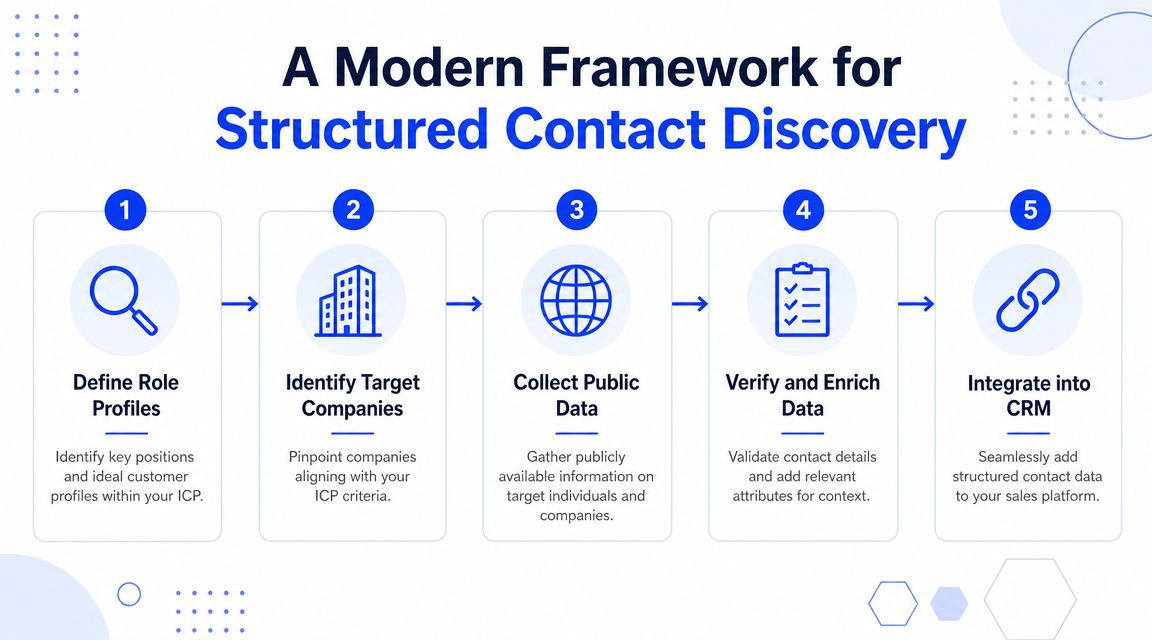
The five-step workflow
Define role profiles first
Start with your ICP, not the website. Decide whether you need a Head of Sales, VP Marketing, Director of Operations, or another role before you search for any address.
Most scraping workflows skip this and treat every visible email as equally valuable. That's how lists get padded with irrelevant inboxes.
Run primary discovery through structured tools
Apollo and Sales Navigator should be first in line for contact identification. They are built around people and roles, which is the core unit of work in outbound.
In our operating experience, this beats relying on a company's team page. The website usually tells you less about who currently owns the function than LinkedIn-linked data does.
Use the website as a context layer
Website data demonstrates its value. Pull product focus, category language, hiring activity, customer proof, market positioning, and recent announcements.
Clay's HTTP layer is useful here. So is manual review for high-value accounts. The site helps you write better messaging and prioritize better accounts. It should not be the main place you hunt for emails.
Enrich with a multi-source waterfall
Once you have a name and role, use Clay to run enrichment across multiple providers in sequence. This is the professional replacement for pattern guessing and page scraping.
If you want a useful example of niche list-building logic in another context, this resource to find top email United States investors shows the same core lesson, structured datasets beat random public-page hunting when the goal is usable outreach data.
Verify before any send
Every address should pass through a verification step before it enters Lemlist, Instantly, or any other sequencer. NeverBounce is a common second-pass layer for this.
If it doesn't verify cleanly, remove it. Don't argue with your verification process.
Practical rule: The website can help you understand the account. It usually shouldn't decide who enters your sequence.
Where website data actually belongs
The cleanest way to think about website data is this:
Use website data for | Don't use website data for |
|---|---|
Product and offer context | Building your primary contact list |
Customer logos and proof | Guessing current org charts |
Hiring and expansion signals | Trusting old team pages |
Message personalization inputs | Bulk importing every visible address |
This is also where a documented data enrichment workflow matters. Without a clear sequence of source selection, enrichment, and verification, teams mix context gathering with contact collection and get weak results from both.
The right tool stack for orchestration, not scraping
When people ask what scraping tool we use, the honest answer is that we don't rely on one. We rely on a data orchestration stack.
The market itself has moved in that direction. Modern tools have shifted from simple page crawling to multi-source collection. Kaspr's comparison notes that providers such as Finder.io and Clearout pull from domains, social media, and company databases, which is why the category now gets positioned as business-data automation instead of plain scraping in its email scraping tools comparison.

Why Clay is closer to the right answer
Clay sits in the middle of the stack because it solves the actual problem. It lets you orchestrate multiple data sources, enrich records in sequence, and push cleaned outputs into downstream systems.
That's very different from a browser scraper or a custom crawler. A scraper extracts what a page exposes. Clay helps you resolve a contact across providers, attach context, and route the result into HubSpot, Instantly, Lemlist, Slack, or your CRM workflow.
A practical stack often looks like this:
Apollo and Sales Navigator for role discovery
Clay for enrichment and orchestration
NeverBounce for bulk verification
Lemlist, Instantly, or HeyReach for delivery and sequencing
HubSpot for contact ownership and lifecycle control
If a team wants an outside partner to run this as an operating system rather than a set of disconnected tools, Grou's lead generation software perspective is aligned with that model.
What to use dedicated scraping tools for
Dedicated scrapers still have a place. It's just narrower than many organizations realize.
Use tools like Apify, PhantomBuster, or custom extraction scripts for specific signal collection, not core contact discovery. Good use cases include customer-logo extraction, careers-page monitoring, directory parsing, or harvesting structured fields from public pages when no licensed provider covers the segment well.
The strongest stacks use scraping as a fallback signal source. Weak stacks use it as the main contact source and hope verification rescues them later.
That distinction matters. One approach produces account intelligence. The other produces cleanup.
A multi-layered process for email verification
Email verification belongs at multiple points in the workflow. Treating it as a final cleanup job is how bad records slip into sequencing tools, bounce, and drag down domain health.
A professional process checks different risks at different stages. One layer removes obvious junk before you spend money on verification. Another confirms whether an address is safe enough to enter the list. A final layer checks viability again right before the email goes out.
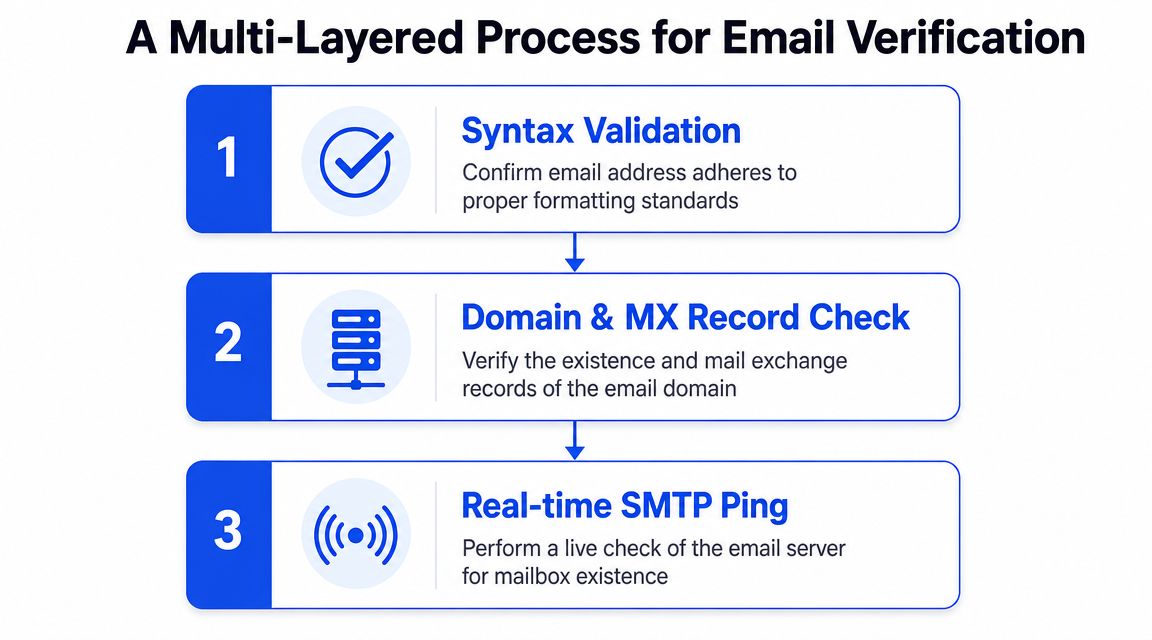
Layer 1, filter before you verify
Start by reducing waste.
Do not send every raw record from Clay, a CSV export, or a scraped page into NeverBounce. Strip out duplicates, malformed addresses, and role accounts first. Addresses like info@, sales@, contact@, and hello@ can verify as real mailboxes, but they rarely map to the person you actually want in a B2B outbound motion.
The limitations of old scraping workflows become apparent. They treat email existence as success. Professional outbound teams care about identity match, ownership, and reply potential.
Use simple rules at this stage:
Remove duplicates: repeated contacts waste credits and muddy reporting
Remove malformed entries: syntax errors should never reach a verifier
Remove role-based aliases: keep them only if the campaign is meant for shared inboxes
Remove obvious mismatches: if the name, company, and domain do not line up, hold the record back
For teams working through person-level matching, this piece on methods to identify people with email is useful because it separates identity resolution from simple address collection.
Layer 2, bulk verification before list entry
Bulk verification is the gate before a record enters outreach.
NeverBounce is a common choice because it is easy to run at volume and easy to operationalize. ZeroBounce and similar tools can fill the same role. The important part is setting policy around the output, not arguing over logos.
Each result needs a clear action:
Verification result | What to do |
|---|---|
Valid | Approve for outreach |
Invalid | Remove |
Disposable | Remove |
Role-based | Usually remove |
Catch-all | Hold for additional review |
Unknown | Review manually or retest later |
Teams that want a reference point can use this email verification workflow to structure decisions before records hit the sender. The mistake is not picking the wrong vendor. The mistake is allowing unclassified records into the sequence queue.
Layer 3, send-time checks before delivery
Verification expires.
A contact can look fine when Clay resolves it, pass NeverBounce in bulk, then fail days later when the campaign sends. People change jobs. Mailboxes get disabled. Domains tighten acceptance rules. That is why the last check belongs inside the sending layer.
Lemlist and Instantly both help catch late-stage problems before a bounce hits your infrastructure. For high-value accounts, some teams also rerun verification right before launch if the list sat untouched for too long.
The operating rule should stay simple:
Clear pass: send
Unclear result: hold unless the account matters enough to justify another check
Bad result: remove it
Verification works as a chain of controls. It starts before the verifier, runs through bulk classification, and ends at send time. That is the standard if you want contact discovery to produce reachable people instead of cleanup work.
Your next step to a reliable contact engine
If your current process to scrape website for emails starts with page extraction, audit it. The question isn't whether the workflow can collect addresses. The question is whether it can reliably produce reachable, relevant contacts without damaging deliverability.
Run a simple review across your current stack:
Check source order: Are you starting with structured role data, or with whatever the website exposes?
Check website usage: Are you using the site for context signals, or treating it like your primary contact database?
Check enrichment depth: Are you relying on one provider, or a waterfall across multiple sources?
Check verification layers: Do you filter, bulk verify, and run send-time controls, or only one of those?
Check list standards: Are low-confidence addresses being removed, or merely tolerated?
The teams that build stable pipeline engines don't win because they found a smarter scraper. They win because they built a stricter system. This is a major shift. Structure turns attention into pipeline, and verified contact discovery is part of that structure.
If your team wants to replace ad hoc list building with a cleaner outbound system, Grou helps revenue teams design structured contact discovery, enrichment, and outbound workflows that connect targeting, messaging, and verification into one pipeline engine.
Most advice on how to scrape website for emails is built for the wrong outcome. It optimizes for more addresses, not more reachable decision-makers. Those are not the same thing, and once you've run enough outbound, the gap becomes expensive.
The old motion is simple. Crawl pages, collect every address you can find, push the list into a sequencer, and hope verification cleans up the mess later. That's how teams end up with stale contacts, role-based aliases, bounce problems, and legal questions they should have solved before the first export.
The professional standard is different. Use website data as a signal layer, not the source of truth for contact discovery. If you work in serious B2B pipeline, the job isn't scraping. The job is building a repeatable system that identifies the right person, finds a verified business address, and protects deliverability before anything gets sent.
Table of Contents
Key takeaways for modern contact discovery
If your team needs contacts fast, direct scraping feels efficient. In practice, it usually creates cleanup work downstream. You don't need every email on a website. You need the right person at the right company with an address that can be used.
A lot of operators coming from adjacent data workflows already understand this. If you've seen how location, ownership, and contact research get layered in processes like this guide to real estate skip tracing, the principle is familiar. Raw data collection is only useful when the filtering logic is strong enough to turn it into a usable target list.
Here's the operating view we use:
Start with role logic: Define who matters before you touch the site. If you don't, you'll collect support inboxes and admin aliases instead of buying committee members.
Use structured sources first: Apollo and Sales Navigator usually outperform company websites for current role discovery, because team pages go stale fast.
Treat the website as context: Pull product focus, proof points, hiring signals, customer logos, and positioning. Don't treat a contact page as your lead database.
Run verification as a system: Tendem's guidance separates crawling from verification and says post-cleaning verification should reach 90%+, while lists below 85% usually signal source or extraction problems, which is the right way to think about list quality for outreach in its B2B lead scraping guide.
Choose quality over list size: Smaller verified lists outperform bloated scraped lists because they protect deliverability and give reps a cleaner lane.
Working rule: If your “scrape website for emails” process starts with extraction instead of role definition, you're building cleanup work, not pipeline.
For a broader view on list quality, enrichment, and outbound structure, this lead generation guide from Grou is a useful companion read.
Why direct website scraping is a broken strategy
The failure mode isn't theoretical. It shows up the minute a team tries to scale from one-off research into campaign volume.
In one manufacturing campaign targeting mid-market industrial companies in Central and Eastern Europe, we leaned harder on website-based discovery than we normally would. Structured providers had weaker coverage in that segment, so the temptation was obvious. Pull from contact pages, team pages, and whatever public addresses were available, then clean later.
That first pass gave us a bigger list than the structured workflow would have. It also gave us a bounce rate of 11%, a pile of role-based aliases, and a chunk of individual contacts who had already left their companies. The list looked productive in a spreadsheet and dangerous in a sending platform.
What went wrong in practice
The bad outcomes came from three very normal scraping mistakes.
First, the source set was too broad. Contact pages and generic team pages are magnets for info@, sales@, contact@, and similar aliases. Those addresses may be technically valid, but they rarely map to the person who owns the problem you're trying to solve.
Second, the recency was poor. Company websites don't update on your schedule. Team pages often lag hiring and departures, which means you can extract a real-looking address tied to a person who no longer works there.
Third, the process assumed extraction quality would survive into delivery. It won't. ParseHub's guidance is directionally right here, quality checks should prioritize recency, consent, and segment fit before extraction, and teams should use timestamp tracking plus bounce-feedback integration to prevent deliverability decay in its email scraping considerations.
We fixed the campaign by getting stricter, not by scraping more.
Removed aliases first: Anything matching role-based inbox patterns was cut before outreach.
Checked current role status: Every individual contact got cross-checked against LinkedIn for role continuity.
Verified before send: NeverBounce became mandatory, not optional.
Preferred verified enrichment: When Clay and the website both produced an address, the Clay-verified result won.
Why the damage lasts longer than the campaign
The hidden cost of bad scraping isn't only wasted sends. It's the way poor data bleeds into the rest of the outbound machine.
A rep sees non-replies and assumes messaging is weak. RevOps sees bounce problems and starts debugging infrastructure. Marketing thinks the segment is cold. In reality, the list quality was broken before the first sequence step fired.
Bad contact data creates fake performance signals. Teams rewrite copy, rebuild sequences, and rotate domains when the original problem was a poor source list.
This is also why I wouldn't recommend direct website extraction as the default motion for teams evaluating tools like Bright Data alternatives and related workflows. The technical ability to pull public data isn't the same as having an operationally sound contact-discovery process.
A modern framework for structured contact discovery
The better workflow isn't “scrape better.” It's identify, enrich, verify, then send. Website data still matters, but it plays a narrower role.
ParseHub's tutorial reflects where this category has gone. Practical workflows now combine extraction, validation, and repeatable batch processing, including pagination and bulk inputs, which shows how email scraping evolved from one-off harvesting into pipeline-style enrichment in its scraping workflow guide. That shift is real. The problem is that many teams still apply pipeline tooling to a broken sourcing model.
The five-step workflow
Define role profiles first
Start with your ICP, not the website. Decide whether you need a Head of Sales, VP Marketing, Director of Operations, or another role before you search for any address.
Most scraping workflows skip this and treat every visible email as equally valuable. That's how lists get padded with irrelevant inboxes.
Run primary discovery through structured tools
Apollo and Sales Navigator should be first in line for contact identification. They are built around people and roles, which is the core unit of work in outbound.
In our operating experience, this beats relying on a company's team page. The website usually tells you less about who currently owns the function than LinkedIn-linked data does.
Use the website as a context layer
Website data demonstrates its value. Pull product focus, category language, hiring activity, customer proof, market positioning, and recent announcements.
Clay's HTTP layer is useful here. So is manual review for high-value accounts. The site helps you write better messaging and prioritize better accounts. It should not be the main place you hunt for emails.
Enrich with a multi-source waterfall
Once you have a name and role, use Clay to run enrichment across multiple providers in sequence. This is the professional replacement for pattern guessing and page scraping.
If you want a useful example of niche list-building logic in another context, this resource to find top email United States investors shows the same core lesson, structured datasets beat random public-page hunting when the goal is usable outreach data.
Verify before any send
Every address should pass through a verification step before it enters Lemlist, Instantly, or any other sequencer. NeverBounce is a common second-pass layer for this.
If it doesn't verify cleanly, remove it. Don't argue with your verification process.
Practical rule: The website can help you understand the account. It usually shouldn't decide who enters your sequence.
Where website data actually belongs
The cleanest way to think about website data is this:
Use website data for | Don't use website data for |
|---|---|
Product and offer context | Building your primary contact list |
Customer logos and proof | Guessing current org charts |
Hiring and expansion signals | Trusting old team pages |
Message personalization inputs | Bulk importing every visible address |
This is also where a documented data enrichment workflow matters. Without a clear sequence of source selection, enrichment, and verification, teams mix context gathering with contact collection and get weak results from both.
The right tool stack for orchestration, not scraping
When people ask what scraping tool we use, the honest answer is that we don't rely on one. We rely on a data orchestration stack.
The market itself has moved in that direction. Modern tools have shifted from simple page crawling to multi-source collection. Kaspr's comparison notes that providers such as Finder.io and Clearout pull from domains, social media, and company databases, which is why the category now gets positioned as business-data automation instead of plain scraping in its email scraping tools comparison.
Why Clay is closer to the right answer
Clay sits in the middle of the stack because it solves the actual problem. It lets you orchestrate multiple data sources, enrich records in sequence, and push cleaned outputs into downstream systems.
That's very different from a browser scraper or a custom crawler. A scraper extracts what a page exposes. Clay helps you resolve a contact across providers, attach context, and route the result into HubSpot, Instantly, Lemlist, Slack, or your CRM workflow.
A practical stack often looks like this:
Apollo and Sales Navigator for role discovery
Clay for enrichment and orchestration
NeverBounce for bulk verification
Lemlist, Instantly, or HeyReach for delivery and sequencing
HubSpot for contact ownership and lifecycle control
If a team wants an outside partner to run this as an operating system rather than a set of disconnected tools, Grou's lead generation software perspective is aligned with that model.
What to use dedicated scraping tools for
Dedicated scrapers still have a place. It's just narrower than many organizations realize.
Use tools like Apify, PhantomBuster, or custom extraction scripts for specific signal collection, not core contact discovery. Good use cases include customer-logo extraction, careers-page monitoring, directory parsing, or harvesting structured fields from public pages when no licensed provider covers the segment well.
The strongest stacks use scraping as a fallback signal source. Weak stacks use it as the main contact source and hope verification rescues them later.
That distinction matters. One approach produces account intelligence. The other produces cleanup.
A multi-layered process for email verification
Email verification belongs at multiple points in the workflow. Treating it as a final cleanup job is how bad records slip into sequencing tools, bounce, and drag down domain health.
A professional process checks different risks at different stages. One layer removes obvious junk before you spend money on verification. Another confirms whether an address is safe enough to enter the list. A final layer checks viability again right before the email goes out.
Layer 1, filter before you verify
Start by reducing waste.
Do not send every raw record from Clay, a CSV export, or a scraped page into NeverBounce. Strip out duplicates, malformed addresses, and role accounts first. Addresses like info@, sales@, contact@, and hello@ can verify as real mailboxes, but they rarely map to the person you actually want in a B2B outbound motion.
The limitations of old scraping workflows become apparent. They treat email existence as success. Professional outbound teams care about identity match, ownership, and reply potential.
Use simple rules at this stage:
Remove duplicates: repeated contacts waste credits and muddy reporting
Remove malformed entries: syntax errors should never reach a verifier
Remove role-based aliases: keep them only if the campaign is meant for shared inboxes
Remove obvious mismatches: if the name, company, and domain do not line up, hold the record back
For teams working through person-level matching, this piece on methods to identify people with email is useful because it separates identity resolution from simple address collection.
Layer 2, bulk verification before list entry
Bulk verification is the gate before a record enters outreach.
NeverBounce is a common choice because it is easy to run at volume and easy to operationalize. ZeroBounce and similar tools can fill the same role. The important part is setting policy around the output, not arguing over logos.
Each result needs a clear action:
Verification result | What to do |
|---|---|
Valid | Approve for outreach |
Invalid | Remove |
Disposable | Remove |
Role-based | Usually remove |
Catch-all | Hold for additional review |
Unknown | Review manually or retest later |
Teams that want a reference point can use this email verification workflow to structure decisions before records hit the sender. The mistake is not picking the wrong vendor. The mistake is allowing unclassified records into the sequence queue.
Layer 3, send-time checks before delivery
Verification expires.
A contact can look fine when Clay resolves it, pass NeverBounce in bulk, then fail days later when the campaign sends. People change jobs. Mailboxes get disabled. Domains tighten acceptance rules. That is why the last check belongs inside the sending layer.
Lemlist and Instantly both help catch late-stage problems before a bounce hits your infrastructure. For high-value accounts, some teams also rerun verification right before launch if the list sat untouched for too long.
The operating rule should stay simple:
Clear pass: send
Unclear result: hold unless the account matters enough to justify another check
Bad result: remove it
Verification works as a chain of controls. It starts before the verifier, runs through bulk classification, and ends at send time. That is the standard if you want contact discovery to produce reachable people instead of cleanup work.
Your next step to a reliable contact engine
If your current process to scrape website for emails starts with page extraction, audit it. The question isn't whether the workflow can collect addresses. The question is whether it can reliably produce reachable, relevant contacts without damaging deliverability.
Run a simple review across your current stack:
Check source order: Are you starting with structured role data, or with whatever the website exposes?
Check website usage: Are you using the site for context signals, or treating it like your primary contact database?
Check enrichment depth: Are you relying on one provider, or a waterfall across multiple sources?
Check verification layers: Do you filter, bulk verify, and run send-time controls, or only one of those?
Check list standards: Are low-confidence addresses being removed, or merely tolerated?
The teams that build stable pipeline engines don't win because they found a smarter scraper. They win because they built a stricter system. This is a major shift. Structure turns attention into pipeline, and verified contact discovery is part of that structure.
If your team wants to replace ad hoc list building with a cleaner outbound system, Grou helps revenue teams design structured contact discovery, enrichment, and outbound workflows that connect targeting, messaging, and verification into one pipeline engine.
Most advice on how to scrape website for emails is built for the wrong outcome. It optimizes for more addresses, not more reachable decision-makers. Those are not the same thing, and once you've run enough outbound, the gap becomes expensive.
The old motion is simple. Crawl pages, collect every address you can find, push the list into a sequencer, and hope verification cleans up the mess later. That's how teams end up with stale contacts, role-based aliases, bounce problems, and legal questions they should have solved before the first export.
The professional standard is different. Use website data as a signal layer, not the source of truth for contact discovery. If you work in serious B2B pipeline, the job isn't scraping. The job is building a repeatable system that identifies the right person, finds a verified business address, and protects deliverability before anything gets sent.
Table of Contents
Key takeaways for modern contact discovery
If your team needs contacts fast, direct scraping feels efficient. In practice, it usually creates cleanup work downstream. You don't need every email on a website. You need the right person at the right company with an address that can be used.
A lot of operators coming from adjacent data workflows already understand this. If you've seen how location, ownership, and contact research get layered in processes like this guide to real estate skip tracing, the principle is familiar. Raw data collection is only useful when the filtering logic is strong enough to turn it into a usable target list.
Here's the operating view we use:
Start with role logic: Define who matters before you touch the site. If you don't, you'll collect support inboxes and admin aliases instead of buying committee members.
Use structured sources first: Apollo and Sales Navigator usually outperform company websites for current role discovery, because team pages go stale fast.
Treat the website as context: Pull product focus, proof points, hiring signals, customer logos, and positioning. Don't treat a contact page as your lead database.
Run verification as a system: Tendem's guidance separates crawling from verification and says post-cleaning verification should reach 90%+, while lists below 85% usually signal source or extraction problems, which is the right way to think about list quality for outreach in its B2B lead scraping guide.
Choose quality over list size: Smaller verified lists outperform bloated scraped lists because they protect deliverability and give reps a cleaner lane.
Working rule: If your “scrape website for emails” process starts with extraction instead of role definition, you're building cleanup work, not pipeline.
For a broader view on list quality, enrichment, and outbound structure, this lead generation guide from Grou is a useful companion read.
Why direct website scraping is a broken strategy
The failure mode isn't theoretical. It shows up the minute a team tries to scale from one-off research into campaign volume.
In one manufacturing campaign targeting mid-market industrial companies in Central and Eastern Europe, we leaned harder on website-based discovery than we normally would. Structured providers had weaker coverage in that segment, so the temptation was obvious. Pull from contact pages, team pages, and whatever public addresses were available, then clean later.
That first pass gave us a bigger list than the structured workflow would have. It also gave us a bounce rate of 11%, a pile of role-based aliases, and a chunk of individual contacts who had already left their companies. The list looked productive in a spreadsheet and dangerous in a sending platform.
What went wrong in practice
The bad outcomes came from three very normal scraping mistakes.
First, the source set was too broad. Contact pages and generic team pages are magnets for info@, sales@, contact@, and similar aliases. Those addresses may be technically valid, but they rarely map to the person who owns the problem you're trying to solve.
Second, the recency was poor. Company websites don't update on your schedule. Team pages often lag hiring and departures, which means you can extract a real-looking address tied to a person who no longer works there.
Third, the process assumed extraction quality would survive into delivery. It won't. ParseHub's guidance is directionally right here, quality checks should prioritize recency, consent, and segment fit before extraction, and teams should use timestamp tracking plus bounce-feedback integration to prevent deliverability decay in its email scraping considerations.
We fixed the campaign by getting stricter, not by scraping more.
Removed aliases first: Anything matching role-based inbox patterns was cut before outreach.
Checked current role status: Every individual contact got cross-checked against LinkedIn for role continuity.
Verified before send: NeverBounce became mandatory, not optional.
Preferred verified enrichment: When Clay and the website both produced an address, the Clay-verified result won.
Why the damage lasts longer than the campaign
The hidden cost of bad scraping isn't only wasted sends. It's the way poor data bleeds into the rest of the outbound machine.
A rep sees non-replies and assumes messaging is weak. RevOps sees bounce problems and starts debugging infrastructure. Marketing thinks the segment is cold. In reality, the list quality was broken before the first sequence step fired.
Bad contact data creates fake performance signals. Teams rewrite copy, rebuild sequences, and rotate domains when the original problem was a poor source list.
This is also why I wouldn't recommend direct website extraction as the default motion for teams evaluating tools like Bright Data alternatives and related workflows. The technical ability to pull public data isn't the same as having an operationally sound contact-discovery process.
A modern framework for structured contact discovery
The better workflow isn't “scrape better.” It's identify, enrich, verify, then send. Website data still matters, but it plays a narrower role.
ParseHub's tutorial reflects where this category has gone. Practical workflows now combine extraction, validation, and repeatable batch processing, including pagination and bulk inputs, which shows how email scraping evolved from one-off harvesting into pipeline-style enrichment in its scraping workflow guide. That shift is real. The problem is that many teams still apply pipeline tooling to a broken sourcing model.
The five-step workflow
Define role profiles first
Start with your ICP, not the website. Decide whether you need a Head of Sales, VP Marketing, Director of Operations, or another role before you search for any address.
Most scraping workflows skip this and treat every visible email as equally valuable. That's how lists get padded with irrelevant inboxes.
Run primary discovery through structured tools
Apollo and Sales Navigator should be first in line for contact identification. They are built around people and roles, which is the core unit of work in outbound.
In our operating experience, this beats relying on a company's team page. The website usually tells you less about who currently owns the function than LinkedIn-linked data does.
Use the website as a context layer
Website data demonstrates its value. Pull product focus, category language, hiring activity, customer proof, market positioning, and recent announcements.
Clay's HTTP layer is useful here. So is manual review for high-value accounts. The site helps you write better messaging and prioritize better accounts. It should not be the main place you hunt for emails.
Enrich with a multi-source waterfall
Once you have a name and role, use Clay to run enrichment across multiple providers in sequence. This is the professional replacement for pattern guessing and page scraping.
If you want a useful example of niche list-building logic in another context, this resource to find top email United States investors shows the same core lesson, structured datasets beat random public-page hunting when the goal is usable outreach data.
Verify before any send
Every address should pass through a verification step before it enters Lemlist, Instantly, or any other sequencer. NeverBounce is a common second-pass layer for this.
If it doesn't verify cleanly, remove it. Don't argue with your verification process.
Practical rule: The website can help you understand the account. It usually shouldn't decide who enters your sequence.
Where website data actually belongs
The cleanest way to think about website data is this:
Use website data for | Don't use website data for |
|---|---|
Product and offer context | Building your primary contact list |
Customer logos and proof | Guessing current org charts |
Hiring and expansion signals | Trusting old team pages |
Message personalization inputs | Bulk importing every visible address |
This is also where a documented data enrichment workflow matters. Without a clear sequence of source selection, enrichment, and verification, teams mix context gathering with contact collection and get weak results from both.
The right tool stack for orchestration, not scraping
When people ask what scraping tool we use, the honest answer is that we don't rely on one. We rely on a data orchestration stack.
The market itself has moved in that direction. Modern tools have shifted from simple page crawling to multi-source collection. Kaspr's comparison notes that providers such as Finder.io and Clearout pull from domains, social media, and company databases, which is why the category now gets positioned as business-data automation instead of plain scraping in its email scraping tools comparison.
Why Clay is closer to the right answer
Clay sits in the middle of the stack because it solves the actual problem. It lets you orchestrate multiple data sources, enrich records in sequence, and push cleaned outputs into downstream systems.
That's very different from a browser scraper or a custom crawler. A scraper extracts what a page exposes. Clay helps you resolve a contact across providers, attach context, and route the result into HubSpot, Instantly, Lemlist, Slack, or your CRM workflow.
A practical stack often looks like this:
Apollo and Sales Navigator for role discovery
Clay for enrichment and orchestration
NeverBounce for bulk verification
Lemlist, Instantly, or HeyReach for delivery and sequencing
HubSpot for contact ownership and lifecycle control
If a team wants an outside partner to run this as an operating system rather than a set of disconnected tools, Grou's lead generation software perspective is aligned with that model.
What to use dedicated scraping tools for
Dedicated scrapers still have a place. It's just narrower than many organizations realize.
Use tools like Apify, PhantomBuster, or custom extraction scripts for specific signal collection, not core contact discovery. Good use cases include customer-logo extraction, careers-page monitoring, directory parsing, or harvesting structured fields from public pages when no licensed provider covers the segment well.
The strongest stacks use scraping as a fallback signal source. Weak stacks use it as the main contact source and hope verification rescues them later.
That distinction matters. One approach produces account intelligence. The other produces cleanup.
A multi-layered process for email verification
Email verification belongs at multiple points in the workflow. Treating it as a final cleanup job is how bad records slip into sequencing tools, bounce, and drag down domain health.
A professional process checks different risks at different stages. One layer removes obvious junk before you spend money on verification. Another confirms whether an address is safe enough to enter the list. A final layer checks viability again right before the email goes out.
Layer 1, filter before you verify
Start by reducing waste.
Do not send every raw record from Clay, a CSV export, or a scraped page into NeverBounce. Strip out duplicates, malformed addresses, and role accounts first. Addresses like info@, sales@, contact@, and hello@ can verify as real mailboxes, but they rarely map to the person you actually want in a B2B outbound motion.
The limitations of old scraping workflows become apparent. They treat email existence as success. Professional outbound teams care about identity match, ownership, and reply potential.
Use simple rules at this stage:
Remove duplicates: repeated contacts waste credits and muddy reporting
Remove malformed entries: syntax errors should never reach a verifier
Remove role-based aliases: keep them only if the campaign is meant for shared inboxes
Remove obvious mismatches: if the name, company, and domain do not line up, hold the record back
For teams working through person-level matching, this piece on methods to identify people with email is useful because it separates identity resolution from simple address collection.
Layer 2, bulk verification before list entry
Bulk verification is the gate before a record enters outreach.
NeverBounce is a common choice because it is easy to run at volume and easy to operationalize. ZeroBounce and similar tools can fill the same role. The important part is setting policy around the output, not arguing over logos.
Each result needs a clear action:
Verification result | What to do |
|---|---|
Valid | Approve for outreach |
Invalid | Remove |
Disposable | Remove |
Role-based | Usually remove |
Catch-all | Hold for additional review |
Unknown | Review manually or retest later |
Teams that want a reference point can use this email verification workflow to structure decisions before records hit the sender. The mistake is not picking the wrong vendor. The mistake is allowing unclassified records into the sequence queue.
Layer 3, send-time checks before delivery
Verification expires.
A contact can look fine when Clay resolves it, pass NeverBounce in bulk, then fail days later when the campaign sends. People change jobs. Mailboxes get disabled. Domains tighten acceptance rules. That is why the last check belongs inside the sending layer.
Lemlist and Instantly both help catch late-stage problems before a bounce hits your infrastructure. For high-value accounts, some teams also rerun verification right before launch if the list sat untouched for too long.
The operating rule should stay simple:
Clear pass: send
Unclear result: hold unless the account matters enough to justify another check
Bad result: remove it
Verification works as a chain of controls. It starts before the verifier, runs through bulk classification, and ends at send time. That is the standard if you want contact discovery to produce reachable people instead of cleanup work.
Your next step to a reliable contact engine
If your current process to scrape website for emails starts with page extraction, audit it. The question isn't whether the workflow can collect addresses. The question is whether it can reliably produce reachable, relevant contacts without damaging deliverability.
Run a simple review across your current stack:
Check source order: Are you starting with structured role data, or with whatever the website exposes?
Check website usage: Are you using the site for context signals, or treating it like your primary contact database?
Check enrichment depth: Are you relying on one provider, or a waterfall across multiple sources?
Check verification layers: Do you filter, bulk verify, and run send-time controls, or only one of those?
Check list standards: Are low-confidence addresses being removed, or merely tolerated?
The teams that build stable pipeline engines don't win because they found a smarter scraper. They win because they built a stricter system. This is a major shift. Structure turns attention into pipeline, and verified contact discovery is part of that structure.
If your team wants to replace ad hoc list building with a cleaner outbound system, Grou helps revenue teams design structured contact discovery, enrichment, and outbound workflows that connect targeting, messaging, and verification into one pipeline engine.

Pipeline OS Newsletter
Build qualified pipeline
Get weekly tactics to generate demand, improve lead quality, and book more meetings.





Trusted by industry leaders
Trusted by industry leaders
Trusted by industry leaders
Ready to build qualified pipeline?
Ready to build qualified pipeline?
Ready to build qualified pipeline?
Book a call to see if we're the right fit, or take the 2-minute quiz to get a clear starting point.
Book a call to see if we're the right fit, or take the 2-minute quiz to get a clear starting point.
Book a call to see if we're the right fit, or take the 2-minute quiz to get a clear starting point.
" height="30.21639343089746px" id="hfGbXmQR2" width="30.216393430897455px"/></svg>)
Copyright © 2026 – All Right Reserved
Copyright © 2026 – All Right Reserved
Copyright © 2026 – All Right Reserved