%22%3E%3C/path%3E%3Cpath d=%22M 63.072 7.554 C 62.258 8.022 61.577 8.689 61.092 9.493 L 61.092 7.076 L 57.158 7.076 L 57.158 22.64 L 61.089 22.64 L 61.089 14.888 C 61.089 13.446 61.403 12.434 62.03 11.853 C 62.818 11.218 63.818 10.907 64.826 10.982 L 65.868 10.982 L 65.868 6.851 C 64.891 6.834 63.926 7.076 63.073 7.554 Z%22 fill=%22rgb(17,17,17)%22%3E%3C/path%3E%3Cpath d=%22M 78.916 7.82 C 76.363 6.49 73.321 6.49 70.768 7.82 C 69.562 8.473 68.564 9.451 67.888 10.644 C 67.167 11.931 66.803 13.387 66.834 14.862 C 66.804 16.332 67.157 17.785 67.86 19.077 C 68.515 20.267 69.494 21.246 70.684 21.901 C 71.924 22.576 73.318 22.92 74.73 22.898 C 76.164 22.918 77.58 22.575 78.846 21.901 C 80.062 21.247 81.073 20.27 81.768 19.077 C 82.506 17.797 82.88 16.339 82.85 14.862 C 82.88 13.389 82.517 11.934 81.797 10.647 C 81.12 9.455 80.122 8.477 78.917 7.824 M 78.803 14.862 C 78.829 15.739 78.636 16.608 78.241 17.391 C 77.903 18.046 77.38 18.588 76.738 18.95 C 76.124 19.293 75.432 19.472 74.729 19.47 C 73.668 19.497 72.648 19.061 71.934 18.276 C 71.139 17.323 70.741 16.1 70.823 14.862 C 70.741 13.62 71.149 12.395 71.959 11.45 C 72.687 10.667 73.715 10.233 74.783 10.256 C 75.859 10.236 76.894 10.67 77.635 11.45 C 78.464 12.387 78.884 13.616 78.801 14.864%22 fill=%22rgb(17,17,17)%22%3E%3C/path%3E%3Cpath d=%22M 95.906 7.076 L 95.906 15.646 C 95.975 16.68 95.643 17.701 94.979 18.498 C 94.311 19.184 93.379 19.547 92.422 19.495 C 91.475 19.544 90.553 19.18 89.894 18.498 C 89.23 17.701 88.898 16.68 88.967 15.646 L 88.967 7.076 L 85.033 7.076 L 85.033 16.207 C 85 17.449 85.275 18.68 85.834 19.79 C 86.327 20.75 87.095 21.542 88.039 22.065 C 89.033 22.594 90.145 22.861 91.271 22.838 C 92.188 22.847 93.095 22.65 93.926 22.263 C 94.708 21.905 95.388 21.36 95.906 20.675 L 95.906 22.645 L 99.865 22.645 L 99.865 7.076 Z%22 fill=%22rgb(17,17,17)%22%3E%3C/path%3E%3Cpath d=%22M 4.513 15.626 C 4.511 10.815 7.606 6.549 12.181 5.059 C 16.756 3.57 21.77 5.195 24.601 9.086 L 27.816 5.87 C 24.074 1.186 17.981 -0.943 12.137 0.393 C 6.292 1.728 1.728 6.292 0.393 12.137 C -0.943 17.981 1.186 24.074 5.87 27.816 L 9.085 24.601 C 6.214 22.512 4.515 19.177 4.513 15.626%22 fill=%22rgb(32,62,235)%22%3E%3C/path%3E%3Cpath d=%22M 17.114 14.343 L 13.354 18.01 L 13.354 18.026 L 21.071 18.026 L 11.412 27.609 L 17.389 27.609 L 23.999 21.081 L 23.999 28.316 L 24.005 28.316 L 27.967 24.393 L 27.967 14.343 Z%22 fill=%22rgb(32,62,235)%22%3E%3C/path%3E%3C/g%3E%3C/svg%3E) ×
× ××
××›
›
›
›
Master Lead Generation Software: Build Qualified Pipeline
Master Lead Generation Software: Build Qualified Pipeline
Master Lead Generation Software: Build Qualified Pipeline
Master Lead Generation Software: Build Qualified Pipeline
Master Lead Generation Software: Build Qualified Pipeline
Master Lead Generation Software: Build Qualified Pipeline

Author
Aljaz Peklaj

Most advice about lead generation software starts at the wrong end of the stack. It treats the sending tool as the engine, so teams spend months tuning sequences in Lemlist, Instantly, or HeyReach while the actual problem sits upstream in list quality, trigger logic, and CRM architecture.
That's how you end up with a CRM packed with contacts, a sales team complaining about quality, and dashboards full of activity that never turns into pipeline. The software didn't fail. The system did.
The stack that produces qualified pipeline usually looks less exciting than the stack that demos well. The hard part isn't sending the email. The hard part is deciding who should get it, why now, and how that decision gets tracked all the way into revenue.
Table of Contents
Your CRM is full but your pipeline is empty
A lot of teams buy lead generation software because they need more pipeline. What they get is more records. More contacts, more sequence activity, more dashboard screenshots, and more sales complaints about bad fit.
That gap gets expensive fast. A projected global lead generation market of $3.4 billion by 2025, growing at 19.6% annually tells you this category is no longer a side utility. The same market coverage says organizations using lead capture software often generate 1,000–5,000 leads per month with an average cost per lead of $53, which means stack efficiency has a direct impact on ROI.
The issue usually isn't whether you have software. It's whether your software is arranged to support qualification, routing, and reporting instead of raw contact accumulation. If your current setup creates noise for sales, your pipeline problem probably starts before the first touch.
A lot of leaders treat this as a sales execution problem. It's closer to a systems design problem, similar to what happens when sales pipeline management gets built around stage movement instead of buyer quality.
Takeaway |
|---|
A full CRM is not evidence of demand. It often means your capture layer is working harder than your qualification layer. |
Lead generation software should be judged on pipeline output. Activity alone hides bad targeting and weak routing. |
The stack matters more than the license. Good tools in the wrong order still produce bad leads. |
Upstream decisions drive downstream results. Contact selection, enrichment, and trigger logic determine whether outreach has a chance. |
Practical rule: If sales says “we have leads” and “none of these are real opportunities” in the same week, the software isn't aligned to qualification.
The operating mistake most teams make
They optimize what prospects can see. Subject lines, first lines, send times, inbox rotation. Those things matter, but they don't rescue a weak prospect pool.
The better operating question is simpler. Did the system identify the right account, the right contact, and the right reason to reach out before the campaign ever launched?
The real job of lead generation software
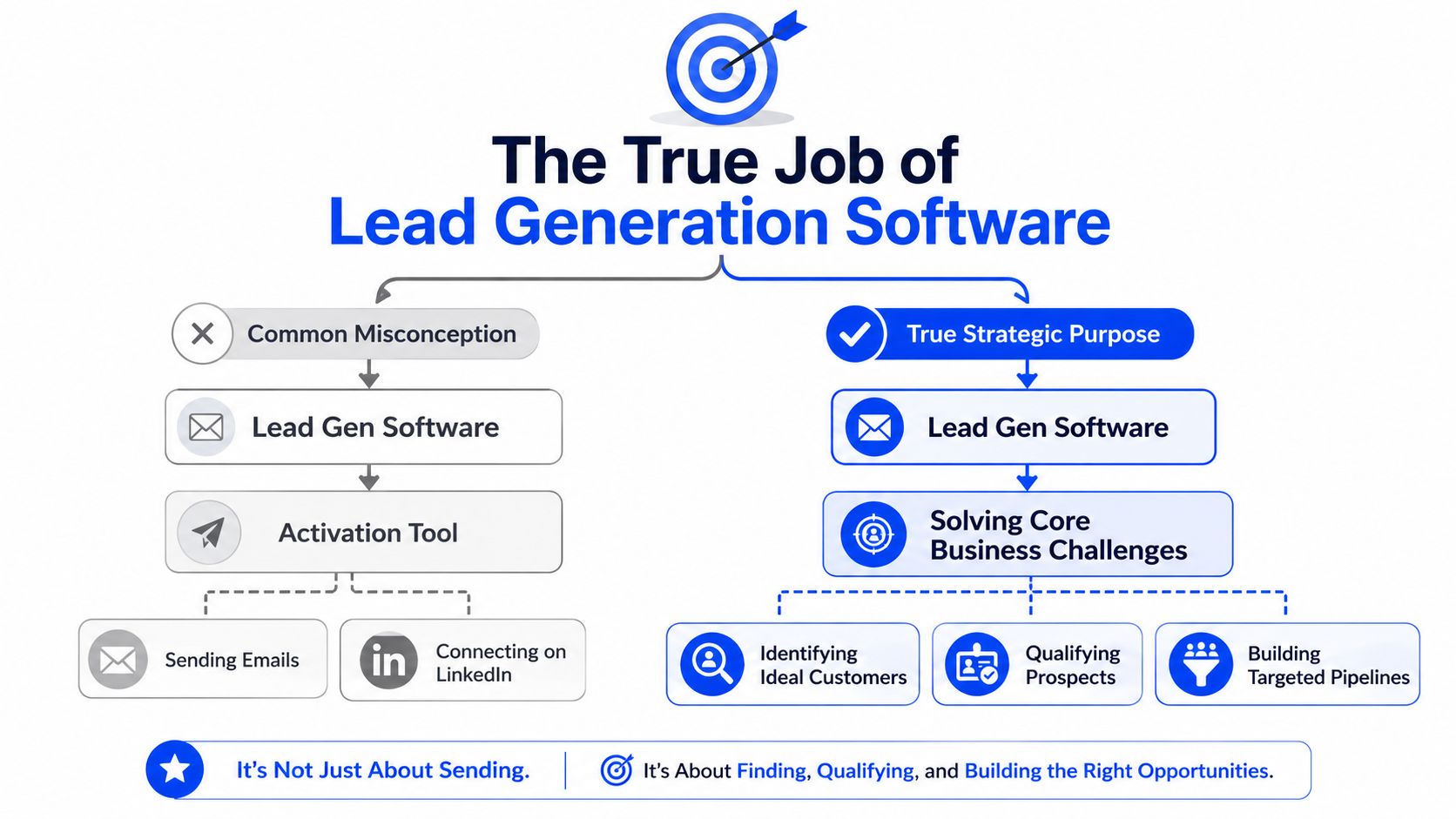
Lead generation software is usually sold as an activation tool. Send emails. Run LinkedIn steps. Push contacts into a sequence. That framing is why so many teams overvalue the visible layer and underinvest in the one that determines quality.
The primary job is upstream. Modern systems need to identify ICP-fit accounts, enrich them with reliable contact data, detect useful signals, score them, and only then pass them into activation. Neutral buying guidance increasingly points to systems that combine capture, enrichment, scoring, routing, and analytics in one workflow because fragmented tools create handoff errors and slower response times, as outlined in the Salesgenie buyer's guide for lead generation systems.
Why the sending layer gets too much credit
Lemlist, Instantly, and HeyReach are visible. They're where the campaign appears to live. That's why teams give them credit for results and blame them when quality drops.
In practice, a sending tool mostly expresses the quality of upstream decisions. A strong sequence can't save a list built from weak fit criteria, stale contact data, or generic triggers. A decent sending tool with disciplined deliverability can still perform if the account selection and signal logic are right.
The lead gen tool that moves qualified lead volume most often is the one prospects never see.
That's why Clay tends to have more impact than the sending layer. It sits where campaigns are won or lost, in data coverage, enrichment logic, and signal consolidation.
What Clay changes upstream
Clay solves three problems that break most outbound programs.
First, it fixes the data quality problem with multi-source enrichment and waterfall logic. Single-source stacks leave too many gaps, especially on senior contacts. When contact coverage improves, list quality stops being the bottleneck and sequence performance becomes much easier to interpret.
Second, it collapses data and signals into one workflow. Instead of stitching together one tool for enrichment, another for triggers, and a third for scoring, the operator can evaluate fit and timing in one pass.
Third, it reduces the human cost of precision. That's the aspect often underestimated. Precision targeting often fails not because teams disagree with it, but because manual list building makes it too slow to run at scale.
If you want a practical training resource on how operators build outbound systems rather than one-off campaigns, the Testimonial.to lead generation course is useful because it focuses on execution discipline rather than vendor feature pages.
Choosing your architecture inbound vs outbound vs hybrid
Lead generation software isn't a single category. It's a stack choice. The architecture you choose shapes how demand gets captured, how prospects get prioritized, and whether your team spends its time reacting to demand or creating it.
The strongest clue is channel behavior. Independent 2025 reporting shows 89% of B2B marketers use LinkedIn for lead generation and 88% use email. That's why single-channel software usually underperforms in B2B. Buyers move across touchpoints, so your architecture needs to do the same.
Inbound stacks
Inbound-led setups usually center on HubSpot, forms, landing pages, and visitor identification tools like Leadfeeder. They're good at capturing existing demand and routing hand-raisers.
They struggle when the market doesn't already know you, or when you need to create conversations inside a defined account list. Inbound tools are reactive by design. That's fine for brand-led motion, less fine for market entry, category creation, or enterprise targeting.
Outbound stacks
Outbound-led setups usually center on Apollo, Sales Navigator, contact data, and a sending layer like Lemlist or Instantly. They're strong when you need account control, segmentation, and direct access to decision-makers.
Their weakness is context. Without a signal layer and a clean CRM loop, outbound stacks become list-and-sequence machines. They produce touches, but not always relevance.
Why hybrid wins for most B2B teams
A hybrid architecture is usually the right call for scaling B2B teams. It combines inbound capture, outbound targeting, and a shared data layer so both motions feed one reporting line. If you need a simpler framing of the distinction, this breakdown of demand generation vs lead generation is useful because it clarifies where each motion belongs.
A workable hybrid stack often looks like this:
Data and signal layer → Clay for enrichment, segmentation, trigger detection
Prospecting layer → Sales Navigator or Apollo for account discovery and contact context
Activation layer → Lemlist, Instantly, or HeyReach for sequence execution
System of record → HubSpot for contact ownership, attribution, routing, and outcome reporting
Inbound capture layer → HubSpot forms, content, and visitor tracking where relevant
This setup does two things well. It captures demand that already exists, and it creates new demand where no hand-raiser exists yet.
Hybrid doesn't mean “use more tools.” It means one workflow across inbound and outbound, with one source of truth.
A 5-point checklist for evaluating software
Most software demos are optimized to impress the buyer in thirty minutes. Real campaigns are won by the features that are boring in the demo and painful to live without in production.
The evaluation standard should be simple. Can this tool support the workflow you need without introducing data gaps, routing delays, or reputation risk?
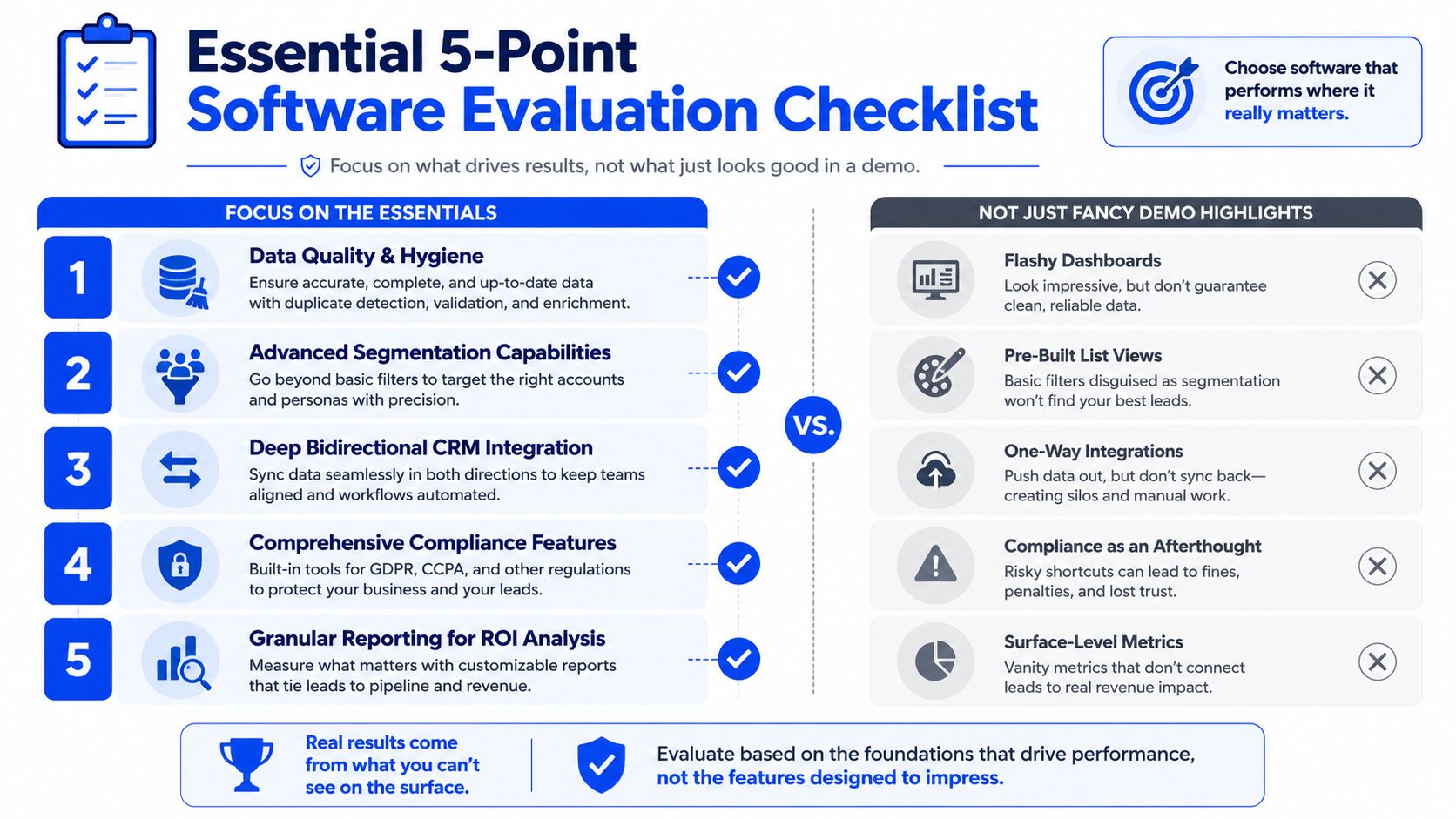
The five checks that matter in production
Multi-source enrichment with waterfall logic
This is the first filter because contact coverage is the ceiling on everything else. If the tool relies on one source, expect holes in senior-level data and inconsistent reachability.Behavioral branching, not just timed steps
A sequence should react to what the prospect did. Opened, replied, clicked, engaged on LinkedIn, booked. Time-only automation is just a calendar with extra branding.Reply detection with fast human routing
Positive replies need to exit automation immediately and land with a human owner fast. If the system keeps sending follow-ups after a prospect responds, it makes your team look careless.Deliverability circuit breakers
The tool should enforce limits and pauses before enthusiasm damages infrastructure. Good software protects the campaign from oversending, bounce spikes, and weak operational judgment.Bidirectional CRM integration
The tool has to write clean data into the CRM and read sales outcomes back out. Without that loop, you can't trust attribution, and you can't automate based on real deal stages.
That logic lines up with broader buying guidance that effective systems combine capture, enrichment, scoring, routing, and analytics, while fragmented setups create handoff errors and slow response times, as covered in the earlier section from Salesgenie.
For teams comparing software vendors or service providers, this shortlist of lead generation companies can help frame what belongs in the software layer versus the operator layer.
What to ignore in the demo
A few things get over-marketed and under-deliver in live campaigns.
Autonomous AI message writing → Good for demos, risky for quality control and brand consistency.
Huge dashboard surfaces → More charts rarely produce better decisions.
Improved open tracking claims → Useful only at the margin, and not where you should anchor ROI.
Surface-level personalization widgets → Nice additions, but weaker than better targeting and cleaner trigger logic.
Buy for boring reliability, not flashy presentation. The campaign will live in the boring parts.
The KPI framework that proves ROI
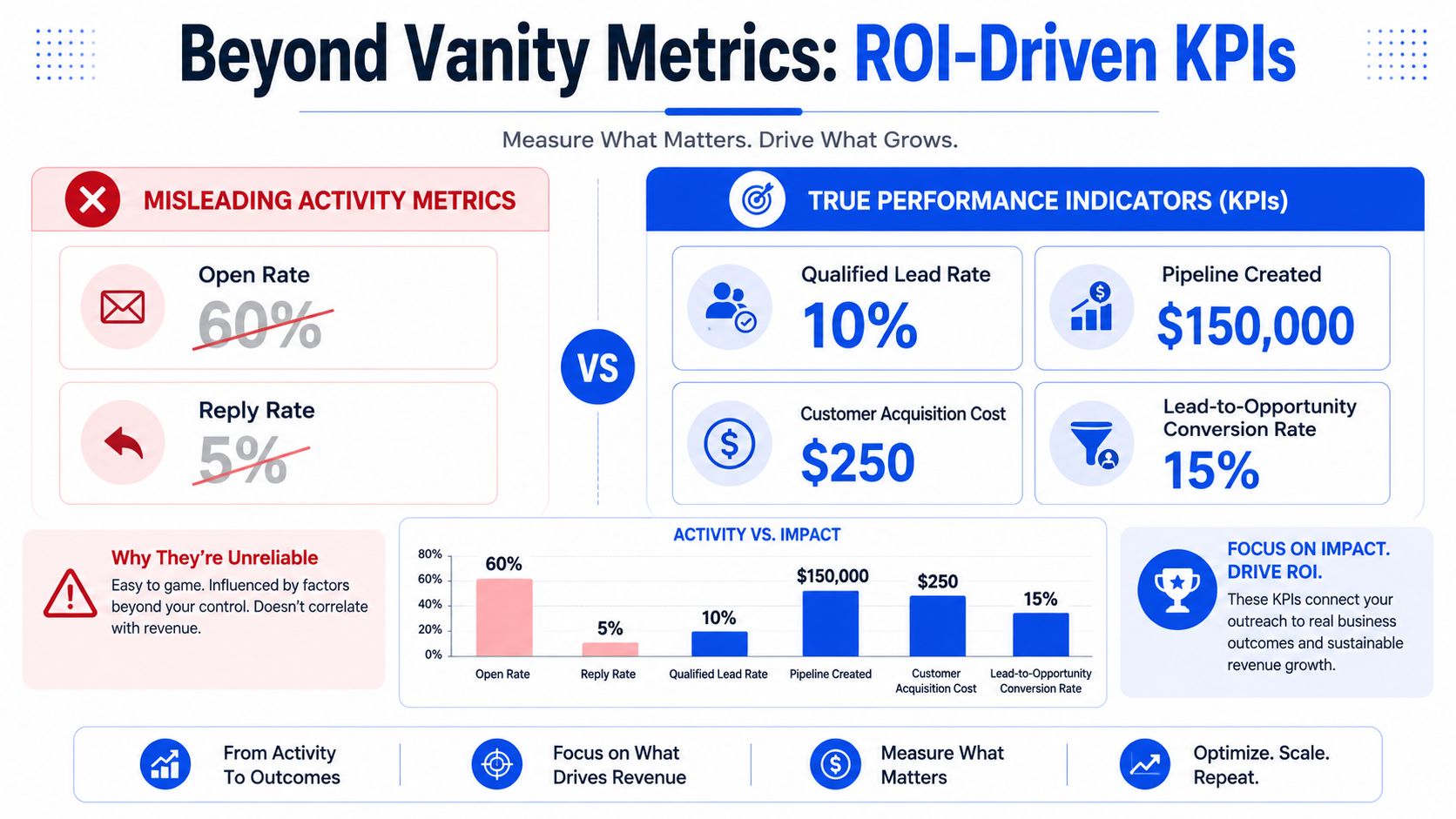
If your lead generation software report starts with open rate, it's already pointing you toward the wrong conclusion. Opens can still help diagnose inbox placement, but they don't tell you whether the system is producing revenue-grade conversations.
The better question is the one many teams avoid because it forces rigor. Is the software improving qualified conversations, opportunity creation, and pipeline velocity, or is it just filling the CRM faster? That's the core point in Smith Digital's analysis of why lead generation campaigns fail.
What we track and what we ignore
Open rate is not a primary success metric anymore. Since iOS 15, mail privacy behavior has made it unreliable enough that it belongs in deliverability monitoring, not board-level reporting.
The metrics worth defending in a review are downstream:
Qualified meetings
Show rate
Qualified meetings held
Opportunities created
Pipeline created
Cost per qualified meeting
Revenue attribution back to campaign, segment, and trigger
If you want a broader operating framework for that measurement layer, this guide to lead generation KPIs is a useful reference.
A real campaign view of the funnel
From a recent Clay plus Lemlist campaign, here's the shape of a funnel that was worth keeping.
Total contacts sent to → 2,100 over 90 days
Open rate reported → 52.4%, directional only because of privacy-related inflation
Estimated real open range → closer to 38 to 42%
Blended reply rate → 11.4%
Top sub-segment reply rate → 14.7%
Weakest sub-segment kept live → 4.1%
Positive replies → 64% of total replies
Meetings booked → 51
Meeting show rate → 84%
Qualified meetings → 33 of 43 held
Pipeline value created → €680k across 24 opportunities
Cost per qualified meeting → €312
Those numbers matter for three reasons.
First, the blended reply rate is not the decision metric. The segment-level spread is what tells you where to scale and where to cut. Second, weak segments need to stay visible in reporting, otherwise the team starts optimizing to presentation instead of truth. Third, cost per qualified meeting and pipeline created are the only metrics that justify the stack.
A lead gen dashboard should answer one question fast. Which segments create qualified pipeline at an acceptable cost?
How to integrate your stack with your CRM
Integrated reporting doesn't come from a native integration checkbox. It comes from choosing the CRM as the system of record and forcing every other tool to respect that contract.
When teams get this wrong, each platform owns a partial version of the contact, attribution drifts, and nobody trusts the reporting. That's when debates start getting settled by opinion instead of evidence.
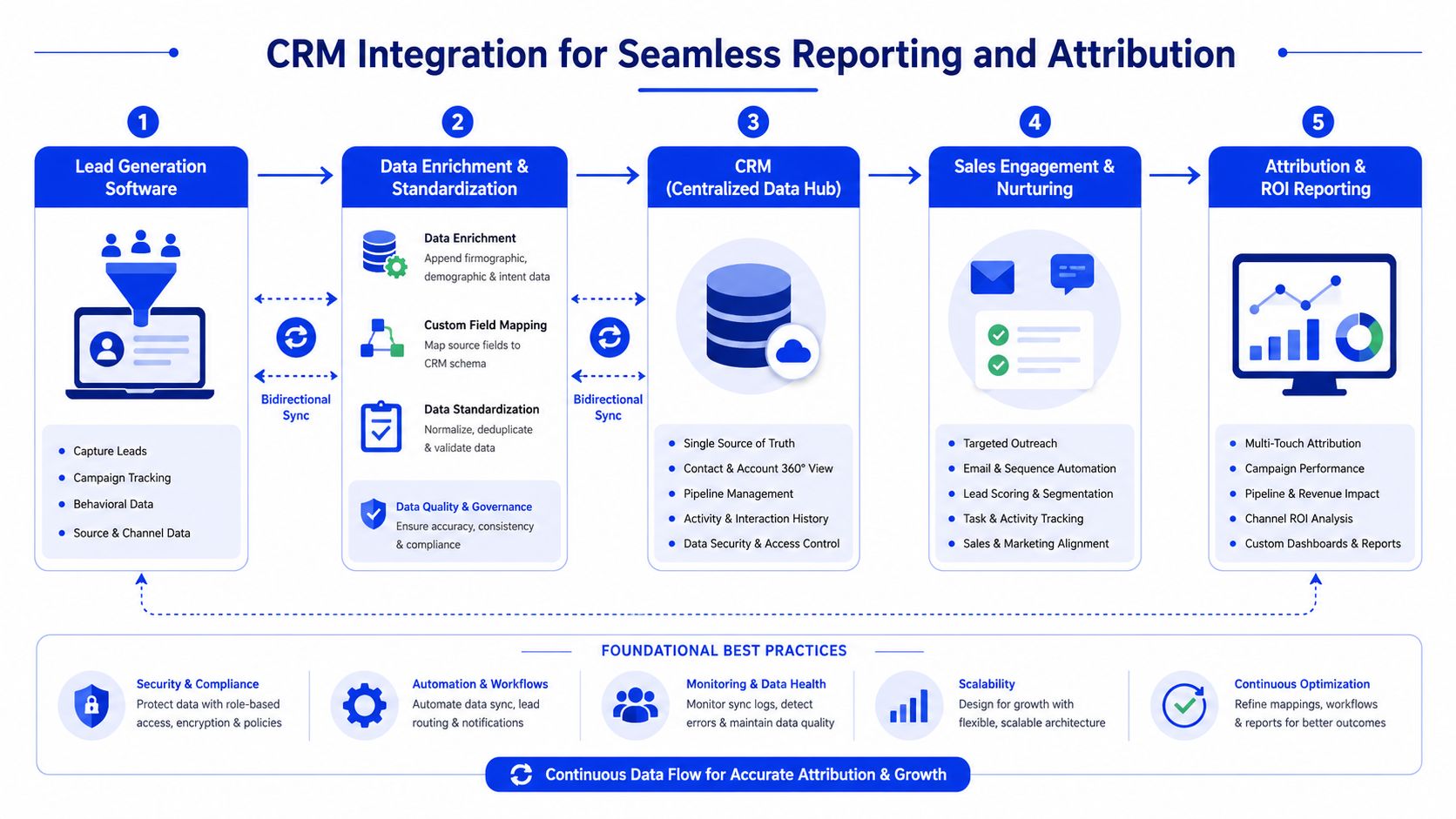
The five-step architecture
Create contacts with source attribution at the moment of entry
Every record entering HubSpot from Lemlist, Instantly, HeyReach, or another engagement tool should carry campaign name, sequence ID, segment, trigger type, and first-touch date.Sync activity both ways
Email sends, replies, bounces, and other relevant events should land on the CRM timeline so reps can work from one record.Let the CRM own routing logic
The outreach tool can detect a reply, but HubSpot should decide what happens next. Task creation, owner assignment, deal creation, Slack alerts. That logic belongs in the system that survives tool swaps.Use CRM stage changes to control sequences
If a contact books a meeting or enters an active deal, the sequence should pause or exit automatically. This is not optional.Report outcomes from the CRM, not the sending tool
Sending tools report sending-layer health. HubSpot should report qualified meetings, opportunities, pipeline created, and attribution.
What breaks attribution
A few habits wreck clean reporting faster than people expect.
Manual CRM entry by sales → Once reps start creating their own versions of sourced contacts, attribution splits.
Trusting native sync without audits → Integrations drift. Audit them.
Letting outreach tools own business reporting → Their reports are for activity, not revenue.
Using multiple sources of truth → If the CRM isn't canonical, reporting disputes are guaranteed.
One service model built around this kind of unified architecture is Grou's lead generation agency approach, which combines list building, LinkedIn content, outbound, and reporting under one system rather than separate channel silos.
When to use software alone vs software plus an agency
Software alone works when your internal team can design the system, not just operate the interface. That means someone owns segmentation logic, enrichment workflows, deliverability discipline, CRM architecture, and performance reviews tied to pipeline.
When an internal team can own it
A software-only path makes sense if you already have strong RevOps and demand generation operators in-house. They need time to maintain the stack, not just approve it.
That usually means clear ownership across data, sales engagement, CRM workflows, and attribution. If those responsibilities are spread across people who already have full-time jobs, the software stack turns into shelfware with sequences attached.
When external operators make more sense
An agency becomes useful when the gap isn't tool access, it's system design and operating cadence. The failure pattern is common. Teams buy the same tools everyone else uses, but they never get one message, one target list, and one reporting line working together.
A good benchmark from another service-heavy category is this agency operations guide from Scheduler.social. Different domain, same lesson. Software gives an agency capability, but process gives it consistency.
If your team can't actively manage the upstream data and signal layer, plus the downstream CRM loop, software alone usually won't hold. It will generate activity, then stall. Software plus operators is often the cleaner option because the stack only works when someone is responsible for the full system.
If you want a lead generation system built around data quality, signal detection, CRM attribution, and qualified pipeline, Grou is one option for teams that need operators as well as software. The useful next step is simple: map your current stack into four layers, data, signals, activation, CRM, then identify where quality drops before outreach starts.
Most advice about lead generation software starts at the wrong end of the stack. It treats the sending tool as the engine, so teams spend months tuning sequences in Lemlist, Instantly, or HeyReach while the actual problem sits upstream in list quality, trigger logic, and CRM architecture.
That's how you end up with a CRM packed with contacts, a sales team complaining about quality, and dashboards full of activity that never turns into pipeline. The software didn't fail. The system did.
The stack that produces qualified pipeline usually looks less exciting than the stack that demos well. The hard part isn't sending the email. The hard part is deciding who should get it, why now, and how that decision gets tracked all the way into revenue.
Table of Contents
Your CRM is full but your pipeline is empty
A lot of teams buy lead generation software because they need more pipeline. What they get is more records. More contacts, more sequence activity, more dashboard screenshots, and more sales complaints about bad fit.
That gap gets expensive fast. A projected global lead generation market of $3.4 billion by 2025, growing at 19.6% annually tells you this category is no longer a side utility. The same market coverage says organizations using lead capture software often generate 1,000–5,000 leads per month with an average cost per lead of $53, which means stack efficiency has a direct impact on ROI.
The issue usually isn't whether you have software. It's whether your software is arranged to support qualification, routing, and reporting instead of raw contact accumulation. If your current setup creates noise for sales, your pipeline problem probably starts before the first touch.
A lot of leaders treat this as a sales execution problem. It's closer to a systems design problem, similar to what happens when sales pipeline management gets built around stage movement instead of buyer quality.
Takeaway |
|---|
A full CRM is not evidence of demand. It often means your capture layer is working harder than your qualification layer. |
Lead generation software should be judged on pipeline output. Activity alone hides bad targeting and weak routing. |
The stack matters more than the license. Good tools in the wrong order still produce bad leads. |
Upstream decisions drive downstream results. Contact selection, enrichment, and trigger logic determine whether outreach has a chance. |
Practical rule: If sales says “we have leads” and “none of these are real opportunities” in the same week, the software isn't aligned to qualification.
The operating mistake most teams make
They optimize what prospects can see. Subject lines, first lines, send times, inbox rotation. Those things matter, but they don't rescue a weak prospect pool.
The better operating question is simpler. Did the system identify the right account, the right contact, and the right reason to reach out before the campaign ever launched?
The real job of lead generation software
Lead generation software is usually sold as an activation tool. Send emails. Run LinkedIn steps. Push contacts into a sequence. That framing is why so many teams overvalue the visible layer and underinvest in the one that determines quality.
The primary job is upstream. Modern systems need to identify ICP-fit accounts, enrich them with reliable contact data, detect useful signals, score them, and only then pass them into activation. Neutral buying guidance increasingly points to systems that combine capture, enrichment, scoring, routing, and analytics in one workflow because fragmented tools create handoff errors and slower response times, as outlined in the Salesgenie buyer's guide for lead generation systems.
Why the sending layer gets too much credit
Lemlist, Instantly, and HeyReach are visible. They're where the campaign appears to live. That's why teams give them credit for results and blame them when quality drops.
In practice, a sending tool mostly expresses the quality of upstream decisions. A strong sequence can't save a list built from weak fit criteria, stale contact data, or generic triggers. A decent sending tool with disciplined deliverability can still perform if the account selection and signal logic are right.
The lead gen tool that moves qualified lead volume most often is the one prospects never see.
That's why Clay tends to have more impact than the sending layer. It sits where campaigns are won or lost, in data coverage, enrichment logic, and signal consolidation.
What Clay changes upstream
Clay solves three problems that break most outbound programs.
First, it fixes the data quality problem with multi-source enrichment and waterfall logic. Single-source stacks leave too many gaps, especially on senior contacts. When contact coverage improves, list quality stops being the bottleneck and sequence performance becomes much easier to interpret.
Second, it collapses data and signals into one workflow. Instead of stitching together one tool for enrichment, another for triggers, and a third for scoring, the operator can evaluate fit and timing in one pass.
Third, it reduces the human cost of precision. That's the aspect often underestimated. Precision targeting often fails not because teams disagree with it, but because manual list building makes it too slow to run at scale.
If you want a practical training resource on how operators build outbound systems rather than one-off campaigns, the Testimonial.to lead generation course is useful because it focuses on execution discipline rather than vendor feature pages.
Choosing your architecture inbound vs outbound vs hybrid
Lead generation software isn't a single category. It's a stack choice. The architecture you choose shapes how demand gets captured, how prospects get prioritized, and whether your team spends its time reacting to demand or creating it.
The strongest clue is channel behavior. Independent 2025 reporting shows 89% of B2B marketers use LinkedIn for lead generation and 88% use email. That's why single-channel software usually underperforms in B2B. Buyers move across touchpoints, so your architecture needs to do the same.
Inbound stacks
Inbound-led setups usually center on HubSpot, forms, landing pages, and visitor identification tools like Leadfeeder. They're good at capturing existing demand and routing hand-raisers.
They struggle when the market doesn't already know you, or when you need to create conversations inside a defined account list. Inbound tools are reactive by design. That's fine for brand-led motion, less fine for market entry, category creation, or enterprise targeting.
Outbound stacks
Outbound-led setups usually center on Apollo, Sales Navigator, contact data, and a sending layer like Lemlist or Instantly. They're strong when you need account control, segmentation, and direct access to decision-makers.
Their weakness is context. Without a signal layer and a clean CRM loop, outbound stacks become list-and-sequence machines. They produce touches, but not always relevance.
Why hybrid wins for most B2B teams
A hybrid architecture is usually the right call for scaling B2B teams. It combines inbound capture, outbound targeting, and a shared data layer so both motions feed one reporting line. If you need a simpler framing of the distinction, this breakdown of demand generation vs lead generation is useful because it clarifies where each motion belongs.
A workable hybrid stack often looks like this:
Data and signal layer → Clay for enrichment, segmentation, trigger detection
Prospecting layer → Sales Navigator or Apollo for account discovery and contact context
Activation layer → Lemlist, Instantly, or HeyReach for sequence execution
System of record → HubSpot for contact ownership, attribution, routing, and outcome reporting
Inbound capture layer → HubSpot forms, content, and visitor tracking where relevant
This setup does two things well. It captures demand that already exists, and it creates new demand where no hand-raiser exists yet.
Hybrid doesn't mean “use more tools.” It means one workflow across inbound and outbound, with one source of truth.
A 5-point checklist for evaluating software
Most software demos are optimized to impress the buyer in thirty minutes. Real campaigns are won by the features that are boring in the demo and painful to live without in production.
The evaluation standard should be simple. Can this tool support the workflow you need without introducing data gaps, routing delays, or reputation risk?
The five checks that matter in production
Multi-source enrichment with waterfall logic
This is the first filter because contact coverage is the ceiling on everything else. If the tool relies on one source, expect holes in senior-level data and inconsistent reachability.Behavioral branching, not just timed steps
A sequence should react to what the prospect did. Opened, replied, clicked, engaged on LinkedIn, booked. Time-only automation is just a calendar with extra branding.Reply detection with fast human routing
Positive replies need to exit automation immediately and land with a human owner fast. If the system keeps sending follow-ups after a prospect responds, it makes your team look careless.Deliverability circuit breakers
The tool should enforce limits and pauses before enthusiasm damages infrastructure. Good software protects the campaign from oversending, bounce spikes, and weak operational judgment.Bidirectional CRM integration
The tool has to write clean data into the CRM and read sales outcomes back out. Without that loop, you can't trust attribution, and you can't automate based on real deal stages.
That logic lines up with broader buying guidance that effective systems combine capture, enrichment, scoring, routing, and analytics, while fragmented setups create handoff errors and slow response times, as covered in the earlier section from Salesgenie.
For teams comparing software vendors or service providers, this shortlist of lead generation companies can help frame what belongs in the software layer versus the operator layer.
What to ignore in the demo
A few things get over-marketed and under-deliver in live campaigns.
Autonomous AI message writing → Good for demos, risky for quality control and brand consistency.
Huge dashboard surfaces → More charts rarely produce better decisions.
Improved open tracking claims → Useful only at the margin, and not where you should anchor ROI.
Surface-level personalization widgets → Nice additions, but weaker than better targeting and cleaner trigger logic.
Buy for boring reliability, not flashy presentation. The campaign will live in the boring parts.
The KPI framework that proves ROI
If your lead generation software report starts with open rate, it's already pointing you toward the wrong conclusion. Opens can still help diagnose inbox placement, but they don't tell you whether the system is producing revenue-grade conversations.
The better question is the one many teams avoid because it forces rigor. Is the software improving qualified conversations, opportunity creation, and pipeline velocity, or is it just filling the CRM faster? That's the core point in Smith Digital's analysis of why lead generation campaigns fail.
What we track and what we ignore
Open rate is not a primary success metric anymore. Since iOS 15, mail privacy behavior has made it unreliable enough that it belongs in deliverability monitoring, not board-level reporting.
The metrics worth defending in a review are downstream:
Qualified meetings
Show rate
Qualified meetings held
Opportunities created
Pipeline created
Cost per qualified meeting
Revenue attribution back to campaign, segment, and trigger
If you want a broader operating framework for that measurement layer, this guide to lead generation KPIs is a useful reference.
A real campaign view of the funnel
From a recent Clay plus Lemlist campaign, here's the shape of a funnel that was worth keeping.
Total contacts sent to → 2,100 over 90 days
Open rate reported → 52.4%, directional only because of privacy-related inflation
Estimated real open range → closer to 38 to 42%
Blended reply rate → 11.4%
Top sub-segment reply rate → 14.7%
Weakest sub-segment kept live → 4.1%
Positive replies → 64% of total replies
Meetings booked → 51
Meeting show rate → 84%
Qualified meetings → 33 of 43 held
Pipeline value created → €680k across 24 opportunities
Cost per qualified meeting → €312
Those numbers matter for three reasons.
First, the blended reply rate is not the decision metric. The segment-level spread is what tells you where to scale and where to cut. Second, weak segments need to stay visible in reporting, otherwise the team starts optimizing to presentation instead of truth. Third, cost per qualified meeting and pipeline created are the only metrics that justify the stack.
A lead gen dashboard should answer one question fast. Which segments create qualified pipeline at an acceptable cost?
How to integrate your stack with your CRM
Integrated reporting doesn't come from a native integration checkbox. It comes from choosing the CRM as the system of record and forcing every other tool to respect that contract.
When teams get this wrong, each platform owns a partial version of the contact, attribution drifts, and nobody trusts the reporting. That's when debates start getting settled by opinion instead of evidence.
The five-step architecture
Create contacts with source attribution at the moment of entry
Every record entering HubSpot from Lemlist, Instantly, HeyReach, or another engagement tool should carry campaign name, sequence ID, segment, trigger type, and first-touch date.Sync activity both ways
Email sends, replies, bounces, and other relevant events should land on the CRM timeline so reps can work from one record.Let the CRM own routing logic
The outreach tool can detect a reply, but HubSpot should decide what happens next. Task creation, owner assignment, deal creation, Slack alerts. That logic belongs in the system that survives tool swaps.Use CRM stage changes to control sequences
If a contact books a meeting or enters an active deal, the sequence should pause or exit automatically. This is not optional.Report outcomes from the CRM, not the sending tool
Sending tools report sending-layer health. HubSpot should report qualified meetings, opportunities, pipeline created, and attribution.
What breaks attribution
A few habits wreck clean reporting faster than people expect.
Manual CRM entry by sales → Once reps start creating their own versions of sourced contacts, attribution splits.
Trusting native sync without audits → Integrations drift. Audit them.
Letting outreach tools own business reporting → Their reports are for activity, not revenue.
Using multiple sources of truth → If the CRM isn't canonical, reporting disputes are guaranteed.
One service model built around this kind of unified architecture is Grou's lead generation agency approach, which combines list building, LinkedIn content, outbound, and reporting under one system rather than separate channel silos.
When to use software alone vs software plus an agency
Software alone works when your internal team can design the system, not just operate the interface. That means someone owns segmentation logic, enrichment workflows, deliverability discipline, CRM architecture, and performance reviews tied to pipeline.
When an internal team can own it
A software-only path makes sense if you already have strong RevOps and demand generation operators in-house. They need time to maintain the stack, not just approve it.
That usually means clear ownership across data, sales engagement, CRM workflows, and attribution. If those responsibilities are spread across people who already have full-time jobs, the software stack turns into shelfware with sequences attached.
When external operators make more sense
An agency becomes useful when the gap isn't tool access, it's system design and operating cadence. The failure pattern is common. Teams buy the same tools everyone else uses, but they never get one message, one target list, and one reporting line working together.
A good benchmark from another service-heavy category is this agency operations guide from Scheduler.social. Different domain, same lesson. Software gives an agency capability, but process gives it consistency.
If your team can't actively manage the upstream data and signal layer, plus the downstream CRM loop, software alone usually won't hold. It will generate activity, then stall. Software plus operators is often the cleaner option because the stack only works when someone is responsible for the full system.
If you want a lead generation system built around data quality, signal detection, CRM attribution, and qualified pipeline, Grou is one option for teams that need operators as well as software. The useful next step is simple: map your current stack into four layers, data, signals, activation, CRM, then identify where quality drops before outreach starts.
Most advice about lead generation software starts at the wrong end of the stack. It treats the sending tool as the engine, so teams spend months tuning sequences in Lemlist, Instantly, or HeyReach while the actual problem sits upstream in list quality, trigger logic, and CRM architecture.
That's how you end up with a CRM packed with contacts, a sales team complaining about quality, and dashboards full of activity that never turns into pipeline. The software didn't fail. The system did.
The stack that produces qualified pipeline usually looks less exciting than the stack that demos well. The hard part isn't sending the email. The hard part is deciding who should get it, why now, and how that decision gets tracked all the way into revenue.
Table of Contents
Your CRM is full but your pipeline is empty
A lot of teams buy lead generation software because they need more pipeline. What they get is more records. More contacts, more sequence activity, more dashboard screenshots, and more sales complaints about bad fit.
That gap gets expensive fast. A projected global lead generation market of $3.4 billion by 2025, growing at 19.6% annually tells you this category is no longer a side utility. The same market coverage says organizations using lead capture software often generate 1,000–5,000 leads per month with an average cost per lead of $53, which means stack efficiency has a direct impact on ROI.
The issue usually isn't whether you have software. It's whether your software is arranged to support qualification, routing, and reporting instead of raw contact accumulation. If your current setup creates noise for sales, your pipeline problem probably starts before the first touch.
A lot of leaders treat this as a sales execution problem. It's closer to a systems design problem, similar to what happens when sales pipeline management gets built around stage movement instead of buyer quality.
Takeaway |
|---|
A full CRM is not evidence of demand. It often means your capture layer is working harder than your qualification layer. |
Lead generation software should be judged on pipeline output. Activity alone hides bad targeting and weak routing. |
The stack matters more than the license. Good tools in the wrong order still produce bad leads. |
Upstream decisions drive downstream results. Contact selection, enrichment, and trigger logic determine whether outreach has a chance. |
Practical rule: If sales says “we have leads” and “none of these are real opportunities” in the same week, the software isn't aligned to qualification.
The operating mistake most teams make
They optimize what prospects can see. Subject lines, first lines, send times, inbox rotation. Those things matter, but they don't rescue a weak prospect pool.
The better operating question is simpler. Did the system identify the right account, the right contact, and the right reason to reach out before the campaign ever launched?
The real job of lead generation software
Lead generation software is usually sold as an activation tool. Send emails. Run LinkedIn steps. Push contacts into a sequence. That framing is why so many teams overvalue the visible layer and underinvest in the one that determines quality.
The primary job is upstream. Modern systems need to identify ICP-fit accounts, enrich them with reliable contact data, detect useful signals, score them, and only then pass them into activation. Neutral buying guidance increasingly points to systems that combine capture, enrichment, scoring, routing, and analytics in one workflow because fragmented tools create handoff errors and slower response times, as outlined in the Salesgenie buyer's guide for lead generation systems.
Why the sending layer gets too much credit
Lemlist, Instantly, and HeyReach are visible. They're where the campaign appears to live. That's why teams give them credit for results and blame them when quality drops.
In practice, a sending tool mostly expresses the quality of upstream decisions. A strong sequence can't save a list built from weak fit criteria, stale contact data, or generic triggers. A decent sending tool with disciplined deliverability can still perform if the account selection and signal logic are right.
The lead gen tool that moves qualified lead volume most often is the one prospects never see.
That's why Clay tends to have more impact than the sending layer. It sits where campaigns are won or lost, in data coverage, enrichment logic, and signal consolidation.
What Clay changes upstream
Clay solves three problems that break most outbound programs.
First, it fixes the data quality problem with multi-source enrichment and waterfall logic. Single-source stacks leave too many gaps, especially on senior contacts. When contact coverage improves, list quality stops being the bottleneck and sequence performance becomes much easier to interpret.
Second, it collapses data and signals into one workflow. Instead of stitching together one tool for enrichment, another for triggers, and a third for scoring, the operator can evaluate fit and timing in one pass.
Third, it reduces the human cost of precision. That's the aspect often underestimated. Precision targeting often fails not because teams disagree with it, but because manual list building makes it too slow to run at scale.
If you want a practical training resource on how operators build outbound systems rather than one-off campaigns, the Testimonial.to lead generation course is useful because it focuses on execution discipline rather than vendor feature pages.
Choosing your architecture inbound vs outbound vs hybrid
Lead generation software isn't a single category. It's a stack choice. The architecture you choose shapes how demand gets captured, how prospects get prioritized, and whether your team spends its time reacting to demand or creating it.
The strongest clue is channel behavior. Independent 2025 reporting shows 89% of B2B marketers use LinkedIn for lead generation and 88% use email. That's why single-channel software usually underperforms in B2B. Buyers move across touchpoints, so your architecture needs to do the same.
Inbound stacks
Inbound-led setups usually center on HubSpot, forms, landing pages, and visitor identification tools like Leadfeeder. They're good at capturing existing demand and routing hand-raisers.
They struggle when the market doesn't already know you, or when you need to create conversations inside a defined account list. Inbound tools are reactive by design. That's fine for brand-led motion, less fine for market entry, category creation, or enterprise targeting.
Outbound stacks
Outbound-led setups usually center on Apollo, Sales Navigator, contact data, and a sending layer like Lemlist or Instantly. They're strong when you need account control, segmentation, and direct access to decision-makers.
Their weakness is context. Without a signal layer and a clean CRM loop, outbound stacks become list-and-sequence machines. They produce touches, but not always relevance.
Why hybrid wins for most B2B teams
A hybrid architecture is usually the right call for scaling B2B teams. It combines inbound capture, outbound targeting, and a shared data layer so both motions feed one reporting line. If you need a simpler framing of the distinction, this breakdown of demand generation vs lead generation is useful because it clarifies where each motion belongs.
A workable hybrid stack often looks like this:
Data and signal layer → Clay for enrichment, segmentation, trigger detection
Prospecting layer → Sales Navigator or Apollo for account discovery and contact context
Activation layer → Lemlist, Instantly, or HeyReach for sequence execution
System of record → HubSpot for contact ownership, attribution, routing, and outcome reporting
Inbound capture layer → HubSpot forms, content, and visitor tracking where relevant
This setup does two things well. It captures demand that already exists, and it creates new demand where no hand-raiser exists yet.
Hybrid doesn't mean “use more tools.” It means one workflow across inbound and outbound, with one source of truth.
A 5-point checklist for evaluating software
Most software demos are optimized to impress the buyer in thirty minutes. Real campaigns are won by the features that are boring in the demo and painful to live without in production.
The evaluation standard should be simple. Can this tool support the workflow you need without introducing data gaps, routing delays, or reputation risk?
The five checks that matter in production
Multi-source enrichment with waterfall logic
This is the first filter because contact coverage is the ceiling on everything else. If the tool relies on one source, expect holes in senior-level data and inconsistent reachability.Behavioral branching, not just timed steps
A sequence should react to what the prospect did. Opened, replied, clicked, engaged on LinkedIn, booked. Time-only automation is just a calendar with extra branding.Reply detection with fast human routing
Positive replies need to exit automation immediately and land with a human owner fast. If the system keeps sending follow-ups after a prospect responds, it makes your team look careless.Deliverability circuit breakers
The tool should enforce limits and pauses before enthusiasm damages infrastructure. Good software protects the campaign from oversending, bounce spikes, and weak operational judgment.Bidirectional CRM integration
The tool has to write clean data into the CRM and read sales outcomes back out. Without that loop, you can't trust attribution, and you can't automate based on real deal stages.
That logic lines up with broader buying guidance that effective systems combine capture, enrichment, scoring, routing, and analytics, while fragmented setups create handoff errors and slow response times, as covered in the earlier section from Salesgenie.
For teams comparing software vendors or service providers, this shortlist of lead generation companies can help frame what belongs in the software layer versus the operator layer.
What to ignore in the demo
A few things get over-marketed and under-deliver in live campaigns.
Autonomous AI message writing → Good for demos, risky for quality control and brand consistency.
Huge dashboard surfaces → More charts rarely produce better decisions.
Improved open tracking claims → Useful only at the margin, and not where you should anchor ROI.
Surface-level personalization widgets → Nice additions, but weaker than better targeting and cleaner trigger logic.
Buy for boring reliability, not flashy presentation. The campaign will live in the boring parts.
The KPI framework that proves ROI
If your lead generation software report starts with open rate, it's already pointing you toward the wrong conclusion. Opens can still help diagnose inbox placement, but they don't tell you whether the system is producing revenue-grade conversations.
The better question is the one many teams avoid because it forces rigor. Is the software improving qualified conversations, opportunity creation, and pipeline velocity, or is it just filling the CRM faster? That's the core point in Smith Digital's analysis of why lead generation campaigns fail.
What we track and what we ignore
Open rate is not a primary success metric anymore. Since iOS 15, mail privacy behavior has made it unreliable enough that it belongs in deliverability monitoring, not board-level reporting.
The metrics worth defending in a review are downstream:
Qualified meetings
Show rate
Qualified meetings held
Opportunities created
Pipeline created
Cost per qualified meeting
Revenue attribution back to campaign, segment, and trigger
If you want a broader operating framework for that measurement layer, this guide to lead generation KPIs is a useful reference.
A real campaign view of the funnel
From a recent Clay plus Lemlist campaign, here's the shape of a funnel that was worth keeping.
Total contacts sent to → 2,100 over 90 days
Open rate reported → 52.4%, directional only because of privacy-related inflation
Estimated real open range → closer to 38 to 42%
Blended reply rate → 11.4%
Top sub-segment reply rate → 14.7%
Weakest sub-segment kept live → 4.1%
Positive replies → 64% of total replies
Meetings booked → 51
Meeting show rate → 84%
Qualified meetings → 33 of 43 held
Pipeline value created → €680k across 24 opportunities
Cost per qualified meeting → €312
Those numbers matter for three reasons.
First, the blended reply rate is not the decision metric. The segment-level spread is what tells you where to scale and where to cut. Second, weak segments need to stay visible in reporting, otherwise the team starts optimizing to presentation instead of truth. Third, cost per qualified meeting and pipeline created are the only metrics that justify the stack.
A lead gen dashboard should answer one question fast. Which segments create qualified pipeline at an acceptable cost?
How to integrate your stack with your CRM
Integrated reporting doesn't come from a native integration checkbox. It comes from choosing the CRM as the system of record and forcing every other tool to respect that contract.
When teams get this wrong, each platform owns a partial version of the contact, attribution drifts, and nobody trusts the reporting. That's when debates start getting settled by opinion instead of evidence.
The five-step architecture
Create contacts with source attribution at the moment of entry
Every record entering HubSpot from Lemlist, Instantly, HeyReach, or another engagement tool should carry campaign name, sequence ID, segment, trigger type, and first-touch date.Sync activity both ways
Email sends, replies, bounces, and other relevant events should land on the CRM timeline so reps can work from one record.Let the CRM own routing logic
The outreach tool can detect a reply, but HubSpot should decide what happens next. Task creation, owner assignment, deal creation, Slack alerts. That logic belongs in the system that survives tool swaps.Use CRM stage changes to control sequences
If a contact books a meeting or enters an active deal, the sequence should pause or exit automatically. This is not optional.Report outcomes from the CRM, not the sending tool
Sending tools report sending-layer health. HubSpot should report qualified meetings, opportunities, pipeline created, and attribution.
What breaks attribution
A few habits wreck clean reporting faster than people expect.
Manual CRM entry by sales → Once reps start creating their own versions of sourced contacts, attribution splits.
Trusting native sync without audits → Integrations drift. Audit them.
Letting outreach tools own business reporting → Their reports are for activity, not revenue.
Using multiple sources of truth → If the CRM isn't canonical, reporting disputes are guaranteed.
One service model built around this kind of unified architecture is Grou's lead generation agency approach, which combines list building, LinkedIn content, outbound, and reporting under one system rather than separate channel silos.
When to use software alone vs software plus an agency
Software alone works when your internal team can design the system, not just operate the interface. That means someone owns segmentation logic, enrichment workflows, deliverability discipline, CRM architecture, and performance reviews tied to pipeline.
When an internal team can own it
A software-only path makes sense if you already have strong RevOps and demand generation operators in-house. They need time to maintain the stack, not just approve it.
That usually means clear ownership across data, sales engagement, CRM workflows, and attribution. If those responsibilities are spread across people who already have full-time jobs, the software stack turns into shelfware with sequences attached.
When external operators make more sense
An agency becomes useful when the gap isn't tool access, it's system design and operating cadence. The failure pattern is common. Teams buy the same tools everyone else uses, but they never get one message, one target list, and one reporting line working together.
A good benchmark from another service-heavy category is this agency operations guide from Scheduler.social. Different domain, same lesson. Software gives an agency capability, but process gives it consistency.
If your team can't actively manage the upstream data and signal layer, plus the downstream CRM loop, software alone usually won't hold. It will generate activity, then stall. Software plus operators is often the cleaner option because the stack only works when someone is responsible for the full system.
If you want a lead generation system built around data quality, signal detection, CRM attribution, and qualified pipeline, Grou is one option for teams that need operators as well as software. The useful next step is simple: map your current stack into four layers, data, signals, activation, CRM, then identify where quality drops before outreach starts.

Pipeline OS Newsletter
Build qualified pipeline
Get weekly tactics to generate demand, improve lead quality, and book more meetings.





Trusted by industry leaders
Trusted by industry leaders
Trusted by industry leaders
Ready to build qualified pipeline?
Ready to build qualified pipeline?
Ready to build qualified pipeline?
Book a call to see if we're the right fit, or take the 2-minute quiz to get a clear starting point.
Book a call to see if we're the right fit, or take the 2-minute quiz to get a clear starting point.
Book a call to see if we're the right fit, or take the 2-minute quiz to get a clear starting point.
" height="30.21639343089746px" id="hfGbXmQR2" width="30.216393430897455px"/></svg>)
Copyright © 2026 – All Right Reserved
Copyright © 2026 – All Right Reserved
Copyright © 2026 – All Right Reserved