%22%3E%3C/path%3E%3Cpath d=%22M 63.072 7.554 C 62.258 8.022 61.577 8.689 61.092 9.493 L 61.092 7.076 L 57.158 7.076 L 57.158 22.64 L 61.089 22.64 L 61.089 14.888 C 61.089 13.446 61.403 12.434 62.03 11.853 C 62.818 11.218 63.818 10.907 64.826 10.982 L 65.868 10.982 L 65.868 6.851 C 64.891 6.834 63.926 7.076 63.073 7.554 Z%22 fill=%22rgb(17,17,17)%22%3E%3C/path%3E%3Cpath d=%22M 78.916 7.82 C 76.363 6.49 73.321 6.49 70.768 7.82 C 69.562 8.473 68.564 9.451 67.888 10.644 C 67.167 11.931 66.803 13.387 66.834 14.862 C 66.804 16.332 67.157 17.785 67.86 19.077 C 68.515 20.267 69.494 21.246 70.684 21.901 C 71.924 22.576 73.318 22.92 74.73 22.898 C 76.164 22.918 77.58 22.575 78.846 21.901 C 80.062 21.247 81.073 20.27 81.768 19.077 C 82.506 17.797 82.88 16.339 82.85 14.862 C 82.88 13.389 82.517 11.934 81.797 10.647 C 81.12 9.455 80.122 8.477 78.917 7.824 M 78.803 14.862 C 78.829 15.739 78.636 16.608 78.241 17.391 C 77.903 18.046 77.38 18.588 76.738 18.95 C 76.124 19.293 75.432 19.472 74.729 19.47 C 73.668 19.497 72.648 19.061 71.934 18.276 C 71.139 17.323 70.741 16.1 70.823 14.862 C 70.741 13.62 71.149 12.395 71.959 11.45 C 72.687 10.667 73.715 10.233 74.783 10.256 C 75.859 10.236 76.894 10.67 77.635 11.45 C 78.464 12.387 78.884 13.616 78.801 14.864%22 fill=%22rgb(17,17,17)%22%3E%3C/path%3E%3Cpath d=%22M 95.906 7.076 L 95.906 15.646 C 95.975 16.68 95.643 17.701 94.979 18.498 C 94.311 19.184 93.379 19.547 92.422 19.495 C 91.475 19.544 90.553 19.18 89.894 18.498 C 89.23 17.701 88.898 16.68 88.967 15.646 L 88.967 7.076 L 85.033 7.076 L 85.033 16.207 C 85 17.449 85.275 18.68 85.834 19.79 C 86.327 20.75 87.095 21.542 88.039 22.065 C 89.033 22.594 90.145 22.861 91.271 22.838 C 92.188 22.847 93.095 22.65 93.926 22.263 C 94.708 21.905 95.388 21.36 95.906 20.675 L 95.906 22.645 L 99.865 22.645 L 99.865 7.076 Z%22 fill=%22rgb(17,17,17)%22%3E%3C/path%3E%3Cpath d=%22M 4.513 15.626 C 4.511 10.815 7.606 6.549 12.181 5.059 C 16.756 3.57 21.77 5.195 24.601 9.086 L 27.816 5.87 C 24.074 1.186 17.981 -0.943 12.137 0.393 C 6.292 1.728 1.728 6.292 0.393 12.137 C -0.943 17.981 1.186 24.074 5.87 27.816 L 9.085 24.601 C 6.214 22.512 4.515 19.177 4.513 15.626%22 fill=%22rgb(32,62,235)%22%3E%3C/path%3E%3Cpath d=%22M 17.114 14.343 L 13.354 18.01 L 13.354 18.026 L 21.071 18.026 L 11.412 27.609 L 17.389 27.609 L 23.999 21.081 L 23.999 28.316 L 24.005 28.316 L 27.967 24.393 L 27.967 14.343 Z%22 fill=%22rgb(32,62,235)%22%3E%3C/path%3E%3C/g%3E%3C/svg%3E) ×
× ××
××›
›
›
›
Best AI customer service platforms 2026: B2B buyer's guide
Best AI customer service platforms 2026: B2B buyer's guide
Best AI customer service platforms 2026: B2B buyer's guide
Best AI customer service platforms 2026: B2B buyer's guide
Best AI customer service platforms 2026: B2B buyer's guide
Best AI customer service platforms 2026: B2B buyer's guide

Author
Aljaz Peklaj

You're staring at the same mess most support leaders are staring at right now. The queue keeps creeping up, SLAs are getting tighter, agents are burning time on repeat questions, and every vendor demo sounds like it will fix all of it without showing you the handoff failures that kill CSAT.
Buy a platform, not a chatbot. The serious tools act as an orchestration layer across routing, summaries, agent assist, and reporting.
Price model matters. Per-seat and per-resolution pricing create very different ROI math, and one of them can surprise you during spikes.
Deflection is not the whole story. Measure repeat contact, escalation quality, and customer effort or you'll miss the problem.
Integration is where rollouts stall. Knowledge quality and handoff design matter more than the logo on the invoice.
Pick a vendor by support motion. Enterprise ticketing, product-led chat, email-first service, and budget-conscious teams don't need the same stack.
Table of Contents
Why B2B support teams are shopping for AI in the first place
Your problem is tier-1 noise eating the day while the hard cases wait. By the time a team starts evaluating ai powered customer service platforms, the pain is usually showing up in backlog growth, SLA drift, and agents spending more time sorting tickets than resolving them.
That is why the platform conversation matters. Analysts at masterofcode.com point to a market that is already large and still growing, which tells you this is not a side experiment anymore. For support leaders, the signal is simple, the budget is moving because the old model cannot keep up with volume and complexity.
The buyer pain
Support teams in SaaS, manufacturing, legal tech, pharma, and iGaming are rarely shopping for the same fix. Some need cleaner routing. Some need self-service that holds up under real customer pressure. Some need agent-assist because humans are still doing most of the work.
A chatbot alone does not solve that. An orchestration layer does, because it can classify intent, pull context, hand off cleanly, and keep the work moving. Twilio's view of modern platforms as orchestration layers matches what operators are buying, which is a system that helps support run better, not a shiny widget (Twilio).
If you want a practical outside view of how this shows up in real companies, industry examples of AI support are useful because they show the mix of automation, routing, and agent support that teams usually need. If you are comparing this to your current outbound stack, the operating logic is the same as the system in our AI sales automation guide, structure beats isolated tactics.
Practical rule: if your support team is buying AI just to suppress ticket count, you are asking the wrong question. The right question is whether the platform cuts manual handling without damaging escalation quality.
What the business is buying
The serious platforms are bought to absorb routine volume, reduce handling cost, and scale support without proportional headcount growth. They are also bought to improve SLA adherence, not just response speed. That is why the better vendors sell layers, not just bots.
Core capabilities first: intent detection, retrieval, routing, summaries, agent assist, and analytics.
Pricing model second: per seat or per resolution, because the math changes fast.
Integration third: CRM, knowledge base, ticketing, identity, analytics.
Measurement last, but not optional: you need baseline numbers before you trust any vendor claim.
That same discipline shows up in support just like it does in revenue operations. Structure turns attention into pipeline, and in support it turns volume into resolution. The same mindset that keeps outbound from drifting into spam is what keeps AI support from becoming a glorified FAQ widget.
What an AI powered customer service platform is
An AI powered customer service platform is an orchestration layer that sits between channels, knowledge, humans, and backend systems, then decides what happens next. That setup is what separates a useful support system from a chatbot that only looks polished in a demo. If you are buying this for a B2B team, judge it by ROI beyond deflection, escalation quality, pricing model fit, and the amount of change management the vendor is willing to own.
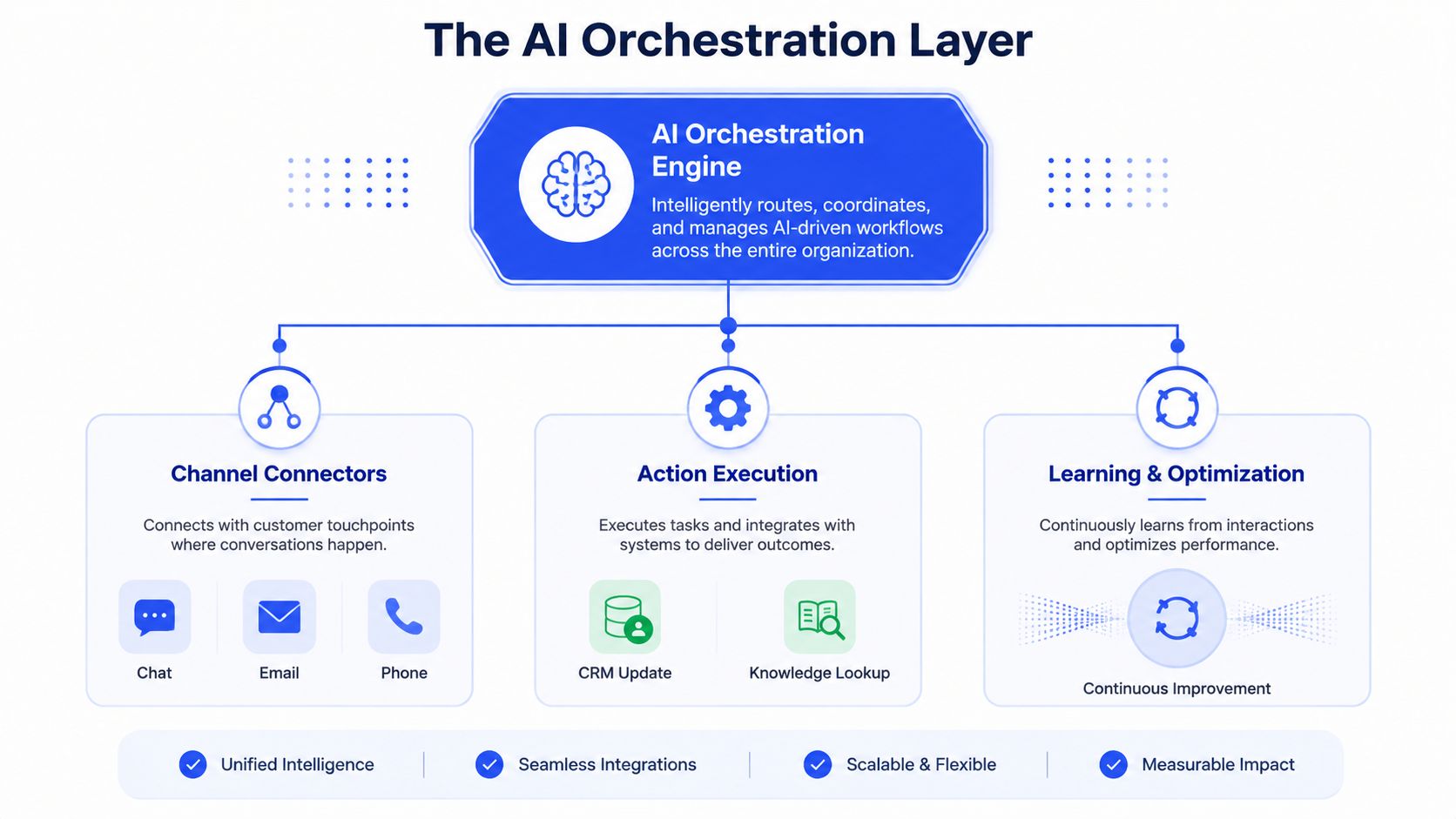
The six capabilities that matter
Intent detection classifies what the customer wants. If it misreads intent, everything downstream gets messy, and your routing, summaries, and answer quality all suffer.
Retrieval-augmented generation, or RAG, pulls from knowledge bases, order data, and policy docs in milliseconds. That keeps answers tied to facts instead of guesses, which is the standard you want in any serious support workflow.
Agent-assist drafts replies and surfaces relevant articles for human agents. A lot of the value shows up here, because it raises human throughput without pretending the support team disappears.
Intelligent routing moves conversations between bots, humans, and backend systems based on content and customer tier. Most rollouts stumble on handoff quality, so this part needs to be clean from day one.
Automated summarization condenses long threads so agents can resume cases fast. No one should reread a 20-message chain just to answer one follow-up.
Analytics tracks resolution, deflection, and quality at conversation level. Without that layer, you are collecting activity, not learning whether the platform is helping customers or just closing tickets faster.
Context.dev is worth a look if you want a clean example of how a platform fetches structured context for RAG, especially through Web Scraping API for RAG. It is the kind of infrastructure choice that matters once your support docs and policies stop living in one tidy place. The same logic applies to internal tooling, which is why the working model in our AI agent glossary matters for teams building the stack.
Operator's take: the best platforms do not replace the support desk. They strip out the repetitive work that keeps the desk from handling real issues.
Table stakes versus differentiators
Intent detection, routing, and summaries are table stakes now. If a vendor cannot do those well, stop there. The differentiators are better grounding, cleaner escalation, and analytics that tell you whether automation improved the case, not just touched it.
Vendors love to talk about “AI experience.” I care about whether the system can pull the right policy, draft the first reply, and hand the thread to a human without losing context. That is what makes the platform useful in SaaS, legal tech, or pharma, where a wrong answer creates more work than it removes.
The two pricing models and which one fits your team
A support AI rollout lives or dies on pricing fit. If your team still needs humans in the loop for most customer issues, per-seat is usually the cleaner buy. If you want the vendor paid only when automation closes the loop, per-resolution is the better bet. My default is simple, per-seat fits most mid-market support teams, while per-resolution fits product-led teams with high self-service volume.
The posted pricing makes the trade-off concrete. Zendesk lists $19/agent/month, Freshdesk lists $19/agent/month, and Help Scout lists $25/user/month. Intercom Fin is listed at $0.99 per resolution billed annually (Zendesk).
How the models behave in practice
Per-seat pricing rewards broad adoption. You pay for every human user, so the math works when AI deflects enough work to make each agent more productive. The trap is obvious. A weak AI layer can still look affordable while handing almost everything back to humans.
Per-resolution pricing ties cost to automation depth. That is cleaner for some teams, especially when support volume is steady and self-service carries a meaningful share of demand. The catch is volume swings. Launches, incidents, and seasonal surges can push the bill up when the model resolves more than expected.
Watch the handoff math. If your AI sends too many cases back to humans, per-seat can be cheaper. If it resolves a large share of volume end-to-end, per-resolution can still be the cleaner bet, but only if you model spikes realistically.
For a deeper cost lens, scalable AI support expenses is a useful companion read because pricing only makes sense when you think about support workload, not just license count. Keep the conversation aligned with our B2B SaaS pricing strategy guide, because the same mistake shows up everywhere, teams buy the metric they can explain, not the structure that fits the operating model.
Pricing model comparison for AI customer service platforms
Pricing model | Example vendors | Best fit | Watch out for |
|---|---|---|---|
Per seat | Zendesk, Freshdesk, Help Scout | Teams with mixed human and AI handling, steady ticket flow, and a need to control user licenses | Paying for seats while AI still hands most work back to humans |
Per resolution | Intercom Fin | Product-led teams with high self-service volume and clear automation targets | Cost spikes during launches, incidents, or seasonal volume surges |
There is another mistake buyers make. If AI handles a very large share of tier-1 volume, per-resolution can stop looking cheap fast. If you are scaling across SaaS, manufacturing, or legal tech, run the model against your peak month, not your average month.
Vendor landscape and which one to pick
Zendesk wins for enterprise support teams that need ticketing depth, SLA control, and a big app ecosystem. Intercom Fin wins for product-led teams that want fast AI deployment and per-resolution pricing. Freshdesk wins for budget-conscious teams under 30 agents. Help Scout wins when email-first support and a human tone matter most.
That's the verdict. The only real question is where your team sits on volume, complexity, and workflow maturity.
Zendesk for teams that need control
Zendesk is the safest choice when support already runs like an operation. If you've got SLAs, multiple queues, and a need for granular routing, it gives you the most structure. The app ecosystem also matters when your stack includes CRM, knowledge, and reporting tools that need to stay in sync.
Zendesk is usually the right call for larger B2B teams that can't afford sloppy handoffs. It's not the flashiest option, but it's the one I'd trust when ticket discipline matters more than a sleek demo.
Intercom Fin for product-led support
Intercom Fin is the cleaner bet for teams that want AI front and center. The per-resolution model fits product-led motions where self-service can handle a meaningful chunk of demand, and the UX tends to be faster to deploy than the more enterprise-heavy options.
If your support motion is tightly tied to onboarding, activation, and usage questions, Intercom Fin earns its place. Just don't buy it if your real problem is deep routing or complex SLA governance.
Freshdesk and Help Scout for narrower fits
Freshdesk works when budget discipline matters and the team is still small enough that a simpler automation stack can carry the load. It's the pragmatic option for under-30-agent teams that want decent automation without enterprise complexity.
Help Scout is for teams that value tone. It's the strongest fit when support is mostly email, the queue is smaller, and you'd rather preserve a human feel than build a heavy automation layer.
The broader platform in our AI support agents tool directory follows the same logic. Match the tool to the motion, not the marketing.
My bias is blunt: if you're a larger support org, start with Zendesk. If you're product-led and moving fast, start with Intercom Fin. Don't force a small team into enterprise tooling unless the queue volume justifies the overhead.
The ROI metric vendors won't put on the slide
A vendor demo will usually start with deflection rate because it looks clean on a slide. In a real rollout, that number means very little unless the handoff is solid and the customer effort stays low. The metrics that matter are customer effort, repeat contact, and escalation quality, because they show whether the AI improved the case or just pushed it into a different queue.
Salesforce's survey data makes the gap obvious. 81% of service professionals said customers expect more personalized service, and only 30% of customers believe companies use their data in a way that improves service (HubSpot). That gap is where AI customer service platforms win or fail. The buyer's real job is to use a platform that lowers effort and raises trust, not one that merely reports fewer inbound tickets.
What to measure instead
Track first contact resolution, repeat contact within 7 days, and CSAT on escalated tickets. Those three numbers tell you whether the platform helped, and they line up with the way a support leader should define ROI.
Cost per ticket still matters, but only as a supporting metric. It can improve while customers get bounced around, and that trade-off is expensive. If the support lead celebrates cheaper tickets while repeat contacts climb, the rollout is not working.
Use a simple test. Did the platform reduce customer effort. Did it stop the issue from coming back. Did the escalated case arrive with enough context that the customer did not have to start over.
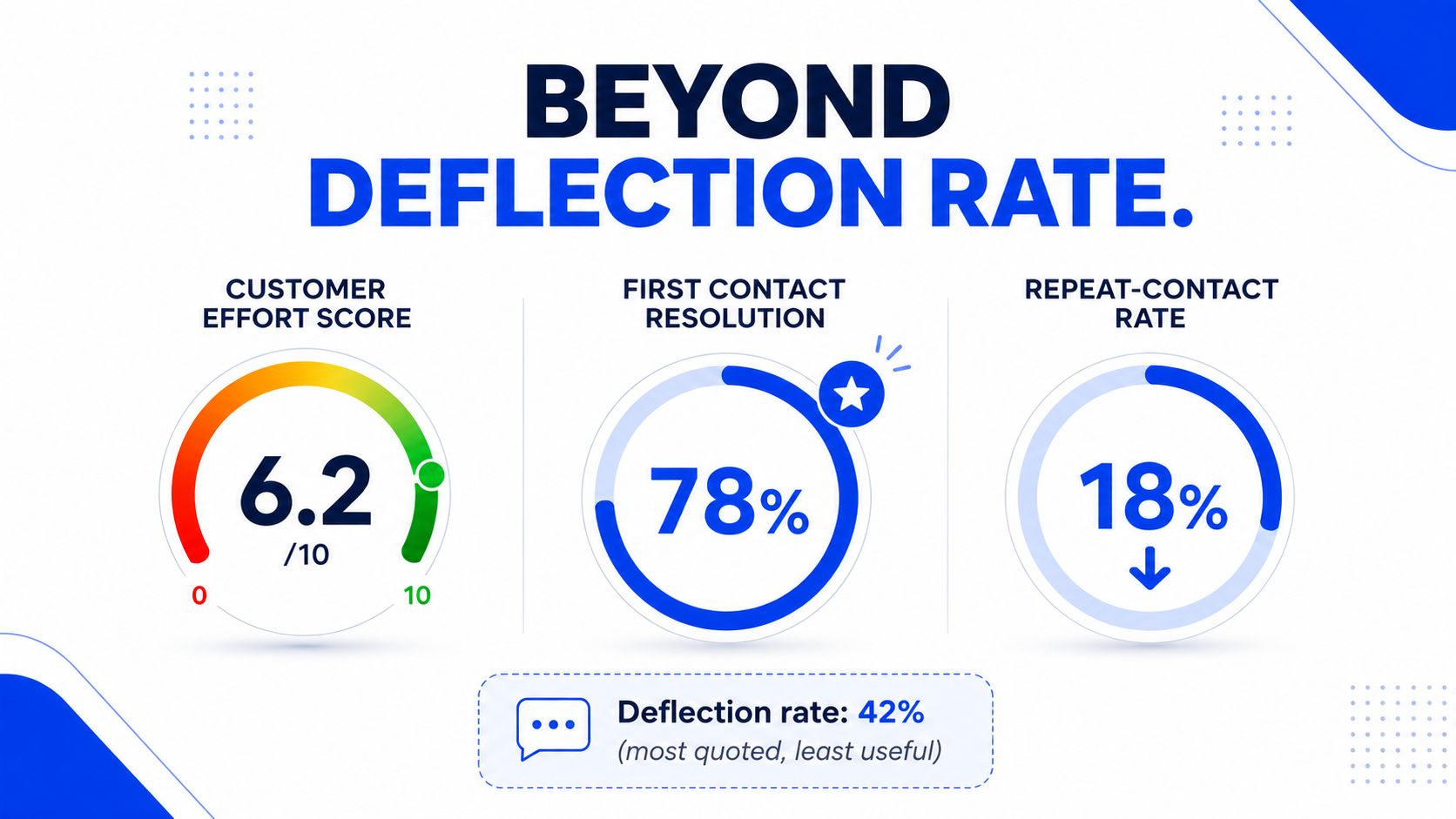
Vendors like deflection because it is easy to present. Operators need to care about what happens after the deflection. If the customer comes back frustrated, the AI did not save work, it delayed it.
Escalation quality deserves more attention than it gets. Good AI support improves the handoff, keeps the case history intact, and gives the agent enough context to finish the job. If that path is weak, the rollout hurts more than it helps.
The ROI conversation gets cleaner when deflection stops acting like the finish line. Better resolution with less effort is the business result. Keep the slide-friendly metric if you want, but do not confuse it with value.
Integration traps that stall most rollouts
Buying the platform is the easy part. Wiring it into the stack is where teams lose time. I'd sequence the work in this order, CRM first, then knowledge base, then identity, then ticketing, then analytics.
Build the integration in the right order
Start with CRM context in HubSpot or Salesforce. The AI needs customer history before it can say anything useful.
Next, connect the knowledge base so RAG has something real to read from. Then wire identity and permissions so the platform knows which customers deserve which treatment. After that, connect the ticketing system for clean handoff, then finish with the analytics warehouse so reporting doesn't live inside the vendor dashboard forever.
Short version: if the AI can't see context, it will sound confident and still be wrong. That's how support teams lose trust in the first month.
The two traps that break most rollouts
The first trap is knowledge base quality. Most internal docs are stale, written for engineers, or structured in ways customers never read. AI inherits that mess. Better docs beat fancier models.
The second trap is escalation path design. If the bot can't hand off to a human with full context, CSAT gets crushed. A clean handoff matters more than clever automation.
A serious rollout needs time. I'd budget 90 days minimum before you judge anything, because integration, tuning, and training all take longer than the demo implied. That isn't vendor pessimism. It's how support systems behave when real customers start using them.
Before you sign, check these items:
CRM sync: confirm the platform can read customer context without manual exports.
Knowledge quality: audit your top articles for freshness and customer readability.
Escalation logic: verify every automation path has a clear human fallback.
Analytics access: make sure you can export conversation-level data.
Permissions: confirm the system respects customer tiers and internal access rules.
The teams that stall usually rush one of those steps. The teams that succeed treat integration like an operations project, not a software purchase.
How to measure AI support ROI without fooling yourself
Start with the numbers you already trust, then prove the AI changed them. Capture first response time, first contact resolution, CSAT, repeat contact rate, and cost per ticket before deployment, then compare those same metrics after launch. If the baseline is missing, the ROI story is already weak.
Use a four-step measurement system
Step 1, baseline. Lock the pre-AI numbers before you launch anything. That gives you a clean comparison later, and it keeps the team from celebrating a vague improvement that no one can verify.
Step 2, attribution. Tag every conversation by resolution path, AI only, AI plus human, or human only. Without that split, you are mixing outputs that do different jobs, and you cannot tell whether the platform is driving value or just shifting work around.
Step 3, ongoing tuning. Review false positives and false negatives every month, especially around escalation triggers. That is where bad routing hides, and it is also where the team starts losing confidence if the handoff feels clumsy or the bot sounds confident and wrong.
Step 4, quarterly review. Compare the baseline to current numbers and decide whether to expand automation or pull back. Do it on a regular operating cadence, not at annual planning time after the rollout has already drifted.
The target is not deflection for its own sake. You want AI to reduce effort and protect service quality at the same time. If ticket volume drops but repeat contacts rise, the program is creating more work somewhere else. If quality improves but handling time stays flat, the rollout is not paying for the change management you put into it.
That is where ROI matters in practice. It only means something when the metric maps to the outcome you need, and in support that usually means faster resolution with less customer friction and fewer bad escalations.
What to do this week before you talk to a vendor
Pull three months of tier-1 ticket data. Count the top five question types by volume. Then audit your escalation path for any place where the customer has to repeat context, re-authenticate, or wait for a second handoff.
That one exercise will tell you whether AI is the right intervention, and it gives you numbers to pressure-test vendor claims. It also keeps you from buying a platform before you know which part of the workflow is broken.
GROU has served 50+ B2B companies across iGaming, SaaS, manufacturing, and professional services. This guide is built from public vendor documentation, third-party benchmarks, and patterns observed across B2B revenue operations, not from customer support implementations.
If you want to pressure-test AI support against your actual pipeline and customer motion, start with a sharper operating system, not another tool demo. Visit Grou and we'll help you map the right structure for the work that drives qualified conversations, cleaner handoffs, and less busywork across the revenue team.
You're staring at the same mess most support leaders are staring at right now. The queue keeps creeping up, SLAs are getting tighter, agents are burning time on repeat questions, and every vendor demo sounds like it will fix all of it without showing you the handoff failures that kill CSAT.
Buy a platform, not a chatbot. The serious tools act as an orchestration layer across routing, summaries, agent assist, and reporting.
Price model matters. Per-seat and per-resolution pricing create very different ROI math, and one of them can surprise you during spikes.
Deflection is not the whole story. Measure repeat contact, escalation quality, and customer effort or you'll miss the problem.
Integration is where rollouts stall. Knowledge quality and handoff design matter more than the logo on the invoice.
Pick a vendor by support motion. Enterprise ticketing, product-led chat, email-first service, and budget-conscious teams don't need the same stack.
Table of Contents
Why B2B support teams are shopping for AI in the first place
Your problem is tier-1 noise eating the day while the hard cases wait. By the time a team starts evaluating ai powered customer service platforms, the pain is usually showing up in backlog growth, SLA drift, and agents spending more time sorting tickets than resolving them.
That is why the platform conversation matters. Analysts at masterofcode.com point to a market that is already large and still growing, which tells you this is not a side experiment anymore. For support leaders, the signal is simple, the budget is moving because the old model cannot keep up with volume and complexity.
The buyer pain
Support teams in SaaS, manufacturing, legal tech, pharma, and iGaming are rarely shopping for the same fix. Some need cleaner routing. Some need self-service that holds up under real customer pressure. Some need agent-assist because humans are still doing most of the work.
A chatbot alone does not solve that. An orchestration layer does, because it can classify intent, pull context, hand off cleanly, and keep the work moving. Twilio's view of modern platforms as orchestration layers matches what operators are buying, which is a system that helps support run better, not a shiny widget (Twilio).
If you want a practical outside view of how this shows up in real companies, industry examples of AI support are useful because they show the mix of automation, routing, and agent support that teams usually need. If you are comparing this to your current outbound stack, the operating logic is the same as the system in our AI sales automation guide, structure beats isolated tactics.
Practical rule: if your support team is buying AI just to suppress ticket count, you are asking the wrong question. The right question is whether the platform cuts manual handling without damaging escalation quality.
What the business is buying
The serious platforms are bought to absorb routine volume, reduce handling cost, and scale support without proportional headcount growth. They are also bought to improve SLA adherence, not just response speed. That is why the better vendors sell layers, not just bots.
Core capabilities first: intent detection, retrieval, routing, summaries, agent assist, and analytics.
Pricing model second: per seat or per resolution, because the math changes fast.
Integration third: CRM, knowledge base, ticketing, identity, analytics.
Measurement last, but not optional: you need baseline numbers before you trust any vendor claim.
That same discipline shows up in support just like it does in revenue operations. Structure turns attention into pipeline, and in support it turns volume into resolution. The same mindset that keeps outbound from drifting into spam is what keeps AI support from becoming a glorified FAQ widget.
What an AI powered customer service platform is
An AI powered customer service platform is an orchestration layer that sits between channels, knowledge, humans, and backend systems, then decides what happens next. That setup is what separates a useful support system from a chatbot that only looks polished in a demo. If you are buying this for a B2B team, judge it by ROI beyond deflection, escalation quality, pricing model fit, and the amount of change management the vendor is willing to own.
The six capabilities that matter
Intent detection classifies what the customer wants. If it misreads intent, everything downstream gets messy, and your routing, summaries, and answer quality all suffer.
Retrieval-augmented generation, or RAG, pulls from knowledge bases, order data, and policy docs in milliseconds. That keeps answers tied to facts instead of guesses, which is the standard you want in any serious support workflow.
Agent-assist drafts replies and surfaces relevant articles for human agents. A lot of the value shows up here, because it raises human throughput without pretending the support team disappears.
Intelligent routing moves conversations between bots, humans, and backend systems based on content and customer tier. Most rollouts stumble on handoff quality, so this part needs to be clean from day one.
Automated summarization condenses long threads so agents can resume cases fast. No one should reread a 20-message chain just to answer one follow-up.
Analytics tracks resolution, deflection, and quality at conversation level. Without that layer, you are collecting activity, not learning whether the platform is helping customers or just closing tickets faster.
Context.dev is worth a look if you want a clean example of how a platform fetches structured context for RAG, especially through Web Scraping API for RAG. It is the kind of infrastructure choice that matters once your support docs and policies stop living in one tidy place. The same logic applies to internal tooling, which is why the working model in our AI agent glossary matters for teams building the stack.
Operator's take: the best platforms do not replace the support desk. They strip out the repetitive work that keeps the desk from handling real issues.
Table stakes versus differentiators
Intent detection, routing, and summaries are table stakes now. If a vendor cannot do those well, stop there. The differentiators are better grounding, cleaner escalation, and analytics that tell you whether automation improved the case, not just touched it.
Vendors love to talk about “AI experience.” I care about whether the system can pull the right policy, draft the first reply, and hand the thread to a human without losing context. That is what makes the platform useful in SaaS, legal tech, or pharma, where a wrong answer creates more work than it removes.
The two pricing models and which one fits your team
A support AI rollout lives or dies on pricing fit. If your team still needs humans in the loop for most customer issues, per-seat is usually the cleaner buy. If you want the vendor paid only when automation closes the loop, per-resolution is the better bet. My default is simple, per-seat fits most mid-market support teams, while per-resolution fits product-led teams with high self-service volume.
The posted pricing makes the trade-off concrete. Zendesk lists $19/agent/month, Freshdesk lists $19/agent/month, and Help Scout lists $25/user/month. Intercom Fin is listed at $0.99 per resolution billed annually (Zendesk).
How the models behave in practice
Per-seat pricing rewards broad adoption. You pay for every human user, so the math works when AI deflects enough work to make each agent more productive. The trap is obvious. A weak AI layer can still look affordable while handing almost everything back to humans.
Per-resolution pricing ties cost to automation depth. That is cleaner for some teams, especially when support volume is steady and self-service carries a meaningful share of demand. The catch is volume swings. Launches, incidents, and seasonal surges can push the bill up when the model resolves more than expected.
Watch the handoff math. If your AI sends too many cases back to humans, per-seat can be cheaper. If it resolves a large share of volume end-to-end, per-resolution can still be the cleaner bet, but only if you model spikes realistically.
For a deeper cost lens, scalable AI support expenses is a useful companion read because pricing only makes sense when you think about support workload, not just license count. Keep the conversation aligned with our B2B SaaS pricing strategy guide, because the same mistake shows up everywhere, teams buy the metric they can explain, not the structure that fits the operating model.
Pricing model comparison for AI customer service platforms
Pricing model | Example vendors | Best fit | Watch out for |
|---|---|---|---|
Per seat | Zendesk, Freshdesk, Help Scout | Teams with mixed human and AI handling, steady ticket flow, and a need to control user licenses | Paying for seats while AI still hands most work back to humans |
Per resolution | Intercom Fin | Product-led teams with high self-service volume and clear automation targets | Cost spikes during launches, incidents, or seasonal volume surges |
There is another mistake buyers make. If AI handles a very large share of tier-1 volume, per-resolution can stop looking cheap fast. If you are scaling across SaaS, manufacturing, or legal tech, run the model against your peak month, not your average month.
Vendor landscape and which one to pick
Zendesk wins for enterprise support teams that need ticketing depth, SLA control, and a big app ecosystem. Intercom Fin wins for product-led teams that want fast AI deployment and per-resolution pricing. Freshdesk wins for budget-conscious teams under 30 agents. Help Scout wins when email-first support and a human tone matter most.
That's the verdict. The only real question is where your team sits on volume, complexity, and workflow maturity.
Zendesk for teams that need control
Zendesk is the safest choice when support already runs like an operation. If you've got SLAs, multiple queues, and a need for granular routing, it gives you the most structure. The app ecosystem also matters when your stack includes CRM, knowledge, and reporting tools that need to stay in sync.
Zendesk is usually the right call for larger B2B teams that can't afford sloppy handoffs. It's not the flashiest option, but it's the one I'd trust when ticket discipline matters more than a sleek demo.
Intercom Fin for product-led support
Intercom Fin is the cleaner bet for teams that want AI front and center. The per-resolution model fits product-led motions where self-service can handle a meaningful chunk of demand, and the UX tends to be faster to deploy than the more enterprise-heavy options.
If your support motion is tightly tied to onboarding, activation, and usage questions, Intercom Fin earns its place. Just don't buy it if your real problem is deep routing or complex SLA governance.
Freshdesk and Help Scout for narrower fits
Freshdesk works when budget discipline matters and the team is still small enough that a simpler automation stack can carry the load. It's the pragmatic option for under-30-agent teams that want decent automation without enterprise complexity.
Help Scout is for teams that value tone. It's the strongest fit when support is mostly email, the queue is smaller, and you'd rather preserve a human feel than build a heavy automation layer.
The broader platform in our AI support agents tool directory follows the same logic. Match the tool to the motion, not the marketing.
My bias is blunt: if you're a larger support org, start with Zendesk. If you're product-led and moving fast, start with Intercom Fin. Don't force a small team into enterprise tooling unless the queue volume justifies the overhead.
The ROI metric vendors won't put on the slide
A vendor demo will usually start with deflection rate because it looks clean on a slide. In a real rollout, that number means very little unless the handoff is solid and the customer effort stays low. The metrics that matter are customer effort, repeat contact, and escalation quality, because they show whether the AI improved the case or just pushed it into a different queue.
Salesforce's survey data makes the gap obvious. 81% of service professionals said customers expect more personalized service, and only 30% of customers believe companies use their data in a way that improves service (HubSpot). That gap is where AI customer service platforms win or fail. The buyer's real job is to use a platform that lowers effort and raises trust, not one that merely reports fewer inbound tickets.
What to measure instead
Track first contact resolution, repeat contact within 7 days, and CSAT on escalated tickets. Those three numbers tell you whether the platform helped, and they line up with the way a support leader should define ROI.
Cost per ticket still matters, but only as a supporting metric. It can improve while customers get bounced around, and that trade-off is expensive. If the support lead celebrates cheaper tickets while repeat contacts climb, the rollout is not working.
Use a simple test. Did the platform reduce customer effort. Did it stop the issue from coming back. Did the escalated case arrive with enough context that the customer did not have to start over.
Vendors like deflection because it is easy to present. Operators need to care about what happens after the deflection. If the customer comes back frustrated, the AI did not save work, it delayed it.
Escalation quality deserves more attention than it gets. Good AI support improves the handoff, keeps the case history intact, and gives the agent enough context to finish the job. If that path is weak, the rollout hurts more than it helps.
The ROI conversation gets cleaner when deflection stops acting like the finish line. Better resolution with less effort is the business result. Keep the slide-friendly metric if you want, but do not confuse it with value.
Integration traps that stall most rollouts
Buying the platform is the easy part. Wiring it into the stack is where teams lose time. I'd sequence the work in this order, CRM first, then knowledge base, then identity, then ticketing, then analytics.
Build the integration in the right order
Start with CRM context in HubSpot or Salesforce. The AI needs customer history before it can say anything useful.
Next, connect the knowledge base so RAG has something real to read from. Then wire identity and permissions so the platform knows which customers deserve which treatment. After that, connect the ticketing system for clean handoff, then finish with the analytics warehouse so reporting doesn't live inside the vendor dashboard forever.
Short version: if the AI can't see context, it will sound confident and still be wrong. That's how support teams lose trust in the first month.
The two traps that break most rollouts
The first trap is knowledge base quality. Most internal docs are stale, written for engineers, or structured in ways customers never read. AI inherits that mess. Better docs beat fancier models.
The second trap is escalation path design. If the bot can't hand off to a human with full context, CSAT gets crushed. A clean handoff matters more than clever automation.
A serious rollout needs time. I'd budget 90 days minimum before you judge anything, because integration, tuning, and training all take longer than the demo implied. That isn't vendor pessimism. It's how support systems behave when real customers start using them.
Before you sign, check these items:
CRM sync: confirm the platform can read customer context without manual exports.
Knowledge quality: audit your top articles for freshness and customer readability.
Escalation logic: verify every automation path has a clear human fallback.
Analytics access: make sure you can export conversation-level data.
Permissions: confirm the system respects customer tiers and internal access rules.
The teams that stall usually rush one of those steps. The teams that succeed treat integration like an operations project, not a software purchase.
How to measure AI support ROI without fooling yourself
Start with the numbers you already trust, then prove the AI changed them. Capture first response time, first contact resolution, CSAT, repeat contact rate, and cost per ticket before deployment, then compare those same metrics after launch. If the baseline is missing, the ROI story is already weak.
Use a four-step measurement system
Step 1, baseline. Lock the pre-AI numbers before you launch anything. That gives you a clean comparison later, and it keeps the team from celebrating a vague improvement that no one can verify.
Step 2, attribution. Tag every conversation by resolution path, AI only, AI plus human, or human only. Without that split, you are mixing outputs that do different jobs, and you cannot tell whether the platform is driving value or just shifting work around.
Step 3, ongoing tuning. Review false positives and false negatives every month, especially around escalation triggers. That is where bad routing hides, and it is also where the team starts losing confidence if the handoff feels clumsy or the bot sounds confident and wrong.
Step 4, quarterly review. Compare the baseline to current numbers and decide whether to expand automation or pull back. Do it on a regular operating cadence, not at annual planning time after the rollout has already drifted.
The target is not deflection for its own sake. You want AI to reduce effort and protect service quality at the same time. If ticket volume drops but repeat contacts rise, the program is creating more work somewhere else. If quality improves but handling time stays flat, the rollout is not paying for the change management you put into it.
That is where ROI matters in practice. It only means something when the metric maps to the outcome you need, and in support that usually means faster resolution with less customer friction and fewer bad escalations.
What to do this week before you talk to a vendor
Pull three months of tier-1 ticket data. Count the top five question types by volume. Then audit your escalation path for any place where the customer has to repeat context, re-authenticate, or wait for a second handoff.
That one exercise will tell you whether AI is the right intervention, and it gives you numbers to pressure-test vendor claims. It also keeps you from buying a platform before you know which part of the workflow is broken.
GROU has served 50+ B2B companies across iGaming, SaaS, manufacturing, and professional services. This guide is built from public vendor documentation, third-party benchmarks, and patterns observed across B2B revenue operations, not from customer support implementations.
If you want to pressure-test AI support against your actual pipeline and customer motion, start with a sharper operating system, not another tool demo. Visit Grou and we'll help you map the right structure for the work that drives qualified conversations, cleaner handoffs, and less busywork across the revenue team.
You're staring at the same mess most support leaders are staring at right now. The queue keeps creeping up, SLAs are getting tighter, agents are burning time on repeat questions, and every vendor demo sounds like it will fix all of it without showing you the handoff failures that kill CSAT.
Buy a platform, not a chatbot. The serious tools act as an orchestration layer across routing, summaries, agent assist, and reporting.
Price model matters. Per-seat and per-resolution pricing create very different ROI math, and one of them can surprise you during spikes.
Deflection is not the whole story. Measure repeat contact, escalation quality, and customer effort or you'll miss the problem.
Integration is where rollouts stall. Knowledge quality and handoff design matter more than the logo on the invoice.
Pick a vendor by support motion. Enterprise ticketing, product-led chat, email-first service, and budget-conscious teams don't need the same stack.
Table of Contents
Why B2B support teams are shopping for AI in the first place
Your problem is tier-1 noise eating the day while the hard cases wait. By the time a team starts evaluating ai powered customer service platforms, the pain is usually showing up in backlog growth, SLA drift, and agents spending more time sorting tickets than resolving them.
That is why the platform conversation matters. Analysts at masterofcode.com point to a market that is already large and still growing, which tells you this is not a side experiment anymore. For support leaders, the signal is simple, the budget is moving because the old model cannot keep up with volume and complexity.
The buyer pain
Support teams in SaaS, manufacturing, legal tech, pharma, and iGaming are rarely shopping for the same fix. Some need cleaner routing. Some need self-service that holds up under real customer pressure. Some need agent-assist because humans are still doing most of the work.
A chatbot alone does not solve that. An orchestration layer does, because it can classify intent, pull context, hand off cleanly, and keep the work moving. Twilio's view of modern platforms as orchestration layers matches what operators are buying, which is a system that helps support run better, not a shiny widget (Twilio).
If you want a practical outside view of how this shows up in real companies, industry examples of AI support are useful because they show the mix of automation, routing, and agent support that teams usually need. If you are comparing this to your current outbound stack, the operating logic is the same as the system in our AI sales automation guide, structure beats isolated tactics.
Practical rule: if your support team is buying AI just to suppress ticket count, you are asking the wrong question. The right question is whether the platform cuts manual handling without damaging escalation quality.
What the business is buying
The serious platforms are bought to absorb routine volume, reduce handling cost, and scale support without proportional headcount growth. They are also bought to improve SLA adherence, not just response speed. That is why the better vendors sell layers, not just bots.
Core capabilities first: intent detection, retrieval, routing, summaries, agent assist, and analytics.
Pricing model second: per seat or per resolution, because the math changes fast.
Integration third: CRM, knowledge base, ticketing, identity, analytics.
Measurement last, but not optional: you need baseline numbers before you trust any vendor claim.
That same discipline shows up in support just like it does in revenue operations. Structure turns attention into pipeline, and in support it turns volume into resolution. The same mindset that keeps outbound from drifting into spam is what keeps AI support from becoming a glorified FAQ widget.
What an AI powered customer service platform is
An AI powered customer service platform is an orchestration layer that sits between channels, knowledge, humans, and backend systems, then decides what happens next. That setup is what separates a useful support system from a chatbot that only looks polished in a demo. If you are buying this for a B2B team, judge it by ROI beyond deflection, escalation quality, pricing model fit, and the amount of change management the vendor is willing to own.
The six capabilities that matter
Intent detection classifies what the customer wants. If it misreads intent, everything downstream gets messy, and your routing, summaries, and answer quality all suffer.
Retrieval-augmented generation, or RAG, pulls from knowledge bases, order data, and policy docs in milliseconds. That keeps answers tied to facts instead of guesses, which is the standard you want in any serious support workflow.
Agent-assist drafts replies and surfaces relevant articles for human agents. A lot of the value shows up here, because it raises human throughput without pretending the support team disappears.
Intelligent routing moves conversations between bots, humans, and backend systems based on content and customer tier. Most rollouts stumble on handoff quality, so this part needs to be clean from day one.
Automated summarization condenses long threads so agents can resume cases fast. No one should reread a 20-message chain just to answer one follow-up.
Analytics tracks resolution, deflection, and quality at conversation level. Without that layer, you are collecting activity, not learning whether the platform is helping customers or just closing tickets faster.
Context.dev is worth a look if you want a clean example of how a platform fetches structured context for RAG, especially through Web Scraping API for RAG. It is the kind of infrastructure choice that matters once your support docs and policies stop living in one tidy place. The same logic applies to internal tooling, which is why the working model in our AI agent glossary matters for teams building the stack.
Operator's take: the best platforms do not replace the support desk. They strip out the repetitive work that keeps the desk from handling real issues.
Table stakes versus differentiators
Intent detection, routing, and summaries are table stakes now. If a vendor cannot do those well, stop there. The differentiators are better grounding, cleaner escalation, and analytics that tell you whether automation improved the case, not just touched it.
Vendors love to talk about “AI experience.” I care about whether the system can pull the right policy, draft the first reply, and hand the thread to a human without losing context. That is what makes the platform useful in SaaS, legal tech, or pharma, where a wrong answer creates more work than it removes.
The two pricing models and which one fits your team
A support AI rollout lives or dies on pricing fit. If your team still needs humans in the loop for most customer issues, per-seat is usually the cleaner buy. If you want the vendor paid only when automation closes the loop, per-resolution is the better bet. My default is simple, per-seat fits most mid-market support teams, while per-resolution fits product-led teams with high self-service volume.
The posted pricing makes the trade-off concrete. Zendesk lists $19/agent/month, Freshdesk lists $19/agent/month, and Help Scout lists $25/user/month. Intercom Fin is listed at $0.99 per resolution billed annually (Zendesk).
How the models behave in practice
Per-seat pricing rewards broad adoption. You pay for every human user, so the math works when AI deflects enough work to make each agent more productive. The trap is obvious. A weak AI layer can still look affordable while handing almost everything back to humans.
Per-resolution pricing ties cost to automation depth. That is cleaner for some teams, especially when support volume is steady and self-service carries a meaningful share of demand. The catch is volume swings. Launches, incidents, and seasonal surges can push the bill up when the model resolves more than expected.
Watch the handoff math. If your AI sends too many cases back to humans, per-seat can be cheaper. If it resolves a large share of volume end-to-end, per-resolution can still be the cleaner bet, but only if you model spikes realistically.
For a deeper cost lens, scalable AI support expenses is a useful companion read because pricing only makes sense when you think about support workload, not just license count. Keep the conversation aligned with our B2B SaaS pricing strategy guide, because the same mistake shows up everywhere, teams buy the metric they can explain, not the structure that fits the operating model.
Pricing model comparison for AI customer service platforms
Pricing model | Example vendors | Best fit | Watch out for |
|---|---|---|---|
Per seat | Zendesk, Freshdesk, Help Scout | Teams with mixed human and AI handling, steady ticket flow, and a need to control user licenses | Paying for seats while AI still hands most work back to humans |
Per resolution | Intercom Fin | Product-led teams with high self-service volume and clear automation targets | Cost spikes during launches, incidents, or seasonal volume surges |
There is another mistake buyers make. If AI handles a very large share of tier-1 volume, per-resolution can stop looking cheap fast. If you are scaling across SaaS, manufacturing, or legal tech, run the model against your peak month, not your average month.
Vendor landscape and which one to pick
Zendesk wins for enterprise support teams that need ticketing depth, SLA control, and a big app ecosystem. Intercom Fin wins for product-led teams that want fast AI deployment and per-resolution pricing. Freshdesk wins for budget-conscious teams under 30 agents. Help Scout wins when email-first support and a human tone matter most.
That's the verdict. The only real question is where your team sits on volume, complexity, and workflow maturity.
Zendesk for teams that need control
Zendesk is the safest choice when support already runs like an operation. If you've got SLAs, multiple queues, and a need for granular routing, it gives you the most structure. The app ecosystem also matters when your stack includes CRM, knowledge, and reporting tools that need to stay in sync.
Zendesk is usually the right call for larger B2B teams that can't afford sloppy handoffs. It's not the flashiest option, but it's the one I'd trust when ticket discipline matters more than a sleek demo.
Intercom Fin for product-led support
Intercom Fin is the cleaner bet for teams that want AI front and center. The per-resolution model fits product-led motions where self-service can handle a meaningful chunk of demand, and the UX tends to be faster to deploy than the more enterprise-heavy options.
If your support motion is tightly tied to onboarding, activation, and usage questions, Intercom Fin earns its place. Just don't buy it if your real problem is deep routing or complex SLA governance.
Freshdesk and Help Scout for narrower fits
Freshdesk works when budget discipline matters and the team is still small enough that a simpler automation stack can carry the load. It's the pragmatic option for under-30-agent teams that want decent automation without enterprise complexity.
Help Scout is for teams that value tone. It's the strongest fit when support is mostly email, the queue is smaller, and you'd rather preserve a human feel than build a heavy automation layer.
The broader platform in our AI support agents tool directory follows the same logic. Match the tool to the motion, not the marketing.
My bias is blunt: if you're a larger support org, start with Zendesk. If you're product-led and moving fast, start with Intercom Fin. Don't force a small team into enterprise tooling unless the queue volume justifies the overhead.
The ROI metric vendors won't put on the slide
A vendor demo will usually start with deflection rate because it looks clean on a slide. In a real rollout, that number means very little unless the handoff is solid and the customer effort stays low. The metrics that matter are customer effort, repeat contact, and escalation quality, because they show whether the AI improved the case or just pushed it into a different queue.
Salesforce's survey data makes the gap obvious. 81% of service professionals said customers expect more personalized service, and only 30% of customers believe companies use their data in a way that improves service (HubSpot). That gap is where AI customer service platforms win or fail. The buyer's real job is to use a platform that lowers effort and raises trust, not one that merely reports fewer inbound tickets.
What to measure instead
Track first contact resolution, repeat contact within 7 days, and CSAT on escalated tickets. Those three numbers tell you whether the platform helped, and they line up with the way a support leader should define ROI.
Cost per ticket still matters, but only as a supporting metric. It can improve while customers get bounced around, and that trade-off is expensive. If the support lead celebrates cheaper tickets while repeat contacts climb, the rollout is not working.
Use a simple test. Did the platform reduce customer effort. Did it stop the issue from coming back. Did the escalated case arrive with enough context that the customer did not have to start over.
Vendors like deflection because it is easy to present. Operators need to care about what happens after the deflection. If the customer comes back frustrated, the AI did not save work, it delayed it.
Escalation quality deserves more attention than it gets. Good AI support improves the handoff, keeps the case history intact, and gives the agent enough context to finish the job. If that path is weak, the rollout hurts more than it helps.
The ROI conversation gets cleaner when deflection stops acting like the finish line. Better resolution with less effort is the business result. Keep the slide-friendly metric if you want, but do not confuse it with value.
Integration traps that stall most rollouts
Buying the platform is the easy part. Wiring it into the stack is where teams lose time. I'd sequence the work in this order, CRM first, then knowledge base, then identity, then ticketing, then analytics.
Build the integration in the right order
Start with CRM context in HubSpot or Salesforce. The AI needs customer history before it can say anything useful.
Next, connect the knowledge base so RAG has something real to read from. Then wire identity and permissions so the platform knows which customers deserve which treatment. After that, connect the ticketing system for clean handoff, then finish with the analytics warehouse so reporting doesn't live inside the vendor dashboard forever.
Short version: if the AI can't see context, it will sound confident and still be wrong. That's how support teams lose trust in the first month.
The two traps that break most rollouts
The first trap is knowledge base quality. Most internal docs are stale, written for engineers, or structured in ways customers never read. AI inherits that mess. Better docs beat fancier models.
The second trap is escalation path design. If the bot can't hand off to a human with full context, CSAT gets crushed. A clean handoff matters more than clever automation.
A serious rollout needs time. I'd budget 90 days minimum before you judge anything, because integration, tuning, and training all take longer than the demo implied. That isn't vendor pessimism. It's how support systems behave when real customers start using them.
Before you sign, check these items:
CRM sync: confirm the platform can read customer context without manual exports.
Knowledge quality: audit your top articles for freshness and customer readability.
Escalation logic: verify every automation path has a clear human fallback.
Analytics access: make sure you can export conversation-level data.
Permissions: confirm the system respects customer tiers and internal access rules.
The teams that stall usually rush one of those steps. The teams that succeed treat integration like an operations project, not a software purchase.
How to measure AI support ROI without fooling yourself
Start with the numbers you already trust, then prove the AI changed them. Capture first response time, first contact resolution, CSAT, repeat contact rate, and cost per ticket before deployment, then compare those same metrics after launch. If the baseline is missing, the ROI story is already weak.
Use a four-step measurement system
Step 1, baseline. Lock the pre-AI numbers before you launch anything. That gives you a clean comparison later, and it keeps the team from celebrating a vague improvement that no one can verify.
Step 2, attribution. Tag every conversation by resolution path, AI only, AI plus human, or human only. Without that split, you are mixing outputs that do different jobs, and you cannot tell whether the platform is driving value or just shifting work around.
Step 3, ongoing tuning. Review false positives and false negatives every month, especially around escalation triggers. That is where bad routing hides, and it is also where the team starts losing confidence if the handoff feels clumsy or the bot sounds confident and wrong.
Step 4, quarterly review. Compare the baseline to current numbers and decide whether to expand automation or pull back. Do it on a regular operating cadence, not at annual planning time after the rollout has already drifted.
The target is not deflection for its own sake. You want AI to reduce effort and protect service quality at the same time. If ticket volume drops but repeat contacts rise, the program is creating more work somewhere else. If quality improves but handling time stays flat, the rollout is not paying for the change management you put into it.
That is where ROI matters in practice. It only means something when the metric maps to the outcome you need, and in support that usually means faster resolution with less customer friction and fewer bad escalations.
What to do this week before you talk to a vendor
Pull three months of tier-1 ticket data. Count the top five question types by volume. Then audit your escalation path for any place where the customer has to repeat context, re-authenticate, or wait for a second handoff.
That one exercise will tell you whether AI is the right intervention, and it gives you numbers to pressure-test vendor claims. It also keeps you from buying a platform before you know which part of the workflow is broken.
GROU has served 50+ B2B companies across iGaming, SaaS, manufacturing, and professional services. This guide is built from public vendor documentation, third-party benchmarks, and patterns observed across B2B revenue operations, not from customer support implementations.
If you want to pressure-test AI support against your actual pipeline and customer motion, start with a sharper operating system, not another tool demo. Visit Grou and we'll help you map the right structure for the work that drives qualified conversations, cleaner handoffs, and less busywork across the revenue team.

Pipeline OS Newsletter
Build qualified pipeline
Get weekly tactics to generate demand, improve lead quality, and book more meetings.





Trusted by industry leaders
Trusted by industry leaders
Trusted by industry leaders
Ready to build qualified pipeline?
Ready to build qualified pipeline?
Ready to build qualified pipeline?
Book a call to see if we're the right fit, or take the 2-minute quiz to get a clear starting point.
Book a call to see if we're the right fit, or take the 2-minute quiz to get a clear starting point.
Book a call to see if we're the right fit, or take the 2-minute quiz to get a clear starting point.
" height="30.21639343089746px" id="hfGbXmQR2" width="30.216393430897455px"/></svg>)
Copyright © 2026 – All Right Reserved
Copyright © 2026 – All Right Reserved
Copyright © 2026 – All Right Reserved