%22%3E%3C/path%3E%3Cpath d=%22M 63.072 7.554 C 62.258 8.022 61.577 8.689 61.092 9.493 L 61.092 7.076 L 57.158 7.076 L 57.158 22.64 L 61.089 22.64 L 61.089 14.888 C 61.089 13.446 61.403 12.434 62.03 11.853 C 62.818 11.218 63.818 10.907 64.826 10.982 L 65.868 10.982 L 65.868 6.851 C 64.891 6.834 63.926 7.076 63.073 7.554 Z%22 fill=%22rgb(17,17,17)%22%3E%3C/path%3E%3Cpath d=%22M 78.916 7.82 C 76.363 6.49 73.321 6.49 70.768 7.82 C 69.562 8.473 68.564 9.451 67.888 10.644 C 67.167 11.931 66.803 13.387 66.834 14.862 C 66.804 16.332 67.157 17.785 67.86 19.077 C 68.515 20.267 69.494 21.246 70.684 21.901 C 71.924 22.576 73.318 22.92 74.73 22.898 C 76.164 22.918 77.58 22.575 78.846 21.901 C 80.062 21.247 81.073 20.27 81.768 19.077 C 82.506 17.797 82.88 16.339 82.85 14.862 C 82.88 13.389 82.517 11.934 81.797 10.647 C 81.12 9.455 80.122 8.477 78.917 7.824 M 78.803 14.862 C 78.829 15.739 78.636 16.608 78.241 17.391 C 77.903 18.046 77.38 18.588 76.738 18.95 C 76.124 19.293 75.432 19.472 74.729 19.47 C 73.668 19.497 72.648 19.061 71.934 18.276 C 71.139 17.323 70.741 16.1 70.823 14.862 C 70.741 13.62 71.149 12.395 71.959 11.45 C 72.687 10.667 73.715 10.233 74.783 10.256 C 75.859 10.236 76.894 10.67 77.635 11.45 C 78.464 12.387 78.884 13.616 78.801 14.864%22 fill=%22rgb(17,17,17)%22%3E%3C/path%3E%3Cpath d=%22M 95.906 7.076 L 95.906 15.646 C 95.975 16.68 95.643 17.701 94.979 18.498 C 94.311 19.184 93.379 19.547 92.422 19.495 C 91.475 19.544 90.553 19.18 89.894 18.498 C 89.23 17.701 88.898 16.68 88.967 15.646 L 88.967 7.076 L 85.033 7.076 L 85.033 16.207 C 85 17.449 85.275 18.68 85.834 19.79 C 86.327 20.75 87.095 21.542 88.039 22.065 C 89.033 22.594 90.145 22.861 91.271 22.838 C 92.188 22.847 93.095 22.65 93.926 22.263 C 94.708 21.905 95.388 21.36 95.906 20.675 L 95.906 22.645 L 99.865 22.645 L 99.865 7.076 Z%22 fill=%22rgb(17,17,17)%22%3E%3C/path%3E%3Cpath d=%22M 4.513 15.626 C 4.511 10.815 7.606 6.549 12.181 5.059 C 16.756 3.57 21.77 5.195 24.601 9.086 L 27.816 5.87 C 24.074 1.186 17.981 -0.943 12.137 0.393 C 6.292 1.728 1.728 6.292 0.393 12.137 C -0.943 17.981 1.186 24.074 5.87 27.816 L 9.085 24.601 C 6.214 22.512 4.515 19.177 4.513 15.626%22 fill=%22rgb(32,62,235)%22%3E%3C/path%3E%3Cpath d=%22M 17.114 14.343 L 13.354 18.01 L 13.354 18.026 L 21.071 18.026 L 11.412 27.609 L 17.389 27.609 L 23.999 21.081 L 23.999 28.316 L 24.005 28.316 L 27.967 24.393 L 27.967 14.343 Z%22 fill=%22rgb(32,62,235)%22%3E%3C/path%3E%3C/g%3E%3C/svg%3E) ×
× ××
××›
›
›
›
B2B Marketing Automation: Build Systems, Grow Revenue
B2B Marketing Automation: Build Systems, Grow Revenue
B2B Marketing Automation: Build Systems, Grow Revenue
B2B Marketing Automation: Build Systems, Grow Revenue
B2B Marketing Automation: Build Systems, Grow Revenue
B2B Marketing Automation: Build Systems, Grow Revenue

Author
Aljaz Peklaj

You already know the failure mode. You bought HubSpot or another platform, connected a form, built a nurture, and now you have more emails going out but not much more pipeline coming back.
That happens because most b2b marketing automation programs are built like campaign factories, not revenue systems. The tooling is fine. The operating model is the problem. Data is incomplete, routing is slow, scoring is vague, and sales gets alerts they don't trust.
The version that works looks different. It connects enrichment, intent, CRM state, outbound, and follow-up into one motion. Structure turns attention into pipeline.
Table of Contents
What B2B marketing automation is (and is not) in 2026
The gap between having a platform and producing pipeline
Many teams don't have an adoption problem. They have an effectiveness problem.
A compiled 2026 market review says 95% of enterprise marketing teams use at least one marketing automation platform, yet automated workflows account for a median 23% of marketing-sourced revenue (Digital Applied market review). That's the clearest sign that owning the software and operating it well are two different things.
If your platform mostly schedules email, it isn't really running b2b marketing automation. It's just sending on a timer. The job is bigger than that.
Practical rule: If a workflow can't change who gets routed, what gets sent, and when sales acts, it isn't orchestration. It's just distribution.
A lot of teams would benefit from revisiting how they frame B2B lead generation automation. The useful lens isn't "how do we automate more touches?" It's "how do we connect signals to the next commercial action?"
What the system is actually supposed to do
A real automation system turns scattered buyer activity into coordinated action. Someone visits a pricing page, comments on a founder post, changes role, or gets added to a target account list. The system should pick that up, enrich the record, score the account, assign the right level of personalization, and route a response.
That means automation sits between marketing and sales, not just inside marketing. In practice, the stack needs to do a few things well:
Capture signals → page visits, content downloads, email engagement, CRM status changes, LinkedIn activity
Interpret relevance → fit, intent, account value, buying stage
Trigger action → nurture, outbound, retargeting, task creation, rep alerts, suppression
Record the outcome → reply, meeting, rejection reason, pipeline movement
The point isn't efficiency for its own sake. The point is predictable movement from attention to conversation.
That is why the best operators treat b2b marketing automation as revenue infrastructure. You don't judge it by how many workflows exist. You judge it by whether the right accounts enter the right motion at the right moment, with sales seeing the same reality as marketing.
The five core components of a pipeline-driven automation system
A workable stack isn't one platform. It's five connected layers, each doing a different job. If one layer is weak, the whole system gets noisy.
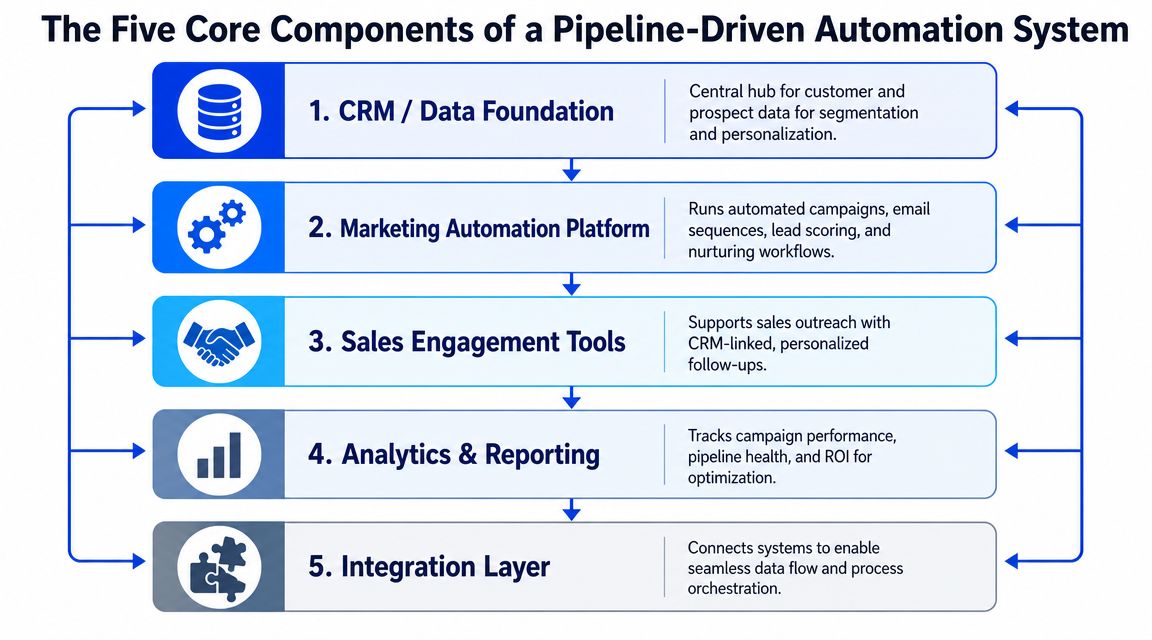
A technically mature stack is a revenue orchestration layer that unifies behavioral signals, firmographic data, and sales intent into workflows. When teams use those signals well, they can shorten the path from anonymous visitor to identified prospect and improve sales efficiency, as outlined in ZoomInfo's view of B2B marketing automation platforms.
1. Data and enrichment layer
Most systems gradually break at this point.
If Apollo, HubSpot, Clay, and your CRM hold different versions of the same account, every downstream workflow becomes unreliable. The fix is not another dashboard. The fix is a disciplined enrichment layer with waterfall logic.
Clay is useful here because it can pull from multiple providers in sequence until the record is usable. That matters more than flashy AI copy features. Without reliable company data, role data, and signal data, your segmentation and routing drift fast.
2. Integration fabric
The second layer is how systems talk to each other. API access, webhooks, field mapping, sync rules, and audit logs decide whether your automation survives real usage.
Weak integrations create manual bridges. Manual bridges create stale records. Stale records create bad handoffs.
If you're cleaning this up, the standard should be simple. A reply in the engagement tool should update the CRM. A lifecycle change in the CRM should suppress the wrong campaigns. A meeting outcome should feed reporting. That's basic sales pipeline management discipline, not an advanced extra.
3. Behavioral workflows
Time-based sequencing is the minimum. Behavior-based branching is where the system starts to earn its keep.
A prospect who opened three emails and visited pricing shouldn't get the same follow-up as someone who never engaged. A target account that clicked a LinkedIn ad and then watched a webinar should move differently from a cold outbound lead. Tools like HubSpot, Lemlist, Instantly, and HeyReach can all play a role here, but only if the branching logic is based on behavior rather than a fixed send calendar.
Good workflows don't ask, "What do we send on day 5?" They ask, "What did the buyer do, and what should happen now?"
4. Cross-channel orchestration
Email still carries most of the weight in B2B. But serious teams don't leave signals trapped in one channel.
A strong system coordinates inbox touches, LinkedIn activity, paid retargeting, rep tasks, and CRM updates. For example, outbound via Apollo or Instantly can pause when a contact books a meeting. LinkedIn follow-up through HeyReach can trigger only after email engagement. Sales Navigator research can feed account notes before a rep reaches out.
One-message, one-list, one-reporting-line thinking matters. If content, outbound, and CRM all run on separate assumptions, automation just multiplies inconsistency.
5. Scoring and routing logic
Scoring is the control layer. Routing is the moment of truth.
You need clear logic for fit and intent, then a rule for what happens next. Does the lead go to nurture, SDR outreach, founder outreach, or hold? Does the account get Tier 1 automation or Tier 3 manual treatment? Those decisions shouldn't depend on whoever happened to notice the record.
The features that matter most here are rarely the ones vendors headline. Native enrichment, behavior-based branching, instant reply routing, deliverability guardrails, and an audit trail decide whether the machine produces pipeline or embarrassment.
The 90-day automation implementation framework
Most failed builds start too wide. Teams try to automate content, outbound, lifecycle nurture, attribution, and reporting all at once. Three months later they have half-built workflows, weak trust from sales, and a lot of "we're still configuring."
A better approach is a controlled 90-day build with one pilot motion first.
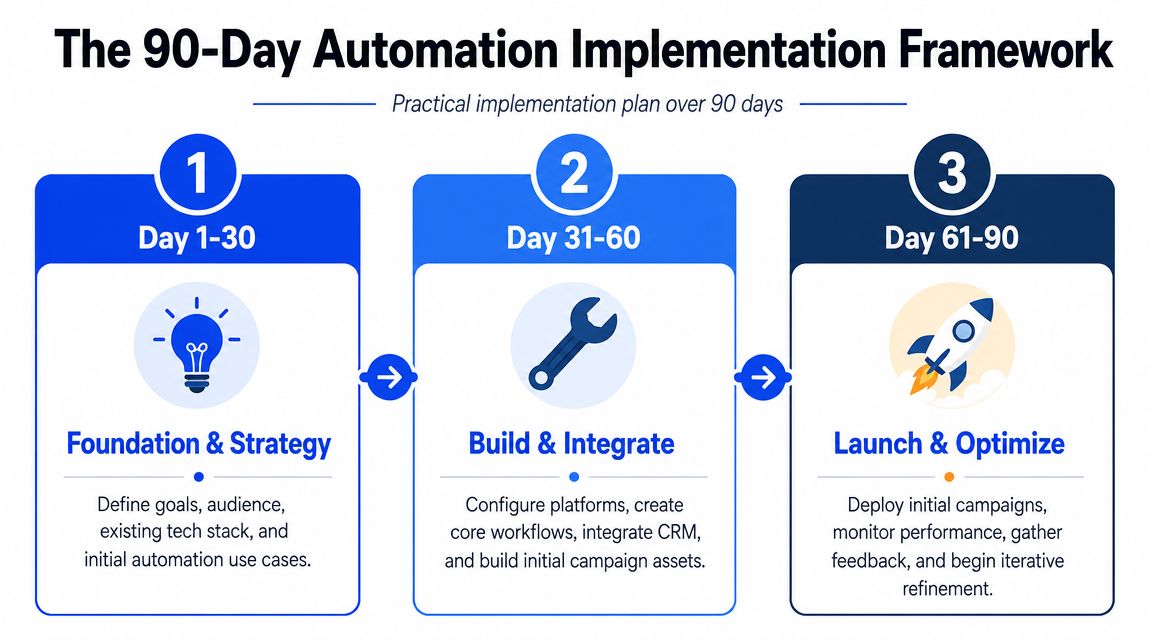
The foundation matters because the value of automation depends on clean, synchronized inputs. Industry guidance consistently points to CRM alignment, data audits, and clear ownership before scaling, as described in TELUS Digital's guidance on B2B marketing automation.
Days 1 to 21, audit and governance
The first three weeks are not for launching campaigns. They're for making the data safe enough to automate against.
Audit CRM and MAP sync
Check duplicates
Check required fields
Check lifecycle stage logic
Check ownership rules
Define commercial thresholds
Agree what counts as an MQL
Agree what makes it sales-ready
Agree what happens when sales rejects it
Document field ownership
Who owns title normalization
Who owns account status
Who owns suppression lists
Who can change scoring rules
This is also the phase where you decide whether your first use case is inbound nurture, signal-triggered outbound intake, meeting-note sync, or something else. Pick one bottleneck, not six.
Teams skip governance because it feels slow. Then the workflow scales bad data faster than a human ever could.
Days 22 to 60, build and pilot
Now build only what supports the first motion.
For many B2B teams, that means a compact stack like Clay for enrichment, HubSpot for CRM and workflow control, Apollo or Instantly for outbound execution, and a simple alerting layer into Slack. If you need a directory to compare categories before locking your stack, this marketing automation tools page is a useful starting point.
The build sequence should be:
Connect the systems → enrichment, CRM, outbound, notifications
Create the workflow logic → entry trigger, enrichment, scoring, routing, exit rules
Write the message set → by segment and personalization tier
Test internally → bad data cases, duplicate prevention, positive reply routing, suppression
If you're also automating adjacent channels, the same rule applies. Keep it controlled. For social distribution, effective social media scheduling only works when publishing logic matches campaign priorities instead of becoming another disconnected content queue.
A useful walkthrough on implementation mechanics sits below.
Days 61 to 90, launch and iterate
Launch with a narrow segment. One ICP slice, one clear offer, one reporting view.
Then run bi-weekly sprint reviews around a short list of operator questions:
Entry quality → Are the right accounts entering?
Routing speed → Are positive replies reaching humans fast enough?
Message fit → Are messages matching the detected trigger?
Sales feedback → Are routed leads workable?
Failure patterns → Which records are breaking the workflow?
The biggest mistake here is overreacting to one week of noise and rebuilding everything. Keep the architecture stable. Adjust thresholds, copy, suppression logic, and enrichment rules first.
Calculating the ROI: a real-world example
Most ROI conversations around b2b marketing automation are too abstract. They stay at platform cost and never get down to what changed in the day-to-day motion.
Here's the cleaner way to look at it. One SDR, same budget, same offer. The change was replacing static list building with signal-triggered intake.
Oracle says marketing automation returns $5.44 for every $1 spent over the first three years in its marketing automation statistics, and that organizations using nurture workflows with lead scoring and behavioral triggers see MQL-to-SQL conversion rates 30% to 50% higher than teams using simple batch emails (Oracle marketing automation statistics). Those are broad benchmarks. The operational question is how that shows up in a live pipeline program.
What changed operationally
Before the build, the SDR was spending a large chunk of the week building and cleaning lists. The list itself was static, so contacts often entered sequences long after the moment that made them relevant.
After the build, the system pulled fresh accounts based on trigger events. The SDR spent far less time on list prep and far more time in live conversation handling. That was the actual gain. Not "AI did the selling." The team removed admin drag and redeployed human time into the part of the motion that closes meetings.
If you're evaluating similar builds, this piece on automating workflows with AI services is useful as a companion read because it focuses on how services tie automation into operating workflows rather than treating it as a standalone software purchase.
Signal-triggered automation ROI: Before vs. After (90 Days)
Metric | Before (Static Lists) | After (Automated Signals) |
|---|---|---|
SDR time spent building and cleaning lists per week | roughly 15 hours | under 3 hours |
Reply rate | 4% | 9.3% |
Meetings booked per month | 7 | 19 |
Cost per qualified meeting | roughly €480 | roughly €210 |
The cleanest figure from that deployment was a 56% reduction in cost per qualified meeting within 90 days. Meeting volume also moved from 7 to 19 per month, with no added spend or headcount.
There was a setup cost. It took 3 weeks of setup, a Clay build, and ongoing human review before send. That caveat matters. Automation ROI is real, but if someone talks about gains without mentioning implementation and maintenance overhead, they aren't giving you a decision-ready number.
For finance and RevOps, this is the version of ROI that matters. Not software utilization. Output per rep, cost per qualified meeting, and whether recovered hours turned into additional opportunities.
How to balance automation with personalization
This gets framed as a trade-off far too often. It isn't.
The decision is where human effort creates disproportionate value and where structured automation already gets you most of the way there. Lead scoring is the control that makes this manageable. Scoring models can weight demographic fit and behavioral intent, then assign leads into tiers once they cross a threshold, typically around 50 to 75 points, as shown in these lead scoring examples from GTM Engineer Club.
The three-tier model
The model that holds up in practice is a three-tier system.
Tier 1, signal-based personalization
This is fully automated and should cover the bulk of the list. The opener comes from a detected trigger, not fake familiarity. "Saw your team is hiring SDRs" or "noticed a new market launch" is specific enough to feel relevant without requiring manual research on every contact.
Tier 2, AI-drafted and human-reviewed
This fits mid-value accounts. The system pulls context from a post, launch, hiring pattern, podcast mention, or product update. AI drafts the opener, then a human sharpens it before send. That keeps throughput high without letting robotic phrasing through.
Tier 3, fully manual
Reserved for strategic accounts only. Deep research, custom assets, bespoke follow-up, and rep ownership from the first touch.
The system should decide the tier automatically based on ICP score and commercial potential. Humans shouldn't be manually sorting the whole list every week.
Where teams usually get this wrong
Most mistakes happen at the extremes.
Some teams try to give every account Tier 3 treatment. That burns the team out and collapses by the third week. Others apply low-effort automation to their most valuable targets and look careless exactly where attention to detail matters most.
Automation handles relevance at scale. Humans should own the moments where judgment changes the deal.
That means proposal-stage and negotiation-stage communication with senior decision makers should stay human-sent. Always. The cost of one tone-deaf automated message landing at the wrong time is higher than the hours you saved that week.
If you want a simple rule, use automation to create timely relevance for the many, and use human depth for the few. That's the practical version of personalisation that scales without flattening message quality.
Your next step: a 5-point automation readiness audit
Before you add another workflow, score the system you already have. Most underperformance shows up in the same five places.
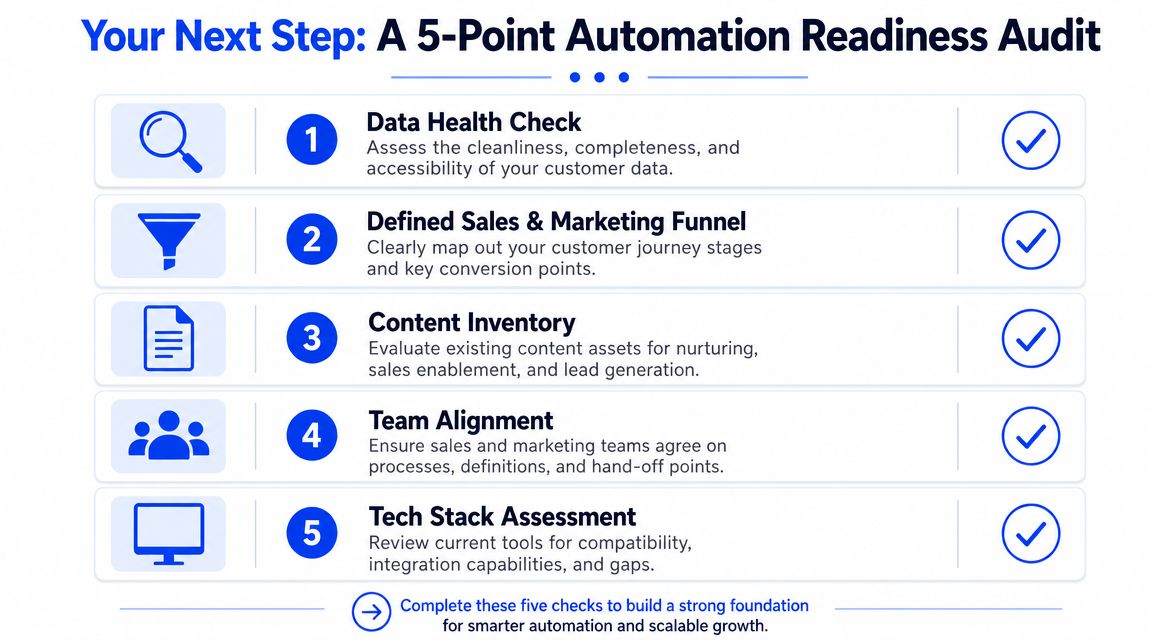
Score these five areas honestly
Use a simple red, amber, green assessment or a low-to-high internal score. The exact scoring system matters less than being honest.
Data integrity
Can your team trust account ownership, lifecycle stage, title data, company data, and suppression status? If duplicates and stale fields are common, automation will just produce faster confusion.ICP and scoring definition
Is there a written scoring model that combines fit and intent, or are reps still deciding quality by feel? If the model isn't explicit, routing will stay inconsistent.Sales and marketing alignment
Do both teams agree on MQL, SQL, rejection reasons, and response expectations? If not, every alert becomes an argument.Tech stack integration
Do Clay, HubSpot, Apollo, your sequencing tool, and your CRM pass data cleanly between each other? If a reply or stage change doesn't update the rest of the system, the workflow is fragile.Operator capacity
Does someone own the system? Not the platform login. The logic, the QA, the reporting, and the sprint reviews.
What to do with the result
If two or more of these areas are weak, don't expand the stack yet. Fix the failure point closest to revenue first.
Typically, the order is:
First → clean core data and ownership
Second → define scoring and routing rules
Third → launch one workflow tied to a real bottleneck
Fourth → review with sales every two weeks
Fifth → add complexity only after the first motion is stable
If you want a faster diagnosis, run this pipeline score quiz. It helps surface whether the blockage is list quality, process design, routing, or execution discipline.
If your team has the tools but not the system, Grou is one option to look at. The model is straightforward: unify target list building, LinkedIn content, outbound execution, and reply routing into one pipeline engine so sales sees qualified conversations instead of disconnected activity.
You already know the failure mode. You bought HubSpot or another platform, connected a form, built a nurture, and now you have more emails going out but not much more pipeline coming back.
That happens because most b2b marketing automation programs are built like campaign factories, not revenue systems. The tooling is fine. The operating model is the problem. Data is incomplete, routing is slow, scoring is vague, and sales gets alerts they don't trust.
The version that works looks different. It connects enrichment, intent, CRM state, outbound, and follow-up into one motion. Structure turns attention into pipeline.
Table of Contents
What B2B marketing automation is (and is not) in 2026
The gap between having a platform and producing pipeline
Many teams don't have an adoption problem. They have an effectiveness problem.
A compiled 2026 market review says 95% of enterprise marketing teams use at least one marketing automation platform, yet automated workflows account for a median 23% of marketing-sourced revenue (Digital Applied market review). That's the clearest sign that owning the software and operating it well are two different things.
If your platform mostly schedules email, it isn't really running b2b marketing automation. It's just sending on a timer. The job is bigger than that.
Practical rule: If a workflow can't change who gets routed, what gets sent, and when sales acts, it isn't orchestration. It's just distribution.
A lot of teams would benefit from revisiting how they frame B2B lead generation automation. The useful lens isn't "how do we automate more touches?" It's "how do we connect signals to the next commercial action?"
What the system is actually supposed to do
A real automation system turns scattered buyer activity into coordinated action. Someone visits a pricing page, comments on a founder post, changes role, or gets added to a target account list. The system should pick that up, enrich the record, score the account, assign the right level of personalization, and route a response.
That means automation sits between marketing and sales, not just inside marketing. In practice, the stack needs to do a few things well:
Capture signals → page visits, content downloads, email engagement, CRM status changes, LinkedIn activity
Interpret relevance → fit, intent, account value, buying stage
Trigger action → nurture, outbound, retargeting, task creation, rep alerts, suppression
Record the outcome → reply, meeting, rejection reason, pipeline movement
The point isn't efficiency for its own sake. The point is predictable movement from attention to conversation.
That is why the best operators treat b2b marketing automation as revenue infrastructure. You don't judge it by how many workflows exist. You judge it by whether the right accounts enter the right motion at the right moment, with sales seeing the same reality as marketing.
The five core components of a pipeline-driven automation system
A workable stack isn't one platform. It's five connected layers, each doing a different job. If one layer is weak, the whole system gets noisy.
A technically mature stack is a revenue orchestration layer that unifies behavioral signals, firmographic data, and sales intent into workflows. When teams use those signals well, they can shorten the path from anonymous visitor to identified prospect and improve sales efficiency, as outlined in ZoomInfo's view of B2B marketing automation platforms.
1. Data and enrichment layer
Most systems gradually break at this point.
If Apollo, HubSpot, Clay, and your CRM hold different versions of the same account, every downstream workflow becomes unreliable. The fix is not another dashboard. The fix is a disciplined enrichment layer with waterfall logic.
Clay is useful here because it can pull from multiple providers in sequence until the record is usable. That matters more than flashy AI copy features. Without reliable company data, role data, and signal data, your segmentation and routing drift fast.
2. Integration fabric
The second layer is how systems talk to each other. API access, webhooks, field mapping, sync rules, and audit logs decide whether your automation survives real usage.
Weak integrations create manual bridges. Manual bridges create stale records. Stale records create bad handoffs.
If you're cleaning this up, the standard should be simple. A reply in the engagement tool should update the CRM. A lifecycle change in the CRM should suppress the wrong campaigns. A meeting outcome should feed reporting. That's basic sales pipeline management discipline, not an advanced extra.
3. Behavioral workflows
Time-based sequencing is the minimum. Behavior-based branching is where the system starts to earn its keep.
A prospect who opened three emails and visited pricing shouldn't get the same follow-up as someone who never engaged. A target account that clicked a LinkedIn ad and then watched a webinar should move differently from a cold outbound lead. Tools like HubSpot, Lemlist, Instantly, and HeyReach can all play a role here, but only if the branching logic is based on behavior rather than a fixed send calendar.
Good workflows don't ask, "What do we send on day 5?" They ask, "What did the buyer do, and what should happen now?"
4. Cross-channel orchestration
Email still carries most of the weight in B2B. But serious teams don't leave signals trapped in one channel.
A strong system coordinates inbox touches, LinkedIn activity, paid retargeting, rep tasks, and CRM updates. For example, outbound via Apollo or Instantly can pause when a contact books a meeting. LinkedIn follow-up through HeyReach can trigger only after email engagement. Sales Navigator research can feed account notes before a rep reaches out.
One-message, one-list, one-reporting-line thinking matters. If content, outbound, and CRM all run on separate assumptions, automation just multiplies inconsistency.
5. Scoring and routing logic
Scoring is the control layer. Routing is the moment of truth.
You need clear logic for fit and intent, then a rule for what happens next. Does the lead go to nurture, SDR outreach, founder outreach, or hold? Does the account get Tier 1 automation or Tier 3 manual treatment? Those decisions shouldn't depend on whoever happened to notice the record.
The features that matter most here are rarely the ones vendors headline. Native enrichment, behavior-based branching, instant reply routing, deliverability guardrails, and an audit trail decide whether the machine produces pipeline or embarrassment.
The 90-day automation implementation framework
Most failed builds start too wide. Teams try to automate content, outbound, lifecycle nurture, attribution, and reporting all at once. Three months later they have half-built workflows, weak trust from sales, and a lot of "we're still configuring."
A better approach is a controlled 90-day build with one pilot motion first.
The foundation matters because the value of automation depends on clean, synchronized inputs. Industry guidance consistently points to CRM alignment, data audits, and clear ownership before scaling, as described in TELUS Digital's guidance on B2B marketing automation.
Days 1 to 21, audit and governance
The first three weeks are not for launching campaigns. They're for making the data safe enough to automate against.
Audit CRM and MAP sync
Check duplicates
Check required fields
Check lifecycle stage logic
Check ownership rules
Define commercial thresholds
Agree what counts as an MQL
Agree what makes it sales-ready
Agree what happens when sales rejects it
Document field ownership
Who owns title normalization
Who owns account status
Who owns suppression lists
Who can change scoring rules
This is also the phase where you decide whether your first use case is inbound nurture, signal-triggered outbound intake, meeting-note sync, or something else. Pick one bottleneck, not six.
Teams skip governance because it feels slow. Then the workflow scales bad data faster than a human ever could.
Days 22 to 60, build and pilot
Now build only what supports the first motion.
For many B2B teams, that means a compact stack like Clay for enrichment, HubSpot for CRM and workflow control, Apollo or Instantly for outbound execution, and a simple alerting layer into Slack. If you need a directory to compare categories before locking your stack, this marketing automation tools page is a useful starting point.
The build sequence should be:
Connect the systems → enrichment, CRM, outbound, notifications
Create the workflow logic → entry trigger, enrichment, scoring, routing, exit rules
Write the message set → by segment and personalization tier
Test internally → bad data cases, duplicate prevention, positive reply routing, suppression
If you're also automating adjacent channels, the same rule applies. Keep it controlled. For social distribution, effective social media scheduling only works when publishing logic matches campaign priorities instead of becoming another disconnected content queue.
A useful walkthrough on implementation mechanics sits below.
Days 61 to 90, launch and iterate
Launch with a narrow segment. One ICP slice, one clear offer, one reporting view.
Then run bi-weekly sprint reviews around a short list of operator questions:
Entry quality → Are the right accounts entering?
Routing speed → Are positive replies reaching humans fast enough?
Message fit → Are messages matching the detected trigger?
Sales feedback → Are routed leads workable?
Failure patterns → Which records are breaking the workflow?
The biggest mistake here is overreacting to one week of noise and rebuilding everything. Keep the architecture stable. Adjust thresholds, copy, suppression logic, and enrichment rules first.
Calculating the ROI: a real-world example
Most ROI conversations around b2b marketing automation are too abstract. They stay at platform cost and never get down to what changed in the day-to-day motion.
Here's the cleaner way to look at it. One SDR, same budget, same offer. The change was replacing static list building with signal-triggered intake.
Oracle says marketing automation returns $5.44 for every $1 spent over the first three years in its marketing automation statistics, and that organizations using nurture workflows with lead scoring and behavioral triggers see MQL-to-SQL conversion rates 30% to 50% higher than teams using simple batch emails (Oracle marketing automation statistics). Those are broad benchmarks. The operational question is how that shows up in a live pipeline program.
What changed operationally
Before the build, the SDR was spending a large chunk of the week building and cleaning lists. The list itself was static, so contacts often entered sequences long after the moment that made them relevant.
After the build, the system pulled fresh accounts based on trigger events. The SDR spent far less time on list prep and far more time in live conversation handling. That was the actual gain. Not "AI did the selling." The team removed admin drag and redeployed human time into the part of the motion that closes meetings.
If you're evaluating similar builds, this piece on automating workflows with AI services is useful as a companion read because it focuses on how services tie automation into operating workflows rather than treating it as a standalone software purchase.
Signal-triggered automation ROI: Before vs. After (90 Days)
Metric | Before (Static Lists) | After (Automated Signals) |
|---|---|---|
SDR time spent building and cleaning lists per week | roughly 15 hours | under 3 hours |
Reply rate | 4% | 9.3% |
Meetings booked per month | 7 | 19 |
Cost per qualified meeting | roughly €480 | roughly €210 |
The cleanest figure from that deployment was a 56% reduction in cost per qualified meeting within 90 days. Meeting volume also moved from 7 to 19 per month, with no added spend or headcount.
There was a setup cost. It took 3 weeks of setup, a Clay build, and ongoing human review before send. That caveat matters. Automation ROI is real, but if someone talks about gains without mentioning implementation and maintenance overhead, they aren't giving you a decision-ready number.
For finance and RevOps, this is the version of ROI that matters. Not software utilization. Output per rep, cost per qualified meeting, and whether recovered hours turned into additional opportunities.
How to balance automation with personalization
This gets framed as a trade-off far too often. It isn't.
The decision is where human effort creates disproportionate value and where structured automation already gets you most of the way there. Lead scoring is the control that makes this manageable. Scoring models can weight demographic fit and behavioral intent, then assign leads into tiers once they cross a threshold, typically around 50 to 75 points, as shown in these lead scoring examples from GTM Engineer Club.
The three-tier model
The model that holds up in practice is a three-tier system.
Tier 1, signal-based personalization
This is fully automated and should cover the bulk of the list. The opener comes from a detected trigger, not fake familiarity. "Saw your team is hiring SDRs" or "noticed a new market launch" is specific enough to feel relevant without requiring manual research on every contact.
Tier 2, AI-drafted and human-reviewed
This fits mid-value accounts. The system pulls context from a post, launch, hiring pattern, podcast mention, or product update. AI drafts the opener, then a human sharpens it before send. That keeps throughput high without letting robotic phrasing through.
Tier 3, fully manual
Reserved for strategic accounts only. Deep research, custom assets, bespoke follow-up, and rep ownership from the first touch.
The system should decide the tier automatically based on ICP score and commercial potential. Humans shouldn't be manually sorting the whole list every week.
Where teams usually get this wrong
Most mistakes happen at the extremes.
Some teams try to give every account Tier 3 treatment. That burns the team out and collapses by the third week. Others apply low-effort automation to their most valuable targets and look careless exactly where attention to detail matters most.
Automation handles relevance at scale. Humans should own the moments where judgment changes the deal.
That means proposal-stage and negotiation-stage communication with senior decision makers should stay human-sent. Always. The cost of one tone-deaf automated message landing at the wrong time is higher than the hours you saved that week.
If you want a simple rule, use automation to create timely relevance for the many, and use human depth for the few. That's the practical version of personalisation that scales without flattening message quality.
Your next step: a 5-point automation readiness audit
Before you add another workflow, score the system you already have. Most underperformance shows up in the same five places.
Score these five areas honestly
Use a simple red, amber, green assessment or a low-to-high internal score. The exact scoring system matters less than being honest.
Data integrity
Can your team trust account ownership, lifecycle stage, title data, company data, and suppression status? If duplicates and stale fields are common, automation will just produce faster confusion.ICP and scoring definition
Is there a written scoring model that combines fit and intent, or are reps still deciding quality by feel? If the model isn't explicit, routing will stay inconsistent.Sales and marketing alignment
Do both teams agree on MQL, SQL, rejection reasons, and response expectations? If not, every alert becomes an argument.Tech stack integration
Do Clay, HubSpot, Apollo, your sequencing tool, and your CRM pass data cleanly between each other? If a reply or stage change doesn't update the rest of the system, the workflow is fragile.Operator capacity
Does someone own the system? Not the platform login. The logic, the QA, the reporting, and the sprint reviews.
What to do with the result
If two or more of these areas are weak, don't expand the stack yet. Fix the failure point closest to revenue first.
Typically, the order is:
First → clean core data and ownership
Second → define scoring and routing rules
Third → launch one workflow tied to a real bottleneck
Fourth → review with sales every two weeks
Fifth → add complexity only after the first motion is stable
If you want a faster diagnosis, run this pipeline score quiz. It helps surface whether the blockage is list quality, process design, routing, or execution discipline.
If your team has the tools but not the system, Grou is one option to look at. The model is straightforward: unify target list building, LinkedIn content, outbound execution, and reply routing into one pipeline engine so sales sees qualified conversations instead of disconnected activity.
You already know the failure mode. You bought HubSpot or another platform, connected a form, built a nurture, and now you have more emails going out but not much more pipeline coming back.
That happens because most b2b marketing automation programs are built like campaign factories, not revenue systems. The tooling is fine. The operating model is the problem. Data is incomplete, routing is slow, scoring is vague, and sales gets alerts they don't trust.
The version that works looks different. It connects enrichment, intent, CRM state, outbound, and follow-up into one motion. Structure turns attention into pipeline.
Table of Contents
What B2B marketing automation is (and is not) in 2026
The gap between having a platform and producing pipeline
Many teams don't have an adoption problem. They have an effectiveness problem.
A compiled 2026 market review says 95% of enterprise marketing teams use at least one marketing automation platform, yet automated workflows account for a median 23% of marketing-sourced revenue (Digital Applied market review). That's the clearest sign that owning the software and operating it well are two different things.
If your platform mostly schedules email, it isn't really running b2b marketing automation. It's just sending on a timer. The job is bigger than that.
Practical rule: If a workflow can't change who gets routed, what gets sent, and when sales acts, it isn't orchestration. It's just distribution.
A lot of teams would benefit from revisiting how they frame B2B lead generation automation. The useful lens isn't "how do we automate more touches?" It's "how do we connect signals to the next commercial action?"
What the system is actually supposed to do
A real automation system turns scattered buyer activity into coordinated action. Someone visits a pricing page, comments on a founder post, changes role, or gets added to a target account list. The system should pick that up, enrich the record, score the account, assign the right level of personalization, and route a response.
That means automation sits between marketing and sales, not just inside marketing. In practice, the stack needs to do a few things well:
Capture signals → page visits, content downloads, email engagement, CRM status changes, LinkedIn activity
Interpret relevance → fit, intent, account value, buying stage
Trigger action → nurture, outbound, retargeting, task creation, rep alerts, suppression
Record the outcome → reply, meeting, rejection reason, pipeline movement
The point isn't efficiency for its own sake. The point is predictable movement from attention to conversation.
That is why the best operators treat b2b marketing automation as revenue infrastructure. You don't judge it by how many workflows exist. You judge it by whether the right accounts enter the right motion at the right moment, with sales seeing the same reality as marketing.
The five core components of a pipeline-driven automation system
A workable stack isn't one platform. It's five connected layers, each doing a different job. If one layer is weak, the whole system gets noisy.
A technically mature stack is a revenue orchestration layer that unifies behavioral signals, firmographic data, and sales intent into workflows. When teams use those signals well, they can shorten the path from anonymous visitor to identified prospect and improve sales efficiency, as outlined in ZoomInfo's view of B2B marketing automation platforms.
1. Data and enrichment layer
Most systems gradually break at this point.
If Apollo, HubSpot, Clay, and your CRM hold different versions of the same account, every downstream workflow becomes unreliable. The fix is not another dashboard. The fix is a disciplined enrichment layer with waterfall logic.
Clay is useful here because it can pull from multiple providers in sequence until the record is usable. That matters more than flashy AI copy features. Without reliable company data, role data, and signal data, your segmentation and routing drift fast.
2. Integration fabric
The second layer is how systems talk to each other. API access, webhooks, field mapping, sync rules, and audit logs decide whether your automation survives real usage.
Weak integrations create manual bridges. Manual bridges create stale records. Stale records create bad handoffs.
If you're cleaning this up, the standard should be simple. A reply in the engagement tool should update the CRM. A lifecycle change in the CRM should suppress the wrong campaigns. A meeting outcome should feed reporting. That's basic sales pipeline management discipline, not an advanced extra.
3. Behavioral workflows
Time-based sequencing is the minimum. Behavior-based branching is where the system starts to earn its keep.
A prospect who opened three emails and visited pricing shouldn't get the same follow-up as someone who never engaged. A target account that clicked a LinkedIn ad and then watched a webinar should move differently from a cold outbound lead. Tools like HubSpot, Lemlist, Instantly, and HeyReach can all play a role here, but only if the branching logic is based on behavior rather than a fixed send calendar.
Good workflows don't ask, "What do we send on day 5?" They ask, "What did the buyer do, and what should happen now?"
4. Cross-channel orchestration
Email still carries most of the weight in B2B. But serious teams don't leave signals trapped in one channel.
A strong system coordinates inbox touches, LinkedIn activity, paid retargeting, rep tasks, and CRM updates. For example, outbound via Apollo or Instantly can pause when a contact books a meeting. LinkedIn follow-up through HeyReach can trigger only after email engagement. Sales Navigator research can feed account notes before a rep reaches out.
One-message, one-list, one-reporting-line thinking matters. If content, outbound, and CRM all run on separate assumptions, automation just multiplies inconsistency.
5. Scoring and routing logic
Scoring is the control layer. Routing is the moment of truth.
You need clear logic for fit and intent, then a rule for what happens next. Does the lead go to nurture, SDR outreach, founder outreach, or hold? Does the account get Tier 1 automation or Tier 3 manual treatment? Those decisions shouldn't depend on whoever happened to notice the record.
The features that matter most here are rarely the ones vendors headline. Native enrichment, behavior-based branching, instant reply routing, deliverability guardrails, and an audit trail decide whether the machine produces pipeline or embarrassment.
The 90-day automation implementation framework
Most failed builds start too wide. Teams try to automate content, outbound, lifecycle nurture, attribution, and reporting all at once. Three months later they have half-built workflows, weak trust from sales, and a lot of "we're still configuring."
A better approach is a controlled 90-day build with one pilot motion first.
The foundation matters because the value of automation depends on clean, synchronized inputs. Industry guidance consistently points to CRM alignment, data audits, and clear ownership before scaling, as described in TELUS Digital's guidance on B2B marketing automation.
Days 1 to 21, audit and governance
The first three weeks are not for launching campaigns. They're for making the data safe enough to automate against.
Audit CRM and MAP sync
Check duplicates
Check required fields
Check lifecycle stage logic
Check ownership rules
Define commercial thresholds
Agree what counts as an MQL
Agree what makes it sales-ready
Agree what happens when sales rejects it
Document field ownership
Who owns title normalization
Who owns account status
Who owns suppression lists
Who can change scoring rules
This is also the phase where you decide whether your first use case is inbound nurture, signal-triggered outbound intake, meeting-note sync, or something else. Pick one bottleneck, not six.
Teams skip governance because it feels slow. Then the workflow scales bad data faster than a human ever could.
Days 22 to 60, build and pilot
Now build only what supports the first motion.
For many B2B teams, that means a compact stack like Clay for enrichment, HubSpot for CRM and workflow control, Apollo or Instantly for outbound execution, and a simple alerting layer into Slack. If you need a directory to compare categories before locking your stack, this marketing automation tools page is a useful starting point.
The build sequence should be:
Connect the systems → enrichment, CRM, outbound, notifications
Create the workflow logic → entry trigger, enrichment, scoring, routing, exit rules
Write the message set → by segment and personalization tier
Test internally → bad data cases, duplicate prevention, positive reply routing, suppression
If you're also automating adjacent channels, the same rule applies. Keep it controlled. For social distribution, effective social media scheduling only works when publishing logic matches campaign priorities instead of becoming another disconnected content queue.
A useful walkthrough on implementation mechanics sits below.
Days 61 to 90, launch and iterate
Launch with a narrow segment. One ICP slice, one clear offer, one reporting view.
Then run bi-weekly sprint reviews around a short list of operator questions:
Entry quality → Are the right accounts entering?
Routing speed → Are positive replies reaching humans fast enough?
Message fit → Are messages matching the detected trigger?
Sales feedback → Are routed leads workable?
Failure patterns → Which records are breaking the workflow?
The biggest mistake here is overreacting to one week of noise and rebuilding everything. Keep the architecture stable. Adjust thresholds, copy, suppression logic, and enrichment rules first.
Calculating the ROI: a real-world example
Most ROI conversations around b2b marketing automation are too abstract. They stay at platform cost and never get down to what changed in the day-to-day motion.
Here's the cleaner way to look at it. One SDR, same budget, same offer. The change was replacing static list building with signal-triggered intake.
Oracle says marketing automation returns $5.44 for every $1 spent over the first three years in its marketing automation statistics, and that organizations using nurture workflows with lead scoring and behavioral triggers see MQL-to-SQL conversion rates 30% to 50% higher than teams using simple batch emails (Oracle marketing automation statistics). Those are broad benchmarks. The operational question is how that shows up in a live pipeline program.
What changed operationally
Before the build, the SDR was spending a large chunk of the week building and cleaning lists. The list itself was static, so contacts often entered sequences long after the moment that made them relevant.
After the build, the system pulled fresh accounts based on trigger events. The SDR spent far less time on list prep and far more time in live conversation handling. That was the actual gain. Not "AI did the selling." The team removed admin drag and redeployed human time into the part of the motion that closes meetings.
If you're evaluating similar builds, this piece on automating workflows with AI services is useful as a companion read because it focuses on how services tie automation into operating workflows rather than treating it as a standalone software purchase.
Signal-triggered automation ROI: Before vs. After (90 Days)
Metric | Before (Static Lists) | After (Automated Signals) |
|---|---|---|
SDR time spent building and cleaning lists per week | roughly 15 hours | under 3 hours |
Reply rate | 4% | 9.3% |
Meetings booked per month | 7 | 19 |
Cost per qualified meeting | roughly €480 | roughly €210 |
The cleanest figure from that deployment was a 56% reduction in cost per qualified meeting within 90 days. Meeting volume also moved from 7 to 19 per month, with no added spend or headcount.
There was a setup cost. It took 3 weeks of setup, a Clay build, and ongoing human review before send. That caveat matters. Automation ROI is real, but if someone talks about gains without mentioning implementation and maintenance overhead, they aren't giving you a decision-ready number.
For finance and RevOps, this is the version of ROI that matters. Not software utilization. Output per rep, cost per qualified meeting, and whether recovered hours turned into additional opportunities.
How to balance automation with personalization
This gets framed as a trade-off far too often. It isn't.
The decision is where human effort creates disproportionate value and where structured automation already gets you most of the way there. Lead scoring is the control that makes this manageable. Scoring models can weight demographic fit and behavioral intent, then assign leads into tiers once they cross a threshold, typically around 50 to 75 points, as shown in these lead scoring examples from GTM Engineer Club.
The three-tier model
The model that holds up in practice is a three-tier system.
Tier 1, signal-based personalization
This is fully automated and should cover the bulk of the list. The opener comes from a detected trigger, not fake familiarity. "Saw your team is hiring SDRs" or "noticed a new market launch" is specific enough to feel relevant without requiring manual research on every contact.
Tier 2, AI-drafted and human-reviewed
This fits mid-value accounts. The system pulls context from a post, launch, hiring pattern, podcast mention, or product update. AI drafts the opener, then a human sharpens it before send. That keeps throughput high without letting robotic phrasing through.
Tier 3, fully manual
Reserved for strategic accounts only. Deep research, custom assets, bespoke follow-up, and rep ownership from the first touch.
The system should decide the tier automatically based on ICP score and commercial potential. Humans shouldn't be manually sorting the whole list every week.
Where teams usually get this wrong
Most mistakes happen at the extremes.
Some teams try to give every account Tier 3 treatment. That burns the team out and collapses by the third week. Others apply low-effort automation to their most valuable targets and look careless exactly where attention to detail matters most.
Automation handles relevance at scale. Humans should own the moments where judgment changes the deal.
That means proposal-stage and negotiation-stage communication with senior decision makers should stay human-sent. Always. The cost of one tone-deaf automated message landing at the wrong time is higher than the hours you saved that week.
If you want a simple rule, use automation to create timely relevance for the many, and use human depth for the few. That's the practical version of personalisation that scales without flattening message quality.
Your next step: a 5-point automation readiness audit
Before you add another workflow, score the system you already have. Most underperformance shows up in the same five places.
Score these five areas honestly
Use a simple red, amber, green assessment or a low-to-high internal score. The exact scoring system matters less than being honest.
Data integrity
Can your team trust account ownership, lifecycle stage, title data, company data, and suppression status? If duplicates and stale fields are common, automation will just produce faster confusion.ICP and scoring definition
Is there a written scoring model that combines fit and intent, or are reps still deciding quality by feel? If the model isn't explicit, routing will stay inconsistent.Sales and marketing alignment
Do both teams agree on MQL, SQL, rejection reasons, and response expectations? If not, every alert becomes an argument.Tech stack integration
Do Clay, HubSpot, Apollo, your sequencing tool, and your CRM pass data cleanly between each other? If a reply or stage change doesn't update the rest of the system, the workflow is fragile.Operator capacity
Does someone own the system? Not the platform login. The logic, the QA, the reporting, and the sprint reviews.
What to do with the result
If two or more of these areas are weak, don't expand the stack yet. Fix the failure point closest to revenue first.
Typically, the order is:
First → clean core data and ownership
Second → define scoring and routing rules
Third → launch one workflow tied to a real bottleneck
Fourth → review with sales every two weeks
Fifth → add complexity only after the first motion is stable
If you want a faster diagnosis, run this pipeline score quiz. It helps surface whether the blockage is list quality, process design, routing, or execution discipline.
If your team has the tools but not the system, Grou is one option to look at. The model is straightforward: unify target list building, LinkedIn content, outbound execution, and reply routing into one pipeline engine so sales sees qualified conversations instead of disconnected activity.

Pipeline OS Newsletter
Build qualified pipeline
Get weekly tactics to generate demand, improve lead quality, and book more meetings.





Trusted by industry leaders
Trusted by industry leaders
Trusted by industry leaders
Ready to build qualified pipeline?
Ready to build qualified pipeline?
Ready to build qualified pipeline?
Book a call to see if we're the right fit, or take the 2-minute quiz to get a clear starting point.
Book a call to see if we're the right fit, or take the 2-minute quiz to get a clear starting point.
Book a call to see if we're the right fit, or take the 2-minute quiz to get a clear starting point.
" height="30.21639343089746px" id="hfGbXmQR2" width="30.216393430897455px"/></svg>)
Copyright © 2026 – All Right Reserved
Copyright © 2026 – All Right Reserved
Copyright © 2026 – All Right Reserved