%22%3E%3C/path%3E%3Cpath d=%22M 63.072 7.554 C 62.258 8.022 61.577 8.689 61.092 9.493 L 61.092 7.076 L 57.158 7.076 L 57.158 22.64 L 61.089 22.64 L 61.089 14.888 C 61.089 13.446 61.403 12.434 62.03 11.853 C 62.818 11.218 63.818 10.907 64.826 10.982 L 65.868 10.982 L 65.868 6.851 C 64.891 6.834 63.926 7.076 63.073 7.554 Z%22 fill=%22rgb(17,17,17)%22%3E%3C/path%3E%3Cpath d=%22M 78.916 7.82 C 76.363 6.49 73.321 6.49 70.768 7.82 C 69.562 8.473 68.564 9.451 67.888 10.644 C 67.167 11.931 66.803 13.387 66.834 14.862 C 66.804 16.332 67.157 17.785 67.86 19.077 C 68.515 20.267 69.494 21.246 70.684 21.901 C 71.924 22.576 73.318 22.92 74.73 22.898 C 76.164 22.918 77.58 22.575 78.846 21.901 C 80.062 21.247 81.073 20.27 81.768 19.077 C 82.506 17.797 82.88 16.339 82.85 14.862 C 82.88 13.389 82.517 11.934 81.797 10.647 C 81.12 9.455 80.122 8.477 78.917 7.824 M 78.803 14.862 C 78.829 15.739 78.636 16.608 78.241 17.391 C 77.903 18.046 77.38 18.588 76.738 18.95 C 76.124 19.293 75.432 19.472 74.729 19.47 C 73.668 19.497 72.648 19.061 71.934 18.276 C 71.139 17.323 70.741 16.1 70.823 14.862 C 70.741 13.62 71.149 12.395 71.959 11.45 C 72.687 10.667 73.715 10.233 74.783 10.256 C 75.859 10.236 76.894 10.67 77.635 11.45 C 78.464 12.387 78.884 13.616 78.801 14.864%22 fill=%22rgb(17,17,17)%22%3E%3C/path%3E%3Cpath d=%22M 95.906 7.076 L 95.906 15.646 C 95.975 16.68 95.643 17.701 94.979 18.498 C 94.311 19.184 93.379 19.547 92.422 19.495 C 91.475 19.544 90.553 19.18 89.894 18.498 C 89.23 17.701 88.898 16.68 88.967 15.646 L 88.967 7.076 L 85.033 7.076 L 85.033 16.207 C 85 17.449 85.275 18.68 85.834 19.79 C 86.327 20.75 87.095 21.542 88.039 22.065 C 89.033 22.594 90.145 22.861 91.271 22.838 C 92.188 22.847 93.095 22.65 93.926 22.263 C 94.708 21.905 95.388 21.36 95.906 20.675 L 95.906 22.645 L 99.865 22.645 L 99.865 7.076 Z%22 fill=%22rgb(17,17,17)%22%3E%3C/path%3E%3Cpath d=%22M 4.513 15.626 C 4.511 10.815 7.606 6.549 12.181 5.059 C 16.756 3.57 21.77 5.195 24.601 9.086 L 27.816 5.87 C 24.074 1.186 17.981 -0.943 12.137 0.393 C 6.292 1.728 1.728 6.292 0.393 12.137 C -0.943 17.981 1.186 24.074 5.87 27.816 L 9.085 24.601 C 6.214 22.512 4.515 19.177 4.513 15.626%22 fill=%22rgb(32,62,235)%22%3E%3C/path%3E%3Cpath d=%22M 17.114 14.343 L 13.354 18.01 L 13.354 18.026 L 21.071 18.026 L 11.412 27.609 L 17.389 27.609 L 23.999 21.081 L 23.999 28.316 L 24.005 28.316 L 27.967 24.393 L 27.967 14.343 Z%22 fill=%22rgb(32,62,235)%22%3E%3C/path%3E%3C/g%3E%3C/svg%3E) ×
× ××
××›
›
›
›
8 B2B Sales Email Templates That Build Pipeline
8 B2B Sales Email Templates That Build Pipeline
8 B2B Sales Email Templates That Build Pipeline
8 B2B Sales Email Templates That Build Pipeline
8 B2B Sales Email Templates That Build Pipeline
8 B2B Sales Email Templates That Build Pipeline

Author
Aljaz Peklaj

More replies won't fix a weak email system. Reps are still sending activity into crowded inboxes, but the replies that do come back often lack buying context, routing is slow, and meetings don't consistently turn into qualified pipeline. The strongest B2B sales email templates start with fit and buying context, then connect one relevant signal to one next step, which is why broad sales outreach tips from CleanMyList usually need a stricter operating layer.
Eight templates, one rule: match the email to buying context, not generic funnel stage
Timing matters: most outbound systems perform better with 3 to 5 follow-ups over roughly 2 to 3 weeks, not one send and hope
Personalization depth should vary: cold ABM openers need company-specific triggers, expansion emails need stakeholder mapping, event follow-ups need exact conversation notes
Measure what matters: positive replies, qualified meetings, meeting-held rate, and pipeline by segment
Keep bodies short: brief emails with one clear CTA consistently outperform product dumps
Table of Contents
1. The ICP-first cold opener
This is the most useful starting template for named-account outbound. It earns its place when you already know the account fits and you need the first email to prove that your team understands why now.
Across outbound, reply rates are usually low. A 2026 benchmark cited an average reply rate of 3.43%, while professionally managed campaigns in a separate 16.5-million-email study averaged 5.8%, and top performers can exceed 10% when targeting, personalization, and follow-up are tight, according to Lemlist's cold email response rate benchmark. That gap is why this template should begin with one concrete account signal, not your offer.
The structure
Use this pattern:
Subject line: short, direct, tied to one account trigger
Line 1: one fact you observed
Line 2: why that fact suggests a likely operational pressure
Line 3: one sentence on the outcome you help with
Line 4: one CTA asking for a quick reply or a specific meeting slot
A working example:
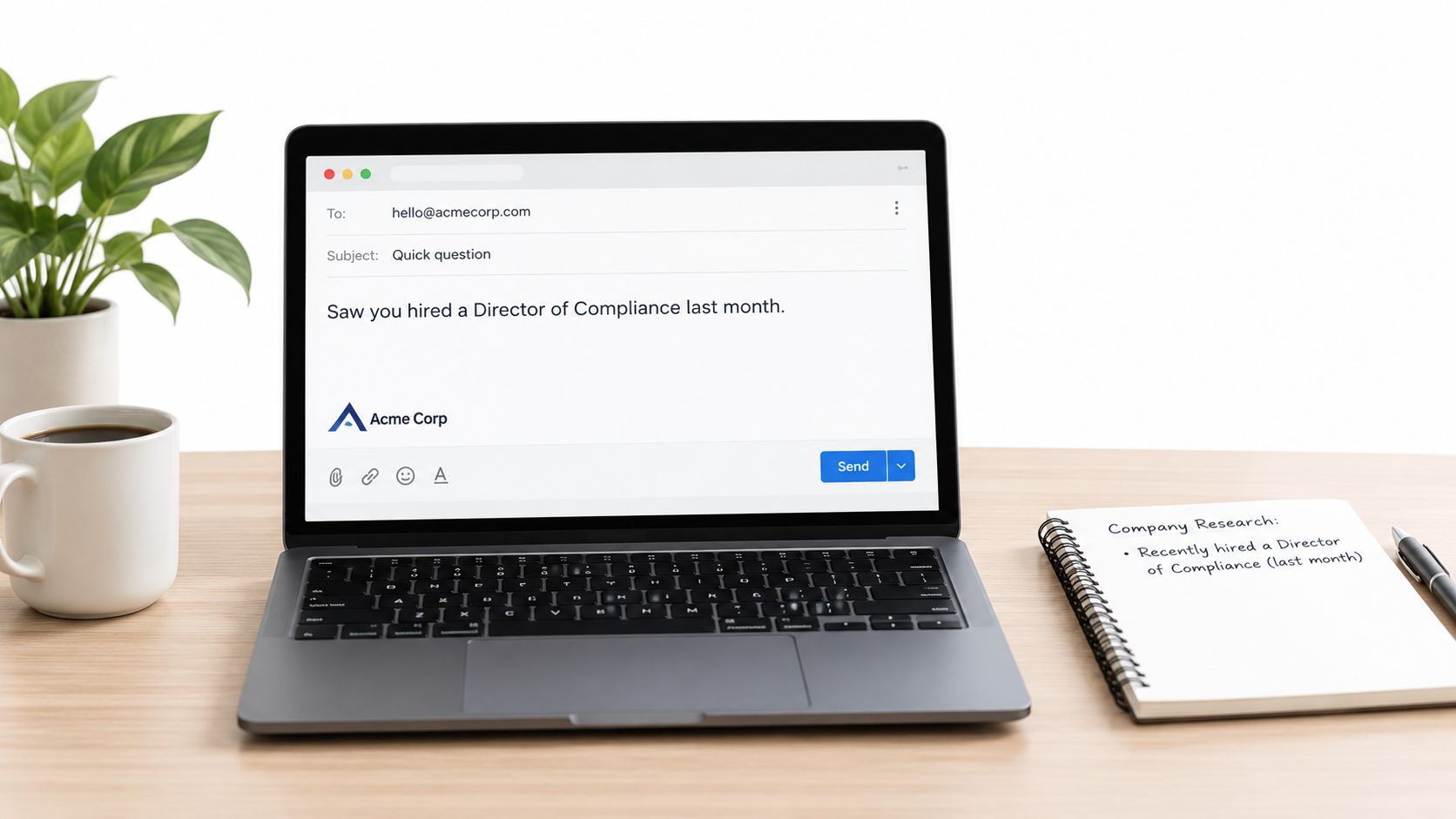
Saw you hired a Director of Compliance last month. That usually means reporting volume and review load are about to rise before process catches up. We help teams tighten that workflow without adding manual handoffs. Worth a quick look next week?
That first sentence carries the whole email. If you stack three facts, the message starts to look assembled by software.
For SaaS, the signal might be a funding round or a new RevOps hire. For iGaming, a market expansion or compliance hire. For manufacturing, a plant expansion or ERP-related role opening. For legal tech, a hiring spike in compliance or contract ops. For pharma, a new quality or regulatory lead. For professional services, a practice-area expansion.
Personalization, timing, and routing
Build the list 5 to 7 days before send. Use Clay or Apollo to enrich recent company news, hiring, role changes, and public announcements. If the signal isn't strong enough to write one clean opening line, the account isn't ready.
Personalization fields I'd require:
Company signal: hiring, launch, market move, leadership change
Role-specific pressure: what that buyer likely owns now
Business outcome: one measurable direction, faster review, fewer manual steps, cleaner routing
CTA variant: reply ask or calendar ask
For sequence timing, don't leave this as a single-send email. A benchmark reported that sequences with 3 to 5 follow-up steps achieved an 8.3% reply rate versus 4.1% for sequences with no follow-ups, according to Built for B2B's sequence benchmark. Keep the later steps short and preserve the original context.
Practical rule: if a segment underperforms after a full sequence, pause the segment before you rewrite the copy. Bad fit looks like bad messaging from the dashboard.
Route all replies into HubSpot the same day. Tag by segment, trigger source, and reply speed. If your team can't review held-meeting rate by segment, your template system is still copywriting, not pipeline management.
This works best when paired with disciplined ideal customer profile work. It does not belong in a broad-volume spray across weak-fit lists.
2. The problem validation sequence
Most teams pitch too early. This sequence waits.
If I had to choose one template for uncertain-fit lists, especially mixed inbound, recycled MQLs, or adjacent-market tests, I'd choose the diagnostic route over the classic product pitch. It filters faster and it gives the rep better context before the meeting ever gets booked.
The sequence
Use four emails.
Email 1, day 1: ask a diagnostic question
Email 2, day 4: ask the same problem from a different angle
Email 3, day 8: present the offer only to confirmed problem-holders
Email 4, day 13: close with a light follow-up or breakup note
Cold email length isn't arbitrary. Several 2026 guides converge on brevity, with one source recommending 50 to 125 words and another 75 to 150 words and 6 to 8 sentences, as shown in SalesHive's cold email length guidance. That matters even more here, because a diagnostic email should feel easy to answer.
A simple opener for manufacturing might read:
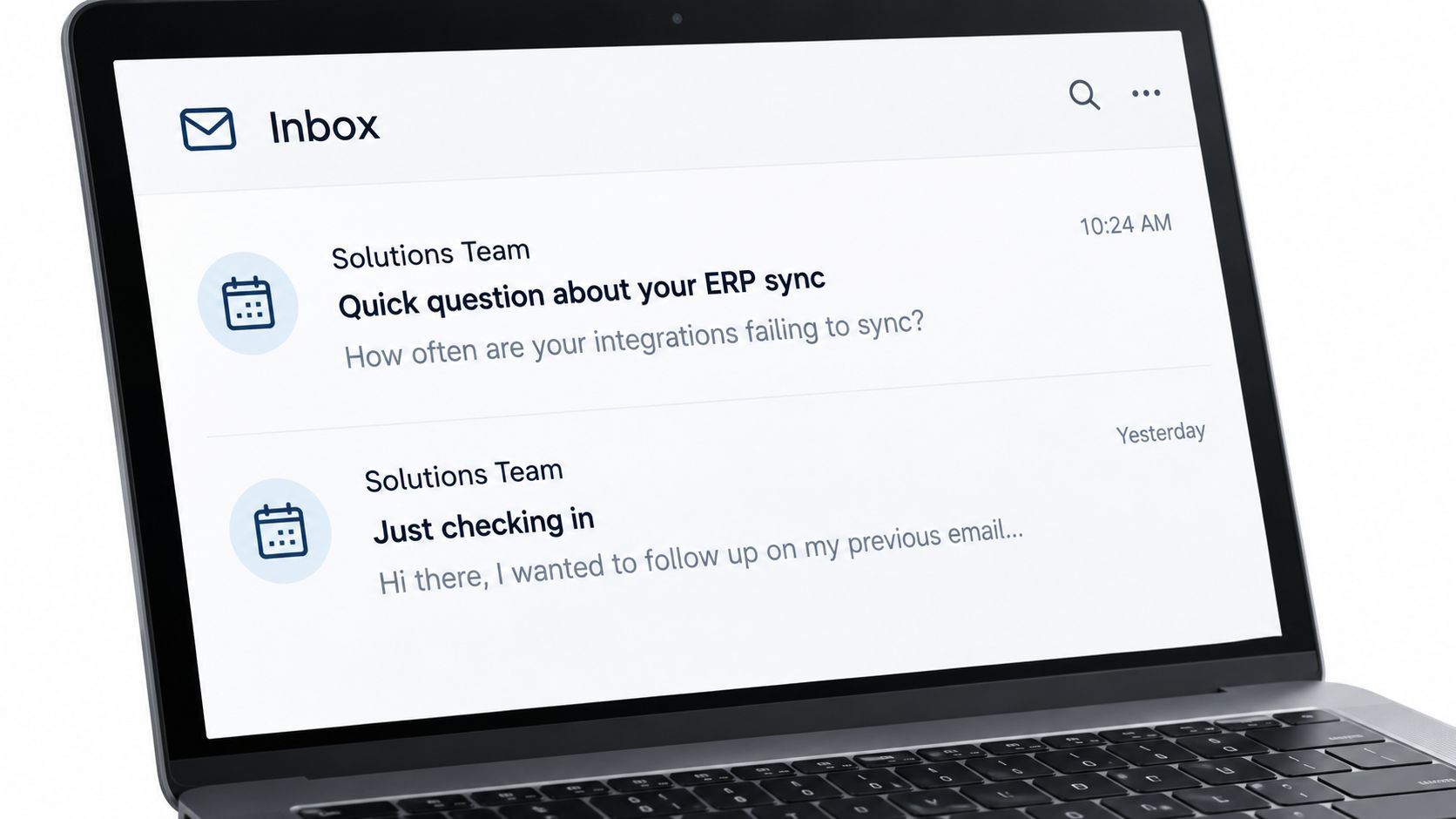
Are your ERP integrations syncing daily, or do you still have manual exceptions every week?
For SaaS:
How often do handoffs from demo booked to AE accepted break this month?
For legal tech:
Are outside counsel requests still getting routed by email first?
Adaptation by industry
Keep the question answerable in a few words. The wrong move is asking, “Do you have this problem?” That invites a reflex no. Ask about frequency, exceptions, or bottlenecks instead.
Use cases by sector:
SaaS: lead routing, handoff lag, reporting gaps
iGaming: jurisdiction changes, KYC review delays, player risk workflows
Manufacturing: ERP sync failures, maintenance reporting, plant-level visibility
Legal tech: contract review queues, intake inconsistency, approval delays
Pharma: batch documentation, QA review bottlenecks, audit-readiness workflows
Professional services: staffing allocation, proposal approval, client onboarding delays
The system depends on routing discipline. In HubSpot, create a property for diagnostic reply status. “Confirmed problem” should trigger a different sequence than “neutral reply” or “no issue.”
If someone answers the problem question, the rep already has qualification material. Don't erase that advantage by dropping them into a generic booking flow.
lead qualification process design matters more than clever writing.
Trade-offs and recommendation
The trade-off is speed. You'll book fewer instant meetings from email one because you're choosing context over urgency. That's fine. The upside is better reply quality and less calendar pollution.
Use Smartlead or Instantly to test the diagnostic question across small cohorts. Don't test product pitches first. Test phrasing. If one wording gets cleaner problem-confirmation replies, keep it and retire the rest.
This template earns a permanent place in the system when fit is plausible but not proven. It should not be your default for high-intent accounts where the trigger is already obvious.
3. The competitive displacement angle
Use this only when you know the current tool, process, or vendor. If you're guessing, skip it.
The competitive angle works because it shortens the context-setting. You don't need to explain the category from scratch. You need to show that you understand the gap in their current setup and that switching has a business reason, not just a vendor reason.
The structure
The email has four parts:
Current-state acknowledgement: name the tool or process
Gap statement: one missing outcome or recurring pain
Relevance proof: why this gap matters for their role or market
Single ask: short meeting or quick reply
Example for iGaming:
Noticed many operators in your market still use generic KYC workflows for local reviews. That usually works until jurisdiction-specific checks start stacking up. We help compliance teams reduce manual review handoffs when market rules shift. Worth comparing notes next week?
For SaaS, mention the known reporting or integration layer. For manufacturing, the manual spreadsheet process can itself be the competitor. For legal tech, it may be inbox-driven intake. For pharma, disconnected QA logs. For professional services, resource planning done across separate systems.
Where it works and where it fails
This is strongest in mature categories where buyers already have a tool and dislike part of it. It's weaker when the category itself still needs education. If your market is early, the prospect will defend the status quo because the switching frame arrived before the problem frame.
Personalization tokens should be stricter here than in broad cold outreach:
Known tool or process
Observed gap
Role pressure
Relevant proof point category
CTA tied to comparison
A note on personalization: benchmark data reported personalized cold emails at about 17% to 18% reply rates versus 7% to 9% for non-personalized emails, with advanced personalization around 18% versus 9% for basic outreach, according to Martal's sales email template benchmarks. Competitive messaging without proof of relevance usually gets treated like non-personalized outreach, even if the email includes the company name.
Routing rules and recommendation
Use Apollo, Sales Navigator, customer conversations, and public materials to confirm the stack before send. Don't infer from a logo page unless your team has validated how current it is.
After a reply lands, route by current state:
Confirmed competitor user: AE or senior SDR takes it
Manual process: route to persona-specific sequence
Wrong assumption: suppress the variant and log the correction
This angle is also a positioning test. If one displacement message gets traction and another doesn't, that tells you which problem buyers will switch for. Tight positioning for B2B services should shape the variant library, not the other way around.
Use this template when the account is already in a compare-and-consider motion. Skip it for unresearched cold volume.
4. The referral reactivation template
This is the warmest message in the list, but teams often waste it by sending it too early or writing it like a generic referral mention. A referral only helps if it changes trust fast.
The right place for this email is after cold outreach has stalled or when a customer surfaces a credible peer connection. It resets the thread without pretending there was already a relationship.
The structure
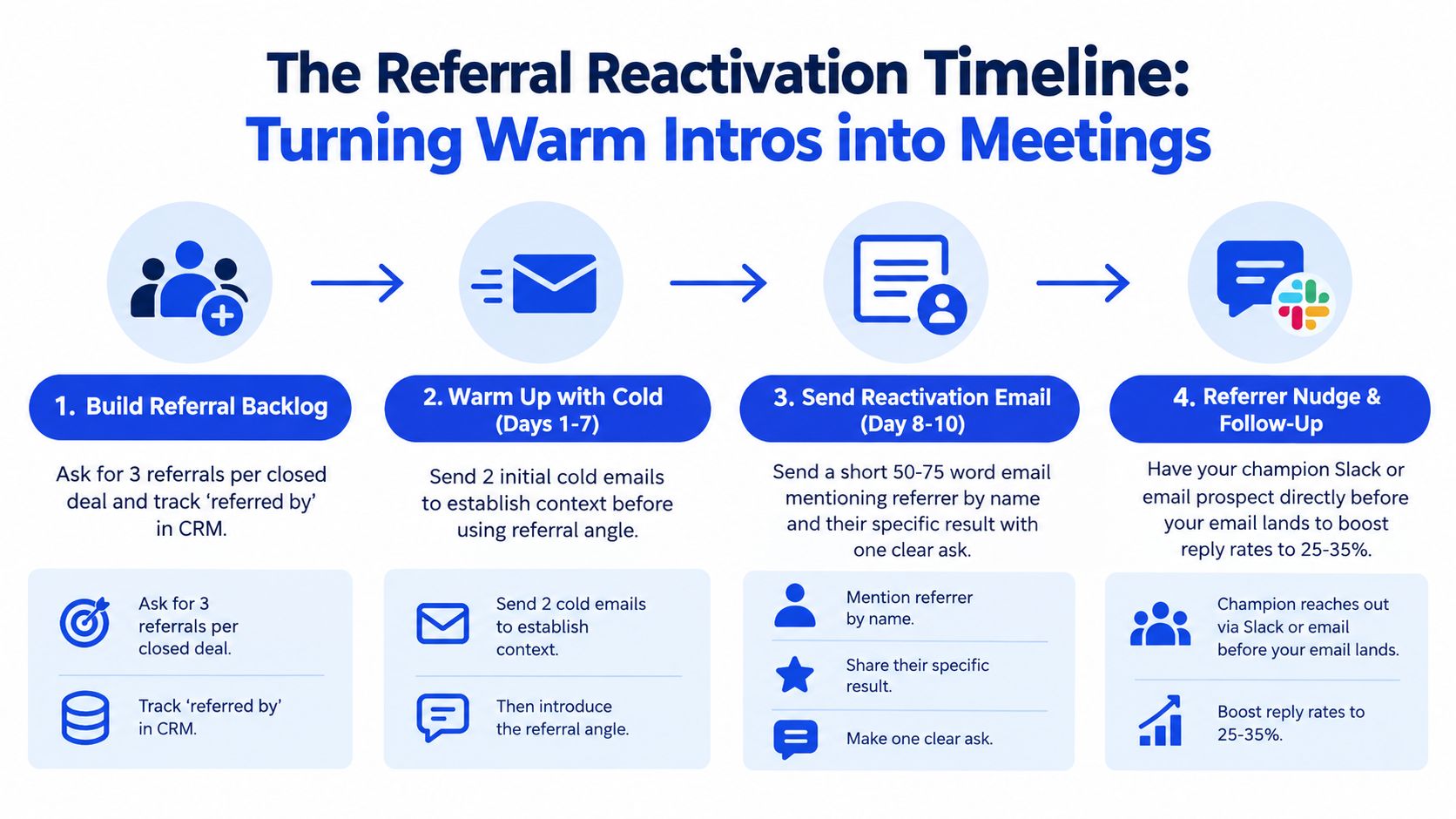
Open with the referrer's name in line one. Then mention a specific outcome or workflow the referrer improved. Then make one ask.
Example for legal tech:
Tom at [firm] suggested I reach out because your team is also reviewing a heavy volume of contract requests. He mentioned your group is dealing with similar handoff issues. We helped his team tighten that intake workflow. Open to a short call next week to see if the same structure applies?
For manufacturing, reference the operations or maintenance leader who made the intro. For SaaS, a RevOps or finance peer. For pharma, a QA or regulatory counterpart. For professional services, a practice lead or COO. For iGaming, a compliance or fraud lead.
Timing and sequence use
Don't bury this in a long thread of stale follow-ups. Use it as email three or four after initial outreach, or as a standalone reset when the referral is fresh.
A defensible B2B cold email sequence usually runs 3 to 5 follow-ups over roughly 2 to 3 weeks, and one practical pattern is Day 1, Day 3 to 4, Day 7 to 8, Day 12 to 13, and Day 18 to 20, according to Genflow's follow-up cadence guide. In that system, the referral reactivation belongs in the middle, when credibility needs a lift and before the sequence goes stale.
Ask customers for role, challenge, and permission to use their name. Without all three, the referral email gets vague fast.
Trade-offs and routing
The trade-off is dependency on customer cooperation. You need the referral source to be specific, and ideally willing to pre-message the prospect. If the customer only says, “You can mention me,” the email loses force.
Routing should reflect warmth:
Peer-to-peer referral: route directly to the closer or account owner
Loose referral without context: SDR qualifies first
Referral from a champion in the same department: fast-track to booking
Keep a “referred by” field in HubSpot or Salesforce. That one field gives your team a dormant backlog to reactivate every month.
This template deserves a fixed spot in your system only if referrals are operationalized, not occasional. If you want that channel to produce consistently, build a visible B2B referral programme, not a rep-by-rep habit.
5. The LinkedIn social proof sequence
Most email teams treat LinkedIn like a separate channel. That's a mistake. When content and outbound run on separate tracks, neither gives the other full value.
This sequence works when the prospect has already interacted with your company's content. You aren't manufacturing relevance. You're extending it. That's why I'd use this more in longer sales cycles and category-building motions than in direct-response outbound.
Start with the visual before the second touch so the prospect sees continuity between channels.
The three-email sequence
Email 1: reference the content they engaged with
Email 2: invite them to a short session tied to that topic
Email 3: share a relevant customer result or practical takeaway from attendees
Example for SaaS:
Saw you engaged with our post on compliance automation. Curious which part is most relevant right now, routing, reporting, or approval speed?
For manufacturing:
Noticed you engaged with our downtime reduction post. Are your biggest delays happening in reporting, handoff, or root-cause follow-up?
For legal tech, reference intake or review content. For pharma, QA or audit-readiness content. For iGaming, KYC or regulatory workflow content. For professional services, staffing or delivery operations content.
Channel coordination
Only send email one to people who engaged recently. If your social engagement list is stale, the reference feels recycled.
Track this with Sales Navigator, LinkedIn analytics, Apollo, and HubSpot. Build an “engaged accounts” list daily, then route those contacts into a dedicated sequence. If someone clicks the session invite, they should branch automatically into the third email.
One 2026 research report noted that reported B2B open rates ranged from 15.1% to 55.71% depending on methodology and Apple Mail Privacy Protection, with a reported 43.46% benchmark from 3.6 million campaigns, 21.3% for 939 B2B SaaS companies, and 27.7% for cold outreach, according to Stripo's B2B open rate benchmark report. That's why I don't recommend managing this sequence by open rate. Replies, registrations, and attended sessions tell the truth better.
A short explanation video can support the middle touch when the event invite needs context:
Recommendation and trade-offs
The trade-off is operational overhead. Someone has to watch engagement signals, update audiences, and keep the content-message pairing tight. But when that system is in place, trust builds before the rep asks for time.
If your company posts inconsistently, this template won't carry. It depends on a real LinkedIn content strategy, not random posting.
Use it for trust-building segments with longer evaluation windows. Don't force it where buyers want a direct operational conversation now.
6. The expansion within account template
This is the highest-confidence template in the list because fit is already proven. You already work with the company. The question is whether your team can turn one departmental win into a second buying conversation without sounding opportunistic.
That's why the email should start with an outcome the company already achieved through your existing relationship, then pivot into the adjacent team's use case. Never open with “since you're already a customer.”
The structure and sequence
Keep this one short. Two emails over about 10 days is usually enough because the account is warm and over-emailing creates internal friction.
Email structure:
Line 1: current internal result
Line 2: adjacent-team use case
Line 3: why this stakeholder should care now
Line 4: one meeting ask
Example for SaaS:
Your Legal team is already using the workflow to tighten review and approval routing. I'm reaching out because Finance often ends up managing adjacent audit and documentation issues that follow the same pattern. Worth a quick conversation to see whether that structure would help on your side too?
For iGaming, move from Product or Compliance into Finance. For manufacturing, from Operations into Procurement or Quality. For legal tech, from legal operations into finance or procurement. For pharma, from regulatory into QA or manufacturing quality. For professional services, from delivery into resource management or finance.
Personalization and routing
Pull stakeholder maps for larger accounts in HubSpot, Sales Navigator, or your CS platform. The CSM should feed the sequence with names, internal terminology, and proof of current usage. If the account team can't explain the customer's existing win in one sentence, don't send the expansion email yet.
Use these tokens:
Current team using the product
Observed outcome or workflow improvement
Target department
Adjacent use case
Internal introducer if available
Expansion outreach should sound like internal continuity, not net-new prospecting with a customer badge attached.
Route replies to the account owner, not generic SDR coverage. Context matters more here than speed alone.
Trade-offs and recommendation
The main risk is timing. If adoption is shallow or the current champion is still proving value, cross-sell outreach can create resistance. Set a rule that expansion starts only after stable usage and positive account health signals.
This template belongs in the system for customers with enough organizational complexity to support horizontal growth. It's less useful for small accounts where one stakeholder already controls the full buying area.
7. The event follow-up sequence
Trade shows, webinars, and sponsored events create a false sense of momentum. Teams leave with badge scans, session registrations, and half-remembered booth conversations, then send generic “great to meet you” emails that erase the signal the event created.
The fix is simple. Treat event follow-up as a qualification sequence, not as a thank-you note.
The three-touch pattern
Email 1, next business day: reference exactly what they asked or discussed
Email 2, five days later: send the specific resource they wanted
Email 3, eleven days after the event: ask for a fit conversation tied to their stated timeline or use case
For legal tech:
Good speaking with you at the session. You asked about intake routing across multiple practice groups, so I wanted to send the workflow example we mentioned.
For pharma:
You mentioned your team is reviewing documentation readiness before the next audit cycle. Sharing the exact framework we referenced after the webinar.
For SaaS, the note may center on handoff logic or reporting. For manufacturing, plant-level visibility or downtime follow-up. For iGaming, compliance updates or KYC workflows. For professional services, staffing and delivery coordination.
Sequence mechanics
The strongest follow-up emails add new information instead of repeating the original ask. One guide recommends that follow-ups be built on something new and kept under 100 words, and another suggests using different angles such as proof, a resource, and a breakup message across the sequence, according to Tomba's follow-up best practices. That's exactly how event follow-up should work.
If your team hosted the event, push attendee and conversation notes into HubSpot on the same day. If you sponsored it, make sure booth staff capture one line of context for each qualified contact. Without that note, your first email becomes generic immediately.
Trade-offs and recommendation
The trade-off is operational discipline at the event itself. Reps hate taking detailed notes while they're networking. But if they don't, marketing hands sales a lead list with no usable buying context.
Use HubSpot or Lemlist for the sequence. Tag by event, session, and topic discussed. Over time, you'll see which event themes produce actual pipeline, not just badge volume.
This template earns a permanent place if your team attends events regularly and you're willing to enforce note capture. If not, event outreach will remain a disconnected tactic.
8. The customer success tear-sheet template
This is the best one-email format when you have strong customer proof and a lookalike audience. It's not a case study email. It's a short outcome snapshot that gives the prospect enough reason to reply without opening an attachment or reading a long PDF.
The mistake teams make is treating this like a universal proof message. It isn't. It only works when the outcome matches the buyer's current buying context.
The structure
Use five elements:
Subject line: outcome-led
Line 1: reference a similar company or operating profile
Line 2: one verified result
Line 3: why that result may be relevant here
Line 4: fit-assessment CTA
The body should stay short. One guide recommends 6 to 8 sentences and one clear meeting-focused CTA, as noted earlier in the cold email length guidance. That fits the tear-sheet format perfectly.
Example for manufacturing:
We recently helped a manufacturer tighten review time in an area similar to yours. I'm reaching out because your team appears to be operating at a comparable level of complexity. If that same kind of workflow issue is showing up in your process, happy to compare notes for 20 minutes next week.
For SaaS, adapt the result to routing or sales process speed. For iGaming, local compliance workflows. For legal tech, contract review or intake speed. For pharma, QA review flow. For professional services, staffing or proposal cycle issues.
Personalization, trade-offs, and recommendation
Use Clay to enrich company size, business model, or operating profile so the proof feels like a real match. The more the customer result maps to the prospect's world, the more credible the message becomes.
A few rules matter here:
Only use verified customer outcomes: if the result can't be defended internally, don't put it in the email
Map one proof point to one persona: finance cares about one outcome, operations another
Keep the ask narrow: fit assessment, not full demo
This email can look strong while performing poorly if the proof point is broad. “Improved efficiency” won't move a serious buyer. A specific operational change often will, but only if it aligns to the person reading it.
This template earns a place in the system when you have enough customer proof to build persona-specific variants. If your customer evidence is thin or generic, skip it and go back to trigger-based emails first.
8-Template B2B Sales Email Comparison
Template | 🔄 Implementation complexity | 💡 Resource requirements | ⚡ Speed / efficiency | 📊 Expected outcomes | ⭐ Key advantages |
|---|---|---|---|---|---|
The ICP-first cold opener | High, deep account research + ABM setup | Enriched prospect data (Clay/Apollo), 3–5 days prep, personalization tooling (Lemlist) | Lower volume per rep; slower outbound cadence | Reply rate ~18–24%; higher pipeline quality; early disqualification | Very high relevance; improves fit and meeting quality |
The problem validation sequence | Moderate, sequence design + diagnostic testing | CRM flags, A/B testing tools (Smartlead/Instantly), disciplined follow-up | Slower conversion (2–3 weeks) but higher qualification | Diagnostic replies 30–40% higher than pitch; responders convert 2.5× to meetings | Validates pain before pitching; fewer wasted meetings |
The competitive displacement angle | Moderate–High, competitor stack research + careful positioning | Competitor data (Apollo/ZoomInfo, G2), targeted case studies | Faster to meeting for accounts already evaluating | Reply rate ~12–18%; reaches buying-mode prospects | Creates urgency; shortens decision for evaluators |
The referral reactivation template | Low–Moderate, CRM referral tracking + timing rules | Referral backlog, customer advocates, CRM discipline | Very fast replies and high engagement when used correctly | Reply rate ~25–35%; strong meeting conversion; referrer engagement | Strong social proof; high credibility and reply lift |
The LinkedIn social proof sequence | High, multi-channel coordination and content cadence | Ongoing LinkedIn content (2–3/wk), event ops, automation (Zapier/HubSpot) | Slower, trust-building over 45–60+ days | Email1 reply ~22%; event attendance -> meeting conversion moderate | Integrates inbound engagement with outbound; highly personalized |
The expansion within account template | Moderate, org mapping + CSM handoff | Org charts, CSM collaboration, usage/NPS data | Faster than net-new (2–3× decision speed) | Reply rates >28%; shorter sales cycles; higher deal sizes | Proven fit; internal advocates ease adoption and increase ACV |
The event follow-up sequence | Low–Moderate, timely follow-up workflows | Event lead capture, fast ops (24h), resource delivery | Fast if followed promptly; must act within 24h | 40–50% take an action; 12–18% convert to meetings | Attendees are pre-qualified; allows high-touch personalization |
The customer success tear-sheet template | Low, create short, persona-targeted tear-sheets | 5–10 verified customer metrics, short copy, rotation | Fast to deploy and scale; low friction for prospect | Reply rate ~15–20%; scales across personas if metrics strong | Short, specific proof in-email; high open/read rates |
Turn the template into a pipeline control system
The right template depends on buying context, not rep preference. If the account is a clean named-fit target with a clear external trigger, start with the ICP-first cold opener. If fit is uncertain, use the problem validation sequence. If the account already knows your category and likely uses another tool or manual process, use the competitive displacement angle. If trust already exists through a customer or prior touch, use the referral or expansion variants.
The operating sequence should stay simple. Pick one ICP segment first, not five. A SaaS RevOps director is a different motion than a manufacturing operations lead, and both are different from a legal tech compliance buyer. Your template library should reflect that, or your reporting won't tell you anything useful.
Define the required personalization fields before anyone writes copy. At minimum, that means one company signal, one role-specific pressure, one proof element, and one CTA. If the list can't support those fields cleanly in Clay, Apollo, or HubSpot, don't launch the sequence yet. Weak data turns decent templates into generic outreach very fast.
Then write the subject line and body around one signal only. One hiring event. One process issue. One piece of content engagement. One referral source. One event conversation. The fastest way to weaken B2B sales email templates is to cram three reasons for reaching out into the first message. Buyers read that as automation, even when the facts are real.
Set reply-routing rules before the first send. Positive replies with clear buying context should go to the account owner or closer. Diagnostic replies should branch based on confirmed problem, unclear fit, or wrong contact. Expansion replies should route to the customer-facing owner. Event replies should retain the event and session tags so your team can connect the meeting back to source quality, not just source volume.
Measure after the full sequence, not after the first send. Review positive replies, qualified meetings, meeting-held rate, and pipeline by segment. Don't stop at reply rate. A segment can reply well and still produce weak meetings if the template invites curiosity without fit. It happens all the time.
There's also a compliance layer that should be built into every sequence. Commercial email sent in the United States must not use materially false or misleading header information or deceptive subject lines, must clearly identify the message as an advertisement or solicitation, must include a valid physical postal address, and must provide a clear opt-out mechanism that remains functional for at least 30 days, according to Cornell Law's CAN-SPAM summary. If your outbound stack runs through multiple sending tools, check that every template still carries those requirements correctly.
Audit the last 10 sequences your team sent and mark each reply as one of three things, fit signal, buying signal, or neither. That one exercise will show whether your copy is attracting the right conversations or just generating activity. If most replies fall into “neither,” the problem usually sits upstream in list quality, trigger selection, or message-to-context mismatch.
You can also pressure-test your workflow against broader automation thinking with this guide from AY Automate, but the core rule stays the same. Structure turns attention into pipeline only when the message, routing, and reporting all point at the same buyer context.
GROU is a global B2B pipeline agency trusted by 50+ companies across iGaming, SaaS, manufacturing, and professional services. Its methodology unifies ICP-aligned lists, LinkedIn content, outbound sequences, fast reply routing, and transparent reporting into one message and one reporting line.
Run that audit this Friday, then rebuild the weakest sequence before adding volume.
GROU helps teams turn B2B sales email templates into a working outbound system, with the list, message, routing, and reporting built together instead of in separate silos. If you want that structure applied across LinkedIn, outbound, and qualification, visit Grou.
More replies won't fix a weak email system. Reps are still sending activity into crowded inboxes, but the replies that do come back often lack buying context, routing is slow, and meetings don't consistently turn into qualified pipeline. The strongest B2B sales email templates start with fit and buying context, then connect one relevant signal to one next step, which is why broad sales outreach tips from CleanMyList usually need a stricter operating layer.
Eight templates, one rule: match the email to buying context, not generic funnel stage
Timing matters: most outbound systems perform better with 3 to 5 follow-ups over roughly 2 to 3 weeks, not one send and hope
Personalization depth should vary: cold ABM openers need company-specific triggers, expansion emails need stakeholder mapping, event follow-ups need exact conversation notes
Measure what matters: positive replies, qualified meetings, meeting-held rate, and pipeline by segment
Keep bodies short: brief emails with one clear CTA consistently outperform product dumps
Table of Contents
1. The ICP-first cold opener
This is the most useful starting template for named-account outbound. It earns its place when you already know the account fits and you need the first email to prove that your team understands why now.
Across outbound, reply rates are usually low. A 2026 benchmark cited an average reply rate of 3.43%, while professionally managed campaigns in a separate 16.5-million-email study averaged 5.8%, and top performers can exceed 10% when targeting, personalization, and follow-up are tight, according to Lemlist's cold email response rate benchmark. That gap is why this template should begin with one concrete account signal, not your offer.
The structure
Use this pattern:
Subject line: short, direct, tied to one account trigger
Line 1: one fact you observed
Line 2: why that fact suggests a likely operational pressure
Line 3: one sentence on the outcome you help with
Line 4: one CTA asking for a quick reply or a specific meeting slot
A working example:
Saw you hired a Director of Compliance last month. That usually means reporting volume and review load are about to rise before process catches up. We help teams tighten that workflow without adding manual handoffs. Worth a quick look next week?
That first sentence carries the whole email. If you stack three facts, the message starts to look assembled by software.
For SaaS, the signal might be a funding round or a new RevOps hire. For iGaming, a market expansion or compliance hire. For manufacturing, a plant expansion or ERP-related role opening. For legal tech, a hiring spike in compliance or contract ops. For pharma, a new quality or regulatory lead. For professional services, a practice-area expansion.
Personalization, timing, and routing
Build the list 5 to 7 days before send. Use Clay or Apollo to enrich recent company news, hiring, role changes, and public announcements. If the signal isn't strong enough to write one clean opening line, the account isn't ready.
Personalization fields I'd require:
Company signal: hiring, launch, market move, leadership change
Role-specific pressure: what that buyer likely owns now
Business outcome: one measurable direction, faster review, fewer manual steps, cleaner routing
CTA variant: reply ask or calendar ask
For sequence timing, don't leave this as a single-send email. A benchmark reported that sequences with 3 to 5 follow-up steps achieved an 8.3% reply rate versus 4.1% for sequences with no follow-ups, according to Built for B2B's sequence benchmark. Keep the later steps short and preserve the original context.
Practical rule: if a segment underperforms after a full sequence, pause the segment before you rewrite the copy. Bad fit looks like bad messaging from the dashboard.
Route all replies into HubSpot the same day. Tag by segment, trigger source, and reply speed. If your team can't review held-meeting rate by segment, your template system is still copywriting, not pipeline management.
This works best when paired with disciplined ideal customer profile work. It does not belong in a broad-volume spray across weak-fit lists.
2. The problem validation sequence
Most teams pitch too early. This sequence waits.
If I had to choose one template for uncertain-fit lists, especially mixed inbound, recycled MQLs, or adjacent-market tests, I'd choose the diagnostic route over the classic product pitch. It filters faster and it gives the rep better context before the meeting ever gets booked.
The sequence
Use four emails.
Email 1, day 1: ask a diagnostic question
Email 2, day 4: ask the same problem from a different angle
Email 3, day 8: present the offer only to confirmed problem-holders
Email 4, day 13: close with a light follow-up or breakup note
Cold email length isn't arbitrary. Several 2026 guides converge on brevity, with one source recommending 50 to 125 words and another 75 to 150 words and 6 to 8 sentences, as shown in SalesHive's cold email length guidance. That matters even more here, because a diagnostic email should feel easy to answer.
A simple opener for manufacturing might read:
Are your ERP integrations syncing daily, or do you still have manual exceptions every week?
For SaaS:
How often do handoffs from demo booked to AE accepted break this month?
For legal tech:
Are outside counsel requests still getting routed by email first?
Adaptation by industry
Keep the question answerable in a few words. The wrong move is asking, “Do you have this problem?” That invites a reflex no. Ask about frequency, exceptions, or bottlenecks instead.
Use cases by sector:
SaaS: lead routing, handoff lag, reporting gaps
iGaming: jurisdiction changes, KYC review delays, player risk workflows
Manufacturing: ERP sync failures, maintenance reporting, plant-level visibility
Legal tech: contract review queues, intake inconsistency, approval delays
Pharma: batch documentation, QA review bottlenecks, audit-readiness workflows
Professional services: staffing allocation, proposal approval, client onboarding delays
The system depends on routing discipline. In HubSpot, create a property for diagnostic reply status. “Confirmed problem” should trigger a different sequence than “neutral reply” or “no issue.”
If someone answers the problem question, the rep already has qualification material. Don't erase that advantage by dropping them into a generic booking flow.
lead qualification process design matters more than clever writing.
Trade-offs and recommendation
The trade-off is speed. You'll book fewer instant meetings from email one because you're choosing context over urgency. That's fine. The upside is better reply quality and less calendar pollution.
Use Smartlead or Instantly to test the diagnostic question across small cohorts. Don't test product pitches first. Test phrasing. If one wording gets cleaner problem-confirmation replies, keep it and retire the rest.
This template earns a permanent place in the system when fit is plausible but not proven. It should not be your default for high-intent accounts where the trigger is already obvious.
3. The competitive displacement angle
Use this only when you know the current tool, process, or vendor. If you're guessing, skip it.
The competitive angle works because it shortens the context-setting. You don't need to explain the category from scratch. You need to show that you understand the gap in their current setup and that switching has a business reason, not just a vendor reason.
The structure
The email has four parts:
Current-state acknowledgement: name the tool or process
Gap statement: one missing outcome or recurring pain
Relevance proof: why this gap matters for their role or market
Single ask: short meeting or quick reply
Example for iGaming:
Noticed many operators in your market still use generic KYC workflows for local reviews. That usually works until jurisdiction-specific checks start stacking up. We help compliance teams reduce manual review handoffs when market rules shift. Worth comparing notes next week?
For SaaS, mention the known reporting or integration layer. For manufacturing, the manual spreadsheet process can itself be the competitor. For legal tech, it may be inbox-driven intake. For pharma, disconnected QA logs. For professional services, resource planning done across separate systems.
Where it works and where it fails
This is strongest in mature categories where buyers already have a tool and dislike part of it. It's weaker when the category itself still needs education. If your market is early, the prospect will defend the status quo because the switching frame arrived before the problem frame.
Personalization tokens should be stricter here than in broad cold outreach:
Known tool or process
Observed gap
Role pressure
Relevant proof point category
CTA tied to comparison
A note on personalization: benchmark data reported personalized cold emails at about 17% to 18% reply rates versus 7% to 9% for non-personalized emails, with advanced personalization around 18% versus 9% for basic outreach, according to Martal's sales email template benchmarks. Competitive messaging without proof of relevance usually gets treated like non-personalized outreach, even if the email includes the company name.
Routing rules and recommendation
Use Apollo, Sales Navigator, customer conversations, and public materials to confirm the stack before send. Don't infer from a logo page unless your team has validated how current it is.
After a reply lands, route by current state:
Confirmed competitor user: AE or senior SDR takes it
Manual process: route to persona-specific sequence
Wrong assumption: suppress the variant and log the correction
This angle is also a positioning test. If one displacement message gets traction and another doesn't, that tells you which problem buyers will switch for. Tight positioning for B2B services should shape the variant library, not the other way around.
Use this template when the account is already in a compare-and-consider motion. Skip it for unresearched cold volume.
4. The referral reactivation template
This is the warmest message in the list, but teams often waste it by sending it too early or writing it like a generic referral mention. A referral only helps if it changes trust fast.
The right place for this email is after cold outreach has stalled or when a customer surfaces a credible peer connection. It resets the thread without pretending there was already a relationship.
The structure
Open with the referrer's name in line one. Then mention a specific outcome or workflow the referrer improved. Then make one ask.
Example for legal tech:
Tom at [firm] suggested I reach out because your team is also reviewing a heavy volume of contract requests. He mentioned your group is dealing with similar handoff issues. We helped his team tighten that intake workflow. Open to a short call next week to see if the same structure applies?
For manufacturing, reference the operations or maintenance leader who made the intro. For SaaS, a RevOps or finance peer. For pharma, a QA or regulatory counterpart. For professional services, a practice lead or COO. For iGaming, a compliance or fraud lead.
Timing and sequence use
Don't bury this in a long thread of stale follow-ups. Use it as email three or four after initial outreach, or as a standalone reset when the referral is fresh.
A defensible B2B cold email sequence usually runs 3 to 5 follow-ups over roughly 2 to 3 weeks, and one practical pattern is Day 1, Day 3 to 4, Day 7 to 8, Day 12 to 13, and Day 18 to 20, according to Genflow's follow-up cadence guide. In that system, the referral reactivation belongs in the middle, when credibility needs a lift and before the sequence goes stale.
Ask customers for role, challenge, and permission to use their name. Without all three, the referral email gets vague fast.
Trade-offs and routing
The trade-off is dependency on customer cooperation. You need the referral source to be specific, and ideally willing to pre-message the prospect. If the customer only says, “You can mention me,” the email loses force.
Routing should reflect warmth:
Peer-to-peer referral: route directly to the closer or account owner
Loose referral without context: SDR qualifies first
Referral from a champion in the same department: fast-track to booking
Keep a “referred by” field in HubSpot or Salesforce. That one field gives your team a dormant backlog to reactivate every month.
This template deserves a fixed spot in your system only if referrals are operationalized, not occasional. If you want that channel to produce consistently, build a visible B2B referral programme, not a rep-by-rep habit.
5. The LinkedIn social proof sequence
Most email teams treat LinkedIn like a separate channel. That's a mistake. When content and outbound run on separate tracks, neither gives the other full value.
This sequence works when the prospect has already interacted with your company's content. You aren't manufacturing relevance. You're extending it. That's why I'd use this more in longer sales cycles and category-building motions than in direct-response outbound.
Start with the visual before the second touch so the prospect sees continuity between channels.
The three-email sequence
Email 1: reference the content they engaged with
Email 2: invite them to a short session tied to that topic
Email 3: share a relevant customer result or practical takeaway from attendees
Example for SaaS:
Saw you engaged with our post on compliance automation. Curious which part is most relevant right now, routing, reporting, or approval speed?
For manufacturing:
Noticed you engaged with our downtime reduction post. Are your biggest delays happening in reporting, handoff, or root-cause follow-up?
For legal tech, reference intake or review content. For pharma, QA or audit-readiness content. For iGaming, KYC or regulatory workflow content. For professional services, staffing or delivery operations content.
Channel coordination
Only send email one to people who engaged recently. If your social engagement list is stale, the reference feels recycled.
Track this with Sales Navigator, LinkedIn analytics, Apollo, and HubSpot. Build an “engaged accounts” list daily, then route those contacts into a dedicated sequence. If someone clicks the session invite, they should branch automatically into the third email.
One 2026 research report noted that reported B2B open rates ranged from 15.1% to 55.71% depending on methodology and Apple Mail Privacy Protection, with a reported 43.46% benchmark from 3.6 million campaigns, 21.3% for 939 B2B SaaS companies, and 27.7% for cold outreach, according to Stripo's B2B open rate benchmark report. That's why I don't recommend managing this sequence by open rate. Replies, registrations, and attended sessions tell the truth better.
A short explanation video can support the middle touch when the event invite needs context:
Recommendation and trade-offs
The trade-off is operational overhead. Someone has to watch engagement signals, update audiences, and keep the content-message pairing tight. But when that system is in place, trust builds before the rep asks for time.
If your company posts inconsistently, this template won't carry. It depends on a real LinkedIn content strategy, not random posting.
Use it for trust-building segments with longer evaluation windows. Don't force it where buyers want a direct operational conversation now.
6. The expansion within account template
This is the highest-confidence template in the list because fit is already proven. You already work with the company. The question is whether your team can turn one departmental win into a second buying conversation without sounding opportunistic.
That's why the email should start with an outcome the company already achieved through your existing relationship, then pivot into the adjacent team's use case. Never open with “since you're already a customer.”
The structure and sequence
Keep this one short. Two emails over about 10 days is usually enough because the account is warm and over-emailing creates internal friction.
Email structure:
Line 1: current internal result
Line 2: adjacent-team use case
Line 3: why this stakeholder should care now
Line 4: one meeting ask
Example for SaaS:
Your Legal team is already using the workflow to tighten review and approval routing. I'm reaching out because Finance often ends up managing adjacent audit and documentation issues that follow the same pattern. Worth a quick conversation to see whether that structure would help on your side too?
For iGaming, move from Product or Compliance into Finance. For manufacturing, from Operations into Procurement or Quality. For legal tech, from legal operations into finance or procurement. For pharma, from regulatory into QA or manufacturing quality. For professional services, from delivery into resource management or finance.
Personalization and routing
Pull stakeholder maps for larger accounts in HubSpot, Sales Navigator, or your CS platform. The CSM should feed the sequence with names, internal terminology, and proof of current usage. If the account team can't explain the customer's existing win in one sentence, don't send the expansion email yet.
Use these tokens:
Current team using the product
Observed outcome or workflow improvement
Target department
Adjacent use case
Internal introducer if available
Expansion outreach should sound like internal continuity, not net-new prospecting with a customer badge attached.
Route replies to the account owner, not generic SDR coverage. Context matters more here than speed alone.
Trade-offs and recommendation
The main risk is timing. If adoption is shallow or the current champion is still proving value, cross-sell outreach can create resistance. Set a rule that expansion starts only after stable usage and positive account health signals.
This template belongs in the system for customers with enough organizational complexity to support horizontal growth. It's less useful for small accounts where one stakeholder already controls the full buying area.
7. The event follow-up sequence
Trade shows, webinars, and sponsored events create a false sense of momentum. Teams leave with badge scans, session registrations, and half-remembered booth conversations, then send generic “great to meet you” emails that erase the signal the event created.
The fix is simple. Treat event follow-up as a qualification sequence, not as a thank-you note.
The three-touch pattern
Email 1, next business day: reference exactly what they asked or discussed
Email 2, five days later: send the specific resource they wanted
Email 3, eleven days after the event: ask for a fit conversation tied to their stated timeline or use case
For legal tech:
Good speaking with you at the session. You asked about intake routing across multiple practice groups, so I wanted to send the workflow example we mentioned.
For pharma:
You mentioned your team is reviewing documentation readiness before the next audit cycle. Sharing the exact framework we referenced after the webinar.
For SaaS, the note may center on handoff logic or reporting. For manufacturing, plant-level visibility or downtime follow-up. For iGaming, compliance updates or KYC workflows. For professional services, staffing and delivery coordination.
Sequence mechanics
The strongest follow-up emails add new information instead of repeating the original ask. One guide recommends that follow-ups be built on something new and kept under 100 words, and another suggests using different angles such as proof, a resource, and a breakup message across the sequence, according to Tomba's follow-up best practices. That's exactly how event follow-up should work.
If your team hosted the event, push attendee and conversation notes into HubSpot on the same day. If you sponsored it, make sure booth staff capture one line of context for each qualified contact. Without that note, your first email becomes generic immediately.
Trade-offs and recommendation
The trade-off is operational discipline at the event itself. Reps hate taking detailed notes while they're networking. But if they don't, marketing hands sales a lead list with no usable buying context.
Use HubSpot or Lemlist for the sequence. Tag by event, session, and topic discussed. Over time, you'll see which event themes produce actual pipeline, not just badge volume.
This template earns a permanent place if your team attends events regularly and you're willing to enforce note capture. If not, event outreach will remain a disconnected tactic.
8. The customer success tear-sheet template
This is the best one-email format when you have strong customer proof and a lookalike audience. It's not a case study email. It's a short outcome snapshot that gives the prospect enough reason to reply without opening an attachment or reading a long PDF.
The mistake teams make is treating this like a universal proof message. It isn't. It only works when the outcome matches the buyer's current buying context.
The structure
Use five elements:
Subject line: outcome-led
Line 1: reference a similar company or operating profile
Line 2: one verified result
Line 3: why that result may be relevant here
Line 4: fit-assessment CTA
The body should stay short. One guide recommends 6 to 8 sentences and one clear meeting-focused CTA, as noted earlier in the cold email length guidance. That fits the tear-sheet format perfectly.
Example for manufacturing:
We recently helped a manufacturer tighten review time in an area similar to yours. I'm reaching out because your team appears to be operating at a comparable level of complexity. If that same kind of workflow issue is showing up in your process, happy to compare notes for 20 minutes next week.
For SaaS, adapt the result to routing or sales process speed. For iGaming, local compliance workflows. For legal tech, contract review or intake speed. For pharma, QA review flow. For professional services, staffing or proposal cycle issues.
Personalization, trade-offs, and recommendation
Use Clay to enrich company size, business model, or operating profile so the proof feels like a real match. The more the customer result maps to the prospect's world, the more credible the message becomes.
A few rules matter here:
Only use verified customer outcomes: if the result can't be defended internally, don't put it in the email
Map one proof point to one persona: finance cares about one outcome, operations another
Keep the ask narrow: fit assessment, not full demo
This email can look strong while performing poorly if the proof point is broad. “Improved efficiency” won't move a serious buyer. A specific operational change often will, but only if it aligns to the person reading it.
This template earns a place in the system when you have enough customer proof to build persona-specific variants. If your customer evidence is thin or generic, skip it and go back to trigger-based emails first.
8-Template B2B Sales Email Comparison
Template | 🔄 Implementation complexity | 💡 Resource requirements | ⚡ Speed / efficiency | 📊 Expected outcomes | ⭐ Key advantages |
|---|---|---|---|---|---|
The ICP-first cold opener | High, deep account research + ABM setup | Enriched prospect data (Clay/Apollo), 3–5 days prep, personalization tooling (Lemlist) | Lower volume per rep; slower outbound cadence | Reply rate ~18–24%; higher pipeline quality; early disqualification | Very high relevance; improves fit and meeting quality |
The problem validation sequence | Moderate, sequence design + diagnostic testing | CRM flags, A/B testing tools (Smartlead/Instantly), disciplined follow-up | Slower conversion (2–3 weeks) but higher qualification | Diagnostic replies 30–40% higher than pitch; responders convert 2.5× to meetings | Validates pain before pitching; fewer wasted meetings |
The competitive displacement angle | Moderate–High, competitor stack research + careful positioning | Competitor data (Apollo/ZoomInfo, G2), targeted case studies | Faster to meeting for accounts already evaluating | Reply rate ~12–18%; reaches buying-mode prospects | Creates urgency; shortens decision for evaluators |
The referral reactivation template | Low–Moderate, CRM referral tracking + timing rules | Referral backlog, customer advocates, CRM discipline | Very fast replies and high engagement when used correctly | Reply rate ~25–35%; strong meeting conversion; referrer engagement | Strong social proof; high credibility and reply lift |
The LinkedIn social proof sequence | High, multi-channel coordination and content cadence | Ongoing LinkedIn content (2–3/wk), event ops, automation (Zapier/HubSpot) | Slower, trust-building over 45–60+ days | Email1 reply ~22%; event attendance -> meeting conversion moderate | Integrates inbound engagement with outbound; highly personalized |
The expansion within account template | Moderate, org mapping + CSM handoff | Org charts, CSM collaboration, usage/NPS data | Faster than net-new (2–3× decision speed) | Reply rates >28%; shorter sales cycles; higher deal sizes | Proven fit; internal advocates ease adoption and increase ACV |
The event follow-up sequence | Low–Moderate, timely follow-up workflows | Event lead capture, fast ops (24h), resource delivery | Fast if followed promptly; must act within 24h | 40–50% take an action; 12–18% convert to meetings | Attendees are pre-qualified; allows high-touch personalization |
The customer success tear-sheet template | Low, create short, persona-targeted tear-sheets | 5–10 verified customer metrics, short copy, rotation | Fast to deploy and scale; low friction for prospect | Reply rate ~15–20%; scales across personas if metrics strong | Short, specific proof in-email; high open/read rates |
Turn the template into a pipeline control system
The right template depends on buying context, not rep preference. If the account is a clean named-fit target with a clear external trigger, start with the ICP-first cold opener. If fit is uncertain, use the problem validation sequence. If the account already knows your category and likely uses another tool or manual process, use the competitive displacement angle. If trust already exists through a customer or prior touch, use the referral or expansion variants.
The operating sequence should stay simple. Pick one ICP segment first, not five. A SaaS RevOps director is a different motion than a manufacturing operations lead, and both are different from a legal tech compliance buyer. Your template library should reflect that, or your reporting won't tell you anything useful.
Define the required personalization fields before anyone writes copy. At minimum, that means one company signal, one role-specific pressure, one proof element, and one CTA. If the list can't support those fields cleanly in Clay, Apollo, or HubSpot, don't launch the sequence yet. Weak data turns decent templates into generic outreach very fast.
Then write the subject line and body around one signal only. One hiring event. One process issue. One piece of content engagement. One referral source. One event conversation. The fastest way to weaken B2B sales email templates is to cram three reasons for reaching out into the first message. Buyers read that as automation, even when the facts are real.
Set reply-routing rules before the first send. Positive replies with clear buying context should go to the account owner or closer. Diagnostic replies should branch based on confirmed problem, unclear fit, or wrong contact. Expansion replies should route to the customer-facing owner. Event replies should retain the event and session tags so your team can connect the meeting back to source quality, not just source volume.
Measure after the full sequence, not after the first send. Review positive replies, qualified meetings, meeting-held rate, and pipeline by segment. Don't stop at reply rate. A segment can reply well and still produce weak meetings if the template invites curiosity without fit. It happens all the time.
There's also a compliance layer that should be built into every sequence. Commercial email sent in the United States must not use materially false or misleading header information or deceptive subject lines, must clearly identify the message as an advertisement or solicitation, must include a valid physical postal address, and must provide a clear opt-out mechanism that remains functional for at least 30 days, according to Cornell Law's CAN-SPAM summary. If your outbound stack runs through multiple sending tools, check that every template still carries those requirements correctly.
Audit the last 10 sequences your team sent and mark each reply as one of three things, fit signal, buying signal, or neither. That one exercise will show whether your copy is attracting the right conversations or just generating activity. If most replies fall into “neither,” the problem usually sits upstream in list quality, trigger selection, or message-to-context mismatch.
You can also pressure-test your workflow against broader automation thinking with this guide from AY Automate, but the core rule stays the same. Structure turns attention into pipeline only when the message, routing, and reporting all point at the same buyer context.
GROU is a global B2B pipeline agency trusted by 50+ companies across iGaming, SaaS, manufacturing, and professional services. Its methodology unifies ICP-aligned lists, LinkedIn content, outbound sequences, fast reply routing, and transparent reporting into one message and one reporting line.
Run that audit this Friday, then rebuild the weakest sequence before adding volume.
GROU helps teams turn B2B sales email templates into a working outbound system, with the list, message, routing, and reporting built together instead of in separate silos. If you want that structure applied across LinkedIn, outbound, and qualification, visit Grou.
More replies won't fix a weak email system. Reps are still sending activity into crowded inboxes, but the replies that do come back often lack buying context, routing is slow, and meetings don't consistently turn into qualified pipeline. The strongest B2B sales email templates start with fit and buying context, then connect one relevant signal to one next step, which is why broad sales outreach tips from CleanMyList usually need a stricter operating layer.
Eight templates, one rule: match the email to buying context, not generic funnel stage
Timing matters: most outbound systems perform better with 3 to 5 follow-ups over roughly 2 to 3 weeks, not one send and hope
Personalization depth should vary: cold ABM openers need company-specific triggers, expansion emails need stakeholder mapping, event follow-ups need exact conversation notes
Measure what matters: positive replies, qualified meetings, meeting-held rate, and pipeline by segment
Keep bodies short: brief emails with one clear CTA consistently outperform product dumps
Table of Contents
1. The ICP-first cold opener
This is the most useful starting template for named-account outbound. It earns its place when you already know the account fits and you need the first email to prove that your team understands why now.
Across outbound, reply rates are usually low. A 2026 benchmark cited an average reply rate of 3.43%, while professionally managed campaigns in a separate 16.5-million-email study averaged 5.8%, and top performers can exceed 10% when targeting, personalization, and follow-up are tight, according to Lemlist's cold email response rate benchmark. That gap is why this template should begin with one concrete account signal, not your offer.
The structure
Use this pattern:
Subject line: short, direct, tied to one account trigger
Line 1: one fact you observed
Line 2: why that fact suggests a likely operational pressure
Line 3: one sentence on the outcome you help with
Line 4: one CTA asking for a quick reply or a specific meeting slot
A working example:
Saw you hired a Director of Compliance last month. That usually means reporting volume and review load are about to rise before process catches up. We help teams tighten that workflow without adding manual handoffs. Worth a quick look next week?
That first sentence carries the whole email. If you stack three facts, the message starts to look assembled by software.
For SaaS, the signal might be a funding round or a new RevOps hire. For iGaming, a market expansion or compliance hire. For manufacturing, a plant expansion or ERP-related role opening. For legal tech, a hiring spike in compliance or contract ops. For pharma, a new quality or regulatory lead. For professional services, a practice-area expansion.
Personalization, timing, and routing
Build the list 5 to 7 days before send. Use Clay or Apollo to enrich recent company news, hiring, role changes, and public announcements. If the signal isn't strong enough to write one clean opening line, the account isn't ready.
Personalization fields I'd require:
Company signal: hiring, launch, market move, leadership change
Role-specific pressure: what that buyer likely owns now
Business outcome: one measurable direction, faster review, fewer manual steps, cleaner routing
CTA variant: reply ask or calendar ask
For sequence timing, don't leave this as a single-send email. A benchmark reported that sequences with 3 to 5 follow-up steps achieved an 8.3% reply rate versus 4.1% for sequences with no follow-ups, according to Built for B2B's sequence benchmark. Keep the later steps short and preserve the original context.
Practical rule: if a segment underperforms after a full sequence, pause the segment before you rewrite the copy. Bad fit looks like bad messaging from the dashboard.
Route all replies into HubSpot the same day. Tag by segment, trigger source, and reply speed. If your team can't review held-meeting rate by segment, your template system is still copywriting, not pipeline management.
This works best when paired with disciplined ideal customer profile work. It does not belong in a broad-volume spray across weak-fit lists.
2. The problem validation sequence
Most teams pitch too early. This sequence waits.
If I had to choose one template for uncertain-fit lists, especially mixed inbound, recycled MQLs, or adjacent-market tests, I'd choose the diagnostic route over the classic product pitch. It filters faster and it gives the rep better context before the meeting ever gets booked.
The sequence
Use four emails.
Email 1, day 1: ask a diagnostic question
Email 2, day 4: ask the same problem from a different angle
Email 3, day 8: present the offer only to confirmed problem-holders
Email 4, day 13: close with a light follow-up or breakup note
Cold email length isn't arbitrary. Several 2026 guides converge on brevity, with one source recommending 50 to 125 words and another 75 to 150 words and 6 to 8 sentences, as shown in SalesHive's cold email length guidance. That matters even more here, because a diagnostic email should feel easy to answer.
A simple opener for manufacturing might read:
Are your ERP integrations syncing daily, or do you still have manual exceptions every week?
For SaaS:
How often do handoffs from demo booked to AE accepted break this month?
For legal tech:
Are outside counsel requests still getting routed by email first?
Adaptation by industry
Keep the question answerable in a few words. The wrong move is asking, “Do you have this problem?” That invites a reflex no. Ask about frequency, exceptions, or bottlenecks instead.
Use cases by sector:
SaaS: lead routing, handoff lag, reporting gaps
iGaming: jurisdiction changes, KYC review delays, player risk workflows
Manufacturing: ERP sync failures, maintenance reporting, plant-level visibility
Legal tech: contract review queues, intake inconsistency, approval delays
Pharma: batch documentation, QA review bottlenecks, audit-readiness workflows
Professional services: staffing allocation, proposal approval, client onboarding delays
The system depends on routing discipline. In HubSpot, create a property for diagnostic reply status. “Confirmed problem” should trigger a different sequence than “neutral reply” or “no issue.”
If someone answers the problem question, the rep already has qualification material. Don't erase that advantage by dropping them into a generic booking flow.
lead qualification process design matters more than clever writing.
Trade-offs and recommendation
The trade-off is speed. You'll book fewer instant meetings from email one because you're choosing context over urgency. That's fine. The upside is better reply quality and less calendar pollution.
Use Smartlead or Instantly to test the diagnostic question across small cohorts. Don't test product pitches first. Test phrasing. If one wording gets cleaner problem-confirmation replies, keep it and retire the rest.
This template earns a permanent place in the system when fit is plausible but not proven. It should not be your default for high-intent accounts where the trigger is already obvious.
3. The competitive displacement angle
Use this only when you know the current tool, process, or vendor. If you're guessing, skip it.
The competitive angle works because it shortens the context-setting. You don't need to explain the category from scratch. You need to show that you understand the gap in their current setup and that switching has a business reason, not just a vendor reason.
The structure
The email has four parts:
Current-state acknowledgement: name the tool or process
Gap statement: one missing outcome or recurring pain
Relevance proof: why this gap matters for their role or market
Single ask: short meeting or quick reply
Example for iGaming:
Noticed many operators in your market still use generic KYC workflows for local reviews. That usually works until jurisdiction-specific checks start stacking up. We help compliance teams reduce manual review handoffs when market rules shift. Worth comparing notes next week?
For SaaS, mention the known reporting or integration layer. For manufacturing, the manual spreadsheet process can itself be the competitor. For legal tech, it may be inbox-driven intake. For pharma, disconnected QA logs. For professional services, resource planning done across separate systems.
Where it works and where it fails
This is strongest in mature categories where buyers already have a tool and dislike part of it. It's weaker when the category itself still needs education. If your market is early, the prospect will defend the status quo because the switching frame arrived before the problem frame.
Personalization tokens should be stricter here than in broad cold outreach:
Known tool or process
Observed gap
Role pressure
Relevant proof point category
CTA tied to comparison
A note on personalization: benchmark data reported personalized cold emails at about 17% to 18% reply rates versus 7% to 9% for non-personalized emails, with advanced personalization around 18% versus 9% for basic outreach, according to Martal's sales email template benchmarks. Competitive messaging without proof of relevance usually gets treated like non-personalized outreach, even if the email includes the company name.
Routing rules and recommendation
Use Apollo, Sales Navigator, customer conversations, and public materials to confirm the stack before send. Don't infer from a logo page unless your team has validated how current it is.
After a reply lands, route by current state:
Confirmed competitor user: AE or senior SDR takes it
Manual process: route to persona-specific sequence
Wrong assumption: suppress the variant and log the correction
This angle is also a positioning test. If one displacement message gets traction and another doesn't, that tells you which problem buyers will switch for. Tight positioning for B2B services should shape the variant library, not the other way around.
Use this template when the account is already in a compare-and-consider motion. Skip it for unresearched cold volume.
4. The referral reactivation template
This is the warmest message in the list, but teams often waste it by sending it too early or writing it like a generic referral mention. A referral only helps if it changes trust fast.
The right place for this email is after cold outreach has stalled or when a customer surfaces a credible peer connection. It resets the thread without pretending there was already a relationship.
The structure
Open with the referrer's name in line one. Then mention a specific outcome or workflow the referrer improved. Then make one ask.
Example for legal tech:
Tom at [firm] suggested I reach out because your team is also reviewing a heavy volume of contract requests. He mentioned your group is dealing with similar handoff issues. We helped his team tighten that intake workflow. Open to a short call next week to see if the same structure applies?
For manufacturing, reference the operations or maintenance leader who made the intro. For SaaS, a RevOps or finance peer. For pharma, a QA or regulatory counterpart. For professional services, a practice lead or COO. For iGaming, a compliance or fraud lead.
Timing and sequence use
Don't bury this in a long thread of stale follow-ups. Use it as email three or four after initial outreach, or as a standalone reset when the referral is fresh.
A defensible B2B cold email sequence usually runs 3 to 5 follow-ups over roughly 2 to 3 weeks, and one practical pattern is Day 1, Day 3 to 4, Day 7 to 8, Day 12 to 13, and Day 18 to 20, according to Genflow's follow-up cadence guide. In that system, the referral reactivation belongs in the middle, when credibility needs a lift and before the sequence goes stale.
Ask customers for role, challenge, and permission to use their name. Without all three, the referral email gets vague fast.
Trade-offs and routing
The trade-off is dependency on customer cooperation. You need the referral source to be specific, and ideally willing to pre-message the prospect. If the customer only says, “You can mention me,” the email loses force.
Routing should reflect warmth:
Peer-to-peer referral: route directly to the closer or account owner
Loose referral without context: SDR qualifies first
Referral from a champion in the same department: fast-track to booking
Keep a “referred by” field in HubSpot or Salesforce. That one field gives your team a dormant backlog to reactivate every month.
This template deserves a fixed spot in your system only if referrals are operationalized, not occasional. If you want that channel to produce consistently, build a visible B2B referral programme, not a rep-by-rep habit.
5. The LinkedIn social proof sequence
Most email teams treat LinkedIn like a separate channel. That's a mistake. When content and outbound run on separate tracks, neither gives the other full value.
This sequence works when the prospect has already interacted with your company's content. You aren't manufacturing relevance. You're extending it. That's why I'd use this more in longer sales cycles and category-building motions than in direct-response outbound.
Start with the visual before the second touch so the prospect sees continuity between channels.
The three-email sequence
Email 1: reference the content they engaged with
Email 2: invite them to a short session tied to that topic
Email 3: share a relevant customer result or practical takeaway from attendees
Example for SaaS:
Saw you engaged with our post on compliance automation. Curious which part is most relevant right now, routing, reporting, or approval speed?
For manufacturing:
Noticed you engaged with our downtime reduction post. Are your biggest delays happening in reporting, handoff, or root-cause follow-up?
For legal tech, reference intake or review content. For pharma, QA or audit-readiness content. For iGaming, KYC or regulatory workflow content. For professional services, staffing or delivery operations content.
Channel coordination
Only send email one to people who engaged recently. If your social engagement list is stale, the reference feels recycled.
Track this with Sales Navigator, LinkedIn analytics, Apollo, and HubSpot. Build an “engaged accounts” list daily, then route those contacts into a dedicated sequence. If someone clicks the session invite, they should branch automatically into the third email.
One 2026 research report noted that reported B2B open rates ranged from 15.1% to 55.71% depending on methodology and Apple Mail Privacy Protection, with a reported 43.46% benchmark from 3.6 million campaigns, 21.3% for 939 B2B SaaS companies, and 27.7% for cold outreach, according to Stripo's B2B open rate benchmark report. That's why I don't recommend managing this sequence by open rate. Replies, registrations, and attended sessions tell the truth better.
A short explanation video can support the middle touch when the event invite needs context:
Recommendation and trade-offs
The trade-off is operational overhead. Someone has to watch engagement signals, update audiences, and keep the content-message pairing tight. But when that system is in place, trust builds before the rep asks for time.
If your company posts inconsistently, this template won't carry. It depends on a real LinkedIn content strategy, not random posting.
Use it for trust-building segments with longer evaluation windows. Don't force it where buyers want a direct operational conversation now.
6. The expansion within account template
This is the highest-confidence template in the list because fit is already proven. You already work with the company. The question is whether your team can turn one departmental win into a second buying conversation without sounding opportunistic.
That's why the email should start with an outcome the company already achieved through your existing relationship, then pivot into the adjacent team's use case. Never open with “since you're already a customer.”
The structure and sequence
Keep this one short. Two emails over about 10 days is usually enough because the account is warm and over-emailing creates internal friction.
Email structure:
Line 1: current internal result
Line 2: adjacent-team use case
Line 3: why this stakeholder should care now
Line 4: one meeting ask
Example for SaaS:
Your Legal team is already using the workflow to tighten review and approval routing. I'm reaching out because Finance often ends up managing adjacent audit and documentation issues that follow the same pattern. Worth a quick conversation to see whether that structure would help on your side too?
For iGaming, move from Product or Compliance into Finance. For manufacturing, from Operations into Procurement or Quality. For legal tech, from legal operations into finance or procurement. For pharma, from regulatory into QA or manufacturing quality. For professional services, from delivery into resource management or finance.
Personalization and routing
Pull stakeholder maps for larger accounts in HubSpot, Sales Navigator, or your CS platform. The CSM should feed the sequence with names, internal terminology, and proof of current usage. If the account team can't explain the customer's existing win in one sentence, don't send the expansion email yet.
Use these tokens:
Current team using the product
Observed outcome or workflow improvement
Target department
Adjacent use case
Internal introducer if available
Expansion outreach should sound like internal continuity, not net-new prospecting with a customer badge attached.
Route replies to the account owner, not generic SDR coverage. Context matters more here than speed alone.
Trade-offs and recommendation
The main risk is timing. If adoption is shallow or the current champion is still proving value, cross-sell outreach can create resistance. Set a rule that expansion starts only after stable usage and positive account health signals.
This template belongs in the system for customers with enough organizational complexity to support horizontal growth. It's less useful for small accounts where one stakeholder already controls the full buying area.
7. The event follow-up sequence
Trade shows, webinars, and sponsored events create a false sense of momentum. Teams leave with badge scans, session registrations, and half-remembered booth conversations, then send generic “great to meet you” emails that erase the signal the event created.
The fix is simple. Treat event follow-up as a qualification sequence, not as a thank-you note.
The three-touch pattern
Email 1, next business day: reference exactly what they asked or discussed
Email 2, five days later: send the specific resource they wanted
Email 3, eleven days after the event: ask for a fit conversation tied to their stated timeline or use case
For legal tech:
Good speaking with you at the session. You asked about intake routing across multiple practice groups, so I wanted to send the workflow example we mentioned.
For pharma:
You mentioned your team is reviewing documentation readiness before the next audit cycle. Sharing the exact framework we referenced after the webinar.
For SaaS, the note may center on handoff logic or reporting. For manufacturing, plant-level visibility or downtime follow-up. For iGaming, compliance updates or KYC workflows. For professional services, staffing and delivery coordination.
Sequence mechanics
The strongest follow-up emails add new information instead of repeating the original ask. One guide recommends that follow-ups be built on something new and kept under 100 words, and another suggests using different angles such as proof, a resource, and a breakup message across the sequence, according to Tomba's follow-up best practices. That's exactly how event follow-up should work.
If your team hosted the event, push attendee and conversation notes into HubSpot on the same day. If you sponsored it, make sure booth staff capture one line of context for each qualified contact. Without that note, your first email becomes generic immediately.
Trade-offs and recommendation
The trade-off is operational discipline at the event itself. Reps hate taking detailed notes while they're networking. But if they don't, marketing hands sales a lead list with no usable buying context.
Use HubSpot or Lemlist for the sequence. Tag by event, session, and topic discussed. Over time, you'll see which event themes produce actual pipeline, not just badge volume.
This template earns a permanent place if your team attends events regularly and you're willing to enforce note capture. If not, event outreach will remain a disconnected tactic.
8. The customer success tear-sheet template
This is the best one-email format when you have strong customer proof and a lookalike audience. It's not a case study email. It's a short outcome snapshot that gives the prospect enough reason to reply without opening an attachment or reading a long PDF.
The mistake teams make is treating this like a universal proof message. It isn't. It only works when the outcome matches the buyer's current buying context.
The structure
Use five elements:
Subject line: outcome-led
Line 1: reference a similar company or operating profile
Line 2: one verified result
Line 3: why that result may be relevant here
Line 4: fit-assessment CTA
The body should stay short. One guide recommends 6 to 8 sentences and one clear meeting-focused CTA, as noted earlier in the cold email length guidance. That fits the tear-sheet format perfectly.
Example for manufacturing:
We recently helped a manufacturer tighten review time in an area similar to yours. I'm reaching out because your team appears to be operating at a comparable level of complexity. If that same kind of workflow issue is showing up in your process, happy to compare notes for 20 minutes next week.
For SaaS, adapt the result to routing or sales process speed. For iGaming, local compliance workflows. For legal tech, contract review or intake speed. For pharma, QA review flow. For professional services, staffing or proposal cycle issues.
Personalization, trade-offs, and recommendation
Use Clay to enrich company size, business model, or operating profile so the proof feels like a real match. The more the customer result maps to the prospect's world, the more credible the message becomes.
A few rules matter here:
Only use verified customer outcomes: if the result can't be defended internally, don't put it in the email
Map one proof point to one persona: finance cares about one outcome, operations another
Keep the ask narrow: fit assessment, not full demo
This email can look strong while performing poorly if the proof point is broad. “Improved efficiency” won't move a serious buyer. A specific operational change often will, but only if it aligns to the person reading it.
This template earns a place in the system when you have enough customer proof to build persona-specific variants. If your customer evidence is thin or generic, skip it and go back to trigger-based emails first.
8-Template B2B Sales Email Comparison
Template | 🔄 Implementation complexity | 💡 Resource requirements | ⚡ Speed / efficiency | 📊 Expected outcomes | ⭐ Key advantages |
|---|---|---|---|---|---|
The ICP-first cold opener | High, deep account research + ABM setup | Enriched prospect data (Clay/Apollo), 3–5 days prep, personalization tooling (Lemlist) | Lower volume per rep; slower outbound cadence | Reply rate ~18–24%; higher pipeline quality; early disqualification | Very high relevance; improves fit and meeting quality |
The problem validation sequence | Moderate, sequence design + diagnostic testing | CRM flags, A/B testing tools (Smartlead/Instantly), disciplined follow-up | Slower conversion (2–3 weeks) but higher qualification | Diagnostic replies 30–40% higher than pitch; responders convert 2.5× to meetings | Validates pain before pitching; fewer wasted meetings |
The competitive displacement angle | Moderate–High, competitor stack research + careful positioning | Competitor data (Apollo/ZoomInfo, G2), targeted case studies | Faster to meeting for accounts already evaluating | Reply rate ~12–18%; reaches buying-mode prospects | Creates urgency; shortens decision for evaluators |
The referral reactivation template | Low–Moderate, CRM referral tracking + timing rules | Referral backlog, customer advocates, CRM discipline | Very fast replies and high engagement when used correctly | Reply rate ~25–35%; strong meeting conversion; referrer engagement | Strong social proof; high credibility and reply lift |
The LinkedIn social proof sequence | High, multi-channel coordination and content cadence | Ongoing LinkedIn content (2–3/wk), event ops, automation (Zapier/HubSpot) | Slower, trust-building over 45–60+ days | Email1 reply ~22%; event attendance -> meeting conversion moderate | Integrates inbound engagement with outbound; highly personalized |
The expansion within account template | Moderate, org mapping + CSM handoff | Org charts, CSM collaboration, usage/NPS data | Faster than net-new (2–3× decision speed) | Reply rates >28%; shorter sales cycles; higher deal sizes | Proven fit; internal advocates ease adoption and increase ACV |
The event follow-up sequence | Low–Moderate, timely follow-up workflows | Event lead capture, fast ops (24h), resource delivery | Fast if followed promptly; must act within 24h | 40–50% take an action; 12–18% convert to meetings | Attendees are pre-qualified; allows high-touch personalization |
The customer success tear-sheet template | Low, create short, persona-targeted tear-sheets | 5–10 verified customer metrics, short copy, rotation | Fast to deploy and scale; low friction for prospect | Reply rate ~15–20%; scales across personas if metrics strong | Short, specific proof in-email; high open/read rates |
Turn the template into a pipeline control system
The right template depends on buying context, not rep preference. If the account is a clean named-fit target with a clear external trigger, start with the ICP-first cold opener. If fit is uncertain, use the problem validation sequence. If the account already knows your category and likely uses another tool or manual process, use the competitive displacement angle. If trust already exists through a customer or prior touch, use the referral or expansion variants.
The operating sequence should stay simple. Pick one ICP segment first, not five. A SaaS RevOps director is a different motion than a manufacturing operations lead, and both are different from a legal tech compliance buyer. Your template library should reflect that, or your reporting won't tell you anything useful.
Define the required personalization fields before anyone writes copy. At minimum, that means one company signal, one role-specific pressure, one proof element, and one CTA. If the list can't support those fields cleanly in Clay, Apollo, or HubSpot, don't launch the sequence yet. Weak data turns decent templates into generic outreach very fast.
Then write the subject line and body around one signal only. One hiring event. One process issue. One piece of content engagement. One referral source. One event conversation. The fastest way to weaken B2B sales email templates is to cram three reasons for reaching out into the first message. Buyers read that as automation, even when the facts are real.
Set reply-routing rules before the first send. Positive replies with clear buying context should go to the account owner or closer. Diagnostic replies should branch based on confirmed problem, unclear fit, or wrong contact. Expansion replies should route to the customer-facing owner. Event replies should retain the event and session tags so your team can connect the meeting back to source quality, not just source volume.
Measure after the full sequence, not after the first send. Review positive replies, qualified meetings, meeting-held rate, and pipeline by segment. Don't stop at reply rate. A segment can reply well and still produce weak meetings if the template invites curiosity without fit. It happens all the time.
There's also a compliance layer that should be built into every sequence. Commercial email sent in the United States must not use materially false or misleading header information or deceptive subject lines, must clearly identify the message as an advertisement or solicitation, must include a valid physical postal address, and must provide a clear opt-out mechanism that remains functional for at least 30 days, according to Cornell Law's CAN-SPAM summary. If your outbound stack runs through multiple sending tools, check that every template still carries those requirements correctly.
Audit the last 10 sequences your team sent and mark each reply as one of three things, fit signal, buying signal, or neither. That one exercise will show whether your copy is attracting the right conversations or just generating activity. If most replies fall into “neither,” the problem usually sits upstream in list quality, trigger selection, or message-to-context mismatch.
You can also pressure-test your workflow against broader automation thinking with this guide from AY Automate, but the core rule stays the same. Structure turns attention into pipeline only when the message, routing, and reporting all point at the same buyer context.
GROU is a global B2B pipeline agency trusted by 50+ companies across iGaming, SaaS, manufacturing, and professional services. Its methodology unifies ICP-aligned lists, LinkedIn content, outbound sequences, fast reply routing, and transparent reporting into one message and one reporting line.
Run that audit this Friday, then rebuild the weakest sequence before adding volume.
GROU helps teams turn B2B sales email templates into a working outbound system, with the list, message, routing, and reporting built together instead of in separate silos. If you want that structure applied across LinkedIn, outbound, and qualification, visit Grou.

Pipeline OS Newsletter
Build qualified pipeline
Get weekly tactics to generate demand, improve lead quality, and book more meetings.





Trusted by industry leaders
Trusted by industry leaders
Trusted by industry leaders
Ready to build qualified pipeline?
Ready to build qualified pipeline?
Ready to build qualified pipeline?
Book a call to see if we're the right fit, or take the 2-minute quiz to get a clear starting point.
Book a call to see if we're the right fit, or take the 2-minute quiz to get a clear starting point.
Book a call to see if we're the right fit, or take the 2-minute quiz to get a clear starting point.
" height="30.21639343089746px" id="hfGbXmQR2" width="30.216393430897455px"/></svg>)
Copyright © 2026 – All Right Reserved
Copyright © 2026 – All Right Reserved
Copyright © 2026 – All Right Reserved