%22%3E%3C/path%3E%3Cpath d=%22M 63.072 7.554 C 62.258 8.022 61.577 8.689 61.092 9.493 L 61.092 7.076 L 57.158 7.076 L 57.158 22.64 L 61.089 22.64 L 61.089 14.888 C 61.089 13.446 61.403 12.434 62.03 11.853 C 62.818 11.218 63.818 10.907 64.826 10.982 L 65.868 10.982 L 65.868 6.851 C 64.891 6.834 63.926 7.076 63.073 7.554 Z%22 fill=%22rgb(17,17,17)%22%3E%3C/path%3E%3Cpath d=%22M 78.916 7.82 C 76.363 6.49 73.321 6.49 70.768 7.82 C 69.562 8.473 68.564 9.451 67.888 10.644 C 67.167 11.931 66.803 13.387 66.834 14.862 C 66.804 16.332 67.157 17.785 67.86 19.077 C 68.515 20.267 69.494 21.246 70.684 21.901 C 71.924 22.576 73.318 22.92 74.73 22.898 C 76.164 22.918 77.58 22.575 78.846 21.901 C 80.062 21.247 81.073 20.27 81.768 19.077 C 82.506 17.797 82.88 16.339 82.85 14.862 C 82.88 13.389 82.517 11.934 81.797 10.647 C 81.12 9.455 80.122 8.477 78.917 7.824 M 78.803 14.862 C 78.829 15.739 78.636 16.608 78.241 17.391 C 77.903 18.046 77.38 18.588 76.738 18.95 C 76.124 19.293 75.432 19.472 74.729 19.47 C 73.668 19.497 72.648 19.061 71.934 18.276 C 71.139 17.323 70.741 16.1 70.823 14.862 C 70.741 13.62 71.149 12.395 71.959 11.45 C 72.687 10.667 73.715 10.233 74.783 10.256 C 75.859 10.236 76.894 10.67 77.635 11.45 C 78.464 12.387 78.884 13.616 78.801 14.864%22 fill=%22rgb(17,17,17)%22%3E%3C/path%3E%3Cpath d=%22M 95.906 7.076 L 95.906 15.646 C 95.975 16.68 95.643 17.701 94.979 18.498 C 94.311 19.184 93.379 19.547 92.422 19.495 C 91.475 19.544 90.553 19.18 89.894 18.498 C 89.23 17.701 88.898 16.68 88.967 15.646 L 88.967 7.076 L 85.033 7.076 L 85.033 16.207 C 85 17.449 85.275 18.68 85.834 19.79 C 86.327 20.75 87.095 21.542 88.039 22.065 C 89.033 22.594 90.145 22.861 91.271 22.838 C 92.188 22.847 93.095 22.65 93.926 22.263 C 94.708 21.905 95.388 21.36 95.906 20.675 L 95.906 22.645 L 99.865 22.645 L 99.865 7.076 Z%22 fill=%22rgb(17,17,17)%22%3E%3C/path%3E%3Cpath d=%22M 4.513 15.626 C 4.511 10.815 7.606 6.549 12.181 5.059 C 16.756 3.57 21.77 5.195 24.601 9.086 L 27.816 5.87 C 24.074 1.186 17.981 -0.943 12.137 0.393 C 6.292 1.728 1.728 6.292 0.393 12.137 C -0.943 17.981 1.186 24.074 5.87 27.816 L 9.085 24.601 C 6.214 22.512 4.515 19.177 4.513 15.626%22 fill=%22rgb(32,62,235)%22%3E%3C/path%3E%3Cpath d=%22M 17.114 14.343 L 13.354 18.01 L 13.354 18.026 L 21.071 18.026 L 11.412 27.609 L 17.389 27.609 L 23.999 21.081 L 23.999 28.316 L 24.005 28.316 L 27.967 24.393 L 27.967 14.343 Z%22 fill=%22rgb(32,62,235)%22%3E%3C/path%3E%3C/g%3E%3C/svg%3E) ×
× ××
××›
›
›
›
Cold Email Playbook 2026: Generate Qualified Pipeline
Cold Email Playbook 2026: Generate Qualified Pipeline
Cold Email Playbook 2026: Generate Qualified Pipeline
Cold Email Playbook 2026: Generate Qualified Pipeline
Cold Email Playbook 2026: Generate Qualified Pipeline
Cold Email Playbook 2026: Generate Qualified Pipeline

Author
Aljaz Peklaj

Most cold email advice starts in the wrong place. It starts with copy.
That's backwards.
If your campaign is built on a vague ICP, a weak trigger, and shaky sending infrastructure, better copy won't save it. It will just help you burn through a larger list with more confidence. The hard truth is that cold email is still a volume channel, but the baseline is unforgiving. Sales.co's research puts the average reply rate at 2.09%, and only 14.1% of those replies indicate a real interest, which works out to roughly 1 interested response per 157 contacts sent, as summarized by Sales.co's cold email statistics.
That's why the operators who win don't obsess over clever phrasing first. They lock targeting, triggers, infrastructure, and reply handling before they argue about subject lines. If you also want to avoid silent deliverability issues, it helps to understand how bad data and hidden list landmines work. CleanMyList explains spam traps in a way most outbound teams should read before their next upload.
Key takeaways
Treat cold email as an ops system first → targeting, infrastructure, list logic, routing, and measurement decide most of the outcome
Start with one-sentence ICP precision → industry, size, geography, role, and current buying trigger
Build message discipline before copy → one message map with fixed pains and proof points beats improvised sequences
Protect inbox placement early → domain setup and deliverability warmup basics matter more than template polish
Measure pipeline, not dashboard cosmetics → reply quality and downstream conversion matter more than send volume
Table of Contents
Your cold email campaign is failing before you hit send
Cold email does not break at the copy layer first. It breaks in targeting, data quality, and sending infrastructure. By the time a team is debating subject lines, the outcome is often already set.
That is why weak campaigns feel confusing. The emails look fine. The sequence reads well. But the wrong accounts were loaded, the timing was off, or the domain was not prepared to carry outbound volume. Poor setup hides behind copy review because copy is the only part everyone can see.
Practical rule: If your team cannot explain why this specific account should care this specific week, the campaign is not ready.
The inbox is crowded, and crowded channels punish generic outreach fast. Buyers ignore messages that arrive without context, and mailbox providers punish senders that combine weak targeting with sloppy infrastructure. If you are still sending from a domain that was rushed into outbound, fix that first. Start with a proper cold email deliverability warmup process.
There is also a list quality tax that many outbound teams ignore until results collapse. Old records, role mismatches, catch-alls, and hidden traps do not just waste sends. They hurt placement. CleanMyList explains spam traps, and every outbound operator should understand that risk before scaling volume.
The cost of doing the visible work first
Writing sequences feels productive. Exporting a large list feels productive. Launching in two days feels productive.
None of that creates pipeline if the inputs are wrong.
Here is what failure-before-send looks like in practice:
Broad ICP definition. “B2B SaaS decision makers” gives reps too much room and gives prospects no reason to care.
No trigger for timing. Without a current event, hiring pattern, tool change, or operating constraint, your email shows up as background noise.
List-first workflow. Ops pulls contacts before the market definition is locked, then the team rebuilds the list after poor reply quality exposes the mistake.
Infrastructure shortcuts. Teams use the main domain, skip authentication checks, warm too fast, and scale volume before reputation is stable.
At GROU, we treat cold email as a pipeline system. The operating order is simple. Targeting first. Data second. Infrastructure third. Copy last.
Run that order and your writing starts working harder. Reverse it and you get busywork, false signals, and a reply inbox full of people who were never a fit.
The foundation a successful campaign is built on
Teams often want to start with templates. We start with constraints.
A campaign that produces qualified conversations usually has boring foundations. Tight market definition. Fixed message architecture. Clean sending setup. That's also why cold email behaves a lot like any other structured go-to-market program. If you've ever built a serious editorial engine, the discipline is familiar. The same logic behind content strategy for video creation applies here, one clear audience, one clear message system, one consistent production process.
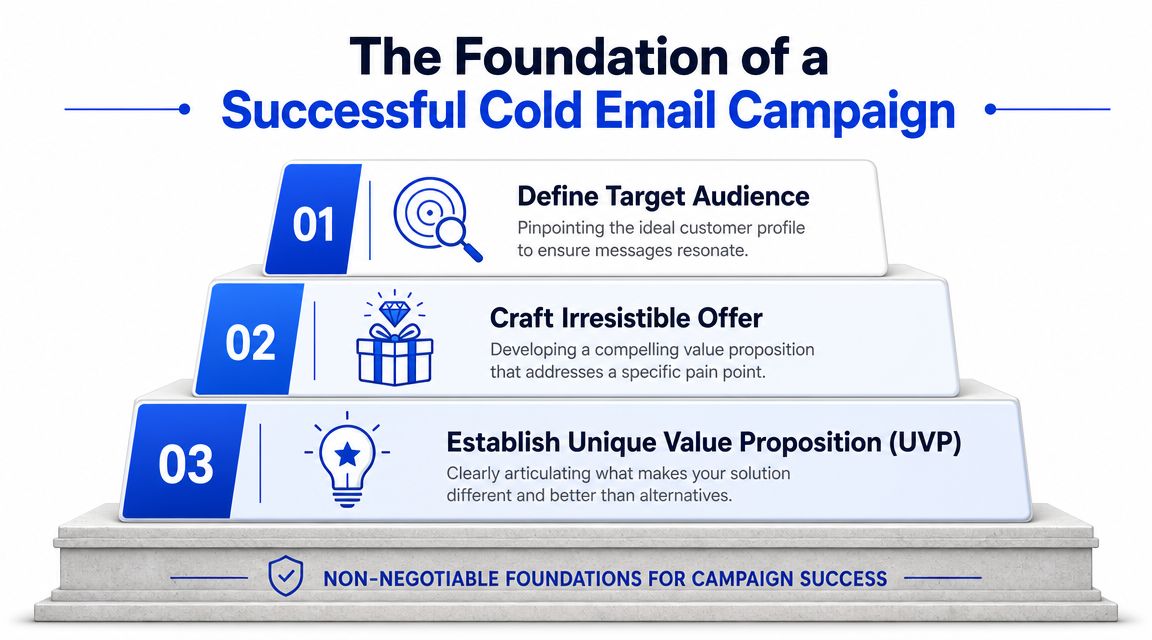
The three-step order that actually works
Lock the ICP and trigger
Write the ICP in one sentence. Include industry, company size, geography, role, and the current trigger that makes outreach relevant.
Bad version → heads of sales at SaaS companies.
Better version → head of sales at a 50 to 250 person B2B SaaS company in North America that hired at least 2 SDRs in the last 90 days.The trigger is the point. Without it, you don't have personalization. You have demographic sorting. If you need a tighter framework for this, start with a proper ideal customer profile guide.
Build the message map
Before any sequence gets written, define 3 pain points and 3 proof points that the campaign will pull from. Then lock it.
This stops message drift. By week three, most campaigns go off the rails because every reply inspires a new angle, a new pitch, or a new “test.” The message map keeps the whole program coherent.
Set up the sending infrastructure
Separate sending domains from the primary brand domain. Verify SPF, DKIM, and DMARC. Warm inboxes before campaign traffic. Set bounce thresholds and daily caps before the first send.
This isn't optional. As inbox filtering gets more aggressive, cold email depends on operational discipline like rotating accounts, avoiding promotional language, and minimizing links, as argued in Alex Berman's breakdown of what actually works.
A great message from a weak domain is still a weak campaign.
What not to do early
The easiest way to wreck a campaign is to do the visible work first.
Don't write copy first → copy written before the ICP and message map exists will get rewritten
Don't build the list first → broad targeting creates rework and contaminates performance data
Don't launch at full volume → start with a soft launch, inspect replies, inspect placement, then scale
The article asset above says “Craft irresistible offer” and “Establish unique value proposition.” In practice, we translate that into a concrete message map. Not abstract branding language. Pain, proof, trigger, and one reason to reply now.
How to build a trigger-based prospect list
Cold email lists fail upstream.
The problem usually is not volume, copy, or even contact data. It is list design. If your list is just job titles inside companies that loosely match your ICP, you are sending into randomness. That creates weak reply data, muddied learning, and outreach that feels unsolicited because there is no visible reason for the timing.
A usable prospect list answers two separate questions. Is this account a fit for what we sell. Why should this person care right now.
Layer | What it answers | Example |
|---|---|---|
Firmographic fit | Is this account in market for us at all | SaaS, 50 to 250 employees, US, sales leadership |
Trigger fit | Why are we contacting them now | recent SDR hiring, funding event, tool change, leadership change |
Build both layers into the dataset before you write a line of copy. Copy is downstream of list logic.
The right model is closer to intent signal qualification in B2B than old-school lead scraping. You are not collecting contacts. You are assembling evidence that a change happened, ownership is clear, and the account has a reason to evaluate something now.
What counts as a trigger
Good triggers change timing. Bad triggers just describe the company.
“VP of Sales at a 100-person SaaS company” is a fit filter. It does not explain urgency. “Hired 4 SDRs in 60 days” is a trigger because it points to a workload shift, process gap, or tooling decision. “New CRO joined last month” is a trigger because leadership changes often reset vendors, targets, and operating cadence.
Use trigger classes, not one-off observations:
Hiring triggers: rapid SDR or AE hiring, new sales manager roles, recruiting spikes in a function you serve
Leadership triggers: new VP, CRO, COO, or founder-led function handoff
Technology triggers: CRM migration, sales engagement rollout, website tags, job posts that reveal stack changes
Commercial triggers: funding, expansion into a new market, pricing changes, new product line
Behavioral triggers: public posts about process problems, team goals, or operational bottlenecks
The trigger has to survive contact-level scrutiny. If a rep cannot look at the row and explain in one sentence why that account is in the batch, the row should not ship.
A practical workflow with Apollo, Clay, and Sales Navigator
Use separate tools for separate jobs. Sales Navigator finds account fit. Apollo finds likely owners. Clay turns raw observations into a usable operating table.
Build narrow account pools in Sales Navigator
Filter by headcount, geography, industry, and seniority. Save lists by sub-vertical or operating model. “Logistics software” and “vertical SaaS” should not sit in the same campaign if the triggers and pain points differ.Pull likely owners in Apollo
Add only the roles that own the problem you solve. If your offer affects outbound execution, start with heads of sales, sales managers, or founders in smaller companies. Do not add finance, ops, and marketing contacts just because they can approve budget.Enrich trigger data in Clay
Add hiring velocity, leadership changes, funding, product launches, tech stack clues, and recent public activity. Then create a field for trigger type and a field for trigger date. Date matters. A trigger from 10 months ago is background noise.Score for actionability
A row needs four things: clear owner, clear trigger, recent timing, and a believable pain link. If one is missing, suppress it. List quality is determined at this point.Split lists by trigger, not just persona
Hiring-trigger accounts get one campaign. Leadership-change accounts get another. Tool-change accounts get a third. That separation keeps the opening line, proof point, and call to action aligned to one event.
This workflow also supports personalization without manual chaos. Teams building data-driven sales for logistics teams use the same principle. Standardize the inputs first, then let reps or automation build the message from structured trigger data.
The operator rule: exclude aggressively
Bad rows cost more than missing rows.
A broad list gives you the illusion of scale, but it contaminates performance fast. You cannot tell whether weak results came from the message, the market, the trigger, or bad ownership mapping. A smaller list with dated, categorized, and explainable triggers gives you cleaner tests and faster iteration.
Use a simple pass-fail standard before launch:
Pass: fit is clear, trigger is recent, owner is obvious, pain link is believable
Fail: trigger is vague, timing is stale, multiple owners could own the issue, or the row would need a custom explanation in Slack
Good list building feels slow because it includes deliberate exclusion. That is the point. The list is the campaign. The copy just reveals whether your targeting logic was right.
Writing messages that prove you did the work
Cold email copy gets blamed for upstream failures it did not create.
If the trigger is weak, the owner is wrong, or the timing is stale, no opener will save the send. Copy matters, but it sits at the end of the system. Its job is simple. Confirm that your targeting logic was sound and make the reason for outreach obvious in one read.
That standard kills a lot of so-called personalization.
First name, company name, and job title are database fields. They do not prove relevance. A message proves relevance when it shows a real-world event, ties that event to an operational problem, and explains why this person should care now. If your team needs a shared standard, align on this first-line personalisation framework before anyone writes variants.
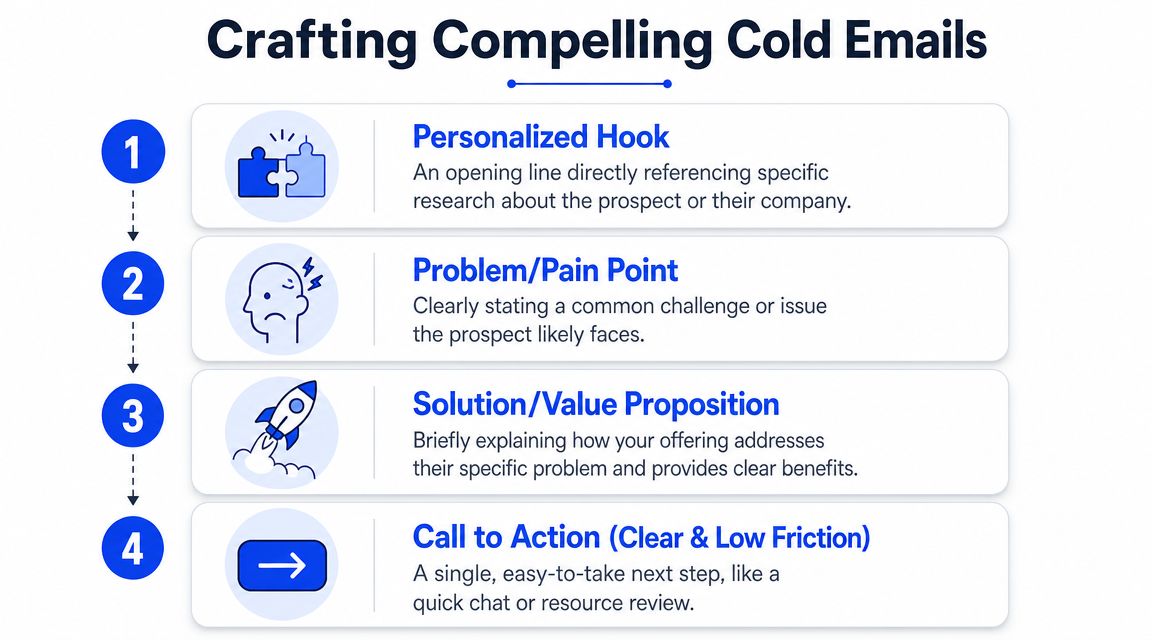
Why trigger-based copy beats mail merge copy
Here's an opener from a B2B SaaS campaign aimed at heads of sales at scaling companies:
Subject line, 4 SDRs in 2 months
Opening sentence, Saw your team brought on 4 SDRs in the last couple of months. Usually that means the founder is still writing the sequences at 11pm.
This worked because the message did three jobs fast.
It used a verifiable event in the subject line instead of vague curiosity bait
It showed recent research rather than recycling CRM fields
It translated the event into workload and execution pressure, which is what the buyer is managing
That is the pattern to copy. Start with observed change. Convert it into likely operational pain. Then make a narrow claim about where you help.
A lot of teams stop too early. They find a trigger and paste it into the first line. That is not enough. The trigger is the receipt. The pain link is the argument.
Use this simple message spine:
Trigger. What changed?
Consequence. What usually breaks or gets harder because of that change?
Relevance. Why does this specific person own the problem?
Proof. What have you seen in similar accounts?
Ask. What low-friction next step makes sense?
For a related example of signal-based outreach in a different operating environment, see Coreties on data-driven sales for logistics teams.
The personalization hierarchy we trust
Treat personalization data like ranked inputs, not creative inspiration. Some signals create urgency. Some just decorate the sentence.
Use this order:
Recent function-specific hiring
New SDRs, first enablement hire, marketing team expansion. These signals usually map to immediate process strain, tooling gaps, or manager bandwidth issues.Funding or expansion events
New capital, a market launch, an acquisition, a new office. These create pressure to ramp faster and report progress.Tech stack changes
A new CRM, engagement tool, enrichment vendor, or job posts that reveal implementation work. Good signal because it often points to a live project with an owner and deadline.Leadership changes
New CRO, VP Sales, or GM. New leaders review systems, team design, and vendor mix early.Public posts or interviews
Useful only when the reference is recent and specific enough to support a concrete point.Job title
Good for routing. Weak for writing.
Here's the rule. The lower the signal sits on this list, the more likely it is to sound like copied research.
What underperforms is predictable:
company size references
location references
school, hometown, or birthday trivia
event mentions with no clear tie to a business problem
praise that could have been sent to anyone in the segment
Use a hard filter before approving any opener. Ask one question: does this detail explain why this email had to be sent now?
If the answer is no, delete it.
Designing a multi-touch sequence that builds pressure
Bad cold email sequences fail for operational reasons long before they fail on copy. The team has no plan for timing, no reason for each touch, and no rule for what happens when a prospect engages. Five emails sent on a schedule is not a sequence. It is just repeated activity.
A working sequence creates cumulative pressure. Each touch should add a missing piece. New context. New risk. New proof. Lower friction. The ask can stay consistent, but the reason to reply should get easier to justify.
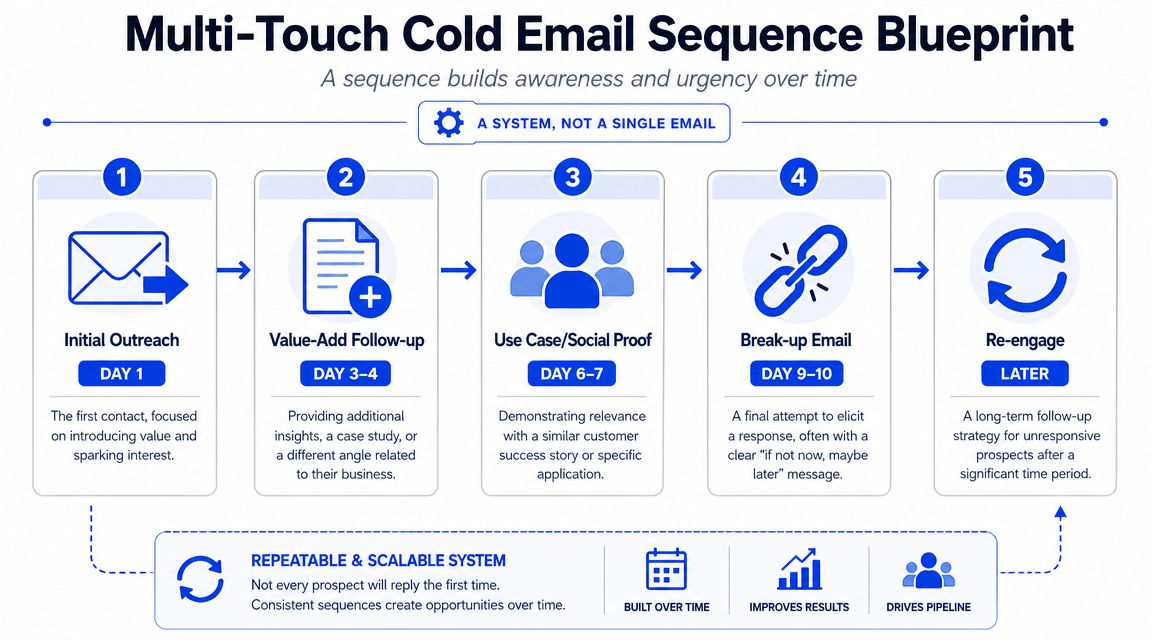
A sequence should create progression
Treat each step like a job in the process.
Touch 1 → establish the trigger, the problem, and why this account is in the sequence now
Touch 2 → widen the business case with a different consequence or stakeholder angle
Touch 3 → add proof that the problem is solvable and familiar
Touch 4 → reduce reply friction with a narrow question or simple yes/no path
Touch 5 → check timing, ownership, or priority without forcing a breakup script
That structure fixes a common mistake. Outbound reps often send four rewritten versions of touch one. Same point, same ask, same prospect experience. Good sequences move the buyer from "why are you emailing me?" to "I see the issue" to "this is probably worth a conversation."
Speed matters most at the start. Early replies and opens cluster near the first touch, which means your monitoring, routing, and follow-up discipline matter more than polishing line seven of email one. If someone engages, the next action has to be immediate. Build the sequence around response handling, not just send dates. Teams that need a cleaner handoff should tie sequence rules to a defined lead qualification process so interest turns into meetings instead of inbox drift.
Use channel layering with restraint
Email should carry the message. Other channels should support recognition.
A practical flow with Instantly, Lemlist, or Smartlead on the email side, and HeyReach on LinkedIn, looks like this:
Step | Action | Intent |
|---|---|---|
Day 1 | Send trigger-led email | Establish relevance and create a reason to reply |
Day 2 | View LinkedIn profile manually or via workflow | Increase name recognition |
Day 4 | Send follow-up with a new angle | Add context and sharpen the cost of delay |
Day 6 | LinkedIn connection request if appropriate | Create a second point of contact |
Day 8 | Short proof-led email | Lower perceived risk |
Later | Re-engage if a new trigger appears | Restart with a fresh reason |
Use one channel to reinforce the last touch, not to spray the same message everywhere. If the prospect has not clicked, replied, or accepted a connection request, do not flood LinkedIn, email, and voicemail in the same week. That is not pressure. That is sloppiness.
The tooling matters less than the operating model. Apollo, Clay, Instantly, HeyReach, and HubSpot can all support this. So can an agency workflow such as Grou, which combines list building, outbound execution, and reply routing into one system. What matters is that targeting, sequencing, and reply handling run inside the same process with clear ownership.
Here's a useful walkthrough on sequence thinking and outbound mechanics:
How to manage replies and qualify interest
Most outbound teams work hard to get replies, then handle replies badly.
That's where pipeline leaks. A positive response sits in an inbox for hours. A vague “tell me more” gets a long product pitch instead of a qualification step. A pricing objection gets handled by the wrong person. Cold email doesn't end at the reply. That's where the revenue part starts.
Route every reply into one of three buckets
You don't need a complicated AI classifier to start. You need consistent categories and ownership.
Use three buckets:
Positive → asks for details, wants to talk, shows active curiosity
Neutral objection → not now, send later, timing issue, internal priority mismatch
Negative → no fit, no interest, opt-out, wrong person
Positive replies should trigger immediate handling. Neutral objections should go into a structured follow-up queue with notes. Negative replies should update suppression and routing so the contact doesn't re-enter future sends.
If your team doesn't already have a defined process for this, build one around a proper lead qualification process and tie the reply status back to CRM stages.
Turn curiosity into calendar action
The biggest reply-management mistake is over-answering.
If someone replies, “Sounds interesting, send more,” don't send a six-paragraph explanation. Confirm fit and move toward a meeting. Keep the reply short, human, and directional.
A simple operator flow:
Acknowledge the trigger they responded to
Keep the thread anchored in relevance.Ask one qualifying question
Example → “Are you solving this internally today, or is it still founder-owned?”Offer a low-friction next step
Give two time options or ask whether they want a brief overview first.Log outcome immediately in HubSpot or your CRM
Don't leave reply context trapped in the sending tool.
Fast reply handling matters most when interest is fresh. Treat positive replies like inbound. Because operationally, they are.
The quality of your outbound engine is visible in how it handles the first interested response, not in how many sequences it has in draft.
Measuring what matters and ignoring vanity metrics
Cold email reporting breaks when the dashboard is built around activity instead of sales decisions.
A send count does not tell you whether the list was right. An open rate does not tell you whether the offer reached a problem worth solving. A blended reply rate does not tell you which segment deserves more volume. If your reporting stops there, you are grading the mailing tool, not the outbound system.
The first cut should be by market, not by template. Teams that treat every reply as a copy problem miss the actual constraint. Segment quality, trigger quality, and buyer-role fit usually explain performance faster than a rewritten opener. That is the point made in this niche-fit analysis on YouTube.
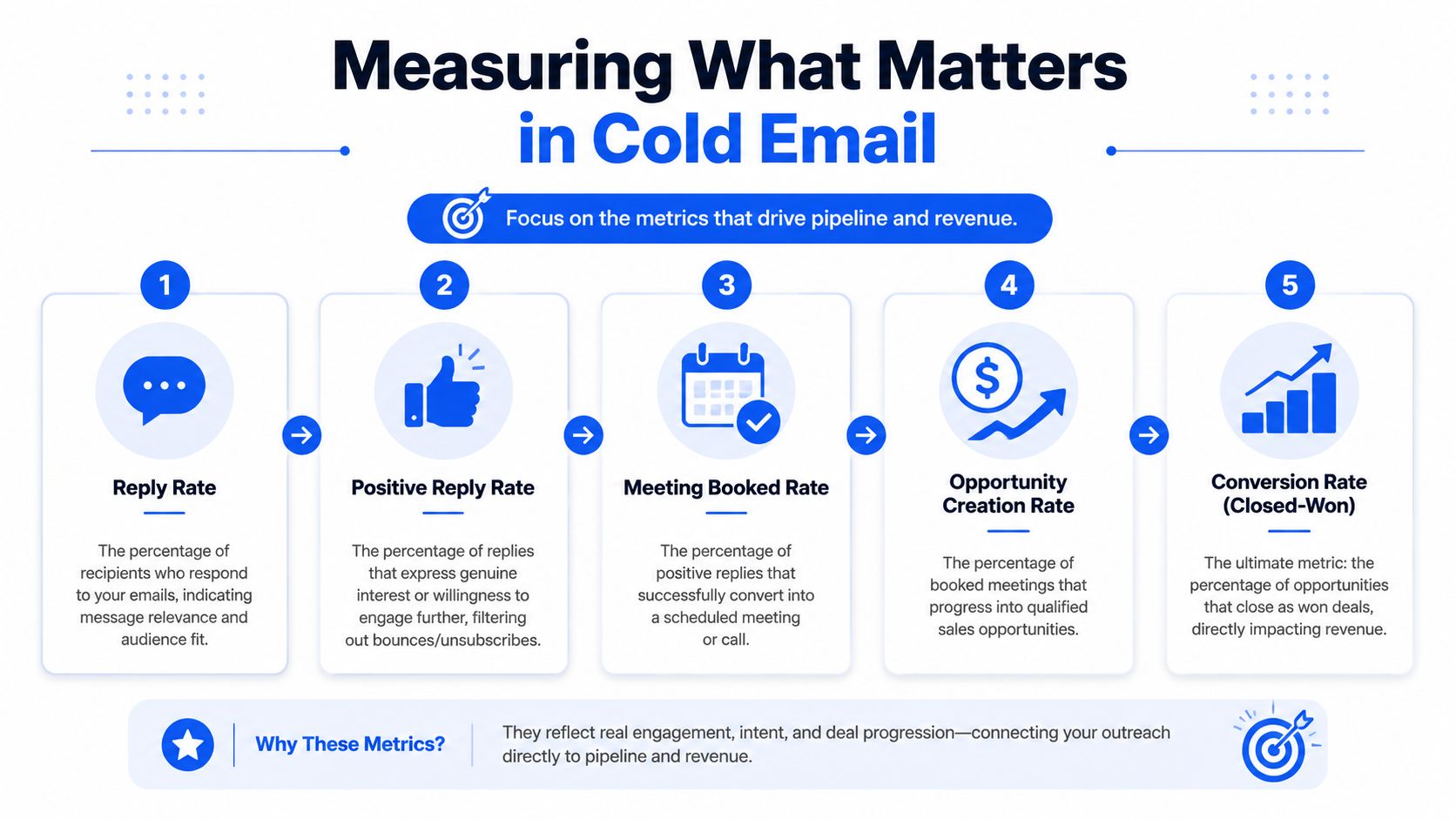
The dashboard that matters
Track metrics that sit close to revenue and can be segmented cleanly.
Reply rate, segmented → by sub-vertical, persona, trigger type, and message variant
Positive reply rate → shows whether your relevance is strong enough to create buying intent
Reply-to-meeting conversion → shows whether SDR follow-up is turning interest into calendar action
Meeting-to-qualified conversion → shows whether targeting is pulling in the right accounts
Cost per qualified meeting → the metric finance and leadership care about because it can be compared against other pipeline channels
Keep open rate on the dashboard, but demote it. Use it to spot deliverability problems, subject-line mismatch, or weak list hygiene. Do not use it to judge campaign success. The same applies to click rate in reply-driven outbound. Total emails sent belongs in an operations view, not an executive summary.
Here is the simpler rule. If a metric cannot tell you what to change in targeting, infrastructure, sequencing, or rep follow-up, it is secondary.
A real benchmark and what it tells you
Here's a recent benchmark from a B2B SaaS campaign over 90 days, provided in the brief:
Total contacts reached → 2,100
Reply rate, blended → 11.4%
Reply rate, top sub-segment → 14.7%
Positive reply rate → 64% of replies
Meetings booked → 51
Show rate → 84%, 43 meetings held
Qualified meetings → 33 of 43, a 77% qualification rate
Pipeline generated → €680k across 24 opportunities
Cost per qualified meeting → €312
That dashboard is useful because it preserves the chain from list to pipeline.
You can diagnose the system from those numbers. A healthy reply rate with a weak qualified-meeting rate points to targeting drift. A strong positive reply rate with weak booking volume points to slow or poor follow-up. A large gap between the blended segment and the top sub-segment means your list strategy is too broad and budget is being wasted on lower-yield accounts.
This is the operating framework I recommend:
Layer | Primary metric | What it diagnoses |
|---|---|---|
Market | Positive reply rate by segment | Whether you chose the right niche, persona, and trigger |
Execution | Reply-to-meeting conversion | Whether the team is handling interest well |
Sales quality | Meeting-to-qualified conversion | Whether outreach is attracting real opportunities |
Efficiency | Cost per qualified meeting | Whether outbound is economically worth scaling |
Run reviews in that order. Market first. Execution second. Sales quality third. Efficiency last.
That sequence matters. Teams often jump to efficiency before they have a repeatable segment. That produces fake optimization. You lower spend, cut volume, and tweak copy while the underlying issue sits upstream in account selection.
Blended numbers hide where the system breaks. Segmented numbers show where to intervene.
Your next step to predictable pipeline
Cold email becomes predictable when you stop treating it like a writing exercise.
The winning sequence usually starts before the sequence exists. It starts with a narrow ICP, a current trigger, a message map that doesn't drift, and infrastructure that won't sabotage the campaign. After that, copy has a real job to do.
If your current program is underperforming, don't ask whether the opener should be shorter. Audit the foundation in order:
Rewrite the ICP as one sentence
Add one trigger that explains why now
Lock 3 pains and 3 proof points
Review sending setup and warmup status
Soft-launch before scaling
That audit will tell you more than another round of subject line tests.
Many teams don't need a new template. They need a stricter system.
If you want a cold email program that ties targeting, outbound, LinkedIn, and reply handling into one reporting line, Grou is built for that kind of pipeline system.
Most cold email advice starts in the wrong place. It starts with copy.
That's backwards.
If your campaign is built on a vague ICP, a weak trigger, and shaky sending infrastructure, better copy won't save it. It will just help you burn through a larger list with more confidence. The hard truth is that cold email is still a volume channel, but the baseline is unforgiving. Sales.co's research puts the average reply rate at 2.09%, and only 14.1% of those replies indicate a real interest, which works out to roughly 1 interested response per 157 contacts sent, as summarized by Sales.co's cold email statistics.
That's why the operators who win don't obsess over clever phrasing first. They lock targeting, triggers, infrastructure, and reply handling before they argue about subject lines. If you also want to avoid silent deliverability issues, it helps to understand how bad data and hidden list landmines work. CleanMyList explains spam traps in a way most outbound teams should read before their next upload.
Key takeaways
Treat cold email as an ops system first → targeting, infrastructure, list logic, routing, and measurement decide most of the outcome
Start with one-sentence ICP precision → industry, size, geography, role, and current buying trigger
Build message discipline before copy → one message map with fixed pains and proof points beats improvised sequences
Protect inbox placement early → domain setup and deliverability warmup basics matter more than template polish
Measure pipeline, not dashboard cosmetics → reply quality and downstream conversion matter more than send volume
Table of Contents
Your cold email campaign is failing before you hit send
Cold email does not break at the copy layer first. It breaks in targeting, data quality, and sending infrastructure. By the time a team is debating subject lines, the outcome is often already set.
That is why weak campaigns feel confusing. The emails look fine. The sequence reads well. But the wrong accounts were loaded, the timing was off, or the domain was not prepared to carry outbound volume. Poor setup hides behind copy review because copy is the only part everyone can see.
Practical rule: If your team cannot explain why this specific account should care this specific week, the campaign is not ready.
The inbox is crowded, and crowded channels punish generic outreach fast. Buyers ignore messages that arrive without context, and mailbox providers punish senders that combine weak targeting with sloppy infrastructure. If you are still sending from a domain that was rushed into outbound, fix that first. Start with a proper cold email deliverability warmup process.
There is also a list quality tax that many outbound teams ignore until results collapse. Old records, role mismatches, catch-alls, and hidden traps do not just waste sends. They hurt placement. CleanMyList explains spam traps, and every outbound operator should understand that risk before scaling volume.
The cost of doing the visible work first
Writing sequences feels productive. Exporting a large list feels productive. Launching in two days feels productive.
None of that creates pipeline if the inputs are wrong.
Here is what failure-before-send looks like in practice:
Broad ICP definition. “B2B SaaS decision makers” gives reps too much room and gives prospects no reason to care.
No trigger for timing. Without a current event, hiring pattern, tool change, or operating constraint, your email shows up as background noise.
List-first workflow. Ops pulls contacts before the market definition is locked, then the team rebuilds the list after poor reply quality exposes the mistake.
Infrastructure shortcuts. Teams use the main domain, skip authentication checks, warm too fast, and scale volume before reputation is stable.
At GROU, we treat cold email as a pipeline system. The operating order is simple. Targeting first. Data second. Infrastructure third. Copy last.
Run that order and your writing starts working harder. Reverse it and you get busywork, false signals, and a reply inbox full of people who were never a fit.
The foundation a successful campaign is built on
Teams often want to start with templates. We start with constraints.
A campaign that produces qualified conversations usually has boring foundations. Tight market definition. Fixed message architecture. Clean sending setup. That's also why cold email behaves a lot like any other structured go-to-market program. If you've ever built a serious editorial engine, the discipline is familiar. The same logic behind content strategy for video creation applies here, one clear audience, one clear message system, one consistent production process.
The three-step order that actually works
Lock the ICP and trigger
Write the ICP in one sentence. Include industry, company size, geography, role, and the current trigger that makes outreach relevant.
Bad version → heads of sales at SaaS companies.
Better version → head of sales at a 50 to 250 person B2B SaaS company in North America that hired at least 2 SDRs in the last 90 days.The trigger is the point. Without it, you don't have personalization. You have demographic sorting. If you need a tighter framework for this, start with a proper ideal customer profile guide.
Build the message map
Before any sequence gets written, define 3 pain points and 3 proof points that the campaign will pull from. Then lock it.
This stops message drift. By week three, most campaigns go off the rails because every reply inspires a new angle, a new pitch, or a new “test.” The message map keeps the whole program coherent.
Set up the sending infrastructure
Separate sending domains from the primary brand domain. Verify SPF, DKIM, and DMARC. Warm inboxes before campaign traffic. Set bounce thresholds and daily caps before the first send.
This isn't optional. As inbox filtering gets more aggressive, cold email depends on operational discipline like rotating accounts, avoiding promotional language, and minimizing links, as argued in Alex Berman's breakdown of what actually works.
A great message from a weak domain is still a weak campaign.
What not to do early
The easiest way to wreck a campaign is to do the visible work first.
Don't write copy first → copy written before the ICP and message map exists will get rewritten
Don't build the list first → broad targeting creates rework and contaminates performance data
Don't launch at full volume → start with a soft launch, inspect replies, inspect placement, then scale
The article asset above says “Craft irresistible offer” and “Establish unique value proposition.” In practice, we translate that into a concrete message map. Not abstract branding language. Pain, proof, trigger, and one reason to reply now.
How to build a trigger-based prospect list
Cold email lists fail upstream.
The problem usually is not volume, copy, or even contact data. It is list design. If your list is just job titles inside companies that loosely match your ICP, you are sending into randomness. That creates weak reply data, muddied learning, and outreach that feels unsolicited because there is no visible reason for the timing.
A usable prospect list answers two separate questions. Is this account a fit for what we sell. Why should this person care right now.
Layer | What it answers | Example |
|---|---|---|
Firmographic fit | Is this account in market for us at all | SaaS, 50 to 250 employees, US, sales leadership |
Trigger fit | Why are we contacting them now | recent SDR hiring, funding event, tool change, leadership change |
Build both layers into the dataset before you write a line of copy. Copy is downstream of list logic.
The right model is closer to intent signal qualification in B2B than old-school lead scraping. You are not collecting contacts. You are assembling evidence that a change happened, ownership is clear, and the account has a reason to evaluate something now.
What counts as a trigger
Good triggers change timing. Bad triggers just describe the company.
“VP of Sales at a 100-person SaaS company” is a fit filter. It does not explain urgency. “Hired 4 SDRs in 60 days” is a trigger because it points to a workload shift, process gap, or tooling decision. “New CRO joined last month” is a trigger because leadership changes often reset vendors, targets, and operating cadence.
Use trigger classes, not one-off observations:
Hiring triggers: rapid SDR or AE hiring, new sales manager roles, recruiting spikes in a function you serve
Leadership triggers: new VP, CRO, COO, or founder-led function handoff
Technology triggers: CRM migration, sales engagement rollout, website tags, job posts that reveal stack changes
Commercial triggers: funding, expansion into a new market, pricing changes, new product line
Behavioral triggers: public posts about process problems, team goals, or operational bottlenecks
The trigger has to survive contact-level scrutiny. If a rep cannot look at the row and explain in one sentence why that account is in the batch, the row should not ship.
A practical workflow with Apollo, Clay, and Sales Navigator
Use separate tools for separate jobs. Sales Navigator finds account fit. Apollo finds likely owners. Clay turns raw observations into a usable operating table.
Build narrow account pools in Sales Navigator
Filter by headcount, geography, industry, and seniority. Save lists by sub-vertical or operating model. “Logistics software” and “vertical SaaS” should not sit in the same campaign if the triggers and pain points differ.Pull likely owners in Apollo
Add only the roles that own the problem you solve. If your offer affects outbound execution, start with heads of sales, sales managers, or founders in smaller companies. Do not add finance, ops, and marketing contacts just because they can approve budget.Enrich trigger data in Clay
Add hiring velocity, leadership changes, funding, product launches, tech stack clues, and recent public activity. Then create a field for trigger type and a field for trigger date. Date matters. A trigger from 10 months ago is background noise.Score for actionability
A row needs four things: clear owner, clear trigger, recent timing, and a believable pain link. If one is missing, suppress it. List quality is determined at this point.Split lists by trigger, not just persona
Hiring-trigger accounts get one campaign. Leadership-change accounts get another. Tool-change accounts get a third. That separation keeps the opening line, proof point, and call to action aligned to one event.
This workflow also supports personalization without manual chaos. Teams building data-driven sales for logistics teams use the same principle. Standardize the inputs first, then let reps or automation build the message from structured trigger data.
The operator rule: exclude aggressively
Bad rows cost more than missing rows.
A broad list gives you the illusion of scale, but it contaminates performance fast. You cannot tell whether weak results came from the message, the market, the trigger, or bad ownership mapping. A smaller list with dated, categorized, and explainable triggers gives you cleaner tests and faster iteration.
Use a simple pass-fail standard before launch:
Pass: fit is clear, trigger is recent, owner is obvious, pain link is believable
Fail: trigger is vague, timing is stale, multiple owners could own the issue, or the row would need a custom explanation in Slack
Good list building feels slow because it includes deliberate exclusion. That is the point. The list is the campaign. The copy just reveals whether your targeting logic was right.
Writing messages that prove you did the work
Cold email copy gets blamed for upstream failures it did not create.
If the trigger is weak, the owner is wrong, or the timing is stale, no opener will save the send. Copy matters, but it sits at the end of the system. Its job is simple. Confirm that your targeting logic was sound and make the reason for outreach obvious in one read.
That standard kills a lot of so-called personalization.
First name, company name, and job title are database fields. They do not prove relevance. A message proves relevance when it shows a real-world event, ties that event to an operational problem, and explains why this person should care now. If your team needs a shared standard, align on this first-line personalisation framework before anyone writes variants.
Why trigger-based copy beats mail merge copy
Here's an opener from a B2B SaaS campaign aimed at heads of sales at scaling companies:
Subject line, 4 SDRs in 2 months
Opening sentence, Saw your team brought on 4 SDRs in the last couple of months. Usually that means the founder is still writing the sequences at 11pm.
This worked because the message did three jobs fast.
It used a verifiable event in the subject line instead of vague curiosity bait
It showed recent research rather than recycling CRM fields
It translated the event into workload and execution pressure, which is what the buyer is managing
That is the pattern to copy. Start with observed change. Convert it into likely operational pain. Then make a narrow claim about where you help.
A lot of teams stop too early. They find a trigger and paste it into the first line. That is not enough. The trigger is the receipt. The pain link is the argument.
Use this simple message spine:
Trigger. What changed?
Consequence. What usually breaks or gets harder because of that change?
Relevance. Why does this specific person own the problem?
Proof. What have you seen in similar accounts?
Ask. What low-friction next step makes sense?
For a related example of signal-based outreach in a different operating environment, see Coreties on data-driven sales for logistics teams.
The personalization hierarchy we trust
Treat personalization data like ranked inputs, not creative inspiration. Some signals create urgency. Some just decorate the sentence.
Use this order:
Recent function-specific hiring
New SDRs, first enablement hire, marketing team expansion. These signals usually map to immediate process strain, tooling gaps, or manager bandwidth issues.Funding or expansion events
New capital, a market launch, an acquisition, a new office. These create pressure to ramp faster and report progress.Tech stack changes
A new CRM, engagement tool, enrichment vendor, or job posts that reveal implementation work. Good signal because it often points to a live project with an owner and deadline.Leadership changes
New CRO, VP Sales, or GM. New leaders review systems, team design, and vendor mix early.Public posts or interviews
Useful only when the reference is recent and specific enough to support a concrete point.Job title
Good for routing. Weak for writing.
Here's the rule. The lower the signal sits on this list, the more likely it is to sound like copied research.
What underperforms is predictable:
company size references
location references
school, hometown, or birthday trivia
event mentions with no clear tie to a business problem
praise that could have been sent to anyone in the segment
Use a hard filter before approving any opener. Ask one question: does this detail explain why this email had to be sent now?
If the answer is no, delete it.
Designing a multi-touch sequence that builds pressure
Bad cold email sequences fail for operational reasons long before they fail on copy. The team has no plan for timing, no reason for each touch, and no rule for what happens when a prospect engages. Five emails sent on a schedule is not a sequence. It is just repeated activity.
A working sequence creates cumulative pressure. Each touch should add a missing piece. New context. New risk. New proof. Lower friction. The ask can stay consistent, but the reason to reply should get easier to justify.
A sequence should create progression
Treat each step like a job in the process.
Touch 1 → establish the trigger, the problem, and why this account is in the sequence now
Touch 2 → widen the business case with a different consequence or stakeholder angle
Touch 3 → add proof that the problem is solvable and familiar
Touch 4 → reduce reply friction with a narrow question or simple yes/no path
Touch 5 → check timing, ownership, or priority without forcing a breakup script
That structure fixes a common mistake. Outbound reps often send four rewritten versions of touch one. Same point, same ask, same prospect experience. Good sequences move the buyer from "why are you emailing me?" to "I see the issue" to "this is probably worth a conversation."
Speed matters most at the start. Early replies and opens cluster near the first touch, which means your monitoring, routing, and follow-up discipline matter more than polishing line seven of email one. If someone engages, the next action has to be immediate. Build the sequence around response handling, not just send dates. Teams that need a cleaner handoff should tie sequence rules to a defined lead qualification process so interest turns into meetings instead of inbox drift.
Use channel layering with restraint
Email should carry the message. Other channels should support recognition.
A practical flow with Instantly, Lemlist, or Smartlead on the email side, and HeyReach on LinkedIn, looks like this:
Step | Action | Intent |
|---|---|---|
Day 1 | Send trigger-led email | Establish relevance and create a reason to reply |
Day 2 | View LinkedIn profile manually or via workflow | Increase name recognition |
Day 4 | Send follow-up with a new angle | Add context and sharpen the cost of delay |
Day 6 | LinkedIn connection request if appropriate | Create a second point of contact |
Day 8 | Short proof-led email | Lower perceived risk |
Later | Re-engage if a new trigger appears | Restart with a fresh reason |
Use one channel to reinforce the last touch, not to spray the same message everywhere. If the prospect has not clicked, replied, or accepted a connection request, do not flood LinkedIn, email, and voicemail in the same week. That is not pressure. That is sloppiness.
The tooling matters less than the operating model. Apollo, Clay, Instantly, HeyReach, and HubSpot can all support this. So can an agency workflow such as Grou, which combines list building, outbound execution, and reply routing into one system. What matters is that targeting, sequencing, and reply handling run inside the same process with clear ownership.
Here's a useful walkthrough on sequence thinking and outbound mechanics:
How to manage replies and qualify interest
Most outbound teams work hard to get replies, then handle replies badly.
That's where pipeline leaks. A positive response sits in an inbox for hours. A vague “tell me more” gets a long product pitch instead of a qualification step. A pricing objection gets handled by the wrong person. Cold email doesn't end at the reply. That's where the revenue part starts.
Route every reply into one of three buckets
You don't need a complicated AI classifier to start. You need consistent categories and ownership.
Use three buckets:
Positive → asks for details, wants to talk, shows active curiosity
Neutral objection → not now, send later, timing issue, internal priority mismatch
Negative → no fit, no interest, opt-out, wrong person
Positive replies should trigger immediate handling. Neutral objections should go into a structured follow-up queue with notes. Negative replies should update suppression and routing so the contact doesn't re-enter future sends.
If your team doesn't already have a defined process for this, build one around a proper lead qualification process and tie the reply status back to CRM stages.
Turn curiosity into calendar action
The biggest reply-management mistake is over-answering.
If someone replies, “Sounds interesting, send more,” don't send a six-paragraph explanation. Confirm fit and move toward a meeting. Keep the reply short, human, and directional.
A simple operator flow:
Acknowledge the trigger they responded to
Keep the thread anchored in relevance.Ask one qualifying question
Example → “Are you solving this internally today, or is it still founder-owned?”Offer a low-friction next step
Give two time options or ask whether they want a brief overview first.Log outcome immediately in HubSpot or your CRM
Don't leave reply context trapped in the sending tool.
Fast reply handling matters most when interest is fresh. Treat positive replies like inbound. Because operationally, they are.
The quality of your outbound engine is visible in how it handles the first interested response, not in how many sequences it has in draft.
Measuring what matters and ignoring vanity metrics
Cold email reporting breaks when the dashboard is built around activity instead of sales decisions.
A send count does not tell you whether the list was right. An open rate does not tell you whether the offer reached a problem worth solving. A blended reply rate does not tell you which segment deserves more volume. If your reporting stops there, you are grading the mailing tool, not the outbound system.
The first cut should be by market, not by template. Teams that treat every reply as a copy problem miss the actual constraint. Segment quality, trigger quality, and buyer-role fit usually explain performance faster than a rewritten opener. That is the point made in this niche-fit analysis on YouTube.
The dashboard that matters
Track metrics that sit close to revenue and can be segmented cleanly.
Reply rate, segmented → by sub-vertical, persona, trigger type, and message variant
Positive reply rate → shows whether your relevance is strong enough to create buying intent
Reply-to-meeting conversion → shows whether SDR follow-up is turning interest into calendar action
Meeting-to-qualified conversion → shows whether targeting is pulling in the right accounts
Cost per qualified meeting → the metric finance and leadership care about because it can be compared against other pipeline channels
Keep open rate on the dashboard, but demote it. Use it to spot deliverability problems, subject-line mismatch, or weak list hygiene. Do not use it to judge campaign success. The same applies to click rate in reply-driven outbound. Total emails sent belongs in an operations view, not an executive summary.
Here is the simpler rule. If a metric cannot tell you what to change in targeting, infrastructure, sequencing, or rep follow-up, it is secondary.
A real benchmark and what it tells you
Here's a recent benchmark from a B2B SaaS campaign over 90 days, provided in the brief:
Total contacts reached → 2,100
Reply rate, blended → 11.4%
Reply rate, top sub-segment → 14.7%
Positive reply rate → 64% of replies
Meetings booked → 51
Show rate → 84%, 43 meetings held
Qualified meetings → 33 of 43, a 77% qualification rate
Pipeline generated → €680k across 24 opportunities
Cost per qualified meeting → €312
That dashboard is useful because it preserves the chain from list to pipeline.
You can diagnose the system from those numbers. A healthy reply rate with a weak qualified-meeting rate points to targeting drift. A strong positive reply rate with weak booking volume points to slow or poor follow-up. A large gap between the blended segment and the top sub-segment means your list strategy is too broad and budget is being wasted on lower-yield accounts.
This is the operating framework I recommend:
Layer | Primary metric | What it diagnoses |
|---|---|---|
Market | Positive reply rate by segment | Whether you chose the right niche, persona, and trigger |
Execution | Reply-to-meeting conversion | Whether the team is handling interest well |
Sales quality | Meeting-to-qualified conversion | Whether outreach is attracting real opportunities |
Efficiency | Cost per qualified meeting | Whether outbound is economically worth scaling |
Run reviews in that order. Market first. Execution second. Sales quality third. Efficiency last.
That sequence matters. Teams often jump to efficiency before they have a repeatable segment. That produces fake optimization. You lower spend, cut volume, and tweak copy while the underlying issue sits upstream in account selection.
Blended numbers hide where the system breaks. Segmented numbers show where to intervene.
Your next step to predictable pipeline
Cold email becomes predictable when you stop treating it like a writing exercise.
The winning sequence usually starts before the sequence exists. It starts with a narrow ICP, a current trigger, a message map that doesn't drift, and infrastructure that won't sabotage the campaign. After that, copy has a real job to do.
If your current program is underperforming, don't ask whether the opener should be shorter. Audit the foundation in order:
Rewrite the ICP as one sentence
Add one trigger that explains why now
Lock 3 pains and 3 proof points
Review sending setup and warmup status
Soft-launch before scaling
That audit will tell you more than another round of subject line tests.
Many teams don't need a new template. They need a stricter system.
If you want a cold email program that ties targeting, outbound, LinkedIn, and reply handling into one reporting line, Grou is built for that kind of pipeline system.
Most cold email advice starts in the wrong place. It starts with copy.
That's backwards.
If your campaign is built on a vague ICP, a weak trigger, and shaky sending infrastructure, better copy won't save it. It will just help you burn through a larger list with more confidence. The hard truth is that cold email is still a volume channel, but the baseline is unforgiving. Sales.co's research puts the average reply rate at 2.09%, and only 14.1% of those replies indicate a real interest, which works out to roughly 1 interested response per 157 contacts sent, as summarized by Sales.co's cold email statistics.
That's why the operators who win don't obsess over clever phrasing first. They lock targeting, triggers, infrastructure, and reply handling before they argue about subject lines. If you also want to avoid silent deliverability issues, it helps to understand how bad data and hidden list landmines work. CleanMyList explains spam traps in a way most outbound teams should read before their next upload.
Key takeaways
Treat cold email as an ops system first → targeting, infrastructure, list logic, routing, and measurement decide most of the outcome
Start with one-sentence ICP precision → industry, size, geography, role, and current buying trigger
Build message discipline before copy → one message map with fixed pains and proof points beats improvised sequences
Protect inbox placement early → domain setup and deliverability warmup basics matter more than template polish
Measure pipeline, not dashboard cosmetics → reply quality and downstream conversion matter more than send volume
Table of Contents
Your cold email campaign is failing before you hit send
Cold email does not break at the copy layer first. It breaks in targeting, data quality, and sending infrastructure. By the time a team is debating subject lines, the outcome is often already set.
That is why weak campaigns feel confusing. The emails look fine. The sequence reads well. But the wrong accounts were loaded, the timing was off, or the domain was not prepared to carry outbound volume. Poor setup hides behind copy review because copy is the only part everyone can see.
Practical rule: If your team cannot explain why this specific account should care this specific week, the campaign is not ready.
The inbox is crowded, and crowded channels punish generic outreach fast. Buyers ignore messages that arrive without context, and mailbox providers punish senders that combine weak targeting with sloppy infrastructure. If you are still sending from a domain that was rushed into outbound, fix that first. Start with a proper cold email deliverability warmup process.
There is also a list quality tax that many outbound teams ignore until results collapse. Old records, role mismatches, catch-alls, and hidden traps do not just waste sends. They hurt placement. CleanMyList explains spam traps, and every outbound operator should understand that risk before scaling volume.
The cost of doing the visible work first
Writing sequences feels productive. Exporting a large list feels productive. Launching in two days feels productive.
None of that creates pipeline if the inputs are wrong.
Here is what failure-before-send looks like in practice:
Broad ICP definition. “B2B SaaS decision makers” gives reps too much room and gives prospects no reason to care.
No trigger for timing. Without a current event, hiring pattern, tool change, or operating constraint, your email shows up as background noise.
List-first workflow. Ops pulls contacts before the market definition is locked, then the team rebuilds the list after poor reply quality exposes the mistake.
Infrastructure shortcuts. Teams use the main domain, skip authentication checks, warm too fast, and scale volume before reputation is stable.
At GROU, we treat cold email as a pipeline system. The operating order is simple. Targeting first. Data second. Infrastructure third. Copy last.
Run that order and your writing starts working harder. Reverse it and you get busywork, false signals, and a reply inbox full of people who were never a fit.
The foundation a successful campaign is built on
Teams often want to start with templates. We start with constraints.
A campaign that produces qualified conversations usually has boring foundations. Tight market definition. Fixed message architecture. Clean sending setup. That's also why cold email behaves a lot like any other structured go-to-market program. If you've ever built a serious editorial engine, the discipline is familiar. The same logic behind content strategy for video creation applies here, one clear audience, one clear message system, one consistent production process.
The three-step order that actually works
Lock the ICP and trigger
Write the ICP in one sentence. Include industry, company size, geography, role, and the current trigger that makes outreach relevant.
Bad version → heads of sales at SaaS companies.
Better version → head of sales at a 50 to 250 person B2B SaaS company in North America that hired at least 2 SDRs in the last 90 days.The trigger is the point. Without it, you don't have personalization. You have demographic sorting. If you need a tighter framework for this, start with a proper ideal customer profile guide.
Build the message map
Before any sequence gets written, define 3 pain points and 3 proof points that the campaign will pull from. Then lock it.
This stops message drift. By week three, most campaigns go off the rails because every reply inspires a new angle, a new pitch, or a new “test.” The message map keeps the whole program coherent.
Set up the sending infrastructure
Separate sending domains from the primary brand domain. Verify SPF, DKIM, and DMARC. Warm inboxes before campaign traffic. Set bounce thresholds and daily caps before the first send.
This isn't optional. As inbox filtering gets more aggressive, cold email depends on operational discipline like rotating accounts, avoiding promotional language, and minimizing links, as argued in Alex Berman's breakdown of what actually works.
A great message from a weak domain is still a weak campaign.
What not to do early
The easiest way to wreck a campaign is to do the visible work first.
Don't write copy first → copy written before the ICP and message map exists will get rewritten
Don't build the list first → broad targeting creates rework and contaminates performance data
Don't launch at full volume → start with a soft launch, inspect replies, inspect placement, then scale
The article asset above says “Craft irresistible offer” and “Establish unique value proposition.” In practice, we translate that into a concrete message map. Not abstract branding language. Pain, proof, trigger, and one reason to reply now.
How to build a trigger-based prospect list
Cold email lists fail upstream.
The problem usually is not volume, copy, or even contact data. It is list design. If your list is just job titles inside companies that loosely match your ICP, you are sending into randomness. That creates weak reply data, muddied learning, and outreach that feels unsolicited because there is no visible reason for the timing.
A usable prospect list answers two separate questions. Is this account a fit for what we sell. Why should this person care right now.
Layer | What it answers | Example |
|---|---|---|
Firmographic fit | Is this account in market for us at all | SaaS, 50 to 250 employees, US, sales leadership |
Trigger fit | Why are we contacting them now | recent SDR hiring, funding event, tool change, leadership change |
Build both layers into the dataset before you write a line of copy. Copy is downstream of list logic.
The right model is closer to intent signal qualification in B2B than old-school lead scraping. You are not collecting contacts. You are assembling evidence that a change happened, ownership is clear, and the account has a reason to evaluate something now.
What counts as a trigger
Good triggers change timing. Bad triggers just describe the company.
“VP of Sales at a 100-person SaaS company” is a fit filter. It does not explain urgency. “Hired 4 SDRs in 60 days” is a trigger because it points to a workload shift, process gap, or tooling decision. “New CRO joined last month” is a trigger because leadership changes often reset vendors, targets, and operating cadence.
Use trigger classes, not one-off observations:
Hiring triggers: rapid SDR or AE hiring, new sales manager roles, recruiting spikes in a function you serve
Leadership triggers: new VP, CRO, COO, or founder-led function handoff
Technology triggers: CRM migration, sales engagement rollout, website tags, job posts that reveal stack changes
Commercial triggers: funding, expansion into a new market, pricing changes, new product line
Behavioral triggers: public posts about process problems, team goals, or operational bottlenecks
The trigger has to survive contact-level scrutiny. If a rep cannot look at the row and explain in one sentence why that account is in the batch, the row should not ship.
A practical workflow with Apollo, Clay, and Sales Navigator
Use separate tools for separate jobs. Sales Navigator finds account fit. Apollo finds likely owners. Clay turns raw observations into a usable operating table.
Build narrow account pools in Sales Navigator
Filter by headcount, geography, industry, and seniority. Save lists by sub-vertical or operating model. “Logistics software” and “vertical SaaS” should not sit in the same campaign if the triggers and pain points differ.Pull likely owners in Apollo
Add only the roles that own the problem you solve. If your offer affects outbound execution, start with heads of sales, sales managers, or founders in smaller companies. Do not add finance, ops, and marketing contacts just because they can approve budget.Enrich trigger data in Clay
Add hiring velocity, leadership changes, funding, product launches, tech stack clues, and recent public activity. Then create a field for trigger type and a field for trigger date. Date matters. A trigger from 10 months ago is background noise.Score for actionability
A row needs four things: clear owner, clear trigger, recent timing, and a believable pain link. If one is missing, suppress it. List quality is determined at this point.Split lists by trigger, not just persona
Hiring-trigger accounts get one campaign. Leadership-change accounts get another. Tool-change accounts get a third. That separation keeps the opening line, proof point, and call to action aligned to one event.
This workflow also supports personalization without manual chaos. Teams building data-driven sales for logistics teams use the same principle. Standardize the inputs first, then let reps or automation build the message from structured trigger data.
The operator rule: exclude aggressively
Bad rows cost more than missing rows.
A broad list gives you the illusion of scale, but it contaminates performance fast. You cannot tell whether weak results came from the message, the market, the trigger, or bad ownership mapping. A smaller list with dated, categorized, and explainable triggers gives you cleaner tests and faster iteration.
Use a simple pass-fail standard before launch:
Pass: fit is clear, trigger is recent, owner is obvious, pain link is believable
Fail: trigger is vague, timing is stale, multiple owners could own the issue, or the row would need a custom explanation in Slack
Good list building feels slow because it includes deliberate exclusion. That is the point. The list is the campaign. The copy just reveals whether your targeting logic was right.
Writing messages that prove you did the work
Cold email copy gets blamed for upstream failures it did not create.
If the trigger is weak, the owner is wrong, or the timing is stale, no opener will save the send. Copy matters, but it sits at the end of the system. Its job is simple. Confirm that your targeting logic was sound and make the reason for outreach obvious in one read.
That standard kills a lot of so-called personalization.
First name, company name, and job title are database fields. They do not prove relevance. A message proves relevance when it shows a real-world event, ties that event to an operational problem, and explains why this person should care now. If your team needs a shared standard, align on this first-line personalisation framework before anyone writes variants.
Why trigger-based copy beats mail merge copy
Here's an opener from a B2B SaaS campaign aimed at heads of sales at scaling companies:
Subject line, 4 SDRs in 2 months
Opening sentence, Saw your team brought on 4 SDRs in the last couple of months. Usually that means the founder is still writing the sequences at 11pm.
This worked because the message did three jobs fast.
It used a verifiable event in the subject line instead of vague curiosity bait
It showed recent research rather than recycling CRM fields
It translated the event into workload and execution pressure, which is what the buyer is managing
That is the pattern to copy. Start with observed change. Convert it into likely operational pain. Then make a narrow claim about where you help.
A lot of teams stop too early. They find a trigger and paste it into the first line. That is not enough. The trigger is the receipt. The pain link is the argument.
Use this simple message spine:
Trigger. What changed?
Consequence. What usually breaks or gets harder because of that change?
Relevance. Why does this specific person own the problem?
Proof. What have you seen in similar accounts?
Ask. What low-friction next step makes sense?
For a related example of signal-based outreach in a different operating environment, see Coreties on data-driven sales for logistics teams.
The personalization hierarchy we trust
Treat personalization data like ranked inputs, not creative inspiration. Some signals create urgency. Some just decorate the sentence.
Use this order:
Recent function-specific hiring
New SDRs, first enablement hire, marketing team expansion. These signals usually map to immediate process strain, tooling gaps, or manager bandwidth issues.Funding or expansion events
New capital, a market launch, an acquisition, a new office. These create pressure to ramp faster and report progress.Tech stack changes
A new CRM, engagement tool, enrichment vendor, or job posts that reveal implementation work. Good signal because it often points to a live project with an owner and deadline.Leadership changes
New CRO, VP Sales, or GM. New leaders review systems, team design, and vendor mix early.Public posts or interviews
Useful only when the reference is recent and specific enough to support a concrete point.Job title
Good for routing. Weak for writing.
Here's the rule. The lower the signal sits on this list, the more likely it is to sound like copied research.
What underperforms is predictable:
company size references
location references
school, hometown, or birthday trivia
event mentions with no clear tie to a business problem
praise that could have been sent to anyone in the segment
Use a hard filter before approving any opener. Ask one question: does this detail explain why this email had to be sent now?
If the answer is no, delete it.
Designing a multi-touch sequence that builds pressure
Bad cold email sequences fail for operational reasons long before they fail on copy. The team has no plan for timing, no reason for each touch, and no rule for what happens when a prospect engages. Five emails sent on a schedule is not a sequence. It is just repeated activity.
A working sequence creates cumulative pressure. Each touch should add a missing piece. New context. New risk. New proof. Lower friction. The ask can stay consistent, but the reason to reply should get easier to justify.
A sequence should create progression
Treat each step like a job in the process.
Touch 1 → establish the trigger, the problem, and why this account is in the sequence now
Touch 2 → widen the business case with a different consequence or stakeholder angle
Touch 3 → add proof that the problem is solvable and familiar
Touch 4 → reduce reply friction with a narrow question or simple yes/no path
Touch 5 → check timing, ownership, or priority without forcing a breakup script
That structure fixes a common mistake. Outbound reps often send four rewritten versions of touch one. Same point, same ask, same prospect experience. Good sequences move the buyer from "why are you emailing me?" to "I see the issue" to "this is probably worth a conversation."
Speed matters most at the start. Early replies and opens cluster near the first touch, which means your monitoring, routing, and follow-up discipline matter more than polishing line seven of email one. If someone engages, the next action has to be immediate. Build the sequence around response handling, not just send dates. Teams that need a cleaner handoff should tie sequence rules to a defined lead qualification process so interest turns into meetings instead of inbox drift.
Use channel layering with restraint
Email should carry the message. Other channels should support recognition.
A practical flow with Instantly, Lemlist, or Smartlead on the email side, and HeyReach on LinkedIn, looks like this:
Step | Action | Intent |
|---|---|---|
Day 1 | Send trigger-led email | Establish relevance and create a reason to reply |
Day 2 | View LinkedIn profile manually or via workflow | Increase name recognition |
Day 4 | Send follow-up with a new angle | Add context and sharpen the cost of delay |
Day 6 | LinkedIn connection request if appropriate | Create a second point of contact |
Day 8 | Short proof-led email | Lower perceived risk |
Later | Re-engage if a new trigger appears | Restart with a fresh reason |
Use one channel to reinforce the last touch, not to spray the same message everywhere. If the prospect has not clicked, replied, or accepted a connection request, do not flood LinkedIn, email, and voicemail in the same week. That is not pressure. That is sloppiness.
The tooling matters less than the operating model. Apollo, Clay, Instantly, HeyReach, and HubSpot can all support this. So can an agency workflow such as Grou, which combines list building, outbound execution, and reply routing into one system. What matters is that targeting, sequencing, and reply handling run inside the same process with clear ownership.
Here's a useful walkthrough on sequence thinking and outbound mechanics:
How to manage replies and qualify interest
Most outbound teams work hard to get replies, then handle replies badly.
That's where pipeline leaks. A positive response sits in an inbox for hours. A vague “tell me more” gets a long product pitch instead of a qualification step. A pricing objection gets handled by the wrong person. Cold email doesn't end at the reply. That's where the revenue part starts.
Route every reply into one of three buckets
You don't need a complicated AI classifier to start. You need consistent categories and ownership.
Use three buckets:
Positive → asks for details, wants to talk, shows active curiosity
Neutral objection → not now, send later, timing issue, internal priority mismatch
Negative → no fit, no interest, opt-out, wrong person
Positive replies should trigger immediate handling. Neutral objections should go into a structured follow-up queue with notes. Negative replies should update suppression and routing so the contact doesn't re-enter future sends.
If your team doesn't already have a defined process for this, build one around a proper lead qualification process and tie the reply status back to CRM stages.
Turn curiosity into calendar action
The biggest reply-management mistake is over-answering.
If someone replies, “Sounds interesting, send more,” don't send a six-paragraph explanation. Confirm fit and move toward a meeting. Keep the reply short, human, and directional.
A simple operator flow:
Acknowledge the trigger they responded to
Keep the thread anchored in relevance.Ask one qualifying question
Example → “Are you solving this internally today, or is it still founder-owned?”Offer a low-friction next step
Give two time options or ask whether they want a brief overview first.Log outcome immediately in HubSpot or your CRM
Don't leave reply context trapped in the sending tool.
Fast reply handling matters most when interest is fresh. Treat positive replies like inbound. Because operationally, they are.
The quality of your outbound engine is visible in how it handles the first interested response, not in how many sequences it has in draft.
Measuring what matters and ignoring vanity metrics
Cold email reporting breaks when the dashboard is built around activity instead of sales decisions.
A send count does not tell you whether the list was right. An open rate does not tell you whether the offer reached a problem worth solving. A blended reply rate does not tell you which segment deserves more volume. If your reporting stops there, you are grading the mailing tool, not the outbound system.
The first cut should be by market, not by template. Teams that treat every reply as a copy problem miss the actual constraint. Segment quality, trigger quality, and buyer-role fit usually explain performance faster than a rewritten opener. That is the point made in this niche-fit analysis on YouTube.
The dashboard that matters
Track metrics that sit close to revenue and can be segmented cleanly.
Reply rate, segmented → by sub-vertical, persona, trigger type, and message variant
Positive reply rate → shows whether your relevance is strong enough to create buying intent
Reply-to-meeting conversion → shows whether SDR follow-up is turning interest into calendar action
Meeting-to-qualified conversion → shows whether targeting is pulling in the right accounts
Cost per qualified meeting → the metric finance and leadership care about because it can be compared against other pipeline channels
Keep open rate on the dashboard, but demote it. Use it to spot deliverability problems, subject-line mismatch, or weak list hygiene. Do not use it to judge campaign success. The same applies to click rate in reply-driven outbound. Total emails sent belongs in an operations view, not an executive summary.
Here is the simpler rule. If a metric cannot tell you what to change in targeting, infrastructure, sequencing, or rep follow-up, it is secondary.
A real benchmark and what it tells you
Here's a recent benchmark from a B2B SaaS campaign over 90 days, provided in the brief:
Total contacts reached → 2,100
Reply rate, blended → 11.4%
Reply rate, top sub-segment → 14.7%
Positive reply rate → 64% of replies
Meetings booked → 51
Show rate → 84%, 43 meetings held
Qualified meetings → 33 of 43, a 77% qualification rate
Pipeline generated → €680k across 24 opportunities
Cost per qualified meeting → €312
That dashboard is useful because it preserves the chain from list to pipeline.
You can diagnose the system from those numbers. A healthy reply rate with a weak qualified-meeting rate points to targeting drift. A strong positive reply rate with weak booking volume points to slow or poor follow-up. A large gap between the blended segment and the top sub-segment means your list strategy is too broad and budget is being wasted on lower-yield accounts.
This is the operating framework I recommend:
Layer | Primary metric | What it diagnoses |
|---|---|---|
Market | Positive reply rate by segment | Whether you chose the right niche, persona, and trigger |
Execution | Reply-to-meeting conversion | Whether the team is handling interest well |
Sales quality | Meeting-to-qualified conversion | Whether outreach is attracting real opportunities |
Efficiency | Cost per qualified meeting | Whether outbound is economically worth scaling |
Run reviews in that order. Market first. Execution second. Sales quality third. Efficiency last.
That sequence matters. Teams often jump to efficiency before they have a repeatable segment. That produces fake optimization. You lower spend, cut volume, and tweak copy while the underlying issue sits upstream in account selection.
Blended numbers hide where the system breaks. Segmented numbers show where to intervene.
Your next step to predictable pipeline
Cold email becomes predictable when you stop treating it like a writing exercise.
The winning sequence usually starts before the sequence exists. It starts with a narrow ICP, a current trigger, a message map that doesn't drift, and infrastructure that won't sabotage the campaign. After that, copy has a real job to do.
If your current program is underperforming, don't ask whether the opener should be shorter. Audit the foundation in order:
Rewrite the ICP as one sentence
Add one trigger that explains why now
Lock 3 pains and 3 proof points
Review sending setup and warmup status
Soft-launch before scaling
That audit will tell you more than another round of subject line tests.
Many teams don't need a new template. They need a stricter system.
If you want a cold email program that ties targeting, outbound, LinkedIn, and reply handling into one reporting line, Grou is built for that kind of pipeline system.

Pipeline OS Newsletter
Build qualified pipeline
Get weekly tactics to generate demand, improve lead quality, and book more meetings.





Trusted by industry leaders
Trusted by industry leaders
Trusted by industry leaders
Ready to build qualified pipeline?
Ready to build qualified pipeline?
Ready to build qualified pipeline?
Book a call to see if we're the right fit, or take the 2-minute quiz to get a clear starting point.
Book a call to see if we're the right fit, or take the 2-minute quiz to get a clear starting point.
Book a call to see if we're the right fit, or take the 2-minute quiz to get a clear starting point.
" height="30.21639343089746px" id="hfGbXmQR2" width="30.216393430897455px"/></svg>)
Copyright © 2026 – All Right Reserved
Copyright © 2026 – All Right Reserved
Copyright © 2026 – All Right Reserved