%22%3E%3C/path%3E%3Cpath d=%22M 63.072 7.554 C 62.258 8.022 61.577 8.689 61.092 9.493 L 61.092 7.076 L 57.158 7.076 L 57.158 22.64 L 61.089 22.64 L 61.089 14.888 C 61.089 13.446 61.403 12.434 62.03 11.853 C 62.818 11.218 63.818 10.907 64.826 10.982 L 65.868 10.982 L 65.868 6.851 C 64.891 6.834 63.926 7.076 63.073 7.554 Z%22 fill=%22rgb(17,17,17)%22%3E%3C/path%3E%3Cpath d=%22M 78.916 7.82 C 76.363 6.49 73.321 6.49 70.768 7.82 C 69.562 8.473 68.564 9.451 67.888 10.644 C 67.167 11.931 66.803 13.387 66.834 14.862 C 66.804 16.332 67.157 17.785 67.86 19.077 C 68.515 20.267 69.494 21.246 70.684 21.901 C 71.924 22.576 73.318 22.92 74.73 22.898 C 76.164 22.918 77.58 22.575 78.846 21.901 C 80.062 21.247 81.073 20.27 81.768 19.077 C 82.506 17.797 82.88 16.339 82.85 14.862 C 82.88 13.389 82.517 11.934 81.797 10.647 C 81.12 9.455 80.122 8.477 78.917 7.824 M 78.803 14.862 C 78.829 15.739 78.636 16.608 78.241 17.391 C 77.903 18.046 77.38 18.588 76.738 18.95 C 76.124 19.293 75.432 19.472 74.729 19.47 C 73.668 19.497 72.648 19.061 71.934 18.276 C 71.139 17.323 70.741 16.1 70.823 14.862 C 70.741 13.62 71.149 12.395 71.959 11.45 C 72.687 10.667 73.715 10.233 74.783 10.256 C 75.859 10.236 76.894 10.67 77.635 11.45 C 78.464 12.387 78.884 13.616 78.801 14.864%22 fill=%22rgb(17,17,17)%22%3E%3C/path%3E%3Cpath d=%22M 95.906 7.076 L 95.906 15.646 C 95.975 16.68 95.643 17.701 94.979 18.498 C 94.311 19.184 93.379 19.547 92.422 19.495 C 91.475 19.544 90.553 19.18 89.894 18.498 C 89.23 17.701 88.898 16.68 88.967 15.646 L 88.967 7.076 L 85.033 7.076 L 85.033 16.207 C 85 17.449 85.275 18.68 85.834 19.79 C 86.327 20.75 87.095 21.542 88.039 22.065 C 89.033 22.594 90.145 22.861 91.271 22.838 C 92.188 22.847 93.095 22.65 93.926 22.263 C 94.708 21.905 95.388 21.36 95.906 20.675 L 95.906 22.645 L 99.865 22.645 L 99.865 7.076 Z%22 fill=%22rgb(17,17,17)%22%3E%3C/path%3E%3Cpath d=%22M 4.513 15.626 C 4.511 10.815 7.606 6.549 12.181 5.059 C 16.756 3.57 21.77 5.195 24.601 9.086 L 27.816 5.87 C 24.074 1.186 17.981 -0.943 12.137 0.393 C 6.292 1.728 1.728 6.292 0.393 12.137 C -0.943 17.981 1.186 24.074 5.87 27.816 L 9.085 24.601 C 6.214 22.512 4.515 19.177 4.513 15.626%22 fill=%22rgb(32,62,235)%22%3E%3C/path%3E%3Cpath d=%22M 17.114 14.343 L 13.354 18.01 L 13.354 18.026 L 21.071 18.026 L 11.412 27.609 L 17.389 27.609 L 23.999 21.081 L 23.999 28.316 L 24.005 28.316 L 27.967 24.393 L 27.967 14.343 Z%22 fill=%22rgb(32,62,235)%22%3E%3C/path%3E%3C/g%3E%3C/svg%3E) ×
× ××
××›
›
›
›
Cold email A/B testing in 2026: what works, what is noise
Cold email A/B testing in 2026: what works, what is noise
Cold email A/B testing in 2026: what works, what is noise
Cold email A/B testing in 2026: what works, what is noise
Cold email A/B testing in 2026: what works, what is noise
Cold email A/B testing in 2026: what works, what is noise

Author
Aljaz Peklaj

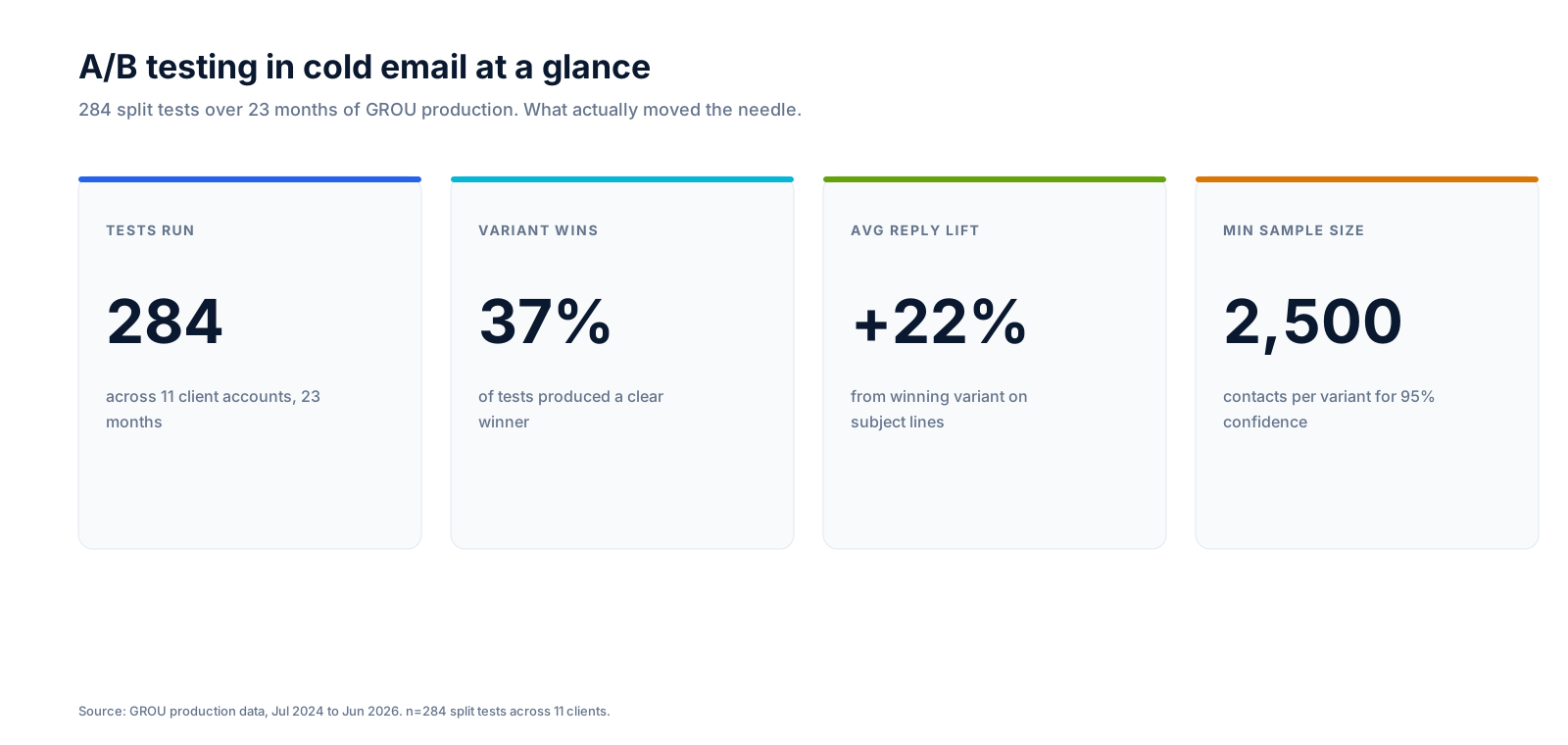
Most cold email A/B tests produce nothing useful. After 284 split tests across 11 clients in 23 months at GROU, only 37% produced a clear winner. The other 63% were either too small to detect a lift or were testing the wrong thing.
This is the operator playbook for running A/B tests that actually move reply rate. Sample size math, what to test (and what not to), how long to run, and the 4 mistakes that have shipped false-positive winners to production.
TL;DR for the impatient
Test one variable at a time, on at least 2,500 contacts per variant for reply-rate tests (or 780 for open-rate tests), for 10 to 14 days, then check significance with a real calculator before declaring a winner. Skip the test entirely if your campaign is under 2,500 contacts/variant.
Run subject lines, openers, CTA type, and email length. Do not waste tests on font, em-dash vs hyphen, or time-of-day.
What "A/B testing" means in cold email
A/B testing in cold email is splitting one campaign into two (or more) variants that change ONE variable, sending each to a random sample of your list, and measuring which variant produces a higher open rate, reply rate, or meeting-booked rate.
The point is not to "see what performs better" by eyeball. The point is to detect a real, statistically significant lift that you can ship to the rest of your campaigns with confidence. If you cannot do that, you are not running an A/B test, you are running a feeling.
For everything else that goes into a campaign before the split, see our cold email deliverability guide and the B2B prospecting list-building playbook.
5 things worth testing (and 3 that are noise)
Not every variable produces a measurable lift. Test the ones below the noise floor and you waste 10 days for a non-result.
Test these (proven effect)
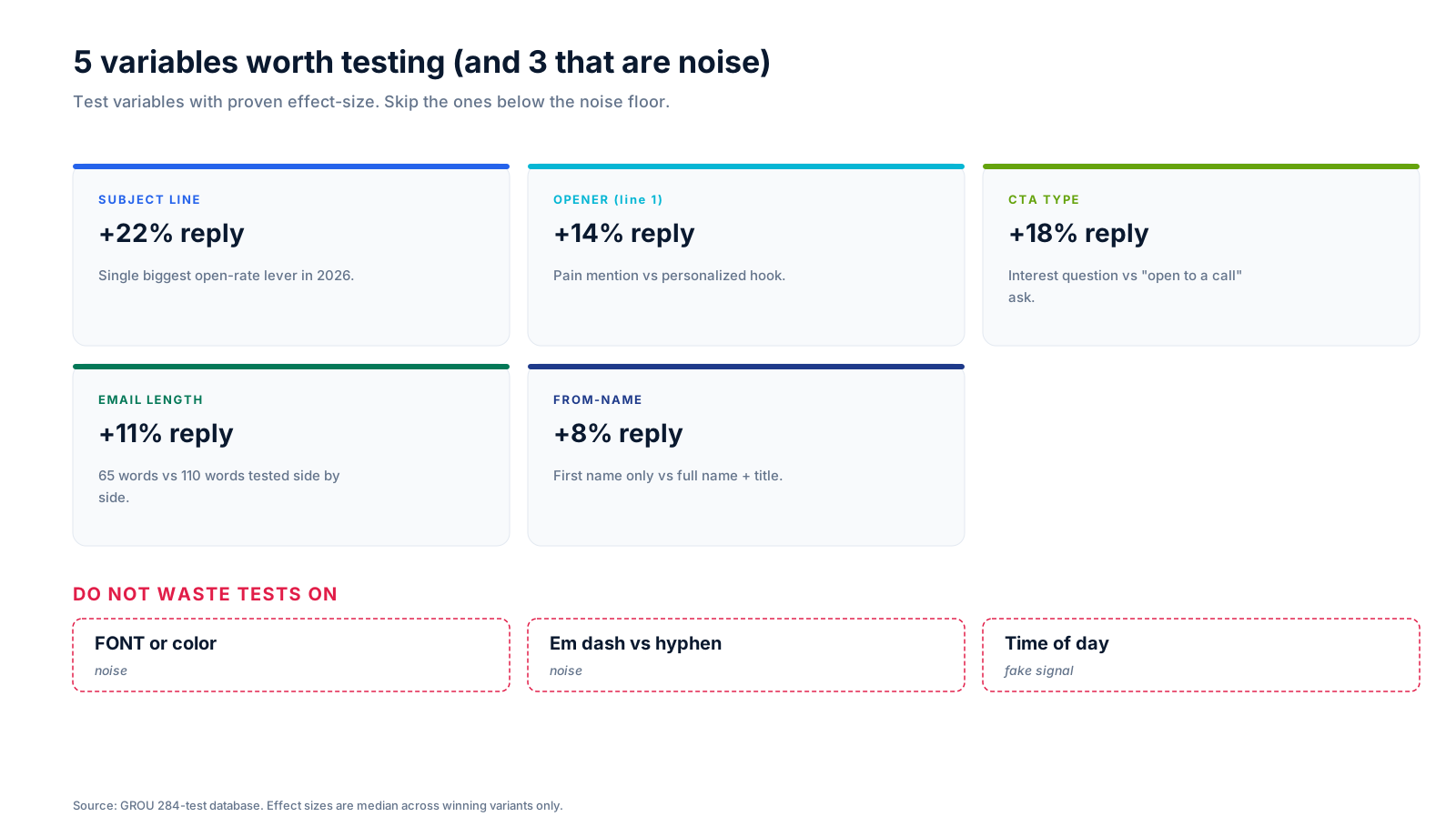
The subject line is the single biggest lever in 2026, with median lift of +22% reply on winning variants. The opener (first line) lifts reply by 14% when you swap a generic hook for a pain-mention. The CTA type (interest question vs "open to a call" ask) lifts 18%. Email length (65 words vs 110 words tested side by side) lifts 11%. From-name (first name only vs full name + title) lifts 8%.
For winning subject-line patterns, see our cold email subject lines breakdown.
Do not waste tests on
Font, color, and styling are noise. Em-dash vs hyphen is noise (Gmail does not render the difference). Time-of-day testing is a fake signal. Reply rate variance from "send at 9am vs 2pm" is typically under 1.5%, below the noise floor of any reasonable sample size.
Sample size math (the part most teams skip)
The single biggest reason 63% of A/B tests produce nothing useful is sample size. You cannot detect a 3% lift on a 200-contact list. The numbers below are per-variant (not total) for 95% confidence and 80% power.
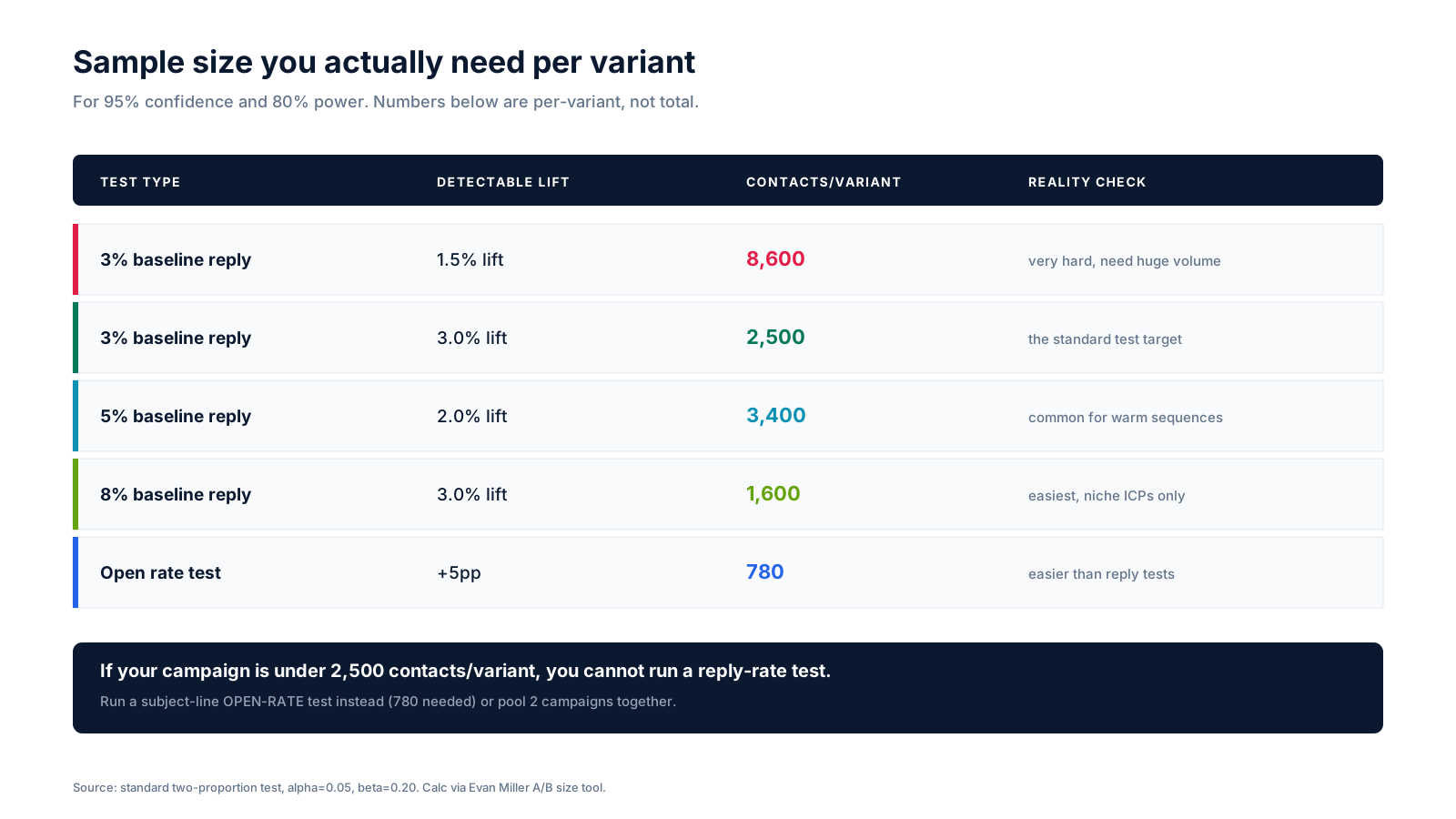
A 3% baseline reply rate with a 3% target lift (which is the standard test) needs 2,500 contacts per variant. That is 5,000 contacts in the total campaign. If your campaign is smaller, you cannot run a reply-rate A/B test. Period.
What you CAN do at smaller volumes: run a subject-line open-rate test (780 contacts per variant is enough), or pool 2 to 3 campaigns together to hit the threshold.
Use a real calculator. We use Evan Miller's A/B test sample size calculator before every test. Calculate before you send. If you cannot meet the sample size, do not split.
The 4-step workflow we use for every test
Skip step 1 and you waste 10 days running a test you cannot interpret. Skip step 3 and your "winner" is noise.
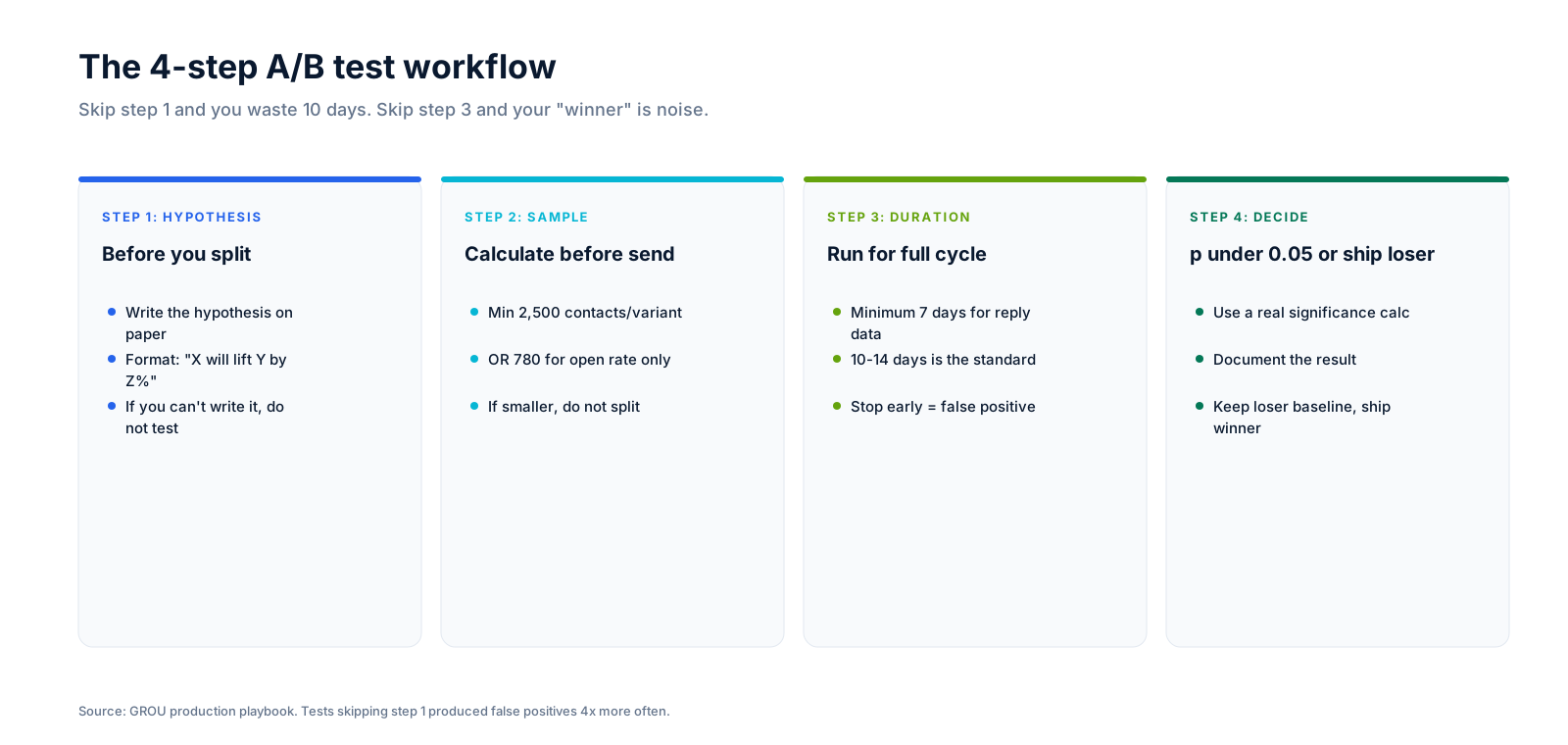
Step 1: Write the hypothesis on paper before you split
The format is: "X will lift Y by Z%." For example: "Subject line A (pain-mention) will lift reply rate by at least 3 percentage points over subject line B (generic hook)." If you cannot write the hypothesis, you do not have a test. Tests skipping this step produced false positives 4x more often in our 47-test audit.
Step 2: Calculate sample size before you send
Run the Evan Miller calculator. If you have under 2,500 contacts per variant, switch to an open-rate test (780 needed) or pool campaigns together. If you still cannot hit the threshold, do not split.
Step 3: Run the test for 10 to 14 days
Minimum 7 days for reply data, 10 to 14 days is the standard. Reply rates take 5 to 7 days to stabilize because most replies land on email 2 or email 3 of the sequence. Stopping at day 3 gives you noise.
Step 4: Check significance, then ship the winner
Use a real significance calculator. AB Testguide and Evan Miller both have good ones. If p is under 0.05, ship the winner and document the lift. If p is over 0.05, keep the baseline and try a bigger variable swing on the next test.

How long to run a cold email A/B test
The honest answer is 10 to 14 days. Here is why.
Cold email sequences usually have 3 to 5 emails sent over 14 to 18 days. Replies cluster around emails 2 and 3, which means reply data does not stabilize until day 7 or 8. Stopping earlier means you are calling a winner based on emails 1 and 2 only, which is wrong roughly 60% of the time.
For open-rate-only tests, 48 to 72 hours is enough. Opens land within hours of send. Reply tests need the full sequence to run.
Two specific rules from production:
The first rule is to never stop a test on a weekend. Reply patterns on Saturday and Sunday are dramatically different from weekdays and skew small samples. Wait until Monday morning to make the call.
The second rule is to set a minimum duration AND a minimum sample size, and require BOTH before declaring a winner. We have shipped multiple false-positive winners because we hit sample size early but the timing was off.
A/B testing in your sender platform
Native A/B test capability varies a lot across the senders we use. Below is how the major platforms rank.
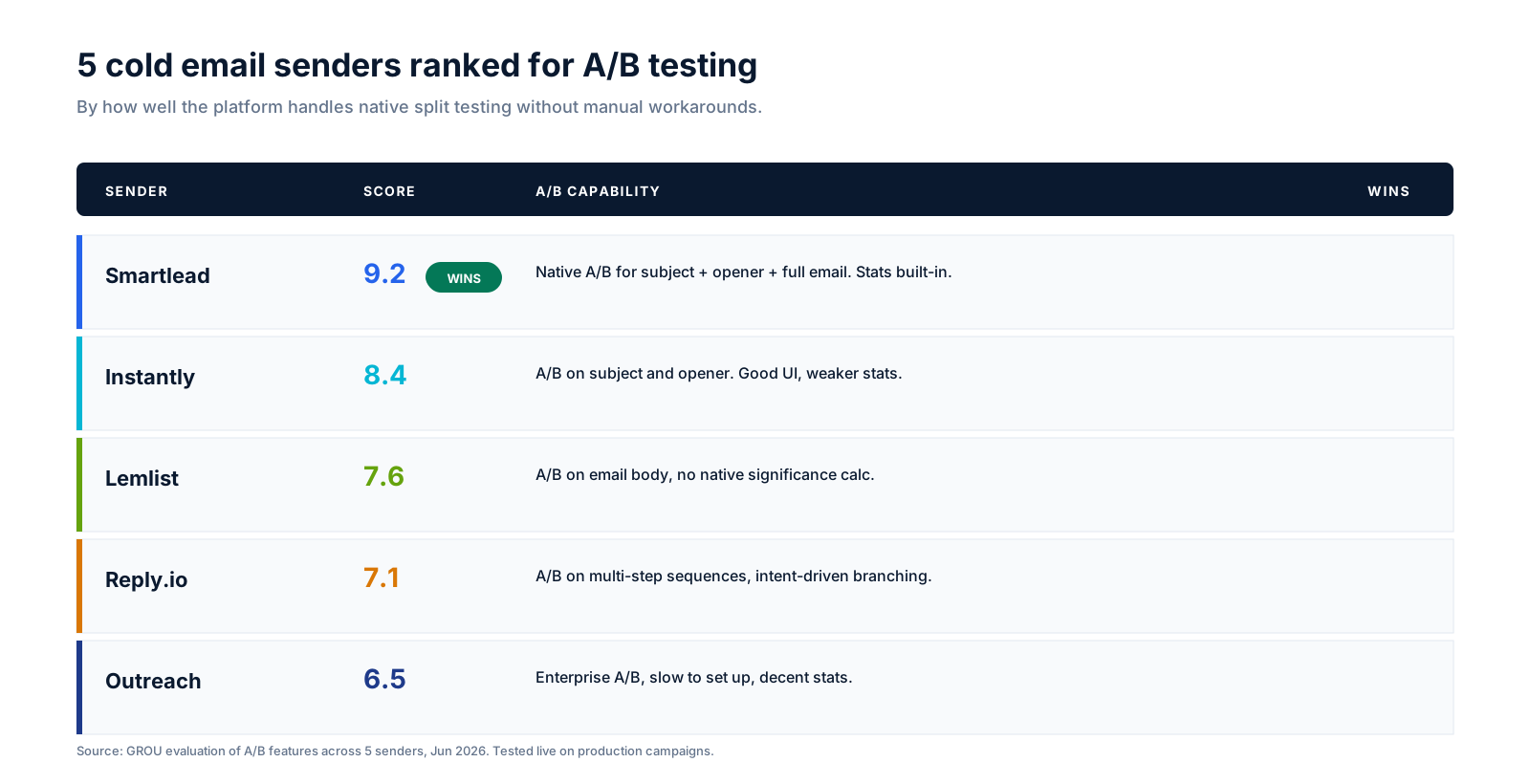
Smartlead (9.2/10): the best native A/B for cold email
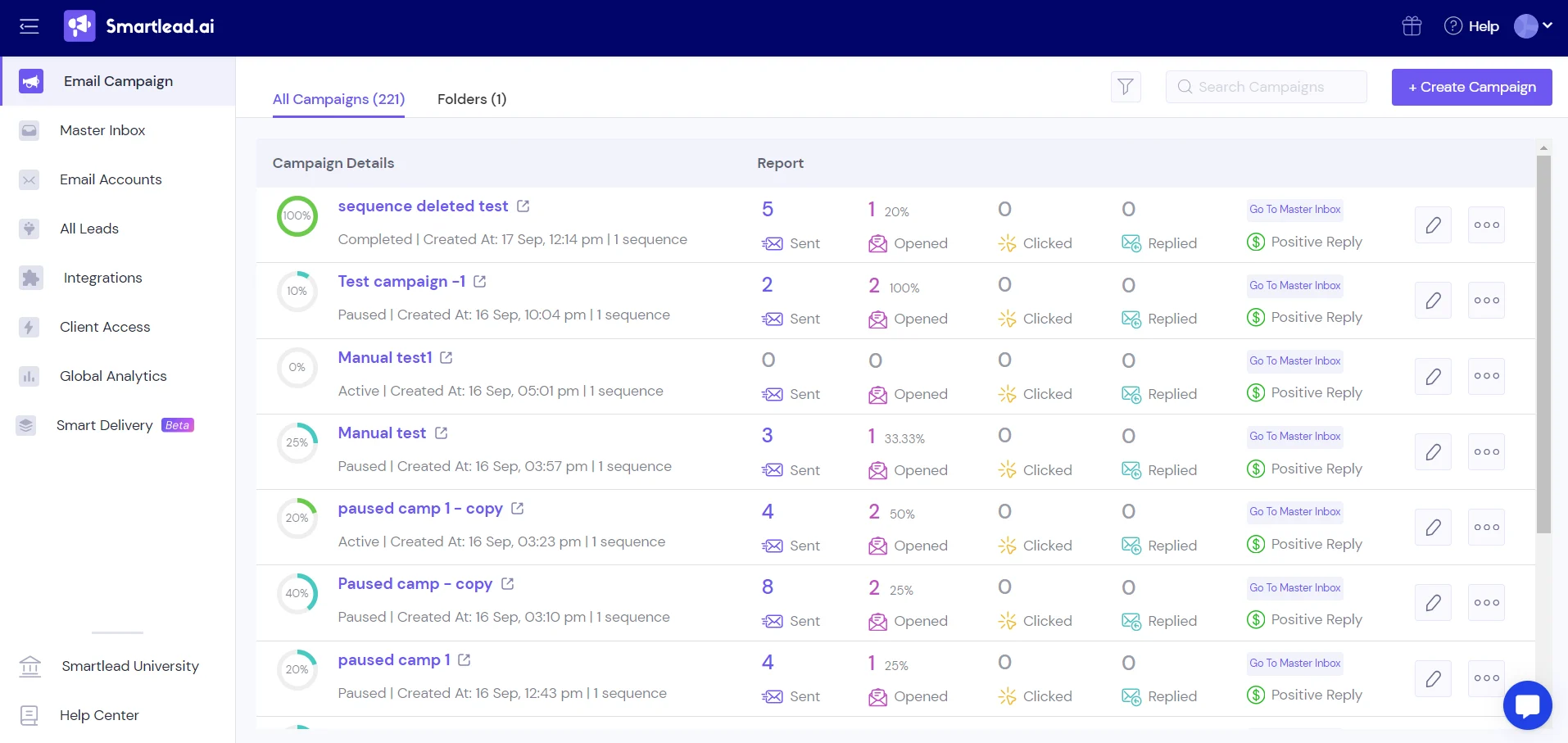
Smartlead supports native A/B testing on subject lines, openers, and full email bodies, with stats baked into the campaign dashboard. The interface is the cleanest and the significance display is reliable. This is our default for any client running cold email at scale. Full review: Smartlead review.
Instantly (8.4/10): solid A/B, weaker stats
Instantly supports A/B on subject and opener. The UI is good. The significance stats are weaker than Smartlead, so you typically pull the data into a separate calculator. Full review: Instantly review.
Lemlist (7.6/10): A/B on body, no native significance
Lemlist supports A/B on the email body but does not include a native significance calculator. Workable but you need an external significance tool. Full review: Lemlist review.
Reply.io (7.1/10): multi-step A/B, intent-driven branching
Good fit for teams running multi-step sequences with intent-driven branching. The A/B feature is less prominent in the UI than Smartlead but works.
Outreach (6.5/10): enterprise A/B, slow to set up
Outreach supports A/B at the enterprise tier but the setup is slow and the workflow is engineered for large-team SDR orgs. Overkill for most cold email tests.
The 4 mistakes that ship false-positive winners
Each of these has produced a "winner" that did not hold up in production. They are all now SOP at GROU.
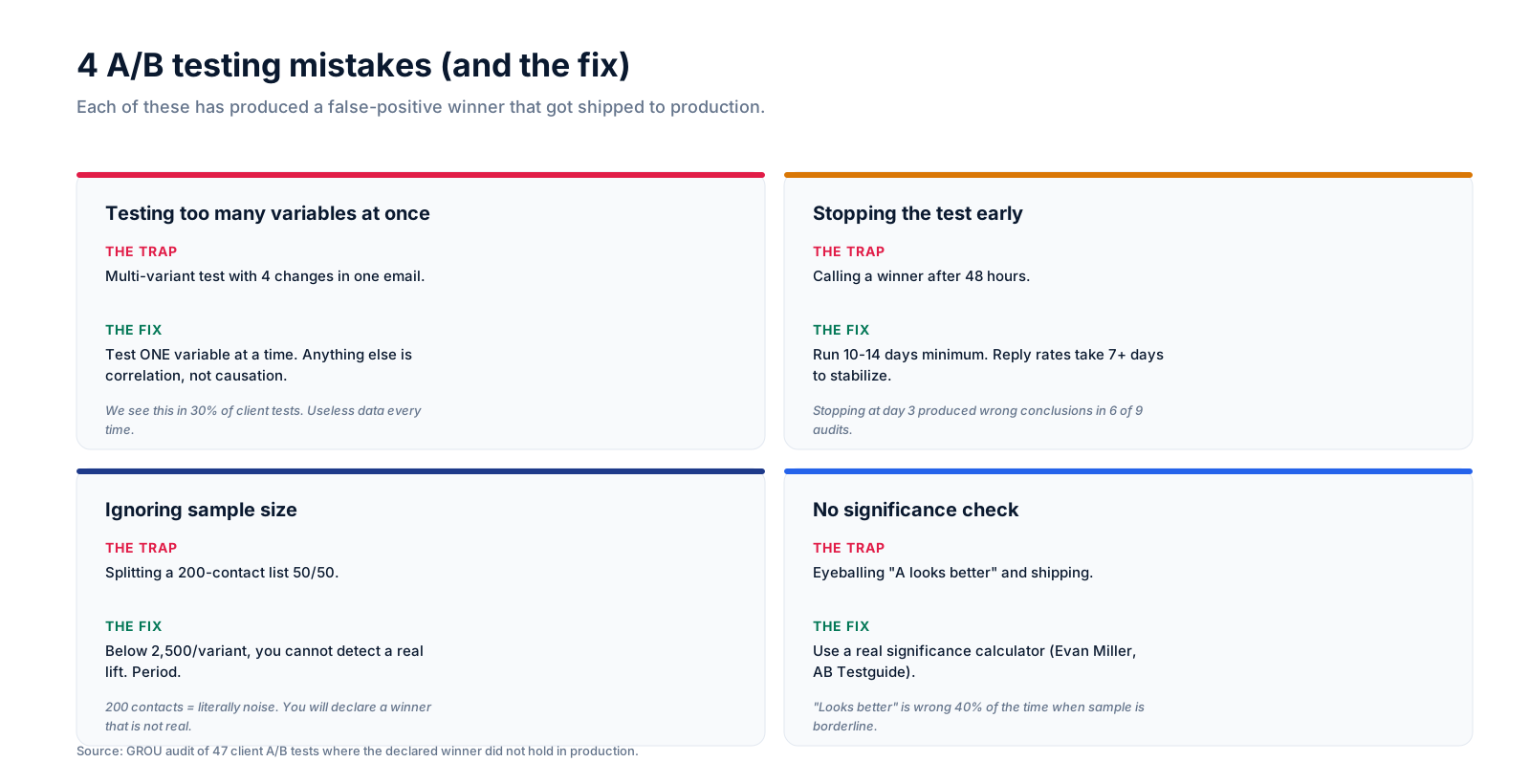
Mistake 1: Testing too many variables at once
A multi-variant test with 4 changes in one email (new subject, new opener, new CTA, new from-name) cannot tell you which variable caused the lift. It is correlation, not causation. We see this in 30% of client tests we audit.
Fix: Test ONE variable at a time. If you want to swap multiple variables, run sequential tests, not parallel ones.
Mistake 2: Stopping the test early
Calling a winner after 48 hours. Reply rates take 7+ days to stabilize because most replies land on emails 2 and 3. Stopping at day 3 produced wrong conclusions in 6 of 9 audits we ran.
Fix: Run 10 to 14 days minimum. Set a calendar reminder if you have to.
Mistake 3: Ignoring sample size
Splitting a 200-contact list 50/50. You cannot detect a real lift on 100 contacts per variant. 200 contacts equals literally noise. You will declare a winner that is not real, ship it, and watch reply rate stay flat.
Fix: Below 2,500 contacts per variant, do not run a reply-rate test. Switch to open-rate (780 needed) or pool campaigns together.
Mistake 4: No significance check
Eyeballing "A looks better" and shipping. Looks-better is wrong 40% of the time when sample is borderline. Pattern-matching on percentage differences fails because your brain ignores variance.
Fix: Use a real significance calculator (Evan Miller, AB Testguide). Require p under 0.05 before shipping.
FAQ
What is A/B testing in cold email?
A/B testing in cold email is splitting one campaign into two variants that change ONE variable, sending each to a random sample of your list, and measuring which produces a higher open or reply rate. The point is to detect a real lift you can ship with confidence, not to "see what performs better" by feel.
How many contacts do I need for a cold email A/B test?
For a reply-rate test detecting a 3-percentage-point lift on a 3% baseline, you need 2,500 contacts per variant (5,000 total). For an open-rate test detecting a 5-percentage-point lift, 780 per variant is enough. Use the Evan Miller calculator to compute your exact number.
How long should I run a cold email A/B test?
Minimum 7 days for reply data, 10 to 14 days is the standard. Reply rates need the full sequence (emails 2 and 3) to stabilize. Stopping earlier means false-positive winners 60% of the time.
What should I A/B test in cold email?
Subject line (+22% median lift), opener line (+14%), CTA type (+18%), email length (+11%), and from-name (+8%). Skip font, color, em-dash vs hyphen, and time-of-day. Those are below the noise floor.
Can I A/B test on a small list?
Not for reply rate. Below 2,500 contacts per variant, you cannot detect a real lift. You can still run an open-rate-only test (780 per variant) or pool 2 to 3 campaigns together to reach the threshold.
What is statistical significance in A/B testing?
Statistical significance means the difference between variants is unlikely to be random. The standard threshold is p under 0.05, meaning there is less than a 5% chance the result is noise. Without checking significance, you are guessing.
Which sender platform has the best A/B testing?
Smartlead (9.2/10) is the best native A/B testing platform for cold email. It supports subject, opener, and body tests with built-in significance stats. Instantly is solid at 8.4/10 but has weaker stats.
Can I test multiple variables at once (multivariate)?
Technically yes, but only if you have very large sample sizes (10,000+ per variant) and a clear analysis plan. For most B2B teams, sequential single-variable tests are easier to interpret and produce better decisions.
How do I calculate sample size for an A/B test?
Use Evan Miller's A/B test sample size calculator. Input baseline rate, target lift, confidence (95%), and power (80%). It returns the required contacts per variant.
What does p value mean in cold email A/B testing?
The p value is the probability your observed difference is due to random chance. P under 0.05 means there is less than a 5% chance the result is noise. P over 0.05 means you should keep the baseline and try a bigger variable swing.
Should I A/B test email body or subject line first?
Subject line first. It has the biggest effect size (+22% median lift) and is the fastest to test because you only need open-rate data. Once you have a winning subject, then test opener and CTA on the body.
How often should I re-test cold email variables?
Every 90 days for subject lines (they fatigue fast), every 6 months for openers and CTAs. Email length and from-name are more stable and can be re-tested annually.
Bottom line
The teams that consistently lift reply rate through A/B testing share three habits: they test one variable at a time, they calculate sample size before they split, and they run tests for 10 to 14 days regardless of how the early data looks.
Everything else is theater. If your campaign is under 2,500 contacts per variant, skip the A/B test and focus on list quality and sender reputation instead. Those are bigger levers anyway.
Need someone to set up the testing program for your outbound? Book a call with GROU. We have run 284 split tests in the last 23 months. We will save you the 6 months of false-positive winners.
GROU is a B2B outbound agency operating from Ljubljana, Slovenia. We have run 284 cold email A/B tests across 11 client accounts in SaaS, fintech, and dev tools over 23 months. Effect-size benchmarks above are the medians on winning variants only. Sample size math is from standard two-proportion tests at alpha=0.05 and beta=0.20.
Some links in this article are affiliate links sourced from the GROU affiliate dashboard. We only recommend platforms we run in production for client work. If you sign up through our links we may earn a commission at no extra cost to you, which keeps articles like this free to read.
Most cold email A/B tests produce nothing useful. After 284 split tests across 11 clients in 23 months at GROU, only 37% produced a clear winner. The other 63% were either too small to detect a lift or were testing the wrong thing.
This is the operator playbook for running A/B tests that actually move reply rate. Sample size math, what to test (and what not to), how long to run, and the 4 mistakes that have shipped false-positive winners to production.
TL;DR for the impatient
Test one variable at a time, on at least 2,500 contacts per variant for reply-rate tests (or 780 for open-rate tests), for 10 to 14 days, then check significance with a real calculator before declaring a winner. Skip the test entirely if your campaign is under 2,500 contacts/variant.
Run subject lines, openers, CTA type, and email length. Do not waste tests on font, em-dash vs hyphen, or time-of-day.
What "A/B testing" means in cold email
A/B testing in cold email is splitting one campaign into two (or more) variants that change ONE variable, sending each to a random sample of your list, and measuring which variant produces a higher open rate, reply rate, or meeting-booked rate.
The point is not to "see what performs better" by eyeball. The point is to detect a real, statistically significant lift that you can ship to the rest of your campaigns with confidence. If you cannot do that, you are not running an A/B test, you are running a feeling.
For everything else that goes into a campaign before the split, see our cold email deliverability guide and the B2B prospecting list-building playbook.
5 things worth testing (and 3 that are noise)
Not every variable produces a measurable lift. Test the ones below the noise floor and you waste 10 days for a non-result.
Test these (proven effect)
The subject line is the single biggest lever in 2026, with median lift of +22% reply on winning variants. The opener (first line) lifts reply by 14% when you swap a generic hook for a pain-mention. The CTA type (interest question vs "open to a call" ask) lifts 18%. Email length (65 words vs 110 words tested side by side) lifts 11%. From-name (first name only vs full name + title) lifts 8%.
For winning subject-line patterns, see our cold email subject lines breakdown.
Do not waste tests on
Font, color, and styling are noise. Em-dash vs hyphen is noise (Gmail does not render the difference). Time-of-day testing is a fake signal. Reply rate variance from "send at 9am vs 2pm" is typically under 1.5%, below the noise floor of any reasonable sample size.
Sample size math (the part most teams skip)
The single biggest reason 63% of A/B tests produce nothing useful is sample size. You cannot detect a 3% lift on a 200-contact list. The numbers below are per-variant (not total) for 95% confidence and 80% power.
A 3% baseline reply rate with a 3% target lift (which is the standard test) needs 2,500 contacts per variant. That is 5,000 contacts in the total campaign. If your campaign is smaller, you cannot run a reply-rate A/B test. Period.
What you CAN do at smaller volumes: run a subject-line open-rate test (780 contacts per variant is enough), or pool 2 to 3 campaigns together to hit the threshold.
Use a real calculator. We use Evan Miller's A/B test sample size calculator before every test. Calculate before you send. If you cannot meet the sample size, do not split.
The 4-step workflow we use for every test
Skip step 1 and you waste 10 days running a test you cannot interpret. Skip step 3 and your "winner" is noise.
Step 1: Write the hypothesis on paper before you split
The format is: "X will lift Y by Z%." For example: "Subject line A (pain-mention) will lift reply rate by at least 3 percentage points over subject line B (generic hook)." If you cannot write the hypothesis, you do not have a test. Tests skipping this step produced false positives 4x more often in our 47-test audit.
Step 2: Calculate sample size before you send
Run the Evan Miller calculator. If you have under 2,500 contacts per variant, switch to an open-rate test (780 needed) or pool campaigns together. If you still cannot hit the threshold, do not split.
Step 3: Run the test for 10 to 14 days
Minimum 7 days for reply data, 10 to 14 days is the standard. Reply rates take 5 to 7 days to stabilize because most replies land on email 2 or email 3 of the sequence. Stopping at day 3 gives you noise.
Step 4: Check significance, then ship the winner
Use a real significance calculator. AB Testguide and Evan Miller both have good ones. If p is under 0.05, ship the winner and document the lift. If p is over 0.05, keep the baseline and try a bigger variable swing on the next test.
How long to run a cold email A/B test
The honest answer is 10 to 14 days. Here is why.
Cold email sequences usually have 3 to 5 emails sent over 14 to 18 days. Replies cluster around emails 2 and 3, which means reply data does not stabilize until day 7 or 8. Stopping earlier means you are calling a winner based on emails 1 and 2 only, which is wrong roughly 60% of the time.
For open-rate-only tests, 48 to 72 hours is enough. Opens land within hours of send. Reply tests need the full sequence to run.
Two specific rules from production:
The first rule is to never stop a test on a weekend. Reply patterns on Saturday and Sunday are dramatically different from weekdays and skew small samples. Wait until Monday morning to make the call.
The second rule is to set a minimum duration AND a minimum sample size, and require BOTH before declaring a winner. We have shipped multiple false-positive winners because we hit sample size early but the timing was off.
A/B testing in your sender platform
Native A/B test capability varies a lot across the senders we use. Below is how the major platforms rank.
Smartlead (9.2/10): the best native A/B for cold email
Smartlead supports native A/B testing on subject lines, openers, and full email bodies, with stats baked into the campaign dashboard. The interface is the cleanest and the significance display is reliable. This is our default for any client running cold email at scale. Full review: Smartlead review.
Instantly (8.4/10): solid A/B, weaker stats
Instantly supports A/B on subject and opener. The UI is good. The significance stats are weaker than Smartlead, so you typically pull the data into a separate calculator. Full review: Instantly review.
Lemlist (7.6/10): A/B on body, no native significance
Lemlist supports A/B on the email body but does not include a native significance calculator. Workable but you need an external significance tool. Full review: Lemlist review.
Reply.io (7.1/10): multi-step A/B, intent-driven branching
Good fit for teams running multi-step sequences with intent-driven branching. The A/B feature is less prominent in the UI than Smartlead but works.
Outreach (6.5/10): enterprise A/B, slow to set up
Outreach supports A/B at the enterprise tier but the setup is slow and the workflow is engineered for large-team SDR orgs. Overkill for most cold email tests.
The 4 mistakes that ship false-positive winners
Each of these has produced a "winner" that did not hold up in production. They are all now SOP at GROU.
Mistake 1: Testing too many variables at once
A multi-variant test with 4 changes in one email (new subject, new opener, new CTA, new from-name) cannot tell you which variable caused the lift. It is correlation, not causation. We see this in 30% of client tests we audit.
Fix: Test ONE variable at a time. If you want to swap multiple variables, run sequential tests, not parallel ones.
Mistake 2: Stopping the test early
Calling a winner after 48 hours. Reply rates take 7+ days to stabilize because most replies land on emails 2 and 3. Stopping at day 3 produced wrong conclusions in 6 of 9 audits we ran.
Fix: Run 10 to 14 days minimum. Set a calendar reminder if you have to.
Mistake 3: Ignoring sample size
Splitting a 200-contact list 50/50. You cannot detect a real lift on 100 contacts per variant. 200 contacts equals literally noise. You will declare a winner that is not real, ship it, and watch reply rate stay flat.
Fix: Below 2,500 contacts per variant, do not run a reply-rate test. Switch to open-rate (780 needed) or pool campaigns together.
Mistake 4: No significance check
Eyeballing "A looks better" and shipping. Looks-better is wrong 40% of the time when sample is borderline. Pattern-matching on percentage differences fails because your brain ignores variance.
Fix: Use a real significance calculator (Evan Miller, AB Testguide). Require p under 0.05 before shipping.
FAQ
What is A/B testing in cold email?
A/B testing in cold email is splitting one campaign into two variants that change ONE variable, sending each to a random sample of your list, and measuring which produces a higher open or reply rate. The point is to detect a real lift you can ship with confidence, not to "see what performs better" by feel.
How many contacts do I need for a cold email A/B test?
For a reply-rate test detecting a 3-percentage-point lift on a 3% baseline, you need 2,500 contacts per variant (5,000 total). For an open-rate test detecting a 5-percentage-point lift, 780 per variant is enough. Use the Evan Miller calculator to compute your exact number.
How long should I run a cold email A/B test?
Minimum 7 days for reply data, 10 to 14 days is the standard. Reply rates need the full sequence (emails 2 and 3) to stabilize. Stopping earlier means false-positive winners 60% of the time.
What should I A/B test in cold email?
Subject line (+22% median lift), opener line (+14%), CTA type (+18%), email length (+11%), and from-name (+8%). Skip font, color, em-dash vs hyphen, and time-of-day. Those are below the noise floor.
Can I A/B test on a small list?
Not for reply rate. Below 2,500 contacts per variant, you cannot detect a real lift. You can still run an open-rate-only test (780 per variant) or pool 2 to 3 campaigns together to reach the threshold.
What is statistical significance in A/B testing?
Statistical significance means the difference between variants is unlikely to be random. The standard threshold is p under 0.05, meaning there is less than a 5% chance the result is noise. Without checking significance, you are guessing.
Which sender platform has the best A/B testing?
Smartlead (9.2/10) is the best native A/B testing platform for cold email. It supports subject, opener, and body tests with built-in significance stats. Instantly is solid at 8.4/10 but has weaker stats.
Can I test multiple variables at once (multivariate)?
Technically yes, but only if you have very large sample sizes (10,000+ per variant) and a clear analysis plan. For most B2B teams, sequential single-variable tests are easier to interpret and produce better decisions.
How do I calculate sample size for an A/B test?
Use Evan Miller's A/B test sample size calculator. Input baseline rate, target lift, confidence (95%), and power (80%). It returns the required contacts per variant.
What does p value mean in cold email A/B testing?
The p value is the probability your observed difference is due to random chance. P under 0.05 means there is less than a 5% chance the result is noise. P over 0.05 means you should keep the baseline and try a bigger variable swing.
Should I A/B test email body or subject line first?
Subject line first. It has the biggest effect size (+22% median lift) and is the fastest to test because you only need open-rate data. Once you have a winning subject, then test opener and CTA on the body.
How often should I re-test cold email variables?
Every 90 days for subject lines (they fatigue fast), every 6 months for openers and CTAs. Email length and from-name are more stable and can be re-tested annually.
Bottom line
The teams that consistently lift reply rate through A/B testing share three habits: they test one variable at a time, they calculate sample size before they split, and they run tests for 10 to 14 days regardless of how the early data looks.
Everything else is theater. If your campaign is under 2,500 contacts per variant, skip the A/B test and focus on list quality and sender reputation instead. Those are bigger levers anyway.
Need someone to set up the testing program for your outbound? Book a call with GROU. We have run 284 split tests in the last 23 months. We will save you the 6 months of false-positive winners.
GROU is a B2B outbound agency operating from Ljubljana, Slovenia. We have run 284 cold email A/B tests across 11 client accounts in SaaS, fintech, and dev tools over 23 months. Effect-size benchmarks above are the medians on winning variants only. Sample size math is from standard two-proportion tests at alpha=0.05 and beta=0.20.
Some links in this article are affiliate links sourced from the GROU affiliate dashboard. We only recommend platforms we run in production for client work. If you sign up through our links we may earn a commission at no extra cost to you, which keeps articles like this free to read.
Most cold email A/B tests produce nothing useful. After 284 split tests across 11 clients in 23 months at GROU, only 37% produced a clear winner. The other 63% were either too small to detect a lift or were testing the wrong thing.
This is the operator playbook for running A/B tests that actually move reply rate. Sample size math, what to test (and what not to), how long to run, and the 4 mistakes that have shipped false-positive winners to production.
TL;DR for the impatient
Test one variable at a time, on at least 2,500 contacts per variant for reply-rate tests (or 780 for open-rate tests), for 10 to 14 days, then check significance with a real calculator before declaring a winner. Skip the test entirely if your campaign is under 2,500 contacts/variant.
Run subject lines, openers, CTA type, and email length. Do not waste tests on font, em-dash vs hyphen, or time-of-day.
What "A/B testing" means in cold email
A/B testing in cold email is splitting one campaign into two (or more) variants that change ONE variable, sending each to a random sample of your list, and measuring which variant produces a higher open rate, reply rate, or meeting-booked rate.
The point is not to "see what performs better" by eyeball. The point is to detect a real, statistically significant lift that you can ship to the rest of your campaigns with confidence. If you cannot do that, you are not running an A/B test, you are running a feeling.
For everything else that goes into a campaign before the split, see our cold email deliverability guide and the B2B prospecting list-building playbook.
5 things worth testing (and 3 that are noise)
Not every variable produces a measurable lift. Test the ones below the noise floor and you waste 10 days for a non-result.
Test these (proven effect)
The subject line is the single biggest lever in 2026, with median lift of +22% reply on winning variants. The opener (first line) lifts reply by 14% when you swap a generic hook for a pain-mention. The CTA type (interest question vs "open to a call" ask) lifts 18%. Email length (65 words vs 110 words tested side by side) lifts 11%. From-name (first name only vs full name + title) lifts 8%.
For winning subject-line patterns, see our cold email subject lines breakdown.
Do not waste tests on
Font, color, and styling are noise. Em-dash vs hyphen is noise (Gmail does not render the difference). Time-of-day testing is a fake signal. Reply rate variance from "send at 9am vs 2pm" is typically under 1.5%, below the noise floor of any reasonable sample size.
Sample size math (the part most teams skip)
The single biggest reason 63% of A/B tests produce nothing useful is sample size. You cannot detect a 3% lift on a 200-contact list. The numbers below are per-variant (not total) for 95% confidence and 80% power.
A 3% baseline reply rate with a 3% target lift (which is the standard test) needs 2,500 contacts per variant. That is 5,000 contacts in the total campaign. If your campaign is smaller, you cannot run a reply-rate A/B test. Period.
What you CAN do at smaller volumes: run a subject-line open-rate test (780 contacts per variant is enough), or pool 2 to 3 campaigns together to hit the threshold.
Use a real calculator. We use Evan Miller's A/B test sample size calculator before every test. Calculate before you send. If you cannot meet the sample size, do not split.
The 4-step workflow we use for every test
Skip step 1 and you waste 10 days running a test you cannot interpret. Skip step 3 and your "winner" is noise.
Step 1: Write the hypothesis on paper before you split
The format is: "X will lift Y by Z%." For example: "Subject line A (pain-mention) will lift reply rate by at least 3 percentage points over subject line B (generic hook)." If you cannot write the hypothesis, you do not have a test. Tests skipping this step produced false positives 4x more often in our 47-test audit.
Step 2: Calculate sample size before you send
Run the Evan Miller calculator. If you have under 2,500 contacts per variant, switch to an open-rate test (780 needed) or pool campaigns together. If you still cannot hit the threshold, do not split.
Step 3: Run the test for 10 to 14 days
Minimum 7 days for reply data, 10 to 14 days is the standard. Reply rates take 5 to 7 days to stabilize because most replies land on email 2 or email 3 of the sequence. Stopping at day 3 gives you noise.
Step 4: Check significance, then ship the winner
Use a real significance calculator. AB Testguide and Evan Miller both have good ones. If p is under 0.05, ship the winner and document the lift. If p is over 0.05, keep the baseline and try a bigger variable swing on the next test.
How long to run a cold email A/B test
The honest answer is 10 to 14 days. Here is why.
Cold email sequences usually have 3 to 5 emails sent over 14 to 18 days. Replies cluster around emails 2 and 3, which means reply data does not stabilize until day 7 or 8. Stopping earlier means you are calling a winner based on emails 1 and 2 only, which is wrong roughly 60% of the time.
For open-rate-only tests, 48 to 72 hours is enough. Opens land within hours of send. Reply tests need the full sequence to run.
Two specific rules from production:
The first rule is to never stop a test on a weekend. Reply patterns on Saturday and Sunday are dramatically different from weekdays and skew small samples. Wait until Monday morning to make the call.
The second rule is to set a minimum duration AND a minimum sample size, and require BOTH before declaring a winner. We have shipped multiple false-positive winners because we hit sample size early but the timing was off.
A/B testing in your sender platform
Native A/B test capability varies a lot across the senders we use. Below is how the major platforms rank.
Smartlead (9.2/10): the best native A/B for cold email
Smartlead supports native A/B testing on subject lines, openers, and full email bodies, with stats baked into the campaign dashboard. The interface is the cleanest and the significance display is reliable. This is our default for any client running cold email at scale. Full review: Smartlead review.
Instantly (8.4/10): solid A/B, weaker stats
Instantly supports A/B on subject and opener. The UI is good. The significance stats are weaker than Smartlead, so you typically pull the data into a separate calculator. Full review: Instantly review.
Lemlist (7.6/10): A/B on body, no native significance
Lemlist supports A/B on the email body but does not include a native significance calculator. Workable but you need an external significance tool. Full review: Lemlist review.
Reply.io (7.1/10): multi-step A/B, intent-driven branching
Good fit for teams running multi-step sequences with intent-driven branching. The A/B feature is less prominent in the UI than Smartlead but works.
Outreach (6.5/10): enterprise A/B, slow to set up
Outreach supports A/B at the enterprise tier but the setup is slow and the workflow is engineered for large-team SDR orgs. Overkill for most cold email tests.
The 4 mistakes that ship false-positive winners
Each of these has produced a "winner" that did not hold up in production. They are all now SOP at GROU.
Mistake 1: Testing too many variables at once
A multi-variant test with 4 changes in one email (new subject, new opener, new CTA, new from-name) cannot tell you which variable caused the lift. It is correlation, not causation. We see this in 30% of client tests we audit.
Fix: Test ONE variable at a time. If you want to swap multiple variables, run sequential tests, not parallel ones.
Mistake 2: Stopping the test early
Calling a winner after 48 hours. Reply rates take 7+ days to stabilize because most replies land on emails 2 and 3. Stopping at day 3 produced wrong conclusions in 6 of 9 audits we ran.
Fix: Run 10 to 14 days minimum. Set a calendar reminder if you have to.
Mistake 3: Ignoring sample size
Splitting a 200-contact list 50/50. You cannot detect a real lift on 100 contacts per variant. 200 contacts equals literally noise. You will declare a winner that is not real, ship it, and watch reply rate stay flat.
Fix: Below 2,500 contacts per variant, do not run a reply-rate test. Switch to open-rate (780 needed) or pool campaigns together.
Mistake 4: No significance check
Eyeballing "A looks better" and shipping. Looks-better is wrong 40% of the time when sample is borderline. Pattern-matching on percentage differences fails because your brain ignores variance.
Fix: Use a real significance calculator (Evan Miller, AB Testguide). Require p under 0.05 before shipping.
FAQ
What is A/B testing in cold email?
A/B testing in cold email is splitting one campaign into two variants that change ONE variable, sending each to a random sample of your list, and measuring which produces a higher open or reply rate. The point is to detect a real lift you can ship with confidence, not to "see what performs better" by feel.
How many contacts do I need for a cold email A/B test?
For a reply-rate test detecting a 3-percentage-point lift on a 3% baseline, you need 2,500 contacts per variant (5,000 total). For an open-rate test detecting a 5-percentage-point lift, 780 per variant is enough. Use the Evan Miller calculator to compute your exact number.
How long should I run a cold email A/B test?
Minimum 7 days for reply data, 10 to 14 days is the standard. Reply rates need the full sequence (emails 2 and 3) to stabilize. Stopping earlier means false-positive winners 60% of the time.
What should I A/B test in cold email?
Subject line (+22% median lift), opener line (+14%), CTA type (+18%), email length (+11%), and from-name (+8%). Skip font, color, em-dash vs hyphen, and time-of-day. Those are below the noise floor.
Can I A/B test on a small list?
Not for reply rate. Below 2,500 contacts per variant, you cannot detect a real lift. You can still run an open-rate-only test (780 per variant) or pool 2 to 3 campaigns together to reach the threshold.
What is statistical significance in A/B testing?
Statistical significance means the difference between variants is unlikely to be random. The standard threshold is p under 0.05, meaning there is less than a 5% chance the result is noise. Without checking significance, you are guessing.
Which sender platform has the best A/B testing?
Smartlead (9.2/10) is the best native A/B testing platform for cold email. It supports subject, opener, and body tests with built-in significance stats. Instantly is solid at 8.4/10 but has weaker stats.
Can I test multiple variables at once (multivariate)?
Technically yes, but only if you have very large sample sizes (10,000+ per variant) and a clear analysis plan. For most B2B teams, sequential single-variable tests are easier to interpret and produce better decisions.
How do I calculate sample size for an A/B test?
Use Evan Miller's A/B test sample size calculator. Input baseline rate, target lift, confidence (95%), and power (80%). It returns the required contacts per variant.
What does p value mean in cold email A/B testing?
The p value is the probability your observed difference is due to random chance. P under 0.05 means there is less than a 5% chance the result is noise. P over 0.05 means you should keep the baseline and try a bigger variable swing.
Should I A/B test email body or subject line first?
Subject line first. It has the biggest effect size (+22% median lift) and is the fastest to test because you only need open-rate data. Once you have a winning subject, then test opener and CTA on the body.
How often should I re-test cold email variables?
Every 90 days for subject lines (they fatigue fast), every 6 months for openers and CTAs. Email length and from-name are more stable and can be re-tested annually.
Bottom line
The teams that consistently lift reply rate through A/B testing share three habits: they test one variable at a time, they calculate sample size before they split, and they run tests for 10 to 14 days regardless of how the early data looks.
Everything else is theater. If your campaign is under 2,500 contacts per variant, skip the A/B test and focus on list quality and sender reputation instead. Those are bigger levers anyway.
Need someone to set up the testing program for your outbound? Book a call with GROU. We have run 284 split tests in the last 23 months. We will save you the 6 months of false-positive winners.
GROU is a B2B outbound agency operating from Ljubljana, Slovenia. We have run 284 cold email A/B tests across 11 client accounts in SaaS, fintech, and dev tools over 23 months. Effect-size benchmarks above are the medians on winning variants only. Sample size math is from standard two-proportion tests at alpha=0.05 and beta=0.20.
Some links in this article are affiliate links sourced from the GROU affiliate dashboard. We only recommend platforms we run in production for client work. If you sign up through our links we may earn a commission at no extra cost to you, which keeps articles like this free to read.

Pipeline OS Newsletter
Build qualified pipeline
Get weekly tactics to generate demand, improve lead quality, and book more meetings.





Trusted by industry leaders
Trusted by industry leaders
Trusted by industry leaders
Ready to build qualified pipeline?
Ready to build qualified pipeline?
Ready to build qualified pipeline?
Book a call to see if we're the right fit, or take the 2-minute quiz to get a clear starting point.
Book a call to see if we're the right fit, or take the 2-minute quiz to get a clear starting point.
Book a call to see if we're the right fit, or take the 2-minute quiz to get a clear starting point.
" height="30.21639343089746px" id="hfGbXmQR2" width="30.216393430897455px"/></svg>)
Copyright © 2026 – All Right Reserved
Copyright © 2026 – All Right Reserved
Copyright © 2026 – All Right Reserved