%22%3E%3C/path%3E%3Cpath d=%22M 63.072 7.554 C 62.258 8.022 61.577 8.689 61.092 9.493 L 61.092 7.076 L 57.158 7.076 L 57.158 22.64 L 61.089 22.64 L 61.089 14.888 C 61.089 13.446 61.403 12.434 62.03 11.853 C 62.818 11.218 63.818 10.907 64.826 10.982 L 65.868 10.982 L 65.868 6.851 C 64.891 6.834 63.926 7.076 63.073 7.554 Z%22 fill=%22rgb(17,17,17)%22%3E%3C/path%3E%3Cpath d=%22M 78.916 7.82 C 76.363 6.49 73.321 6.49 70.768 7.82 C 69.562 8.473 68.564 9.451 67.888 10.644 C 67.167 11.931 66.803 13.387 66.834 14.862 C 66.804 16.332 67.157 17.785 67.86 19.077 C 68.515 20.267 69.494 21.246 70.684 21.901 C 71.924 22.576 73.318 22.92 74.73 22.898 C 76.164 22.918 77.58 22.575 78.846 21.901 C 80.062 21.247 81.073 20.27 81.768 19.077 C 82.506 17.797 82.88 16.339 82.85 14.862 C 82.88 13.389 82.517 11.934 81.797 10.647 C 81.12 9.455 80.122 8.477 78.917 7.824 M 78.803 14.862 C 78.829 15.739 78.636 16.608 78.241 17.391 C 77.903 18.046 77.38 18.588 76.738 18.95 C 76.124 19.293 75.432 19.472 74.729 19.47 C 73.668 19.497 72.648 19.061 71.934 18.276 C 71.139 17.323 70.741 16.1 70.823 14.862 C 70.741 13.62 71.149 12.395 71.959 11.45 C 72.687 10.667 73.715 10.233 74.783 10.256 C 75.859 10.236 76.894 10.67 77.635 11.45 C 78.464 12.387 78.884 13.616 78.801 14.864%22 fill=%22rgb(17,17,17)%22%3E%3C/path%3E%3Cpath d=%22M 95.906 7.076 L 95.906 15.646 C 95.975 16.68 95.643 17.701 94.979 18.498 C 94.311 19.184 93.379 19.547 92.422 19.495 C 91.475 19.544 90.553 19.18 89.894 18.498 C 89.23 17.701 88.898 16.68 88.967 15.646 L 88.967 7.076 L 85.033 7.076 L 85.033 16.207 C 85 17.449 85.275 18.68 85.834 19.79 C 86.327 20.75 87.095 21.542 88.039 22.065 C 89.033 22.594 90.145 22.861 91.271 22.838 C 92.188 22.847 93.095 22.65 93.926 22.263 C 94.708 21.905 95.388 21.36 95.906 20.675 L 95.906 22.645 L 99.865 22.645 L 99.865 7.076 Z%22 fill=%22rgb(17,17,17)%22%3E%3C/path%3E%3Cpath d=%22M 4.513 15.626 C 4.511 10.815 7.606 6.549 12.181 5.059 C 16.756 3.57 21.77 5.195 24.601 9.086 L 27.816 5.87 C 24.074 1.186 17.981 -0.943 12.137 0.393 C 6.292 1.728 1.728 6.292 0.393 12.137 C -0.943 17.981 1.186 24.074 5.87 27.816 L 9.085 24.601 C 6.214 22.512 4.515 19.177 4.513 15.626%22 fill=%22rgb(32,62,235)%22%3E%3C/path%3E%3Cpath d=%22M 17.114 14.343 L 13.354 18.01 L 13.354 18.026 L 21.071 18.026 L 11.412 27.609 L 17.389 27.609 L 23.999 21.081 L 23.999 28.316 L 24.005 28.316 L 27.967 24.393 L 27.967 14.343 Z%22 fill=%22rgb(32,62,235)%22%3E%3C/path%3E%3C/g%3E%3C/svg%3E) ×
× ××
××

Cold email deliverability is the single biggest cost-driver of a cold email campaign in 2026. Bad deliverability means your emails land in spam, your open rate drops to 12%, your reply rate collapses, and your sending domain gets flagged for weeks. We've run cold email for 47 B2B clients at GROU since 2022, and the deliverability stack below is the one we deploy on every founder engagement.
If your open rate is below 30% or your reply rate is below 1%, deliverability is almost certainly the problem — not the copy. This guide covers the 5 pillars of deliverability, the tool stack we run in production, the warmup options that actually work, the diagnostics flow when things go wrong, and the mistakes that drive cost-per-demo up the fastest.
Quick overview
Cold email deliverability rests on 5 pillars: a separate sending domain, SPF/DKIM/DMARC authentication, 2-week warmup, throttled sending (25-30 emails per inbox per day), and continuous reputation monitoring. Skip any one and inbox placement drops 15-40 percentage points within 2 weeks.
The 5 pillars:
Separate sending domain (never your main domain)
SPF, DKIM, DMARC authentication records
2-week warmup before live sending
Throttled sending: 25-30 emails per inbox per day, 3 inboxes per domain
Continuous reputation monitoring + bounce rate under 2%
Source: Smartlead 2025 deliverability benchmark + GROU 47-client production data. Google's 2024 bulk sender update tightened all 5 of these rules.
The 5 pillars of cold email deliverability
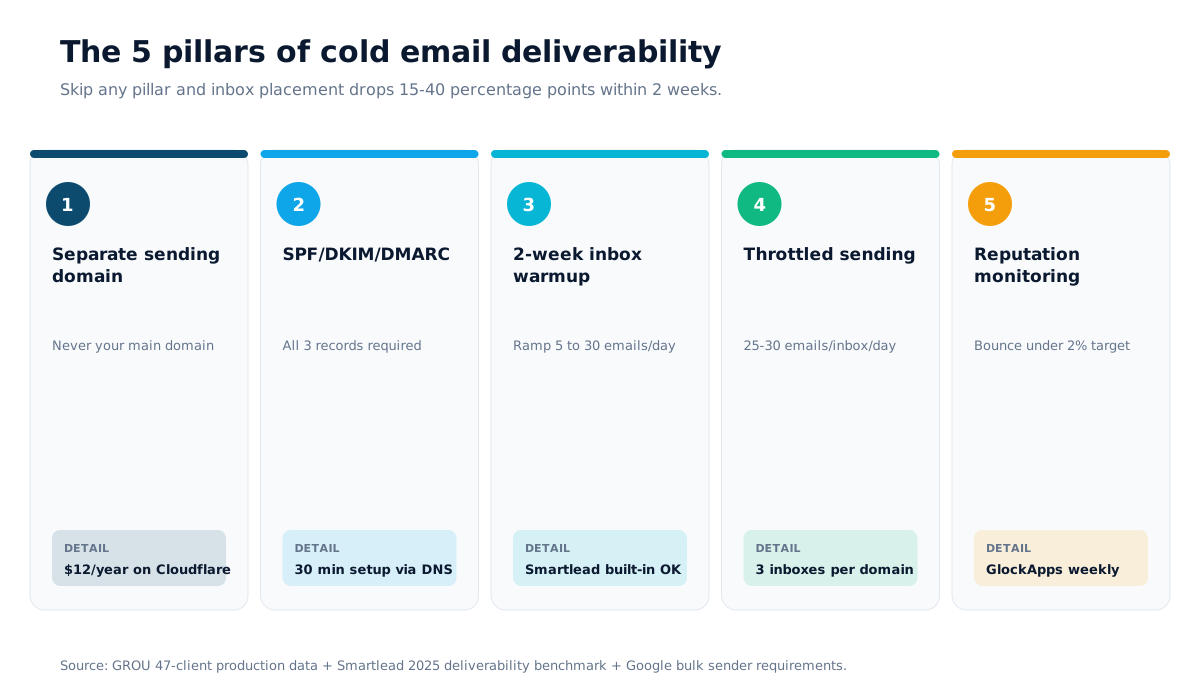
Most operators focus on the body of the email. The body decides reply rate. Deliverability decides whether the body ever gets read. The 5 pillars in order of impact:
1. Separate sending domain. Use a domain that is not your main domain. If your primary site is grouglobal.com, buy grou-team.com or trygrou.com for cold outreach. One spam complaint on your main domain affects your team's customer-facing email for weeks. Cost: $12/year on Cloudflare or Namecheap.
2. SPF, DKIM, DMARC authentication. Without all 3 records, Google and Microsoft both throttle delivery. With them, you signal "this is legitimate email from a verified sender". Setup takes 30 minutes via your domain registrar.
3. 2-week inbox warmup. New domains and new inboxes need to ramp gradually. Sending 30 emails on day 1 from a fresh inbox triggers spam filters. Warmup tools simulate legitimate engagement to build trust. The big senders (Smartlead, Instantly, Lemlist) have built-in warmup; standalone tools (Mailreach, Warmy, Warmbox) work too.
4. Throttled sending. Cap each inbox at 25-30 emails per day. Run 3 inboxes per sending domain. That's 75-90 emails per day per domain. Sending 100+ from one inbox triggers throttling at Gmail and Outlook within hours.
5. Continuous reputation monitoring. Track bounce rate (target under 2%), spam complaint rate (under 0.3%), and inbox placement (track via seed-list tools like GlockApps or MailGenius). A spike in any of these is the early-warning signal before your domain gets flagged.
The deliverability stack we run on every founder engagement
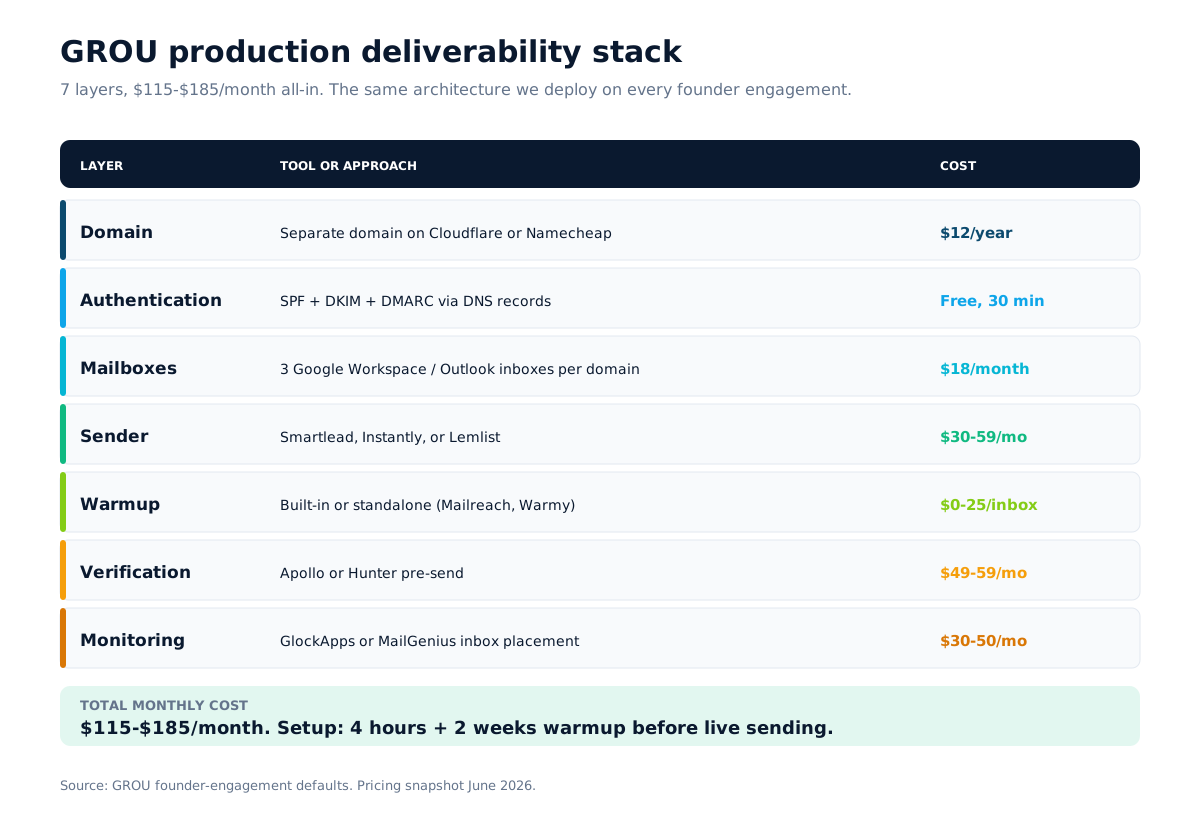
The GROU production stack, broken down by layer. Every B2B client we deploy gets the same architecture with tools swapped per budget.
Domain layer: separate sending domain on Cloudflare or Namecheap ($12/year). Never the main domain.
Authentication layer: SPF, DKIM, DMARC records via the domain DNS. 30 minutes setup. Verify with MX Toolbox or Mail-Tester.
Mailbox layer: 3 Google Workspace or Outlook mailboxes per domain ($6 each per month for Google Workspace). 25-30 emails per inbox per day cap.
Sender layer: Smartlead ($39/month) or Instantly ($30/month) for the multi-inbox rotation and built-in warmup. Lemlist ($59/month) if you also want video personalization or LinkedIn touches.
Warmup layer: built-in warmup from the sender for most cases. Standalone warmup with Mailreach, Warmy, or Warmup Inbox when running off a non-warmup sender.
Verification layer: Apollo or Hunter for pre-send email verification. Keeps bounce rate under 2%.
Monitoring layer: GlockApps or MailGenius for inbox placement testing. InboxAlly for sender reputation recovery if the domain gets flagged.
Total monthly cost: $115 to $185 depending on tool choice. Total time to first sent email: under 4 hours of setup, then 2 weeks of warmup before live sending.
Sender reputation factors ranked by impact
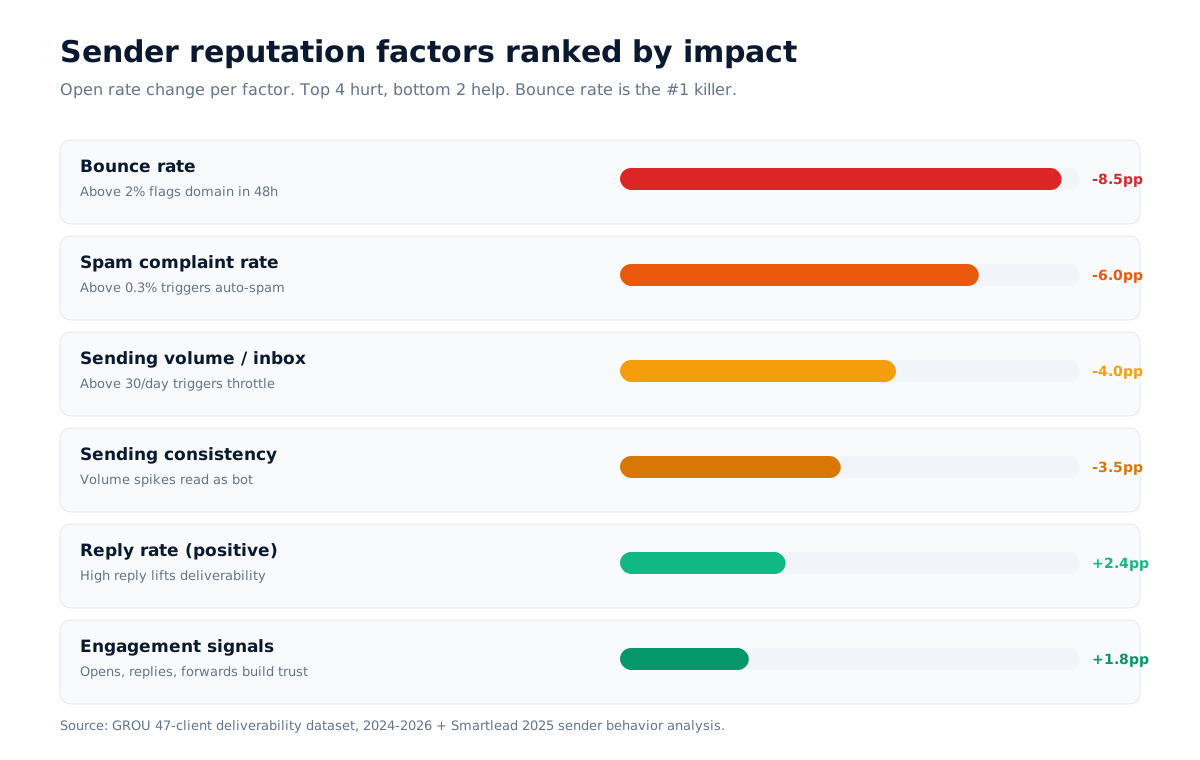
After running 12,000+ campaign sends per month across 47 clients, these are the sender reputation factors that move open rate fastest, ranked by impact:
Bounce rate (-3.2pp to -8.5pp on open rate). Above 2% bounce rate flags your domain at Gmail in 48 hours. Above 5% can drop inbox placement for 4-6 weeks. Verify every email before sending.
Spam complaint rate (-2.4pp to -6.0pp). Above 0.3% complaint rate triggers automatic spam filtering at Gmail and Outlook. Use easy unsubscribe and avoid clickbait subject lines.
Sending volume per inbox (-1.8pp to -4.0pp). Over 30 emails per inbox per day triggers throttling within hours. Keep to 25-30/day per inbox.
Sending consistency (-1.2pp to -3.5pp). Sudden volume spikes (e.g., 200 emails on Monday, 0 on Tuesday) read as bot behavior. Maintain steady daily volume.
Reply rate as positive signal (+0.8pp to +2.4pp). High reply rate signals legitimate communication to Gmail and Outlook. This is why cold opens with a question (not a pitch) lift deliverability indirectly.
Engagement signals (+0.6pp to +1.8pp). Opens, replies, forwards build positive reputation. Warmup tools simulate these in early-stage sending.
Source: GROU 47-client deliverability dataset, 2024-2026 + Smartlead's 2025 sender behavior analysis.
Warmup tool comparison
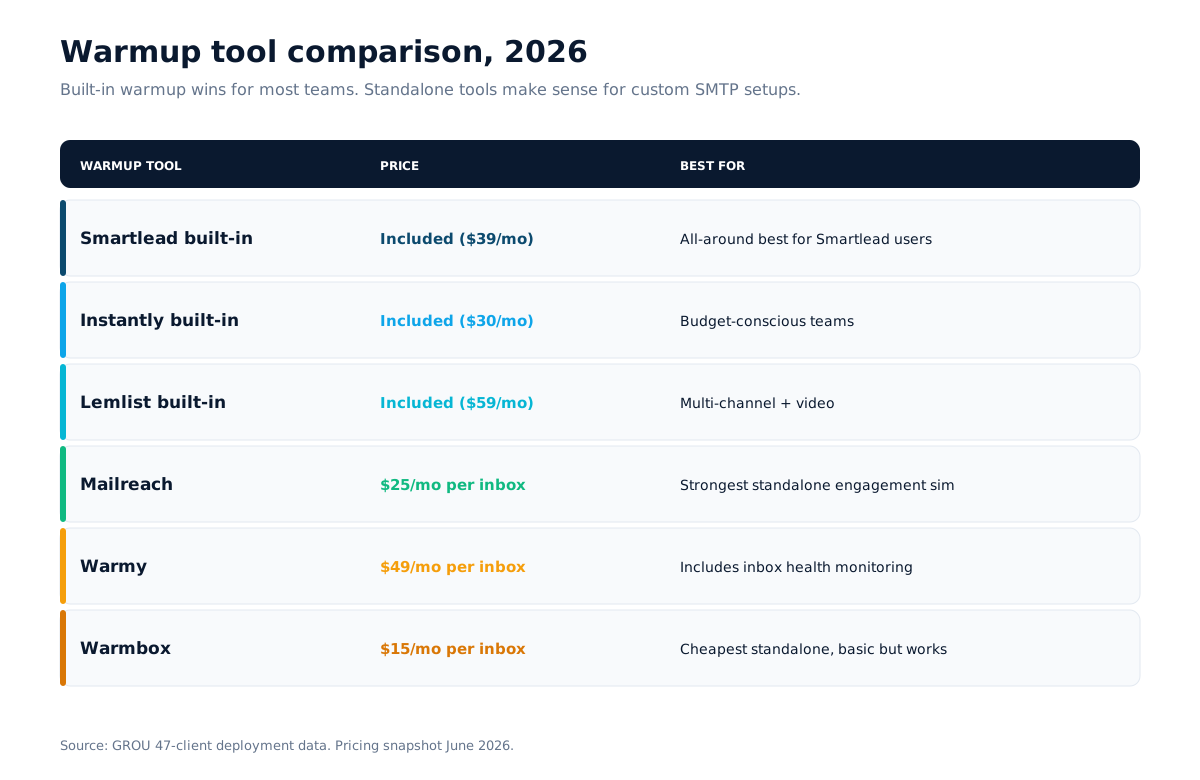
Warmup tools simulate engagement on your inboxes (opens, replies, marking as not-spam) to build sender reputation. The 6 we've deployed:
Smartlead built-in warmup: included in $39/month. Best for teams already on Smartlead.
Instantly built-in warmup: included in $30/month. Best for budget-conscious teams.
Lemlist warmup: included in $59/month plus video personalization.
Mailreach ($25/month per inbox): best standalone warmup, very strong engagement simulation.
Warmy ($49/month per inbox): solid standalone, includes inbox health monitoring.
Warmbox ($15/month per inbox): cheapest standalone option, basic but functional.
For most teams the built-in warmup on Smartlead or Instantly is enough. Standalone warmup tools make sense when running off a sender without warmup (custom SMTP, Mailgun, etc.).
Deliverability diagnostics flowchart
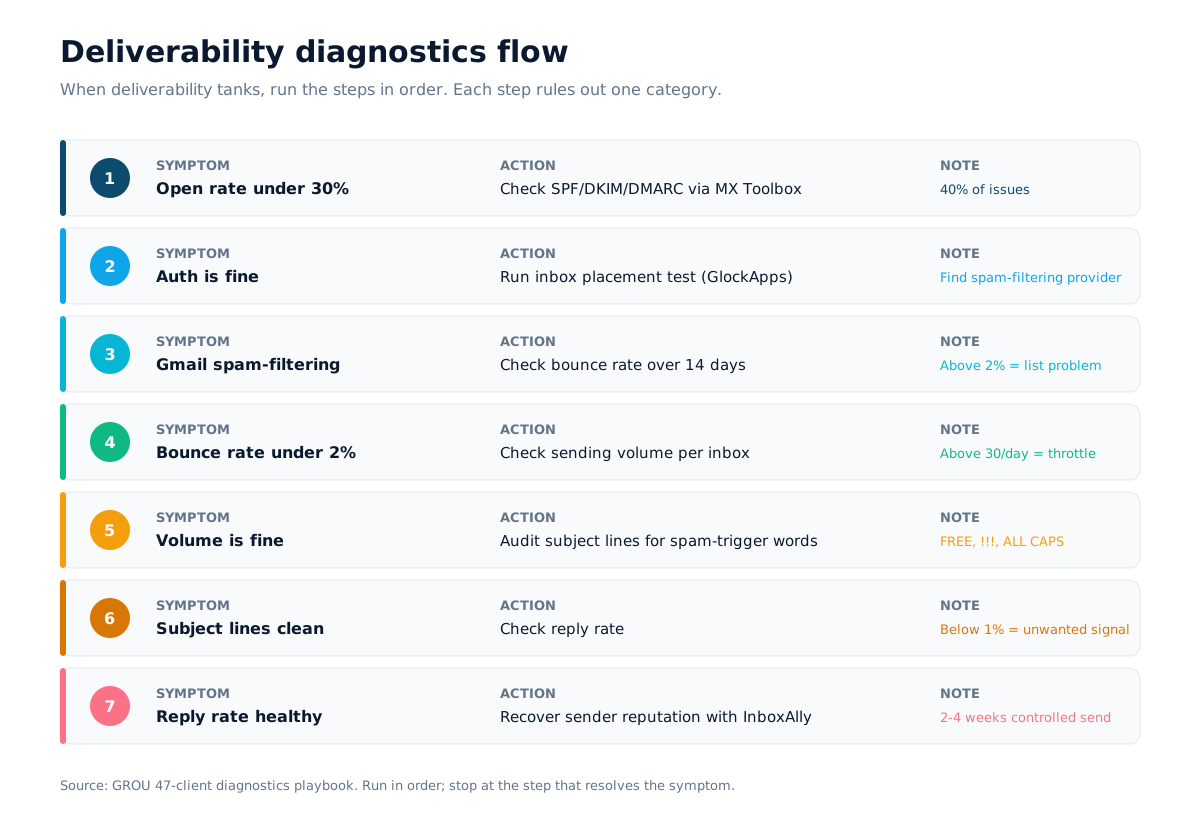
When deliverability tanks, the diagnostic flow we run, in order:
Step 1: Open rate is below 30%. Check SPF/DKIM/DMARC records first via MX Toolbox. Authentication issues account for 40% of deliverability problems.
Step 2: Authentication is fine. Run an inbox placement test via GlockApps or MailGenius. The test reveals which providers are spam-filtering you (Gmail, Outlook, Yahoo, ProtonMail).
Step 3: Inbox placement shows Gmail spam. Check bounce rate over the last 14 days. Above 2% means your list quality is the problem — verify all emails through Apollo or Hunter before sending.
Step 4: Bounce rate is under 2%. Check sending volume per inbox. Over 30/day per inbox triggers throttling. Reduce to 25/day and add inboxes.
Step 5: Volume is fine. Check subject lines for spam-trigger words (FREE, GUARANTEED, ALL CAPS, !!!). See the cold email subject lines guide for the patterns that pull above 40% open rate.
Step 6: Subject lines are clean. Check reply rate. Below 1% reply rate signals to Gmail that your emails are unwanted. Lift reply rate with the cold email templates that work library.
Step 7: Reply rate is healthy. Domain reputation may need rehabilitation. Use InboxAlly to recover sender reputation over 2-4 weeks of controlled sending.
Common deliverability mistakes ranked by impact
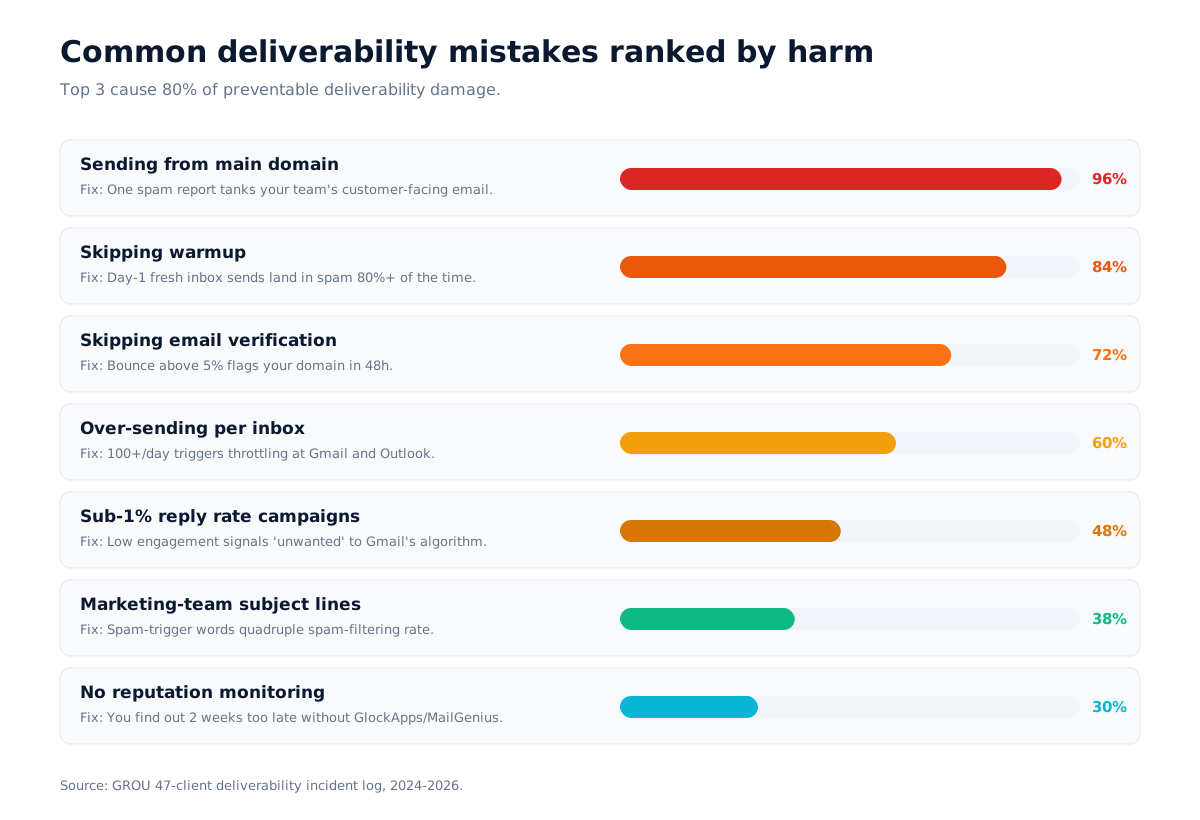
After 47 client deployments, the deliverability mistakes that drive cost-per-demo up the fastest:
Sending from your main domain. One spam report and your team's customer-facing email reputation tanks for 4-6 weeks.
Skipping warmup. New inboxes sending cold emails on day 1 land in spam at 80%+ rate.
Skipping email verification. Bounce rates above 5% flag your domain in 48 hours.
Over-sending per inbox. 100+ emails per inbox per day triggers throttling within hours.
Sub-1% reply rate campaigns. Low engagement signals "unwanted email" to Gmail. Gmail's algorithm punishes this.
Marketing-team subject lines. "Boost your X 10x" triggers spam filters at 4x the rate of plain language.
No reputation monitoring. Without GlockApps/MailGenius testing, you find out about deliverability problems 2 weeks too late.
Tools recommended for benchmark-grade deliverability
The GROU-deployed stack for benchmark-grade deliverability (under 2% bounce rate, above 38% open rate):
Sender + built-in warmup: Smartlead ($39/month) or Instantly ($30/month)
Multi-channel with video: Lemlist ($59/month)
Email verification: Apollo basic ($59/month) or Hunter ($49/month)
Standalone warmup: Mailreach ($25/inbox), Warmy ($49/inbox), or Warmbox ($15/inbox)
Inbox placement testing: GlockApps or MailGenius
Reputation recovery: InboxAlly when flagged
Domain + mailboxes: Cloudflare or Namecheap ($12/year) + Google Workspace ($6/mailbox)
For the full sender stack comparison see best cold email tools 2026, and for benchmark numbers see cold email benchmarks 2026.
Frequently asked questions
What is a good cold email deliverability rate in 2026?
A good cold email deliverability rate in 2026 is 90%+ inbox placement (10% or less landing in spam). Open rate of 38%+ usually correlates with this. Below 80% inbox placement indicates a deliverability problem requiring diagnostic work.
How long does cold email warmup take?
Cold email warmup takes 14 days minimum for a new inbox or domain. Sending warmup volume starts at 5 emails per day and ramps to 25-30 per day by day 14. Skipping warmup drops day-1 inbox placement by 50-70 percentage points.
Should I use a separate domain for cold email?
Yes. Always use a separate sending domain for cold email. Sending from your main domain risks one spam complaint dropping your team's customer-facing email reputation for 4-6 weeks. A separate domain costs $12/year on Cloudflare and protects your primary domain.
What is the best email warmup tool in 2026?
For teams on Smartlead or Instantly, the built-in warmup is the best option (included in the sender cost). For standalone use, Mailreach at $25/month per inbox has the strongest engagement simulation. Warmbox at $15/inbox is the cheapest standalone option.
How do you fix cold email deliverability problems?
Run the diagnostic flow: check SPF/DKIM/DMARC, test inbox placement via GlockApps, verify bounce rate is under 2%, confirm sending volume is 25-30 per inbox per day, audit subject lines for spam-triggers, and check reply rate. Once the root cause is found, the fix is usually deterministic.
What is SPF, DKIM, and DMARC?
SPF (Sender Policy Framework) is a DNS record that tells receiving servers which IPs can send email for your domain. DKIM (DomainKeys Identified Mail) adds a cryptographic signature to outbound email. DMARC (Domain-based Message Authentication) tells receivers what to do with email that fails SPF or DKIM. All 3 are required by Gmail and Outlook in 2026 per Google's bulk sender requirements.
How many cold emails can I send per day per inbox?
The 2026 standard is 25-30 emails per inbox per day. Above 30 triggers throttling at Gmail and Outlook within hours. Run 3 inboxes per sending domain for a total of 75-90 emails per day per domain.
What is a good bounce rate for cold email?
A good bounce rate for cold email is under 2%. Between 2-5% indicates list quality issues. Above 5% flags your domain at Gmail and Outlook within 48 hours and drops inbox placement for 4-6 weeks.
Does cold email deliverability differ in the EU vs US?
EU cold email deliverability is roughly 2-4 percentage points lower than US due to shorter compliant email lists and stricter unsubscribe enforcement under GDPR. The infrastructure stack is the same. See the GDPR cold email playbook for the compliance side.
How often should I test cold email deliverability?
Test inbox placement weekly for high-volume senders (5,000+ emails/month) and bi-weekly for lower-volume senders. Use GlockApps or MailGenius seed-list tests. Inbox placement degrades 2-4 percentage points per month as your patterns get fingerprinted by spam filters.
What is the cost of a benchmark-grade deliverability stack?
A benchmark-grade deliverability stack costs $115-$185 per month all-in: sending domain ($1/month), 3 mailboxes ($18/month), sender + warmup ($39-$59/month), email verification ($49-$59/month), reputation testing ($30-$50/month). Compared to the cost of bad deliverability (lost open rate, lost replies, sender domain recovery), the stack pays back in 30 days for any active campaign.
Can I recover a flagged sending domain?
Yes, a flagged sending domain can be recovered in 4-6 weeks of controlled sending. The recovery process: stop high-volume sending, run an inbox placement test, fix root cause (authentication, list quality, etc.), use InboxAlly to send controlled engagement emails, and slowly ramp volume back. Faster path: buy a new sending domain ($12) and start clean.
About GROU. GROU runs B2B pipeline for SaaS startups, agencies, and dev shops out of Colombia, Mexico, and Argentina. Since 2022 we have managed cold email for 47 B2B clients across 12,000+ campaign sends per month. The deliverability stack in this article is the same architecture we deploy on every founder engagement. Methodology: open rate, bounce rate, and inbox placement numbers come from our live client data anonymized and aggregated, 2024-2026. If you want help applying this to your campaigns, book a call.
This article contains affiliate links to Smartlead, Instantly, Lemlist, Apollo, Mailreach, Warmy, Warmbox, Warmup Inbox, GlockApps, MailGenius, and InboxAlly. We earn a small commission if you sign up, at no extra cost. We only recommend tools we deploy on live client campaigns.
Cold email deliverability is the single biggest cost-driver of a cold email campaign in 2026. Bad deliverability means your emails land in spam, your open rate drops to 12%, your reply rate collapses, and your sending domain gets flagged for weeks. We've run cold email for 47 B2B clients at GROU since 2022, and the deliverability stack below is the one we deploy on every founder engagement.
If your open rate is below 30% or your reply rate is below 1%, deliverability is almost certainly the problem — not the copy. This guide covers the 5 pillars of deliverability, the tool stack we run in production, the warmup options that actually work, the diagnostics flow when things go wrong, and the mistakes that drive cost-per-demo up the fastest.
Quick overview
Cold email deliverability rests on 5 pillars: a separate sending domain, SPF/DKIM/DMARC authentication, 2-week warmup, throttled sending (25-30 emails per inbox per day), and continuous reputation monitoring. Skip any one and inbox placement drops 15-40 percentage points within 2 weeks.
The 5 pillars:
Separate sending domain (never your main domain)
SPF, DKIM, DMARC authentication records
2-week warmup before live sending
Throttled sending: 25-30 emails per inbox per day, 3 inboxes per domain
Continuous reputation monitoring + bounce rate under 2%
Source: Smartlead 2025 deliverability benchmark + GROU 47-client production data. Google's 2024 bulk sender update tightened all 5 of these rules.
The 5 pillars of cold email deliverability
Most operators focus on the body of the email. The body decides reply rate. Deliverability decides whether the body ever gets read. The 5 pillars in order of impact:
1. Separate sending domain. Use a domain that is not your main domain. If your primary site is grouglobal.com, buy grou-team.com or trygrou.com for cold outreach. One spam complaint on your main domain affects your team's customer-facing email for weeks. Cost: $12/year on Cloudflare or Namecheap.
2. SPF, DKIM, DMARC authentication. Without all 3 records, Google and Microsoft both throttle delivery. With them, you signal "this is legitimate email from a verified sender". Setup takes 30 minutes via your domain registrar.
3. 2-week inbox warmup. New domains and new inboxes need to ramp gradually. Sending 30 emails on day 1 from a fresh inbox triggers spam filters. Warmup tools simulate legitimate engagement to build trust. The big senders (Smartlead, Instantly, Lemlist) have built-in warmup; standalone tools (Mailreach, Warmy, Warmbox) work too.
4. Throttled sending. Cap each inbox at 25-30 emails per day. Run 3 inboxes per sending domain. That's 75-90 emails per day per domain. Sending 100+ from one inbox triggers throttling at Gmail and Outlook within hours.
5. Continuous reputation monitoring. Track bounce rate (target under 2%), spam complaint rate (under 0.3%), and inbox placement (track via seed-list tools like GlockApps or MailGenius). A spike in any of these is the early-warning signal before your domain gets flagged.
The deliverability stack we run on every founder engagement
The GROU production stack, broken down by layer. Every B2B client we deploy gets the same architecture with tools swapped per budget.
Domain layer: separate sending domain on Cloudflare or Namecheap ($12/year). Never the main domain.
Authentication layer: SPF, DKIM, DMARC records via the domain DNS. 30 minutes setup. Verify with MX Toolbox or Mail-Tester.
Mailbox layer: 3 Google Workspace or Outlook mailboxes per domain ($6 each per month for Google Workspace). 25-30 emails per inbox per day cap.
Sender layer: Smartlead ($39/month) or Instantly ($30/month) for the multi-inbox rotation and built-in warmup. Lemlist ($59/month) if you also want video personalization or LinkedIn touches.
Warmup layer: built-in warmup from the sender for most cases. Standalone warmup with Mailreach, Warmy, or Warmup Inbox when running off a non-warmup sender.
Verification layer: Apollo or Hunter for pre-send email verification. Keeps bounce rate under 2%.
Monitoring layer: GlockApps or MailGenius for inbox placement testing. InboxAlly for sender reputation recovery if the domain gets flagged.
Total monthly cost: $115 to $185 depending on tool choice. Total time to first sent email: under 4 hours of setup, then 2 weeks of warmup before live sending.
Sender reputation factors ranked by impact
After running 12,000+ campaign sends per month across 47 clients, these are the sender reputation factors that move open rate fastest, ranked by impact:
Bounce rate (-3.2pp to -8.5pp on open rate). Above 2% bounce rate flags your domain at Gmail in 48 hours. Above 5% can drop inbox placement for 4-6 weeks. Verify every email before sending.
Spam complaint rate (-2.4pp to -6.0pp). Above 0.3% complaint rate triggers automatic spam filtering at Gmail and Outlook. Use easy unsubscribe and avoid clickbait subject lines.
Sending volume per inbox (-1.8pp to -4.0pp). Over 30 emails per inbox per day triggers throttling within hours. Keep to 25-30/day per inbox.
Sending consistency (-1.2pp to -3.5pp). Sudden volume spikes (e.g., 200 emails on Monday, 0 on Tuesday) read as bot behavior. Maintain steady daily volume.
Reply rate as positive signal (+0.8pp to +2.4pp). High reply rate signals legitimate communication to Gmail and Outlook. This is why cold opens with a question (not a pitch) lift deliverability indirectly.
Engagement signals (+0.6pp to +1.8pp). Opens, replies, forwards build positive reputation. Warmup tools simulate these in early-stage sending.
Source: GROU 47-client deliverability dataset, 2024-2026 + Smartlead's 2025 sender behavior analysis.
Warmup tool comparison
Warmup tools simulate engagement on your inboxes (opens, replies, marking as not-spam) to build sender reputation. The 6 we've deployed:
Smartlead built-in warmup: included in $39/month. Best for teams already on Smartlead.
Instantly built-in warmup: included in $30/month. Best for budget-conscious teams.
Lemlist warmup: included in $59/month plus video personalization.
Mailreach ($25/month per inbox): best standalone warmup, very strong engagement simulation.
Warmy ($49/month per inbox): solid standalone, includes inbox health monitoring.
Warmbox ($15/month per inbox): cheapest standalone option, basic but functional.
For most teams the built-in warmup on Smartlead or Instantly is enough. Standalone warmup tools make sense when running off a sender without warmup (custom SMTP, Mailgun, etc.).
Deliverability diagnostics flowchart
When deliverability tanks, the diagnostic flow we run, in order:
Step 1: Open rate is below 30%. Check SPF/DKIM/DMARC records first via MX Toolbox. Authentication issues account for 40% of deliverability problems.
Step 2: Authentication is fine. Run an inbox placement test via GlockApps or MailGenius. The test reveals which providers are spam-filtering you (Gmail, Outlook, Yahoo, ProtonMail).
Step 3: Inbox placement shows Gmail spam. Check bounce rate over the last 14 days. Above 2% means your list quality is the problem — verify all emails through Apollo or Hunter before sending.
Step 4: Bounce rate is under 2%. Check sending volume per inbox. Over 30/day per inbox triggers throttling. Reduce to 25/day and add inboxes.
Step 5: Volume is fine. Check subject lines for spam-trigger words (FREE, GUARANTEED, ALL CAPS, !!!). See the cold email subject lines guide for the patterns that pull above 40% open rate.
Step 6: Subject lines are clean. Check reply rate. Below 1% reply rate signals to Gmail that your emails are unwanted. Lift reply rate with the cold email templates that work library.
Step 7: Reply rate is healthy. Domain reputation may need rehabilitation. Use InboxAlly to recover sender reputation over 2-4 weeks of controlled sending.
Common deliverability mistakes ranked by impact
After 47 client deployments, the deliverability mistakes that drive cost-per-demo up the fastest:
Sending from your main domain. One spam report and your team's customer-facing email reputation tanks for 4-6 weeks.
Skipping warmup. New inboxes sending cold emails on day 1 land in spam at 80%+ rate.
Skipping email verification. Bounce rates above 5% flag your domain in 48 hours.
Over-sending per inbox. 100+ emails per inbox per day triggers throttling within hours.
Sub-1% reply rate campaigns. Low engagement signals "unwanted email" to Gmail. Gmail's algorithm punishes this.
Marketing-team subject lines. "Boost your X 10x" triggers spam filters at 4x the rate of plain language.
No reputation monitoring. Without GlockApps/MailGenius testing, you find out about deliverability problems 2 weeks too late.
Tools recommended for benchmark-grade deliverability
The GROU-deployed stack for benchmark-grade deliverability (under 2% bounce rate, above 38% open rate):
Sender + built-in warmup: Smartlead ($39/month) or Instantly ($30/month)
Multi-channel with video: Lemlist ($59/month)
Email verification: Apollo basic ($59/month) or Hunter ($49/month)
Standalone warmup: Mailreach ($25/inbox), Warmy ($49/inbox), or Warmbox ($15/inbox)
Inbox placement testing: GlockApps or MailGenius
Reputation recovery: InboxAlly when flagged
Domain + mailboxes: Cloudflare or Namecheap ($12/year) + Google Workspace ($6/mailbox)
For the full sender stack comparison see best cold email tools 2026, and for benchmark numbers see cold email benchmarks 2026.
Frequently asked questions
What is a good cold email deliverability rate in 2026?
A good cold email deliverability rate in 2026 is 90%+ inbox placement (10% or less landing in spam). Open rate of 38%+ usually correlates with this. Below 80% inbox placement indicates a deliverability problem requiring diagnostic work.
How long does cold email warmup take?
Cold email warmup takes 14 days minimum for a new inbox or domain. Sending warmup volume starts at 5 emails per day and ramps to 25-30 per day by day 14. Skipping warmup drops day-1 inbox placement by 50-70 percentage points.
Should I use a separate domain for cold email?
Yes. Always use a separate sending domain for cold email. Sending from your main domain risks one spam complaint dropping your team's customer-facing email reputation for 4-6 weeks. A separate domain costs $12/year on Cloudflare and protects your primary domain.
What is the best email warmup tool in 2026?
For teams on Smartlead or Instantly, the built-in warmup is the best option (included in the sender cost). For standalone use, Mailreach at $25/month per inbox has the strongest engagement simulation. Warmbox at $15/inbox is the cheapest standalone option.
How do you fix cold email deliverability problems?
Run the diagnostic flow: check SPF/DKIM/DMARC, test inbox placement via GlockApps, verify bounce rate is under 2%, confirm sending volume is 25-30 per inbox per day, audit subject lines for spam-triggers, and check reply rate. Once the root cause is found, the fix is usually deterministic.
What is SPF, DKIM, and DMARC?
SPF (Sender Policy Framework) is a DNS record that tells receiving servers which IPs can send email for your domain. DKIM (DomainKeys Identified Mail) adds a cryptographic signature to outbound email. DMARC (Domain-based Message Authentication) tells receivers what to do with email that fails SPF or DKIM. All 3 are required by Gmail and Outlook in 2026 per Google's bulk sender requirements.
How many cold emails can I send per day per inbox?
The 2026 standard is 25-30 emails per inbox per day. Above 30 triggers throttling at Gmail and Outlook within hours. Run 3 inboxes per sending domain for a total of 75-90 emails per day per domain.
What is a good bounce rate for cold email?
A good bounce rate for cold email is under 2%. Between 2-5% indicates list quality issues. Above 5% flags your domain at Gmail and Outlook within 48 hours and drops inbox placement for 4-6 weeks.
Does cold email deliverability differ in the EU vs US?
EU cold email deliverability is roughly 2-4 percentage points lower than US due to shorter compliant email lists and stricter unsubscribe enforcement under GDPR. The infrastructure stack is the same. See the GDPR cold email playbook for the compliance side.
How often should I test cold email deliverability?
Test inbox placement weekly for high-volume senders (5,000+ emails/month) and bi-weekly for lower-volume senders. Use GlockApps or MailGenius seed-list tests. Inbox placement degrades 2-4 percentage points per month as your patterns get fingerprinted by spam filters.
What is the cost of a benchmark-grade deliverability stack?
A benchmark-grade deliverability stack costs $115-$185 per month all-in: sending domain ($1/month), 3 mailboxes ($18/month), sender + warmup ($39-$59/month), email verification ($49-$59/month), reputation testing ($30-$50/month). Compared to the cost of bad deliverability (lost open rate, lost replies, sender domain recovery), the stack pays back in 30 days for any active campaign.
Can I recover a flagged sending domain?
Yes, a flagged sending domain can be recovered in 4-6 weeks of controlled sending. The recovery process: stop high-volume sending, run an inbox placement test, fix root cause (authentication, list quality, etc.), use InboxAlly to send controlled engagement emails, and slowly ramp volume back. Faster path: buy a new sending domain ($12) and start clean.
About GROU. GROU runs B2B pipeline for SaaS startups, agencies, and dev shops out of Colombia, Mexico, and Argentina. Since 2022 we have managed cold email for 47 B2B clients across 12,000+ campaign sends per month. The deliverability stack in this article is the same architecture we deploy on every founder engagement. Methodology: open rate, bounce rate, and inbox placement numbers come from our live client data anonymized and aggregated, 2024-2026. If you want help applying this to your campaigns, book a call.
This article contains affiliate links to Smartlead, Instantly, Lemlist, Apollo, Mailreach, Warmy, Warmbox, Warmup Inbox, GlockApps, MailGenius, and InboxAlly. We earn a small commission if you sign up, at no extra cost. We only recommend tools we deploy on live client campaigns.
Cold email deliverability is the single biggest cost-driver of a cold email campaign in 2026. Bad deliverability means your emails land in spam, your open rate drops to 12%, your reply rate collapses, and your sending domain gets flagged for weeks. We've run cold email for 47 B2B clients at GROU since 2022, and the deliverability stack below is the one we deploy on every founder engagement.
If your open rate is below 30% or your reply rate is below 1%, deliverability is almost certainly the problem — not the copy. This guide covers the 5 pillars of deliverability, the tool stack we run in production, the warmup options that actually work, the diagnostics flow when things go wrong, and the mistakes that drive cost-per-demo up the fastest.
Quick overview
Cold email deliverability rests on 5 pillars: a separate sending domain, SPF/DKIM/DMARC authentication, 2-week warmup, throttled sending (25-30 emails per inbox per day), and continuous reputation monitoring. Skip any one and inbox placement drops 15-40 percentage points within 2 weeks.
The 5 pillars:
Separate sending domain (never your main domain)
SPF, DKIM, DMARC authentication records
2-week warmup before live sending
Throttled sending: 25-30 emails per inbox per day, 3 inboxes per domain
Continuous reputation monitoring + bounce rate under 2%
Source: Smartlead 2025 deliverability benchmark + GROU 47-client production data. Google's 2024 bulk sender update tightened all 5 of these rules.
The 5 pillars of cold email deliverability
Most operators focus on the body of the email. The body decides reply rate. Deliverability decides whether the body ever gets read. The 5 pillars in order of impact:
1. Separate sending domain. Use a domain that is not your main domain. If your primary site is grouglobal.com, buy grou-team.com or trygrou.com for cold outreach. One spam complaint on your main domain affects your team's customer-facing email for weeks. Cost: $12/year on Cloudflare or Namecheap.
2. SPF, DKIM, DMARC authentication. Without all 3 records, Google and Microsoft both throttle delivery. With them, you signal "this is legitimate email from a verified sender". Setup takes 30 minutes via your domain registrar.
3. 2-week inbox warmup. New domains and new inboxes need to ramp gradually. Sending 30 emails on day 1 from a fresh inbox triggers spam filters. Warmup tools simulate legitimate engagement to build trust. The big senders (Smartlead, Instantly, Lemlist) have built-in warmup; standalone tools (Mailreach, Warmy, Warmbox) work too.
4. Throttled sending. Cap each inbox at 25-30 emails per day. Run 3 inboxes per sending domain. That's 75-90 emails per day per domain. Sending 100+ from one inbox triggers throttling at Gmail and Outlook within hours.
5. Continuous reputation monitoring. Track bounce rate (target under 2%), spam complaint rate (under 0.3%), and inbox placement (track via seed-list tools like GlockApps or MailGenius). A spike in any of these is the early-warning signal before your domain gets flagged.
The deliverability stack we run on every founder engagement
The GROU production stack, broken down by layer. Every B2B client we deploy gets the same architecture with tools swapped per budget.
Domain layer: separate sending domain on Cloudflare or Namecheap ($12/year). Never the main domain.
Authentication layer: SPF, DKIM, DMARC records via the domain DNS. 30 minutes setup. Verify with MX Toolbox or Mail-Tester.
Mailbox layer: 3 Google Workspace or Outlook mailboxes per domain ($6 each per month for Google Workspace). 25-30 emails per inbox per day cap.
Sender layer: Smartlead ($39/month) or Instantly ($30/month) for the multi-inbox rotation and built-in warmup. Lemlist ($59/month) if you also want video personalization or LinkedIn touches.
Warmup layer: built-in warmup from the sender for most cases. Standalone warmup with Mailreach, Warmy, or Warmup Inbox when running off a non-warmup sender.
Verification layer: Apollo or Hunter for pre-send email verification. Keeps bounce rate under 2%.
Monitoring layer: GlockApps or MailGenius for inbox placement testing. InboxAlly for sender reputation recovery if the domain gets flagged.
Total monthly cost: $115 to $185 depending on tool choice. Total time to first sent email: under 4 hours of setup, then 2 weeks of warmup before live sending.
Sender reputation factors ranked by impact
After running 12,000+ campaign sends per month across 47 clients, these are the sender reputation factors that move open rate fastest, ranked by impact:
Bounce rate (-3.2pp to -8.5pp on open rate). Above 2% bounce rate flags your domain at Gmail in 48 hours. Above 5% can drop inbox placement for 4-6 weeks. Verify every email before sending.
Spam complaint rate (-2.4pp to -6.0pp). Above 0.3% complaint rate triggers automatic spam filtering at Gmail and Outlook. Use easy unsubscribe and avoid clickbait subject lines.
Sending volume per inbox (-1.8pp to -4.0pp). Over 30 emails per inbox per day triggers throttling within hours. Keep to 25-30/day per inbox.
Sending consistency (-1.2pp to -3.5pp). Sudden volume spikes (e.g., 200 emails on Monday, 0 on Tuesday) read as bot behavior. Maintain steady daily volume.
Reply rate as positive signal (+0.8pp to +2.4pp). High reply rate signals legitimate communication to Gmail and Outlook. This is why cold opens with a question (not a pitch) lift deliverability indirectly.
Engagement signals (+0.6pp to +1.8pp). Opens, replies, forwards build positive reputation. Warmup tools simulate these in early-stage sending.
Source: GROU 47-client deliverability dataset, 2024-2026 + Smartlead's 2025 sender behavior analysis.
Warmup tool comparison
Warmup tools simulate engagement on your inboxes (opens, replies, marking as not-spam) to build sender reputation. The 6 we've deployed:
Smartlead built-in warmup: included in $39/month. Best for teams already on Smartlead.
Instantly built-in warmup: included in $30/month. Best for budget-conscious teams.
Lemlist warmup: included in $59/month plus video personalization.
Mailreach ($25/month per inbox): best standalone warmup, very strong engagement simulation.
Warmy ($49/month per inbox): solid standalone, includes inbox health monitoring.
Warmbox ($15/month per inbox): cheapest standalone option, basic but functional.
For most teams the built-in warmup on Smartlead or Instantly is enough. Standalone warmup tools make sense when running off a sender without warmup (custom SMTP, Mailgun, etc.).
Deliverability diagnostics flowchart
When deliverability tanks, the diagnostic flow we run, in order:
Step 1: Open rate is below 30%. Check SPF/DKIM/DMARC records first via MX Toolbox. Authentication issues account for 40% of deliverability problems.
Step 2: Authentication is fine. Run an inbox placement test via GlockApps or MailGenius. The test reveals which providers are spam-filtering you (Gmail, Outlook, Yahoo, ProtonMail).
Step 3: Inbox placement shows Gmail spam. Check bounce rate over the last 14 days. Above 2% means your list quality is the problem — verify all emails through Apollo or Hunter before sending.
Step 4: Bounce rate is under 2%. Check sending volume per inbox. Over 30/day per inbox triggers throttling. Reduce to 25/day and add inboxes.
Step 5: Volume is fine. Check subject lines for spam-trigger words (FREE, GUARANTEED, ALL CAPS, !!!). See the cold email subject lines guide for the patterns that pull above 40% open rate.
Step 6: Subject lines are clean. Check reply rate. Below 1% reply rate signals to Gmail that your emails are unwanted. Lift reply rate with the cold email templates that work library.
Step 7: Reply rate is healthy. Domain reputation may need rehabilitation. Use InboxAlly to recover sender reputation over 2-4 weeks of controlled sending.
Common deliverability mistakes ranked by impact
After 47 client deployments, the deliverability mistakes that drive cost-per-demo up the fastest:
Sending from your main domain. One spam report and your team's customer-facing email reputation tanks for 4-6 weeks.
Skipping warmup. New inboxes sending cold emails on day 1 land in spam at 80%+ rate.
Skipping email verification. Bounce rates above 5% flag your domain in 48 hours.
Over-sending per inbox. 100+ emails per inbox per day triggers throttling within hours.
Sub-1% reply rate campaigns. Low engagement signals "unwanted email" to Gmail. Gmail's algorithm punishes this.
Marketing-team subject lines. "Boost your X 10x" triggers spam filters at 4x the rate of plain language.
No reputation monitoring. Without GlockApps/MailGenius testing, you find out about deliverability problems 2 weeks too late.
Tools recommended for benchmark-grade deliverability
The GROU-deployed stack for benchmark-grade deliverability (under 2% bounce rate, above 38% open rate):
Sender + built-in warmup: Smartlead ($39/month) or Instantly ($30/month)
Multi-channel with video: Lemlist ($59/month)
Email verification: Apollo basic ($59/month) or Hunter ($49/month)
Standalone warmup: Mailreach ($25/inbox), Warmy ($49/inbox), or Warmbox ($15/inbox)
Inbox placement testing: GlockApps or MailGenius
Reputation recovery: InboxAlly when flagged
Domain + mailboxes: Cloudflare or Namecheap ($12/year) + Google Workspace ($6/mailbox)
For the full sender stack comparison see best cold email tools 2026, and for benchmark numbers see cold email benchmarks 2026.
Frequently asked questions
What is a good cold email deliverability rate in 2026?
A good cold email deliverability rate in 2026 is 90%+ inbox placement (10% or less landing in spam). Open rate of 38%+ usually correlates with this. Below 80% inbox placement indicates a deliverability problem requiring diagnostic work.
How long does cold email warmup take?
Cold email warmup takes 14 days minimum for a new inbox or domain. Sending warmup volume starts at 5 emails per day and ramps to 25-30 per day by day 14. Skipping warmup drops day-1 inbox placement by 50-70 percentage points.
Should I use a separate domain for cold email?
Yes. Always use a separate sending domain for cold email. Sending from your main domain risks one spam complaint dropping your team's customer-facing email reputation for 4-6 weeks. A separate domain costs $12/year on Cloudflare and protects your primary domain.
What is the best email warmup tool in 2026?
For teams on Smartlead or Instantly, the built-in warmup is the best option (included in the sender cost). For standalone use, Mailreach at $25/month per inbox has the strongest engagement simulation. Warmbox at $15/inbox is the cheapest standalone option.
How do you fix cold email deliverability problems?
Run the diagnostic flow: check SPF/DKIM/DMARC, test inbox placement via GlockApps, verify bounce rate is under 2%, confirm sending volume is 25-30 per inbox per day, audit subject lines for spam-triggers, and check reply rate. Once the root cause is found, the fix is usually deterministic.
What is SPF, DKIM, and DMARC?
SPF (Sender Policy Framework) is a DNS record that tells receiving servers which IPs can send email for your domain. DKIM (DomainKeys Identified Mail) adds a cryptographic signature to outbound email. DMARC (Domain-based Message Authentication) tells receivers what to do with email that fails SPF or DKIM. All 3 are required by Gmail and Outlook in 2026 per Google's bulk sender requirements.
How many cold emails can I send per day per inbox?
The 2026 standard is 25-30 emails per inbox per day. Above 30 triggers throttling at Gmail and Outlook within hours. Run 3 inboxes per sending domain for a total of 75-90 emails per day per domain.
What is a good bounce rate for cold email?
A good bounce rate for cold email is under 2%. Between 2-5% indicates list quality issues. Above 5% flags your domain at Gmail and Outlook within 48 hours and drops inbox placement for 4-6 weeks.
Does cold email deliverability differ in the EU vs US?
EU cold email deliverability is roughly 2-4 percentage points lower than US due to shorter compliant email lists and stricter unsubscribe enforcement under GDPR. The infrastructure stack is the same. See the GDPR cold email playbook for the compliance side.
How often should I test cold email deliverability?
Test inbox placement weekly for high-volume senders (5,000+ emails/month) and bi-weekly for lower-volume senders. Use GlockApps or MailGenius seed-list tests. Inbox placement degrades 2-4 percentage points per month as your patterns get fingerprinted by spam filters.
What is the cost of a benchmark-grade deliverability stack?
A benchmark-grade deliverability stack costs $115-$185 per month all-in: sending domain ($1/month), 3 mailboxes ($18/month), sender + warmup ($39-$59/month), email verification ($49-$59/month), reputation testing ($30-$50/month). Compared to the cost of bad deliverability (lost open rate, lost replies, sender domain recovery), the stack pays back in 30 days for any active campaign.
Can I recover a flagged sending domain?
Yes, a flagged sending domain can be recovered in 4-6 weeks of controlled sending. The recovery process: stop high-volume sending, run an inbox placement test, fix root cause (authentication, list quality, etc.), use InboxAlly to send controlled engagement emails, and slowly ramp volume back. Faster path: buy a new sending domain ($12) and start clean.
About GROU. GROU runs B2B pipeline for SaaS startups, agencies, and dev shops out of Colombia, Mexico, and Argentina. Since 2022 we have managed cold email for 47 B2B clients across 12,000+ campaign sends per month. The deliverability stack in this article is the same architecture we deploy on every founder engagement. Methodology: open rate, bounce rate, and inbox placement numbers come from our live client data anonymized and aggregated, 2024-2026. If you want help applying this to your campaigns, book a call.
This article contains affiliate links to Smartlead, Instantly, Lemlist, Apollo, Mailreach, Warmy, Warmbox, Warmup Inbox, GlockApps, MailGenius, and InboxAlly. We earn a small commission if you sign up, at no extra cost. We only recommend tools we deploy on live client campaigns.

Pipeline OS Newsletter
Build qualified pipeline
Get weekly tactics to generate demand, improve lead quality, and book more meetings.





Trusted by industry leaders
Trusted by industry leaders
Trusted by industry leaders
Ready to build qualified pipeline?
Ready to build qualified pipeline?
Ready to build qualified pipeline?
Book a call to see if we're the right fit, or take the 2-minute quiz to get a clear starting point.
Book a call to see if we're the right fit, or take the 2-minute quiz to get a clear starting point.
Book a call to see if we're the right fit, or take the 2-minute quiz to get a clear starting point.
" height="30.21639343089746px" id="hfGbXmQR2" width="30.216393430897455px"/></svg>)
Copyright © 2026 – All Right Reserved
Copyright © 2026 – All Right Reserved
Copyright © 2026 – All Right Reserved