%22%3E%3C/path%3E%3Cpath d=%22M 63.072 7.554 C 62.258 8.022 61.577 8.689 61.092 9.493 L 61.092 7.076 L 57.158 7.076 L 57.158 22.64 L 61.089 22.64 L 61.089 14.888 C 61.089 13.446 61.403 12.434 62.03 11.853 C 62.818 11.218 63.818 10.907 64.826 10.982 L 65.868 10.982 L 65.868 6.851 C 64.891 6.834 63.926 7.076 63.073 7.554 Z%22 fill=%22rgb(17,17,17)%22%3E%3C/path%3E%3Cpath d=%22M 78.916 7.82 C 76.363 6.49 73.321 6.49 70.768 7.82 C 69.562 8.473 68.564 9.451 67.888 10.644 C 67.167 11.931 66.803 13.387 66.834 14.862 C 66.804 16.332 67.157 17.785 67.86 19.077 C 68.515 20.267 69.494 21.246 70.684 21.901 C 71.924 22.576 73.318 22.92 74.73 22.898 C 76.164 22.918 77.58 22.575 78.846 21.901 C 80.062 21.247 81.073 20.27 81.768 19.077 C 82.506 17.797 82.88 16.339 82.85 14.862 C 82.88 13.389 82.517 11.934 81.797 10.647 C 81.12 9.455 80.122 8.477 78.917 7.824 M 78.803 14.862 C 78.829 15.739 78.636 16.608 78.241 17.391 C 77.903 18.046 77.38 18.588 76.738 18.95 C 76.124 19.293 75.432 19.472 74.729 19.47 C 73.668 19.497 72.648 19.061 71.934 18.276 C 71.139 17.323 70.741 16.1 70.823 14.862 C 70.741 13.62 71.149 12.395 71.959 11.45 C 72.687 10.667 73.715 10.233 74.783 10.256 C 75.859 10.236 76.894 10.67 77.635 11.45 C 78.464 12.387 78.884 13.616 78.801 14.864%22 fill=%22rgb(17,17,17)%22%3E%3C/path%3E%3Cpath d=%22M 95.906 7.076 L 95.906 15.646 C 95.975 16.68 95.643 17.701 94.979 18.498 C 94.311 19.184 93.379 19.547 92.422 19.495 C 91.475 19.544 90.553 19.18 89.894 18.498 C 89.23 17.701 88.898 16.68 88.967 15.646 L 88.967 7.076 L 85.033 7.076 L 85.033 16.207 C 85 17.449 85.275 18.68 85.834 19.79 C 86.327 20.75 87.095 21.542 88.039 22.065 C 89.033 22.594 90.145 22.861 91.271 22.838 C 92.188 22.847 93.095 22.65 93.926 22.263 C 94.708 21.905 95.388 21.36 95.906 20.675 L 95.906 22.645 L 99.865 22.645 L 99.865 7.076 Z%22 fill=%22rgb(17,17,17)%22%3E%3C/path%3E%3Cpath d=%22M 4.513 15.626 C 4.511 10.815 7.606 6.549 12.181 5.059 C 16.756 3.57 21.77 5.195 24.601 9.086 L 27.816 5.87 C 24.074 1.186 17.981 -0.943 12.137 0.393 C 6.292 1.728 1.728 6.292 0.393 12.137 C -0.943 17.981 1.186 24.074 5.87 27.816 L 9.085 24.601 C 6.214 22.512 4.515 19.177 4.513 15.626%22 fill=%22rgb(32,62,235)%22%3E%3C/path%3E%3Cpath d=%22M 17.114 14.343 L 13.354 18.01 L 13.354 18.026 L 21.071 18.026 L 11.412 27.609 L 17.389 27.609 L 23.999 21.081 L 23.999 28.316 L 24.005 28.316 L 27.967 24.393 L 27.967 14.343 Z%22 fill=%22rgb(32,62,235)%22%3E%3C/path%3E%3C/g%3E%3C/svg%3E) ×
× ××
××›
›
›
›
LinkedIn connection message examples that get 40%+ acceptance rates
LinkedIn connection message examples that get 40%+ acceptance rates
LinkedIn connection message examples that get 40%+ acceptance rates
LinkedIn connection message examples that get 40%+ acceptance rates
LinkedIn connection message examples that get 40%+ acceptance rates
LinkedIn connection message examples that get 40%+ acceptance rates

Author
Aljaz Peklaj

Slug: linkedin-connection-message
Meta description: Most LinkedIn connection requests fail because the system behind them is weak. See the message structures, trigger workflow, follow-up cadence, and pipeline metrics that separate noise from conversations.
Many assume their LinkedIn problem is copy. It usually isn't. The counterintuitive part is that sending more requests often makes performance worse, while a tighter message structure tied to a real trigger can push acceptance into the healthy range of 30% to 45%, with strong personalization driving much better outcomes than generic outreach Leadriver.
Winning messages start with a recent, verifiable trigger, not “Hi [name]” or a compliment.
The message is only one layer. Significant gains come from signal monitoring, token population, and human review.
Accepted connections still need a system. A brief follow-up with a genuine observation and soft question is where replies start.
Pipeline beats vanity metrics. Acceptance rate matters, but positive replies and meeting-held rate matter more.
Table of Contents
Your connection messages are being ignored
Most LinkedIn connection problems are not copy problems. They are operating model problems.
Teams send enough requests to blame volume, then keep missing the actual constraint. Buyers are filtering for relevance in a single notification, while the outbound team is judging quality by how personalized the note felt to write. Those are two different standards, and the buyer's standard is the one that matters.
That gap shows up in performance. Personalized LinkedIn connection messages achieve approximately 45% acceptance rates, compared to 15% for generic untargeted outreach, and the cross-industry average sits at approximately 30% across 500,000 tracked LinkedIn connection requests SalesHive. If your campaign is below 20%, the fix usually sits in targeting, trigger quality, profile credibility, or account setup.
What the buyer actually evaluates
Prospects do not see your intent, your SDR brief, or your enrichment workflow. They see a short note attached to a request from someone they do not know. In practice, acceptance rates rise or fall on four checks:
Does the opener sound human? “Hi [name], hope you're well” still signals mass outreach.
Is there a reason to connect now? No recent trigger means no urgency.
Does the profile support the message? A weak headline, vague company description, or thin activity feed lowers trust.
Does the post-accept flow match the request? If the rep pivots into a generic pitch, the connection never turns into pipeline.
Use a simple rule in reviews. If a rep can send the same note to twenty accounts with only the company name swapped, it is still a template.
As noted earlier, even a short relevant note can outperform a blank request. More targeted personalization around a specific achievement or shared context performs better than broad “saw your profile” language. That is why acceptance rate is a system output, not just a writing output.
Why message advice alone falls short
A strong connection strategy has four moving parts. Clean account selection, a recent and credible trigger, a profile that can survive scrutiny, and a follow-up sequence that continues the same thread after acceptance. Miss one of those and the message has to work too hard.
I have seen this pattern across thousands of campaigns. Teams that obsess over wording while ignoring profile quality and follow-up logic usually plateau early. Teams that build around signals, workflow discipline, and rep consistency produce conversion rates that hold up across segments instead of collapsing after the first batch.
For a useful perspective on what happens after a prospect sees your message, A guide for B2B outreach on LinkedIn adds context to your own reply and view data. Before scaling request volume, audit account health and sending behavior too, especially if your team has not reviewed LinkedIn limits and warmup best practices.
The primary performance driver is alignment between targeting, trigger, profile, and follow-up. That is the structure that turns LinkedIn connections into repeatable pipeline instead of one-off wins.
The opening line that gets a 47% acceptance rate
A strong LinkedIn opener does one job. It shows the prospect that this request came from observation, not list access.

Across outbound programs, the opening line that keeps winning is simple: a specific, recent, verifiable trigger with no greeting and no pitch. As noted earlier, healthy acceptance rates usually sit in the 30% to 45% range, and the best trigger-led campaigns push higher. In practice, I see the same pattern repeatedly. Once the first line references something real that happened recently, acceptance rate climbs because the note reads like research instead of prospecting automation.
The exact format
Use this structure:
→ “Saw [specific recent event from the past 14 days].”
That format works because it earns attention before asking for it. It also avoids the language patterns buyers associate with low-effort outreach.
Examples that have worked in live campaigns:
Saw your team brought on 4 SDRs in the last 8 weeks.
Saw your post yesterday on the Q1 pipeline gap.
Saw your Series B announcement last week.
Saw your team moved from HubSpot to Salesforce last month.
Caught your Tuesday post on ABM positioning, the part about coverage ratios stood out.
The trade-off is clear. This style outperforms generic intros, but only if the trigger is real and recent. Reps who fake specificity usually get exposed fast. Reps who use clean signals can run this at scale without sounding templated.
If your team uses AI to help draft variants, the model should not invent the personalization. Feed it real signal inputs and force short outputs tied to one event. If marketing is also building content around the same buying committee, these AI prompts for social media can help refine the signal categories your reps track.
Here is the benchmark table worth keeping in your enablement docs:
Opening line style | Average acceptance rate |
|---|---|
Trigger-referenced opening, specific recent event | 40% to 47% |
Generic warm opening, “Hi [name], hope you're well” | 22% to 28% |
Compliment-led opening | 18% to 24% |
Direct ask opening | 12% to 18% |
No personalization, no note | 12% to 18% |
The mechanic is simple. The buyer can verify the trigger in seconds. That lowers skepticism and raises the odds that the request feels relevant enough to accept.
For a tighter definition of the mechanic itself, see this breakdown of first-line personalisation.
What to delete from your templates
Low-performing notes usually fail in the first seven words. Remove these openers:
“Hi [name], hope you're doing well.” It signals a cold template immediately.
“I came across your profile and...” It says nothing useful.
“I noticed you work at [company].” That shows list access, not research.
“Love your work at [company].” It reads like flattery.
“We have something in common...” It often feels forced.
“I'd love to connect because...” It puts your agenda first.
“Just wanted to add you to my network.” It gives the buyer no reason to care.
Buyers decide fast. The first line does not need charm. It needs proof.
Place the video below in your internal training doc if you want reps to hear the logic from another angle before role-based practice.
The system for finding personalization triggers at scale
A strong opener is useless if your team can only produce five of them a day. Consequently, most outbound programs break. They have the right idea, but no operating system behind it.
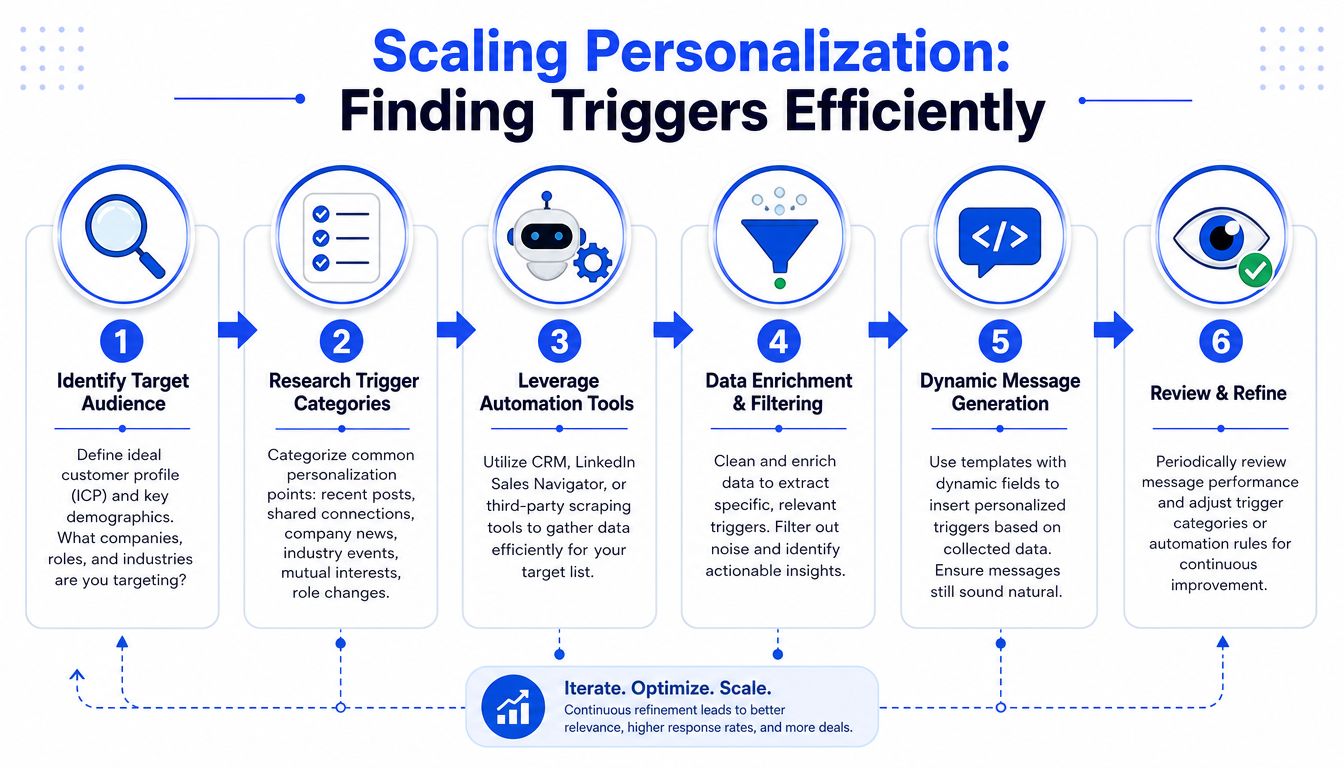
The gap is real. Existing content often fails to provide scalable frameworks for sending 50 to 100 weekly requests that maintain genuine intent, leaving teams averaging only 13% acceptance rates despite hours of manual effort. An AI-assisted, human-reviewed system bridges that gap Reddit.
Where the trigger comes from
The highest-lift token isn't {{first_name}} or {{company_name}}. It's the recent trigger reference, populated from active signal monitoring rather than static profile fields.
In practice, that means your stack watches for things like:
Hiring changes: new SDRs, leadership hires, team build-out
Stack shifts: CRM migration, new tooling, process rebuild
Company events: funding, expansion, product launches
Content signals: posts, comments, podcast appearances, interviews
Role changes: job moves with clear operating implications
Clay is well suited for this because it can pull and enrich signal data across multiple sources, then write back to a field like {{recent_trigger}}. Sales Navigator handles targeting. HeyReach or a similar sender handles controlled execution. HubSpot holds the reporting line.
If your team is comparing send-layer options before building this workflow, this review of the best LinkedIn automation tools is a useful starting point.
The workflow that makes it repeatable
This is the sequence that works in real ops:
Build the active queue
Pull ICP-fit prospects from Sales Navigator into Clay. Keep the list narrow by role, account fit, and actual buying context.Monitor live signals
Watch LinkedIn activity, company announcements, hiring patterns, and role changes. Don't rely on one source.Populate one token
Write the strongest current signal into {{recent_trigger}} as a full sentence. Example, “Saw your Series B announcement last week.”Use AI for phrasing, not invention
Let AI compress and clean the sentence. Don't let it fabricate context.Add a short human review
A quick check catches stale triggers, awkward wording, or false positives. That small review step saves campaigns.Send only when the trigger is real
If the token is weak, don't force the message. Move the prospect to another sequence.
One mistake teams make is stacking tokens. “Hi {{first_name}}, noticed {{company_name}} and saw {{recent_trigger}}” looks more templated than a single clean observation.
The system matters more than the line. The line is just the proof that the system did its job.
The advantage isn't “automation.” It's accurate trigger selection, clean formatting, and disciplined review. That's what turns a LinkedIn connection message from a guess into a repeatable pipeline input.
The first follow-up that earns a reply
Acceptance is not the win. It's permission to continue. Many organizations waste that permission in one of two ways. They pitch immediately, or they say nothing useful after the connection lands.
The stronger move is a short follow-up sent a few days later that continues the same thread. Successful LinkedIn connection strategies rely on a 2 to 3 touch sequence with a soft conversational question, rather than a single aggressive pitch, because that's what turns attention into qualified pipeline Martal.
The three-part DM structure
The first follow-up works best when it has three parts:
Brief acknowledgment
Keep it short. “Thanks for connecting, [name].”Deeper observation
Build on the original trigger with a pattern you believe.Soft question
End with a question that's easy to answer and doesn't demand a meeting.
This format works because it shows continuity. The recipient sees that the connection request wasn't bait for a generic pitch. It was the start of a specific conversation.
A follow-up example that works
If the original request opened with “Saw your team brought on 4 SDRs in the last 8 weeks,” the first DM can look like this:
Thanks for connecting, [name]. Now that we're connected, wanted to share an observation. When teams scale SDR headcount that fast, the founder or head of sales usually ends up writing the sequences personally at 11pm because the new SDRs need 3 to 4 weeks to ramp on tools, conversion, and copy. Is that resonating right now, or have you found a way to compress that ramp window?
The mechanics matter.
“Thanks for connecting” acknowledges the accept without wasting space. “Wanted to share an observation” frames the note as substance, not ask. The middle of the message takes a position. The final question gives the buyer two easy ways to reply.
A few rules keep this strong:
Don't ask for a meeting in the first DM
Don't paste a calendar link
Don't explain your company
Don't add case studies too early
Don't ask commercially sensitive questions
That timing matters too. Sent after a short pause, the note feels considered. Sent instantly, it feels like an ambush. Sent too late, the context fades.
If your team needs a cleaner process after acceptance, map the message into a shared follow-up workflow so the handoff from connection to conversation isn't left to rep habit.
A good follow-up DM doesn't sound “clever.” It sounds like someone noticed the same operating problem the buyer is already dealing with. That's enough to start a real reply.
How to approach C-level executives
Cold LinkedIn requests to C-level prospects are usually the wrong channel. That's the honest answer. When founders or senior sales leaders insist on this route, expectations need to be reset before copy gets discussed.
The issue isn't wording alone. Senior executives at larger companies receive constant inbound. Their LinkedIn network is curated, and cold requests compete with referrals, events, peer intros, and inbound content. That means a decent LinkedIn connection message may still underperform because the channel itself is weak for that audience.
Why the channel is the constraint
For C-level outreach, the strongest pattern is usually indirect first contact:
Referrals through existing relationships
Thoughtful comments on their content over time
Conference or event context
Warm email when the signal is strong
Executive-network peer introductions
That doesn't mean LinkedIn never works. It means it should be treated as one lane, not the engine.
If your team is selling into regulated or politically layered accounts, the communication challenge starts before the message. Training around executive communication and influence can help here, and unlock leadership potential is a relevant resource for that skill set.
The two-sentence format
When LinkedIn is the channel, keep the request to two sentences:
→ Sentence 1: “Saw your [specific, recent, substantive trigger relevant to their role].”
→ Sentence 2: “Working with a small number of [C-level peer group] navigating similar territory, wanted to add you to my network. No agenda.”
Examples:
CEO: “Saw your announcement Monday on the EMEA expansion. Working with a small number of B2B SaaS CEOs navigating similar geographic builds, wanted to add you to my network. No agenda.”
CFO: “Saw your Q3 commentary on capital efficiency in the earnings call. Working with a small number of CFOs at growth-stage SaaS companies on similar capital decisions, wanted to add you to my network. No agenda.”
CRO: “Saw your post Tuesday on the SDR efficiency benchmarks. Working with a handful of CROs running the same exercise on their teams, wanted to add you to my network. No agenda.”
The message works when the trigger is substantive. Strategic announcement, earnings call remark, regulatory submission, hiring move. Not title. Not school. Not “impressive background.”
The “small number of peer group” line matters because it places you in their professional context rather than vendor mode. The “No agenda” close lowers pressure. That's useful here because senior executives filter hard for early sales intent.
Still, the recommendation doesn't change. Use this format when you have to. For most C-level targets, a structured warm-up through content, referrals, and event context will outperform cold LinkedIn requests.
Common mistakes that kill acceptance rates
Most weak LinkedIn campaigns don't fail because the list is terrible. They fail because the message contains tells. The buyer spots those tells instantly and declines without reading the rest.

Why blank requests are a bad bet
One of the more persistent myths in outbound is that blank requests outperform personalized notes. Current data points the other way. Personalized notes yield 10.3% DM response rates versus 5.1% for cold emails, and trigger-based notes are reported to produce 2 to 3x higher acceptance than weaker approaches LinkedIn post.
That doesn't mean every note beats every blank request. It means good personalization beats non-contextual outreach. Blank requests might get accepted sometimes, but they often create weaker downstream engagement because no intent was established.
The failure patterns to cut now
These are the mistakes that drag campaigns down:
Generic greetings
“Hi [name], hope you're well” is still everywhere. Buyers recognize it on sight.Compliment-led intros
“Love your work” or “Great profile” creates skepticism, not trust.Merge-field obviousness
“I noticed you work at [company]” tells the prospect you pulled a list and hit send.Immediate sales pitch
Asking for time, demoing value, or forcing a CTA in the request creates resistance.Long notes
LinkedIn sales messages kept under 400 characters boost response rates from 3% to 22%, while longer messages reduce reply potential Clevenio.Poor timing
The strongest window to send a LinkedIn connection message is within 24 to 48 hours after the prospect engaged with your content or viewed your profile LinkedIn marketing guide.No pre-connection context
Engaging with 2 to 3 of the prospect's posts before sending the request, keeping the note under 75 words, and sending during midweek business hours improves acceptance, while blank messages sit in the 20% to 30% range and personalized messages can reach 70% to 78% Salesforge.
If your team keeps debating message copy while still pitching in the request, they're fixing the wrong layer.
The biggest trap is thinking “more personalization” means “more fields.” It doesn't. One real trigger beats four decorative tokens every time.
The metrics that matter for pipeline
Acceptance rate is an access metric. Pipeline metrics decide whether the LinkedIn connection message system is working.
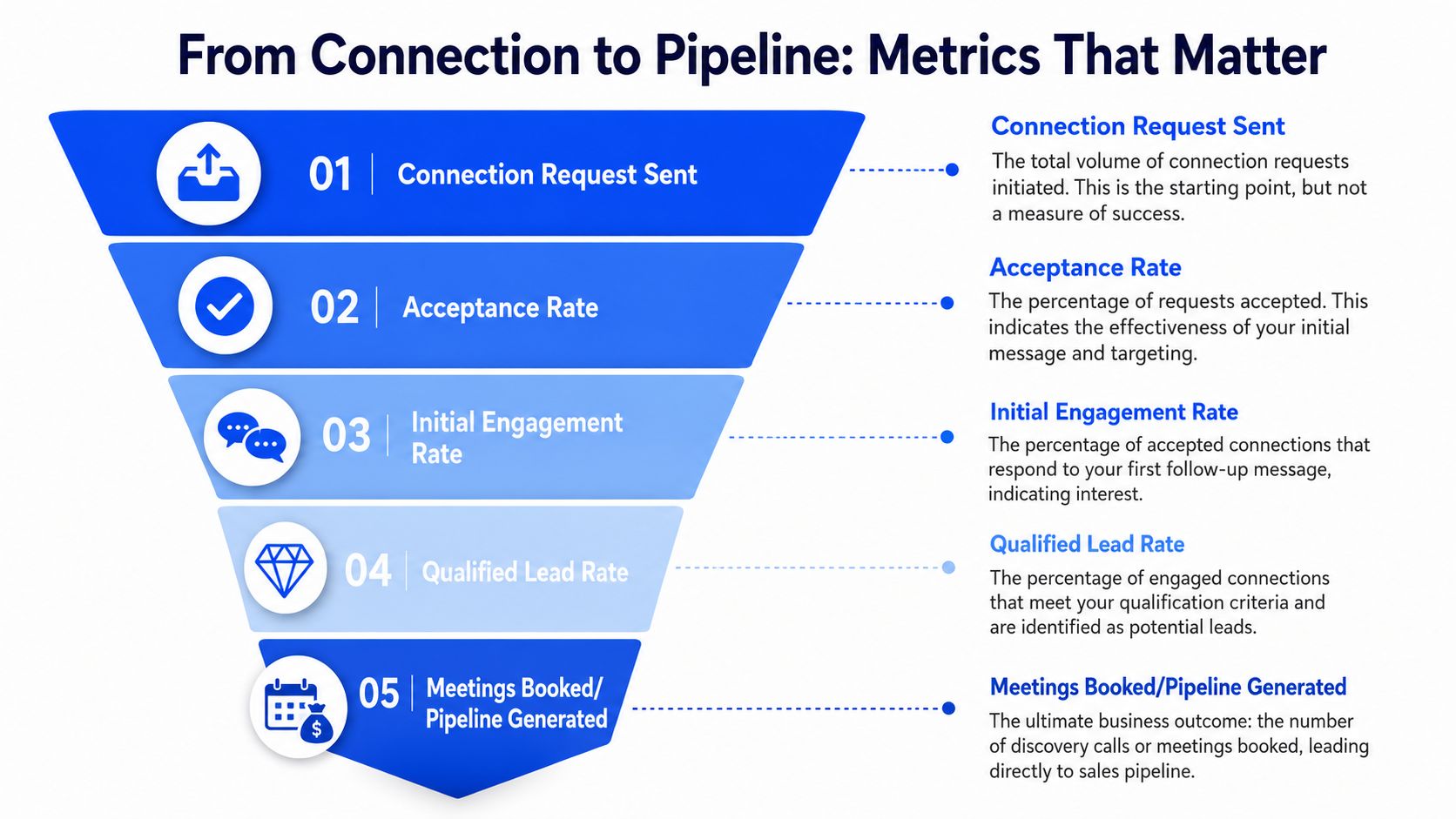
I have seen teams hit strong acceptance numbers and still miss pipeline targets because the follow-up layer was weak, the handoff was messy, or the targeting looked broad but produced no buying intent. If you only report on accepted connections, LinkedIn will look productive long before it is profitable.
Track the full path in your CRM, from request sent to qualified opportunity created. In HubSpot, Salesforce, or any system your team already uses, the reporting line should stay simple:
Requests sent
Acceptance rate
First follow-up reply rate
Positive reply ratio
Meetings booked
Meetings held
Qualified opportunities created
That sequence shows where the breakdown sits.
Acceptance rate measures message-market fit at the door. First follow-up reply rate measures whether the conversation started. Positive reply ratio shows whether the trigger, opener, and first DM produced real commercial interest. Meetings held matters more than meetings booked because no-show-heavy campaigns can make weak outbound look healthy.
Segment every one of those metrics by role, industry, and trigger category. Post-engagers often respond differently than job-change triggers. Founder outreach behaves differently from VP-level outreach. Manufacturing and pharma usually reward direct operational relevance. SaaS and legal tech often tolerate a lighter, insight-led opener.
If LinkedIn still sits in your dashboard as an activity channel instead of a revenue source, fix the reporting model first with a lead generation KPI framework.
The Friday audit
Run this on your last 50 accepted connections.
Check who received a first follow-up, who replied, which replies showed clear interest, how many meetings were booked, and how many were held. One sheet is enough. The goal is to find the stage where conversion drops.
Patterns show up fast. Healthy acceptance with weak replies usually points to poor DM structure or a follow-up that asks too much too early. Healthy replies with weak meetings usually points to rep handoff, scheduling friction, or low qualification discipline. Weak acceptance across segments usually points back to targeting, trigger selection, or profile credibility.
Review the lowest-performing segment first. Then inspect the opener, the trigger behind it, and the first DM used after acceptance. That is usually where the next pipeline gain comes from.
GROU is a global B2B pipeline agency working across iGaming, SaaS, manufacturing, legal tech, and pharma. We build one operating system across targeting, LinkedIn content, outbound, and CRM reporting so teams can turn structured attention into qualified pipeline. If you want a concrete next move, take your last 10 accepted LinkedIn connections, map the opener, trigger, first DM, reply outcome, and meeting-held status in one sheet by Monday, then compare that flow against how Grou structures signal-led outbound.
Slug: linkedin-connection-message
Meta description: Most LinkedIn connection requests fail because the system behind them is weak. See the message structures, trigger workflow, follow-up cadence, and pipeline metrics that separate noise from conversations.
Many assume their LinkedIn problem is copy. It usually isn't. The counterintuitive part is that sending more requests often makes performance worse, while a tighter message structure tied to a real trigger can push acceptance into the healthy range of 30% to 45%, with strong personalization driving much better outcomes than generic outreach Leadriver.
Winning messages start with a recent, verifiable trigger, not “Hi [name]” or a compliment.
The message is only one layer. Significant gains come from signal monitoring, token population, and human review.
Accepted connections still need a system. A brief follow-up with a genuine observation and soft question is where replies start.
Pipeline beats vanity metrics. Acceptance rate matters, but positive replies and meeting-held rate matter more.
Table of Contents
Your connection messages are being ignored
Most LinkedIn connection problems are not copy problems. They are operating model problems.
Teams send enough requests to blame volume, then keep missing the actual constraint. Buyers are filtering for relevance in a single notification, while the outbound team is judging quality by how personalized the note felt to write. Those are two different standards, and the buyer's standard is the one that matters.
That gap shows up in performance. Personalized LinkedIn connection messages achieve approximately 45% acceptance rates, compared to 15% for generic untargeted outreach, and the cross-industry average sits at approximately 30% across 500,000 tracked LinkedIn connection requests SalesHive. If your campaign is below 20%, the fix usually sits in targeting, trigger quality, profile credibility, or account setup.
What the buyer actually evaluates
Prospects do not see your intent, your SDR brief, or your enrichment workflow. They see a short note attached to a request from someone they do not know. In practice, acceptance rates rise or fall on four checks:
Does the opener sound human? “Hi [name], hope you're well” still signals mass outreach.
Is there a reason to connect now? No recent trigger means no urgency.
Does the profile support the message? A weak headline, vague company description, or thin activity feed lowers trust.
Does the post-accept flow match the request? If the rep pivots into a generic pitch, the connection never turns into pipeline.
Use a simple rule in reviews. If a rep can send the same note to twenty accounts with only the company name swapped, it is still a template.
As noted earlier, even a short relevant note can outperform a blank request. More targeted personalization around a specific achievement or shared context performs better than broad “saw your profile” language. That is why acceptance rate is a system output, not just a writing output.
Why message advice alone falls short
A strong connection strategy has four moving parts. Clean account selection, a recent and credible trigger, a profile that can survive scrutiny, and a follow-up sequence that continues the same thread after acceptance. Miss one of those and the message has to work too hard.
I have seen this pattern across thousands of campaigns. Teams that obsess over wording while ignoring profile quality and follow-up logic usually plateau early. Teams that build around signals, workflow discipline, and rep consistency produce conversion rates that hold up across segments instead of collapsing after the first batch.
For a useful perspective on what happens after a prospect sees your message, A guide for B2B outreach on LinkedIn adds context to your own reply and view data. Before scaling request volume, audit account health and sending behavior too, especially if your team has not reviewed LinkedIn limits and warmup best practices.
The primary performance driver is alignment between targeting, trigger, profile, and follow-up. That is the structure that turns LinkedIn connections into repeatable pipeline instead of one-off wins.
The opening line that gets a 47% acceptance rate
A strong LinkedIn opener does one job. It shows the prospect that this request came from observation, not list access.
Across outbound programs, the opening line that keeps winning is simple: a specific, recent, verifiable trigger with no greeting and no pitch. As noted earlier, healthy acceptance rates usually sit in the 30% to 45% range, and the best trigger-led campaigns push higher. In practice, I see the same pattern repeatedly. Once the first line references something real that happened recently, acceptance rate climbs because the note reads like research instead of prospecting automation.
The exact format
Use this structure:
→ “Saw [specific recent event from the past 14 days].”
That format works because it earns attention before asking for it. It also avoids the language patterns buyers associate with low-effort outreach.
Examples that have worked in live campaigns:
Saw your team brought on 4 SDRs in the last 8 weeks.
Saw your post yesterday on the Q1 pipeline gap.
Saw your Series B announcement last week.
Saw your team moved from HubSpot to Salesforce last month.
Caught your Tuesday post on ABM positioning, the part about coverage ratios stood out.
The trade-off is clear. This style outperforms generic intros, but only if the trigger is real and recent. Reps who fake specificity usually get exposed fast. Reps who use clean signals can run this at scale without sounding templated.
If your team uses AI to help draft variants, the model should not invent the personalization. Feed it real signal inputs and force short outputs tied to one event. If marketing is also building content around the same buying committee, these AI prompts for social media can help refine the signal categories your reps track.
Here is the benchmark table worth keeping in your enablement docs:
Opening line style | Average acceptance rate |
|---|---|
Trigger-referenced opening, specific recent event | 40% to 47% |
Generic warm opening, “Hi [name], hope you're well” | 22% to 28% |
Compliment-led opening | 18% to 24% |
Direct ask opening | 12% to 18% |
No personalization, no note | 12% to 18% |
The mechanic is simple. The buyer can verify the trigger in seconds. That lowers skepticism and raises the odds that the request feels relevant enough to accept.
For a tighter definition of the mechanic itself, see this breakdown of first-line personalisation.
What to delete from your templates
Low-performing notes usually fail in the first seven words. Remove these openers:
“Hi [name], hope you're doing well.” It signals a cold template immediately.
“I came across your profile and...” It says nothing useful.
“I noticed you work at [company].” That shows list access, not research.
“Love your work at [company].” It reads like flattery.
“We have something in common...” It often feels forced.
“I'd love to connect because...” It puts your agenda first.
“Just wanted to add you to my network.” It gives the buyer no reason to care.
Buyers decide fast. The first line does not need charm. It needs proof.
Place the video below in your internal training doc if you want reps to hear the logic from another angle before role-based practice.
The system for finding personalization triggers at scale
A strong opener is useless if your team can only produce five of them a day. Consequently, most outbound programs break. They have the right idea, but no operating system behind it.
The gap is real. Existing content often fails to provide scalable frameworks for sending 50 to 100 weekly requests that maintain genuine intent, leaving teams averaging only 13% acceptance rates despite hours of manual effort. An AI-assisted, human-reviewed system bridges that gap Reddit.
Where the trigger comes from
The highest-lift token isn't {{first_name}} or {{company_name}}. It's the recent trigger reference, populated from active signal monitoring rather than static profile fields.
In practice, that means your stack watches for things like:
Hiring changes: new SDRs, leadership hires, team build-out
Stack shifts: CRM migration, new tooling, process rebuild
Company events: funding, expansion, product launches
Content signals: posts, comments, podcast appearances, interviews
Role changes: job moves with clear operating implications
Clay is well suited for this because it can pull and enrich signal data across multiple sources, then write back to a field like {{recent_trigger}}. Sales Navigator handles targeting. HeyReach or a similar sender handles controlled execution. HubSpot holds the reporting line.
If your team is comparing send-layer options before building this workflow, this review of the best LinkedIn automation tools is a useful starting point.
The workflow that makes it repeatable
This is the sequence that works in real ops:
Build the active queue
Pull ICP-fit prospects from Sales Navigator into Clay. Keep the list narrow by role, account fit, and actual buying context.Monitor live signals
Watch LinkedIn activity, company announcements, hiring patterns, and role changes. Don't rely on one source.Populate one token
Write the strongest current signal into {{recent_trigger}} as a full sentence. Example, “Saw your Series B announcement last week.”Use AI for phrasing, not invention
Let AI compress and clean the sentence. Don't let it fabricate context.Add a short human review
A quick check catches stale triggers, awkward wording, or false positives. That small review step saves campaigns.Send only when the trigger is real
If the token is weak, don't force the message. Move the prospect to another sequence.
One mistake teams make is stacking tokens. “Hi {{first_name}}, noticed {{company_name}} and saw {{recent_trigger}}” looks more templated than a single clean observation.
The system matters more than the line. The line is just the proof that the system did its job.
The advantage isn't “automation.” It's accurate trigger selection, clean formatting, and disciplined review. That's what turns a LinkedIn connection message from a guess into a repeatable pipeline input.
The first follow-up that earns a reply
Acceptance is not the win. It's permission to continue. Many organizations waste that permission in one of two ways. They pitch immediately, or they say nothing useful after the connection lands.
The stronger move is a short follow-up sent a few days later that continues the same thread. Successful LinkedIn connection strategies rely on a 2 to 3 touch sequence with a soft conversational question, rather than a single aggressive pitch, because that's what turns attention into qualified pipeline Martal.
The three-part DM structure
The first follow-up works best when it has three parts:
Brief acknowledgment
Keep it short. “Thanks for connecting, [name].”Deeper observation
Build on the original trigger with a pattern you believe.Soft question
End with a question that's easy to answer and doesn't demand a meeting.
This format works because it shows continuity. The recipient sees that the connection request wasn't bait for a generic pitch. It was the start of a specific conversation.
A follow-up example that works
If the original request opened with “Saw your team brought on 4 SDRs in the last 8 weeks,” the first DM can look like this:
Thanks for connecting, [name]. Now that we're connected, wanted to share an observation. When teams scale SDR headcount that fast, the founder or head of sales usually ends up writing the sequences personally at 11pm because the new SDRs need 3 to 4 weeks to ramp on tools, conversion, and copy. Is that resonating right now, or have you found a way to compress that ramp window?
The mechanics matter.
“Thanks for connecting” acknowledges the accept without wasting space. “Wanted to share an observation” frames the note as substance, not ask. The middle of the message takes a position. The final question gives the buyer two easy ways to reply.
A few rules keep this strong:
Don't ask for a meeting in the first DM
Don't paste a calendar link
Don't explain your company
Don't add case studies too early
Don't ask commercially sensitive questions
That timing matters too. Sent after a short pause, the note feels considered. Sent instantly, it feels like an ambush. Sent too late, the context fades.
If your team needs a cleaner process after acceptance, map the message into a shared follow-up workflow so the handoff from connection to conversation isn't left to rep habit.
A good follow-up DM doesn't sound “clever.” It sounds like someone noticed the same operating problem the buyer is already dealing with. That's enough to start a real reply.
How to approach C-level executives
Cold LinkedIn requests to C-level prospects are usually the wrong channel. That's the honest answer. When founders or senior sales leaders insist on this route, expectations need to be reset before copy gets discussed.
The issue isn't wording alone. Senior executives at larger companies receive constant inbound. Their LinkedIn network is curated, and cold requests compete with referrals, events, peer intros, and inbound content. That means a decent LinkedIn connection message may still underperform because the channel itself is weak for that audience.
Why the channel is the constraint
For C-level outreach, the strongest pattern is usually indirect first contact:
Referrals through existing relationships
Thoughtful comments on their content over time
Conference or event context
Warm email when the signal is strong
Executive-network peer introductions
That doesn't mean LinkedIn never works. It means it should be treated as one lane, not the engine.
If your team is selling into regulated or politically layered accounts, the communication challenge starts before the message. Training around executive communication and influence can help here, and unlock leadership potential is a relevant resource for that skill set.
The two-sentence format
When LinkedIn is the channel, keep the request to two sentences:
→ Sentence 1: “Saw your [specific, recent, substantive trigger relevant to their role].”
→ Sentence 2: “Working with a small number of [C-level peer group] navigating similar territory, wanted to add you to my network. No agenda.”
Examples:
CEO: “Saw your announcement Monday on the EMEA expansion. Working with a small number of B2B SaaS CEOs navigating similar geographic builds, wanted to add you to my network. No agenda.”
CFO: “Saw your Q3 commentary on capital efficiency in the earnings call. Working with a small number of CFOs at growth-stage SaaS companies on similar capital decisions, wanted to add you to my network. No agenda.”
CRO: “Saw your post Tuesday on the SDR efficiency benchmarks. Working with a handful of CROs running the same exercise on their teams, wanted to add you to my network. No agenda.”
The message works when the trigger is substantive. Strategic announcement, earnings call remark, regulatory submission, hiring move. Not title. Not school. Not “impressive background.”
The “small number of peer group” line matters because it places you in their professional context rather than vendor mode. The “No agenda” close lowers pressure. That's useful here because senior executives filter hard for early sales intent.
Still, the recommendation doesn't change. Use this format when you have to. For most C-level targets, a structured warm-up through content, referrals, and event context will outperform cold LinkedIn requests.
Common mistakes that kill acceptance rates
Most weak LinkedIn campaigns don't fail because the list is terrible. They fail because the message contains tells. The buyer spots those tells instantly and declines without reading the rest.
Why blank requests are a bad bet
One of the more persistent myths in outbound is that blank requests outperform personalized notes. Current data points the other way. Personalized notes yield 10.3% DM response rates versus 5.1% for cold emails, and trigger-based notes are reported to produce 2 to 3x higher acceptance than weaker approaches LinkedIn post.
That doesn't mean every note beats every blank request. It means good personalization beats non-contextual outreach. Blank requests might get accepted sometimes, but they often create weaker downstream engagement because no intent was established.
The failure patterns to cut now
These are the mistakes that drag campaigns down:
Generic greetings
“Hi [name], hope you're well” is still everywhere. Buyers recognize it on sight.Compliment-led intros
“Love your work” or “Great profile” creates skepticism, not trust.Merge-field obviousness
“I noticed you work at [company]” tells the prospect you pulled a list and hit send.Immediate sales pitch
Asking for time, demoing value, or forcing a CTA in the request creates resistance.Long notes
LinkedIn sales messages kept under 400 characters boost response rates from 3% to 22%, while longer messages reduce reply potential Clevenio.Poor timing
The strongest window to send a LinkedIn connection message is within 24 to 48 hours after the prospect engaged with your content or viewed your profile LinkedIn marketing guide.No pre-connection context
Engaging with 2 to 3 of the prospect's posts before sending the request, keeping the note under 75 words, and sending during midweek business hours improves acceptance, while blank messages sit in the 20% to 30% range and personalized messages can reach 70% to 78% Salesforge.
If your team keeps debating message copy while still pitching in the request, they're fixing the wrong layer.
The biggest trap is thinking “more personalization” means “more fields.” It doesn't. One real trigger beats four decorative tokens every time.
The metrics that matter for pipeline
Acceptance rate is an access metric. Pipeline metrics decide whether the LinkedIn connection message system is working.
I have seen teams hit strong acceptance numbers and still miss pipeline targets because the follow-up layer was weak, the handoff was messy, or the targeting looked broad but produced no buying intent. If you only report on accepted connections, LinkedIn will look productive long before it is profitable.
Track the full path in your CRM, from request sent to qualified opportunity created. In HubSpot, Salesforce, or any system your team already uses, the reporting line should stay simple:
Requests sent
Acceptance rate
First follow-up reply rate
Positive reply ratio
Meetings booked
Meetings held
Qualified opportunities created
That sequence shows where the breakdown sits.
Acceptance rate measures message-market fit at the door. First follow-up reply rate measures whether the conversation started. Positive reply ratio shows whether the trigger, opener, and first DM produced real commercial interest. Meetings held matters more than meetings booked because no-show-heavy campaigns can make weak outbound look healthy.
Segment every one of those metrics by role, industry, and trigger category. Post-engagers often respond differently than job-change triggers. Founder outreach behaves differently from VP-level outreach. Manufacturing and pharma usually reward direct operational relevance. SaaS and legal tech often tolerate a lighter, insight-led opener.
If LinkedIn still sits in your dashboard as an activity channel instead of a revenue source, fix the reporting model first with a lead generation KPI framework.
The Friday audit
Run this on your last 50 accepted connections.
Check who received a first follow-up, who replied, which replies showed clear interest, how many meetings were booked, and how many were held. One sheet is enough. The goal is to find the stage where conversion drops.
Patterns show up fast. Healthy acceptance with weak replies usually points to poor DM structure or a follow-up that asks too much too early. Healthy replies with weak meetings usually points to rep handoff, scheduling friction, or low qualification discipline. Weak acceptance across segments usually points back to targeting, trigger selection, or profile credibility.
Review the lowest-performing segment first. Then inspect the opener, the trigger behind it, and the first DM used after acceptance. That is usually where the next pipeline gain comes from.
GROU is a global B2B pipeline agency working across iGaming, SaaS, manufacturing, legal tech, and pharma. We build one operating system across targeting, LinkedIn content, outbound, and CRM reporting so teams can turn structured attention into qualified pipeline. If you want a concrete next move, take your last 10 accepted LinkedIn connections, map the opener, trigger, first DM, reply outcome, and meeting-held status in one sheet by Monday, then compare that flow against how Grou structures signal-led outbound.
Slug: linkedin-connection-message
Meta description: Most LinkedIn connection requests fail because the system behind them is weak. See the message structures, trigger workflow, follow-up cadence, and pipeline metrics that separate noise from conversations.
Many assume their LinkedIn problem is copy. It usually isn't. The counterintuitive part is that sending more requests often makes performance worse, while a tighter message structure tied to a real trigger can push acceptance into the healthy range of 30% to 45%, with strong personalization driving much better outcomes than generic outreach Leadriver.
Winning messages start with a recent, verifiable trigger, not “Hi [name]” or a compliment.
The message is only one layer. Significant gains come from signal monitoring, token population, and human review.
Accepted connections still need a system. A brief follow-up with a genuine observation and soft question is where replies start.
Pipeline beats vanity metrics. Acceptance rate matters, but positive replies and meeting-held rate matter more.
Table of Contents
Your connection messages are being ignored
Most LinkedIn connection problems are not copy problems. They are operating model problems.
Teams send enough requests to blame volume, then keep missing the actual constraint. Buyers are filtering for relevance in a single notification, while the outbound team is judging quality by how personalized the note felt to write. Those are two different standards, and the buyer's standard is the one that matters.
That gap shows up in performance. Personalized LinkedIn connection messages achieve approximately 45% acceptance rates, compared to 15% for generic untargeted outreach, and the cross-industry average sits at approximately 30% across 500,000 tracked LinkedIn connection requests SalesHive. If your campaign is below 20%, the fix usually sits in targeting, trigger quality, profile credibility, or account setup.
What the buyer actually evaluates
Prospects do not see your intent, your SDR brief, or your enrichment workflow. They see a short note attached to a request from someone they do not know. In practice, acceptance rates rise or fall on four checks:
Does the opener sound human? “Hi [name], hope you're well” still signals mass outreach.
Is there a reason to connect now? No recent trigger means no urgency.
Does the profile support the message? A weak headline, vague company description, or thin activity feed lowers trust.
Does the post-accept flow match the request? If the rep pivots into a generic pitch, the connection never turns into pipeline.
Use a simple rule in reviews. If a rep can send the same note to twenty accounts with only the company name swapped, it is still a template.
As noted earlier, even a short relevant note can outperform a blank request. More targeted personalization around a specific achievement or shared context performs better than broad “saw your profile” language. That is why acceptance rate is a system output, not just a writing output.
Why message advice alone falls short
A strong connection strategy has four moving parts. Clean account selection, a recent and credible trigger, a profile that can survive scrutiny, and a follow-up sequence that continues the same thread after acceptance. Miss one of those and the message has to work too hard.
I have seen this pattern across thousands of campaigns. Teams that obsess over wording while ignoring profile quality and follow-up logic usually plateau early. Teams that build around signals, workflow discipline, and rep consistency produce conversion rates that hold up across segments instead of collapsing after the first batch.
For a useful perspective on what happens after a prospect sees your message, A guide for B2B outreach on LinkedIn adds context to your own reply and view data. Before scaling request volume, audit account health and sending behavior too, especially if your team has not reviewed LinkedIn limits and warmup best practices.
The primary performance driver is alignment between targeting, trigger, profile, and follow-up. That is the structure that turns LinkedIn connections into repeatable pipeline instead of one-off wins.
The opening line that gets a 47% acceptance rate
A strong LinkedIn opener does one job. It shows the prospect that this request came from observation, not list access.
Across outbound programs, the opening line that keeps winning is simple: a specific, recent, verifiable trigger with no greeting and no pitch. As noted earlier, healthy acceptance rates usually sit in the 30% to 45% range, and the best trigger-led campaigns push higher. In practice, I see the same pattern repeatedly. Once the first line references something real that happened recently, acceptance rate climbs because the note reads like research instead of prospecting automation.
The exact format
Use this structure:
→ “Saw [specific recent event from the past 14 days].”
That format works because it earns attention before asking for it. It also avoids the language patterns buyers associate with low-effort outreach.
Examples that have worked in live campaigns:
Saw your team brought on 4 SDRs in the last 8 weeks.
Saw your post yesterday on the Q1 pipeline gap.
Saw your Series B announcement last week.
Saw your team moved from HubSpot to Salesforce last month.
Caught your Tuesday post on ABM positioning, the part about coverage ratios stood out.
The trade-off is clear. This style outperforms generic intros, but only if the trigger is real and recent. Reps who fake specificity usually get exposed fast. Reps who use clean signals can run this at scale without sounding templated.
If your team uses AI to help draft variants, the model should not invent the personalization. Feed it real signal inputs and force short outputs tied to one event. If marketing is also building content around the same buying committee, these AI prompts for social media can help refine the signal categories your reps track.
Here is the benchmark table worth keeping in your enablement docs:
Opening line style | Average acceptance rate |
|---|---|
Trigger-referenced opening, specific recent event | 40% to 47% |
Generic warm opening, “Hi [name], hope you're well” | 22% to 28% |
Compliment-led opening | 18% to 24% |
Direct ask opening | 12% to 18% |
No personalization, no note | 12% to 18% |
The mechanic is simple. The buyer can verify the trigger in seconds. That lowers skepticism and raises the odds that the request feels relevant enough to accept.
For a tighter definition of the mechanic itself, see this breakdown of first-line personalisation.
What to delete from your templates
Low-performing notes usually fail in the first seven words. Remove these openers:
“Hi [name], hope you're doing well.” It signals a cold template immediately.
“I came across your profile and...” It says nothing useful.
“I noticed you work at [company].” That shows list access, not research.
“Love your work at [company].” It reads like flattery.
“We have something in common...” It often feels forced.
“I'd love to connect because...” It puts your agenda first.
“Just wanted to add you to my network.” It gives the buyer no reason to care.
Buyers decide fast. The first line does not need charm. It needs proof.
Place the video below in your internal training doc if you want reps to hear the logic from another angle before role-based practice.
The system for finding personalization triggers at scale
A strong opener is useless if your team can only produce five of them a day. Consequently, most outbound programs break. They have the right idea, but no operating system behind it.
The gap is real. Existing content often fails to provide scalable frameworks for sending 50 to 100 weekly requests that maintain genuine intent, leaving teams averaging only 13% acceptance rates despite hours of manual effort. An AI-assisted, human-reviewed system bridges that gap Reddit.
Where the trigger comes from
The highest-lift token isn't {{first_name}} or {{company_name}}. It's the recent trigger reference, populated from active signal monitoring rather than static profile fields.
In practice, that means your stack watches for things like:
Hiring changes: new SDRs, leadership hires, team build-out
Stack shifts: CRM migration, new tooling, process rebuild
Company events: funding, expansion, product launches
Content signals: posts, comments, podcast appearances, interviews
Role changes: job moves with clear operating implications
Clay is well suited for this because it can pull and enrich signal data across multiple sources, then write back to a field like {{recent_trigger}}. Sales Navigator handles targeting. HeyReach or a similar sender handles controlled execution. HubSpot holds the reporting line.
If your team is comparing send-layer options before building this workflow, this review of the best LinkedIn automation tools is a useful starting point.
The workflow that makes it repeatable
This is the sequence that works in real ops:
Build the active queue
Pull ICP-fit prospects from Sales Navigator into Clay. Keep the list narrow by role, account fit, and actual buying context.Monitor live signals
Watch LinkedIn activity, company announcements, hiring patterns, and role changes. Don't rely on one source.Populate one token
Write the strongest current signal into {{recent_trigger}} as a full sentence. Example, “Saw your Series B announcement last week.”Use AI for phrasing, not invention
Let AI compress and clean the sentence. Don't let it fabricate context.Add a short human review
A quick check catches stale triggers, awkward wording, or false positives. That small review step saves campaigns.Send only when the trigger is real
If the token is weak, don't force the message. Move the prospect to another sequence.
One mistake teams make is stacking tokens. “Hi {{first_name}}, noticed {{company_name}} and saw {{recent_trigger}}” looks more templated than a single clean observation.
The system matters more than the line. The line is just the proof that the system did its job.
The advantage isn't “automation.” It's accurate trigger selection, clean formatting, and disciplined review. That's what turns a LinkedIn connection message from a guess into a repeatable pipeline input.
The first follow-up that earns a reply
Acceptance is not the win. It's permission to continue. Many organizations waste that permission in one of two ways. They pitch immediately, or they say nothing useful after the connection lands.
The stronger move is a short follow-up sent a few days later that continues the same thread. Successful LinkedIn connection strategies rely on a 2 to 3 touch sequence with a soft conversational question, rather than a single aggressive pitch, because that's what turns attention into qualified pipeline Martal.
The three-part DM structure
The first follow-up works best when it has three parts:
Brief acknowledgment
Keep it short. “Thanks for connecting, [name].”Deeper observation
Build on the original trigger with a pattern you believe.Soft question
End with a question that's easy to answer and doesn't demand a meeting.
This format works because it shows continuity. The recipient sees that the connection request wasn't bait for a generic pitch. It was the start of a specific conversation.
A follow-up example that works
If the original request opened with “Saw your team brought on 4 SDRs in the last 8 weeks,” the first DM can look like this:
Thanks for connecting, [name]. Now that we're connected, wanted to share an observation. When teams scale SDR headcount that fast, the founder or head of sales usually ends up writing the sequences personally at 11pm because the new SDRs need 3 to 4 weeks to ramp on tools, conversion, and copy. Is that resonating right now, or have you found a way to compress that ramp window?
The mechanics matter.
“Thanks for connecting” acknowledges the accept without wasting space. “Wanted to share an observation” frames the note as substance, not ask. The middle of the message takes a position. The final question gives the buyer two easy ways to reply.
A few rules keep this strong:
Don't ask for a meeting in the first DM
Don't paste a calendar link
Don't explain your company
Don't add case studies too early
Don't ask commercially sensitive questions
That timing matters too. Sent after a short pause, the note feels considered. Sent instantly, it feels like an ambush. Sent too late, the context fades.
If your team needs a cleaner process after acceptance, map the message into a shared follow-up workflow so the handoff from connection to conversation isn't left to rep habit.
A good follow-up DM doesn't sound “clever.” It sounds like someone noticed the same operating problem the buyer is already dealing with. That's enough to start a real reply.
How to approach C-level executives
Cold LinkedIn requests to C-level prospects are usually the wrong channel. That's the honest answer. When founders or senior sales leaders insist on this route, expectations need to be reset before copy gets discussed.
The issue isn't wording alone. Senior executives at larger companies receive constant inbound. Their LinkedIn network is curated, and cold requests compete with referrals, events, peer intros, and inbound content. That means a decent LinkedIn connection message may still underperform because the channel itself is weak for that audience.
Why the channel is the constraint
For C-level outreach, the strongest pattern is usually indirect first contact:
Referrals through existing relationships
Thoughtful comments on their content over time
Conference or event context
Warm email when the signal is strong
Executive-network peer introductions
That doesn't mean LinkedIn never works. It means it should be treated as one lane, not the engine.
If your team is selling into regulated or politically layered accounts, the communication challenge starts before the message. Training around executive communication and influence can help here, and unlock leadership potential is a relevant resource for that skill set.
The two-sentence format
When LinkedIn is the channel, keep the request to two sentences:
→ Sentence 1: “Saw your [specific, recent, substantive trigger relevant to their role].”
→ Sentence 2: “Working with a small number of [C-level peer group] navigating similar territory, wanted to add you to my network. No agenda.”
Examples:
CEO: “Saw your announcement Monday on the EMEA expansion. Working with a small number of B2B SaaS CEOs navigating similar geographic builds, wanted to add you to my network. No agenda.”
CFO: “Saw your Q3 commentary on capital efficiency in the earnings call. Working with a small number of CFOs at growth-stage SaaS companies on similar capital decisions, wanted to add you to my network. No agenda.”
CRO: “Saw your post Tuesday on the SDR efficiency benchmarks. Working with a handful of CROs running the same exercise on their teams, wanted to add you to my network. No agenda.”
The message works when the trigger is substantive. Strategic announcement, earnings call remark, regulatory submission, hiring move. Not title. Not school. Not “impressive background.”
The “small number of peer group” line matters because it places you in their professional context rather than vendor mode. The “No agenda” close lowers pressure. That's useful here because senior executives filter hard for early sales intent.
Still, the recommendation doesn't change. Use this format when you have to. For most C-level targets, a structured warm-up through content, referrals, and event context will outperform cold LinkedIn requests.
Common mistakes that kill acceptance rates
Most weak LinkedIn campaigns don't fail because the list is terrible. They fail because the message contains tells. The buyer spots those tells instantly and declines without reading the rest.
Why blank requests are a bad bet
One of the more persistent myths in outbound is that blank requests outperform personalized notes. Current data points the other way. Personalized notes yield 10.3% DM response rates versus 5.1% for cold emails, and trigger-based notes are reported to produce 2 to 3x higher acceptance than weaker approaches LinkedIn post.
That doesn't mean every note beats every blank request. It means good personalization beats non-contextual outreach. Blank requests might get accepted sometimes, but they often create weaker downstream engagement because no intent was established.
The failure patterns to cut now
These are the mistakes that drag campaigns down:
Generic greetings
“Hi [name], hope you're well” is still everywhere. Buyers recognize it on sight.Compliment-led intros
“Love your work” or “Great profile” creates skepticism, not trust.Merge-field obviousness
“I noticed you work at [company]” tells the prospect you pulled a list and hit send.Immediate sales pitch
Asking for time, demoing value, or forcing a CTA in the request creates resistance.Long notes
LinkedIn sales messages kept under 400 characters boost response rates from 3% to 22%, while longer messages reduce reply potential Clevenio.Poor timing
The strongest window to send a LinkedIn connection message is within 24 to 48 hours after the prospect engaged with your content or viewed your profile LinkedIn marketing guide.No pre-connection context
Engaging with 2 to 3 of the prospect's posts before sending the request, keeping the note under 75 words, and sending during midweek business hours improves acceptance, while blank messages sit in the 20% to 30% range and personalized messages can reach 70% to 78% Salesforge.
If your team keeps debating message copy while still pitching in the request, they're fixing the wrong layer.
The biggest trap is thinking “more personalization” means “more fields.” It doesn't. One real trigger beats four decorative tokens every time.
The metrics that matter for pipeline
Acceptance rate is an access metric. Pipeline metrics decide whether the LinkedIn connection message system is working.
I have seen teams hit strong acceptance numbers and still miss pipeline targets because the follow-up layer was weak, the handoff was messy, or the targeting looked broad but produced no buying intent. If you only report on accepted connections, LinkedIn will look productive long before it is profitable.
Track the full path in your CRM, from request sent to qualified opportunity created. In HubSpot, Salesforce, or any system your team already uses, the reporting line should stay simple:
Requests sent
Acceptance rate
First follow-up reply rate
Positive reply ratio
Meetings booked
Meetings held
Qualified opportunities created
That sequence shows where the breakdown sits.
Acceptance rate measures message-market fit at the door. First follow-up reply rate measures whether the conversation started. Positive reply ratio shows whether the trigger, opener, and first DM produced real commercial interest. Meetings held matters more than meetings booked because no-show-heavy campaigns can make weak outbound look healthy.
Segment every one of those metrics by role, industry, and trigger category. Post-engagers often respond differently than job-change triggers. Founder outreach behaves differently from VP-level outreach. Manufacturing and pharma usually reward direct operational relevance. SaaS and legal tech often tolerate a lighter, insight-led opener.
If LinkedIn still sits in your dashboard as an activity channel instead of a revenue source, fix the reporting model first with a lead generation KPI framework.
The Friday audit
Run this on your last 50 accepted connections.
Check who received a first follow-up, who replied, which replies showed clear interest, how many meetings were booked, and how many were held. One sheet is enough. The goal is to find the stage where conversion drops.
Patterns show up fast. Healthy acceptance with weak replies usually points to poor DM structure or a follow-up that asks too much too early. Healthy replies with weak meetings usually points to rep handoff, scheduling friction, or low qualification discipline. Weak acceptance across segments usually points back to targeting, trigger selection, or profile credibility.
Review the lowest-performing segment first. Then inspect the opener, the trigger behind it, and the first DM used after acceptance. That is usually where the next pipeline gain comes from.
GROU is a global B2B pipeline agency working across iGaming, SaaS, manufacturing, legal tech, and pharma. We build one operating system across targeting, LinkedIn content, outbound, and CRM reporting so teams can turn structured attention into qualified pipeline. If you want a concrete next move, take your last 10 accepted LinkedIn connections, map the opener, trigger, first DM, reply outcome, and meeting-held status in one sheet by Monday, then compare that flow against how Grou structures signal-led outbound.

Pipeline OS Newsletter
Build qualified pipeline
Get weekly tactics to generate demand, improve lead quality, and book more meetings.





Trusted by industry leaders
Trusted by industry leaders
Trusted by industry leaders
Ready to build qualified pipeline?
Ready to build qualified pipeline?
Ready to build qualified pipeline?
Book a call to see if we're the right fit, or take the 2-minute quiz to get a clear starting point.
Book a call to see if we're the right fit, or take the 2-minute quiz to get a clear starting point.
Book a call to see if we're the right fit, or take the 2-minute quiz to get a clear starting point.
" height="30.21639343089746px" id="hfGbXmQR2" width="30.216393430897455px"/></svg>)
Copyright © 2026 – All Right Reserved
Copyright © 2026 – All Right Reserved
Copyright © 2026 – All Right Reserved