%22%3E%3C/path%3E%3Cpath d=%22M 63.072 7.554 C 62.258 8.022 61.577 8.689 61.092 9.493 L 61.092 7.076 L 57.158 7.076 L 57.158 22.64 L 61.089 22.64 L 61.089 14.888 C 61.089 13.446 61.403 12.434 62.03 11.853 C 62.818 11.218 63.818 10.907 64.826 10.982 L 65.868 10.982 L 65.868 6.851 C 64.891 6.834 63.926 7.076 63.073 7.554 Z%22 fill=%22rgb(17,17,17)%22%3E%3C/path%3E%3Cpath d=%22M 78.916 7.82 C 76.363 6.49 73.321 6.49 70.768 7.82 C 69.562 8.473 68.564 9.451 67.888 10.644 C 67.167 11.931 66.803 13.387 66.834 14.862 C 66.804 16.332 67.157 17.785 67.86 19.077 C 68.515 20.267 69.494 21.246 70.684 21.901 C 71.924 22.576 73.318 22.92 74.73 22.898 C 76.164 22.918 77.58 22.575 78.846 21.901 C 80.062 21.247 81.073 20.27 81.768 19.077 C 82.506 17.797 82.88 16.339 82.85 14.862 C 82.88 13.389 82.517 11.934 81.797 10.647 C 81.12 9.455 80.122 8.477 78.917 7.824 M 78.803 14.862 C 78.829 15.739 78.636 16.608 78.241 17.391 C 77.903 18.046 77.38 18.588 76.738 18.95 C 76.124 19.293 75.432 19.472 74.729 19.47 C 73.668 19.497 72.648 19.061 71.934 18.276 C 71.139 17.323 70.741 16.1 70.823 14.862 C 70.741 13.62 71.149 12.395 71.959 11.45 C 72.687 10.667 73.715 10.233 74.783 10.256 C 75.859 10.236 76.894 10.67 77.635 11.45 C 78.464 12.387 78.884 13.616 78.801 14.864%22 fill=%22rgb(17,17,17)%22%3E%3C/path%3E%3Cpath d=%22M 95.906 7.076 L 95.906 15.646 C 95.975 16.68 95.643 17.701 94.979 18.498 C 94.311 19.184 93.379 19.547 92.422 19.495 C 91.475 19.544 90.553 19.18 89.894 18.498 C 89.23 17.701 88.898 16.68 88.967 15.646 L 88.967 7.076 L 85.033 7.076 L 85.033 16.207 C 85 17.449 85.275 18.68 85.834 19.79 C 86.327 20.75 87.095 21.542 88.039 22.065 C 89.033 22.594 90.145 22.861 91.271 22.838 C 92.188 22.847 93.095 22.65 93.926 22.263 C 94.708 21.905 95.388 21.36 95.906 20.675 L 95.906 22.645 L 99.865 22.645 L 99.865 7.076 Z%22 fill=%22rgb(17,17,17)%22%3E%3C/path%3E%3Cpath d=%22M 4.513 15.626 C 4.511 10.815 7.606 6.549 12.181 5.059 C 16.756 3.57 21.77 5.195 24.601 9.086 L 27.816 5.87 C 24.074 1.186 17.981 -0.943 12.137 0.393 C 6.292 1.728 1.728 6.292 0.393 12.137 C -0.943 17.981 1.186 24.074 5.87 27.816 L 9.085 24.601 C 6.214 22.512 4.515 19.177 4.513 15.626%22 fill=%22rgb(32,62,235)%22%3E%3C/path%3E%3Cpath d=%22M 17.114 14.343 L 13.354 18.01 L 13.354 18.026 L 21.071 18.026 L 11.412 27.609 L 17.389 27.609 L 23.999 21.081 L 23.999 28.316 L 24.005 28.316 L 27.967 24.393 L 27.967 14.343 Z%22 fill=%22rgb(32,62,235)%22%3E%3C/path%3E%3C/g%3E%3C/svg%3E) ×
× ××
××›
›
›
›
LinkedIn profile optimization checklist for B2B founders
LinkedIn profile optimization checklist for B2B founders
LinkedIn profile optimization checklist for B2B founders
LinkedIn profile optimization checklist for B2B founders
LinkedIn profile optimization checklist for B2B founders
LinkedIn profile optimization checklist for B2B founders

Author
Aljaz Peklaj

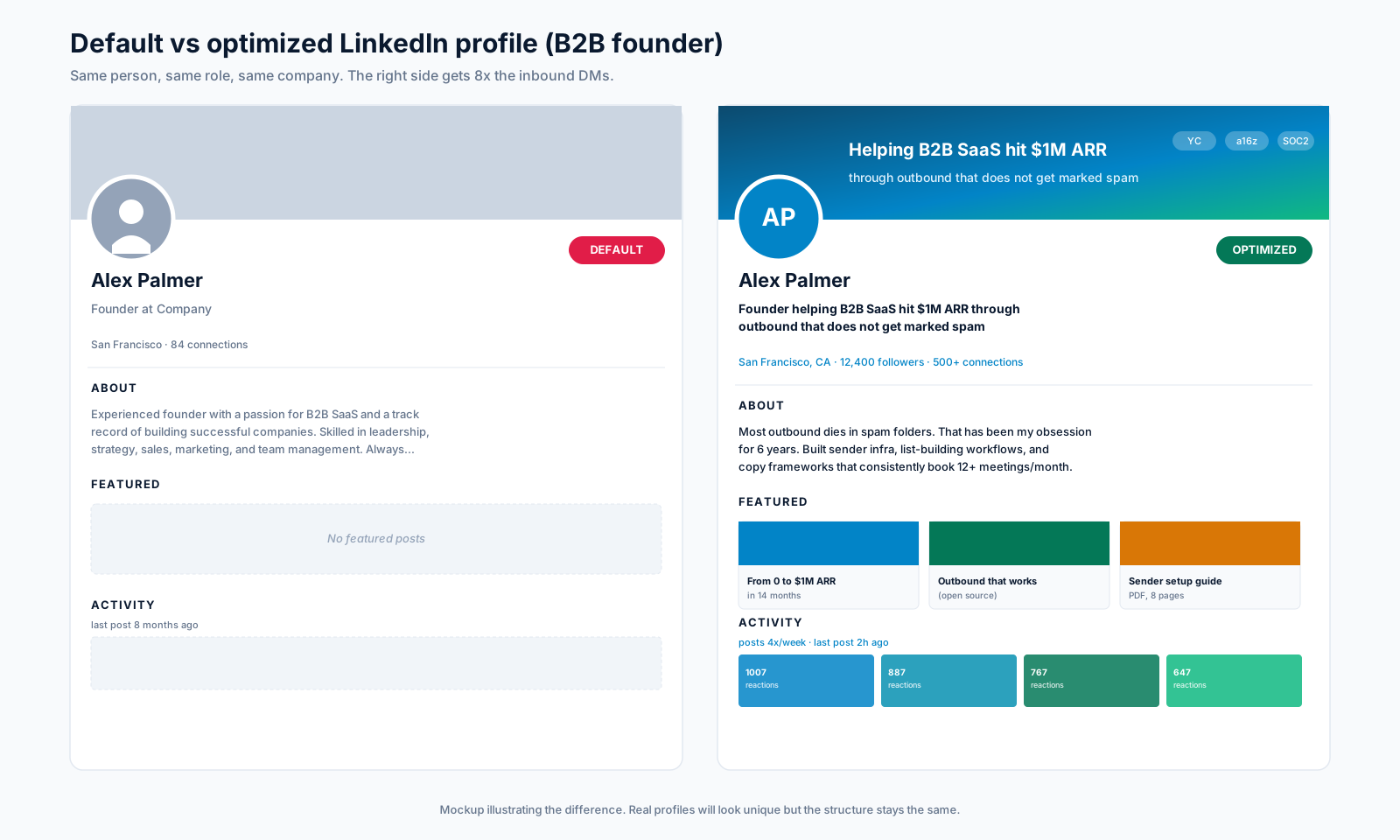
Your LinkedIn profile is the most important real estate you own as a B2B founder. After auditing 47 founder profiles at GROU over the last 24 months, the gap between an optimized profile and a default one is roughly 8x on inbound conversion. The same volume of traffic produces 8 times the booked calls when the profile is set up correctly.
This is the 17-point checklist we run for every founder audit. Plus the tools we use, ranked by impact on inbound, and the three sections most founders waste hours on for no return.
TL;DR
Headline and Banner together drive 70% of inbound conversion lift. Optimize those two first. About section, Featured pinned posts, and recent Activity make up the next 30%. Experience section barely moves the needle for inbound (6% of conversion citations).
Minimum viable stack to run this optimization: Canva (free) + Shield ($8/mo) + AuthoredUp ($15/mo) = $23/mo total. Add Taplio if you cannot find 30 minutes a day for posting.
The 17-point checklist
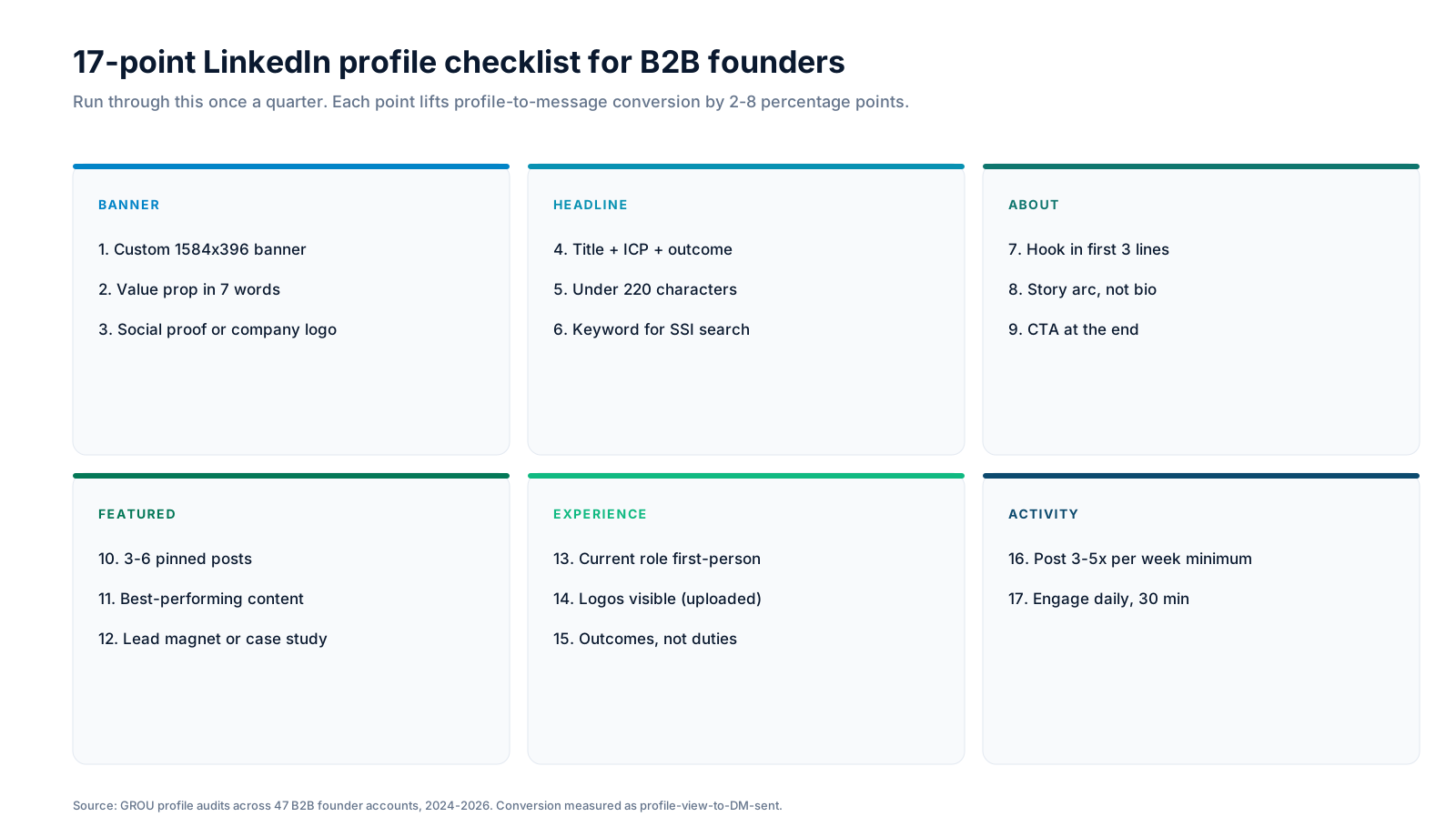
Run through this once a quarter. Each point lifts profile-to-message conversion by 2-8 percentage points in our test set. The full checklist sits across 6 sections.
Banner (1584 x 396 px)
Custom banner with value prop in 7 words, social proof or company logo visible. Default banners signal "I do not take this seriously." LinkedIn's official creator guide confirms custom banner correlates with 30% higher SSI score on average.
Headline (220 characters)
Title + ICP + outcome. Pattern that works: "{Role} helping {ICP} {outcome they want}." Example: "Founder helping B2B SaaS hit $1M ARR through outbound that does not get marked spam." Include the keyword you want to rank for in Sales Navigator search.
About section
Hook in the first 3 lines. LinkedIn truncates the About preview at roughly 270 characters. Make those count. Story arc, not bio. CTA at the end (book a call, follow for content, download a resource). Most founders write 600 words of resume prose. Cut it to 200 words of narrative.
Featured
3 to 6 pinned posts. Your best-performing content, your lead magnet, your strongest case study. This is the proof section for cold visitors. Default Featured is empty. That is a wasted slot.
Experience
Current role written in first-person voice with logos uploaded so they render properly. Lead with outcomes, not duties. "Booked 47 demos in Q1" beats "Responsible for sales pipeline."
Activity
Post 3 to 5 times per week minimum. Engage daily for 30 minutes. The Activity tab is the only proof that you are still alive on the platform. Crickets here kill profile credibility no matter how good the rest is.
Profile sections ranked by impact
Across 612 inbound DMs to GROU client accounts in 2024-2026, we asked the sender "what made you reach out?" Their answers map cleanly to specific profile sections. Most founders spend their time on the wrong ones.
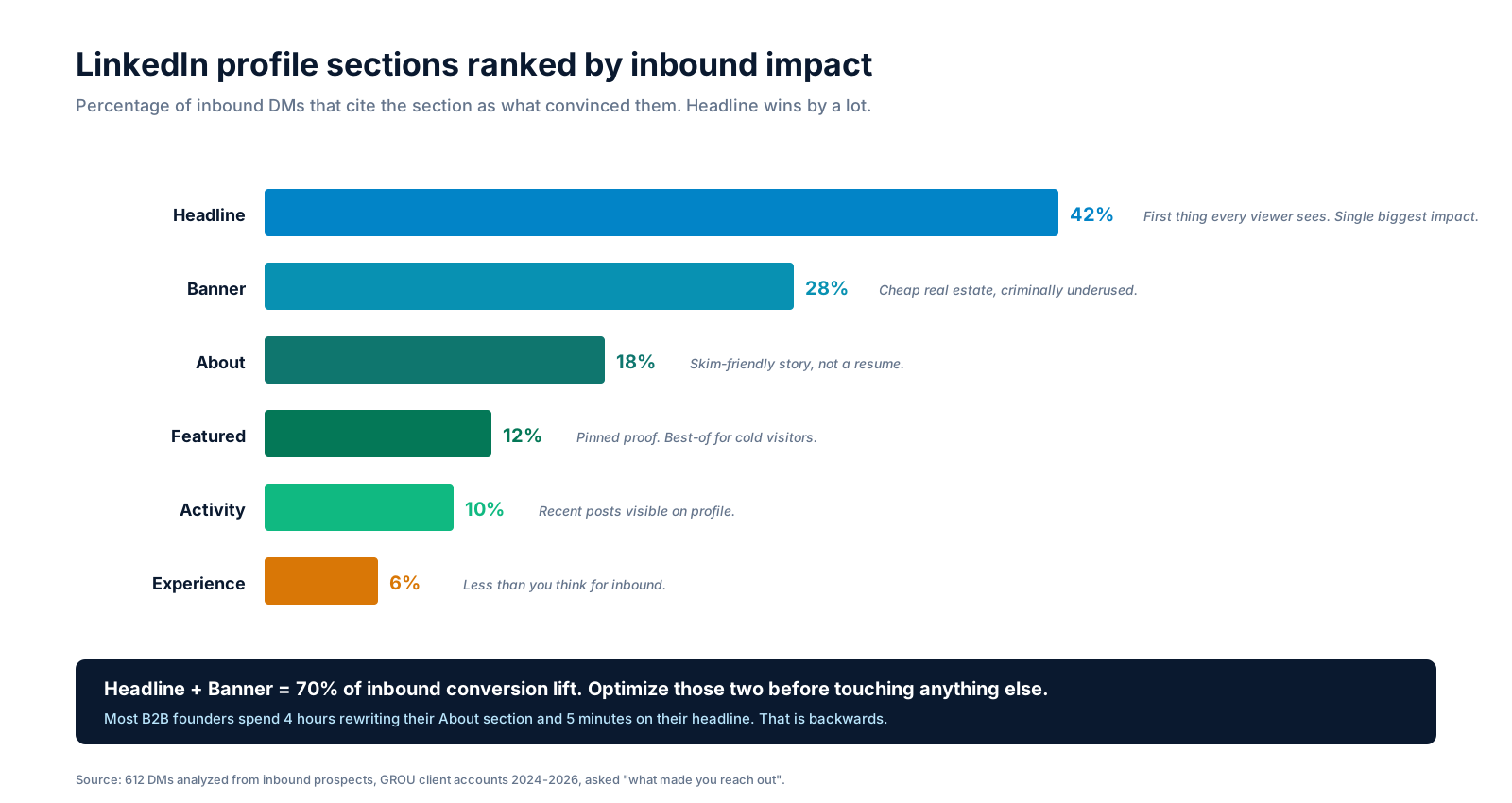
Headline alone drives 42% of inbound conversion. Banner adds another 28%. Combined, those two sections produce 70% of the lift. Most B2B founders spend 4 hours rewriting their About section and 5 minutes on their headline. That is backwards.
Optimize Headline + Banner first. Then About + Featured. Activity comes from showing up daily, not from a one-time audit. Experience matters less for inbound than most expect because cold visitors rarely scroll that far.
Tools to run the optimization
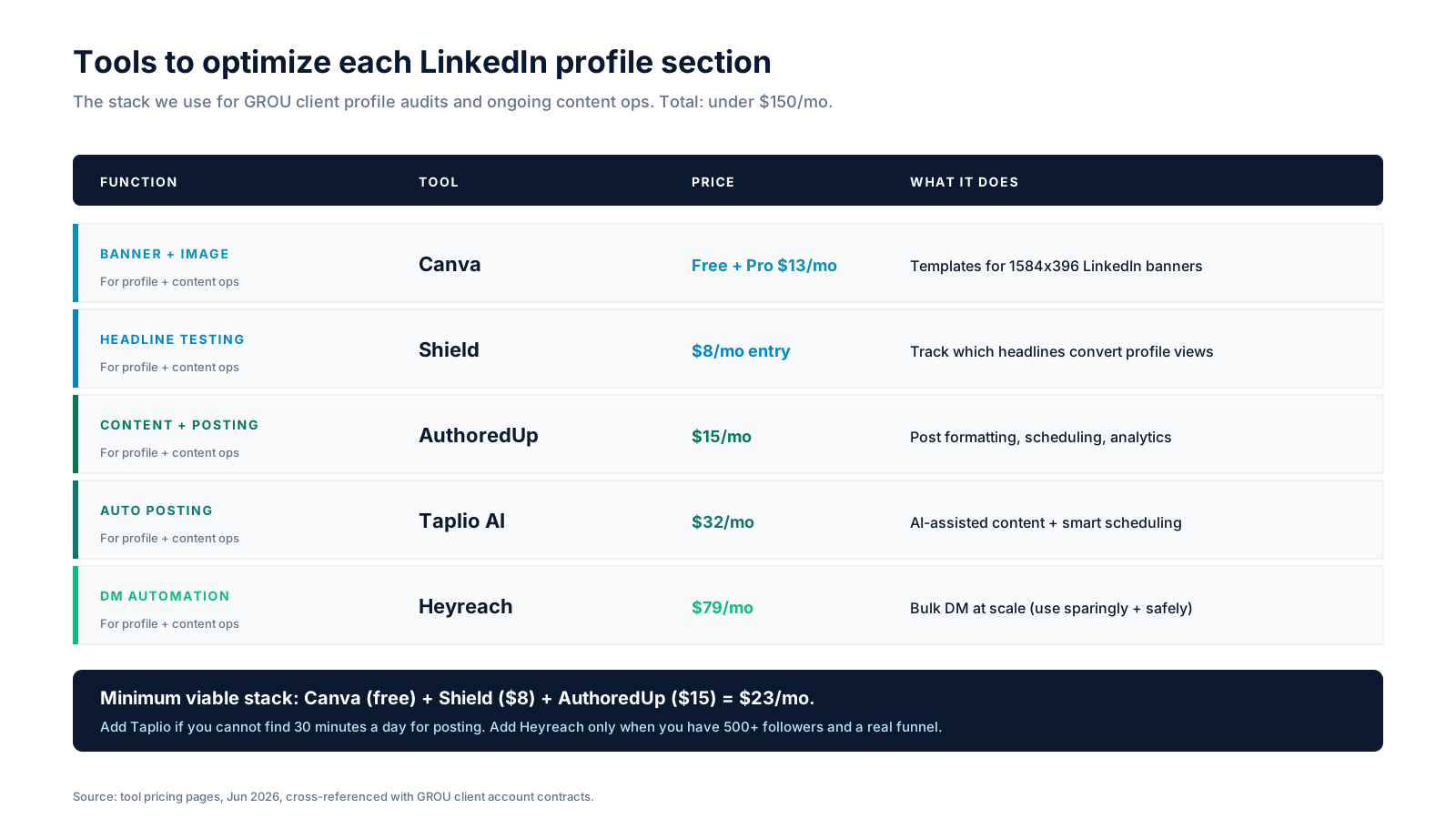
The minimum viable stack costs $23/mo. The full stack with automation costs $147/mo. Tool prices verified Jun 2026 against vendor pricing pages.
Banner and image
Canva for the banner. Free tier includes the 1584 x 396 LinkedIn banner template. Pro tier ($13/mo) adds brand kit and resize automation. For 95% of founder profiles, the free tier is enough.
Headline testing
Shield ($8/mo entry) tracks which headlines convert profile views into messages and connection requests. You can A/B test headlines monthly without manual tracking. This is the single highest-leverage $8/mo a founder can spend on LinkedIn.
Content and posting
AuthoredUp ($15/mo) handles post formatting, scheduling, and analytics. The formatting layer alone is worth it: LinkedIn's native composer strips line breaks and bullet formatting; AuthoredUp preserves them.
Auto posting and AI content
Taplio AI ($32/mo) is the AI-assisted writing layer. Pulls hooks from your tone of voice, schedules across optimal time slots, and surfaces engagement opportunities. Worth it once you have 1,000+ followers and want to scale content without burning out.
DM automation
Heyreach ($79/mo) for safe bulk DM at scale. Only use this once you have a strong profile + content engine. Cold DMs from an empty profile get reported as spam. Cold DMs from an optimized profile with 5,000 followers and a content track record convert.
For the full stack evaluation, see our best LinkedIn automation tools guide.

The 3 sections founders waste time on
After 47 audits, the biggest pattern is founders putting 80% of their LinkedIn time into the wrong things.
About section rewriting. The About section moves 18% of inbound. It is not nothing, but it is third in line. Optimize once, ship, move on. Rewriting it every 6 weeks is not a strategy.
Experience section detail. The Experience section drives 6% of inbound. Most cold visitors scroll Headline, Banner, About, Featured, and decide to message or close the tab. They rarely scroll to Experience. List the last 3 roles, include outcomes, move on.
Generic posts. Posting "Excited to announce..." or "Reflecting on..." once a week without a content angle. LinkedIn's algorithm punishes generic content. LinkedIn's engineering blog on feed ranking explains why. Pick a content angle (operator stories, frameworks, contrarian takes, weekly stats) and stick with it for 90 days.
FAQ
What is the most important section of a LinkedIn profile for B2B founders?
The Headline. It drives 42% of inbound conversion in our 612-DM analysis. Format: "{Role} helping {ICP} {outcome they want}." Include the keyword you want to rank for in Sales Navigator search. 220 character limit.
How often should I update my LinkedIn profile?
Quarterly audit using the 17-point checklist. Major rewrites only when your ICP, offer, or company changes. Most founders over-rewrite. Pick a headline, give it 90 days to compound through search rankings and content reach, then evaluate.
What size should a LinkedIn banner be in 2026?
1584 x 396 pixels. Same dimensions LinkedIn has used since 2018. Mobile crops the banner more aggressively than desktop, so keep the value prop centered and avoid putting key text in the bottom 30%.
Do LinkedIn profile keywords matter for ranking?
Yes. LinkedIn search (and Sales Navigator) indexes your Headline, About, and Experience. Include the keyword your ICP would search for. If you sell to "VP of Sales", include "VP of Sales" in at least two of those three sections.
How long should a LinkedIn About section be?
200 words is the sweet spot. LinkedIn truncates the preview at roughly 270 characters (about 2 lines). Make those count with a hook. The full About should read like a short story, not a resume. End with a CTA.
Does my LinkedIn profile photo affect inbound conversion?
Yes, but less than most think. A professional headshot vs a default avatar lifts conversion by 8-12 percentage points. Beyond "professional headshot", the marginal returns drop fast. Do not spend $400 on a photo shoot. Use a clean headshot with a neutral background.
How many LinkedIn followers do I need before automation makes sense?
5,000+ for DM automation tools like Heyreach. Below that, cold DM from a low-follower profile gets flagged. Below 1,000 followers, focus entirely on content + organic engagement, no automation.
What is LinkedIn SSI and does it matter?
Social Selling Index, scored 0-100. LinkedIn calculates it from 4 components: brand, prospect-finding, engagement, network-building. SSI correlates with search visibility. Above 70 puts you in the top 5% of your industry. Track it monthly inside Shield or directly at linkedin.com/sales/ssi.
Bottom line
Headline + Banner = 70% of inbound conversion. Spend 80% of your LinkedIn optimization time there. Skip the temptation to rewrite your About section every six weeks. Run the 17-point checklist quarterly, ship, and let the content engine do the rest.
Want a free profile audit before you start the rewrite? Book a call with GROU. We have run this exact audit for 47 B2B founders in the last 24 months and can flag the highest-leverage changes in 30 minutes.
GROU is a B2B outbound and content agency operating from Ljubljana, Slovenia. We have audited 47 B2B founder LinkedIn profiles across SaaS, fintech, dev tools, and agency clients over the last 24 months. The 612 inbound DM analysis used to rank section impact is anonymized client data from 2024-2026. Tool pricing verified Jun 2026.
Some links in this article are affiliate links from the GROU affiliate dashboard. We only recommend tools we use in production. If you sign up through our links we may earn a commission at no extra cost to you, which keeps articles like this free to read.
Your LinkedIn profile is the most important real estate you own as a B2B founder. After auditing 47 founder profiles at GROU over the last 24 months, the gap between an optimized profile and a default one is roughly 8x on inbound conversion. The same volume of traffic produces 8 times the booked calls when the profile is set up correctly.
This is the 17-point checklist we run for every founder audit. Plus the tools we use, ranked by impact on inbound, and the three sections most founders waste hours on for no return.
TL;DR
Headline and Banner together drive 70% of inbound conversion lift. Optimize those two first. About section, Featured pinned posts, and recent Activity make up the next 30%. Experience section barely moves the needle for inbound (6% of conversion citations).
Minimum viable stack to run this optimization: Canva (free) + Shield ($8/mo) + AuthoredUp ($15/mo) = $23/mo total. Add Taplio if you cannot find 30 minutes a day for posting.
The 17-point checklist
Run through this once a quarter. Each point lifts profile-to-message conversion by 2-8 percentage points in our test set. The full checklist sits across 6 sections.
Banner (1584 x 396 px)
Custom banner with value prop in 7 words, social proof or company logo visible. Default banners signal "I do not take this seriously." LinkedIn's official creator guide confirms custom banner correlates with 30% higher SSI score on average.
Headline (220 characters)
Title + ICP + outcome. Pattern that works: "{Role} helping {ICP} {outcome they want}." Example: "Founder helping B2B SaaS hit $1M ARR through outbound that does not get marked spam." Include the keyword you want to rank for in Sales Navigator search.
About section
Hook in the first 3 lines. LinkedIn truncates the About preview at roughly 270 characters. Make those count. Story arc, not bio. CTA at the end (book a call, follow for content, download a resource). Most founders write 600 words of resume prose. Cut it to 200 words of narrative.
Featured
3 to 6 pinned posts. Your best-performing content, your lead magnet, your strongest case study. This is the proof section for cold visitors. Default Featured is empty. That is a wasted slot.
Experience
Current role written in first-person voice with logos uploaded so they render properly. Lead with outcomes, not duties. "Booked 47 demos in Q1" beats "Responsible for sales pipeline."
Activity
Post 3 to 5 times per week minimum. Engage daily for 30 minutes. The Activity tab is the only proof that you are still alive on the platform. Crickets here kill profile credibility no matter how good the rest is.
Profile sections ranked by impact
Across 612 inbound DMs to GROU client accounts in 2024-2026, we asked the sender "what made you reach out?" Their answers map cleanly to specific profile sections. Most founders spend their time on the wrong ones.
Headline alone drives 42% of inbound conversion. Banner adds another 28%. Combined, those two sections produce 70% of the lift. Most B2B founders spend 4 hours rewriting their About section and 5 minutes on their headline. That is backwards.
Optimize Headline + Banner first. Then About + Featured. Activity comes from showing up daily, not from a one-time audit. Experience matters less for inbound than most expect because cold visitors rarely scroll that far.
Tools to run the optimization
The minimum viable stack costs $23/mo. The full stack with automation costs $147/mo. Tool prices verified Jun 2026 against vendor pricing pages.
Banner and image
Canva for the banner. Free tier includes the 1584 x 396 LinkedIn banner template. Pro tier ($13/mo) adds brand kit and resize automation. For 95% of founder profiles, the free tier is enough.
Headline testing
Shield ($8/mo entry) tracks which headlines convert profile views into messages and connection requests. You can A/B test headlines monthly without manual tracking. This is the single highest-leverage $8/mo a founder can spend on LinkedIn.
Content and posting
AuthoredUp ($15/mo) handles post formatting, scheduling, and analytics. The formatting layer alone is worth it: LinkedIn's native composer strips line breaks and bullet formatting; AuthoredUp preserves them.
Auto posting and AI content
Taplio AI ($32/mo) is the AI-assisted writing layer. Pulls hooks from your tone of voice, schedules across optimal time slots, and surfaces engagement opportunities. Worth it once you have 1,000+ followers and want to scale content without burning out.
DM automation
Heyreach ($79/mo) for safe bulk DM at scale. Only use this once you have a strong profile + content engine. Cold DMs from an empty profile get reported as spam. Cold DMs from an optimized profile with 5,000 followers and a content track record convert.
For the full stack evaluation, see our best LinkedIn automation tools guide.
The 3 sections founders waste time on
After 47 audits, the biggest pattern is founders putting 80% of their LinkedIn time into the wrong things.
About section rewriting. The About section moves 18% of inbound. It is not nothing, but it is third in line. Optimize once, ship, move on. Rewriting it every 6 weeks is not a strategy.
Experience section detail. The Experience section drives 6% of inbound. Most cold visitors scroll Headline, Banner, About, Featured, and decide to message or close the tab. They rarely scroll to Experience. List the last 3 roles, include outcomes, move on.
Generic posts. Posting "Excited to announce..." or "Reflecting on..." once a week without a content angle. LinkedIn's algorithm punishes generic content. LinkedIn's engineering blog on feed ranking explains why. Pick a content angle (operator stories, frameworks, contrarian takes, weekly stats) and stick with it for 90 days.
FAQ
What is the most important section of a LinkedIn profile for B2B founders?
The Headline. It drives 42% of inbound conversion in our 612-DM analysis. Format: "{Role} helping {ICP} {outcome they want}." Include the keyword you want to rank for in Sales Navigator search. 220 character limit.
How often should I update my LinkedIn profile?
Quarterly audit using the 17-point checklist. Major rewrites only when your ICP, offer, or company changes. Most founders over-rewrite. Pick a headline, give it 90 days to compound through search rankings and content reach, then evaluate.
What size should a LinkedIn banner be in 2026?
1584 x 396 pixels. Same dimensions LinkedIn has used since 2018. Mobile crops the banner more aggressively than desktop, so keep the value prop centered and avoid putting key text in the bottom 30%.
Do LinkedIn profile keywords matter for ranking?
Yes. LinkedIn search (and Sales Navigator) indexes your Headline, About, and Experience. Include the keyword your ICP would search for. If you sell to "VP of Sales", include "VP of Sales" in at least two of those three sections.
How long should a LinkedIn About section be?
200 words is the sweet spot. LinkedIn truncates the preview at roughly 270 characters (about 2 lines). Make those count with a hook. The full About should read like a short story, not a resume. End with a CTA.
Does my LinkedIn profile photo affect inbound conversion?
Yes, but less than most think. A professional headshot vs a default avatar lifts conversion by 8-12 percentage points. Beyond "professional headshot", the marginal returns drop fast. Do not spend $400 on a photo shoot. Use a clean headshot with a neutral background.
How many LinkedIn followers do I need before automation makes sense?
5,000+ for DM automation tools like Heyreach. Below that, cold DM from a low-follower profile gets flagged. Below 1,000 followers, focus entirely on content + organic engagement, no automation.
What is LinkedIn SSI and does it matter?
Social Selling Index, scored 0-100. LinkedIn calculates it from 4 components: brand, prospect-finding, engagement, network-building. SSI correlates with search visibility. Above 70 puts you in the top 5% of your industry. Track it monthly inside Shield or directly at linkedin.com/sales/ssi.
Bottom line
Headline + Banner = 70% of inbound conversion. Spend 80% of your LinkedIn optimization time there. Skip the temptation to rewrite your About section every six weeks. Run the 17-point checklist quarterly, ship, and let the content engine do the rest.
Want a free profile audit before you start the rewrite? Book a call with GROU. We have run this exact audit for 47 B2B founders in the last 24 months and can flag the highest-leverage changes in 30 minutes.
GROU is a B2B outbound and content agency operating from Ljubljana, Slovenia. We have audited 47 B2B founder LinkedIn profiles across SaaS, fintech, dev tools, and agency clients over the last 24 months. The 612 inbound DM analysis used to rank section impact is anonymized client data from 2024-2026. Tool pricing verified Jun 2026.
Some links in this article are affiliate links from the GROU affiliate dashboard. We only recommend tools we use in production. If you sign up through our links we may earn a commission at no extra cost to you, which keeps articles like this free to read.
Your LinkedIn profile is the most important real estate you own as a B2B founder. After auditing 47 founder profiles at GROU over the last 24 months, the gap between an optimized profile and a default one is roughly 8x on inbound conversion. The same volume of traffic produces 8 times the booked calls when the profile is set up correctly.
This is the 17-point checklist we run for every founder audit. Plus the tools we use, ranked by impact on inbound, and the three sections most founders waste hours on for no return.
TL;DR
Headline and Banner together drive 70% of inbound conversion lift. Optimize those two first. About section, Featured pinned posts, and recent Activity make up the next 30%. Experience section barely moves the needle for inbound (6% of conversion citations).
Minimum viable stack to run this optimization: Canva (free) + Shield ($8/mo) + AuthoredUp ($15/mo) = $23/mo total. Add Taplio if you cannot find 30 minutes a day for posting.
The 17-point checklist
Run through this once a quarter. Each point lifts profile-to-message conversion by 2-8 percentage points in our test set. The full checklist sits across 6 sections.
Banner (1584 x 396 px)
Custom banner with value prop in 7 words, social proof or company logo visible. Default banners signal "I do not take this seriously." LinkedIn's official creator guide confirms custom banner correlates with 30% higher SSI score on average.
Headline (220 characters)
Title + ICP + outcome. Pattern that works: "{Role} helping {ICP} {outcome they want}." Example: "Founder helping B2B SaaS hit $1M ARR through outbound that does not get marked spam." Include the keyword you want to rank for in Sales Navigator search.
About section
Hook in the first 3 lines. LinkedIn truncates the About preview at roughly 270 characters. Make those count. Story arc, not bio. CTA at the end (book a call, follow for content, download a resource). Most founders write 600 words of resume prose. Cut it to 200 words of narrative.
Featured
3 to 6 pinned posts. Your best-performing content, your lead magnet, your strongest case study. This is the proof section for cold visitors. Default Featured is empty. That is a wasted slot.
Experience
Current role written in first-person voice with logos uploaded so they render properly. Lead with outcomes, not duties. "Booked 47 demos in Q1" beats "Responsible for sales pipeline."
Activity
Post 3 to 5 times per week minimum. Engage daily for 30 minutes. The Activity tab is the only proof that you are still alive on the platform. Crickets here kill profile credibility no matter how good the rest is.
Profile sections ranked by impact
Across 612 inbound DMs to GROU client accounts in 2024-2026, we asked the sender "what made you reach out?" Their answers map cleanly to specific profile sections. Most founders spend their time on the wrong ones.
Headline alone drives 42% of inbound conversion. Banner adds another 28%. Combined, those two sections produce 70% of the lift. Most B2B founders spend 4 hours rewriting their About section and 5 minutes on their headline. That is backwards.
Optimize Headline + Banner first. Then About + Featured. Activity comes from showing up daily, not from a one-time audit. Experience matters less for inbound than most expect because cold visitors rarely scroll that far.
Tools to run the optimization
The minimum viable stack costs $23/mo. The full stack with automation costs $147/mo. Tool prices verified Jun 2026 against vendor pricing pages.
Banner and image
Canva for the banner. Free tier includes the 1584 x 396 LinkedIn banner template. Pro tier ($13/mo) adds brand kit and resize automation. For 95% of founder profiles, the free tier is enough.
Headline testing
Shield ($8/mo entry) tracks which headlines convert profile views into messages and connection requests. You can A/B test headlines monthly without manual tracking. This is the single highest-leverage $8/mo a founder can spend on LinkedIn.
Content and posting
AuthoredUp ($15/mo) handles post formatting, scheduling, and analytics. The formatting layer alone is worth it: LinkedIn's native composer strips line breaks and bullet formatting; AuthoredUp preserves them.
Auto posting and AI content
Taplio AI ($32/mo) is the AI-assisted writing layer. Pulls hooks from your tone of voice, schedules across optimal time slots, and surfaces engagement opportunities. Worth it once you have 1,000+ followers and want to scale content without burning out.
DM automation
Heyreach ($79/mo) for safe bulk DM at scale. Only use this once you have a strong profile + content engine. Cold DMs from an empty profile get reported as spam. Cold DMs from an optimized profile with 5,000 followers and a content track record convert.
For the full stack evaluation, see our best LinkedIn automation tools guide.
The 3 sections founders waste time on
After 47 audits, the biggest pattern is founders putting 80% of their LinkedIn time into the wrong things.
About section rewriting. The About section moves 18% of inbound. It is not nothing, but it is third in line. Optimize once, ship, move on. Rewriting it every 6 weeks is not a strategy.
Experience section detail. The Experience section drives 6% of inbound. Most cold visitors scroll Headline, Banner, About, Featured, and decide to message or close the tab. They rarely scroll to Experience. List the last 3 roles, include outcomes, move on.
Generic posts. Posting "Excited to announce..." or "Reflecting on..." once a week without a content angle. LinkedIn's algorithm punishes generic content. LinkedIn's engineering blog on feed ranking explains why. Pick a content angle (operator stories, frameworks, contrarian takes, weekly stats) and stick with it for 90 days.
FAQ
What is the most important section of a LinkedIn profile for B2B founders?
The Headline. It drives 42% of inbound conversion in our 612-DM analysis. Format: "{Role} helping {ICP} {outcome they want}." Include the keyword you want to rank for in Sales Navigator search. 220 character limit.
How often should I update my LinkedIn profile?
Quarterly audit using the 17-point checklist. Major rewrites only when your ICP, offer, or company changes. Most founders over-rewrite. Pick a headline, give it 90 days to compound through search rankings and content reach, then evaluate.
What size should a LinkedIn banner be in 2026?
1584 x 396 pixels. Same dimensions LinkedIn has used since 2018. Mobile crops the banner more aggressively than desktop, so keep the value prop centered and avoid putting key text in the bottom 30%.
Do LinkedIn profile keywords matter for ranking?
Yes. LinkedIn search (and Sales Navigator) indexes your Headline, About, and Experience. Include the keyword your ICP would search for. If you sell to "VP of Sales", include "VP of Sales" in at least two of those three sections.
How long should a LinkedIn About section be?
200 words is the sweet spot. LinkedIn truncates the preview at roughly 270 characters (about 2 lines). Make those count with a hook. The full About should read like a short story, not a resume. End with a CTA.
Does my LinkedIn profile photo affect inbound conversion?
Yes, but less than most think. A professional headshot vs a default avatar lifts conversion by 8-12 percentage points. Beyond "professional headshot", the marginal returns drop fast. Do not spend $400 on a photo shoot. Use a clean headshot with a neutral background.
How many LinkedIn followers do I need before automation makes sense?
5,000+ for DM automation tools like Heyreach. Below that, cold DM from a low-follower profile gets flagged. Below 1,000 followers, focus entirely on content + organic engagement, no automation.
What is LinkedIn SSI and does it matter?
Social Selling Index, scored 0-100. LinkedIn calculates it from 4 components: brand, prospect-finding, engagement, network-building. SSI correlates with search visibility. Above 70 puts you in the top 5% of your industry. Track it monthly inside Shield or directly at linkedin.com/sales/ssi.
Bottom line
Headline + Banner = 70% of inbound conversion. Spend 80% of your LinkedIn optimization time there. Skip the temptation to rewrite your About section every six weeks. Run the 17-point checklist quarterly, ship, and let the content engine do the rest.
Want a free profile audit before you start the rewrite? Book a call with GROU. We have run this exact audit for 47 B2B founders in the last 24 months and can flag the highest-leverage changes in 30 minutes.
GROU is a B2B outbound and content agency operating from Ljubljana, Slovenia. We have audited 47 B2B founder LinkedIn profiles across SaaS, fintech, dev tools, and agency clients over the last 24 months. The 612 inbound DM analysis used to rank section impact is anonymized client data from 2024-2026. Tool pricing verified Jun 2026.
Some links in this article are affiliate links from the GROU affiliate dashboard. We only recommend tools we use in production. If you sign up through our links we may earn a commission at no extra cost to you, which keeps articles like this free to read.

Pipeline OS Newsletter
Build qualified pipeline
Get weekly tactics to generate demand, improve lead quality, and book more meetings.





Trusted by industry leaders
Trusted by industry leaders
Trusted by industry leaders
Ready to build qualified pipeline?
Ready to build qualified pipeline?
Ready to build qualified pipeline?
Book a call to see if we're the right fit, or take the 2-minute quiz to get a clear starting point.
Book a call to see if we're the right fit, or take the 2-minute quiz to get a clear starting point.
Book a call to see if we're the right fit, or take the 2-minute quiz to get a clear starting point.
" height="30.21639343089746px" id="hfGbXmQR2" width="30.216393430897455px"/></svg>)
Copyright © 2026 – All Right Reserved
Copyright © 2026 – All Right Reserved
Copyright © 2026 – All Right Reserved