%22%3E%3C/path%3E%3Cpath d=%22M 63.072 7.554 C 62.258 8.022 61.577 8.689 61.092 9.493 L 61.092 7.076 L 57.158 7.076 L 57.158 22.64 L 61.089 22.64 L 61.089 14.888 C 61.089 13.446 61.403 12.434 62.03 11.853 C 62.818 11.218 63.818 10.907 64.826 10.982 L 65.868 10.982 L 65.868 6.851 C 64.891 6.834 63.926 7.076 63.073 7.554 Z%22 fill=%22rgb(17,17,17)%22%3E%3C/path%3E%3Cpath d=%22M 78.916 7.82 C 76.363 6.49 73.321 6.49 70.768 7.82 C 69.562 8.473 68.564 9.451 67.888 10.644 C 67.167 11.931 66.803 13.387 66.834 14.862 C 66.804 16.332 67.157 17.785 67.86 19.077 C 68.515 20.267 69.494 21.246 70.684 21.901 C 71.924 22.576 73.318 22.92 74.73 22.898 C 76.164 22.918 77.58 22.575 78.846 21.901 C 80.062 21.247 81.073 20.27 81.768 19.077 C 82.506 17.797 82.88 16.339 82.85 14.862 C 82.88 13.389 82.517 11.934 81.797 10.647 C 81.12 9.455 80.122 8.477 78.917 7.824 M 78.803 14.862 C 78.829 15.739 78.636 16.608 78.241 17.391 C 77.903 18.046 77.38 18.588 76.738 18.95 C 76.124 19.293 75.432 19.472 74.729 19.47 C 73.668 19.497 72.648 19.061 71.934 18.276 C 71.139 17.323 70.741 16.1 70.823 14.862 C 70.741 13.62 71.149 12.395 71.959 11.45 C 72.687 10.667 73.715 10.233 74.783 10.256 C 75.859 10.236 76.894 10.67 77.635 11.45 C 78.464 12.387 78.884 13.616 78.801 14.864%22 fill=%22rgb(17,17,17)%22%3E%3C/path%3E%3Cpath d=%22M 95.906 7.076 L 95.906 15.646 C 95.975 16.68 95.643 17.701 94.979 18.498 C 94.311 19.184 93.379 19.547 92.422 19.495 C 91.475 19.544 90.553 19.18 89.894 18.498 C 89.23 17.701 88.898 16.68 88.967 15.646 L 88.967 7.076 L 85.033 7.076 L 85.033 16.207 C 85 17.449 85.275 18.68 85.834 19.79 C 86.327 20.75 87.095 21.542 88.039 22.065 C 89.033 22.594 90.145 22.861 91.271 22.838 C 92.188 22.847 93.095 22.65 93.926 22.263 C 94.708 21.905 95.388 21.36 95.906 20.675 L 95.906 22.645 L 99.865 22.645 L 99.865 7.076 Z%22 fill=%22rgb(17,17,17)%22%3E%3C/path%3E%3Cpath d=%22M 4.513 15.626 C 4.511 10.815 7.606 6.549 12.181 5.059 C 16.756 3.57 21.77 5.195 24.601 9.086 L 27.816 5.87 C 24.074 1.186 17.981 -0.943 12.137 0.393 C 6.292 1.728 1.728 6.292 0.393 12.137 C -0.943 17.981 1.186 24.074 5.87 27.816 L 9.085 24.601 C 6.214 22.512 4.515 19.177 4.513 15.626%22 fill=%22rgb(32,62,235)%22%3E%3C/path%3E%3Cpath d=%22M 17.114 14.343 L 13.354 18.01 L 13.354 18.026 L 21.071 18.026 L 11.412 27.609 L 17.389 27.609 L 23.999 21.081 L 23.999 28.316 L 24.005 28.316 L 27.967 24.393 L 27.967 14.343 Z%22 fill=%22rgb(32,62,235)%22%3E%3C/path%3E%3C/g%3E%3C/svg%3E) ×
× ××
××›
›
›
›
Outbound Lead Generation: Build Your Pipeline Engine
Outbound Lead Generation: Build Your Pipeline Engine
Outbound Lead Generation: Build Your Pipeline Engine
Outbound Lead Generation: Build Your Pipeline Engine
Outbound Lead Generation: Build Your Pipeline Engine
Outbound Lead Generation: Build Your Pipeline Engine

Author
Aljaz Peklaj

Your outbound lead generation probably isn't failing because reps need to send more. It's failing because the system can't tell the difference between a company that fits your ICP and a company that's ready to buy now. Organizations still build lists off static filters, then wonder why reply quality is flat and meetings don't convert.
Timing beats static fit. Firmographics tell you who could buy. Trigger data tells you who might care right now.
List quality is the main lever. General outbound success rates sit around 2 to 3% according to Mailerio's outbound guide, so broad lists are expensive noise.
Sequences need structure. Multichannel outreach can outperform single-channel outreach by 287% according to SalesHive's 2025 outreach review.
Reply handling is part of outbound. Fast routing matters, with guides recommending response times of 5 minutes when possible and 24 hours maximum for handoffs in The Small Business Expo guide.
The operating unit is the sprint. If you're not reviewing segment-level reply data every two weeks, you're guessing.
Table of Contents
The foundation is timing not just targeting
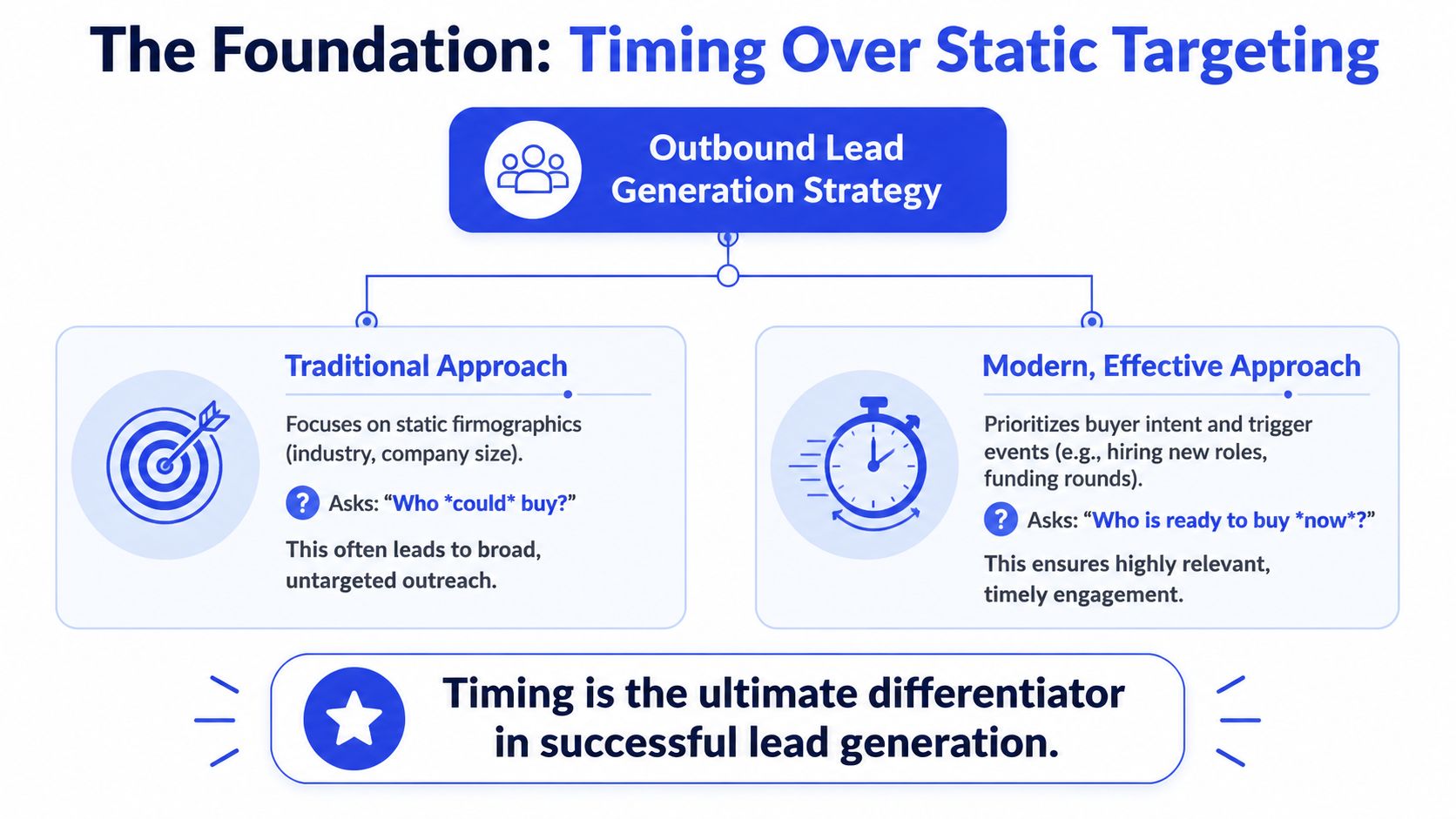
Most outbound teams start with the wrong question. They ask, “Which companies match our ICP?” That matters, but it's incomplete. A clean ICP without timing is just a neat list of companies that may ignore you politely.
What changes performance is timing data. Recent hiring in the buying function is the clearest signal I've seen because it's public, verifiable, and tied to budget pressure. If a company is hiring sales reps, marketers, compliance staff, or RevOps people, that function is getting investment and scrutiny at the same time.
Why static targeting underperforms
Static firmographics are necessary, but they're only the outer shell. Industry, headcount, geography, and revenue tell you who belongs in the market. They don't tell you who has an active reason to reply this week.
That gap is why so many teams burn domains and rep time on accounts that look right on paper. The data point is correct. The timing is wrong.
Practical rule: Build outbound around signals that indicate change inside the account, not just fit on a spreadsheet.
The broader market has already moved this way. Chili Piper notes that response quality depends more on account completeness and proof of relevance than on volume, with more emphasis on sub-industry segmentation, growth signals, and buying committee coverage. That aligns with how good outbound works now.
If you need a shared definition for the team, GROU's glossary entry on intent signals is a useful framing device.
Why hiring signals win
Hiring patterns beat most other inputs for one reason. They capture timing, not just fit.
Use them because they are:
Observable. Job posts and role changes can be checked before a message goes out.
Specific. A hiring spike in SDRs means something different from hiring regulatory staff or plant managers.
Time-bound. A fresh event creates a real window. Old firmographic data doesn't.
Operationally scalable. Tools like Clay can monitor these signals across large account sets without manual research.
I rank recent funding lower than hiring because it suggests capacity, not always urgency. Leadership changes can be excellent, especially when a new VP enters the buying function, but volume is smaller. Third-party intent scores are usually too abstract to trust as a primary targeting layer.
What this changes in practice
Once timing becomes the foundation, your outbound lead generation system changes shape.
You stop asking reps to “work the list.” You ask the system to surface accounts showing change, map the buying committee around that change, and write messaging that references the trigger directly. That's a different motion, and it's much more defensible when inboxes are crowded.
The easiest mistake here is treating a trigger like a personalization token. It isn't. It's the reason the message exists.
How to build and enrich a trigger-based list
A new outbound program usually breaks at the list stage.
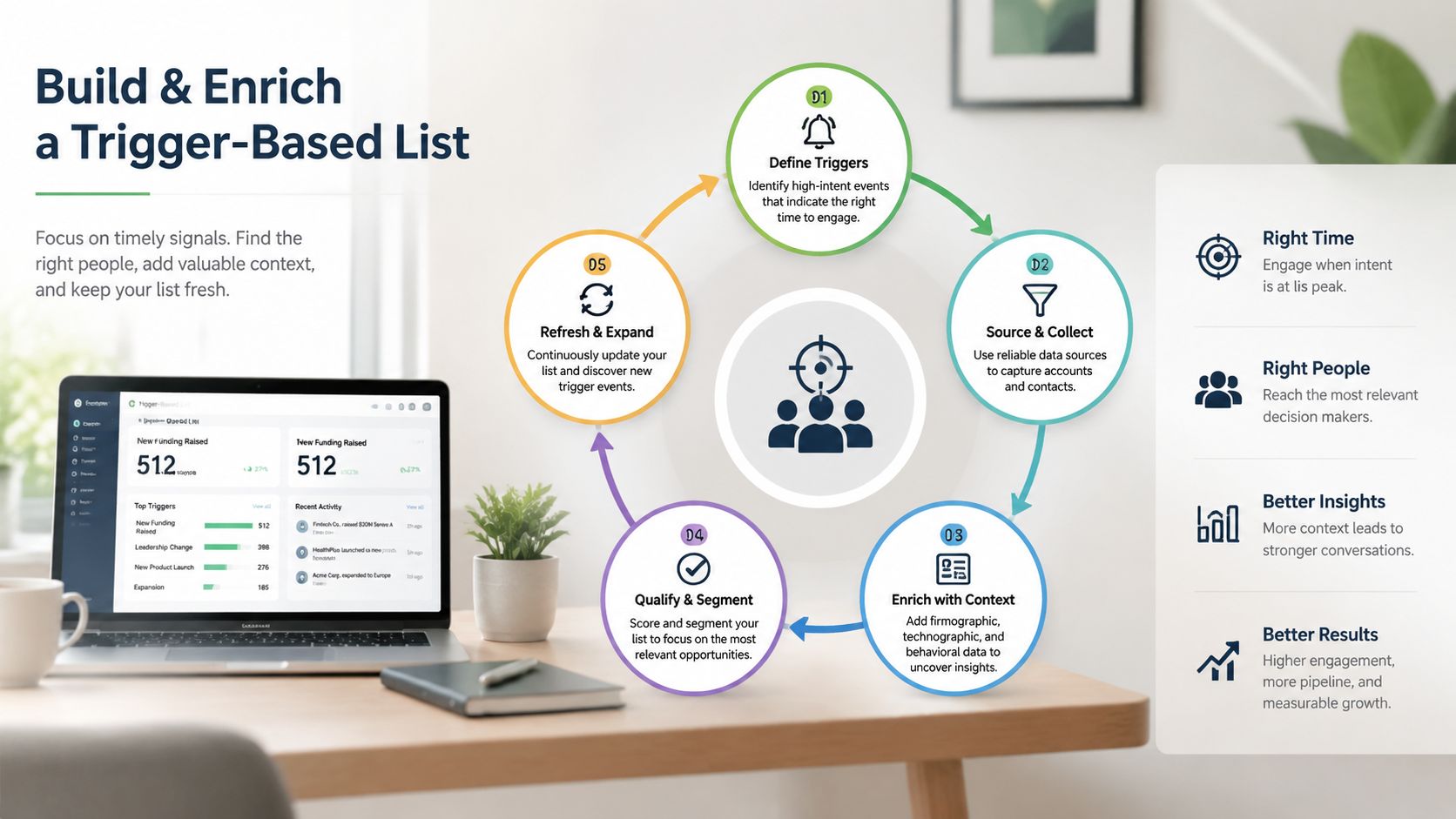
The team pulls a few thousand accounts, enriches every contact it can find, loads them into a sequencer, and calls it pipeline creation. Two weeks later, reply quality is poor, bounce risk is up, and nobody can explain why a given account was contacted now. The fix is structural. Build the list so every record earns its way into outreach.
My default stack for this is straightforward: Sales Navigator for account discovery, Clay for trigger detection, Apollo for contact enrichment and verification, HubSpot for record control. That order is deliberate. If the account has no credible trigger, enrichment is wasted spend and extra noise in the CRM.
Start with accounts that could buy, then prove they should buy now
Build the account set in Sales Navigator first. Filter by sub-industry, employee band, geography, and the part of the org chart your product usually touches. If I am setting this up for a new head of sales, I would rather start with 300 accounts that fit tightly than 3,000 that only pass a surface-level firmographic check.
Narrowing the list feels uncomfortable early on. It should.
The primary cost in outbound is not a small TAM slice. It is sending messages to accounts that match your ICP on paper but show no sign of change. Those accounts absorb rep time, enrichment credits, and domain capacity without creating enough qualified conversations to justify the effort.
Use Clay to score the trigger, not just append data
After the account list is clean, push it into Clay and append trigger fields. Start with hiring data. It is the most operational signal because it is public, specific, and recent enough to act on. If a company is hiring SDR leaders, implementation managers, compliance staff, or RevOps analysts, that usually points to a real change in process, tooling, or throughput expectations.
I rank triggers in this order for many teams:
Hiring activity tied to the problem you solve
Leadership changes inside the buying function
Funding, if it connects to a known operational shift
Public pain signals from earnings calls, review sites, or job descriptions
The rule is simple. Keep accounts where the trigger creates a credible reason to start a conversation. Drop accounts where the signal is stale, generic, or unrelated to your offer.
That means the account record needs more than a company name and a few filters. A proper data enrichment workflow stores the trigger type, date, source, affected function, owner, and qualification notes in a way reps can use. If the record cannot answer "why now" in one line, it is not ready for sequencing.
Enrich the buying committee after trigger qualification
Once an account passes the trigger check, enrich contacts around the change event. Apollo works well here because it is fast and easy to operationalize. The mistake I see too often is stopping at one title. Buying decisions rarely sit with one person, especially once you move beyond small business.
Pull a small committee linked to the same trigger. For a hiring signal in sales, that may include the VP Sales, Head of RevOps, sales enablement lead, and an operations manager. For a compliance hiring spike, the set changes completely.
Useful fields to append:
Core contact data: work email, title, seniority, LinkedIn URL
Trigger context: trigger type, trigger date, source URL, affected department
Routing fields: account owner, segment, sequence assignment, qualification status
Committee fields: primary buyer, likely champion, adjacent stakeholder
If direct contact data is thin, reps can uncover LinkedIn prospect emails before the record is finalized. I still want verification back inside the core workflow so sales engagement data, CRM ownership, and deliverability checks stay aligned.
This short walkthrough is worth watching if you want a visual on list building and outbound setup:
What good list discipline looks like
A good trigger-based list usually looks too small at first. That is a healthy sign. It means the team filtered for timing, not vanity volume.
I want every exported account to pass three tests:
The company fits the segment
A recent trigger points to active change
The right buying group can be mapped with confidence
If one of those is missing, the list is still incomplete. Broad lists create generic messaging, messy routing, and weak reply quality. Tight lists give reps a reason to contact the account, a clear hypothesis about who cares, and cleaner reporting once meetings start coming in.
Crafting sequences that earn a reply
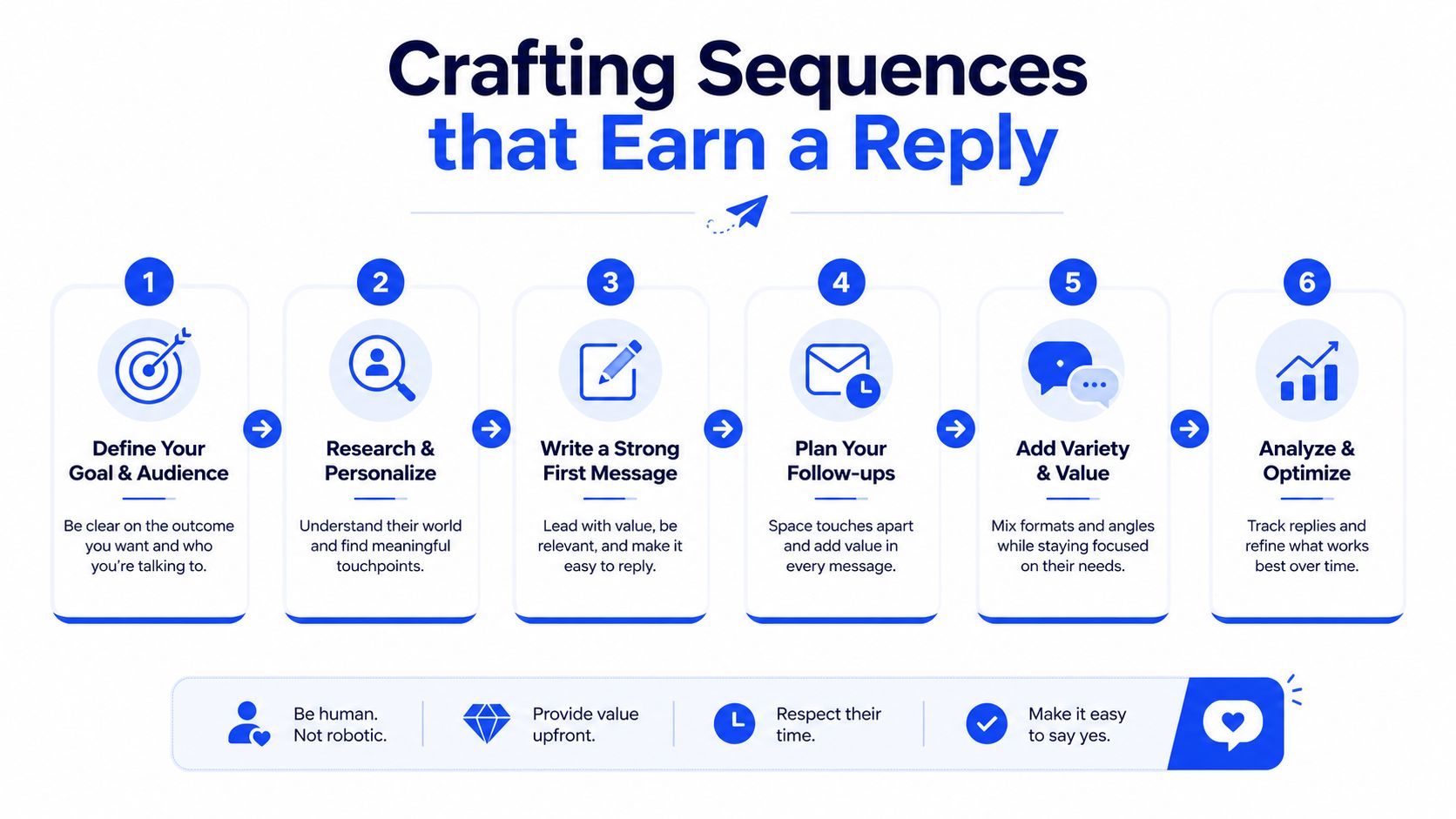
A rep pulls a fresh account from the trigger list on Monday morning. The company opened three sales roles last week, posted a new VP of Revenue Operations, and just expanded into EMEA. If the first message still says “came across your company,” the problem is not copy. The problem is that the sequence ignored the signal that justified outreach in the first place.
That is the standard I use for sequence design. Every touch should carry the same operational logic as the list build. Recent change creates the reason to reach out, and hiring signals are usually the cleanest proxy for active budget, new pressure, or a team trying to fix execution. Generic personalization wastes that advantage.
The sequence also has to reflect channel reality. SalesHive's 2025 outreach review found stronger performance from multichannel outreach than single-channel programs, reported cold email reply rates around 5.1%, and noted that follow-ups drive a large share of total replies. That matches what I see in practice. Email-only outreach can still work, but it gives you fewer chances to connect the trigger to the right buyer at the right moment.
The sequence I'd run first
For a new outbound motion, I'd start with a 5-touch sequence across 14 days:
Touch | Day | Channel | Job |
|---|---|---|---|
1 | 0 | LinkedIn view or light engagement | Create recognition |
2 | 2 | Email 1 | State the trigger and test a hypothesis |
3 | 5 | LinkedIn DM | Repeat the reason for outreach in a lower-friction channel |
4 | 8 | Email 2 | Add one operational observation |
5 | 14 | Email 3 | Close the loop with a clean reply path |
This timing is deliberate. New SDR teams usually rush the sequence or overextend it. A compressed cadence feels automated. A slow one misses the window where the trigger still feels current inside the prospect's world.
If you want a practical reference for message construction, GROU's piece on cold email systems is useful training material for SDR managers who need a clear framework instead of copywriting theory.
The opening line carries the sequence
The first sentence should prove two things fast. You noticed a real change, and you understand the pressure that change tends to create.
Weak opener:
Hi Sarah, I came across your company and thought it made sense to connect.
Stronger opener:
Saw you're hiring AEs after adding sales leadership. That usually means coverage changed, ramp targets got tighter, or both.
That works because it ties outreach to a current event and a likely business consequence. It also gives the rep a stable angle to reuse across email, LinkedIn, and phone without changing the story every time.
For teams filling in direct dials and emails from LinkedIn-first research, this guide on how to uncover LinkedIn prospect emails fits neatly into the workflow.
A sequence structure that holds up under volume
I trust structure more than “clever” messaging because structure scales.
Touch 1, LinkedIn warm-up
View the profile, follow the account, or interact with a recent post if there is a legitimate connection to the trigger. Random engagement creates noise, not familiarity.
Touch 2, Email 1
Use the trigger in the subject line or preview text. In the body, name the event, connect it to one likely operating problem, and ask one question that can be answered quickly.
Example:
Saw you're hiring in partner sales after adding channel roles. That usually points to one of two issues: new coverage targets or inconsistent partner-sourced pipeline.
Is that part of the push right now?
Touch 3, LinkedIn DM
Keep the same angle. The goal is recognition and consistency. Reps lose replies when every touch introduces a new theory about the account.
Touch 4, Email 2
Add one grounded observation. Mention headcount pattern, territory expansion, role mix, or org design. Leave out product language unless the prospect already engaged.
Touch 5, Break-up email
Keep it short and useful. Confirm the trigger you saw, acknowledge timing may be off, and give them an easy way to respond, defer, or redirect.
Short sequences do not fail because the copy lacked flair. They fail because the outreach never earned the right to ask a question. Name the trigger. Attach it to a plausible business problem. Stay consistent across channels. That is how replies get easier to win and easier to qualify once they arrive.
Managing reply routing and qualification
A rep opens their inbox at 9:07 a.m. There are twelve replies from yesterday's sequence. Two are real buying conversations. Three are referrals. Four are soft objections tied to timing. The rest are dead ends. If those all sit in one queue with no routing rules, the good replies age out and sales calls the program low quality.
Reply handling decides whether trigger-based outbound produces pipeline or just activity. I treat replies as workflow events inside HubSpot, not inbox trivia. Every response needs a required disposition, an owner, a due time, and a next step logged on the record. If that sounds rigid, good. Rigid beats selective follow-up and memory-based qualification.
Use four reply categories
Keep the taxonomy tight. More categories create reporting noise and lower rep compliance.
Positive interest
The prospect asks a relevant question, confirms the problem, or suggests a meeting. The assigned SDR or AE responds and qualifies.Objection
The prospect pushes back on relevance, timing, budget, or approach. SDR owns the reply unless pricing, security, or contract detail pulls in an AE.Not interested
The prospect declines clearly. Log the reason, update suppression status, and stop sending.Logistical
Out of office, referral, wrong contact, or request to reconnect later. Route based on the instruction in the reply.
This setup matters because timing signals are only useful if the response path preserves that timing. A prospect who replied because they are hiring five AEs right now should not wait two days while someone decides whether the message counts as positive.
Speed improves qualification quality
Fast follow-up protects context. The rep still remembers the trigger. The prospect still remembers why they replied. That makes qualification cleaner.
The first response should confirm three things and nothing else:
Role fit
Are you speaking with someone close to the problem or buying process?Problem fit
Did they reply because the issue is real, or because the email was polite and easy to answer?Timing fit
Is there an active initiative, a live blocker, or a near-term evaluation tied to the trigger?
That is enough to decide whether a meeting should happen. Teams that turn the first reply into a long checklist lose momentum and lower show rates. If you need a tighter operating model here, GROU's guide to a lead qualification process is a useful reference.
One more rule. Reps should answer the signal they got, not restart discovery from zero. If the original trigger was hiring growth in customer success, the qualification should stay anchored to ramp, coverage, handoff quality, or onboarding load. That continuity is what makes trigger-based outbound feel relevant instead of generic.
Ownership rules that prevent drops
I use a simple routing table and enforce it in the CRM.
Reply type | Owner | SLA | Next action |
|---|---|---|---|
Positive interest | SDR or AE | Immediate | Reply, qualify, book or route |
Objection | SDR | Same day | Clarify, answer, re-qualify |
Not interested | Ops or SDR | Same day | Log reason, suppress |
Logistical | SDR or Ops | Same day | Reassign, reschedule, update record |
The handoff logic should match deal size and team design. In a founder-led motion, positive replies may go straight to an AE. In a segmented SDR team, objections and referrals usually stay with the SDR until role fit is confirmed. The point is consistency, not theory.
I also want a live queue view for exceptions. Anything unworked, reassigned, or stuck in pending should be visible without asking reps for updates. A simple operating view, or even a dedicated dashboard for AI agency operations, helps teams catch aging replies before they become lost demand.
Bad meetings usually start earlier than teams think. They start when a good reply gets routed late, qualified loosely, or handed to the wrong person. Fix that layer first.
The operating rhythm for sprints and reporting
Run outbound in two-week sprints. Anything looser and learning takes too long. Anything shorter and teams overreact to normal variance.
The unit of management isn't the campaign. It's the sprint with a defined audience, trigger set, sequence version, and owner. That structure gives you something you can diagnose.
What happens in each sprint
I'd run the rhythm like this:
Sprint planning, day 1
Pick segments, define trigger rules, approve the committee map, confirm message variants, assign owners.
Daily check-in, 15 minutes
Review replies, exceptions, list issues, and sender problems. Don't turn this into a pipeline meeting.
Mid-sprint review
Look at early signal quality. Are replies relevant, confused, hostile, or routed to the wrong people?
Sprint review, day 14
Decide what to keep, kill, or tighten. One segment may stay. Another may need a different trigger, not different copy.
The dashboard I care about
I don't care much about opens. I care about diagnostics.
Track these:
Reply rate by segment → tells you whether the market and trigger are coherent
Positive reply rate → separates noise from actual buying interest
Meetings booked → useful, but downstream
Cost per qualified meeting → the economic score of the system
Time-to-first-reply → the best leading indicator of trigger quality
Time-to-first-reply is underused. If relevant accounts are replying quickly after the first send, your targeting and timing are lined up. If replies arrive late and mostly from follow-ups, the account may fit but the trigger probably doesn't carry enough urgency.
For teams building reporting infrastructure, this example of a dashboard for AI agency operations is a useful model for how to structure operational visibility across moving parts.
Fast replies early in the sequence usually mean the trigger is real. Slow replies spread across the full cadence usually mean the list is doing too much work for the copy.
What not to obsess over
Don't spend sprint reviews arguing about send time minutiae or one subject line winner from a tiny sample. That's how teams avoid harder conversations about list quality.
The reporting question should always be operational. Which combination of segment, trigger, and committee coverage created the cleanest path to a qualified conversation?
The recommended outbound tech stack
The verdict for most B2B teams is this: HubSpot as the system of record, Apollo for base data and email operations, Clay for enrichment and trigger logic, HeyReach for LinkedIn execution. That stack is easier to manage than trying to force one database vendor to do everything.
ZoomInfo is still useful for some teams, especially where procurement wants a single data vendor, but I'd still rather combine Clay and Apollo if the goal is structure, speed, and trigger-based outbound.
Recommended outbound tech stack
Job | Our Pick | Why it wins |
|---|---|---|
CRM | HubSpot | Clear object structure, easy routing, solid reporting, flexible enough for RevOps without becoming a project |
Base data and sending | Apollo | Good enough data coverage, operationally simple, fast for prospecting and outbound execution |
Trigger detection and enrichment | Clay | Best fit for building workflows around hiring, role changes, and custom data logic |
LinkedIn outreach | HeyReach | Better for coordinated LinkedIn activity across accounts and reps than trying to improvise manually |
Inbox and sequence variants | Smartlead or Lemlist | Good when deliverability or channel-specific workflows need tighter control |
Done-for-you execution | Grou | Useful when a team wants one external operator to manage list building, LinkedIn content, outbound, and reporting in a single system |
Why this stack beats the common alternatives
Apollo plus Clay beats a single-source setup because the jobs are different. One tool gives you usable contact data and sending infrastructure. The other lets you shape records around actual buying signals.
If you're comparing send tools, this third-party review of Instantly AI software is worth scanning before you choose between Instantly, Smartlead, and Lemlist. My bias is simple. Pick the tool your team will govern well.
For a broader category view, GROU's list of top lead generation tools is a good shortlist.
The mistake I'd avoid is buying overlapping tools because each one demos well in isolation. A stack should have clean job boundaries. If two tools both claim to own the same step, your team will create duplicate records, conflicting workflows, and bad reporting.
Your next step
A new Head of Sales usually asks the same question in week one. Which part of outbound creates pipeline, and which part only looks busy?
Answer that with one report by Friday. Pull your last three outbound campaigns and sort them by cost per qualified meeting, then break the result out by list source and trigger reason. Skip reply rate for now. A campaign that generates replies without qualified meetings usually has a timing problem, a list quality problem, or both.
Then make one field mandatory on every active account: trigger reason. If that field is empty, the account stays out of sequence review. That rule raises the bar fast. It forces reps, SDR managers, and RevOps to show the event that justifies outreach, whether that is hiring, a leadership change, or another signal you can verify.
Check one more operational metric by Monday morning: time to first human response on positive replies.
I care about that metric because a good trigger loses value quickly when the handoff is slow. If someone replies after a hiring spike or a newly opened role, the window is small. A fast, informed response beats another round of copy testing almost every time.
GROU builds structured B2B pipeline systems for revenue teams across global markets. The method is simple: one target list, one message architecture, one routing model, and one reporting line tied to pipeline quality and speed.
Your outbound lead generation probably isn't failing because reps need to send more. It's failing because the system can't tell the difference between a company that fits your ICP and a company that's ready to buy now. Organizations still build lists off static filters, then wonder why reply quality is flat and meetings don't convert.
Timing beats static fit. Firmographics tell you who could buy. Trigger data tells you who might care right now.
List quality is the main lever. General outbound success rates sit around 2 to 3% according to Mailerio's outbound guide, so broad lists are expensive noise.
Sequences need structure. Multichannel outreach can outperform single-channel outreach by 287% according to SalesHive's 2025 outreach review.
Reply handling is part of outbound. Fast routing matters, with guides recommending response times of 5 minutes when possible and 24 hours maximum for handoffs in The Small Business Expo guide.
The operating unit is the sprint. If you're not reviewing segment-level reply data every two weeks, you're guessing.
Table of Contents
The foundation is timing not just targeting
Most outbound teams start with the wrong question. They ask, “Which companies match our ICP?” That matters, but it's incomplete. A clean ICP without timing is just a neat list of companies that may ignore you politely.
What changes performance is timing data. Recent hiring in the buying function is the clearest signal I've seen because it's public, verifiable, and tied to budget pressure. If a company is hiring sales reps, marketers, compliance staff, or RevOps people, that function is getting investment and scrutiny at the same time.
Why static targeting underperforms
Static firmographics are necessary, but they're only the outer shell. Industry, headcount, geography, and revenue tell you who belongs in the market. They don't tell you who has an active reason to reply this week.
That gap is why so many teams burn domains and rep time on accounts that look right on paper. The data point is correct. The timing is wrong.
Practical rule: Build outbound around signals that indicate change inside the account, not just fit on a spreadsheet.
The broader market has already moved this way. Chili Piper notes that response quality depends more on account completeness and proof of relevance than on volume, with more emphasis on sub-industry segmentation, growth signals, and buying committee coverage. That aligns with how good outbound works now.
If you need a shared definition for the team, GROU's glossary entry on intent signals is a useful framing device.
Why hiring signals win
Hiring patterns beat most other inputs for one reason. They capture timing, not just fit.
Use them because they are:
Observable. Job posts and role changes can be checked before a message goes out.
Specific. A hiring spike in SDRs means something different from hiring regulatory staff or plant managers.
Time-bound. A fresh event creates a real window. Old firmographic data doesn't.
Operationally scalable. Tools like Clay can monitor these signals across large account sets without manual research.
I rank recent funding lower than hiring because it suggests capacity, not always urgency. Leadership changes can be excellent, especially when a new VP enters the buying function, but volume is smaller. Third-party intent scores are usually too abstract to trust as a primary targeting layer.
What this changes in practice
Once timing becomes the foundation, your outbound lead generation system changes shape.
You stop asking reps to “work the list.” You ask the system to surface accounts showing change, map the buying committee around that change, and write messaging that references the trigger directly. That's a different motion, and it's much more defensible when inboxes are crowded.
The easiest mistake here is treating a trigger like a personalization token. It isn't. It's the reason the message exists.
How to build and enrich a trigger-based list
A new outbound program usually breaks at the list stage.
The team pulls a few thousand accounts, enriches every contact it can find, loads them into a sequencer, and calls it pipeline creation. Two weeks later, reply quality is poor, bounce risk is up, and nobody can explain why a given account was contacted now. The fix is structural. Build the list so every record earns its way into outreach.
My default stack for this is straightforward: Sales Navigator for account discovery, Clay for trigger detection, Apollo for contact enrichment and verification, HubSpot for record control. That order is deliberate. If the account has no credible trigger, enrichment is wasted spend and extra noise in the CRM.
Start with accounts that could buy, then prove they should buy now
Build the account set in Sales Navigator first. Filter by sub-industry, employee band, geography, and the part of the org chart your product usually touches. If I am setting this up for a new head of sales, I would rather start with 300 accounts that fit tightly than 3,000 that only pass a surface-level firmographic check.
Narrowing the list feels uncomfortable early on. It should.
The primary cost in outbound is not a small TAM slice. It is sending messages to accounts that match your ICP on paper but show no sign of change. Those accounts absorb rep time, enrichment credits, and domain capacity without creating enough qualified conversations to justify the effort.
Use Clay to score the trigger, not just append data
After the account list is clean, push it into Clay and append trigger fields. Start with hiring data. It is the most operational signal because it is public, specific, and recent enough to act on. If a company is hiring SDR leaders, implementation managers, compliance staff, or RevOps analysts, that usually points to a real change in process, tooling, or throughput expectations.
I rank triggers in this order for many teams:
Hiring activity tied to the problem you solve
Leadership changes inside the buying function
Funding, if it connects to a known operational shift
Public pain signals from earnings calls, review sites, or job descriptions
The rule is simple. Keep accounts where the trigger creates a credible reason to start a conversation. Drop accounts where the signal is stale, generic, or unrelated to your offer.
That means the account record needs more than a company name and a few filters. A proper data enrichment workflow stores the trigger type, date, source, affected function, owner, and qualification notes in a way reps can use. If the record cannot answer "why now" in one line, it is not ready for sequencing.
Enrich the buying committee after trigger qualification
Once an account passes the trigger check, enrich contacts around the change event. Apollo works well here because it is fast and easy to operationalize. The mistake I see too often is stopping at one title. Buying decisions rarely sit with one person, especially once you move beyond small business.
Pull a small committee linked to the same trigger. For a hiring signal in sales, that may include the VP Sales, Head of RevOps, sales enablement lead, and an operations manager. For a compliance hiring spike, the set changes completely.
Useful fields to append:
Core contact data: work email, title, seniority, LinkedIn URL
Trigger context: trigger type, trigger date, source URL, affected department
Routing fields: account owner, segment, sequence assignment, qualification status
Committee fields: primary buyer, likely champion, adjacent stakeholder
If direct contact data is thin, reps can uncover LinkedIn prospect emails before the record is finalized. I still want verification back inside the core workflow so sales engagement data, CRM ownership, and deliverability checks stay aligned.
This short walkthrough is worth watching if you want a visual on list building and outbound setup:
What good list discipline looks like
A good trigger-based list usually looks too small at first. That is a healthy sign. It means the team filtered for timing, not vanity volume.
I want every exported account to pass three tests:
The company fits the segment
A recent trigger points to active change
The right buying group can be mapped with confidence
If one of those is missing, the list is still incomplete. Broad lists create generic messaging, messy routing, and weak reply quality. Tight lists give reps a reason to contact the account, a clear hypothesis about who cares, and cleaner reporting once meetings start coming in.
Crafting sequences that earn a reply
A rep pulls a fresh account from the trigger list on Monday morning. The company opened three sales roles last week, posted a new VP of Revenue Operations, and just expanded into EMEA. If the first message still says “came across your company,” the problem is not copy. The problem is that the sequence ignored the signal that justified outreach in the first place.
That is the standard I use for sequence design. Every touch should carry the same operational logic as the list build. Recent change creates the reason to reach out, and hiring signals are usually the cleanest proxy for active budget, new pressure, or a team trying to fix execution. Generic personalization wastes that advantage.
The sequence also has to reflect channel reality. SalesHive's 2025 outreach review found stronger performance from multichannel outreach than single-channel programs, reported cold email reply rates around 5.1%, and noted that follow-ups drive a large share of total replies. That matches what I see in practice. Email-only outreach can still work, but it gives you fewer chances to connect the trigger to the right buyer at the right moment.
The sequence I'd run first
For a new outbound motion, I'd start with a 5-touch sequence across 14 days:
Touch | Day | Channel | Job |
|---|---|---|---|
1 | 0 | LinkedIn view or light engagement | Create recognition |
2 | 2 | Email 1 | State the trigger and test a hypothesis |
3 | 5 | LinkedIn DM | Repeat the reason for outreach in a lower-friction channel |
4 | 8 | Email 2 | Add one operational observation |
5 | 14 | Email 3 | Close the loop with a clean reply path |
This timing is deliberate. New SDR teams usually rush the sequence or overextend it. A compressed cadence feels automated. A slow one misses the window where the trigger still feels current inside the prospect's world.
If you want a practical reference for message construction, GROU's piece on cold email systems is useful training material for SDR managers who need a clear framework instead of copywriting theory.
The opening line carries the sequence
The first sentence should prove two things fast. You noticed a real change, and you understand the pressure that change tends to create.
Weak opener:
Hi Sarah, I came across your company and thought it made sense to connect.
Stronger opener:
Saw you're hiring AEs after adding sales leadership. That usually means coverage changed, ramp targets got tighter, or both.
That works because it ties outreach to a current event and a likely business consequence. It also gives the rep a stable angle to reuse across email, LinkedIn, and phone without changing the story every time.
For teams filling in direct dials and emails from LinkedIn-first research, this guide on how to uncover LinkedIn prospect emails fits neatly into the workflow.
A sequence structure that holds up under volume
I trust structure more than “clever” messaging because structure scales.
Touch 1, LinkedIn warm-up
View the profile, follow the account, or interact with a recent post if there is a legitimate connection to the trigger. Random engagement creates noise, not familiarity.
Touch 2, Email 1
Use the trigger in the subject line or preview text. In the body, name the event, connect it to one likely operating problem, and ask one question that can be answered quickly.
Example:
Saw you're hiring in partner sales after adding channel roles. That usually points to one of two issues: new coverage targets or inconsistent partner-sourced pipeline.
Is that part of the push right now?
Touch 3, LinkedIn DM
Keep the same angle. The goal is recognition and consistency. Reps lose replies when every touch introduces a new theory about the account.
Touch 4, Email 2
Add one grounded observation. Mention headcount pattern, territory expansion, role mix, or org design. Leave out product language unless the prospect already engaged.
Touch 5, Break-up email
Keep it short and useful. Confirm the trigger you saw, acknowledge timing may be off, and give them an easy way to respond, defer, or redirect.
Short sequences do not fail because the copy lacked flair. They fail because the outreach never earned the right to ask a question. Name the trigger. Attach it to a plausible business problem. Stay consistent across channels. That is how replies get easier to win and easier to qualify once they arrive.
Managing reply routing and qualification
A rep opens their inbox at 9:07 a.m. There are twelve replies from yesterday's sequence. Two are real buying conversations. Three are referrals. Four are soft objections tied to timing. The rest are dead ends. If those all sit in one queue with no routing rules, the good replies age out and sales calls the program low quality.
Reply handling decides whether trigger-based outbound produces pipeline or just activity. I treat replies as workflow events inside HubSpot, not inbox trivia. Every response needs a required disposition, an owner, a due time, and a next step logged on the record. If that sounds rigid, good. Rigid beats selective follow-up and memory-based qualification.
Use four reply categories
Keep the taxonomy tight. More categories create reporting noise and lower rep compliance.
Positive interest
The prospect asks a relevant question, confirms the problem, or suggests a meeting. The assigned SDR or AE responds and qualifies.Objection
The prospect pushes back on relevance, timing, budget, or approach. SDR owns the reply unless pricing, security, or contract detail pulls in an AE.Not interested
The prospect declines clearly. Log the reason, update suppression status, and stop sending.Logistical
Out of office, referral, wrong contact, or request to reconnect later. Route based on the instruction in the reply.
This setup matters because timing signals are only useful if the response path preserves that timing. A prospect who replied because they are hiring five AEs right now should not wait two days while someone decides whether the message counts as positive.
Speed improves qualification quality
Fast follow-up protects context. The rep still remembers the trigger. The prospect still remembers why they replied. That makes qualification cleaner.
The first response should confirm three things and nothing else:
Role fit
Are you speaking with someone close to the problem or buying process?Problem fit
Did they reply because the issue is real, or because the email was polite and easy to answer?Timing fit
Is there an active initiative, a live blocker, or a near-term evaluation tied to the trigger?
That is enough to decide whether a meeting should happen. Teams that turn the first reply into a long checklist lose momentum and lower show rates. If you need a tighter operating model here, GROU's guide to a lead qualification process is a useful reference.
One more rule. Reps should answer the signal they got, not restart discovery from zero. If the original trigger was hiring growth in customer success, the qualification should stay anchored to ramp, coverage, handoff quality, or onboarding load. That continuity is what makes trigger-based outbound feel relevant instead of generic.
Ownership rules that prevent drops
I use a simple routing table and enforce it in the CRM.
Reply type | Owner | SLA | Next action |
|---|---|---|---|
Positive interest | SDR or AE | Immediate | Reply, qualify, book or route |
Objection | SDR | Same day | Clarify, answer, re-qualify |
Not interested | Ops or SDR | Same day | Log reason, suppress |
Logistical | SDR or Ops | Same day | Reassign, reschedule, update record |
The handoff logic should match deal size and team design. In a founder-led motion, positive replies may go straight to an AE. In a segmented SDR team, objections and referrals usually stay with the SDR until role fit is confirmed. The point is consistency, not theory.
I also want a live queue view for exceptions. Anything unworked, reassigned, or stuck in pending should be visible without asking reps for updates. A simple operating view, or even a dedicated dashboard for AI agency operations, helps teams catch aging replies before they become lost demand.
Bad meetings usually start earlier than teams think. They start when a good reply gets routed late, qualified loosely, or handed to the wrong person. Fix that layer first.
The operating rhythm for sprints and reporting
Run outbound in two-week sprints. Anything looser and learning takes too long. Anything shorter and teams overreact to normal variance.
The unit of management isn't the campaign. It's the sprint with a defined audience, trigger set, sequence version, and owner. That structure gives you something you can diagnose.
What happens in each sprint
I'd run the rhythm like this:
Sprint planning, day 1
Pick segments, define trigger rules, approve the committee map, confirm message variants, assign owners.
Daily check-in, 15 minutes
Review replies, exceptions, list issues, and sender problems. Don't turn this into a pipeline meeting.
Mid-sprint review
Look at early signal quality. Are replies relevant, confused, hostile, or routed to the wrong people?
Sprint review, day 14
Decide what to keep, kill, or tighten. One segment may stay. Another may need a different trigger, not different copy.
The dashboard I care about
I don't care much about opens. I care about diagnostics.
Track these:
Reply rate by segment → tells you whether the market and trigger are coherent
Positive reply rate → separates noise from actual buying interest
Meetings booked → useful, but downstream
Cost per qualified meeting → the economic score of the system
Time-to-first-reply → the best leading indicator of trigger quality
Time-to-first-reply is underused. If relevant accounts are replying quickly after the first send, your targeting and timing are lined up. If replies arrive late and mostly from follow-ups, the account may fit but the trigger probably doesn't carry enough urgency.
For teams building reporting infrastructure, this example of a dashboard for AI agency operations is a useful model for how to structure operational visibility across moving parts.
Fast replies early in the sequence usually mean the trigger is real. Slow replies spread across the full cadence usually mean the list is doing too much work for the copy.
What not to obsess over
Don't spend sprint reviews arguing about send time minutiae or one subject line winner from a tiny sample. That's how teams avoid harder conversations about list quality.
The reporting question should always be operational. Which combination of segment, trigger, and committee coverage created the cleanest path to a qualified conversation?
The recommended outbound tech stack
The verdict for most B2B teams is this: HubSpot as the system of record, Apollo for base data and email operations, Clay for enrichment and trigger logic, HeyReach for LinkedIn execution. That stack is easier to manage than trying to force one database vendor to do everything.
ZoomInfo is still useful for some teams, especially where procurement wants a single data vendor, but I'd still rather combine Clay and Apollo if the goal is structure, speed, and trigger-based outbound.
Recommended outbound tech stack
Job | Our Pick | Why it wins |
|---|---|---|
CRM | HubSpot | Clear object structure, easy routing, solid reporting, flexible enough for RevOps without becoming a project |
Base data and sending | Apollo | Good enough data coverage, operationally simple, fast for prospecting and outbound execution |
Trigger detection and enrichment | Clay | Best fit for building workflows around hiring, role changes, and custom data logic |
LinkedIn outreach | HeyReach | Better for coordinated LinkedIn activity across accounts and reps than trying to improvise manually |
Inbox and sequence variants | Smartlead or Lemlist | Good when deliverability or channel-specific workflows need tighter control |
Done-for-you execution | Grou | Useful when a team wants one external operator to manage list building, LinkedIn content, outbound, and reporting in a single system |
Why this stack beats the common alternatives
Apollo plus Clay beats a single-source setup because the jobs are different. One tool gives you usable contact data and sending infrastructure. The other lets you shape records around actual buying signals.
If you're comparing send tools, this third-party review of Instantly AI software is worth scanning before you choose between Instantly, Smartlead, and Lemlist. My bias is simple. Pick the tool your team will govern well.
For a broader category view, GROU's list of top lead generation tools is a good shortlist.
The mistake I'd avoid is buying overlapping tools because each one demos well in isolation. A stack should have clean job boundaries. If two tools both claim to own the same step, your team will create duplicate records, conflicting workflows, and bad reporting.
Your next step
A new Head of Sales usually asks the same question in week one. Which part of outbound creates pipeline, and which part only looks busy?
Answer that with one report by Friday. Pull your last three outbound campaigns and sort them by cost per qualified meeting, then break the result out by list source and trigger reason. Skip reply rate for now. A campaign that generates replies without qualified meetings usually has a timing problem, a list quality problem, or both.
Then make one field mandatory on every active account: trigger reason. If that field is empty, the account stays out of sequence review. That rule raises the bar fast. It forces reps, SDR managers, and RevOps to show the event that justifies outreach, whether that is hiring, a leadership change, or another signal you can verify.
Check one more operational metric by Monday morning: time to first human response on positive replies.
I care about that metric because a good trigger loses value quickly when the handoff is slow. If someone replies after a hiring spike or a newly opened role, the window is small. A fast, informed response beats another round of copy testing almost every time.
GROU builds structured B2B pipeline systems for revenue teams across global markets. The method is simple: one target list, one message architecture, one routing model, and one reporting line tied to pipeline quality and speed.
Your outbound lead generation probably isn't failing because reps need to send more. It's failing because the system can't tell the difference between a company that fits your ICP and a company that's ready to buy now. Organizations still build lists off static filters, then wonder why reply quality is flat and meetings don't convert.
Timing beats static fit. Firmographics tell you who could buy. Trigger data tells you who might care right now.
List quality is the main lever. General outbound success rates sit around 2 to 3% according to Mailerio's outbound guide, so broad lists are expensive noise.
Sequences need structure. Multichannel outreach can outperform single-channel outreach by 287% according to SalesHive's 2025 outreach review.
Reply handling is part of outbound. Fast routing matters, with guides recommending response times of 5 minutes when possible and 24 hours maximum for handoffs in The Small Business Expo guide.
The operating unit is the sprint. If you're not reviewing segment-level reply data every two weeks, you're guessing.
Table of Contents
The foundation is timing not just targeting
Most outbound teams start with the wrong question. They ask, “Which companies match our ICP?” That matters, but it's incomplete. A clean ICP without timing is just a neat list of companies that may ignore you politely.
What changes performance is timing data. Recent hiring in the buying function is the clearest signal I've seen because it's public, verifiable, and tied to budget pressure. If a company is hiring sales reps, marketers, compliance staff, or RevOps people, that function is getting investment and scrutiny at the same time.
Why static targeting underperforms
Static firmographics are necessary, but they're only the outer shell. Industry, headcount, geography, and revenue tell you who belongs in the market. They don't tell you who has an active reason to reply this week.
That gap is why so many teams burn domains and rep time on accounts that look right on paper. The data point is correct. The timing is wrong.
Practical rule: Build outbound around signals that indicate change inside the account, not just fit on a spreadsheet.
The broader market has already moved this way. Chili Piper notes that response quality depends more on account completeness and proof of relevance than on volume, with more emphasis on sub-industry segmentation, growth signals, and buying committee coverage. That aligns with how good outbound works now.
If you need a shared definition for the team, GROU's glossary entry on intent signals is a useful framing device.
Why hiring signals win
Hiring patterns beat most other inputs for one reason. They capture timing, not just fit.
Use them because they are:
Observable. Job posts and role changes can be checked before a message goes out.
Specific. A hiring spike in SDRs means something different from hiring regulatory staff or plant managers.
Time-bound. A fresh event creates a real window. Old firmographic data doesn't.
Operationally scalable. Tools like Clay can monitor these signals across large account sets without manual research.
I rank recent funding lower than hiring because it suggests capacity, not always urgency. Leadership changes can be excellent, especially when a new VP enters the buying function, but volume is smaller. Third-party intent scores are usually too abstract to trust as a primary targeting layer.
What this changes in practice
Once timing becomes the foundation, your outbound lead generation system changes shape.
You stop asking reps to “work the list.” You ask the system to surface accounts showing change, map the buying committee around that change, and write messaging that references the trigger directly. That's a different motion, and it's much more defensible when inboxes are crowded.
The easiest mistake here is treating a trigger like a personalization token. It isn't. It's the reason the message exists.
How to build and enrich a trigger-based list
A new outbound program usually breaks at the list stage.
The team pulls a few thousand accounts, enriches every contact it can find, loads them into a sequencer, and calls it pipeline creation. Two weeks later, reply quality is poor, bounce risk is up, and nobody can explain why a given account was contacted now. The fix is structural. Build the list so every record earns its way into outreach.
My default stack for this is straightforward: Sales Navigator for account discovery, Clay for trigger detection, Apollo for contact enrichment and verification, HubSpot for record control. That order is deliberate. If the account has no credible trigger, enrichment is wasted spend and extra noise in the CRM.
Start with accounts that could buy, then prove they should buy now
Build the account set in Sales Navigator first. Filter by sub-industry, employee band, geography, and the part of the org chart your product usually touches. If I am setting this up for a new head of sales, I would rather start with 300 accounts that fit tightly than 3,000 that only pass a surface-level firmographic check.
Narrowing the list feels uncomfortable early on. It should.
The primary cost in outbound is not a small TAM slice. It is sending messages to accounts that match your ICP on paper but show no sign of change. Those accounts absorb rep time, enrichment credits, and domain capacity without creating enough qualified conversations to justify the effort.
Use Clay to score the trigger, not just append data
After the account list is clean, push it into Clay and append trigger fields. Start with hiring data. It is the most operational signal because it is public, specific, and recent enough to act on. If a company is hiring SDR leaders, implementation managers, compliance staff, or RevOps analysts, that usually points to a real change in process, tooling, or throughput expectations.
I rank triggers in this order for many teams:
Hiring activity tied to the problem you solve
Leadership changes inside the buying function
Funding, if it connects to a known operational shift
Public pain signals from earnings calls, review sites, or job descriptions
The rule is simple. Keep accounts where the trigger creates a credible reason to start a conversation. Drop accounts where the signal is stale, generic, or unrelated to your offer.
That means the account record needs more than a company name and a few filters. A proper data enrichment workflow stores the trigger type, date, source, affected function, owner, and qualification notes in a way reps can use. If the record cannot answer "why now" in one line, it is not ready for sequencing.
Enrich the buying committee after trigger qualification
Once an account passes the trigger check, enrich contacts around the change event. Apollo works well here because it is fast and easy to operationalize. The mistake I see too often is stopping at one title. Buying decisions rarely sit with one person, especially once you move beyond small business.
Pull a small committee linked to the same trigger. For a hiring signal in sales, that may include the VP Sales, Head of RevOps, sales enablement lead, and an operations manager. For a compliance hiring spike, the set changes completely.
Useful fields to append:
Core contact data: work email, title, seniority, LinkedIn URL
Trigger context: trigger type, trigger date, source URL, affected department
Routing fields: account owner, segment, sequence assignment, qualification status
Committee fields: primary buyer, likely champion, adjacent stakeholder
If direct contact data is thin, reps can uncover LinkedIn prospect emails before the record is finalized. I still want verification back inside the core workflow so sales engagement data, CRM ownership, and deliverability checks stay aligned.
This short walkthrough is worth watching if you want a visual on list building and outbound setup:
What good list discipline looks like
A good trigger-based list usually looks too small at first. That is a healthy sign. It means the team filtered for timing, not vanity volume.
I want every exported account to pass three tests:
The company fits the segment
A recent trigger points to active change
The right buying group can be mapped with confidence
If one of those is missing, the list is still incomplete. Broad lists create generic messaging, messy routing, and weak reply quality. Tight lists give reps a reason to contact the account, a clear hypothesis about who cares, and cleaner reporting once meetings start coming in.
Crafting sequences that earn a reply
A rep pulls a fresh account from the trigger list on Monday morning. The company opened three sales roles last week, posted a new VP of Revenue Operations, and just expanded into EMEA. If the first message still says “came across your company,” the problem is not copy. The problem is that the sequence ignored the signal that justified outreach in the first place.
That is the standard I use for sequence design. Every touch should carry the same operational logic as the list build. Recent change creates the reason to reach out, and hiring signals are usually the cleanest proxy for active budget, new pressure, or a team trying to fix execution. Generic personalization wastes that advantage.
The sequence also has to reflect channel reality. SalesHive's 2025 outreach review found stronger performance from multichannel outreach than single-channel programs, reported cold email reply rates around 5.1%, and noted that follow-ups drive a large share of total replies. That matches what I see in practice. Email-only outreach can still work, but it gives you fewer chances to connect the trigger to the right buyer at the right moment.
The sequence I'd run first
For a new outbound motion, I'd start with a 5-touch sequence across 14 days:
Touch | Day | Channel | Job |
|---|---|---|---|
1 | 0 | LinkedIn view or light engagement | Create recognition |
2 | 2 | Email 1 | State the trigger and test a hypothesis |
3 | 5 | LinkedIn DM | Repeat the reason for outreach in a lower-friction channel |
4 | 8 | Email 2 | Add one operational observation |
5 | 14 | Email 3 | Close the loop with a clean reply path |
This timing is deliberate. New SDR teams usually rush the sequence or overextend it. A compressed cadence feels automated. A slow one misses the window where the trigger still feels current inside the prospect's world.
If you want a practical reference for message construction, GROU's piece on cold email systems is useful training material for SDR managers who need a clear framework instead of copywriting theory.
The opening line carries the sequence
The first sentence should prove two things fast. You noticed a real change, and you understand the pressure that change tends to create.
Weak opener:
Hi Sarah, I came across your company and thought it made sense to connect.
Stronger opener:
Saw you're hiring AEs after adding sales leadership. That usually means coverage changed, ramp targets got tighter, or both.
That works because it ties outreach to a current event and a likely business consequence. It also gives the rep a stable angle to reuse across email, LinkedIn, and phone without changing the story every time.
For teams filling in direct dials and emails from LinkedIn-first research, this guide on how to uncover LinkedIn prospect emails fits neatly into the workflow.
A sequence structure that holds up under volume
I trust structure more than “clever” messaging because structure scales.
Touch 1, LinkedIn warm-up
View the profile, follow the account, or interact with a recent post if there is a legitimate connection to the trigger. Random engagement creates noise, not familiarity.
Touch 2, Email 1
Use the trigger in the subject line or preview text. In the body, name the event, connect it to one likely operating problem, and ask one question that can be answered quickly.
Example:
Saw you're hiring in partner sales after adding channel roles. That usually points to one of two issues: new coverage targets or inconsistent partner-sourced pipeline.
Is that part of the push right now?
Touch 3, LinkedIn DM
Keep the same angle. The goal is recognition and consistency. Reps lose replies when every touch introduces a new theory about the account.
Touch 4, Email 2
Add one grounded observation. Mention headcount pattern, territory expansion, role mix, or org design. Leave out product language unless the prospect already engaged.
Touch 5, Break-up email
Keep it short and useful. Confirm the trigger you saw, acknowledge timing may be off, and give them an easy way to respond, defer, or redirect.
Short sequences do not fail because the copy lacked flair. They fail because the outreach never earned the right to ask a question. Name the trigger. Attach it to a plausible business problem. Stay consistent across channels. That is how replies get easier to win and easier to qualify once they arrive.
Managing reply routing and qualification
A rep opens their inbox at 9:07 a.m. There are twelve replies from yesterday's sequence. Two are real buying conversations. Three are referrals. Four are soft objections tied to timing. The rest are dead ends. If those all sit in one queue with no routing rules, the good replies age out and sales calls the program low quality.
Reply handling decides whether trigger-based outbound produces pipeline or just activity. I treat replies as workflow events inside HubSpot, not inbox trivia. Every response needs a required disposition, an owner, a due time, and a next step logged on the record. If that sounds rigid, good. Rigid beats selective follow-up and memory-based qualification.
Use four reply categories
Keep the taxonomy tight. More categories create reporting noise and lower rep compliance.
Positive interest
The prospect asks a relevant question, confirms the problem, or suggests a meeting. The assigned SDR or AE responds and qualifies.Objection
The prospect pushes back on relevance, timing, budget, or approach. SDR owns the reply unless pricing, security, or contract detail pulls in an AE.Not interested
The prospect declines clearly. Log the reason, update suppression status, and stop sending.Logistical
Out of office, referral, wrong contact, or request to reconnect later. Route based on the instruction in the reply.
This setup matters because timing signals are only useful if the response path preserves that timing. A prospect who replied because they are hiring five AEs right now should not wait two days while someone decides whether the message counts as positive.
Speed improves qualification quality
Fast follow-up protects context. The rep still remembers the trigger. The prospect still remembers why they replied. That makes qualification cleaner.
The first response should confirm three things and nothing else:
Role fit
Are you speaking with someone close to the problem or buying process?Problem fit
Did they reply because the issue is real, or because the email was polite and easy to answer?Timing fit
Is there an active initiative, a live blocker, or a near-term evaluation tied to the trigger?
That is enough to decide whether a meeting should happen. Teams that turn the first reply into a long checklist lose momentum and lower show rates. If you need a tighter operating model here, GROU's guide to a lead qualification process is a useful reference.
One more rule. Reps should answer the signal they got, not restart discovery from zero. If the original trigger was hiring growth in customer success, the qualification should stay anchored to ramp, coverage, handoff quality, or onboarding load. That continuity is what makes trigger-based outbound feel relevant instead of generic.
Ownership rules that prevent drops
I use a simple routing table and enforce it in the CRM.
Reply type | Owner | SLA | Next action |
|---|---|---|---|
Positive interest | SDR or AE | Immediate | Reply, qualify, book or route |
Objection | SDR | Same day | Clarify, answer, re-qualify |
Not interested | Ops or SDR | Same day | Log reason, suppress |
Logistical | SDR or Ops | Same day | Reassign, reschedule, update record |
The handoff logic should match deal size and team design. In a founder-led motion, positive replies may go straight to an AE. In a segmented SDR team, objections and referrals usually stay with the SDR until role fit is confirmed. The point is consistency, not theory.
I also want a live queue view for exceptions. Anything unworked, reassigned, or stuck in pending should be visible without asking reps for updates. A simple operating view, or even a dedicated dashboard for AI agency operations, helps teams catch aging replies before they become lost demand.
Bad meetings usually start earlier than teams think. They start when a good reply gets routed late, qualified loosely, or handed to the wrong person. Fix that layer first.
The operating rhythm for sprints and reporting
Run outbound in two-week sprints. Anything looser and learning takes too long. Anything shorter and teams overreact to normal variance.
The unit of management isn't the campaign. It's the sprint with a defined audience, trigger set, sequence version, and owner. That structure gives you something you can diagnose.
What happens in each sprint
I'd run the rhythm like this:
Sprint planning, day 1
Pick segments, define trigger rules, approve the committee map, confirm message variants, assign owners.
Daily check-in, 15 minutes
Review replies, exceptions, list issues, and sender problems. Don't turn this into a pipeline meeting.
Mid-sprint review
Look at early signal quality. Are replies relevant, confused, hostile, or routed to the wrong people?
Sprint review, day 14
Decide what to keep, kill, or tighten. One segment may stay. Another may need a different trigger, not different copy.
The dashboard I care about
I don't care much about opens. I care about diagnostics.
Track these:
Reply rate by segment → tells you whether the market and trigger are coherent
Positive reply rate → separates noise from actual buying interest
Meetings booked → useful, but downstream
Cost per qualified meeting → the economic score of the system
Time-to-first-reply → the best leading indicator of trigger quality
Time-to-first-reply is underused. If relevant accounts are replying quickly after the first send, your targeting and timing are lined up. If replies arrive late and mostly from follow-ups, the account may fit but the trigger probably doesn't carry enough urgency.
For teams building reporting infrastructure, this example of a dashboard for AI agency operations is a useful model for how to structure operational visibility across moving parts.
Fast replies early in the sequence usually mean the trigger is real. Slow replies spread across the full cadence usually mean the list is doing too much work for the copy.
What not to obsess over
Don't spend sprint reviews arguing about send time minutiae or one subject line winner from a tiny sample. That's how teams avoid harder conversations about list quality.
The reporting question should always be operational. Which combination of segment, trigger, and committee coverage created the cleanest path to a qualified conversation?
The recommended outbound tech stack
The verdict for most B2B teams is this: HubSpot as the system of record, Apollo for base data and email operations, Clay for enrichment and trigger logic, HeyReach for LinkedIn execution. That stack is easier to manage than trying to force one database vendor to do everything.
ZoomInfo is still useful for some teams, especially where procurement wants a single data vendor, but I'd still rather combine Clay and Apollo if the goal is structure, speed, and trigger-based outbound.
Recommended outbound tech stack
Job | Our Pick | Why it wins |
|---|---|---|
CRM | HubSpot | Clear object structure, easy routing, solid reporting, flexible enough for RevOps without becoming a project |
Base data and sending | Apollo | Good enough data coverage, operationally simple, fast for prospecting and outbound execution |
Trigger detection and enrichment | Clay | Best fit for building workflows around hiring, role changes, and custom data logic |
LinkedIn outreach | HeyReach | Better for coordinated LinkedIn activity across accounts and reps than trying to improvise manually |
Inbox and sequence variants | Smartlead or Lemlist | Good when deliverability or channel-specific workflows need tighter control |
Done-for-you execution | Grou | Useful when a team wants one external operator to manage list building, LinkedIn content, outbound, and reporting in a single system |
Why this stack beats the common alternatives
Apollo plus Clay beats a single-source setup because the jobs are different. One tool gives you usable contact data and sending infrastructure. The other lets you shape records around actual buying signals.
If you're comparing send tools, this third-party review of Instantly AI software is worth scanning before you choose between Instantly, Smartlead, and Lemlist. My bias is simple. Pick the tool your team will govern well.
For a broader category view, GROU's list of top lead generation tools is a good shortlist.
The mistake I'd avoid is buying overlapping tools because each one demos well in isolation. A stack should have clean job boundaries. If two tools both claim to own the same step, your team will create duplicate records, conflicting workflows, and bad reporting.
Your next step
A new Head of Sales usually asks the same question in week one. Which part of outbound creates pipeline, and which part only looks busy?
Answer that with one report by Friday. Pull your last three outbound campaigns and sort them by cost per qualified meeting, then break the result out by list source and trigger reason. Skip reply rate for now. A campaign that generates replies without qualified meetings usually has a timing problem, a list quality problem, or both.
Then make one field mandatory on every active account: trigger reason. If that field is empty, the account stays out of sequence review. That rule raises the bar fast. It forces reps, SDR managers, and RevOps to show the event that justifies outreach, whether that is hiring, a leadership change, or another signal you can verify.
Check one more operational metric by Monday morning: time to first human response on positive replies.
I care about that metric because a good trigger loses value quickly when the handoff is slow. If someone replies after a hiring spike or a newly opened role, the window is small. A fast, informed response beats another round of copy testing almost every time.
GROU builds structured B2B pipeline systems for revenue teams across global markets. The method is simple: one target list, one message architecture, one routing model, and one reporting line tied to pipeline quality and speed.

Pipeline OS Newsletter
Build qualified pipeline
Get weekly tactics to generate demand, improve lead quality, and book more meetings.





Trusted by industry leaders
Trusted by industry leaders
Trusted by industry leaders
Ready to build qualified pipeline?
Ready to build qualified pipeline?
Ready to build qualified pipeline?
Book a call to see if we're the right fit, or take the 2-minute quiz to get a clear starting point.
Book a call to see if we're the right fit, or take the 2-minute quiz to get a clear starting point.
Book a call to see if we're the right fit, or take the 2-minute quiz to get a clear starting point.
" height="30.21639343089746px" id="hfGbXmQR2" width="30.216393430897455px"/></svg>)
Copyright © 2026 – All Right Reserved
Copyright © 2026 – All Right Reserved
Copyright © 2026 – All Right Reserved