%22%3E%3C/path%3E%3Cpath d=%22M 63.072 7.554 C 62.258 8.022 61.577 8.689 61.092 9.493 L 61.092 7.076 L 57.158 7.076 L 57.158 22.64 L 61.089 22.64 L 61.089 14.888 C 61.089 13.446 61.403 12.434 62.03 11.853 C 62.818 11.218 63.818 10.907 64.826 10.982 L 65.868 10.982 L 65.868 6.851 C 64.891 6.834 63.926 7.076 63.073 7.554 Z%22 fill=%22rgb(17,17,17)%22%3E%3C/path%3E%3Cpath d=%22M 78.916 7.82 C 76.363 6.49 73.321 6.49 70.768 7.82 C 69.562 8.473 68.564 9.451 67.888 10.644 C 67.167 11.931 66.803 13.387 66.834 14.862 C 66.804 16.332 67.157 17.785 67.86 19.077 C 68.515 20.267 69.494 21.246 70.684 21.901 C 71.924 22.576 73.318 22.92 74.73 22.898 C 76.164 22.918 77.58 22.575 78.846 21.901 C 80.062 21.247 81.073 20.27 81.768 19.077 C 82.506 17.797 82.88 16.339 82.85 14.862 C 82.88 13.389 82.517 11.934 81.797 10.647 C 81.12 9.455 80.122 8.477 78.917 7.824 M 78.803 14.862 C 78.829 15.739 78.636 16.608 78.241 17.391 C 77.903 18.046 77.38 18.588 76.738 18.95 C 76.124 19.293 75.432 19.472 74.729 19.47 C 73.668 19.497 72.648 19.061 71.934 18.276 C 71.139 17.323 70.741 16.1 70.823 14.862 C 70.741 13.62 71.149 12.395 71.959 11.45 C 72.687 10.667 73.715 10.233 74.783 10.256 C 75.859 10.236 76.894 10.67 77.635 11.45 C 78.464 12.387 78.884 13.616 78.801 14.864%22 fill=%22rgb(17,17,17)%22%3E%3C/path%3E%3Cpath d=%22M 95.906 7.076 L 95.906 15.646 C 95.975 16.68 95.643 17.701 94.979 18.498 C 94.311 19.184 93.379 19.547 92.422 19.495 C 91.475 19.544 90.553 19.18 89.894 18.498 C 89.23 17.701 88.898 16.68 88.967 15.646 L 88.967 7.076 L 85.033 7.076 L 85.033 16.207 C 85 17.449 85.275 18.68 85.834 19.79 C 86.327 20.75 87.095 21.542 88.039 22.065 C 89.033 22.594 90.145 22.861 91.271 22.838 C 92.188 22.847 93.095 22.65 93.926 22.263 C 94.708 21.905 95.388 21.36 95.906 20.675 L 95.906 22.645 L 99.865 22.645 L 99.865 7.076 Z%22 fill=%22rgb(17,17,17)%22%3E%3C/path%3E%3Cpath d=%22M 4.513 15.626 C 4.511 10.815 7.606 6.549 12.181 5.059 C 16.756 3.57 21.77 5.195 24.601 9.086 L 27.816 5.87 C 24.074 1.186 17.981 -0.943 12.137 0.393 C 6.292 1.728 1.728 6.292 0.393 12.137 C -0.943 17.981 1.186 24.074 5.87 27.816 L 9.085 24.601 C 6.214 22.512 4.515 19.177 4.513 15.626%22 fill=%22rgb(32,62,235)%22%3E%3C/path%3E%3Cpath d=%22M 17.114 14.343 L 13.354 18.01 L 13.354 18.026 L 21.071 18.026 L 11.412 27.609 L 17.389 27.609 L 23.999 21.081 L 23.999 28.316 L 24.005 28.316 L 27.967 24.393 L 27.967 14.343 Z%22 fill=%22rgb(32,62,235)%22%3E%3C/path%3E%3C/g%3E%3C/svg%3E) ×
× ××
××
Your LinkedIn Ads campaign is spending. The dashboard looks active. Impressions are coming in, clicks are happening, maybe even a few form fills. Then sales asks the only question that matters, where's the pipeline?
That gap is why many B2B teams end up treating Ads LinkedIn like a slot machine. They pull targeting levers, swap creatives every few days, and hope the next tweak fixes performance. It usually doesn't, because the problem rarely starts inside Campaign Manager.
LinkedIn is a premium B2B media environment. Statista projects LinkedIn's B2B display ad revenue will reach $4.73 billion by the end of 2025, and benchmark data places average CPM at about $33.80. That means a loose setup gets expensive fast. If you're also trying to tighten conversion paths after the click, this breakdown of LinkedIn lead generation systems is worth pairing with your paid strategy.
The fix is simple, but not easy. Structure the campaign before launch, then run it with enough discipline to learn what's working.
Table of Contents
Key takeaways how to get predictable results from LinkedIn ads
Most LinkedIn campaigns fail for boring reasons. The objective is unclear, the audience is too loose, the format doesn't match the funnel stage, and the team keeps changing variables before any real signal appears.
The operating rules are straightforward:
Start with one business outcome → pipeline, retargeting, and awareness need different setups, budgets, and success criteria.
Write the audience before you build it → job title, function, seniority, company size, and industry should be agreed in plain language first.
Hold the campaign steady long enough to learn → daily edits create noise, not optimization.
Change one variable per sprint → audience, creative angle, or offer. Never all three.
Judge the program on revenue movement, not dashboard activity → impressions and clicks matter only if they push qualified demand forward.
For teams testing more visual formats, it also helps to review examples of optimizing LinkedIn carousel ads so the creative format supports the buying journey instead of just filling the feed.
Practical rule: If your team can't explain the campaign in one sentence before launch, the platform won't fix it for you after launch.
The 90-minute structure session that prevents wasted spend
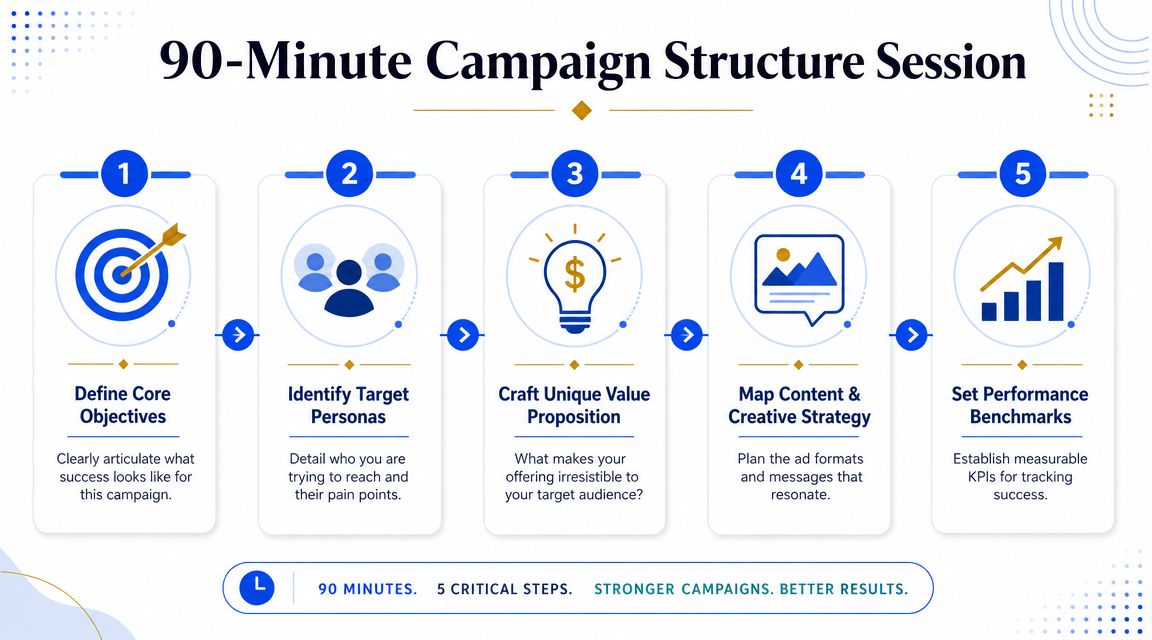
Before anyone opens Campaign Manager, block 90 minutes and write the campaign on paper first. This is the most impactful part of the entire workflow. Most wasted spend starts when teams skip alignment and build directly in the platform.
Five decisions to make before Campaign Manager
Define the single outcome
Pick one. Pipeline is not the same campaign as awareness, and neither is the same as retargeting. If you ask one campaign to educate cold traffic, capture leads, and close buyers at the same time, you spread budget across conflicting jobs.
Lock the audience in writing
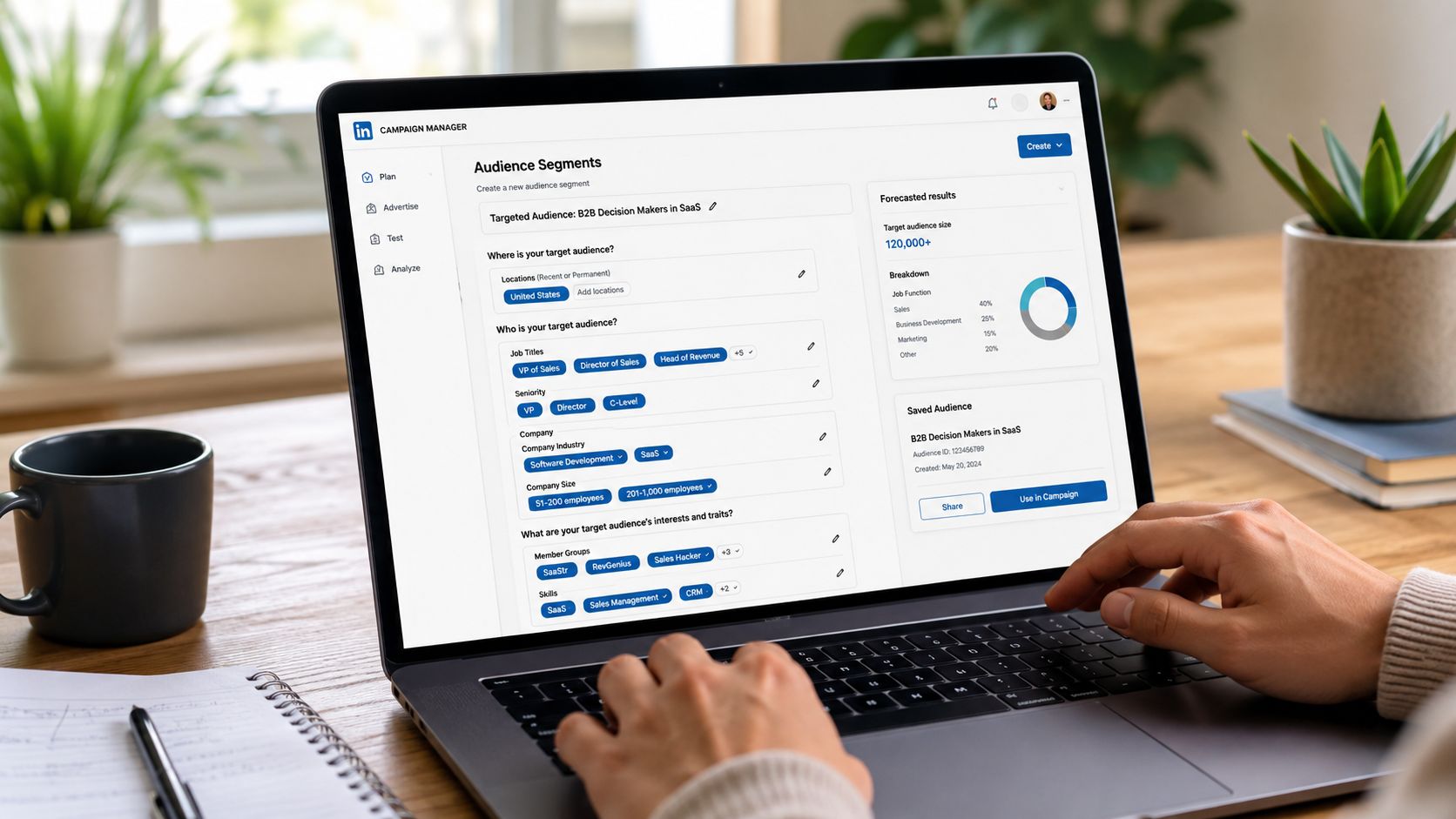
We define the audience using plain criteria → job title → function → seniority → company size → industry. Writing it first removes the temptation to build five half-formed audiences in week one.
Choose the funnel stage and ad format together
Cold traffic usually needs proof, not pressure. That's why sponsored content, video, or document-based assets often make more sense early, while direct response formats belong later when intent is stronger.
Set the campaign architecture
Keep the launch simple. One campaign group, two to three campaigns, and no more than four ads per campaign gives you enough structure to test without starving each ad of delivery.
Agree the budget floor and testing window
Launching too small creates weak delivery and weak learning. Declaring the review window in advance also protects the campaign from premature edits driven by anxiety.
What teams usually get wrong
The common mistake isn't bad copy. It's trying to answer unresolved strategy questions inside the ad platform. Campaign Manager is good at execution. It's terrible at deciding who matters, what the offer should be, or how sales will judge lead quality.
A structure session also forces alignment between marketing, sales, and RevOps. That matters because a campaign can look healthy in-platform and still produce the wrong kind of demand if qualification rules are fuzzy.
Teams don't lose LinkedIn budget because the platform lacks options. They lose it because too many options get used before the campaign earns the right to expand.
A simple worksheet works better than a fancy planning deck. We usually capture the outcome, target account logic, audience filters, offer, funnel stage, conversion event, reporting owner, and sprint review dates in one document. If the team can't sign off on those items, the launch isn't ready.
Building your campaign with precision
Once the structure is done, the platform setup should feel almost mechanical. You're not brainstorming inside Campaign Manager. You're translating a strategy into settings.
Precision beats reach on LinkedIn
Many Ads LinkedIn accounts drift off course when pursuing increased reach. While the platform consistently offers ways to expand reach, what appears efficient for B2B often means paying premium CPMs to target individuals never involved in the buying committee.
Dreamdata's guidance recommends disabling Audience Expansion and tightening location and audience settings because LinkedIn can otherwise serve outside the intended ICP. That lines up with what good operators see in-market. Precision usually beats scale when the clicks are expensive and the sales cycle is long.
If you want a deeper breakdown of the actual filters and targeting logic, this glossary on LinkedIn targeting is a useful companion for build-stage decisions.
The settings that actually matter
A few settings deserve disproportionate attention:
Objective selection → If the business goal is pipeline, optimize toward a meaningful conversion event on-site, not just clicks or engagement.
Audience controls → Build the saved audience from the written ICP definition. Don't improvise segments because the interface suggests them.
Expansion settings → Turn off Audience Expansion unless you have a very specific reason to test outside your baseline audience.
Conversion tracking → Verify the LinkedIn Insight Tag and your downstream CRM mapping before launch day.
Naming conventions → Use names that reflect audience, offer, stage, and creative angle so reviews are readable later.
A clean build also makes it easier to connect paid data with the rest of your revenue stack. In practice that means LinkedIn Campaign Manager feeding into HubSpot, then reviewed alongside account lists in Apollo or Sales Navigator so paid and outbound don't target two different worlds. Grou is one option for teams that want LinkedIn content, outbound, and paid demand working from the same ICP and reporting line.
Operational note: Broad targeting can make a dashboard look busy. It doesn't make the campaign useful.
The trade-off is obvious. Tight targeting limits raw volume. That's fine. On LinkedIn, lower waste matters more than bigger top-line numbers if the goal is qualified pipeline.
Designing creative and messaging for credibility
On LinkedIn, creative isn't decoration. It's the first proof that you understand the buyer's world. If the ad looks generic, the audience assumes the offer is generic too.
Match the format to the funnel stage
For cold audiences, the creative should reduce skepticism before it asks for action. That usually means thought-out sponsored content, a clear single-image ad, a sharp short video, or a document ad that teaches something concrete. A cold audience rarely wants a hard demo CTA as the first touch.
The message also needs a specific promise. “Download our guide” is weak because it says nothing about the problem being solved. A better angle names the operational pain directly and shows why the asset is worth attention.
Here is a simple perspective:
Funnel stage | Better fit | Usually a poor fit |
|---|---|---|
Cold | Educational sponsored content, video, document ads | Aggressive lead gen forms |
Warm | Consideration assets, webinars, problem-solution creative | Broad awareness copy |
Hot | Strong offer, direct CTA, retargeting creative | Thought leadership with no action |
If your paid creative is also feeding your organic credibility, this guide to LinkedIn content strategy helps keep both channels aligned.
Creative specs and production checklist
For single-image ads, Brandwatch notes the practical export standards are 1200 × 628 px for landscape and 1200 × 1200 px for square, with JPG, PNG, or GIF files under the 5 MB upload limit. LinkedIn supports 1.91:1, 1:1, and 4:5, so it's better to build placement-specific variants than assume one file will render well everywhere.
Production checklist:
Use real proof → product UI, diagrams, framework slides, or expert-led visuals beat abstract stock imagery.
Write to one pain point → one ad, one problem, one promise.
Design variants deliberately → square and horizontal versions prevent awkward feed rendering.
Keep video practical → if you're compressing founder clips or customer-facing explainers, tools like BlitzReels for LinkedIn videos can help keep files platform-ready without overcomplicating production.
Credibility compounds when the ad looks like it came from a team that actually works on the problem, not a team that outsourced the opinion.
The best creative on LinkedIn feels informed, not polished for its own sake.
The 4-week sprint for optimizing and scaling results
What's often needed isn't more optimization ideas. It's a review cadence that prevents changing everything at once.
A disciplined sprint matters because LinkedIn can perform very well when given stable conditions. Hootsuite's LinkedIn statistics roundup notes that ads on the platform can drive up to 2x higher conversion rates compared to other channels. The catch is that you only reach that upside if the campaign gets enough time and consistency to learn.
The weekly operating cadence
Here's the sprint model we use.
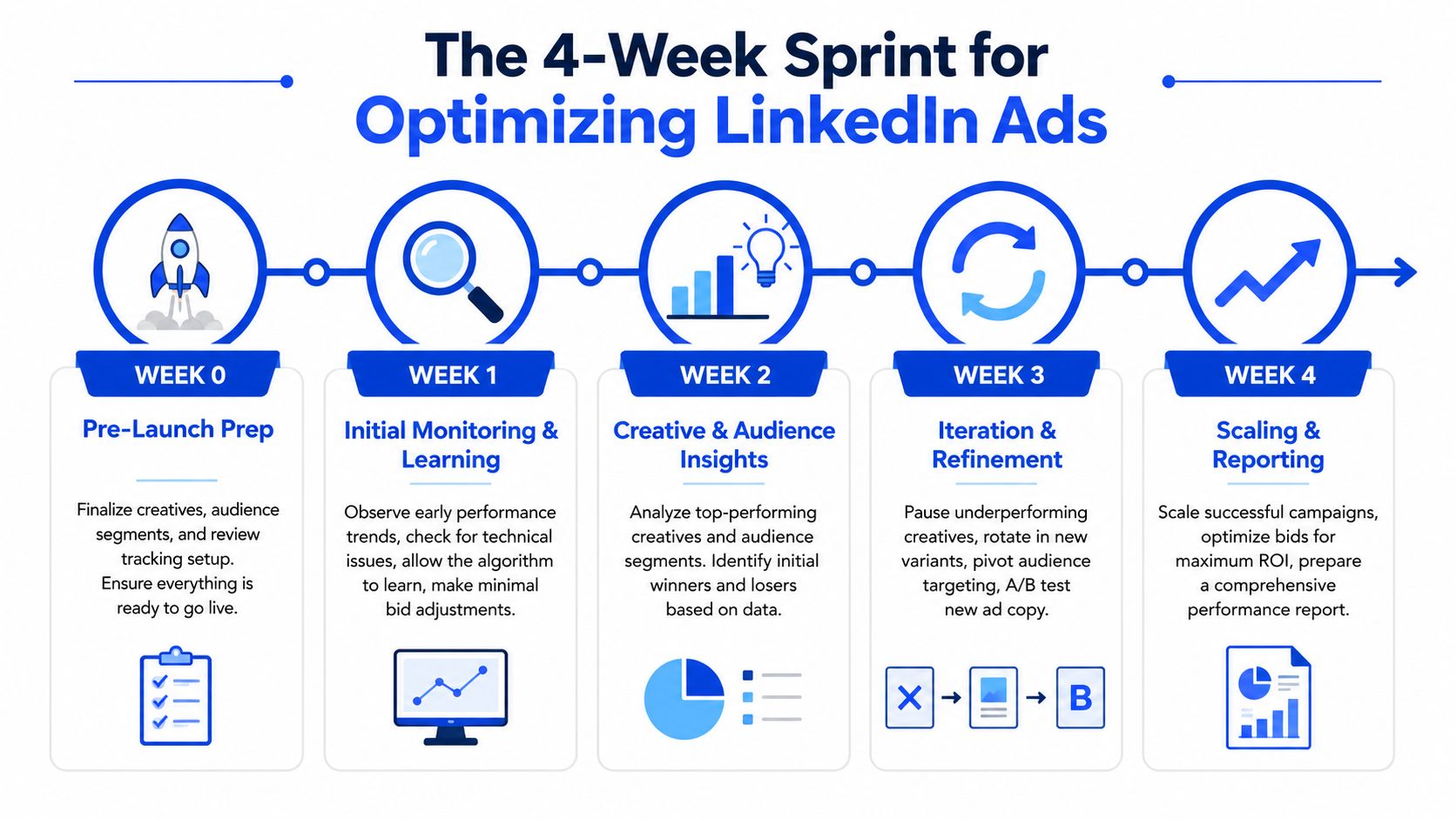
Week 0, pre-launch
Finalize audience definitions, approve the first creative set, verify the Insight Tag, and confirm CRM-side conversion handling. Nothing goes live until tracking is checked.
Week 1, soft launch
Launch to the primary audience only. Look for delivery issues, pacing issues, or broken tracking. Don't rewrite ads because of two days of mixed CTR.
A practical reference point for teams building a broader acquisition engine is this page on how to scale paid acquisition, especially if LinkedIn is one part of a larger program.
Later in the sprint, review gets more deliberate.
Week 2, first review
With two weeks of data, you can start separating noise from signal. Identify whether one creative angle is clearly stronger or whether a specific segment within the defined audience is showing better conversion quality.
Week 3, scale or pivot
If the trajectory is viable, scale the winning setup by increasing budget on the best-performing combination. If it isn't viable, change either the audience or the creative angle. Never both in the same move.
Week 4, retrospective
Review qualified leads, meeting quality, and pipeline influence where attribution is clean. Then decide what survives into the next sprint and what gets retired.
What stays frozen during the sprint
The sprint works because several things stay still.
No daily creative swaps → the platform needs stability.
No audience additions mid-sprint → audience expansion belongs between cycles.
No emotional reactions to week-one numbers → early fluctuations are not a strategy signal.
That fixed cadence is what turns paid media from a reactive dashboard habit into an operating system.
What to measure and when to act
The biggest optimization mistake on LinkedIn is over-optimization. Teams log in every morning, see a small dip in click-through rate, then start editing ads, budgets, and audiences before the system has produced usable signal.
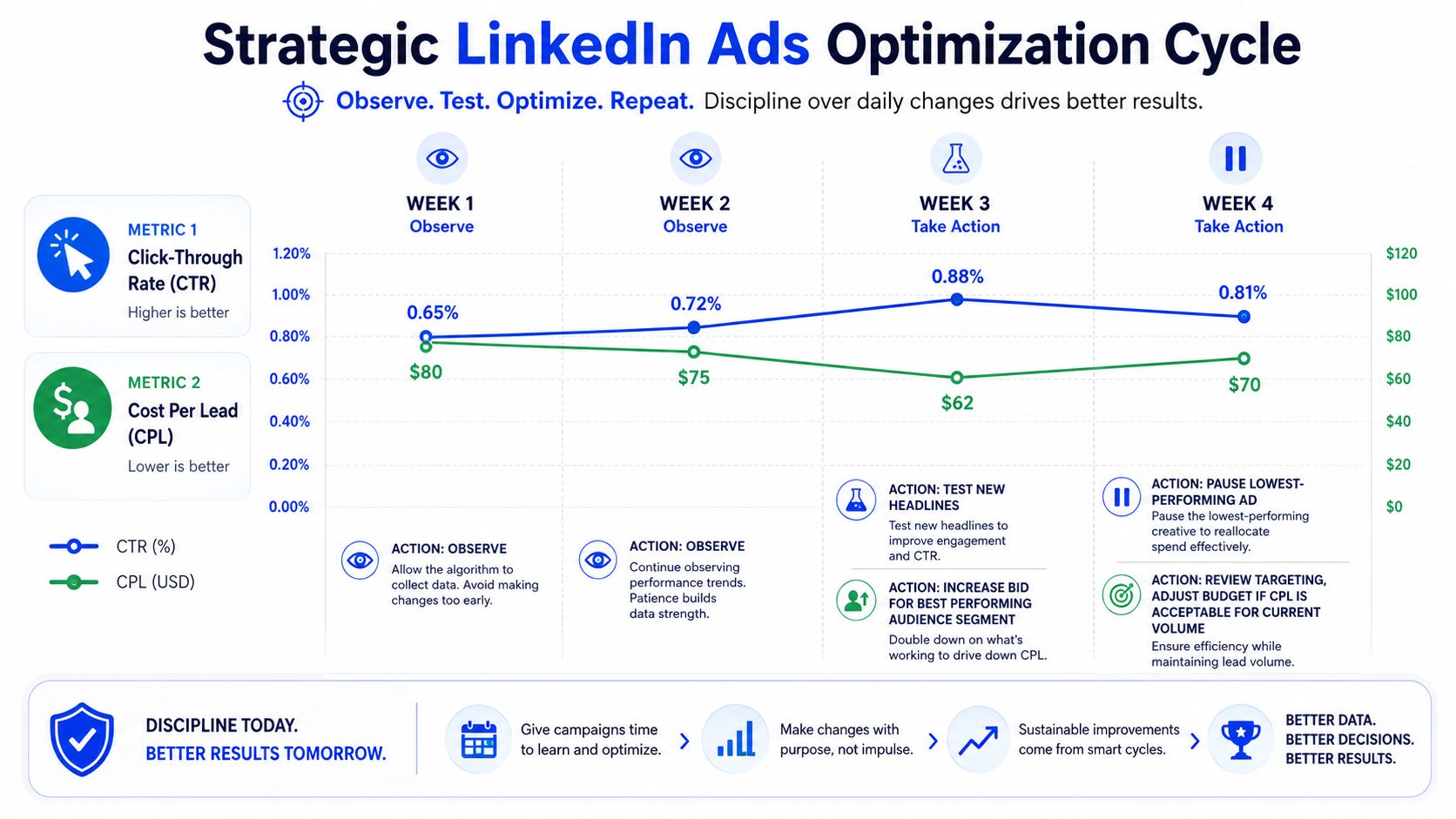
The one metric we glance at daily
We don't optimize daily. We glance daily, and only one number really matters for that glance, frequency.
Why frequency matters:
Above 4 in a 7-day window → the audience is likely saturating, which usually shows up as fatigue before bigger performance deterioration.
Below 2 → the spend may be too diluted across the audience, or the audience is too broad for the budget.
Between 2.5 and 3.5 → usually enough repetition to register without becoming annoying.
That metric is useful because it points to the kind of action required. High frequency usually means rotate out the weakest creative. Low frequency usually means a structural issue, audience size or budget alignment, not a copy problem.
Watch carefully, act rarely. That's closer to real optimization than constant activity.
What belongs in weekly reviews instead
Other metrics matter, just not as daily triggers.
CTR → useful in trend form, noisy in isolation.
Cost per click → volatile day to day, better interpreted over a longer window.
Cost per conversion → too low-volume in many B2B programs to judge in real time.
Lead quality → best reviewed against CRM outcomes, not ad-platform enthusiasm.
This is also where the analytics stack matters. If you're trying to connect ad performance with meetings, influenced pipeline, and sales feedback, these insights into marketing analytics tools are a useful starting point for evaluating your reporting layer.
A healthy review rhythm looks like this: daily technical glance, weekly trend review, sprint-level decisions. That order protects the campaign from panic edits and gives the team a cleaner feedback loop.
Your next step schedule your structure session
Don't start by rebuilding your account. Start by blocking time.
Put a 90-minute session on the calendar before your next LinkedIn campaign launch, or before you put more budget into a campaign that's already underperforming. Bring in whoever owns paid media, sales follow-up, and CRM reporting. Then write down the five decisions that matter most, outcome, audience, funnel stage, structure, and testing rules.
That one meeting will do more for your Ads LinkedIn performance than another round of random targeting tweaks. It forces the team to define what the campaign is supposed to do, who it's supposed to reach, and how success will be judged after launch.
If you want outside help structuring that process, you can book a call with Grou. The useful part isn't the call itself. It's getting the campaign logic clear before more budget goes live.
If you want a B2B paid program that turns attention into pipeline, Grou builds LinkedIn content, outbound, and demand capture around one ICP, one message, and one reporting line.
Your LinkedIn Ads campaign is spending. The dashboard looks active. Impressions are coming in, clicks are happening, maybe even a few form fills. Then sales asks the only question that matters, where's the pipeline?
That gap is why many B2B teams end up treating Ads LinkedIn like a slot machine. They pull targeting levers, swap creatives every few days, and hope the next tweak fixes performance. It usually doesn't, because the problem rarely starts inside Campaign Manager.
LinkedIn is a premium B2B media environment. Statista projects LinkedIn's B2B display ad revenue will reach $4.73 billion by the end of 2025, and benchmark data places average CPM at about $33.80. That means a loose setup gets expensive fast. If you're also trying to tighten conversion paths after the click, this breakdown of LinkedIn lead generation systems is worth pairing with your paid strategy.
The fix is simple, but not easy. Structure the campaign before launch, then run it with enough discipline to learn what's working.
Table of Contents
Key takeaways how to get predictable results from LinkedIn ads
Most LinkedIn campaigns fail for boring reasons. The objective is unclear, the audience is too loose, the format doesn't match the funnel stage, and the team keeps changing variables before any real signal appears.
The operating rules are straightforward:
Start with one business outcome → pipeline, retargeting, and awareness need different setups, budgets, and success criteria.
Write the audience before you build it → job title, function, seniority, company size, and industry should be agreed in plain language first.
Hold the campaign steady long enough to learn → daily edits create noise, not optimization.
Change one variable per sprint → audience, creative angle, or offer. Never all three.
Judge the program on revenue movement, not dashboard activity → impressions and clicks matter only if they push qualified demand forward.
For teams testing more visual formats, it also helps to review examples of optimizing LinkedIn carousel ads so the creative format supports the buying journey instead of just filling the feed.
Practical rule: If your team can't explain the campaign in one sentence before launch, the platform won't fix it for you after launch.
The 90-minute structure session that prevents wasted spend
Before anyone opens Campaign Manager, block 90 minutes and write the campaign on paper first. This is the most impactful part of the entire workflow. Most wasted spend starts when teams skip alignment and build directly in the platform.
Five decisions to make before Campaign Manager
Define the single outcome
Pick one. Pipeline is not the same campaign as awareness, and neither is the same as retargeting. If you ask one campaign to educate cold traffic, capture leads, and close buyers at the same time, you spread budget across conflicting jobs.
Lock the audience in writing
We define the audience using plain criteria → job title → function → seniority → company size → industry. Writing it first removes the temptation to build five half-formed audiences in week one.
Choose the funnel stage and ad format together
Cold traffic usually needs proof, not pressure. That's why sponsored content, video, or document-based assets often make more sense early, while direct response formats belong later when intent is stronger.
Set the campaign architecture
Keep the launch simple. One campaign group, two to three campaigns, and no more than four ads per campaign gives you enough structure to test without starving each ad of delivery.
Agree the budget floor and testing window
Launching too small creates weak delivery and weak learning. Declaring the review window in advance also protects the campaign from premature edits driven by anxiety.
What teams usually get wrong
The common mistake isn't bad copy. It's trying to answer unresolved strategy questions inside the ad platform. Campaign Manager is good at execution. It's terrible at deciding who matters, what the offer should be, or how sales will judge lead quality.
A structure session also forces alignment between marketing, sales, and RevOps. That matters because a campaign can look healthy in-platform and still produce the wrong kind of demand if qualification rules are fuzzy.
Teams don't lose LinkedIn budget because the platform lacks options. They lose it because too many options get used before the campaign earns the right to expand.
A simple worksheet works better than a fancy planning deck. We usually capture the outcome, target account logic, audience filters, offer, funnel stage, conversion event, reporting owner, and sprint review dates in one document. If the team can't sign off on those items, the launch isn't ready.
Building your campaign with precision
Once the structure is done, the platform setup should feel almost mechanical. You're not brainstorming inside Campaign Manager. You're translating a strategy into settings.
Precision beats reach on LinkedIn
Many Ads LinkedIn accounts drift off course when pursuing increased reach. While the platform consistently offers ways to expand reach, what appears efficient for B2B often means paying premium CPMs to target individuals never involved in the buying committee.
Dreamdata's guidance recommends disabling Audience Expansion and tightening location and audience settings because LinkedIn can otherwise serve outside the intended ICP. That lines up with what good operators see in-market. Precision usually beats scale when the clicks are expensive and the sales cycle is long.
If you want a deeper breakdown of the actual filters and targeting logic, this glossary on LinkedIn targeting is a useful companion for build-stage decisions.
The settings that actually matter
A few settings deserve disproportionate attention:
Objective selection → If the business goal is pipeline, optimize toward a meaningful conversion event on-site, not just clicks or engagement.
Audience controls → Build the saved audience from the written ICP definition. Don't improvise segments because the interface suggests them.
Expansion settings → Turn off Audience Expansion unless you have a very specific reason to test outside your baseline audience.
Conversion tracking → Verify the LinkedIn Insight Tag and your downstream CRM mapping before launch day.
Naming conventions → Use names that reflect audience, offer, stage, and creative angle so reviews are readable later.
A clean build also makes it easier to connect paid data with the rest of your revenue stack. In practice that means LinkedIn Campaign Manager feeding into HubSpot, then reviewed alongside account lists in Apollo or Sales Navigator so paid and outbound don't target two different worlds. Grou is one option for teams that want LinkedIn content, outbound, and paid demand working from the same ICP and reporting line.
Operational note: Broad targeting can make a dashboard look busy. It doesn't make the campaign useful.
The trade-off is obvious. Tight targeting limits raw volume. That's fine. On LinkedIn, lower waste matters more than bigger top-line numbers if the goal is qualified pipeline.
Designing creative and messaging for credibility
On LinkedIn, creative isn't decoration. It's the first proof that you understand the buyer's world. If the ad looks generic, the audience assumes the offer is generic too.
Match the format to the funnel stage
For cold audiences, the creative should reduce skepticism before it asks for action. That usually means thought-out sponsored content, a clear single-image ad, a sharp short video, or a document ad that teaches something concrete. A cold audience rarely wants a hard demo CTA as the first touch.
The message also needs a specific promise. “Download our guide” is weak because it says nothing about the problem being solved. A better angle names the operational pain directly and shows why the asset is worth attention.
Here is a simple perspective:
Funnel stage | Better fit | Usually a poor fit |
|---|---|---|
Cold | Educational sponsored content, video, document ads | Aggressive lead gen forms |
Warm | Consideration assets, webinars, problem-solution creative | Broad awareness copy |
Hot | Strong offer, direct CTA, retargeting creative | Thought leadership with no action |
If your paid creative is also feeding your organic credibility, this guide to LinkedIn content strategy helps keep both channels aligned.
Creative specs and production checklist
For single-image ads, Brandwatch notes the practical export standards are 1200 × 628 px for landscape and 1200 × 1200 px for square, with JPG, PNG, or GIF files under the 5 MB upload limit. LinkedIn supports 1.91:1, 1:1, and 4:5, so it's better to build placement-specific variants than assume one file will render well everywhere.
Production checklist:
Use real proof → product UI, diagrams, framework slides, or expert-led visuals beat abstract stock imagery.
Write to one pain point → one ad, one problem, one promise.
Design variants deliberately → square and horizontal versions prevent awkward feed rendering.
Keep video practical → if you're compressing founder clips or customer-facing explainers, tools like BlitzReels for LinkedIn videos can help keep files platform-ready without overcomplicating production.
Credibility compounds when the ad looks like it came from a team that actually works on the problem, not a team that outsourced the opinion.
The best creative on LinkedIn feels informed, not polished for its own sake.
The 4-week sprint for optimizing and scaling results
What's often needed isn't more optimization ideas. It's a review cadence that prevents changing everything at once.
A disciplined sprint matters because LinkedIn can perform very well when given stable conditions. Hootsuite's LinkedIn statistics roundup notes that ads on the platform can drive up to 2x higher conversion rates compared to other channels. The catch is that you only reach that upside if the campaign gets enough time and consistency to learn.
The weekly operating cadence
Here's the sprint model we use.
Week 0, pre-launch
Finalize audience definitions, approve the first creative set, verify the Insight Tag, and confirm CRM-side conversion handling. Nothing goes live until tracking is checked.
Week 1, soft launch
Launch to the primary audience only. Look for delivery issues, pacing issues, or broken tracking. Don't rewrite ads because of two days of mixed CTR.
A practical reference point for teams building a broader acquisition engine is this page on how to scale paid acquisition, especially if LinkedIn is one part of a larger program.
Later in the sprint, review gets more deliberate.
Week 2, first review
With two weeks of data, you can start separating noise from signal. Identify whether one creative angle is clearly stronger or whether a specific segment within the defined audience is showing better conversion quality.
Week 3, scale or pivot
If the trajectory is viable, scale the winning setup by increasing budget on the best-performing combination. If it isn't viable, change either the audience or the creative angle. Never both in the same move.
Week 4, retrospective
Review qualified leads, meeting quality, and pipeline influence where attribution is clean. Then decide what survives into the next sprint and what gets retired.
What stays frozen during the sprint
The sprint works because several things stay still.
No daily creative swaps → the platform needs stability.
No audience additions mid-sprint → audience expansion belongs between cycles.
No emotional reactions to week-one numbers → early fluctuations are not a strategy signal.
That fixed cadence is what turns paid media from a reactive dashboard habit into an operating system.
What to measure and when to act
The biggest optimization mistake on LinkedIn is over-optimization. Teams log in every morning, see a small dip in click-through rate, then start editing ads, budgets, and audiences before the system has produced usable signal.
The one metric we glance at daily
We don't optimize daily. We glance daily, and only one number really matters for that glance, frequency.
Why frequency matters:
Above 4 in a 7-day window → the audience is likely saturating, which usually shows up as fatigue before bigger performance deterioration.
Below 2 → the spend may be too diluted across the audience, or the audience is too broad for the budget.
Between 2.5 and 3.5 → usually enough repetition to register without becoming annoying.
That metric is useful because it points to the kind of action required. High frequency usually means rotate out the weakest creative. Low frequency usually means a structural issue, audience size or budget alignment, not a copy problem.
Watch carefully, act rarely. That's closer to real optimization than constant activity.
What belongs in weekly reviews instead
Other metrics matter, just not as daily triggers.
CTR → useful in trend form, noisy in isolation.
Cost per click → volatile day to day, better interpreted over a longer window.
Cost per conversion → too low-volume in many B2B programs to judge in real time.
Lead quality → best reviewed against CRM outcomes, not ad-platform enthusiasm.
This is also where the analytics stack matters. If you're trying to connect ad performance with meetings, influenced pipeline, and sales feedback, these insights into marketing analytics tools are a useful starting point for evaluating your reporting layer.
A healthy review rhythm looks like this: daily technical glance, weekly trend review, sprint-level decisions. That order protects the campaign from panic edits and gives the team a cleaner feedback loop.
Your next step schedule your structure session
Don't start by rebuilding your account. Start by blocking time.
Put a 90-minute session on the calendar before your next LinkedIn campaign launch, or before you put more budget into a campaign that's already underperforming. Bring in whoever owns paid media, sales follow-up, and CRM reporting. Then write down the five decisions that matter most, outcome, audience, funnel stage, structure, and testing rules.
That one meeting will do more for your Ads LinkedIn performance than another round of random targeting tweaks. It forces the team to define what the campaign is supposed to do, who it's supposed to reach, and how success will be judged after launch.
If you want outside help structuring that process, you can book a call with Grou. The useful part isn't the call itself. It's getting the campaign logic clear before more budget goes live.
If you want a B2B paid program that turns attention into pipeline, Grou builds LinkedIn content, outbound, and demand capture around one ICP, one message, and one reporting line.
Your LinkedIn Ads campaign is spending. The dashboard looks active. Impressions are coming in, clicks are happening, maybe even a few form fills. Then sales asks the only question that matters, where's the pipeline?
That gap is why many B2B teams end up treating Ads LinkedIn like a slot machine. They pull targeting levers, swap creatives every few days, and hope the next tweak fixes performance. It usually doesn't, because the problem rarely starts inside Campaign Manager.
LinkedIn is a premium B2B media environment. Statista projects LinkedIn's B2B display ad revenue will reach $4.73 billion by the end of 2025, and benchmark data places average CPM at about $33.80. That means a loose setup gets expensive fast. If you're also trying to tighten conversion paths after the click, this breakdown of LinkedIn lead generation systems is worth pairing with your paid strategy.
The fix is simple, but not easy. Structure the campaign before launch, then run it with enough discipline to learn what's working.
Table of Contents
Key takeaways how to get predictable results from LinkedIn ads
Most LinkedIn campaigns fail for boring reasons. The objective is unclear, the audience is too loose, the format doesn't match the funnel stage, and the team keeps changing variables before any real signal appears.
The operating rules are straightforward:
Start with one business outcome → pipeline, retargeting, and awareness need different setups, budgets, and success criteria.
Write the audience before you build it → job title, function, seniority, company size, and industry should be agreed in plain language first.
Hold the campaign steady long enough to learn → daily edits create noise, not optimization.
Change one variable per sprint → audience, creative angle, or offer. Never all three.
Judge the program on revenue movement, not dashboard activity → impressions and clicks matter only if they push qualified demand forward.
For teams testing more visual formats, it also helps to review examples of optimizing LinkedIn carousel ads so the creative format supports the buying journey instead of just filling the feed.
Practical rule: If your team can't explain the campaign in one sentence before launch, the platform won't fix it for you after launch.
The 90-minute structure session that prevents wasted spend
Before anyone opens Campaign Manager, block 90 minutes and write the campaign on paper first. This is the most impactful part of the entire workflow. Most wasted spend starts when teams skip alignment and build directly in the platform.
Five decisions to make before Campaign Manager
Define the single outcome
Pick one. Pipeline is not the same campaign as awareness, and neither is the same as retargeting. If you ask one campaign to educate cold traffic, capture leads, and close buyers at the same time, you spread budget across conflicting jobs.
Lock the audience in writing
We define the audience using plain criteria → job title → function → seniority → company size → industry. Writing it first removes the temptation to build five half-formed audiences in week one.
Choose the funnel stage and ad format together
Cold traffic usually needs proof, not pressure. That's why sponsored content, video, or document-based assets often make more sense early, while direct response formats belong later when intent is stronger.
Set the campaign architecture
Keep the launch simple. One campaign group, two to three campaigns, and no more than four ads per campaign gives you enough structure to test without starving each ad of delivery.
Agree the budget floor and testing window
Launching too small creates weak delivery and weak learning. Declaring the review window in advance also protects the campaign from premature edits driven by anxiety.
What teams usually get wrong
The common mistake isn't bad copy. It's trying to answer unresolved strategy questions inside the ad platform. Campaign Manager is good at execution. It's terrible at deciding who matters, what the offer should be, or how sales will judge lead quality.
A structure session also forces alignment between marketing, sales, and RevOps. That matters because a campaign can look healthy in-platform and still produce the wrong kind of demand if qualification rules are fuzzy.
Teams don't lose LinkedIn budget because the platform lacks options. They lose it because too many options get used before the campaign earns the right to expand.
A simple worksheet works better than a fancy planning deck. We usually capture the outcome, target account logic, audience filters, offer, funnel stage, conversion event, reporting owner, and sprint review dates in one document. If the team can't sign off on those items, the launch isn't ready.
Building your campaign with precision
Once the structure is done, the platform setup should feel almost mechanical. You're not brainstorming inside Campaign Manager. You're translating a strategy into settings.
Precision beats reach on LinkedIn
Many Ads LinkedIn accounts drift off course when pursuing increased reach. While the platform consistently offers ways to expand reach, what appears efficient for B2B often means paying premium CPMs to target individuals never involved in the buying committee.
Dreamdata's guidance recommends disabling Audience Expansion and tightening location and audience settings because LinkedIn can otherwise serve outside the intended ICP. That lines up with what good operators see in-market. Precision usually beats scale when the clicks are expensive and the sales cycle is long.
If you want a deeper breakdown of the actual filters and targeting logic, this glossary on LinkedIn targeting is a useful companion for build-stage decisions.
The settings that actually matter
A few settings deserve disproportionate attention:
Objective selection → If the business goal is pipeline, optimize toward a meaningful conversion event on-site, not just clicks or engagement.
Audience controls → Build the saved audience from the written ICP definition. Don't improvise segments because the interface suggests them.
Expansion settings → Turn off Audience Expansion unless you have a very specific reason to test outside your baseline audience.
Conversion tracking → Verify the LinkedIn Insight Tag and your downstream CRM mapping before launch day.
Naming conventions → Use names that reflect audience, offer, stage, and creative angle so reviews are readable later.
A clean build also makes it easier to connect paid data with the rest of your revenue stack. In practice that means LinkedIn Campaign Manager feeding into HubSpot, then reviewed alongside account lists in Apollo or Sales Navigator so paid and outbound don't target two different worlds. Grou is one option for teams that want LinkedIn content, outbound, and paid demand working from the same ICP and reporting line.
Operational note: Broad targeting can make a dashboard look busy. It doesn't make the campaign useful.
The trade-off is obvious. Tight targeting limits raw volume. That's fine. On LinkedIn, lower waste matters more than bigger top-line numbers if the goal is qualified pipeline.
Designing creative and messaging for credibility
On LinkedIn, creative isn't decoration. It's the first proof that you understand the buyer's world. If the ad looks generic, the audience assumes the offer is generic too.
Match the format to the funnel stage
For cold audiences, the creative should reduce skepticism before it asks for action. That usually means thought-out sponsored content, a clear single-image ad, a sharp short video, or a document ad that teaches something concrete. A cold audience rarely wants a hard demo CTA as the first touch.
The message also needs a specific promise. “Download our guide” is weak because it says nothing about the problem being solved. A better angle names the operational pain directly and shows why the asset is worth attention.
Here is a simple perspective:
Funnel stage | Better fit | Usually a poor fit |
|---|---|---|
Cold | Educational sponsored content, video, document ads | Aggressive lead gen forms |
Warm | Consideration assets, webinars, problem-solution creative | Broad awareness copy |
Hot | Strong offer, direct CTA, retargeting creative | Thought leadership with no action |
If your paid creative is also feeding your organic credibility, this guide to LinkedIn content strategy helps keep both channels aligned.
Creative specs and production checklist
For single-image ads, Brandwatch notes the practical export standards are 1200 × 628 px for landscape and 1200 × 1200 px for square, with JPG, PNG, or GIF files under the 5 MB upload limit. LinkedIn supports 1.91:1, 1:1, and 4:5, so it's better to build placement-specific variants than assume one file will render well everywhere.
Production checklist:
Use real proof → product UI, diagrams, framework slides, or expert-led visuals beat abstract stock imagery.
Write to one pain point → one ad, one problem, one promise.
Design variants deliberately → square and horizontal versions prevent awkward feed rendering.
Keep video practical → if you're compressing founder clips or customer-facing explainers, tools like BlitzReels for LinkedIn videos can help keep files platform-ready without overcomplicating production.
Credibility compounds when the ad looks like it came from a team that actually works on the problem, not a team that outsourced the opinion.
The best creative on LinkedIn feels informed, not polished for its own sake.
The 4-week sprint for optimizing and scaling results
What's often needed isn't more optimization ideas. It's a review cadence that prevents changing everything at once.
A disciplined sprint matters because LinkedIn can perform very well when given stable conditions. Hootsuite's LinkedIn statistics roundup notes that ads on the platform can drive up to 2x higher conversion rates compared to other channels. The catch is that you only reach that upside if the campaign gets enough time and consistency to learn.
The weekly operating cadence
Here's the sprint model we use.
Week 0, pre-launch
Finalize audience definitions, approve the first creative set, verify the Insight Tag, and confirm CRM-side conversion handling. Nothing goes live until tracking is checked.
Week 1, soft launch
Launch to the primary audience only. Look for delivery issues, pacing issues, or broken tracking. Don't rewrite ads because of two days of mixed CTR.
A practical reference point for teams building a broader acquisition engine is this page on how to scale paid acquisition, especially if LinkedIn is one part of a larger program.
Later in the sprint, review gets more deliberate.
Week 2, first review
With two weeks of data, you can start separating noise from signal. Identify whether one creative angle is clearly stronger or whether a specific segment within the defined audience is showing better conversion quality.
Week 3, scale or pivot
If the trajectory is viable, scale the winning setup by increasing budget on the best-performing combination. If it isn't viable, change either the audience or the creative angle. Never both in the same move.
Week 4, retrospective
Review qualified leads, meeting quality, and pipeline influence where attribution is clean. Then decide what survives into the next sprint and what gets retired.
What stays frozen during the sprint
The sprint works because several things stay still.
No daily creative swaps → the platform needs stability.
No audience additions mid-sprint → audience expansion belongs between cycles.
No emotional reactions to week-one numbers → early fluctuations are not a strategy signal.
That fixed cadence is what turns paid media from a reactive dashboard habit into an operating system.
What to measure and when to act
The biggest optimization mistake on LinkedIn is over-optimization. Teams log in every morning, see a small dip in click-through rate, then start editing ads, budgets, and audiences before the system has produced usable signal.
The one metric we glance at daily
We don't optimize daily. We glance daily, and only one number really matters for that glance, frequency.
Why frequency matters:
Above 4 in a 7-day window → the audience is likely saturating, which usually shows up as fatigue before bigger performance deterioration.
Below 2 → the spend may be too diluted across the audience, or the audience is too broad for the budget.
Between 2.5 and 3.5 → usually enough repetition to register without becoming annoying.
That metric is useful because it points to the kind of action required. High frequency usually means rotate out the weakest creative. Low frequency usually means a structural issue, audience size or budget alignment, not a copy problem.
Watch carefully, act rarely. That's closer to real optimization than constant activity.
What belongs in weekly reviews instead
Other metrics matter, just not as daily triggers.
CTR → useful in trend form, noisy in isolation.
Cost per click → volatile day to day, better interpreted over a longer window.
Cost per conversion → too low-volume in many B2B programs to judge in real time.
Lead quality → best reviewed against CRM outcomes, not ad-platform enthusiasm.
This is also where the analytics stack matters. If you're trying to connect ad performance with meetings, influenced pipeline, and sales feedback, these insights into marketing analytics tools are a useful starting point for evaluating your reporting layer.
A healthy review rhythm looks like this: daily technical glance, weekly trend review, sprint-level decisions. That order protects the campaign from panic edits and gives the team a cleaner feedback loop.
Your next step schedule your structure session
Don't start by rebuilding your account. Start by blocking time.
Put a 90-minute session on the calendar before your next LinkedIn campaign launch, or before you put more budget into a campaign that's already underperforming. Bring in whoever owns paid media, sales follow-up, and CRM reporting. Then write down the five decisions that matter most, outcome, audience, funnel stage, structure, and testing rules.
That one meeting will do more for your Ads LinkedIn performance than another round of random targeting tweaks. It forces the team to define what the campaign is supposed to do, who it's supposed to reach, and how success will be judged after launch.
If you want outside help structuring that process, you can book a call with Grou. The useful part isn't the call itself. It's getting the campaign logic clear before more budget goes live.
If you want a B2B paid program that turns attention into pipeline, Grou builds LinkedIn content, outbound, and demand capture around one ICP, one message, and one reporting line.

Pipeline OS Newsletter
Build qualified pipeline
Get weekly tactics to generate demand, improve lead quality, and book more meetings.





Trusted by industry leaders
Trusted by industry leaders
Trusted by industry leaders
Ready to build qualified pipeline?
Ready to build qualified pipeline?
Ready to build qualified pipeline?
Book a call to see if we're the right fit, or take the 2-minute quiz to get a clear starting point.
Book a call to see if we're the right fit, or take the 2-minute quiz to get a clear starting point.
Book a call to see if we're the right fit, or take the 2-minute quiz to get a clear starting point.
" height="30.21639343089746px" id="hfGbXmQR2" width="30.216393430897455px"/></svg>)
Copyright © 2026 – All Right Reserved
Copyright © 2026 – All Right Reserved
Copyright © 2026 – All Right Reserved