%22%3E%3C/path%3E%3Cpath d=%22M 63.072 7.554 C 62.258 8.022 61.577 8.689 61.092 9.493 L 61.092 7.076 L 57.158 7.076 L 57.158 22.64 L 61.089 22.64 L 61.089 14.888 C 61.089 13.446 61.403 12.434 62.03 11.853 C 62.818 11.218 63.818 10.907 64.826 10.982 L 65.868 10.982 L 65.868 6.851 C 64.891 6.834 63.926 7.076 63.073 7.554 Z%22 fill=%22rgb(17,17,17)%22%3E%3C/path%3E%3Cpath d=%22M 78.916 7.82 C 76.363 6.49 73.321 6.49 70.768 7.82 C 69.562 8.473 68.564 9.451 67.888 10.644 C 67.167 11.931 66.803 13.387 66.834 14.862 C 66.804 16.332 67.157 17.785 67.86 19.077 C 68.515 20.267 69.494 21.246 70.684 21.901 C 71.924 22.576 73.318 22.92 74.73 22.898 C 76.164 22.918 77.58 22.575 78.846 21.901 C 80.062 21.247 81.073 20.27 81.768 19.077 C 82.506 17.797 82.88 16.339 82.85 14.862 C 82.88 13.389 82.517 11.934 81.797 10.647 C 81.12 9.455 80.122 8.477 78.917 7.824 M 78.803 14.862 C 78.829 15.739 78.636 16.608 78.241 17.391 C 77.903 18.046 77.38 18.588 76.738 18.95 C 76.124 19.293 75.432 19.472 74.729 19.47 C 73.668 19.497 72.648 19.061 71.934 18.276 C 71.139 17.323 70.741 16.1 70.823 14.862 C 70.741 13.62 71.149 12.395 71.959 11.45 C 72.687 10.667 73.715 10.233 74.783 10.256 C 75.859 10.236 76.894 10.67 77.635 11.45 C 78.464 12.387 78.884 13.616 78.801 14.864%22 fill=%22rgb(17,17,17)%22%3E%3C/path%3E%3Cpath d=%22M 95.906 7.076 L 95.906 15.646 C 95.975 16.68 95.643 17.701 94.979 18.498 C 94.311 19.184 93.379 19.547 92.422 19.495 C 91.475 19.544 90.553 19.18 89.894 18.498 C 89.23 17.701 88.898 16.68 88.967 15.646 L 88.967 7.076 L 85.033 7.076 L 85.033 16.207 C 85 17.449 85.275 18.68 85.834 19.79 C 86.327 20.75 87.095 21.542 88.039 22.065 C 89.033 22.594 90.145 22.861 91.271 22.838 C 92.188 22.847 93.095 22.65 93.926 22.263 C 94.708 21.905 95.388 21.36 95.906 20.675 L 95.906 22.645 L 99.865 22.645 L 99.865 7.076 Z%22 fill=%22rgb(17,17,17)%22%3E%3C/path%3E%3Cpath d=%22M 4.513 15.626 C 4.511 10.815 7.606 6.549 12.181 5.059 C 16.756 3.57 21.77 5.195 24.601 9.086 L 27.816 5.87 C 24.074 1.186 17.981 -0.943 12.137 0.393 C 6.292 1.728 1.728 6.292 0.393 12.137 C -0.943 17.981 1.186 24.074 5.87 27.816 L 9.085 24.601 C 6.214 22.512 4.515 19.177 4.513 15.626%22 fill=%22rgb(32,62,235)%22%3E%3C/path%3E%3Cpath d=%22M 17.114 14.343 L 13.354 18.01 L 13.354 18.026 L 21.071 18.026 L 11.412 27.609 L 17.389 27.609 L 23.999 21.081 L 23.999 28.316 L 24.005 28.316 L 27.967 24.393 L 27.967 14.343 Z%22 fill=%22rgb(32,62,235)%22%3E%3C/path%3E%3C/g%3E%3C/svg%3E) ×
× ××
××›
›
›
›
LinkedIn Lead Gen: The B2B Pipeline Playbook for 2026
LinkedIn Lead Gen: The B2B Pipeline Playbook for 2026
LinkedIn Lead Gen: The B2B Pipeline Playbook for 2026
LinkedIn Lead Gen: The B2B Pipeline Playbook for 2026
LinkedIn Lead Gen: The B2B Pipeline Playbook for 2026
LinkedIn Lead Gen: The B2B Pipeline Playbook for 2026

Author
Aljaz Peklaj

Most LinkedIn lead gen advice starts in the wrong place. It tells teams to write better connection requests, buy automation, or copy a template. That's why so many campaigns produce activity without pipeline.
The failure usually happens before the first message goes out. The sender profile looks like a resume, the list is too broad, and the outreach hits people with no timing signal. Then the team blames copy. In practice, structure turns attention into pipeline. The order is what makes LinkedIn work.
LinkedIn keeps earning budget because it remains the default B2B social channel. In 2025, 89% of B2B marketers said they use LinkedIn for lead generation, and 62% said it actively produces leads for them, which is why a disciplined operating model matters more here than on almost any other platform (LinkedIn lead generation statistics).
TL;DR
Profile before outreach: prospects check the sender before they reply
List before copy: a tight ICP plus trigger signals beats a large static list
Human cadence beats blasts: space touches like a real person would
Measure funnel leaks, not noise: acceptance, replies, positive replies, meetings, qualified opportunities
Run LinkedIn lead gen in sprints: one change at a time, then review
Table of Contents
Introduction: Why most linkedin campaigns fail before they start
Most poor LinkedIn lead gen programs are not message problems. They are sequencing problems. Teams skip the prep work, fire outreach at a cold list, then try to rescue performance with copy tests.
That doesn't hold up in real execution. A prospect gets your connection request, checks your profile, looks for relevance, and decides whether you're worth engaging. If the profile is vague and the message is generic, you've already spent your one cold shot badly.
Practical rule: Profile before list. List before outreach. If you invert that order, you burn good accounts on a setup that wasn't ready.
The pattern is consistent across B2B categories. SaaS founders do it. Manufacturing teams do it. Legal tech and pharma teams do it too. They over-focus on volume, under-focus on fit, and mistake visible activity for progress.
The fix is less exciting than often desired. Rebuild the sender profile into a conversion asset. Build a narrow list inside Sales Navigator. Add timing signals with enrichment and manual research. Then run a restrained, human sequence that earns a reply instead of forcing one.
Phase 1: Rebuild your profile to convert traffic
Cold outreach does not start in the inbox. It starts on the sender profile.
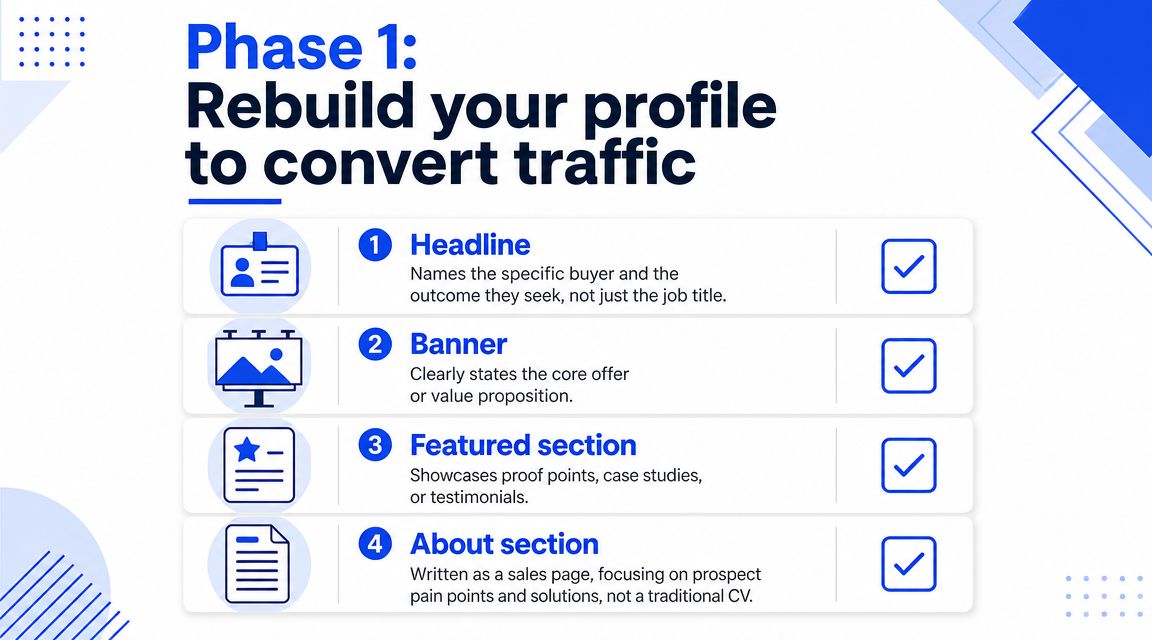
A prospect sees your name, opens your profile, and makes a fast decision: relevant, credible, worth replying to, or not. That decision happens before your follow-up sequence has any chance to work. In the systems we run, profile rebuild comes first because every connection request, comment, and message sends traffic back to that page. If the page does not convert, the campaign bleeds response rate at the point of inspection.
Headline and banner
The headline has one job. Explain who you help and what changes after working with you.
Job titles waste that space. “Founder at X” or “Account Executive at Y” forces the prospect to do interpretation work. A stronger headline names the buyer, the problem, and the outcome. For example: “Helping SaaS sales teams turn cold outbound into qualified meetings” is clear enough to survive a two-second scan on mobile.
The banner should support the same message, not introduce a second one. Keep it tight: buyer, pain point, offer. If you sell to operations leaders, say that. If you reduce no-show rates, say that. If your banner needs a paragraph to make sense, it is too busy.
Visual trust matters because the sender identity is part of conversion. A clean headshot usually performs better than heavily edited branding shots or casual photos. If you need a benchmark for what good looks like, improve your LinkedIn presence with 43frames.
For B2B outreach, the personal profile usually drives more replies than the company page because prospects evaluate people before brands. If your team is still splitting effort the wrong way, this guide on LinkedIn page vs profile for B2B lays out the trade-off clearly.
Featured section and about section
The featured section is where you reduce doubt fast. I prefer one proof asset and one process asset. That combination works better than stacking generic posts.
A proof asset can be a short case snapshot, a client result breakdown, or a recorded teardown. A process asset can be a one-page framework, a VSL, or a walkthrough of how leads move from targeting to meeting booked. The point is to answer two questions without forcing the buyer to ask them: “Can this team do it?” and “How do they work?”
The About section should read like an operator wrote it. Skip the autobiography. Prospects do not need your career timeline. They need enough context to decide whether the offer fits their situation.
Use this order:
Who you help
Name the role, segment, and company type.What is breaking
Describe the sales or pipeline problem in concrete terms.How you fix it
Show the sequence, tools, and constraints. Mention the mechanics.What to do next
Offer a low-friction action such as a teardown, audit, or short call.
That middle section matters most. “We help companies grow” says nothing. “We rebuild the sender profile, build prioritized Sales Navigator lists, enrich with signal data, and run a reply-focused sequence through HubSpot and Clay” gives the buyer a reason to trust the process.
A short explainer video often outperforms another block of text because it shows how you think and how clearly you can explain your work.
Strong copy cannot rescue a profile that fails the credibility check.
Phase 2: Build a prioritized list with a signal layer
Teams often don't have a messaging problem. They have a queue problem. They treat a list of prospects like one flat database, then wonder why reply quality is inconsistent.
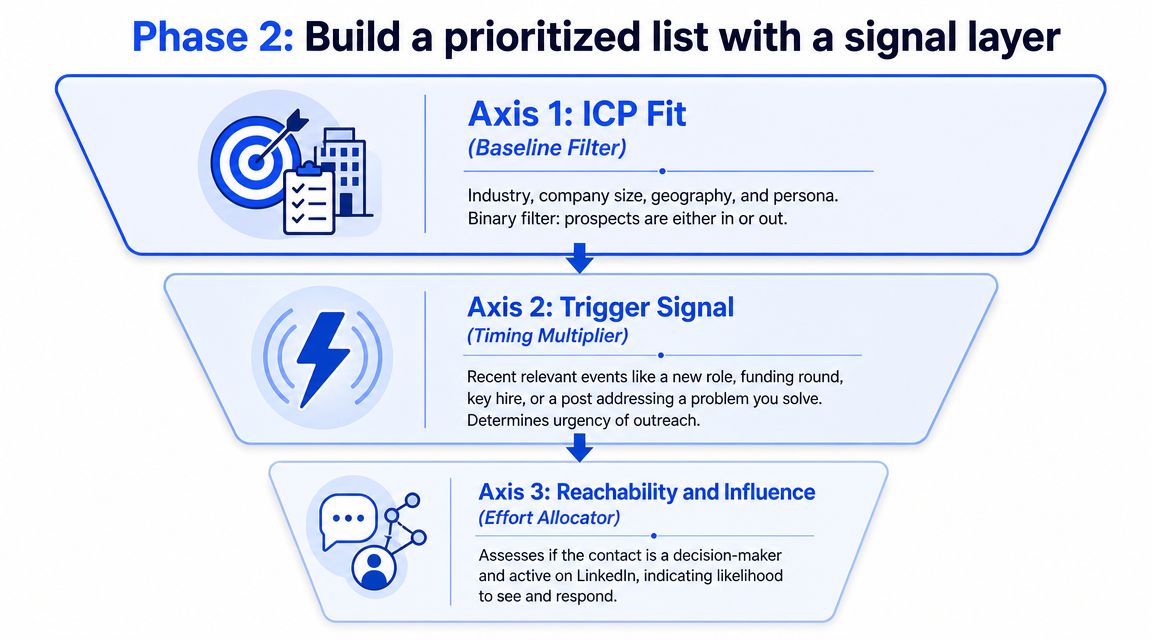
Start with ICP, not names
Build the base list in Sales Navigator. Use hard filters first → industry, company headcount, geography, seniority, function. Most list quality is won or lost during this initial filtering.
If the ICP is still vague, fix that before you pull names. A lot of messy LinkedIn lead gen comes from weak account selection, not weak outreach. This guide to building an ideal customer profile is the right place to tighten those rules before you export anything.
Broad engagement can fool teams into thinking the top of funnel is healthy. It isn't. LinkedIn drives around 80% of B2B social media leads, but one analysis found that only 2.9% of engagements came from prospects matching the ICP, which is why reach is a poor substitute for fit (LinkedIn lead generation statistics from Cclarity).
For tooling, Sales Navigator stays the base layer. Then add enrichment and research across tools like Apollo, Clay, and manual review. If you're comparing prospecting environments beyond native LinkedIn filtering, it's worth looking at how teams explore Orbbit's features alongside Sales Navigator workflows.
Use a three-tier priority model
Once the base list is clean, add a signal layer. Don't message a static list in the order it was exported. Sort by timing and reachability.
Use three axes:
Axis 1, ICP fit
Industry, company size, geography, persona. This is binary. In or out.Axis 2, trigger signal
New role, recent hire, funding event, team expansion, or a post about the problem you solve.Axis 3, reachability and influence
Decision-maker status plus actual activity on LinkedIn.
Then stack contacts into working tiers:
Tier | Logic | Execution style |
|---|---|---|
Tier A | Fit + trigger + reachable | Highest research depth, manual personalization first |
Tier B | Fit + reachable, no current trigger | Semi-automated personalization, second wave |
Tier C | Fit only, weak timing or low reachability | Light touch or hold until a signal appears |
Operators save accounts and time. A precise list of a few hundred can outperform a bloated list because effort is concentrated where timing exists. Tiering also makes personalization rational. You don't need the same research depth for every prospect.
The real decision is not who qualifies. It's who deserves your best effort first.
Phase 3: Execute a human sequence that gets replies
Once the profile and list are right, outreach gets simpler. Not easy, but simpler. The message doesn't have to carry the whole campaign anymore.
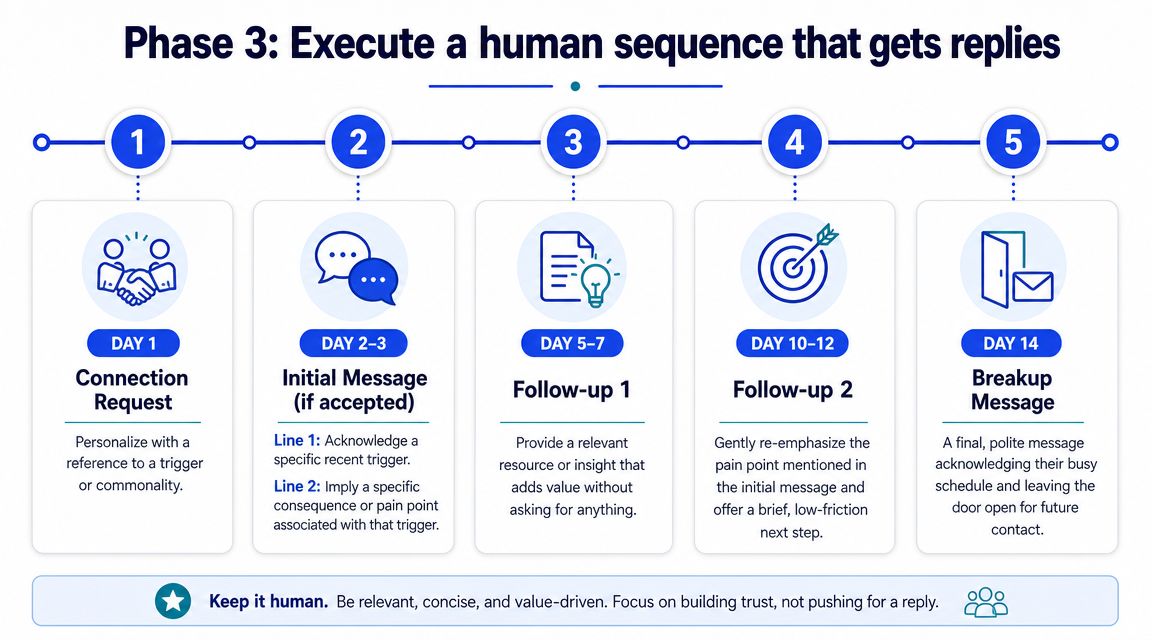
LinkedIn is worth this level of care because it remains unusually strong for B2B demand capture. Independent benchmarks have reported that LinkedIn outperforms Facebook and X by as much as 277% for lead generation, which is why it deserves an actual operating system instead of random prospecting bursts. That benchmark was noted earlier in the source cited in the introduction.
The message structure that works
The format we keep returning to is simple:
Line 1, trigger → mention a specific recent event
Line 2, implication → state the likely consequence
Line 3, ask → use a low-friction yes or no question
Example:
Saw you've brought on 4 SDRs in the last couple of months. Usually that means the founder is still the one writing sequences late at night. Worth a quick conversation about taking that off your plate?
That structure works because the trigger does the heavy lifting. Without the trigger, the rest sounds templated. With the trigger, the prospect understands why they were selected now.
The implication line's importance is often underestimated. It has to be specific enough to feel observed, not broad enough to sound like agency copy. “Improve sales efficiency” gets ignored. A recognisable operational pain gets replies.
A 14-day sequence that doesn't burn accounts
Use a spaced sequence, not a compressed blast. We usually run this on a 14-day rhythm inside LinkedIn, with HeyReach or another safe execution layer handling light workflow support while humans still control message quality.
Day 1, connection request
Short, relevant, and tied to a trigger or commonality.Day 2 or 3, first message after acceptance
Trigger + implication. No pitch deck. No calendar link.Day 5 to 7, follow-up with value
Share a relevant observation, teardown, or resource.Day 10 to 12, qualifying nudge
Re-state the issue lightly, then ask a small question.Day 14, polite closeout
Acknowledge timing and leave the door open.
If the offer is strong enough to move off-platform, route the handoff fast into email or a booked call process. The handoff point is where many teams need better coordination with sales. If you want a tighter framework for that jump, this guide on B2B appointment setting covers the next step after reply generation.
What doesn't work is obvious in live campaigns. Big first-touch pitches. Long intros. Explaining your company before naming their context. Asking for a meeting before earning a reply. Those habits lower response quality even when acceptance looks healthy.
System operations: Automate routing and qualify leads
Replies create a second problem. If routing is messy, the campaign appears weaker than it is because interested prospects sit unanswered or get handled inconsistently.
Route replies by intent
Every reply should fall into one of three buckets:
Curious and relevant
They recognize the problem, ask a question, or show active interest.Polite but closed
They answer, but there's no current opportunity.Information-seeking
They want context, a resource, or a clearer explanation before deciding.
That logic needs to exist before launch. Otherwise SDRs and founders improvise in the inbox, and performance becomes impossible to read. A high reply rate can hide weak commercial intent if nobody distinguishes positive replies from soft rejections.
Treat reply handling like triage, not admin. The first response determines whether the prospect moves forward, stalls, or disappears.
For qualification, keep the first pass lightweight. Validate fit, urgency, and owner. Don't turn the inbox into a discovery call. Move good conversations into CRM with clean status labels and next steps. If your internal process is inconsistent, tighten it with a defined lead qualification process.
Build a simple operating stack
A practical stack for LinkedIn lead gen usually looks like this:
Function | Common tools | What the tool should do |
|---|---|---|
List building | Sales Navigator, Apollo, Clay | Pull target accounts, enrich contacts, add signals |
Sequence support | HeyReach, Lemlist, Instantly | Manage touches, alerts, and follow-up tasks |
CRM and routing | HubSpot | Create records, assign owners, track stages |
Team visibility | Slack, Notion, shared sheets | Keep reply handling and sprint notes visible |
The point of automation here is routing and consistency, not impersonation. Use systems to move data, assign ownership, and avoid dropped leads. Don't use systems to replace judgment in the first message.
One option in this category is Grou, which runs LinkedIn content, list building, outbound execution, and reply routing in one workflow. The useful part of that model is not the branding. It's the single reporting line across targeting, messaging, and qualification.
The sprint review: Five metrics to measure what matters
Most LinkedIn reporting is too noisy to help operators fix anything. It overweights impressions, profile views, and surface-level engagement. Those numbers can rise while qualified pipeline stays flat.
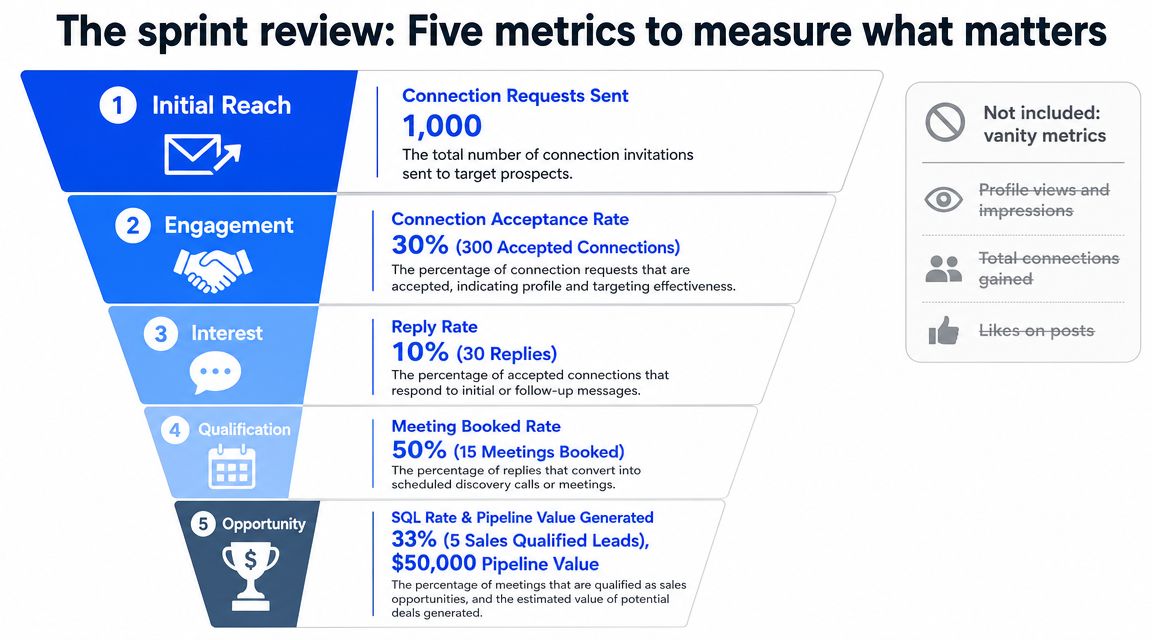
Attribution is already hard on LinkedIn because the platform often acts as a mid-funnel touchpoint instead of the final conversion event. That's why qualified conversation rate and sales acceptance are better indicators than raw lead volume alone, as noted in Directive's guidance on LinkedIn B2B lead generation.
What to review every two weeks
Run the campaign in two-week sprints and review five metrics in order.
Connection acceptance rate
This diagnoses profile strength and list quality first. If acceptance is weak, don't start rewriting the message immediately.Reply rate, segmented
Split by persona, trigger type, and variant. Blended reply rate hides where the actual wins are.Positive reply rate
Not every reply is useful. Separate interest from objections and dead ends.Reply-to-meeting conversion
If this is weak, the problem is usually follow-up handling or a bad transition to qualification.Meeting-to-qualified-opportunity rate
This tells you whether the campaign is creating pipeline or just conversations.
A lot of teams need better measurement discipline around social touches in general. If you want a practical reference for building reporting around business outcomes instead of engagement noise, Sift AI has a solid operational social media framework.
What not to headline in reporting
Don't center the sprint review on these:
Profile views and impressions
Useful context, poor decision inputs.Total connections gained
Easy to inflate, weak pipeline signal.Likes on posts from sending profiles
Relevant for content motion, not for outbound sprint review.
The rule that keeps learning clean is simple. Change one variable per sprint. If you change targeting, copy, cadence, and qualification rules at the same time, you can't tell what caused the result.
For a tighter measurement model, use a KPI sheet tied to funnel stages and CRM status changes. This framework for lead generation KPIs is the right kind of structure for that.
Your next step: a two-week validation sprint
Run the sprint to answer one question: does this system work on a small, expensive sample where bad assumptions show up fast?
Use 20 Tier A accounts, but do not treat them as a vanity pilot. Split the results by account quality and contact quality from day one. In practice, I label each account strong, borderline, or weak before outreach starts. If 6 of the 20 were weak fits, a bad sprint result does not automatically mean the messaging failed. It often means the list was never clean enough to validate the sequence.
The common mistake in a 14 day test is reading ambiguous results too quickly. A campaign can produce decent acceptance, a few replies, and still fail validation. That usually means the messages created curiosity, not buying intent. The fix is not always new copy. Sometimes the underlying issue is that trigger research was interesting but not commercially relevant, so the conversation starts and then stalls.
Keep a short decision log during the sprint. Note every objection, every positive reply that did not turn into a meeting, and every account where the message felt personalized but still drew no response. After 20 accounts, patterns show up. You will usually find one of three problems. The profile attracts the wrong kind of curiosity. The list contains accounts without active pain. The handoff from reply to qualification asks for too much, too early.
One sender profile is enough for this test. Sales Navigator for the list, a simple sheet for signal tagging, and your CRM for outcome tracking are enough too. The point of the sprint is not scale. The point is to find the constraint before you add more senders, more accounts, or automation.
If the result is mixed, do not rebuild everything. Pick the highest-friction step, change one input, and run the next 20 accounts.
If you want to compare your current setup against a tighter LinkedIn and outbound operating model, Grou shows what that looks like in practice, from ICP list building and sender positioning to reply routing and pipeline reporting.
Most LinkedIn lead gen advice starts in the wrong place. It tells teams to write better connection requests, buy automation, or copy a template. That's why so many campaigns produce activity without pipeline.
The failure usually happens before the first message goes out. The sender profile looks like a resume, the list is too broad, and the outreach hits people with no timing signal. Then the team blames copy. In practice, structure turns attention into pipeline. The order is what makes LinkedIn work.
LinkedIn keeps earning budget because it remains the default B2B social channel. In 2025, 89% of B2B marketers said they use LinkedIn for lead generation, and 62% said it actively produces leads for them, which is why a disciplined operating model matters more here than on almost any other platform (LinkedIn lead generation statistics).
TL;DR
Profile before outreach: prospects check the sender before they reply
List before copy: a tight ICP plus trigger signals beats a large static list
Human cadence beats blasts: space touches like a real person would
Measure funnel leaks, not noise: acceptance, replies, positive replies, meetings, qualified opportunities
Run LinkedIn lead gen in sprints: one change at a time, then review
Table of Contents
Introduction: Why most linkedin campaigns fail before they start
Most poor LinkedIn lead gen programs are not message problems. They are sequencing problems. Teams skip the prep work, fire outreach at a cold list, then try to rescue performance with copy tests.
That doesn't hold up in real execution. A prospect gets your connection request, checks your profile, looks for relevance, and decides whether you're worth engaging. If the profile is vague and the message is generic, you've already spent your one cold shot badly.
Practical rule: Profile before list. List before outreach. If you invert that order, you burn good accounts on a setup that wasn't ready.
The pattern is consistent across B2B categories. SaaS founders do it. Manufacturing teams do it. Legal tech and pharma teams do it too. They over-focus on volume, under-focus on fit, and mistake visible activity for progress.
The fix is less exciting than often desired. Rebuild the sender profile into a conversion asset. Build a narrow list inside Sales Navigator. Add timing signals with enrichment and manual research. Then run a restrained, human sequence that earns a reply instead of forcing one.
Phase 1: Rebuild your profile to convert traffic
Cold outreach does not start in the inbox. It starts on the sender profile.
A prospect sees your name, opens your profile, and makes a fast decision: relevant, credible, worth replying to, or not. That decision happens before your follow-up sequence has any chance to work. In the systems we run, profile rebuild comes first because every connection request, comment, and message sends traffic back to that page. If the page does not convert, the campaign bleeds response rate at the point of inspection.
Headline and banner
The headline has one job. Explain who you help and what changes after working with you.
Job titles waste that space. “Founder at X” or “Account Executive at Y” forces the prospect to do interpretation work. A stronger headline names the buyer, the problem, and the outcome. For example: “Helping SaaS sales teams turn cold outbound into qualified meetings” is clear enough to survive a two-second scan on mobile.
The banner should support the same message, not introduce a second one. Keep it tight: buyer, pain point, offer. If you sell to operations leaders, say that. If you reduce no-show rates, say that. If your banner needs a paragraph to make sense, it is too busy.
Visual trust matters because the sender identity is part of conversion. A clean headshot usually performs better than heavily edited branding shots or casual photos. If you need a benchmark for what good looks like, improve your LinkedIn presence with 43frames.
For B2B outreach, the personal profile usually drives more replies than the company page because prospects evaluate people before brands. If your team is still splitting effort the wrong way, this guide on LinkedIn page vs profile for B2B lays out the trade-off clearly.
Featured section and about section
The featured section is where you reduce doubt fast. I prefer one proof asset and one process asset. That combination works better than stacking generic posts.
A proof asset can be a short case snapshot, a client result breakdown, or a recorded teardown. A process asset can be a one-page framework, a VSL, or a walkthrough of how leads move from targeting to meeting booked. The point is to answer two questions without forcing the buyer to ask them: “Can this team do it?” and “How do they work?”
The About section should read like an operator wrote it. Skip the autobiography. Prospects do not need your career timeline. They need enough context to decide whether the offer fits their situation.
Use this order:
Who you help
Name the role, segment, and company type.What is breaking
Describe the sales or pipeline problem in concrete terms.How you fix it
Show the sequence, tools, and constraints. Mention the mechanics.What to do next
Offer a low-friction action such as a teardown, audit, or short call.
That middle section matters most. “We help companies grow” says nothing. “We rebuild the sender profile, build prioritized Sales Navigator lists, enrich with signal data, and run a reply-focused sequence through HubSpot and Clay” gives the buyer a reason to trust the process.
A short explainer video often outperforms another block of text because it shows how you think and how clearly you can explain your work.
Strong copy cannot rescue a profile that fails the credibility check.
Phase 2: Build a prioritized list with a signal layer
Teams often don't have a messaging problem. They have a queue problem. They treat a list of prospects like one flat database, then wonder why reply quality is inconsistent.
Start with ICP, not names
Build the base list in Sales Navigator. Use hard filters first → industry, company headcount, geography, seniority, function. Most list quality is won or lost during this initial filtering.
If the ICP is still vague, fix that before you pull names. A lot of messy LinkedIn lead gen comes from weak account selection, not weak outreach. This guide to building an ideal customer profile is the right place to tighten those rules before you export anything.
Broad engagement can fool teams into thinking the top of funnel is healthy. It isn't. LinkedIn drives around 80% of B2B social media leads, but one analysis found that only 2.9% of engagements came from prospects matching the ICP, which is why reach is a poor substitute for fit (LinkedIn lead generation statistics from Cclarity).
For tooling, Sales Navigator stays the base layer. Then add enrichment and research across tools like Apollo, Clay, and manual review. If you're comparing prospecting environments beyond native LinkedIn filtering, it's worth looking at how teams explore Orbbit's features alongside Sales Navigator workflows.
Use a three-tier priority model
Once the base list is clean, add a signal layer. Don't message a static list in the order it was exported. Sort by timing and reachability.
Use three axes:
Axis 1, ICP fit
Industry, company size, geography, persona. This is binary. In or out.Axis 2, trigger signal
New role, recent hire, funding event, team expansion, or a post about the problem you solve.Axis 3, reachability and influence
Decision-maker status plus actual activity on LinkedIn.
Then stack contacts into working tiers:
Tier | Logic | Execution style |
|---|---|---|
Tier A | Fit + trigger + reachable | Highest research depth, manual personalization first |
Tier B | Fit + reachable, no current trigger | Semi-automated personalization, second wave |
Tier C | Fit only, weak timing or low reachability | Light touch or hold until a signal appears |
Operators save accounts and time. A precise list of a few hundred can outperform a bloated list because effort is concentrated where timing exists. Tiering also makes personalization rational. You don't need the same research depth for every prospect.
The real decision is not who qualifies. It's who deserves your best effort first.
Phase 3: Execute a human sequence that gets replies
Once the profile and list are right, outreach gets simpler. Not easy, but simpler. The message doesn't have to carry the whole campaign anymore.
LinkedIn is worth this level of care because it remains unusually strong for B2B demand capture. Independent benchmarks have reported that LinkedIn outperforms Facebook and X by as much as 277% for lead generation, which is why it deserves an actual operating system instead of random prospecting bursts. That benchmark was noted earlier in the source cited in the introduction.
The message structure that works
The format we keep returning to is simple:
Line 1, trigger → mention a specific recent event
Line 2, implication → state the likely consequence
Line 3, ask → use a low-friction yes or no question
Example:
Saw you've brought on 4 SDRs in the last couple of months. Usually that means the founder is still the one writing sequences late at night. Worth a quick conversation about taking that off your plate?
That structure works because the trigger does the heavy lifting. Without the trigger, the rest sounds templated. With the trigger, the prospect understands why they were selected now.
The implication line's importance is often underestimated. It has to be specific enough to feel observed, not broad enough to sound like agency copy. “Improve sales efficiency” gets ignored. A recognisable operational pain gets replies.
A 14-day sequence that doesn't burn accounts
Use a spaced sequence, not a compressed blast. We usually run this on a 14-day rhythm inside LinkedIn, with HeyReach or another safe execution layer handling light workflow support while humans still control message quality.
Day 1, connection request
Short, relevant, and tied to a trigger or commonality.Day 2 or 3, first message after acceptance
Trigger + implication. No pitch deck. No calendar link.Day 5 to 7, follow-up with value
Share a relevant observation, teardown, or resource.Day 10 to 12, qualifying nudge
Re-state the issue lightly, then ask a small question.Day 14, polite closeout
Acknowledge timing and leave the door open.
If the offer is strong enough to move off-platform, route the handoff fast into email or a booked call process. The handoff point is where many teams need better coordination with sales. If you want a tighter framework for that jump, this guide on B2B appointment setting covers the next step after reply generation.
What doesn't work is obvious in live campaigns. Big first-touch pitches. Long intros. Explaining your company before naming their context. Asking for a meeting before earning a reply. Those habits lower response quality even when acceptance looks healthy.
System operations: Automate routing and qualify leads
Replies create a second problem. If routing is messy, the campaign appears weaker than it is because interested prospects sit unanswered or get handled inconsistently.
Route replies by intent
Every reply should fall into one of three buckets:
Curious and relevant
They recognize the problem, ask a question, or show active interest.Polite but closed
They answer, but there's no current opportunity.Information-seeking
They want context, a resource, or a clearer explanation before deciding.
That logic needs to exist before launch. Otherwise SDRs and founders improvise in the inbox, and performance becomes impossible to read. A high reply rate can hide weak commercial intent if nobody distinguishes positive replies from soft rejections.
Treat reply handling like triage, not admin. The first response determines whether the prospect moves forward, stalls, or disappears.
For qualification, keep the first pass lightweight. Validate fit, urgency, and owner. Don't turn the inbox into a discovery call. Move good conversations into CRM with clean status labels and next steps. If your internal process is inconsistent, tighten it with a defined lead qualification process.
Build a simple operating stack
A practical stack for LinkedIn lead gen usually looks like this:
Function | Common tools | What the tool should do |
|---|---|---|
List building | Sales Navigator, Apollo, Clay | Pull target accounts, enrich contacts, add signals |
Sequence support | HeyReach, Lemlist, Instantly | Manage touches, alerts, and follow-up tasks |
CRM and routing | HubSpot | Create records, assign owners, track stages |
Team visibility | Slack, Notion, shared sheets | Keep reply handling and sprint notes visible |
The point of automation here is routing and consistency, not impersonation. Use systems to move data, assign ownership, and avoid dropped leads. Don't use systems to replace judgment in the first message.
One option in this category is Grou, which runs LinkedIn content, list building, outbound execution, and reply routing in one workflow. The useful part of that model is not the branding. It's the single reporting line across targeting, messaging, and qualification.
The sprint review: Five metrics to measure what matters
Most LinkedIn reporting is too noisy to help operators fix anything. It overweights impressions, profile views, and surface-level engagement. Those numbers can rise while qualified pipeline stays flat.
Attribution is already hard on LinkedIn because the platform often acts as a mid-funnel touchpoint instead of the final conversion event. That's why qualified conversation rate and sales acceptance are better indicators than raw lead volume alone, as noted in Directive's guidance on LinkedIn B2B lead generation.
What to review every two weeks
Run the campaign in two-week sprints and review five metrics in order.
Connection acceptance rate
This diagnoses profile strength and list quality first. If acceptance is weak, don't start rewriting the message immediately.Reply rate, segmented
Split by persona, trigger type, and variant. Blended reply rate hides where the actual wins are.Positive reply rate
Not every reply is useful. Separate interest from objections and dead ends.Reply-to-meeting conversion
If this is weak, the problem is usually follow-up handling or a bad transition to qualification.Meeting-to-qualified-opportunity rate
This tells you whether the campaign is creating pipeline or just conversations.
A lot of teams need better measurement discipline around social touches in general. If you want a practical reference for building reporting around business outcomes instead of engagement noise, Sift AI has a solid operational social media framework.
What not to headline in reporting
Don't center the sprint review on these:
Profile views and impressions
Useful context, poor decision inputs.Total connections gained
Easy to inflate, weak pipeline signal.Likes on posts from sending profiles
Relevant for content motion, not for outbound sprint review.
The rule that keeps learning clean is simple. Change one variable per sprint. If you change targeting, copy, cadence, and qualification rules at the same time, you can't tell what caused the result.
For a tighter measurement model, use a KPI sheet tied to funnel stages and CRM status changes. This framework for lead generation KPIs is the right kind of structure for that.
Your next step: a two-week validation sprint
Run the sprint to answer one question: does this system work on a small, expensive sample where bad assumptions show up fast?
Use 20 Tier A accounts, but do not treat them as a vanity pilot. Split the results by account quality and contact quality from day one. In practice, I label each account strong, borderline, or weak before outreach starts. If 6 of the 20 were weak fits, a bad sprint result does not automatically mean the messaging failed. It often means the list was never clean enough to validate the sequence.
The common mistake in a 14 day test is reading ambiguous results too quickly. A campaign can produce decent acceptance, a few replies, and still fail validation. That usually means the messages created curiosity, not buying intent. The fix is not always new copy. Sometimes the underlying issue is that trigger research was interesting but not commercially relevant, so the conversation starts and then stalls.
Keep a short decision log during the sprint. Note every objection, every positive reply that did not turn into a meeting, and every account where the message felt personalized but still drew no response. After 20 accounts, patterns show up. You will usually find one of three problems. The profile attracts the wrong kind of curiosity. The list contains accounts without active pain. The handoff from reply to qualification asks for too much, too early.
One sender profile is enough for this test. Sales Navigator for the list, a simple sheet for signal tagging, and your CRM for outcome tracking are enough too. The point of the sprint is not scale. The point is to find the constraint before you add more senders, more accounts, or automation.
If the result is mixed, do not rebuild everything. Pick the highest-friction step, change one input, and run the next 20 accounts.
If you want to compare your current setup against a tighter LinkedIn and outbound operating model, Grou shows what that looks like in practice, from ICP list building and sender positioning to reply routing and pipeline reporting.
Most LinkedIn lead gen advice starts in the wrong place. It tells teams to write better connection requests, buy automation, or copy a template. That's why so many campaigns produce activity without pipeline.
The failure usually happens before the first message goes out. The sender profile looks like a resume, the list is too broad, and the outreach hits people with no timing signal. Then the team blames copy. In practice, structure turns attention into pipeline. The order is what makes LinkedIn work.
LinkedIn keeps earning budget because it remains the default B2B social channel. In 2025, 89% of B2B marketers said they use LinkedIn for lead generation, and 62% said it actively produces leads for them, which is why a disciplined operating model matters more here than on almost any other platform (LinkedIn lead generation statistics).
TL;DR
Profile before outreach: prospects check the sender before they reply
List before copy: a tight ICP plus trigger signals beats a large static list
Human cadence beats blasts: space touches like a real person would
Measure funnel leaks, not noise: acceptance, replies, positive replies, meetings, qualified opportunities
Run LinkedIn lead gen in sprints: one change at a time, then review
Table of Contents
Introduction: Why most linkedin campaigns fail before they start
Most poor LinkedIn lead gen programs are not message problems. They are sequencing problems. Teams skip the prep work, fire outreach at a cold list, then try to rescue performance with copy tests.
That doesn't hold up in real execution. A prospect gets your connection request, checks your profile, looks for relevance, and decides whether you're worth engaging. If the profile is vague and the message is generic, you've already spent your one cold shot badly.
Practical rule: Profile before list. List before outreach. If you invert that order, you burn good accounts on a setup that wasn't ready.
The pattern is consistent across B2B categories. SaaS founders do it. Manufacturing teams do it. Legal tech and pharma teams do it too. They over-focus on volume, under-focus on fit, and mistake visible activity for progress.
The fix is less exciting than often desired. Rebuild the sender profile into a conversion asset. Build a narrow list inside Sales Navigator. Add timing signals with enrichment and manual research. Then run a restrained, human sequence that earns a reply instead of forcing one.
Phase 1: Rebuild your profile to convert traffic
Cold outreach does not start in the inbox. It starts on the sender profile.
A prospect sees your name, opens your profile, and makes a fast decision: relevant, credible, worth replying to, or not. That decision happens before your follow-up sequence has any chance to work. In the systems we run, profile rebuild comes first because every connection request, comment, and message sends traffic back to that page. If the page does not convert, the campaign bleeds response rate at the point of inspection.
Headline and banner
The headline has one job. Explain who you help and what changes after working with you.
Job titles waste that space. “Founder at X” or “Account Executive at Y” forces the prospect to do interpretation work. A stronger headline names the buyer, the problem, and the outcome. For example: “Helping SaaS sales teams turn cold outbound into qualified meetings” is clear enough to survive a two-second scan on mobile.
The banner should support the same message, not introduce a second one. Keep it tight: buyer, pain point, offer. If you sell to operations leaders, say that. If you reduce no-show rates, say that. If your banner needs a paragraph to make sense, it is too busy.
Visual trust matters because the sender identity is part of conversion. A clean headshot usually performs better than heavily edited branding shots or casual photos. If you need a benchmark for what good looks like, improve your LinkedIn presence with 43frames.
For B2B outreach, the personal profile usually drives more replies than the company page because prospects evaluate people before brands. If your team is still splitting effort the wrong way, this guide on LinkedIn page vs profile for B2B lays out the trade-off clearly.
Featured section and about section
The featured section is where you reduce doubt fast. I prefer one proof asset and one process asset. That combination works better than stacking generic posts.
A proof asset can be a short case snapshot, a client result breakdown, or a recorded teardown. A process asset can be a one-page framework, a VSL, or a walkthrough of how leads move from targeting to meeting booked. The point is to answer two questions without forcing the buyer to ask them: “Can this team do it?” and “How do they work?”
The About section should read like an operator wrote it. Skip the autobiography. Prospects do not need your career timeline. They need enough context to decide whether the offer fits their situation.
Use this order:
Who you help
Name the role, segment, and company type.What is breaking
Describe the sales or pipeline problem in concrete terms.How you fix it
Show the sequence, tools, and constraints. Mention the mechanics.What to do next
Offer a low-friction action such as a teardown, audit, or short call.
That middle section matters most. “We help companies grow” says nothing. “We rebuild the sender profile, build prioritized Sales Navigator lists, enrich with signal data, and run a reply-focused sequence through HubSpot and Clay” gives the buyer a reason to trust the process.
A short explainer video often outperforms another block of text because it shows how you think and how clearly you can explain your work.
Strong copy cannot rescue a profile that fails the credibility check.
Phase 2: Build a prioritized list with a signal layer
Teams often don't have a messaging problem. They have a queue problem. They treat a list of prospects like one flat database, then wonder why reply quality is inconsistent.
Start with ICP, not names
Build the base list in Sales Navigator. Use hard filters first → industry, company headcount, geography, seniority, function. Most list quality is won or lost during this initial filtering.
If the ICP is still vague, fix that before you pull names. A lot of messy LinkedIn lead gen comes from weak account selection, not weak outreach. This guide to building an ideal customer profile is the right place to tighten those rules before you export anything.
Broad engagement can fool teams into thinking the top of funnel is healthy. It isn't. LinkedIn drives around 80% of B2B social media leads, but one analysis found that only 2.9% of engagements came from prospects matching the ICP, which is why reach is a poor substitute for fit (LinkedIn lead generation statistics from Cclarity).
For tooling, Sales Navigator stays the base layer. Then add enrichment and research across tools like Apollo, Clay, and manual review. If you're comparing prospecting environments beyond native LinkedIn filtering, it's worth looking at how teams explore Orbbit's features alongside Sales Navigator workflows.
Use a three-tier priority model
Once the base list is clean, add a signal layer. Don't message a static list in the order it was exported. Sort by timing and reachability.
Use three axes:
Axis 1, ICP fit
Industry, company size, geography, persona. This is binary. In or out.Axis 2, trigger signal
New role, recent hire, funding event, team expansion, or a post about the problem you solve.Axis 3, reachability and influence
Decision-maker status plus actual activity on LinkedIn.
Then stack contacts into working tiers:
Tier | Logic | Execution style |
|---|---|---|
Tier A | Fit + trigger + reachable | Highest research depth, manual personalization first |
Tier B | Fit + reachable, no current trigger | Semi-automated personalization, second wave |
Tier C | Fit only, weak timing or low reachability | Light touch or hold until a signal appears |
Operators save accounts and time. A precise list of a few hundred can outperform a bloated list because effort is concentrated where timing exists. Tiering also makes personalization rational. You don't need the same research depth for every prospect.
The real decision is not who qualifies. It's who deserves your best effort first.
Phase 3: Execute a human sequence that gets replies
Once the profile and list are right, outreach gets simpler. Not easy, but simpler. The message doesn't have to carry the whole campaign anymore.
LinkedIn is worth this level of care because it remains unusually strong for B2B demand capture. Independent benchmarks have reported that LinkedIn outperforms Facebook and X by as much as 277% for lead generation, which is why it deserves an actual operating system instead of random prospecting bursts. That benchmark was noted earlier in the source cited in the introduction.
The message structure that works
The format we keep returning to is simple:
Line 1, trigger → mention a specific recent event
Line 2, implication → state the likely consequence
Line 3, ask → use a low-friction yes or no question
Example:
Saw you've brought on 4 SDRs in the last couple of months. Usually that means the founder is still the one writing sequences late at night. Worth a quick conversation about taking that off your plate?
That structure works because the trigger does the heavy lifting. Without the trigger, the rest sounds templated. With the trigger, the prospect understands why they were selected now.
The implication line's importance is often underestimated. It has to be specific enough to feel observed, not broad enough to sound like agency copy. “Improve sales efficiency” gets ignored. A recognisable operational pain gets replies.
A 14-day sequence that doesn't burn accounts
Use a spaced sequence, not a compressed blast. We usually run this on a 14-day rhythm inside LinkedIn, with HeyReach or another safe execution layer handling light workflow support while humans still control message quality.
Day 1, connection request
Short, relevant, and tied to a trigger or commonality.Day 2 or 3, first message after acceptance
Trigger + implication. No pitch deck. No calendar link.Day 5 to 7, follow-up with value
Share a relevant observation, teardown, or resource.Day 10 to 12, qualifying nudge
Re-state the issue lightly, then ask a small question.Day 14, polite closeout
Acknowledge timing and leave the door open.
If the offer is strong enough to move off-platform, route the handoff fast into email or a booked call process. The handoff point is where many teams need better coordination with sales. If you want a tighter framework for that jump, this guide on B2B appointment setting covers the next step after reply generation.
What doesn't work is obvious in live campaigns. Big first-touch pitches. Long intros. Explaining your company before naming their context. Asking for a meeting before earning a reply. Those habits lower response quality even when acceptance looks healthy.
System operations: Automate routing and qualify leads
Replies create a second problem. If routing is messy, the campaign appears weaker than it is because interested prospects sit unanswered or get handled inconsistently.
Route replies by intent
Every reply should fall into one of three buckets:
Curious and relevant
They recognize the problem, ask a question, or show active interest.Polite but closed
They answer, but there's no current opportunity.Information-seeking
They want context, a resource, or a clearer explanation before deciding.
That logic needs to exist before launch. Otherwise SDRs and founders improvise in the inbox, and performance becomes impossible to read. A high reply rate can hide weak commercial intent if nobody distinguishes positive replies from soft rejections.
Treat reply handling like triage, not admin. The first response determines whether the prospect moves forward, stalls, or disappears.
For qualification, keep the first pass lightweight. Validate fit, urgency, and owner. Don't turn the inbox into a discovery call. Move good conversations into CRM with clean status labels and next steps. If your internal process is inconsistent, tighten it with a defined lead qualification process.
Build a simple operating stack
A practical stack for LinkedIn lead gen usually looks like this:
Function | Common tools | What the tool should do |
|---|---|---|
List building | Sales Navigator, Apollo, Clay | Pull target accounts, enrich contacts, add signals |
Sequence support | HeyReach, Lemlist, Instantly | Manage touches, alerts, and follow-up tasks |
CRM and routing | HubSpot | Create records, assign owners, track stages |
Team visibility | Slack, Notion, shared sheets | Keep reply handling and sprint notes visible |
The point of automation here is routing and consistency, not impersonation. Use systems to move data, assign ownership, and avoid dropped leads. Don't use systems to replace judgment in the first message.
One option in this category is Grou, which runs LinkedIn content, list building, outbound execution, and reply routing in one workflow. The useful part of that model is not the branding. It's the single reporting line across targeting, messaging, and qualification.
The sprint review: Five metrics to measure what matters
Most LinkedIn reporting is too noisy to help operators fix anything. It overweights impressions, profile views, and surface-level engagement. Those numbers can rise while qualified pipeline stays flat.
Attribution is already hard on LinkedIn because the platform often acts as a mid-funnel touchpoint instead of the final conversion event. That's why qualified conversation rate and sales acceptance are better indicators than raw lead volume alone, as noted in Directive's guidance on LinkedIn B2B lead generation.
What to review every two weeks
Run the campaign in two-week sprints and review five metrics in order.
Connection acceptance rate
This diagnoses profile strength and list quality first. If acceptance is weak, don't start rewriting the message immediately.Reply rate, segmented
Split by persona, trigger type, and variant. Blended reply rate hides where the actual wins are.Positive reply rate
Not every reply is useful. Separate interest from objections and dead ends.Reply-to-meeting conversion
If this is weak, the problem is usually follow-up handling or a bad transition to qualification.Meeting-to-qualified-opportunity rate
This tells you whether the campaign is creating pipeline or just conversations.
A lot of teams need better measurement discipline around social touches in general. If you want a practical reference for building reporting around business outcomes instead of engagement noise, Sift AI has a solid operational social media framework.
What not to headline in reporting
Don't center the sprint review on these:
Profile views and impressions
Useful context, poor decision inputs.Total connections gained
Easy to inflate, weak pipeline signal.Likes on posts from sending profiles
Relevant for content motion, not for outbound sprint review.
The rule that keeps learning clean is simple. Change one variable per sprint. If you change targeting, copy, cadence, and qualification rules at the same time, you can't tell what caused the result.
For a tighter measurement model, use a KPI sheet tied to funnel stages and CRM status changes. This framework for lead generation KPIs is the right kind of structure for that.
Your next step: a two-week validation sprint
Run the sprint to answer one question: does this system work on a small, expensive sample where bad assumptions show up fast?
Use 20 Tier A accounts, but do not treat them as a vanity pilot. Split the results by account quality and contact quality from day one. In practice, I label each account strong, borderline, or weak before outreach starts. If 6 of the 20 were weak fits, a bad sprint result does not automatically mean the messaging failed. It often means the list was never clean enough to validate the sequence.
The common mistake in a 14 day test is reading ambiguous results too quickly. A campaign can produce decent acceptance, a few replies, and still fail validation. That usually means the messages created curiosity, not buying intent. The fix is not always new copy. Sometimes the underlying issue is that trigger research was interesting but not commercially relevant, so the conversation starts and then stalls.
Keep a short decision log during the sprint. Note every objection, every positive reply that did not turn into a meeting, and every account where the message felt personalized but still drew no response. After 20 accounts, patterns show up. You will usually find one of three problems. The profile attracts the wrong kind of curiosity. The list contains accounts without active pain. The handoff from reply to qualification asks for too much, too early.
One sender profile is enough for this test. Sales Navigator for the list, a simple sheet for signal tagging, and your CRM for outcome tracking are enough too. The point of the sprint is not scale. The point is to find the constraint before you add more senders, more accounts, or automation.
If the result is mixed, do not rebuild everything. Pick the highest-friction step, change one input, and run the next 20 accounts.
If you want to compare your current setup against a tighter LinkedIn and outbound operating model, Grou shows what that looks like in practice, from ICP list building and sender positioning to reply routing and pipeline reporting.

Pipeline OS Newsletter
Build qualified pipeline
Get weekly tactics to generate demand, improve lead quality, and book more meetings.





Trusted by industry leaders
Trusted by industry leaders
Trusted by industry leaders
Ready to build qualified pipeline?
Ready to build qualified pipeline?
Ready to build qualified pipeline?
Book a call to see if we're the right fit, or take the 2-minute quiz to get a clear starting point.
Book a call to see if we're the right fit, or take the 2-minute quiz to get a clear starting point.
Book a call to see if we're the right fit, or take the 2-minute quiz to get a clear starting point.
" height="30.21639343089746px" id="hfGbXmQR2" width="30.216393430897455px"/></svg>)
Copyright © 2026 – All Right Reserved
Copyright © 2026 – All Right Reserved
Copyright © 2026 – All Right Reserved