%22%3E%3C/path%3E%3Cpath d=%22M 63.072 7.554 C 62.258 8.022 61.577 8.689 61.092 9.493 L 61.092 7.076 L 57.158 7.076 L 57.158 22.64 L 61.089 22.64 L 61.089 14.888 C 61.089 13.446 61.403 12.434 62.03 11.853 C 62.818 11.218 63.818 10.907 64.826 10.982 L 65.868 10.982 L 65.868 6.851 C 64.891 6.834 63.926 7.076 63.073 7.554 Z%22 fill=%22rgb(17,17,17)%22%3E%3C/path%3E%3Cpath d=%22M 78.916 7.82 C 76.363 6.49 73.321 6.49 70.768 7.82 C 69.562 8.473 68.564 9.451 67.888 10.644 C 67.167 11.931 66.803 13.387 66.834 14.862 C 66.804 16.332 67.157 17.785 67.86 19.077 C 68.515 20.267 69.494 21.246 70.684 21.901 C 71.924 22.576 73.318 22.92 74.73 22.898 C 76.164 22.918 77.58 22.575 78.846 21.901 C 80.062 21.247 81.073 20.27 81.768 19.077 C 82.506 17.797 82.88 16.339 82.85 14.862 C 82.88 13.389 82.517 11.934 81.797 10.647 C 81.12 9.455 80.122 8.477 78.917 7.824 M 78.803 14.862 C 78.829 15.739 78.636 16.608 78.241 17.391 C 77.903 18.046 77.38 18.588 76.738 18.95 C 76.124 19.293 75.432 19.472 74.729 19.47 C 73.668 19.497 72.648 19.061 71.934 18.276 C 71.139 17.323 70.741 16.1 70.823 14.862 C 70.741 13.62 71.149 12.395 71.959 11.45 C 72.687 10.667 73.715 10.233 74.783 10.256 C 75.859 10.236 76.894 10.67 77.635 11.45 C 78.464 12.387 78.884 13.616 78.801 14.864%22 fill=%22rgb(17,17,17)%22%3E%3C/path%3E%3Cpath d=%22M 95.906 7.076 L 95.906 15.646 C 95.975 16.68 95.643 17.701 94.979 18.498 C 94.311 19.184 93.379 19.547 92.422 19.495 C 91.475 19.544 90.553 19.18 89.894 18.498 C 89.23 17.701 88.898 16.68 88.967 15.646 L 88.967 7.076 L 85.033 7.076 L 85.033 16.207 C 85 17.449 85.275 18.68 85.834 19.79 C 86.327 20.75 87.095 21.542 88.039 22.065 C 89.033 22.594 90.145 22.861 91.271 22.838 C 92.188 22.847 93.095 22.65 93.926 22.263 C 94.708 21.905 95.388 21.36 95.906 20.675 L 95.906 22.645 L 99.865 22.645 L 99.865 7.076 Z%22 fill=%22rgb(17,17,17)%22%3E%3C/path%3E%3Cpath d=%22M 4.513 15.626 C 4.511 10.815 7.606 6.549 12.181 5.059 C 16.756 3.57 21.77 5.195 24.601 9.086 L 27.816 5.87 C 24.074 1.186 17.981 -0.943 12.137 0.393 C 6.292 1.728 1.728 6.292 0.393 12.137 C -0.943 17.981 1.186 24.074 5.87 27.816 L 9.085 24.601 C 6.214 22.512 4.515 19.177 4.513 15.626%22 fill=%22rgb(32,62,235)%22%3E%3C/path%3E%3Cpath d=%22M 17.114 14.343 L 13.354 18.01 L 13.354 18.026 L 21.071 18.026 L 11.412 27.609 L 17.389 27.609 L 23.999 21.081 L 23.999 28.316 L 24.005 28.316 L 27.967 24.393 L 27.967 14.343 Z%22 fill=%22rgb(32,62,235)%22%3E%3C/path%3E%3C/g%3E%3C/svg%3E) ×
× ××
××›
›
›
›
10 metrics dashboard examples for B2B teams in 2026
10 metrics dashboard examples for B2B teams in 2026
10 metrics dashboard examples for B2B teams in 2026
10 metrics dashboard examples for B2B teams in 2026
10 metrics dashboard examples for B2B teams in 2026
10 metrics dashboard examples for B2B teams in 2026

Author
Aljaz Peklaj

The three-KPI view built on positive reply rate, qualified meetings, and sourced pipeline is the default for most B2B revenue teams. The other seven metrics dashboard examples below exist to diagnose problems that view surfaces.
You're looking at a 14-tile dashboard on Monday morning. Sales points at bookings, marketing points at replies, RevOps points at pipeline, and nobody agrees which number decides anything.
Which KPIs belong on the default view and which ones belong underneath it
Why booked meetings mislead when sales acceptance isn't tracked beside them
What the gap chart reveals about targeting quality month by month
How sourcing rules settle attribution fights before they reach the leadership meeting
Build the decision view first. Diagnostic boards come second, and that's where a guide to AI-powered dashboard insights can help flag movement you might miss between reviews. If a tile doesn't change a decision this sprint, move it off the top screen.
Table of Contents
1. Three-KPI go-to dashboard positive reply rate, qualified meetings, sourced pipeline
3. Positive reply rate by campaign and variant outbound diagnostic board
4. Sourced vs influenced pipeline attribution split dashboard
5. ICP fit by account segment enrichment-driven targeting board
6. LinkedIn outreach diagnostic layer acceptance and interested replies
7. Paid channel cost per qualified meeting spend-to-meeting dashboard
1. Three-KPI go-to dashboard positive reply rate, qualified meetings, sourced pipeline
This is the #1 pick and the view leadership should open first. It reads the system at the start, in the middle, and at the end, so you can locate a break without reading fourteen tiles.

Positive reply rate counts replies showing interest or asking a real question, divided by prospects contacted. Privacy features can't inflate it the way they inflate opens. When it drops, check the list or the message before you add volume.
Qualified meetings means meetings sales accepts, not meetings booked. Sourced pipeline is the value of opportunities the program generated or influenced where CRM tracking allows. Sends, opens, and connection requests sit underneath because they diagnose problems. They don't prove results.
What the live numbers looked like
In a six-month B2B SaaS program, qualified meetings rose from 9 in month 3 to 14 in month 4, then held at 18 to 22 per month. Sourced pipeline in that same program reached €450k. That shape is normal. Setup takes time.
Put the three numbers in a header row with one trend chart beneath them. Write the definition of qualified with sales before month one, including rejection reasons they must log. Our lead generation KPIs framework covers how to lock those definitions down.
Failure mode one: sales marks qualification inconsistently across reps, so the middle number becomes opinion. Failure mode two: sourced pipeline gets claimed without a CRM rule, so finance stops trusting it. Check campaign data daily in HubSpot, Smartlead, or Instantly. Review the full view every two weeks.
Verdict: build this first. Every other board on this list explains why one of these three numbers moved.
2. Booked vs qualified meetings chart the monthly gap view
Month 3 showed 12 booked and 9 qualified. Month 4 showed 17 booked and 14 qualified. That gap had not been seen before because bookings had been the only reported metric.
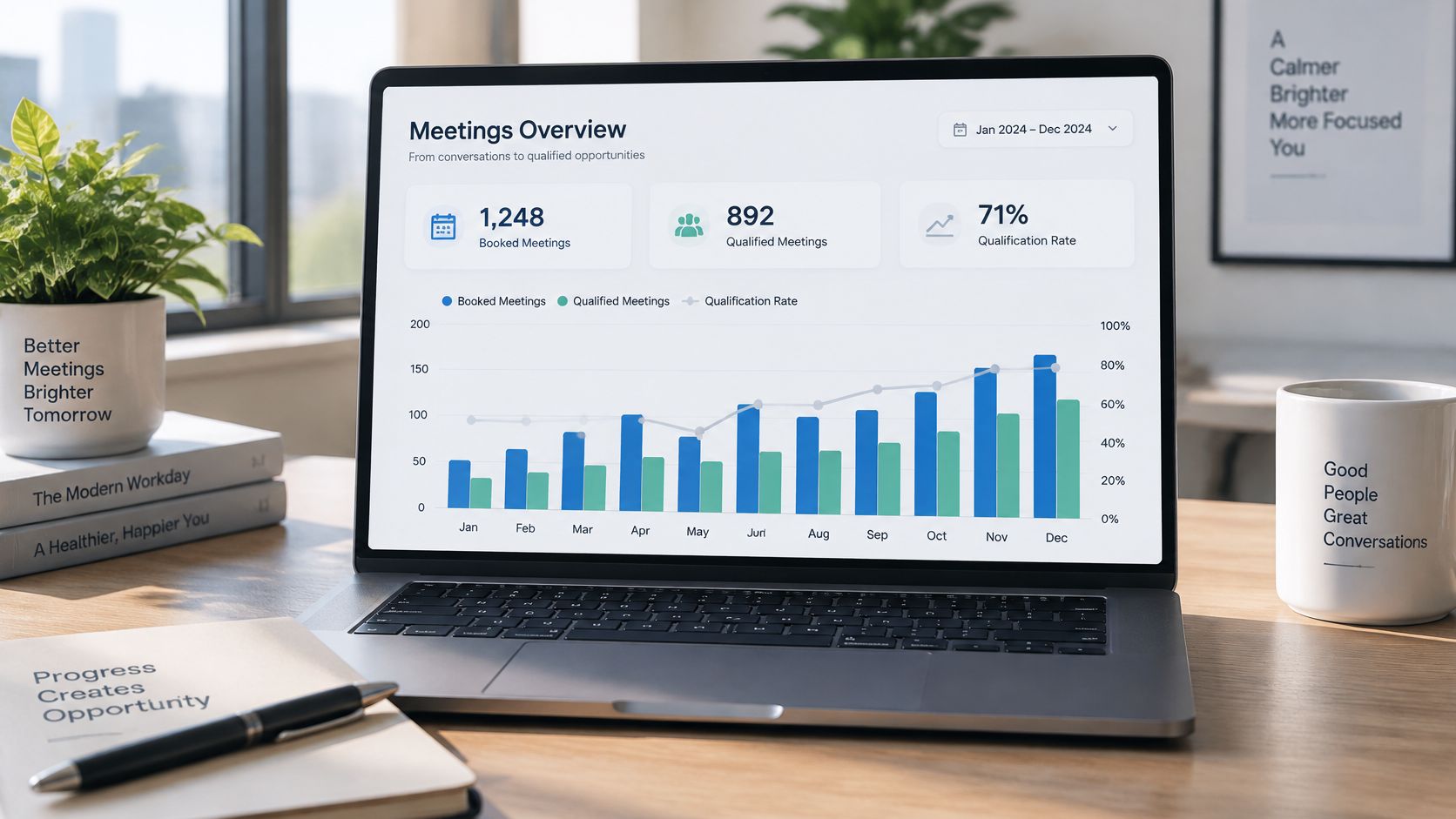
Build a monthly column chart with two bars side by side. Add qualification rate as a line on a secondary axis. In that SaaS program the rate moved from 75% in month 3 to 82% in month 4, which told us targeting was improving faster than volume.
The chart also sets expectations with stakeholders (which matters more than people admit). It marks the slow first two months as setup, then shows the lift once market feedback corrects the list and the message.
How to build it in the CRM
You need two fields. First, a booked-date field set when the meeting lands. Second, a qualified flag only sales can set, with a required rejection reason when they don't. Without that restriction, outbound teams will qualify their own work.
Pair this with sales pipeline management discipline so rejected meetings feed back into list building. Label months one and two as setup in the chart title. That single label prevents a bad conversation in week three.
A booked meeting that sales rejects is a cost. It consumed rep time and prospect goodwill, and the dashboard should count it that way.
Failure mode one: reps leave the qualified flag blank, so unreviewed meetings look identical to rejected ones. Failure mode two: the team celebrates a rising booked bar while the gap widens, which means targeting is getting worse.
Verdict: build this second. It's the chart that changes the room.
3. Positive reply rate by campaign and variant outbound diagnostic board
Campaign-level reply rate hides the problem. One weak variant drags the average down while a strong segment carries it, and you end up rewriting copy that was working.
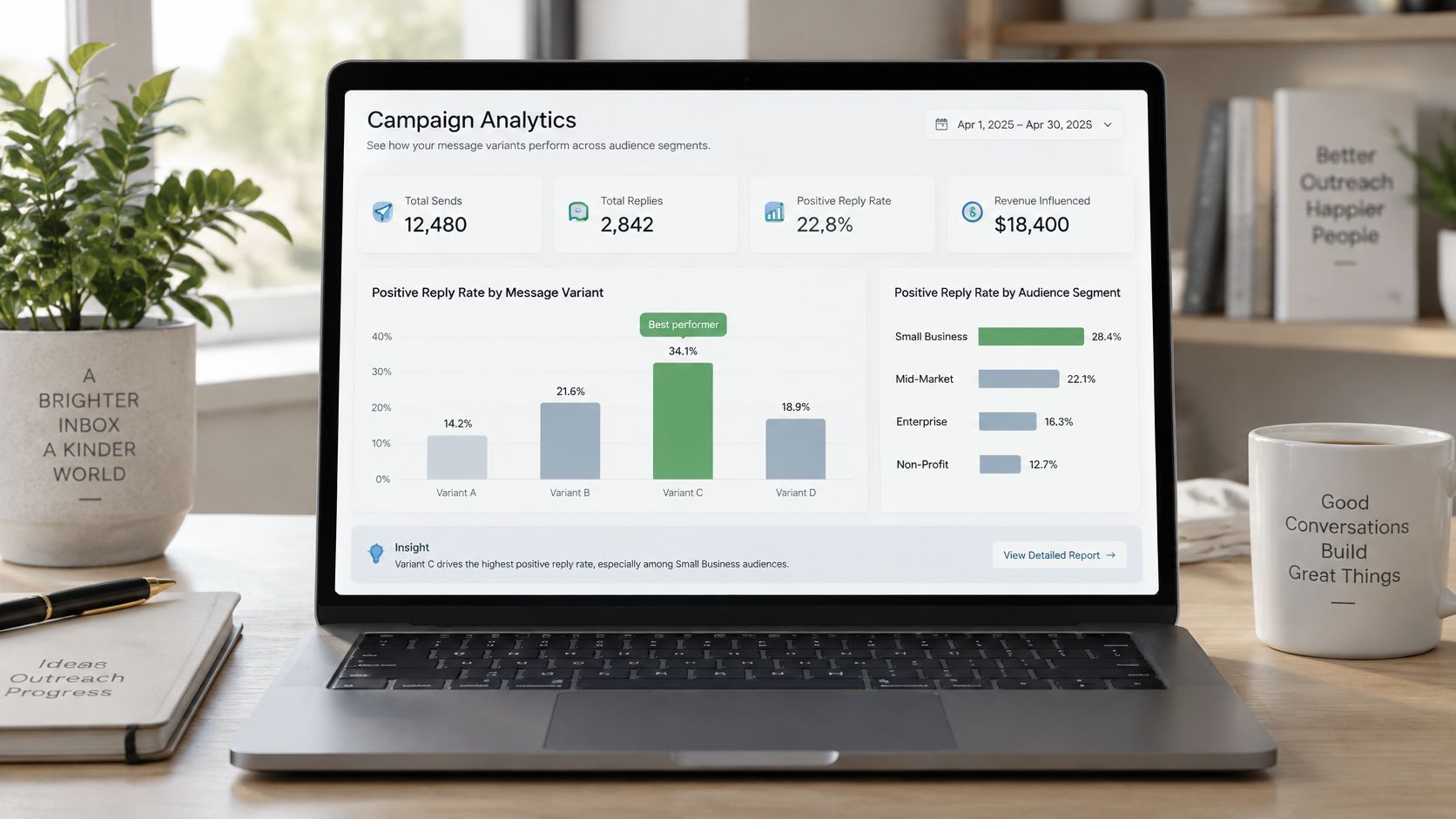
Cut positive replies by message variant and list segment, divided by prospects contacted in each cell. GROU tracks sends, replies, and positive replies from Smartlead and Instantly at that level, reviewed daily. That's the cadence that catches a bad list before it burns a domain.
The tagging rule has to be fixed before launch. A real question or stated interest counts as positive. A polite decline doesn't, even if it's friendly. Write the rule in the campaign doc and tag against it every day, because two people tagging differently will produce two different dashboards.
Decision rules that keep this honest
Minimum sample of 150 prospects per variant before you declare a winner
Retire any variant that trails the campaign average for two consecutive sprints
Check segment before copy when a rate falls, since list quality breaks more often than wording
Run structured cold email A/B testing against this board rather than swapping subject lines on instinct. Change one variable per sprint. Lemlist and Instantly both support variant-level cuts if your tagging stays consistent.
Failure mode one: declaring winners on tiny samples, then scaling noise. Failure mode two: counting out-of-office and referral replies as interest, which inflates the earliest signal you have.
Verdict: build this when positive reply rate drops. It's a diagnostic board, not a leadership view.
4. Sourced vs influenced pipeline attribution split dashboard
Attribution fights happen because two teams use one word for two things. This board splits them. Sourced means the first recorded touch came from outbound or LinkedIn. Influenced means the contact engaged before the opportunity was created.
Headline sourced pipeline. Show influenced as a secondary series underneath it. In the SaaS program referenced earlier, the sourced figure reached €450k where CRM tracking allowed, and that qualification clause matters. Some pipeline can't be traced cleanly, and pretending otherwise destroys credibility.
Pre-contact activity is why last-touch reporting fails in B2B. Buyers spend only about 17% of purchase time meeting potential suppliers, per Gartner research summarized on buyer journey timing. LinkedIn content, search, and peer research happen before your CRM sees anything.
The rule to write down
Set an influence window and publish it, for example engagement within 90 days before opportunity creation. Keep first-touch source, latest meaningful touch, opportunity creation date, and closed revenue on the record. Then compare first-touch, last-touch, and multi-touch views side by side.
Use first-touch for demand creation questions. Use stage conversion for channel quality questions. Use sourced or influenced pipeline for executive reporting, following a clear multi-touch attribution model. Label every rule on the dashboard itself so nobody confuses correlation with revenue credit.
Failure mode one: counting the same opportunity as sourced by two channels. Failure mode two: setting the influence window so wide that everything qualifies, which makes the influenced number meaningless.
Verdict: build this before your next budget review. Sourced decides spend. Influenced gives LinkedIn content the credit it earns.
5. ICP fit by account segment enrichment-driven targeting board
A campaign can hit its reply target while targeting the wrong accounts. This board catches that by showing reply rate and qualified meeting rate per segment, not per send list.
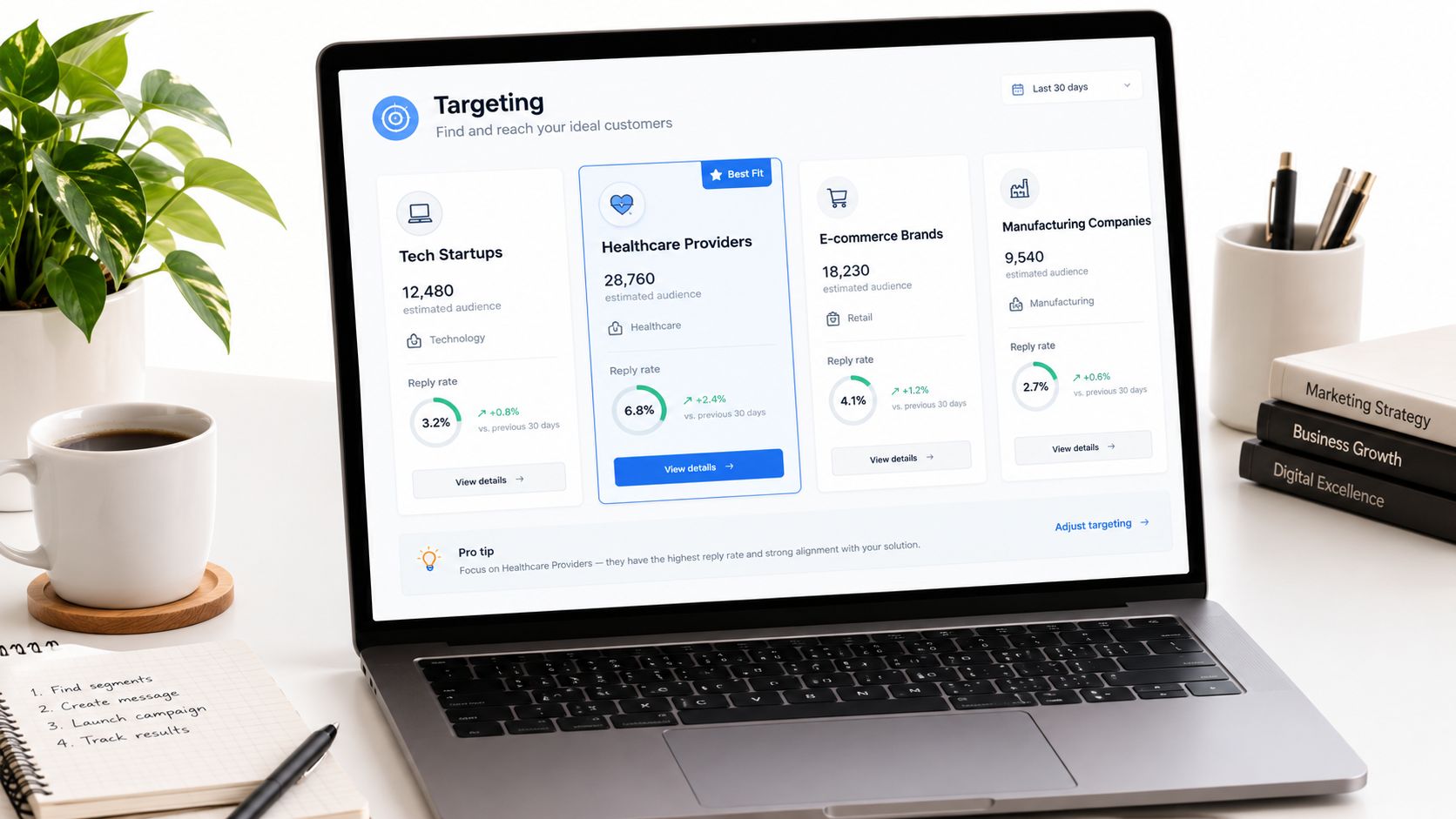
Build segments from enrichment fields such as headcount, tech stack, funding stage, and sub-vertical. Clay fills those fields through waterfall enrichment, then pushes segment tags into Smartlead or Instantly. Run one campaign per segment so performance stays attributable. If segments share a campaign, you've lost the cut.
That discipline connects directly to your ICP ideal customer profile definition. The profile stops being a slide and becomes a tested claim. Segments either produce qualified meetings or they don't, and the board shows which within two sprints.
How to read segment results
Require at least 50 contacts per segment before judging its rate
Compare qualified meeting rate first and reply rate second, since replies from poor-fit accounts waste sales time
Retire the weakest segment after two sprint reviews with no qualified meetings
Pull the list from Apollo or Sales Navigator, enrich in Clay, then write the segment tag back to HubSpot on both contact and company records. That writeback is where teams usually cut corners. Don't. Without it, segment performance dies inside the sending tool.
Failure mode one: segments built on stale enrichment, so headcount bands drift. Failure mode two: keeping a segment alive because reply rate looks decent while it produces zero qualified meetings.
Verdict: build this when you suspect fit, not copy. It tells you which market to drop.
6. LinkedIn outreach diagnostic layer acceptance and interested replies
LinkedIn numbers don't belong on the executive view. They belong one layer down, where the person running outreach can act on them the same week.
This board tracks connection requests → acceptances → replies → replies tagged as interested. GROU reviews that chain in HeyReach and Sales Navigator data during bi-weekly sprint reviews, feeding the interested replies into HubSpot for routing. Acceptance rate tells you whether the profile and first line earn a look. Interested-reply rate tells you whether the message earns a conversation.
Those two rates point at different fixes. Low acceptance with decent interested replies means your profile, headline, or sender selection needs work. Strong acceptance with weak interested replies means the message after connection is the problem. Treating them as one funnel number sends you to rewrite the wrong asset.
Practical rule: test two profile versions and compare acceptance before you touch the outreach copy. Profile changes are cheaper than sequence rebuilds.
Tag interested replies within 24 hours so routing stays fast. A reply that waits three days for tagging isn't a dashboard problem. It's a lost meeting. Keep a named owner per sender profile because acceptance varies by person, and averages hide who is getting through.
Failure mode one: reporting acceptances as progress to leadership, which rewards collecting connections (a metric nobody can bank). Failure mode two: mixing personal profile results with company page engagement in one view, so neither number explains anything.
Verdict: build this if LinkedIn is a primary channel. Keep it off the board slide. Operators need it daily, executives need it never.
7. Paid channel cost per qualified meeting spend-to-meeting dashboard
Cost per lead lies politely. A LinkedIn campaign can produce cheap leads that sales rejects on sight, while a Google campaign with pricier leads produces meetings that close. Report cost per lead to leadership and you'll fund the wrong channel.
This board carries spend forward. It tracks clicks, leads, and cost per lead from LinkedIn and Google, then divides total spend by qualified meetings. That final division is where channel rankings usually reverse. HubSpot needs the campaign association on the contact and the qualified flag from sales before any of this works, so fix field hygiene before you build the view.
Hold channel mix steady for two sprints before reading the trend. Paid results in iGaming, SaaS, and legal tech swing week to week on small numbers, and daily budget moves turn noise into strategy. GROU agrees channel mix changes in bi-weekly sprint reviews with the client, not in daily check-ins. Daily work stays at the ad and audience level.
Quality framing matters beyond paid. A 2026 summary of HubSpot metric usage ranks lead quality and MQLs first at 39%, ahead of lead-to-customer conversion at 34% and lead volume at 29%, per B2B marketing statistics on metric usage. Volume ranks last for a reason.
Failure mode one: comparing channels before sales has qualified the meetings, which credits whatever generated fast bookings. Failure mode two: ignoring view-through LinkedIn engagement entirely, then cutting the channel that was warming accounts for outbound.
Verdict: build this only where paid spend runs. The decision it drives is budget allocation, and it should never report leads as the outcome.
8. Sales velocity and stage conversion pipeline flow board
Outbound gets blamed for deals that stall in stage three. This board separates the two jobs. It tracks opportunities from qualified meeting to SQL to closed-won, with days spent in each stage.
Sales velocity combines opportunity count, average deal value, win rate, and cycle length into one figure. Watch it alongside stage conversion rates, because velocity can rise on deal size while conversion drops. Measure days in stage from the qualified meeting date, not the booking date. Booking date includes meetings sales later rejected, which pollutes every downstream calculation.
The linear funnel view also misses how buying works. Gartner describes six recurring buying jobs, from problem identification to consensus creation, that buyers revisit during a purchase, per Gartner's B2B buying journey research. A deal sitting in validation isn't stalled the same way a deal missing stakeholders is stalled. Add fields for stakeholder coverage and validation activity so the board shows which job is stuck.
The walkthrough below shows how stage aging surfaces in a live pipeline review.
Review stalled deals with sales in the same sprint meeting where targeting changes get agreed. GROU programs start stage data at the qualified meeting, with fast reply routing feeding HubSpot. That keeps the handoff point clean.
Failure mode one: reps skip stages, so conversion rates between stages are fiction. Failure mode two: no stage aging threshold, so stale deals inflate pipeline coverage for months.
Verdict: build this once qualified meetings flow steadily. It's a sales management board, and RevOps should own it.
8 Metrics Dashboard Examples Compared
Dashboard example | Focus and metrics | 🔄 Complexity and resources | 📊 Expected outcome | ⭐ Ideal use and key advantage |
|---|---|---|---|---|
Three-KPI go-to dashboard | Positive reply rate, qualified meetings, sourced pipeline | Moderate; CRM tracking and agreed qualification rules required | Full-funnel view; example reached €450k sourced pipeline | Executive reporting; prioritizes results and gives a clear diagnostic order |
Booked vs. qualified meetings chart | Monthly bookings, qualified meetings, qualification rate | Low to moderate; consistent sales rejection logging and CRM fields needed | Reveals meeting-quality gaps; example improved from 75% to 82% qualification | Tracking meeting quality; adds insight without a new tool |
Positive reply rate by campaign and variant | Positive replies by campaign, message variant, and segment | Moderate; tagging rules and sufficient sample sizes needed | Early signal of targeting or copy performance | Outbound optimization; supports faster diagnosis before scaling volume |
Sourced vs. influenced pipeline dashboard | Opportunity value split by sourced and influenced pipeline | Moderate to high; reliable CRM source fields and attribution rules needed | Separates pipeline creation from influence on existing opportunities | Attribution and budget decisions; recognizes content that assists deals |
ICP fit by account segment | Reply and qualified-meeting rates by enriched segment | Moderate; enrichment tools, CRM tagging, and adequate segment sizes needed | Identifies stronger segments and those to drop | Targeting refinement; grounds ICP decisions in conversion data |
LinkedIn outreach diagnostic layer | Connection requests, acceptances, replies, and interested replies | Moderate; activity data from LinkedIn tools and timely reply tagging needed | Pinpoints whether profile, targeting, or messaging needs work | LinkedIn outreach optimization; keeps diagnostic activity metrics out of executive reporting |
Paid channel cost per qualified meeting | Clicks, leads, cost per lead, spend, and cost per qualified meeting | Moderate; ad-platform and CRM data, with careful attribution | Compares true meeting costs across paid and outbound channels | Channel-mix decisions; avoids judging spend by lead cost alone |
Sales velocity and stage conversion board | Stage conversion, days per stage, deal value, win rate, and cycle length | Moderate to high; consistent CRM data and about a quarter for stable cycle estimates | Shows where deals stall and tracks sales velocity | Pipeline and sales-process reviews; distinguishes sales-stage issues from top-of-funnel issues |
Build the three-KPI view this Friday
Open your CRM this Friday. Create the three-number header row with positive reply rate, qualified meetings, and sourced pipeline. Add the booked vs qualified column chart directly beneath it by Monday.
That build takes one working session if your fields exist. If they don't, the session still pays off, because you'll leave knowing exactly which fields sales needs to start completing (the qualified flag, the rejection reason, the sourced rule). Write the three definitions on the dashboard itself. A definition living in a separate doc will be ignored by week two.
Set the rhythm before you share the link. Check campaign data daily, since that's how often lists, variants, and tagging get corrected. Review the full dashboard every two weeks in a sprint meeting where targeting, messaging, and channel mix decisions get made and recorded. Daily checks fix execution. Sprint reviews fix direction. Confusing those two cadences is how teams end up rebuilding dashboards monthly.
There's history behind keeping this view small. Stephen Few's 2006 Information Dashboard Design set the principle that a dashboard should consolidate the most important information on one screen for at-a-glance monitoring, as covered in Tutorialspoint's Excel dashboards tutorial. Adoption is the harder problem. TDWI research found 50% of respondents rated a single graphical view as very important and another 34% rated it somewhat important, per the 2018 data visualization and discovery report. Yet half of organizations reported dashboard use among no more than a quarter of their users. A dashboard nobody opens is a reporting artifact.
Trust decides whether people open it. One executive reporting case consolidated warehouse and spreadsheet data into Snowflake, then surfaced it through Tableau as a single source of truth, per Concord's executive reporting case study. You don't need that stack at your size, but you need the same separation: standardize definitions where data lands, then expose a small executive layer. Add refresh timestamps and metric owners to every tile. For teams already on a warehouse, Snowflake time series analytics examples show how trend views get built on that foundation.
Evidence from other settings points the same way. A production dashboard implementation reported an 18% improvement in production-output productivity, per a Malaysian academic case study on warehouse operations dashboards. Don't treat that as your expected return. Treat it as proof that visibility tied to daily decisions produces measurable gains. The 2025 survey behind IEEE VIS research on dashboard decision-making found only 45% of business data fully used in decision-making among 500 senior decision-makers, and 67% worried static dashboards cause missed opportunities. Fewer metrics with named owners beat more metrics with none.
GROU is a B2B pipeline agency running these exact views across iGaming, SaaS, manufacturing, and legal tech programs. The method stays constant: bi-weekly sprints, one target list, one reporting line, and first signals inside 30 days.
If your current dashboard can't tell you which number moved, who owns it, and what happens next, Grou can rebuild that reporting line around positive reply rate, qualified meetings, and sourced pipeline. We run the outbound, LinkedIn, and list systems that feed those numbers, reviewed with you every two weeks. See how the system works at Grou.
The three-KPI view built on positive reply rate, qualified meetings, and sourced pipeline is the default for most B2B revenue teams. The other seven metrics dashboard examples below exist to diagnose problems that view surfaces.
You're looking at a 14-tile dashboard on Monday morning. Sales points at bookings, marketing points at replies, RevOps points at pipeline, and nobody agrees which number decides anything.
Which KPIs belong on the default view and which ones belong underneath it
Why booked meetings mislead when sales acceptance isn't tracked beside them
What the gap chart reveals about targeting quality month by month
How sourcing rules settle attribution fights before they reach the leadership meeting
Build the decision view first. Diagnostic boards come second, and that's where a guide to AI-powered dashboard insights can help flag movement you might miss between reviews. If a tile doesn't change a decision this sprint, move it off the top screen.
Table of Contents
1. Three-KPI go-to dashboard positive reply rate, qualified meetings, sourced pipeline
3. Positive reply rate by campaign and variant outbound diagnostic board
4. Sourced vs influenced pipeline attribution split dashboard
5. ICP fit by account segment enrichment-driven targeting board
6. LinkedIn outreach diagnostic layer acceptance and interested replies
7. Paid channel cost per qualified meeting spend-to-meeting dashboard
1. Three-KPI go-to dashboard positive reply rate, qualified meetings, sourced pipeline
This is the #1 pick and the view leadership should open first. It reads the system at the start, in the middle, and at the end, so you can locate a break without reading fourteen tiles.
Positive reply rate counts replies showing interest or asking a real question, divided by prospects contacted. Privacy features can't inflate it the way they inflate opens. When it drops, check the list or the message before you add volume.
Qualified meetings means meetings sales accepts, not meetings booked. Sourced pipeline is the value of opportunities the program generated or influenced where CRM tracking allows. Sends, opens, and connection requests sit underneath because they diagnose problems. They don't prove results.
What the live numbers looked like
In a six-month B2B SaaS program, qualified meetings rose from 9 in month 3 to 14 in month 4, then held at 18 to 22 per month. Sourced pipeline in that same program reached €450k. That shape is normal. Setup takes time.
Put the three numbers in a header row with one trend chart beneath them. Write the definition of qualified with sales before month one, including rejection reasons they must log. Our lead generation KPIs framework covers how to lock those definitions down.
Failure mode one: sales marks qualification inconsistently across reps, so the middle number becomes opinion. Failure mode two: sourced pipeline gets claimed without a CRM rule, so finance stops trusting it. Check campaign data daily in HubSpot, Smartlead, or Instantly. Review the full view every two weeks.
Verdict: build this first. Every other board on this list explains why one of these three numbers moved.
2. Booked vs qualified meetings chart the monthly gap view
Month 3 showed 12 booked and 9 qualified. Month 4 showed 17 booked and 14 qualified. That gap had not been seen before because bookings had been the only reported metric.
Build a monthly column chart with two bars side by side. Add qualification rate as a line on a secondary axis. In that SaaS program the rate moved from 75% in month 3 to 82% in month 4, which told us targeting was improving faster than volume.
The chart also sets expectations with stakeholders (which matters more than people admit). It marks the slow first two months as setup, then shows the lift once market feedback corrects the list and the message.
How to build it in the CRM
You need two fields. First, a booked-date field set when the meeting lands. Second, a qualified flag only sales can set, with a required rejection reason when they don't. Without that restriction, outbound teams will qualify their own work.
Pair this with sales pipeline management discipline so rejected meetings feed back into list building. Label months one and two as setup in the chart title. That single label prevents a bad conversation in week three.
A booked meeting that sales rejects is a cost. It consumed rep time and prospect goodwill, and the dashboard should count it that way.
Failure mode one: reps leave the qualified flag blank, so unreviewed meetings look identical to rejected ones. Failure mode two: the team celebrates a rising booked bar while the gap widens, which means targeting is getting worse.
Verdict: build this second. It's the chart that changes the room.
3. Positive reply rate by campaign and variant outbound diagnostic board
Campaign-level reply rate hides the problem. One weak variant drags the average down while a strong segment carries it, and you end up rewriting copy that was working.
Cut positive replies by message variant and list segment, divided by prospects contacted in each cell. GROU tracks sends, replies, and positive replies from Smartlead and Instantly at that level, reviewed daily. That's the cadence that catches a bad list before it burns a domain.
The tagging rule has to be fixed before launch. A real question or stated interest counts as positive. A polite decline doesn't, even if it's friendly. Write the rule in the campaign doc and tag against it every day, because two people tagging differently will produce two different dashboards.
Decision rules that keep this honest
Minimum sample of 150 prospects per variant before you declare a winner
Retire any variant that trails the campaign average for two consecutive sprints
Check segment before copy when a rate falls, since list quality breaks more often than wording
Run structured cold email A/B testing against this board rather than swapping subject lines on instinct. Change one variable per sprint. Lemlist and Instantly both support variant-level cuts if your tagging stays consistent.
Failure mode one: declaring winners on tiny samples, then scaling noise. Failure mode two: counting out-of-office and referral replies as interest, which inflates the earliest signal you have.
Verdict: build this when positive reply rate drops. It's a diagnostic board, not a leadership view.
4. Sourced vs influenced pipeline attribution split dashboard
Attribution fights happen because two teams use one word for two things. This board splits them. Sourced means the first recorded touch came from outbound or LinkedIn. Influenced means the contact engaged before the opportunity was created.
Headline sourced pipeline. Show influenced as a secondary series underneath it. In the SaaS program referenced earlier, the sourced figure reached €450k where CRM tracking allowed, and that qualification clause matters. Some pipeline can't be traced cleanly, and pretending otherwise destroys credibility.
Pre-contact activity is why last-touch reporting fails in B2B. Buyers spend only about 17% of purchase time meeting potential suppliers, per Gartner research summarized on buyer journey timing. LinkedIn content, search, and peer research happen before your CRM sees anything.
The rule to write down
Set an influence window and publish it, for example engagement within 90 days before opportunity creation. Keep first-touch source, latest meaningful touch, opportunity creation date, and closed revenue on the record. Then compare first-touch, last-touch, and multi-touch views side by side.
Use first-touch for demand creation questions. Use stage conversion for channel quality questions. Use sourced or influenced pipeline for executive reporting, following a clear multi-touch attribution model. Label every rule on the dashboard itself so nobody confuses correlation with revenue credit.
Failure mode one: counting the same opportunity as sourced by two channels. Failure mode two: setting the influence window so wide that everything qualifies, which makes the influenced number meaningless.
Verdict: build this before your next budget review. Sourced decides spend. Influenced gives LinkedIn content the credit it earns.
5. ICP fit by account segment enrichment-driven targeting board
A campaign can hit its reply target while targeting the wrong accounts. This board catches that by showing reply rate and qualified meeting rate per segment, not per send list.
Build segments from enrichment fields such as headcount, tech stack, funding stage, and sub-vertical. Clay fills those fields through waterfall enrichment, then pushes segment tags into Smartlead or Instantly. Run one campaign per segment so performance stays attributable. If segments share a campaign, you've lost the cut.
That discipline connects directly to your ICP ideal customer profile definition. The profile stops being a slide and becomes a tested claim. Segments either produce qualified meetings or they don't, and the board shows which within two sprints.
How to read segment results
Require at least 50 contacts per segment before judging its rate
Compare qualified meeting rate first and reply rate second, since replies from poor-fit accounts waste sales time
Retire the weakest segment after two sprint reviews with no qualified meetings
Pull the list from Apollo or Sales Navigator, enrich in Clay, then write the segment tag back to HubSpot on both contact and company records. That writeback is where teams usually cut corners. Don't. Without it, segment performance dies inside the sending tool.
Failure mode one: segments built on stale enrichment, so headcount bands drift. Failure mode two: keeping a segment alive because reply rate looks decent while it produces zero qualified meetings.
Verdict: build this when you suspect fit, not copy. It tells you which market to drop.
6. LinkedIn outreach diagnostic layer acceptance and interested replies
LinkedIn numbers don't belong on the executive view. They belong one layer down, where the person running outreach can act on them the same week.
This board tracks connection requests → acceptances → replies → replies tagged as interested. GROU reviews that chain in HeyReach and Sales Navigator data during bi-weekly sprint reviews, feeding the interested replies into HubSpot for routing. Acceptance rate tells you whether the profile and first line earn a look. Interested-reply rate tells you whether the message earns a conversation.
Those two rates point at different fixes. Low acceptance with decent interested replies means your profile, headline, or sender selection needs work. Strong acceptance with weak interested replies means the message after connection is the problem. Treating them as one funnel number sends you to rewrite the wrong asset.
Practical rule: test two profile versions and compare acceptance before you touch the outreach copy. Profile changes are cheaper than sequence rebuilds.
Tag interested replies within 24 hours so routing stays fast. A reply that waits three days for tagging isn't a dashboard problem. It's a lost meeting. Keep a named owner per sender profile because acceptance varies by person, and averages hide who is getting through.
Failure mode one: reporting acceptances as progress to leadership, which rewards collecting connections (a metric nobody can bank). Failure mode two: mixing personal profile results with company page engagement in one view, so neither number explains anything.
Verdict: build this if LinkedIn is a primary channel. Keep it off the board slide. Operators need it daily, executives need it never.
7. Paid channel cost per qualified meeting spend-to-meeting dashboard
Cost per lead lies politely. A LinkedIn campaign can produce cheap leads that sales rejects on sight, while a Google campaign with pricier leads produces meetings that close. Report cost per lead to leadership and you'll fund the wrong channel.
This board carries spend forward. It tracks clicks, leads, and cost per lead from LinkedIn and Google, then divides total spend by qualified meetings. That final division is where channel rankings usually reverse. HubSpot needs the campaign association on the contact and the qualified flag from sales before any of this works, so fix field hygiene before you build the view.
Hold channel mix steady for two sprints before reading the trend. Paid results in iGaming, SaaS, and legal tech swing week to week on small numbers, and daily budget moves turn noise into strategy. GROU agrees channel mix changes in bi-weekly sprint reviews with the client, not in daily check-ins. Daily work stays at the ad and audience level.
Quality framing matters beyond paid. A 2026 summary of HubSpot metric usage ranks lead quality and MQLs first at 39%, ahead of lead-to-customer conversion at 34% and lead volume at 29%, per B2B marketing statistics on metric usage. Volume ranks last for a reason.
Failure mode one: comparing channels before sales has qualified the meetings, which credits whatever generated fast bookings. Failure mode two: ignoring view-through LinkedIn engagement entirely, then cutting the channel that was warming accounts for outbound.
Verdict: build this only where paid spend runs. The decision it drives is budget allocation, and it should never report leads as the outcome.
8. Sales velocity and stage conversion pipeline flow board
Outbound gets blamed for deals that stall in stage three. This board separates the two jobs. It tracks opportunities from qualified meeting to SQL to closed-won, with days spent in each stage.
Sales velocity combines opportunity count, average deal value, win rate, and cycle length into one figure. Watch it alongside stage conversion rates, because velocity can rise on deal size while conversion drops. Measure days in stage from the qualified meeting date, not the booking date. Booking date includes meetings sales later rejected, which pollutes every downstream calculation.
The linear funnel view also misses how buying works. Gartner describes six recurring buying jobs, from problem identification to consensus creation, that buyers revisit during a purchase, per Gartner's B2B buying journey research. A deal sitting in validation isn't stalled the same way a deal missing stakeholders is stalled. Add fields for stakeholder coverage and validation activity so the board shows which job is stuck.
The walkthrough below shows how stage aging surfaces in a live pipeline review.
Review stalled deals with sales in the same sprint meeting where targeting changes get agreed. GROU programs start stage data at the qualified meeting, with fast reply routing feeding HubSpot. That keeps the handoff point clean.
Failure mode one: reps skip stages, so conversion rates between stages are fiction. Failure mode two: no stage aging threshold, so stale deals inflate pipeline coverage for months.
Verdict: build this once qualified meetings flow steadily. It's a sales management board, and RevOps should own it.
8 Metrics Dashboard Examples Compared
Dashboard example | Focus and metrics | 🔄 Complexity and resources | 📊 Expected outcome | ⭐ Ideal use and key advantage |
|---|---|---|---|---|
Three-KPI go-to dashboard | Positive reply rate, qualified meetings, sourced pipeline | Moderate; CRM tracking and agreed qualification rules required | Full-funnel view; example reached €450k sourced pipeline | Executive reporting; prioritizes results and gives a clear diagnostic order |
Booked vs. qualified meetings chart | Monthly bookings, qualified meetings, qualification rate | Low to moderate; consistent sales rejection logging and CRM fields needed | Reveals meeting-quality gaps; example improved from 75% to 82% qualification | Tracking meeting quality; adds insight without a new tool |
Positive reply rate by campaign and variant | Positive replies by campaign, message variant, and segment | Moderate; tagging rules and sufficient sample sizes needed | Early signal of targeting or copy performance | Outbound optimization; supports faster diagnosis before scaling volume |
Sourced vs. influenced pipeline dashboard | Opportunity value split by sourced and influenced pipeline | Moderate to high; reliable CRM source fields and attribution rules needed | Separates pipeline creation from influence on existing opportunities | Attribution and budget decisions; recognizes content that assists deals |
ICP fit by account segment | Reply and qualified-meeting rates by enriched segment | Moderate; enrichment tools, CRM tagging, and adequate segment sizes needed | Identifies stronger segments and those to drop | Targeting refinement; grounds ICP decisions in conversion data |
LinkedIn outreach diagnostic layer | Connection requests, acceptances, replies, and interested replies | Moderate; activity data from LinkedIn tools and timely reply tagging needed | Pinpoints whether profile, targeting, or messaging needs work | LinkedIn outreach optimization; keeps diagnostic activity metrics out of executive reporting |
Paid channel cost per qualified meeting | Clicks, leads, cost per lead, spend, and cost per qualified meeting | Moderate; ad-platform and CRM data, with careful attribution | Compares true meeting costs across paid and outbound channels | Channel-mix decisions; avoids judging spend by lead cost alone |
Sales velocity and stage conversion board | Stage conversion, days per stage, deal value, win rate, and cycle length | Moderate to high; consistent CRM data and about a quarter for stable cycle estimates | Shows where deals stall and tracks sales velocity | Pipeline and sales-process reviews; distinguishes sales-stage issues from top-of-funnel issues |
Build the three-KPI view this Friday
Open your CRM this Friday. Create the three-number header row with positive reply rate, qualified meetings, and sourced pipeline. Add the booked vs qualified column chart directly beneath it by Monday.
That build takes one working session if your fields exist. If they don't, the session still pays off, because you'll leave knowing exactly which fields sales needs to start completing (the qualified flag, the rejection reason, the sourced rule). Write the three definitions on the dashboard itself. A definition living in a separate doc will be ignored by week two.
Set the rhythm before you share the link. Check campaign data daily, since that's how often lists, variants, and tagging get corrected. Review the full dashboard every two weeks in a sprint meeting where targeting, messaging, and channel mix decisions get made and recorded. Daily checks fix execution. Sprint reviews fix direction. Confusing those two cadences is how teams end up rebuilding dashboards monthly.
There's history behind keeping this view small. Stephen Few's 2006 Information Dashboard Design set the principle that a dashboard should consolidate the most important information on one screen for at-a-glance monitoring, as covered in Tutorialspoint's Excel dashboards tutorial. Adoption is the harder problem. TDWI research found 50% of respondents rated a single graphical view as very important and another 34% rated it somewhat important, per the 2018 data visualization and discovery report. Yet half of organizations reported dashboard use among no more than a quarter of their users. A dashboard nobody opens is a reporting artifact.
Trust decides whether people open it. One executive reporting case consolidated warehouse and spreadsheet data into Snowflake, then surfaced it through Tableau as a single source of truth, per Concord's executive reporting case study. You don't need that stack at your size, but you need the same separation: standardize definitions where data lands, then expose a small executive layer. Add refresh timestamps and metric owners to every tile. For teams already on a warehouse, Snowflake time series analytics examples show how trend views get built on that foundation.
Evidence from other settings points the same way. A production dashboard implementation reported an 18% improvement in production-output productivity, per a Malaysian academic case study on warehouse operations dashboards. Don't treat that as your expected return. Treat it as proof that visibility tied to daily decisions produces measurable gains. The 2025 survey behind IEEE VIS research on dashboard decision-making found only 45% of business data fully used in decision-making among 500 senior decision-makers, and 67% worried static dashboards cause missed opportunities. Fewer metrics with named owners beat more metrics with none.
GROU is a B2B pipeline agency running these exact views across iGaming, SaaS, manufacturing, and legal tech programs. The method stays constant: bi-weekly sprints, one target list, one reporting line, and first signals inside 30 days.
If your current dashboard can't tell you which number moved, who owns it, and what happens next, Grou can rebuild that reporting line around positive reply rate, qualified meetings, and sourced pipeline. We run the outbound, LinkedIn, and list systems that feed those numbers, reviewed with you every two weeks. See how the system works at Grou.
The three-KPI view built on positive reply rate, qualified meetings, and sourced pipeline is the default for most B2B revenue teams. The other seven metrics dashboard examples below exist to diagnose problems that view surfaces.
You're looking at a 14-tile dashboard on Monday morning. Sales points at bookings, marketing points at replies, RevOps points at pipeline, and nobody agrees which number decides anything.
Which KPIs belong on the default view and which ones belong underneath it
Why booked meetings mislead when sales acceptance isn't tracked beside them
What the gap chart reveals about targeting quality month by month
How sourcing rules settle attribution fights before they reach the leadership meeting
Build the decision view first. Diagnostic boards come second, and that's where a guide to AI-powered dashboard insights can help flag movement you might miss between reviews. If a tile doesn't change a decision this sprint, move it off the top screen.
Table of Contents
1. Three-KPI go-to dashboard positive reply rate, qualified meetings, sourced pipeline
3. Positive reply rate by campaign and variant outbound diagnostic board
4. Sourced vs influenced pipeline attribution split dashboard
5. ICP fit by account segment enrichment-driven targeting board
6. LinkedIn outreach diagnostic layer acceptance and interested replies
7. Paid channel cost per qualified meeting spend-to-meeting dashboard
1. Three-KPI go-to dashboard positive reply rate, qualified meetings, sourced pipeline
This is the #1 pick and the view leadership should open first. It reads the system at the start, in the middle, and at the end, so you can locate a break without reading fourteen tiles.
Positive reply rate counts replies showing interest or asking a real question, divided by prospects contacted. Privacy features can't inflate it the way they inflate opens. When it drops, check the list or the message before you add volume.
Qualified meetings means meetings sales accepts, not meetings booked. Sourced pipeline is the value of opportunities the program generated or influenced where CRM tracking allows. Sends, opens, and connection requests sit underneath because they diagnose problems. They don't prove results.
What the live numbers looked like
In a six-month B2B SaaS program, qualified meetings rose from 9 in month 3 to 14 in month 4, then held at 18 to 22 per month. Sourced pipeline in that same program reached €450k. That shape is normal. Setup takes time.
Put the three numbers in a header row with one trend chart beneath them. Write the definition of qualified with sales before month one, including rejection reasons they must log. Our lead generation KPIs framework covers how to lock those definitions down.
Failure mode one: sales marks qualification inconsistently across reps, so the middle number becomes opinion. Failure mode two: sourced pipeline gets claimed without a CRM rule, so finance stops trusting it. Check campaign data daily in HubSpot, Smartlead, or Instantly. Review the full view every two weeks.
Verdict: build this first. Every other board on this list explains why one of these three numbers moved.
2. Booked vs qualified meetings chart the monthly gap view
Month 3 showed 12 booked and 9 qualified. Month 4 showed 17 booked and 14 qualified. That gap had not been seen before because bookings had been the only reported metric.
Build a monthly column chart with two bars side by side. Add qualification rate as a line on a secondary axis. In that SaaS program the rate moved from 75% in month 3 to 82% in month 4, which told us targeting was improving faster than volume.
The chart also sets expectations with stakeholders (which matters more than people admit). It marks the slow first two months as setup, then shows the lift once market feedback corrects the list and the message.
How to build it in the CRM
You need two fields. First, a booked-date field set when the meeting lands. Second, a qualified flag only sales can set, with a required rejection reason when they don't. Without that restriction, outbound teams will qualify their own work.
Pair this with sales pipeline management discipline so rejected meetings feed back into list building. Label months one and two as setup in the chart title. That single label prevents a bad conversation in week three.
A booked meeting that sales rejects is a cost. It consumed rep time and prospect goodwill, and the dashboard should count it that way.
Failure mode one: reps leave the qualified flag blank, so unreviewed meetings look identical to rejected ones. Failure mode two: the team celebrates a rising booked bar while the gap widens, which means targeting is getting worse.
Verdict: build this second. It's the chart that changes the room.
3. Positive reply rate by campaign and variant outbound diagnostic board
Campaign-level reply rate hides the problem. One weak variant drags the average down while a strong segment carries it, and you end up rewriting copy that was working.
Cut positive replies by message variant and list segment, divided by prospects contacted in each cell. GROU tracks sends, replies, and positive replies from Smartlead and Instantly at that level, reviewed daily. That's the cadence that catches a bad list before it burns a domain.
The tagging rule has to be fixed before launch. A real question or stated interest counts as positive. A polite decline doesn't, even if it's friendly. Write the rule in the campaign doc and tag against it every day, because two people tagging differently will produce two different dashboards.
Decision rules that keep this honest
Minimum sample of 150 prospects per variant before you declare a winner
Retire any variant that trails the campaign average for two consecutive sprints
Check segment before copy when a rate falls, since list quality breaks more often than wording
Run structured cold email A/B testing against this board rather than swapping subject lines on instinct. Change one variable per sprint. Lemlist and Instantly both support variant-level cuts if your tagging stays consistent.
Failure mode one: declaring winners on tiny samples, then scaling noise. Failure mode two: counting out-of-office and referral replies as interest, which inflates the earliest signal you have.
Verdict: build this when positive reply rate drops. It's a diagnostic board, not a leadership view.
4. Sourced vs influenced pipeline attribution split dashboard
Attribution fights happen because two teams use one word for two things. This board splits them. Sourced means the first recorded touch came from outbound or LinkedIn. Influenced means the contact engaged before the opportunity was created.
Headline sourced pipeline. Show influenced as a secondary series underneath it. In the SaaS program referenced earlier, the sourced figure reached €450k where CRM tracking allowed, and that qualification clause matters. Some pipeline can't be traced cleanly, and pretending otherwise destroys credibility.
Pre-contact activity is why last-touch reporting fails in B2B. Buyers spend only about 17% of purchase time meeting potential suppliers, per Gartner research summarized on buyer journey timing. LinkedIn content, search, and peer research happen before your CRM sees anything.
The rule to write down
Set an influence window and publish it, for example engagement within 90 days before opportunity creation. Keep first-touch source, latest meaningful touch, opportunity creation date, and closed revenue on the record. Then compare first-touch, last-touch, and multi-touch views side by side.
Use first-touch for demand creation questions. Use stage conversion for channel quality questions. Use sourced or influenced pipeline for executive reporting, following a clear multi-touch attribution model. Label every rule on the dashboard itself so nobody confuses correlation with revenue credit.
Failure mode one: counting the same opportunity as sourced by two channels. Failure mode two: setting the influence window so wide that everything qualifies, which makes the influenced number meaningless.
Verdict: build this before your next budget review. Sourced decides spend. Influenced gives LinkedIn content the credit it earns.
5. ICP fit by account segment enrichment-driven targeting board
A campaign can hit its reply target while targeting the wrong accounts. This board catches that by showing reply rate and qualified meeting rate per segment, not per send list.
Build segments from enrichment fields such as headcount, tech stack, funding stage, and sub-vertical. Clay fills those fields through waterfall enrichment, then pushes segment tags into Smartlead or Instantly. Run one campaign per segment so performance stays attributable. If segments share a campaign, you've lost the cut.
That discipline connects directly to your ICP ideal customer profile definition. The profile stops being a slide and becomes a tested claim. Segments either produce qualified meetings or they don't, and the board shows which within two sprints.
How to read segment results
Require at least 50 contacts per segment before judging its rate
Compare qualified meeting rate first and reply rate second, since replies from poor-fit accounts waste sales time
Retire the weakest segment after two sprint reviews with no qualified meetings
Pull the list from Apollo or Sales Navigator, enrich in Clay, then write the segment tag back to HubSpot on both contact and company records. That writeback is where teams usually cut corners. Don't. Without it, segment performance dies inside the sending tool.
Failure mode one: segments built on stale enrichment, so headcount bands drift. Failure mode two: keeping a segment alive because reply rate looks decent while it produces zero qualified meetings.
Verdict: build this when you suspect fit, not copy. It tells you which market to drop.
6. LinkedIn outreach diagnostic layer acceptance and interested replies
LinkedIn numbers don't belong on the executive view. They belong one layer down, where the person running outreach can act on them the same week.
This board tracks connection requests → acceptances → replies → replies tagged as interested. GROU reviews that chain in HeyReach and Sales Navigator data during bi-weekly sprint reviews, feeding the interested replies into HubSpot for routing. Acceptance rate tells you whether the profile and first line earn a look. Interested-reply rate tells you whether the message earns a conversation.
Those two rates point at different fixes. Low acceptance with decent interested replies means your profile, headline, or sender selection needs work. Strong acceptance with weak interested replies means the message after connection is the problem. Treating them as one funnel number sends you to rewrite the wrong asset.
Practical rule: test two profile versions and compare acceptance before you touch the outreach copy. Profile changes are cheaper than sequence rebuilds.
Tag interested replies within 24 hours so routing stays fast. A reply that waits three days for tagging isn't a dashboard problem. It's a lost meeting. Keep a named owner per sender profile because acceptance varies by person, and averages hide who is getting through.
Failure mode one: reporting acceptances as progress to leadership, which rewards collecting connections (a metric nobody can bank). Failure mode two: mixing personal profile results with company page engagement in one view, so neither number explains anything.
Verdict: build this if LinkedIn is a primary channel. Keep it off the board slide. Operators need it daily, executives need it never.
7. Paid channel cost per qualified meeting spend-to-meeting dashboard
Cost per lead lies politely. A LinkedIn campaign can produce cheap leads that sales rejects on sight, while a Google campaign with pricier leads produces meetings that close. Report cost per lead to leadership and you'll fund the wrong channel.
This board carries spend forward. It tracks clicks, leads, and cost per lead from LinkedIn and Google, then divides total spend by qualified meetings. That final division is where channel rankings usually reverse. HubSpot needs the campaign association on the contact and the qualified flag from sales before any of this works, so fix field hygiene before you build the view.
Hold channel mix steady for two sprints before reading the trend. Paid results in iGaming, SaaS, and legal tech swing week to week on small numbers, and daily budget moves turn noise into strategy. GROU agrees channel mix changes in bi-weekly sprint reviews with the client, not in daily check-ins. Daily work stays at the ad and audience level.
Quality framing matters beyond paid. A 2026 summary of HubSpot metric usage ranks lead quality and MQLs first at 39%, ahead of lead-to-customer conversion at 34% and lead volume at 29%, per B2B marketing statistics on metric usage. Volume ranks last for a reason.
Failure mode one: comparing channels before sales has qualified the meetings, which credits whatever generated fast bookings. Failure mode two: ignoring view-through LinkedIn engagement entirely, then cutting the channel that was warming accounts for outbound.
Verdict: build this only where paid spend runs. The decision it drives is budget allocation, and it should never report leads as the outcome.
8. Sales velocity and stage conversion pipeline flow board
Outbound gets blamed for deals that stall in stage three. This board separates the two jobs. It tracks opportunities from qualified meeting to SQL to closed-won, with days spent in each stage.
Sales velocity combines opportunity count, average deal value, win rate, and cycle length into one figure. Watch it alongside stage conversion rates, because velocity can rise on deal size while conversion drops. Measure days in stage from the qualified meeting date, not the booking date. Booking date includes meetings sales later rejected, which pollutes every downstream calculation.
The linear funnel view also misses how buying works. Gartner describes six recurring buying jobs, from problem identification to consensus creation, that buyers revisit during a purchase, per Gartner's B2B buying journey research. A deal sitting in validation isn't stalled the same way a deal missing stakeholders is stalled. Add fields for stakeholder coverage and validation activity so the board shows which job is stuck.
The walkthrough below shows how stage aging surfaces in a live pipeline review.
Review stalled deals with sales in the same sprint meeting where targeting changes get agreed. GROU programs start stage data at the qualified meeting, with fast reply routing feeding HubSpot. That keeps the handoff point clean.
Failure mode one: reps skip stages, so conversion rates between stages are fiction. Failure mode two: no stage aging threshold, so stale deals inflate pipeline coverage for months.
Verdict: build this once qualified meetings flow steadily. It's a sales management board, and RevOps should own it.
8 Metrics Dashboard Examples Compared
Dashboard example | Focus and metrics | 🔄 Complexity and resources | 📊 Expected outcome | ⭐ Ideal use and key advantage |
|---|---|---|---|---|
Three-KPI go-to dashboard | Positive reply rate, qualified meetings, sourced pipeline | Moderate; CRM tracking and agreed qualification rules required | Full-funnel view; example reached €450k sourced pipeline | Executive reporting; prioritizes results and gives a clear diagnostic order |
Booked vs. qualified meetings chart | Monthly bookings, qualified meetings, qualification rate | Low to moderate; consistent sales rejection logging and CRM fields needed | Reveals meeting-quality gaps; example improved from 75% to 82% qualification | Tracking meeting quality; adds insight without a new tool |
Positive reply rate by campaign and variant | Positive replies by campaign, message variant, and segment | Moderate; tagging rules and sufficient sample sizes needed | Early signal of targeting or copy performance | Outbound optimization; supports faster diagnosis before scaling volume |
Sourced vs. influenced pipeline dashboard | Opportunity value split by sourced and influenced pipeline | Moderate to high; reliable CRM source fields and attribution rules needed | Separates pipeline creation from influence on existing opportunities | Attribution and budget decisions; recognizes content that assists deals |
ICP fit by account segment | Reply and qualified-meeting rates by enriched segment | Moderate; enrichment tools, CRM tagging, and adequate segment sizes needed | Identifies stronger segments and those to drop | Targeting refinement; grounds ICP decisions in conversion data |
LinkedIn outreach diagnostic layer | Connection requests, acceptances, replies, and interested replies | Moderate; activity data from LinkedIn tools and timely reply tagging needed | Pinpoints whether profile, targeting, or messaging needs work | LinkedIn outreach optimization; keeps diagnostic activity metrics out of executive reporting |
Paid channel cost per qualified meeting | Clicks, leads, cost per lead, spend, and cost per qualified meeting | Moderate; ad-platform and CRM data, with careful attribution | Compares true meeting costs across paid and outbound channels | Channel-mix decisions; avoids judging spend by lead cost alone |
Sales velocity and stage conversion board | Stage conversion, days per stage, deal value, win rate, and cycle length | Moderate to high; consistent CRM data and about a quarter for stable cycle estimates | Shows where deals stall and tracks sales velocity | Pipeline and sales-process reviews; distinguishes sales-stage issues from top-of-funnel issues |
Build the three-KPI view this Friday
Open your CRM this Friday. Create the three-number header row with positive reply rate, qualified meetings, and sourced pipeline. Add the booked vs qualified column chart directly beneath it by Monday.
That build takes one working session if your fields exist. If they don't, the session still pays off, because you'll leave knowing exactly which fields sales needs to start completing (the qualified flag, the rejection reason, the sourced rule). Write the three definitions on the dashboard itself. A definition living in a separate doc will be ignored by week two.
Set the rhythm before you share the link. Check campaign data daily, since that's how often lists, variants, and tagging get corrected. Review the full dashboard every two weeks in a sprint meeting where targeting, messaging, and channel mix decisions get made and recorded. Daily checks fix execution. Sprint reviews fix direction. Confusing those two cadences is how teams end up rebuilding dashboards monthly.
There's history behind keeping this view small. Stephen Few's 2006 Information Dashboard Design set the principle that a dashboard should consolidate the most important information on one screen for at-a-glance monitoring, as covered in Tutorialspoint's Excel dashboards tutorial. Adoption is the harder problem. TDWI research found 50% of respondents rated a single graphical view as very important and another 34% rated it somewhat important, per the 2018 data visualization and discovery report. Yet half of organizations reported dashboard use among no more than a quarter of their users. A dashboard nobody opens is a reporting artifact.
Trust decides whether people open it. One executive reporting case consolidated warehouse and spreadsheet data into Snowflake, then surfaced it through Tableau as a single source of truth, per Concord's executive reporting case study. You don't need that stack at your size, but you need the same separation: standardize definitions where data lands, then expose a small executive layer. Add refresh timestamps and metric owners to every tile. For teams already on a warehouse, Snowflake time series analytics examples show how trend views get built on that foundation.
Evidence from other settings points the same way. A production dashboard implementation reported an 18% improvement in production-output productivity, per a Malaysian academic case study on warehouse operations dashboards. Don't treat that as your expected return. Treat it as proof that visibility tied to daily decisions produces measurable gains. The 2025 survey behind IEEE VIS research on dashboard decision-making found only 45% of business data fully used in decision-making among 500 senior decision-makers, and 67% worried static dashboards cause missed opportunities. Fewer metrics with named owners beat more metrics with none.
GROU is a B2B pipeline agency running these exact views across iGaming, SaaS, manufacturing, and legal tech programs. The method stays constant: bi-weekly sprints, one target list, one reporting line, and first signals inside 30 days.
If your current dashboard can't tell you which number moved, who owns it, and what happens next, Grou can rebuild that reporting line around positive reply rate, qualified meetings, and sourced pipeline. We run the outbound, LinkedIn, and list systems that feed those numbers, reviewed with you every two weeks. See how the system works at Grou.

Pipeline OS Newsletter
Build qualified pipeline
Get weekly tactics to generate demand, improve lead quality, and book more meetings.





Trusted by industry leaders
Trusted by industry leaders
Trusted by industry leaders
Ready to build qualified pipeline?
Ready to build qualified pipeline?
Ready to build qualified pipeline?
Book a call to see if we're the right fit, or take the 2-minute quiz to get a clear starting point.
Book a call to see if we're the right fit, or take the 2-minute quiz to get a clear starting point.
Book a call to see if we're the right fit, or take the 2-minute quiz to get a clear starting point.
" height="30.21639343089746px" id="hfGbXmQR2" width="30.216393430897455px"/></svg>)
Copyright © 2026 – All Right Reserved
Copyright © 2026 – All Right Reserved
Copyright © 2026 – All Right Reserved