%22%3E%3C/path%3E%3Cpath d=%22M 63.072 7.554 C 62.258 8.022 61.577 8.689 61.092 9.493 L 61.092 7.076 L 57.158 7.076 L 57.158 22.64 L 61.089 22.64 L 61.089 14.888 C 61.089 13.446 61.403 12.434 62.03 11.853 C 62.818 11.218 63.818 10.907 64.826 10.982 L 65.868 10.982 L 65.868 6.851 C 64.891 6.834 63.926 7.076 63.073 7.554 Z%22 fill=%22rgb(17,17,17)%22%3E%3C/path%3E%3Cpath d=%22M 78.916 7.82 C 76.363 6.49 73.321 6.49 70.768 7.82 C 69.562 8.473 68.564 9.451 67.888 10.644 C 67.167 11.931 66.803 13.387 66.834 14.862 C 66.804 16.332 67.157 17.785 67.86 19.077 C 68.515 20.267 69.494 21.246 70.684 21.901 C 71.924 22.576 73.318 22.92 74.73 22.898 C 76.164 22.918 77.58 22.575 78.846 21.901 C 80.062 21.247 81.073 20.27 81.768 19.077 C 82.506 17.797 82.88 16.339 82.85 14.862 C 82.88 13.389 82.517 11.934 81.797 10.647 C 81.12 9.455 80.122 8.477 78.917 7.824 M 78.803 14.862 C 78.829 15.739 78.636 16.608 78.241 17.391 C 77.903 18.046 77.38 18.588 76.738 18.95 C 76.124 19.293 75.432 19.472 74.729 19.47 C 73.668 19.497 72.648 19.061 71.934 18.276 C 71.139 17.323 70.741 16.1 70.823 14.862 C 70.741 13.62 71.149 12.395 71.959 11.45 C 72.687 10.667 73.715 10.233 74.783 10.256 C 75.859 10.236 76.894 10.67 77.635 11.45 C 78.464 12.387 78.884 13.616 78.801 14.864%22 fill=%22rgb(17,17,17)%22%3E%3C/path%3E%3Cpath d=%22M 95.906 7.076 L 95.906 15.646 C 95.975 16.68 95.643 17.701 94.979 18.498 C 94.311 19.184 93.379 19.547 92.422 19.495 C 91.475 19.544 90.553 19.18 89.894 18.498 C 89.23 17.701 88.898 16.68 88.967 15.646 L 88.967 7.076 L 85.033 7.076 L 85.033 16.207 C 85 17.449 85.275 18.68 85.834 19.79 C 86.327 20.75 87.095 21.542 88.039 22.065 C 89.033 22.594 90.145 22.861 91.271 22.838 C 92.188 22.847 93.095 22.65 93.926 22.263 C 94.708 21.905 95.388 21.36 95.906 20.675 L 95.906 22.645 L 99.865 22.645 L 99.865 7.076 Z%22 fill=%22rgb(17,17,17)%22%3E%3C/path%3E%3Cpath d=%22M 4.513 15.626 C 4.511 10.815 7.606 6.549 12.181 5.059 C 16.756 3.57 21.77 5.195 24.601 9.086 L 27.816 5.87 C 24.074 1.186 17.981 -0.943 12.137 0.393 C 6.292 1.728 1.728 6.292 0.393 12.137 C -0.943 17.981 1.186 24.074 5.87 27.816 L 9.085 24.601 C 6.214 22.512 4.515 19.177 4.513 15.626%22 fill=%22rgb(32,62,235)%22%3E%3C/path%3E%3Cpath d=%22M 17.114 14.343 L 13.354 18.01 L 13.354 18.026 L 21.071 18.026 L 11.412 27.609 L 17.389 27.609 L 23.999 21.081 L 23.999 28.316 L 24.005 28.316 L 27.967 24.393 L 27.967 14.343 Z%22 fill=%22rgb(32,62,235)%22%3E%3C/path%3E%3C/g%3E%3C/svg%3E) ×
× ××
××›
›
›
›
How to build a B2B lead generation system for predictable pipeline
How to build a B2B lead generation system for predictable pipeline
How to build a B2B lead generation system for predictable pipeline
How to build a B2B lead generation system for predictable pipeline
How to build a B2B lead generation system for predictable pipeline
How to build a B2B lead generation system for predictable pipeline

Author
Aljaz Peklaj

Your problem probably isn't channel count. It's that your team is running outbound, LinkedIn, content, and qualification as separate motions, so attention never turns into consistent pipeline. Most lead generation programs fail before launch because the ICP is loose, the timing is wrong, and replies sit too long.
Lock ICP, trigger, and message before list building
Replace static lists with signal-triggered intake
Run LinkedIn and email from one message map
Measure held meetings and qualified opportunities, not vanity activity
Table of Contents
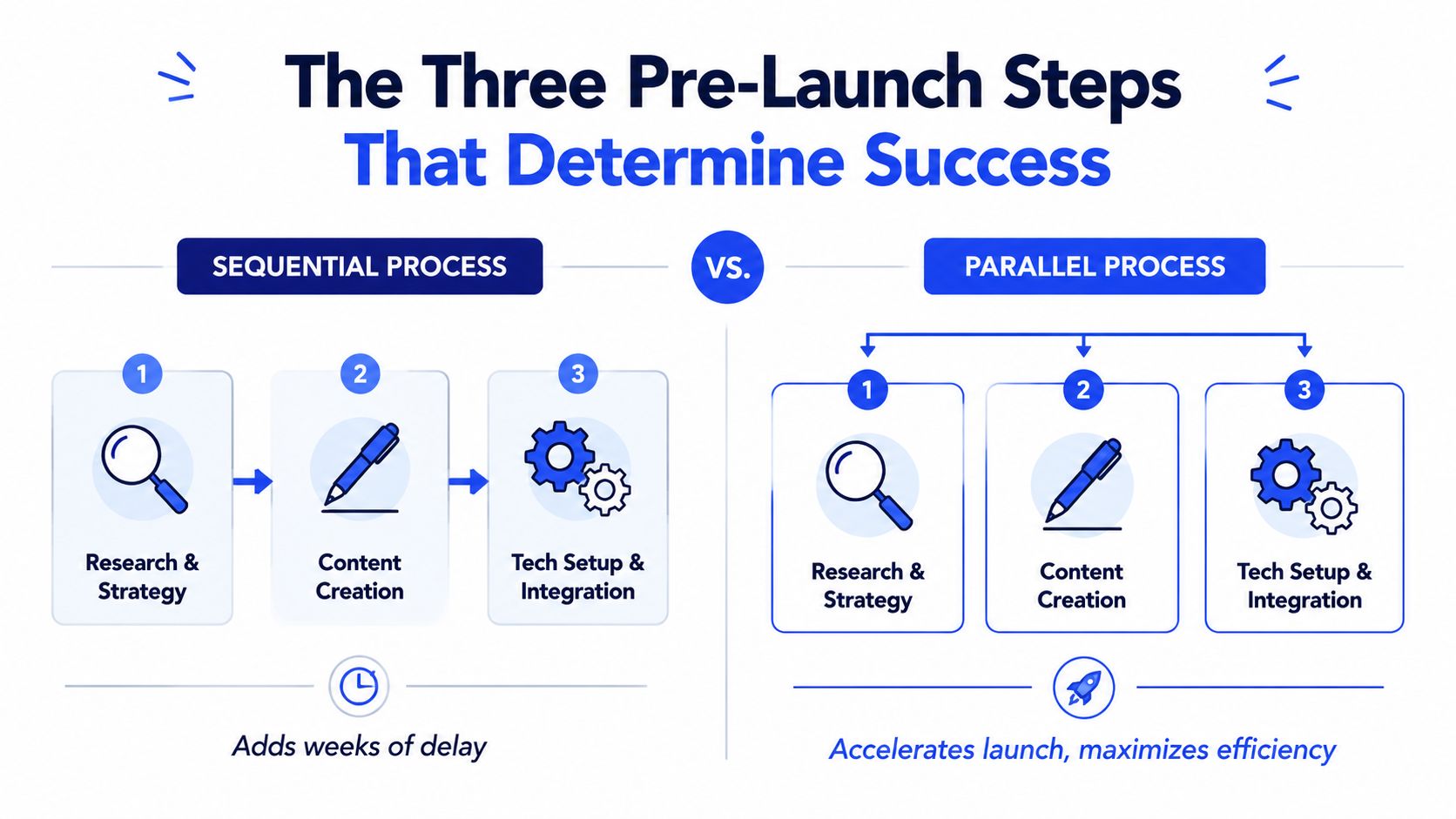
The three pre-launch steps that determine success
The initial impulse is to write copy first because it feels like progress. It isn't. If you haven't locked who you're targeting, which trigger makes them timely, and how replies will move, you're writing messages for a market that doesn't exist yet.
Start with ICP and trigger lock
I run this as one working session, usually 90 minutes. The output is short on purpose. If the team can't state the target in one sentence, the campaign isn't ready.
You need three written outputs:
ICP sentence → industry, company size, geography, role, and the trigger that signals buying readiness
Offer sentence → what you sell, who it's for, and why now
Message map → three pains and three proof points the campaign can pull from
For teams still tightening audience boundaries, EmailScout's guide on identifying target customers is a useful prompt set because it forces specificity instead of broad personas. The same discipline matters when building an ideal customer profile framework that sales and marketing can use.
Practical rule: No list build starts until those three outputs are written and approved.
Pressure-test the message against wins and losses
Getting honest means reviewing a handful of closed-won deals and a handful of closed-lost deals, then looking for pattern matches. Wins show what the market values. Losses show the boundary your targeting should respect.
A weak process only studies success stories. A good process studies who looked like a fit and still didn't buy. That usually reveals one of three problems:
Signal from review | What it usually means | Adjustment |
|---|---|---|
Deals stall after discovery | Pain is real, urgency is weak | Tighten trigger definition |
Meetings book but don't qualify | Persona fit is loose | Narrow title and department |
Replies are polite but vague | Message sounds relevant, not urgent | Rewrite pain line around consequence |
Build infrastructure in parallel, not later
This track should start on day one, at the same time as ICP work. Dedicated sending domains, inbox rotation, SPF, DKIM, DMARC, warm-up inside Lemlist or Instantly, and volume caps per inbox all need time to settle. If you wait until messaging is “done,” launch gets pushed back for avoidable reasons.
This pre-launch window usually takes 7 to 14 days, and the infrastructure side often needs 14 to 21 days to mature properly, based on the operating pattern described in the brief above. That's why parallel execution matters. Sequential teams add dead time because each function waits for the previous one to finish.
A basic day-one stack looks like this:
Prospecting and data → Sales Navigator, Apollo, Clay
Sending → Instantly or Lemlist
CRM and routing → HubSpot
Team response layer → Slack for positive-reply alerts
The point of this phase isn't creativity. It's removing ambiguity before your first contact goes out. If you're trying to learn how to lead generation at a high level, this is the part most guides underweight because it looks operationally boring. It's also where performance gets decided.
Building lists with signal-triggered intake
Static lists create fake certainty. You load a few thousand contacts, launch a sequence, and hope the timing works out. It usually doesn't. The account may fit the ICP, but if nothing has changed inside that business recently, your message lands as background noise.

Why static lists underperform
The better approach is continuous intake based on signals. You keep the same ICP, but accounts only enter the queue when a relevant event fires. That changes the question from “who fits?” to “who fits right now?”
That shift matters because outreach guidance has moved away from brute-force volume. Recent guidance points to niche lists and highly specific openers as stronger than broad outreach, and the key question becomes “how do I make fewer, better touches with tighter targeting?” as noted in this YouTube discussion on outreach specificity and saturation.
If you need a shared definition for your team, build around one clear intent signal taxonomy before you automate anything. Otherwise Clay turns into an expensive way to collect random account activity.
How the intake workflow actually runs
In practice, Clay becomes the intake layer. It watches for trigger types that matter to your offer, then pushes matching accounts into the active queue. For SaaS, that might be hiring patterns, funding, leadership changes, or public posts about pipeline pressure. For manufacturing, it might be ERP migration signals, plant expansion, or supply-chain change.
The queue should carry context, not just contacts. A useful record includes:
Trigger type → what happened
Trigger date → how fresh it is
Target role → who should receive the first touch
Pain hypothesis → what likely changed for them
Proof angle → which case, category, or capability to mention
Here's the core trade-off. Static lists feel larger. Signal-triggered queues feel smaller. Smaller is often better because the SDR is working on accounts with live reasons to care.
A lot of teams also pair intake with workflow automation. If you're mapping handoffs and reminders around that queue, these sales funnel automation tips are useful for tightening task flow without adding admin overhead.
What to track inside the queue
The strongest evidence for this model is timing. In one operational pattern from the brief, replacing static prospecting with signal-triggered intake moved reply rates from 4% to 6% to 11% to 14% and improved meeting quality as well. I'm treating that as an example from the operator brief, not a general market benchmark.
For broader market context, the qualification gap is what matters. The average conversion rate from prospects to qualified leads is about 10%, while only 1%–6% of leads become customers, according to Superhuman Prospecting's review of common B2B lead gen mistakes. That's why bad timing hurts twice. You lose replies, then you waste AE time on weak conversations.
This video is useful if your team needs to see how signal-based prospecting works in an operational workflow, not just as a strategy point.
Crafting a unified message for LinkedIn and email
Teams often write channel-by-channel. One template for cold email, another for LinkedIn, then a third for content. That fragments the motion. The prospect experiences three different companies instead of one coordinated point of view.
Use one message map across both channels
The data supports a synchronized system. 94% of B2B marketers use LinkedIn for sales and lead generation efforts, 62% say LinkedIn is the leading lead generation platform, 81% rely on email as a key lead-generation channel, and email returns an average of $42 for every $1 spent, according to this Warmly lead generation statistics summary. If both channels matter this much, they shouldn't run on separate logic.
That means one message map, reused with channel-specific formatting:
Core pain stays the same
Proof point stays the same
Trigger reference stays the same
CTA format changes by channel
Your LinkedIn content strategy should also support the same narrative. If you're publishing while prospecting, map outbound pain points to your LinkedIn content strategy so comments, posts, and DMs reinforce each other instead of competing.
Keep the argument consistent. Change the wrapper, not the point of view.
The three-line LinkedIn DM structure
The best first-touch LinkedIn message is plain text and short enough to read in one glance. Three lines is enough.
Trigger reference
Saw you hired three SDRs in a short window.Named implication
Usually that means pipeline coverage is under pressure and ramp time matters fast.Soft question
Curious if that's resonating right now?
This works because it proves attention without flattery. It takes a position, and it asks for very little. The prospect can answer yes, no, or not now. That's a much easier decision than “book a call.”
The trigger matters more than the structure. In the operator brief, this format produced 18% to 24% reply rates when the trigger was fresh, 11% to 14% when older, and 5% to 8% with a generic opener. I'm keeping those as campaign-level operating figures from the brief, not universal benchmarks.
What to avoid in first-touch outreach
A few things consistently weaken the first message:
Generic compliments → “Impressed by your growth” tells the buyer nothing
Calendar links in first touch → too much commitment too early
Voice notes by default → more friction than value for cold outreach
Multi-paragraph context dumps → prospects save them for later, which usually means never
Decorative formatting → bullets, emojis, and styling can make a DM look manufactured
Email should mirror the same logic. Subject line tied to the trigger. Body focused on one consequence. One soft CTA. If you're learning how to lead generation in a mature B2B motion, this is the mental model to keep: one message system, two channels, zero mixed signals.
Running the engine with synchronized sprints
A lead gen engine works better as an operating rhythm than as a campaign calendar. I prefer two-week sprints because they force a review cycle that's short enough to catch drift but long enough to gather signal. In that window, content, outbound, and qualification all move together.
What a two-week sprint looks like
A clean sprint has one commercial theme, one trigger cluster, and one review meeting. If your SDRs are pushing one pain narrative while LinkedIn posts discuss something else, your market sees inconsistency.
A workable sprint structure looks like this:
Days 1 to 3 → refresh trigger queue, approve copy variants, align AE context
Days 4 to 8 → launch outreach, publish supporting LinkedIn posts, monitor replies
Days 9 to 10 → review objections, adjust pain framing, tighten targeting
Days 11 to 14 → second wave, sales feedback review, update qualification notes
Lead generation in major markets now leans heavily on owned and digital channels. 90.7% of marketers use websites to generate leads and sales, blogs are used by 89.2%, email by 69.2%, organic social by 65.9%, and PPC by 53.7%. In B2B, 87% of marketers say content marketing successfully generates leads, according to this Email Vendor Selection statistics roundup. The practical takeaway is simple. Publishing and outbound shouldn't be separate programs.
How one trigger turned into a closed deal
One example from the operator brief shows how this coordination works in real life. The account was a mid-market manufacturer that had recently gone through an ERP migration. The trigger wasn't abstract. It was a live operational change with a predictable pain window.
The sequence looked like this:
Day | Touch | What mattered |
|---|---|---|
0 | LinkedIn connection request | Trigger referenced plainly |
2 | Cold email | Subject tied to post-ERP period |
4 | LinkedIn comment | Reinforced relevance without pitch |
5 | Reply arrived | Routed fast to AE |
11 | Discovery call | Urgency, authority, timeline confirmed |
14 to 25 | Proposal and revision | Concerns handled directly |
31 | Contract signed | Multi-channel context held together |
The closed deal in that example was roughly €68,000 over 12 months, and the cycle from first contact to signature was 31 days. The reason it moved wasn't volume. It was coherence. Every touch pointed back to the same trigger and the same operating pain.
A synchronized campaign feels to the buyer like one ongoing conversation, not separate messages from separate systems.
This is also where a service layer can help if the internal team is fragmented. Grou is one option built around that model, combining LinkedIn content, outbound, qualification, and reporting into one sprint-based motion. The main point isn't the vendor choice. It's that someone must own the whole chain.
Routing replies and defining qualification rules
Replies need a processing layer. Without one, synchronized outbound creates interest faster than the team can sort it, and good conversations sit in a shared inbox until the buying window cools off.
I set this up before the first sequence goes live. If email runs through Instantly or Lemlist and LinkedIn replies land with SDRs or AEs, both streams still need one routing path, one owner, and one clock. The point is simple. Speed and context beat improvisation.
Set routing rules before launch
Routing should be systemized inside the stack, not handled case by case.
A workable baseline looks like this:
Positive replies post to the AE Slack channel within five minutes
AE first response goes out within 30 minutes during business hours
Context block includes the original outbound message, trigger, persona, company, and account notes
Ownership is assigned before launch, by segment or named account
Disqualified replies get coded with a reason so scoring can be adjusted in the next sprint
Slack is usually the easiest alert layer because the whole pod can see whether replies are getting picked up. HubSpot, Salesforce, and most sequencing tools can handle the logging. The trade-off is noise. If every neutral response triggers the same alert as a high-intent reply, reps stop trusting the channel. Keep the routing logic tight.
Teams that want a more structured model usually document the stages, disqualification reasons, and handoff rules in a formal lead qualification process. That work pays off once volume rises above a few dozen live conversations per week.
Qualify on fit and live urgency
The qualification model needs two lenses. Fit answers whether the account belongs in the pipe. Urgency answers whether it belongs there now.
Fit is usually stable. Industry, employee range, geography, tech stack, role seniority, and operating model tell you whether the account matches the ICP you defined earlier. Urgency changes fast. Fresh trigger, direct ownership of the problem, active evaluation, internal pressure, and a clear timeline matter more than opens or clicks once a human replies.
That is why the first AE response should not jump straight to demo scheduling. It should confirm the problem, the owner, and the timing. One question often gets there fast:
What's driving this for you right now?
That wording surfaces the true reason behind the reply. Budget pressure. A system rollout. Missed targets. An upcoming renewal. If the answer is vague, keep the opportunity in nurture instead of forcing it into pipeline.
You can also use behavioral context from social engagement, but only as support, not as proof of intent. If your team wants to track social media KPIs, use those signals to prioritize outreach and enrich reply context, not to override fit or urgency.
Where the handoff usually fails
The breaks are operational, not mysterious.
Reps mark “interested” as qualified when no timeline, owner, or problem has been confirmed
Positive replies sit too long because no one owns the first response SLA
Scoring models overweight activity such as opens, clicks, or profile views
Sales feedback never returns to RevOps so bad-fit accounts keep getting enrolled
Strategic accounts get auto-routed with no human review, even when the reply is ambiguous
For larger deals, I keep automated scoring as a filter, then add manual review for accounts that could become meaningful pipeline. That slows the process slightly, but it prevents bad routing on complex deals where one short reply can mean very different things depending on the account history.
The pattern is consistent. Predictable pipeline comes from disciplined reply handling, clear qualification rules, and fast handoff between systems and people. Clever copy gets the response. Structure determines whether the response turns into revenue.
The KPI dashboard that actually measures pipeline
Monday morning, the team has 40 positive replies from last week, three meetings booked, and one opportunity that sales accepted. If the dashboard still celebrates opens, clicks, and connection accepts, nobody can explain where the other 36 replies went.
A useful pipeline dashboard follows one path. Enrollment to reply. Reply to meeting. Meeting to qualified opportunity. That structure matters more than how polished the charts look, because it shows where the engine breaks inside a sprint.
The dashboard fields that matter
Start with stage-to-stage conversion, not top-of-funnel activity. If a metric does not help the team make a routing, targeting, or follow-up decision, remove it.
Track these fields every week:
Contacts enrolled
Positive reply rate
Reply-to-meeting conversion
Meeting-held rate
Qualified opportunities created
Cost per qualified opportunity
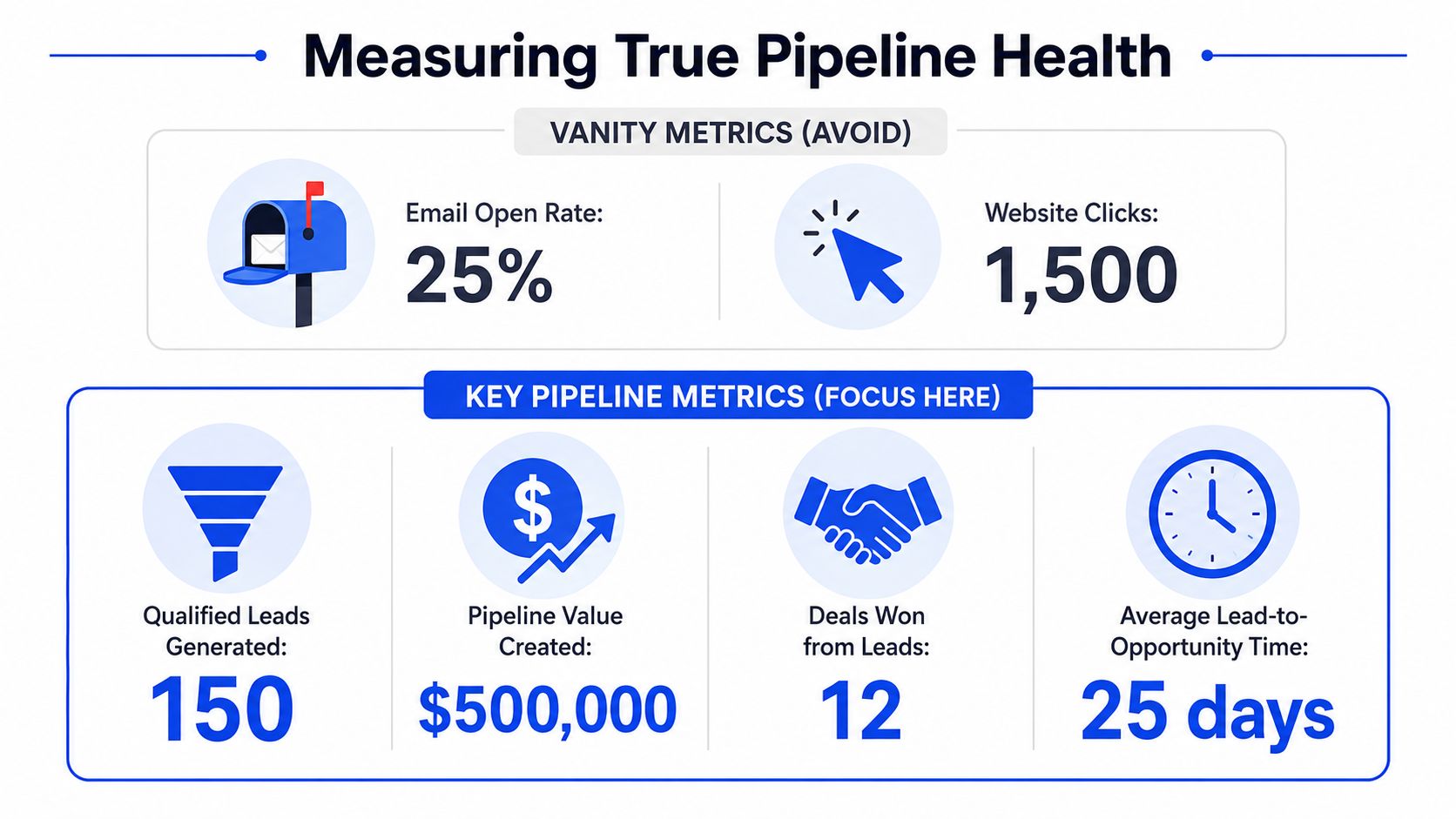
The key is to keep the definitions tight. "Positive reply" is not "anyone who responded." It means a reply that shows enough interest to justify human follow-up. "Qualified opportunity" is not "a meeting happened." It means the account passed the qualification rules defined in the previous section and sales accepted it into pipeline.
Teams lose reporting accuracy when marketing reports lead volume, SDRs report meetings, and sales reports pipeline in a separate system with different stage logic. Keep one reporting line across all three. HubSpot can handle this well if lifecycle stages, source properties, and outbound campaign IDs are set up cleanly. A spreadsheet can also work early on, but only if one person owns the definitions and updates them every sprint.
For teams combining outbound with brand and social activity, it also helps to understand how to track social media KPIs without mixing audience engagement with pipeline creation. Social data can explain context and assist prioritization. It should not sit beside opportunity metrics as if both carry the same business weight.
How to diagnose the bottleneck
A good dashboard narrows the problem fast.
If positive replies drop, check targeting, signal freshness, and whether the opener matches the trigger. If replies stay healthy but meetings stall, look at the CTA, first-response speed, and whether AEs are picking up context from the outbound thread. If meetings happen and opportunities still do not materialize, the issue is usually fit, urgency, or loose qualification standards.
Use a simple diagnostic view:
If this metric is weak | Look here first | Typical fix |
|---|---|---|
Positive reply rate | Trigger freshness, opener specificity | Tighten intake rules |
Reply-to-meeting | CTA, AE response speed | Rewrite response templates |
Meeting-held rate | Confirmation process, calendar friction | Add reminders and context |
Qualified opportunities | ICP fit, urgency questions | Tighten qualification rules |
Then split the same view by signal type, persona, and message angle. That is where the sprint model pays off. You can see whether funding-triggered accounts convert better than hiring-triggered accounts, whether VPs respond better than directors, and whether one problem statement creates more accepted pipeline than another. Those comparisons improve the system far faster than editing copy line by line.
If you need a starting point, use a lead generation KPI dashboard for pipeline reporting in HubSpot or in a shared spreadsheet. The tool is secondary. Consistent stage definitions, source tagging, and weekly review discipline are what make the numbers usable.
Start with one operational change this week. Add a required CRM field for trigger type on every new outbound-sourced lead, then review your last ten meetings and check which triggers produced qualified conversations.
Grou works with B2B teams globally to connect LinkedIn content, outbound, and qualification into one pipeline system. The methodology is sprint-based, signal-led, and built around one message, one target list, and one reporting line.
Your problem probably isn't channel count. It's that your team is running outbound, LinkedIn, content, and qualification as separate motions, so attention never turns into consistent pipeline. Most lead generation programs fail before launch because the ICP is loose, the timing is wrong, and replies sit too long.
Lock ICP, trigger, and message before list building
Replace static lists with signal-triggered intake
Run LinkedIn and email from one message map
Measure held meetings and qualified opportunities, not vanity activity
Table of Contents
The three pre-launch steps that determine success
The initial impulse is to write copy first because it feels like progress. It isn't. If you haven't locked who you're targeting, which trigger makes them timely, and how replies will move, you're writing messages for a market that doesn't exist yet.
Start with ICP and trigger lock
I run this as one working session, usually 90 minutes. The output is short on purpose. If the team can't state the target in one sentence, the campaign isn't ready.
You need three written outputs:
ICP sentence → industry, company size, geography, role, and the trigger that signals buying readiness
Offer sentence → what you sell, who it's for, and why now
Message map → three pains and three proof points the campaign can pull from
For teams still tightening audience boundaries, EmailScout's guide on identifying target customers is a useful prompt set because it forces specificity instead of broad personas. The same discipline matters when building an ideal customer profile framework that sales and marketing can use.
Practical rule: No list build starts until those three outputs are written and approved.
Pressure-test the message against wins and losses
Getting honest means reviewing a handful of closed-won deals and a handful of closed-lost deals, then looking for pattern matches. Wins show what the market values. Losses show the boundary your targeting should respect.
A weak process only studies success stories. A good process studies who looked like a fit and still didn't buy. That usually reveals one of three problems:
Signal from review | What it usually means | Adjustment |
|---|---|---|
Deals stall after discovery | Pain is real, urgency is weak | Tighten trigger definition |
Meetings book but don't qualify | Persona fit is loose | Narrow title and department |
Replies are polite but vague | Message sounds relevant, not urgent | Rewrite pain line around consequence |
Build infrastructure in parallel, not later
This track should start on day one, at the same time as ICP work. Dedicated sending domains, inbox rotation, SPF, DKIM, DMARC, warm-up inside Lemlist or Instantly, and volume caps per inbox all need time to settle. If you wait until messaging is “done,” launch gets pushed back for avoidable reasons.
This pre-launch window usually takes 7 to 14 days, and the infrastructure side often needs 14 to 21 days to mature properly, based on the operating pattern described in the brief above. That's why parallel execution matters. Sequential teams add dead time because each function waits for the previous one to finish.
A basic day-one stack looks like this:
Prospecting and data → Sales Navigator, Apollo, Clay
Sending → Instantly or Lemlist
CRM and routing → HubSpot
Team response layer → Slack for positive-reply alerts
The point of this phase isn't creativity. It's removing ambiguity before your first contact goes out. If you're trying to learn how to lead generation at a high level, this is the part most guides underweight because it looks operationally boring. It's also where performance gets decided.
Building lists with signal-triggered intake
Static lists create fake certainty. You load a few thousand contacts, launch a sequence, and hope the timing works out. It usually doesn't. The account may fit the ICP, but if nothing has changed inside that business recently, your message lands as background noise.
Why static lists underperform
The better approach is continuous intake based on signals. You keep the same ICP, but accounts only enter the queue when a relevant event fires. That changes the question from “who fits?” to “who fits right now?”
That shift matters because outreach guidance has moved away from brute-force volume. Recent guidance points to niche lists and highly specific openers as stronger than broad outreach, and the key question becomes “how do I make fewer, better touches with tighter targeting?” as noted in this YouTube discussion on outreach specificity and saturation.
If you need a shared definition for your team, build around one clear intent signal taxonomy before you automate anything. Otherwise Clay turns into an expensive way to collect random account activity.
How the intake workflow actually runs
In practice, Clay becomes the intake layer. It watches for trigger types that matter to your offer, then pushes matching accounts into the active queue. For SaaS, that might be hiring patterns, funding, leadership changes, or public posts about pipeline pressure. For manufacturing, it might be ERP migration signals, plant expansion, or supply-chain change.
The queue should carry context, not just contacts. A useful record includes:
Trigger type → what happened
Trigger date → how fresh it is
Target role → who should receive the first touch
Pain hypothesis → what likely changed for them
Proof angle → which case, category, or capability to mention
Here's the core trade-off. Static lists feel larger. Signal-triggered queues feel smaller. Smaller is often better because the SDR is working on accounts with live reasons to care.
A lot of teams also pair intake with workflow automation. If you're mapping handoffs and reminders around that queue, these sales funnel automation tips are useful for tightening task flow without adding admin overhead.
What to track inside the queue
The strongest evidence for this model is timing. In one operational pattern from the brief, replacing static prospecting with signal-triggered intake moved reply rates from 4% to 6% to 11% to 14% and improved meeting quality as well. I'm treating that as an example from the operator brief, not a general market benchmark.
For broader market context, the qualification gap is what matters. The average conversion rate from prospects to qualified leads is about 10%, while only 1%–6% of leads become customers, according to Superhuman Prospecting's review of common B2B lead gen mistakes. That's why bad timing hurts twice. You lose replies, then you waste AE time on weak conversations.
This video is useful if your team needs to see how signal-based prospecting works in an operational workflow, not just as a strategy point.
Crafting a unified message for LinkedIn and email
Teams often write channel-by-channel. One template for cold email, another for LinkedIn, then a third for content. That fragments the motion. The prospect experiences three different companies instead of one coordinated point of view.
Use one message map across both channels
The data supports a synchronized system. 94% of B2B marketers use LinkedIn for sales and lead generation efforts, 62% say LinkedIn is the leading lead generation platform, 81% rely on email as a key lead-generation channel, and email returns an average of $42 for every $1 spent, according to this Warmly lead generation statistics summary. If both channels matter this much, they shouldn't run on separate logic.
That means one message map, reused with channel-specific formatting:
Core pain stays the same
Proof point stays the same
Trigger reference stays the same
CTA format changes by channel
Your LinkedIn content strategy should also support the same narrative. If you're publishing while prospecting, map outbound pain points to your LinkedIn content strategy so comments, posts, and DMs reinforce each other instead of competing.
Keep the argument consistent. Change the wrapper, not the point of view.
The three-line LinkedIn DM structure
The best first-touch LinkedIn message is plain text and short enough to read in one glance. Three lines is enough.
Trigger reference
Saw you hired three SDRs in a short window.Named implication
Usually that means pipeline coverage is under pressure and ramp time matters fast.Soft question
Curious if that's resonating right now?
This works because it proves attention without flattery. It takes a position, and it asks for very little. The prospect can answer yes, no, or not now. That's a much easier decision than “book a call.”
The trigger matters more than the structure. In the operator brief, this format produced 18% to 24% reply rates when the trigger was fresh, 11% to 14% when older, and 5% to 8% with a generic opener. I'm keeping those as campaign-level operating figures from the brief, not universal benchmarks.
What to avoid in first-touch outreach
A few things consistently weaken the first message:
Generic compliments → “Impressed by your growth” tells the buyer nothing
Calendar links in first touch → too much commitment too early
Voice notes by default → more friction than value for cold outreach
Multi-paragraph context dumps → prospects save them for later, which usually means never
Decorative formatting → bullets, emojis, and styling can make a DM look manufactured
Email should mirror the same logic. Subject line tied to the trigger. Body focused on one consequence. One soft CTA. If you're learning how to lead generation in a mature B2B motion, this is the mental model to keep: one message system, two channels, zero mixed signals.
Running the engine with synchronized sprints
A lead gen engine works better as an operating rhythm than as a campaign calendar. I prefer two-week sprints because they force a review cycle that's short enough to catch drift but long enough to gather signal. In that window, content, outbound, and qualification all move together.
What a two-week sprint looks like
A clean sprint has one commercial theme, one trigger cluster, and one review meeting. If your SDRs are pushing one pain narrative while LinkedIn posts discuss something else, your market sees inconsistency.
A workable sprint structure looks like this:
Days 1 to 3 → refresh trigger queue, approve copy variants, align AE context
Days 4 to 8 → launch outreach, publish supporting LinkedIn posts, monitor replies
Days 9 to 10 → review objections, adjust pain framing, tighten targeting
Days 11 to 14 → second wave, sales feedback review, update qualification notes
Lead generation in major markets now leans heavily on owned and digital channels. 90.7% of marketers use websites to generate leads and sales, blogs are used by 89.2%, email by 69.2%, organic social by 65.9%, and PPC by 53.7%. In B2B, 87% of marketers say content marketing successfully generates leads, according to this Email Vendor Selection statistics roundup. The practical takeaway is simple. Publishing and outbound shouldn't be separate programs.
How one trigger turned into a closed deal
One example from the operator brief shows how this coordination works in real life. The account was a mid-market manufacturer that had recently gone through an ERP migration. The trigger wasn't abstract. It was a live operational change with a predictable pain window.
The sequence looked like this:
Day | Touch | What mattered |
|---|---|---|
0 | LinkedIn connection request | Trigger referenced plainly |
2 | Cold email | Subject tied to post-ERP period |
4 | LinkedIn comment | Reinforced relevance without pitch |
5 | Reply arrived | Routed fast to AE |
11 | Discovery call | Urgency, authority, timeline confirmed |
14 to 25 | Proposal and revision | Concerns handled directly |
31 | Contract signed | Multi-channel context held together |
The closed deal in that example was roughly €68,000 over 12 months, and the cycle from first contact to signature was 31 days. The reason it moved wasn't volume. It was coherence. Every touch pointed back to the same trigger and the same operating pain.
A synchronized campaign feels to the buyer like one ongoing conversation, not separate messages from separate systems.
This is also where a service layer can help if the internal team is fragmented. Grou is one option built around that model, combining LinkedIn content, outbound, qualification, and reporting into one sprint-based motion. The main point isn't the vendor choice. It's that someone must own the whole chain.
Routing replies and defining qualification rules
Replies need a processing layer. Without one, synchronized outbound creates interest faster than the team can sort it, and good conversations sit in a shared inbox until the buying window cools off.
I set this up before the first sequence goes live. If email runs through Instantly or Lemlist and LinkedIn replies land with SDRs or AEs, both streams still need one routing path, one owner, and one clock. The point is simple. Speed and context beat improvisation.
Set routing rules before launch
Routing should be systemized inside the stack, not handled case by case.
A workable baseline looks like this:
Positive replies post to the AE Slack channel within five minutes
AE first response goes out within 30 minutes during business hours
Context block includes the original outbound message, trigger, persona, company, and account notes
Ownership is assigned before launch, by segment or named account
Disqualified replies get coded with a reason so scoring can be adjusted in the next sprint
Slack is usually the easiest alert layer because the whole pod can see whether replies are getting picked up. HubSpot, Salesforce, and most sequencing tools can handle the logging. The trade-off is noise. If every neutral response triggers the same alert as a high-intent reply, reps stop trusting the channel. Keep the routing logic tight.
Teams that want a more structured model usually document the stages, disqualification reasons, and handoff rules in a formal lead qualification process. That work pays off once volume rises above a few dozen live conversations per week.
Qualify on fit and live urgency
The qualification model needs two lenses. Fit answers whether the account belongs in the pipe. Urgency answers whether it belongs there now.
Fit is usually stable. Industry, employee range, geography, tech stack, role seniority, and operating model tell you whether the account matches the ICP you defined earlier. Urgency changes fast. Fresh trigger, direct ownership of the problem, active evaluation, internal pressure, and a clear timeline matter more than opens or clicks once a human replies.
That is why the first AE response should not jump straight to demo scheduling. It should confirm the problem, the owner, and the timing. One question often gets there fast:
What's driving this for you right now?
That wording surfaces the true reason behind the reply. Budget pressure. A system rollout. Missed targets. An upcoming renewal. If the answer is vague, keep the opportunity in nurture instead of forcing it into pipeline.
You can also use behavioral context from social engagement, but only as support, not as proof of intent. If your team wants to track social media KPIs, use those signals to prioritize outreach and enrich reply context, not to override fit or urgency.
Where the handoff usually fails
The breaks are operational, not mysterious.
Reps mark “interested” as qualified when no timeline, owner, or problem has been confirmed
Positive replies sit too long because no one owns the first response SLA
Scoring models overweight activity such as opens, clicks, or profile views
Sales feedback never returns to RevOps so bad-fit accounts keep getting enrolled
Strategic accounts get auto-routed with no human review, even when the reply is ambiguous
For larger deals, I keep automated scoring as a filter, then add manual review for accounts that could become meaningful pipeline. That slows the process slightly, but it prevents bad routing on complex deals where one short reply can mean very different things depending on the account history.
The pattern is consistent. Predictable pipeline comes from disciplined reply handling, clear qualification rules, and fast handoff between systems and people. Clever copy gets the response. Structure determines whether the response turns into revenue.
The KPI dashboard that actually measures pipeline
Monday morning, the team has 40 positive replies from last week, three meetings booked, and one opportunity that sales accepted. If the dashboard still celebrates opens, clicks, and connection accepts, nobody can explain where the other 36 replies went.
A useful pipeline dashboard follows one path. Enrollment to reply. Reply to meeting. Meeting to qualified opportunity. That structure matters more than how polished the charts look, because it shows where the engine breaks inside a sprint.
The dashboard fields that matter
Start with stage-to-stage conversion, not top-of-funnel activity. If a metric does not help the team make a routing, targeting, or follow-up decision, remove it.
Track these fields every week:
Contacts enrolled
Positive reply rate
Reply-to-meeting conversion
Meeting-held rate
Qualified opportunities created
Cost per qualified opportunity
The key is to keep the definitions tight. "Positive reply" is not "anyone who responded." It means a reply that shows enough interest to justify human follow-up. "Qualified opportunity" is not "a meeting happened." It means the account passed the qualification rules defined in the previous section and sales accepted it into pipeline.
Teams lose reporting accuracy when marketing reports lead volume, SDRs report meetings, and sales reports pipeline in a separate system with different stage logic. Keep one reporting line across all three. HubSpot can handle this well if lifecycle stages, source properties, and outbound campaign IDs are set up cleanly. A spreadsheet can also work early on, but only if one person owns the definitions and updates them every sprint.
For teams combining outbound with brand and social activity, it also helps to understand how to track social media KPIs without mixing audience engagement with pipeline creation. Social data can explain context and assist prioritization. It should not sit beside opportunity metrics as if both carry the same business weight.
How to diagnose the bottleneck
A good dashboard narrows the problem fast.
If positive replies drop, check targeting, signal freshness, and whether the opener matches the trigger. If replies stay healthy but meetings stall, look at the CTA, first-response speed, and whether AEs are picking up context from the outbound thread. If meetings happen and opportunities still do not materialize, the issue is usually fit, urgency, or loose qualification standards.
Use a simple diagnostic view:
If this metric is weak | Look here first | Typical fix |
|---|---|---|
Positive reply rate | Trigger freshness, opener specificity | Tighten intake rules |
Reply-to-meeting | CTA, AE response speed | Rewrite response templates |
Meeting-held rate | Confirmation process, calendar friction | Add reminders and context |
Qualified opportunities | ICP fit, urgency questions | Tighten qualification rules |
Then split the same view by signal type, persona, and message angle. That is where the sprint model pays off. You can see whether funding-triggered accounts convert better than hiring-triggered accounts, whether VPs respond better than directors, and whether one problem statement creates more accepted pipeline than another. Those comparisons improve the system far faster than editing copy line by line.
If you need a starting point, use a lead generation KPI dashboard for pipeline reporting in HubSpot or in a shared spreadsheet. The tool is secondary. Consistent stage definitions, source tagging, and weekly review discipline are what make the numbers usable.
Start with one operational change this week. Add a required CRM field for trigger type on every new outbound-sourced lead, then review your last ten meetings and check which triggers produced qualified conversations.
Grou works with B2B teams globally to connect LinkedIn content, outbound, and qualification into one pipeline system. The methodology is sprint-based, signal-led, and built around one message, one target list, and one reporting line.
Your problem probably isn't channel count. It's that your team is running outbound, LinkedIn, content, and qualification as separate motions, so attention never turns into consistent pipeline. Most lead generation programs fail before launch because the ICP is loose, the timing is wrong, and replies sit too long.
Lock ICP, trigger, and message before list building
Replace static lists with signal-triggered intake
Run LinkedIn and email from one message map
Measure held meetings and qualified opportunities, not vanity activity
Table of Contents
The three pre-launch steps that determine success
The initial impulse is to write copy first because it feels like progress. It isn't. If you haven't locked who you're targeting, which trigger makes them timely, and how replies will move, you're writing messages for a market that doesn't exist yet.
Start with ICP and trigger lock
I run this as one working session, usually 90 minutes. The output is short on purpose. If the team can't state the target in one sentence, the campaign isn't ready.
You need three written outputs:
ICP sentence → industry, company size, geography, role, and the trigger that signals buying readiness
Offer sentence → what you sell, who it's for, and why now
Message map → three pains and three proof points the campaign can pull from
For teams still tightening audience boundaries, EmailScout's guide on identifying target customers is a useful prompt set because it forces specificity instead of broad personas. The same discipline matters when building an ideal customer profile framework that sales and marketing can use.
Practical rule: No list build starts until those three outputs are written and approved.
Pressure-test the message against wins and losses
Getting honest means reviewing a handful of closed-won deals and a handful of closed-lost deals, then looking for pattern matches. Wins show what the market values. Losses show the boundary your targeting should respect.
A weak process only studies success stories. A good process studies who looked like a fit and still didn't buy. That usually reveals one of three problems:
Signal from review | What it usually means | Adjustment |
|---|---|---|
Deals stall after discovery | Pain is real, urgency is weak | Tighten trigger definition |
Meetings book but don't qualify | Persona fit is loose | Narrow title and department |
Replies are polite but vague | Message sounds relevant, not urgent | Rewrite pain line around consequence |
Build infrastructure in parallel, not later
This track should start on day one, at the same time as ICP work. Dedicated sending domains, inbox rotation, SPF, DKIM, DMARC, warm-up inside Lemlist or Instantly, and volume caps per inbox all need time to settle. If you wait until messaging is “done,” launch gets pushed back for avoidable reasons.
This pre-launch window usually takes 7 to 14 days, and the infrastructure side often needs 14 to 21 days to mature properly, based on the operating pattern described in the brief above. That's why parallel execution matters. Sequential teams add dead time because each function waits for the previous one to finish.
A basic day-one stack looks like this:
Prospecting and data → Sales Navigator, Apollo, Clay
Sending → Instantly or Lemlist
CRM and routing → HubSpot
Team response layer → Slack for positive-reply alerts
The point of this phase isn't creativity. It's removing ambiguity before your first contact goes out. If you're trying to learn how to lead generation at a high level, this is the part most guides underweight because it looks operationally boring. It's also where performance gets decided.
Building lists with signal-triggered intake
Static lists create fake certainty. You load a few thousand contacts, launch a sequence, and hope the timing works out. It usually doesn't. The account may fit the ICP, but if nothing has changed inside that business recently, your message lands as background noise.
Why static lists underperform
The better approach is continuous intake based on signals. You keep the same ICP, but accounts only enter the queue when a relevant event fires. That changes the question from “who fits?” to “who fits right now?”
That shift matters because outreach guidance has moved away from brute-force volume. Recent guidance points to niche lists and highly specific openers as stronger than broad outreach, and the key question becomes “how do I make fewer, better touches with tighter targeting?” as noted in this YouTube discussion on outreach specificity and saturation.
If you need a shared definition for your team, build around one clear intent signal taxonomy before you automate anything. Otherwise Clay turns into an expensive way to collect random account activity.
How the intake workflow actually runs
In practice, Clay becomes the intake layer. It watches for trigger types that matter to your offer, then pushes matching accounts into the active queue. For SaaS, that might be hiring patterns, funding, leadership changes, or public posts about pipeline pressure. For manufacturing, it might be ERP migration signals, plant expansion, or supply-chain change.
The queue should carry context, not just contacts. A useful record includes:
Trigger type → what happened
Trigger date → how fresh it is
Target role → who should receive the first touch
Pain hypothesis → what likely changed for them
Proof angle → which case, category, or capability to mention
Here's the core trade-off. Static lists feel larger. Signal-triggered queues feel smaller. Smaller is often better because the SDR is working on accounts with live reasons to care.
A lot of teams also pair intake with workflow automation. If you're mapping handoffs and reminders around that queue, these sales funnel automation tips are useful for tightening task flow without adding admin overhead.
What to track inside the queue
The strongest evidence for this model is timing. In one operational pattern from the brief, replacing static prospecting with signal-triggered intake moved reply rates from 4% to 6% to 11% to 14% and improved meeting quality as well. I'm treating that as an example from the operator brief, not a general market benchmark.
For broader market context, the qualification gap is what matters. The average conversion rate from prospects to qualified leads is about 10%, while only 1%–6% of leads become customers, according to Superhuman Prospecting's review of common B2B lead gen mistakes. That's why bad timing hurts twice. You lose replies, then you waste AE time on weak conversations.
This video is useful if your team needs to see how signal-based prospecting works in an operational workflow, not just as a strategy point.
Crafting a unified message for LinkedIn and email
Teams often write channel-by-channel. One template for cold email, another for LinkedIn, then a third for content. That fragments the motion. The prospect experiences three different companies instead of one coordinated point of view.
Use one message map across both channels
The data supports a synchronized system. 94% of B2B marketers use LinkedIn for sales and lead generation efforts, 62% say LinkedIn is the leading lead generation platform, 81% rely on email as a key lead-generation channel, and email returns an average of $42 for every $1 spent, according to this Warmly lead generation statistics summary. If both channels matter this much, they shouldn't run on separate logic.
That means one message map, reused with channel-specific formatting:
Core pain stays the same
Proof point stays the same
Trigger reference stays the same
CTA format changes by channel
Your LinkedIn content strategy should also support the same narrative. If you're publishing while prospecting, map outbound pain points to your LinkedIn content strategy so comments, posts, and DMs reinforce each other instead of competing.
Keep the argument consistent. Change the wrapper, not the point of view.
The three-line LinkedIn DM structure
The best first-touch LinkedIn message is plain text and short enough to read in one glance. Three lines is enough.
Trigger reference
Saw you hired three SDRs in a short window.Named implication
Usually that means pipeline coverage is under pressure and ramp time matters fast.Soft question
Curious if that's resonating right now?
This works because it proves attention without flattery. It takes a position, and it asks for very little. The prospect can answer yes, no, or not now. That's a much easier decision than “book a call.”
The trigger matters more than the structure. In the operator brief, this format produced 18% to 24% reply rates when the trigger was fresh, 11% to 14% when older, and 5% to 8% with a generic opener. I'm keeping those as campaign-level operating figures from the brief, not universal benchmarks.
What to avoid in first-touch outreach
A few things consistently weaken the first message:
Generic compliments → “Impressed by your growth” tells the buyer nothing
Calendar links in first touch → too much commitment too early
Voice notes by default → more friction than value for cold outreach
Multi-paragraph context dumps → prospects save them for later, which usually means never
Decorative formatting → bullets, emojis, and styling can make a DM look manufactured
Email should mirror the same logic. Subject line tied to the trigger. Body focused on one consequence. One soft CTA. If you're learning how to lead generation in a mature B2B motion, this is the mental model to keep: one message system, two channels, zero mixed signals.
Running the engine with synchronized sprints
A lead gen engine works better as an operating rhythm than as a campaign calendar. I prefer two-week sprints because they force a review cycle that's short enough to catch drift but long enough to gather signal. In that window, content, outbound, and qualification all move together.
What a two-week sprint looks like
A clean sprint has one commercial theme, one trigger cluster, and one review meeting. If your SDRs are pushing one pain narrative while LinkedIn posts discuss something else, your market sees inconsistency.
A workable sprint structure looks like this:
Days 1 to 3 → refresh trigger queue, approve copy variants, align AE context
Days 4 to 8 → launch outreach, publish supporting LinkedIn posts, monitor replies
Days 9 to 10 → review objections, adjust pain framing, tighten targeting
Days 11 to 14 → second wave, sales feedback review, update qualification notes
Lead generation in major markets now leans heavily on owned and digital channels. 90.7% of marketers use websites to generate leads and sales, blogs are used by 89.2%, email by 69.2%, organic social by 65.9%, and PPC by 53.7%. In B2B, 87% of marketers say content marketing successfully generates leads, according to this Email Vendor Selection statistics roundup. The practical takeaway is simple. Publishing and outbound shouldn't be separate programs.
How one trigger turned into a closed deal
One example from the operator brief shows how this coordination works in real life. The account was a mid-market manufacturer that had recently gone through an ERP migration. The trigger wasn't abstract. It was a live operational change with a predictable pain window.
The sequence looked like this:
Day | Touch | What mattered |
|---|---|---|
0 | LinkedIn connection request | Trigger referenced plainly |
2 | Cold email | Subject tied to post-ERP period |
4 | LinkedIn comment | Reinforced relevance without pitch |
5 | Reply arrived | Routed fast to AE |
11 | Discovery call | Urgency, authority, timeline confirmed |
14 to 25 | Proposal and revision | Concerns handled directly |
31 | Contract signed | Multi-channel context held together |
The closed deal in that example was roughly €68,000 over 12 months, and the cycle from first contact to signature was 31 days. The reason it moved wasn't volume. It was coherence. Every touch pointed back to the same trigger and the same operating pain.
A synchronized campaign feels to the buyer like one ongoing conversation, not separate messages from separate systems.
This is also where a service layer can help if the internal team is fragmented. Grou is one option built around that model, combining LinkedIn content, outbound, qualification, and reporting into one sprint-based motion. The main point isn't the vendor choice. It's that someone must own the whole chain.
Routing replies and defining qualification rules
Replies need a processing layer. Without one, synchronized outbound creates interest faster than the team can sort it, and good conversations sit in a shared inbox until the buying window cools off.
I set this up before the first sequence goes live. If email runs through Instantly or Lemlist and LinkedIn replies land with SDRs or AEs, both streams still need one routing path, one owner, and one clock. The point is simple. Speed and context beat improvisation.
Set routing rules before launch
Routing should be systemized inside the stack, not handled case by case.
A workable baseline looks like this:
Positive replies post to the AE Slack channel within five minutes
AE first response goes out within 30 minutes during business hours
Context block includes the original outbound message, trigger, persona, company, and account notes
Ownership is assigned before launch, by segment or named account
Disqualified replies get coded with a reason so scoring can be adjusted in the next sprint
Slack is usually the easiest alert layer because the whole pod can see whether replies are getting picked up. HubSpot, Salesforce, and most sequencing tools can handle the logging. The trade-off is noise. If every neutral response triggers the same alert as a high-intent reply, reps stop trusting the channel. Keep the routing logic tight.
Teams that want a more structured model usually document the stages, disqualification reasons, and handoff rules in a formal lead qualification process. That work pays off once volume rises above a few dozen live conversations per week.
Qualify on fit and live urgency
The qualification model needs two lenses. Fit answers whether the account belongs in the pipe. Urgency answers whether it belongs there now.
Fit is usually stable. Industry, employee range, geography, tech stack, role seniority, and operating model tell you whether the account matches the ICP you defined earlier. Urgency changes fast. Fresh trigger, direct ownership of the problem, active evaluation, internal pressure, and a clear timeline matter more than opens or clicks once a human replies.
That is why the first AE response should not jump straight to demo scheduling. It should confirm the problem, the owner, and the timing. One question often gets there fast:
What's driving this for you right now?
That wording surfaces the true reason behind the reply. Budget pressure. A system rollout. Missed targets. An upcoming renewal. If the answer is vague, keep the opportunity in nurture instead of forcing it into pipeline.
You can also use behavioral context from social engagement, but only as support, not as proof of intent. If your team wants to track social media KPIs, use those signals to prioritize outreach and enrich reply context, not to override fit or urgency.
Where the handoff usually fails
The breaks are operational, not mysterious.
Reps mark “interested” as qualified when no timeline, owner, or problem has been confirmed
Positive replies sit too long because no one owns the first response SLA
Scoring models overweight activity such as opens, clicks, or profile views
Sales feedback never returns to RevOps so bad-fit accounts keep getting enrolled
Strategic accounts get auto-routed with no human review, even when the reply is ambiguous
For larger deals, I keep automated scoring as a filter, then add manual review for accounts that could become meaningful pipeline. That slows the process slightly, but it prevents bad routing on complex deals where one short reply can mean very different things depending on the account history.
The pattern is consistent. Predictable pipeline comes from disciplined reply handling, clear qualification rules, and fast handoff between systems and people. Clever copy gets the response. Structure determines whether the response turns into revenue.
The KPI dashboard that actually measures pipeline
Monday morning, the team has 40 positive replies from last week, three meetings booked, and one opportunity that sales accepted. If the dashboard still celebrates opens, clicks, and connection accepts, nobody can explain where the other 36 replies went.
A useful pipeline dashboard follows one path. Enrollment to reply. Reply to meeting. Meeting to qualified opportunity. That structure matters more than how polished the charts look, because it shows where the engine breaks inside a sprint.
The dashboard fields that matter
Start with stage-to-stage conversion, not top-of-funnel activity. If a metric does not help the team make a routing, targeting, or follow-up decision, remove it.
Track these fields every week:
Contacts enrolled
Positive reply rate
Reply-to-meeting conversion
Meeting-held rate
Qualified opportunities created
Cost per qualified opportunity
The key is to keep the definitions tight. "Positive reply" is not "anyone who responded." It means a reply that shows enough interest to justify human follow-up. "Qualified opportunity" is not "a meeting happened." It means the account passed the qualification rules defined in the previous section and sales accepted it into pipeline.
Teams lose reporting accuracy when marketing reports lead volume, SDRs report meetings, and sales reports pipeline in a separate system with different stage logic. Keep one reporting line across all three. HubSpot can handle this well if lifecycle stages, source properties, and outbound campaign IDs are set up cleanly. A spreadsheet can also work early on, but only if one person owns the definitions and updates them every sprint.
For teams combining outbound with brand and social activity, it also helps to understand how to track social media KPIs without mixing audience engagement with pipeline creation. Social data can explain context and assist prioritization. It should not sit beside opportunity metrics as if both carry the same business weight.
How to diagnose the bottleneck
A good dashboard narrows the problem fast.
If positive replies drop, check targeting, signal freshness, and whether the opener matches the trigger. If replies stay healthy but meetings stall, look at the CTA, first-response speed, and whether AEs are picking up context from the outbound thread. If meetings happen and opportunities still do not materialize, the issue is usually fit, urgency, or loose qualification standards.
Use a simple diagnostic view:
If this metric is weak | Look here first | Typical fix |
|---|---|---|
Positive reply rate | Trigger freshness, opener specificity | Tighten intake rules |
Reply-to-meeting | CTA, AE response speed | Rewrite response templates |
Meeting-held rate | Confirmation process, calendar friction | Add reminders and context |
Qualified opportunities | ICP fit, urgency questions | Tighten qualification rules |
Then split the same view by signal type, persona, and message angle. That is where the sprint model pays off. You can see whether funding-triggered accounts convert better than hiring-triggered accounts, whether VPs respond better than directors, and whether one problem statement creates more accepted pipeline than another. Those comparisons improve the system far faster than editing copy line by line.
If you need a starting point, use a lead generation KPI dashboard for pipeline reporting in HubSpot or in a shared spreadsheet. The tool is secondary. Consistent stage definitions, source tagging, and weekly review discipline are what make the numbers usable.
Start with one operational change this week. Add a required CRM field for trigger type on every new outbound-sourced lead, then review your last ten meetings and check which triggers produced qualified conversations.
Grou works with B2B teams globally to connect LinkedIn content, outbound, and qualification into one pipeline system. The methodology is sprint-based, signal-led, and built around one message, one target list, and one reporting line.

Pipeline OS Newsletter
Build qualified pipeline
Get weekly tactics to generate demand, improve lead quality, and book more meetings.





Trusted by industry leaders
Trusted by industry leaders
Trusted by industry leaders
Ready to build qualified pipeline?
Ready to build qualified pipeline?
Ready to build qualified pipeline?
Book a call to see if we're the right fit, or take the 2-minute quiz to get a clear starting point.
Book a call to see if we're the right fit, or take the 2-minute quiz to get a clear starting point.
Book a call to see if we're the right fit, or take the 2-minute quiz to get a clear starting point.
" height="30.21639343089746px" id="hfGbXmQR2" width="30.216393430897455px"/></svg>)
Copyright © 2026 – All Right Reserved
Copyright © 2026 – All Right Reserved
Copyright © 2026 – All Right Reserved