%22%3E%3C/path%3E%3Cpath d=%22M 63.072 7.554 C 62.258 8.022 61.577 8.689 61.092 9.493 L 61.092 7.076 L 57.158 7.076 L 57.158 22.64 L 61.089 22.64 L 61.089 14.888 C 61.089 13.446 61.403 12.434 62.03 11.853 C 62.818 11.218 63.818 10.907 64.826 10.982 L 65.868 10.982 L 65.868 6.851 C 64.891 6.834 63.926 7.076 63.073 7.554 Z%22 fill=%22rgb(17,17,17)%22%3E%3C/path%3E%3Cpath d=%22M 78.916 7.82 C 76.363 6.49 73.321 6.49 70.768 7.82 C 69.562 8.473 68.564 9.451 67.888 10.644 C 67.167 11.931 66.803 13.387 66.834 14.862 C 66.804 16.332 67.157 17.785 67.86 19.077 C 68.515 20.267 69.494 21.246 70.684 21.901 C 71.924 22.576 73.318 22.92 74.73 22.898 C 76.164 22.918 77.58 22.575 78.846 21.901 C 80.062 21.247 81.073 20.27 81.768 19.077 C 82.506 17.797 82.88 16.339 82.85 14.862 C 82.88 13.389 82.517 11.934 81.797 10.647 C 81.12 9.455 80.122 8.477 78.917 7.824 M 78.803 14.862 C 78.829 15.739 78.636 16.608 78.241 17.391 C 77.903 18.046 77.38 18.588 76.738 18.95 C 76.124 19.293 75.432 19.472 74.729 19.47 C 73.668 19.497 72.648 19.061 71.934 18.276 C 71.139 17.323 70.741 16.1 70.823 14.862 C 70.741 13.62 71.149 12.395 71.959 11.45 C 72.687 10.667 73.715 10.233 74.783 10.256 C 75.859 10.236 76.894 10.67 77.635 11.45 C 78.464 12.387 78.884 13.616 78.801 14.864%22 fill=%22rgb(17,17,17)%22%3E%3C/path%3E%3Cpath d=%22M 95.906 7.076 L 95.906 15.646 C 95.975 16.68 95.643 17.701 94.979 18.498 C 94.311 19.184 93.379 19.547 92.422 19.495 C 91.475 19.544 90.553 19.18 89.894 18.498 C 89.23 17.701 88.898 16.68 88.967 15.646 L 88.967 7.076 L 85.033 7.076 L 85.033 16.207 C 85 17.449 85.275 18.68 85.834 19.79 C 86.327 20.75 87.095 21.542 88.039 22.065 C 89.033 22.594 90.145 22.861 91.271 22.838 C 92.188 22.847 93.095 22.65 93.926 22.263 C 94.708 21.905 95.388 21.36 95.906 20.675 L 95.906 22.645 L 99.865 22.645 L 99.865 7.076 Z%22 fill=%22rgb(17,17,17)%22%3E%3C/path%3E%3Cpath d=%22M 4.513 15.626 C 4.511 10.815 7.606 6.549 12.181 5.059 C 16.756 3.57 21.77 5.195 24.601 9.086 L 27.816 5.87 C 24.074 1.186 17.981 -0.943 12.137 0.393 C 6.292 1.728 1.728 6.292 0.393 12.137 C -0.943 17.981 1.186 24.074 5.87 27.816 L 9.085 24.601 C 6.214 22.512 4.515 19.177 4.513 15.626%22 fill=%22rgb(32,62,235)%22%3E%3C/path%3E%3Cpath d=%22M 17.114 14.343 L 13.354 18.01 L 13.354 18.026 L 21.071 18.026 L 11.412 27.609 L 17.389 27.609 L 23.999 21.081 L 23.999 28.316 L 24.005 28.316 L 27.967 24.393 L 27.967 14.343 Z%22 fill=%22rgb(32,62,235)%22%3E%3C/path%3E%3C/g%3E%3C/svg%3E) ×
× ××
××›
›
›
›
How to get more connections on LinkedIn: 9 ways that work
How to get more connections on LinkedIn: 9 ways that work
How to get more connections on LinkedIn: 9 ways that work
How to get more connections on LinkedIn: 9 ways that work
How to get more connections on LinkedIn: 9 ways that work
How to get more connections on LinkedIn: 9 ways that work

Author
Aljaz Peklaj

Your connection count is climbing, but the accepts are coming from peers, vendors, and people in markets you'll never sell into. The buyers on your target account list haven't accepted. That's the actual problem you need to fix.
Build for weak ties. Connect with adjacent buyers, partners, and second-degree contacts who can open new circles.
Fix the profile first. Make your role, market, and proof legible before you send anything.
Send daily from an ICP list. Run a steady cadence, not weekly blasts, and score sends by downstream replies.
Route every accept in HubSpot. Track segment, sender, reply, meeting, and pipeline, not vanity counts.
Table of Contents
The problem with most connection advice
Most advice on how to get more connections on LinkedIn treats the count as the win. For a founder or head of sales, that count is useless if the network can't buy, refer, or introduce you to someone who can. You've probably seen this already. Accepts arrive, nobody replies, and your content lands with people outside your ICP.
That happens because the usual advice skips structure. It tells you to post more, comment more, and send more requests, without telling you who should receive them or how you'll know if any of it created a conversation worth having.
Connections are an input, not a score
Treat every new connection as pipeline input with a defined job. Some people are direct buyers. Others are partners who serve the same accounts, operators who amplify your content in the right rooms, or second-degree contacts who can make a warm introduction later.
If a prospect fits none of those roles, don't send. A big network of the wrong people dilutes your feed, wastes follow-up capacity, and gives you false confidence. A smaller network built around buyers, partners, and relevant peers gives you distribution where it counts.
Operator rule: If you can't name the commercial reason for a connection in one line, that request doesn't go out today.
You'll also need to stop judging this work by accept rate alone. Acceptance tells you targeting and profile credibility are probably fine. It doesn't tell you whether anyone replied, booked, or referred. Those downstream steps are where revenue lives.
For a broader view of how connection work fits into outbound, LinkedIn B2B lead generation covers the channel in the context of a wider demand system. Your job is narrower and harder. You need a governed system with list rules, message rules, sender limits, and CRM routing, all tied to qualified conversations.
That's the standard for everything that follows here. Daily cadence, a clear note versus blank decision, a tool stack that respects account limits, and a HubSpot dashboard that proves whether connection growth produced meetings. Anything that doesn't move those numbers is busywork, even when the connection count goes up.
Why weak ties beat big networks
Close colleagues already know what you know. They sit in the same accounts, read the same posts, and hear about the same openings. Adding more of them feels safe, but it rarely puts you in front of a new buyer.
The evidence points elsewhere. A randomized experiment published in Science in 2022 analyzed more than 20 million LinkedIn members over five years, with roughly 2 billion new connections formed during the study period, according to MIT's summary of the LinkedIn weak ties experiment. The strongest outcomes came from moderately weak ties, not close friends.
Connections sharing roughly 10 mutual contacts produced the strongest employment-related outcomes, and the benefit declined as networks became more redundant, as reported in the Science study on weak ties and job mobility. Very strong ties overlapped too much. Extremely weak ties lacked enough shared context to matter.

The targeting rule that follows
Split your prospect universe into three buckets before you send a single request.
Existing network: Direct peers, current colleagues, and people you already know well. Connect, but don't count this as growth work.
Adjacent network: Second-degree buyers, ecosystem partners, conference speakers, specialists serving your buyer, and operators at adjacent companies. Send here first.
Cold network: Relevant titles with no mutual contacts, shared event, or market overlap. Send last, and only with a clear reason.
Start in the adjacent bucket. Those prospects have enough overlap for your request to feel credible, and enough distance to expose you to new accounts, new information, and new introductions. For SaaS, iGaming, and other digitally intensive sectors, that exposure matters because buying groups shift fast and referrals travel through loose professional ties.
Your comments do supporting work here, too. Show up on posts your adjacent network already reads, add a specific observation, and let recognition build before you connect. A structured approach to commenting for visibility with target accounts turns cold names into familiar ones, which makes the later request feel like a continuation rather than an interruption (a small thing, but buyers notice consistency).
Don't chase the visible 500+ milestone for its own sake. Build a mixed network. Weak ties give you discovery and market access. A smaller set of high-context relationships gives you replies, engagement, and introductions. That mix is what converts network design into qualified conversations, which is the B2B equivalent of the mobility outcome the research measured.
Profile and value proposition that earn accepts
When a prospect opens your request, they don't study your profile. They scan it for three seconds and decide whether you're a peer worth accepting or a salesperson working a list. Your profile has to answer that fast.
Start with the headline. State who you help, in which market, and what changes for them, in plain words a buyer would use. A job title alone tells them nothing. A headline that names their role and your outcome gives them a reason to keep reading.
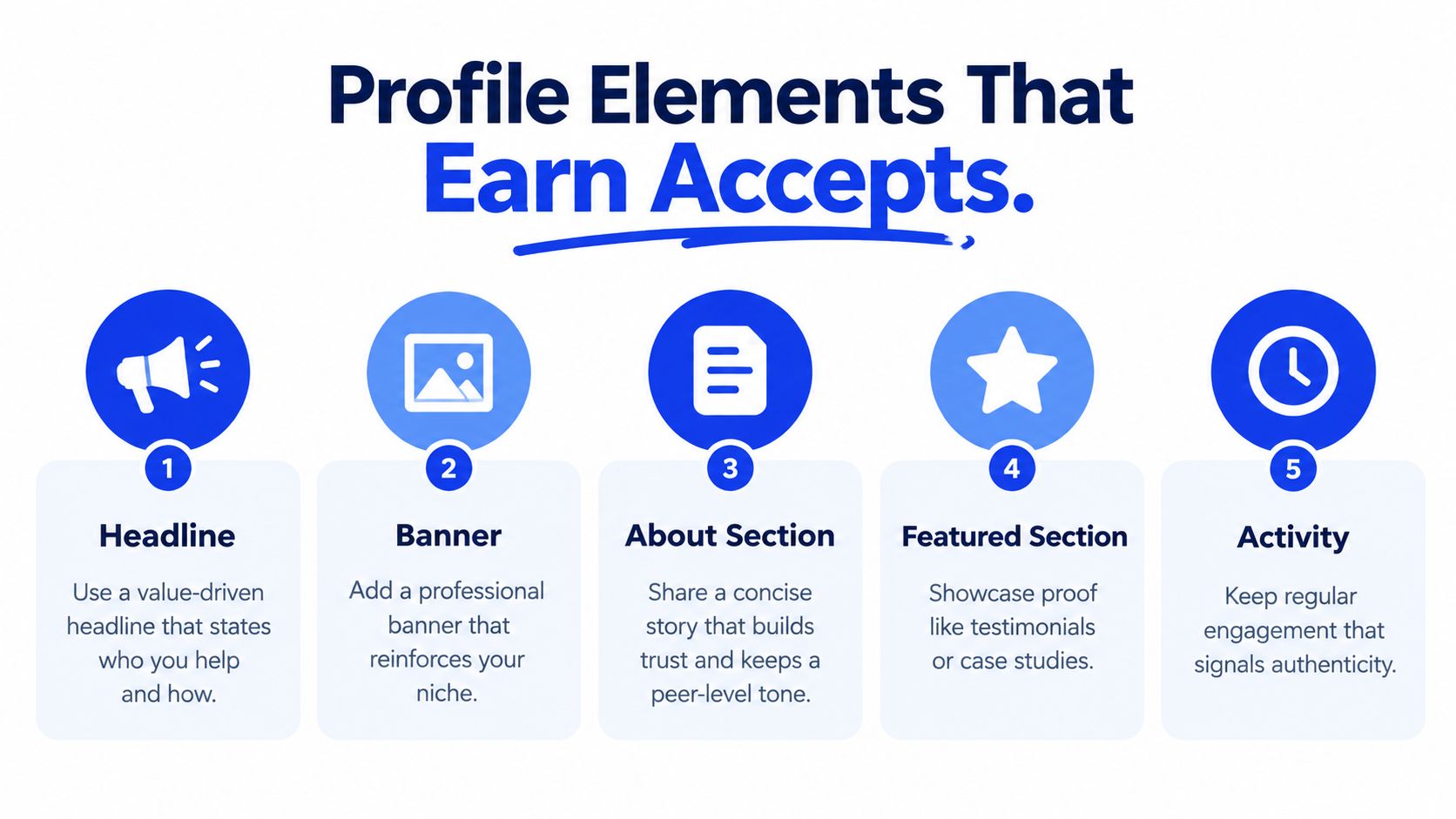
The pre-send checklist
Fix these elements before any outreach sprint starts.
Banner: Show one relevant proof point, your market, or the buyer outcome you sell. Leave the generic skyline image behind.
About section: Write in first person. Name the companies you serve, the problem you work on, and what a good outcome looks like for that buyer.
Featured section: Pin one credibility asset. A case study, newsletter, product walkthrough, or recorded talk beats a wall of links every time.
Experience: Describe results and responsibilities in buyer language, not internal titles and task lists.
Recent activity: Post or comment in your buyer's industry every week. An empty activity feed signals a dormant account that only woke up to pitch.
If you want a deeper walkthrough of each element, profile optimization for LinkedIn outreach breaks down the mechanics step by step. Treat that work as part of outreach, not personal branding for its own sake. The profile is the landing page every request points to.
Founder profiles need extra care because buyers check whether a real operator is behind the request. Our guide to profile setup for B2B founders doing outbound covers the founder-specific version of this checklist. The principle stays the same for any sender. Credibility first, volume second.
Review sender profiles every sprint, not once a year. Markets shift, offers change, and a headline written for last year's ICP will depress accept rates for this year's list. When acceptance drops, check the profile before you blame the message. In our experience, the profile is the problem more often than teams want to admit.
Building an ICP aligned prospect list
Good connection growth starts in the list, not in the message. Define a narrow ideal connection profile first → role and seniority → industry and geography → company size → buying relevance to a named segment. If you can't describe the segment in one sentence, it's too broad to send to.
Layer buying signals on top of firmographics. Recent senior hires, new market entry, hiring patterns in the function you sell to, and technology changes all give you a reason to prioritize one account over another. Signals decide order. ICP fit decides eligibility.
The stack that builds the list
Use each tool for the job it's good at.
Sales Navigator: Boolean title searches, saved lead lists per segment, and filters for seniority, geography, and tenure in role.
Apollo: Company and contact data at scale when you need broad coverage across a defined ICP.
Clay: Enrichment waterfalls and signal scoring, so each row carries title, seniority, company size, and the trigger that earned its place.
HubSpot: The system of record. Every contact and company lands here with segment, owner, and source before outreach begins.
If your ICP definition is still a paragraph in a strategy doc, fix that first. A working ICP definition your team can filter and score against turns list building from guesswork into a repeatable query. That definition drives every saved search you build.
The operating loop
Run the same loop every sprint. Define the segment, build the saved search, enrich the list, score it by fit and signal, then route each prospect to the right sender account based on persona and geography. Founders connect with founders. Sales leads connect with commercial buyers. Matching sender to prospect raises credibility before you've written a word.
Your output each sprint should be concrete. One saved search per segment, one enrichment pass, and a short top tier of highest-fit prospects flagged for personalized requests. The broader qualified list gets standard requests. That split matters because personalization capacity is limited, and spending it evenly across a big list wastes it where it would have counted most (teams that spread personalization evenly across a large list often leave their best replies on the table).
Reject list padding. A segment that produces accepts but no ICP-relevant buyers is worse than a small segment, because it consumes sender capacity and follow-up time. Cut it and rebuild.
Daily outreach cadence and message rules
Send a small, steady number of requests every working day instead of big weekly batches. Our operating pace is roughly 25 to 30 connection requests per sender account per working day, about 125 to 150 per week, with no weekend sends. Steady daily activity looks natural, keeps accounts healthy, and produces a predictable flow of accepts you can follow up.
Bursts create two problems. They spike account risk, and they dump accepts on your team faster than anyone can reply well. Daily sending spreads both the risk and the workload.
Blank request or note
Here's the verdict up front. Send most requests blank, and spend your notes where a reply matters most.
Across 16,492 tracked requests, acceptance was nearly identical at 26.42% with notes and 26.37% without, while personalized requests produced a 9.36% reply rate versus 5.44% without a message, according to Botdog's analysis of LinkedIn acceptance and reply rates. Notes don't buy accepts. They buy conversations.
That matches what we see in client campaigns. A blank request from a relevant profile reads like a peer connecting. A note that pitches gets ignored. Save the personalized message for after acceptance, where it can open with an observation about their role and end with one question they can answer in a line.
Prospect type | Recommended request | Reason |
|---|---|---|
High-fit buyer at a target account | Short personalized note | Reply quality matters more than the accept itself |
Referral path or mutual contact intro | Short personalized note | Named context makes the bridge credible |
Adjacent peer in your ICP segment | Blank request | Profile relevance carries the accept on its own |
Broader qualified list member | Blank request | Save personalization effort for the first message |
Rules for the note itself
When you do write one, keep it to one verifiable context point → a shared event → a post they wrote → a mutual contact → a shared customer type. Say nothing about what you sell. Make no ask. The note earns the connection, the first message earns the reply.
Timing matters for measurement, too. In that same dataset, most acceptances landed within the first day, but the tail ran for weeks. Check early performance at 24 hours to catch targeting problems, then keep attribution open for at least 30 days before you judge a segment. Closing the window early makes good segments look weak and pushes you toward volume you don't need.
Review the cadence every two weeks. Compare segments on acceptance, accepted-to-reply rate, and qualified conversations, and test one variable at a time. If a segment accepts well but never replies, your targeting is fine and your first message is the problem.
Automation, safety, and sender health
Automation should execute your cadence, not invent one. The tool sends at the pace you set, inside working hours, to the list you built. If the strategy is wrong, the tool just makes the mistake faster and puts the account at risk while doing it.
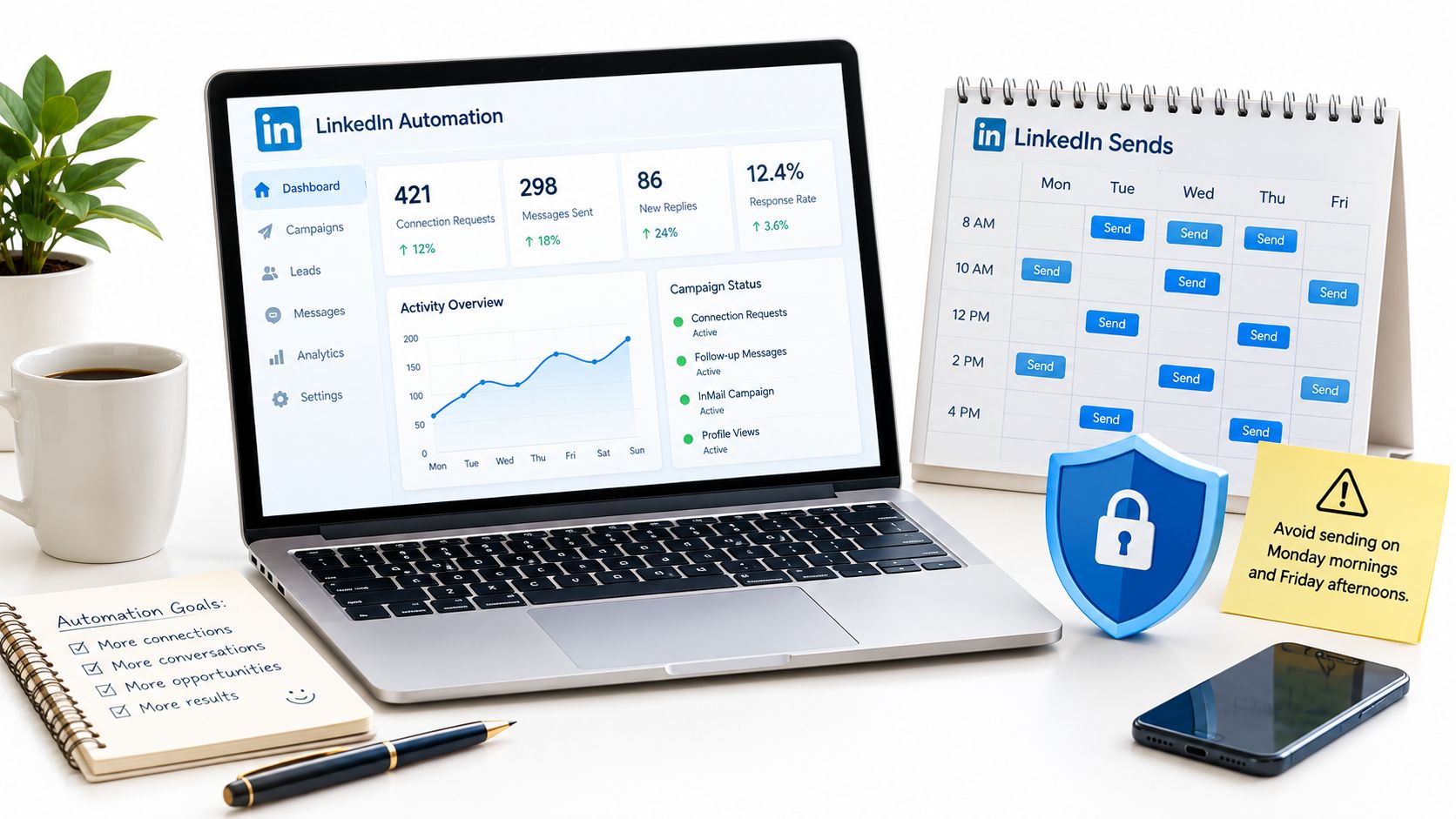
Safety rules that keep accounts alive
Spread sends across working hours. Avoid Monday morning and Friday afternoon spikes that look like batch jobs.
Pause when acceptance falls sharply. A sudden drop means targeting or profile problems. Fix those before sending more.
Warm up new sender accounts. Start below your normal daily pace and build up over the first sprints.
Rotate by segment, not randomly. Each sender owns a persona and geography, so prospects see a coherent peer, not a pool account.
Withdraw stale pending invites. Old unanswered requests signal low relevance and clutter your attribution.
Personalization capacity is a hard constraint, not a preference. LinkedIn limits free members to three connection requests per month with a personalized message, each capped at 200 characters, per LinkedIn's help documentation on personalized invitation limits. Premium removes that monthly message cap, but overall request limits still apply. Reserve custom notes for high-fit accounts and referral paths.
Our breakdown of connection limits and account warm-up practices covers the pacing detail if you're setting this up for several senders at once. Get the limits right before you pick software.
Picking the tool
HeyReach wins for LinkedIn-first teams because it models invite limits and multi-sender rotation natively. Lemlist wins when you want LinkedIn, email, and calls inside one sequence. Smartlead and Instantly win for email-heavy plays where LinkedIn is a supporting step. Pick based on your primary channel, not feature count.
If you want to see how a structured sending system is usually assembled, you can browse the LinkedIn system for a reference architecture. The tooling choice is secondary either way. List quality and sender credibility decide results.
The short walkthrough below shows the dashboard view we use to keep daily volume, acceptance, and replies visible in one place.
Set the limits once, review sender health weekly, and treat any restriction warning as a stop signal, not a challenge. An account that stays live for years compounds. An account burned in a quarter takes your network access with it (and rebuilding a founder profile from zero is a miserable quarter).
Qualifying, routing, and proving pipeline impact
An accepted connection is not a lead. It's permission to start a conversation, nothing more. Your qualification rule should be strict. A connection counts as qualified only when it matches the ICP, holds a role that can buy or refer, and shows a commercial signal such as a reply, content engagement, a profile view back, or a clear referral path into a target account.
Anything less stays a connection, not pipeline. That distinction protects your sales team from chasing friendly accepts that will never convert, and it keeps your reporting honest.
CRM fields that make attribution possible
Add these fields in HubSpot before your next sprint. Without them, you'll argue about LinkedIn's value from memory instead of data.
Connection source: Campaign or sprint that produced the request
Campaign segment: The ICP segment and bucket, existing, adjacent, or cold
Sender account: Which profile sent the request
Accept date: When the connection was confirmed
First reply date: When a real conversation started
Qualification status: Qualified, nurture, or not a fit
Meeting date: When the first call was held
Closed won amount: Revenue tied back to the original segment
With those fields in place, your weekly dashboard writes itself. The core set we track for lead generation reporting that revenue leaders actually trust covers the same logic across channels. For LinkedIn specifically, watch acceptance rate by segment, accepted-to-reply rate, reply-to-meeting rate, meeting-to-opportunity rate, and sourced pipeline per sprint.
Routing rules after acceptance
Speed decides whether a reply becomes a meeting. Route hot replies to a named sales owner within one hour, with the segment and signal attached so they don't open cold. Warm replies that show interest without timing go into a nurture sequence with content matched to their role. Cold accepts with no engagement after 30 days move to a low-touch newsletter list, where they cost you nothing and may resurface when timing changes.
Don't pitch in the first message after acceptance. Open with an observation about their work, ask one question they can answer in a line, and let the reply tell you whether there's a commercial thread worth pulling. Acceptance is not permission to sell, and treating it that way is how good lists produce bad reply rates.
The diagnostic rule
Across 13.2 million tracked requests, the average LinkedIn acceptance rate was approximately 28.5%, ranging from roughly 17.5% to 40.1% by industry, per Expandi's benchmark analysis of LinkedIn acceptance rates. Treat anything under 20% as a diagnostic signal. Audit targeting, sender positioning, and profile completeness before you send another request. More volume on a broken segment only burns sender health faster.
A segment that produces accepts without replies is a targeting success and a messaging failure. Fix the right one.
Read the funnel in order. Low acceptance points at list and profile. Good acceptance with weak replies points at the first message. Good replies with few meetings points at qualification and routing speed. Each stage has a different owner and a different fix, which is exactly why connection count alone tells you nothing.
Your next step this week
Founders, audit acceptance rate by segment this Friday and cut any segment under 20%. Heads of marketing, build the eight CRM fields above by Monday. RevOps leads, pull accepted-to-reply rate by sender on Tuesday and tag the underperformers for profile review. One action, one owner, one deadline.
A daily, governed, ICP-anchored system beats any volume push. The teams that win treat connections as pipeline input scored by downstream outcomes, and they can prove it in the CRM.
GROU is a B2B pipeline agency trusted by more than 50 companies across iGaming, SaaS, manufacturing, and professional services. We unify LinkedIn content, lead generation, and outbound into one system with one message, one target list, and one reporting line, so structure turns attention into pipeline.
If your network is growing but your meeting calendar isn't, the fix is segment discipline, sender credibility, and CRM routing, not more requests. Grou builds and runs that system for B2B teams, from ICP list building and LinkedIn content through outbound sequences and pipeline reporting. Visit us to see how we'd structure your first sprint.
Your connection count is climbing, but the accepts are coming from peers, vendors, and people in markets you'll never sell into. The buyers on your target account list haven't accepted. That's the actual problem you need to fix.
Build for weak ties. Connect with adjacent buyers, partners, and second-degree contacts who can open new circles.
Fix the profile first. Make your role, market, and proof legible before you send anything.
Send daily from an ICP list. Run a steady cadence, not weekly blasts, and score sends by downstream replies.
Route every accept in HubSpot. Track segment, sender, reply, meeting, and pipeline, not vanity counts.
Table of Contents
The problem with most connection advice
Most advice on how to get more connections on LinkedIn treats the count as the win. For a founder or head of sales, that count is useless if the network can't buy, refer, or introduce you to someone who can. You've probably seen this already. Accepts arrive, nobody replies, and your content lands with people outside your ICP.
That happens because the usual advice skips structure. It tells you to post more, comment more, and send more requests, without telling you who should receive them or how you'll know if any of it created a conversation worth having.
Connections are an input, not a score
Treat every new connection as pipeline input with a defined job. Some people are direct buyers. Others are partners who serve the same accounts, operators who amplify your content in the right rooms, or second-degree contacts who can make a warm introduction later.
If a prospect fits none of those roles, don't send. A big network of the wrong people dilutes your feed, wastes follow-up capacity, and gives you false confidence. A smaller network built around buyers, partners, and relevant peers gives you distribution where it counts.
Operator rule: If you can't name the commercial reason for a connection in one line, that request doesn't go out today.
You'll also need to stop judging this work by accept rate alone. Acceptance tells you targeting and profile credibility are probably fine. It doesn't tell you whether anyone replied, booked, or referred. Those downstream steps are where revenue lives.
For a broader view of how connection work fits into outbound, LinkedIn B2B lead generation covers the channel in the context of a wider demand system. Your job is narrower and harder. You need a governed system with list rules, message rules, sender limits, and CRM routing, all tied to qualified conversations.
That's the standard for everything that follows here. Daily cadence, a clear note versus blank decision, a tool stack that respects account limits, and a HubSpot dashboard that proves whether connection growth produced meetings. Anything that doesn't move those numbers is busywork, even when the connection count goes up.
Why weak ties beat big networks
Close colleagues already know what you know. They sit in the same accounts, read the same posts, and hear about the same openings. Adding more of them feels safe, but it rarely puts you in front of a new buyer.
The evidence points elsewhere. A randomized experiment published in Science in 2022 analyzed more than 20 million LinkedIn members over five years, with roughly 2 billion new connections formed during the study period, according to MIT's summary of the LinkedIn weak ties experiment. The strongest outcomes came from moderately weak ties, not close friends.
Connections sharing roughly 10 mutual contacts produced the strongest employment-related outcomes, and the benefit declined as networks became more redundant, as reported in the Science study on weak ties and job mobility. Very strong ties overlapped too much. Extremely weak ties lacked enough shared context to matter.
The targeting rule that follows
Split your prospect universe into three buckets before you send a single request.
Existing network: Direct peers, current colleagues, and people you already know well. Connect, but don't count this as growth work.
Adjacent network: Second-degree buyers, ecosystem partners, conference speakers, specialists serving your buyer, and operators at adjacent companies. Send here first.
Cold network: Relevant titles with no mutual contacts, shared event, or market overlap. Send last, and only with a clear reason.
Start in the adjacent bucket. Those prospects have enough overlap for your request to feel credible, and enough distance to expose you to new accounts, new information, and new introductions. For SaaS, iGaming, and other digitally intensive sectors, that exposure matters because buying groups shift fast and referrals travel through loose professional ties.
Your comments do supporting work here, too. Show up on posts your adjacent network already reads, add a specific observation, and let recognition build before you connect. A structured approach to commenting for visibility with target accounts turns cold names into familiar ones, which makes the later request feel like a continuation rather than an interruption (a small thing, but buyers notice consistency).
Don't chase the visible 500+ milestone for its own sake. Build a mixed network. Weak ties give you discovery and market access. A smaller set of high-context relationships gives you replies, engagement, and introductions. That mix is what converts network design into qualified conversations, which is the B2B equivalent of the mobility outcome the research measured.
Profile and value proposition that earn accepts
When a prospect opens your request, they don't study your profile. They scan it for three seconds and decide whether you're a peer worth accepting or a salesperson working a list. Your profile has to answer that fast.
Start with the headline. State who you help, in which market, and what changes for them, in plain words a buyer would use. A job title alone tells them nothing. A headline that names their role and your outcome gives them a reason to keep reading.
The pre-send checklist
Fix these elements before any outreach sprint starts.
Banner: Show one relevant proof point, your market, or the buyer outcome you sell. Leave the generic skyline image behind.
About section: Write in first person. Name the companies you serve, the problem you work on, and what a good outcome looks like for that buyer.
Featured section: Pin one credibility asset. A case study, newsletter, product walkthrough, or recorded talk beats a wall of links every time.
Experience: Describe results and responsibilities in buyer language, not internal titles and task lists.
Recent activity: Post or comment in your buyer's industry every week. An empty activity feed signals a dormant account that only woke up to pitch.
If you want a deeper walkthrough of each element, profile optimization for LinkedIn outreach breaks down the mechanics step by step. Treat that work as part of outreach, not personal branding for its own sake. The profile is the landing page every request points to.
Founder profiles need extra care because buyers check whether a real operator is behind the request. Our guide to profile setup for B2B founders doing outbound covers the founder-specific version of this checklist. The principle stays the same for any sender. Credibility first, volume second.
Review sender profiles every sprint, not once a year. Markets shift, offers change, and a headline written for last year's ICP will depress accept rates for this year's list. When acceptance drops, check the profile before you blame the message. In our experience, the profile is the problem more often than teams want to admit.
Building an ICP aligned prospect list
Good connection growth starts in the list, not in the message. Define a narrow ideal connection profile first → role and seniority → industry and geography → company size → buying relevance to a named segment. If you can't describe the segment in one sentence, it's too broad to send to.
Layer buying signals on top of firmographics. Recent senior hires, new market entry, hiring patterns in the function you sell to, and technology changes all give you a reason to prioritize one account over another. Signals decide order. ICP fit decides eligibility.
The stack that builds the list
Use each tool for the job it's good at.
Sales Navigator: Boolean title searches, saved lead lists per segment, and filters for seniority, geography, and tenure in role.
Apollo: Company and contact data at scale when you need broad coverage across a defined ICP.
Clay: Enrichment waterfalls and signal scoring, so each row carries title, seniority, company size, and the trigger that earned its place.
HubSpot: The system of record. Every contact and company lands here with segment, owner, and source before outreach begins.
If your ICP definition is still a paragraph in a strategy doc, fix that first. A working ICP definition your team can filter and score against turns list building from guesswork into a repeatable query. That definition drives every saved search you build.
The operating loop
Run the same loop every sprint. Define the segment, build the saved search, enrich the list, score it by fit and signal, then route each prospect to the right sender account based on persona and geography. Founders connect with founders. Sales leads connect with commercial buyers. Matching sender to prospect raises credibility before you've written a word.
Your output each sprint should be concrete. One saved search per segment, one enrichment pass, and a short top tier of highest-fit prospects flagged for personalized requests. The broader qualified list gets standard requests. That split matters because personalization capacity is limited, and spending it evenly across a big list wastes it where it would have counted most (teams that spread personalization evenly across a large list often leave their best replies on the table).
Reject list padding. A segment that produces accepts but no ICP-relevant buyers is worse than a small segment, because it consumes sender capacity and follow-up time. Cut it and rebuild.
Daily outreach cadence and message rules
Send a small, steady number of requests every working day instead of big weekly batches. Our operating pace is roughly 25 to 30 connection requests per sender account per working day, about 125 to 150 per week, with no weekend sends. Steady daily activity looks natural, keeps accounts healthy, and produces a predictable flow of accepts you can follow up.
Bursts create two problems. They spike account risk, and they dump accepts on your team faster than anyone can reply well. Daily sending spreads both the risk and the workload.
Blank request or note
Here's the verdict up front. Send most requests blank, and spend your notes where a reply matters most.
Across 16,492 tracked requests, acceptance was nearly identical at 26.42% with notes and 26.37% without, while personalized requests produced a 9.36% reply rate versus 5.44% without a message, according to Botdog's analysis of LinkedIn acceptance and reply rates. Notes don't buy accepts. They buy conversations.
That matches what we see in client campaigns. A blank request from a relevant profile reads like a peer connecting. A note that pitches gets ignored. Save the personalized message for after acceptance, where it can open with an observation about their role and end with one question they can answer in a line.
Prospect type | Recommended request | Reason |
|---|---|---|
High-fit buyer at a target account | Short personalized note | Reply quality matters more than the accept itself |
Referral path or mutual contact intro | Short personalized note | Named context makes the bridge credible |
Adjacent peer in your ICP segment | Blank request | Profile relevance carries the accept on its own |
Broader qualified list member | Blank request | Save personalization effort for the first message |
Rules for the note itself
When you do write one, keep it to one verifiable context point → a shared event → a post they wrote → a mutual contact → a shared customer type. Say nothing about what you sell. Make no ask. The note earns the connection, the first message earns the reply.
Timing matters for measurement, too. In that same dataset, most acceptances landed within the first day, but the tail ran for weeks. Check early performance at 24 hours to catch targeting problems, then keep attribution open for at least 30 days before you judge a segment. Closing the window early makes good segments look weak and pushes you toward volume you don't need.
Review the cadence every two weeks. Compare segments on acceptance, accepted-to-reply rate, and qualified conversations, and test one variable at a time. If a segment accepts well but never replies, your targeting is fine and your first message is the problem.
Automation, safety, and sender health
Automation should execute your cadence, not invent one. The tool sends at the pace you set, inside working hours, to the list you built. If the strategy is wrong, the tool just makes the mistake faster and puts the account at risk while doing it.
Safety rules that keep accounts alive
Spread sends across working hours. Avoid Monday morning and Friday afternoon spikes that look like batch jobs.
Pause when acceptance falls sharply. A sudden drop means targeting or profile problems. Fix those before sending more.
Warm up new sender accounts. Start below your normal daily pace and build up over the first sprints.
Rotate by segment, not randomly. Each sender owns a persona and geography, so prospects see a coherent peer, not a pool account.
Withdraw stale pending invites. Old unanswered requests signal low relevance and clutter your attribution.
Personalization capacity is a hard constraint, not a preference. LinkedIn limits free members to three connection requests per month with a personalized message, each capped at 200 characters, per LinkedIn's help documentation on personalized invitation limits. Premium removes that monthly message cap, but overall request limits still apply. Reserve custom notes for high-fit accounts and referral paths.
Our breakdown of connection limits and account warm-up practices covers the pacing detail if you're setting this up for several senders at once. Get the limits right before you pick software.
Picking the tool
HeyReach wins for LinkedIn-first teams because it models invite limits and multi-sender rotation natively. Lemlist wins when you want LinkedIn, email, and calls inside one sequence. Smartlead and Instantly win for email-heavy plays where LinkedIn is a supporting step. Pick based on your primary channel, not feature count.
If you want to see how a structured sending system is usually assembled, you can browse the LinkedIn system for a reference architecture. The tooling choice is secondary either way. List quality and sender credibility decide results.
The short walkthrough below shows the dashboard view we use to keep daily volume, acceptance, and replies visible in one place.
Set the limits once, review sender health weekly, and treat any restriction warning as a stop signal, not a challenge. An account that stays live for years compounds. An account burned in a quarter takes your network access with it (and rebuilding a founder profile from zero is a miserable quarter).
Qualifying, routing, and proving pipeline impact
An accepted connection is not a lead. It's permission to start a conversation, nothing more. Your qualification rule should be strict. A connection counts as qualified only when it matches the ICP, holds a role that can buy or refer, and shows a commercial signal such as a reply, content engagement, a profile view back, or a clear referral path into a target account.
Anything less stays a connection, not pipeline. That distinction protects your sales team from chasing friendly accepts that will never convert, and it keeps your reporting honest.
CRM fields that make attribution possible
Add these fields in HubSpot before your next sprint. Without them, you'll argue about LinkedIn's value from memory instead of data.
Connection source: Campaign or sprint that produced the request
Campaign segment: The ICP segment and bucket, existing, adjacent, or cold
Sender account: Which profile sent the request
Accept date: When the connection was confirmed
First reply date: When a real conversation started
Qualification status: Qualified, nurture, or not a fit
Meeting date: When the first call was held
Closed won amount: Revenue tied back to the original segment
With those fields in place, your weekly dashboard writes itself. The core set we track for lead generation reporting that revenue leaders actually trust covers the same logic across channels. For LinkedIn specifically, watch acceptance rate by segment, accepted-to-reply rate, reply-to-meeting rate, meeting-to-opportunity rate, and sourced pipeline per sprint.
Routing rules after acceptance
Speed decides whether a reply becomes a meeting. Route hot replies to a named sales owner within one hour, with the segment and signal attached so they don't open cold. Warm replies that show interest without timing go into a nurture sequence with content matched to their role. Cold accepts with no engagement after 30 days move to a low-touch newsletter list, where they cost you nothing and may resurface when timing changes.
Don't pitch in the first message after acceptance. Open with an observation about their work, ask one question they can answer in a line, and let the reply tell you whether there's a commercial thread worth pulling. Acceptance is not permission to sell, and treating it that way is how good lists produce bad reply rates.
The diagnostic rule
Across 13.2 million tracked requests, the average LinkedIn acceptance rate was approximately 28.5%, ranging from roughly 17.5% to 40.1% by industry, per Expandi's benchmark analysis of LinkedIn acceptance rates. Treat anything under 20% as a diagnostic signal. Audit targeting, sender positioning, and profile completeness before you send another request. More volume on a broken segment only burns sender health faster.
A segment that produces accepts without replies is a targeting success and a messaging failure. Fix the right one.
Read the funnel in order. Low acceptance points at list and profile. Good acceptance with weak replies points at the first message. Good replies with few meetings points at qualification and routing speed. Each stage has a different owner and a different fix, which is exactly why connection count alone tells you nothing.
Your next step this week
Founders, audit acceptance rate by segment this Friday and cut any segment under 20%. Heads of marketing, build the eight CRM fields above by Monday. RevOps leads, pull accepted-to-reply rate by sender on Tuesday and tag the underperformers for profile review. One action, one owner, one deadline.
A daily, governed, ICP-anchored system beats any volume push. The teams that win treat connections as pipeline input scored by downstream outcomes, and they can prove it in the CRM.
GROU is a B2B pipeline agency trusted by more than 50 companies across iGaming, SaaS, manufacturing, and professional services. We unify LinkedIn content, lead generation, and outbound into one system with one message, one target list, and one reporting line, so structure turns attention into pipeline.
If your network is growing but your meeting calendar isn't, the fix is segment discipline, sender credibility, and CRM routing, not more requests. Grou builds and runs that system for B2B teams, from ICP list building and LinkedIn content through outbound sequences and pipeline reporting. Visit us to see how we'd structure your first sprint.
Your connection count is climbing, but the accepts are coming from peers, vendors, and people in markets you'll never sell into. The buyers on your target account list haven't accepted. That's the actual problem you need to fix.
Build for weak ties. Connect with adjacent buyers, partners, and second-degree contacts who can open new circles.
Fix the profile first. Make your role, market, and proof legible before you send anything.
Send daily from an ICP list. Run a steady cadence, not weekly blasts, and score sends by downstream replies.
Route every accept in HubSpot. Track segment, sender, reply, meeting, and pipeline, not vanity counts.
Table of Contents
The problem with most connection advice
Most advice on how to get more connections on LinkedIn treats the count as the win. For a founder or head of sales, that count is useless if the network can't buy, refer, or introduce you to someone who can. You've probably seen this already. Accepts arrive, nobody replies, and your content lands with people outside your ICP.
That happens because the usual advice skips structure. It tells you to post more, comment more, and send more requests, without telling you who should receive them or how you'll know if any of it created a conversation worth having.
Connections are an input, not a score
Treat every new connection as pipeline input with a defined job. Some people are direct buyers. Others are partners who serve the same accounts, operators who amplify your content in the right rooms, or second-degree contacts who can make a warm introduction later.
If a prospect fits none of those roles, don't send. A big network of the wrong people dilutes your feed, wastes follow-up capacity, and gives you false confidence. A smaller network built around buyers, partners, and relevant peers gives you distribution where it counts.
Operator rule: If you can't name the commercial reason for a connection in one line, that request doesn't go out today.
You'll also need to stop judging this work by accept rate alone. Acceptance tells you targeting and profile credibility are probably fine. It doesn't tell you whether anyone replied, booked, or referred. Those downstream steps are where revenue lives.
For a broader view of how connection work fits into outbound, LinkedIn B2B lead generation covers the channel in the context of a wider demand system. Your job is narrower and harder. You need a governed system with list rules, message rules, sender limits, and CRM routing, all tied to qualified conversations.
That's the standard for everything that follows here. Daily cadence, a clear note versus blank decision, a tool stack that respects account limits, and a HubSpot dashboard that proves whether connection growth produced meetings. Anything that doesn't move those numbers is busywork, even when the connection count goes up.
Why weak ties beat big networks
Close colleagues already know what you know. They sit in the same accounts, read the same posts, and hear about the same openings. Adding more of them feels safe, but it rarely puts you in front of a new buyer.
The evidence points elsewhere. A randomized experiment published in Science in 2022 analyzed more than 20 million LinkedIn members over five years, with roughly 2 billion new connections formed during the study period, according to MIT's summary of the LinkedIn weak ties experiment. The strongest outcomes came from moderately weak ties, not close friends.
Connections sharing roughly 10 mutual contacts produced the strongest employment-related outcomes, and the benefit declined as networks became more redundant, as reported in the Science study on weak ties and job mobility. Very strong ties overlapped too much. Extremely weak ties lacked enough shared context to matter.
The targeting rule that follows
Split your prospect universe into three buckets before you send a single request.
Existing network: Direct peers, current colleagues, and people you already know well. Connect, but don't count this as growth work.
Adjacent network: Second-degree buyers, ecosystem partners, conference speakers, specialists serving your buyer, and operators at adjacent companies. Send here first.
Cold network: Relevant titles with no mutual contacts, shared event, or market overlap. Send last, and only with a clear reason.
Start in the adjacent bucket. Those prospects have enough overlap for your request to feel credible, and enough distance to expose you to new accounts, new information, and new introductions. For SaaS, iGaming, and other digitally intensive sectors, that exposure matters because buying groups shift fast and referrals travel through loose professional ties.
Your comments do supporting work here, too. Show up on posts your adjacent network already reads, add a specific observation, and let recognition build before you connect. A structured approach to commenting for visibility with target accounts turns cold names into familiar ones, which makes the later request feel like a continuation rather than an interruption (a small thing, but buyers notice consistency).
Don't chase the visible 500+ milestone for its own sake. Build a mixed network. Weak ties give you discovery and market access. A smaller set of high-context relationships gives you replies, engagement, and introductions. That mix is what converts network design into qualified conversations, which is the B2B equivalent of the mobility outcome the research measured.
Profile and value proposition that earn accepts
When a prospect opens your request, they don't study your profile. They scan it for three seconds and decide whether you're a peer worth accepting or a salesperson working a list. Your profile has to answer that fast.
Start with the headline. State who you help, in which market, and what changes for them, in plain words a buyer would use. A job title alone tells them nothing. A headline that names their role and your outcome gives them a reason to keep reading.
The pre-send checklist
Fix these elements before any outreach sprint starts.
Banner: Show one relevant proof point, your market, or the buyer outcome you sell. Leave the generic skyline image behind.
About section: Write in first person. Name the companies you serve, the problem you work on, and what a good outcome looks like for that buyer.
Featured section: Pin one credibility asset. A case study, newsletter, product walkthrough, or recorded talk beats a wall of links every time.
Experience: Describe results and responsibilities in buyer language, not internal titles and task lists.
Recent activity: Post or comment in your buyer's industry every week. An empty activity feed signals a dormant account that only woke up to pitch.
If you want a deeper walkthrough of each element, profile optimization for LinkedIn outreach breaks down the mechanics step by step. Treat that work as part of outreach, not personal branding for its own sake. The profile is the landing page every request points to.
Founder profiles need extra care because buyers check whether a real operator is behind the request. Our guide to profile setup for B2B founders doing outbound covers the founder-specific version of this checklist. The principle stays the same for any sender. Credibility first, volume second.
Review sender profiles every sprint, not once a year. Markets shift, offers change, and a headline written for last year's ICP will depress accept rates for this year's list. When acceptance drops, check the profile before you blame the message. In our experience, the profile is the problem more often than teams want to admit.
Building an ICP aligned prospect list
Good connection growth starts in the list, not in the message. Define a narrow ideal connection profile first → role and seniority → industry and geography → company size → buying relevance to a named segment. If you can't describe the segment in one sentence, it's too broad to send to.
Layer buying signals on top of firmographics. Recent senior hires, new market entry, hiring patterns in the function you sell to, and technology changes all give you a reason to prioritize one account over another. Signals decide order. ICP fit decides eligibility.
The stack that builds the list
Use each tool for the job it's good at.
Sales Navigator: Boolean title searches, saved lead lists per segment, and filters for seniority, geography, and tenure in role.
Apollo: Company and contact data at scale when you need broad coverage across a defined ICP.
Clay: Enrichment waterfalls and signal scoring, so each row carries title, seniority, company size, and the trigger that earned its place.
HubSpot: The system of record. Every contact and company lands here with segment, owner, and source before outreach begins.
If your ICP definition is still a paragraph in a strategy doc, fix that first. A working ICP definition your team can filter and score against turns list building from guesswork into a repeatable query. That definition drives every saved search you build.
The operating loop
Run the same loop every sprint. Define the segment, build the saved search, enrich the list, score it by fit and signal, then route each prospect to the right sender account based on persona and geography. Founders connect with founders. Sales leads connect with commercial buyers. Matching sender to prospect raises credibility before you've written a word.
Your output each sprint should be concrete. One saved search per segment, one enrichment pass, and a short top tier of highest-fit prospects flagged for personalized requests. The broader qualified list gets standard requests. That split matters because personalization capacity is limited, and spending it evenly across a big list wastes it where it would have counted most (teams that spread personalization evenly across a large list often leave their best replies on the table).
Reject list padding. A segment that produces accepts but no ICP-relevant buyers is worse than a small segment, because it consumes sender capacity and follow-up time. Cut it and rebuild.
Daily outreach cadence and message rules
Send a small, steady number of requests every working day instead of big weekly batches. Our operating pace is roughly 25 to 30 connection requests per sender account per working day, about 125 to 150 per week, with no weekend sends. Steady daily activity looks natural, keeps accounts healthy, and produces a predictable flow of accepts you can follow up.
Bursts create two problems. They spike account risk, and they dump accepts on your team faster than anyone can reply well. Daily sending spreads both the risk and the workload.
Blank request or note
Here's the verdict up front. Send most requests blank, and spend your notes where a reply matters most.
Across 16,492 tracked requests, acceptance was nearly identical at 26.42% with notes and 26.37% without, while personalized requests produced a 9.36% reply rate versus 5.44% without a message, according to Botdog's analysis of LinkedIn acceptance and reply rates. Notes don't buy accepts. They buy conversations.
That matches what we see in client campaigns. A blank request from a relevant profile reads like a peer connecting. A note that pitches gets ignored. Save the personalized message for after acceptance, where it can open with an observation about their role and end with one question they can answer in a line.
Prospect type | Recommended request | Reason |
|---|---|---|
High-fit buyer at a target account | Short personalized note | Reply quality matters more than the accept itself |
Referral path or mutual contact intro | Short personalized note | Named context makes the bridge credible |
Adjacent peer in your ICP segment | Blank request | Profile relevance carries the accept on its own |
Broader qualified list member | Blank request | Save personalization effort for the first message |
Rules for the note itself
When you do write one, keep it to one verifiable context point → a shared event → a post they wrote → a mutual contact → a shared customer type. Say nothing about what you sell. Make no ask. The note earns the connection, the first message earns the reply.
Timing matters for measurement, too. In that same dataset, most acceptances landed within the first day, but the tail ran for weeks. Check early performance at 24 hours to catch targeting problems, then keep attribution open for at least 30 days before you judge a segment. Closing the window early makes good segments look weak and pushes you toward volume you don't need.
Review the cadence every two weeks. Compare segments on acceptance, accepted-to-reply rate, and qualified conversations, and test one variable at a time. If a segment accepts well but never replies, your targeting is fine and your first message is the problem.
Automation, safety, and sender health
Automation should execute your cadence, not invent one. The tool sends at the pace you set, inside working hours, to the list you built. If the strategy is wrong, the tool just makes the mistake faster and puts the account at risk while doing it.
Safety rules that keep accounts alive
Spread sends across working hours. Avoid Monday morning and Friday afternoon spikes that look like batch jobs.
Pause when acceptance falls sharply. A sudden drop means targeting or profile problems. Fix those before sending more.
Warm up new sender accounts. Start below your normal daily pace and build up over the first sprints.
Rotate by segment, not randomly. Each sender owns a persona and geography, so prospects see a coherent peer, not a pool account.
Withdraw stale pending invites. Old unanswered requests signal low relevance and clutter your attribution.
Personalization capacity is a hard constraint, not a preference. LinkedIn limits free members to three connection requests per month with a personalized message, each capped at 200 characters, per LinkedIn's help documentation on personalized invitation limits. Premium removes that monthly message cap, but overall request limits still apply. Reserve custom notes for high-fit accounts and referral paths.
Our breakdown of connection limits and account warm-up practices covers the pacing detail if you're setting this up for several senders at once. Get the limits right before you pick software.
Picking the tool
HeyReach wins for LinkedIn-first teams because it models invite limits and multi-sender rotation natively. Lemlist wins when you want LinkedIn, email, and calls inside one sequence. Smartlead and Instantly win for email-heavy plays where LinkedIn is a supporting step. Pick based on your primary channel, not feature count.
If you want to see how a structured sending system is usually assembled, you can browse the LinkedIn system for a reference architecture. The tooling choice is secondary either way. List quality and sender credibility decide results.
The short walkthrough below shows the dashboard view we use to keep daily volume, acceptance, and replies visible in one place.
Set the limits once, review sender health weekly, and treat any restriction warning as a stop signal, not a challenge. An account that stays live for years compounds. An account burned in a quarter takes your network access with it (and rebuilding a founder profile from zero is a miserable quarter).
Qualifying, routing, and proving pipeline impact
An accepted connection is not a lead. It's permission to start a conversation, nothing more. Your qualification rule should be strict. A connection counts as qualified only when it matches the ICP, holds a role that can buy or refer, and shows a commercial signal such as a reply, content engagement, a profile view back, or a clear referral path into a target account.
Anything less stays a connection, not pipeline. That distinction protects your sales team from chasing friendly accepts that will never convert, and it keeps your reporting honest.
CRM fields that make attribution possible
Add these fields in HubSpot before your next sprint. Without them, you'll argue about LinkedIn's value from memory instead of data.
Connection source: Campaign or sprint that produced the request
Campaign segment: The ICP segment and bucket, existing, adjacent, or cold
Sender account: Which profile sent the request
Accept date: When the connection was confirmed
First reply date: When a real conversation started
Qualification status: Qualified, nurture, or not a fit
Meeting date: When the first call was held
Closed won amount: Revenue tied back to the original segment
With those fields in place, your weekly dashboard writes itself. The core set we track for lead generation reporting that revenue leaders actually trust covers the same logic across channels. For LinkedIn specifically, watch acceptance rate by segment, accepted-to-reply rate, reply-to-meeting rate, meeting-to-opportunity rate, and sourced pipeline per sprint.
Routing rules after acceptance
Speed decides whether a reply becomes a meeting. Route hot replies to a named sales owner within one hour, with the segment and signal attached so they don't open cold. Warm replies that show interest without timing go into a nurture sequence with content matched to their role. Cold accepts with no engagement after 30 days move to a low-touch newsletter list, where they cost you nothing and may resurface when timing changes.
Don't pitch in the first message after acceptance. Open with an observation about their work, ask one question they can answer in a line, and let the reply tell you whether there's a commercial thread worth pulling. Acceptance is not permission to sell, and treating it that way is how good lists produce bad reply rates.
The diagnostic rule
Across 13.2 million tracked requests, the average LinkedIn acceptance rate was approximately 28.5%, ranging from roughly 17.5% to 40.1% by industry, per Expandi's benchmark analysis of LinkedIn acceptance rates. Treat anything under 20% as a diagnostic signal. Audit targeting, sender positioning, and profile completeness before you send another request. More volume on a broken segment only burns sender health faster.
A segment that produces accepts without replies is a targeting success and a messaging failure. Fix the right one.
Read the funnel in order. Low acceptance points at list and profile. Good acceptance with weak replies points at the first message. Good replies with few meetings points at qualification and routing speed. Each stage has a different owner and a different fix, which is exactly why connection count alone tells you nothing.
Your next step this week
Founders, audit acceptance rate by segment this Friday and cut any segment under 20%. Heads of marketing, build the eight CRM fields above by Monday. RevOps leads, pull accepted-to-reply rate by sender on Tuesday and tag the underperformers for profile review. One action, one owner, one deadline.
A daily, governed, ICP-anchored system beats any volume push. The teams that win treat connections as pipeline input scored by downstream outcomes, and they can prove it in the CRM.
GROU is a B2B pipeline agency trusted by more than 50 companies across iGaming, SaaS, manufacturing, and professional services. We unify LinkedIn content, lead generation, and outbound into one system with one message, one target list, and one reporting line, so structure turns attention into pipeline.
If your network is growing but your meeting calendar isn't, the fix is segment discipline, sender credibility, and CRM routing, not more requests. Grou builds and runs that system for B2B teams, from ICP list building and LinkedIn content through outbound sequences and pipeline reporting. Visit us to see how we'd structure your first sprint.

Pipeline OS Newsletter
Build qualified pipeline
Get weekly tactics to generate demand, improve lead quality, and book more meetings.







Trusted by industry leaders
Trusted by industry leaders
Trusted by industry leaders
Ready to build qualified pipeline?
Ready to build qualified pipeline?
Ready to build qualified pipeline?
Book a call to see if we're the right fit, or take the 2-minute quiz to get a clear starting point.
Book a call to see if we're the right fit, or take the 2-minute quiz to get a clear starting point.
Book a call to see if we're the right fit, or take the 2-minute quiz to get a clear starting point.
" height="30.21639343089746px" id="hfGbXmQR2" width="30.216393430897455px"/></svg>)
Copyright © 2026 – All Right Reserved
Copyright © 2026 – All Right Reserved
Copyright © 2026 – All Right Reserved