%22%3E%3C/path%3E%3Cpath d=%22M 63.072 7.554 C 62.258 8.022 61.577 8.689 61.092 9.493 L 61.092 7.076 L 57.158 7.076 L 57.158 22.64 L 61.089 22.64 L 61.089 14.888 C 61.089 13.446 61.403 12.434 62.03 11.853 C 62.818 11.218 63.818 10.907 64.826 10.982 L 65.868 10.982 L 65.868 6.851 C 64.891 6.834 63.926 7.076 63.073 7.554 Z%22 fill=%22rgb(17,17,17)%22%3E%3C/path%3E%3Cpath d=%22M 78.916 7.82 C 76.363 6.49 73.321 6.49 70.768 7.82 C 69.562 8.473 68.564 9.451 67.888 10.644 C 67.167 11.931 66.803 13.387 66.834 14.862 C 66.804 16.332 67.157 17.785 67.86 19.077 C 68.515 20.267 69.494 21.246 70.684 21.901 C 71.924 22.576 73.318 22.92 74.73 22.898 C 76.164 22.918 77.58 22.575 78.846 21.901 C 80.062 21.247 81.073 20.27 81.768 19.077 C 82.506 17.797 82.88 16.339 82.85 14.862 C 82.88 13.389 82.517 11.934 81.797 10.647 C 81.12 9.455 80.122 8.477 78.917 7.824 M 78.803 14.862 C 78.829 15.739 78.636 16.608 78.241 17.391 C 77.903 18.046 77.38 18.588 76.738 18.95 C 76.124 19.293 75.432 19.472 74.729 19.47 C 73.668 19.497 72.648 19.061 71.934 18.276 C 71.139 17.323 70.741 16.1 70.823 14.862 C 70.741 13.62 71.149 12.395 71.959 11.45 C 72.687 10.667 73.715 10.233 74.783 10.256 C 75.859 10.236 76.894 10.67 77.635 11.45 C 78.464 12.387 78.884 13.616 78.801 14.864%22 fill=%22rgb(17,17,17)%22%3E%3C/path%3E%3Cpath d=%22M 95.906 7.076 L 95.906 15.646 C 95.975 16.68 95.643 17.701 94.979 18.498 C 94.311 19.184 93.379 19.547 92.422 19.495 C 91.475 19.544 90.553 19.18 89.894 18.498 C 89.23 17.701 88.898 16.68 88.967 15.646 L 88.967 7.076 L 85.033 7.076 L 85.033 16.207 C 85 17.449 85.275 18.68 85.834 19.79 C 86.327 20.75 87.095 21.542 88.039 22.065 C 89.033 22.594 90.145 22.861 91.271 22.838 C 92.188 22.847 93.095 22.65 93.926 22.263 C 94.708 21.905 95.388 21.36 95.906 20.675 L 95.906 22.645 L 99.865 22.645 L 99.865 7.076 Z%22 fill=%22rgb(17,17,17)%22%3E%3C/path%3E%3Cpath d=%22M 4.513 15.626 C 4.511 10.815 7.606 6.549 12.181 5.059 C 16.756 3.57 21.77 5.195 24.601 9.086 L 27.816 5.87 C 24.074 1.186 17.981 -0.943 12.137 0.393 C 6.292 1.728 1.728 6.292 0.393 12.137 C -0.943 17.981 1.186 24.074 5.87 27.816 L 9.085 24.601 C 6.214 22.512 4.515 19.177 4.513 15.626%22 fill=%22rgb(32,62,235)%22%3E%3C/path%3E%3Cpath d=%22M 17.114 14.343 L 13.354 18.01 L 13.354 18.026 L 21.071 18.026 L 11.412 27.609 L 17.389 27.609 L 23.999 21.081 L 23.999 28.316 L 24.005 28.316 L 27.967 24.393 L 27.967 14.343 Z%22 fill=%22rgb(32,62,235)%22%3E%3C/path%3E%3C/g%3E%3C/svg%3E) ×
× ××
××›
›
›
›
B2B Lead Generation on LinkedIn: Your 2026 Playbook
B2B Lead Generation on LinkedIn: Your 2026 Playbook
B2B Lead Generation on LinkedIn: Your 2026 Playbook
B2B Lead Generation on LinkedIn: Your 2026 Playbook
B2B Lead Generation on LinkedIn: Your 2026 Playbook
B2B Lead Generation on LinkedIn: Your 2026 Playbook

Author
Aljaz Peklaj

Your team is active on LinkedIn, but the CRM tells a different story. Connection requests are going out, posts are getting engagement, inboxes have replies, and sales still says the channel isn't producing enough qualified pipeline. That usually means the motion is built around activity, not structure.
LinkedIn is a serious B2B demand channel, not just a visibility channel. Independent industry roundups consistently report that about 80% of all B2B social media leads come from LinkedIn, its visitor-to-lead conversion rate is 2.74%, compared with Facebook's 0.77% and Twitter/X's 0.69%, and 89% of B2B marketers use LinkedIn for lead generation (LinkedIn marketing stats roundup).
The channel works when targeting, content, outreach, and qualification run as one system, not as separate tasks owned by different people.
Most teams fail after the reply, because they capture interest but don't route it into a qualification framework. If SQL quality is your bottleneck, this guide on Orbit AI strategies for SQLs is worth reading alongside your LinkedIn motion.
If your team books meetings that don't convert, fix routing before adding volume. This breakdown of why your leads aren't converting and how to fix it is the right companion to the system below.
Table of Contents
Your LinkedIn activity is high but your pipeline is empty
High activity with weak pipeline usually means one of three things. Your list is too broad, your content attracts the wrong attention, or your team is treating every reply like a meeting request.
That's why most LinkedIn programs feel busy but don't compound. One person owns Sales Navigator, another posts content, SDRs send DMs, AEs complain about quality, and RevOps is left trying to explain why top-of-funnel effort isn't turning into real sales conversations.
Practical rule: LinkedIn lead generation on LinkedIn only works when one system controls list quality, message timing, and qualification rules.
The fix isn't more volume. It's a tighter operating model with four linked parts:
List design: Build around structural filters that map to buying authority and company fit.
Credibility layer: Publish content that makes your name familiar before outreach lands.
Reply-first outreach: Write to earn a response, not to force a meeting.
Qualification routing: Separate curiosity from actual sales readiness before AE handoff.
If you run those parts separately, the channel breaks at the seams. If you run them together, LinkedIn becomes one of the cleanest places to create qualified pipeline because the buyer context is already there.
Build your target list with structural filters
Most weak LinkedIn campaigns are weak before the first message goes out. The problem starts in Sales Navigator, where teams over-index on title searches and keyword guessing.
Title-only targeting looks precise, but it isn't. A buyer who can approve budget might show up as VP Revenue, Head of Growth, Commercial Director, Revenue Operations Lead, or something custom the company made up last quarter. If your list depends on title matching, you'll miss qualified accounts and include a lot of noise.

Start with role structure, not title guessing
The most reliable list structure uses three core filters together.
Filter | Why it matters | What usually goes wrong |
|---|---|---|
Job function | Captures the actual department buying the solution | Teams search titles and miss variant naming |
Seniority | Maps to authority better than vague role labels | Lists get filled with managers and ICs |
Company headcount | Keeps the motion inside one maturity band | Startups and enterprises get mixed together |
For most B2B motions, I start with function plus seniority plus headcount, then add industry. That gives you a list built around buying reality, not profile cosmetics.
A practical example in Sales Navigator might look like this:
Function: Sales, Marketing, or Operations, depending on the offer
Seniority: Director, VP, C-level
Headcount: A narrow range that matches your ACV and sales motion
Industry: The verticals where your proof already travels well
If you need a cleaner framework for defining the account layer before you touch contacts, use this guide to build an ICP that sales can actually use.
Layer in company context and trigger overlays
Once the structural base is right, add context. Industry is the first layer because it controls vocabulary, urgency, and proof fit. After that, I care about trigger overlays more than decorative filters.
The triggers that tend to matter most on LinkedIn are visible changes in the business or the buyer's role. Recent job changes, growth hiring, product launches, event activity, and fresh post engagement all give you a reason to write a message that feels observed rather than templated.
Buyers rarely respond because your template is clever. They respond because the timing makes sense.
What I avoid:
Job title filters as the main selector: too brittle
Years of experience: weak proxy for buying authority
Skills filters: usually noisy and poorly maintained
Profile keyword booleans: they feel exact, but they exclude obvious fits
A strong list should feel boring in the best possible way. It should look structurally tight, easy to segment, and simple to route into outreach. That's the kind of list your SDR team can work without constant cleanup.
Publish content that builds credibility and invites DMs
Most founders and revenue leaders still treat LinkedIn content like a media exercise. They track reach, comments, and follower growth, then wonder why none of it turns into pipeline.
That framing misses how the channel works in B2B. The stronger model is a loop between credibility, signal detection, and follow-up, where recent activity such as job changes, post engagement, and event attendance become intent signals instead of relying on cold list size alone (recent LinkedIn lead generation guidance).
Use posts that show judgment, not just knowledge
The content format that keeps producing the best-fit inbound for us is long-form text posts in the 200 to 280 word range, built around a real decision or trade-off. Not educational threads. Not generic advice. A point of view tied to an actual business call.
Examples:
Decision post: why you refused a deal that looked attractive on paper
Trade-off post: when outbound should win over content, and when it shouldn't
Operator post: a system change that improved sales quality but reduced vanity numbers
Contrarian post: a practice you stopped doing because it produced bad-fit pipeline
These posts work because they reveal how you think under constraints. Buyers don't just want expertise. They want to know whether your judgment matches theirs.
A post that earns fewer likes but triggers the right DM is doing its job.
If you already have strong articles, operator notes, or internal memos, repurposing them into founder-style LinkedIn posts is often the fastest path to consistency. This resource on how to convert articles to LinkedIn posts is useful when the raw material exists but the format is wrong.
A practical content mix for founder-led LinkedIn
I don't recommend trying every format. Keep the mix narrow and repeatable.
Content format | Use it for | My recommendation |
|---|---|---|
Long-form text posts | Decisions, trade-offs, operating lessons | Make this your core format |
Carousels | Visual explanation or saved reference content | Use selectively |
Short posts | Sharp observations and light consistency | Helpful, but secondary |
Native video | Cases where the founder is genuinely strong on camera | Only if it fits naturally |
LinkedIn articles | Evergreen assets you'll reference elsewhere | Rarely the priority |
For teams building a founder or executive presence, the content system should do two jobs at once. It should attract the right inbound signals, and it should warm outbound accounts so your eventual DM lands from a known name.
If you need a tighter operating model for that side of the motion, this LinkedIn content strategy framework is the right place to start.
Design an outbound sequence that earns replies
A prospect accepts your connection request on Monday. By Monday afternoon they already have a pitch, a product summary, and a meeting link in their inbox. That rep created activity. They also burned the easiest chance to start a real conversation.
LinkedIn outbound works better when the sequence earns micro-commitments in the right order. Attention first. Familiarity second. Context third. The meeting ask comes later, after the buyer has shown intent in the thread.
A visual helps here:
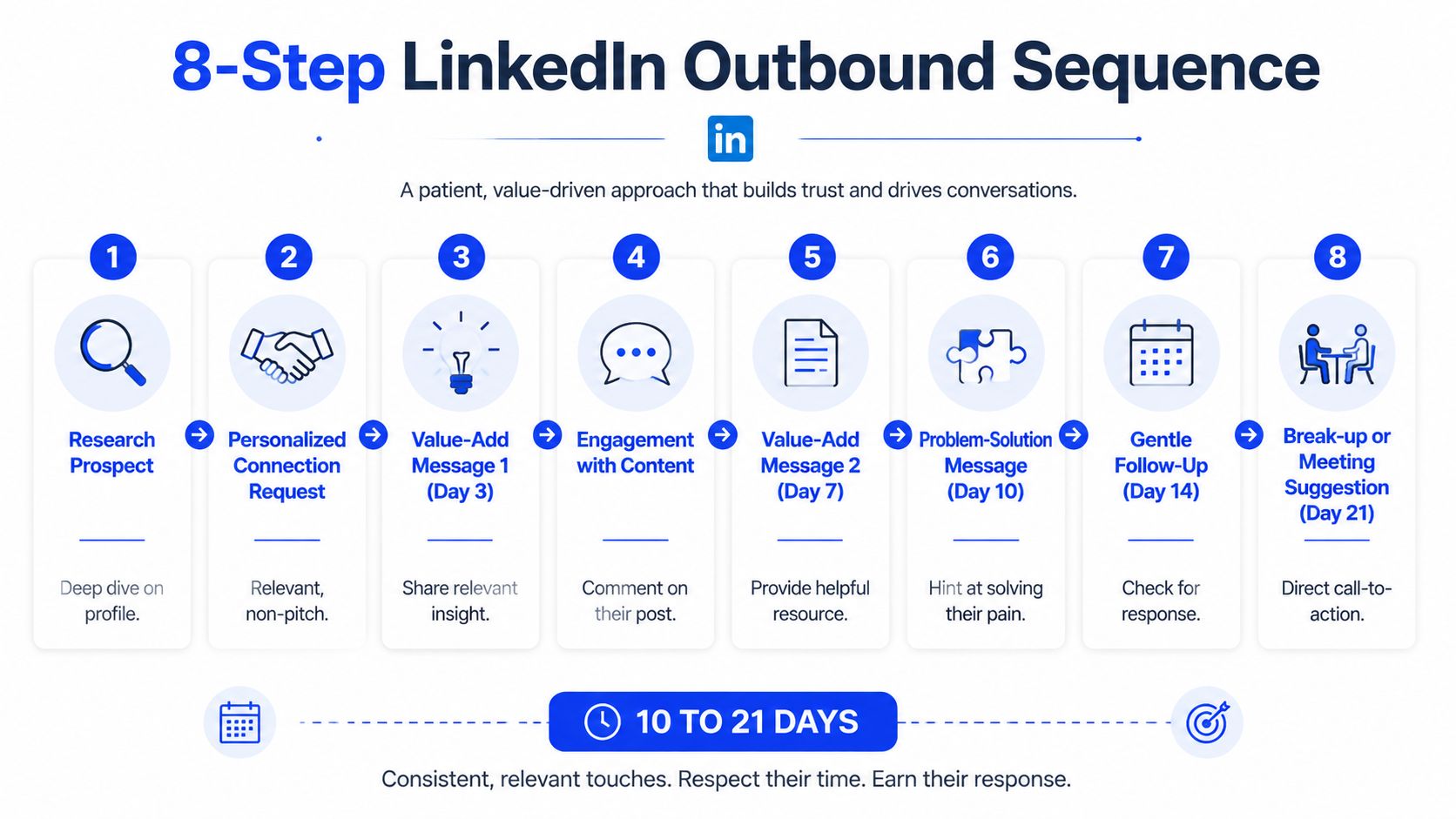
The sequence works because the ask shows up late
The outbound motion I use runs across 10 to 21 days from connection request to qualified meeting. That timing is deliberate. On LinkedIn, speed usually helps the sender more than the buyer. Good sequences protect the buyer's attention and let your team gather context before asking for time.
Here is the operating flow.
Connection request
Send a blank request or one short line tied to a visible trigger. Keep it under one screen line. No offer. No deck. No calendar language.Silent observation
Wait 3 to 5 days after acceptance. Check their recent posts, job change, hiring pattern, funding event, territory shift, or comments on related topics.Warm-up engagement
Add one real interaction before the DM. A thoughtful comment works better than a like because it creates name recognition without forcing a response.First DM
Send a short trigger-based message built to start a thread, not close a deal.Context exchange
If they reply, answer the point they raised. Add one useful observation or example. Do not paste a case study and do not drop a calendar link.Qualification surfacing
Use the chat to confirm role fit, current problem, urgency, and whether there is an active initiative behind the reply.Meeting offer
Offer time only after the prospect has signaled they want help, not just information.AE handoff
Pass the account context, trigger, pain summary, buying signal, and any stated objections into CRM before the meeting is booked.
In our experience, outbound teams grow impatient around step three or four. They see acceptance as permission to pitch. That is where reply quality drops. The sequence fails because the ask arrives before enough trust exists.
The point is control. Control of timing, control of message length, and control of what each touch is supposed to accomplish.
Later, if you scale this across SDRs, tools like Apollo for enrichment, Clay for signal layering, HubSpot for routing, and Grou for connecting content, outbound, and qualification can support the same structure. The structure still needs human review. If your team is considering end-to-end LinkedIn message automation, read this guide on outbound sales automation risks and trade-offs.
A lot of teams also benefit from seeing the pacing in action:
The three-line DM format that keeps working
The highest-performing cold LinkedIn DMs I see share the same structure because they reduce cognitive load for the buyer.
Line 1, trigger reference: a recent factual signal that proves this message is for them
Line 2, named pain: the likely consequence of that signal, stated plainly
Line 3, soft question: a low-friction prompt that invites a reply
Example:
“Noticed you're hiring AEs in EMEA.
That usually creates handoff and territory noise before pipeline reporting catches up.
Is that on your side right now?”
This format works for one reason. It respects the job of the first message. The first DM is there to open a thread with a relevant problem, not to explain your company.
Field note: The best LinkedIn DM is readable in under 10 seconds and asks for very little.
What to stop doing immediately
I usually cut four habits first because they create volume without pipeline movement.
Pitching in message one: this inflates send count and lowers response quality
Sending long multi-paragraph DMs: cold prospects skim, then ignore
Using voice notes or cold video by default: these formats ask for more attention than the relationship has earned
Automating DMs without human review: message quality drops fast, and platform risk is real
The sequence should create qualified conversations, not just replies. That only happens when targeting, content familiarity, and outbound timing work as one system.
Route replies to qualify for real sales conversations
A prospect replies. The rep drops in a calendar link on the next touch. The meeting gets booked, shows up in the dashboard, then dies in discovery because there was no defined problem, no owner, and no timing. That is how LinkedIn activity turns into fake pipeline.

The fix is simple. Keep qualification inside the message thread until the buyer gives enough context to justify a sales conversation.
Classify the reply before you offer a meeting
Replies do not all mean the same thing. Some signal curiosity. Some signal active evaluation. Some are just polite deflections. If the team treats every response as meeting-ready, AE calendars fill up with low-quality conversations and CRM stages stop meaning anything.
I use a basic routing table to keep the handoff clean:
Reply type | What it usually means | Next action |
|---|---|---|
“Interesting, send more info” | Low intent, weak problem definition | Send a short clarification question or route to nurture |
“We're dealing with this now” | Clear pain, timing still unclear | Qualify in-thread |
“How does that work for X?” | Buyer is mapping your offer to a live issue | Good candidate for a meeting after one more qualifier |
“Not me, speak to Y” | Contact is not the owner, but there may be an internal path | Re-route only if the new contact is relevant |
The goal in the next few messages is to confirm four things:
ICP fit
Persona match
Pain signal
Why now
Without timing, the thread usually stalls. A contact can match the account and title perfectly and still have no reason to act this quarter.
Qualify in-thread with short, diagnostic questions
The fastest way to ruin reply quality is to switch from a relevant first message to a bloated qualification script. Keep the thread tight. Ask one question at a time. Use the buyer's wording. Do not force a call until the answers point to a real opportunity.
A simple progression works well:
Confirm the problem: “What part of that is creating the most friction right now?”
Confirm ownership: “Who owns fixing that on your side?”
Confirm urgency: “Is this something you need solved this quarter, or is it still early?”
Confirm process: “Are you already evaluating options, or still defining the approach?”
Those questions do two jobs at once. They improve qualification and they tell you how the buyer thinks about the problem. That context is what makes the eventual handoff useful to sales.
Use explicit routing rules
Teams get better results when routing is defined before volume scales.
Route to nurture if the reply is friendly but vague, with no clear pain or timeline.
Route to SDR continuation if the issue is real but the owner, urgency, or scope is still unclear.
Route to meeting offer if the buyer has stated the problem, confirmed relevance, and given a reason the issue matters now.
Route out if the contact is outside your ICP, lacks a path to the owner, or is describing a problem you do not solve well.
This protects two things that are expensive to recover once they degrade. AE time and CRM trust.
I would rather miss a marginal meeting than push junk into the funnel. One weak meeting does not just waste 30 minutes. It distorts conversion rates, pollutes stage definitions, and teaches the team to value activity over actual pipeline creation.
If you want that routing to hold up under volume, document it inside your lead qualification process so SDRs, AEs, and RevOps are using the same threshold for what counts as sales-ready.
Build a dashboard that measures pipeline contribution
If your LinkedIn reporting still starts with “connection requests sent,” you don't have a pipeline dashboard. You have an activity log.
A useful dashboard tracks the places where quality is gained or lost. That means handoffs, not touches. It should tell you whether the system is attracting the right people, whether the message earns relevant replies, and whether those replies survive contact with sales reality.
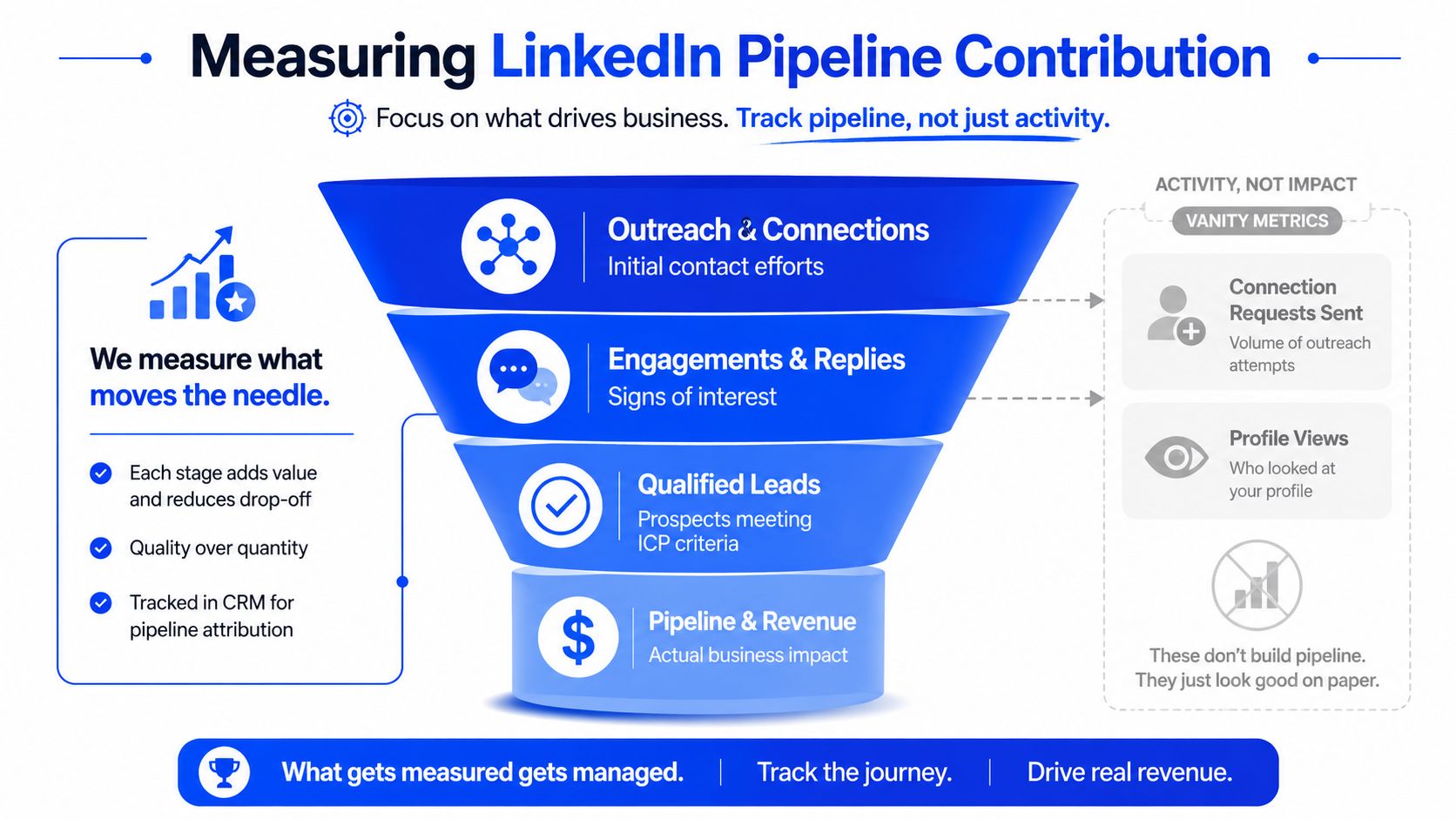
Track the handoffs, not just the touches
These are the numbers I want in the dashboard every week.
Stage | KPI | Healthy target |
|---|---|---|
Connection request | Acceptance rate | 35%+ |
First DM | Reply rate for trigger-based outreach | 12 to 18% |
Reply stage | Reply-to-meeting-booked conversion | 25 to 40% |
Meeting stage | Show rate | 80%+ |
Qualification stage | Meeting-to-qualified conversion | 70%+ |
Those targets matter because each one tells you where the system is breaking.
If acceptance is low, the list or connection framing is off. If replies are weak, your trigger detection is probably stale or generic. If meetings book but don't show, you're asking too early. If meetings show but don't qualify, the inbox routing is too loose.
Measure the step where a human handoff happens. That's where pipeline quality changes.
I also recommend logging the trigger source on every active LinkedIn opportunity. Job change, hiring, post engagement, event attendance, inbound DM, content comment, or referral from a connection. That one field becomes very useful later when you want to see which signals are producing qualified conversations.
How to troubleshoot a stalled LinkedIn motion
When numbers slip, don't rewrite the whole system. Isolate the bottleneck and test one layer at a time.
Low acceptance rate: test no-note requests versus a one-line trigger reference
Low reply rate: tighten trigger freshness and rewrite the pain line in plain language
Good replies, weak meeting conversion: stop rushing to the calendar and add context exchange
Good meetings, weak qualification: enforce why-now routing before AE handoff
Strong outbound, weak inbound: review whether content shows judgment or just competence
A dashboard should help you make operating decisions, not decorate a slide deck. If the metrics don't tell your SDR lead what to fix by Friday, the dashboard is too abstract.
Use bi-weekly sprints for rapid iteration
LinkedIn lead generation on LinkedIn improves fastest when you run it like a sprint system, not a monthly reporting ritual. Two weeks is enough time to spot a pattern, test a change, and decide whether it deserves to stay.
Review one bottleneck at a time
At the end of each sprint, pull the last slice of data and ask one hard question. Where did the system lose the most quality?
If connection acceptance is under 35%, change the request format first. Test no note against a short trigger line. If first-message reply rate is under 12%, inspect the trigger source before you touch the copy. Weak signal detection is usually the main issue.
For teams getting replies but not meetings, read the actual conversations. You'll often find one of two errors. Either the SDR asked for time before pain was clear, or the prospect was never a serious candidate and should have been routed to nurture.
Keep the sprint review simple:
One metric under target
One likely cause
One test for the next two weeks
One rule you'll keep or kill
That pace does two useful things. It keeps your team from making random changes, and it builds an internal record of what your buyers respond to.
Your next step
By Friday, review your last 100 connection requests and calculate three numbers. Acceptance rate, first-DM reply rate, and reply-to-meeting-booked conversion.
If you can't pull those numbers in under half an hour, your first job isn't writing better DMs. It's building the tracking sheet or CRM view that makes the channel measurable. Structure turns attention into pipeline only when every handoff is visible.
Grou helps B2B teams build LinkedIn pipeline systems that connect targeting, content, outbound, and qualification into one motion. The methodology is simple: one message, one target list, one reporting line, then bi-weekly iteration until the channel produces qualified conversations you can forecast.
Your team is active on LinkedIn, but the CRM tells a different story. Connection requests are going out, posts are getting engagement, inboxes have replies, and sales still says the channel isn't producing enough qualified pipeline. That usually means the motion is built around activity, not structure.
LinkedIn is a serious B2B demand channel, not just a visibility channel. Independent industry roundups consistently report that about 80% of all B2B social media leads come from LinkedIn, its visitor-to-lead conversion rate is 2.74%, compared with Facebook's 0.77% and Twitter/X's 0.69%, and 89% of B2B marketers use LinkedIn for lead generation (LinkedIn marketing stats roundup).
The channel works when targeting, content, outreach, and qualification run as one system, not as separate tasks owned by different people.
Most teams fail after the reply, because they capture interest but don't route it into a qualification framework. If SQL quality is your bottleneck, this guide on Orbit AI strategies for SQLs is worth reading alongside your LinkedIn motion.
If your team books meetings that don't convert, fix routing before adding volume. This breakdown of why your leads aren't converting and how to fix it is the right companion to the system below.
Table of Contents
Your LinkedIn activity is high but your pipeline is empty
High activity with weak pipeline usually means one of three things. Your list is too broad, your content attracts the wrong attention, or your team is treating every reply like a meeting request.
That's why most LinkedIn programs feel busy but don't compound. One person owns Sales Navigator, another posts content, SDRs send DMs, AEs complain about quality, and RevOps is left trying to explain why top-of-funnel effort isn't turning into real sales conversations.
Practical rule: LinkedIn lead generation on LinkedIn only works when one system controls list quality, message timing, and qualification rules.
The fix isn't more volume. It's a tighter operating model with four linked parts:
List design: Build around structural filters that map to buying authority and company fit.
Credibility layer: Publish content that makes your name familiar before outreach lands.
Reply-first outreach: Write to earn a response, not to force a meeting.
Qualification routing: Separate curiosity from actual sales readiness before AE handoff.
If you run those parts separately, the channel breaks at the seams. If you run them together, LinkedIn becomes one of the cleanest places to create qualified pipeline because the buyer context is already there.
Build your target list with structural filters
Most weak LinkedIn campaigns are weak before the first message goes out. The problem starts in Sales Navigator, where teams over-index on title searches and keyword guessing.
Title-only targeting looks precise, but it isn't. A buyer who can approve budget might show up as VP Revenue, Head of Growth, Commercial Director, Revenue Operations Lead, or something custom the company made up last quarter. If your list depends on title matching, you'll miss qualified accounts and include a lot of noise.
Start with role structure, not title guessing
The most reliable list structure uses three core filters together.
Filter | Why it matters | What usually goes wrong |
|---|---|---|
Job function | Captures the actual department buying the solution | Teams search titles and miss variant naming |
Seniority | Maps to authority better than vague role labels | Lists get filled with managers and ICs |
Company headcount | Keeps the motion inside one maturity band | Startups and enterprises get mixed together |
For most B2B motions, I start with function plus seniority plus headcount, then add industry. That gives you a list built around buying reality, not profile cosmetics.
A practical example in Sales Navigator might look like this:
Function: Sales, Marketing, or Operations, depending on the offer
Seniority: Director, VP, C-level
Headcount: A narrow range that matches your ACV and sales motion
Industry: The verticals where your proof already travels well
If you need a cleaner framework for defining the account layer before you touch contacts, use this guide to build an ICP that sales can actually use.
Layer in company context and trigger overlays
Once the structural base is right, add context. Industry is the first layer because it controls vocabulary, urgency, and proof fit. After that, I care about trigger overlays more than decorative filters.
The triggers that tend to matter most on LinkedIn are visible changes in the business or the buyer's role. Recent job changes, growth hiring, product launches, event activity, and fresh post engagement all give you a reason to write a message that feels observed rather than templated.
Buyers rarely respond because your template is clever. They respond because the timing makes sense.
What I avoid:
Job title filters as the main selector: too brittle
Years of experience: weak proxy for buying authority
Skills filters: usually noisy and poorly maintained
Profile keyword booleans: they feel exact, but they exclude obvious fits
A strong list should feel boring in the best possible way. It should look structurally tight, easy to segment, and simple to route into outreach. That's the kind of list your SDR team can work without constant cleanup.
Publish content that builds credibility and invites DMs
Most founders and revenue leaders still treat LinkedIn content like a media exercise. They track reach, comments, and follower growth, then wonder why none of it turns into pipeline.
That framing misses how the channel works in B2B. The stronger model is a loop between credibility, signal detection, and follow-up, where recent activity such as job changes, post engagement, and event attendance become intent signals instead of relying on cold list size alone (recent LinkedIn lead generation guidance).
Use posts that show judgment, not just knowledge
The content format that keeps producing the best-fit inbound for us is long-form text posts in the 200 to 280 word range, built around a real decision or trade-off. Not educational threads. Not generic advice. A point of view tied to an actual business call.
Examples:
Decision post: why you refused a deal that looked attractive on paper
Trade-off post: when outbound should win over content, and when it shouldn't
Operator post: a system change that improved sales quality but reduced vanity numbers
Contrarian post: a practice you stopped doing because it produced bad-fit pipeline
These posts work because they reveal how you think under constraints. Buyers don't just want expertise. They want to know whether your judgment matches theirs.
A post that earns fewer likes but triggers the right DM is doing its job.
If you already have strong articles, operator notes, or internal memos, repurposing them into founder-style LinkedIn posts is often the fastest path to consistency. This resource on how to convert articles to LinkedIn posts is useful when the raw material exists but the format is wrong.
A practical content mix for founder-led LinkedIn
I don't recommend trying every format. Keep the mix narrow and repeatable.
Content format | Use it for | My recommendation |
|---|---|---|
Long-form text posts | Decisions, trade-offs, operating lessons | Make this your core format |
Carousels | Visual explanation or saved reference content | Use selectively |
Short posts | Sharp observations and light consistency | Helpful, but secondary |
Native video | Cases where the founder is genuinely strong on camera | Only if it fits naturally |
LinkedIn articles | Evergreen assets you'll reference elsewhere | Rarely the priority |
For teams building a founder or executive presence, the content system should do two jobs at once. It should attract the right inbound signals, and it should warm outbound accounts so your eventual DM lands from a known name.
If you need a tighter operating model for that side of the motion, this LinkedIn content strategy framework is the right place to start.
Design an outbound sequence that earns replies
A prospect accepts your connection request on Monday. By Monday afternoon they already have a pitch, a product summary, and a meeting link in their inbox. That rep created activity. They also burned the easiest chance to start a real conversation.
LinkedIn outbound works better when the sequence earns micro-commitments in the right order. Attention first. Familiarity second. Context third. The meeting ask comes later, after the buyer has shown intent in the thread.
A visual helps here:
The sequence works because the ask shows up late
The outbound motion I use runs across 10 to 21 days from connection request to qualified meeting. That timing is deliberate. On LinkedIn, speed usually helps the sender more than the buyer. Good sequences protect the buyer's attention and let your team gather context before asking for time.
Here is the operating flow.
Connection request
Send a blank request or one short line tied to a visible trigger. Keep it under one screen line. No offer. No deck. No calendar language.Silent observation
Wait 3 to 5 days after acceptance. Check their recent posts, job change, hiring pattern, funding event, territory shift, or comments on related topics.Warm-up engagement
Add one real interaction before the DM. A thoughtful comment works better than a like because it creates name recognition without forcing a response.First DM
Send a short trigger-based message built to start a thread, not close a deal.Context exchange
If they reply, answer the point they raised. Add one useful observation or example. Do not paste a case study and do not drop a calendar link.Qualification surfacing
Use the chat to confirm role fit, current problem, urgency, and whether there is an active initiative behind the reply.Meeting offer
Offer time only after the prospect has signaled they want help, not just information.AE handoff
Pass the account context, trigger, pain summary, buying signal, and any stated objections into CRM before the meeting is booked.
In our experience, outbound teams grow impatient around step three or four. They see acceptance as permission to pitch. That is where reply quality drops. The sequence fails because the ask arrives before enough trust exists.
The point is control. Control of timing, control of message length, and control of what each touch is supposed to accomplish.
Later, if you scale this across SDRs, tools like Apollo for enrichment, Clay for signal layering, HubSpot for routing, and Grou for connecting content, outbound, and qualification can support the same structure. The structure still needs human review. If your team is considering end-to-end LinkedIn message automation, read this guide on outbound sales automation risks and trade-offs.
A lot of teams also benefit from seeing the pacing in action:
The three-line DM format that keeps working
The highest-performing cold LinkedIn DMs I see share the same structure because they reduce cognitive load for the buyer.
Line 1, trigger reference: a recent factual signal that proves this message is for them
Line 2, named pain: the likely consequence of that signal, stated plainly
Line 3, soft question: a low-friction prompt that invites a reply
Example:
“Noticed you're hiring AEs in EMEA.
That usually creates handoff and territory noise before pipeline reporting catches up.
Is that on your side right now?”
This format works for one reason. It respects the job of the first message. The first DM is there to open a thread with a relevant problem, not to explain your company.
Field note: The best LinkedIn DM is readable in under 10 seconds and asks for very little.
What to stop doing immediately
I usually cut four habits first because they create volume without pipeline movement.
Pitching in message one: this inflates send count and lowers response quality
Sending long multi-paragraph DMs: cold prospects skim, then ignore
Using voice notes or cold video by default: these formats ask for more attention than the relationship has earned
Automating DMs without human review: message quality drops fast, and platform risk is real
The sequence should create qualified conversations, not just replies. That only happens when targeting, content familiarity, and outbound timing work as one system.
Route replies to qualify for real sales conversations
A prospect replies. The rep drops in a calendar link on the next touch. The meeting gets booked, shows up in the dashboard, then dies in discovery because there was no defined problem, no owner, and no timing. That is how LinkedIn activity turns into fake pipeline.
The fix is simple. Keep qualification inside the message thread until the buyer gives enough context to justify a sales conversation.
Classify the reply before you offer a meeting
Replies do not all mean the same thing. Some signal curiosity. Some signal active evaluation. Some are just polite deflections. If the team treats every response as meeting-ready, AE calendars fill up with low-quality conversations and CRM stages stop meaning anything.
I use a basic routing table to keep the handoff clean:
Reply type | What it usually means | Next action |
|---|---|---|
“Interesting, send more info” | Low intent, weak problem definition | Send a short clarification question or route to nurture |
“We're dealing with this now” | Clear pain, timing still unclear | Qualify in-thread |
“How does that work for X?” | Buyer is mapping your offer to a live issue | Good candidate for a meeting after one more qualifier |
“Not me, speak to Y” | Contact is not the owner, but there may be an internal path | Re-route only if the new contact is relevant |
The goal in the next few messages is to confirm four things:
ICP fit
Persona match
Pain signal
Why now
Without timing, the thread usually stalls. A contact can match the account and title perfectly and still have no reason to act this quarter.
Qualify in-thread with short, diagnostic questions
The fastest way to ruin reply quality is to switch from a relevant first message to a bloated qualification script. Keep the thread tight. Ask one question at a time. Use the buyer's wording. Do not force a call until the answers point to a real opportunity.
A simple progression works well:
Confirm the problem: “What part of that is creating the most friction right now?”
Confirm ownership: “Who owns fixing that on your side?”
Confirm urgency: “Is this something you need solved this quarter, or is it still early?”
Confirm process: “Are you already evaluating options, or still defining the approach?”
Those questions do two jobs at once. They improve qualification and they tell you how the buyer thinks about the problem. That context is what makes the eventual handoff useful to sales.
Use explicit routing rules
Teams get better results when routing is defined before volume scales.
Route to nurture if the reply is friendly but vague, with no clear pain or timeline.
Route to SDR continuation if the issue is real but the owner, urgency, or scope is still unclear.
Route to meeting offer if the buyer has stated the problem, confirmed relevance, and given a reason the issue matters now.
Route out if the contact is outside your ICP, lacks a path to the owner, or is describing a problem you do not solve well.
This protects two things that are expensive to recover once they degrade. AE time and CRM trust.
I would rather miss a marginal meeting than push junk into the funnel. One weak meeting does not just waste 30 minutes. It distorts conversion rates, pollutes stage definitions, and teaches the team to value activity over actual pipeline creation.
If you want that routing to hold up under volume, document it inside your lead qualification process so SDRs, AEs, and RevOps are using the same threshold for what counts as sales-ready.
Build a dashboard that measures pipeline contribution
If your LinkedIn reporting still starts with “connection requests sent,” you don't have a pipeline dashboard. You have an activity log.
A useful dashboard tracks the places where quality is gained or lost. That means handoffs, not touches. It should tell you whether the system is attracting the right people, whether the message earns relevant replies, and whether those replies survive contact with sales reality.
Track the handoffs, not just the touches
These are the numbers I want in the dashboard every week.
Stage | KPI | Healthy target |
|---|---|---|
Connection request | Acceptance rate | 35%+ |
First DM | Reply rate for trigger-based outreach | 12 to 18% |
Reply stage | Reply-to-meeting-booked conversion | 25 to 40% |
Meeting stage | Show rate | 80%+ |
Qualification stage | Meeting-to-qualified conversion | 70%+ |
Those targets matter because each one tells you where the system is breaking.
If acceptance is low, the list or connection framing is off. If replies are weak, your trigger detection is probably stale or generic. If meetings book but don't show, you're asking too early. If meetings show but don't qualify, the inbox routing is too loose.
Measure the step where a human handoff happens. That's where pipeline quality changes.
I also recommend logging the trigger source on every active LinkedIn opportunity. Job change, hiring, post engagement, event attendance, inbound DM, content comment, or referral from a connection. That one field becomes very useful later when you want to see which signals are producing qualified conversations.
How to troubleshoot a stalled LinkedIn motion
When numbers slip, don't rewrite the whole system. Isolate the bottleneck and test one layer at a time.
Low acceptance rate: test no-note requests versus a one-line trigger reference
Low reply rate: tighten trigger freshness and rewrite the pain line in plain language
Good replies, weak meeting conversion: stop rushing to the calendar and add context exchange
Good meetings, weak qualification: enforce why-now routing before AE handoff
Strong outbound, weak inbound: review whether content shows judgment or just competence
A dashboard should help you make operating decisions, not decorate a slide deck. If the metrics don't tell your SDR lead what to fix by Friday, the dashboard is too abstract.
Use bi-weekly sprints for rapid iteration
LinkedIn lead generation on LinkedIn improves fastest when you run it like a sprint system, not a monthly reporting ritual. Two weeks is enough time to spot a pattern, test a change, and decide whether it deserves to stay.
Review one bottleneck at a time
At the end of each sprint, pull the last slice of data and ask one hard question. Where did the system lose the most quality?
If connection acceptance is under 35%, change the request format first. Test no note against a short trigger line. If first-message reply rate is under 12%, inspect the trigger source before you touch the copy. Weak signal detection is usually the main issue.
For teams getting replies but not meetings, read the actual conversations. You'll often find one of two errors. Either the SDR asked for time before pain was clear, or the prospect was never a serious candidate and should have been routed to nurture.
Keep the sprint review simple:
One metric under target
One likely cause
One test for the next two weeks
One rule you'll keep or kill
That pace does two useful things. It keeps your team from making random changes, and it builds an internal record of what your buyers respond to.
Your next step
By Friday, review your last 100 connection requests and calculate three numbers. Acceptance rate, first-DM reply rate, and reply-to-meeting-booked conversion.
If you can't pull those numbers in under half an hour, your first job isn't writing better DMs. It's building the tracking sheet or CRM view that makes the channel measurable. Structure turns attention into pipeline only when every handoff is visible.
Grou helps B2B teams build LinkedIn pipeline systems that connect targeting, content, outbound, and qualification into one motion. The methodology is simple: one message, one target list, one reporting line, then bi-weekly iteration until the channel produces qualified conversations you can forecast.
Your team is active on LinkedIn, but the CRM tells a different story. Connection requests are going out, posts are getting engagement, inboxes have replies, and sales still says the channel isn't producing enough qualified pipeline. That usually means the motion is built around activity, not structure.
LinkedIn is a serious B2B demand channel, not just a visibility channel. Independent industry roundups consistently report that about 80% of all B2B social media leads come from LinkedIn, its visitor-to-lead conversion rate is 2.74%, compared with Facebook's 0.77% and Twitter/X's 0.69%, and 89% of B2B marketers use LinkedIn for lead generation (LinkedIn marketing stats roundup).
The channel works when targeting, content, outreach, and qualification run as one system, not as separate tasks owned by different people.
Most teams fail after the reply, because they capture interest but don't route it into a qualification framework. If SQL quality is your bottleneck, this guide on Orbit AI strategies for SQLs is worth reading alongside your LinkedIn motion.
If your team books meetings that don't convert, fix routing before adding volume. This breakdown of why your leads aren't converting and how to fix it is the right companion to the system below.
Table of Contents
Your LinkedIn activity is high but your pipeline is empty
High activity with weak pipeline usually means one of three things. Your list is too broad, your content attracts the wrong attention, or your team is treating every reply like a meeting request.
That's why most LinkedIn programs feel busy but don't compound. One person owns Sales Navigator, another posts content, SDRs send DMs, AEs complain about quality, and RevOps is left trying to explain why top-of-funnel effort isn't turning into real sales conversations.
Practical rule: LinkedIn lead generation on LinkedIn only works when one system controls list quality, message timing, and qualification rules.
The fix isn't more volume. It's a tighter operating model with four linked parts:
List design: Build around structural filters that map to buying authority and company fit.
Credibility layer: Publish content that makes your name familiar before outreach lands.
Reply-first outreach: Write to earn a response, not to force a meeting.
Qualification routing: Separate curiosity from actual sales readiness before AE handoff.
If you run those parts separately, the channel breaks at the seams. If you run them together, LinkedIn becomes one of the cleanest places to create qualified pipeline because the buyer context is already there.
Build your target list with structural filters
Most weak LinkedIn campaigns are weak before the first message goes out. The problem starts in Sales Navigator, where teams over-index on title searches and keyword guessing.
Title-only targeting looks precise, but it isn't. A buyer who can approve budget might show up as VP Revenue, Head of Growth, Commercial Director, Revenue Operations Lead, or something custom the company made up last quarter. If your list depends on title matching, you'll miss qualified accounts and include a lot of noise.
Start with role structure, not title guessing
The most reliable list structure uses three core filters together.
Filter | Why it matters | What usually goes wrong |
|---|---|---|
Job function | Captures the actual department buying the solution | Teams search titles and miss variant naming |
Seniority | Maps to authority better than vague role labels | Lists get filled with managers and ICs |
Company headcount | Keeps the motion inside one maturity band | Startups and enterprises get mixed together |
For most B2B motions, I start with function plus seniority plus headcount, then add industry. That gives you a list built around buying reality, not profile cosmetics.
A practical example in Sales Navigator might look like this:
Function: Sales, Marketing, or Operations, depending on the offer
Seniority: Director, VP, C-level
Headcount: A narrow range that matches your ACV and sales motion
Industry: The verticals where your proof already travels well
If you need a cleaner framework for defining the account layer before you touch contacts, use this guide to build an ICP that sales can actually use.
Layer in company context and trigger overlays
Once the structural base is right, add context. Industry is the first layer because it controls vocabulary, urgency, and proof fit. After that, I care about trigger overlays more than decorative filters.
The triggers that tend to matter most on LinkedIn are visible changes in the business or the buyer's role. Recent job changes, growth hiring, product launches, event activity, and fresh post engagement all give you a reason to write a message that feels observed rather than templated.
Buyers rarely respond because your template is clever. They respond because the timing makes sense.
What I avoid:
Job title filters as the main selector: too brittle
Years of experience: weak proxy for buying authority
Skills filters: usually noisy and poorly maintained
Profile keyword booleans: they feel exact, but they exclude obvious fits
A strong list should feel boring in the best possible way. It should look structurally tight, easy to segment, and simple to route into outreach. That's the kind of list your SDR team can work without constant cleanup.
Publish content that builds credibility and invites DMs
Most founders and revenue leaders still treat LinkedIn content like a media exercise. They track reach, comments, and follower growth, then wonder why none of it turns into pipeline.
That framing misses how the channel works in B2B. The stronger model is a loop between credibility, signal detection, and follow-up, where recent activity such as job changes, post engagement, and event attendance become intent signals instead of relying on cold list size alone (recent LinkedIn lead generation guidance).
Use posts that show judgment, not just knowledge
The content format that keeps producing the best-fit inbound for us is long-form text posts in the 200 to 280 word range, built around a real decision or trade-off. Not educational threads. Not generic advice. A point of view tied to an actual business call.
Examples:
Decision post: why you refused a deal that looked attractive on paper
Trade-off post: when outbound should win over content, and when it shouldn't
Operator post: a system change that improved sales quality but reduced vanity numbers
Contrarian post: a practice you stopped doing because it produced bad-fit pipeline
These posts work because they reveal how you think under constraints. Buyers don't just want expertise. They want to know whether your judgment matches theirs.
A post that earns fewer likes but triggers the right DM is doing its job.
If you already have strong articles, operator notes, or internal memos, repurposing them into founder-style LinkedIn posts is often the fastest path to consistency. This resource on how to convert articles to LinkedIn posts is useful when the raw material exists but the format is wrong.
A practical content mix for founder-led LinkedIn
I don't recommend trying every format. Keep the mix narrow and repeatable.
Content format | Use it for | My recommendation |
|---|---|---|
Long-form text posts | Decisions, trade-offs, operating lessons | Make this your core format |
Carousels | Visual explanation or saved reference content | Use selectively |
Short posts | Sharp observations and light consistency | Helpful, but secondary |
Native video | Cases where the founder is genuinely strong on camera | Only if it fits naturally |
LinkedIn articles | Evergreen assets you'll reference elsewhere | Rarely the priority |
For teams building a founder or executive presence, the content system should do two jobs at once. It should attract the right inbound signals, and it should warm outbound accounts so your eventual DM lands from a known name.
If you need a tighter operating model for that side of the motion, this LinkedIn content strategy framework is the right place to start.
Design an outbound sequence that earns replies
A prospect accepts your connection request on Monday. By Monday afternoon they already have a pitch, a product summary, and a meeting link in their inbox. That rep created activity. They also burned the easiest chance to start a real conversation.
LinkedIn outbound works better when the sequence earns micro-commitments in the right order. Attention first. Familiarity second. Context third. The meeting ask comes later, after the buyer has shown intent in the thread.
A visual helps here:
The sequence works because the ask shows up late
The outbound motion I use runs across 10 to 21 days from connection request to qualified meeting. That timing is deliberate. On LinkedIn, speed usually helps the sender more than the buyer. Good sequences protect the buyer's attention and let your team gather context before asking for time.
Here is the operating flow.
Connection request
Send a blank request or one short line tied to a visible trigger. Keep it under one screen line. No offer. No deck. No calendar language.Silent observation
Wait 3 to 5 days after acceptance. Check their recent posts, job change, hiring pattern, funding event, territory shift, or comments on related topics.Warm-up engagement
Add one real interaction before the DM. A thoughtful comment works better than a like because it creates name recognition without forcing a response.First DM
Send a short trigger-based message built to start a thread, not close a deal.Context exchange
If they reply, answer the point they raised. Add one useful observation or example. Do not paste a case study and do not drop a calendar link.Qualification surfacing
Use the chat to confirm role fit, current problem, urgency, and whether there is an active initiative behind the reply.Meeting offer
Offer time only after the prospect has signaled they want help, not just information.AE handoff
Pass the account context, trigger, pain summary, buying signal, and any stated objections into CRM before the meeting is booked.
In our experience, outbound teams grow impatient around step three or four. They see acceptance as permission to pitch. That is where reply quality drops. The sequence fails because the ask arrives before enough trust exists.
The point is control. Control of timing, control of message length, and control of what each touch is supposed to accomplish.
Later, if you scale this across SDRs, tools like Apollo for enrichment, Clay for signal layering, HubSpot for routing, and Grou for connecting content, outbound, and qualification can support the same structure. The structure still needs human review. If your team is considering end-to-end LinkedIn message automation, read this guide on outbound sales automation risks and trade-offs.
A lot of teams also benefit from seeing the pacing in action:
The three-line DM format that keeps working
The highest-performing cold LinkedIn DMs I see share the same structure because they reduce cognitive load for the buyer.
Line 1, trigger reference: a recent factual signal that proves this message is for them
Line 2, named pain: the likely consequence of that signal, stated plainly
Line 3, soft question: a low-friction prompt that invites a reply
Example:
“Noticed you're hiring AEs in EMEA.
That usually creates handoff and territory noise before pipeline reporting catches up.
Is that on your side right now?”
This format works for one reason. It respects the job of the first message. The first DM is there to open a thread with a relevant problem, not to explain your company.
Field note: The best LinkedIn DM is readable in under 10 seconds and asks for very little.
What to stop doing immediately
I usually cut four habits first because they create volume without pipeline movement.
Pitching in message one: this inflates send count and lowers response quality
Sending long multi-paragraph DMs: cold prospects skim, then ignore
Using voice notes or cold video by default: these formats ask for more attention than the relationship has earned
Automating DMs without human review: message quality drops fast, and platform risk is real
The sequence should create qualified conversations, not just replies. That only happens when targeting, content familiarity, and outbound timing work as one system.
Route replies to qualify for real sales conversations
A prospect replies. The rep drops in a calendar link on the next touch. The meeting gets booked, shows up in the dashboard, then dies in discovery because there was no defined problem, no owner, and no timing. That is how LinkedIn activity turns into fake pipeline.
The fix is simple. Keep qualification inside the message thread until the buyer gives enough context to justify a sales conversation.
Classify the reply before you offer a meeting
Replies do not all mean the same thing. Some signal curiosity. Some signal active evaluation. Some are just polite deflections. If the team treats every response as meeting-ready, AE calendars fill up with low-quality conversations and CRM stages stop meaning anything.
I use a basic routing table to keep the handoff clean:
Reply type | What it usually means | Next action |
|---|---|---|
“Interesting, send more info” | Low intent, weak problem definition | Send a short clarification question or route to nurture |
“We're dealing with this now” | Clear pain, timing still unclear | Qualify in-thread |
“How does that work for X?” | Buyer is mapping your offer to a live issue | Good candidate for a meeting after one more qualifier |
“Not me, speak to Y” | Contact is not the owner, but there may be an internal path | Re-route only if the new contact is relevant |
The goal in the next few messages is to confirm four things:
ICP fit
Persona match
Pain signal
Why now
Without timing, the thread usually stalls. A contact can match the account and title perfectly and still have no reason to act this quarter.
Qualify in-thread with short, diagnostic questions
The fastest way to ruin reply quality is to switch from a relevant first message to a bloated qualification script. Keep the thread tight. Ask one question at a time. Use the buyer's wording. Do not force a call until the answers point to a real opportunity.
A simple progression works well:
Confirm the problem: “What part of that is creating the most friction right now?”
Confirm ownership: “Who owns fixing that on your side?”
Confirm urgency: “Is this something you need solved this quarter, or is it still early?”
Confirm process: “Are you already evaluating options, or still defining the approach?”
Those questions do two jobs at once. They improve qualification and they tell you how the buyer thinks about the problem. That context is what makes the eventual handoff useful to sales.
Use explicit routing rules
Teams get better results when routing is defined before volume scales.
Route to nurture if the reply is friendly but vague, with no clear pain or timeline.
Route to SDR continuation if the issue is real but the owner, urgency, or scope is still unclear.
Route to meeting offer if the buyer has stated the problem, confirmed relevance, and given a reason the issue matters now.
Route out if the contact is outside your ICP, lacks a path to the owner, or is describing a problem you do not solve well.
This protects two things that are expensive to recover once they degrade. AE time and CRM trust.
I would rather miss a marginal meeting than push junk into the funnel. One weak meeting does not just waste 30 minutes. It distorts conversion rates, pollutes stage definitions, and teaches the team to value activity over actual pipeline creation.
If you want that routing to hold up under volume, document it inside your lead qualification process so SDRs, AEs, and RevOps are using the same threshold for what counts as sales-ready.
Build a dashboard that measures pipeline contribution
If your LinkedIn reporting still starts with “connection requests sent,” you don't have a pipeline dashboard. You have an activity log.
A useful dashboard tracks the places where quality is gained or lost. That means handoffs, not touches. It should tell you whether the system is attracting the right people, whether the message earns relevant replies, and whether those replies survive contact with sales reality.
Track the handoffs, not just the touches
These are the numbers I want in the dashboard every week.
Stage | KPI | Healthy target |
|---|---|---|
Connection request | Acceptance rate | 35%+ |
First DM | Reply rate for trigger-based outreach | 12 to 18% |
Reply stage | Reply-to-meeting-booked conversion | 25 to 40% |
Meeting stage | Show rate | 80%+ |
Qualification stage | Meeting-to-qualified conversion | 70%+ |
Those targets matter because each one tells you where the system is breaking.
If acceptance is low, the list or connection framing is off. If replies are weak, your trigger detection is probably stale or generic. If meetings book but don't show, you're asking too early. If meetings show but don't qualify, the inbox routing is too loose.
Measure the step where a human handoff happens. That's where pipeline quality changes.
I also recommend logging the trigger source on every active LinkedIn opportunity. Job change, hiring, post engagement, event attendance, inbound DM, content comment, or referral from a connection. That one field becomes very useful later when you want to see which signals are producing qualified conversations.
How to troubleshoot a stalled LinkedIn motion
When numbers slip, don't rewrite the whole system. Isolate the bottleneck and test one layer at a time.
Low acceptance rate: test no-note requests versus a one-line trigger reference
Low reply rate: tighten trigger freshness and rewrite the pain line in plain language
Good replies, weak meeting conversion: stop rushing to the calendar and add context exchange
Good meetings, weak qualification: enforce why-now routing before AE handoff
Strong outbound, weak inbound: review whether content shows judgment or just competence
A dashboard should help you make operating decisions, not decorate a slide deck. If the metrics don't tell your SDR lead what to fix by Friday, the dashboard is too abstract.
Use bi-weekly sprints for rapid iteration
LinkedIn lead generation on LinkedIn improves fastest when you run it like a sprint system, not a monthly reporting ritual. Two weeks is enough time to spot a pattern, test a change, and decide whether it deserves to stay.
Review one bottleneck at a time
At the end of each sprint, pull the last slice of data and ask one hard question. Where did the system lose the most quality?
If connection acceptance is under 35%, change the request format first. Test no note against a short trigger line. If first-message reply rate is under 12%, inspect the trigger source before you touch the copy. Weak signal detection is usually the main issue.
For teams getting replies but not meetings, read the actual conversations. You'll often find one of two errors. Either the SDR asked for time before pain was clear, or the prospect was never a serious candidate and should have been routed to nurture.
Keep the sprint review simple:
One metric under target
One likely cause
One test for the next two weeks
One rule you'll keep or kill
That pace does two useful things. It keeps your team from making random changes, and it builds an internal record of what your buyers respond to.
Your next step
By Friday, review your last 100 connection requests and calculate three numbers. Acceptance rate, first-DM reply rate, and reply-to-meeting-booked conversion.
If you can't pull those numbers in under half an hour, your first job isn't writing better DMs. It's building the tracking sheet or CRM view that makes the channel measurable. Structure turns attention into pipeline only when every handoff is visible.
Grou helps B2B teams build LinkedIn pipeline systems that connect targeting, content, outbound, and qualification into one motion. The methodology is simple: one message, one target list, one reporting line, then bi-weekly iteration until the channel produces qualified conversations you can forecast.

Pipeline OS Newsletter
Build qualified pipeline
Get weekly tactics to generate demand, improve lead quality, and book more meetings.





Trusted by industry leaders
Trusted by industry leaders
Trusted by industry leaders
Ready to build qualified pipeline?
Ready to build qualified pipeline?
Ready to build qualified pipeline?
Book a call to see if we're the right fit, or take the 2-minute quiz to get a clear starting point.
Book a call to see if we're the right fit, or take the 2-minute quiz to get a clear starting point.
Book a call to see if we're the right fit, or take the 2-minute quiz to get a clear starting point.
" height="30.21639343089746px" id="hfGbXmQR2" width="30.216393430897455px"/></svg>)
Copyright © 2026 – All Right Reserved
Copyright © 2026 – All Right Reserved
Copyright © 2026 – All Right Reserved