%22%3E%3C/path%3E%3Cpath d=%22M 63.072 7.554 C 62.258 8.022 61.577 8.689 61.092 9.493 L 61.092 7.076 L 57.158 7.076 L 57.158 22.64 L 61.089 22.64 L 61.089 14.888 C 61.089 13.446 61.403 12.434 62.03 11.853 C 62.818 11.218 63.818 10.907 64.826 10.982 L 65.868 10.982 L 65.868 6.851 C 64.891 6.834 63.926 7.076 63.073 7.554 Z%22 fill=%22rgb(17,17,17)%22%3E%3C/path%3E%3Cpath d=%22M 78.916 7.82 C 76.363 6.49 73.321 6.49 70.768 7.82 C 69.562 8.473 68.564 9.451 67.888 10.644 C 67.167 11.931 66.803 13.387 66.834 14.862 C 66.804 16.332 67.157 17.785 67.86 19.077 C 68.515 20.267 69.494 21.246 70.684 21.901 C 71.924 22.576 73.318 22.92 74.73 22.898 C 76.164 22.918 77.58 22.575 78.846 21.901 C 80.062 21.247 81.073 20.27 81.768 19.077 C 82.506 17.797 82.88 16.339 82.85 14.862 C 82.88 13.389 82.517 11.934 81.797 10.647 C 81.12 9.455 80.122 8.477 78.917 7.824 M 78.803 14.862 C 78.829 15.739 78.636 16.608 78.241 17.391 C 77.903 18.046 77.38 18.588 76.738 18.95 C 76.124 19.293 75.432 19.472 74.729 19.47 C 73.668 19.497 72.648 19.061 71.934 18.276 C 71.139 17.323 70.741 16.1 70.823 14.862 C 70.741 13.62 71.149 12.395 71.959 11.45 C 72.687 10.667 73.715 10.233 74.783 10.256 C 75.859 10.236 76.894 10.67 77.635 11.45 C 78.464 12.387 78.884 13.616 78.801 14.864%22 fill=%22rgb(17,17,17)%22%3E%3C/path%3E%3Cpath d=%22M 95.906 7.076 L 95.906 15.646 C 95.975 16.68 95.643 17.701 94.979 18.498 C 94.311 19.184 93.379 19.547 92.422 19.495 C 91.475 19.544 90.553 19.18 89.894 18.498 C 89.23 17.701 88.898 16.68 88.967 15.646 L 88.967 7.076 L 85.033 7.076 L 85.033 16.207 C 85 17.449 85.275 18.68 85.834 19.79 C 86.327 20.75 87.095 21.542 88.039 22.065 C 89.033 22.594 90.145 22.861 91.271 22.838 C 92.188 22.847 93.095 22.65 93.926 22.263 C 94.708 21.905 95.388 21.36 95.906 20.675 L 95.906 22.645 L 99.865 22.645 L 99.865 7.076 Z%22 fill=%22rgb(17,17,17)%22%3E%3C/path%3E%3Cpath d=%22M 4.513 15.626 C 4.511 10.815 7.606 6.549 12.181 5.059 C 16.756 3.57 21.77 5.195 24.601 9.086 L 27.816 5.87 C 24.074 1.186 17.981 -0.943 12.137 0.393 C 6.292 1.728 1.728 6.292 0.393 12.137 C -0.943 17.981 1.186 24.074 5.87 27.816 L 9.085 24.601 C 6.214 22.512 4.515 19.177 4.513 15.626%22 fill=%22rgb(32,62,235)%22%3E%3C/path%3E%3Cpath d=%22M 17.114 14.343 L 13.354 18.01 L 13.354 18.026 L 21.071 18.026 L 11.412 27.609 L 17.389 27.609 L 23.999 21.081 L 23.999 28.316 L 24.005 28.316 L 27.967 24.393 L 27.967 14.343 Z%22 fill=%22rgb(32,62,235)%22%3E%3C/path%3E%3C/g%3E%3C/svg%3E) ×
× ××
××›
›
›
›
LinkedIn for Sales: Your 2026 B2B Revenue Guide
LinkedIn for Sales: Your 2026 B2B Revenue Guide
LinkedIn for Sales: Your 2026 B2B Revenue Guide
LinkedIn for Sales: Your 2026 B2B Revenue Guide
LinkedIn for Sales: Your 2026 B2B Revenue Guide
LinkedIn for Sales: Your 2026 B2B Revenue Guide

Author
Aljaz Peklaj

Your reps are sending connection requests, getting some accepts, and still not creating pipeline. The usual problem isn't volume. It's that the profile doesn't build trust, the targeting is too broad, and the team pitches before the buyer has any reason to engage.
LinkedIn for sales works when credibility, targeting, pacing, and qualification are built as one system
Sales Navigator should be structured at both account and lead level before any outreach starts
A connection is only permission to begin, not permission to pitch
The metric that matters is accepted connections that turn into qualified conversations within 30 days
Table of Contents
The foundation for outreach credibility
Most LinkedIn outreach fails before the first message. The rep looks interchangeable, the headline reads like an internal org chart, and the feed is empty. Buyers don't respond to a stranger's message just because the copy is polished.
LinkedIn passed 1 billion members in 2024, but buyers are also seeing more AI-generated and templated outreach, which makes better personalization less useful unless it's tied to a credible profile, proof points, and relationship-building, as noted in Valley's analysis of LinkedIn sales strategy and AI outreach.

Your profile has one job
Your profile doesn't need to impress recruiters. It needs to reduce buyer skepticism.
That means three areas have to line up with the ICP:
Headline → State who you help and what problem you work on. Job title alone wastes the highest-visibility real estate on the page.
About section → Describe the commercial problem you solve, the environments where it shows up, and the kind of outcomes buyers care about. Keep it buyer-facing.
Featured section → Pin proof. Good options are a sharp post, a teardown, a customer-facing framework, or a webinar clip.
A bad sales profile says, in effect, "I'm in sales." A good one says, "I understand this problem, I talk about it often, and other people seem to take that seriously."
Practical rule: if a prospect lands on the profile after seeing your DM, they should understand your market, your angle, and your relevance in under a minute.
For teams trying to systemize posting, scheduling matters less than consistency. If you're operationalizing founder or rep content at scale, this guide on publishing LinkedIn content via API is useful because it shows how to make distribution repeatable once the editorial system is already solid.
Content is the proof layer
For B2B LinkedIn for sales, content isn't branding theater. It's pre-call trust.
The format I recommend first is text-only long-form posts. They are easier to sustain, easier to write with nuance, and better at carrying an opinion than most company-safe carousels. For founder-led and sales-led accounts, they also create a visible trail of competence before any outreach begins.
A simple weekly cadence works well:
Content slot | Format | Purpose |
|---|---|---|
Post 1 | Long-form text | Point of view on a recurring buyer problem |
Post 2 | Long-form text | Story, decision, or teardown |
Post 3 | Long-form text | Objection handling or market observation |
Post 4 | Carousel | One framework buyers can share internally |
If the team has no content system, start there before scaling outbound. A blank feed forces every message to carry the entire trust burden by itself. That is usually where LinkedIn programs stall. For a practical structure, see this LinkedIn content strategy framework.
Building your targeting machine
A rep pulls 300 names from Sales Navigator, sends the same sequence, and gets almost nothing back. The instinct is to rewrite the copy. In practice, the failure usually starts earlier. The list bundled good accounts with weak contacts, or good contacts inside accounts that were never likely to buy.
Targeting needs to produce clear learning. If segment A underperforms segment B, the team should know whether the problem is market fit, contact selection, timing, or message angle. That only happens when account selection and lead selection are built as separate layers.
Sales Navigator supports that structure well because it lets teams search companies and people independently. Use account search to define where the problem exists. Use lead search to define who feels it, owns it, or can sponsor change. This Sales Navigator walkthrough on lead and account search shows the mechanics. The important part is the operating model behind it.
Start with account lists, then build lead lists
For most B2B motions, accounts come first. Founder-led outbound can be an exception, especially in narrow markets where the founder is the buyer and the account list is small. For everyone else, starting with people searches creates messy data fast. Reps end up chasing titles without enough company context to know whether the outreach deserves a send.
Build the account layer with filters such as:
Industry fit: Focus on verticals where the pain is common, expensive, and easy to recognize from the outside.
Company size: Match headcount bands to your ACV, implementation load, and sales cycle.
Geography: Split regions when proof points, regulations, or buying behavior differ.
Growth signals: Prioritize companies showing change, such as hiring, expansion, new leadership, or team restructuring.
Then build lead lists inside those accounts. Many teams become careless at this stage. "VP" is not a persona. A VP Sales, a Head of RevOps, and a founder can all sit inside the same company and require different triggers, different language, and a different ask.
My rule is simple. Every saved lead should answer three questions: why this company, why this person, and why now. If the team cannot fill in those fields, the record is not ready for outreach.
A workable setup is to define the ICP, split target accounts into a few tight segments, map the buying roles inside each segment, and create message variants by persona instead of one generic sequence for everyone. That is the foundation behind a useful LinkedIn targeting framework for B2B teams.
Enrich for triggers, not trivia
Once the list is built, enrich it with context that changes timing or relevance. A static CSV ages out quickly, especially on LinkedIn where job changes, reporting lines, and team priorities shift all the time.
Clay and similar tools help here if the team uses them with discipline. Pull fields that improve decision quality. Recent posts, open roles, executive changes, product launches, funding events, territory expansion, and signs of process change are worth more than extra firmographic noise after the account already meets baseline fit.
Two custom fields matter more than people expect:
Why this account is on the list
What changed recently that justifies contact now
Those fields force judgment. They also make it easier for managers to audit list quality before volume goes out.
Good targeting is less about getting a huge list and more about pacing the right list into market. If reps add names faster than the team can enrich, segment, and review them, quality drops first and reply rates follow. The targeting machine has to be tight enough that every outbound test teaches something useful.
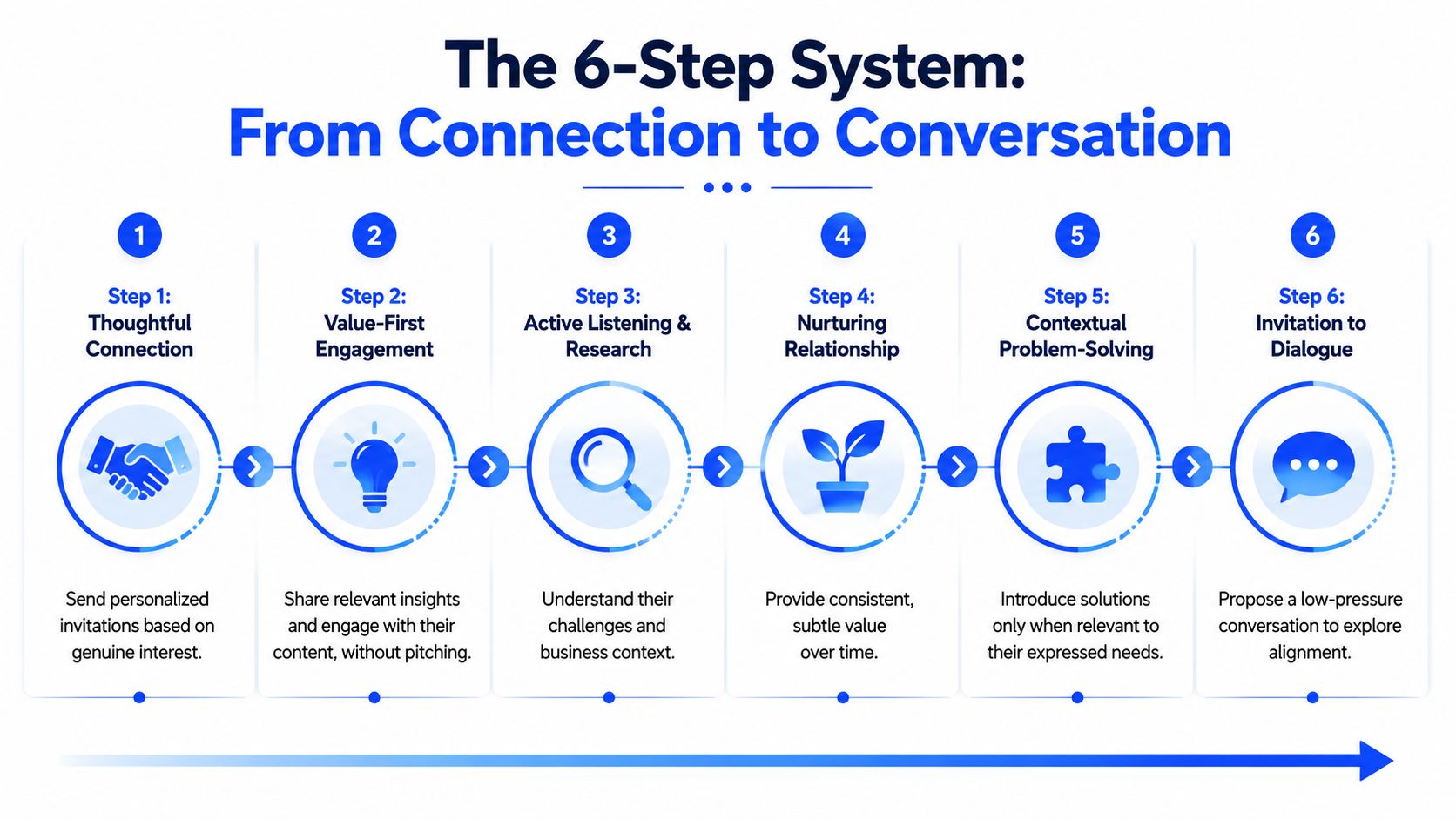
The 6-step system from connection to conversation
A connection isn't a sales outcome. It's a permission slip. Teams that confuse the two usually destroy the opportunity in the first day.
Here's the infographic version of the system before the detail.
What most teams do wrong
They send the request, get the accept, and immediately drop a pitch. That move tells the buyer the connection had no independent value. It was only a delivery mechanism for a canned message.
The result is predictable. Low reply quality, weak meeting intent, and calendar bookings that don't hold.
The biggest mistake in LinkedIn for sales is collapsing relationship timing into one transaction.
The sequence that actually converts
The system below is slower than instant pitching, but it creates better conversations and cleaner qualification.
Connection request with context
Send either no note or a short one-line note tied to the trigger that justified outreach. Both approaches work in different segments, so test them by ICP instead of treating one as doctrine.Silent observation period
Wait before messaging. The short pause changes how the connection is perceived. You want to register as a real professional connection, not an automated seller.Value-led engagement
Show up in the feed before you show up in the inbox. Comment where you can add substance. Publish content that supports your market position. Let the buyer see your name in a context that isn't a request.First DM as a qualifying question
The first direct message should reference something specific and ask a question. Not a pitch. Not a deck. Not a calendar link.Conversation handoff to context
Once they reply, respond with a useful perspective, a pattern you've seen, or a framing that helps them interpret their own situation. Let the buyer keep talking.Meeting offer at the right moment
Only offer time when they've shown active interest and exposed enough context to self-qualify.
A short comparison makes the trade-off clearer:
Approach | What it feels like to the buyer | What usually happens |
|---|---|---|
Pitch right after accept | Ambush | Ignore, deflect, or soft no |
Pace across feed and DM | Familiarity building | Better reply quality and cleaner meeting intent |
Where to put the video
Some teams need a visual walkthrough to coach reps against the sequence. This one is worth using in onboarding or QA reviews.
The key management point is that every step should be inspectable. If acceptance is fine but conversations don't start, the problem is usually pacing or message one. If conversations start but meetings don't convert, the problem is often that reps rush to the calendar before the buyer has fully engaged. This LinkedIn lead generation guide is useful if you want to map this sequence into a wider outbound motion.
Writing messages that earn a reply
A rep gets the connection accepted, sends a polished note, and hears nothing. The problem usually is not copy polish. It is that the message asks for attention before it has earned relevance.
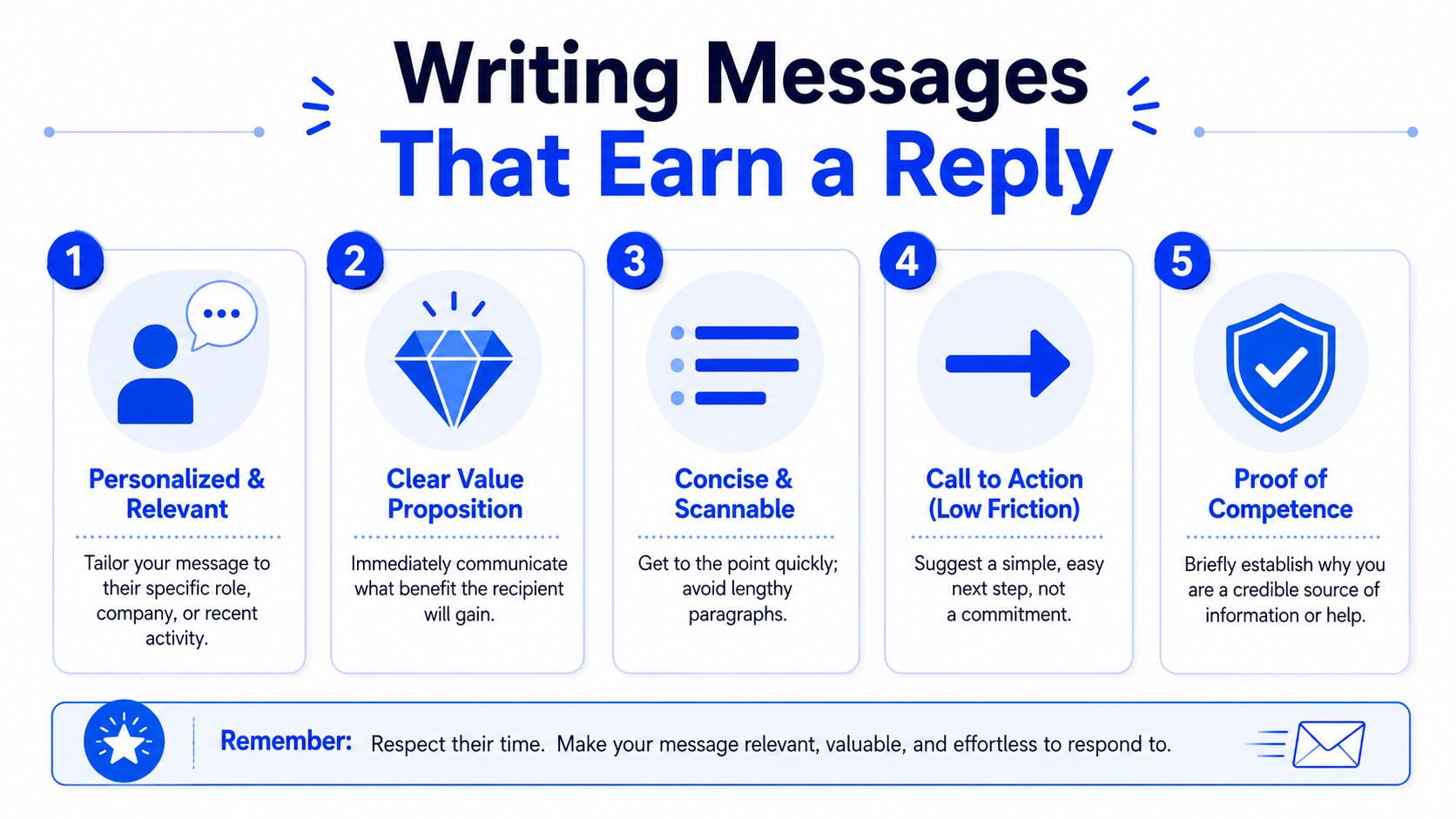
Reply-worthy LinkedIn messages do one job well. They help the buyer recognize a real situation fast enough to answer without doing homework. That means the message needs to be built from observable context, a specific point of view, and a question that is easy to answer in one sentence.
Why generic personalization fails
Buyers can spot fake relevance immediately. "Saw your impressive background" is filler. "Noticed you opened three AE roles after missing plan in Q1" gives them something concrete to react to.
The standard I use with teams is simple. If a sales manager cannot point to the trigger that justified the message, the rep should not send it. Good outreach starts from a reason, not a template.
Strong messages usually include four parts:
A verifiable trigger. A hiring push, territory change, product launch, leadership move, earnings comment, or post
A commercial point of view. What that trigger tends to cause in pipeline, conversion, or sales execution
Plain language about the problem. Use the buyer's operating terms, not category jargon
A low-friction question. Ask something they can confirm, reject, or clarify quickly
A message structure worth stealing
Here is a structure that consistently produces better reply quality than generic "open to connecting?" notes:
Saw you posted about missing Q1 by 18%. In that situation, we usually find the issue started earlier with pipeline coverage, not rep activity in the quarter itself. Was that true for your team, or was the bigger problem conversion?
It works because each line carries weight.
The first sentence proves attention. The second gives a point of view with some risk in it. The last sentence makes it easy to respond without agreeing to anything.
That is the trade-off many outbound teams miss. Safer copy feels polite to the sender and forgettable to the buyer. Sharper copy risks being wrong, but it earns correction, and correction is a reply.
Write for conversation, not for approval
A lot of reps are trained to sound professional. On LinkedIn, that often produces stiff messages that read like compliance-approved email. Replies improve when the note sounds like a person who noticed something and has a useful opinion about it.
That does not mean casual. It means precise.
Bad:
Congrats on the growth at Acme. We help companies like yours improve sales performance. Would you be open to a quick chat?
Better:
Noticed the team is hiring enterprise reps in EMEA while North America openings are flat. That usually means coverage is shifting faster than process does. Are managers rebuilding stages and handoffs too, or just adding headcount?
The second message gives the buyer something real to react to. Even if the assumption is partly wrong, the prospect can correct it in a sentence. That is enough to start a conversation.
If your team needs more first-touch examples, these LinkedIn connection request message patterns are useful reference points. Use them to study trigger-to-message fit, not to hand reps another copy-and-paste file.
How to run this at scale without sounding automated
The stack does not need to be complicated. Sales Navigator builds the audience. Clay surfaces triggers. Claude can draft opening lines. A rep or manager still needs to review every message before it goes out.
That review step is where quality is won or lost. AI can summarize a trigger and mimic tone. It still misses social context, overstates certainty, and occasionally references the wrong detail. One bad assumption can kill a thread before the buyer even reads the second sentence.
Here is the workflow that holds up in production:
Stage | Tool | Human role |
|---|---|---|
Build segment | Sales Navigator | Define account and lead criteria |
Detect trigger | Clay | Approve which signals matter |
Draft opener | Claude | Edit tone, check assumptions, sharpen relevance |
Send sequence | HeyReach or native workflow | Set pacing, suppression, and follow-up rules |
Log outcomes | HubSpot | Tag source, trigger, reply type, and next step |
Video can help in some segments, especially when the seller already has a clear reason to reach out and can explain it in under 30 seconds. It does not rescue weak targeting. If you're testing richer media, this guide on optimiza tu presencia con videos en LinkedIn is a useful reference for format choices.
The operating metric that matters here is not just reply rate. Track reply rate by trigger type, positive reply rate by segment, and meeting rate from positive replies. A message about a funding event may get more responses than one about process change, but if the second path creates cleaner opportunities, that is the one to scale.
Qualification and routing after the reply
The reply is where most LinkedIn programs start losing money. Teams celebrate the response, drop a calendar link too early, and turn an interested buyer into a no-show.
Qualification matters because the platform is huge. LinkedIn is reported to have more than 1.2 billion members and around 80% of B2B social leads coming through it, which means qualification is the only way to manage volume and find real opportunities, as summarized in these LinkedIn B2B lead generation stats.
Don't book the meeting too early
After the first reply, your job is to guide the conversation into context. Most good conversations need a few exchanges before a meeting ask makes sense.
That means your next message should usually do one of these:
Clarify the situation → "How is the team handling that now?"
Offer a pattern → "We usually see that happen when pipeline coverage was already thin earlier in the quarter."
Test urgency → "Is this something you're actively trying to fix this quarter, or just diagnosing right now?"
What you should not do is send, "Happy to show you how we help, here's my calendar."
A meeting should feel like the natural next step in a conversation the buyer is already leaning into.
Route context, not just a contact record
Once the buyer is ready for a call, the handoff from founder or SDR to AE needs more than name, title, and company. It needs the story of why this meeting exists.
The AE should receive:
Trigger source → what happened that opened the conversation
Pain summary → the exact issue in the buyer's own language
Relevant proof angle → what example, framework, or capability matched their concern
Conversation notes → objections, stakeholders mentioned, urgency cues
If you're using HubSpot, create required properties for trigger type, pain category, conversation stage, and meeting source detail. If you're using a more custom stack, the same logic still applies.
Agencies and internal teams often diverge in their practices. Internal teams often log the lead. The better operators log the context. If you want a clean standard for what qualifies before routing, use a documented lead qualification process rather than leaving it to rep judgment call by call.
Measuring what actually creates pipeline
A team can post every day, accept connections all week, and still miss the number because none of that motion turns into qualified meetings. LinkedIn gives you plenty to report on. Very little of it helps you decide what to fix.
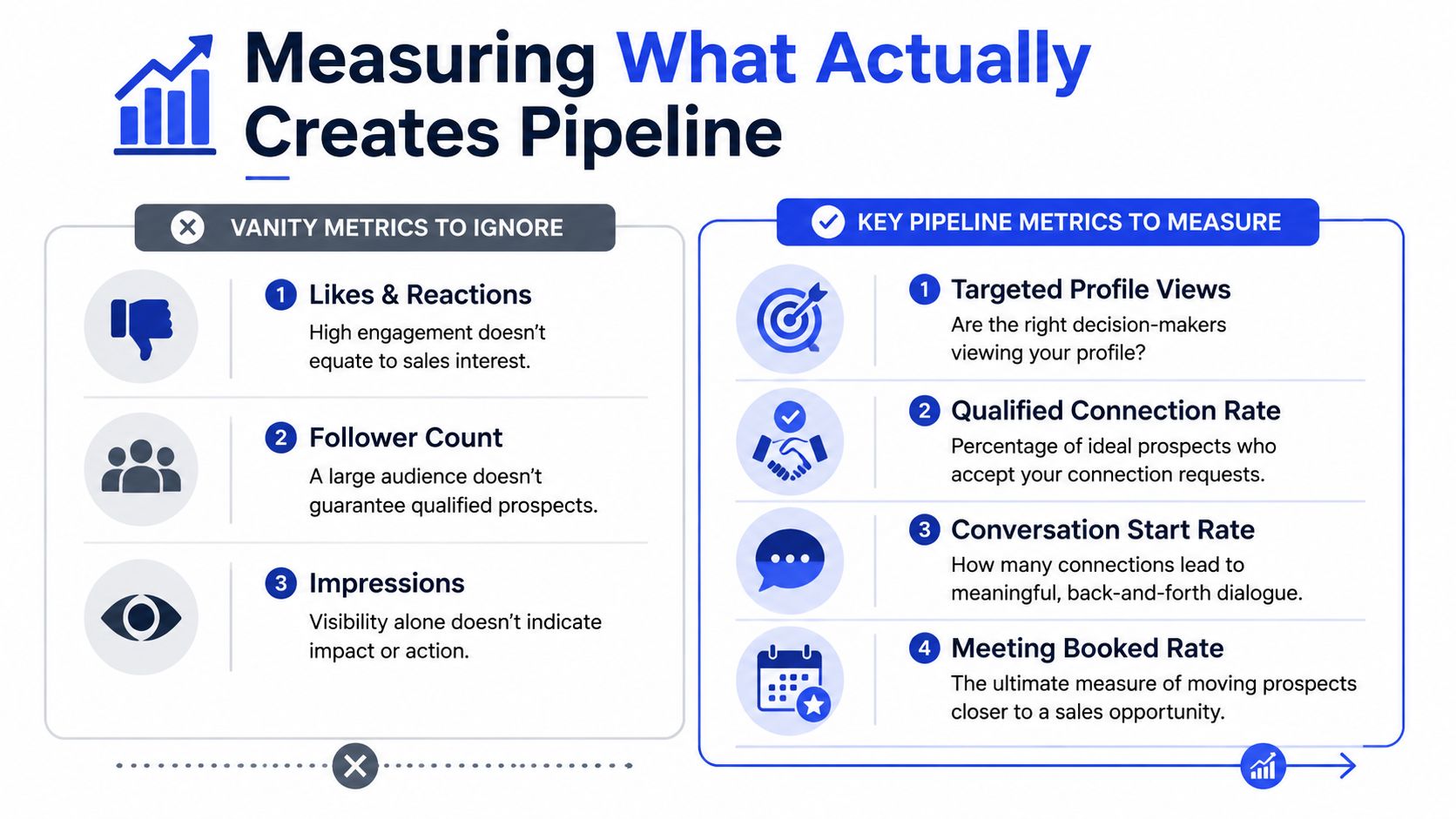
Ignore activity metrics that flatter the team
Impressions, likes, profile views, and follower growth show that people noticed something. They do not show whether your outreach system is producing sales conversations with the right accounts.
The metric I use first is accepted connections that become qualified conversations within 30 days.
That number exposes pacing problems fast.
If connection acceptance is healthy but qualified conversation rate is weak, the issue is rarely volume. It is usually one of three things. The follow-up came too slowly, the message sequence did not match the trigger that earned the connection, or reps booked calls before confirming pain and urgency.
Use simple operating ranges to guide the review:
Below 5% → the system needs repair, usually in pacing, qualification, or message quality
8 to 12% → healthy for many B2B outbound programs
Above 15% → strong targeting, strong timing, or both
The point is not to chase a benchmark for bragging rights. The point is to know where to inspect the process.
Track one conversion path end to end
The cleanest setup is a stage-based path inside the CRM. HubSpot handles this well, but Salesforce or any CRM with custom properties can do the same job if the fields are enforced.
Create one path with these checkpoints:
Connection sent
Connection accepted
First message sent
Reply received
Qualified conversation started
Meeting booked
Meeting held
Keep the path narrow. Once teams start adding extra statuses for every edge case, reporting gets muddy and reps stop updating records consistently.
I also recommend logging three fields that explain performance, not just volume: segment, message variant, and days from acceptance to first follow-up. Those three fields tell you more than a polished dashboard full of engagement charts. They show whether one persona converts better, whether one narrative is carrying replies, and whether the team is waiting too long after acceptance.
Tools sit underneath this system. They do not create it. Apollo, Clay, Lemlist, Instantly, Smartlead, HeyReach, HubSpot, Sales Navigator, and Grou can support the workflow. None of them will fix weak process discipline, sloppy routing, or a team that logs meetings but not context.
Run a weekly inspection, not a monthly recap. Pull the last ten accepted connections that stalled. Find the exact step where momentum died, then fix that step before you ask the team for more activity.
Grou is a global B2B pipeline agency that runs LinkedIn content, lead generation, and outbound as one system. The methodology is simple: structure attention around one ICP, one message architecture, and one reporting line so LinkedIn activity turns into qualified conversations instead of disconnected sales noise.
Your reps are sending connection requests, getting some accepts, and still not creating pipeline. The usual problem isn't volume. It's that the profile doesn't build trust, the targeting is too broad, and the team pitches before the buyer has any reason to engage.
LinkedIn for sales works when credibility, targeting, pacing, and qualification are built as one system
Sales Navigator should be structured at both account and lead level before any outreach starts
A connection is only permission to begin, not permission to pitch
The metric that matters is accepted connections that turn into qualified conversations within 30 days
Table of Contents
The foundation for outreach credibility
Most LinkedIn outreach fails before the first message. The rep looks interchangeable, the headline reads like an internal org chart, and the feed is empty. Buyers don't respond to a stranger's message just because the copy is polished.
LinkedIn passed 1 billion members in 2024, but buyers are also seeing more AI-generated and templated outreach, which makes better personalization less useful unless it's tied to a credible profile, proof points, and relationship-building, as noted in Valley's analysis of LinkedIn sales strategy and AI outreach.
Your profile has one job
Your profile doesn't need to impress recruiters. It needs to reduce buyer skepticism.
That means three areas have to line up with the ICP:
Headline → State who you help and what problem you work on. Job title alone wastes the highest-visibility real estate on the page.
About section → Describe the commercial problem you solve, the environments where it shows up, and the kind of outcomes buyers care about. Keep it buyer-facing.
Featured section → Pin proof. Good options are a sharp post, a teardown, a customer-facing framework, or a webinar clip.
A bad sales profile says, in effect, "I'm in sales." A good one says, "I understand this problem, I talk about it often, and other people seem to take that seriously."
Practical rule: if a prospect lands on the profile after seeing your DM, they should understand your market, your angle, and your relevance in under a minute.
For teams trying to systemize posting, scheduling matters less than consistency. If you're operationalizing founder or rep content at scale, this guide on publishing LinkedIn content via API is useful because it shows how to make distribution repeatable once the editorial system is already solid.
Content is the proof layer
For B2B LinkedIn for sales, content isn't branding theater. It's pre-call trust.
The format I recommend first is text-only long-form posts. They are easier to sustain, easier to write with nuance, and better at carrying an opinion than most company-safe carousels. For founder-led and sales-led accounts, they also create a visible trail of competence before any outreach begins.
A simple weekly cadence works well:
Content slot | Format | Purpose |
|---|---|---|
Post 1 | Long-form text | Point of view on a recurring buyer problem |
Post 2 | Long-form text | Story, decision, or teardown |
Post 3 | Long-form text | Objection handling or market observation |
Post 4 | Carousel | One framework buyers can share internally |
If the team has no content system, start there before scaling outbound. A blank feed forces every message to carry the entire trust burden by itself. That is usually where LinkedIn programs stall. For a practical structure, see this LinkedIn content strategy framework.
Building your targeting machine
A rep pulls 300 names from Sales Navigator, sends the same sequence, and gets almost nothing back. The instinct is to rewrite the copy. In practice, the failure usually starts earlier. The list bundled good accounts with weak contacts, or good contacts inside accounts that were never likely to buy.
Targeting needs to produce clear learning. If segment A underperforms segment B, the team should know whether the problem is market fit, contact selection, timing, or message angle. That only happens when account selection and lead selection are built as separate layers.
Sales Navigator supports that structure well because it lets teams search companies and people independently. Use account search to define where the problem exists. Use lead search to define who feels it, owns it, or can sponsor change. This Sales Navigator walkthrough on lead and account search shows the mechanics. The important part is the operating model behind it.
Start with account lists, then build lead lists
For most B2B motions, accounts come first. Founder-led outbound can be an exception, especially in narrow markets where the founder is the buyer and the account list is small. For everyone else, starting with people searches creates messy data fast. Reps end up chasing titles without enough company context to know whether the outreach deserves a send.
Build the account layer with filters such as:
Industry fit: Focus on verticals where the pain is common, expensive, and easy to recognize from the outside.
Company size: Match headcount bands to your ACV, implementation load, and sales cycle.
Geography: Split regions when proof points, regulations, or buying behavior differ.
Growth signals: Prioritize companies showing change, such as hiring, expansion, new leadership, or team restructuring.
Then build lead lists inside those accounts. Many teams become careless at this stage. "VP" is not a persona. A VP Sales, a Head of RevOps, and a founder can all sit inside the same company and require different triggers, different language, and a different ask.
My rule is simple. Every saved lead should answer three questions: why this company, why this person, and why now. If the team cannot fill in those fields, the record is not ready for outreach.
A workable setup is to define the ICP, split target accounts into a few tight segments, map the buying roles inside each segment, and create message variants by persona instead of one generic sequence for everyone. That is the foundation behind a useful LinkedIn targeting framework for B2B teams.
Enrich for triggers, not trivia
Once the list is built, enrich it with context that changes timing or relevance. A static CSV ages out quickly, especially on LinkedIn where job changes, reporting lines, and team priorities shift all the time.
Clay and similar tools help here if the team uses them with discipline. Pull fields that improve decision quality. Recent posts, open roles, executive changes, product launches, funding events, territory expansion, and signs of process change are worth more than extra firmographic noise after the account already meets baseline fit.
Two custom fields matter more than people expect:
Why this account is on the list
What changed recently that justifies contact now
Those fields force judgment. They also make it easier for managers to audit list quality before volume goes out.
Good targeting is less about getting a huge list and more about pacing the right list into market. If reps add names faster than the team can enrich, segment, and review them, quality drops first and reply rates follow. The targeting machine has to be tight enough that every outbound test teaches something useful.
The 6-step system from connection to conversation
A connection isn't a sales outcome. It's a permission slip. Teams that confuse the two usually destroy the opportunity in the first day.
Here's the infographic version of the system before the detail.
What most teams do wrong
They send the request, get the accept, and immediately drop a pitch. That move tells the buyer the connection had no independent value. It was only a delivery mechanism for a canned message.
The result is predictable. Low reply quality, weak meeting intent, and calendar bookings that don't hold.
The biggest mistake in LinkedIn for sales is collapsing relationship timing into one transaction.
The sequence that actually converts
The system below is slower than instant pitching, but it creates better conversations and cleaner qualification.
Connection request with context
Send either no note or a short one-line note tied to the trigger that justified outreach. Both approaches work in different segments, so test them by ICP instead of treating one as doctrine.Silent observation period
Wait before messaging. The short pause changes how the connection is perceived. You want to register as a real professional connection, not an automated seller.Value-led engagement
Show up in the feed before you show up in the inbox. Comment where you can add substance. Publish content that supports your market position. Let the buyer see your name in a context that isn't a request.First DM as a qualifying question
The first direct message should reference something specific and ask a question. Not a pitch. Not a deck. Not a calendar link.Conversation handoff to context
Once they reply, respond with a useful perspective, a pattern you've seen, or a framing that helps them interpret their own situation. Let the buyer keep talking.Meeting offer at the right moment
Only offer time when they've shown active interest and exposed enough context to self-qualify.
A short comparison makes the trade-off clearer:
Approach | What it feels like to the buyer | What usually happens |
|---|---|---|
Pitch right after accept | Ambush | Ignore, deflect, or soft no |
Pace across feed and DM | Familiarity building | Better reply quality and cleaner meeting intent |
Where to put the video
Some teams need a visual walkthrough to coach reps against the sequence. This one is worth using in onboarding or QA reviews.
The key management point is that every step should be inspectable. If acceptance is fine but conversations don't start, the problem is usually pacing or message one. If conversations start but meetings don't convert, the problem is often that reps rush to the calendar before the buyer has fully engaged. This LinkedIn lead generation guide is useful if you want to map this sequence into a wider outbound motion.
Writing messages that earn a reply
A rep gets the connection accepted, sends a polished note, and hears nothing. The problem usually is not copy polish. It is that the message asks for attention before it has earned relevance.
Reply-worthy LinkedIn messages do one job well. They help the buyer recognize a real situation fast enough to answer without doing homework. That means the message needs to be built from observable context, a specific point of view, and a question that is easy to answer in one sentence.
Why generic personalization fails
Buyers can spot fake relevance immediately. "Saw your impressive background" is filler. "Noticed you opened three AE roles after missing plan in Q1" gives them something concrete to react to.
The standard I use with teams is simple. If a sales manager cannot point to the trigger that justified the message, the rep should not send it. Good outreach starts from a reason, not a template.
Strong messages usually include four parts:
A verifiable trigger. A hiring push, territory change, product launch, leadership move, earnings comment, or post
A commercial point of view. What that trigger tends to cause in pipeline, conversion, or sales execution
Plain language about the problem. Use the buyer's operating terms, not category jargon
A low-friction question. Ask something they can confirm, reject, or clarify quickly
A message structure worth stealing
Here is a structure that consistently produces better reply quality than generic "open to connecting?" notes:
Saw you posted about missing Q1 by 18%. In that situation, we usually find the issue started earlier with pipeline coverage, not rep activity in the quarter itself. Was that true for your team, or was the bigger problem conversion?
It works because each line carries weight.
The first sentence proves attention. The second gives a point of view with some risk in it. The last sentence makes it easy to respond without agreeing to anything.
That is the trade-off many outbound teams miss. Safer copy feels polite to the sender and forgettable to the buyer. Sharper copy risks being wrong, but it earns correction, and correction is a reply.
Write for conversation, not for approval
A lot of reps are trained to sound professional. On LinkedIn, that often produces stiff messages that read like compliance-approved email. Replies improve when the note sounds like a person who noticed something and has a useful opinion about it.
That does not mean casual. It means precise.
Bad:
Congrats on the growth at Acme. We help companies like yours improve sales performance. Would you be open to a quick chat?
Better:
Noticed the team is hiring enterprise reps in EMEA while North America openings are flat. That usually means coverage is shifting faster than process does. Are managers rebuilding stages and handoffs too, or just adding headcount?
The second message gives the buyer something real to react to. Even if the assumption is partly wrong, the prospect can correct it in a sentence. That is enough to start a conversation.
If your team needs more first-touch examples, these LinkedIn connection request message patterns are useful reference points. Use them to study trigger-to-message fit, not to hand reps another copy-and-paste file.
How to run this at scale without sounding automated
The stack does not need to be complicated. Sales Navigator builds the audience. Clay surfaces triggers. Claude can draft opening lines. A rep or manager still needs to review every message before it goes out.
That review step is where quality is won or lost. AI can summarize a trigger and mimic tone. It still misses social context, overstates certainty, and occasionally references the wrong detail. One bad assumption can kill a thread before the buyer even reads the second sentence.
Here is the workflow that holds up in production:
Stage | Tool | Human role |
|---|---|---|
Build segment | Sales Navigator | Define account and lead criteria |
Detect trigger | Clay | Approve which signals matter |
Draft opener | Claude | Edit tone, check assumptions, sharpen relevance |
Send sequence | HeyReach or native workflow | Set pacing, suppression, and follow-up rules |
Log outcomes | HubSpot | Tag source, trigger, reply type, and next step |
Video can help in some segments, especially when the seller already has a clear reason to reach out and can explain it in under 30 seconds. It does not rescue weak targeting. If you're testing richer media, this guide on optimiza tu presencia con videos en LinkedIn is a useful reference for format choices.
The operating metric that matters here is not just reply rate. Track reply rate by trigger type, positive reply rate by segment, and meeting rate from positive replies. A message about a funding event may get more responses than one about process change, but if the second path creates cleaner opportunities, that is the one to scale.
Qualification and routing after the reply
The reply is where most LinkedIn programs start losing money. Teams celebrate the response, drop a calendar link too early, and turn an interested buyer into a no-show.
Qualification matters because the platform is huge. LinkedIn is reported to have more than 1.2 billion members and around 80% of B2B social leads coming through it, which means qualification is the only way to manage volume and find real opportunities, as summarized in these LinkedIn B2B lead generation stats.
Don't book the meeting too early
After the first reply, your job is to guide the conversation into context. Most good conversations need a few exchanges before a meeting ask makes sense.
That means your next message should usually do one of these:
Clarify the situation → "How is the team handling that now?"
Offer a pattern → "We usually see that happen when pipeline coverage was already thin earlier in the quarter."
Test urgency → "Is this something you're actively trying to fix this quarter, or just diagnosing right now?"
What you should not do is send, "Happy to show you how we help, here's my calendar."
A meeting should feel like the natural next step in a conversation the buyer is already leaning into.
Route context, not just a contact record
Once the buyer is ready for a call, the handoff from founder or SDR to AE needs more than name, title, and company. It needs the story of why this meeting exists.
The AE should receive:
Trigger source → what happened that opened the conversation
Pain summary → the exact issue in the buyer's own language
Relevant proof angle → what example, framework, or capability matched their concern
Conversation notes → objections, stakeholders mentioned, urgency cues
If you're using HubSpot, create required properties for trigger type, pain category, conversation stage, and meeting source detail. If you're using a more custom stack, the same logic still applies.
Agencies and internal teams often diverge in their practices. Internal teams often log the lead. The better operators log the context. If you want a clean standard for what qualifies before routing, use a documented lead qualification process rather than leaving it to rep judgment call by call.
Measuring what actually creates pipeline
A team can post every day, accept connections all week, and still miss the number because none of that motion turns into qualified meetings. LinkedIn gives you plenty to report on. Very little of it helps you decide what to fix.
Ignore activity metrics that flatter the team
Impressions, likes, profile views, and follower growth show that people noticed something. They do not show whether your outreach system is producing sales conversations with the right accounts.
The metric I use first is accepted connections that become qualified conversations within 30 days.
That number exposes pacing problems fast.
If connection acceptance is healthy but qualified conversation rate is weak, the issue is rarely volume. It is usually one of three things. The follow-up came too slowly, the message sequence did not match the trigger that earned the connection, or reps booked calls before confirming pain and urgency.
Use simple operating ranges to guide the review:
Below 5% → the system needs repair, usually in pacing, qualification, or message quality
8 to 12% → healthy for many B2B outbound programs
Above 15% → strong targeting, strong timing, or both
The point is not to chase a benchmark for bragging rights. The point is to know where to inspect the process.
Track one conversion path end to end
The cleanest setup is a stage-based path inside the CRM. HubSpot handles this well, but Salesforce or any CRM with custom properties can do the same job if the fields are enforced.
Create one path with these checkpoints:
Connection sent
Connection accepted
First message sent
Reply received
Qualified conversation started
Meeting booked
Meeting held
Keep the path narrow. Once teams start adding extra statuses for every edge case, reporting gets muddy and reps stop updating records consistently.
I also recommend logging three fields that explain performance, not just volume: segment, message variant, and days from acceptance to first follow-up. Those three fields tell you more than a polished dashboard full of engagement charts. They show whether one persona converts better, whether one narrative is carrying replies, and whether the team is waiting too long after acceptance.
Tools sit underneath this system. They do not create it. Apollo, Clay, Lemlist, Instantly, Smartlead, HeyReach, HubSpot, Sales Navigator, and Grou can support the workflow. None of them will fix weak process discipline, sloppy routing, or a team that logs meetings but not context.
Run a weekly inspection, not a monthly recap. Pull the last ten accepted connections that stalled. Find the exact step where momentum died, then fix that step before you ask the team for more activity.
Grou is a global B2B pipeline agency that runs LinkedIn content, lead generation, and outbound as one system. The methodology is simple: structure attention around one ICP, one message architecture, and one reporting line so LinkedIn activity turns into qualified conversations instead of disconnected sales noise.
Your reps are sending connection requests, getting some accepts, and still not creating pipeline. The usual problem isn't volume. It's that the profile doesn't build trust, the targeting is too broad, and the team pitches before the buyer has any reason to engage.
LinkedIn for sales works when credibility, targeting, pacing, and qualification are built as one system
Sales Navigator should be structured at both account and lead level before any outreach starts
A connection is only permission to begin, not permission to pitch
The metric that matters is accepted connections that turn into qualified conversations within 30 days
Table of Contents
The foundation for outreach credibility
Most LinkedIn outreach fails before the first message. The rep looks interchangeable, the headline reads like an internal org chart, and the feed is empty. Buyers don't respond to a stranger's message just because the copy is polished.
LinkedIn passed 1 billion members in 2024, but buyers are also seeing more AI-generated and templated outreach, which makes better personalization less useful unless it's tied to a credible profile, proof points, and relationship-building, as noted in Valley's analysis of LinkedIn sales strategy and AI outreach.
Your profile has one job
Your profile doesn't need to impress recruiters. It needs to reduce buyer skepticism.
That means three areas have to line up with the ICP:
Headline → State who you help and what problem you work on. Job title alone wastes the highest-visibility real estate on the page.
About section → Describe the commercial problem you solve, the environments where it shows up, and the kind of outcomes buyers care about. Keep it buyer-facing.
Featured section → Pin proof. Good options are a sharp post, a teardown, a customer-facing framework, or a webinar clip.
A bad sales profile says, in effect, "I'm in sales." A good one says, "I understand this problem, I talk about it often, and other people seem to take that seriously."
Practical rule: if a prospect lands on the profile after seeing your DM, they should understand your market, your angle, and your relevance in under a minute.
For teams trying to systemize posting, scheduling matters less than consistency. If you're operationalizing founder or rep content at scale, this guide on publishing LinkedIn content via API is useful because it shows how to make distribution repeatable once the editorial system is already solid.
Content is the proof layer
For B2B LinkedIn for sales, content isn't branding theater. It's pre-call trust.
The format I recommend first is text-only long-form posts. They are easier to sustain, easier to write with nuance, and better at carrying an opinion than most company-safe carousels. For founder-led and sales-led accounts, they also create a visible trail of competence before any outreach begins.
A simple weekly cadence works well:
Content slot | Format | Purpose |
|---|---|---|
Post 1 | Long-form text | Point of view on a recurring buyer problem |
Post 2 | Long-form text | Story, decision, or teardown |
Post 3 | Long-form text | Objection handling or market observation |
Post 4 | Carousel | One framework buyers can share internally |
If the team has no content system, start there before scaling outbound. A blank feed forces every message to carry the entire trust burden by itself. That is usually where LinkedIn programs stall. For a practical structure, see this LinkedIn content strategy framework.
Building your targeting machine
A rep pulls 300 names from Sales Navigator, sends the same sequence, and gets almost nothing back. The instinct is to rewrite the copy. In practice, the failure usually starts earlier. The list bundled good accounts with weak contacts, or good contacts inside accounts that were never likely to buy.
Targeting needs to produce clear learning. If segment A underperforms segment B, the team should know whether the problem is market fit, contact selection, timing, or message angle. That only happens when account selection and lead selection are built as separate layers.
Sales Navigator supports that structure well because it lets teams search companies and people independently. Use account search to define where the problem exists. Use lead search to define who feels it, owns it, or can sponsor change. This Sales Navigator walkthrough on lead and account search shows the mechanics. The important part is the operating model behind it.
Start with account lists, then build lead lists
For most B2B motions, accounts come first. Founder-led outbound can be an exception, especially in narrow markets where the founder is the buyer and the account list is small. For everyone else, starting with people searches creates messy data fast. Reps end up chasing titles without enough company context to know whether the outreach deserves a send.
Build the account layer with filters such as:
Industry fit: Focus on verticals where the pain is common, expensive, and easy to recognize from the outside.
Company size: Match headcount bands to your ACV, implementation load, and sales cycle.
Geography: Split regions when proof points, regulations, or buying behavior differ.
Growth signals: Prioritize companies showing change, such as hiring, expansion, new leadership, or team restructuring.
Then build lead lists inside those accounts. Many teams become careless at this stage. "VP" is not a persona. A VP Sales, a Head of RevOps, and a founder can all sit inside the same company and require different triggers, different language, and a different ask.
My rule is simple. Every saved lead should answer three questions: why this company, why this person, and why now. If the team cannot fill in those fields, the record is not ready for outreach.
A workable setup is to define the ICP, split target accounts into a few tight segments, map the buying roles inside each segment, and create message variants by persona instead of one generic sequence for everyone. That is the foundation behind a useful LinkedIn targeting framework for B2B teams.
Enrich for triggers, not trivia
Once the list is built, enrich it with context that changes timing or relevance. A static CSV ages out quickly, especially on LinkedIn where job changes, reporting lines, and team priorities shift all the time.
Clay and similar tools help here if the team uses them with discipline. Pull fields that improve decision quality. Recent posts, open roles, executive changes, product launches, funding events, territory expansion, and signs of process change are worth more than extra firmographic noise after the account already meets baseline fit.
Two custom fields matter more than people expect:
Why this account is on the list
What changed recently that justifies contact now
Those fields force judgment. They also make it easier for managers to audit list quality before volume goes out.
Good targeting is less about getting a huge list and more about pacing the right list into market. If reps add names faster than the team can enrich, segment, and review them, quality drops first and reply rates follow. The targeting machine has to be tight enough that every outbound test teaches something useful.
The 6-step system from connection to conversation
A connection isn't a sales outcome. It's a permission slip. Teams that confuse the two usually destroy the opportunity in the first day.
Here's the infographic version of the system before the detail.
What most teams do wrong
They send the request, get the accept, and immediately drop a pitch. That move tells the buyer the connection had no independent value. It was only a delivery mechanism for a canned message.
The result is predictable. Low reply quality, weak meeting intent, and calendar bookings that don't hold.
The biggest mistake in LinkedIn for sales is collapsing relationship timing into one transaction.
The sequence that actually converts
The system below is slower than instant pitching, but it creates better conversations and cleaner qualification.
Connection request with context
Send either no note or a short one-line note tied to the trigger that justified outreach. Both approaches work in different segments, so test them by ICP instead of treating one as doctrine.Silent observation period
Wait before messaging. The short pause changes how the connection is perceived. You want to register as a real professional connection, not an automated seller.Value-led engagement
Show up in the feed before you show up in the inbox. Comment where you can add substance. Publish content that supports your market position. Let the buyer see your name in a context that isn't a request.First DM as a qualifying question
The first direct message should reference something specific and ask a question. Not a pitch. Not a deck. Not a calendar link.Conversation handoff to context
Once they reply, respond with a useful perspective, a pattern you've seen, or a framing that helps them interpret their own situation. Let the buyer keep talking.Meeting offer at the right moment
Only offer time when they've shown active interest and exposed enough context to self-qualify.
A short comparison makes the trade-off clearer:
Approach | What it feels like to the buyer | What usually happens |
|---|---|---|
Pitch right after accept | Ambush | Ignore, deflect, or soft no |
Pace across feed and DM | Familiarity building | Better reply quality and cleaner meeting intent |
Where to put the video
Some teams need a visual walkthrough to coach reps against the sequence. This one is worth using in onboarding or QA reviews.
The key management point is that every step should be inspectable. If acceptance is fine but conversations don't start, the problem is usually pacing or message one. If conversations start but meetings don't convert, the problem is often that reps rush to the calendar before the buyer has fully engaged. This LinkedIn lead generation guide is useful if you want to map this sequence into a wider outbound motion.
Writing messages that earn a reply
A rep gets the connection accepted, sends a polished note, and hears nothing. The problem usually is not copy polish. It is that the message asks for attention before it has earned relevance.
Reply-worthy LinkedIn messages do one job well. They help the buyer recognize a real situation fast enough to answer without doing homework. That means the message needs to be built from observable context, a specific point of view, and a question that is easy to answer in one sentence.
Why generic personalization fails
Buyers can spot fake relevance immediately. "Saw your impressive background" is filler. "Noticed you opened three AE roles after missing plan in Q1" gives them something concrete to react to.
The standard I use with teams is simple. If a sales manager cannot point to the trigger that justified the message, the rep should not send it. Good outreach starts from a reason, not a template.
Strong messages usually include four parts:
A verifiable trigger. A hiring push, territory change, product launch, leadership move, earnings comment, or post
A commercial point of view. What that trigger tends to cause in pipeline, conversion, or sales execution
Plain language about the problem. Use the buyer's operating terms, not category jargon
A low-friction question. Ask something they can confirm, reject, or clarify quickly
A message structure worth stealing
Here is a structure that consistently produces better reply quality than generic "open to connecting?" notes:
Saw you posted about missing Q1 by 18%. In that situation, we usually find the issue started earlier with pipeline coverage, not rep activity in the quarter itself. Was that true for your team, or was the bigger problem conversion?
It works because each line carries weight.
The first sentence proves attention. The second gives a point of view with some risk in it. The last sentence makes it easy to respond without agreeing to anything.
That is the trade-off many outbound teams miss. Safer copy feels polite to the sender and forgettable to the buyer. Sharper copy risks being wrong, but it earns correction, and correction is a reply.
Write for conversation, not for approval
A lot of reps are trained to sound professional. On LinkedIn, that often produces stiff messages that read like compliance-approved email. Replies improve when the note sounds like a person who noticed something and has a useful opinion about it.
That does not mean casual. It means precise.
Bad:
Congrats on the growth at Acme. We help companies like yours improve sales performance. Would you be open to a quick chat?
Better:
Noticed the team is hiring enterprise reps in EMEA while North America openings are flat. That usually means coverage is shifting faster than process does. Are managers rebuilding stages and handoffs too, or just adding headcount?
The second message gives the buyer something real to react to. Even if the assumption is partly wrong, the prospect can correct it in a sentence. That is enough to start a conversation.
If your team needs more first-touch examples, these LinkedIn connection request message patterns are useful reference points. Use them to study trigger-to-message fit, not to hand reps another copy-and-paste file.
How to run this at scale without sounding automated
The stack does not need to be complicated. Sales Navigator builds the audience. Clay surfaces triggers. Claude can draft opening lines. A rep or manager still needs to review every message before it goes out.
That review step is where quality is won or lost. AI can summarize a trigger and mimic tone. It still misses social context, overstates certainty, and occasionally references the wrong detail. One bad assumption can kill a thread before the buyer even reads the second sentence.
Here is the workflow that holds up in production:
Stage | Tool | Human role |
|---|---|---|
Build segment | Sales Navigator | Define account and lead criteria |
Detect trigger | Clay | Approve which signals matter |
Draft opener | Claude | Edit tone, check assumptions, sharpen relevance |
Send sequence | HeyReach or native workflow | Set pacing, suppression, and follow-up rules |
Log outcomes | HubSpot | Tag source, trigger, reply type, and next step |
Video can help in some segments, especially when the seller already has a clear reason to reach out and can explain it in under 30 seconds. It does not rescue weak targeting. If you're testing richer media, this guide on optimiza tu presencia con videos en LinkedIn is a useful reference for format choices.
The operating metric that matters here is not just reply rate. Track reply rate by trigger type, positive reply rate by segment, and meeting rate from positive replies. A message about a funding event may get more responses than one about process change, but if the second path creates cleaner opportunities, that is the one to scale.
Qualification and routing after the reply
The reply is where most LinkedIn programs start losing money. Teams celebrate the response, drop a calendar link too early, and turn an interested buyer into a no-show.
Qualification matters because the platform is huge. LinkedIn is reported to have more than 1.2 billion members and around 80% of B2B social leads coming through it, which means qualification is the only way to manage volume and find real opportunities, as summarized in these LinkedIn B2B lead generation stats.
Don't book the meeting too early
After the first reply, your job is to guide the conversation into context. Most good conversations need a few exchanges before a meeting ask makes sense.
That means your next message should usually do one of these:
Clarify the situation → "How is the team handling that now?"
Offer a pattern → "We usually see that happen when pipeline coverage was already thin earlier in the quarter."
Test urgency → "Is this something you're actively trying to fix this quarter, or just diagnosing right now?"
What you should not do is send, "Happy to show you how we help, here's my calendar."
A meeting should feel like the natural next step in a conversation the buyer is already leaning into.
Route context, not just a contact record
Once the buyer is ready for a call, the handoff from founder or SDR to AE needs more than name, title, and company. It needs the story of why this meeting exists.
The AE should receive:
Trigger source → what happened that opened the conversation
Pain summary → the exact issue in the buyer's own language
Relevant proof angle → what example, framework, or capability matched their concern
Conversation notes → objections, stakeholders mentioned, urgency cues
If you're using HubSpot, create required properties for trigger type, pain category, conversation stage, and meeting source detail. If you're using a more custom stack, the same logic still applies.
Agencies and internal teams often diverge in their practices. Internal teams often log the lead. The better operators log the context. If you want a clean standard for what qualifies before routing, use a documented lead qualification process rather than leaving it to rep judgment call by call.
Measuring what actually creates pipeline
A team can post every day, accept connections all week, and still miss the number because none of that motion turns into qualified meetings. LinkedIn gives you plenty to report on. Very little of it helps you decide what to fix.
Ignore activity metrics that flatter the team
Impressions, likes, profile views, and follower growth show that people noticed something. They do not show whether your outreach system is producing sales conversations with the right accounts.
The metric I use first is accepted connections that become qualified conversations within 30 days.
That number exposes pacing problems fast.
If connection acceptance is healthy but qualified conversation rate is weak, the issue is rarely volume. It is usually one of three things. The follow-up came too slowly, the message sequence did not match the trigger that earned the connection, or reps booked calls before confirming pain and urgency.
Use simple operating ranges to guide the review:
Below 5% → the system needs repair, usually in pacing, qualification, or message quality
8 to 12% → healthy for many B2B outbound programs
Above 15% → strong targeting, strong timing, or both
The point is not to chase a benchmark for bragging rights. The point is to know where to inspect the process.
Track one conversion path end to end
The cleanest setup is a stage-based path inside the CRM. HubSpot handles this well, but Salesforce or any CRM with custom properties can do the same job if the fields are enforced.
Create one path with these checkpoints:
Connection sent
Connection accepted
First message sent
Reply received
Qualified conversation started
Meeting booked
Meeting held
Keep the path narrow. Once teams start adding extra statuses for every edge case, reporting gets muddy and reps stop updating records consistently.
I also recommend logging three fields that explain performance, not just volume: segment, message variant, and days from acceptance to first follow-up. Those three fields tell you more than a polished dashboard full of engagement charts. They show whether one persona converts better, whether one narrative is carrying replies, and whether the team is waiting too long after acceptance.
Tools sit underneath this system. They do not create it. Apollo, Clay, Lemlist, Instantly, Smartlead, HeyReach, HubSpot, Sales Navigator, and Grou can support the workflow. None of them will fix weak process discipline, sloppy routing, or a team that logs meetings but not context.
Run a weekly inspection, not a monthly recap. Pull the last ten accepted connections that stalled. Find the exact step where momentum died, then fix that step before you ask the team for more activity.
Grou is a global B2B pipeline agency that runs LinkedIn content, lead generation, and outbound as one system. The methodology is simple: structure attention around one ICP, one message architecture, and one reporting line so LinkedIn activity turns into qualified conversations instead of disconnected sales noise.

Pipeline OS Newsletter
Build qualified pipeline
Get weekly tactics to generate demand, improve lead quality, and book more meetings.





Trusted by industry leaders
Trusted by industry leaders
Trusted by industry leaders
Ready to build qualified pipeline?
Ready to build qualified pipeline?
Ready to build qualified pipeline?
Book a call to see if we're the right fit, or take the 2-minute quiz to get a clear starting point.
Book a call to see if we're the right fit, or take the 2-minute quiz to get a clear starting point.
Book a call to see if we're the right fit, or take the 2-minute quiz to get a clear starting point.
" height="30.21639343089746px" id="hfGbXmQR2" width="30.216393430897455px"/></svg>)
Copyright © 2026 – All Right Reserved
Copyright © 2026 – All Right Reserved
Copyright © 2026 – All Right Reserved