%22%3E%3C/path%3E%3Cpath d=%22M 63.072 7.554 C 62.258 8.022 61.577 8.689 61.092 9.493 L 61.092 7.076 L 57.158 7.076 L 57.158 22.64 L 61.089 22.64 L 61.089 14.888 C 61.089 13.446 61.403 12.434 62.03 11.853 C 62.818 11.218 63.818 10.907 64.826 10.982 L 65.868 10.982 L 65.868 6.851 C 64.891 6.834 63.926 7.076 63.073 7.554 Z%22 fill=%22rgb(17,17,17)%22%3E%3C/path%3E%3Cpath d=%22M 78.916 7.82 C 76.363 6.49 73.321 6.49 70.768 7.82 C 69.562 8.473 68.564 9.451 67.888 10.644 C 67.167 11.931 66.803 13.387 66.834 14.862 C 66.804 16.332 67.157 17.785 67.86 19.077 C 68.515 20.267 69.494 21.246 70.684 21.901 C 71.924 22.576 73.318 22.92 74.73 22.898 C 76.164 22.918 77.58 22.575 78.846 21.901 C 80.062 21.247 81.073 20.27 81.768 19.077 C 82.506 17.797 82.88 16.339 82.85 14.862 C 82.88 13.389 82.517 11.934 81.797 10.647 C 81.12 9.455 80.122 8.477 78.917 7.824 M 78.803 14.862 C 78.829 15.739 78.636 16.608 78.241 17.391 C 77.903 18.046 77.38 18.588 76.738 18.95 C 76.124 19.293 75.432 19.472 74.729 19.47 C 73.668 19.497 72.648 19.061 71.934 18.276 C 71.139 17.323 70.741 16.1 70.823 14.862 C 70.741 13.62 71.149 12.395 71.959 11.45 C 72.687 10.667 73.715 10.233 74.783 10.256 C 75.859 10.236 76.894 10.67 77.635 11.45 C 78.464 12.387 78.884 13.616 78.801 14.864%22 fill=%22rgb(17,17,17)%22%3E%3C/path%3E%3Cpath d=%22M 95.906 7.076 L 95.906 15.646 C 95.975 16.68 95.643 17.701 94.979 18.498 C 94.311 19.184 93.379 19.547 92.422 19.495 C 91.475 19.544 90.553 19.18 89.894 18.498 C 89.23 17.701 88.898 16.68 88.967 15.646 L 88.967 7.076 L 85.033 7.076 L 85.033 16.207 C 85 17.449 85.275 18.68 85.834 19.79 C 86.327 20.75 87.095 21.542 88.039 22.065 C 89.033 22.594 90.145 22.861 91.271 22.838 C 92.188 22.847 93.095 22.65 93.926 22.263 C 94.708 21.905 95.388 21.36 95.906 20.675 L 95.906 22.645 L 99.865 22.645 L 99.865 7.076 Z%22 fill=%22rgb(17,17,17)%22%3E%3C/path%3E%3Cpath d=%22M 4.513 15.626 C 4.511 10.815 7.606 6.549 12.181 5.059 C 16.756 3.57 21.77 5.195 24.601 9.086 L 27.816 5.87 C 24.074 1.186 17.981 -0.943 12.137 0.393 C 6.292 1.728 1.728 6.292 0.393 12.137 C -0.943 17.981 1.186 24.074 5.87 27.816 L 9.085 24.601 C 6.214 22.512 4.515 19.177 4.513 15.626%22 fill=%22rgb(32,62,235)%22%3E%3C/path%3E%3Cpath d=%22M 17.114 14.343 L 13.354 18.01 L 13.354 18.026 L 21.071 18.026 L 11.412 27.609 L 17.389 27.609 L 23.999 21.081 L 23.999 28.316 L 24.005 28.316 L 27.967 24.393 L 27.967 14.343 Z%22 fill=%22rgb(32,62,235)%22%3E%3C/path%3E%3C/g%3E%3C/svg%3E) ×
× ××
××›
›
›
›
Sales Process Optimization for Predictable Pipeline
Sales Process Optimization for Predictable Pipeline
Sales Process Optimization for Predictable Pipeline
Sales Process Optimization for Predictable Pipeline
Sales Process Optimization for Predictable Pipeline
Sales Process Optimization for Predictable Pipeline

Author
Aljaz Peklaj

Your CRM says pipeline is healthy. Reps are busy. Activity counts look fine. But deals sit in stage for days, positive replies wait in an inbox, proposals trigger another meeting instead of a decision, and the quarter ends with less revenue than the pipeline report implied.
That usually isn't a broken sales motion. It's a slow one.
Most heads of sales make the same mistake at this point. They start a CRM cleanup, rewrite the qualification framework, or debate a full process overhaul. Those projects matter, but they rarely change pipeline fast enough. Sales process optimization works best when you treat it like an operational diagnosis first, not a redesign exercise. Structure turns attention into pipeline, but only if the structure removes delay at the exact points where buyers lose momentum.
If you need a practical way to think about the flow before changing anything, a visual map for sales operations is a useful starting point. And if your issue is bigger than stage design alone, this breakdown of sales pipeline management helps frame where process, follow-up, and reporting usually disconnect.
TL;DR
Measure before you change anything. Sales process optimization starts with bottleneck diagnosis, not rep opinion.
Fix the fastest operational leak first. Often, that's reply lag after a positive prospect response.
Build outreach around ICP fit. More volume with weak definitions just speeds up bad deals.
Remove buyer friction, not just rep friction. A small change in how proposals are delivered can compress the whole cycle.
Automate admin, not judgment. The best automations usually save rep time and improve data quality at the same time.
Table of Contents
Your sales process isn't broken, it's just slow
What a slow pipeline actually looks like
A slow pipeline has a specific feel to it. Reps are doing the work, but the work isn't compounding. The inbox has positive replies that don't get picked up quickly. Discovery calls happen, then nothing moves for days. Marketing says lead quality is fine, sales says the handoff is weak, and nobody can point to the exact place where momentum dies.
That matters because sales process optimization is fundamentally a diagnostic discipline, not a brainstorming session. Teams that instrument the funnel can compare conversion and cycle-time benchmarks, then focus on the stage with the lowest conversion rate or the longest delay, instead of guessing where the problem lives, as noted by Monday's guide to sales optimization.
Slow deals often aren't caused by bad selling. They're caused by dead time between steps.
When I see a team miss target with plenty of pipeline, I don't assume the messaging is wrong or the reps are weak. I assume the motion has hidden drag. The fix is usually less dramatic than leadership expects.
What to optimize first
Don't start with the biggest project. Start with the fix that is operational, cheap to implement, and visible in the numbers within a few weeks.
That rules out a few common distractions:
CRM cleanup first: Useful, but it tends to become a long internal project with weak near-term revenue impact.
Full qualification rewrite: Sometimes necessary, but slow to roll out and even slower to prove.
Pricing and packaging changes: These can matter, but they usually need stakeholder alignment you won't get quickly.
A better first move is to tighten the spots where attention turns into action. At GROU, that's usually reply routing, handoff clarity, proposal delivery, and admin removal. Those are not glamorous projects. They are the ones that show up in pipeline fastest.
Find the one bottleneck that matters most
Start with funnel instrumentation
Before changing scripts, tools, or stage names, map the process end to end and pull enough data to see where deals slow down. Industry guidance is clear on this point. A rigorous optimization effort starts with process mapping, then uses stage-to-stage conversion, time in stage, and no-decision or lost-reason analysis to find the highest-friction bottleneck. It also recommends pulling at least 3–6 months of data so changes are measurable, not anecdotal, according to Heimdall's sales process optimization guidance.
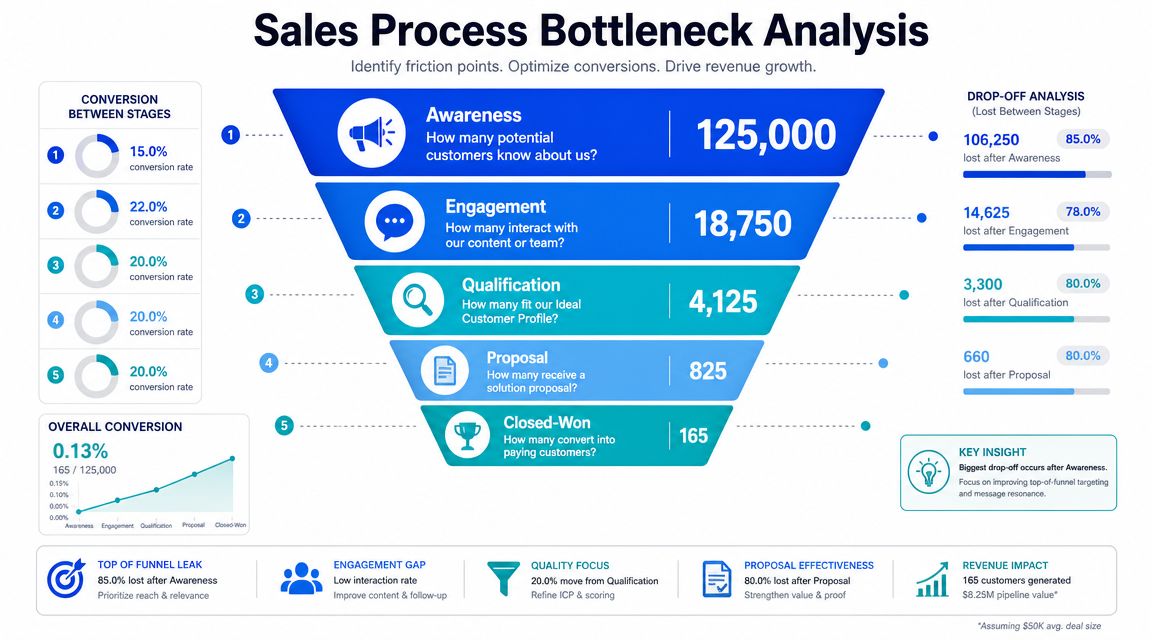
The minimum set I want on the dashboard is simple:
Stage conversion: Where does the drop-off spike?
Time in stage: Where do deals wait too long?
Cycle length: How long from first conversation to closed-won?
Win rate by segment: Which ICP slices convert?
Lost reason and no-decision: Where are deals dying, and why?
If you need a common language for this across sales and RevOps, a clear definition of pipeline velocity helps keep the conversation grounded in movement, not just volume.
The hidden bottleneck most teams miss
The first bottleneck I remove in most engagements isn't proposal quality or demo structure. It's the lag between a positive reply and the rep seeing it.
Reliance on a sequencing inbox, a rep manually checking HubSpot, or a batch review later in the day remains a common practice. That means a buyer raises their hand and waits. By the time the rep responds, the buyer has cooled off or booked time with someone else.
Here's the operational fix that works:
Wire positive reply detection into Slack. The rep gets a Slack DM within minutes with prospect name, company, full reply text, and the HubSpot link.
Set a written response standard. Positive replies get a response within one business hour, or they escalate.
Prioritize the response. Include score context so the rep knows whether to answer immediately or queue it behind a lower-fit reply.
Track response time weekly. If you don't measure time-to-first-response after positive reply, the delay stays invisible.
Practical rule: The first bottleneck worth fixing is the one with low implementation cost and visible impact inside one reporting cycle.
A simple diagnostic scorecard
Use this before you touch enablement, AI scoring, or stage redesign.
Checkpoint | What you're looking for | What it usually means |
|---|---|---|
Positive replies sit too long | Slow first response after interest | Momentum loss at the top of the funnel |
Discovery happens, then stalls | No defined next step or weak buyer commitment | Stage exit criteria are vague |
Proposals trigger another meeting | Buyer can't absorb or share the information easily | Delivery friction, not pricing friction |
CRM notes are inconsistent | Reps update records late or not at all | Admin burden is stealing selling time |
If your team is debating five problems at once, don't split attention. Pick the one delay that affects the most deals and fix that first.
Design an ICP-aligned outreach engine
The teams that struggle with sales process optimization often try to compensate with more volume. More Apollo exports. More sequences in Instantly. More contact enrichment in Clay. More LinkedIn touches in HeyReach. That usually creates a bigger top of funnel with the same conversion problems underneath.
Recent guidance gets this right. Optimization should start with a multidimensional ICP and stage-specific KPI design, not with more outreach volume or more tooling, so you don't automate your way into more bad-fit deals, as explained in ZoomInfo's sales process optimization analysis.
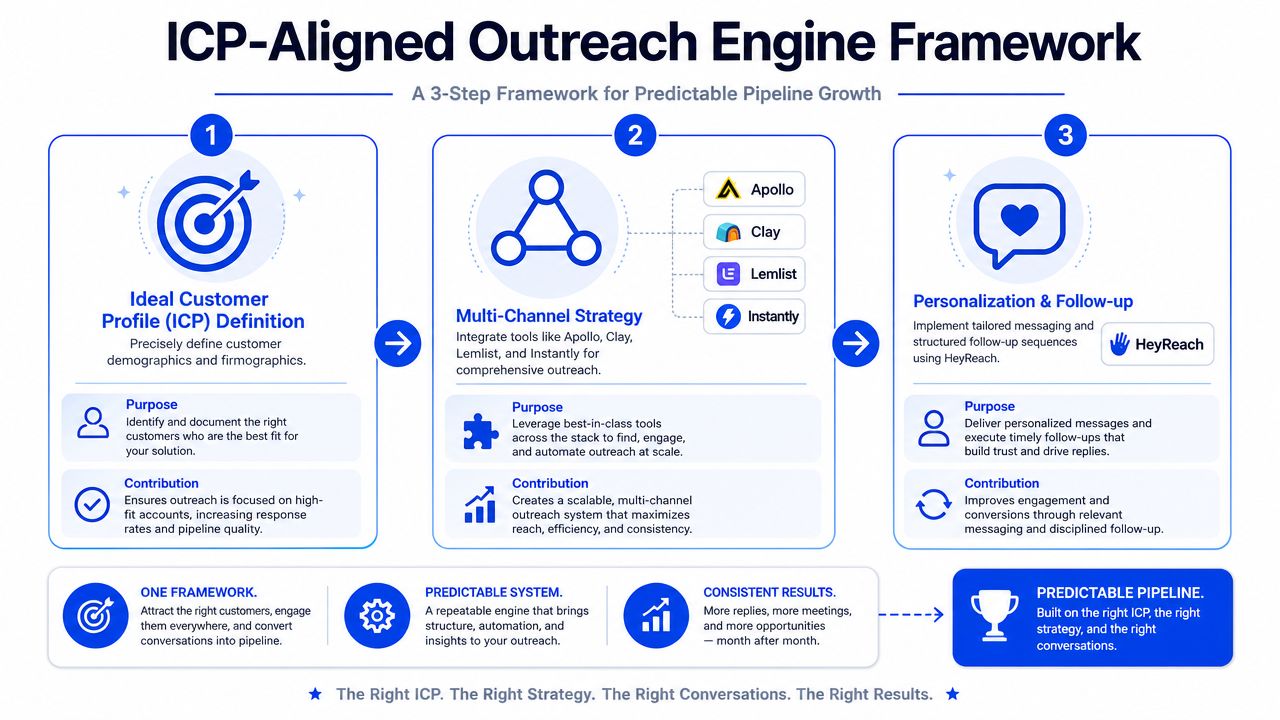
A three-part build sequence
I like a three-part build because it forces discipline.
Define the ICP with more than firmographics
Sales Navigator gets you started, but title, headcount, and industry aren't enough. Add buying triggers, tech stack clues, region, team shape, expansion motion, and commercial fit. If your segmentation is still basic, these customer segmentation strategies are a good refresher on how to split markets in a way that sales can effectively use.Build the list with field logic, not manual guesswork
Clay is useful when you need to enrich and normalize records before they hit HubSpot. Apollo is useful for scale and contact discovery. The point isn't the tool. The point is that every account should hit your CRM with enough context for a rep to know why it's there.Sequence around response handling, not just send volume
Lemlist, Instantly, and HeyReach can all run a decent multi-channel sequence. The difference is operational discipline. If your workflow doesn't define what happens on a positive reply, a soft objection, a referral, and a no-fit response, your outreach engine isn't complete.
For teams refining this structure, an ideal customer profile workflow helps connect targeting rules to pipeline outcomes instead of treating ICP as a static document.
What good outreach ops looks like in practice
A workable stack for a lean B2B team often looks like this:
Sales Navigator: Account identification and buyer mapping
Clay: Enrichment, trigger logic, and record cleanup before sync
Apollo: Contact sourcing and outbound data layer
Lemlist or Instantly: Email sequencing
HeyReach: LinkedIn touch orchestration
HubSpot: Source of truth for stages, ownership, and reporting
The mistake is thinking the stack creates the system. It doesn't. The system comes from rules.
If a rep can't explain why an account is in sequence, who owns the reply, and what qualifies the next stage, the tooling is already ahead of the process.
One mention that's relevant here. Some teams use Grou when they want LinkedIn content, outbound, and lead generation to run from the same target list and reporting line, instead of in separate programs. That model works when the issue is coordination, not tool access.
The recommendation is straightforward. Pick fewer tools, define stricter qualification rules, and make reply handling part of the outreach design. That's what turns attention into real pipeline.
Compress your sales cycle by removing friction
Sales leaders often look for cycle compression in the wrong places. They revisit pricing. They add another qualification call. They debate whether the team needs a new methodology. Most of the time, cycle length drops faster when you remove one piece of buyer friction inside the existing motion.

Independent sales-process content reports that process-led teams outperform peers by 25–30% on win rate, and separate optimization content reports cycle reductions of 28% and conversion gains of 43% after optimization, as summarized by SparrowGenie's sales process optimization glossary. The lesson I take from that isn't "install more software." It's that small process corrections can change outcomes when they're applied at the point of friction.
If shortening the cycle is your immediate goal, this guide on how to shorten the sales cycle lines up well with what works in the field.
The proposal-stage change that moved deals faster
One of the cleaner examples I've seen was simple. The rep stopped sending only a written proposal and started sending the same proposal plus a personalized Loom video.
The workflow looked like this:
Before: PDF or Notion proposal sent after discovery, then a follow-up meeting scheduled later to walk through it
After: Same proposal, plus a 3 to 4 minute Loom with screen share, webcam, prospect name, and one clear next step
Everything else stayed the same: Same pricing, same cadence, same rep, same qualification
Across 60 days and roughly 40 deals, the change moved average sales cycle from 47 days to 38 days, improved proposal-to-close conversion from 28% to 41%, and reduced meetings between discovery and close from 3.2 to 1.8 average.
Why this worked when bigger projects did not
It removed a meeting. That's the first win.
The buyer could watch the walkthrough on their own time, forward it internally, and let a manager or CFO hear the same explanation without the champion translating it. That compressed internal selling. It also surfaced objections earlier because prospects replied with specifics instead of waiting for the next scheduled call.
A practical walkthrough helps here:
There are caveats. The Loom has to be authentically personalized. A recycled video usually does more harm than good because buyers can tell. And this works best at proposal stage, not earlier, when the buyer already has context and is evaluating.
Buyers don't need more meetings to understand a good proposal. They need a clearer way to share it internally.
That is what good sales process optimization looks like in practice. You don't always need a new sales process. You need fewer moments where the buyer has to do your work for you.
Automate the work that slows reps down
If a rep spends the last part of every call thinking about note-taking, your process has already stolen attention from the conversation. That's why the highest-value automation is usually boring. It removes admin from the rep's plate and puts cleaner data into the CRM.
Start with the boring integration
The biggest time-saver I've seen consistently is meeting transcription wired into the CRM. Fathom or Fireflies records the call, an AI step extracts structured notes like pain, objection, deal facts, and next step, and those fields post into HubSpot automatically.
The before-and-after is hard to ignore:
Before integration: reps spent 18 to 22 minutes per call writing notes, updating CRM, and setting follow-up tasks
After integration: they spent 2 to 3 minutes per call reviewing and correcting the summary
Net time saved: roughly 15 to 19 minutes per call
Measured weekly impact: 3.5 to 5 hours saved per rep per week
Recovered selling time: live selling moved from roughly 6 hours per week to nearly 10 hours, a 60% increase
If you're making the internal case for this kind of workflow, this short explanation of why transcription is necessary is a useful framing piece for teams that still see transcripts as just note storage.
The second integration worth mentioning is Clay to HubSpot for contact creation and enrichment. That saved roughly 5 to 7 hours per week per SDR on manual record building and field population. Useful, yes. Still not as impactful as taking post-call admin off AEs.
For teams building this into a larger system, this overview of sales process automation is a solid reference point.
Where automation usually goes wrong
Automation fails when it standardizes bad habits.
A cleaner process can still break if stage exits are built around internal labels instead of buyer-confirmed progress. One guide explicitly warns against labels like “Demo Done” and argues for buyer-confirmed advancement instead, which is the right way to think about stage discipline in complex B2B sales, as explained in DealHub's sales process optimization glossary.
That means your automation rules should support buyer movement, not rep activity.
Bad automation habit | Better operational rule |
|---|---|
Auto-advance after a demo is delivered | Advance only when the buyer confirms a next evaluation step |
Auto-create tasks nobody reviews | Route only the next required action to an owner |
Stuff every transcript into one note blob | Map pain, objections, and next steps to structured HubSpot fields |
Add more sequences to increase output | Tighten ICP filters before increasing send volume |
The position here is simple. Automate admin, capture context, and keep humans responsible for qualification and stage movement. That's the split that helps reps sell.
Your first 30-day optimization sprint
The fastest way to stall a sales process optimization effort is to call it a transformation program. Treat it like a sprint. One bottleneck, one or two operational fixes, one review cycle.
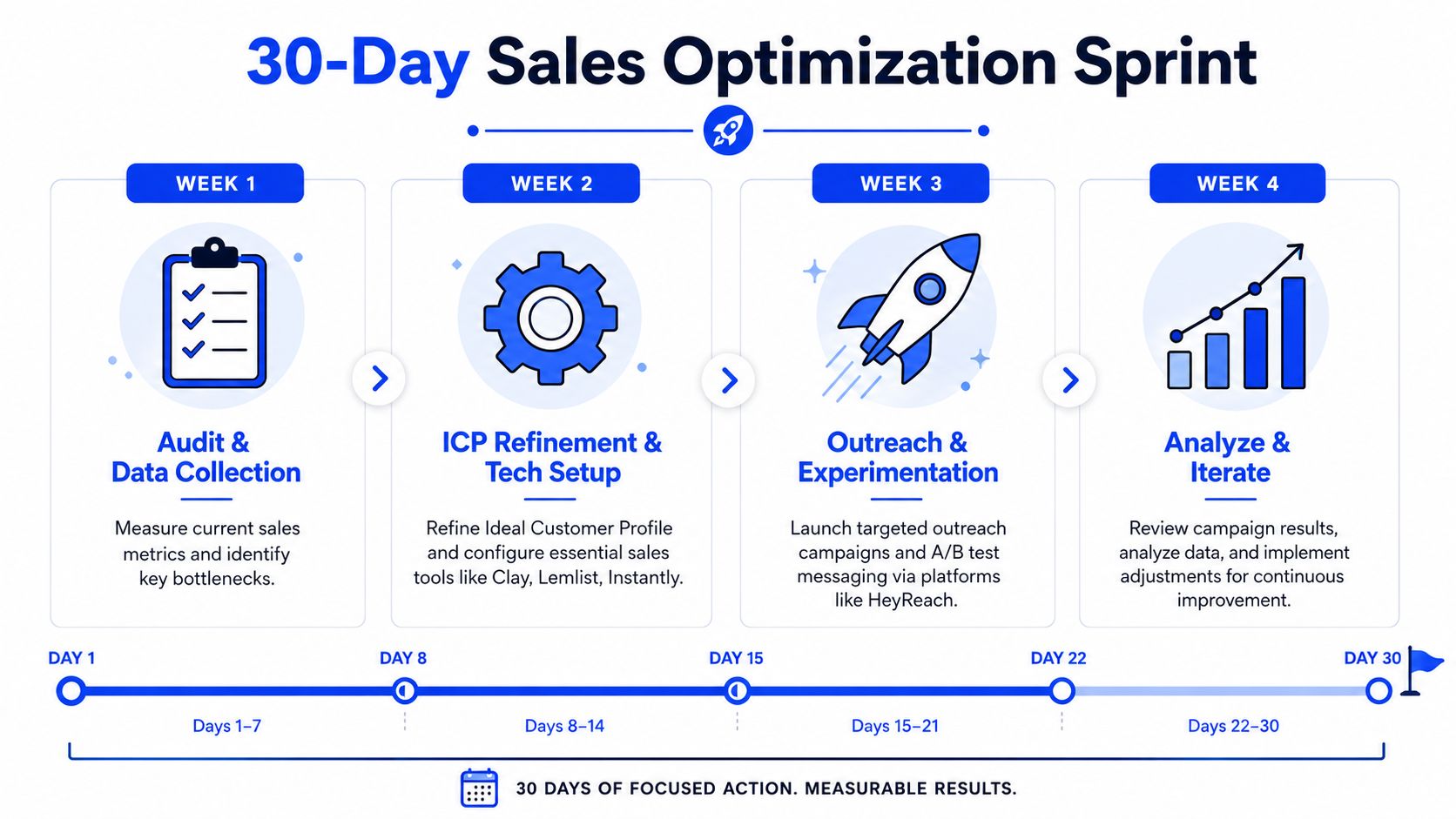
Sales optimization works when you instrument the funnel, compare conversion and cycle-time behavior, and then work on the stage with the lowest conversion rate or longest delay, as described in Monday's overview of sales optimization as a diagnostic discipline. That is the logic behind the sprint below.
Week 1 and 2
Week 1, instrument the leak
Measure response lag: Track time-to-first-response after positive reply
Audit stage delay: Pull time-in-stage and recent lost reasons from HubSpot
Check handoff visibility: Review whether marketing and sales can both see lead outcome quickly
Week 2, implement the first operational fix
Set up Slack reply routing: Positive replies trigger a Slack DM with context and record link
Write the response standard: One-hour response expectation during business hours
Pilot one buyer-friction fix: Proposal Loom is a strong candidate if the team already sends a written proposal
Week 3 and 4
Week 3, tighten the handoff
The simplest handoff improvement I've seen is a shared Slack channel where marketing posts each lead with a three-line context note, and sales replies in-thread after the first call with outcome, qualification status, reason, and next step.
That sounds almost too simple, but it changes behavior because both teams see the same lead lifecycle in real time. It also creates a fast feedback loop on targeting and qualification without waiting for a monthly review deck.
Shared visibility fixes more handoff problems than another SLA document.
Week 4, review only the numbers that matter
Response time after positive reply
Booked-to-held meeting behavior
Reply-to-meeting conversion
Cycle movement on deals touched by the new process
Adoption consistency by rep
Don't expand scope yet. If the first fix is working, standardize it. If adoption is weak, coach it before adding more tooling.
The next step is straightforward. Pick one metric your current dashboard doesn't expose, usually response lag after positive reply. Instrument it this week, route those replies into Slack, and hold the one-hour response standard for the next 30 days. You'll know very quickly whether your pipeline problem is strategic or just slow.
If your team needs outside help to operationalize this, Grou works with B2B revenue teams to connect targeting, outbound, LinkedIn, and handoff workflows into one pipeline system. The useful starting point isn't a full rebuild. It's a short sprint around one measurable bottleneck, one shared workflow, and one reporting line.
Your CRM says pipeline is healthy. Reps are busy. Activity counts look fine. But deals sit in stage for days, positive replies wait in an inbox, proposals trigger another meeting instead of a decision, and the quarter ends with less revenue than the pipeline report implied.
That usually isn't a broken sales motion. It's a slow one.
Most heads of sales make the same mistake at this point. They start a CRM cleanup, rewrite the qualification framework, or debate a full process overhaul. Those projects matter, but they rarely change pipeline fast enough. Sales process optimization works best when you treat it like an operational diagnosis first, not a redesign exercise. Structure turns attention into pipeline, but only if the structure removes delay at the exact points where buyers lose momentum.
If you need a practical way to think about the flow before changing anything, a visual map for sales operations is a useful starting point. And if your issue is bigger than stage design alone, this breakdown of sales pipeline management helps frame where process, follow-up, and reporting usually disconnect.
TL;DR
Measure before you change anything. Sales process optimization starts with bottleneck diagnosis, not rep opinion.
Fix the fastest operational leak first. Often, that's reply lag after a positive prospect response.
Build outreach around ICP fit. More volume with weak definitions just speeds up bad deals.
Remove buyer friction, not just rep friction. A small change in how proposals are delivered can compress the whole cycle.
Automate admin, not judgment. The best automations usually save rep time and improve data quality at the same time.
Table of Contents
Your sales process isn't broken, it's just slow
What a slow pipeline actually looks like
A slow pipeline has a specific feel to it. Reps are doing the work, but the work isn't compounding. The inbox has positive replies that don't get picked up quickly. Discovery calls happen, then nothing moves for days. Marketing says lead quality is fine, sales says the handoff is weak, and nobody can point to the exact place where momentum dies.
That matters because sales process optimization is fundamentally a diagnostic discipline, not a brainstorming session. Teams that instrument the funnel can compare conversion and cycle-time benchmarks, then focus on the stage with the lowest conversion rate or the longest delay, instead of guessing where the problem lives, as noted by Monday's guide to sales optimization.
Slow deals often aren't caused by bad selling. They're caused by dead time between steps.
When I see a team miss target with plenty of pipeline, I don't assume the messaging is wrong or the reps are weak. I assume the motion has hidden drag. The fix is usually less dramatic than leadership expects.
What to optimize first
Don't start with the biggest project. Start with the fix that is operational, cheap to implement, and visible in the numbers within a few weeks.
That rules out a few common distractions:
CRM cleanup first: Useful, but it tends to become a long internal project with weak near-term revenue impact.
Full qualification rewrite: Sometimes necessary, but slow to roll out and even slower to prove.
Pricing and packaging changes: These can matter, but they usually need stakeholder alignment you won't get quickly.
A better first move is to tighten the spots where attention turns into action. At GROU, that's usually reply routing, handoff clarity, proposal delivery, and admin removal. Those are not glamorous projects. They are the ones that show up in pipeline fastest.
Find the one bottleneck that matters most
Start with funnel instrumentation
Before changing scripts, tools, or stage names, map the process end to end and pull enough data to see where deals slow down. Industry guidance is clear on this point. A rigorous optimization effort starts with process mapping, then uses stage-to-stage conversion, time in stage, and no-decision or lost-reason analysis to find the highest-friction bottleneck. It also recommends pulling at least 3–6 months of data so changes are measurable, not anecdotal, according to Heimdall's sales process optimization guidance.
The minimum set I want on the dashboard is simple:
Stage conversion: Where does the drop-off spike?
Time in stage: Where do deals wait too long?
Cycle length: How long from first conversation to closed-won?
Win rate by segment: Which ICP slices convert?
Lost reason and no-decision: Where are deals dying, and why?
If you need a common language for this across sales and RevOps, a clear definition of pipeline velocity helps keep the conversation grounded in movement, not just volume.
The hidden bottleneck most teams miss
The first bottleneck I remove in most engagements isn't proposal quality or demo structure. It's the lag between a positive reply and the rep seeing it.
Reliance on a sequencing inbox, a rep manually checking HubSpot, or a batch review later in the day remains a common practice. That means a buyer raises their hand and waits. By the time the rep responds, the buyer has cooled off or booked time with someone else.
Here's the operational fix that works:
Wire positive reply detection into Slack. The rep gets a Slack DM within minutes with prospect name, company, full reply text, and the HubSpot link.
Set a written response standard. Positive replies get a response within one business hour, or they escalate.
Prioritize the response. Include score context so the rep knows whether to answer immediately or queue it behind a lower-fit reply.
Track response time weekly. If you don't measure time-to-first-response after positive reply, the delay stays invisible.
Practical rule: The first bottleneck worth fixing is the one with low implementation cost and visible impact inside one reporting cycle.
A simple diagnostic scorecard
Use this before you touch enablement, AI scoring, or stage redesign.
Checkpoint | What you're looking for | What it usually means |
|---|---|---|
Positive replies sit too long | Slow first response after interest | Momentum loss at the top of the funnel |
Discovery happens, then stalls | No defined next step or weak buyer commitment | Stage exit criteria are vague |
Proposals trigger another meeting | Buyer can't absorb or share the information easily | Delivery friction, not pricing friction |
CRM notes are inconsistent | Reps update records late or not at all | Admin burden is stealing selling time |
If your team is debating five problems at once, don't split attention. Pick the one delay that affects the most deals and fix that first.
Design an ICP-aligned outreach engine
The teams that struggle with sales process optimization often try to compensate with more volume. More Apollo exports. More sequences in Instantly. More contact enrichment in Clay. More LinkedIn touches in HeyReach. That usually creates a bigger top of funnel with the same conversion problems underneath.
Recent guidance gets this right. Optimization should start with a multidimensional ICP and stage-specific KPI design, not with more outreach volume or more tooling, so you don't automate your way into more bad-fit deals, as explained in ZoomInfo's sales process optimization analysis.
A three-part build sequence
I like a three-part build because it forces discipline.
Define the ICP with more than firmographics
Sales Navigator gets you started, but title, headcount, and industry aren't enough. Add buying triggers, tech stack clues, region, team shape, expansion motion, and commercial fit. If your segmentation is still basic, these customer segmentation strategies are a good refresher on how to split markets in a way that sales can effectively use.Build the list with field logic, not manual guesswork
Clay is useful when you need to enrich and normalize records before they hit HubSpot. Apollo is useful for scale and contact discovery. The point isn't the tool. The point is that every account should hit your CRM with enough context for a rep to know why it's there.Sequence around response handling, not just send volume
Lemlist, Instantly, and HeyReach can all run a decent multi-channel sequence. The difference is operational discipline. If your workflow doesn't define what happens on a positive reply, a soft objection, a referral, and a no-fit response, your outreach engine isn't complete.
For teams refining this structure, an ideal customer profile workflow helps connect targeting rules to pipeline outcomes instead of treating ICP as a static document.
What good outreach ops looks like in practice
A workable stack for a lean B2B team often looks like this:
Sales Navigator: Account identification and buyer mapping
Clay: Enrichment, trigger logic, and record cleanup before sync
Apollo: Contact sourcing and outbound data layer
Lemlist or Instantly: Email sequencing
HeyReach: LinkedIn touch orchestration
HubSpot: Source of truth for stages, ownership, and reporting
The mistake is thinking the stack creates the system. It doesn't. The system comes from rules.
If a rep can't explain why an account is in sequence, who owns the reply, and what qualifies the next stage, the tooling is already ahead of the process.
One mention that's relevant here. Some teams use Grou when they want LinkedIn content, outbound, and lead generation to run from the same target list and reporting line, instead of in separate programs. That model works when the issue is coordination, not tool access.
The recommendation is straightforward. Pick fewer tools, define stricter qualification rules, and make reply handling part of the outreach design. That's what turns attention into real pipeline.
Compress your sales cycle by removing friction
Sales leaders often look for cycle compression in the wrong places. They revisit pricing. They add another qualification call. They debate whether the team needs a new methodology. Most of the time, cycle length drops faster when you remove one piece of buyer friction inside the existing motion.
Independent sales-process content reports that process-led teams outperform peers by 25–30% on win rate, and separate optimization content reports cycle reductions of 28% and conversion gains of 43% after optimization, as summarized by SparrowGenie's sales process optimization glossary. The lesson I take from that isn't "install more software." It's that small process corrections can change outcomes when they're applied at the point of friction.
If shortening the cycle is your immediate goal, this guide on how to shorten the sales cycle lines up well with what works in the field.
The proposal-stage change that moved deals faster
One of the cleaner examples I've seen was simple. The rep stopped sending only a written proposal and started sending the same proposal plus a personalized Loom video.
The workflow looked like this:
Before: PDF or Notion proposal sent after discovery, then a follow-up meeting scheduled later to walk through it
After: Same proposal, plus a 3 to 4 minute Loom with screen share, webcam, prospect name, and one clear next step
Everything else stayed the same: Same pricing, same cadence, same rep, same qualification
Across 60 days and roughly 40 deals, the change moved average sales cycle from 47 days to 38 days, improved proposal-to-close conversion from 28% to 41%, and reduced meetings between discovery and close from 3.2 to 1.8 average.
Why this worked when bigger projects did not
It removed a meeting. That's the first win.
The buyer could watch the walkthrough on their own time, forward it internally, and let a manager or CFO hear the same explanation without the champion translating it. That compressed internal selling. It also surfaced objections earlier because prospects replied with specifics instead of waiting for the next scheduled call.
A practical walkthrough helps here:
There are caveats. The Loom has to be authentically personalized. A recycled video usually does more harm than good because buyers can tell. And this works best at proposal stage, not earlier, when the buyer already has context and is evaluating.
Buyers don't need more meetings to understand a good proposal. They need a clearer way to share it internally.
That is what good sales process optimization looks like in practice. You don't always need a new sales process. You need fewer moments where the buyer has to do your work for you.
Automate the work that slows reps down
If a rep spends the last part of every call thinking about note-taking, your process has already stolen attention from the conversation. That's why the highest-value automation is usually boring. It removes admin from the rep's plate and puts cleaner data into the CRM.
Start with the boring integration
The biggest time-saver I've seen consistently is meeting transcription wired into the CRM. Fathom or Fireflies records the call, an AI step extracts structured notes like pain, objection, deal facts, and next step, and those fields post into HubSpot automatically.
The before-and-after is hard to ignore:
Before integration: reps spent 18 to 22 minutes per call writing notes, updating CRM, and setting follow-up tasks
After integration: they spent 2 to 3 minutes per call reviewing and correcting the summary
Net time saved: roughly 15 to 19 minutes per call
Measured weekly impact: 3.5 to 5 hours saved per rep per week
Recovered selling time: live selling moved from roughly 6 hours per week to nearly 10 hours, a 60% increase
If you're making the internal case for this kind of workflow, this short explanation of why transcription is necessary is a useful framing piece for teams that still see transcripts as just note storage.
The second integration worth mentioning is Clay to HubSpot for contact creation and enrichment. That saved roughly 5 to 7 hours per week per SDR on manual record building and field population. Useful, yes. Still not as impactful as taking post-call admin off AEs.
For teams building this into a larger system, this overview of sales process automation is a solid reference point.
Where automation usually goes wrong
Automation fails when it standardizes bad habits.
A cleaner process can still break if stage exits are built around internal labels instead of buyer-confirmed progress. One guide explicitly warns against labels like “Demo Done” and argues for buyer-confirmed advancement instead, which is the right way to think about stage discipline in complex B2B sales, as explained in DealHub's sales process optimization glossary.
That means your automation rules should support buyer movement, not rep activity.
Bad automation habit | Better operational rule |
|---|---|
Auto-advance after a demo is delivered | Advance only when the buyer confirms a next evaluation step |
Auto-create tasks nobody reviews | Route only the next required action to an owner |
Stuff every transcript into one note blob | Map pain, objections, and next steps to structured HubSpot fields |
Add more sequences to increase output | Tighten ICP filters before increasing send volume |
The position here is simple. Automate admin, capture context, and keep humans responsible for qualification and stage movement. That's the split that helps reps sell.
Your first 30-day optimization sprint
The fastest way to stall a sales process optimization effort is to call it a transformation program. Treat it like a sprint. One bottleneck, one or two operational fixes, one review cycle.
Sales optimization works when you instrument the funnel, compare conversion and cycle-time behavior, and then work on the stage with the lowest conversion rate or longest delay, as described in Monday's overview of sales optimization as a diagnostic discipline. That is the logic behind the sprint below.
Week 1 and 2
Week 1, instrument the leak
Measure response lag: Track time-to-first-response after positive reply
Audit stage delay: Pull time-in-stage and recent lost reasons from HubSpot
Check handoff visibility: Review whether marketing and sales can both see lead outcome quickly
Week 2, implement the first operational fix
Set up Slack reply routing: Positive replies trigger a Slack DM with context and record link
Write the response standard: One-hour response expectation during business hours
Pilot one buyer-friction fix: Proposal Loom is a strong candidate if the team already sends a written proposal
Week 3 and 4
Week 3, tighten the handoff
The simplest handoff improvement I've seen is a shared Slack channel where marketing posts each lead with a three-line context note, and sales replies in-thread after the first call with outcome, qualification status, reason, and next step.
That sounds almost too simple, but it changes behavior because both teams see the same lead lifecycle in real time. It also creates a fast feedback loop on targeting and qualification without waiting for a monthly review deck.
Shared visibility fixes more handoff problems than another SLA document.
Week 4, review only the numbers that matter
Response time after positive reply
Booked-to-held meeting behavior
Reply-to-meeting conversion
Cycle movement on deals touched by the new process
Adoption consistency by rep
Don't expand scope yet. If the first fix is working, standardize it. If adoption is weak, coach it before adding more tooling.
The next step is straightforward. Pick one metric your current dashboard doesn't expose, usually response lag after positive reply. Instrument it this week, route those replies into Slack, and hold the one-hour response standard for the next 30 days. You'll know very quickly whether your pipeline problem is strategic or just slow.
If your team needs outside help to operationalize this, Grou works with B2B revenue teams to connect targeting, outbound, LinkedIn, and handoff workflows into one pipeline system. The useful starting point isn't a full rebuild. It's a short sprint around one measurable bottleneck, one shared workflow, and one reporting line.
Your CRM says pipeline is healthy. Reps are busy. Activity counts look fine. But deals sit in stage for days, positive replies wait in an inbox, proposals trigger another meeting instead of a decision, and the quarter ends with less revenue than the pipeline report implied.
That usually isn't a broken sales motion. It's a slow one.
Most heads of sales make the same mistake at this point. They start a CRM cleanup, rewrite the qualification framework, or debate a full process overhaul. Those projects matter, but they rarely change pipeline fast enough. Sales process optimization works best when you treat it like an operational diagnosis first, not a redesign exercise. Structure turns attention into pipeline, but only if the structure removes delay at the exact points where buyers lose momentum.
If you need a practical way to think about the flow before changing anything, a visual map for sales operations is a useful starting point. And if your issue is bigger than stage design alone, this breakdown of sales pipeline management helps frame where process, follow-up, and reporting usually disconnect.
TL;DR
Measure before you change anything. Sales process optimization starts with bottleneck diagnosis, not rep opinion.
Fix the fastest operational leak first. Often, that's reply lag after a positive prospect response.
Build outreach around ICP fit. More volume with weak definitions just speeds up bad deals.
Remove buyer friction, not just rep friction. A small change in how proposals are delivered can compress the whole cycle.
Automate admin, not judgment. The best automations usually save rep time and improve data quality at the same time.
Table of Contents
Your sales process isn't broken, it's just slow
What a slow pipeline actually looks like
A slow pipeline has a specific feel to it. Reps are doing the work, but the work isn't compounding. The inbox has positive replies that don't get picked up quickly. Discovery calls happen, then nothing moves for days. Marketing says lead quality is fine, sales says the handoff is weak, and nobody can point to the exact place where momentum dies.
That matters because sales process optimization is fundamentally a diagnostic discipline, not a brainstorming session. Teams that instrument the funnel can compare conversion and cycle-time benchmarks, then focus on the stage with the lowest conversion rate or the longest delay, instead of guessing where the problem lives, as noted by Monday's guide to sales optimization.
Slow deals often aren't caused by bad selling. They're caused by dead time between steps.
When I see a team miss target with plenty of pipeline, I don't assume the messaging is wrong or the reps are weak. I assume the motion has hidden drag. The fix is usually less dramatic than leadership expects.
What to optimize first
Don't start with the biggest project. Start with the fix that is operational, cheap to implement, and visible in the numbers within a few weeks.
That rules out a few common distractions:
CRM cleanup first: Useful, but it tends to become a long internal project with weak near-term revenue impact.
Full qualification rewrite: Sometimes necessary, but slow to roll out and even slower to prove.
Pricing and packaging changes: These can matter, but they usually need stakeholder alignment you won't get quickly.
A better first move is to tighten the spots where attention turns into action. At GROU, that's usually reply routing, handoff clarity, proposal delivery, and admin removal. Those are not glamorous projects. They are the ones that show up in pipeline fastest.
Find the one bottleneck that matters most
Start with funnel instrumentation
Before changing scripts, tools, or stage names, map the process end to end and pull enough data to see where deals slow down. Industry guidance is clear on this point. A rigorous optimization effort starts with process mapping, then uses stage-to-stage conversion, time in stage, and no-decision or lost-reason analysis to find the highest-friction bottleneck. It also recommends pulling at least 3–6 months of data so changes are measurable, not anecdotal, according to Heimdall's sales process optimization guidance.
The minimum set I want on the dashboard is simple:
Stage conversion: Where does the drop-off spike?
Time in stage: Where do deals wait too long?
Cycle length: How long from first conversation to closed-won?
Win rate by segment: Which ICP slices convert?
Lost reason and no-decision: Where are deals dying, and why?
If you need a common language for this across sales and RevOps, a clear definition of pipeline velocity helps keep the conversation grounded in movement, not just volume.
The hidden bottleneck most teams miss
The first bottleneck I remove in most engagements isn't proposal quality or demo structure. It's the lag between a positive reply and the rep seeing it.
Reliance on a sequencing inbox, a rep manually checking HubSpot, or a batch review later in the day remains a common practice. That means a buyer raises their hand and waits. By the time the rep responds, the buyer has cooled off or booked time with someone else.
Here's the operational fix that works:
Wire positive reply detection into Slack. The rep gets a Slack DM within minutes with prospect name, company, full reply text, and the HubSpot link.
Set a written response standard. Positive replies get a response within one business hour, or they escalate.
Prioritize the response. Include score context so the rep knows whether to answer immediately or queue it behind a lower-fit reply.
Track response time weekly. If you don't measure time-to-first-response after positive reply, the delay stays invisible.
Practical rule: The first bottleneck worth fixing is the one with low implementation cost and visible impact inside one reporting cycle.
A simple diagnostic scorecard
Use this before you touch enablement, AI scoring, or stage redesign.
Checkpoint | What you're looking for | What it usually means |
|---|---|---|
Positive replies sit too long | Slow first response after interest | Momentum loss at the top of the funnel |
Discovery happens, then stalls | No defined next step or weak buyer commitment | Stage exit criteria are vague |
Proposals trigger another meeting | Buyer can't absorb or share the information easily | Delivery friction, not pricing friction |
CRM notes are inconsistent | Reps update records late or not at all | Admin burden is stealing selling time |
If your team is debating five problems at once, don't split attention. Pick the one delay that affects the most deals and fix that first.
Design an ICP-aligned outreach engine
The teams that struggle with sales process optimization often try to compensate with more volume. More Apollo exports. More sequences in Instantly. More contact enrichment in Clay. More LinkedIn touches in HeyReach. That usually creates a bigger top of funnel with the same conversion problems underneath.
Recent guidance gets this right. Optimization should start with a multidimensional ICP and stage-specific KPI design, not with more outreach volume or more tooling, so you don't automate your way into more bad-fit deals, as explained in ZoomInfo's sales process optimization analysis.
A three-part build sequence
I like a three-part build because it forces discipline.
Define the ICP with more than firmographics
Sales Navigator gets you started, but title, headcount, and industry aren't enough. Add buying triggers, tech stack clues, region, team shape, expansion motion, and commercial fit. If your segmentation is still basic, these customer segmentation strategies are a good refresher on how to split markets in a way that sales can effectively use.Build the list with field logic, not manual guesswork
Clay is useful when you need to enrich and normalize records before they hit HubSpot. Apollo is useful for scale and contact discovery. The point isn't the tool. The point is that every account should hit your CRM with enough context for a rep to know why it's there.Sequence around response handling, not just send volume
Lemlist, Instantly, and HeyReach can all run a decent multi-channel sequence. The difference is operational discipline. If your workflow doesn't define what happens on a positive reply, a soft objection, a referral, and a no-fit response, your outreach engine isn't complete.
For teams refining this structure, an ideal customer profile workflow helps connect targeting rules to pipeline outcomes instead of treating ICP as a static document.
What good outreach ops looks like in practice
A workable stack for a lean B2B team often looks like this:
Sales Navigator: Account identification and buyer mapping
Clay: Enrichment, trigger logic, and record cleanup before sync
Apollo: Contact sourcing and outbound data layer
Lemlist or Instantly: Email sequencing
HeyReach: LinkedIn touch orchestration
HubSpot: Source of truth for stages, ownership, and reporting
The mistake is thinking the stack creates the system. It doesn't. The system comes from rules.
If a rep can't explain why an account is in sequence, who owns the reply, and what qualifies the next stage, the tooling is already ahead of the process.
One mention that's relevant here. Some teams use Grou when they want LinkedIn content, outbound, and lead generation to run from the same target list and reporting line, instead of in separate programs. That model works when the issue is coordination, not tool access.
The recommendation is straightforward. Pick fewer tools, define stricter qualification rules, and make reply handling part of the outreach design. That's what turns attention into real pipeline.
Compress your sales cycle by removing friction
Sales leaders often look for cycle compression in the wrong places. They revisit pricing. They add another qualification call. They debate whether the team needs a new methodology. Most of the time, cycle length drops faster when you remove one piece of buyer friction inside the existing motion.
Independent sales-process content reports that process-led teams outperform peers by 25–30% on win rate, and separate optimization content reports cycle reductions of 28% and conversion gains of 43% after optimization, as summarized by SparrowGenie's sales process optimization glossary. The lesson I take from that isn't "install more software." It's that small process corrections can change outcomes when they're applied at the point of friction.
If shortening the cycle is your immediate goal, this guide on how to shorten the sales cycle lines up well with what works in the field.
The proposal-stage change that moved deals faster
One of the cleaner examples I've seen was simple. The rep stopped sending only a written proposal and started sending the same proposal plus a personalized Loom video.
The workflow looked like this:
Before: PDF or Notion proposal sent after discovery, then a follow-up meeting scheduled later to walk through it
After: Same proposal, plus a 3 to 4 minute Loom with screen share, webcam, prospect name, and one clear next step
Everything else stayed the same: Same pricing, same cadence, same rep, same qualification
Across 60 days and roughly 40 deals, the change moved average sales cycle from 47 days to 38 days, improved proposal-to-close conversion from 28% to 41%, and reduced meetings between discovery and close from 3.2 to 1.8 average.
Why this worked when bigger projects did not
It removed a meeting. That's the first win.
The buyer could watch the walkthrough on their own time, forward it internally, and let a manager or CFO hear the same explanation without the champion translating it. That compressed internal selling. It also surfaced objections earlier because prospects replied with specifics instead of waiting for the next scheduled call.
A practical walkthrough helps here:
There are caveats. The Loom has to be authentically personalized. A recycled video usually does more harm than good because buyers can tell. And this works best at proposal stage, not earlier, when the buyer already has context and is evaluating.
Buyers don't need more meetings to understand a good proposal. They need a clearer way to share it internally.
That is what good sales process optimization looks like in practice. You don't always need a new sales process. You need fewer moments where the buyer has to do your work for you.
Automate the work that slows reps down
If a rep spends the last part of every call thinking about note-taking, your process has already stolen attention from the conversation. That's why the highest-value automation is usually boring. It removes admin from the rep's plate and puts cleaner data into the CRM.
Start with the boring integration
The biggest time-saver I've seen consistently is meeting transcription wired into the CRM. Fathom or Fireflies records the call, an AI step extracts structured notes like pain, objection, deal facts, and next step, and those fields post into HubSpot automatically.
The before-and-after is hard to ignore:
Before integration: reps spent 18 to 22 minutes per call writing notes, updating CRM, and setting follow-up tasks
After integration: they spent 2 to 3 minutes per call reviewing and correcting the summary
Net time saved: roughly 15 to 19 minutes per call
Measured weekly impact: 3.5 to 5 hours saved per rep per week
Recovered selling time: live selling moved from roughly 6 hours per week to nearly 10 hours, a 60% increase
If you're making the internal case for this kind of workflow, this short explanation of why transcription is necessary is a useful framing piece for teams that still see transcripts as just note storage.
The second integration worth mentioning is Clay to HubSpot for contact creation and enrichment. That saved roughly 5 to 7 hours per week per SDR on manual record building and field population. Useful, yes. Still not as impactful as taking post-call admin off AEs.
For teams building this into a larger system, this overview of sales process automation is a solid reference point.
Where automation usually goes wrong
Automation fails when it standardizes bad habits.
A cleaner process can still break if stage exits are built around internal labels instead of buyer-confirmed progress. One guide explicitly warns against labels like “Demo Done” and argues for buyer-confirmed advancement instead, which is the right way to think about stage discipline in complex B2B sales, as explained in DealHub's sales process optimization glossary.
That means your automation rules should support buyer movement, not rep activity.
Bad automation habit | Better operational rule |
|---|---|
Auto-advance after a demo is delivered | Advance only when the buyer confirms a next evaluation step |
Auto-create tasks nobody reviews | Route only the next required action to an owner |
Stuff every transcript into one note blob | Map pain, objections, and next steps to structured HubSpot fields |
Add more sequences to increase output | Tighten ICP filters before increasing send volume |
The position here is simple. Automate admin, capture context, and keep humans responsible for qualification and stage movement. That's the split that helps reps sell.
Your first 30-day optimization sprint
The fastest way to stall a sales process optimization effort is to call it a transformation program. Treat it like a sprint. One bottleneck, one or two operational fixes, one review cycle.
Sales optimization works when you instrument the funnel, compare conversion and cycle-time behavior, and then work on the stage with the lowest conversion rate or longest delay, as described in Monday's overview of sales optimization as a diagnostic discipline. That is the logic behind the sprint below.
Week 1 and 2
Week 1, instrument the leak
Measure response lag: Track time-to-first-response after positive reply
Audit stage delay: Pull time-in-stage and recent lost reasons from HubSpot
Check handoff visibility: Review whether marketing and sales can both see lead outcome quickly
Week 2, implement the first operational fix
Set up Slack reply routing: Positive replies trigger a Slack DM with context and record link
Write the response standard: One-hour response expectation during business hours
Pilot one buyer-friction fix: Proposal Loom is a strong candidate if the team already sends a written proposal
Week 3 and 4
Week 3, tighten the handoff
The simplest handoff improvement I've seen is a shared Slack channel where marketing posts each lead with a three-line context note, and sales replies in-thread after the first call with outcome, qualification status, reason, and next step.
That sounds almost too simple, but it changes behavior because both teams see the same lead lifecycle in real time. It also creates a fast feedback loop on targeting and qualification without waiting for a monthly review deck.
Shared visibility fixes more handoff problems than another SLA document.
Week 4, review only the numbers that matter
Response time after positive reply
Booked-to-held meeting behavior
Reply-to-meeting conversion
Cycle movement on deals touched by the new process
Adoption consistency by rep
Don't expand scope yet. If the first fix is working, standardize it. If adoption is weak, coach it before adding more tooling.
The next step is straightforward. Pick one metric your current dashboard doesn't expose, usually response lag after positive reply. Instrument it this week, route those replies into Slack, and hold the one-hour response standard for the next 30 days. You'll know very quickly whether your pipeline problem is strategic or just slow.
If your team needs outside help to operationalize this, Grou works with B2B revenue teams to connect targeting, outbound, LinkedIn, and handoff workflows into one pipeline system. The useful starting point isn't a full rebuild. It's a short sprint around one measurable bottleneck, one shared workflow, and one reporting line.

Pipeline OS Newsletter
Build qualified pipeline
Get weekly tactics to generate demand, improve lead quality, and book more meetings.





Trusted by industry leaders
Trusted by industry leaders
Trusted by industry leaders
Ready to build qualified pipeline?
Ready to build qualified pipeline?
Ready to build qualified pipeline?
Book a call to see if we're the right fit, or take the 2-minute quiz to get a clear starting point.
Book a call to see if we're the right fit, or take the 2-minute quiz to get a clear starting point.
Book a call to see if we're the right fit, or take the 2-minute quiz to get a clear starting point.
" height="30.21639343089746px" id="hfGbXmQR2" width="30.216393430897455px"/></svg>)
Copyright © 2026 – All Right Reserved
Copyright © 2026 – All Right Reserved
Copyright © 2026 – All Right Reserved