%22%3E%3C/path%3E%3Cpath d=%22M 63.072 7.554 C 62.258 8.022 61.577 8.689 61.092 9.493 L 61.092 7.076 L 57.158 7.076 L 57.158 22.64 L 61.089 22.64 L 61.089 14.888 C 61.089 13.446 61.403 12.434 62.03 11.853 C 62.818 11.218 63.818 10.907 64.826 10.982 L 65.868 10.982 L 65.868 6.851 C 64.891 6.834 63.926 7.076 63.073 7.554 Z%22 fill=%22rgb(17,17,17)%22%3E%3C/path%3E%3Cpath d=%22M 78.916 7.82 C 76.363 6.49 73.321 6.49 70.768 7.82 C 69.562 8.473 68.564 9.451 67.888 10.644 C 67.167 11.931 66.803 13.387 66.834 14.862 C 66.804 16.332 67.157 17.785 67.86 19.077 C 68.515 20.267 69.494 21.246 70.684 21.901 C 71.924 22.576 73.318 22.92 74.73 22.898 C 76.164 22.918 77.58 22.575 78.846 21.901 C 80.062 21.247 81.073 20.27 81.768 19.077 C 82.506 17.797 82.88 16.339 82.85 14.862 C 82.88 13.389 82.517 11.934 81.797 10.647 C 81.12 9.455 80.122 8.477 78.917 7.824 M 78.803 14.862 C 78.829 15.739 78.636 16.608 78.241 17.391 C 77.903 18.046 77.38 18.588 76.738 18.95 C 76.124 19.293 75.432 19.472 74.729 19.47 C 73.668 19.497 72.648 19.061 71.934 18.276 C 71.139 17.323 70.741 16.1 70.823 14.862 C 70.741 13.62 71.149 12.395 71.959 11.45 C 72.687 10.667 73.715 10.233 74.783 10.256 C 75.859 10.236 76.894 10.67 77.635 11.45 C 78.464 12.387 78.884 13.616 78.801 14.864%22 fill=%22rgb(17,17,17)%22%3E%3C/path%3E%3Cpath d=%22M 95.906 7.076 L 95.906 15.646 C 95.975 16.68 95.643 17.701 94.979 18.498 C 94.311 19.184 93.379 19.547 92.422 19.495 C 91.475 19.544 90.553 19.18 89.894 18.498 C 89.23 17.701 88.898 16.68 88.967 15.646 L 88.967 7.076 L 85.033 7.076 L 85.033 16.207 C 85 17.449 85.275 18.68 85.834 19.79 C 86.327 20.75 87.095 21.542 88.039 22.065 C 89.033 22.594 90.145 22.861 91.271 22.838 C 92.188 22.847 93.095 22.65 93.926 22.263 C 94.708 21.905 95.388 21.36 95.906 20.675 L 95.906 22.645 L 99.865 22.645 L 99.865 7.076 Z%22 fill=%22rgb(17,17,17)%22%3E%3C/path%3E%3Cpath d=%22M 4.513 15.626 C 4.511 10.815 7.606 6.549 12.181 5.059 C 16.756 3.57 21.77 5.195 24.601 9.086 L 27.816 5.87 C 24.074 1.186 17.981 -0.943 12.137 0.393 C 6.292 1.728 1.728 6.292 0.393 12.137 C -0.943 17.981 1.186 24.074 5.87 27.816 L 9.085 24.601 C 6.214 22.512 4.515 19.177 4.513 15.626%22 fill=%22rgb(32,62,235)%22%3E%3C/path%3E%3Cpath d=%22M 17.114 14.343 L 13.354 18.01 L 13.354 18.026 L 21.071 18.026 L 11.412 27.609 L 17.389 27.609 L 23.999 21.081 L 23.999 28.316 L 24.005 28.316 L 27.967 24.393 L 27.967 14.343 Z%22 fill=%22rgb(32,62,235)%22%3E%3C/path%3E%3C/g%3E%3C/svg%3E) ×
× ××
××›
›
›
›
How to use LinkedIn for B2B prospecting and pipeline growth in 2026
How to use LinkedIn for B2B prospecting and pipeline growth in 2026
How to use LinkedIn for B2B prospecting and pipeline growth in 2026
How to use LinkedIn for B2B prospecting and pipeline growth in 2026
How to use LinkedIn for B2B prospecting and pipeline growth in 2026
How to use LinkedIn for B2B prospecting and pipeline growth in 2026

Author
Aljaz Peklaj

Your reps are sending connection requests, getting some accepts, maybe even a few replies, and still not seeing enough pipeline. That usually means the problem started before the first message. On LinkedIn, activity hides weak structure for a while, then the numbers flatten.
LinkedIn for prospecting works when it's treated as a targeting layer, not a complete outbound system.
Strict ICP discipline beats broad search behavior, and one guide reports 4.2% conversion for sector-specific campaigns versus 1.8% for generalist approaches (Sales Odyssey).
The highest-leverage workflow is Sales Navigator for targeting, enrichment in tools like Clay or Apollo, then signal-based prioritization before outreach.
Personalized connection requests and structured follow-up matter, but measurement matters more than vanity engagement.
The handoff from reply to CRM stage is where most teams lose attribution.
Table of Contents
The foundation of effective LinkedIn prospecting
Most LinkedIn prospecting fails before outreach starts. The profile looks like a resume, the ICP lives in someone's head, and the rep opens Sales Navigator hoping the filters will somehow create strategy.
That's backwards.
Fix the profile before you touch the list
When a prospect gets your connection request, they inspect your profile before they decide. If the profile reads like a generic work history, it creates friction. If it reads like a useful commercial identity, it supports the click.
Three profile elements do most of the work:
Headline: State who you help, what problem you work on, and the commercial context. Skip vague positioning.
Banner: Use it to reinforce category, proof, or operating focus. Don't leave default branding there.
Featured section: Pin assets that reduce buyer uncertainty, such as a useful post, a short case summary, or a point of view on the problem you solve.
A good profile doesn't close deals. It lowers resistance. That's enough.
If your team also needs to build credibility through consistent content, this guide on how to grow your LinkedIn presence is useful because it focuses on visibility habits that support outbound rather than vanity posting.
A weak profile makes every outbound touch work harder than it should.
Write the ICP before you open Sales Navigator
The single most common mistake in LinkedIn for prospecting is searching first and defining the ICP later. Once that happens, reps start filtering by what they can find instead of who should buy.
The fix is simple. Write a one-page ICP document before list building starts.
That document should include:
Firmographics: Industry, company size, geography, company type
Buying personas: Function, seniority, reporting structure, likely owner of the pain
Triggers: Hiring, leadership changes, growth motions, public pain indicators
Disqualifiers: Titles, industries, and company types that look close but don't convert
This isn't admin work. It's conversion work. One guide reports that sector-specific campaigns convert at 4.2% on average versus 1.8% for generalist approaches (Sales Odyssey). The practical takeaway is obvious. Narrowing the ICP is not restricting pipeline. It's protecting it.
A written ICP also creates consistency across the stack. Sales Navigator filters improve. Clay enrichment rules get cleaner. Apollo sequences stop drifting. HubSpot reporting becomes usable because “target account” finally means the same thing across teams.
Building and enriching high-signal prospect lists
LinkedIn gives you access to a large buying audience, but that doesn't mean every search result deserves outreach. Sales research published in 2025 says 65 million decision-makers are active on LinkedIn and 4 out of 5 members drive business decisions (HeyReach). That scale is useful only if you can shrink it into a list your team should contact.
Treat Sales Navigator as the targeting layer
Sales Navigator is good at one thing. It helps you identify people who match a market hypothesis.
It is not enough on its own to run outbound. It doesn't give you a complete contact record, it won't clean stale company data for you, and it won't tell you how to prioritize the list against current buying signals. Teams that treat it as a complete prospecting stack usually end up with bloated lists and flat reply rates.
The better stack is straightforward → Sales Navigator for targeting, Clay or Apollo for enrichment, HubSpot for routing and attribution, and a sequencing tool like Lemlist, Instantly, Smartlead, or HeyReach depending on channel mix and account setup.
If your team hasn't formalized the definition work upstream, start with a proper ideal customer profile framework before you touch extraction or enrichment.
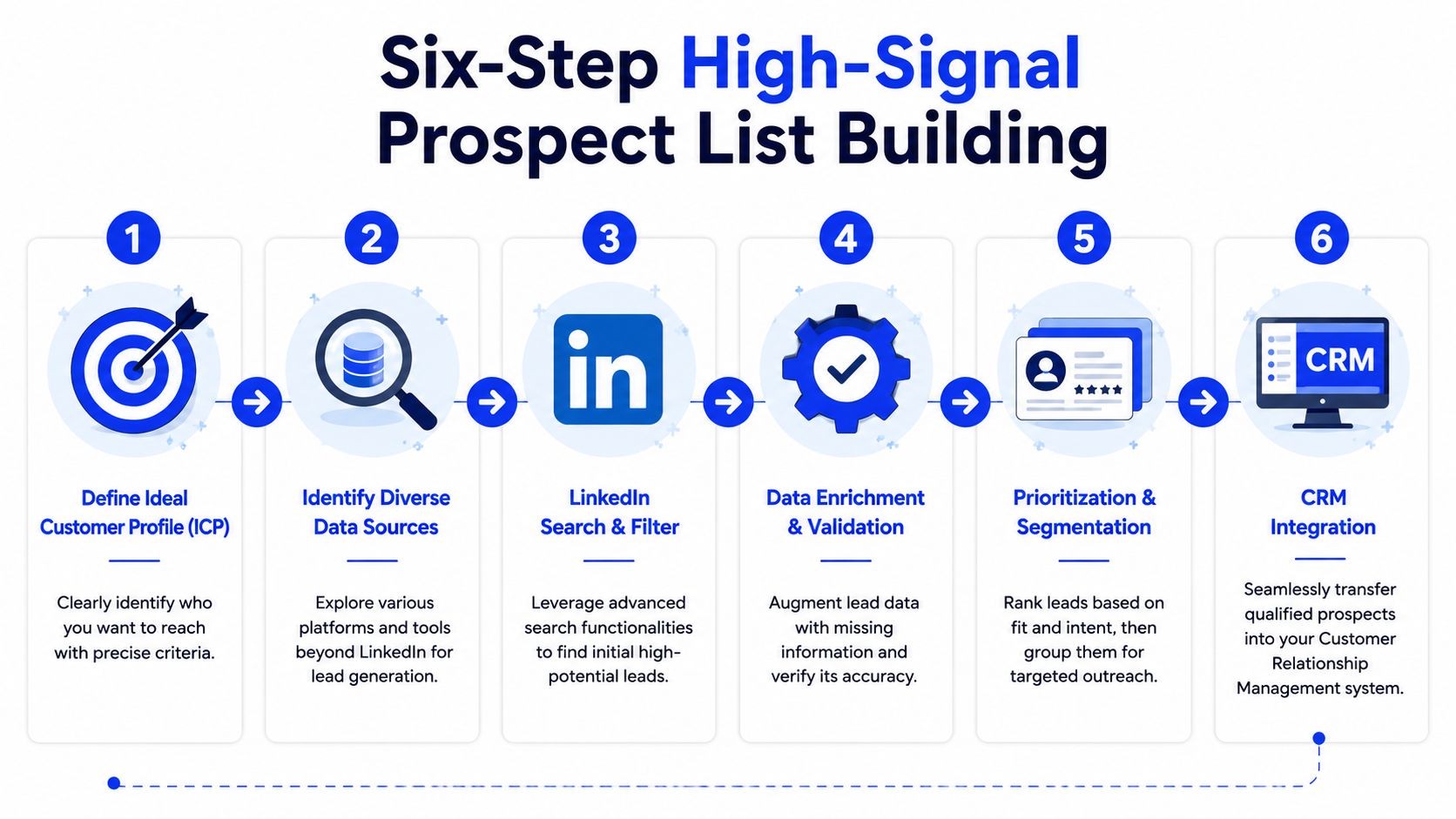
Use a six-step list build process
This is the system that keeps list quality high.
Lock the ICP
Don't improvise this in the search bar. The output should be a written target definition with firmographics, persona, and trigger logic.
Build a layered search
Start with industry, headcount, and geography. Add function and seniority. Then add exclusion logic. Exclusions matter more than often realized because they remove adjacent roles that pollute campaigns.
Validate the search manually
Check the search size, then review the first results yourself. If the list looks broad, it is broad. If too many results are consultants, recruiters, or wrong-fit operators, refine before export.
Segment before extraction
Don't export one giant list labeled “VP Sales SaaS.” Split by sub-segment where the pain and messaging differ.
Enrich outside LinkedIn
Push the list into Clay for waterfall enrichment or into Apollo for contact and account completion. LinkedIn gives targeting context, not a launch-ready record.
Add the signal layer
Prioritize recent job changes, hiring moves, recent posting activity, and account-level events that suggest buying motion.
Practical rule: If a prospect entered the list with no fit signal and no timing signal, they shouldn't be first in queue.
There are also teams that want this workflow managed end to end through an external partner. In that case, agencies like Grou sit in the mix alongside tools, handling list build, enrichment, outbound, and reporting as one system rather than separate tasks.
A working filter structure for B2B teams
There's no universal “magic filter combo.” Anyone selling one is selling content, not operating discipline.
Still, one structure repeatedly produces cleaner lists for B2B SaaS and services teams:
Filter layer | What to include |
|---|---|
Function and seniority | Sales, Marketing, Operations, depending on the buyer. Focus on Manager, Director, VP, and CXO where relevant |
Company size | Mid-market ranges that fit your sales motion |
Industry | Include target categories, exclude tangential ones |
Behavioral layer | Posted on LinkedIn in the last 30 days |
Tenure layer | Changed jobs recently, or shorter tenure in current company |
Geography | Specific regions, not broad “everywhere” targeting |
The behavioral layer is where many teams improve list quality fast. Recent posters are easier to warm because they're active. Recent job changers are often still setting priorities. Short-tenure buyers haven't fully locked in old vendor assumptions.
For outbound, that matters more than another thousand names in the export.
Crafting messages that open conversations
The connection request is not where the meeting gets booked. It's where permission gets earned. Teams that treat the note like a mini sales letter get rejected early, then blame the channel.
That's why the first message should stay small.

What the connection note is actually for
One 2026 benchmark reports 30 to 40% acceptance rates for well-targeted, personalized requests, with 15 to 25% reply rates from accepted connections in structured campaigns (Topo). That's the frame to use. The request creates access. The follow-up sequence creates the conversation.
If you need examples beyond the ones below, this breakdown of LinkedIn connection request messages is a good reference for teams standardizing templates by persona.
A simple message structure that gets accepted
The structure is short enough to fit the medium and specific enough to avoid looking automated.
Line one, specific observation: Mention a recent post, hiring move, team change, or visible business signal.
Line two, reason for connecting: Keep it professional and low-pressure.
Optional line three: A light “no agenda” line can help when tone needs softening.
Example:
Saw your team has been hiring SDRs recently. Working with sales leaders dealing with the same outbound scaling issues, thought it made sense to connect. No agenda.
That works because it does three things at once. It proves you looked. It explains the relevance. It doesn't ask for anything too early.
What doesn't work:
Pitching in the request: Prospects can smell the sequence before they accept.
Generic greetings: “Hope you're well” wastes the highest-value characters.
Flattery: “Love what you're doing” reads like low-effort sales language.
Meeting ask in the note: Too early, too much pressure.
What to send after they accept
The first DM should build on the same trigger, not start a new topic. Keep it text-based, direct, and easy to answer.
A simple pattern works well:
DM element | Example |
|---|---|
Reference the trigger | “You've been hiring into outbound recently” |
Name the likely pain | “That usually creates sequence inconsistency and weak follow-up coverage” |
Ask a soft question | “Is that something your team is dealing with right now?” |
If your email motion runs beside LinkedIn, this guide to prospecting email best practices is useful because the same principles apply. Specificity, low-friction asks, and message variation beat generic cadence copy every time.
The 14-day multi-channel sequence that works
LinkedIn should sit inside a sequence, not replace one. The platform has become mainstream for B2B prospecting, with 53% of B2B marketers using it to identify prospects and an average 2.8% engagement rate on the platform, according to a 2025 roundup from Sopro. That's enough signal to justify a serious motion, but not enough reason to make LinkedIn your only channel.

The cadence
For mid-market B2B SaaS, a five-touch sequence over 14 days is a strong default.
Day 0, LinkedIn connection request
Use the observation-based note. No pitch, no calendar link, no company monologue.Day 2, first email
Reference the same trigger from LinkedIn, but expand into the pain pattern. Keep the body tight. Three to four short paragraphs is enough.Day 4, LinkedIn engagement
Leave a real comment on a recent post if there's one worth engaging with. Don't drop generic praise. Add a thought.Day 6, second email
Change angle. If the first email framed the problem, the second should probe current process or ownership.Day 8, LinkedIn DM
If they accepted, send the follow-up message. Reference the trigger and ask the soft question.Day 14, final email
Keep it respectful. Close the loop without dramatics.
A lot of teams also need stronger orchestration between channels. This piece on a multi-channel communication strategy that converts is worth reading because it reinforces the same operational point, cadence design matters more than channel enthusiasm.
A practical walkthrough helps here:
If email is part of your mix, your sequence logic in the CRM and your send tool need to match. That includes stop rules, routing, and stage updates. A clean cold email system saves a lot of manual repair work.
What this sequence avoids
The sequence works because it avoids the common mistakes that make outbound feel noisy.
No over-messaging: Touches that land too close together feel desperate.
No repeated copy: Each touch needs a new angle or new context.
No early calendar links: They create pressure before interest exists.
No channel isolation: LinkedIn and email support each other. They shouldn't compete.
Keep the cumulative effect. Lose the repetitive feel.
Where LinkedIn fits in the channel mix
On its own, LinkedIn is a warm-up layer. In a sequence, it becomes a recognition layer and a reply accelerator.
That distinction matters. Teams often say “LinkedIn isn't converting,” when the underlying issue is that they expected a social profile and a few DMs to carry the full burden of prospecting. It won't. LinkedIn for prospecting works when every touch supports the next one and every channel shares the same account logic.
From reply to revenue qualification and handoff
Most LinkedIn prospecting advice stops at reply rates. RevOps can't stop there. A reply is not pipeline, and a booked meeting isn't useful if sales gets it with no context and no qualification standard.
That attribution gap is a known issue. One analysis notes that a major weakness in current LinkedIn prospecting guidance is measurement and attribution, especially the lack of clear ways to connect activity to qualified pipeline and prove ROI (Valley).
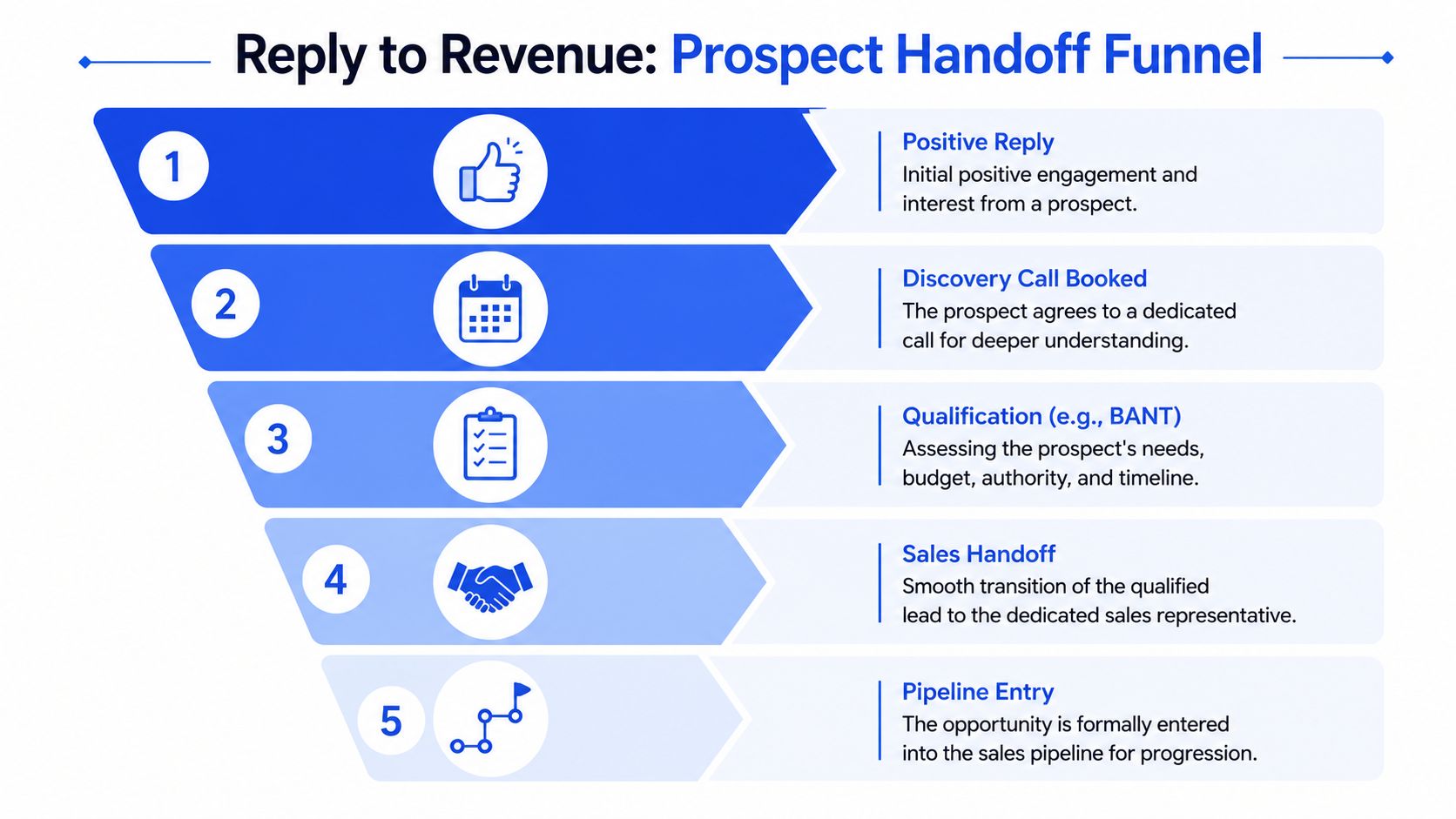
Define qualification by reply type
The cleanest way to run this is to classify replies before reps improvise.
A workable framework:
Reply type | What it means | CRM action |
|---|---|---|
Positive interest | Wants more detail, asks a relevant question, or agrees to a conversation | Create meeting task and route owner |
Qualified curiosity | Engages on the problem but timing or ownership is unclear | Mark for manual qualification |
Referral or redirect | Points to another stakeholder | Create new contact and relate the account |
Soft no | Not now, wrong timing, revisit later | Move to nurture with reason code |
Hard no | Clear disinterest or mismatch | Close outbound attempt and suppress |
The point is consistency. If marketing calls everything a positive reply and sales only respects booked meetings, reporting breaks instantly.
That's where a defined lead qualification process matters. The handoff rule should be tied to evidence in the reply, not optimism from the sender.
Build the handoff in the CRM, not in Slack
Slack is fine for speed. It's terrible as the system of record.
Once a prospect replies positively, the handoff should include:
Original trigger: What caused them to enter the queue
Channel history: Connection accepted, email touches sent, DM history
Message context: Which angle got the response
Qualification notes: Pain, ownership, timing, any explicit need
Next action owner: SDR, AE, founder, or regional sales lead
This should be automatic where possible. HubSpot can handle routing and stage updates. Apollo can sync contact and account data. Clay can append research notes upstream before the record ever reaches sales. The goal is simple, sales should never ask, “Why is this lead in my queue?”
If the rep booking the meeting knows the context but the closer doesn't, your system is incomplete.
Measure the system, not the activity
Most dashboards over-report the easy stuff and ignore the expensive stuff.
Weekly reporting should focus on progression metrics such as:
Prospects contacted to positive reply
Positive reply to meeting booked
Meeting booked to meeting held
Meeting held to qualified opportunity
Lead source and segment tags by opportunity creation
Those are the numbers that tell you whether the issue sits in targeting, messaging, qualification, or handoff. Profile views and likes can be interesting. They are not operating metrics.
A clean attribution setup also needs response tagging discipline. Every reply should carry a disposition. Every meeting should retain source context. Every opportunity should preserve the originating segment. If that sounds obvious, good. Yet, consistently executing this often proves difficult.
Your next step audit your prospecting metrics
By Friday, pull one number from your CRM or engagement stack. Calculate your meeting-held rate for the last quarter.
Use a simple formula. Divide qualified meetings held by the total number of prospects contacted. Don't use replies. Don't use bookings. Use held meetings only.
Then review the result by segment, not in aggregate. If one ICP slice is healthy and another is weak, the problem isn't “LinkedIn.” It's your list logic, message relevance, or qualification threshold in that segment.
After that, open your dashboard and add one more field, source trigger. Every contacted prospect should carry the reason they entered the queue, recent post, job change, hiring activity, manual account selection, or another defined signal. That single field will tell you more about pipeline quality than another month of surface-level engagement metrics.
For a tighter reporting setup, use a clear set of lead generation KPIs that connect outreach to meetings, opportunities, and revenue, not just top-of-funnel motion.
Grou builds unified pipeline systems for B2B companies across iGaming, SaaS, manufacturing, legal tech, and pharma. The methodology combines ICP-led list building, credibility-focused LinkedIn content, enrichment, outbound execution, and clear qualification rules so attention turns into pipeline.
Your reps are sending connection requests, getting some accepts, maybe even a few replies, and still not seeing enough pipeline. That usually means the problem started before the first message. On LinkedIn, activity hides weak structure for a while, then the numbers flatten.
LinkedIn for prospecting works when it's treated as a targeting layer, not a complete outbound system.
Strict ICP discipline beats broad search behavior, and one guide reports 4.2% conversion for sector-specific campaigns versus 1.8% for generalist approaches (Sales Odyssey).
The highest-leverage workflow is Sales Navigator for targeting, enrichment in tools like Clay or Apollo, then signal-based prioritization before outreach.
Personalized connection requests and structured follow-up matter, but measurement matters more than vanity engagement.
The handoff from reply to CRM stage is where most teams lose attribution.
Table of Contents
The foundation of effective LinkedIn prospecting
Most LinkedIn prospecting fails before outreach starts. The profile looks like a resume, the ICP lives in someone's head, and the rep opens Sales Navigator hoping the filters will somehow create strategy.
That's backwards.
Fix the profile before you touch the list
When a prospect gets your connection request, they inspect your profile before they decide. If the profile reads like a generic work history, it creates friction. If it reads like a useful commercial identity, it supports the click.
Three profile elements do most of the work:
Headline: State who you help, what problem you work on, and the commercial context. Skip vague positioning.
Banner: Use it to reinforce category, proof, or operating focus. Don't leave default branding there.
Featured section: Pin assets that reduce buyer uncertainty, such as a useful post, a short case summary, or a point of view on the problem you solve.
A good profile doesn't close deals. It lowers resistance. That's enough.
If your team also needs to build credibility through consistent content, this guide on how to grow your LinkedIn presence is useful because it focuses on visibility habits that support outbound rather than vanity posting.
A weak profile makes every outbound touch work harder than it should.
Write the ICP before you open Sales Navigator
The single most common mistake in LinkedIn for prospecting is searching first and defining the ICP later. Once that happens, reps start filtering by what they can find instead of who should buy.
The fix is simple. Write a one-page ICP document before list building starts.
That document should include:
Firmographics: Industry, company size, geography, company type
Buying personas: Function, seniority, reporting structure, likely owner of the pain
Triggers: Hiring, leadership changes, growth motions, public pain indicators
Disqualifiers: Titles, industries, and company types that look close but don't convert
This isn't admin work. It's conversion work. One guide reports that sector-specific campaigns convert at 4.2% on average versus 1.8% for generalist approaches (Sales Odyssey). The practical takeaway is obvious. Narrowing the ICP is not restricting pipeline. It's protecting it.
A written ICP also creates consistency across the stack. Sales Navigator filters improve. Clay enrichment rules get cleaner. Apollo sequences stop drifting. HubSpot reporting becomes usable because “target account” finally means the same thing across teams.
Building and enriching high-signal prospect lists
LinkedIn gives you access to a large buying audience, but that doesn't mean every search result deserves outreach. Sales research published in 2025 says 65 million decision-makers are active on LinkedIn and 4 out of 5 members drive business decisions (HeyReach). That scale is useful only if you can shrink it into a list your team should contact.
Treat Sales Navigator as the targeting layer
Sales Navigator is good at one thing. It helps you identify people who match a market hypothesis.
It is not enough on its own to run outbound. It doesn't give you a complete contact record, it won't clean stale company data for you, and it won't tell you how to prioritize the list against current buying signals. Teams that treat it as a complete prospecting stack usually end up with bloated lists and flat reply rates.
The better stack is straightforward → Sales Navigator for targeting, Clay or Apollo for enrichment, HubSpot for routing and attribution, and a sequencing tool like Lemlist, Instantly, Smartlead, or HeyReach depending on channel mix and account setup.
If your team hasn't formalized the definition work upstream, start with a proper ideal customer profile framework before you touch extraction or enrichment.
Use a six-step list build process
This is the system that keeps list quality high.
Lock the ICP
Don't improvise this in the search bar. The output should be a written target definition with firmographics, persona, and trigger logic.
Build a layered search
Start with industry, headcount, and geography. Add function and seniority. Then add exclusion logic. Exclusions matter more than often realized because they remove adjacent roles that pollute campaigns.
Validate the search manually
Check the search size, then review the first results yourself. If the list looks broad, it is broad. If too many results are consultants, recruiters, or wrong-fit operators, refine before export.
Segment before extraction
Don't export one giant list labeled “VP Sales SaaS.” Split by sub-segment where the pain and messaging differ.
Enrich outside LinkedIn
Push the list into Clay for waterfall enrichment or into Apollo for contact and account completion. LinkedIn gives targeting context, not a launch-ready record.
Add the signal layer
Prioritize recent job changes, hiring moves, recent posting activity, and account-level events that suggest buying motion.
Practical rule: If a prospect entered the list with no fit signal and no timing signal, they shouldn't be first in queue.
There are also teams that want this workflow managed end to end through an external partner. In that case, agencies like Grou sit in the mix alongside tools, handling list build, enrichment, outbound, and reporting as one system rather than separate tasks.
A working filter structure for B2B teams
There's no universal “magic filter combo.” Anyone selling one is selling content, not operating discipline.
Still, one structure repeatedly produces cleaner lists for B2B SaaS and services teams:
Filter layer | What to include |
|---|---|
Function and seniority | Sales, Marketing, Operations, depending on the buyer. Focus on Manager, Director, VP, and CXO where relevant |
Company size | Mid-market ranges that fit your sales motion |
Industry | Include target categories, exclude tangential ones |
Behavioral layer | Posted on LinkedIn in the last 30 days |
Tenure layer | Changed jobs recently, or shorter tenure in current company |
Geography | Specific regions, not broad “everywhere” targeting |
The behavioral layer is where many teams improve list quality fast. Recent posters are easier to warm because they're active. Recent job changers are often still setting priorities. Short-tenure buyers haven't fully locked in old vendor assumptions.
For outbound, that matters more than another thousand names in the export.
Crafting messages that open conversations
The connection request is not where the meeting gets booked. It's where permission gets earned. Teams that treat the note like a mini sales letter get rejected early, then blame the channel.
That's why the first message should stay small.
What the connection note is actually for
One 2026 benchmark reports 30 to 40% acceptance rates for well-targeted, personalized requests, with 15 to 25% reply rates from accepted connections in structured campaigns (Topo). That's the frame to use. The request creates access. The follow-up sequence creates the conversation.
If you need examples beyond the ones below, this breakdown of LinkedIn connection request messages is a good reference for teams standardizing templates by persona.
A simple message structure that gets accepted
The structure is short enough to fit the medium and specific enough to avoid looking automated.
Line one, specific observation: Mention a recent post, hiring move, team change, or visible business signal.
Line two, reason for connecting: Keep it professional and low-pressure.
Optional line three: A light “no agenda” line can help when tone needs softening.
Example:
Saw your team has been hiring SDRs recently. Working with sales leaders dealing with the same outbound scaling issues, thought it made sense to connect. No agenda.
That works because it does three things at once. It proves you looked. It explains the relevance. It doesn't ask for anything too early.
What doesn't work:
Pitching in the request: Prospects can smell the sequence before they accept.
Generic greetings: “Hope you're well” wastes the highest-value characters.
Flattery: “Love what you're doing” reads like low-effort sales language.
Meeting ask in the note: Too early, too much pressure.
What to send after they accept
The first DM should build on the same trigger, not start a new topic. Keep it text-based, direct, and easy to answer.
A simple pattern works well:
DM element | Example |
|---|---|
Reference the trigger | “You've been hiring into outbound recently” |
Name the likely pain | “That usually creates sequence inconsistency and weak follow-up coverage” |
Ask a soft question | “Is that something your team is dealing with right now?” |
If your email motion runs beside LinkedIn, this guide to prospecting email best practices is useful because the same principles apply. Specificity, low-friction asks, and message variation beat generic cadence copy every time.
The 14-day multi-channel sequence that works
LinkedIn should sit inside a sequence, not replace one. The platform has become mainstream for B2B prospecting, with 53% of B2B marketers using it to identify prospects and an average 2.8% engagement rate on the platform, according to a 2025 roundup from Sopro. That's enough signal to justify a serious motion, but not enough reason to make LinkedIn your only channel.
The cadence
For mid-market B2B SaaS, a five-touch sequence over 14 days is a strong default.
Day 0, LinkedIn connection request
Use the observation-based note. No pitch, no calendar link, no company monologue.Day 2, first email
Reference the same trigger from LinkedIn, but expand into the pain pattern. Keep the body tight. Three to four short paragraphs is enough.Day 4, LinkedIn engagement
Leave a real comment on a recent post if there's one worth engaging with. Don't drop generic praise. Add a thought.Day 6, second email
Change angle. If the first email framed the problem, the second should probe current process or ownership.Day 8, LinkedIn DM
If they accepted, send the follow-up message. Reference the trigger and ask the soft question.Day 14, final email
Keep it respectful. Close the loop without dramatics.
A lot of teams also need stronger orchestration between channels. This piece on a multi-channel communication strategy that converts is worth reading because it reinforces the same operational point, cadence design matters more than channel enthusiasm.
A practical walkthrough helps here:
If email is part of your mix, your sequence logic in the CRM and your send tool need to match. That includes stop rules, routing, and stage updates. A clean cold email system saves a lot of manual repair work.
What this sequence avoids
The sequence works because it avoids the common mistakes that make outbound feel noisy.
No over-messaging: Touches that land too close together feel desperate.
No repeated copy: Each touch needs a new angle or new context.
No early calendar links: They create pressure before interest exists.
No channel isolation: LinkedIn and email support each other. They shouldn't compete.
Keep the cumulative effect. Lose the repetitive feel.
Where LinkedIn fits in the channel mix
On its own, LinkedIn is a warm-up layer. In a sequence, it becomes a recognition layer and a reply accelerator.
That distinction matters. Teams often say “LinkedIn isn't converting,” when the underlying issue is that they expected a social profile and a few DMs to carry the full burden of prospecting. It won't. LinkedIn for prospecting works when every touch supports the next one and every channel shares the same account logic.
From reply to revenue qualification and handoff
Most LinkedIn prospecting advice stops at reply rates. RevOps can't stop there. A reply is not pipeline, and a booked meeting isn't useful if sales gets it with no context and no qualification standard.
That attribution gap is a known issue. One analysis notes that a major weakness in current LinkedIn prospecting guidance is measurement and attribution, especially the lack of clear ways to connect activity to qualified pipeline and prove ROI (Valley).
Define qualification by reply type
The cleanest way to run this is to classify replies before reps improvise.
A workable framework:
Reply type | What it means | CRM action |
|---|---|---|
Positive interest | Wants more detail, asks a relevant question, or agrees to a conversation | Create meeting task and route owner |
Qualified curiosity | Engages on the problem but timing or ownership is unclear | Mark for manual qualification |
Referral or redirect | Points to another stakeholder | Create new contact and relate the account |
Soft no | Not now, wrong timing, revisit later | Move to nurture with reason code |
Hard no | Clear disinterest or mismatch | Close outbound attempt and suppress |
The point is consistency. If marketing calls everything a positive reply and sales only respects booked meetings, reporting breaks instantly.
That's where a defined lead qualification process matters. The handoff rule should be tied to evidence in the reply, not optimism from the sender.
Build the handoff in the CRM, not in Slack
Slack is fine for speed. It's terrible as the system of record.
Once a prospect replies positively, the handoff should include:
Original trigger: What caused them to enter the queue
Channel history: Connection accepted, email touches sent, DM history
Message context: Which angle got the response
Qualification notes: Pain, ownership, timing, any explicit need
Next action owner: SDR, AE, founder, or regional sales lead
This should be automatic where possible. HubSpot can handle routing and stage updates. Apollo can sync contact and account data. Clay can append research notes upstream before the record ever reaches sales. The goal is simple, sales should never ask, “Why is this lead in my queue?”
If the rep booking the meeting knows the context but the closer doesn't, your system is incomplete.
Measure the system, not the activity
Most dashboards over-report the easy stuff and ignore the expensive stuff.
Weekly reporting should focus on progression metrics such as:
Prospects contacted to positive reply
Positive reply to meeting booked
Meeting booked to meeting held
Meeting held to qualified opportunity
Lead source and segment tags by opportunity creation
Those are the numbers that tell you whether the issue sits in targeting, messaging, qualification, or handoff. Profile views and likes can be interesting. They are not operating metrics.
A clean attribution setup also needs response tagging discipline. Every reply should carry a disposition. Every meeting should retain source context. Every opportunity should preserve the originating segment. If that sounds obvious, good. Yet, consistently executing this often proves difficult.
Your next step audit your prospecting metrics
By Friday, pull one number from your CRM or engagement stack. Calculate your meeting-held rate for the last quarter.
Use a simple formula. Divide qualified meetings held by the total number of prospects contacted. Don't use replies. Don't use bookings. Use held meetings only.
Then review the result by segment, not in aggregate. If one ICP slice is healthy and another is weak, the problem isn't “LinkedIn.” It's your list logic, message relevance, or qualification threshold in that segment.
After that, open your dashboard and add one more field, source trigger. Every contacted prospect should carry the reason they entered the queue, recent post, job change, hiring activity, manual account selection, or another defined signal. That single field will tell you more about pipeline quality than another month of surface-level engagement metrics.
For a tighter reporting setup, use a clear set of lead generation KPIs that connect outreach to meetings, opportunities, and revenue, not just top-of-funnel motion.
Grou builds unified pipeline systems for B2B companies across iGaming, SaaS, manufacturing, legal tech, and pharma. The methodology combines ICP-led list building, credibility-focused LinkedIn content, enrichment, outbound execution, and clear qualification rules so attention turns into pipeline.
Your reps are sending connection requests, getting some accepts, maybe even a few replies, and still not seeing enough pipeline. That usually means the problem started before the first message. On LinkedIn, activity hides weak structure for a while, then the numbers flatten.
LinkedIn for prospecting works when it's treated as a targeting layer, not a complete outbound system.
Strict ICP discipline beats broad search behavior, and one guide reports 4.2% conversion for sector-specific campaigns versus 1.8% for generalist approaches (Sales Odyssey).
The highest-leverage workflow is Sales Navigator for targeting, enrichment in tools like Clay or Apollo, then signal-based prioritization before outreach.
Personalized connection requests and structured follow-up matter, but measurement matters more than vanity engagement.
The handoff from reply to CRM stage is where most teams lose attribution.
Table of Contents
The foundation of effective LinkedIn prospecting
Most LinkedIn prospecting fails before outreach starts. The profile looks like a resume, the ICP lives in someone's head, and the rep opens Sales Navigator hoping the filters will somehow create strategy.
That's backwards.
Fix the profile before you touch the list
When a prospect gets your connection request, they inspect your profile before they decide. If the profile reads like a generic work history, it creates friction. If it reads like a useful commercial identity, it supports the click.
Three profile elements do most of the work:
Headline: State who you help, what problem you work on, and the commercial context. Skip vague positioning.
Banner: Use it to reinforce category, proof, or operating focus. Don't leave default branding there.
Featured section: Pin assets that reduce buyer uncertainty, such as a useful post, a short case summary, or a point of view on the problem you solve.
A good profile doesn't close deals. It lowers resistance. That's enough.
If your team also needs to build credibility through consistent content, this guide on how to grow your LinkedIn presence is useful because it focuses on visibility habits that support outbound rather than vanity posting.
A weak profile makes every outbound touch work harder than it should.
Write the ICP before you open Sales Navigator
The single most common mistake in LinkedIn for prospecting is searching first and defining the ICP later. Once that happens, reps start filtering by what they can find instead of who should buy.
The fix is simple. Write a one-page ICP document before list building starts.
That document should include:
Firmographics: Industry, company size, geography, company type
Buying personas: Function, seniority, reporting structure, likely owner of the pain
Triggers: Hiring, leadership changes, growth motions, public pain indicators
Disqualifiers: Titles, industries, and company types that look close but don't convert
This isn't admin work. It's conversion work. One guide reports that sector-specific campaigns convert at 4.2% on average versus 1.8% for generalist approaches (Sales Odyssey). The practical takeaway is obvious. Narrowing the ICP is not restricting pipeline. It's protecting it.
A written ICP also creates consistency across the stack. Sales Navigator filters improve. Clay enrichment rules get cleaner. Apollo sequences stop drifting. HubSpot reporting becomes usable because “target account” finally means the same thing across teams.
Building and enriching high-signal prospect lists
LinkedIn gives you access to a large buying audience, but that doesn't mean every search result deserves outreach. Sales research published in 2025 says 65 million decision-makers are active on LinkedIn and 4 out of 5 members drive business decisions (HeyReach). That scale is useful only if you can shrink it into a list your team should contact.
Treat Sales Navigator as the targeting layer
Sales Navigator is good at one thing. It helps you identify people who match a market hypothesis.
It is not enough on its own to run outbound. It doesn't give you a complete contact record, it won't clean stale company data for you, and it won't tell you how to prioritize the list against current buying signals. Teams that treat it as a complete prospecting stack usually end up with bloated lists and flat reply rates.
The better stack is straightforward → Sales Navigator for targeting, Clay or Apollo for enrichment, HubSpot for routing and attribution, and a sequencing tool like Lemlist, Instantly, Smartlead, or HeyReach depending on channel mix and account setup.
If your team hasn't formalized the definition work upstream, start with a proper ideal customer profile framework before you touch extraction or enrichment.
Use a six-step list build process
This is the system that keeps list quality high.
Lock the ICP
Don't improvise this in the search bar. The output should be a written target definition with firmographics, persona, and trigger logic.
Build a layered search
Start with industry, headcount, and geography. Add function and seniority. Then add exclusion logic. Exclusions matter more than often realized because they remove adjacent roles that pollute campaigns.
Validate the search manually
Check the search size, then review the first results yourself. If the list looks broad, it is broad. If too many results are consultants, recruiters, or wrong-fit operators, refine before export.
Segment before extraction
Don't export one giant list labeled “VP Sales SaaS.” Split by sub-segment where the pain and messaging differ.
Enrich outside LinkedIn
Push the list into Clay for waterfall enrichment or into Apollo for contact and account completion. LinkedIn gives targeting context, not a launch-ready record.
Add the signal layer
Prioritize recent job changes, hiring moves, recent posting activity, and account-level events that suggest buying motion.
Practical rule: If a prospect entered the list with no fit signal and no timing signal, they shouldn't be first in queue.
There are also teams that want this workflow managed end to end through an external partner. In that case, agencies like Grou sit in the mix alongside tools, handling list build, enrichment, outbound, and reporting as one system rather than separate tasks.
A working filter structure for B2B teams
There's no universal “magic filter combo.” Anyone selling one is selling content, not operating discipline.
Still, one structure repeatedly produces cleaner lists for B2B SaaS and services teams:
Filter layer | What to include |
|---|---|
Function and seniority | Sales, Marketing, Operations, depending on the buyer. Focus on Manager, Director, VP, and CXO where relevant |
Company size | Mid-market ranges that fit your sales motion |
Industry | Include target categories, exclude tangential ones |
Behavioral layer | Posted on LinkedIn in the last 30 days |
Tenure layer | Changed jobs recently, or shorter tenure in current company |
Geography | Specific regions, not broad “everywhere” targeting |
The behavioral layer is where many teams improve list quality fast. Recent posters are easier to warm because they're active. Recent job changers are often still setting priorities. Short-tenure buyers haven't fully locked in old vendor assumptions.
For outbound, that matters more than another thousand names in the export.
Crafting messages that open conversations
The connection request is not where the meeting gets booked. It's where permission gets earned. Teams that treat the note like a mini sales letter get rejected early, then blame the channel.
That's why the first message should stay small.
What the connection note is actually for
One 2026 benchmark reports 30 to 40% acceptance rates for well-targeted, personalized requests, with 15 to 25% reply rates from accepted connections in structured campaigns (Topo). That's the frame to use. The request creates access. The follow-up sequence creates the conversation.
If you need examples beyond the ones below, this breakdown of LinkedIn connection request messages is a good reference for teams standardizing templates by persona.
A simple message structure that gets accepted
The structure is short enough to fit the medium and specific enough to avoid looking automated.
Line one, specific observation: Mention a recent post, hiring move, team change, or visible business signal.
Line two, reason for connecting: Keep it professional and low-pressure.
Optional line three: A light “no agenda” line can help when tone needs softening.
Example:
Saw your team has been hiring SDRs recently. Working with sales leaders dealing with the same outbound scaling issues, thought it made sense to connect. No agenda.
That works because it does three things at once. It proves you looked. It explains the relevance. It doesn't ask for anything too early.
What doesn't work:
Pitching in the request: Prospects can smell the sequence before they accept.
Generic greetings: “Hope you're well” wastes the highest-value characters.
Flattery: “Love what you're doing” reads like low-effort sales language.
Meeting ask in the note: Too early, too much pressure.
What to send after they accept
The first DM should build on the same trigger, not start a new topic. Keep it text-based, direct, and easy to answer.
A simple pattern works well:
DM element | Example |
|---|---|
Reference the trigger | “You've been hiring into outbound recently” |
Name the likely pain | “That usually creates sequence inconsistency and weak follow-up coverage” |
Ask a soft question | “Is that something your team is dealing with right now?” |
If your email motion runs beside LinkedIn, this guide to prospecting email best practices is useful because the same principles apply. Specificity, low-friction asks, and message variation beat generic cadence copy every time.
The 14-day multi-channel sequence that works
LinkedIn should sit inside a sequence, not replace one. The platform has become mainstream for B2B prospecting, with 53% of B2B marketers using it to identify prospects and an average 2.8% engagement rate on the platform, according to a 2025 roundup from Sopro. That's enough signal to justify a serious motion, but not enough reason to make LinkedIn your only channel.
The cadence
For mid-market B2B SaaS, a five-touch sequence over 14 days is a strong default.
Day 0, LinkedIn connection request
Use the observation-based note. No pitch, no calendar link, no company monologue.Day 2, first email
Reference the same trigger from LinkedIn, but expand into the pain pattern. Keep the body tight. Three to four short paragraphs is enough.Day 4, LinkedIn engagement
Leave a real comment on a recent post if there's one worth engaging with. Don't drop generic praise. Add a thought.Day 6, second email
Change angle. If the first email framed the problem, the second should probe current process or ownership.Day 8, LinkedIn DM
If they accepted, send the follow-up message. Reference the trigger and ask the soft question.Day 14, final email
Keep it respectful. Close the loop without dramatics.
A lot of teams also need stronger orchestration between channels. This piece on a multi-channel communication strategy that converts is worth reading because it reinforces the same operational point, cadence design matters more than channel enthusiasm.
A practical walkthrough helps here:
If email is part of your mix, your sequence logic in the CRM and your send tool need to match. That includes stop rules, routing, and stage updates. A clean cold email system saves a lot of manual repair work.
What this sequence avoids
The sequence works because it avoids the common mistakes that make outbound feel noisy.
No over-messaging: Touches that land too close together feel desperate.
No repeated copy: Each touch needs a new angle or new context.
No early calendar links: They create pressure before interest exists.
No channel isolation: LinkedIn and email support each other. They shouldn't compete.
Keep the cumulative effect. Lose the repetitive feel.
Where LinkedIn fits in the channel mix
On its own, LinkedIn is a warm-up layer. In a sequence, it becomes a recognition layer and a reply accelerator.
That distinction matters. Teams often say “LinkedIn isn't converting,” when the underlying issue is that they expected a social profile and a few DMs to carry the full burden of prospecting. It won't. LinkedIn for prospecting works when every touch supports the next one and every channel shares the same account logic.
From reply to revenue qualification and handoff
Most LinkedIn prospecting advice stops at reply rates. RevOps can't stop there. A reply is not pipeline, and a booked meeting isn't useful if sales gets it with no context and no qualification standard.
That attribution gap is a known issue. One analysis notes that a major weakness in current LinkedIn prospecting guidance is measurement and attribution, especially the lack of clear ways to connect activity to qualified pipeline and prove ROI (Valley).
Define qualification by reply type
The cleanest way to run this is to classify replies before reps improvise.
A workable framework:
Reply type | What it means | CRM action |
|---|---|---|
Positive interest | Wants more detail, asks a relevant question, or agrees to a conversation | Create meeting task and route owner |
Qualified curiosity | Engages on the problem but timing or ownership is unclear | Mark for manual qualification |
Referral or redirect | Points to another stakeholder | Create new contact and relate the account |
Soft no | Not now, wrong timing, revisit later | Move to nurture with reason code |
Hard no | Clear disinterest or mismatch | Close outbound attempt and suppress |
The point is consistency. If marketing calls everything a positive reply and sales only respects booked meetings, reporting breaks instantly.
That's where a defined lead qualification process matters. The handoff rule should be tied to evidence in the reply, not optimism from the sender.
Build the handoff in the CRM, not in Slack
Slack is fine for speed. It's terrible as the system of record.
Once a prospect replies positively, the handoff should include:
Original trigger: What caused them to enter the queue
Channel history: Connection accepted, email touches sent, DM history
Message context: Which angle got the response
Qualification notes: Pain, ownership, timing, any explicit need
Next action owner: SDR, AE, founder, or regional sales lead
This should be automatic where possible. HubSpot can handle routing and stage updates. Apollo can sync contact and account data. Clay can append research notes upstream before the record ever reaches sales. The goal is simple, sales should never ask, “Why is this lead in my queue?”
If the rep booking the meeting knows the context but the closer doesn't, your system is incomplete.
Measure the system, not the activity
Most dashboards over-report the easy stuff and ignore the expensive stuff.
Weekly reporting should focus on progression metrics such as:
Prospects contacted to positive reply
Positive reply to meeting booked
Meeting booked to meeting held
Meeting held to qualified opportunity
Lead source and segment tags by opportunity creation
Those are the numbers that tell you whether the issue sits in targeting, messaging, qualification, or handoff. Profile views and likes can be interesting. They are not operating metrics.
A clean attribution setup also needs response tagging discipline. Every reply should carry a disposition. Every meeting should retain source context. Every opportunity should preserve the originating segment. If that sounds obvious, good. Yet, consistently executing this often proves difficult.
Your next step audit your prospecting metrics
By Friday, pull one number from your CRM or engagement stack. Calculate your meeting-held rate for the last quarter.
Use a simple formula. Divide qualified meetings held by the total number of prospects contacted. Don't use replies. Don't use bookings. Use held meetings only.
Then review the result by segment, not in aggregate. If one ICP slice is healthy and another is weak, the problem isn't “LinkedIn.” It's your list logic, message relevance, or qualification threshold in that segment.
After that, open your dashboard and add one more field, source trigger. Every contacted prospect should carry the reason they entered the queue, recent post, job change, hiring activity, manual account selection, or another defined signal. That single field will tell you more about pipeline quality than another month of surface-level engagement metrics.
For a tighter reporting setup, use a clear set of lead generation KPIs that connect outreach to meetings, opportunities, and revenue, not just top-of-funnel motion.
Grou builds unified pipeline systems for B2B companies across iGaming, SaaS, manufacturing, legal tech, and pharma. The methodology combines ICP-led list building, credibility-focused LinkedIn content, enrichment, outbound execution, and clear qualification rules so attention turns into pipeline.

Pipeline OS Newsletter
Build qualified pipeline
Get weekly tactics to generate demand, improve lead quality, and book more meetings.







Trusted by industry leaders
Trusted by industry leaders
Trusted by industry leaders
Ready to build qualified pipeline?
Ready to build qualified pipeline?
Ready to build qualified pipeline?
Book a call to see if we're the right fit, or take the 2-minute quiz to get a clear starting point.
Book a call to see if we're the right fit, or take the 2-minute quiz to get a clear starting point.
Book a call to see if we're the right fit, or take the 2-minute quiz to get a clear starting point.
" height="30.21639343089746px" id="hfGbXmQR2" width="30.216393430897455px"/></svg>)
Copyright © 2026 – All Right Reserved
Copyright © 2026 – All Right Reserved
Copyright © 2026 – All Right Reserved